
Abbreviation list
Abbreviation/Acronym list
|
ABBREVIATIONS |
MEANING |
|
A/C |
Air Conditioning |
|
ABS |
Anti-lock Brake System |
|
ACC |
Accessory |
|
ALR |
Automatic Locking Retractor |
|
CRS |
Child Restraint System |
|
ECU |
Electronic Control Unit |
|
EDR |
Event Data Recorder |
|
ELR |
Emergency Locking Retractor |
|
EPS |
Electric Power Steering |
|
GAWR |
Gross Axle Weight Rating |
|
GVWR |
Gross Vehicle Weight Rating |
|
I/M |
Emission inspection and maintenance |
|
LATCH |
Lower Anchors and Tethers for Children |
|
LED |
Light Emitting Diode |
|
M + S |
Mud and Snow |
|
MAX |
Maximum |
|
MIN |
Minimum |
|
MMT |
Methylcyclopentadienyl Manganese Tricarbonyl |
|
MTBE |
Methyl Tertiary Butyl Ether |
|
OBD |
On Board Diagnostics |
|
SRS |
Supplemental Restraint System |
|
TIN |
Tire Identification Number |
|
TPMS |
Tire Pressure Warning System |
|
TRAC |
Traction Control |
|
VIN |
Vehicle Identification Number |
|
VSC |
Vehicle Stability Control |
516
TABLE OF CONTENTS Index
1 Before driving
|
1-1. |
Key information |
|
|
Keys ………………………………. |
20 |
|
|
1-2. Opening, closing and |
||
|
locking the doors and |
||
|
trunk |
||
|
Smart key system…………….. |
23 |
|
|
Wireless remote control ……. |
34 |
|
|
Doors……………………………… |
39 |
|
|
Trunk ……………………………… |
45 |
|
|
1-3. |
Adjustable components |
|
|
(seats, mirrors, |
||
|
steering wheel) |
||
|
Front seats ……………………… |
49 |
|
|
Rear seats………………………. |
52 |
|
|
Head restraints………………… |
54 |
|
|
Seat belts ……………………….. |
56 |
|
|
Steering wheel ………………… |
64 |
|
|
Anti-glare inside rear view |
||
|
mirror……………………………. |
65 |
|
|
Outside rear view mirrors ….. |
67 |
|
|
1-4. Opening and closing the |
||
|
windows |
||
|
Power windows ……………….. |
69 |
|
|
Moon roof ……………………….. |
71 |
|
|
1-5. |
Refueling |
|
|
Opening the fuel tank cap …. |
75 |
|
1-6. Theft deterrent system |
|
|
Engine immobilizer |
|
|
system ………………………….. |
79 |
|
Theft prevention labels |
|
|
(for U.S.A.) ……………………. |
82 |
|
1-7. Safety information |
|
|
Correct driving posture ……… |
83 |
|
SRS airbags ……………………. |
85 |
|
Front passenger occupant |
|
|
classification system……….. |
97 |
|
Child restraint systems ……. |
102 |
|
Installing child restraints ….. |
106 |
|
2 |
When driving |
||
|
2-1. |
Driving procedures |
||
|
Driving the vehicle ………….. |
118 |
||
|
Engine (ignition) switch |
|||
|
(vehicles with smart key |
|||
|
system)……………………….. |
129 |
||
|
Engine (ignition) switch |
|||
|
(vehicles without smart |
|||
|
key system) …………………. |
133 |
||
|
Automatic transmission …… |
137 |
||
|
Manual transmission……….. |
143 |
||
|
Turn signal lever …………….. |
144 |
||
|
Parking brake ………………… |
145 |
||
|
Horn……………………………… |
146 |
||
|
2-2. |
Instrument cluster |
||
|
Gauges and meters ………… |
147 |
||
|
Indicators and warning |
|||
|
lights …………………………… |
150 |
||
|
Multi-information display….. |
154 |
2
|
2-3. Operating the lights and |
|
|
wipers |
|
|
Headlight switch……………… |
157 |
|
Fog light switch ………………. |
159 |
|
Windshield wipers and |
|
|
washer ………………………… |
160 |
|
2-4. Using other driving systems |
|
|
Cruise control…………………. |
162 |
|
Driving assist systems …….. |
166 |
|
2-5. Driving information |
|
|
Cargo and luggage …………. |
170 |
|
Vehicle load limits …………… |
173 |
|
Winter driving tips …………… |
174 |
|
Trailer towing |
|
|
(2.4 L 4-cylinder |
|
|
[2AZ-FE] engine) ………….. |
178 |
|
Trailer towing |
|
|
(1.8 L 4-cylinder |
|
|
[2ZR-FE] engine) ………….. |
186 |
|
Dinghy towing (automatic |
|
|
transmission) ……………….. |
187 |
|
Dinghy towing (manual |
|
|
transmission) ……………….. |
188 |
3 Interior features
3-1. Using the air conditioning system and defogger
|
Automatic air conditioning |
|
|
system ………………………… |
192 |
|
Manual air conditioning |
|
|
system ………………………… |
198 |
|
Rear window and |
|
|
outside rear view |
|
|
mirror defoggers …………… |
205 |
|
3-2. Using the audio system |
|
|
Audio system types ………… |
206 |
|
Using the radio ………………. |
210 |
|
Using the CD player ……….. |
217 |
|
Playing back MP3 and |
|
|
WMA discs ………………….. |
225 |
|
Operating an iPod ………….. |
233 |
|
Operating a USB |
|
|
memory ………………………. |
240 |
|
Optimal use of the audio |
|
|
system………………………… |
248 |
|
Using the AUX port…………. |
253 |
|
Using the steering wheel |
|
|
audio switches……………… |
255 |
|
3-3. Using the Bluetooth® |
|
|
audio system |
|
|
Bluetooth® audio system…. |
259 |
|
Using the Bluetooth® |
|
|
audio system ……………….. |
262 |
|
Operating a Bluetooth® |
|
|
enabled portable player…. |
267 |
|
Setting up a Bluetooth® |
|
|
enabled portable player…. |
269 |
|
Bluetooth® audio system |
|
|
setup ………………………….. |
274 |
3

|
TABLE OF CONTENTS |
Index |
|
3-4. Using the hands-free |
|
|
phone system |
|
|
(for cellular phone) |
|
|
Hands-free phone system |
|
|
(for cellular phone) |
|
|
features ………………………. |
275 |
|
Using the hands-free |
|
|
phone system………………. |
279 |
|
Making a phone call ……….. |
289 |
|
Setting a cellular phone…… |
293 |
|
Security and system |
|
|
setup ………………………….. |
298 |
|
Using the phone book …….. |
302 |
|
3-5. Using the interior lights |
|
|
Interior lights list …………….. |
309 |
|
• Interior light …………………. |
311 |
|
• Personal lights …………….. |
311 |
|
• Personal/interior lights…… |
312 |
|
3-6. Using the storage features |
|
|
List of storage features……. |
313 |
|
• Glove box……………………. |
314 |
|
• Console box ………………… |
314 |
|
• Cup holders…………………. |
316 |
|
• Auxiliary boxes…………….. |
318 |
|
• Bottle holders ………………. |
320 |
|
3-7. Other interior features |
|
|
Sun visors …………………….. |
321 |
|
Vanity mirrors ………………… |
322 |
|
Clock ……………………………. |
323 |
|
Ashtray …………………………. |
324 |
|
Cigarette lighter……………… |
325 |
|
Power outlet ………………….. |
326 |
|
Seat heaters………………….. |
327 |
|
Floor mat ………………………. |
329 |
|
Compass ………………………. |
330 |
|
4 |
Maintenance and care |
||
|
4-1. Maintenance and care |
|||
|
Cleaning and protecting |
|||
|
the vehicle exterior ……….. |
336 |
||
|
Cleaning and protecting |
|||
|
the vehicle interior ………… |
338 |
||
|
4-2. |
Maintenance |
||
|
Maintenance |
|||
|
requirements ……………….. |
341 |
||
|
General maintenance ……… |
343 |
||
|
Emission inspection and |
|||
|
maintenance (I/M) |
|||
|
programs …………………….. |
346 |
||
|
4-3. |
Do-it-yourself maintenance |
||
|
Do-it-yourself service |
|||
|
precautions………………….. |
347 |
||
|
Hood …………………………….. |
351 |
||
|
Positioning a floor jack…….. |
353 |
||
|
Engine compartment ………. |
356 |
||
|
Tires……………………………… |
370 |
||
|
Tire inflation pressure ……… |
378 |
||
|
Wheels………………………….. |
382 |
||
|
Air conditioning filter ……….. |
384 |
||
|
Key battery ……………………. |
386 |
||
|
Checking and replacing |
|||
|
fuses…………………………… |
390 |
||
|
Light bulbs …………………….. |
400 |
4
|
5 |
When trouble arises |
||
|
5-1. |
Essential information |
||
|
Emergency flashers ………… |
414 |
||
|
If your vehicle needs to |
|||
|
be towed ……………………… |
415 |
||
|
If you think something is |
|||
|
wrong ………………………….. |
420 |
||
|
Fuel pump shut off |
|||
|
system ………………………… |
421 |
||
|
Event data recorder ………… |
422 |
||
|
5-2. Steps to take in an |
|||
|
emergency |
|||
|
If a warning light turns |
|||
|
on or a warning buzzer |
|||
|
sounds… …………………….. |
424 |
||
|
If you have a flat tire………… |
436 |
||
|
If the engine will not start …. |
448 |
||
|
If the shift lever cannot be |
|||
|
shifted from P……………….. |
450 |
||
|
If you lose your keys ……….. |
451 |
||
|
If the electronic key does |
|||
|
not operate properly………. |
452 |
||
|
If the battery is |
|||
|
discharged …………………… |
454 |
||
|
If your vehicle overheats ….. |
460 |
||
|
If the vehicle becomes |
|||
|
stuck …………………………… |
463 |
||
|
If your vehicle has to |
|||
|
be stopped in an |
|||
|
emergency …………………… |
465 |
|
6 |
Vehicle specifications |
||||
|
6-1. |
Specifications |
||||
|
1 |
|||||
|
Maintenance data |
|||||
|
(fuel, oil level, etc.) ……….. |
468 |
||||
|
………………Fuel information |
480 |
||||
|
………………Tire information |
483 |
||||
|
6-2. |
Customization |
2 |
|||
|
Customizable features |
495 |
||||
|
6-3. |
Initialization |
||||
|
3 |
|||||
|
Items to initialize |
499 |
||||
|
7 |
For owners |
|||
|
4 |
||||
|
Reporting safety defects |
||||
|
for U.S. owners ……………. |
502 |
|||
|
Seat belt instructions |
5 |
|||
|
for Canadian owners |
||||
|
(in French)…………………… |
503 |
|||
|
SRS airbag instructions |
||||
|
for Canadian owners |
||||
|
(in French)…………………… |
506 |
6 |
||
|
Index |
||||
|
7 |
||||
|
Abbreviation list…………………… |
516 |
|||
|
Alphabetical index |
517 |
|||
|
What to do if… …………………….. |
525 |
|||
5
For your information
 Main Owner’s Manual
Please note that this manual covers all models and all equipment, including options. Therefore, you may find some explanations for equipment not installed on your vehicle.
All specifications provided in this manual are current at the time of printing. However, because of the Toyota policy of continual product improvement, we reserve the right to make changes at any time without notice.
Depending on specifications, the vehicle shown in the illustrations may differ from your vehicle in terms of equipment.
 Noise from under vehicle after turning off the engine
Approximately five hours after the engine is turned off, you may hear sound coming from under the vehicle for several minutes. This is the sound of a fuel evaporation leakage check and, it does not indicate a malfunction.
 Accessories, spare parts and modification of your Toyota
A wide variety of non-genuine spare parts and accessories for Toyota vehicles are currently available on the market. You should know that these parts are not covered by Toyota warranty and that Toyota is not responsible for their performance, repair, or replacement, or for any damage they may cause to, or adverse effect they may have on, your Toyota vehicle.
This vehicle should not be modified with non-genuine Toyota products. Modification with non-genuine Toyota products could affect its performance, safety or durability, and may even violate governmental regulations. In addition, damage or performance problems resulting from the modification may not be covered under warranty.
15

 Installation of a mobile two-way radio system
As the installation of a mobile two-way radio system in your vehicle may affect electronic systems such as the multi-port fuel injection system/sequential multi-port fuel injection system, cruise control system, anti-lock brake system, SRS airbag system or seat belt pretensioner system, be sure to check with your Toyota dealer for precautionary measures or special instructions regarding installation.
 Scrapping of your Toyota
The SRS airbag and seat belt pretensioner devices in your Toyota contain explosive chemicals. If the vehicle is scrapped with the airbags and seat belt pretensioners left as they are, this may cause an accident such as fire. Be sure to have the systems of the SRS airbag and seat belt pretensioner removed and disposed of by a qualified service shop or by your Toyota dealer before you scrap your vehicle.
 Perchlorate Material
Special handling may apply, See www.dtsc.ca.gov/hazardouswaste/perchlorate.
Your vehicle has components that may contain perchlorate. These components may include airbags, seat belt pretensioners, and wireless remote control batteries.
16

 CAUTION
■General precautions while driving
Driving under the influence: Never drive your vehicle when under the influence of alcohol or drugs that have impaired your ability to operate your vehicle. Alcohol and certain drugs delay reaction time, impair judgment and reduce coordination, which could lead to an accident that could result in death or serious injury.
Defensive driving: Always drive defensively. Anticipate mistakes that other drivers or pedestrians might make and be ready to avoid accidents.
Driver distraction: Always give your full attention to driving. Anything that distracts the driver, such as adjusting controls, talking on a cellular phone or reading can result in a collision with resulting death or serious injury to you, your occupants or others.
■General precaution regarding children’s safety
Never leave children unattended in the vehicle, and never allow children to have or use the key.
Children may be able to start the vehicle or shift the vehicle into neutral. There is also a danger that children may injure themselves by playing with the cigarette lighter, the windows, or other features of the vehicle. In addition, heat build-up or extremely cold temperatures inside the vehicle can be fatal to children.
17
Symbols used throughout this manual
 Cautions & Notices
 CAUTION
This is a warning against anything which may cause death or injury to people if the warning is ignored. You are informed about what you must or must not do in order to reduce the risk of injury to yourself and others.
 NOTICE
This is a warning against anything which may cause damage to the vehicle or its equipment if the warning is ignored. You are informed about what you must or must not do in order to avoid or reduce the risk of damage to your Toyota and its equipment.
 Symbols used in illustrations
Safety symbol
The symbol of a circle with a slash through means “Do not”, “Do not do this”, or “Do not let this happen”.
Arrows indicating operations
 Indicates the action (pushing, turning, etc.) used to operate switches and other devices.
 Indicates the outcome of an operation (e.g. a lid opens).
18
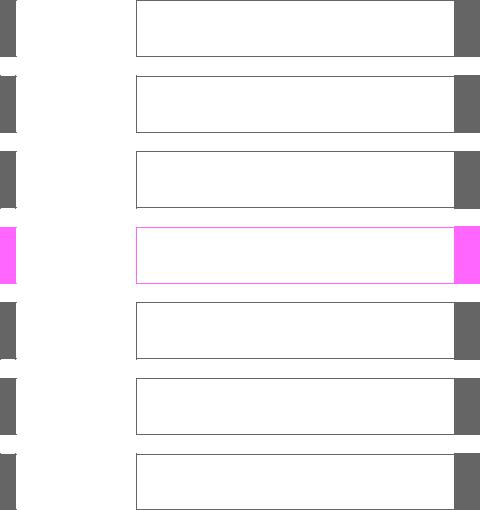
TABLE OF CONTENTS
|
1 |
Before driving |
Adjusting and operating features such as door locks, |
|
|
mirrors, and steering column. |
|||
2When driving Driving, stopping and safe-driving information.
3Interior fea- Air conditioning and audio systems, as well as other in-
|
tures |
terior features for a comfortable driving experience. |
4Maintenance and care
5Whenarisestrouble
6Vehiclespecifications
7For owners
Index
Cleaning and protecting your vehicle, performing do-it- yourself maintenance, and maintenance information.
What to do if the vehicle needs to be towed, gets a flat tire, or is involved in an accident.
Detailed vehicle information.
Reporting safety defects for U.S. owners, and seat belt and SRS airbag instructions for Canadian owners
Alphabetical listing of information contained in this manual.
1
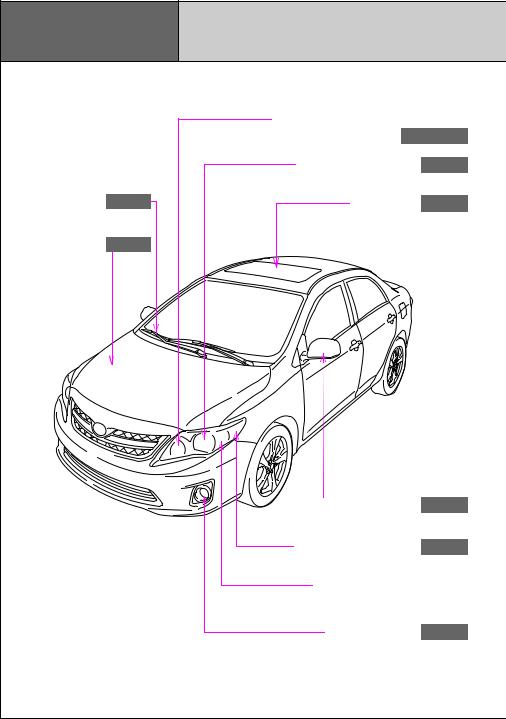
P. 144, 157
Pictorial index Exterior
|
Headlights (high beam) and daytime |
|||
|
running lights P. 157, 158 |
|||
|
Headlights (low beam) |
P. 157 |
||
|
Windshield wipers |
P. 160 |
Moon roof |
P. 71 |
|
Hood |
P. 351 |
|
Outside rear view mirrors |
P. 67 |
|
Front side marker lights |
P. 157 |
Front turn signal and parking lights 
Front fog lights P. 159
6
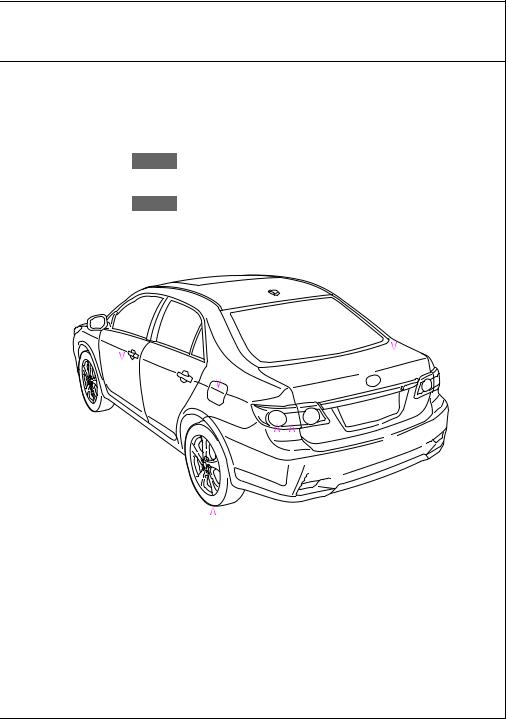
|
Fuel filler door |
P. 75 |
|||||||
|
Trunk |
||||||||
|
P. 45 |
||||||||
|
Doors |
P. 39 |
|||||||
|
Tires |
||||||||||
|
●Rotation |
P. 370 |
|||||||||
|
●Replacement |
||||||||||
|
P. 436 |
Rear turn signal lights |
|||||||||
|
P. 144 |
||||||||||
|
●Inflation pressure |
||||||||||
|
P. 478 |
||||||||||
|
●Information |
||||||||||
|
P. 483 |
Stop/tail and rear side marker lights |
|||||||||
|
P. 157 |
||||||||||
|
: If equipped |
7
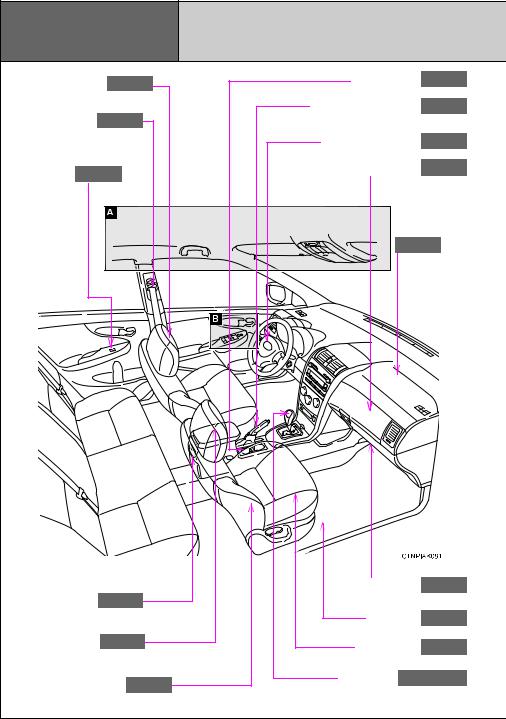
|
Pictorial index |
Interior |
||||
|
Head restraints |
P. 54 |
Cup holders |
P. 316 |
||
|
Seat belts |
P. 56 |
Parking brake lever |
P. 145 |
||
|
Power window |
SRS driver airbag |
P. 85 |
|||
|
Auxiliary boxes |
P. 318 |
||||
|
switches |
P. 69 |
||||
|
SRS front |
|||||
|
passenger |
|||||
|
airbag |
|||||
|
P. 85 |
|||||
|
Glove box |
P. 314 |
||||
|
Cup holders |
P. 316 |
||||
|
Floor mat |
P. 329 |
||||
|
Console box |
P. 314 |
Front seats |
P. 49 |
||
|
SRS side airbags |
P. 85 |
Shift lever P. 137, 143 |
|||
|
8 |
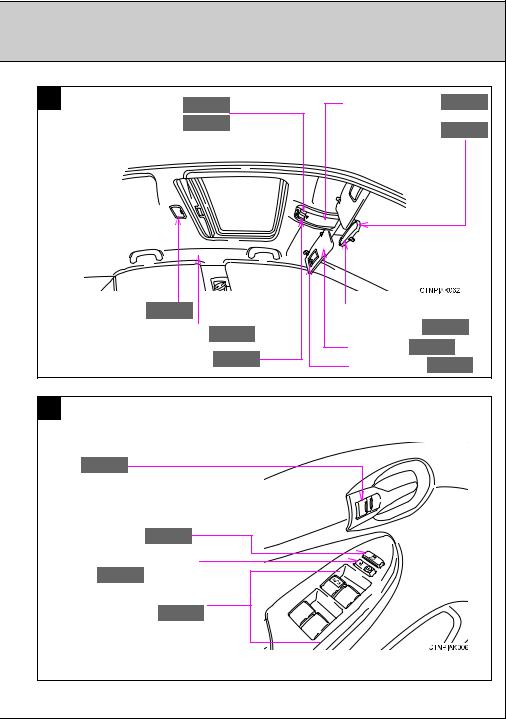
|
A |
Personal lights |
P. 311 |
Auxiliary boxes |
P. 318 |
|||||
|
Personal/interior lights |
P. 312 |
Compass |
P. 330 |
||||||
|
Interior light |
P. 311 |
Anti-glare inside |
|||||||
|
SRS curtain shield airbags |
P. 85 |
rear view mirror |
P. 65 |
||||||
|
Sun visors P. 321 |
|||||||||
|
Moon roof switch |
P. 71 |
||||||||
|
Vanity mirrors |
P. 322 |
||||||||
|
B |
|||||||||
|
Inside door lock button |
|||||||||
|
P. 40 |
|||||||||
|
Window lock |
|||||||||
|
switch |
P. 69 |
||||||||
|
Door lock switch |
|||||||||
|
P. 39 |
|||||||||
|
Power window |
|||||||||
|
switches |
P. 69 |
||||||||
|
: If equipped |
|||||||||
|
9 |
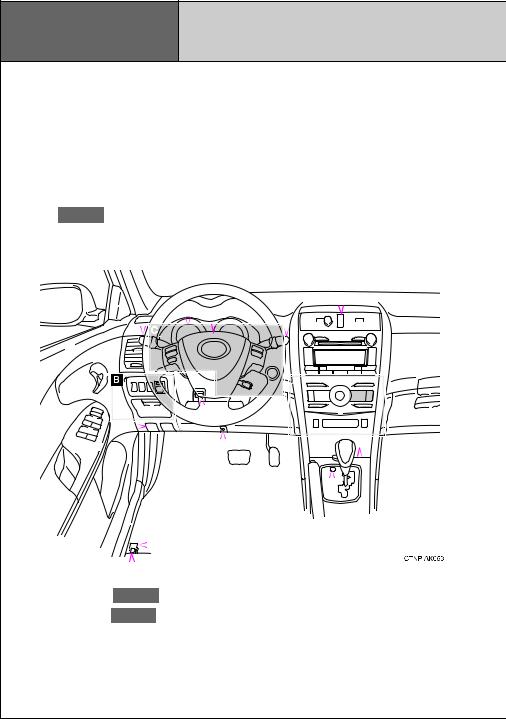
Pictorial index Instrument panel
Headlight switch Turn signal lever Fog light switch
Hood lock release lever P. 351
|
Gauges and meters |
P. 147 |
|||||||||||||||||||||||||||||||||
|
P. 157 |
||||||||||||||||||||||||||||||||||
|
Multi-information display |
P. 154 |
|||||||||||||||||||||||||||||||||
|
P. 144 |
||||||||||||||||||||||||||||||||||
|
P. 159 |
Windshield wiper and washer switch |
|||||||||||||||||||||||||||||||||
|
P. 160 |
||||||||||||||||||||||||||||||||||
|
Emergency flasher switch |
||||||||||||||||||||||||||||||||||
|
P. 414 |
||||||||||||||||||||||||||||||||||
|
Horn |
||||||||||||||||||||||||||||||||||
|
P. 146 |
||||||||||||||||||||||||||||||||||
|
Audio system |
||||||||||||||||||||||||||||||||||
|
P. 206 |
||||||||||||||||||||||||||||||||||
|
Shift lock override |
||||||||||||||||||||||||
|
button |
||||||||||||||||||||||||
|
Fuel filler door opener |
P. 450 |
|||||||||||||||||||||||
|
P. 75 |
||||||||||||||||||||||||
|
Trunk opener P. 45 |
Cigarette lighter |
P. 325 |
||||||||||||||||||||||
|
Power outlet |
||||||||||||||||||||||||
|
P. 326 |
||||||||||||||||||||||||
|
Ashtray |
||||||||||||||||||||||||
|
P. 324 |
||||||||||||||||||||||||
|
Auxiliary box |
||||||||||||||||||||||||
|
Tilt and telescopic |
P. 318 |
|||||||||||||||||||||||
|
Tire pressure warning |
||||||||||||||||||||||||
|
steering control lever |
||||||||||||||||||||||||
|
reset switch |
||||||||||||||||||||||||
|
P. 371 |
||||||||||||||||||||||||
|
P. 64 |
||||||||||||||||||||||||
10
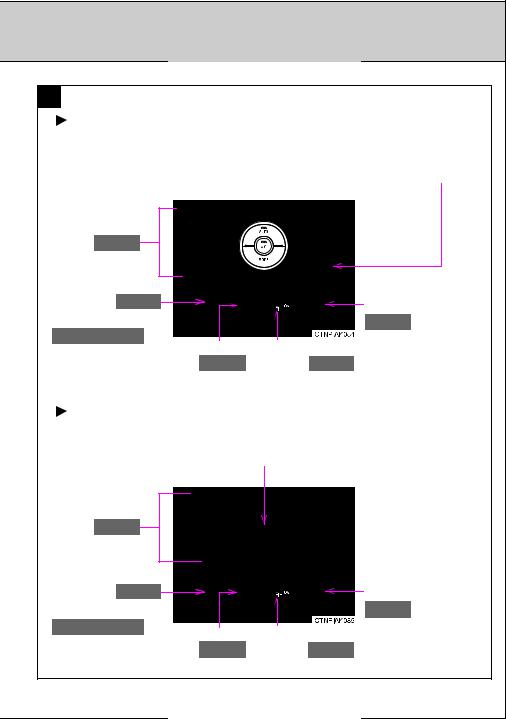
P. 205
P. 205
A
Automatic air conditioning system
Rear window and outside rear view mirror defogger switch /rear window defogger switch 
Air conditioning system P. 192
|
AUX port P. 253 |
Seat heater switches |
|
AUX port/USB port |
P. 327 |
|
P. 233, 240, 253 |
Engine immobilizer system |
|
Clock |
|
|
P. 323 |
indicator P. 79 |
Manual air conditioning system
Rear window and outside rear view mirror defogger switch /rear window defogger switch 
Air conditioning system P. 198
|
AUX port P. 253 |
Seat heater switches |
|
|
AUX port/USB port |
P. 327 |
|
|
P. 233, 240, 253 |
Clock |
Engine immobilizer system |
|
P. 323 |
indicator P. 79 |
: If equipped
11
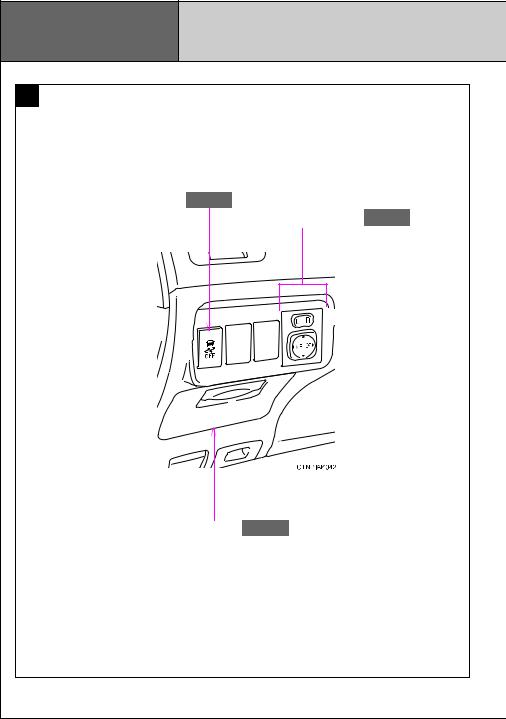
|
Pictorial index |
Instrument panel |
||
|
B |
|||
|
VSC/TRAC off switch |
P. 166 |
Outside rear view |
|
|
mirror switches |
P. 67 |
||
|
Auxiliary boxes |
P. 318 |
||
|
12 |
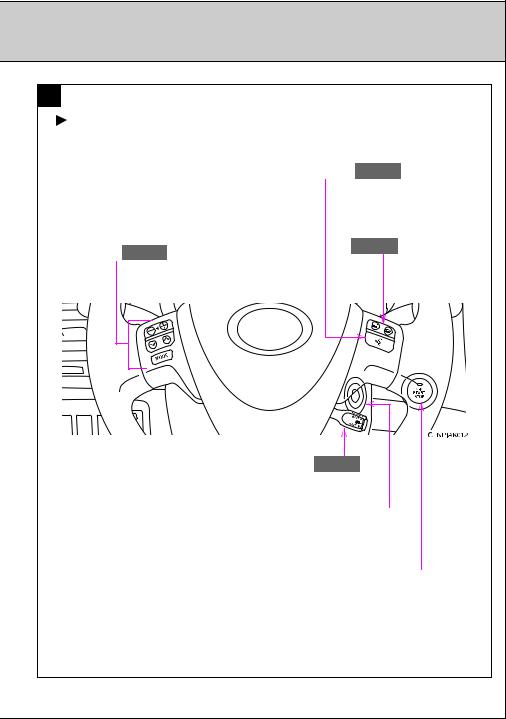
P. 129
P. 133
C
Type A
|
Talk switch P. 280 |
|||
|
Audio remote control |
Telephone switch |
||
|
P. 280 |
|||
|
switches |
P. 255 |
||
Cruise control switch P. 162
Engine (ignition) switch (vehicles without smart key system) 
Engine (ignition) switch (vehicles with smart key system) 
: If equipped
13
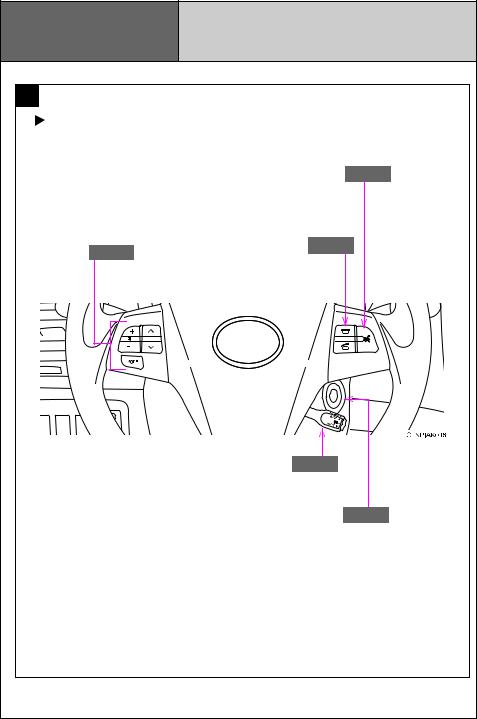
|
Pictorial index |
Instrument panel |
|
|
C |
||
|
Type B |
||
|
Talk switch P. 280 |
||
|
Audio remote control |
Telephone switch |
|
|
P. 280 |
||
|
switches P. 255 |
||
Cruise control switch P. 162
Engine (ignition) switch P. 133
: If equipped
14
COROLLA
2 0 1 1
QUICK REFERENCE
GUIDE
2011 Corolla
This Quick Reference Guide is a summary of basic vehicle operations. It contains brief descriptions of fundamental operations so you can locate and use the vehicle’s main equipment quickly and easily.
The Quick Reference Guide is not intended as a substitute for the Owner’s Manual located in your vehicle’s glove box. We strongly encourage you to review the Owner’s Manual and supplementary manuals so you will have a better understanding of your vehicle’s capabilities and limitations.
Your dealership and the entire staff of Toyota Motor Sales, U.S.A., Inc. wish you many years of satisfied driving in your new Corolla.
! A word about safe vehicle operations
This Quick Reference Guide is not a full description of Corolla operations. Every Corolla owner should review the Owner’s Manual that accompanies this vehicle.
Pay special attention to the boxed information highlighted in color throughout the Owner’s Manual. Each box contains safe operating instructions to help you avoid injury or equipment malfunction.
All information in this Quick Reference Guide is current at the time of printing. Toyota reserves the right to make changes at any time without notice.

INDEX
OVERVIEW
FEATURES/OPERATIONS
SAFETY AND EMERGENCY FEATURES
|
Engine maintenance |
7 |
|
Fuel tank door release and cap |
6 |
|
Hood release |
7 |
|
Indicator symbols |
5 |
|
Instrument cluster |
4 |
|
Instrument panel |
2-3 |
|
Keyless entry1 |
6 |
|
Air Conditioning/Heating |
14 |
|
Audio |
12-13 |
|
Auto lock/unlock2 |
9 |
|
Automatic Transmission |
8 |
|
Auxiliary storage |
18 |
|
Clock |
16 |
|
Cruise control |
15 |
|
Cup holders |
18 |
|
Door locks-Power |
17 |
|
Light control-Instrument panel |
18 |
|
Lights & turn signals |
11 |
|
Moonroof |
17 |
|
Multi-information display |
15 |
|
Parking brake |
8 |
|
Power outlet |
11 |
|
Seat adjustments-Front |
9 |
|
Seat adjustments-Rear |
9 |
|
Seats-Head restraints |
10 |
|
Telephone controls (Bluetooth®) |
16 |
|
Tilt and telescopic steering wheel |
17 |
|
Windows-Power |
10 |
|
Windshield wipers & washers |
10 |
|
Child comfort guide |
19 |
|
Doors-Child safety locks |
20 |
|
Seat belts |
19 |
|
Seat belts-Shoulder belt adjustment |
19 |
|
Spare tire & tools |
21 |
|
Tire Pressure Monitoring (warning) System |
20 |
|
Trunk-Internal release |
20 |
1 Visit your Toyota dealer for information on customizing this feature.
2 Programmable by customer. Refer to the Owner’s Manual for instructions and more information.
OVERVIEW
 FEATURES/OPERATIONS
FEATURES EMERGENCY AND SAFETY
1
OVERVIEW
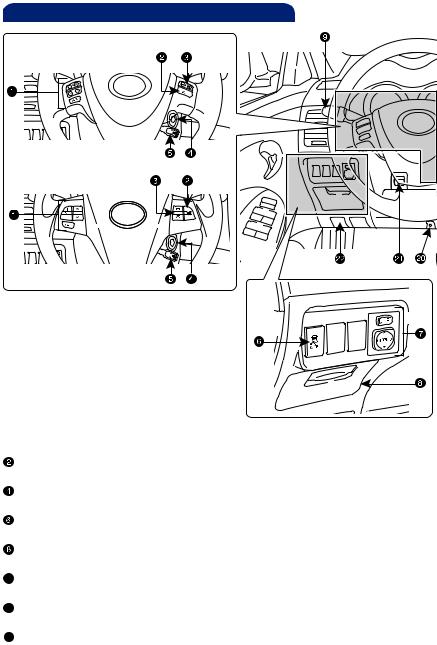
Instrument panel
Steering wheel controls
Type A
Type B
 Steering wheel audio controls*
Voice command button*
 Telephone controls*
Ignition switch
 Cruise control*
VSC/TRAC OFF switch
 Power outside rearview mirror controls
Auxiliary storage
 Headlight, turn signal and front fog light* controls
 Wiper and washer controls
 Emergency flasher button
 Audio system
 Air Conditioning controls
 Outside rearview mirror*/Rear window defogger button
2
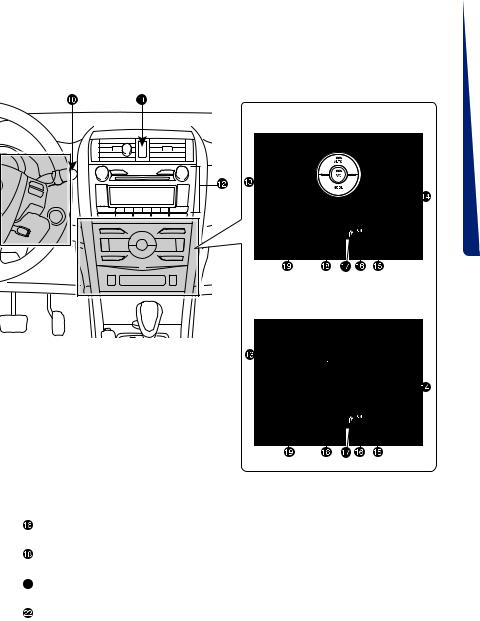
Automatic Air Conditioning system
Manual Air Conditioning system
OVERVIEW
 FEATURES/OPERATIONS
 Front passenger seat belt reminder light
“AIR BAG ON” and “AIR BAG OFF” indicator
 Engine immobilizer indicator
Clock
 USB*/AUX port
 Tire Pressure Monitoring (warning) System reset
 Tilt and telescopic steering control Hood lock release lever
* If equipped
 FEATURES EMERGENCY AND SAFETY
3
OVERVIEW
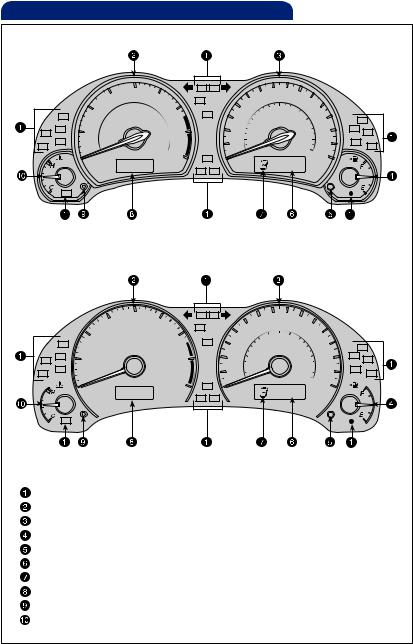
Instrument cluster
|
Type A |
|
Type B |
|
Service indicator and reminder |
|
Tachometer |
|
Speedometer |
|
Fuel gauge |
|
Trip meter reset/Instrument panel light control |
|
Odometer and two trip meters |
|
Automatic Transmission shift range display (if equipped) |
|
Multi-information display |
|
Display button |
|
Engine coolant temperature |
|
4 |
Indicator symbols
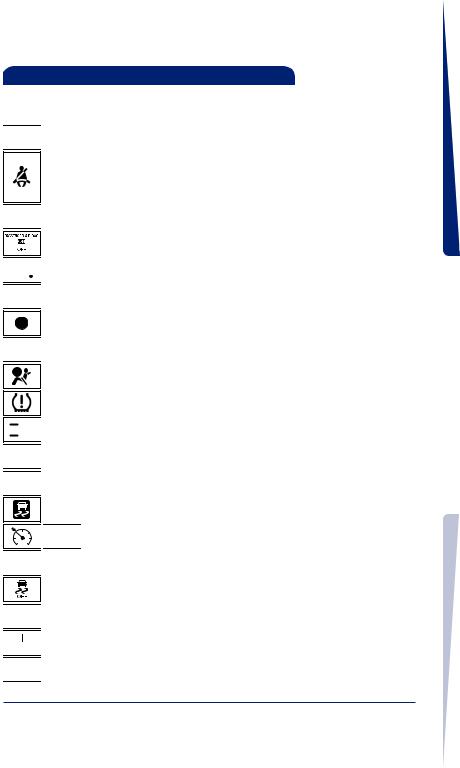
For details, refer to “Indicators and warning lights,” Section 2-2, 2011 Owner’s Manual.

 Brake system warning1
Driver seat belt reminder (on the instrument cluster) (alarm will sound if speed is over 12 mph)
Front passenger seat belt reminder (on the center panel) (alarm will sound if speed is over 12 mph)
 Charging system warning1
AIR BAG ON and AIR BAG OFF indicator


 Electric power steering warning1
 Malfunction/Check Engine indicator1
Low fuel level warning
 Open door warning
SRS Airbag warning1
Low Tire Pressure Warning1

 Headlight high beam indicator


 Turn signal indicator


 Fog light indicator
Slip indicator1


 Cruise control/Cruise control SET indicator
 Anti-lock Brake System warning1
Vehicle Stability Control OFF indicator1


 Low engine oil pressure warning1


 Maintenance/Service required indicator1


 Traction Control OFF indicator1
1If indicator does not turn off within a few seconds of starting engine, there may be a malfunction. Have vehicle inspected by your Toyota dealer.
OVERVIEW
 FEATURES/OPERATIONS
FEATURES EMERGENCY AND SAFETY
5
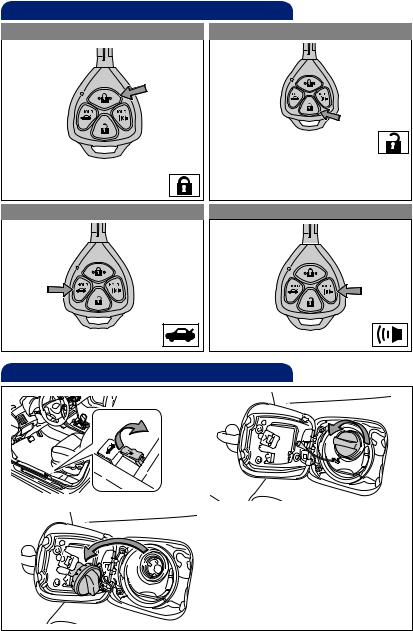
OVERVIEW
Keyless entry (if equipped)
|
Locking operation |
Unlocking operation |
|
Push ONCE: Driver door |
||
|
TWICE: All doors |
||
|
NOTE: If a door is not opened within |
||
|
Push |
60 seconds of unlocking, all doors |
|
|
will relock for safety. |
||
|
Trunk lid operation |
Panic button |
|
Push and hold |
Push and hold |
|
Fuel tank door release and cap |
|
|
Pull |
Turn to open |
Store
NOTE: Tighten until one click is heard. If the cap is not tightened enough, Check Engine “ ” indicator may illuminate.
6
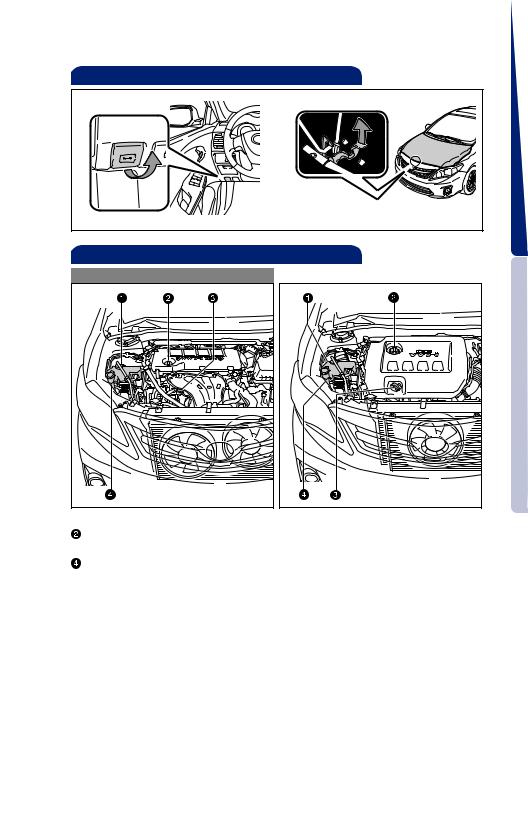
Hood release
OVERVIEW
Pull
Pull up latch and raise hood
Engine maintenance
|
4 cylinder (2AZ-FE) engine |
4 cylinder (2ZR-FE) engine |
 Engine coolant reservoir
Engine oil filler cap
 Engine oil level dipstick
Windshield washer fluid tank
NOTE: Regularly scheduled maintenance, including oil changes, will help extend the life of your vehicle and maintain performance. Please refer to the “Warranty Maintenance Guide.”
 FEATURES EMERGENCY AND SAFETY
7
FEATURES/OPERATIONS
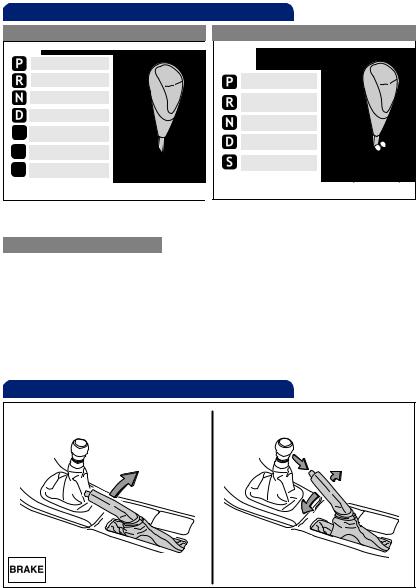
Automatic Transmission (if equipped)
|
Standard type |
Multi-mode type |
|
Park* |
||
|
Reverse |
Park* |
|
|
Neutral |
Reverse |
|
|
Drive |
Neutral |
|
|
Third gear |
||
|
Drive |
||
|
Second gear |
||
|
“S” mode |
||
|
First gear |
||
“S” “D”
*The ignition switch must be “ON” and the brake pedal depressed to shift from Park.
“S” (Sequential) mode
Shift the shift lever to “S” position from “D” position.
+: Upshift (push and release) —: Downshift (pull and release)
Downshifting increases power going uphill, or provides engine braking downhill. For best fuel economy during normal driving conditions, always drive with the shift lever in the “D” position.
Parking brake
|
Set |
Release |
|
|
(2) Push |
||
|
Pull |
(1) Pull slightly |
|
|
(3) Lower |
8
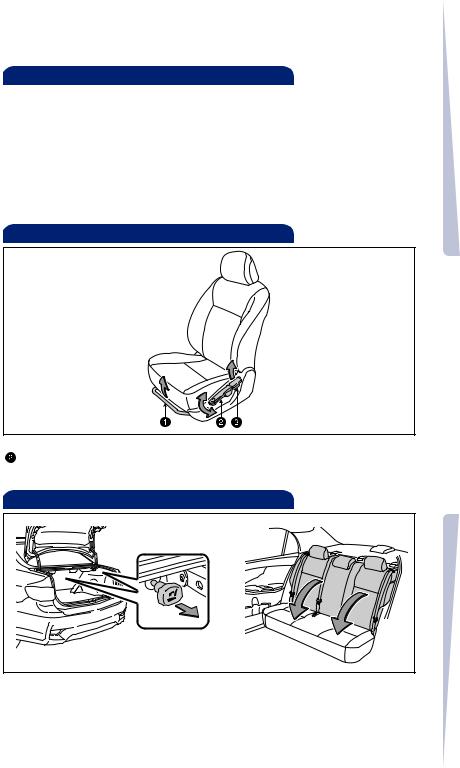
Auto lock/unlock (if equipped)
Automatic door locks can be programmed to operate in two different modes, or turned OFF.
—Doors lock when shifting from Park.
-Doors lock when the vehicle speed is approximately 12 mph or higher. —Doors unlock when shifting into Park.
-Doors unlock when the driver’s door is opened within 10 seconds after turning the ignition switch OFF.
Refer to the Owner’s Manual for more details.
Seat adjustments-Front
 Seat position (forward/backward)
Height crank (driver side only)
 Seatback angle
OVERVIEW
 FEATURES/OPERATIONS
Seat adjustments-Rear
|
Pull |
AND SAFETY |
|
Fold down |
|
|
FEATURESEMERGENCY |
|
|
9 |

FEATURES/OPERATIONS
Seats-Head restraints
|
Lock release button |
Lock release button |
Windshield wipers & washers
|
Intermittent windshield wiper |
|
|
frequency adjustment |
|
|
Single wipe |
(if equipped) |
|
Increase |
|
|
Interval wipe |
|
|
Slow |
|
|
Fast |
Decrease |
Pull to wash and wipe
Windows-Power (if equipped)
Driver side
Window lock switch
Up
Down
Automatic operation (driver side only) Push the switch completely down and release to fully open. To stop window midway, lightly push the switch in the opposite direction.
Window lock switch Deactivates all passenger windows. Driver’s window remains operable.
10

Lights & turn signals
Headlights


 High beam
Parking lights


 High beam flasher
Daytime Running Light system (DRL) Headlights turn on automatically upon starting engine. The brightness of the headlights will automatically change depending on the darkness of the surroundings.
Front fog lights (if equipped)
OVERVIEW
Turn
Front fog lights come on only when the headlights are on low beam.
Turn signals
Right turn
Lane change
Lane change 
Left turn
Power outlet
Designed for 12V car accessories.
The ignition switch must be in the “ACC” or “ON” position.
 FEATURES/OPERATIONS
FEATURES EMERGENCY AND SAFETY
11

FEATURES/OPERATIONS
Audio
Type 1
Preset buttons — functions in other
Eject CD modes indicated above number
|
Push to turn |
Push and turn |
|
|
ON/OFF |
to adjust tone |
|
|
& balance |
||
|
Seek station/ |
Push to skip |
|
|
CD track select |
up/down |
|
|
folder and |
||
|
radio category |
||
|
Station/CD |
type |
|
|
track scan |
||
|
Mode |
View CD text |
|
|
Type 2 |
Preset buttons — functions in other |
|
Eject CD |
modes indicated above button |
|
Push to turn |
Push and |
|
ON/OFF |
turn to |
|
adjust tone |
|
|
& balance |
|
Seek station/ |
Push to skip |
|||
|
CD track select |
||||
|
up/down |
||||
|
folder and |
||||
|
radio category |
||||
|
type |
||||
|
Station/CD |
||||
|
track select |
||||
|
Setting preset |
Mode |
Menu |
Mute |
View CD text |
|
buttons |
|
Type 3 additional functions |
Load CD(s) |
|||||||||||||||||||||
12

CD Player
To scan tracks on a disc Push “SCAN.” Push again to hold selection.
CD changer (Type 3 only)
-To load one disc Push “LOAD” and insert one disc.
-To load multiple discs Push and hold “LOAD” until you hear a beep. Insert one disc. Shutter will close and then re-open for next disc.
To select a file (MP3/WMA only) Turn “TUNE.FILE” or “TUNE.SCROLL.”
Radio
OVERVIEW
To preset stations Tune in the desired station and hold down a preset button (from  to
to  or one of
  ) until you hear a beep. Push desired preset button (from
  to
to  or one of
  ) to select.
To scan stations Push and hold “SCAN” to scan preset stations. Push again to hold selection.
AUX port/USB port
|
AUX port |
USB/AUX port |
|
AUX port |
FEATURES/OPERATIONS |
By inserting a mini plug into the AUX port, you can listen to music from a portable audio device through the vehicle’s speaker system while in AUX mode.
USB port (if equipped)
By connecting a USB-compatible portable audio device or USB memory to the USB port, you can listen to music from the portable audio device or USB memory through the vehicle’s speaker system while in USB mode.
Steering wheel switches (if equipped)
|
Type A |
Volume control |
Type B |
Volume control |
 “ v v ”
Use to search within the selected audio medium (radio, CD, iPod®, etc.).
 “MODE”
Push to turn audio ON and to select an audio mode. Push and hold to turn the audio system OFF.
 FEATURES EMERGENCY AND SAFETY
13

FEATURES/OPERATIONS
Air Conditioning/Heating
 Airflow vent
Use “ ” or “ ” mode to reduce window fogging (system automatically switches to fresh air mode).
 Fan speed
Temperature selector
For quick cooling, turn to MAX A/C position and select recirculated air mode (“ ” indicator ON).
 Air Conditioning ON/OFF
Outside rearview mirror*/Rear window defogger
Recirculate cabin air (fresh air when OFF)
* If equipped
14

Cruise control (if equipped)
Turning system ON/OFF
 System ON/OFF
Functions
Increase speed
Set/Decrease speed
1 The set speed may also be cancelled by depressing the brake pedal. 2 The set speed may be resumed once vehicle speed exceeds 25 mph.
Multi-information display
Display button
Push the display button to scroll through the following:
(1)Outside temperature
(2)Current gas mileage
(3)Average gas mileage*
(4)Miles left on remaining fuel
(5)Average vehicle speed from engine start*
(6)Running time from engine start*
* Push and hold display button to reset.
OVERVIEW
 FEATURES/OPERATIONS
FEATURES EMERGENCY AND SAFETY
15

FEATURES/OPERATIONS
Telephone controls (Bluetooth®)
(if equipped)
|
Vehicles with moonroof |
Vehicles without moonroof |
|||
Microphone
Microphone
|
Steering wheel telephone switches |
|||
|
Type A |
Type B |
||
|
Volume control |
Start call |
||
|
End call |
Volume control |
End call |
|
Start call |
|
|
Voice command button |
Voice command button |
Bluetooth® technology allows dialing or receipt of calls without taking hands from the steering wheel or using a cable to connect the compatible telephone and the system.
Refer to “Hands-free phone system (for cellular phone),” Section 3-4 in the Owner’s Manual, or go to Toyota.LetsTalk.com for more information about phone connections and compatibility.
Clock
Adjusts the hour
Adjusts the minutes
16

Moonroof (if equipped)
|
Sliding operation |
Tilting operation |
Recommended open position to minimize wind noise.
 Open
Open
Close
Push once to open partway; again to open completely.
Tilt and telescopic steering wheel
 Angle
Angle
Length
Hold wheel, push lever down, set angle and length, and return lever.
Lock release lever
NOTE: Do not attempt to adjust while the vehicle is in motion.
Door locks-Power (if equipped)
Unlock
Lock
 FEATURES/OPERATIONS
FEATURES EMERGENCY AND SAFETY
17

FEATURES/OPERATIONS
Light control-Instrument panel
+
Brightness
control
—
Cup holders
Auxiliary storage
Instrument panel
|
Type A |
Type B (if equipped) |
Type C |
Pull
Pull
Pull
Overhead console (if equipped)
 Push
Push
18

SAFETY AND EMERGENCY FEATURES
Seat belts
Take up slack
Too high
Keep as low on hips as possible
OVERVIEW
If belt is fully extended, then retracted even slightly, it cannot be re-extended beyond that point, unless fully retracted again. This feature is used to help hold child restraint systems securely.
To find more information about seat belts, and how to install a child restraint system, refer to the Owner’s Manual.
Seat belts-Shoulder belt adjustment
Push up, or squeeze lock release to lower
 FEATURES/OPERATIONS
Child comfort guide
Rear seat outside position guides provide added comfort for children who have outgrown child restraints.
 FEATURES EMERGENCY AND SAFETY
19

SAFETY AND EMERGENCY FEATURES
Tire Pressure Monitoring (warning)
System
System reset initialization
1. Push and hold “ SET” button until the indicator blinks three times.
2. Wait a few minutes to allow initialization to complete.
After adjusting tire pressures, or after tires have been rotated or replaced, turn the ignition switch to “ON” and press and hold the
“ SET” button until indicator blinks three times. Let the vehicle sit for a few minutes to allow initialization to complete.
Refer to the load label on the door jamb or the Owner’s Manual for tire inflation specifications.
If the tire pressure indicator flashes for more than 60 seconds and then remains on, take the vehicle to your local Toyota dealer.
NOTE: The warning light may come on due to temperature changes or changes in tire pressure from natural air leakage. If the system has not been initialized recently, setting the tire pressures to factory specifications should turn off the light.
Trunk-Internal release
Pull up
Doors-Child safety locks
Rear door
Moving the lever to “LOCK” will allow the door to be opened only from the outside.
20

Spare tire & tools
Tool location
OVERVIEW
Tool box
Removing the spare tire
|
(1) |
(2) |
FEATURES/OPERATIONS |
|
|
(3) |
|||
|
AND SAFETY |
|||
|
(1) |
Remove the luggage floor cover. |
EMERGENCY |
|
|
(2) |
Remove the tool tray. |
||
|
(3) |
Loosen the center fastener that secures the spare tire. |
||
|
FEATURES |
|||
|
Refer to the Owner’s Manual for tire changing and jack positioning |
|||
|
procedures. |
|||
|
21 |

CUSTOMER EXPERIENCE CENTER
1-800-331-4331
Printed in U.S.A. 11/10
10-TCS-04007
10%


 Cert no. SGSNA-COC-005612
00505-QRG11-COR

1-1. Key information
Keys
The following keys are provided with the vehicle.
 Vehicles with smart key system
 Electronic keys
• Operating the smart key
system (→P. 23)
• Operating the wireless remote control function (→P. 34)
|
Mechanical keys |
|
Key number plate |
|
Vehicles without smart key system (type A) |
 Master keys
Operating the wireless remote control function (→P. 34)
 Valet key
 Key number plate
 Vehicles without smart key system (type B)
 Master keys (black)
 Valet key (gray)
 Key number plate
20

1-1. Key information
 Using the mechanical key (vehicles with smart key system)
Take out the mechanical key.
After using the mechanical key, store it in the electronic key. Carry the mechanical key together with the electronic key. If the electronic key battery is depleted or the entry function does not operate properly, you will need the mechanical key. (→P. 452)
■When required to leave a key to the vehicle with a parking attendant
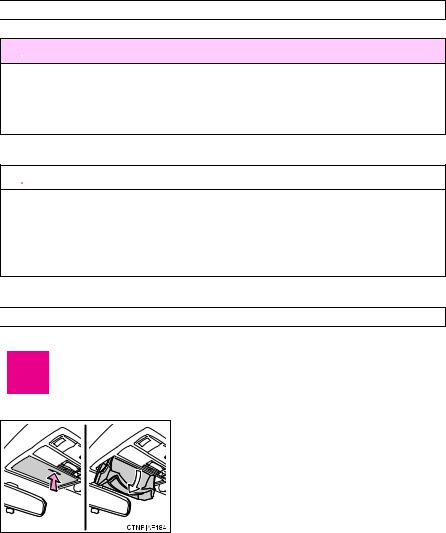
Set the trunk opener cancelling system. (→P. 46)
Vehicles with smart key system: Remove the mechanical key for your own use and provide the attendant with the electronic key only.
Vehicles without smart key system: Carry the master key for your own use and leave the valet key only with the attendant.
■Key number plate
Keep the plate in a safe place such as your wallet, not in the vehicle. In the event that a key is lost, a new key can be made by your Toyota dealer using the key number plate. (→P. 451)
■When riding in an aircraft
When bringing a key with wireless remote control function onto an aircraft, make sure you do not press any buttons on the key while inside the aircraft cabin. If you are carrying the key in your bag etc, ensure that the buttons are not likely to be pressed accidentally. Pressing a button may cause the key to emit radio waves that could interfere with the operation of the aircraft.
1 Beforedriving
21

1-1. Key information
 NOTICE
■To prevent key damage
●Do not subject the keys to strong shocks, expose them to high temperatures by placing them in direct sunlight, or get them wet.
●Do not expose the keys to electromagnetic materials or attach any material that blocks electromagnetic waves to the key surface.
●Do not disassemble the electronic key.
22

1-2. Opening, closing and locking the doors and trunk
Smart key system
The following operations can be performed simply by carrying the electronic key on your person, for example in your pocket.
(The driver should always carry the electronic key.)
|
1 |
|
|
driving Before |
|
|
Electronic key |
|
|
Electronic key |
Electronic key |
 Locks and unlocks the doors (→P. 24)
 Unlocks the trunk (→P. 24)
 Starts the engine (→P. 129)
: If equipped
23

1-2. Opening, closing and locking the doors and trunk
 Unlocking and locking the doors (front door handles only)
Grip the handle to unlock the door.
Make sure to touch the sensor on the back of the handle.
The door cannot be unlocked for 3 seconds after the door is locked.
Press the lock button to lock the door.
 Unlocking the trunk
Press the button to unlock the trunk.
24

1-2. Opening, closing and locking the doors and trunk
 Antenna location and effective range
■ Antenna location
 Antennas outside the cabin
 Antenna outside the trunk
 Antenna inside the trunk
 Antennas inside the cabin
1 Beforedriving
25

1-2. Opening, closing and locking the doors and trunk
■Effective range (areas within which the electronic key is detected)
When locking or unlocking the doors
The system can be operated when the electronic key is within about 2.3 ft. (0.7 m) of either of the outside front door handles. (Only the doors detecting the key can be operated.)
When starting the engine or changing “ENGINE START STOP” switch modes
The system can be operated when the electronic key is inside the vehicle.
When unlocking the trunk
The system can be operated when the electronic key is within about 2.3 ft. (0.7 m) of the trunk release button.
26
 Loading…
Toyota Corolla 205/70/15

kvv84
Был 12 часов назад
Вальдемар
Я езжу на KIA Cerato и Toyota Corolla 205/70/15
Новосибирск, Россия
Всем привет!
Искал коды неисправностей АБС и нашел электронную инструкцию по ремонту и обслуживанию. Здесь есть все, от замены лампочки до замены цепи ГРМ. Все расписано и с фотографиями.
toyota-corolla-auris-10-e150.dv13.ru/


10 мая 2016
Метки: своими руками
70
5
Ранее Расход моторного масла: горим на работе
Далее Зри в корень: даунсайзинг
Разместить рекламу
Реклама
Машины в продаже

Москва
Toyota Corolla, 2008
785 000 ₽

Москва
Toyota Corolla, 2008
640 000 ₽

Москва
Toyota Corolla, 2011
899 000 ₽

Москва
Toyota Corolla, 2012
1 074 000 ₽
Посмотреть больше машин на Дроме
Комментарии
5
Войдите или зарегистрируйтесь, чтобы писать комментарии, задавать вопросы и участвовать в обсуждении.
Войти
Зарегистрироваться

InfReflect
Я езжу на Toyota Corolla (140/150)
Имхо толку от этой книжки не много. Инструкции там попадаются мягко говоря не адекватные.
4 года

Serega-43region
Без машины
в закладки))
7 лет

starter163
Я езжу на Toyota RAV4 (IV)
Вот здесь собирал некоторые книжки www.drive2.ru/c/689639/
1

7 лет

wolk14
Я езжу на Toyota Corolla (140/150)
Вот тебе еще
toyota-corolla.ru/rm04f1ru/index2.html
Инфы много на драйве + много книжек.
1
7 лет

Mikha1989
Я езжу на Toyota Corolla (140/150)
Я в прошлом году в формате PDF данное руководство скачал.
Думаю распечатать на бумаге надо, т.к. в электронном виде не всегда удобно читать.
2
7 лет

516
Abbreviation list
Abbreviation/Acronym list
ABBREVIATIONS
MEANING
A/C
Air Conditioning
ABS
Anti-lock Brake System
ACC
Accessory
ALR
Automatic Locking Retractor
CRS
Child Restraint System
ECU
Electronic Control Unit
EDR
Event Data Recorder
ELR
Emergency Locking Retractor
EPS
Electric Power Steering
GAWR
Gross Axle Weight Rating
GVWR
Gross Vehicle Weight Rating
I/M
Emission inspection and maintenance
LATCH
Lower Anchors and Tethers for Children
LED
Light Emitting Diode
M + S
Mud and Snow
MAX
Maximum
MIN
Minimum
MMT
Methylcyclopentadienyl Manganese Tricarbonyl
MTBE
Methyl Tertiary Butyl Ether
OBD
On Board Diagnostics
SRS
Supplemental Restraint System
TIN
Tire Identification Number
TPMS
Tire Pressure Warning System
TRAC
Traction Control
VIN
Vehicle Identification Number
VSC
Vehicle Stability Control

- Форум
- Королла 150 — предыдущее поколение
- FAQ по E150
- Руководство по эксплуатации Corolla 150

-
17.09.2013, 18:48
#1
Новичок
Руководство по эксплуатации Corolla 150
Отсканированное штатное руководство (мануал) пользователя, которое идет с завода вместе с автомобилем Тойота Королла 10 поколения.
Ссылка на скачку http://yadi.sk/d/b6DMC9BwR7eHT
Альтернативная ссылка http://corolla-club.ru/manual/Toyota…a_2007.pdf.zip
руководство предоставил Гоголь
-
7 пользователя(ей) сказали cпасибо:
Advokat (15.07.2017),Dandy (22.01.2016),NEO)96 (08.11.2015),PR_102 (06.03.2016),Roman_115 (09.07.2017),Ламповед (02.08.2016),серик (04.02.2018)
-
21.03.2016, 20:28
#2
Мимо проходил
-
08.06.2016, 22:22
#3
Мимо проходил
Книга toyota corolla e150
Всем доброго времени суток! Ищу книгу toyota corolla /auris — издательства легион автодата.
Скачивал ту что тут представлена «на фоне синяя королка», книга не очень понравилась… нужна именно легион-автодата.
Если у кого есть… дам свою электронку, скиньте , пожалуйста.