
USER MANUAL
用户手册
用戶手冊
UŽIVATELSKÝ MANUÁL
HANDLEIDING
MANUEL DE L’UTILISATEUR
BENUTZERHANDBUCH
MANUALE D’USO
ユーザーマニュアル
사용자 매뉴얼
INSTRUKCJA OBSŁUGI
MANUAL DO USUÁRIO
РУКОВОДСТВО ПОЛЬЗОВАТЕЛЯ
POUŽÍVATEĽSKÁ PRÍRUČKA
MANUAL DE USUARIO
คู่มือการใช้
Как стало понятным после прочтения заголовка, сегодня речь пойдет о дооснащении оригинальным видеорегистратором BMW Advanced Car Eye 2.0 (он же ACE 2.0)

Представляет собой пару камер со встроенными радарами (они же датчики движения) с углом обзора 150 градусов для каждой камеры, подключается к штатной проводке автомобиля

Ранее в Москве был куплен полный комплект со всем необходимым для установки и ждал своей очереди. И вот, этот день настал! (Ну или, почти настал)
Первым камнем преткновения стала проводка, а точнее, ее правильное подключение, так как, по случайному стечению обстоятельств, не составит труда спалить дорогостоящую игрушку из-за перепутанных проводов
Пара дней поисков информации в интернете дали свои плоды, и в итоге в темных затворках малоизвестных форумов была найдена инструкция по правильному подключению для разных кузовов (от Е серии и вплоть до G-шек). Нас интересует вариант подключения именно на e9X кузов (на некоторые другие кузова схема немного отличается)
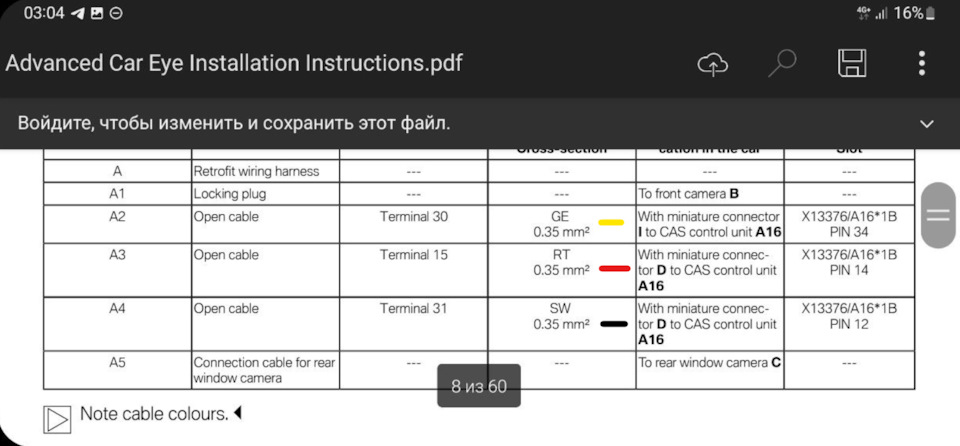
Для простоты понимания, буквенные обозначения цветов проводов обозначил цветами, как в схемах из TIS (почему тут не сделали так же?)
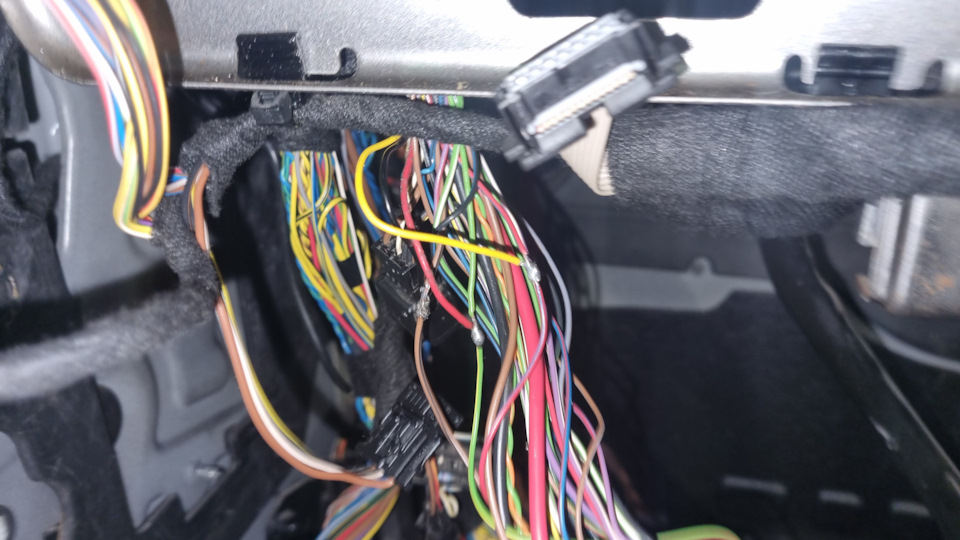
Как несложно догадаться, подключение будем осуществлять в 12, 14 и 34 пины фишки X13376 блока CAS (установлен сразу за блоком управления светом или за перчаточным ящиком на стороне водителя (если таковой имеется)
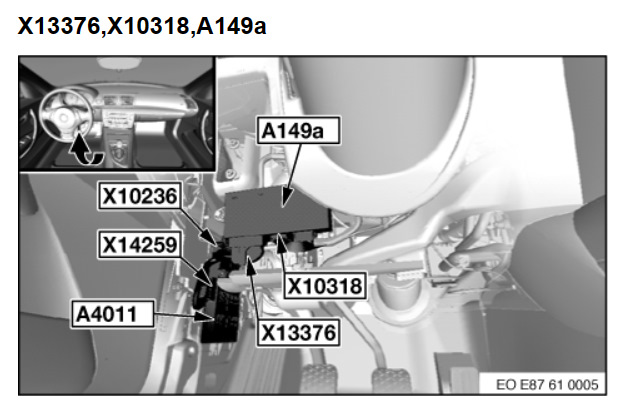
Запчасти на фото: A4011
Пины с регистратора подключаем параллельно штатным проводам и изолируем. Проводку до регистратора мотаем такой же тряпичной изолентой, которой перемотана вся проводка в салоне, чтобы не брякала по обшивкам и потолку изнутри (та же самая TESA). В потолок заводим по ЛЕВОЙ стойке, далее параллельно солнцезащитному козырьку и уводим косу на заднюю камеру четко посередине потолка в обход заднего потолочного плафона. Лишнее сматываем в кучу и подматываем к штатной, уже приклеенной к потолку, проводке
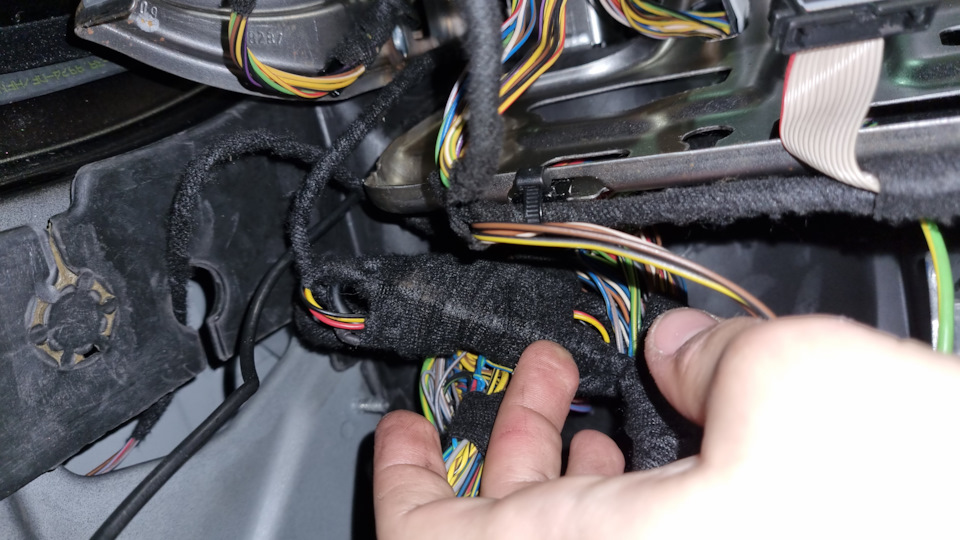
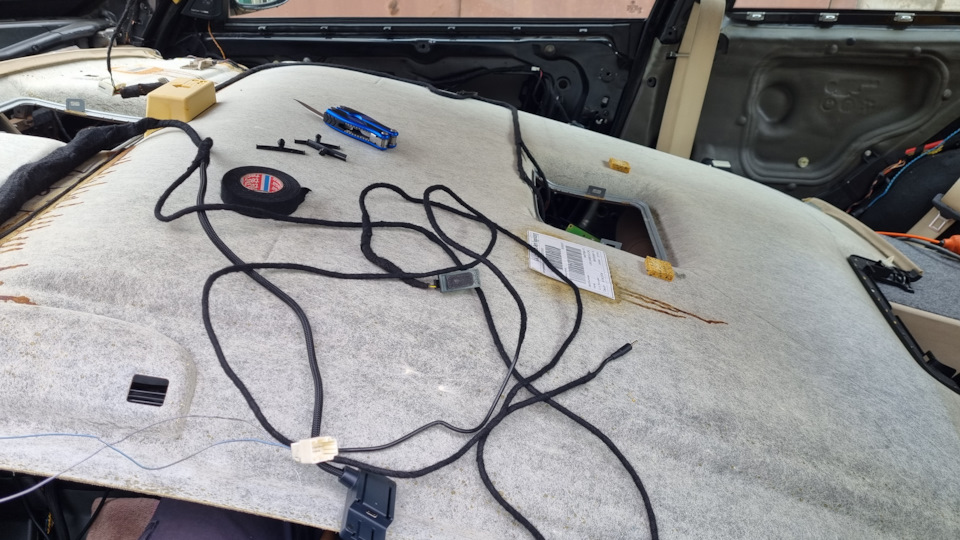
Для справки. Для демонтажа потолка необходимо снять все потолочные ручки и крючки, козырьки, облицовку третьего стоп-сигнала и стойки вкруг.
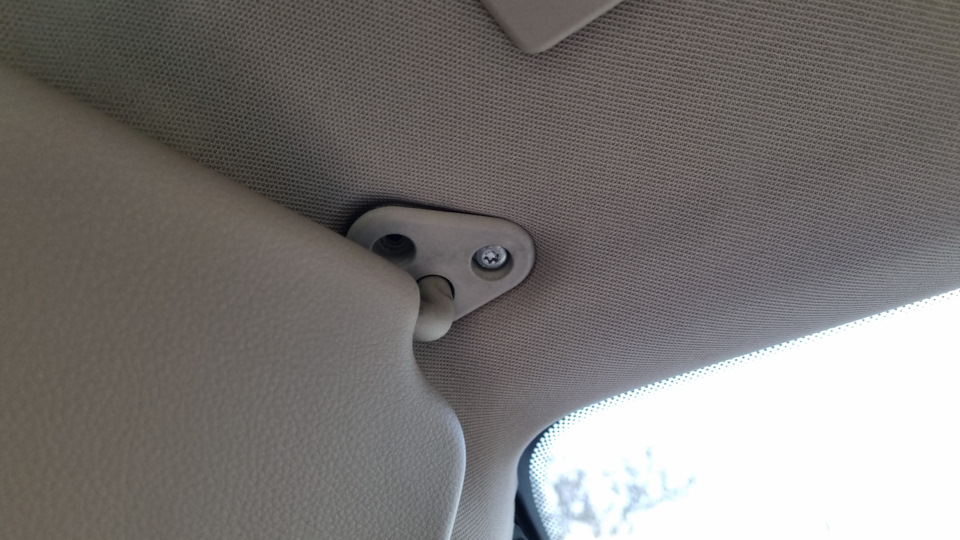
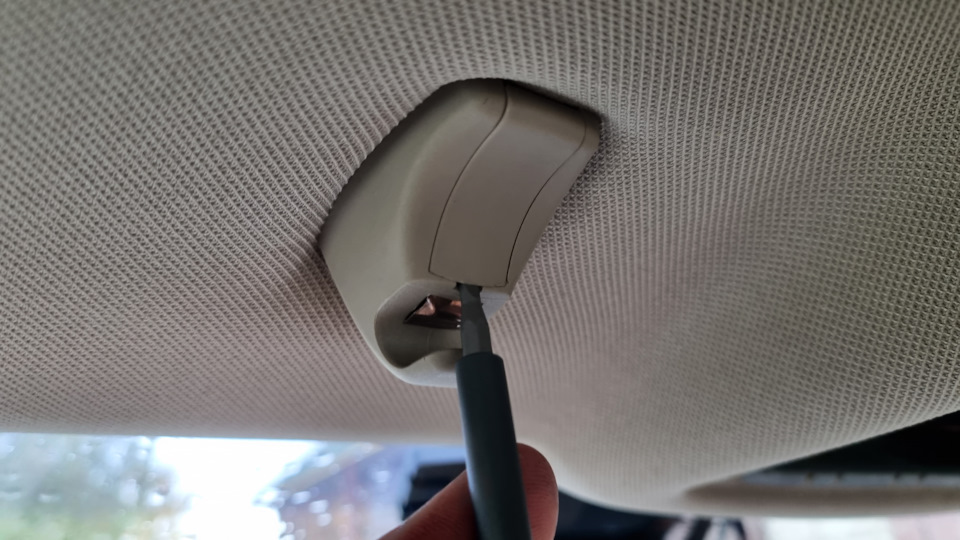
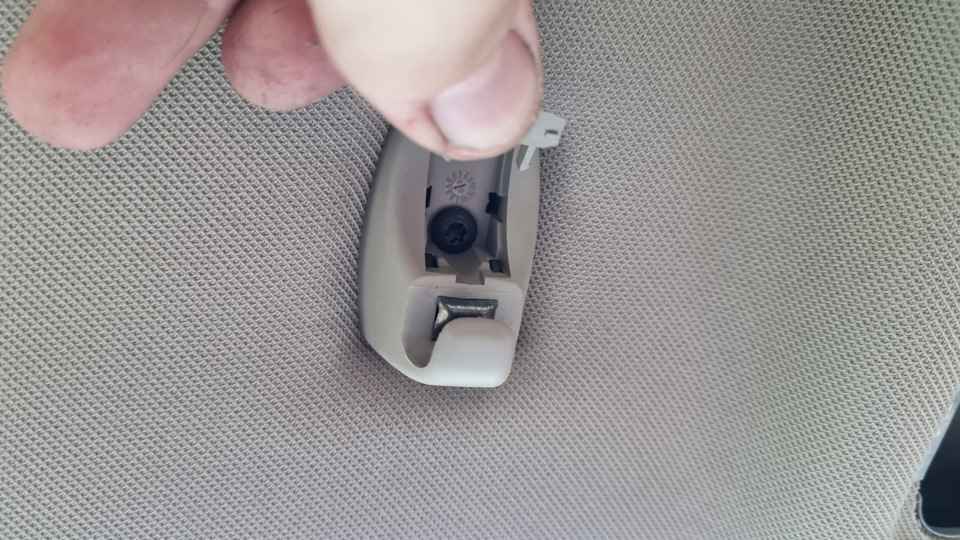
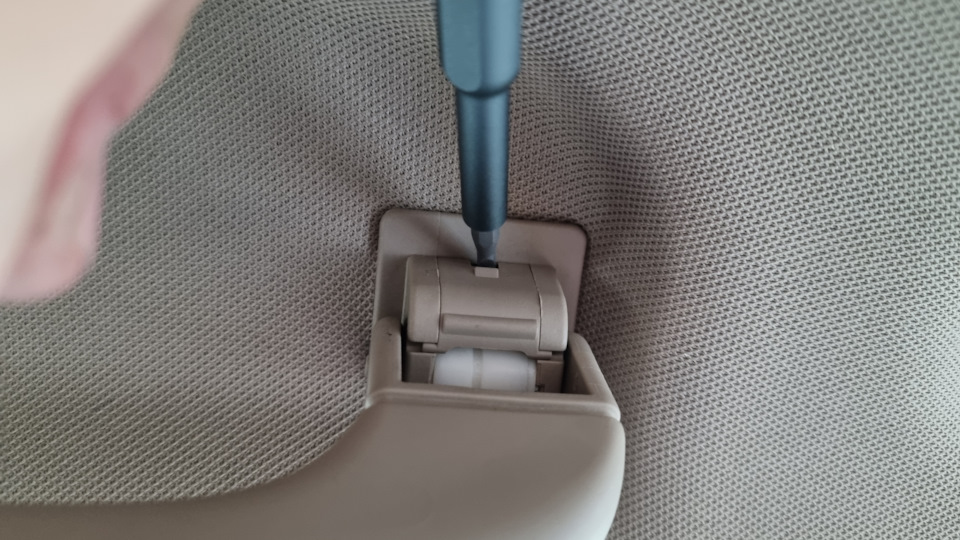
Выводим подготовку под установку к стеклам и ставим потолок на место
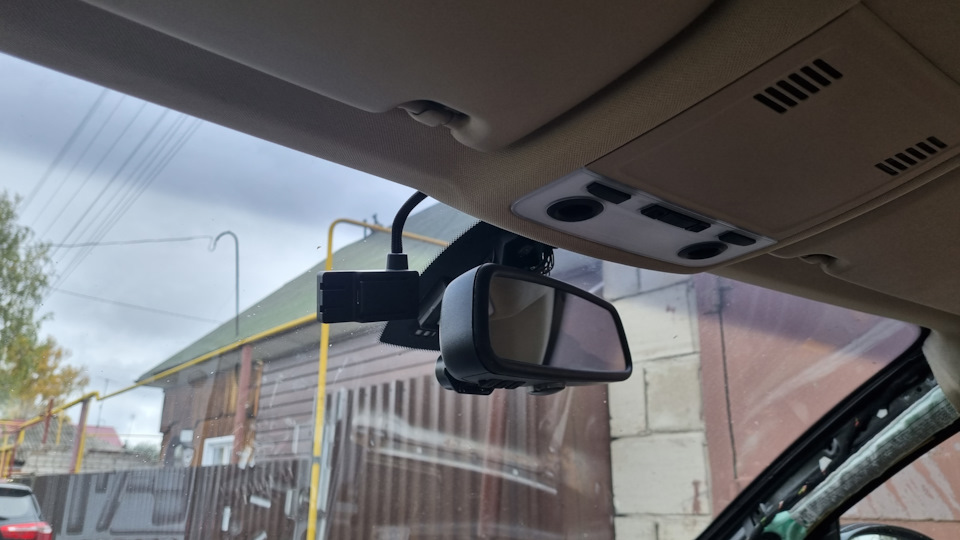
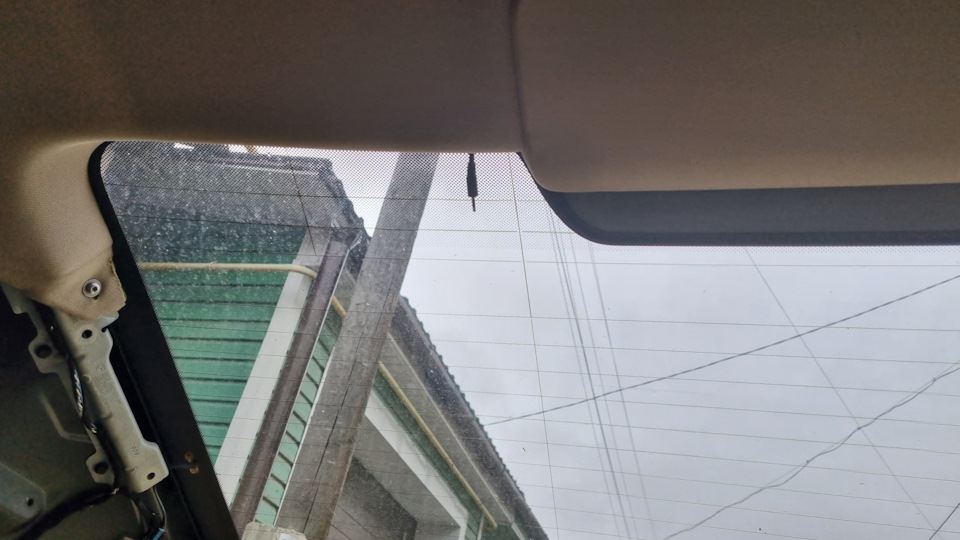
Но мы не ставим, а, параллельно, делаем еще один допил, о котором в следующем посте 😉
Table of Contents: BMW Advanced Car Eye Automobile Accessories Owner’s Manual
-
BMW Advanced Car Eye 72 I NFORMATION OF REGULATIONS EUROPE United States F CC ID: WHBFCAREYE20, WHBRCAREYE20 T his device complies with Part 15 of the FCC Rules. Operation is subjec t t o the following two conditions: (1) this device may not cause harmfu l i nterference, and (2) this device must accept any interference received , i ncluding interference that may cause undesired operation. C AUTION : Any Changes or modifications not expressly approved by th e m anufacturer could void the user’s authority to opera
-
BMW Advanced Car Eye 한국어 61 BMW Advanced Car Eye 전방 카메라 1. 카메라 렌즈 2. GPS 3. 레이더 4. 주차 모드에서 안전 LED가 깜박입니다(끄기 가능). 5. 리셋 버튼 – 기기 재시작 및 공장 설정으로 초기화(WLAN) 6. 마이크로 SD 슬롯 – 기기가 꺼진 상태에서만 카드를 삽입하거나 제거 하십시오. 7. 전원 버튼: – 카메라 ON/OFF 켜기: 짧게 누르기 끄기: 길게 누 르기(3초) – 포맷 시작, 10초 이내에 버튼 누르기 – 수동 기록(이미
-
BMW Advanced Car Eye 54
-
中文 39 安全提示 行驶期间切勿操作 行驶期间切勿操作 BMW Advanced Car Eye 的智 能手机应用程序,以防驾驶员分心。 为了您的安全,请留意并遵守所有其他安全提 示。应始终遵守法律法规。请获悉所在国是否允 许使用 ACE。 原则上不允许在网络中或经由其他途经发布由 ACE 拍摄的公共场所相关视频。 调试 将存储卡 (µSD) 插入设备。仅允许在关闭状态下 插入和取出存储卡,否则将损坏数据且可能导 致功能异常。为避免故障,请仅使�
-
50 安装 将安装文件“BMW Advanced Car Eye Viewer.msi”保存在您的计算机上。双击,然后文 件开始安装。请遵照说明。 一台高性能的 PC 是顺利运行视频高清回放的前 提。 否则可能导致播放时出现抖动和跳帧。 系统要求 具备高清视频硬件支持(显卡芯片),PC 搭载 1.5 GHz 双核处理器。无高清视频硬件支持,PC 搭载 2.5 GHz 双核处理器。 – 2 GB RAM – 60 MB 硬盘内存 – USB 2.0 插槽 – 起自 Windows XP SP3(32/64 �
-
BMW Advanced Car Eye BMW Advanced Car Eye Bedienungsanleitung 한국어 © 2017 BMW AG, München/독일 복사는 일부분이라도 반드시 독일 München의 BMW AG로부터 문서상 승인을 받아야 합니다. 친환경 종이에 독일에서 인쇄되었습니다 (무염소 표백 처리, 재사용 가능). 인쇄 오류, 오류 및 변경이 있을 수 있습니다. 55 내용 일반 정보 56 안전 지침 57 작동 준비 57 작동 58 스마트폰과 연결 58 작동 모드 59 이벤트 기록 59 저장 사용 60 수동 켜기/끄기 60
-
BMW Advanced Car Eye EN 35 Package – BMW ACE — front camera – BMW ACE — rear camera – Cable – 32 GB µSD card, class 10, MLC – Operating manual – Double screen film – Single ant-bubble film Maintenance If the ACE fails, contact an authorised BMW specialised dealer.
-
8 Betrieb Mit Einschalten der Zündung aktiviert das ACE automatisch den „Fahrmodus“ und zeichnet die Fahrt auf der µSD-Karte auf. Mit Abschalten der Zündung schaltet das ACE automatisch in den „Parkmodus“, in dem mittels Radar und Erschütterungssensor das Fahrzeug überwacht wird. Kommt eine Person auf Ihr Fahrzeug zu oder erfährt Ihr Fahrzeug einen Parkrempler, so aktiviert sich die Kamera und zeichnet das Geschehen in einem kurzen Video auf. Ist Ihr Fahrzeug längere Zeit abgestellt, so deaktiviert sic
-
EN 29 App start menu Start the App and activate your WLAN. The main menu appears. The functions are accessed by clicking on the icons, and, in certain cases, the recording can be paused. 1. Overview of events during parking; since switching the ignition off 2. Calling up the live image 3. Video replay: Overview of the videos stored in the device and on the smartphone; possibility of viewing (limited resolution) and downloading (full resolution). 4. Video replay: Overview of the events stored in the device and on the smartphone; possibility of viewing (limite
-
BMW Advanced Car Eye 70 세척 젖은 헝겊으로만 ACE를 세척하십시오. 커넥터에 물기가 묻지 않도록 주의하십시오. 전기 기기 폐기 기기를 더 이상 쓰지 못할 경우에는 환경 보호를 위해 가정용 쓰레기로 배출하지 말고 전문 폐기 업체에서 폐기하도록 하십시오. 전기/전자 기기 폐기에 관한 유럽 규정 2012/19/ EC 및 각 국내법 적용 사항에 따라 노후된 전기 기기는 별도로 수거하여 친환경적으로 재활용되 도록 처리해야 합니다. 노후된 기기를 폐기하는 방법은 관할 행정청에 문의하십시오.
-
BMW Advanced Car Eye 中文 47 运行模式 1. 行驶模式(车辆点火系统接通时启用) 2. 驻车模式(点火系统关闭且车辆停驻时启用) 默认: 针对城市区域采用中等灵敏度的雷达监控。仅当出现 近车移动或振动时触发摄录。 仅限事件:仅当出现振 动时触发摄录。 关闭:未监控 3. 拍摄信道: – 仅前置摄像机 @ 60 fps – 前置与后置摄像机 @ 30 fps 4. 行驶模式下的振动传感器灵敏度设置: 1(不灵敏) 至 5(极其灵敏);一旦振动传感器被触发,将发出 两次哔声并在“事件”文件夹中保�
-
BMW Advanced Car Eye 中文 53 电气设备废置 一旦设备报废,出于环保考虑,不可与生活垃圾 一同丢弃,而应对其采取适当废置。 根据关于报废电子与电气设备的欧盟准则 2012 / 19 / EC 及国内的转致适用法规,废弃的电气设 备必须加以独立收集,随后对其采取环保性回收 利用。 有关报废设备的废置方法,请咨询当地管理部 门。
-
28 BMW Advanced Car Eye Rear Camera 1. Camera lens 2. Radar 3. Connection cable plug
-
BMW Advanced Car Eye 12 BMW Advanced Car Eye Heckkamera 1. Kamera Linse 2. Radar 3. Stecker für das Verbindungskabel
-
DE 17 PC-Programm Zu Ihrer Kamera können Sie sich die PC- Software „BMW Advanced Car Eye Viewer“ kostenlos unter folgender Adresse herunterladen: http://www.AdvancedCarEye.com. Es handelt sich dabei um ein Videobetrachtungsprogramm, dass alle zusätzlich zum Video aufgezeichneten Informationen zum Bild synchronisiert anzeigt. Alternativ können Sie aber auch andere Vodeoplayer (z.B. VLC) nutzen. Installation Die Installationsdate „BMW Advanced Car Eye Viewer.msi” auf Ihrem Computer abspeichern. Ein Doppelklick und die Datei startet die Installat
-
BMW Advanced Car Eye 한국어 57 안전 지침 주행 중에는 조작하지 마십시오. 주행 중에는 운전자의 주의가 분산되지 않도록 BMW Advanced Car Eye의 스마트폰 앱을 조작 하지 마십시오. 사용자의 안전을 위해 모든 기타 안전 지침을 준 수하십시오. 법적 규정은 항상 준수해야 합니다. 귀하의 국가에서 ACE를 사용할 수 있는지 확인 하십시오. 원칙적으로 ACE 표시가 있는 비디오는 인터넷 또는 기타 출처를 통해 공개해서는 안 됩니다. 작동 준비 메모리 카드(마이크로 SD)를 기기 안으로 미십 시오. 기�
-
BMW Advanced Car Eye 中文 49 PC 程序 您可从以下网址为您的摄像机免费下载 PC 软 件“BMW Advanced Car Eye Viewer”:http:// www.AdvancedCarEye.com。 此为一款视频浏览程序,会将视频补充摄录的所 有信息与图像同步显示。当然,您也可使用其他 视频播放器(例如 VLC)。
-
BMW Advanced Car Eye Bedienungsanleitung 中文 © 2017 BMW AG,慕尼黑/德国 未经BMW AG(慕尼黑)书面授权, 不得翻印此说明书及其摘要。 在德国采用环保纸张印刷 (非氯漂白纸张,可以回收)。 可能会有印刷错误、误差和变更。 37 目录 一般信息 38 安全提示 39 调试 39 运行 40 连接智能手机 40 运行模式 41 事件记录 41 内存使用 42 手动开关 42 BMW Advanced Car Eye 前置摄像机 43 BMW Advanced Car Eye 后置摄像机 44 应用程序开始菜单 45 PC 程序 49 安装 50 系统要求 50
-
BMW Advanced Car Eye 中文 45 应用程序开始菜单 请启动应用程序并启用 WiFi。显示主菜单。 通过点击图标进入各项功能,其中个别功能运行期间拍摄将中断。 1. 驻车期间事件概览;自点火系统关闭起 2. 调用实时图像 3. 视频回放: 存储于设备与智能手机上的视频概览;可 选择查看(有限分辨率)与下载(全分辨率)。 4. 视频回放: 存储于设备与智能手机上的事件概览;可 选择查看(有限分辨率)与下载(全分辨率)。 5. 调用寻址程序(仅当手机在点火系统关闭时已连接至 ACE,数�
-
BMW Advanced Car Eye DE 11 BMW Advanced Car Eye Frontkamera 1. Kamera Linse 2. GPS 3. Radar 4. Sicherheits-LED blinkt im Parkmodus (abschaltbar) 5. Reset Taste – Neustart des Gerätes und Zurücksetzen auf Werkseinstellungen (WLAN) 6. Miro SD Schacht – Karte nur bei ausgeschaltetem Gerät einstecken und entnehmen 7. Power Taste: – Kamera EIN / AUS Einschalten: kurz drücken Ausschalten: lange drücken (3 Sek.) – Formatierung starten, Taste innerhalb von 10 Sek. Drücken – Manuelle Aufnahme (Bild oder Video) starten: kurz drücken 8. Lautsprecher 9. Mikrofon 10. Mikrofon EIN / AUS: – Kurz drück
-
BMW Advanced Car Eye 68 시스템 요구 사항 HD 비디오 하드웨어 지원(그래픽 칩셋) 기능이 있는 경우 1.5 GHz 듀얼코어 프로세서의 PC. HD 비디오 하드웨어 지원 기능이 없는 경우 최소 2.5 GHz 듀얼코어 프로세서의 PC. – 2 GB의 메모리 – 60 MB의 하드 디스크 – USB 2.0 슬롯 – 최소 Windows XP SP3(32/64비트) ~ Windows 8(32/64비트) – Direct-X 9.0 – 지도 표시를 위한 활성화된 인터넷 연결 – 최소 1024 x 768픽셀의 디스플레이 기술 데이터 카메라 전방 FHD(1920 x 1080), 30 fps / 60 fps 카메라 후방 FHD(1920
-
BMW Advanced Car Eye 기) South Korea KC ID : MSIP-CMM-MAI-CAREYE20 기자재의 명칭: 물체감지센서용 무선기기(24GHz 주파수대를 사용하는 기 모델명: BMW Advanced Car Eye 2.0 식별부호: MSIP-CMM-MAI-CAREYE20 상호: 모바일 어플라이언스 주식회사 제조자/제조국: 모바일 어플라이언스 주식회사 / 한 국 제조년월: 2017. ※ 사용자 안내문 제작자 및 설치자는 당해 무선설비가 전파혼신 가능성이 있으므로 인명�
-
BMW Advanced Car Eye 56 일반 정보 조작 설명서는 이 기기와 함께 제공됩니다. 여기 에는 안전, 사용 및 폐기에 관한 주요 지침이 포함 되어 있습니다. 기기를 사용하기 전에 모든 조작 및 안전 지침을 숙지하십시오. 기기는 설명된 대로만 지정된 사용 범위에서 사 용하십시오. 기기를 제삼자에게 전달할 때는 모든 문서를 함 께 인도하십시오. BMW는 안전, 기능 및 지속성과 관련하여 BMW 에서 검사하고 승인한 부품 및 부속품만 사용할 것을 권장합니다. BMW Advanced Car Eye(ACE) 사용에 관�
-
한국어 65 작동 모드 1. 주행 모드(차량의 점화 장치가 켜져 있는 경우 활성화) 2. 주차 모드(점화 장치가 꺼져 있고 차량이 주차된 경우 활성화) 기본: 도시 환경용의 중간 감도로 설정된 레이 더 모니터링. 차량 근처에서 움직임 또는 진동이 있을 때만 기록이 실행됩니다. 이벤트만: 진동이 있을 때만 기록이 실행됩니다. OFF: 모니터링하지 않음 3. 기록 채널: – 전방 카메라만, 60 fps – 전방 및
-
BMW Advanced Car Eye 32 System settings 1. GPS ON / OFF 2. Microphone ON / OFF 3. Speaker volume setting 4. Safety LED ON / OFF 5. Resetting to factory settings 6. Formatting SD card 7. Log Video 8. Setting manual recording 9. Cloud registration 10. Push Server registration (only with Connectivity Module)
-
中文 43 BMW Advanced Car Eye 前置摄像机 1. 摄像机镜头 2. GPS 3. 雷达 4. 驻车模式中,安全 LED 闪烁(可关闭) 5. 复位键 – 重启设备并恢复至出厂设置 (WiFi) 6. Miro SD 槽 – 仅在设备关闭时插入及取出存储卡 7. 电源键: – 摄像机开/关 开机:短按 关机:长按(3 秒) – 开始格式化,10 秒内按下按键 – 开始手动拍摄(照片或视频):短按 8. 扬声器 9. 麦克风 10. 麦克风开/关: – 短按,设备运行时 11. WiF
-
BMW Advanced Car Eye 64 설정 1. Wi-Fi 설정 변경 2. 작동 모드 설정으로 이동 – 주행 모드 – 주차 모드 – 기록 채널 – G 센서 감도(주행 모드) – G 센서 감도(주차 모드) – 레이더 감도 3. 시스템 설정: – GPS – 마이크 – 스피커 – 안전 LED – 공장 설정 – SD 카드 포맷 – 비디오 로그 – 수동 기록 – 클라우드 등록 – 푸시 서버 등록(Connectivity 모듈을 사용해서만 가능) 4. 비디오 오버레이: – 시간 – 날짜 5. 일반 �
-
BMW Advanced Car Eye 한국어 63 앱 시작 메뉴 앱을 시작하고 WLAN을 활성화하십시오. 메인 메뉴가 나타납니다. 아이콘을 누르면 기능 메뉴로 이동합니다. 이때 일부 기능은 사용 시 기록 과정이 중간에 멈출 수 있습 니다. 1. 점화 장치를 끈 후 주차 중 발생한 이벤트 개요 2. 라이브 이미지 불러오기 3. 비디오 재생: 기기 및 스마트폰에 저장된 비디오 개요, 시청(제한된 해상도) 및 다운로드(전체 해상도) 옵션 4. 비디오 재생: 기기 및 스마트�
-
BMW Advanced Car Eye DE 19 Lieferumfang – BMW ACE – Frontkamera – BMW ACE – Heckkamera – Kabel – 32 GB µSD Karte, class 10, MLC – Bedienungsanleitung – Zweimal Scheibenfolie – Einmal Anti-Blasenfolie Wartung Sollte das ACE ausfallen, wenden Sie sich bitte an einen autorisierten BMW Fachhändler.
-
BMW Advanced Car Eye 한국어 69 제공 제품 – BMW ACE – 전방 카메라 – BMW ACE – 후방 카메라 – 케이블 – 32 GB 마이크로 SD 카드, Class 10, MLC – 조작 설명서 – 2개의 필름 – 1개의 충격 방지 에어캡 정비 ACE가 고장 나는 경우에는 공인된 BMW 딜러에 게 문의하십시오.
-
BMW Advanced Car Eye 20 Reinigung Reinigen Sie das ACE ausschließlich mit einem feuchten Tuch. Achten Sie darauf, dass keine Feuchtigkeit in die Anschlussstecker gelangt. Entsorgung von Elektrogeräten Werfen Sie Ihr Gerät, wenn es ausgedient hat, im Interesse des Umweltschutzes nicht in den Hausmüll, sondern führen Sie es einer fachgerechten Entsorgung zu. Gemäß Europäischer Richtlinie 2012 / 19 / EC über Elektro- und Elektronik-Altgeräte und Umsetzung in nationales Recht müssen verbrauchte Elektrogeräte getrennt gesammelt und einer umweltgerechten Wiederverwertung zugeführt werden. Möglichkeiten zur Entsorgung
-
BMW Advanced Car Eye 44 BMW Advanced Car Eye 后置摄像机 1. 摄像机镜头 2. 雷达 3. 连接电缆插头
-
EN 27 BMW Advanced Car Eye Front Camera 1. Camera lens 2. GPS 3. Radar 4. Safety LED flashes in Park Mode (can be switched off) 5. Reset button – Restarting the device and resetting to factory settings (WLAN) 6. Micro SD slot – Insert and remove the card only when the device is switched off 7. Power button: – Switching the camera ON / OFF: brief push Switching off: long push (3 seconds) – Starting the formatting, push the button within 10 seconds – Starting manual recording (image or video): brief push 8. Speaker 9. Microphone 10. Microph
-
BMW Advanced Car Eye 한국어 59 작동 모드 주행 모드 점화 장치를 켜는 즉시 자동으로 시작됩니다. 이제 계속해서 비디오가 녹화되고 1분간의 시퀀 스 영상으로 메모리 카드에 기록됩니다. 주차 모드 점화 장치를 끄는 즉시 주차 모드가 활성화됩니 다. 차량이 진동하거나 레이더 센서가 움직이면 각 각 20초간의 시퀀스 영상으로 비디오가 녹화됩 니다. 이때 진동으로 인해 녹화되는 비디오는 SD 카드 의 ‘이벤트’ 폴더에 저장되고, 센서의 움직�
-
中文 51 技术数据 摄像机 前置 FHD (1920 x 1080) @ 30 fps / 或 60 fps 摄像机 后置 FHD (1920 x 1080) @ 30 fps CPU 450 MHz 内存 256 MB DDR3 SD 卡 32 GB µSD,class 10,MLC Wi-Fi & BLE 2.4 GHz RADAR 24 GHz 格式 AVI-Container(视频: H.264 / 音频:PCM) / FAT 文件系统 备用电源 Super-Cap 5,4V – 3,5F GPS GPS & GLONASS 工作电压 12V 运行温度 -40°C ~ + 85°C 储存温度 -30°C ~ + 80°C 内存需求 采用双信道模式(前置与后
-
BMW Advanced Car Eye 中文 41 运行模式 行驶模式 一旦接通点火系统,该模式将自动启动。 此时将持续拍摄视频,然后以每段一分钟的连续 片段写入存储卡。 驻车模式 一旦关闭点火系统,将自动启用驻车模式。 雷达传感器前方出现移动或车辆发生振动时,将 相应记录一个持续 20 秒的片段。 其中,因振动而录制的视频保存在 SD 卡的“事 件”文件夹中,而由移动引发的录制视频则保存 在“驻车”文件夹中。 驻车模式中设备将监测自身的电�
-
BMW Advanced Car Eye DE 15 Betriebsmodi 1. Fahrmodus (aktiv während die Zündung vom Fahrzeug eingeschaltet ist) 2. Parkmodus (aktiv wenn die Zündung ausgeschaltet und das Fahrzeug geparkt wird) Standard: Radarüberwachung mit mittlerer Empfindlichkeit für städtisches Umfeld. Nur Bewegungen nahe am Fahrzeug oder Erschütterungen lösen eine Aufzeichnung aus. Nur Event: Nur Erschütterungen lösen eine Aufzeichnung aus. Aus: Keine Überwachung 3. Aufnahmekanäle: – nur Frontkamera @ 60 fps – Front- und Heckkamera @ 30 fps 4. Empfindlichkeitseinstellungen Erschütteru
-
BMW Advanced Car Eye 58 작동 점화 장치를 켜면 ACE가 자동으로 ‘주행 모드’를 활성화하고 마이크로 SD 카드에 주행 영상을 녹 화합니다. 점화 장치를 끄면 ACE가 자동으로 ‘주차 모드’를 켜고 레이더 및 진동 센서를 통해 차량이 모니터 링됩니다. 보행자가 차량 쪽으로 접근하거나 차량이 주차 시 충돌을 감지하면 카메라가 활성화되고 해당 상황을 짧은 비디오로 녹화합니다. 차량이 오랫 동안 주차해 있는 경우에는 지정된 에너지를 사 용한 후 레이더 시스템이 비활성화되고 차량
-
BMW Advanced Car Eye 6 Allgemeine Informationen Die Bedienungsanleitung ist Bestandteil dieses Gerätes. Sie enthält wichtige Hinweise für Sicherheit, Gebrauch und Entsorgung. Machen Sie sich vor der Benutzung des Geräts mit allen Bedien- und Sicherheitshinweisen vertraut. Benutzen Sie das Gerät nur wie beschrieben und für die angegebenen Einsatzbereiche. Händigen Sie alle Unterlagen bei Weitergabe des Geräts an Dritte mit aus. BMW empfiehlt, nur von BMW in Bezug auf die Sicherheit, Funktion und Nachhaltigkeit getestete und genehmigte Teile und Zubehörteile zu verwenden. Wenn Sie Fragen zur Nutzung Ihres BMW Advanced Car Eye
-
BMW Advanced Car Eye 10 Speichernutzung Die Speicherkarte wird vom System für jeden Betriebsmodus in unterschiedliche Bereiche geteilt (Fahren, Parken, Event). In jedem Speicherbereich wird die jeweils älteste Aufzeichnung durch die neueste überschrieben. Sichern Sie daher die Daten sofort, wenn etwas passiert ist. Sie können sich die Daten über die ACE App auf Ihr Smartphone herunterladen oder entnehmen Sie die SD-Karte (nach dem Ausschalten des Gerätes) um ein Überschreiben der Dateien zu verhindern. Wenn Sie die SD- Karte am PC bearbeiten und anschließend wieder mit der Kamera benutzen, wird die SD- Karte formatiert. D. h. alle vorhan
-
BMW Advanced Car Eye 14 Einstellungen 1. Wi-Fi Einstellungen ändern 2. Zu den Einstellungen der Betriebsmodi – Fahrmodus – Parkmodus – Aufnahmekanäle – Empfindlichkeit G-Sensor (Fahrmodus) – Empfindlichkeit G-Sensor (Parkmodus) – Empfindlichkeit Radar 3. Systemeinstellungen: – GPS – Mikrofon – Lautsprecher – Sicherheits-LED – Werkseinstellungen – SD Karte Formatieren – Log Video – Manuelle Aufnahme – Registrierung Cloud – Registrierung Push Server (nur mit Connectivity Modul möglich) 4. Videoeinblendungen: – Zei
-
한국어 67 PC 프로그램 카메라용 PC 소프트웨어 ‘BMW Advanced Car Eye Viewer’를 다음과 같은 주소에 서 무료로 다운로드할 수 있습니다. http:// www.AdvancedCarEye.com 이는 비디오 모니터링 프로그램으로, 비디오 외 에 추가로 기록된 모든 정보를 이미지와 동기화 하여 표시합니다. 또한, 다른 비디오 플레이어(예: VLC)를 사용할 수도 있습니다. 설치 설치 파일 ‘BMW Advanced
-
BMW Advanced Car Eye DE 7 Sicherheitshinweise Nicht während der Fahrt bedienen. Bedienen Sie die Smartphone App Ihres BMW Advanced Car Eye nicht während der Fahrt, damit der Fahrer nicht abgelenkt wird. Bitte beachten und befolgen Sie zu Ihrer Sicherheit auch alle weiteren Sicherheitshinweise. Gesetzliche Bestimmungen sind immer einzuhalten. Bitte informieren Sie sich, ob in Ihrem Land die Nutzung des ACE erlaubt ist. Grundsätzlich ist es nicht erlaubt mit dem ACE aufgezeichnete Videos öffentlicher Orte im Internet oder anderen Quellen zu publizieren. Inbetriebnahme Schieben Sie die Speicherkarte (µSD) in das Gerä
-
34 System requirements With HD video support hardware (graphic chip), PC with dualcore processor 1.5 Ghz. Without HD video support hardware, PC with dualcore processor min. 2.5 Ghz. – 2 GB RAM – 60 MB hard disc storage – USB 2.0 socket – Above Windows XP SP3 (32/64/ Bit — Windows 8 (32/64 Bit) – Direct-X 9.0 – Active internet connection for card representation – 1024X768 pixel display (minimum) Technical data Front camera FHD (1920 x 1080) @ 30 fps / or 60 fps Rear camera FHD (1920 x 1080) @ 30 fps CPU 4
-
Original BMW Zubehör Bedienungsanleitung Freude am Fahren BMW Advanced Car Eye BEDIENUNGSANLEITUNG. ORIGINAL BMW ZUBEHÖR. Original BMW Zubehör Bedienungsanleitung Freude am Fahren BMW Advanced Car Eye BEDIENUNGSANLEITUNG. ORIGINAL BMW ZUBEHÖR.
-
BMW Advanced Car Eye 40 运行 点火系统接通后,ACE 自动启用“行驶模式”并将 行驶情况记录在 µSD 卡上。 点火系统关闭后,ACE 自动切换至“驻车模式”, 此时借助雷达与振动传感器监测车辆。当有人进 入车辆或车辆发生泊车碰撞情况时,摄像机将自 动启动并将发生的事件记录在短视频中。 如果您的车辆停驻时间较长,雷达系统将在消耗 设定的电量数后自动停用,仅通过振动传感器监 测车辆。 连接智能手机 原则上,即使未连接智能手�
-
24 Operation When the ignition is switched on, the ACE automatically activates the “Drive Mode” and records the journey on the µSD. When the ignition is switched off, the ACE automatically switches to “Park Mode” where the vehicle is monitored using radar and vibration sensors. If a person approaches the vehicle or if the vehicle detects parking contact, the camera is activated and records the event on a brief video. If your vehicle is parked for an extended period, the radar syste
-
16 Systemeinstellungen 1. GPS EIN / AUS 2. Mikrofon EIN / AUS 3. Lautsprecher Einstellung Lautstärke 4. Sicherheits-LED EIN / AUS 5. Auf Werkseinstellungen zurücksetzen 6. SD Karte formatieren 7. Log Video 8. Einstellung manuelle Aufnahme 9. Registrierung Cloud 10. Registrierung Push Server (nur mit Connectivity Modul möglich)
-
BMW Advanced Car Eye EN 25 Operating modes Drive mode Is started automatically as soon as the ignition is switched on. A video is recorded continuously and is written to the memory card in one-minute sequences. Park mode The park mode is activated as soon as the ignition is switched off. If the vehicle detects vibration or movement in front of the radar sensors, a 20 second sequence is recorded in each case. Videos that are recorded as a result of vibration are saved in the “Event” folder, and videos that are recorded as a result of movement are saved in the “Parking” fol
-
BMW Advanced Car Eye 30 Settings 1. Changing the Wi-Fi settings 2. To operating mode settings – Drive mode – Park mode – Recording channels – Sensitivity of G Sensor (Drive Mode) – Sensitivity of G Sensor (Park Mode) – Sensitivity of radar 3. System settings: – GPS – Microphone – Speaker – Safety LED – Factory settings – Formatting SD card – Log Video – Manual recording – Cloud registration – Push Server registration (only with Connectivity Module) 4. Video displays: – Time – Date 5. Legal notice 6. Leg
-
EN 23 Safety information Do not operate when driving. Do not us the smartphone App on your Advanced Car Eye when you are driving to prevent distracting the driver. Observe and comply with all the other safety instructions for your safety. The legal stipulations must be observed at all times. Please check that the ACE can be used in your country. It is categorically prohibited to publish videos of public places recorded using the ACE on the internet and in other sources. Commissioning Slide the memory card (µSD
-
26 Memory use The memory card is split into various different areas for each operating mode by the system (Drive, Park, Event). In each memory area, the oldest recording is overwritten by the newest one, in each case. So you should secure the data immediately if anything has happened. You can download the data to your smartphone via the ACE App or you can remove the SD card (after switching the device off) to prevent overwriting the files. If you process the SD card on a PC, and then reuse it with the camera, the SD card will be formatt
-
BMW Advanced Car Eye Bedienungsanleitung DE © 2017 BMW AG, München/Deutschland Nachdruck, auch auszugsweise, nur mit schriftlicher Genehmigung der BMW AG, München. Gedruckt in Deutschland auf umweltfreundlichem Papier (chlorfrei gebleicht, wiederverwertbar). Druckfehler, Irrtümer und Änderungen vorbehalten. 5 Inhalt Allgemeine Informationen 6 Sicherheitshinweise 7 Inbetriebnahme 7 Betrieb 8 Koppelung mit dem Smartphone 8 Betriebsmodi 9 Ereignisaufnahmen 9 Speichernutzung 10 Manuelles Ein- und Ausschalten 10 BMW Advanced Car Eye Frontkamera 11 BMW Advanced Car Eye Heckkamera
-
36 Cleaning Only clean the ACE with a damp cloth. Ensure that no moisture gets into the connection plug. Disposal of electrical devices To protect our environment, do not dispose of the device in the domestic waste when it has reached the end of its service life, but instead send it for proper disposal. Under European Directive 2012 / 19 / EC on waste electrical and electronic equipment and its implementation in national law, waste electrical and electronic equipment must be collected separately and sent for environmentally friendly recycling. Your local or municipal council can provide det
-
BMW Advanced Car Eye DE 13 Startmenü der App Starten Sie die App und aktivieren Sie Ihr WLAN. Es erscheint das Hauptmenü. In die Funktionen kommen Sie durch Antippen der Icons, dabei kann bei manchen Funktionen die Aufnahme zwischenzeitlich angehalten werden. 1. Übersicht über die Ereignisse während dem Parken; seit Abschalten der Zündung 2. Livebild aufrufen 3. Video-Wiedergabe: Übersicht der auf dem Gerät und Smartphone gespeicherten Videos; Möglichkeit zum Ansehen (begrenzte Auflösung) und Downloaden (volle Auflösung). 4. Video-Wiedergabe: Übersicht der auf dem Gerät und Smartphone gespeich
-
46 设置 1. 更改 Wi-Fi 设置 2. 关于运行模式设置 – 行驶模式 – 驻车模式 – 拍摄信道 – 重力感应传感器的灵敏度(行驶模式) – 重力感应传感器的灵敏度(驻车模式) – 雷达灵敏度 3. 系统设置: – GPS – 麦克风 – 扬声器 – 安全 LED – 出厂设置 – SD 卡格式化 – 视频日志 – 手动拍摄 – 注册 Cloud – 注册 Push Server(仅限组合连接模块可用) 4. 视频叠加: – 时间 – 日期 5. 版本说明 6. 法律提示 7. 软件版本: – 更新选项 – 重置 WiF
-
38 一般信息 本操作说明为此设备的组成部分。它包含有关安 全、使用与废置的重要信息。使用此设备前,请 先熟悉所有操作及安全提示。 请仅按照说明使用设备,且仅将其用于规定的应 用范围。 向第三方转交设备时,请一并交付所有文件资 料。 BMW 建议,仅使用在安全、功能和耐久性方面 经由 BMW 测试并许可的零件与配件。 如您对 BMW Advanced Car Eye (ACE) 的使用存 有疑问,请咨�
-
52 维护 如若 ACE 故障,请咨询经授权的 BMW 专业经 销商。 清洁 仅使用湿布清洁 ACE。 请注意切勿沾湿连接插头。
-
BMW Advanced Car Eye Bedienungsanleitung EN © 2017 BMW AG, Munich, Germany Reproduction, even in excerpt form, only permitted with the written approval of BMW AG, Munich. Printed in Germany on environmentally friendly paper (bleached without chloride, recyclable). Subject to misprints, errors and changes. 21 Contents General information 22 Safety information 23 Commissioning 23 Operation 24 Coupling to your smartphone 24 Operating modes 25 Event recordings 25 Memory use 26 Switching on and off manually 26 BMW Advanced Car Eye Front Camera 27 BMW Advan
-
42 内存使用 针对各个运行模式,系统将存储卡分为不同的区 域(行驶、驻车、事件)。各个存储区域中最早 的录制内容将分别被最新的录制内容所覆盖。因 此,如有事情发生,请立即保存数据。您可经由 ACE 应用程序自行将数据下载至智能手机,或者 (设备关闭后)取出 SD 卡以防文件被覆盖。如 您在 PC 上编辑 SD 卡,随后将其重新装入摄像 机使用,则 SD 卡将被格式化。�
-
BMW Advanced Car Eye 62 BMW Advanced Car Eye 후방 카메라 1. 카메라 렌즈 2. 레이더 3. 연결 케이블용 커넥터
-
BMW Advanced Car Eye 22 General information The operating manual is an integral part of this device. It contains important information relating to safety, use and disposal. Familiarise yourself with all the operating and safety instructions before using the device. Only use the device as described and for the specified purposes. Give all the documents to the next owner if you sell or pass on the device. BMW recommends using only parts and accessories tested and approved by BMW with regard to safety, function and sustainability. If you have any questions about the use of your BMW Advanced Car E
-
EN 33 PC Programme You can download the free PC software “BMW Advanced Car Eye Viewer” from the following location: http://www.AdvancedCarEye.com. This is a video viewing programme which displays all the additional information recorded to the video, synchronised with the image. Alternatively, you can also use other video players (e.g. VLC). Installation Save the installation file “BMW Advanced car Eye Viewer.msi” to your computer. A double click starts the installation via the file.
-
BMW Advanced Car Eye 60 저장 사용 메모리 카드는 시스템에서 각 작동 모드에 따라 여러 영역으로 구분됩니다(주행, 주차, 이벤트). 각 저장 영역에서는 오래된 데이터가 새로운 데 이터로 덮어 쓰입니다. 그러므로 무언가 기록된 경우에는 데이터를 즉시 별도로 저장하십시오. ACE 앱을 통해 스마트폰에 데이터를 다운로드하 거나 SD 카드를 제거하여(기기를 끈 후) 데이터 가 덮어 쓰이는 것을 방지할 수 있습니다. SD 카 드를 PC에
-
66 시스템 설정 1. GPS ON/OFF 2. 마이크 ON/OFF 3. 스피커 스피커 설정 4. 안전 LED ON/OFF 5. 공장 설정으로 초기화 6. SD 카드 포맷 7. 비디오 로그 8. 수동 기록 설정 9. 클라우드 등록 10. 푸시 서버 등록(Connectivity 모듈을 사용해서만 가능)
-
18 Systemanforderungen Mit Hardware HD-Video-Unterstützung (Grafikchip), PC mit Dualcore Prozessor 1,5 GHz. Ohne Hardware HD-Video-Unterstützung, PC mit Dualcore Prozessor min. 2,5 GHz. – 2 GB RAM – 60 MB Festplatten Speicher – USB 2.0 Steckplatz – Ab Windows XP SP3 (32/64/ Bit – Windows 8 (32/64 Bit) – Direct-X 9.0 – Aktive Internetverbindung für Kartendarstellung – Display mit min. 1024×768 Pixel Technische Daten Kamera Front FHD (1920 x 1080) @ 30 fps / oder 60 fps Kamera Heck FHD (1920 x 1080) @ 30 fps CPU 450 MHz Speicher 256 MB DDR3 SD-Kar
-
BMW Advanced Car Eye BMW Advanced Car Eye Bedienungsanleitung 5 DE BMW Advanced Car Eye Instructions for use 21 EN BMW Advanced Car Eye 操作说明书 37 中文 BMW Advanced Car Eye 사용 설명서 55 한국어
-
BMW Advanced Car Eye 48 系统设置 1. GPS 开/关 2. 麦克风开/关 3. 扬声器 音量设置 4. 安全 LED 开/关 5. 恢复至出厂设置 6. SD 卡格式化 7. 视频日志 8. 手动拍摄设置 9. 注册 Cloud 10. 注册 Push Server(仅限组合连接模块可用)
-
BMW Advanced Car Eye RF Specification WiFi Supported Protocol and Standard : IEEE 802.11b, IEEE 802.11g, IEEE 802.11n Frequency Range : 2400MHz ~ 2483.5MHz Amount of Working channel : 1-11 (America) 1-13 (Korea, China, Europe) Channel Bandwidth : 20MHz, 40MHz Modulation : DSSS / CCK / OFDM Output Power : 10mW / MHz 이하 (Korea) 10 dBm± 1 dB (General) Bluetooth Low Energy Supported Protocol and Standard : Bluetooth v4.2 Low Energy Frequency Range :
-
BMW Advanced Car Eye Mehr über BMW www.bmw.de www.bmw.com Freude am Fahren 0.3
-
BMW Advanced Car Eye EN 31 Operating modes 1. Drive mode (active when the vehicle ignition is switched on) 2. Park mode (active when the ignition is switched off and the vehicle is parked) Standard: Radar monitoring with medium sensitivity for urban environment. Only movement close to the vehicle or vibration trigger a recording. Event only: Only vibration triggers a recording. Off: No monitoring 3. Recording channels: – only front camera @ 60 fps – Front and rear camera @ 30 fps 4. Sensitivity settings Vibration sensor in drive mode: 1 insensitive to 5 very sensitive; if the vibra

Confidentiality Request Letter
FCC ID 부여규칙 이경택 RF schi@xessone Sean Chi Confidentiality Request THINKWARE CORPORATION ACE3 Car Dash Cam Front Camera 2ADTG 2ADTGACE3 ace3
THINKWARE CORPORATION A, 9FL., Samwhan Hipex,240, Pangyoyeok-ro, Bundang Seongnam-si, Gyeonggi-do South Korea Date: 11/23/2021 Federal Communications Commission Authorization and Evaluation Division 1435 Oakland Mills Road Columbia, MD 21046 Request of Confidentiality FCC ID: 2ADTG-ACE3 To Whom I…
lang:en score:51 filesize: 29.52 K page_count: 1 document date: 2021-11-24

Agent Authorization
FCC ID 부여규칙 이경택 RF schi@xessone Sean Chi Authorization Letter THINKWARE CORPORATION ACE3 Car Dash Cam Front Camera 2ADTG 2ADTGACE3 ace3
THINKWARE CORPORATION A, 9FL., Samwhan Hipex,240, Pangyoyeok-ro, Bundang Seongnam-si, Gyeonggi-do So … on our behalf in all manners relating to application for equipment authorization for FCC ID: 2ADTG-ACE3 including signing of all documents relating to these matters. Any and all acts carried out by G…
lang:en score:51 filesize: 23.89 K page_count: 1 document date: 2021-11-23

Decleration of Conformity
Microsoft Word Advanced Car Eye 3 0 Int Photo doc mood414 Internal THINKWARE CORPORATION ACE3 2ADTG 2ADTGACE3 ace3
View 1 FCC ID: 2ADTG-ACE3 Copyright 2021, DT C Co., Ltd. View 2 FCC ID: 2ADTG-ACE3 Copyright 2021, DT C Co., Ltd. View 3 FCC ID: 2ADTG-ACE3 Copyright 2021, DT C Co., Ltd. View 4 FCC ID: 2ADTG-ACE3 Copyright 2021, DT C Co., Ltd. View 5 FCC ID: 2ADTG-ACE3 Copyright 2021, DT C Co…
lang:i-klingon score:50 filesize: 3.56 M page_count: 8 document date: 2021-11-23

Decleration of Conformity Test Report
Microsoft Word Advanced Car Eye 3 0 FCC declaration Letter r1 doc jjlee Declaration THINKWARE CORPORATION ACE3 Dash Cam Front Camera 2ADTG 2ADTGACE3 ace3
THINKWARE CORPORATION A, 9FL., Samwhan Hipex,240, Pangyoyeok-ro, Bundang Date: 10/28/2021 Federal Communications Commission Authorization and Evaluation Division 1435 Oakland Mills Road Columbia, MD 21046 Declaration Letter FCC ID: 2ADTG-ACE3 To Whom It May Concern: This device is integrated with th…
lang:en score:50 filesize: 105.34 K page_count: 1 document date: 2021-11-24

Decleration of Conformity Product Photos
Microsoft Word Advanced Car Eye 3 0 Test Photo doc mood414 THINKWARE CORPORATION ACE3 2ADTG 2ADTGACE3 ace3
Test Setup photographs EUT Position: X-axis FCC ID: 2ADTG-ACE3 EUT Position: Y-axis EUT Position: Z-axis Copyright 2021, DT C Co., Ltd. FCC ID: 2ADTG-ACE3 Test Setup Photo of Radiated Measurement 0.009 — 30MHz Copyright 2021, DT C Co., Ltd. FCC ID: 2ADTG-ACE3 Test Setup Photo of Radiated…
lang:en score:49 filesize: 1.63 M page_count: 4 document date: 2021-11-23

Decleration of Conformity
Microsoft Word Advanced Car Eye 3 0 Ext Photo doc mood414 External THINKWARE CORPORATION ACE3 2ADTG 2ADTGACE3 ace3
View 1 FCC ID: 2ADTG-ACE3 Copyright 2021, DT C Co., Ltd. View 2 FCC ID: 2ADTG-ACE3 Copyright 2021, DT C Co., Ltd. View 3 FCC ID: 2ADTG-ACE3 Copyright 2021, DT C Co., Ltd. View 4 FCC ID: 2ADTG-ACE3 Copyright 2021, DT C Co., Ltd. …
lang:en score:49 filesize: 1.84 M page_count: 4 document date: 2021-11-23

MPE Calculation FCC xls jjlee THINKWARE CORPORATION ACE3 Car Dash Cam Front Camera 2ADTG 2ADTGACE3 ace3
FCC ID: 2ADTG-ACE3 MPE Calculation RF feature Mode Frequency range MHz Max Target Power dBm ANT Gain dBi Maximum EIRP dBm Maximum power Maximum EIRP density mW mW/cm2 Requirement mW/cm2 Bluetooth LE 1Mbps 2402.00 — 2480.00 1.00 0.21 1.21 1.322 0.001 1.000 WLAN 802…
lang:en score:44 filesize: 135.05 K page_count: 1 document date: 2021-11-24

User Manual Specifications Guide Accessories
User Manual THINKWARE CORPORATION ACE3 2ADTG 2ADTGACE3 ace3
3.0 User Guide 3.0 User Guide BMW Advanced Car Eye 3.0 Contents General information 3 Legal regulations 4 Safety information 4 Symbols used 4 Product overview 4 Included items 4 microSD Card 4 Front camera 5 Rear camera optional 5 Checking the status LED 6 Using the product features 7 Driving…
lang:en score:30 filesize: 1.49 M page_count: 16 document date: 2021-11-01

Label
mood414 Label and Location THINKWARE CORPORATION ACE3 Car Dash Cam Front Camera 2ADTG 2ADTGACE3 ace3
…
lang:en score:19 filesize: 352.74 K page_count: 1 document date: 2021-11-23

Test Report
Will RF Test Report UNII WLAN THINKWARE CORPORATION ACE3 Car Dash Cam Front Camera 2ADTG 2ADTGACE3 ace3
…
lang:en score:19 filesize: 2.21 M page_count: 44 document date: 2021-11-24

Test Report
318 Will Microsoft Corporation RF Test Report DTS WLAN THINKWARE CORPORATION ACE3 Car Dash Cam Front Camera 2ADTG 2ADTGACE3 ace3
…
lang:en score:18 filesize: 4.51 M page_count: 68 document date: 2021-11-24

Test Report
65 Will Microsoft Corporation RF Test Report DTS LE THINKWARE CORPORATION ACE3 Car Dash Cam Front Camera 2ADTG 2ADTGACE3 ace3
…
lang:en score:18 filesize: 1.07 M page_count: 19 document date: 2021-11-24

Microsoft Word NTC1712033FV00 WIFI BT combo Module 8223A SR FCC ID BLE Administrator Report for THINKWARE CORPORATION ACE3 Car Dash Cam Front Camera 2ADTG 2ADTGACE3 ace3
…
lang:en score:16 filesize: 1.58 M page_count: 35 document date: 2017-12-22

Label
Microsoft Word LABEL Location ACE3 0PRO Front docx mood414 Label Information THINKWARE CORPORATION ACE3PROF Car Dash Cam Camera 2ADTG 2ADTGACE3PROF ace3prof
LABEL Location Car Dash Cam Front Camera / Advanced Car Eye 3.0 PRO …
lang:en score:9 filesize: 208.06 K page_count: 1 document date: 2022-01-21

Label
Microsoft Word LABEL Location ACE3 0PRO Rear R1 1 docx hsshim Label Sample THINKWARE CORPORATION ACE3PROR Car Dash Cam Camera 2ADTG 2ADTGACE3PROR ace3pror
LABEL Location Car Dash Cam Rear Camera / Advanced Car Eye 3.0 PRO . …
lang:en score:9 filesize: 210.45 K page_count: 1 document date: 2022-01-21
Настройка даты и времени
Система ACE 2.0 устанавливает время и дату
автоматически по GPS-координатам (UTC)
(для этого система ACE 2.0 должна принимать
сигнал от спутника).
Коррекция времени, т. е. выбор летнего
и зимнего времени, осуществляется при
синхронизации со смартфоном (для этого
необходимо выполнить сопряжение системы
ACE 2.0 со смартфоном).
Сопряжение со смартфоном
Для использования системы ACE 2.0 со
смартфоном (на базе iOS или Android) сначала
загрузите бесплатное приложение Advanced
Car Eye 2.0 (приложение ACE 2.0) из
магазина приложений: iTunes (iOS), Google
Play Store (Android) или Tencent App Store
(Android).
В приложении ACE 2.0 будет использоваться
язык интерфейса смартфона.
Чтобы выполнить сопряжение смартфона с
системой ACE 2.0, активируйте модуль Wi-
Fi на смартфоне и установите соединение с
точкой доступа:
SSID: BMWACE2.0
Стандартный пароль: 1234567890
Также отключите на смартфоне функцию
энергосбережения. На некоторых смартфонах
при включенном энергосбережении
возможны разрывы соединения с системой
ACE 2.0.
Некоторые модели смартфонов также не
поддерживают постоянное соединение с
другими устройствами по Wi-Fi.
190
При первом запуске приложения ACE 2.0
вам будет предложено выбрать один из двух
вариантов дизайна: в стиле BMW или в стиле
MINI. Изменить дизайн можно только путем
удаления и повторной установки приложения
ACE 2.0.
Система предложит изменить
стандартный пароль (мин. 8 символов)
и SSID в приложении ACE 2.0, см.
пункт «Настройки» > «Wi-Fi» (см.
раздел
«Приложение
изменения пароля и SSID необходимо
повторно подключиться к точке
доступа Wi-Fi, используя заданный
идентификатор SSID и новый пароль.
Систему ACE 2.0 можно использовать с
базовыми настройками и без соединения со
смартфоном.
Но для этого все же требуется первичное
сопряжение со смартфоном для правильной
настройки даты и времени (см. раздел
«Настройка даты и
времени»).
Звуковые уведомления будут информировать
вас о рабочем состоянии системы ACE 2.0.
Записи можно также посмотреть с помощью
проигрывателя на компьютере (например,
Windows Media Player, VLC и т. д.), вставив
карту microSD в устройство для считывания
карт памяти, подключенное к ПК или MAC.
ACE 2.0″). После
Table of Contents: BMW Advanced Car Eye 3.0 Engine Owner’s Manual
-
4 Legal regulations Theuserstakefullresponsiblitiyforchecking thelocallegalrequirementsforusingtheACE 3.0andAdvancedCarEye3.0application (hereinafterreferredtoasthe“ACE3.0App”). You must check the current laws in the relevant countries and check whether the product is allowed to be used and its permitted uses to complywiththelegalregulations. Insomecircumstances,mediadatamayalsobe
-
BMW Advanced Car Eye 3.0 3 General information BMW recommends that you only use parts and accessories which have been tested andapprovedbyBMWwithregardtosafety, functionandsustainability. BMWreservestherighttochangeormodify anyoftheinformationorspecicationsinthis userguidewithoutpriornoticeorobligation. The most up-to-date user guide is available on theAdvancedCarEye3.0applicationandat thefollowingwebsite:https://www.ace
-
BMW Advanced Car Eye 3.0 6 Checking the status LED Status Specication Status LED AUDIO LED BT/WI-FI LED REC LED Voice recording on Orange Voicerecordingoff Off WaitingforWi-Ficonnection Flickers green Wi-Fi connected Green WaitingforBluetoothconnection Flickers blue Bluetooth pairing mode Flickers blue quickly Bluetooth connected Blue Bluetoothoff Off Recording standby Yellow Recording driving Red Event recording (Incident/Manual recording) Flickers red Event recording (taking pictures) Flickers red twice Recording parking Off Firmware upgr
-
BMW Advanced Car Eye 3.0 15 Disposal of electrical devices InaccordancewiththeEuropeanDirective2012/19/EConthedisposalofelectricalandelectronic devicesandtheapplicablenationallaws,oldelectricaldevicesmustbecollectedseparatelyand recycledinanenvironmentallyfriendlymanner.IfthesymbolwithanXonawastebinismarked ontheproductoraccompanyingdocumentation,itmustbediscardedseparatelyfromgeneral wasteattheendofitslifespan.Forthedi
-
BMW Advanced Car Eye 3.0 7 Using the product MicroSD memory card Ensurethattheproductisturnedoffbefore insertingthememorycard. Ifthememorycardisremovedorinserted whiletheproductisturnedon,thestoreddata maybelostortheproductmaymalfunction. Removetheprotectivelm from the camera lens Removetheprotectivelmfromthefront cameralensbeforeinstallingandusingthe product. Mounting/Removing the Fron
-
11 System settings ■ Language:Selectthelanguagetobeused inthesystem. ■ Country/Region:Selectthecountryand regionwheretheproductisused. ■ Date and time: − Set the same as the smartphone connected to the product or select a time zonetosetthedateandtime. − Turn daylight saving (summer time) on oroff. ■ Voice guidance gender:Selectthedesired gender�
-
BMW Advanced Car Eye 3.0 12 Voice recognition commands Thevoicerecognitioncommandsforeachlanguageareasfollows. Items Commands Korean English German Chinese Japanese Turn on the screen Start manual recording (photo) Start manual recording �
-
BMW Advanced Car Eye 3.0 9 Vehicle location Youcanndyourparkedvehicleeasilyby usingtheACE3.0app.Whentheproduct switches to parking mode while connected totheACE3.0app,thepicturesandvideos takenbythefrontandrearcamera(optional) aresavedintheACE3.0app,andthe locationofthevehicleisdisplayedonadigital map(mayvaryaccordingtonationallaw). Tousethisfeature,theGPSsignalofthe�
-
2 BMW Advanced Car Eye 3.0 Contents General information 3 Legal regulations 4 Safety information 4 Symbols used 4 Product overview 4 Included items 4 microSD Card 4 Front camera 5 Rear camera (optional) 5 Checking the status LED 6 Using the product 7 MicroSD memory card 7 Removetheprotectivelmfromthecameralens 7 Mounting/Removing the Front Camera 7 Turning the product on 7 Turningtheproducton/offmanually 7 Resetting the prod
-
BMW Advanced Car Eye 3.0 10 Settings OnthemainscreenoftheACE3.0app, touch Blackbox Settings.Eachfeatureofthe product can be set and used according to the user’sneedorpreference. IntheACE3.0app,selectSettings > System Settings > Reset settings to delete all settings and saved data on theproduct. Camera settings ■ Audio Recording:Turnvoicerecordingon oroff. ■ Rec Button Action:Selecteithervideo�
-
8 Using the product features ACE3.0recordsvideoswhilethevehicleisin operation. Whenyoustartthevehicleandstartdriving, the product can check any damage caused by accidentsthatoccurredinthefrontandrear (rearcameraisoptional)areasofthevehicle whileitwasindrivingmodeandfromany accidents that occurred while the vehicle was parkedandusingparkingmode. Driving mode Whenyo
-
14 Specications Items Description CPU Quad-coreCortex-A53,upto1008MHz Memory DDR3 512MByte (32bit) / NAND 512 MB Resolution QHD2560x1440p(30fps) FHD1920x1080p(30fps) G censor 3-axisaccelerationsensor/accelerationrange±4g Memory card UHS-I 32GB / 64GB / 128GB Emergency current Super capacitor GPS 3GNSS(GPS,GLONASS),NumberofconcurrentGNSS:3 Interface • AV-INterminal:rearcamera • USB:Massstorageonly Operating voltage 12V Operating/storage temperature -30 — 80°C Blue
-
BMW Advanced Car Eye 3.0 BMW Advanced Car Eye 3.0 User Guide BEDIENUNGSANLEITUNG. ORIGINAL BMW ZUBEHÖR.
-
BMW Advanced Car Eye 3.0 13 Preventing Product Malfunctions Mistakesduringusemaycausetheproducttomalfunction.Refertothefollowinginstructionsto avoidthefollowingmalfunctions. Malfunctions Correct usage Lossofsaveddata Turnofftheproductbeforeremovingthememorycard fromtheproduct. Lossofsaveddata,systemfailure Usetheincludedmemorycard. Lossofsaveddataduetoauto format Backupimportanteventvideostoanexternal�
Questions, Opinions and Exploitation Impressions:
You can ask a question, express your opinion or share our experience of BMW Advanced Car Eye 3.0 device using right now.