
Найди любой мануал:
Например: Sony VGN-FW460J/T
Вы можете бесплатно скачать Инструкция по эксплуатации для Motorola GM340.
Также вы сможете прочесть онлайн этот документ без скачивания.
Скачать Инструкция по эксплуатации для Motorola GM340
Тип файла
PDF
Размер
217 Kb
Кол-во страниц
32
Просмотров
21104
Читать онлайн Инструкция по эксплуатации для Motorola GM340 (Страница 1)

Другие Двусторонняя радиостанция Motorola GM340
Топ Motorola Двусторонняя радиостанция
Вопросы
Ранее вы смотрели
Эта страница полезна для вас? Поделитесь ссылкой:
Table of Contents: Motorola GM340 Radio Owner’s Manual
-
12 English RADIO CALLS EMERGENCY CALL Your radio can be programmed to give you a one-button quick access to call a particular radio or centre (predefined by your dealer) in emergency situations. This is the Emergency Call. When you make an Emergency call, your radio goes into an Emergency state, which can be programmed to: • continually receive speech, • the radio can receive and transmit. 1. Press the Emergency button to initiate an Emergency call. 2. Emergency can be stopped by: • Switching the radio Off and On again. •Areset
-
7 English RADIO OVERVIEW AUDIO SIGNAL TONES High pitched tone Low pitched tone Tone Signal Description Power up OK Radio self-test OK. Power up Fail Radio self-test fail. Button Error Button press not permitted. Engaged Channel busy or not permitted to transmit. Call Failed Call failed to connect. Force Monitor Radio must monitor channel before trans- mission permitted. Button Feature Enable Any option button pressed to enable a feature. Button Feature Disable Any option button pressed to disable a feature. Group Call Radio receives a Group Call. Individual Call Radio receives a
-
Motorola GM340 6 English RADIO OVERVIEW External Alarm To toggle the External Alarm feature on and off. Record/Play-back (Voice Recorder) To record/play-back incoming calls or memos using voice recorder feature. Feature Description
-
5 English RADIO OVERVIEW Nuisance Delete To delete a nuisance (unwanted) channel when scanning, with exception of priority channel, last channel in scan list and home channel. Cancel (Voice Storage) Cancel, deletes messages being played back from the Voice Storage feature. Power Level To toggle the radio’s transmit power level between High and Low. Talkaround On/Off To talk directly with another radio without going through a system or despatcher. Emergency Activates emergency alarm sequence. Lone Worker To identify user as a lone worker. Radio enters emergency sequence unless user respon
-
Motorola GM340 11 English RADIO CALLS RADIO CALLS SELECTIVE CALLS Making a Selective Call You can make a selective call to a particular radio, known as an individual call, or a group of radios, known as a group call. To make a S ele ct ive Call : 1. Press the PTT or Call Button (depending on the way your radio has been pro- grammed by your dealer), to set up the call. 2. Wait until the conversation has been set up, which means you are authorised to use the system. 3. Talk with your mouth 2.5 — 5cm from the microphone. Release PTT to listen. 4. When transmitting the red indicator will light continuously. Receiving a Selective Call When you re
-
Motorola GM340 18 English UTILITIES DELETING A NUISANCE CHANNEL If a channel continually generates unwanted calls/ noise (a “nuisance” channel), you can temporarily remove it from the scan list by performing a Nuisance Channel Delete operation: 1. While the radio is on the Nuisance Chan- nel, press and hold the Nuisance Delete button until you hear the scan start alert tone. 2. Release the Nuisance Delete button. Note:You cannot perform a Nuisance Channel Delete on a priority channel or if there is only one remainingchannelinthescanlist. ADDING A DELETED NUISANCE CHANNEL BACK INTO THE SCAN LIST Using the Scan Button 1. Press the Scan
-
Motorola GM340 19 English UTILITIES CALL FORWARD You can call forward calls to your radio to another radio if you are unable to take calls or are away from your radio. Yo u ca n sw i t c h On or Off Call Forward by using a pre-programmed Call Forward button. To enable Call Forward 1. Press the Call Forward button to switch on Call Forward, when the feature enable alert will sound and the associated LED will light. To disable Call Forward 1. Press the Call Forward button again to switch off Call Forward when the feature disable alert will sound and the associated LED will be extinguished.
-
Motorola GM340 26 English UTILITIES VOICE OPERATED TRANSMIT (VOX) When the VOX accessory is connected, your radio may be used with hands-free operation. The VOX feature intelligently senses background noise, so that it adapts automatically to the noise level in the environment in which you are working. To start the VOX feature: 1. Ensure that the VOX accessory is connected to the rear accessory connec- tor of the radio. 2. Switch the radio to a VOX channel. You can disable the VOX feature by pressing the PTT button on the hand held microphone.
-
10 English GETTING STARTED Sending a Call 1. Select the desired radio channel. 2. Press the PTT button and speak clearly into the microphone.Your mouth should be 2.5 to 5 cm away from the microphone. 3. When transmitting, the red indicator will light continuously. 4. Release the PTT button to listen. Your radio may be configured for ‘Transmit Inhibit’ under certain conditions (e.g. when the channel is in use by others) in which case, the channel busy tone will sound when you press the PTT or call button to indicate that
-
Motorola GM340 23 English UTILITIES POWER LEVEL You can transmit your calls at different transmit power levels. A higher level means you can reach a radio that is farther away. A lower power level reduces the possibility of interference. Use thehighpowersettingonlywhennecessary. You can switch between high and low power levels by using a pre-programmed Power Level button. Using the Power Level Button 1. Press the Power Level buttontoswitchto high power when the feature enable alert will sound and the associated LED will light. 2. Press the Power Level button a
-
Motorola GM340 3 English RADIO OVERVIEW RADIO OVERVIEW This user guide covers the operation of the GM340 Professional Mobile Radio. Please read pages 27 to 30 before using this radio. RADIO CONTROLS The numbers below refer to the illustrations on the inside front cover. 1. On-Off / Volume Knob Used to turn the radio on or off, and to adjust the radio’s volume. 2. LED Indicators Indicates channel, scan, and monitor status, as well as receipt of a selective call. Green: Successful power up. Green Flashing: Radio scanning. Red: Radio transmitting. Red Flashing: Channel busy-when receiving. Yellow: Radio called or Monitor (lower priority). Yellow Flashin
-
20 English UTILITIES TALKAROUND In your communications network, you may be using a system to cover a larger area than is possible with your radio. However, you can communicate with another radio within your radio’s range without going through the system by using the Talkaround feature. This is especially useful when the system is down. Yo u ca n sw i t c h On or Off Talkaround by using a pre-programmed Talkaround button. To enable Talkaround 1. Press the Talkaround
-
2 English CONTENTS SafetyInformation…………….. 27 SafeandEfficientOperation ………. 27 Exposure to Radio Frequency Energy . . . 27 Electromagnetic Interference/ Compatibility………………….. 28 OperationalWarnings …………… 28 Potentially Explosive Atmospheres. . . 28 Blasting Caps and Areas. . . . . . . . . . . 28 Radio Operation and EME Exposure. . . . 29 Mobile Antenna Installation . . . . . . . . . . . 29 ControlStationOperation…………. 29 GeneralRadioCare…….
-
29 English SAFETY Mobile Radio Operation and EME Exposure To assure optimal radio performance and that human exposure to radio frequency electromagnetic energy is within the guidelines referenced earlier in this document, transmit only when people inside and outside the vehicle are at least the minimum distance away from a properly installed, externally mounted antenna. Table 1 lists the minimum distance for several different ranges of radiated power. Mobile Antenna Installation Install the vehicle antenna external to the vehi
-
Motorola GM340 24 English UTILITIES COMPANDING Companding is a collective term to define compressing the audio signal on transmission and expanding the audio signal on reception. The overall effect is to reduce noise in the received signal, giving you crisper, clearer audio clarity. Companding should only be used when other radios in your system have the same companding feature available. Yo u ca n sw i t c h On or Off Companding by using a pre-programmed Companding button or via the menu. To enable Companding 1. Press the Companding button to switch Companding on, when the feature enable alert will sound and th
-
8 English RADIO OVERVIEW Hardware Error Hardware error, tone continues until valid operation. Cancel Message Previous message or message currently being played from Voice Storage has been deleted. Channel Free Beep Indicates current channel is free. Incoming Emergency Alert Indicates an emergency situation. Ringtones English/French/ General Incoming calls (high tones), outgoing calls (low tones). Tone Signal Description
-
Motorola GM340 Professional Radio GM340 User Guide 68P64110B88 Issue: July 2000
-
Motorola GM340 4 English RADIO OVERVIEW PROGRAMMABLE BUTTONS Several of your radio buttons can be programmed (by Customer Programming Software CPS) to activate the radio features. AboveeachbuttonisanassociatedLED.For buttons programmed as channel selectors, only the LED of the selected channel will be lit; for buttons programmed as feature on/off switches, the LED will be lit if the feature is on. The following table shows the features that can be assigned to the P1and P2 buttons and the 1-4 buttons. P1 and P2 are exchangeable for customised icon b
-
9 English GETTING STARTED GETTING STARTED TURNING THE RADIO ON OR OFF ADJUSTING THE VOLUME Tur n the On/Off/Volume Control knob clockwise to increase the volume, or counterclockwise to decrease the volume. RADIO ON INDICATION At power up the radio performs a self test routine. On completion of a successful self test the radio will emit a high pitched tone (Radio self test ok) and the green led will light. If the radio fails the self test, an alternating high/low pitched t
-
Motorola GM340 21 English UTILITIES EXTERNAL ALARM The external alarm feature activates the vehicle horn and/or lights to inform you of an incoming call when you are away from your vehicle. Yo u ca n sw i t c h On or Off External Alarm by using a pre-programmed External Alarm button. When the alarm is activated it can be cancelled by: 1. Answering the call. 2. The external alarm timer times out. To enable External Alarm 1. Press the External Alarm button to switch External Alarm on, when the feature enable alert will sound and the associated LED will light. To disable Extern
-
Motorola GM340 17 English UTILITIES SCAN You can monitor several channels in order to receive any call that is transmitted on any of these channels. Sixteen channels can be programmed into each scan list. Each channel cansharethesamescanlistorhavedifferent scan lists assigned to them. Once the radio’s scan operation is activated and the radio detects a call coming through a channel in its scan list, it switches to that channel for you to receive the call. STARTING OR STOPPING SCAN You can start or stop a scan operation by using a pre-programmed Scan button. 1. Press the Scan button to start scanning. The scan start alert tone will sound and the associated LE
-
28 English SAFETY Electromagnetic Interference/Compatibility Note: Nearly every electronic device is susceptible to electromagnetic interference (EMI) if inadequately shielded, designed or otherwise configured for electromagnetic compatibility. To avoid electromagnetic interference and/or compatibility conflicts, turn off your radio in any facility where posted notices instruct you to do so. Hospitals or health care facilities may be using equipment that is sensitive to external RF energy. When ins
-
Motorola GM340 30 English SAFETY General Radio Care • The use of chemicals such as detergents, alcohol, aerosol sprays, and/or petroleum products may be harmful to and damage the radio housing. • Avoid physical abuse of the radio. • Clean the radio exterior using a cloth moistened with clean water and a mild dishwashing liquid. • The use of non-approved radio accessories may damage the radio and invalidate warranty. NOTES ! C a u t i o n
-
Motorola GM340 27 English SAFETY SAFETY INFORMATION Safe and Efficient Operation of Motorola Two-Way Radios This section provides information and instructions for the safe and efficient operation of Motorola Mobile Two-Way Radios. For information regarding radio use in hazardous areas, please refer to the Factory Mutual (FM) approval manual supplement or Instruction Card which is included with radio models that offer this capability. Exposure To Radio Frequency Energy National and International Standards and Guidelines Your Motorola Two-Way Radio, which generates and radiates radio frequency (RF) electromagnetic energy (EME) is desi
-
Motorola GM340 1 English CONTENTS CONTENTS RadioOverview ……………….. 3 RadioControls…………………. 3 ProgrammableButtons …………… 4 AudioSignalTones……………… 7 GettingStarted………………… 9 TurningtheRadioOn-Off………….. 9 RadioOnIndication……………… 9 AdjustingtheRadio’sVolume ………. 9 SelectingaRadioChannel…………. 9 SendingaCall………………… 10 ReceivingaCall……………….. 10 CancellingaCall ………………. 10 EndingaCall…………………. 10 RadioCalls………………….. 11 SelectiveCalls………………… 11 MakingaSelectiveCall..
-
Motorola GM340 22 English UTILITIES LONE WORKER The Lone Worker feature enables you to work alone with added safety. Yo u ca n sw i t c h On or Off Lone Worker by using a pre-programmed Lone Worker button. To enable Lone Worker 1. Press the Lone Worker button to switch Lone Worker on, when the feature enable alert will sound and the associated LED will light. • If you have not pressed any buttons within a programmed time, you will be reminded that Lone Worker is switched on by a high pitched alert tone (Lone Worker Reminder) being sounded. •Pressany button to respond and cancel thealert,ifyoudonot the radio will enter the E
-
Motorola GM340 25 English UTILITIES OPTION BOARD Your radio is capable of being fitted with an option board. Each board will extend the capability of your radio by adding a new feature such as voice storage, voice scrambler or trunking. See your dealer for the availability and suitability of the various option boards. Yo u ca n sw i t c h On or Off theOptionBoardby using a pre-programmed Option Board button or via the menu. To enable the Option Board 1. Press the Option Board button to switch the Option Board on, when the feature enable alert will sound and the associated LED will light. To disable the Option Board 1. Press the Option Board button again to switch t
-
Motorola GM340 13 English FEATURES FEATURES PUBLIC ADDRESS MODE The Public Address mode allows you to use your radio audio as a public address system. You can use your radio microphone as normal and the audio is routed through the radio to an external loudspeaker fitted to your vehicle. A switch, external to your radio, switches the audio from your radio to the external loudspeaker. This feature is programmed and fitted by your dealer. To access the Public Address system: 1 Turn external switch to the PA position. 2 Press microphone PTT and talk. 3 To exit PA mode, turn external switch to the RADIO position. Note 1: WhileinPAmodeyoucanstillhearin
-
1 2 3 4 5 6
-
16 English UTILITIES VOICE RECORDER You can record and playback incoming calls or make a memo using the voice recorder feature, which allows up to 2 minutes of recording. To record an incoming call: 1. Press and hold the Record/Playback but- ton, the Voice Storage Recording alert sounds momentarily. 2. Record the call or part of the call. 3. The Voice Storage Warning alert sounds when the memory is nearly full. 4. The Voice Storage Full alert sounds when the memory is
-
Motorola GM340 15 English UTILITIES UTILITIES The utilities described below are programmed into your radio by your dealer and are accessible via a programmable button.
Questions, Opinions and Exploitation Impressions:
You can ask a question, express your opinion or share our experience of Motorola GM340 device using right now.

Professional Radio
GM340
User Guide
68P64110B88
Issue: July 2000
6
4
5

CONTENTS
|
Radio Overview . . . . . . . . . . . . . . . . . . . . |
3 |
Radio Controls . . . . . . . . . . . . . . . . . . . . . . 3
Programmable Buttons . . . . . . . . . . . . . . . 4
Audio Signal Tones . . . . . . . . . . . . . . . . . . 7
Getting Started . . . . . . . . . . . . . . . . . . . . . 9
Turning the Radio On-Off. . . . . . . . . . . . . . 9
Radio On Indication . . . . . . . . . . . . . . . . . . 9
Adjusting the Radio’s Volume . . . . . . . . . . 9
Selecting a Radio Channel. . . . . . . . . . . . . 9
Sending a Call . . . . . . . . . . . . . . . . . . . . . 10
Receiving a Call . . . . . . . . . . . . . . . . . . . . 10
Cancelling a Call . . . . . . . . . . . . . . . . . . . 10
Ending a Call . . . . . . . . . . . . . . . . . . . . . . 10
Radio Calls . . . . . . . . . . . . . . . . . . . . . . . 11
Selective Calls . . . . . . . . . . . . . . . . . . . . . 11
Making a Selective Call . . . . . . . . . . . . . . 11
Receiving a Selective Call . . . . . . . . . . . . 11
Emergency Calls . . . . . . . . . . . . . . . . . . . 12
Features . . . . . . . . . . . . . . . . . . . . . . . . . .13
Public Address Mode. . . . . . . . . . . . . . . . .13
Car Radio Mute . . . . . . . . . . . . . . . . . . . . .14
Utilities . . . . . . . . . . . . . . . . . . . . . . . . . . .15
Voice Recorder . . . . . . . . . . . . . . . . . . . . .16
Scan . . . . . . . . . . . . . . . . . . . . . . . . . . . . .17
Call Forward . . . . . . . . . . . . . . . . . . . . . . .19
Talkaround. . . . . . . . . . . . . . . . . . . . . . . . .20
External Alarm . . . . . . . . . . . . . . . . . . . . . .21
Lone Worker . . . . . . . . . . . . . . . . . . . . . . .22
Power Level. . . . . . . . . . . . . . . . . . . . . . . .23
Companding . . . . . . . . . . . . . . . . . . . . . . .24
Option Board . . . . . . . . . . . . . . . . . . . . . . .25
Voice Operated Transmit (VOX) . . . . . . . .26
Stun/Unstun. . . . . . . . . . . . . . . . . . . . . . . .26
CONTENTS
1 English

CONTENTS
Safety Information . . . . . . . . . . . . . . . . . 27
Safe and Efficient Operation . . . . . . . . . . 27 Exposure to Radio Frequency Energy . . . 27 Electromagnetic Interference/
Compatibility. . . . . . . . . . . . . . . . . . . . . . . 28 Operational Warnings . . . . . . . . . . . . . . . 28 Potentially Explosive Atmospheres. . . 28 Blasting Caps and Areas. . . . . . . . . . . 28 Radio Operation and EME Exposure . . . . 29 Mobile Antenna Installation . . . . . . . . . . . 29 Control Station Operation. . . . . . . . . . . . . 29 General Radio Care . . . . . . . . . . . . . . . . . 30
Computer Software Copyright
The products described in this manual may include copyrighted computer programmes stored in semiconductor memories or other media. Laws in the United States of America and other countries preserve for Motorola Europe and Motorola Inc. certain exclusive rights for copyrighted computer programmes, including the right to copy or reproduce in any form the copyrighted computer programme. Accordingly, any copyrighted computer programmes contained in the products described in this manual may not be copied or reproduced in any manner without the express written permission of the holders of the rights. Furthermore, the purchase of these products shall not be deemed to grant either directly or by implication, estoppel, or otherwise, any licence under the copyrights, patents, or patent applications of the holders of the rights, except for the normal non-exclusive royalty free licence to use that arises by operation of the law in the sale of the product.
English 2

RADIO OVERVIEW
This user guide covers the operation of the GM340 Professional Mobile Radio.
Please read pages 27 to 30 before using this radio.
RADIO CONTROLS
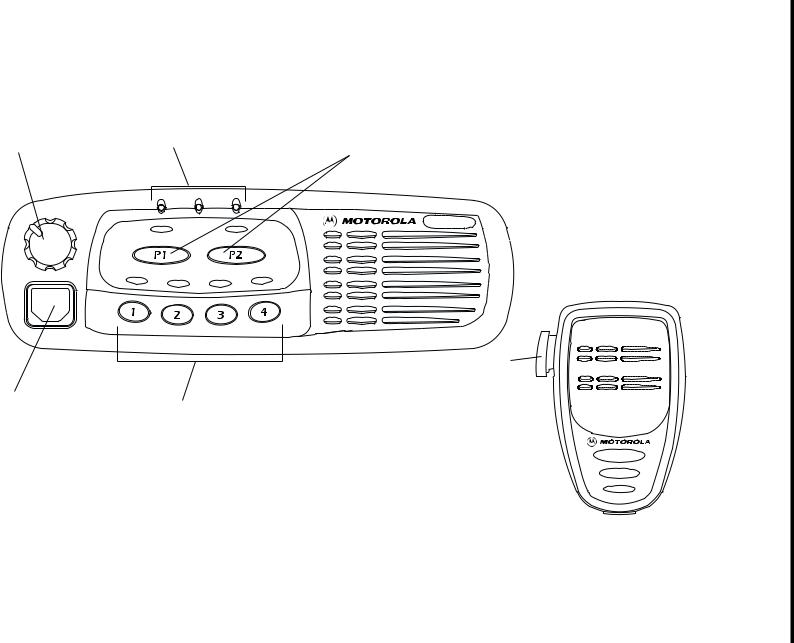
The numbers below refer to the illustrations on the inside front cover.
1.On-Off / Volume Knob
Used to turn the radio on or off, and to adjust the radio’s volume.
2.LED Indicators
Indicates channel, scan, and monitor status, as well as receipt of a selective call.
Green: Successful power up. Green Flashing: Radio scanning. Red: Radio transmitting.
Red Flashing: Channel busy-when receiving. Yellow: Radio called or Monitor (lower priority). Yellow Flashing: Radio call reminder alert.
3.Programmable Buttons gh
4.Mic Jack
5.Programmable Buttons VWXY
6.Push-to-talk (PTT)
Press and hold down this button to talk; release it to listen.
OVERVIEW RADIO
3 English

RADIO OVERVIEW
PROGRAMMABLE BUTTONS
Several of your radio buttons can be programmed (by Customer Programming Software CPS) to activate the radio features.
Above each button is an associated LED. For buttons programmed as channel selectors, only the LED of the selected channel will be lit; for buttons programmed as feature on/off switches, the LED will be lit if the feature is on.
The following table shows the features that can be assigned to the P1and P2 buttons and the 1-4 buttons.
P1 and P2 are exchangeable for customised icon buttons to match programming.
|
Feature |
Description |
|
|
Monitor allows user to select between signalling squelch, |
||
|
carrier squelch and unsquelch, and to suspend scan when |
||
|
Monitor/Cancel |
landed on a channel in scan mode. |
|
|
Cancel allows user to cancel current incoming or outgoing |
||
|
call. |
||
|
Radio Call |
To make an individual or group selective call. |
|
|
Scan On/Off |
To toggle between start and stop of the scan |
|
|
operation. |
||
|
To delete a nuisance (unwanted) channel when scanning, |
||
|
Nuisance |
with exception of priority channel, last channel in scan list |
|
|
Delete/Cancel |
and home channel. |
|
|
(Voice Storage) |
Cancel, deletes messages being played back from the |
|
|
Voice Storage feature. |
||
English 4

|
Feature |
Description |
RADIO |
|
|
To delete a nuisance (unwanted) channel when scanning, |
|||
|
Nuisance Delete |
with exception of priority channel, last channel in scan list |
OVERVIEW |
|
|
and home channel. |
|||
|
Cancel |
Cancel, deletes messages being played back from the |
||
|
(Voice Storage) |
Voice Storage feature. |
||
|
Power Level |
To toggle the radio’s transmit power level between High |
||
|
and Low. |
|||
|
Talkaround On/Off |
To talk directly with another radio without going through a |
||
|
system or despatcher. |
|||
|
Emergency |
Activates emergency alarm sequence. |
||
|
To identify user as a lone worker. Radio enters emergency |
|||
|
Lone Worker |
sequence unless user responds, when prompted, by |
||
|
pressing any radio button. |
|||
|
Call Forward |
To transfer calls automatically to another radio if user is |
||
|
unable to take the call. |
|||
|
Companding On/Off |
To toggle between compression/expansion of audio signal |
||
|
and normal audio signal. |
|||
|
Option Board |
Allows user to toggle the option board between on and off. |
||
|
On/Off |
|||
5 English

|
OVERVIEW |
Feature |
Description |
|
|
External Alarm |
To toggle the External Alarm feature on and off. |
||
|
Record/Play-back |
To record/play-back incoming calls or memos using voice |
||
|
RADIO |
(Voice Recorder) |
recorder feature. |
|
English 6
AUDIO SIGNAL TONES
|
High pitched tone |
Low pitched tone |
|||||||||||||||
|
Tone |
Signal |
Description |
||||||||||||||
|
Power up OK |
Radio self-test OK. |
|||||||||||||||
|
Power up Fail |
Radio self-test fail. |
|||||||||||||||
|
Button Error |
Button press not |
|||||||||||||||
|
permitted. |
||||||||||||||||
|
Engaged |
Channel busy or not |
|||||||||||||||
|
permitted to transmit. |
||||||||||||||||
|
Call Failed |
Call failed to connect. |
|||||||||||||||
|
Radio must monitor |
||||||||||||||||
|
Force Monitor |
channel before trans- |
|||||||||||||||
|
mission permitted. |
||||||||||||||||
|
Button |
Any option button |
|||||||||||||||
|
Feature |
pressed to enable a |
|||||||||||||||
|
Enable |
feature. |
|||||||||||||||
|
Button |
Any option button |
|||||||||||||||
|
Feature |
pressed to disable a |
|||||||||||||||
|
Disable |
feature. |
|||||||||||||||
|
Group Call |
Radio receives a |
|||||||||||||||
|
Group Call. |
||||||||||||||||
|
Individual Call |
Radio receives an |
|||||||||||||||
|
Individual Call. |
||||||||||||||||
|
Tone |
Signal |
Description |
|||||||||||||||||
|
Call |
Reminder of |
||||||||||||||||||
|
Reminder |
unanswered call. |
||||||||||||||||||
|
TOT Pre-Alert |
Warns of expiry of |
||||||||||||||||||
|
time out timer. |
|||||||||||||||||||
|
Monitor Alert |
Alerts to change of |
||||||||||||||||||
|
squelch. |
|||||||||||||||||||
|
Voice Storage |
Voice Storage- |
||||||||||||||||||
|
Recording. |
|||||||||||||||||||
|
Voice Storage |
Voice Storage- |
||||||||||||||||||
|
Warning. |
|||||||||||||||||||
|
Voice Storage |
Voice Storage- |
||||||||||||||||||
|
Full. |
|||||||||||||||||||
|
Scan Start |
Radio starts |
||||||||||||||||||
|
scanning. |
|||||||||||||||||||
|
Scan Stop |
Radio stops |
||||||||||||||||||
|
scanning. |
|||||||||||||||||||
|
Priority Call |
Radio detects a |
||||||||||||||||||
|
Decode |
priority call. |
||||||||||||||||||
|
Priority |
Radio landed on the |
||||||||||||||||||
|
Channel |
priority channel. |
||||||||||||||||||
|
Lone Worker |
Reminds lone worker |
||||||||||||||||||
|
to respond. |
|||||||||||||||||||
OVERVIEW RADIO
7 English

RADIO OVERVIEW
|
Tone |
Signal |
Description |
|||||||||||||
|
Hardware |
Hardware error, tone |
||||||||||||||
|
continues until valid |
|||||||||||||||
|
Error |
|||||||||||||||
|
operation. |
|||||||||||||||
|
Previous message or |
|||||||||||||||
|
Cancel |
message currently |
||||||||||||||
|
being played from |
|||||||||||||||
|
Message |
|||||||||||||||
|
Voice Storage has |
|||||||||||||||
|
been deleted. |
|||||||||||||||
|
Channel Free |
Indicates current |
||||||||||||||
|
Beep |
channel is free. |
||||||||||||||
|
Incoming |
Indicates an |
||||||||||||||
|
Emergency |
|||||||||||||||
|
emergency situation. |
|||||||||||||||
|
Alert |
|||||||||||||||
|
English/French/ |
Incoming calls (high |
||||||||||||||
|
Ringtones |
tones), outgoing calls |
||||||||||||||
|
General |
|||||||||||||||
|
(low tones). |
|||||||||||||||
English 8
 Loading…
Motorola GM340, автомобильная радиостанция MDM25RHC9AN1AE
Motorola MDM25RHC9AN1AE GM340 403-470MHZ 1-25W SEL5
— профессиональная автомобильно-стационарная UHF-радиостанция с поддержкой сигналинга Select-V. Рация GM-340 обладает широчайшими возможностями для обеспечения удобного и безопасного использования при любых условиях. Одной из таких, является возможность особого подключения GM-340 к системе электроники автомобиля, что позволит сигнализировать о входящих вызовах с помощью мигания фар автомобиля или подачи звукового сигнала гудком транспортного средства. Это позволит не пропустить входящий вызов на радиостанцию Моторола GM 340, даже если абонент вышел из машины. В случае, если отсутствие пользователя в транспорте вызвано форс-мажорными обстоятельствами, автомобильная радиостанция GM-340 имеет возможность настройки подачи экстренного сигнала тревоги, если вызываемый сотрудник не ответил на последний входящий вызов.
Помимо прочего данная радиостанция поддерживает целый ряд дополнительно устанавливаемых модулей для расширения её функционала. Сюда относятся платы шифрования, платы для работы в транкинговых системах, модуль записи и хранения голосовых сообщений, который так же можно использовать для транслирования заранее записанного сообщения тревоги, и многое другое.
Одним из определяющих мотивов к покупке данного аппарата для многих стало то, что радиостанция Моторола GM340 является очень простой в использовании. Небольшое количество кнопок управления и простая индикация статуса работы станции исключают все наиболее распространенные ошибки пользователей. Все это делает рацию GM340 не только надежным, но и очень удобным устройством для создания или расширения парка радио-устройств
Технические характеристики радиостанции Motorola GM340:
- Рабочий диапазон частот, МГц: 403-470
- Мощность передатчика, Вт: 1…25
- Шаг сетки, кГц: 12,5 20 25
- Кол-во каналов: 6
- Антенный разъем на радиостанции: BNC-мама
Комплект поставки радиостанции Motorola GM-340:
Радиостанция Motorola GM340 MDM25RHC9AN1AE
Тангента, ручной микрофон
Крепеж тангенты
Кабель питания 25 Ваттной радиостанции с модулем предохранителей, 15А, DC, ±13.8 В
6864110B80 Инструкция по эксплуатации для Motorola GM340
Оригинальные аксессуары для радиостанции Motorola GM340:
Врезная автомобильная антенна, 1/4, 403-430 МГц, 0 dB, BNC
Врезная автомобильная антенна, 1/4, 450-470 МГц, 0 dB, BNC
Врезная автомобильная антенна, 5/8, 450-470 МГц, 3.5 dB, BNC
HAE4002 Врезная автомобильная антенна, 1/4, 403-430 МГц, 0 dB
HAE4003 Врезная автомобильная антенна, 1/4, 450-470 МГц, 0 dB
HAE4010 Врезная автомобильная антенна, 5/8, 406-420 МГц, 3.5 dB
HAE4011 Врезная автомобильная антенна, 5/8, 450-470 МГц, 3.5 dB
0902105F01 Высокочастотный BNC разъем для автомобильных антенн с кабелем RG-58 Тангента, ручной микрофон
Тангента, ручной микрофон с DTMF-клавиатурой
Высокопрочная тангента, ручной микрофон
/ MDREX4617 Тангента, ручной микрофон в форме телефонной трубки Крепеж тангенты
Низкопрофильная скоба крепления радиостанции
Скоба крепления радиостанции
Трехточечный крепеж для жесткой фиксации радиостанции
Скоба крепления радиостанции с замком блокиратором
Комплект крепления радиостанции в приборную панель автомобиля, типоразмер DIN
/ RLN4856 Кнопка-педаль для подачи аварийного сигнала
Выносная кнопка PTT на гибком кронштейне
ENMN4019 Выносной микрофон для установки на солнцезащитный козырек
Внешний динамик, max. 7.5 Вт, прямоугольный
Внешний динамик, max. 12 Вт, квадратный
GLN7282 Комплект сирены для подачи внешних звуковых сигналов при поступлении входящего вызова
HKN9327 Кабель автоматического вкл./выкл. радиостанции управляемый системой зажигания автомобиля
Кабель питания 25 Вт радиостанции с предохранителем, 15А, DC, ±13.8 В
Удлиненный 7-метровый кабель питания 45 Вт радиостанции с предохранителем, 20А, DC, ±13.8 В
GKN6272 Реле подключения радиостанции к сигнальным цепям автомобиля
Комплект для выноса лицевой панели радиостанцией GM140, GM340, GM640 (необходим соединительный кабель)
Соединительный кабель для комплектов выноса лицевой панели радиостанции, 3м
Соединительный кабель для комплектов выноса лицевой панели радиостанции, 5м
Соединительный кабель для комплектов выноса лицевой панели радиостанции, 7м
Преобразователь напряжения 24-12 В, 6-10А
Преобразователь напряжения 24-12 В, 8-12А Настольный микрофон для радиостанций Motorola GM140, GM160, GM340, GM360, GM380
Настольная подставка
Настольная подставка со встроенным динамиком
Сетевой блок питания для 25 Вт радиостанций с возможностью подключения резервного аккумулятора
DC кабель для соединения радиостанции с сетевым блоком питания GPN6145
/ HPN4001 Сетевой блок питания для 45 Вт радиостанций
Кабель-адаптер для программирования и тестирования автомобильных радиостанций Motorola, используется в составе RIB — RLN4008
RLN4853 Кабель-адаптер для программирования автомобильных радиостанций Motorola через аксессуарный разъем 20-pin, используется в составе GTF374, RKN4083 и RKN4081
RIB (Radio Interface Box) Универсальный интерфейс (RS232, COM-Port) для программирования радиостанций Motorola
EPN4041 Сетевой блок питания для RIB — RLN4008
Адаптер для перепрошивки Flash памяти радиостанций Motorola серий GP/GM-Professional используется в составе программаторов6864110B80 Инструкция по эксплуатации для радиостанции Motorola GM340
Детальная сервисная документация с программным обеспечением для радиостанций Motorola GM140, GM160, GM340, GM360, GM380 (Русский)
Описание:
Простые кнопки и индикаторы делают использование радиостанции Motorola GM340 легким и понятным, требующим минимального обучения. Радиостанция (рация) GM340 обеспечивает передачу данных, что позволяет ее адаптировать к требованиям организации. Функции радиостанции могут быть расширены за счет установки дополнительных функциональных плат других поставщиков, например, плат с функцией диктофона, который позволяет избежать потери важных сообщений в тот момент, когда абонент не находится в автомобиле.
Радиостанция GM340 может управлять внешним светозвуковым сигнальным устройством автомобиля при поступлении вызова. Вызовы могут отправляться другому пользователю, когда он не находится в автомобиле. Функция экстренная сигнализация позволяет отправить сигнал помощи заранее определенному человеку или группе людей. Этот сигнал может содержать записанное заранее голосовое сообщение, позволяющее получившему его сотруднику сразу определить местонахождение/состояние пострадавшего. Радиостанция переходит в экстренный режим, если пользователь не отвечает на периодический контрольный запрос.
Для радиостанции GM340 разработан целый спектр оригинальных аксессуаров компании Motorola, таких как: микрофоны, динамики, внешние тангенты, комплекты аксессуаров для установки радиостанции в автомобилях, а также для стационарного крепежа.
Для удобства монтажа все автомобильные радиостанции Motorola профессиональной GM-серии можно разделить на две составные части: приемопередатчик и лицевая панель. При этом применяется специальный комплект для разделения радиостанции.
Функциональное оснащение
|
Сигналинг Программное обеспечение радиостанции поддерживает передачу PL-тонов (Private Line ™) и 5-тоновый селективный сигналинг (Select-V). |
|
|
Голосовая активация передачи (VOX) Режим работы, при котором благодаря использованию микрофона с функцией VOX руки остаются свободными. |
|
|
Экстренная сигнализация Сигнал помощи направляется заранее определённому лицу или группе людей. Передаваемая информация может содержать записанное заранее голосовое сообщение, позволяющее получившему его сотруднику сразу определить местонахождение пострадавшего или его состояние. |
|
|
«Одинокий» работник (Lone Worker) Обеспечивает дополнительную безопасность и защищённость для сотрудников, работающих в опасных условиях в удалении от своей группы. Радиостанция переходит в экстренный режим, если пользователь не отвечает на периодический контрольный запрос. |
|
|
Расширяемость за счёт функциональных плат* Возможности радиостанции могут быть расширены за счет установки одной из функциональных плат:
|
|
|
Управление внешним сигналом оповещения Включение звукового сигнала и/или фар автомобиля при получении вызова: даже находясь вне оборудованного радиостанцией автомобиля, пользователь не пропустит вызов. |
|
|
Режим мегафона Оснастив радиостанцию внешним динамиком и переключателем, её можно использовать в качестве мегафона. |
|
|
Возможность передачи данных Модем для передачи данных может быть установлен в слоте расширения радиостанции или подключён как внешнее устройство. |
|
Дополнительные возможности:
|
* Информацию о наличии функциональных плат Вы можете уточнить у Авторизованного Дистрибьютера компании Моторола.
Комплект поставки:
- Радиостанция
- кабель питания от аккумулятора HKN4137
- Руководство на русском языке
Инструкция MOTOROLA GP340 на русском языке в формате pdf для устройства: радиостанция. Прочитайте инструкцию для ознакомления с функциями и условиями эксплуатации, характеристиками и способами исправления неисправностей. Данное руководство пользователя поможет использовать весь функционал изделия и увеличит срок службы при условии соблюдения всех правил изложенных в документе.
Из за большого объема этот материал размещен на нескольких страницах:
1 2 3 4 5 6 7

РУП «Молодечненский радиозавод «Спутник», «Моторола ГмбХ»
РАДИОСТАНЦИИ ВОЗИМЫЕ СЕРИИ
GM
РУКОВОДСТВО ПО ЭКСПЛУАТАЦИИ
1. ОБЩАЯ ИНФОРМАЦИЯ
1.1. Основные параметры радиостанций
1.3. Транспортирование и хранение
2. ОРГАНЫ УПРАВЛЕНИЯ И РАБОТА С РАДИОСТАНЦИЕЙ
2.1. Органы управления радиостанции
2.2. Включение-выключение радиостанции
2.3. Регулировка громкости
3. ИНФОРМАЦИЯ ПО ТЕХНИКЕ БЕЗОПАСНОСТИ
3.1. Воздействие радиочастотного излучения
3.2. Электромагнитные помехи/совместимость
3.3. Меры предосторожности при эксплуатации
3.4. Общий уход за радиостанцией
4. ТЕХНИЧЕСКОЕ ОБСЛУЖИВАНИЕ
4.2. Процедура очистки
5. ОСОБЕННОСТИ ЭКСПЛУАТАЦИИ РАДИОСТАНЦИЙ GM140, GM340
5.1. Программируемые кнопки/ DTMF -микрофон
5.2. Звуковые тональные сигналы (тоны)
5.3. Индикация включения радиостанции
5.4. Выбор радиоканала
5.5. Посылка вызова
5.6. Прием вызова
5.7. Отмена вызова
5.8. Окончание вызова
5.9. Экстренные вызовы
5.10.1. Включение и выключение сканирования
5.10.2. Приоритет каналов в списке сканирования
5.10.3. Обратный ответ (токбэк)
5.10.4. Удаление мешающего канала
5.10.5. Возврат удаленного мешающего канала в список сканирования
5.12. Внешняя сигнализация
5.13. Уровень мощности
6. ОСОБЕННОСТИ ЭКСПЛУАТАЦИИ РАДИОСТАНЦИЙ GM160, GM360
6.1. Программируемые кнопки/DTMF-микрофон
6.2. Блокировка/разблокировка клавиатуры
6.3. Клавиши меню
6.4. Схема навигации меню
6.5. Навигация меню
6.6. Жидкокристаллический дисплей и пиктограммы
6.7. Звуковые тональные сигналы (тоны)
6.8. Подготовка радиостанции к работе
6.8.2. Выбор радиоканала
6.8.3. Канал в памяти
6.8.4. Посылка вызова
6.8.5. Прием вызова
6.8.6. Отмена вызова
6.8.7. Окончание вызова
6.9. Экстренные вызовы
6.10.1. Включение и выключение сканирования
6.10.2. Приоритетный канал
6.10.3. Обратный ответ (токбэк)
6.10.4. Удаление мешающего канала
6.10.5. Возврат удаленного мешающего канала в список сканирования
6.12. Внешняя сигнализация
6.13. Одинокий работник
6.14. Уровень мощности
7. ОСОБЕННОСТИ ЭКСПЛУАТАЦИИ РАДИОСТАНЦИЙ GM640, GM660
7.1. Программируемые клавиши
7.2. Клавиши меню (только для радиостанции GM660)
7.3. Схема навигации меню (только для радиостанции GM660)
7.4. Навигация меню (только для радиостанции GM660)
7.5. Клавиши клавиатуры (микрофон с клавиатурой)
7.6. Жидкокристаллический дисплей и пиктограммы (только для GM660)
7.7. Звуковые сигналы (ЗС)
7.8. Регистрация радиостанции
7.9.1. Выполнение вызова
7.9.2. Список контактных номеров
7.9.4. Ручной набор
7.9.5. Окончание связи
7.9.6. Отмена вызова
7.9.7. Прием вызова
7.9.8. Не отвеченные вызовы
7.9.9. Переадресация вызовов
7.10. Специальные вызовы
7.10.1. Короткие сообщения данных
7.10.2. Статусные вызовы
7.10.3. Экстренные вызовы
7.10.4. Приоритетные и циркулярные вызовы
7.11.2. Разговорная группа
7.11.3. Конвенциональный режим
7.11.4. Выбор персональности
7.12. Этапы выполнения вызова
1. ОБЩАЯ ИНФОРМАЦИЯ
В настоящем руководстве описаны основы работы с возимыми радиостанциями серии GM . Радиостанции соответствуют требованиям СТБ 1200, технических условий ТУ РБ., комплекта конструкторской документации. Для получения более подробной информации обратитесь к продавцу.
Примечание: перед началом использования радиостанции прочтите информацию по технике безопасности п.3.
Радиостанции предназначены для обеспечения радиосвязи с объектами сухопутных подвижных служб в симплексном и полудуплексном режимах и используются для профессиональных целей.
Руководство распространяется на следующие модели радиостанций:
Классификация моделей в зависимости от сигналинга и применяемых софтов систем:
GM 1** — М D С 1200;
В составе радиостанции GM360 применяются приёмо-передающие модули МW106, МW304, МW504, в моделях GM640, GM660 – MW 504, в GM140, GM160 , GM340 – MW 304, MW 504. В дальнейшем по тексту вместо термина «приёмо-передающий модуль» будет использован термин «платформа».
Радиостанции имеют модификации, обозначаемые буквами после обозначения платформы, в соответствии с таблицей:
А – ПО для работы в протоколах PL / DPL и MPT 1327 или Select 5
В – ПО для работы в протоколах PL / DPL и MDC 1200
Тип контрольной панели
А – без дисплея, без клавиатуры, 6 кнопок меню
С – без клавиатуры, дисплей, 10 кнопок меню
Примечание: третья буква ставится только для модели
GM
360 с платформой МW106.
Радиостанции относятся к системам аналоговой телефонной радиосвязи.
Класс излучения 16К0 F 3Е, 11К0 F 3Е.
В зависимости от условий эксплуатации радиостанции соответствуют группе В4 по ГОСТ 16019, с рабочей температурой от минус 25 до плюс 55 ° С, степень жесткости 1.
Электропитание радиостанций осуществляется от аккумуляторных батарей постоянным напряжением от 10 до 15,8 В с минусом на корпусе автомобиля.
Степень защиты по ГОСТ14254 (МЭК529) соответствует IP 54.
Радиостанция имеет код ТН ВЭД – 8
Обозначение радиостанции в документации и при заказе состоит из:
Пример записи обозначения радиостанции модели GM 140, платформы MW 304, модификации АС:
Радиостанция GM 140 — М W 304 АС ТУ РБ..
1
.1. Основные параметры радиостанций
Общие параметры приёмо-передатчика
1. Рабочий диапазон частот, МГц,
— для радиостанций GM 360 – MW 106 ACA
— для радиостанций GM 360 – MW 106 ACB
— для радиостанций GM 360 – MW 106 ACC
— для радиостанций GM с платформой МW304
— для радиостанций GM с платформой М W 504
2. Разнос частот между соседними каналами, кГц
3. Количество каналов для программирования:
— для моделей GM 140
— для моделей GM 160
— для моделей GM 340
— для моделей GM 360
— для моделей GM 640
— для моделей GM 660
4. Мощность несущей передатчика, Вт, не более
5. Ширина полосы излучения передатчика на уровне -30 дБ, кГц, не более
6. Допустимое отклонение частоты передатчика, кГц, не более:
— в диапазоне МГц
— в диапазоне МГц
7. Максимальная девиация частоты передатчика, кГц, не более
8. Уровень излучений передатчика в соседнем канале, дБ, не более
9. Уровень побочных излучений передатчика в диапазоне 9 кГц — 1 ГГц, мкВт, не более
10. Коэффициент нелинейных искажений передатчика, %, не более
13. Чувствительность (12 дБ SINAD), мкВт, не более
— в диапазоне МГц
14. Интермодуляционная избирательность, дБ, не менее
15. Избирательность по соседнему каналу, дБ, не менее
— в диапазоне МГц
16. Избирательность по побочным каналам приёма, дБ, не менее
17. Изменение чувствительности приемника при отклонении частоты сигнала, дБ, не более
19. Коэффициент нелинейных искажений приёмника, %, не более
20. Уровень фона приёмника, дБ, не более
Примечание: параметры, указанные через / , даны для сетки частот 12,5/25,0 кГц.
Комплект поставки радиостанции серии GM должен соответствовать перечню, приведенному в таблице.
Радиостанция GMХ1Х20 — МWХ30Х4 XYZ
Руководство по эксплуатации
СИКМ.464424.0 09 РЭ
1. В соответствии классификацией, приведенной выше:
— Х1, Х2 – первые цифры в обозначении модели;
— Х3, Х4 – первая и третья цифры в обозначении платформы;
— Х
YZ – обозначение модификации.
2. По требованию Заказчика в комплект поставки может входить антенна.
1.3. Транспортирование и хранение
Климатические условия транспортирования должны быть:
— температура окружающего воздуха от минус 50 до плюс 50 ° С;
— относительная влажность воздуха до 98 % при 25 ° С;
— атмосферное давление от 84 до 107 кПа (от 630 до 800 мм рт. ст.).
Радиостанции в упаковке могут транспортироваться на любое расстояние любым видом транспорта, за исключением морского. Транспортирование автомобильным транспортом следует осуществлять в закрытых транспортных средствах. При транспортировании в самолетах радиостанции помещают в обогреваемые герметизированные отсеки. Размещение и крепление транспортной тары с упакованными изделиями в транспортных средствах должны обеспечивать её устойчивое положение и не допускать перемещения во время транспортирования. Разупаковывание радиостанций проводят после их выдержки не менее 24 ч в нормальных климатических условиях.
Хранение
Условия хранения радиостанций — основное обозначение 2 по ГОСТ 15150.
Радиостанции хранят в упаковке в складских помещениях у изготовителя и потребителя при температуре воздуха от минус 50 до плюс 40 ° С и относительной влажности воздуха не более 80 % с соблюдением требований правил пожарной безопасности.
Гарантийный срок хранения – 6 мес.
В складских помещениях и транспортных средствах, где хранятся и перевозятся радиостанции не должно быть паров кислот, щелочей или других активных веществ, пары или газы которых могут вызвать коррозию, или повлиять на работоспособность.


Рис. 1 Радиостанции
GM140, GM340, GM640

Рис. 2 Радиостанции
GM 160,
GM 360,
GM 660
2. ОРГАНЫ УПРАВЛЕНИЯ И РАБОТА С РАДИОСТАНЦИЕЙ
2.1. Органы управления радиостанции
Приведенные ниже цифры являются номерами позиций на иллюстрациях выше.
Ручка включения-выключения/регулировки громкости.
Используется для включения-выключения радиостанции и регулировки громкости.
Используются для индикации канала, сканирования, статуса монитора, а также приема селективного вызова:
— зеленый – нормальная подача питания;
— мигающий зеленый – режим сканирования;
— красный – режим передачи;
— мигающий красный – канал занят (при приеме);
— желтый – на радиостанцию поступает вызов или работает монитор (неприоритетный);
— мигающий желтый – напоминание о полученном вызове.
Жидкокристаллический дисплей
(1 строка).
Кнопка Выход из меню/Выход.
Выбор канала/навигация меню, Вверх/Вниз.
Используется для прокрутки каналов. В режиме меню используется для навигации меню.
Не правильный пароль
Поле обязательно для заполнения
* — обязательные для заполнения поля
Простые кнопки и индикаторы делают использование радиостанции Motorola GM340 легким и понятным, требующим минимального обучения. Радиостанция (рация) GM340 обеспечивает передачу данных, что позволяет ее адаптировать к требованиям организации. Функции радиостанции могут быть расширены за счет установки дополнительных функциональных плат других поставщиков, например, плат с функцией диктофона, который позволяет избежать потери важных сообщений в тот момент, когда абонент не находится в автомобиле.
Радиостанция GM340 может управлять внешним светозвуковым сигнальным устройством автомобиля при поступлении вызова. Вызовы могут отправляться другому пользователю, когда он не находится в автомобиле. Функция экстренная сигнализация позволяет отправить сигнал помощи заранее определенному человеку или группе людей. Этот сигнал может содержать записанное заранее голосовое сообщение, позволяющее получившему его сотруднику сразу определить местонахождение/состояние пострадавшего. Радиостанция переходит в экстренный режим, если пользователь не отвечает на периодический контрольный запрос.
Для радиостанции GM340 разработан целый спектр оригинальных аксессуаров компании Motorola, таких как: микрофоны, динамики, внешние тангенты, комплекты аксессуаров для установки радиостанции в автомобилях, а также для стационарного крепежа.
Для удобства монтажа все автомобильные радиостанции Motorola профессиональной GM-серии можно разделить на две составные части: приемопередатчик и лицевая панель. При этом применяется специальный комплект для разделения радиостанции.
Функциональное оснащение
| Сигналинг Программное обеспечение радиостанции поддерживает передачу PL-тонов (Private Line ™) и 5-тоновый селективный сигналинг (Select-V). |
|
| Голосовая активация передачи (VOX) Режим работы, при котором благодаря использованию микрофона с функцией VOX руки остаются свободными. |
|
| Экстренная сигнализация Сигнал помощи направляется заранее определённому лицу или группе людей. Передаваемая информация может содержать записанное заранее голосовое сообщение, позволяющее получившему его сотруднику сразу определить местонахождение пострадавшего или его состояние. |
|
| «Одинокий» работник (Lone Worker) Обеспечивает дополнительную безопасность и защищённость для сотрудников, работающих в опасных условиях в удалении от своей группы. Радиостанция переходит в экстренный режим, если пользователь не отвечает на периодический контрольный запрос. |
|
| Расширяемость за счёт функциональных плат* Возможности радиостанции могут быть расширены за счет установки одной из функциональных плат:
|
|
| Управление внешним сигналом оповещения Включение звукового сигнала и/или фар автомобиля при получении вызова: даже находясь вне оборудованного радиостанцией автомобиля, пользователь не пропустит вызов. |
|
| Режим мегафона Оснастив радиостанцию внешним динамиком и переключателем, её можно использовать в качестве мегафона. |
|
| Возможность передачи данных Модем для передачи данных может быть установлен в слоте расширения радиостанции или подключён как внешнее устройство. |
|
Дополнительные возможности:
|
* Информацию о наличии функциональных плат Вы можете уточнить у Авторизованного Дистрибьютера компании Моторола.
Комплект поставки:
- Радиостанция
- кабель питания от аккумулятора HKN4137
- Руководство на русском языке
- Page 1
Professional Radio GM340 User Guide 68P64110B88 Issue: July 2000… - Page 4
The products described in this manual may include copyrighted computer programmes stored in semiconductor memories or other media. Laws in the United States of America and other countries preserve for Motorola Europe and Motorola Inc. certain exclusive rights for copyrighted computer programmes, including the right to copy or reproduce in any form the copyrighted computer programme. -
Page 6: Programmable Buttons
PROGRAMMABLE BUTTONS The following table shows the features that can Several of your radio buttons can be be assigned to the P1and P2 buttons and the programmed (by Customer Programming 1-4 buttons. Software CPS) to activate the radio features. P1 and P2 are exchangeable for customised Above each button is an associated LED.
- Page 8
Feature Description External Alarm To toggle the External Alarm feature on and off. Record/Play-back To record/play-back incoming calls or memos using voice (Voice Recorder) recorder feature. English… - Page 10
Tone Signal Description Hardware error, tone Hardware continues until valid Error operation. Previous message or message currently Cancel being played from Message Voice Storage has been deleted. Channel Free Indicates current Beep channel is free. Incoming Indicates an Emergency emergency situation. Alert Incoming calls (high English/French/… -
Page 12: Sending A Call
Sending a Call Receiving a Call Select the desired radio channel. Turn your radio on and adjust the volume level. Press the PTT button and speak clearly into the microphone.Your mouth should be Switch to the desired radio channel. 2.5 to 5 cm away from the microphone. If, at any time, a call is received you will When transmitting, the red indicator will hear the call at the volume level you have…
-
Page 14: Emergency Calls
EMERGENCY CALL Should you receive an Emergency call the incoming emergency alert tone Your radio can be programmed to give you a will sound. one-button quick access to call a particular radio or centre (predefined by your dealer) in emergency situations. This is the Emergency Call.
-
Page 16: Car Radio Mute
CAR RADIO MUTE The Car Radio Mute feature automatically mutes your in-car audio entertainment system to allow you to hear incoming calls or to stop audio interference when you are making a call. This feature may be programmed into your radio by your dealer.
-
Page 18: Voice Recorder
VOICE RECORDER Speak clearly into the radio microphone to recored your memo. You can record and playback incoming calls or The Voice Storage Warning alert make a memo using the voice recorder feature, sounds when the which allows up to 2 minutes of recording. memory is nearly full.
- Page 20
DELETING A NUISANCE CHANNEL ADDING A DELETED NUISANCE CHANNEL BACK INTO THE SCAN LIST If a channel continually generates unwanted calls/ noise (a “nuisance” channel), you can temporarily Using the Scan Button remove it from the scan list by performing a Press the Scan button to stop scanning. -
Page 22: Talkaround
TALKAROUND In your communications network, you may be using a system to cover a larger area than is possible with your radio. However, you can communicate with another radio within your radio’s range without going through the system by using the Talkaround feature.
-
Page 24: Lone Worker
LONE WORKER To disable Lone Worker The Lone Worker feature enables you to work Press the Lone Worker button again to alone with added safety. switch Lone Worker off, when the feature You can switch On or Off Lone Worker by disable alert will sound and the using a pre-programmed Lone Worker button.
-
Page 26: Companding
COMPANDING Companding is a collective term to define compressing the audio signal on transmission and expanding the audio signal on reception. The overall effect is to reduce noise in the received signal, giving you crisper, clearer audio clarity. Companding should only be used when other radios in your system have the same companding feature available.
-
Page 28: Voice Operated Transmit (vox)
VOICE OPERATED TRANSMIT (VOX) STUN/UNSTUN When the VOX accessory is connected, your For added security and to avoid abuse of the radio may be used with hands-free operation. radio system in which you operate, a feature known as Stun/Unstun is included in your The VOX feature intelligently senses radio.
-
Page 30: Electromagnetic Interference/compatibility
Electromagnetic Interference/Compatibility Potentially Explosive Atmospheres Turn off your two-way radio when you are in any Note: Nearly every electronic device area with a potentially explosive atmosphere. susceptible to electromagnetic interference Sparks in a potentially explosive atmosphere can (EMI) if inadequately shielded, designed or otherwise configured for electromagnetic cause an explosion or fire resulting in bodily injury or compatibility.
-
Page 32: General Radio Care
General Radio Care NOTES The use of chemicals such as detergents, alcohol, aerosol C a u t i o n sprays, and/or petroleum products may be harmful to and damage the radio housing. Avoid physical abuse of the radio. …
Page 3: Table Of Contents
Features ……13 CONTENTS Public Address Mode….13 Car Radio Mute .
Page 5: Radio Overview
Mic Jack This user guide covers the operation of the Programmable Buttons V W X Y GM340 Professional Mobile Radio. Push-to-talk (PTT) Please read pages 27 to 30 before using this radio. Press and hold down this button to talk;…
Page 7
Feature Description To delete a nuisance (unwanted) channel when scanning, Nuisance Delete with exception of priority channel, last channel in scan list and home channel. Cancel Cancel, deletes messages being played back from the (Voice Storage) Voice Storage feature. To toggle the radio’s transmit power level between High Power Level and Low.
Page 9: Audio Signal Tones
AUDIO SIGNAL TONES Tone Signal Description High pitched tone Low pitched tone Call Reminder of Reminder unanswered call. Tone Signal Description Warns of expiry of TOT Pre-Alert Power up OK Radio self-test OK. time out timer. Power up Fail Radio self-test fail. Alerts to change of Monitor Alert squelch.
Page 11: Getting Started
GETTING STARTED RADIO ON INDICATION At power up the radio performs a self test TURNING THE RADIO ON OR OFF routine. On completion of a successful self test the radio will emit a high pitched tone (Radio self test ok) and the green led will light. If the radio fails the self test, an alternating high/low pitched tone (Radio self test fail) will sound and the red LED will flash until the radio is turned…
Page 13: Radio Calls
RADIO CALLS Receiving a Selective Call When you receive a selective call, you will hear SELECTIVE CALLS either, Making a Selective Call an individual call alert tone You can make a selective call to a particular or a group call alert tone radio, known as an individual call, or a group of radios, known as a group call.
Page 15: Features
FEATURES To access the Public Address system: Turn external switch to the PA position. PUBLIC ADDRESS MODE The Public Address mode allows you to use Press microphone PTT and talk. your radio audio as a public address system. To exit PA mode, turn external switch to the You can use your radio microphone as normal RADIO position.
Page 17: Utilities
UTILITIES The utilities described below are programmed into your radio by your dealer and are accessible via a programmable button. English…
Page 19: Scan
SCAN PRIORITY CHANNEL You can monitor several channels in order to A scan list may contain a priority channel. This receive any call that is transmitted on any of means that a particular channel (for example, a these channels. Sixteen channels can be commonly used channel) may be checked programmed into each scan list.
Page 21: Call Forward
CALL FORWARD You can call forward calls to your radio to another radio if you are unable to take calls or are away from your radio. You can switch On or Off Call Forward by using a pre-programmed Call Forward button. To enable Call Forward Press the Call Forward button to switch on Call Forward, when the feature enable…
Page 23: External Alarm
EXTERNAL ALARM The external alarm feature activates the vehicle horn and/or lights to inform you of an incoming call when you are away from your vehicle. You can switch On or Off External Alarm by using a pre-programmed External Alarm button.
Page 25: Power Level
POWER LEVEL You can transmit your calls at different transmit power levels. A higher level means you can reach a radio that is farther away. A lower power level reduces the possibility of interference. Use the high power setting only when necessary. You can switch between high and low power levels by using a pre-programmed Power Level button.
Page 27: Option Board
OPTION BOARD Your radio is capable of being fitted with an option board. Each board will extend the capability of your radio by adding a new feature such as voice storage, voice scrambler or trunking. See your dealer for the availability and suitability of the various option boards.
Page 29: Safety Information
Protection (ICNRP — 1986) Two-Way Radios European Committee for Electrotechnical This section provides information and instructions for Standardisation (CENELEC) the safe and efficient operation of Motorola Mobile Two-Way Radios. ENV. 50166-1 Human Exposure to Electro- 1995 E magnetic Fields Low Fre-…
Page 31: Radio Operation And Eme Exposure
Mobile Radio Operation and EME Exposure Mobile Antenna Installation To assure optimal radio performance and that Install the vehicle antenna external to the vehicle human exposure to radio frequency electromagnetic and in accordance with: energy is within the guidelines referenced earlier in …