
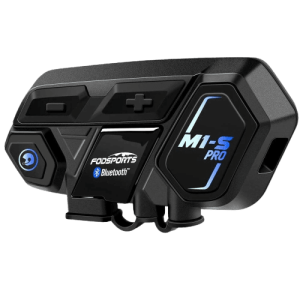
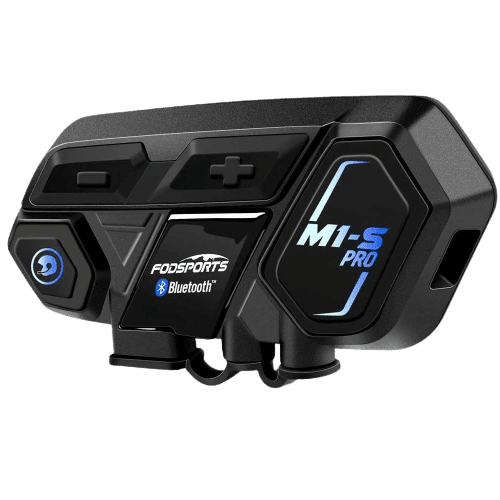
Operation Manual
Attention
Thank you for purchasing FODSPORTS M1-S PRO Bluetooth stereo headsets. For best experiences, please read manual before use.
Sound volume warning
Long period or too loud may hurt hearing ability.
Disassemble or modification
The M1-S PRO is precisely made in the factory. Any disassemble or modification may damage the device. Please do not tear any of the safety regulation and serial number sticker from the device, that will void warranty. Please contact us at [email protected] if needed.
Warranty:
In normal use, we offer one year warranty from the date of purchase. Any disassemble, modification, will void warranty.
1. Outlook (e.g. M1-S PRO)
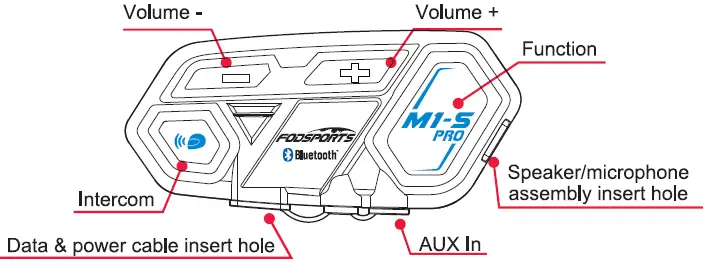
Functions
Switch On: When device is off, press intercom button and function button at samelimefor3 seconds.
Switch Off: When device is on, press intercom button and function button at samelimefor3
Power Detect: When device is on, short press volume”-‘ button and volume”+’ button at same time.
Voice control function {Only If your cellphone is equipped) : Short press function button once.
Switch on external wired device such as speed detector : when device IS on, long press volume•-• button and volume”+’ button at same time for 3 seconds.
Cellphone Function
Answering call: Short press function button once.
Hangup call : After call, short press function once.
Refuse call : After call, short press function button once.
Redial : Short press function button twice.
Volume up : Press volume’,” button while talking.
Volume down : Press volume”-” button while talking.
Switch manual/automatic answering calls : While in standby, press and hold the intercom button and volume ” +” / “-” button at the same time for 3 seconds.
Device Pair Up
Pairing mode : When device is on, long press function button for 5 seconds. Search mode When device is on, long press intercom button for 5 seconds. Remark, pairing mode is for pairing up to other devices like cellphone, gps Search mode is for pairing up with other Ml-S PRO.
Music Function
Play : When device is on, short press volume”+” button twice.
Pause : When music playing, short press volume”+” button twice.
Volume up : When playing music, short press volume”+” button once.
Volume down : When playing music, short press volume”: button once.
Play previous : When playing music, long press volume”+” button for 2 seconds.
Play next : When playing music, long press volume “-” button for 2 seconds.
Intercom Function
Switch intercom on : when device on : short press intercom button once.
Switch off : when talking, short press intercom button once.
Volume up : when talking, short press volume’,” button once.
Volume down : when talking, short press volume”, button once.
Special Function
Update mode : Plug in the Data & power cable, press volume “-” button and function button at same time for 5 seconds.
Memory clear : When device is on, press volume “+” button and function button at same time for 5 seconds.
2. Recharge
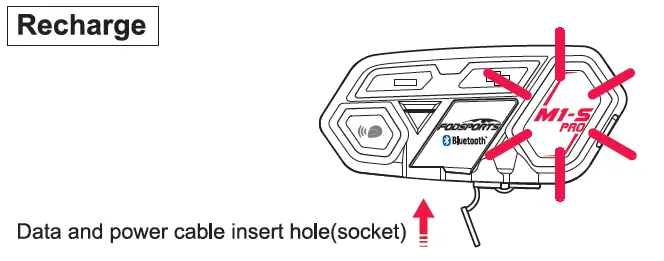
For first time use, please recharge the device until red light is off.
- Use data and power cable plug to the socket, connect to power source.
Bike usb chargers are not recommended, unsterilized circuit may damage the device. - When connecting to power source, red light appears in function button. When recharge complete, red light is off. Complete recharge is about 2 hours.
Low power notification
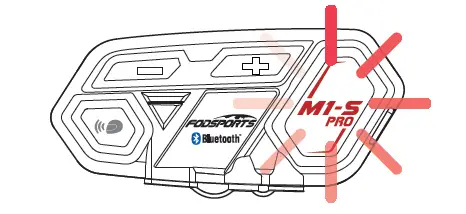
When power lower than 10%, Red light flash in the function button and voice message will remind power lower than 10%, please recharge immediately.
Power Detect Function
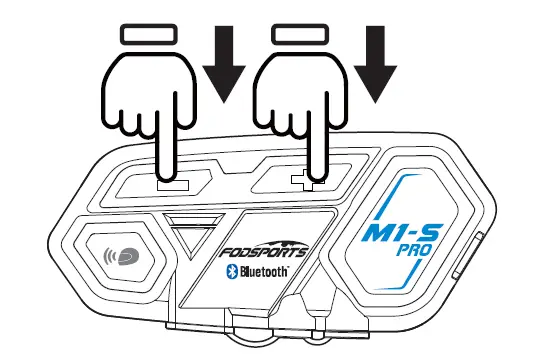
M1-S PRO has power detection function, when device is on, short press volume”-” button and volume”+” button at same time. Recorded voice message will remind
Power over 90%
Power over 50%
Power lower 50%
Power lower than 10% please recharge immediately
Voice control function( only if your cellphone is equipped): short press function button once
Switch on external wired devices such as speed detector … : when device is on, long press volume”-” button and volume”+” button at same time for 3 seconds.
3. On / Off
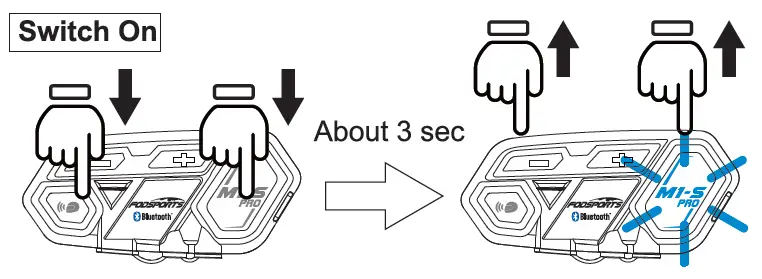
1. Switch on : long press function and intercom button at same time for
3 seconds. until blue light flash in function button. Voice message says “welcome to the Fodsports bluetooth communication system”.
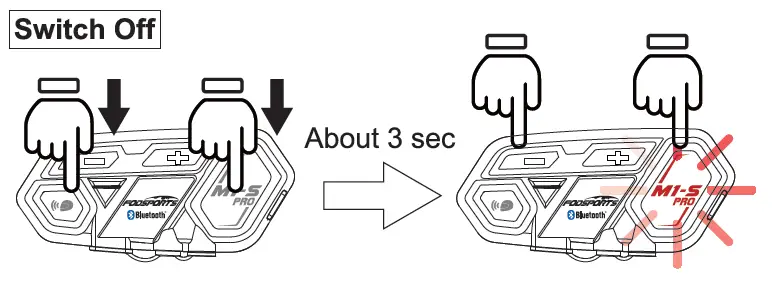
2. Switch off : When the device is on, long press function and intercom button at same time for 3 seconds, until red light flash in function button. The device will detect power and voice message will says “power off’.
4. Pair Up To Different Devices
M1-S PRO can pair to different Bluetooth devices.
Pairing Mode
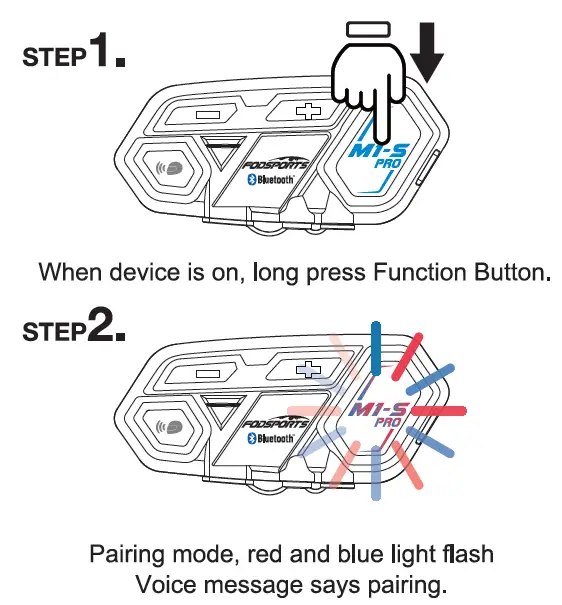
Search Mode
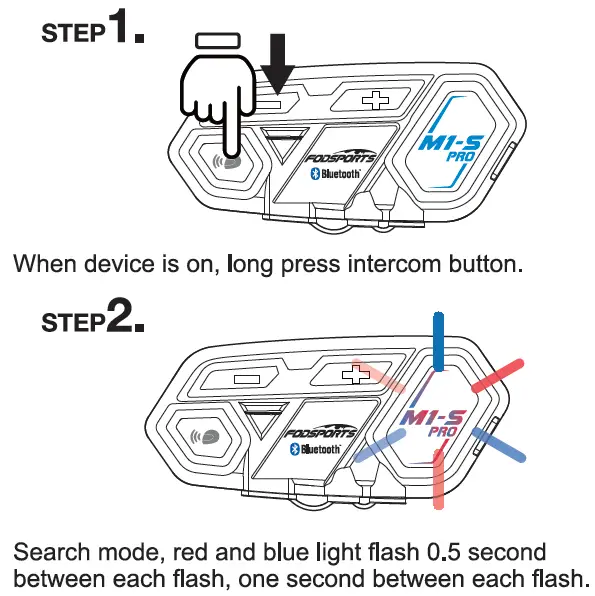
It’s search mode, voice message shows “Searching” sound.
5. Pairing With Cellphone
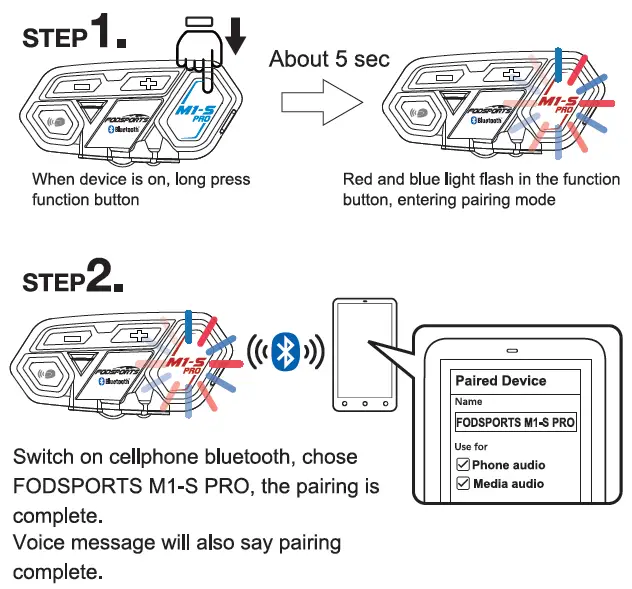
Remark, when pairing complete, please check both cellphone audio and media audio are all chosen, otherwise call or music can’t be processed.
6. Telephone Function
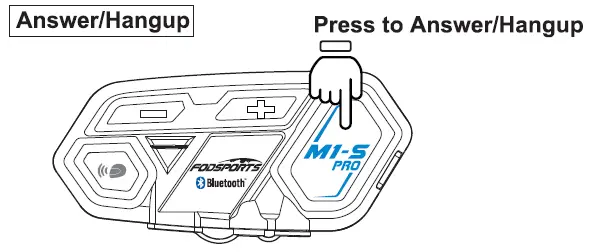
M1-S PRO is set to automaticity answer incoming calls, when incoming calls, beside rings, blue light flashes. Push function button to answer and push function button to hang up.
When talking, press volume”+” button and volume”-” button to adjust volume.
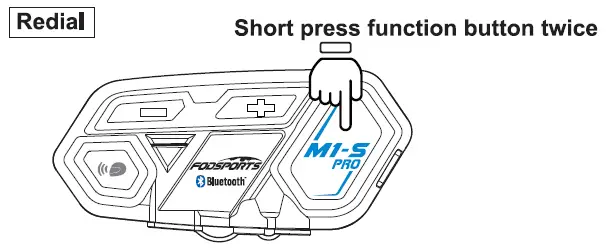
When the device is on, short press function button twice, will redial, blue light flashes.
*Only redial last call out number
7. Voice Command
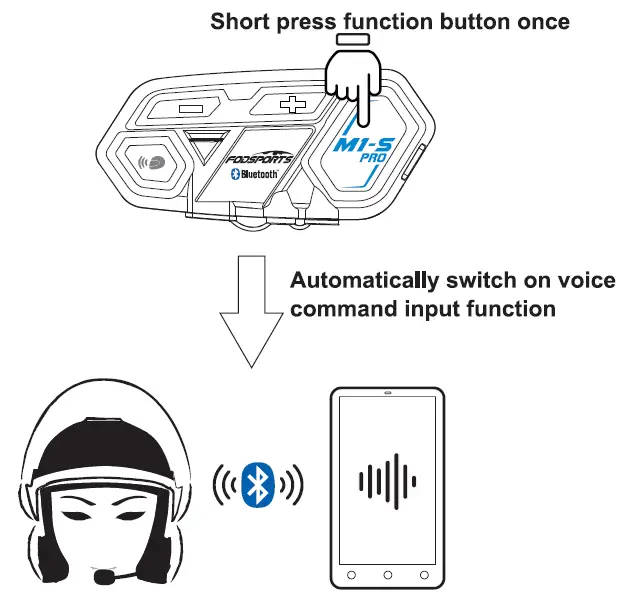
When your M1-S PRO is paired up with your cellphone, when both device are on, short press function button once, will automatically switch on the voice command function
*Cellphone must be equipped with this function
8. Music Selections Functions
Play/Pause
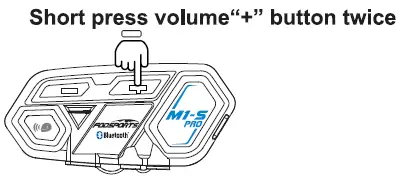
Play music: When cellphone and M1 -S paired up, when both devices are on, short press volume”+” button twice, will play music.
Pause: When playing music, short press volume”+” button twice, will pause.
Previous
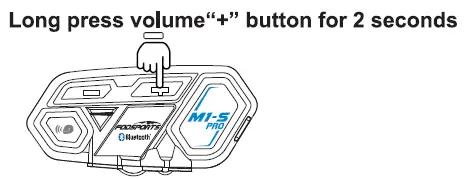
Long press volume”+” button for 2 seconds, will play previous music in your cellphone music list.
Next
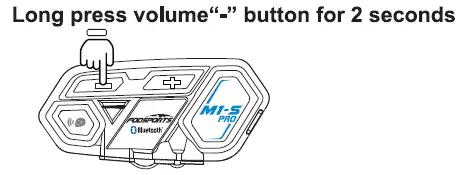
Long press volume”-” button for 2 seconds, will play next music stored in your cellphone music list.
9. Wire Connecting
Long press volume”+” button and volume”-” button for 3 seconds.
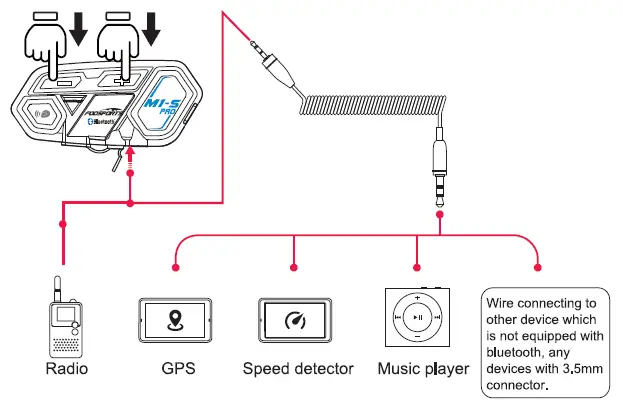
M1-S PRO equipped with wire connection function in order to connect to devices without bluetooth. As long as the device is connected by 3.5mm aux out, all can transmit voice signal to M1 -S PRO.
When device wire connected by 2.5mm to 3.5mm cable to M1-S PRO, long press volume”+” button and volume”-” button for 3 seconds to switch on the connection.
* When wired mode is switched on, it will keep it on until switch off the M1-S PRO.
10. Operating Scenario 1:
One person use, pair to cellphone + Bluetooth GPS device + Bluetooth speed detector
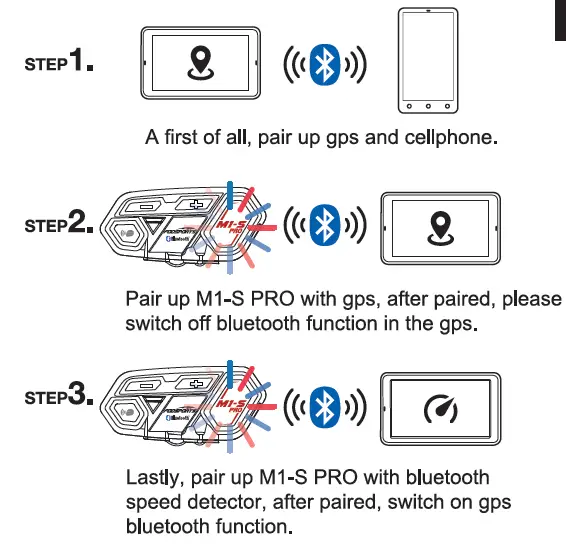
*After M1-S PRO paired with gps, if don’t switch off gps’s bluetooth, its will interference the pairing when pairing to speed detector. Recommended to switch gps bluetooth off, after pair up to detector, switch the bluetooth back on.
11. Operating scenario 2:
Two persons intercom, and pairing to cellphone + Bluetooth GPS + speed detector or radio
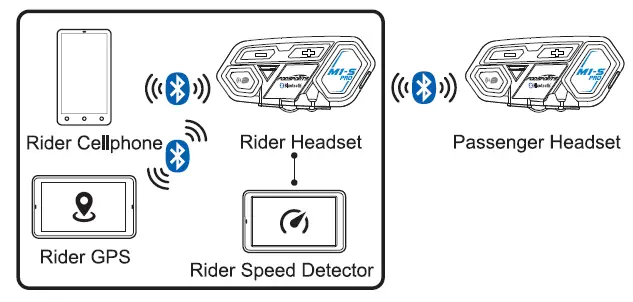
Passenger Procedure:
Step 1: switch rider headset to search mode, passenger headset to pairing mode. When both headset stop red+blue light flashes, they are paired.
Step 2: switch rider headset to pairing mode, cellphone search this M1-S PRO and pair it up.
Step 3: keep riders headset in pairing mode, use bluetooth gps to search rider’s headset and pair it up.
Step 4: use 2.5mm to 3.5mm aux in to connect speed detector or radio to M1 -S PRO, and switch M1-S PRO to Wire Connecting, all audio integrade complete.
Please read STEP 9. For Wire Connecting.
12. Operating Scenario 3:
Two persons intercom, rider using cellphone + Bluetooth GPS passenger using Bluetooth Speed detector
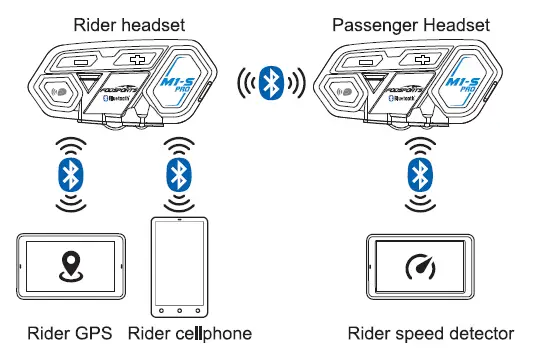
Pairing Procedure
Step 1: switch rider headset to search mode, passenger’s headset switch to pairing mode, when red and blue light stop flash, intercom pairing complete. At same time instantly switch on intercom.
Step 2: Set rider headset to pairing mode, use cellphone to search rider’s headset to complete pair up.
Step 3: set rider’s headset to pairing mode, use bluetooth gps to search rider’s headset and complete.
Step 4: set passenger’s headset to pairing mode, use Bluetooth speed detector to search passenger headset and complete pair up.
13. Multiple Intercom
Multiple intercom pairing procedure
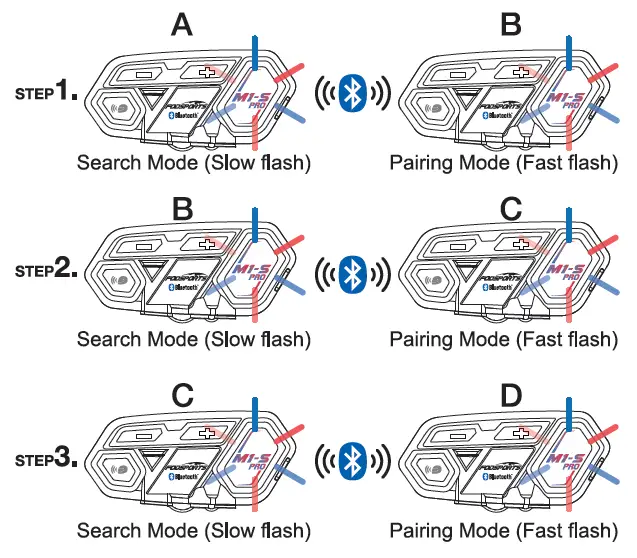
*Numbers of device which the headset can be paired 8 x M1-S PRO (A, B, C D}, multiple intercom connections, the connection will occupy channels, thus only unit A can connect to the other two Bluetooth devices, the others B, C, D can only connect to one Bluetooth device.
M1-S PRO equipped multiple intercom function, support 8 units talk same time,but recommended 4-6 units,pairing procedure as follow.
Step 1: switch on both A and B unit, long press A unit intercom button to search mode, Then long press unit B function button to pairing mode. When blue light on both intercoms, pairing complete.(You should press the intercom button on B unit to end the talking if you need to pair with more than 2 units.in order to new pairing later)
Now A and B unit pairing complete.
Step 2: When B C units on power on status. long press unit B intercom button to search mode, Then long press unit C function button to pairing mode. When blue light on both units, pairing complete.(You should press intercom button on B units if you need 3 units talk same time, then 3 units will light on blue same lime. Or you should press intercom button on C unit to end the talking if you need to pair with more than 3 units)
Three unit pairing complete.
Step 3: When C D units on power on status, Long press unit C intercom button, then long press unit D function button. When blue light on both units, pairing complete.(You should press intercom button on B C units if you need 4 units talk same lime, then 4 units will light on blue same time. Or you need to press intercom on D unit to end the talking if you need to pair with more than 4 units) Pis repeat above steps if you need to pair with 5 or 6 or 7 or 8 units.
Four units pairing complete.
*Interruption
In multiple intercom mode, if there is an incoming call caused one of unit away from the connection. After call, will reconnected automatically. If interruption is caused by distance or bad signal. Please press intercom button to reconnect.
Multiple intercom reconnect procedure
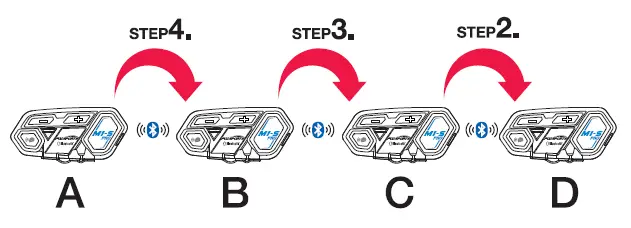
M1-S PRO will remember paired units. But after switch off and want to reconnect again, please follow the procedure.
Step 1: switching off all four units and all bluetooth device connected to the headset.
Step 2: switch on C and D unit, press C unit intercom button to connect to D unit.
Step 3: switch on B unit, press B unit intercom button to connect to C and D unit.
Step 4: switch on A unit, press A unit intercom button to connect to B, C and D unit. After all four unit reconnected, switch on original connected bluetooth devices.
14. QandA
Q1 : No sounds from one or two side speaker.
A1 : Check device plug, needs to firmly connected.
Q2 : Can it be recharged from bike USB charger while riding?
A2.1 : Not recommended, unstablized power source will cause damage on internal circuit, may cause unable to recharge/can’t fully charged/can’t switch on.
A2.2 : Power bank is a good choice.
Q3 : When using radio, not transmission or continuous transmission.
A3 : Pis check whether plug the 2.5mm pin deeply enough. this pin built in waterproof parts, It is easily misunderstand it have been pluged well because of a little resistance.
Q4 : New device can’t switch on.
A4 : Recharged at least 30mins before use.
FAQs:
Frequently Asked Questions
Why are my two speakers or one side speaker unavailable/no sound?
A: 1. Please check if the headphone cable is inserted in the correct direction.
2. Please make sure the headphone cable is fully inserted into the interface.
Why is my microphone unavailable/no sound?
The microphone part is detachable and can replace the soft/boom microphone, so please check if this part is inserted tightly.
2. Please check if the headphone cable is inserted in the correct direction.
Why are my speakers volume low?
Different locations of speakers will cause differences in volume, please install the speaker as close to your ears as possible. If the distance is too far, the volume will be reduced. You can use the thickened pad in the package to achieve it.
Please note that both the volume of the intercom or the volume of listening to music can be adjusted with the volume +- button, if you think the intercom volume is too low, you can press “+” button to increase the intercom volume.
Technical Specification
| Manufacturer | Fodsports |
| Brand | FODSPORTS |
| Item Weight | 40g |
| Product Dimensions | 4cm*2.5cm*8cm |
| Item model number | M1-S Pro |
| Batteries | 900 mAh battery |
| Manufacturer Part Number | M1-S Pro |
| Maximum Number of Speakers | |
| special Features | |
| Max number of speakers | |
| Reminder | |
| Handsfree Bluetooth Headset | |
| Waterproof | |
| Bluetooth and chips: | |
| Maximum Intercom Distance | |
| Stereo Music/Audio | |
| Applicable Helmet Type |
More Manuals From Fodsports

Блог им.
gorbatch-d
Денис
пользователь не участвует в рейтинге
Последний раз был на сайте 791 день и 13 часов назад
Скажу два слова про качество звука гарнитуры Fodsports m1-s pro, сравнивал с моими обычными наушниками Marshall Major III.
1. Басы в гарнитуре.
Они есть, что уже плюс. Не хватает четкости по сравнению с Marshall, но глубина есть. Электронная музыка вообще очень похоже звучит, на инструментальных композициях разница слышится по басс-гитаре и акустической гитаре: не хватает детализации.
Классическую музыку слушать тоже можно, мозг дорисует и подправит звук в голове 
Звуковая сцена создается правильно, где-то между глаз и ушей
2. Голос.
Отлично слышно интонации абонента при входящем звонке. Голос в музыке сопоставим с качеством Marshall, если это средние частоты (внизу и наверху Marshall дает больше деталей).
3. Звук входящего звонка.
Тут провал, потому что не играет рингтон с телефона, а идет служебный писк. Его слышно, но не удобно пользоваться (если стоит 2 симки и 2 разных рингтона или разные рингтоны на разные категории контактов), на какую симку идет входящий звонок не понятно.
4. Громкость звука и микрофон.
Я скидываю скорость при входящем звонке до 80: слышно хорошо и что говорят мне, и что говорю я (говорю обычным голосом, кричать не нужно). К микрофону у абонентов нареканий нет, мой голос четко слышно.
Если просто ехать, то на 100 музыку слышно, регулировки громкости хватает. У меня нет стекла, так что при хорошей ветрозащите можно, наверное, слушать и при 120.
Что в итоге: я удовлетворен.
Купить гарнитуру за 4000 р. с нормальным качеством звука оказалось вполне реально.
Если не слушать сложную для динамиков музыку, то качество звука раздражать не будет, а электронная музыка вообще будет звучать как в нормальных наушниках.
 gorbatch-d
- Денис
- 24 февраля 2021 в 10:35
-
2
-
?
 gorbatch-d
Только зарегистрированные пользователи могут оставлять комментарии.
Войдите, пожалуйста, или зарегистрируйтесь.
При перепечатке материалов, видео или картинок гиперссылка на «bikepost.ru» обязательна
мотоблоги, Блог им. gorbatch-d, Звук в гарнитуре Fodsports m1-s pro в сравнении с наушниками Marshall Major III
The massive advancement in technology has encompassed almost every domain of life. This also includes the case of a motorcycle. Therefore, you might often think of a device that could help you while riding on the bike as a means of communication. Certain technologies have been designed to meet this cause, and among these, Fodsports m1-s remains top of the line. This device would save you the time of stopping and using your smartphone. Rather, you would do all the work while riding.
Moreover, it remains the most effective tool as a Bluetooth-based device that can be connected via a wire. We believe that it is one of the most suitable devices with an attractive cost. It can help your communication with other riders, and your riding would become much more joyful. This device holds a series of features and can be easily attached to your helmet. It is an effective tool for most bikers and those who move out in a group for traveling.
Fodsports M1-S Pro
Pros
- Extensive battery timing owing to 900mAh battery size
- Long-range of communication up to 2000 meters
- Multiple methods of connecting like Bluetooth and wired system
- Crystal clear sound quality
- Completely dust as well as waterproof
Cons
- The communication is effective more in 500 meters which is quite less for riders.
- Therefore, for eight riders, its effectiveness becomes less.
When we talk about a communication device, the first and the foremost concern is the affectivity and the range up to which the device can function. Unfortunately, most of the device either lack affectivity or they lack the in communication distance. However, Fodsports m1-s is here to save you from these concerns as it aces in both of these aspects.
Similarly, in a normal routine, this device can continue promoting intercommunication within a distance of almost 2000 meters. However, this distance can be between hilly areas or skyscrapers which can somewhat create a hurdle, but it keeps a connection between the riders. Therefore, for 100% results, it is preferred that the riders are between a range of 500 meters as in this range, there is a lack of communication losses, thus giving the best results.
This Bluetooth-based device can be connected to your smartphone to help you receive calls and attend to them as well. It is like a Bluetooth headphone but with a long-range distance that can connect others in the group. Your riding would become much more fun when you use this device, as riding with others can be even more communicative.
It can connect almost eight riders at a time. So if you are thinking of leading a group of riders, you can use this device to guide them during your travel. It can also support calls among multiple people at a time. You cannot only use it for communication, but if you wish to listen to your favorite music, you can use the headset for that as well. So what more can you expect from such an exceptional device?
Riding sometimes demands the use of GPS navigation as a means of finding the route to your destination. But how do you expect to use the GPS while riding? Do you intend to stop again and again for the sake of looking at the route? Through the device, you can use GPS and even activate it using your voice. So you don’t need to look at the ma; rather, it would guide you orally.
Most of the users usually complain about the sound quality of the intercom device. Well, it is the right concern as the entire purpose is the sound quality. Fodsports m1-s has a crystal clear sound quality, and even while riding, the air noise reduction mechanism reduces the surrounding noise to a minimum.
Having said that, the excellent reproducibility of bass can provide excellent sound quality. In addition, the CSR chip that s embedded in the headset minimizes wind noise or any other kind of additional sound that could interfere with sound quality.
Another feature of this device is its resistance to water and dust as it is installed on the helmet, so it is likely exposed to water and dust. So feel free to use it in any form of weather. All that is left is the biggest concern which is the battery timing of the device. The device cannot be credible as long as its battery timing is not good enough.
The 900mAh battery has working hours up to 20. So even if it is a long tour, you can feel free to use it for as long as a day. So get this easy installation and Bluetooth-based device as soon as possible.
Fodsports M1-S PLUS
Pros
- Microphone mute function
- Long-range of communication
- Universal connectivity via Bluetooth
- Clear sound quality
- Completely weatherproof
Cons
- The sound is not clear enough.
This amazing headset is developed based on M1-S pro. It is one of the new Bluetooth headsets that allows communication between 8 riders. So while you ride through the beautiful scenery, you can share the experience with your friends and enjoy it together.
In some cases, when you feel like staying silent and staying alone to enjoy and feel the surrounding scenery, you feel like taking off the intercoms so that no one may be able to contact you. Why take them off when we have such an amazing alternative. These intercoms come with a unique microphone mute function. Now you can enjoy your privacy without any disturbance.
Now share your music with your friends who are riders like you. These advanced intercoms are made to stay connected via music by sharing between two M1S PLUS. That being said, the M1-S PLUS helmet speakers with Bluetooth connectivity also comprises of having FM capabilities. Furthermore, the CSR sound reduction chip, which is built-in, can also reduce wind and engine noise. With 40mm speakers, the M1-S PLUS communication system outperforms other intercoms in sound quality and volume.
M1-S PLUS motorcycle helmet Bluetooth is simple to set up according to sound reminders. It features battery detection and low battery reminder capabilities, so you can always know how much battery power you have. In addition, you can make or receive hands-free calls, listen to music, and get GPS voice assistance. Being weatherproof, these intercoms can be used in any weather condition.
M1-S PLUS intercoms are compatible with most Bluetooth headsets or earpieces on the market. Its universal pairing makes it unique and easy to use. It comes with two microphones: and along with that, there`s a booming microphone for flip-face and the open-face helmets and a button microphone for full-face helmets.
Things to Consider Before Buying
Cost
Before investing in such a device, you must be able to understand the need the buy it. You should be investing in these intercoms if you’re a bike lover and enjoy riding with your friends daily.
Features
Before you spend money on a random intercom, go through the specifications and features it offers. Best intercoms are the ones that can provide good quality of sound for music as well as for listening to other riders while communicating with them.
However, a good battery that can hold on for long is the best feature to look for in your intercoms. It saves your time and helps you reach the destination on time. Some intercoms do not have a GPS, carefully check and buy the ones that have it.
Usability
If you’re a regular rider, intercoms are a must for you. You cannot enjoy yourself with a group of riders if you cannot communicate with them. If you do not want to be a lonely rider, these intercoms are best for you. Although if you’re an occasional rider, you may not desperately need them, so why waste money.
Features and Benefits
Design
The design of these intercoms is classy and will stand out in the group of riders. First, you have to attach them to your helmet, and they are activated. Then, connect through Bluetooth, and you are good to go. The features of this device are designed in the simplest way possible.
Mode
It has a Bluetooth mode that works in connectivity and also allows the rider to stay connected. The GPS mode allows you to track your route and also guides you to the destination. And calling mode helps you make calls and talk to your friends and family.
Maintenance
The intercoms are easy to keep and maintain. They work great unless they are exposed to extreme weather conditions or other such issues. Then, you can contact the company for technical issues and can get your product fixed.
Other Features
The device allows the riders to stay connected not only but communicating but also by sharing music. It also comes with a CSR noise reduction chip that can reduce wind and engine noise and provide you with excellent sound quality.
Final Verdict
These devices are the best alternative to cell phones. Using phones is dangerous while riding the bike and also requires extra focus on the road. These devices will do their work easily without involving the rider’s extra attention, hence making it safe for them.
| Document Information: | Share in Social: |
|---|---|
FODSPORTS M1-S PRO Operation manual (144 pages)
|


