
- Documents
- FAQs
- Video
- Tech Specs
Documents
M1S plus Quick Operation Guide
A quick and easy to use guide for operating your device.
M1S Plus User Manual language
EN-JP
EN-FR-ES-IT-DE
Software Update
Installer
FAQs
Frequently Asked Questions
Is my unit still under warranty?
All Fodsports units come with a 1-year warranty, starting from the date of purchase. Please keep your proof of purchase in order to reclaim your warranty.
Create a record of ownership in case of loss or theft.
REGISTER NOW
Your first point of warranty service is your dealer
Why are my speakers volume low?
A: Please note that both the volume of the intercom or the volume of listening to music can be adjusted with the volume +- button, if you think the intercom volume is too low, you can press “+” button to increase the intercom volume.
Why are my two speakers or one side speaker unavailable/no sound?
Please note that both the volume of the intercom or the volume of listening to music can be adjusted with the spin button, if you think the intercom volume is too low, you canTurn clockwise to increase the intercom volume.
How long will it take to receive the items we buy?
For fast delivery, it will take 5-7 workdays;
For standard free shipping, it will take nearly 30 workdays.
Why does the indicator light on the charging head not light up when charging?
Our product itself does not have a charging head.
1. Change the charger
2. Use the computer’s USB port to charge
For standard free shipping, it will take nearly 30 workdays.
The indicator light of the charging head is on but the indicator light of the main unit is not on
1. It is recommended to replace the charging cable (if you buy a double pack, it is recommended that the buyer exchange the charging cable for testing)
2. It is possible that the indicator light of the host is broken, other functions are normal, and it does not affect normal use
3. If 1.2 is not feasible, it is estimated to be a problem with the host, and it needs to be returned for repair or replacement
The indicator lights of the main unit and the charging head are on, the main unit cannot be turned on or the working time is very short after charging
1. It is recommended to replace the charging cable (if you buy a double pack, it is recommended that the buyer exchange the charging cable for testing)
2. It is possible that the indicator light of the host is broken, other functions are normal, and it does not affect normal use
3. If 1.2 is not feasible, it is estimated to be a problem with the host, and it needs to be returned for repair or replacement
Why can’t the Bluetooth connect?
Clear the Bluetooth pairing information of the intercom and connect it again.
Bluetooth connection to mobile phone is interrupted while riding.
1. Part of the cell phone signal is blocked by the human body. Check whether the cell phone is completely blocked by the human body.
2. Whether there is signal interference in the current environment, it is recommended to connect again in another environment。
Why is there no sound when playing music on a Bluetooth-connected mobile phone?
Check whether the earphones are properly inserted as required and whether the earphones are inversely inserted. 2. Replace the earphone cable
Why can’t the intercom connect?
Clear the Bluetooth pairing information of the intercom and connect it again.
Why can’t I hear the other party’s voice when the intercom is in use?
1. Check whether the earphone accessories are normal and properly inserted.
2. If there are too many obstacles between interphones, part of the Bluetooth signals will be blocked. It is recommended to reduce the obstacles between interphones.
3. Whether the speed exceeds 60 km/h or the distance exceeds 300 meters, it is recommended to ride within the effective speed range.
Why can’t FM find channels?
1. FM signal is affected by the weather and surrounding environment, so it is recommended to use it in an open environment without shelter.FM effect will be better when the weather is clear.
2. Whether there is signal interference in the current environment, it is recommended to switch on FM again in another environment
Why is the sound of the earphones low?
1. Turn up the volume of the intercom to check whether the volume is increased.
2. Check whether the earphones are properly assembled and the speakers are close to the ears.
why it can’t recognize speech?
The voice assistant can be recognized only when it is connected to the Internet. Please confirm whether the mobile phone network signal is normal.
Waterproof maintenance
1. Do not soak the Bluetooth intercom in water.
2. After using the Bluetooth intercom on rainy days, wipe the water off the surface of the walkie-talkie and remove the headset to prevent water from entering the headset or USB port.
Video
Video Guide
How To Use The Fodsports M1 S Plus Music Share Function
How To Update Fodsports M1 S Plus Software?
Tech Specs
Tech Specs
| Manufacturer | Fodsports |
|---|---|
| Brand | FODSPORTS |
| Item Weight | 12 ounces |
| Product Dimensions | 5.51 x 3.35 x 3.27 inches |
| Item model number | M1-S PLUS |
| Batteries | 900 mAh battery |
| Manufacturer Part Number | M1-S PLUS |
Can’t find what you need
To contact Customer Service, please
SEND US A FORM
Operation hours: Mon -Fri: 9:00 AM-6:00 PM (GMT)
Related Articles
- F1 PRO User Manual
- FX 10c User Manual
- M1-S AIR User Manual
- FX8 PRO User Manual
- FX30C PRO User Manual
- How To Update M1-S Plus Software?
The massive advancement in technology has encompassed almost every domain of life. This also includes the case of a motorcycle. Therefore, you might often think of a device that could help you while riding on the bike as a means of communication. Certain technologies have been designed to meet this cause, and among these, Fodsports m1-s remains top of the line. This device would save you the time of stopping and using your smartphone. Rather, you would do all the work while riding.
Moreover, it remains the most effective tool as a Bluetooth-based device that can be connected via a wire. We believe that it is one of the most suitable devices with an attractive cost. It can help your communication with other riders, and your riding would become much more joyful. This device holds a series of features and can be easily attached to your helmet. It is an effective tool for most bikers and those who move out in a group for traveling.
Fodsports M1-S Pro
Pros
- Extensive battery timing owing to 900mAh battery size
- Long-range of communication up to 2000 meters
- Multiple methods of connecting like Bluetooth and wired system
- Crystal clear sound quality
- Completely dust as well as waterproof
Cons
- The communication is effective more in 500 meters which is quite less for riders.
- Therefore, for eight riders, its effectiveness becomes less.
When we talk about a communication device, the first and the foremost concern is the affectivity and the range up to which the device can function. Unfortunately, most of the device either lack affectivity or they lack the in communication distance. However, Fodsports m1-s is here to save you from these concerns as it aces in both of these aspects.
Similarly, in a normal routine, this device can continue promoting intercommunication within a distance of almost 2000 meters. However, this distance can be between hilly areas or skyscrapers which can somewhat create a hurdle, but it keeps a connection between the riders. Therefore, for 100% results, it is preferred that the riders are between a range of 500 meters as in this range, there is a lack of communication losses, thus giving the best results.
This Bluetooth-based device can be connected to your smartphone to help you receive calls and attend to them as well. It is like a Bluetooth headphone but with a long-range distance that can connect others in the group. Your riding would become much more fun when you use this device, as riding with others can be even more communicative.
It can connect almost eight riders at a time. So if you are thinking of leading a group of riders, you can use this device to guide them during your travel. It can also support calls among multiple people at a time. You cannot only use it for communication, but if you wish to listen to your favorite music, you can use the headset for that as well. So what more can you expect from such an exceptional device?
Riding sometimes demands the use of GPS navigation as a means of finding the route to your destination. But how do you expect to use the GPS while riding? Do you intend to stop again and again for the sake of looking at the route? Through the device, you can use GPS and even activate it using your voice. So you don’t need to look at the ma; rather, it would guide you orally.
Most of the users usually complain about the sound quality of the intercom device. Well, it is the right concern as the entire purpose is the sound quality. Fodsports m1-s has a crystal clear sound quality, and even while riding, the air noise reduction mechanism reduces the surrounding noise to a minimum.
Having said that, the excellent reproducibility of bass can provide excellent sound quality. In addition, the CSR chip that s embedded in the headset minimizes wind noise or any other kind of additional sound that could interfere with sound quality.
Another feature of this device is its resistance to water and dust as it is installed on the helmet, so it is likely exposed to water and dust. So feel free to use it in any form of weather. All that is left is the biggest concern which is the battery timing of the device. The device cannot be credible as long as its battery timing is not good enough.
The 900mAh battery has working hours up to 20. So even if it is a long tour, you can feel free to use it for as long as a day. So get this easy installation and Bluetooth-based device as soon as possible.
Fodsports M1-S PLUS
Pros
- Microphone mute function
- Long-range of communication
- Universal connectivity via Bluetooth
- Clear sound quality
- Completely weatherproof
Cons
- The sound is not clear enough.
This amazing headset is developed based on M1-S pro. It is one of the new Bluetooth headsets that allows communication between 8 riders. So while you ride through the beautiful scenery, you can share the experience with your friends and enjoy it together.
In some cases, when you feel like staying silent and staying alone to enjoy and feel the surrounding scenery, you feel like taking off the intercoms so that no one may be able to contact you. Why take them off when we have such an amazing alternative. These intercoms come with a unique microphone mute function. Now you can enjoy your privacy without any disturbance.
Now share your music with your friends who are riders like you. These advanced intercoms are made to stay connected via music by sharing between two M1S PLUS. That being said, the M1-S PLUS helmet speakers with Bluetooth connectivity also comprises of having FM capabilities. Furthermore, the CSR sound reduction chip, which is built-in, can also reduce wind and engine noise. With 40mm speakers, the M1-S PLUS communication system outperforms other intercoms in sound quality and volume.
M1-S PLUS motorcycle helmet Bluetooth is simple to set up according to sound reminders. It features battery detection and low battery reminder capabilities, so you can always know how much battery power you have. In addition, you can make or receive hands-free calls, listen to music, and get GPS voice assistance. Being weatherproof, these intercoms can be used in any weather condition.
M1-S PLUS intercoms are compatible with most Bluetooth headsets or earpieces on the market. Its universal pairing makes it unique and easy to use. It comes with two microphones: and along with that, there`s a booming microphone for flip-face and the open-face helmets and a button microphone for full-face helmets.
Things to Consider Before Buying
Cost
Before investing in such a device, you must be able to understand the need the buy it. You should be investing in these intercoms if you’re a bike lover and enjoy riding with your friends daily.
Features
Before you spend money on a random intercom, go through the specifications and features it offers. Best intercoms are the ones that can provide good quality of sound for music as well as for listening to other riders while communicating with them.
However, a good battery that can hold on for long is the best feature to look for in your intercoms. It saves your time and helps you reach the destination on time. Some intercoms do not have a GPS, carefully check and buy the ones that have it.
Usability
If you’re a regular rider, intercoms are a must for you. You cannot enjoy yourself with a group of riders if you cannot communicate with them. If you do not want to be a lonely rider, these intercoms are best for you. Although if you’re an occasional rider, you may not desperately need them, so why waste money.
Features and Benefits
Design
The design of these intercoms is classy and will stand out in the group of riders. First, you have to attach them to your helmet, and they are activated. Then, connect through Bluetooth, and you are good to go. The features of this device are designed in the simplest way possible.
Mode
It has a Bluetooth mode that works in connectivity and also allows the rider to stay connected. The GPS mode allows you to track your route and also guides you to the destination. And calling mode helps you make calls and talk to your friends and family.
Maintenance
The intercoms are easy to keep and maintain. They work great unless they are exposed to extreme weather conditions or other such issues. Then, you can contact the company for technical issues and can get your product fixed.
Other Features
The device allows the riders to stay connected not only but communicating but also by sharing music. It also comes with a CSR noise reduction chip that can reduce wind and engine noise and provide you with excellent sound quality.
Final Verdict
These devices are the best alternative to cell phones. Using phones is dangerous while riding the bike and also requires extra focus on the road. These devices will do their work easily without involving the rider’s extra attention, hence making it safe for them.
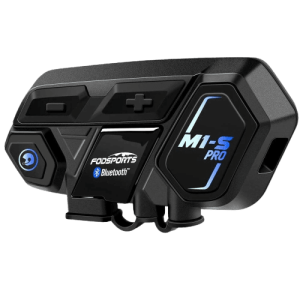
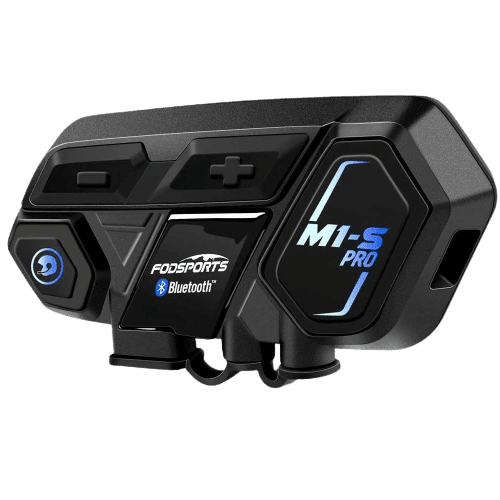
Operation Manual
Attention
Thank you for purchasing FODSPORTS M1-S PRO Bluetooth stereo headsets. For best experiences, please read manual before use.
Sound volume warning
Long period or too loud may hurt hearing ability.
Disassemble or modification
The M1-S PRO is precisely made in the factory. Any disassemble or modification may damage the device. Please do not tear any of the safety regulation and serial number sticker from the device, that will void warranty. Please contact us at [email protected] if needed.
Warranty:
In normal use, we offer one year warranty from the date of purchase. Any disassemble, modification, will void warranty.
1. Outlook (e.g. M1-S PRO)
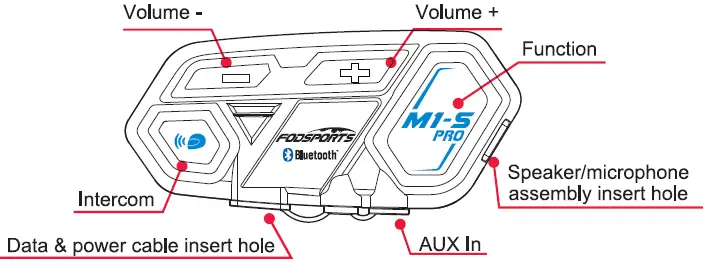
Functions
Switch On: When device is off, press intercom button and function button at samelimefor3 seconds.
Switch Off: When device is on, press intercom button and function button at samelimefor3
Power Detect: When device is on, short press volume”-‘ button and volume”+’ button at same time.
Voice control function {Only If your cellphone is equipped) : Short press function button once.
Switch on external wired device such as speed detector : when device IS on, long press volume•-• button and volume”+’ button at same time for 3 seconds.
Cellphone Function
Answering call: Short press function button once.
Hangup call : After call, short press function once.
Refuse call : After call, short press function button once.
Redial : Short press function button twice.
Volume up : Press volume’,” button while talking.
Volume down : Press volume”-” button while talking.
Switch manual/automatic answering calls : While in standby, press and hold the intercom button and volume ” +” / “-” button at the same time for 3 seconds.
Device Pair Up
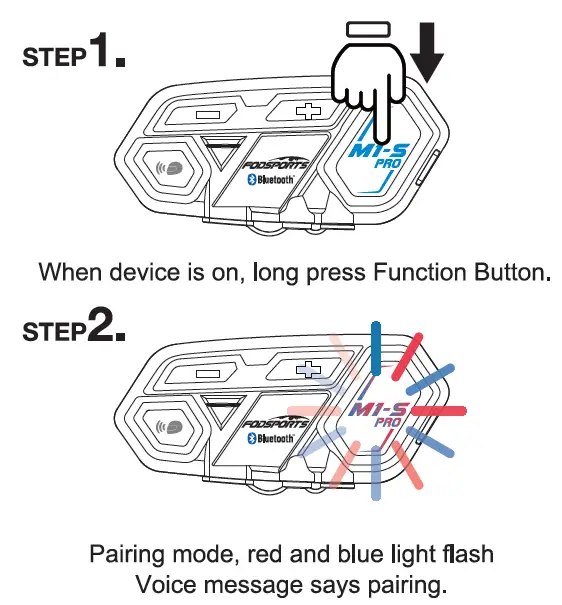
Pairing mode : When device is on, long press function button for 5 seconds. Search mode When device is on, long press intercom button for 5 seconds. Remark, pairing mode is for pairing up to other devices like cellphone, gps Search mode is for pairing up with other Ml-S PRO.
Music Function
Play : When device is on, short press volume”+” button twice.
Pause : When music playing, short press volume”+” button twice.
Volume up : When playing music, short press volume”+” button once.
Volume down : When playing music, short press volume”: button once.
Play previous : When playing music, long press volume”+” button for 2 seconds.
Play next : When playing music, long press volume “-” button for 2 seconds.
Intercom Function
Switch intercom on : when device on : short press intercom button once.
Switch off : when talking, short press intercom button once.
Volume up : when talking, short press volume’,” button once.
Volume down : when talking, short press volume”, button once.
Special Function
Update mode : Plug in the Data & power cable, press volume “-” button and function button at same time for 5 seconds.
Memory clear : When device is on, press volume “+” button and function button at same time for 5 seconds.
2. Recharge
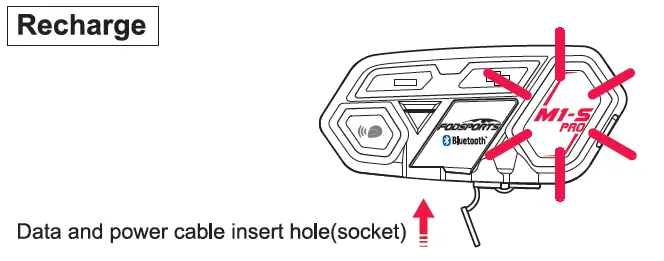
For first time use, please recharge the device until red light is off.
- Use data and power cable plug to the socket, connect to power source.
Bike usb chargers are not recommended, unsterilized circuit may damage the device. - When connecting to power source, red light appears in function button. When recharge complete, red light is off. Complete recharge is about 2 hours.
Low power notification
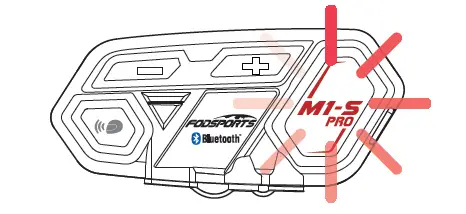
When power lower than 10%, Red light flash in the function button and voice message will remind power lower than 10%, please recharge immediately.
Power Detect Function
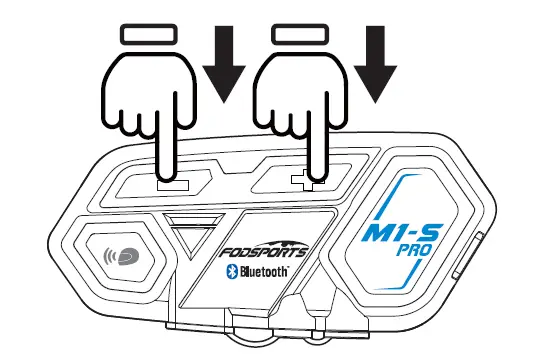
M1-S PRO has power detection function, when device is on, short press volume”-” button and volume”+” button at same time. Recorded voice message will remind
Power over 90%
Power over 50%
Power lower 50%
Power lower than 10% please recharge immediately
Voice control function( only if your cellphone is equipped): short press function button once
Switch on external wired devices such as speed detector … : when device is on, long press volume”-” button and volume”+” button at same time for 3 seconds.
3. On / Off
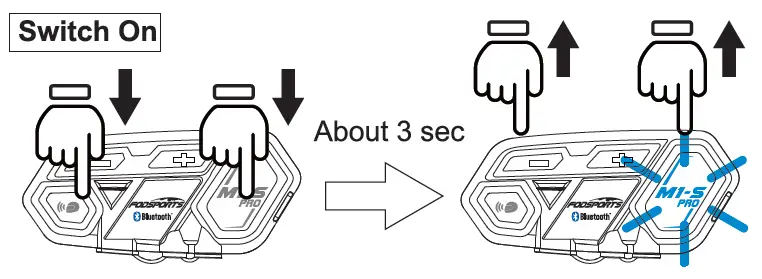
1. Switch on : long press function and intercom button at same time for
3 seconds. until blue light flash in function button. Voice message says “welcome to the Fodsports bluetooth communication system”.
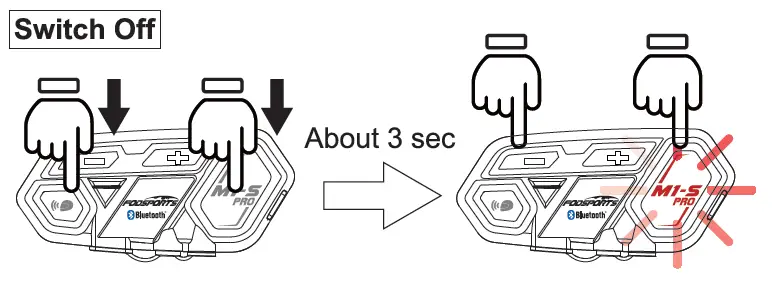
2. Switch off : When the device is on, long press function and intercom button at same time for 3 seconds, until red light flash in function button. The device will detect power and voice message will says “power off’.
4. Pair Up To Different Devices
M1-S PRO can pair to different Bluetooth devices.
Pairing Mode
Search Mode
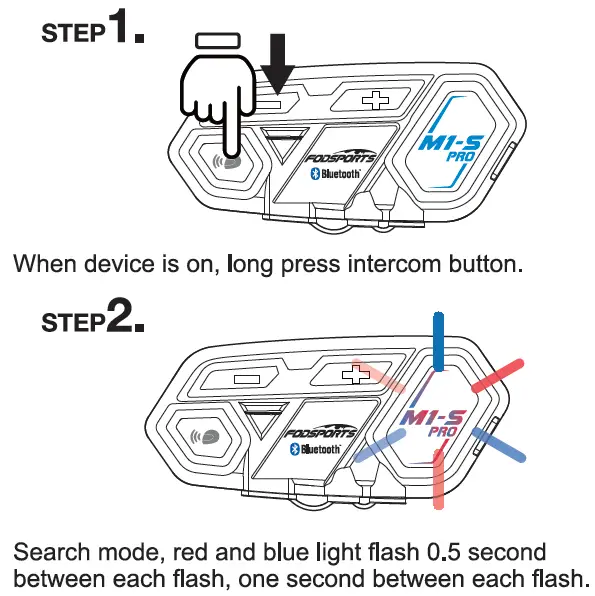
It’s search mode, voice message shows “Searching” sound.
5. Pairing With Cellphone
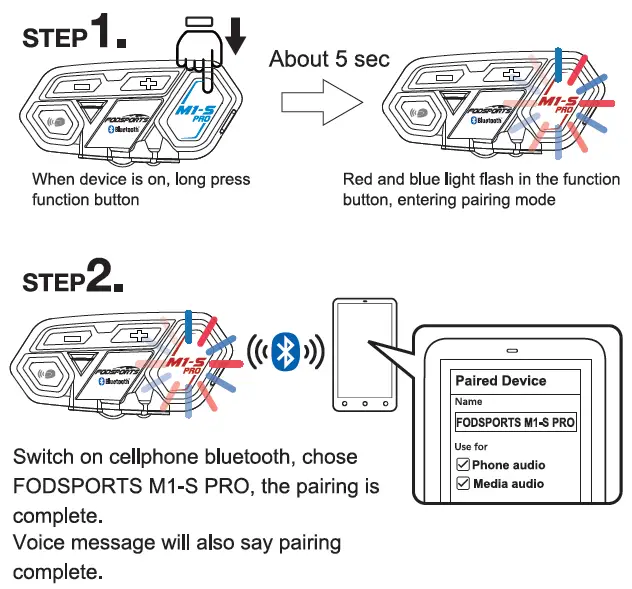
Remark, when pairing complete, please check both cellphone audio and media audio are all chosen, otherwise call or music can’t be processed.
6. Telephone Function
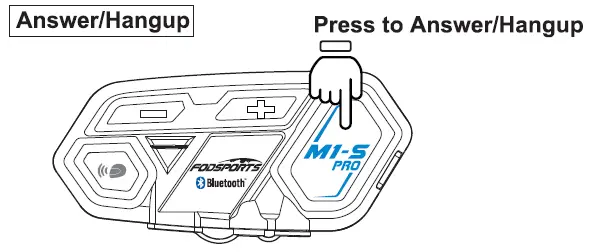
M1-S PRO is set to automaticity answer incoming calls, when incoming calls, beside rings, blue light flashes. Push function button to answer and push function button to hang up.
When talking, press volume”+” button and volume”-” button to adjust volume.
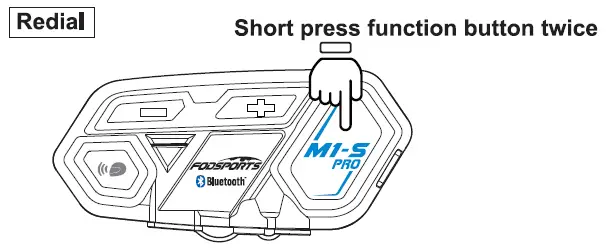
When the device is on, short press function button twice, will redial, blue light flashes.
*Only redial last call out number
7. Voice Command
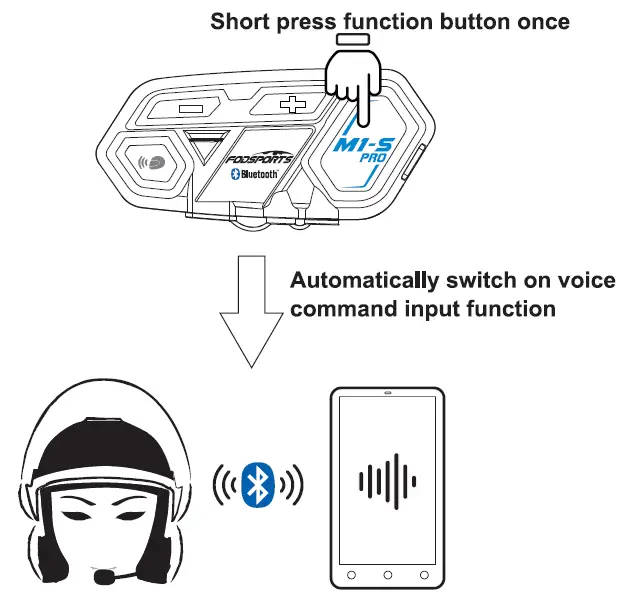
When your M1-S PRO is paired up with your cellphone, when both device are on, short press function button once, will automatically switch on the voice command function
*Cellphone must be equipped with this function
8. Music Selections Functions
Play/Pause
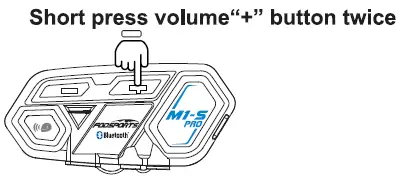
Play music: When cellphone and M1 -S paired up, when both devices are on, short press volume”+” button twice, will play music.
Pause: When playing music, short press volume”+” button twice, will pause.
Previous
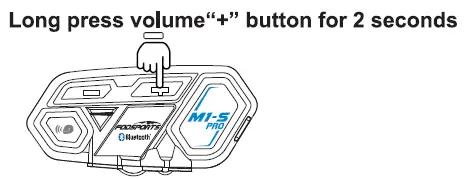
Long press volume”+” button for 2 seconds, will play previous music in your cellphone music list.
Next
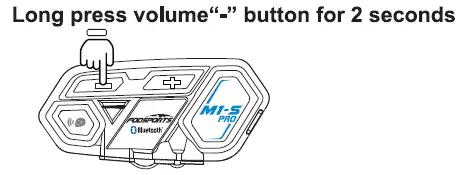
Long press volume”-” button for 2 seconds, will play next music stored in your cellphone music list.
9. Wire Connecting
Long press volume”+” button and volume”-” button for 3 seconds.
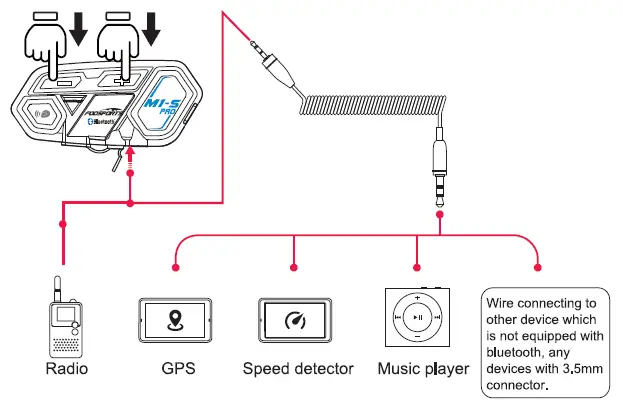
M1-S PRO equipped with wire connection function in order to connect to devices without bluetooth. As long as the device is connected by 3.5mm aux out, all can transmit voice signal to M1 -S PRO.
When device wire connected by 2.5mm to 3.5mm cable to M1-S PRO, long press volume”+” button and volume”-” button for 3 seconds to switch on the connection.
* When wired mode is switched on, it will keep it on until switch off the M1-S PRO.
10. Operating Scenario 1:
One person use, pair to cellphone + Bluetooth GPS device + Bluetooth speed detector
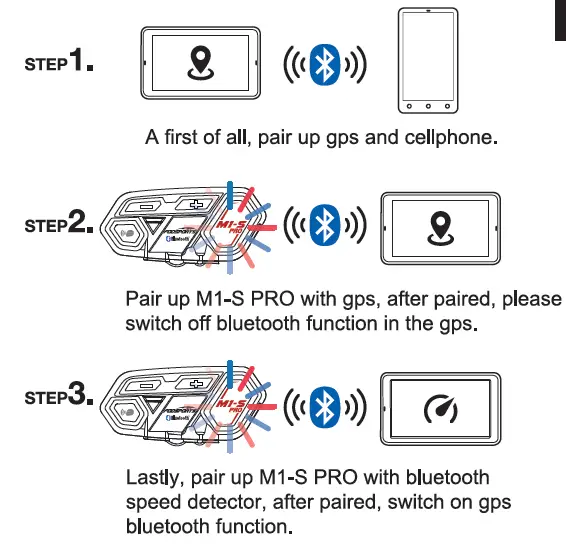
*After M1-S PRO paired with gps, if don’t switch off gps’s bluetooth, its will interference the pairing when pairing to speed detector. Recommended to switch gps bluetooth off, after pair up to detector, switch the bluetooth back on.
11. Operating scenario 2:
Two persons intercom, and pairing to cellphone + Bluetooth GPS + speed detector or radio
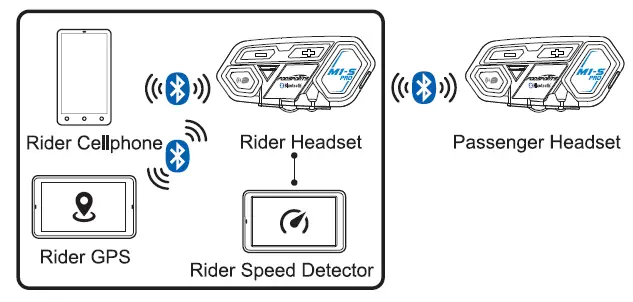
Passenger Procedure:
Step 1: switch rider headset to search mode, passenger headset to pairing mode. When both headset stop red+blue light flashes, they are paired.
Step 2: switch rider headset to pairing mode, cellphone search this M1-S PRO and pair it up.
Step 3: keep riders headset in pairing mode, use bluetooth gps to search rider’s headset and pair it up.
Step 4: use 2.5mm to 3.5mm aux in to connect speed detector or radio to M1 -S PRO, and switch M1-S PRO to Wire Connecting, all audio integrade complete.
Please read STEP 9. For Wire Connecting.
12. Operating Scenario 3:
Two persons intercom, rider using cellphone + Bluetooth GPS passenger using Bluetooth Speed detector
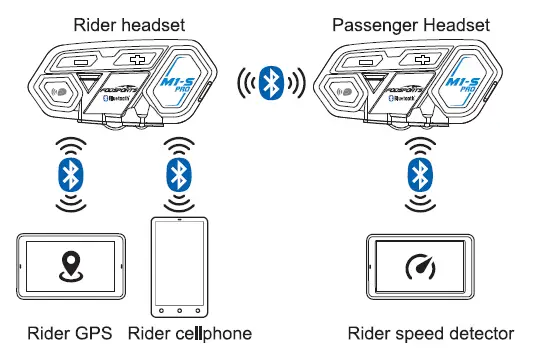
Pairing Procedure
Step 1: switch rider headset to search mode, passenger’s headset switch to pairing mode, when red and blue light stop flash, intercom pairing complete. At same time instantly switch on intercom.
Step 2: Set rider headset to pairing mode, use cellphone to search rider’s headset to complete pair up.
Step 3: set rider’s headset to pairing mode, use bluetooth gps to search rider’s headset and complete.
Step 4: set passenger’s headset to pairing mode, use Bluetooth speed detector to search passenger headset and complete pair up.
13. Multiple Intercom
Multiple intercom pairing procedure
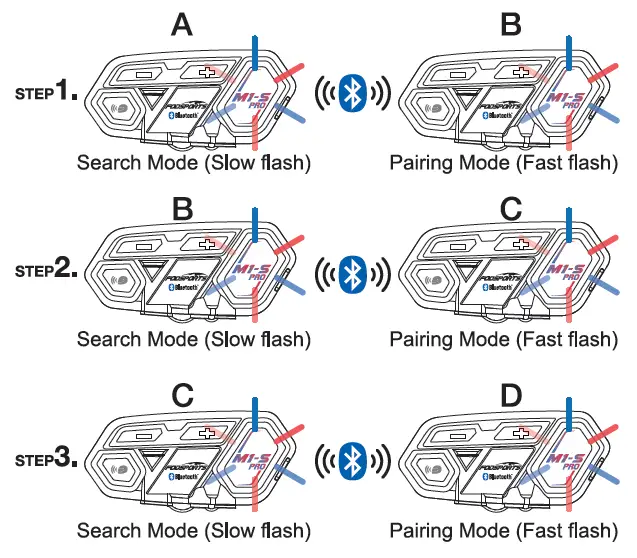
*Numbers of device which the headset can be paired 8 x M1-S PRO (A, B, C D}, multiple intercom connections, the connection will occupy channels, thus only unit A can connect to the other two Bluetooth devices, the others B, C, D can only connect to one Bluetooth device.
M1-S PRO equipped multiple intercom function, support 8 units talk same time,but recommended 4-6 units,pairing procedure as follow.
Step 1: switch on both A and B unit, long press A unit intercom button to search mode, Then long press unit B function button to pairing mode. When blue light on both intercoms, pairing complete.(You should press the intercom button on B unit to end the talking if you need to pair with more than 2 units.in order to new pairing later)
Now A and B unit pairing complete.
Step 2: When B C units on power on status. long press unit B intercom button to search mode, Then long press unit C function button to pairing mode. When blue light on both units, pairing complete.(You should press intercom button on B units if you need 3 units talk same time, then 3 units will light on blue same lime. Or you should press intercom button on C unit to end the talking if you need to pair with more than 3 units)
Three unit pairing complete.
Step 3: When C D units on power on status, Long press unit C intercom button, then long press unit D function button. When blue light on both units, pairing complete.(You should press intercom button on B C units if you need 4 units talk same lime, then 4 units will light on blue same time. Or you need to press intercom on D unit to end the talking if you need to pair with more than 4 units) Pis repeat above steps if you need to pair with 5 or 6 or 7 or 8 units.
Four units pairing complete.
*Interruption
In multiple intercom mode, if there is an incoming call caused one of unit away from the connection. After call, will reconnected automatically. If interruption is caused by distance or bad signal. Please press intercom button to reconnect.
Multiple intercom reconnect procedure
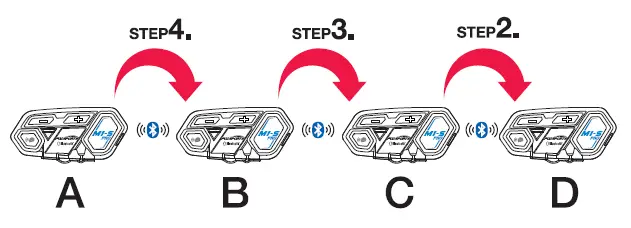
M1-S PRO will remember paired units. But after switch off and want to reconnect again, please follow the procedure.
Step 1: switching off all four units and all bluetooth device connected to the headset.
Step 2: switch on C and D unit, press C unit intercom button to connect to D unit.
Step 3: switch on B unit, press B unit intercom button to connect to C and D unit.
Step 4: switch on A unit, press A unit intercom button to connect to B, C and D unit. After all four unit reconnected, switch on original connected bluetooth devices.
14. QandA
Q1 : No sounds from one or two side speaker.
A1 : Check device plug, needs to firmly connected.
Q2 : Can it be recharged from bike USB charger while riding?
A2.1 : Not recommended, unstablized power source will cause damage on internal circuit, may cause unable to recharge/can’t fully charged/can’t switch on.
A2.2 : Power bank is a good choice.
Q3 : When using radio, not transmission or continuous transmission.
A3 : Pis check whether plug the 2.5mm pin deeply enough. this pin built in waterproof parts, It is easily misunderstand it have been pluged well because of a little resistance.
Q4 : New device can’t switch on.
A4 : Recharged at least 30mins before use.
FAQs:
Frequently Asked Questions
Why are my two speakers or one side speaker unavailable/no sound?
A: 1. Please check if the headphone cable is inserted in the correct direction.
2. Please make sure the headphone cable is fully inserted into the interface.
Why is my microphone unavailable/no sound?
The microphone part is detachable and can replace the soft/boom microphone, so please check if this part is inserted tightly.
2. Please check if the headphone cable is inserted in the correct direction.
Why are my speakers volume low?
Different locations of speakers will cause differences in volume, please install the speaker as close to your ears as possible. If the distance is too far, the volume will be reduced. You can use the thickened pad in the package to achieve it.
Please note that both the volume of the intercom or the volume of listening to music can be adjusted with the volume +- button, if you think the intercom volume is too low, you can press “+” button to increase the intercom volume.
Technical Specification
| Manufacturer | Fodsports |
| Brand | FODSPORTS |
| Item Weight | 40g |
| Product Dimensions | 4cm*2.5cm*8cm |
| Item model number | M1-S Pro |
| Batteries | 900 mAh battery |
| Manufacturer Part Number | M1-S Pro |
| Maximum Number of Speakers | |
| special Features | |
| Max number of speakers | |
| Reminder | |
| Handsfree Bluetooth Headset | |
| Waterproof | |
| Bluetooth and chips: | |
| Maximum Intercom Distance | |
| Stereo Music/Audio | |
| Applicable Helmet Type |
More Manuals From Fodsports
Универсальная bluetooth гарнитура с функцией интеркома для восьми человек, подойдет как для открытых, так и для закрытых шлемов. Fodsports M1-S Plus защищен от воды, использует алгоритм шумоподавления CVC и работает до 20-ти часов от одного заряда. Обладает функцией AGC — автоматическая регулировка громкости. Версия Plus отличается от Pro тремя дополнительными функциями: поддержка обмена музыкой, отключение микрофона и встроенный FM приемник.
Особенности:
• Интерком для 8-ми человек.
• При нажатии на “звук минус” и “звук плюс” одновременно устройство уведомит вас об оставшемся проценте заряда аккумулятора.
• Новый чип CSR BC8 Bluetooth.
• Качественные динамики в комплекте, отлично подходят как для прослушивания музыки, так и для разговора.
• Гарнитура может проработать до 20-ти часов от одного заряда.
• Максимальное расстояние для использования интеркома 500 метров.
• Режим трансляции музыки на две мотогарнитуры M1S Plus (не работает с режимом интеркома)
• Возможность проводного подключения смартфона.
• Микрофон с защитой от ветра и профессиональный алгоритм шумоподавления CVC.
• Низкое энергопотребление.
• Защита от воды IP65, гарнитура не боится дождя.
• Поддержка голосовых ассистентов
• FM радио.
В комплект входит:
2 x Гарнитура для шлема Fodsports M1-S Plus
2 х Динамики и жесткий микрофон для открытого шлема
2 x Мягкий микрофон
2 x USB кабель
1 х Инструкция
2 x Набор креплений
Характеристики:
- Бренд: Fodsports
- Модель: M1-S Plus
- Bluetooth: 4.1
- Чип: CSR BC8
- Максимальное расстояние внутренней связи: 500 м
- Время работы: 20ч
- Время зарядки: 3 ч
- Аккумулятор: 900мА
- Рабочая температура: (-20) — 55
- Цвет: черный
- Размер: 85x40x25 мм
- Вес: 40 гр
- Совместимость: работает с Fodsports V6, Fodsports BT-S2
- Сертификаты: CE / FCC / ROHS / TELEC
Нет отзывов об этом товаре.
M1-S Plus Bluetooth-гарнитура для внутренней связи на шлеме

РУКОВОДСТВО ПО ЭКСПЛУАТАЦИИ
Фокус на спорте на открытом воздухе
1. Пакет включает:

2. Зарядка:

- Функциональная кнопка загорается красным во время зарядки, а красный свет гаснет после завершения (как показано ниже). Пожалуйста, зарядите перед первым использованием.
- Пожалуйста, используйте сертифицированное зарядное устройство 5В/1А±0.5А.
- Пожалуйста, продолжайте заряжать не реже одного раза в 2 месяца, если продукт не используется в течение длительного времени.
3. Установка и разборка
3.1 Установка динамика

Примечание: микрофон должен быть закрыт и направлен в рот, насколько это возможно. Динамики максимально близко к ушам. Если место установки динамика слишком глубокое, так что динамик находится слишком далеко от уха, можно использовать губку из аксессуара для поднятия.
3.2 Исправлено кл.amp

3.3 Разборка устройства

4. Эксплуатация (НАЧАЛО РАБОТЫ)

Внешний вид/кнопка
- Внутренняя связь
- Объем —
- Объем +
- Индикатор
- Функция
- AUX In
- Порт TYPE-C (наушники I заряжаются)
Включение/выключение
Включить: Одновременно нажмите и удерживайте кнопку внутренней связи и функциональную кнопку в течение 3 секунд. В голосовом сообщении также будет сказано: «Добро пожаловать в систему связи FODSPORTS Bluetooth».
Выключить: Одновременно нажмите и удерживайте кнопку внутренней связи и функциональную кнопку в течение 3 секунд. В голосовом сообщении также будет сказано «Питание выключено».
Функция обнаружения питания и уведомления
M1-S PLUS имеет функцию определения мощности, когда устройство включено, коротко нажмите кнопки громкости + и громкости одновременно, записанное голосовое сообщение сообщит вам:
Мощность более 90%
Мощность более 50%
Мощность ниже 50%
Уведомление о низком энергопотреблении
Когда мощность ниже 20%, на функциональной кнопке мигает красная лампочка, и голосовое сообщение напоминает: «Мощность ниже 20%, пожалуйста, немедленно перезарядите».
Когда мощность ниже 10%, на функциональной кнопке мигает красная лампочка, и голосовое сообщение напоминает: «Мощность ниже 10% будет отключена. пожалуйста, перезарядите немедленно».
Сотовый телефон
Ответ на вызов: короткое нажатие функциональной кнопки.
Отбой вызова: вызов завершен, короткое нажатие функциональной кнопки.
Отказ от вызова: нажмите и удерживайте функциональную кнопку в течение 2 секунд.
Повторный набор: дважды нажмите функциональную кнопку.
Увеличение громкости: короткое нажатие кнопки Volume+.
Уменьшение громкости: короткое нажатие кнопки громкости.
Переключение ручного/автоматического ответа на вызовы: в режиме ожидания одновременно нажмите и удерживайте кнопку внутренней связи и кнопку громкости «+» «-» в течение 3 секунд. (По умолчанию: отвечать на входящие вызовы автоматически)
Голосовая команда

Когда ваш M1-S PLUS сопряжен с мобильным телефоном. Короткое нажатие кнопки Громкость+ и Громкость- один раз автоматически включит функцию голосовой команды (только для iOS).
*Мобильный телефон должен иметь функцию голосового управления.
Музыкальная функция
Воспроизведение: короткое нажатие функциональной кнопки.
Пауза: короткое нажатие функциональной кнопки.
Увеличение громкости: короткое нажатие кнопки Volume+. Уменьшение громкости: короткое нажатие кнопки громкости. Воспроизвести Предыдущее: два раза коротко нажмите кнопку Громкость+. Воспроизвести следующее: дважды нажмите кнопку громкости.
Обмен музыкой

* Начать делиться музыкой
Для бывшихample: A поделиться музыкой с B
Шаг 1: подключение к телефону (см. 5.3)
Шаг 2: A и B устанавливают интерком-соединение (см. 5.2)
Шаг 3: Коротко нажмите кнопку внутренней связи A, чтобы выйти из режима внутренней связи.
Шаг 4: Длительное нажатие кнопки громкости + около 3 секунд, голосовое уведомление «Начать обмен музыкой».
Шаг 5: Включите музыкальный проигрыватель на телефоне и воспроизводите песни.
Шаг 6: Теперь B может наслаждаться музыкой, которой поделился A.
* Прекратить делиться музыкой
Сначала приостановите музыку, нажмите и удерживайте кнопку громкости + около 3 секунд, голосовое уведомление «Прекратить делиться музыкой»
* Об обмене музыкой
- Функция обмена музыкой используется только между двумя устройствами M1-S plus.
- Когда вы начинаете, я прекращаю делиться музыкой, музыка должна быть в состоянии паузы.
- Коротко нажмите функциональную кнопку, чтобы воспроизвести/приостановить обмен музыкой.
- Если операция обмена музыкой не удалась, вам необходимо очистить память сопряжения устройства A и устройства B и повторить попытку.
Функция внутренней связи
Включение интеркома: короткое нажатие на кнопку интеркома.
Выключение внутренней связи: короткое нажатие кнопки внутренней связи.
Увеличение громкости: короткое нажатие кнопки Volume+.
Уменьшение громкости: короткое нажатие кнопки громкости.
Микрофон (без звука)
Отключение микрофона: когда устройство находится в режиме разговора (интерком), нажмите и удерживайте кнопку громкости + 2 секунды.
Включить микрофон: когда устройство находится в режиме разговора (интерком), нажмите и удерживайте кнопку громкости + 2 секунды.
По умолчанию: включить микрофон)
Функция FM
Включение FM: Нажмите и удерживайте кнопку громкости в течение 3 секунд.
FM Off: Нажмите и удерживайте кнопку громкости в течение 3 секунд.
Увеличение громкости: короткое нажатие кнопки громкости + .
Уменьшение громкости: короткое нажатие кнопки громкости.
Поиск каналов: дважды нажмите кнопку Громкость+/Громкость-.
Очистить память

Очистить память: Когда устройство включено, одновременно нажмите кнопки «Функция» и «Громкость +» в течение 5 секунд. Затем M1-S PLUS очистит память сопряжения с другими устройствами. Красный и синий свет мигают одновременно, полностью очищая память.
5. Сопряжение устройств
5.1 Режимы сопряжения
5.1.1 Пассивный режим сопряжения

Когда устройство включено. Нажмите и удерживайте функциональную кнопку, чтобы войти в режим сопряжения. красный и синий индикаторы быстро мигают. голосовое уведомление «сопряжение». Режим сопряжения для подключения к устройствам Bluetooth, таким как мобильные телефоны и Bluetooth GPS.
5.1.2 Активный режим поиска

Когда устройство включено. Нажмите и удерживайте кнопку внутренней связи, чтобы войти в режим поиска, красный и синий индикаторы медленно мигают, голосовое сообщение говорит «Поиск». Режим поиска используется только для внутренней связи между устройствами M1-S PLUS.
5.2 (A)M1-S PLUS соединяется с (B)M1-S PLUS

A M1-S PLUS находится в активном режиме поиска (см. 5.1.2), B M1S-PLUS находится в пассивном режиме поиска (см. 5.1.1), A и B M1-S PLUS перестают мигать красным и синим светом попеременно. чтобы функциональные кнопки и кнопки внутренней связи мигали синим светом одновременно, подключение успешно.
5.3 Сопряжение с мобильным телефоном

ШАГ 1. Когда устройство включено, нажмите и удерживайте функциональную кнопку. красный и синий свет быстро мигают, переходя в режим пассивного сопряжения (см. 5.1.1).

ШАГ 2. Включите Bluetooth мобильного телефона, выберите «FODSPORTS M1-S PLUS», сопряжение завершено. В голосовом сообщении будет указано «Устройство подключено».
5.4 Подключение с двумя телефонами

Шаг 1 . Подключитесь к первому телефону (см. 5.3)
Шаг 2 . Нажмите и удерживайте функциональную кнопку, M1-S PLUS в режиме пассивного поиска, подключитесь ко второму телефону (см. 5.3).
Примечание: M1-S PLUS может подключаться к двум телефонам, но поддерживает только один телефон для аудиовхода.
5.5 провода Соединительный

Любое устройство с разъемом 3.5 мм может передавать голосовой сигнал на M1-S PLUS.
Когда провод устройства подключен кабелем 2.5 мм к 3.5 мм к M1-S PLUS, завершите ввод проводного источника звука.

Вам необходимо приобрести кабель, если вам необходимо проводное соединение для рации.
6. Сопряжение нескольких устройств
6.1 Случаи: Водитель А соединяется с пассажиром Б по интеркому. Затем A подключается к двум устройствам Bluetooth и одному проводному оборудованию, а B подключается к одному устройству Bluetooth (как показано ниже).

Шаг 1 . A M1-S PLUS соединяется с B M1-S PLUS (см. 5.2)
Шаг 2. Коротко нажмите один раз кнопку внутренней связи A или B, чтобы отключить внутреннюю связь.
Шаг 3. Соединение с двумя телефонами (см. 2)
Шаг 4. Используйте аудиолинию AUX от 2.5 мм до 3.5 мм для подключения к одному аудиоустройству.
Шаг 5. B подключитесь к одному телефону (устройству Bluetooth)
Шаг 6. Коротко нажмите кнопку внутренней связи A или B для соединения.
Примечание. Если A или B необходимо использовать аудиофункцию телефона (устройство Bluetooth), вам необходимо отключить внутреннюю связь.
6.2 Многоканальный интерком
6.2.1 M1-S PLUS оснащен функцией множественной внутренней связи, рекомендуется 4 устройства (A, B, C, D), процедура сопряжения следующая:


Шаг 1: Блок А находится в активном режиме поиска (см. 5.1.2), Блок В находится в режиме пассивного поиска (см. 5.1.1), Блок А и Блок В перестают мигать красным и синим светом попеременно, мигая функциональной кнопкой и Кнопка внутренней связи мигает синим светом одновременно, соединение успешно. Коротко нажмите кнопку внутренней связи на блоке B один раз, временно выйдите из состояния внутренней связи.
Шаг 2: Устройство B находится в активном режиме поиска (см. 5.1.2), Устройство C находится в режиме пассивного поиска (см. 5.1.1), Устройство B и Устройство C перестают мигать красным и синим светом попеременно с функциональной кнопкой и Кнопка внутренней связи мигает синим светом одновременно, подключение успешно. Коротко нажмите кнопку интеркома на блоке C один раз, чтобы временно выйти из режима интеркома.
Шаг 3: Устройство C находится в активном режиме поиска (см. 5.1.2), Устройство D находится в режиме пассивного поиска (см. 5.1.1), Unite и Устройство D перестают мигать красным и синим светом попеременно, мигая функциональная кнопка и кнопка внутренней связи. синие загораются одновременно с лаймом, подключение успешно.
Шаг 4: Кнопки внутренней связи и функциональные кнопки блоков A, B, C и D мигают синим светом одновременно, соединение групповой внутренней связи успешно установлено.
*Вы можете подключить больше M1-S PLUS, повторив описанные выше методы.
Обратите внимание: Первый и последний M 1 S-PLUS могут подключаться еще к 2 устройствам Bluetooth. То
M1 S-PLUS в среднем положении соединения группы может подключаться к дополнительному устройству Bluetooth.
Для бывшихample: В режиме групповой внутренней связи устройства B и C могут подключаться только к одному устройству Bluetooth. Блоки A и D могут подключаться к двум устройствам Bluetooth.
* Прерывание внутренней связи
В режиме нескольких интеркомов, если есть входящий вызов, вызванный на расстоянии одного устройства от соединения, после звонка будет автоматически восстановлено соединение. Если прерывание вызвано расстоянием или плохим сигналом, нажмите кнопку внутренней связи, чтобы восстановить соединение.
6.2.2 Функция подключения памяти
M1-S PLUS запоминает сопряженные устройства. но после выключения и снова хочу переподключиться. пожалуйста, следуйте процедуре:

ШАГ 1. Выключите все 4 устройства (A, B, C, D) и все устройства Bluetooth, подключенные к гарнитуре, такие как мобильный телефон и GPS. (II повлияет на спаривание)
ШАГ 2. Включите все 4 устройства (A, B, C, D) одновременно (длительное нажатие внутренней и функциональной кнопок около 3 секунд).
ШАГ 3. Коротко нажмите одну кнопку интеркома на 4 M1S-PLUS, и они одновременно замигают синим и красным светом. Подключение к памяти началось успешно.
ШАГ-4. После повторного подключения всех 4 устройств включите исходные подключенные устройства Bluetooth, такие как мобильный телефон и GPS.
6.2.3 Метод быстрого подключения внутренней связи для четырех человек (режим быстрого сопряжения)

Шаг-1: Включите 4 M1 S-Plus ABC и D.
Шаг 2: Unit AB C и Dare all находятся в режиме пассивного поиска долгим нажатием функциональных кнопок. 4 устройства попеременно мигают синим и красным светом, голосовое уведомление «сопряжение».
Шаг 3: Коротко нажмите функциональную кнопку одного M1-S PLUS один раз, 4 устройства будут попеременно мигать синим и красным светом.
Шаг 4: Через 15 секунд голосовое уведомление «Поиск» 4 устройств, функциональные кнопки и кнопки интеркома одновременно мигают синим светом, групповое интерком-соединение успешно завершено.
*Примечание: режим быстрого сопряжения предназначен только для 4 гонщиков.
7. Технические характеристики
- Поддержка Bluetooth: HSP, HFP, A2DP, AVRCP, AGHSP
- Батарея: литиевая батарея, 900 мА, 3.7 В
- Габаритные размеры: 8.6cm * 4.4cm * 2.5cm
- Вес: 44G, 92G (включая комплекты для наушников и микрофона)
- Диапазон частот: 2.4G-2.485G
- Рабочая Температура: -20″С-50С
- сертификация: CE FCC ROHS BQB ТЕЛЕК
- Стандартная зарядка USB-адаптера, объемtage: 5 В постоянного тока ± 0.2 В USB
- Стандартная схема заряда адаптера: 1 А ± 0.5 А постоянного тока Время зарядки: 2-3 часа
8. Вопросы и ответы / Предупреждение
Q1: Нет звука из одного или двух боковых динамиков.
A1: Проверьте штекер устройства, он должен быть надежно подключен.
Q2: Можно ли заряжать его от велосипедного USB-зарядного устройства во время езды 7
A2: 1. Не рекомендуется, нестабильный источник питания вызовет повреждение внутренней цепи, может привести к невозможности перезарядки/полной зарядки/невозможности включения.
2. Повербанк будет хорошим.
Q3: При использовании радио, без передачи или непрерывной передачи.
A3: Проверьте штифт 2.5 мм, он должен быть надежно вставлен. Штифт оснащен водонепроницаемыми фартуками, пользователь может подумать, что он уже подключен.
Q4: Новое устройство не включается.
А4. Зарядка не менее чем за 30 минут до использования переключателя.
*Предупреждение
Предупреждение о громкости звука
Продолжительное прослушивание или слишком высокая громкость могут повредить слух.
Разобрать или модифицировать
M1-S PLUS точно изготовлен на заводе. Любая разборка или модификация могут привести к повреждению устройства. Пожалуйста, не отрывайте от устройства правила техники безопасности и наклейку с серийным номером, это приведет к аннулированию гарантии. Пожалуйста, свяжитесь с нами напрямую, если это необходимо.
9. Заявление/гарантия
9.1 Заявление FCC Изменения или модификации, явно не одобренные стороной, ответственной за соответствие требованиям, могут привести к аннулированию права пользователя на эксплуатацию оборудования.
Это оборудование было протестировано и признано соответствующим ограничениям для цифровых устройств класса B согласно части 15 правил FCC. Эти ограничения разработаны для обеспечения разумной защиты от вредных помех при установке в жилых помещениях. Это оборудование генерирует, использует и может излучать радиочастотную энергию и, если оно установлено и используется не в соответствии с инструкциями, может создавать вредные помехи для радиосвязи.
Однако нет гарантии, что помехи не возникнут при конкретной установке. Если это оборудование действительно создает недопустимые помехи для приема радио или телевидения, что можно определить, выключив и снова включив оборудование, пользователю рекомендуется попытаться устранить помехи одним или несколькими из следующих способов:
- Изменить ориентацию или местоположение приемной антенны.
- Увеличьте расстояние между оборудованием и приемником.
- Подключить оборудование к розетке в цепи, отличной от той, к которой подключен приемник.
- Обратитесь за помощью к дилеру или опытному радио / телевизионному технику.
Это устройство соответствует части 15 правил FCC. Эксплуатация зависит от следующих двух условий: (1) это устройство не должно создавать вредных помех. и (2) это устройство должно принимать любые принимаемые помехи, включая помехи, которые могут вызвать нежелательную работу.
Это устройство было проверено на соответствие общим требованиям к воздействию радиочастотного излучения. Устройство можно использовать в условиях переносного воздействия без ограничений.
9.2 Гарантия
При нормальном использовании. Один год гарантии с даты покупки, любая модификация, связанная с разборкой, приведет к аннулированию гарантии.

Послепродажное обслуживание
Если у вас возникли проблемы с качеством или отсутствующими аксессуарами, особенно с проблемой сопряжения двух или более гарнитур M2-S PLUS, свяжитесь с нами по адресу электронная почта: winzon.cs@outlook.com. Мы всегда готовы помочь, ответим вам в течение 12 часов.
Часто задаваемые вопросы:
Почему два моих динамика или один боковой динамик недоступны / нет звука?
A: 1. Пожалуйста, проверьте, правильно ли вставлен кабель наушников, M1-S PLUS — это интерфейс Type-C со значком микрофона, обращенным к вам, а затем вставьте интерфейс в правильном направлении. 2. Убедитесь, что кабель наушников полностью вставлен в интерфейс.
Почему мой микрофон недоступен/нет звука?
Микрофонная часть является съемной и может заменить мягкий/штанговый микрофон, поэтому проверьте, плотно ли вставлена эта часть. 2. Убедитесь, что кабель наушников вставлен в правильном направлении, M1-S PLUS — это интерфейс Type-C со значком микрофона, обращенным к вам, а затем вставьте интерфейс в правильном направлении.
Почему громкость моих динамиков низкая?
Различное расположение динамиков приведет к разнице в громкости, пожалуйста, установите динамик как можно ближе к ушам. Если расстояние слишком велико, громкость будет уменьшена. Для этого можно использовать утолщенную прокладку в упаковке.
Почему громкость домофона такая низкая?
Обратите внимание, что как громкость внутренней связи, так и громкость прослушивания музыки можно регулировать с помощью кнопки громкости +-, если вы считаете, что громкость внутренней связи слишком низкая, вы можете нажать кнопку «+», чтобы увеличить громкость внутренней связи.
Мы с другом оба пользуемся M1-S PLUS, почему я слышу его голос, а он меня не слышит?
Возможно, у него неисправен динамик. Пожалуйста, попросите его подключить телефон и воспроизвести музыку, чтобы проверить, не связана ли проблема с динамиком. 2. Также может быть, что ваш микрофон неисправен и он не слышит ваш голос. Замените мягкий/жесткий микрофон, чтобы проверить, не связана ли проблема с микрофоном.
Почему не удалось обменяться музыкой?
Функция обмена музыкой применима только между 2 устройствами M1-S PLUS. 2. Когда вы запускаете / останавливаете обмен музыкой, музыка должна находиться в состоянии паузы, если вы не приостановите воспроизведение музыки, она не сможет поделиться музыкой.