


ТВС НБ2 Про
Настоящие беспроводные наушники с активным шумоподавлением
www. edi fer.com
Описание продукта и аксессуары

Вспомогательное оборудование:
Наушники x 3 пары, сумка для хранения x 1, зарядный кабель x 1
Примечание:
- В упаковке прилагаются ушные вкладыши разного размера, выберите подходящие для ношения.
- Изображения предназначены только для иллюстративных целей и могут отличаться от реального продукта.
Включение / выключение питания
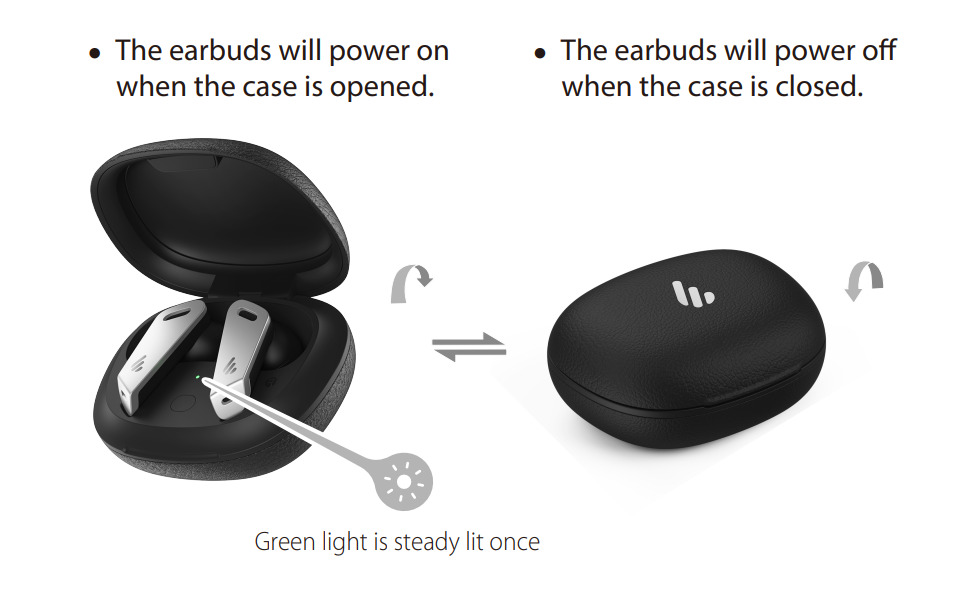
- Наушники включатся при открытии футляра.
- Наушники выключатся, когда чехол будет закрыт.

Заряд
Зарядите наушники
- Поместите наушники в чехол и закройте чехол для зарядки.
Зарядите зарядный чехол
- Подключите прилагаемый зарядный кабель к чехлу для зарядки.
- Индикатор горит постоянно = зарядка
Индикатор не горит = полностью заряжен
Индикатор уровня заряда аккумулятора на зарядном футляре
- Откройте / закройте кейс, чтобы увидеть уровень заряда кейса;
если индикатор fl горит трижды: полный уровень заряда батареи
если индикатор fl горит дважды: средний уровень заряда батареи
если индикатор fl горит один раз: низкий уровень заряда батареи

Предупреждение. Аккумуляторные батареи, обеспечивающие питание этого продукта, необходимо утилизировать надлежащим образом для вторичной переработки. Не бросайте батареи в огонь, чтобы
взрыв.
Инструкция
Подключение Bluetooth

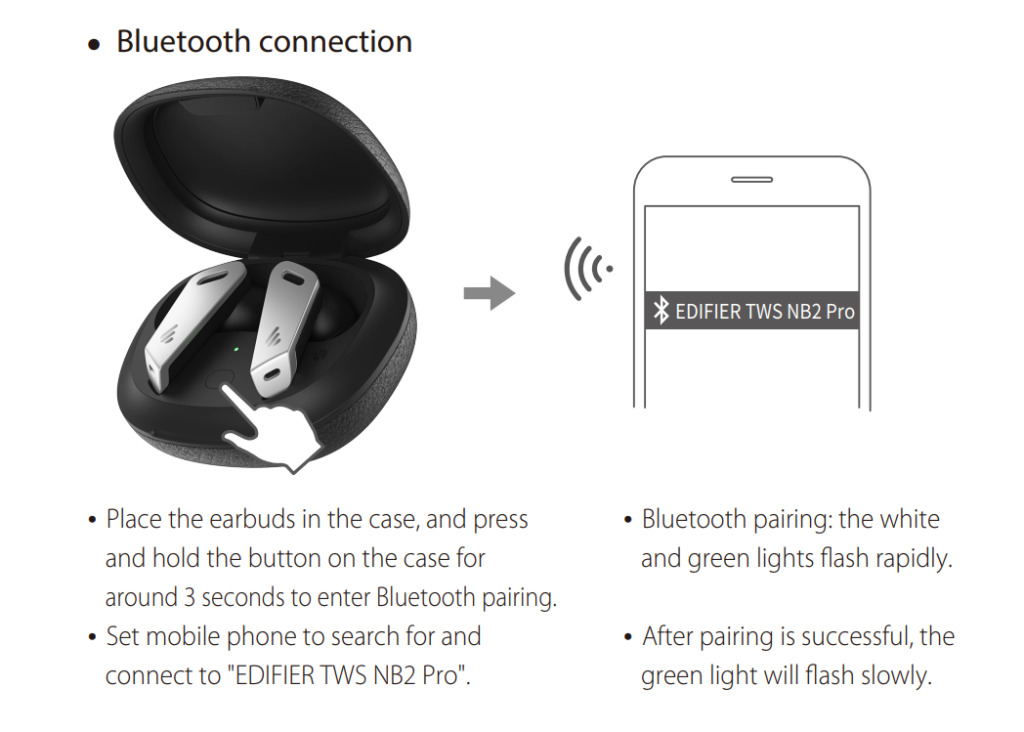
- Поместите наушники в чехол, нажмите и удерживайте кнопку на чехле около 3 секунд, чтобы войти в сопряжение по Bluetooth.
- Настройте мобильный телефон на поиск и подключение к «EDIFIER TWS NB2 Pro».
- Сопряжение Bluetooth: быстро мигают белый и зеленый индикаторы.
- После успешного сопряжения зеленый индикатор начнет медленно мигать.
Соединение левого и правого наушников / очистка записей сопряжения
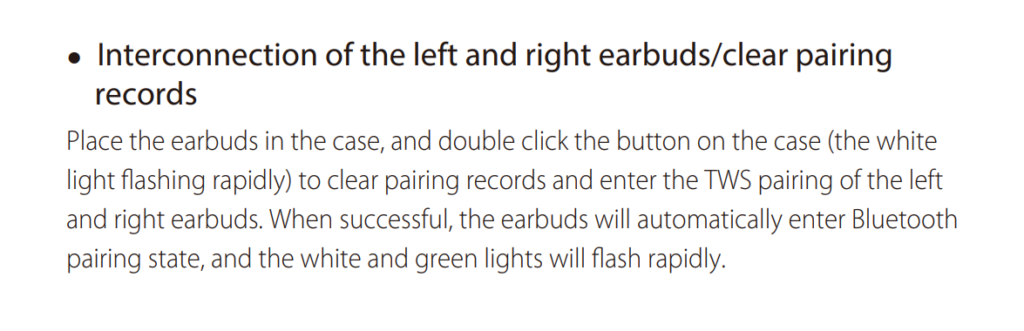
Поместите наушники в футляр и дважды нажмите кнопку на футляре (белый свет быстро мигает), чтобы очистить записи сопряжения и войти в пару TWS для левого и правого наушников. В случае успеха наушники автоматически перейдут в состояние сопряжения Bluetooth, а белый и зеленый индикаторы будут быстро мигать.
Функциональная работа

Примечание:
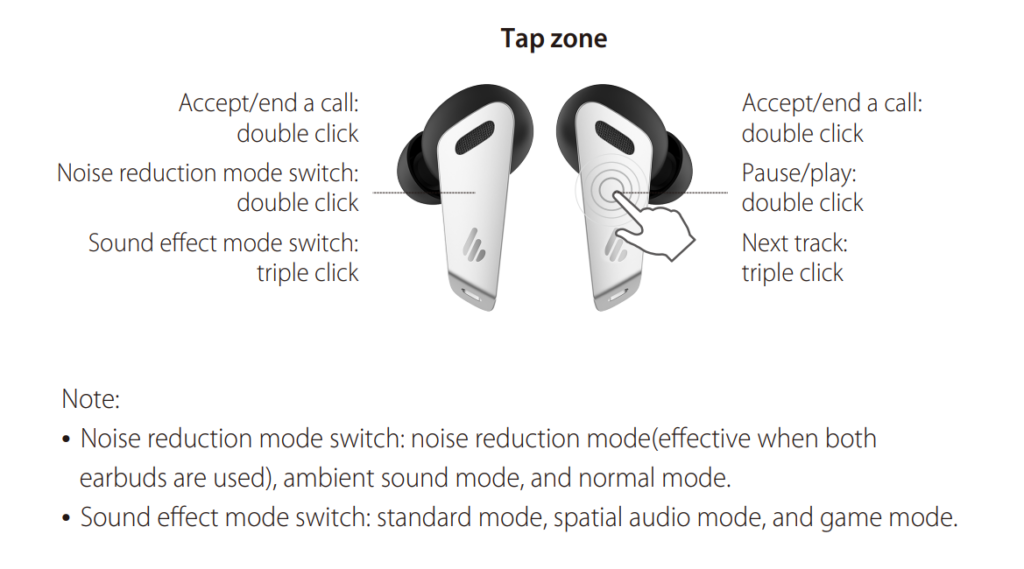
- Переключатель режима шумоподавления: режим шумоподавления (эффективен при использовании обоих наушников), режим окружающего звука и нормальный режим.
- Переключатель режима звукового эффекта: стандартный режим, режим пространственного звука и игровой режим.Функция обнаружения в ухе
- Управление музыкой: музыка будет воспроизводиться / приостанавливаться при вставке или удалении одного наушника.
- Управление шумоподавлением: в режиме шумоподавления шумоподавление будет включено, когда вставлены оба наушника, и будет отключено, когда один наушник будет удален.
- Вы также можете установить или закрыть функцию обнаружения в ухе через ПРИЛОЖЕНИЕ EDIFIER CONNECT.
Часто задаваемые вопросы
При зарядке зарядного кейса индикатор не горит.
- Убедитесь, что зарядный футляр правильно подключен к источнику питания.
Без звука
- Проверьте, работают ли наушники.
- Убедитесь, что уровень громкости наушников соответствует требованиям.
- Убедитесь, что наушники правильно подключены к мобильному телефону.
- Убедитесь, что наушники работают в нормальном рабочем диапазоне.
Качество связи наушников оставляет желать лучшего.
- Убедитесь, что мобильный телефон находится в зоне с сильным сигналом.
- Убедитесь, что наушники находятся на эффективном расстоянии (10 м) и между наушниками и мобильным телефоном нет препятствий.
При воспроизведении музыки нельзя управлять паузой / воспроизведением / следующей дорожкой через наушники.
- Убедитесь, что сопряженное устройство поддерживает профиль AVRCP (профиль дистанционного управления аудио / видео).
Функция постукивания слишком чувствительна или нечувствительна.
- Убедитесь, что вы постукиваете в зоне эффективного постукивания с умеренной интенсивностью или под подходящим углом. Вы также можете настроить желаемую чувствительность нажатия через ПРИЛОЖЕНИЕ EDIFIER CONNECT.
После подключения одного наушника к другому мобильному телефону звук из другого наушника отсутствует при повторном использовании.
- Когда один наушник подключен к другому мобильному телефону, соединение между левым и правым наушниками могло быть отключено. Чтобы восстановить режим двух наушников, дважды нажмите кнопку сопряжения на корпусе, чтобы возобновить соединение между левым и правым наушниками. Затем попробуйте еще раз.
При игре в игры возникает проблема с задержкой.
- Трижды щелкните левый наушник, чтобы переключиться в игровой режим, а затем запустите
играю в игру.
Функция обнаружения в ухе не чувствительна или слишком чувствительна.
- Чтобы гарантировать распознавание каждого ношения наушников пользователем, распознавание наушников в ухе было немного улучшено. Если они не используются, поместите наушники обратно в чехол для зарядки и хранения; Лучше не класть наушники одни в карман или на стол на длительное время, чтобы избежать помех для функции обнаружения внутри уха или их отсутствия. Вы также можете настроить функцию автоматического обнаружения наушников на другие функции или закрыть ее с помощью приложения EDIFIER CONNECT APP.
Обслуживание
- Если он не используется в течение длительного времени, заряжайте продукт от литиевой батареи каждые три месяца.
- Держите изделие подальше от влажных мест, чтобы не повредить внутреннюю цепь.
Не используйте продукт во время интенсивных тренировок или с большим количеством пота, чтобы пот не попал на продукт и не повредил его. - Не кладите продукт в места, подверженные воздействию солнечных лучей или с высокими температурами.
Высокая температура сократит срок службы электронных компонентов, повредит аккумулятор и приведет к деформации пластиковых компонентов. - Не кладите изделие в холодные места, чтобы не повредить внутреннюю печатную плату.
- Не разбирайте изделие. Непрофессиональный персонал может повредить продукт.
- Не роняйте, не трясите и не ударяйте изделие твердыми предметами, чтобы не повредить внутреннюю цепь.
- Не используйте сильнодействующие химические вещества или чистящие средства для очистки продукта.
- Не используйте острые предметы, чтобы поцарапать поверхность продукта, чтобы не повредить оболочку и не раскололся фасад.
Модель: EDF200026
Эдиф Интернэшнл Лимитед
Почтовый ящик 6264
Генеральная почта
香港(中國)
www.edifier.com
2021 Edifier International Limited. Все права защищены.
Напечатано в Китае
ВНИМАНИЕ:
При необходимости технического усовершенствования и обновления системы информация, содержащаяся в данном документе, может время от времени изменяться без
предварительное извещение.
Продукты EDIFIER будут адаптированы для различных приложений. Рисунки и иллюстрации, представленные в этом руководстве, могут немного отличаться от реального продукта. Если обнаруживается какое-либо различие, преобладает фактический продукт.

Документы / Ресурсы
Рекомендации
- Руководство пользователя
The Edifier TWS NB2 Pro earbuds come with hybrid active noise canceling technology, three-dimensional audio technology, app support, Bluetooth 5.0 and a working range of 10 meters, support for the SBC audio codec, the IPX4 sweat and dust-proof certification, and much more. Learn how to use these earbuds using this manual!
What’s Inside
Edifier TWS NB2 Pro | How To Pair?
How to Pair The Earbuds?
To iOS and Android phones
Step 1: Open the lid of the charging case. After that, a green light turns on for one second on the case, and the earbuds will turn on automatically.
Step 2: Press and hold the button on the inside of the charging case for about 3 seconds. When a white and green light starts flashing quickly, the earbuds enter pairing mode and will be ready to pair with any device.
Step 3: Turn on Bluetooth on the desired device.
Step 4: Go to the device’s Bluetooth settings.
Step 5: Select “EDIFIER TWS NB2 Pro“. If a password is needed, type “0000”. After that, a green light will start flashing slowly, and the pairing will be done.
To PC (Windows)
Step 1: Turn on Bluetooth on the desired device.
Step 2: Go to the settings.
Step 3: Go to “Bluetooth and other devices”.
Step 4: Click on “Add device”.
Step 5: Open the lid of the charging case. After that, a green light turns on for one second on the case, and the earbuds will turn on automatically.
Step 6: Press and hold the button on the inside of the charging case for about 3 seconds. When a white and green light starts flashing quickly, the earbuds enter pairing mode and will be ready to pair with any device.
Step 7: Select “EDIFIER TWS NB2 Pro“. If a password is needed, type “0000”. After that, a green light will start flashing slowly, and the pairing will be done.
Pairing The Earbuds To Each Other
If the earbuds don’t pair with each other automatically after the charging case is open, then follow the following instructions:
Step 1: Place the earbuds into the charging case and keep its lid open.
Step 2: Press the button on the inside of the charging case two times. A white light will start flashing quickly.
When a white and green light starts flashing quickly, the process will be done.
How to Wear?
Step 1: Take both earbuds out of the charging case.
Step 2: Identify the left and right earbuds.
Step 3: Choose the ear tips that best suit your ears.
Step 4: Insert the headphones into the inner canal of the ears.
Step 5: Rotate for the best possible comfort and best fit, and make sure that the microphone is pointing to the mouth.
How to Turn On and Off?
Turn on: Open the lid of the charging case. After that, a green light turns on for one second on the case, and the earbuds will turn on automatically.
Turn off: Place the earbuds into the charging case and close its lid. After that, the earbuds will turn on automatically.
How to Control? / How to Operate? – Instructions
- Play or pause a song: Press the multifunction touch sensor on the right earbud two times.
- Play the next song: Press the multifunction touch sensor on the right earbud three times.
- Answer an incoming call: Press the multifunction touch sensor on any of the earbuds two times.
- End a current call: Press the multifunction touch sensor on any of the earbuds two times.
- Activate and change the ANC mode: Press the multifunction touch sensor on any of the earbuds two times.
- Activate or deactivate the sound effect mode: Press the multifunction touch sensor on the left earbud three times.
How to Activate The Mono Mode?
To activate or deactivate the mono mode in these earbuds, all you have to do is to pair the earbuds to the device and take out one of the earbuds from the charging case. It will start working by itself.
How to Charge The Earbuds?
Earbuds
To charge the earbuds, all you have to do is to place them into the charging case and close the lid. The earbuds will start charging automatically.
Charging case
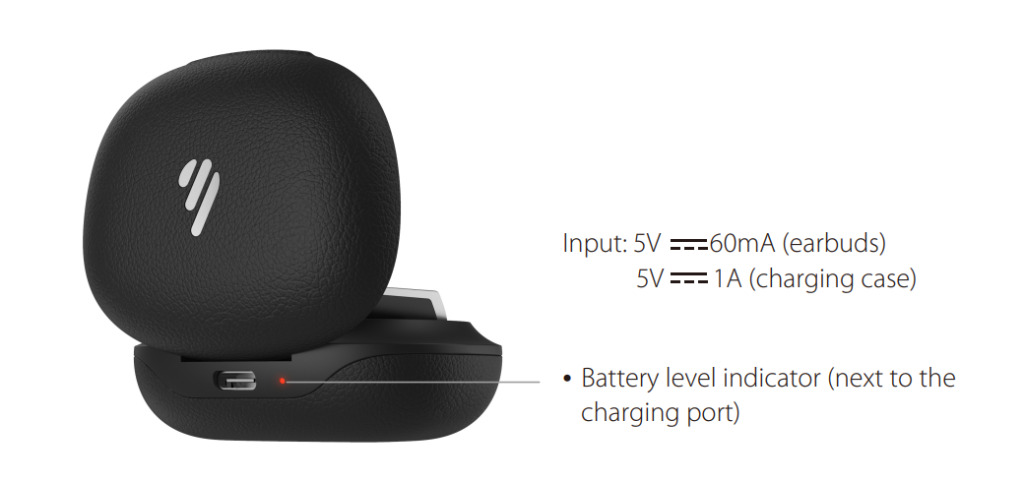
To charge the charging case, all you have to do is to connect the case to a USB charger or charging port with the included USB-A to C cable. It will start charging automatically.
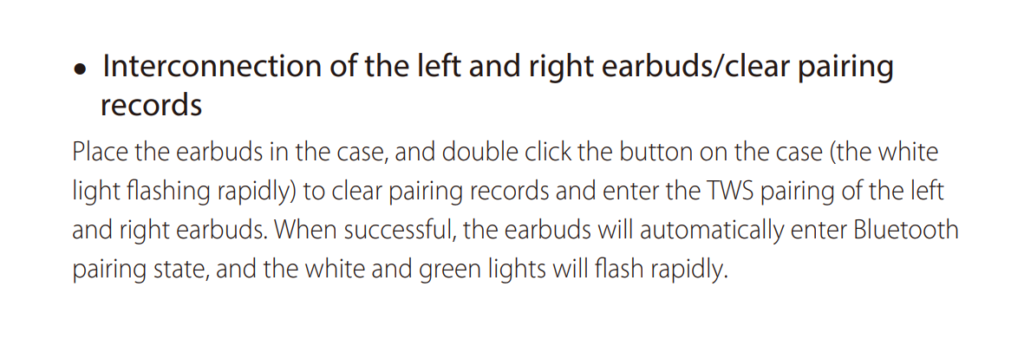
How to Reset The Earbuds?
Step 1: Delete all pairing information related to the “EDIFIER TWS NB2 Pro” earbuds on the connected device.
Step 2: Place the earbuds into the charging case and keep its lid open.
Step 3: Press the button on the inside of the charging case two times. A white light will start flashing quickly.
When a white and green light starts flashing quickly, the process will be done.
What Do The Lights Mean?
Earbuds
- A white and green light will start flashing quickly: The earbuds will be ready to pair with any device.
- A green light flashing slowly: The earbuds are now connected to the device.
- A white light flashing quickly while resetting: The earbuds are resetting.
Charging case
- A green light turns on for one second: The earbuds turn on.
- A light is on while charging: The case is charging.
- Said light turns off while charging: The case is fully charged.
- A light is on while on the case: The earbuds are charging.
- Said light turns off while on the case: The earbuds are fully charged.
- The light flashes one time when the lid is open/closed: The case has a low battery level.
- The light flashes two times when the lid is open/closed: The case has a medium battery level.
- The light flashes three times when the lid is open/closed: The case has a full battery level.

A Guide To Edifier TWS NB2 Pro APP
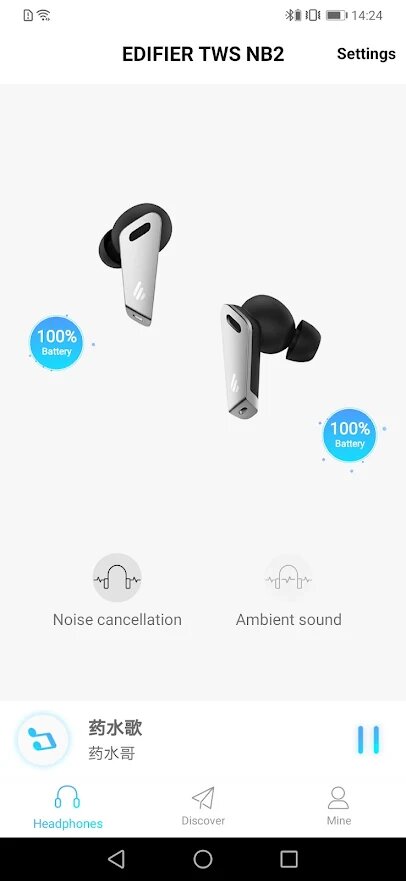
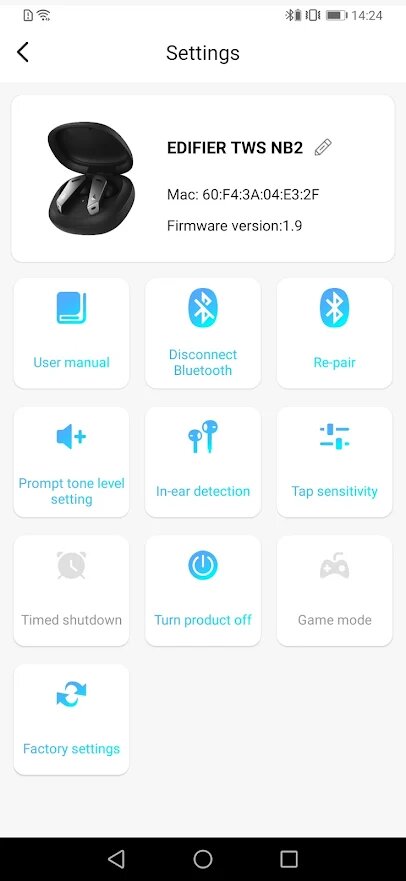
The Edifier TWS NB2 Pro can be used with an application, called Edifier Connect. This application is available for iOS and Android devices.
- First page: On the first page, not only is the battery percentage that the earbuds have but there is also the ability to turn ANC and ambient sound mode on or off. Likewise, there are also the settings, where there is information about the earbuds, as well as some options for use and user manuals.
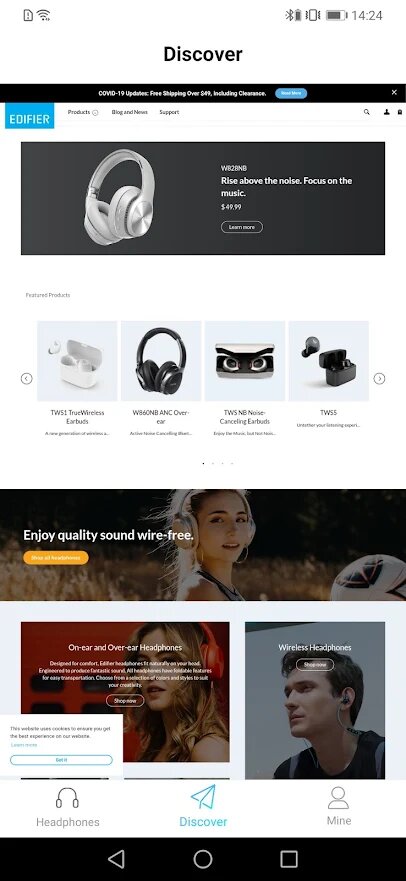
- Second page: On the second page, you will find information about the different products launched by Edifier, as well as blogs, news, and support in case of problems with the devices.
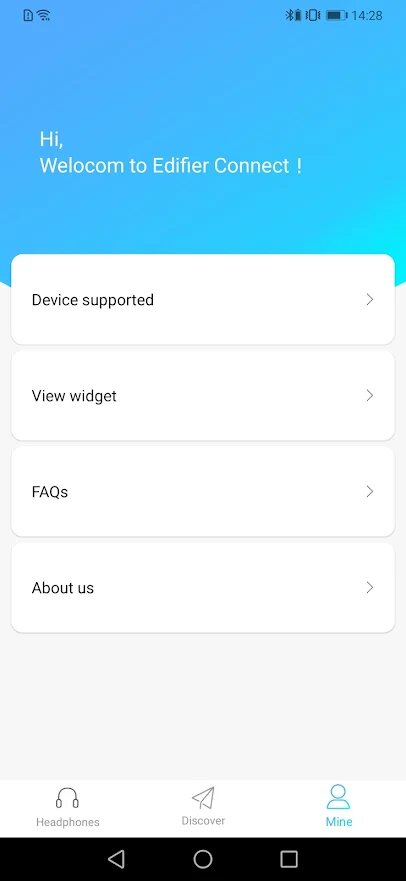
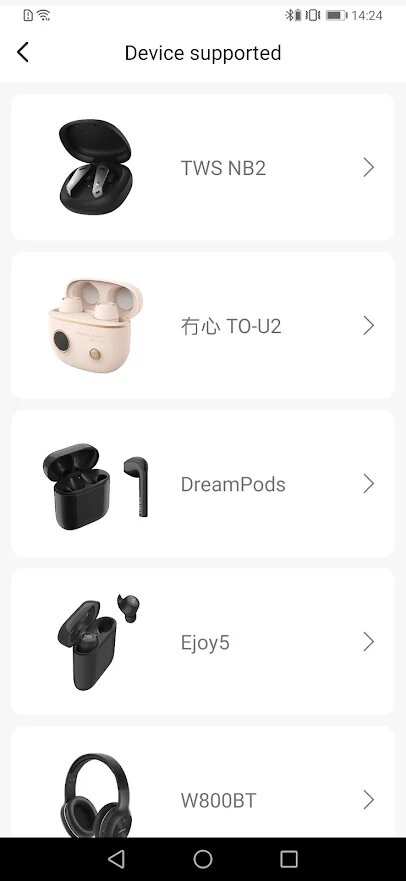
- Third page: On the third page, you will find general information about the application, as well as the devices with which it is compatible, FAQs, and more.
Some Common Problems & Troubleshooting
Left / Right / One side of the earbuds has stopped working
If this happens, it may be because it is low on battery or it did not connect correctly with the device. To fix this, you can do the following:
1. Try charging the earbud that is not working or both, placing them in the charging case.
See also

2. Try factory resetting the earbuds.
3. Check if the earbuds are operating within a normal working range
If that doesn’t work, the earbud is probably faulty, and I can go for a refund or replacement of it.
Left / Right / One side of the earbuds has a low volume
If this happens, it may be because the earbuds are dirty or the volume is set low. To fix this, you can do the following:
1. Try cleaning the earbud using a cotton swab or carefully clean the mesh with a pin.
2. Try factory resetting the earbuds.
The microphone is not working
If this happens, it can be because the microphone is muted, or the earbuds are badly positioned. To fix this, you can do the following:
If the microphone is muted, check the device microphone volume. If that doesn’t work, that means that there might be a defect in the earbud, so try replacing them or get a refund.
The earbuds are not connecting to Windows/laptop/PC
If the earbuds are earbuds not connecting, it can be because the Bluetooth on the computer has a pairing problem. To fix this, you can do the following:
1. Try disabling Bluetooth from nearby devices >>> then activate the pairing mode of the earbuds, pair and connect earbuds from Settings >>> Bluetooth & other devices >>> Add a new device >>>> select Bluetooth.
2. Try uninstalling and reinstalling the Bluetooth driver, or updating the Bluetooth driver. All can be done in Manage >>> Device Manager, reset earbuds (if available), and then repeat the step.
3. Try resetting the earbuds.
FAQs
Are the Edifier TWS NB2 Pro waterproof?
No, the Edifier TWS NB2 Pro are not waterproof (IPX6 and up). They have a rating of IPX4, which means they’re splash and sweat-resistant.
Do the Edifier TWS NB2 Pro have a microphone?
Yes, the earbuds come with integrated microphones.
Do the Edifier TWS NB2 Pro have a low latency/gaming mode?
Yes. These earbuds have a low latency/gaming mode.
Can the Edifier TWS NB2 Pro connect to PCs and Laptops?
Yes, these earbuds can connect to PCs, laptops, and even tablets.
Are the Edifier TWS NB2 Pro noise-canceling?
Yes. These earbuds come with noise-cancellation technology.
How to know when the Edifier TWS NB2 Pro are fully charged?
When the earbuds are charging, an orange light is on the case. When fully charged, said light turns off.
We hope you now know how to operate the earphone from the above Edifier TWS NB2 Pro manual. Want to know anything about the earphones? Do not hesitate to ask in the comments section.
ТВС НБ2 Про
Настоящие беспроводные наушники с активным шумоподавлением
www. edi fer.com
Описание продукта и аксессуары
Вспомогательное оборудование:
Наушники x 3 пары, сумка для хранения x 1, зарядный кабель x 1
Примечание:
- В упаковке прилагаются ушные вкладыши разного размера, выберите подходящие для ношения.
- Изображения предназначены только для иллюстративных целей и могут отличаться от реального продукта.
Включение / выключение питания
- Наушники включатся при открытии футляра.
- Наушники выключатся, когда чехол будет закрыт.
Заряд
Зарядите наушники
- Поместите наушники в чехол и закройте чехол для зарядки.
Зарядите зарядный чехол
- Подключите прилагаемый зарядный кабель к чехлу для зарядки.
- Индикатор горит постоянно = зарядка
Индикатор не горит = полностью заряжен
Индикатор уровня заряда аккумулятора на зарядном футляре
- Откройте / закройте кейс, чтобы увидеть уровень заряда кейса;
если индикатор fl горит трижды: полный уровень заряда батареи
если индикатор fl горит дважды: средний уровень заряда батареи
если индикатор fl горит один раз: низкий уровень заряда батареи
Предупреждение. Аккумуляторные батареи, обеспечивающие питание этого продукта, необходимо утилизировать надлежащим образом для вторичной переработки. Не бросайте батареи в огонь, чтобы
взрыв.
Инструкция
Подключение Bluetooth
- Поместите наушники в чехол, нажмите и удерживайте кнопку на чехле около 3 секунд, чтобы войти в сопряжение по Bluetooth.
- Настройте мобильный телефон на поиск и подключение к «EDIFIER TWS NB2 Pro».
- Сопряжение Bluetooth: быстро мигают белый и зеленый индикаторы.
- После успешного сопряжения зеленый индикатор начнет медленно мигать.
Соединение левого и правого наушников / очистка записей сопряжения
Поместите наушники в футляр и дважды нажмите кнопку на футляре (белый свет быстро мигает), чтобы очистить записи сопряжения и войти в пару TWS для левого и правого наушников. В случае успеха наушники автоматически перейдут в состояние сопряжения Bluetooth, а белый и зеленый индикаторы будут быстро мигать.
Функциональная работа
Примечание:
- Переключатель режима шумоподавления: режим шумоподавления (эффективен при использовании обоих наушников), режим окружающего звука и нормальный режим.
- Переключатель режима звукового эффекта: стандартный режим, режим пространственного звука и игровой режим.Функция обнаружения в ухе
- Управление музыкой: музыка будет воспроизводиться / приостанавливаться при вставке или удалении одного наушника.
- Управление шумоподавлением: в режиме шумоподавления шумоподавление будет включено, когда вставлены оба наушника, и будет отключено, когда один наушник будет удален.
- Вы также можете установить или закрыть функцию обнаружения в ухе через ПРИЛОЖЕНИЕ EDIFIER CONNECT.
Часто задаваемые вопросы
При зарядке зарядного кейса индикатор не горит.
- Убедитесь, что зарядный футляр правильно подключен к источнику питания.
Без звука
- Проверьте, работают ли наушники.
- Убедитесь, что уровень громкости наушников соответствует требованиям.
- Убедитесь, что наушники правильно подключены к мобильному телефону.
- Убедитесь, что наушники работают в нормальном рабочем диапазоне.
Качество связи наушников оставляет желать лучшего.
- Убедитесь, что мобильный телефон находится в зоне с сильным сигналом.
- Убедитесь, что наушники находятся на эффективном расстоянии (10 м) и между наушниками и мобильным телефоном нет препятствий.
При воспроизведении музыки нельзя управлять паузой / воспроизведением / следующей дорожкой через наушники.
- Убедитесь, что сопряженное устройство поддерживает профиль AVRCP (профиль дистанционного управления аудио / видео).
Функция постукивания слишком чувствительна или нечувствительна.
- Убедитесь, что вы постукиваете в зоне эффективного постукивания с умеренной интенсивностью или под подходящим углом. Вы также можете настроить желаемую чувствительность нажатия через ПРИЛОЖЕНИЕ EDIFIER CONNECT.
После подключения одного наушника к другому мобильному телефону звук из другого наушника отсутствует при повторном использовании.
- Когда один наушник подключен к другому мобильному телефону, соединение между левым и правым наушниками могло быть отключено. Чтобы восстановить режим двух наушников, дважды нажмите кнопку сопряжения на корпусе, чтобы возобновить соединение между левым и правым наушниками. Затем попробуйте еще раз.
При игре в игры возникает проблема с задержкой.
- Трижды щелкните левый наушник, чтобы переключиться в игровой режим, а затем запустите
играю в игру.
Функция обнаружения в ухе не чувствительна или слишком чувствительна.
- Чтобы гарантировать распознавание каждого ношения наушников пользователем, распознавание наушников в ухе было немного улучшено. Если они не используются, поместите наушники обратно в чехол для зарядки и хранения; Лучше не класть наушники одни в карман или на стол на длительное время, чтобы избежать помех для функции обнаружения внутри уха или их отсутствия. Вы также можете настроить функцию автоматического обнаружения наушников на другие функции или закрыть ее с помощью приложения EDIFIER CONNECT APP.
Обслуживание
- Если он не используется в течение длительного времени, заряжайте продукт от литиевой батареи каждые три месяца.
- Держите изделие подальше от влажных мест, чтобы не повредить внутреннюю цепь.
Не используйте продукт во время интенсивных тренировок или с большим количеством пота, чтобы пот не попал на продукт и не повредил его. - Не кладите продукт в места, подверженные воздействию солнечных лучей или с высокими температурами.
Высокая температура сократит срок службы электронных компонентов, повредит аккумулятор и приведет к деформации пластиковых компонентов. - Не кладите изделие в холодные места, чтобы не повредить внутреннюю печатную плату.
- Не разбирайте изделие. Непрофессиональный персонал может повредить продукт.
- Не роняйте, не трясите и не ударяйте изделие твердыми предметами, чтобы не повредить внутреннюю цепь.
- Не используйте сильнодействующие химические вещества или чистящие средства для очистки продукта.
- Не используйте острые предметы, чтобы поцарапать поверхность продукта, чтобы не повредить оболочку и не раскололся фасад.
Модель: EDF200026
Эдиф Интернэшнл Лимитед
Почтовый ящик 6264
Генеральная почта
香港(中國)
www.edifier.com
2021 Edifier International Limited. Все права защищены.
Напечатано в Китае
ВНИМАНИЕ:
При необходимости технического усовершенствования и обновления системы информация, содержащаяся в данном документе, может время от времени изменяться без
предварительное извещение.
Продукты EDIFIER будут адаптированы для различных приложений. Рисунки и иллюстрации, представленные в этом руководстве, могут немного отличаться от реального продукта. Если обнаруживается какое-либо различие, преобладает фактический продукт.
Документы / Ресурсы
Рекомендации

IER | Solutions d’optimisation des flux des biens et des personnes

True Wireless Earbuds with Active Noise Cancellation
EN 1. Product Description and Accessories
Button
Accessories:
Ear tips x 3 pairs, Storage bag x 1, Charging cable x 1
Note:
•
There are different size of ear tips attached in the package, please select the
suitable ones to wear.
•
Images are for illustrative purposes only and may differ from the actual
product.
2. Power on/o
The earbuds will power on
●
when the case is opened.
Green light is steady lit once
3. Charge
Charge the earbuds
●
•
Place the earbuds in the case and close the case for charging.
Charge the charging case
●
•
Connect the included charging cable to the case for charging.
•
Indicator steady lit = charging
Indicator off = fully charged
Battery level indicator on the charging case
●
•
Open/close the case to show the case’s battery level;
if indicator flashes three times: full battery level
if indicator flashes twice: medium battery level
if indicator flashes once: low battery level
Warning: The rechargeable batteries that provide power for this product must
be disposed properly for recycling. Do not dispose of batteries in fire to prevent
an explosion.
4. User guide
Bluetooth connection
●
•
Place the earbuds in the case, and press
and hold the button on the case for
around 3 seconds to enter Bluetooth pairing.
•
Set mobile phone to search for and
connect to «EDIFIER TWS NB2 Pro».
Interconnection of the left and right earbuds/clear pairing
●
records
Place the earbuds in the case, and double click the button on the case (the white
light flashing rapidly) to clear pairing records and enter the TWS pairing of the left
and right earbuds. When successful, the earbuds will automatically enter Bluetooth
pairing state, and the white and green lights will flash rapidly.
Functional operation
●
Accept/end a call:
double click
Noise reduction mode switch:
double click
Sound effect mode switch:
Note:
•
Noise reduction mode switch: noise reduction mode(effective when both
earbuds are used), ambient sound mode, and normal mode.
•
Sound effect mode switch: standard mode, spatial audio mode, and game mode.
In-ear detection function
●
•
Music control: Music will be played/paused when one earbud is inserted or
removed.
•
Noise reduction control: In noise reduction mode, the noise reduction will be
enabled when both earbuds are inserted, and will be disabled when one earbud
is removed.
•
You can also set or close the in-ear detection function via the EDIFIER CONNECT
APP.
5. FAQs
When charging the charging case, the indicator is o .
•
Please ensure the charging case is correctly connected with power source.
No sound
•
Check if the earbuds are operating.
•
Check if the earbuds volume are at an appropriate level.
•
Check if the earbuds are correctly connected with mobile phone.
•
Check if the earbuds are operating within a normal working range.
The call quality of the earbuds are not good.
•
Check if mobile phone is in an area with strong signal.
•
Please ensure the earbuds are within effective distance (10m) and no
obstacle between the earbuds and mobile phone.
When playing music, cannot control pause/play/next track via the earbuds.
•
Please ensure the paired device support AVRCP (Audio/Video Remote
Control Profile) profile.
The tapping function is too sensitive or not sensitive.
•
Please ensure you are tapping in the effective tap zone with a moderate
intensity or at an appropriate angle. You can also adjust to a desired tapping
sensitivity via the EDIFIER CONNECT APP.
After one earbud alone is connected to another mobile phone, there is no
sound from the other earbud when used again.
•
When one earbud alone is connected to another mobile phone, the
interconnection between the left and right earbuds may have been
disconnected. To restore the two earbuds mode, double click the pairing
button on the case to resume interconnection between the left and right
earbuds. Then try again.
There is a delay problem when playing game.
•
Please triple click the left earbud to switch to game mode and then start
playing game.
In-ear detection function is not sensitive or too sensitive.
•
To ensure every wearing of the earbuds by user can be recognized, the
recognition of in-ear detection have been slightly raised. If not used, please
place the earbuds back into the case for charging and storage; it is better
not to place the earbuds alone in the pocket or on the desk for long periods
of time, so as to avoid interference with the in-ear detection function or
missing of the earbuds. You can also set the automatic in-ear detection
function to other functions or close it via the EDIFIER CONNECT APP.
6. Maintenance
•
If it is not used for long periods of time, please charge the product with
lithium battery every three months.
•
Keep the product away from humid places to avoid affecting internal circuit.
Do not use the product during intense exercise or with much sweat to
prevent sweat from dropping into the product to make damage.
•
Do not put the product in places exposed to sun or with high temperature.
High temperature will shorten service life of electronic components, damage
battery and make plastic components deformed.
•
Do not put the product in cold places to avoid damaging internal circuit
board.
•
Do not dismantle the product. Non-professional personnel may damage the
product.
•
Do not drop, strongly vibrate, strike the product with hard object to avoid
damaging internal circuit.
•
Do not use drastic chemicals or cleaner to clean the product.
•
Do not use sharp objects to scratch product surface to avoid damaging shell
and affecting facade.
Model: EDF200026
Edif ier International Limited
P.O. Box 6264
General Post Off ice
Hong Kong
www.edif ier.com
2021 Edif ier International Limited. All rights reserved.
Printed in China
NOTICE:
For the need of technical improvement and system upgrade, information
contained herein may be subject to change from time to time without
prior notice.
Products of EDIFIER will be customized for different applications. Pictures
and illustrations shown on this manual may be slightly different from
actual product. If any difference is found, the actual product prevails.
TWS NB2 Pro
www.edifier.com
triple click
The earbuds will power o
●
when the case is closed.
Input: 5V
60mA (earbuds)
5V
•
Battery level indicator (next to the
charging port)
EDIFIER TWS NB2 Pro
•
Bluetooth pairing: the white
and green lights flash rapidly.
•
After pairing is successful, the
green light will flash slowly.
Tap zone
Tap zone
1A (charging case)
Accept/end a call:
double click
Pause/play:
double click
Next track:
triple click
The Edifier TWS NB2 Pro earbuds come with hybrid active noise canceling technology, three-dimensional audio technology, app support, Bluetooth 5.0 and a working range of 10 meters, support for the SBC audio codec, the IPX4 sweat and dust-proof certification, and much more. Learn how to use these earbuds using this manual!
What’s Inside
Edifier TWS NB2 Pro | How To Pair?
How to Pair The Earbuds?
To iOS and Android phones
Step 1: Open the lid of the charging case. After that, a green light turns on for one second on the case, and the earbuds will turn on automatically.
Step 2: Press and hold the button on the inside of the charging case for about 3 seconds. When a white and green light starts flashing quickly, the earbuds enter pairing mode and will be ready to pair with any device.
Step 3: Turn on Bluetooth on the desired device.
Step 4: Go to the device’s Bluetooth settings.
Step 5: Select “EDIFIER TWS NB2 Pro“. If a password is needed, type “0000”. After that, a green light will start flashing slowly, and the pairing will be done.
To PC (Windows)
Step 1: Turn on Bluetooth on the desired device.
Step 2: Go to the settings.
Step 3: Go to “Bluetooth and other devices”.
Step 4: Click on “Add device”.
Step 5: Open the lid of the charging case. After that, a green light turns on for one second on the case, and the earbuds will turn on automatically.
Step 6: Press and hold the button on the inside of the charging case for about 3 seconds. When a white and green light starts flashing quickly, the earbuds enter pairing mode and will be ready to pair with any device.
Step 7: Select “EDIFIER TWS NB2 Pro“. If a password is needed, type “0000”. After that, a green light will start flashing slowly, and the pairing will be done.
Pairing The Earbuds To Each Other
If the earbuds don’t pair with each other automatically after the charging case is open, then follow the following instructions:
Step 1: Place the earbuds into the charging case and keep its lid open.
Step 2: Press the button on the inside of the charging case two times. A white light will start flashing quickly.
When a white and green light starts flashing quickly, the process will be done.
How to Wear?
Step 1: Take both earbuds out of the charging case.
Step 2: Identify the left and right earbuds.
Step 3: Choose the ear tips that best suit your ears.
Step 4: Insert the headphones into the inner canal of the ears.
Step 5: Rotate for the best possible comfort and best fit, and make sure that the microphone is pointing to the mouth.
How to Turn On and Off?
Turn on: Open the lid of the charging case. After that, a green light turns on for one second on the case, and the earbuds will turn on automatically.
Turn off: Place the earbuds into the charging case and close its lid. After that, the earbuds will turn on automatically.
How to Control? / How to Operate? – Instructions
- Play or pause a song: Press the multifunction touch sensor on the right earbud two times.
- Play the next song: Press the multifunction touch sensor on the right earbud three times.
- Answer an incoming call: Press the multifunction touch sensor on any of the earbuds two times.
- End a current call: Press the multifunction touch sensor on any of the earbuds two times.
- Activate and change the ANC mode: Press the multifunction touch sensor on any of the earbuds two times.
- Activate or deactivate the sound effect mode: Press the multifunction touch sensor on the left earbud three times.
How to Activate The Mono Mode?
To activate or deactivate the mono mode in these earbuds, all you have to do is to pair the earbuds to the device and take out one of the earbuds from the charging case. It will start working by itself.
How to Charge The Earbuds?
Earbuds
To charge the earbuds, all you have to do is to place them into the charging case and close the lid. The earbuds will start charging automatically.
Charging case
To charge the charging case, all you have to do is to connect the case to a USB charger or charging port with the included USB-A to C cable. It will start charging automatically.
How to Reset The Earbuds?
Step 1: Delete all pairing information related to the “EDIFIER TWS NB2 Pro” earbuds on the connected device.
Step 2: Place the earbuds into the charging case and keep its lid open.
Step 3: Press the button on the inside of the charging case two times. A white light will start flashing quickly.
When a white and green light starts flashing quickly, the process will be done.
What Do The Lights Mean?
Earbuds
- A white and green light will start flashing quickly: The earbuds will be ready to pair with any device.
- A green light flashing slowly: The earbuds are now connected to the device.
- A white light flashing quickly while resetting: The earbuds are resetting.
Charging case
- A green light turns on for one second: The earbuds turn on.
- A light is on while charging: The case is charging.
- Said light turns off while charging: The case is fully charged.
- A light is on while on the case: The earbuds are charging.
- Said light turns off while on the case: The earbuds are fully charged.
- The light flashes one time when the lid is open/closed: The case has a low battery level.
- The light flashes two times when the lid is open/closed: The case has a medium battery level.
- The light flashes three times when the lid is open/closed: The case has a full battery level.
A Guide To Edifier TWS NB2 Pro APP
The Edifier TWS NB2 Pro can be used with an application, called Edifier Connect. This application is available for iOS and Android devices.
- First page: On the first page, not only is the battery percentage that the earbuds have but there is also the ability to turn ANC and ambient sound mode on or off. Likewise, there are also the settings, where there is information about the earbuds, as well as some options for use and user manuals.
- Second page: On the second page, you will find information about the different products launched by Edifier, as well as blogs, news, and support in case of problems with the devices.
- Third page: On the third page, you will find general information about the application, as well as the devices with which it is compatible, FAQs, and more.
Some Common Problems & Troubleshooting
Left / Right / One side of the earbuds has stopped working
If this happens, it may be because it is low on battery or it did not connect correctly with the device. To fix this, you can do the following:
1. Try charging the earbud that is not working or both, placing them in the charging case.
See also

2. Try factory resetting the earbuds.
3. Check if the earbuds are operating within a normal working range
If that doesn’t work, the earbud is probably faulty, and I can go for a refund or replacement of it.
Left / Right / One side of the earbuds has a low volume
If this happens, it may be because the earbuds are dirty or the volume is set low. To fix this, you can do the following:
1. Try cleaning the earbud using a cotton swab or carefully clean the mesh with a pin.
2. Try factory resetting the earbuds.
The microphone is not working
If this happens, it can be because the microphone is muted, or the earbuds are badly positioned. To fix this, you can do the following:
If the microphone is muted, check the device microphone volume. If that doesn’t work, that means that there might be a defect in the earbud, so try replacing them or get a refund.
The earbuds are not connecting to Windows/laptop/PC
If the earbuds are earbuds not connecting, it can be because the Bluetooth on the computer has a pairing problem. To fix this, you can do the following:
1. Try disabling Bluetooth from nearby devices >>> then activate the pairing mode of the earbuds, pair and connect earbuds from Settings >>> Bluetooth & other devices >>> Add a new device >>>> select Bluetooth.
2. Try uninstalling and reinstalling the Bluetooth driver, or updating the Bluetooth driver. All can be done in Manage >>> Device Manager, reset earbuds (if available), and then repeat the step.
3. Try resetting the earbuds.
FAQs
Are the Edifier TWS NB2 Pro waterproof?
No, the Edifier TWS NB2 Pro are not waterproof (IPX6 and up). They have a rating of IPX4, which means they’re splash and sweat-resistant.
Do the Edifier TWS NB2 Pro have a microphone?
Yes, the earbuds come with integrated microphones.
Do the Edifier TWS NB2 Pro have a low latency/gaming mode?
Yes. These earbuds have a low latency/gaming mode.
Can the Edifier TWS NB2 Pro connect to PCs and Laptops?
Yes, these earbuds can connect to PCs, laptops, and even tablets.
Are the Edifier TWS NB2 Pro noise-canceling?
Yes. These earbuds come with noise-cancellation technology.
How to know when the Edifier TWS NB2 Pro are fully charged?
When the earbuds are charging, an orange light is on the case. When fully charged, said light turns off.
We hope you now know how to operate the earphone from the above Edifier TWS NB2 Pro manual. Want to know anything about the earphones? Do not hesitate to ask in the comments section.

EN
1. Product Description and Accessories
2. Power on/o
3. Charge
4. User guide
5. FAQs
6. Maintenance
Input: 5V 60mA (earbuds)
5V 1A (charging case)
Note:
•
There are different size of ear tips attached in the package, please select the suitable ones to wear.
•
Images are for illustrative purposes only and may differ from the actual product.
Warning: The rechargeable batteries that provide power for this product must
be disposed properly for recycling. Do not dispose of batteries in fire to prevent
an explosion.
• If it is not used for long periods of time, please charge the product with
lithium battery every three months.
• Keep the product away from humid places to avoid affecting internal circuit.
Do not use the product during intense exercise or with much sweat to
prevent sweat from dropping into the product to make damage.
• Do not put the product in places exposed to sun or with high temperature.
High temperature will shorten service life of electronic components, damage
battery and make plastic components deformed.
• Do not put the product in cold places to avoid damaging internal circuit
board.
• Do not dismantle the product. Non-professional personnel may damage the
product.
• Do not drop, strongly vibrate, strike the product with hard object to avoid
damaging internal circuit.
• Do not use drastic chemicals or cleaner to clean the product.
• Do not use sharp objects to scratch product surface to avoid damaging shell
and affecting facade.
When charging the charging case, the indicator is o.
• Please ensure the charging case is correctly connected with power source.
No sound
• Check if the earbuds are operating.
• Check if the earbuds volume are at an appropriate level.
• Check if the earbuds are correctly connected with mobile phone.
• Check if the earbuds are operating within a normal working range.
The call quality of the earbuds are not good.
• Check if mobile phone is in an area with strong signal.
• Please ensure the earbuds are within effective distance (10m) and no
obstacle between the earbuds and mobile phone.
When playing music, cannot control pause/play/next track via the earbuds.
• Please ensure the paired device support AVRCP (Audio/Video Remote
Control Profile) profile.
The tapping function is too sensitive or not sensitive.
• Please ensure you are tapping in the effective tap zone with a moderate
intensity or at an appropriate angle. You can also adjust to a desired tapping
sensitivity via the EDIFIER CONNECT APP.
After one earbud alone is connected to another mobile phone, there is no
sound from the other earbud when used again.
• When one earbud alone is connected to another mobile phone, the
interconnection between the left and right earbuds may have been
disconnected. To restore the two earbuds mode, double click the pairing
button on the case to resume interconnection between the left and right
earbuds. Then try again.
There is a delay problem when playing game.
• Please triple click the left earbud to switch to game mode and then start
playing game.
In-ear detection function is not sensitive or too sensitive.
• To ensure every wearing of the earbuds by user can be recognized, the
recognition of in-ear detection have been slightly raised. If not used, please
place the earbuds back into the case for charging and storage; it is better
not to place the earbuds alone in the pocket or on the desk for long periods
of time, so as to avoid interference with the in-ear detection function or
missing of the earbuds. You can also set the automatic in-ear detection
function to other functions or close it via the EDIFIER CONNECT APP.
True Wireless Earbuds with Active Noise Cancellation
www.edifier.com
● The earbuds will power on
when the case is opened.
● The earbuds will power o
when the case is closed.
Green light is steady lit once
● Bluetooth connection
•
Place the earbuds in the case, and press
and hold the button on the case for
around 3 seconds to enter Bluetooth pairing.
•
Set mobile phone to search for and
connect to «EDIFIER TWS NB2 Pro».
•
Bluetooth pairing: the white
and green lights flash rapidly.
•
After pairing is successful, the
green light will flash slowly.
Tap zoneButton Accessories: Ear tips x 3 pairs, Storage bag x 1, Charging cable x 1
● Interconnection of the left and right earbuds/clear pairing
records
Place the earbuds in the case, and double click the button on the case (the white
light flashing rapidly) to clear pairing records and enter the TWS pairing of the left
and right earbuds. When successful, the earbuds will automatically enter Bluetooth
pairing state, and the white and green lights will flash rapidly.
● Functional operation
Note:
•
Noise reduction mode switch: noise reduction mode(effective when both
earbuds are used), ambient sound mode, and normal mode.
•
Sound effect mode switch: standard mode, spatial audio mode, and game mode.
Accept/end a call:
double click
Noise reduction mode switch:
double click
Sound effect mode switch:
triple click
Accept/end a call:
double click
Pause/play:
double click
Next track:
triple click
Tap zone
● In-ear detection function
•
Music control: Music will be played/paused when one earbud is inserted or
removed.
•
Noise reduction control: In noise reduction mode, the noise reduction will be
enabled when both earbuds are inserted, and will be disabled when one earbud
is removed.
•
You can also set or close the in-ear detection function via the EDIFIER CONNECT
APP.
● Charge the earbuds
•
Place the earbuds in the case and close the case for charging.
● Charge the charging case
•
Connect the included charging cable to the case for charging.
•
Indicator steady lit = charging
Indicator off = fully charged
● Battery level indicator on the charging case
•
Open/close the case to show the case’s battery level;
if indicator flashes three times: full battery level
if indicator flashes twice: medium battery level
if indicator flashes once: low battery level
EDIFIER TWS NB2 Pro
• Battery level indicator (next to the
charging port)
Model: EDF200026
Edif ier International Limited
P.O. Box 6264
General Post Off ice
Hong Kong
www.edif ier.com
2021 Edif ier
International Limited. All rights reserved.Printed in ChinaNOTICE:For the need of technical improvement and system upgrade, information contained herein may be subject to change from time to time without prior notice. Products of EDIFIER will be customized for different applications. Pictures and illustrations shown on this manual may be slightly different from actual product. If any difference is found, the actual product prevails.
Наушники TWS Edifier TWS NB2 PRO серый
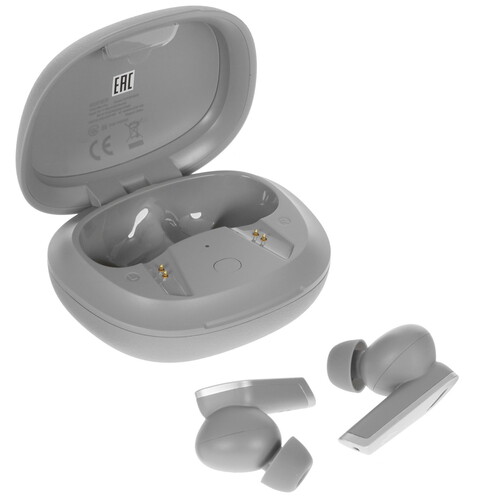
2.0, внутриканальные, 20 Гц — 20000 Гц, 24Ω, Bluetooth, 5.0
подробнее

39
Цвет:
Код товара: 5020483

Instructions Guide Accessories
Open in new tab Edifier TWS200 Plus Earphone Instructions Guide ManualsDock manualsdock 2023 08 |||
TWS200 Plus True Wireless Stereo Earbuds www.edif ier.com EN Product description and accessories Pairing button Charging case Charging cable Storage bag Note: Images are for illustrative purposes only and may differ from the actual product. User guide L R Charge the earbuds You may hear…
lang:en score:45 filesize: 1.23 M page_count: 50 document date: 2023-08-23

User Manual Frequently Asked Questions Guide Accessories
Edifier TWS NB2 Pro User Manual Manuals Black ▻ Наушники Внутриканальные Беспроводные Bluetooth купить в GEEK MD geek md index route product lang ru id 825 |||
Manuals User Manuals Simplified. Edifier TWS NB2 Pro User Manual Home Edifier Edifier TWS NB2 Pro … arp objects to scratch the product surface to avoid damaging the shell and affecting facade. Model: EDF200026 Edif is International Limited P.O. Box 6264 General Post Off ice Hong Kong www.edifier.com…
lang:en score:40 filesize: 158.26 K page_count: 7 document date: 2022-05-30

User Manual Guide
EDIFIER X5 Xemal X True Wireless Stereo Earbuds User Guide Manuals Manual Edifier Black ▻ Наушники Внутриканальные TWS Беспроводные Bluetooth купить в GEEK MD geek md index route product lang ru id 835 |||
Skip to content Manuals User Manuals Simplified. EDIFIER X5 Xemal X True Wireless Stereo Earbuds U … in the charging case. Pairing Bluetooth pairing: press and hold the touch button for 3 seconds TWS pairing: double click the touch button Clear pairing records: press and hold the touch button f…
lang:en score:38 filesize: 149.07 K page_count: 4 document date: 2022-05-30

User Manual Guide
EDIFIER X5 Xemal X True Wireless Stereo Earbuds User Guide Manuals Manual Edifier XM3BT 38 W ▻ Колонки 2 1 Дерево купить в GEEK MD geek md index route product lang ru id 836 |||
Skip to content Manuals User Manuals Simplified. EDIFIER X5 Xemal X True Wireless Stereo Earbuds U … in the charging case. Pairing Bluetooth pairing: press and hold the touch button for 3 seconds TWS pairing: double click the touch button Clear pairing records: press and hold the touch button f…
lang:en score:36 filesize: 147.29 K page_count: 4 document date: 2022-05-30

User Manual Accessories
Lolli Pods Pro说明书网页版 V1 0 TWS NB2 Pro True Wireless Earbuds with Active Noise Cancellation edier tws nb2 pro true wireless earbuds user manual mall edifier media productattachment t w
TWS NB2 Pro True Wireless Earbuds with Active Noise Cancellation www.edifier.com EN 1. Product Descr … use sharp objects to scratch product surface to avoid damaging shell and affecting facade. Model: EDF200026 Edifier International Limited P.O. Box 6264 General Post Office Hong Kong www.edif ier.com…
lang:en score:36 filesize: 37.55 M page_count: 7 document date: 2021-02-01

User Manual Accessories
TWS NB2 Pro出口说明书网页版-V1 0 Pro edifier mall and illustrations shown on this manual may be slightly different from actual product If any difference is found the prevails tws_nb2_pro_true_wireless_earbuds_user_manual_1 media productattachment t w
TWS NB2 Pro True Wireless Earbuds with Active Noise Cancellation www.edifier.com EN 1. Product Descr … use sharp objects to scratch product surface to avoid damaging shell and affecting facade. Model: EDF200026 Edifier International Limited P.O. Box 6264 General Post Office Hong Kong www.edif ier.com…
lang:en score:35 filesize: 33.87 M page_count: 7 document date: 2021-02-01

Accessories
Untitled Bekijk de handleiding Edifier TWSNB2 Pro In ear TWS ANC oortjes Grijs bol original media s mMA91MVBN7p0 |||
TWS NB2 Pro True Wireless Earbuds with Active Noise Cancellation www.edifier.com EN 1. Product Descr … use sharp objects to scratch product surface to avoid damaging shell and affecting facade. Model: EDF200026 Edifier International Limited P.O. Box 6264 General Post Office Hong Kong www.edif ier.com…
lang:en score:31 filesize: 581.49 K page_count: 7 document date: 2021-12-02

Accessories
Untitled Bekijk de handleiding Edifier TWSNB2 Pro In ear TWS ANC oortjes Zwart bol original media s YljZq73ALRXA |||
TWS NB2 Pro True Wireless Earbuds with Active Noise Cancellation www.edifier.com EN 1. Product Descr … use sharp objects to scratch product surface to avoid damaging shell and affecting facade. Model: EDF200026 Edifier International Limited P.O. Box 6264 General Post Office Hong Kong www.edif ier.com…
lang:en score:31 filesize: 581.49 K page_count: 7 document date: 2021-11-30

Accessories
Untitled Bekijk de handleiding Edifier TWSNB2 Pro In ear TWS ANC oortjes Ivoor wit bol original media s BRxGn93ZRQxW |||
TWS NB2 Pro True Wireless Earbuds with Active Noise Cancellation www.edifier.com EN 1. Product Descr … use sharp objects to scratch product surface to avoid damaging shell and affecting facade. Model: EDF200026 Edifier International Limited P.O. Box 6264 General Post Office Hong Kong www.edif ier.com…
lang:en score:31 filesize: 581.49 K page_count: 7 document date: 2021-12-02

User Manual Instructions Guide Accessories
tech49 True Wireless Stereo Earbuds edifier www X5 Manual Download Use the product properly by following instructions in manual and if not installed used accordance with may cause harmful Please read carefully Keep it safe place for future reference Using a 0 35 35℃ environment is recommended Supervise children under 14 when using toy dusermanual 2020 05
X5 True Wireless Stereo Earbuds www.edifier.com Product Description and Accessories Touch button … teady lit for 1 second Pairing Bluetooth pairing: press and hold the touch button for 3 seconds TWS pairing: double click the touch button Clear pairing records: press and hold the touch button f…
lang:en score:29 filesize: 671.35 K page_count: 11 document date: 2020-05-28

User Manual Accessories
2021051722174816212610688446 Edifier Hecate gm5 Gaming Earbuds Manual Manuals Clip manualsclip 2023 02 |||
www.edif ier.com EN Product description and accessories Earbuds Charging case Silicone case U … an auto-connect to the Bluetooth device again if return to the e ective distance within 5 minutes. TWS pairing of the left and right earbuds The left and right earbuds have nished TWS pairing before …
lang:en score:29 filesize: 343.17 K page_count: 57 document date: 2023-02-22

User Manual Accessories
GX07 User Manual 2022022118300416454394047394 Edifier Hecate gm07 Gaming Earbuds Manuals Clip manualsclip 2023 02 |||
TRUE WIRELESS GAMING EARBUDS WITH ACTIVE NOISE CANCELLATION Download EDIFIER CONNECT APP from the AP … hite light will be steady lit in music mode and the ice blue light will be steady lit in game mode. TWS pairing of the left and right earbuds clear pairing records Place the earbuds in the case, dou…
lang:en score:29 filesize: 376.48 K page_count: 7 document date: 2023-02-22

TWS说明书网页版 1 产品说明及配件4 操作说明5 常见问题解答6 保养与 Edifier 耳机全部放入盒中,双击充电盒按键白灯快闪,耳机清 除配对记录并进入TWS左右耳配对,成功后耳机自动进 入蓝牙配对状态,白绿灯快闪。 True Wireless Earbuds with TWS NB2 Pro-V1 2_ryy3orZlO static edifier uploads 2021-01
True Wireless Earbuds with Active Noise Cancellation *3*1*1 1 / 3= 2= … le / EDIFIER CONNECT EDIFIER CONNECT 68 100080 523808 2 EDF200026 , …
lang:en score:29 filesize: 22.56 M page_count: 1 document date: 2021-01-29

User Manual Guide Accessories
Edifier TWS200 Plus User Manual Manuals TWS200BT Black ▻ Наушники Внутриканальные TWS Беспроводные Bluetooth купить в GEEK MD geek md index route product lang ru id 827 |||
Skip to content Manuals User Manuals Simplified. Edifier TWS200 Plus User Manual Home Edifier Edifier TWS200 Plus User Manual TWS200 Plus True Wireless Stereo Earbuds www.edifier.com Contents hide 1 Product description and accessories 2 User guide 3 Functional operation 4 Maintenance 5 File Dow…
lang:en score:29 filesize: 156.83 K page_count: 6 document date: 2022-05-30

User Manual
X2s User Manual Download W110T EDIFIER Fone TWS Earbuds Bluetooth 5 3 edifierbr br 2023 09 |||
1. Ligar/Desligar LED branco aceso por 1s 1. Ligados quando retirados do estojo. 2. Desligados quan … icador x5 Indicador 1. Quando os fones de ouvido estiverem ligados e no houver conexo Bluetooth e TWS, toque respectivamente o painel de toque 5 vezes em ambos os fones at o LED branco piscar lentam…
lang:pt score:28 filesize: 373.79 K page_count: 1 document date: 2023-07-12

User Manual
X2s User Manual True Wireless Earbuds Headphones 【Edifier】 8054742c317a1440ae9f4303e7962311 new edifier us oss files 20230712 |||
X2s True Wireless Earbuds Headphones Manual EN 1. Power ON/OFF White LED lit for 1s 1. Power ON whe … x5 Indicator x5 Indicator 1. When earbuds are powered on and there is no Bluetooth connection and TWS connection, respectively tap the touch panel 5 times on both earbuds until white LED blinks slow…
lang:en score:28 filesize: 307.75 K page_count: 7 document date: 2023-07-12

Accessories
Lolli Pods Pro说明书网页版 V1 0 EDIFIER NB2 Pro EN files innpro pl s3 amazonaws Edifier ||| ||| TWS NB2 Pro True Wireless Earbuds with Active Noise Cancellation www.edifier.com EN 1. Product Description and Accessories Button Tap zone Accessories: Ear tips x 3 pairs, Storage bag x 1, Charging cable x 1 Note: There are different size o
TWS NB2 Pro True Wireless Earbuds with Active Noise Cancellation www.edifier.com EN 1. Product Descr … use sharp objects to scratch product surface to avoid damaging shell and affecting facade. Model: EDF200026 Edifier International Limited P.O. Box 6264 General Post Office Hong Kong www.edif ier.com…
lang:en score:28 filesize: 33.85 M page_count: 1 document date: 2023-05-11

cccc EDIFIER NB2 Pro CZ files innpro pl s3 amazonaws Edifier |||
TWS NB2 Pro Bezdrtov sluchtka do us s aktivn m potlacen m hluku www.edifier.com Popis produktu a … zvejte ostr pedmty k poskrbn povrchu vrobku, aby nedoslo k poskozen plst a poskozen fasdy. Model: EDF200026 Edifier International Limited P.O. Box 6264 General Post O ice Hong Kong www.edif ier.com …
lang:hr score:27 filesize: 9.74 M page_count: 11 document date: 2023-05-11

Decleration of Conformity
EC Declaration of Conformity Jerry Download EU 【Edifier】 ef9bef8fb138784656f7461c1d4d9e2a test edifierus oss us east 1 aliyuncs files 20230516 |||
EU DECLARATION OF CONFORMITY WITH BELOW LISTED COMMUNITY LEGISLATION AND HARMONIZED STANDARDS TO SAT … k Product Name Model Name EDIFIER True Wireless Earbuds with Active Noise Cancellation TWS NB2 EDF200026 TWS NB2 pro has been tested and complies with the European Standard herein specified: …
lang:en score:27 filesize: 56.17 K page_count: 1 document date: 2023-05-16

User Manual
X3 Lite User Manual True Wireless In Ear Headphones 【Edifier】 36a47d57f78905075953e26be827f3d3 new edifier us oss files 20230816 |||
EN 1. Power ON/OFF White LED lit for 1s 1. Power ON when taken out of the case. 2. Power OFF when p … 4. Left Right connection x5 Indicator x5 Indicator 1. If there is no Bluetooth connnection and TWS connection when earbuds are powered on, respectively tap the touch panel 5 times on both earbuds…
lang:en score:27 filesize: 616.11 K page_count: 7 document date: 2023-08-16

IB-100-TWSNB2-00 TWS NB2说明书含保修卡V1 0 Edifier True Wireless Earbuds with Active Noise Cancellation 真无线主动降噪耳机 ○ 开 关机 开机:充电盒开盖,耳机自动开机 关机:耳机放入充电盒,合盖关机 TWSNB2Pro_Hy9NVTFE_ static edifier uploads 2021-03 保修服务: 我司保修服务不包括送修产品的运费及上门服务。用户可到当 地售后服务中心享受我公司提供的自购买之日起一月包换(注: 在外观无损,配件齐全前提下), edifier-asset ventmere cn
IB-100-TWNB2P-01 TWS NB2 Pro///V1.1 V1.1 148g, ,,80 65*90mm / Edifier Connect Tru … / L R 1. 2. 3. 1. 2. 3.EDIFIER CONNECT APP 0-35 14 : EDF200026 SJ/T 11364 GB/T 26572 GB/T 26572 PBDE PBB Cd Cr VI …
lang:i-klingon score:27 filesize: 7.17 M page_count: 1 document date: 2020-11-04

User Manual Guide Accessories
LolliPods中文 TWS NBQ Edifier Official Mall and illustrations shown on this manual may be slightly different from actual product If any difference is found the prevails tws_nbq_true_wireless_earbuds_user_manual mall edifier media productattachment t w
TWS NBQ True Wireless Earbuds with Active Noise Cancellation www.edif ier.com EN Product description and accessories Function button Ear tips Storage bag Charging cable Note: Please use the R button for functional operations, as the L button is only an decorative part. There are differ…
lang:en score:27 filesize: 17.61 M page_count: 50 document date: 2021-02-01

User Manual
Manual X5 Edifier White ▻ Наушники Внутриканальные TWS Беспроводные Bluetooth купить в GEEK MD geek md index route product lang ru id 2093 |||
True Wireless Stereo Earbuds Please visit EDIFIER website for the full version user manual: www.edif … y lit for 1 second Touch button Bluetooth pairing: press and hold the touch button for 3 seconds TWS pairing: double click the touch button Clear pairing records: press and hold the touch button f…
lang:en score:27 filesize: 2.42 M page_count: 45 document date: 2022-06-16

Decleration of Conformity
EC Declaration of Conformity Jerry WITH BELOW LISTED COMMUNITY LEGISLATION AND HARMONIZED STANDARDS TO SATISFY THE SAFETY QUALITY REGULATORY REQUIREMENTS OF SPECIFIED 2021090109244316304594837846 usa oss edifier Uploads images 2021 09 01
EU DECLARATION OF CONFORMITY WITH BELOW LISTED COMMUNITY LEGISLATION AND HARMONIZED STANDARDS TO SAT … k Product Name Model Name EDIFIER True Wireless Earbuds with Active Noise Cancellation TWS NB2 EDF200026 TWS NB2 pro has been tested and complies with the European Standard herein specified: …
lang:en score:27 filesize: 88.97 K page_count: 1 document date: 2021-08-31

User Manual Guide Accessories
W200BT运动版APP说明书V1 0 User Manual Support for TWS5 【Edifier】 ddbc06f82f796a9c66268d78a5453f28 new edifier us oss files 20230601 |||
TWS5 Truly Wireless Stereo Earbuds www.edif ier.com EN Product Description and Accessories Multi-function button LED light Charging case Ear tips x 3 Pairs USB charging cable There are different size of ear tips attached in the package, please select the suitable ones to wear. Note: Images are…
lang:en score:26 filesize: 620.46 K page_count: 50 document date: 2023-06-01

User Manual Instructions
X2出口说明书V1 1 IB 200 X00020 03压缩 X2 EDIFIER TWS sluchátka růžová NeoxShop cz neoxshop images manuals |||
X225 EN FR ES DE IT PT JP PL CZ SK UKR GR RU TR BG NL DK SV KR VN THAI ID SA … 3s x2 x2 x2 x2 3s 3s 71 CN / 1. 2. 1 1. 2. EDIFIER X2 8s 8s 1. 2. 8 TWS 3. 4. EDIFIER X2 74 NCC PBB PBDE 72 X2 x5 x5 x2 x2 1. TWS TWS 2….
lang:en score:25 filesize: 6.48 M page_count: 1 document date: 2021-11-25

User Manual Frequently Asked Questions Specifications Guide
EDIFIER TWS2 True Wireless Earbuds User Manual Manuals Edifier Black ▻ Наушники Внутриканальные TWS Беспроводные Bluetooth купить в GEEK MD geek md index route product lang ru id 826 |||
Skip to content Manuals User Manuals Simplified. EDIFIER TWS2 True Wireless Earbuds User Manual May 12, 2022May 12, 2022 Leave a comment on EDIFIER TWS2 True Wireless Earbuds User Manual Home Edifier EDIFIER TWS2 True Wireless Earbuds User Manual EDIFIER TWS2 True Wireless Earbuds Contents hide…
lang:en score:25 filesize: 132.23 K page_count: 6 document date: 2022-05-30

User Manual
IB 500 M0202D 00 MP202DUO 俄文 说明书60x130mm V1 0 ai tech19 User manual Russian edifier ru user |||
MP202DUO 80 60*130mm V1.0/IB-500-M0202D-00 MP202DUO 1. , . … microSD : USB . microSD . DC IN . / USB- . . / : / : . — : TWS True Wireless Stereo — . Bluetooth : / Bluetooth : / . : …
lang:en score:25 filesize: 1.35 M page_count: 1 document date: 2017-09-12

User Manual Accessories
GX07 User Manual Edifier 2022 02 21 — Place the earbuds in case press and hold button on for around 3 seconds to enter Bluetooth pairing ice blue light 2022022118300416454394047394 usa oss edifier Uploads images |||
TRUE WIRELESS GAMING EARBUDS WITH ACTIVE NOISE CANCELLATION Download EDIFIER CONNECT APP from the AP … hite light will be steady lit in music mode and the ice blue light will be steady lit in game mode. TWS pairing of the left and right earbuds clear pairing records Place the earbuds in the case, dou…
lang:en score:24 filesize: 19.26 M page_count: 7 document date: 2022-02-17

User Manual
User Manual Edifier International Limited EDF135 True Wireless Earbuds with Active Noise Cancellation Z9G Z9GEDF135 edf135
Model: EDF201005 Edifier International Limited P.O. Box 6264 General Post Office Hong Kong www.edifi … e actual product prevails. V1.1 IB-200-TWNBQ0-01 Edifierglobal Edifier_Global Edifier_Global TWS NBQ True Wireless Earbuds with Active Noise Cancellation Download EDIFIER CONNECT APP from the A…
lang:en score:24 filesize: 2.34 M page_count: 2 document date: 2021-03-12

User Manual Guide Accessories
W200BT运动版APP说明书V1 0 Manual TWS1 Edifier Black ▻ Наушники Внутриканальные TWS Беспроводные Bluetooth купить в GEEK MD geek md index route product lang ru id 2091 |||
TWS1 Truly Wireless Stereo Earbuds www.edi er.com EN Product Description and Accessories Touch button Indicator light / microphone Charging case Earmu s x 3 pairs USB charging cable There are di erent size of earmu s attached in the package, please select the suitable ones to wear. Operation…
lang:en score:24 filesize: 277.66 K page_count: 43 document date: 2022-06-16

User Manual Guide Accessories
Edifier TWS1 User Manual Ventmere Ltd TWS true wireless stereo Pairing of the Left and Right Headphones The left right headphones have ˛nished pairing before leaving factory If connection fails to resume please follow steps below re pair With no Bluetooth double press touch SkojaHlIr cdn ventmere edifier dev 2019 09
TWS1 Truly Wireless Stereo Earbuds www.edi er.com EN Product Description and Accessories Touch button Indicator light / microphone Charging case Earmu s x 3 pairs USB charging cable There are di erent size of earmu s attached in the package, please select the suitable ones to wear. Operation…
lang:en score:24 filesize: 1.96 M page_count: 43 document date: 2019-09-06

User Manual
LolliPods中文 User Manual Edifier International Limited EDF100 True Wireless Stereo Earbuds Z9G Z9GEDF100 edf100
X3//V1.0 55*75mm8080 EN Power on when taken out of the charging case. Power o when the chargi … user manual: www.edifier.com Bluetooth pairing: press and hold the touch button for 1-3 seconds TWS pairing: double click the touch button Clear pairing records: press and hold the touch button f…
lang:en score:24 filesize: 3.13 M page_count: 1 document date: 2020-03-11

User Manual Guide Accessories
W200BT APP V1 0 Edifier W200Bt Manual Pdf SE 出口说明书 User Search Engine original media s bol mO3QJqMjNkMG |||
TWS1 Truly Wireless Stereo Earbuds www.edifier.com EN Product Description and Accessories Touch button Indicator light / microphone Charging case Earmuffs x 3 pairs USB charging cable There are different size of earmuffs attached in the package, please select the suitable ones to wear. Oper…
lang:en score:24 filesize: 131.63 K page_count: 15 document date: 2020-06-10

User Manual Instructions
tech19 User manual Edifier International Limited EDF146 True Wireless Stereo Earbuds Z9G Z9GEDF146 edf146
IB-200-UNIBUS-02 UniBudsV1.2 FCC ICFCC ICBC IB-200-UNIBUS-01 UniBudsV1.1 facebook 55*75mm8080 … to search for and connect to the Bluetooth name, take out the earbuds after pairing is successful. TWS pairing of the left and right earbud When TWS pairing is not connected, place the earbuds in th…
lang:en score:24 filesize: 3.41 M page_count: 2 document date: 2021-11-24

User Manual Instructions Accessories
tech49 User manual Edifier International Limited EDF143 True Wireless Stereo Earbuds Z9G Z9GEDF143 edf143
NeoBuds Pro True Wireless Stereo Earbuds with Active Noise Cancellation Download EDIFIER CONNECT APP … r pairing is successful, all the indicators will simultaneously flash red twice and then turn off. TWS pairing of the left and right earbuds clear pairing records Place the earbuds in the case, tri…
lang:en score:24 filesize: 1.05 M page_count: 10 document date: 2021-05-25

User Manual
TWS X5 Port Manual 31 mag 2022 — True Wireless Stereo Earbuds Pictures and illustrations shown on this manual may be slightly di erent Emparelhamento toque duas vezes no edifierbr br 05 |||
Edi er International Limited P.O. Box 6264 General Post O ce Hong Kong www.edi er.com 2020 Edi er In … oth: as boto de toque pressionado durante 3 segundos luzes vermelha e azul piscam Emparelhamento TWS: toque duas vezes no rapidamente area touch do fone Emparelhamento TWS: a luz azul Limpar r…
lang:pt score:24 filesize: 1.45 M page_count: 1 document date: 2022-05-11

User Manual
W210BT User Manual Download Fone TWS Hi Res com IP55 W210T EDIFIER Preto edifierbr br 2023 11 |||
1. Ligar/Desligar 3s Pressione e mantenha o boto de energia pressionado por 3s. Indicador 2. Pareamento 5s 1. Quando eles estiverem desligados, pressione e mantenha o boto de energia pressionado por 5s. O LED verde e vermelho piscar rapidamente. 2. Selecione EDIFIER W210BT na configurao do se…
lang:pt score:24 filesize: 227.49 K page_count: 1 document date: 2023-07-17

User Manual Guide Accessories
IB 200 T00020 02 TWS2出口说明书55x75mm V1 2 User Manual Wireless Bluetooth Earbuds TWS2 【Edifier】 879dbd7f9a1d5ca4c67ab3a57cba97ee new edifier us oss files 20230601 |||
TWS2 Truly Wireless Stereo Earbuds Product Description and Accessories Multifunctional button LED light Charging case Earmuffs x 3 Charging cable There are different sizes of earmuffs attached in the package, please select the suitable ones to wear. 1 Operational Guide Headphones Charging D…
lang:en score:23 filesize: 1.32 M page_count: 26 document date: 2021-05-24

User Manual
打印 user manual Edifier International Limited EDF129 True Wireless Stereo Earbuds with Active Noise Cancellation Z9G Z9GEDF129 edf129
Model: EDF201010 Edifier International Limited P.O. Box 6264 General Post Office Hong Kong www.edif … ctual product prevails. V1.0 IB-200-TW330N-00 Edif ierglobal Edif ier_Global Edif ier_Global TWS330 NB True Wireless Stereo Earbuds with Active Noise Cancellation Download EDIFIER CONNECT APP f…
lang:en score:23 filesize: 3.4 M page_count: 2 document date: 2021-04-16

User Manual Accessories
tech19 User manual Edifier International Limited EDF132 True Wireless Earbuds with Active Noise Cancellation Z9G Z9GEDF132 edf132
TWS NB5 True Wireless Earbuds with Active Noise Cancellation Download EDIFIER CONNECT APP from the APP store/Google Play Store Product description and accessories Button on the charging case Ear tips Charging cable User manual Note: There are different size of ear tips attached in the packa…
lang:en score:23 filesize: 433.51 K page_count: 11 document date: 2021-03-24

User Manual Instructions Accessories
2 tech49 User manual Edifier International Limited EDF150 True Wireless Stereo Earbuds Z9G Z9GEDF150 edf150
X3s True Wireless Stereo Earbuds For user safety and compliances, also for the optimum performance, … for and connect to EDIFIER X3s , after pairing is successful, the blue light will flash slowly. 4. TWS connection of the left and right earbuds The left and right earbuds have finished TWS pairing be…
lang:en score:23 filesize: 381.78 K page_count: 9 document date: 2021-06-25

User Manual Accessories
User Manual Edifier International Limited EDF144 True Wireless Gaming Earbuds with Active Noise Cancellation Z9G Z9GEDF144 edf144
EDF700012 GX07 TRUE WIRELESS GAMING EARBUDS WITH ACTIVE NOISE CANCELLATION Download EDIFIER CONNEC … ite light will be steady lit in music mode and the ice blue light will be steady lit in game mode. TWS pairing of the left and right earbuds clear pairing records Place the earbuds in the case, dou…
lang:en score:23 filesize: 275.18 K page_count: 10 document date: 2021-05-10

User Manual Guide Accessories
LolliPods True Wireless Stereo Earbuds Bol 26 dic 2021 — EDIFIER X3 L Products of will be customized for different applications Pictures and illustrations shown on this manual may slightly original media s bol xoyDG9jLrBAE |||
True Wireless Stereo Earbuds EN Product Description and Accessories Touch button Red/blue light … second Pairing Touch button Bluetooth pairing: press and hold the touch button for 1-3 seconds TWS pairing: double click the touch button Clear pairing records: press and hold the touch button f…
lang:en score:23 filesize: 508.61 K page_count: 15 document date: 2021-08-10

User Manual Guide Accessories
tech19 User Manual Edifier International Limited EDF81 Truly Wireless Stereo Earbuds Z9G Z9GEDF81 edf81
*#57584 YNN EDIFIER International Limited www.edifier.com 2018 Edifier International Limited … nt from actual product. Picture for reference only, actual product prevails. V1.0 IB-200-T00050-00 TWS5 Truly Wireless Stereo Earbuds Product Description and Accessories Multifunctional button LED i…
lang:en score:23 filesize: 277.76 K page_count: 1 document date: 2018-12-14

User Manual Instructions Specifications Accessories
tech49 User manual Edifier International Limited EDF156 True Wireless Earbuds Headphones Z9G Z9GEDF156 edf156
W200BT mini True Wireless Earbuds Headphones For user safety and compliances, also for the optimum p … l auto-enter Bluetooth pairing. Left Right connection The left and right earbuds have finished TWS pairing before leaving factory. If the wireless connection fails to resume, please follow the st…
lang:en score:23 filesize: 301.74 K page_count: 10 document date: 2021-08-20

User Manual Instructions
LolliPods中文 扇形折 封面底面印80%灰 其它页 EN FR ES DE Manual Download Bluetooth pairing press and hold the touch button for 1 3 seconds TWS double click Clear records 8 Touch Connessione le luci rossa e blu lampeggiano rapidamente la luce lampeggia Pictures illustrations shown on this manual may be slightly different from actual product Images are illustrative purposes only differ V1 0 IB 200 X00030 00 The Bluetooth® word mark logos registered trademarks owned by SIG Inc any use of such marks EDIFIER is under license Edifier True Wireless Stereo Earbuds dusermanual 2020 03
X3//V1.0 55*75mm8080 EN Power on when taken out of the charging case. Power off when the char … user manual: www.edifier.com Bluetooth pairing: press and hold the touch button for 1-3 seconds TWS pairing: double click the touch button Clear pairing records: press and hold the touch button f…
lang:en score:23 filesize: 3.31 M page_count: 1 document date: 2020-03-11

User Manual Guide Accessories
LolliPods中文 True Wireless< b> Stereo Earbuds< Headphones and TWS< The call quality of the earbuds< are not good • Check if mobile phone is in an area with strong signal Please ensure within effective distance (10m) no obstacle between When playing music cannot control pause play previous track next via x3_to_u_true_wireless_earbuds_user_manual mall edifier media productattachment x 3 True Wireless Earbuds TWS earbuds operating volume at appropriate level correctly connected a normal working range For need technical improvement system upgrade information contained herein may be subject to change from time without prior notice X3-TO-U-True-Wireless-Earbuds-User-Manual dusermanual uploads 2020 03 PDF Edifier Products EDIFIER will customized for different applications Pictures illustrations shown on this manual slightly actual product Images illustrative purposes only differ FR · Description du produit et accessoires
True Wireless Stereo Earbuds EN Product Description and Accessories Touch button Red/blue light … second Pairing Touch button Bluetooth pairing: press and hold the touch button for 1-3 seconds TWS pairing: double click the touch button Clear pairing records: press and hold the touch button f…
lang:en score:22 filesize: 5.08 M page_count: 50 document date: 2021-01-22

User Manual Guide Accessories
TWS NBQ出口说明书完整版 V1 0 True Wireless Earbuds with Active Noise Cancellation EN · Product description and accessories Function button Ear tips Storage bag Charging cable Note Please use the R for functional operations as L is only an decorative part tws nbq true wireless earbuds user manual 1 mall edifier media productattachment t w
TWS NBQ True Wireless Earbuds with Active Noise Cancellation www.edif ier.com EN Product description and accessories Function button Ear tips Storage bag Charging cable Note: Please use the R button for functional operations, as the L button is only an decorative part. There are differ…
lang:en score:22 filesize: 14.71 M page_count: 50 document date: 2021-02-01

User Manual Instructions Specifications
tech19 User Manual Edifier International Limited EDF69 True Wireless Earbud Headphones Z9G Z9GEDF69 edf69
TWS3//V1.0 IB-200-XXXXXX-00 55x75mm 128, TWS3 True Wireless Earbud Headphones Operating instructions EDIFIER International Limited www.edifier.com 2018 Edifier International Limited. All rights reserved. Printed in China NOTICE: For the need of technical improvement and system upgrade, informat…
lang:en score:22 filesize: 319.05 K page_count: 1 document date: 2018-05-07