
Download or browse on-line these Installation Manual for Delem DAC-310 Controller.
More Manuals:
In case you failed to obtain relevant information in this document, please, look through related operating manuals and user instructions for Delem DAC-310.
Just click one of the links below to go to the selected manual:


Summary of Contents:
 |
[Page 1] Delem DAC-310 Delem V0504, 1.1 DAC-310 Installation manual |
 |
[Page 2] Delem DAC-310 Delem V0504, 1.2 Table of contents PART I — HARDWARE DESCRIPTION …………………………………………………………………… 3 1. INTRODUCTION …………………………………………………………………… |
 |
[Page 3] Delem DAC-310 Delem V0504, 1.3 Part I — Hardware description This section contains the hardware specifications of a Delem DAC-310 control. |
 |
[Page 4] Delem DAC-310 Delem V0504, 1.4 1. Introduction The DAC-310 is a universal programmable controller, designed to control machinery based on incremental displacement such as the backgauge control of an industrial shear. For a better understanding the bac… |
 |
[Page 5] Delem DAC-310 Delem V0504, 1.5 2. Specifications 2.1. Physical dimensions For the dimensions of the DAC-310 control, see the included drawings at the end of this section. The following environment specification values are valid for a DAC-310 cont… |
 |
[Page 6] Delem DAC-310 Delem V0504, 1.6 2.2. Technical specifications Power supply 18 — 28 VDC 15W Display LCD/STN 128 x 64 black/white Interfaces 1 x Encoder 1 x RS-232 (service only) I/O 4 x Digital input, 24V 8 x Digital outpu… |
 |
[Page 7] Delem DAC-310 Delem V0504, 1.7 3. Schematics 3.1. Connection diagram |
 |
[Page 8] Delem DAC-310 Delem V0504, 1.8 3.2. Physical dimensions |
 |
[Page 9] Delem DAC-310 Delem V0504, 2.1 Part II — Machine parameters This section will describe the necessary settings of a DAC-310 control regarding machine settings. |
 |
[Page 10] Delem DAC-310 Delem V0504, 2.2 1. I/O assignments The DAC-310 has several programmable features. These features can be enabled or disabled in software and mapped to the I/O connectors of the DAC. To enter the I/O allocation mode: • move the cursor… |
 |
[Page 11] Delem DAC-310 Delem V0504, 2.3 I/O list Digital input signals Code Name Description R Retract Retract request signal ST Start Enable External start signal, used to start axis movement and change step. RSD Reference input Input for referenc… |
 |
[Page 12] Delem DAC-310 Delem V0504, 2.4 SPD Speed Speed output |
 |
[Page 13] Delem DAC-310 Delem V0504, 2.5 2. The machine parameters 2.1. The menu The machine parameters are only accessible with a special entry code. We recommend that machine parameters should preferably be adjusted by authorized personnel. To enter the ma… |
 |
[Page 14] Delem DAC-310 Delem V0504, 2.6 25 DC motor slow speed 26 DC motor fast speed 27 Unipolar output 30 Servo motor gain 31 Servo motor switch 32 Servo motor braking ramp 33 Servo motor acceleration ramp 34 Manual movement slow speed 35 Manual movement hi… |
 |
[Page 15] Delem DAC-310 Delem V0504, 2.7 3. Parameter explanation Parameter 00: Software version Range : — Unit : — Default : — Function Version number of the current software. Parameter 01: Type of drive Range : 1 — 3 Unit : — Default : 2 … |
 |
[Page 16] Delem DAC-310 Delem V0504, 2.8 Parameter 04: Decimal point position Range : 0 — 3 Unit : — Default : 1 Function 0 = 1 mm / 0.1 inch resolution 1 = 0.1 mm / 0.01 inch resolution 2 = 0.01 mm / 0.001 inch resolution Parameter 05: Maximum ba… |
 |
[Page 17] Delem DAC-310 Delem V0504, 2.9 Parameter 08: Reference position Range : 0 — 9999 Unit : mm Default : 100 Function This position must appear on the display when the reference has passed. The reference encoder must generate a pulse from low to hig… |
 |
[Page 18] Delem DAC-310 Delem V0504, 2.10 Range : 0 — 1 Unit : — Default : 0 Function When set to 1, retraction is enabled. Parameter 13: Auto retract Range : 0 — 1 Unit : — Default : 0 Function When set to 1, retract is automatically started… |
 |
[Page 19] Delem DAC-310 Delem V0504, 2.11 Delay time before brake is activated. Parameter 20: Breakpoint Fast Speed Range : 0 — 9999 Unit : mm Default : 0 Function Switch point from high speed to slow speed. Parameter 21: Breakpoint Slow Speed R… |
 |
[Page 20] Delem DAC-310 Delem V0504, 2.12 Range : 0 — 9.9 Unit : seconds Default : 1 Function Wait time at overrun position before the backgauge starts positioning in the opposite direction. Parameter 25: DC-motor Slow speed Range : 1 — 100 Unit : % … |
 |
[Page 21] Delem DAC-310 Delem V0504, 2.13 Parameter 30: Servo motor gain Range : 1 — 15 Unit : — Default : 8 Parameter 31: Servo motor switch Range : 0 — 999 Unit : count units Default : 20 Switching point from ramp to gain Parameter 32… |
 |
[Page 22] Delem DAC-310 Delem V0504, 2.14 Range : 1 — 99.9 Unit : mm/sec Default : 1 Function Speed of the axis, when it is moved in manual mode with the ‘manual move’ function. This is the low speed value. Parameter 35: Manual movement high speed … |
 |
[Page 23] Delem DAC-310 Delem V0504, 2.15 0 = System 1: standard reference search system without Reference Search Direction switch (RSD-switch). 1 = System 2: reference search system with RSD-switch System 1 is the standard reference search system. For this syste… |
 |
[Page 24] Delem DAC-310 Delem V0504, 2.16 • digital output EOS • analog input SFB (only system 2) Parameter 41: Stroke time Range : 0 — 999.9 Unit : seconds Default : 0 Function With this parameter, it is possible to set a maximum stroke length i… |
 |
[Page 25] Delem DAC-310 Delem V0504, 2.17 Unit : — Default : 0 Function Program one of three possible Gap control modes. 0 = No gap control/watch 1 = Gap watch 2 = Gap control In case of 1 and 2, the following I/O is used: • digital outputs G+ and G- •… |
 |
[Page 26] Delem DAC-310 Delem V0504, 2.18 Function The AD value corresponding with the maximum gap. Only valid when gap option enabled. Parameter 49: Gap prestop positive Range : 0 — 99 Unit : AD value Default : 0 Function Due to the inertia there wil… |
 |
[Page 27] Delem DAC-310 Delem V0504, 2.19 Range : 0 — 1 Unit : — Default : 1 Function Enables CY (step repetition) parameter in the user interface. Parameter 55: Enable Steps Range : 0 — 1 Unit : — Default : 1 Function Enables ST (step) param… |
 |
[Page 28] Delem DAC-310 Delem V0504, 2.20 |
 |
[Page 29] Delem DAC-310 Delem V0504, 3.1 Part III — The diagnostic program To be able to test a DAC-310 control, it has been equipped with a diagnostic program. With the test functions of the diagnostic program the service engineer can test the control itself … |
 |
[Page 30] Delem DAC-310 Delem V0504, 3.2 1. General remarks 1.1. Outputs Before starting the diagnostic program it is wise to check the machine for moving parts. This is because during the diagnostic operation of the control no regulation of the axis is perf… |
 |
[Page 31] Delem DAC-310 Delem V0504, 3.3 2. Test-menu 2.1. Start To select the diagnostic program the following steps have to be performed: — move the cursor to the M field — enter the access code 741. The diagnostic screen of the control looks as follo… |
 |
[Page 32] Delem DAC-310 Delem V0504, 3.4 2.2. Test functions In 1 — 4 These digits refer to the digital inputs of the control. To test the digital inputs, apply 24V to the inputs and check if they change to ‘1’. Out 1-8 These digits refer to the digital… |
 |
[Page 33] Delem DAC-310 Delem A.1 Appendix A — Reference list [1] DAC-310 Operation manual |
| Document’s Content and Additional Information | Share Manual |
|---|---|
|
Delem DAC-310 Installation manual
Pages Preview: Document Transcription:
See Details |
|
|
Delem DAC-310 Installation manual
See Details |
|
|
Delem DAC-310 Manual
See Details |


Цена: по запросу
Наличие: уточняйте
Доставка: самовывоз
Система ЧПУ Delem DAC-310 для гидравлических ножниц выполняет все основные функции контроля, включая контроль заднего упора, контроль зазораножей, контроль предельного хода и т.д., и является универсальным решением в области электронного управления гидравлических ножниц.
Контроль оси заднего упора основан на серворегулировании, двухскоростном регулировании АУ и униполярном контроле.
В зависимости от задач можно выбрать двусторонне или одностороннее позиционирование с устранением отклонений упора.
В памяти системы после выключения всегда сохраняется последняя позиция.
Задний упор можно перемещать вручную, выбрав кнопкой одну из двух скоростей.
Яркий ЖКИ дисплей дает возможность точного, быстрого и простого программирования. Одновременно отображается информация о запрограммированной позиции и о фактической. Одновременно могут отображаться значения счетчика.
Контроллер позволяет последовательно и поступательно выполнять каждый шаг программирования.
Конфигурация:
- яркий ЖКИ дисплей 128х64 с подсветкой
- контроль положения заднего упора
- контроль зазора между ножами
- контроль длины хода ножа
- отображение запрограммированной и фактической позиции упора
- ручное управление перемещением заднего упора
- счетчик рубов с памятью
- программирование до 100 последовательных операций
- высококачественное изоляционное покрытие клавиатуры со встроенными мембранными кнопками.
- метрическое и дюймовое отображение параметров
- два цифровых функциональных выхода
- запоминающее устройство с низкими энергозатратами
- диапазон перемещения упора 0-9,999.99 мм
- диапазон програмироанного возврата 0-9,999.99 мм
- корректировка 0-9,999.99 мм
- диагностический режим
- гибкая конфигурация входа / выхода
- оптическая развязка входных и выходных цепей 0..24 В
- аналоговый выход +/- 10В для электропривода постоянного тока
- двухскоростное регулирование для двигателя переменного тока
- униполярный контроль, включая управление векторным инвертором
- ТТЛ программатор
- макс. частота программатора 1 МГц
- интерфейс управления RS-232
- панельный корпус в соответствии DIN 43700
- размеры: 186х138х40 мм
220141, г. Минск, ул. Купревича 1/3, каб. 323
Please select your preferred language


DAC-300 Touch shear control
Simply cutting made easier
Single axis shear control solution
The DAC-310T control provides a user-friendly and compact touch control solution for standard shears. Including back gauge control, cutting angle, gap and stroke length limitation based on state-of-the-art electronics.
Next to back gauge control, the DAC-310T automatically calculates the required setting for the cutting angle or gap depending on material properties and thickness. The stroke length is optimized based on the required cutting length, thus increasing productivity.
The back gauge control supports servo control, 1- or 2-speed AC control as well as inverter control.
Depending on the application you can select either two-side positioning or single side positioning, using optional spindle correction functionality.
With its easy to use touch screen navigation on the bright LCD screen, operation is most user-friendly. The numerical programming with clear icons guides the operator through all programming functionalities.

Compact solution
The DAC-300T series provides compact touch shear control solutions for a variety of functionality on modern shears.

Cut easy
Powerful as a tool can be, operating machines is made even easier, cuttting both material and cost.

Operator friendly
Confidence for operators increasing productivity. Finding functions easily, offering cutting at its best.

Robust
Strong and sturdy as the machine it is controlling, reliable solutions. Control and machine are one.

State-of-the-art
New technologies enabling highest accuracies, enhancing functions and user friendliness at a whole new level.
Features
- Panel based housing
- Bright LCD screen
- Back gauge control
- Retract function
- Cutting angle or gap control
- Stroke length limitation
- Manual movement of axes
- Stock count

Technical data
| DAC-310T | |
|---|---|
| Standard | |
| Display | Colour LCD display |
| Type | 7″ widescreen TFT, high brightness |
| Backlight | LED |
| Resolution | 1024 x 600 pixels, 32 bit colour |
| Touch sensor | Full touch screen control (PCT-touch) |
| Storage capacity | Program memory for 100 programs |
| Program steps | 25 steps per program |
| Housing | Panel version |
| Exchangeable memory | USB flash memory drive |
Images
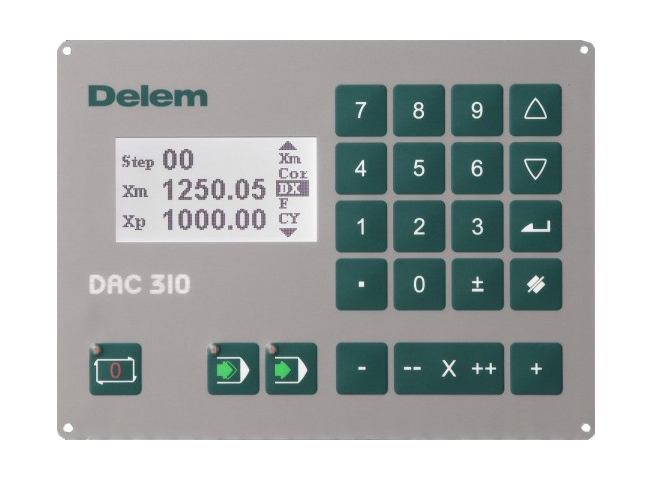
DELEM DAC-310
DAC-310 обеспечивает лучшее и полное решение для гильотин. Она включает в себя контроль задних упоров, угла резания, длину хода и зазора между ножами, основанные на современной электронике.
Выбор вида позиционирования , в зависимости от применения можно выбрать двухстороннее позиционирование, а также одностороннее позиционирование и устранение неисправностей. Реферирование может быть выполнено автоматически DAC-310 всегда будет помнить последнее положение системы после отключения питания.
Упор можно перемещать вручную, выбирая кнопками между 2 разными скоростями.
С его ярким ЖК-дисплеем, предлагается: четкое управление, быстрое и простое программирование.Фактическое и запрограммированное местоположение визуализируется одновременно; Также присуствует счетчик резов и тд.
DAC-310 особенности:
Яркий ЖК-дисплей 128 х 64
Управление задним упором
Регулировка угла реза
Программное ограничение хода
Визуализация Фактического и Запрограммированного положения.
Счетчик резов
Программируемый до 100 шагов
Сервоуправление / однополярный / AC два режима контроля скорости
стандарт
• 128 х 64 ЖК-дисплей
• Высокое качество панели с интегрированными мембранными переключателями
• Корпус для панели
|
DAC-310 |
Scherensteuerungen |
||
|
Serie die Lösung zur |
|||
|
Programmierung einer Achse |
|||
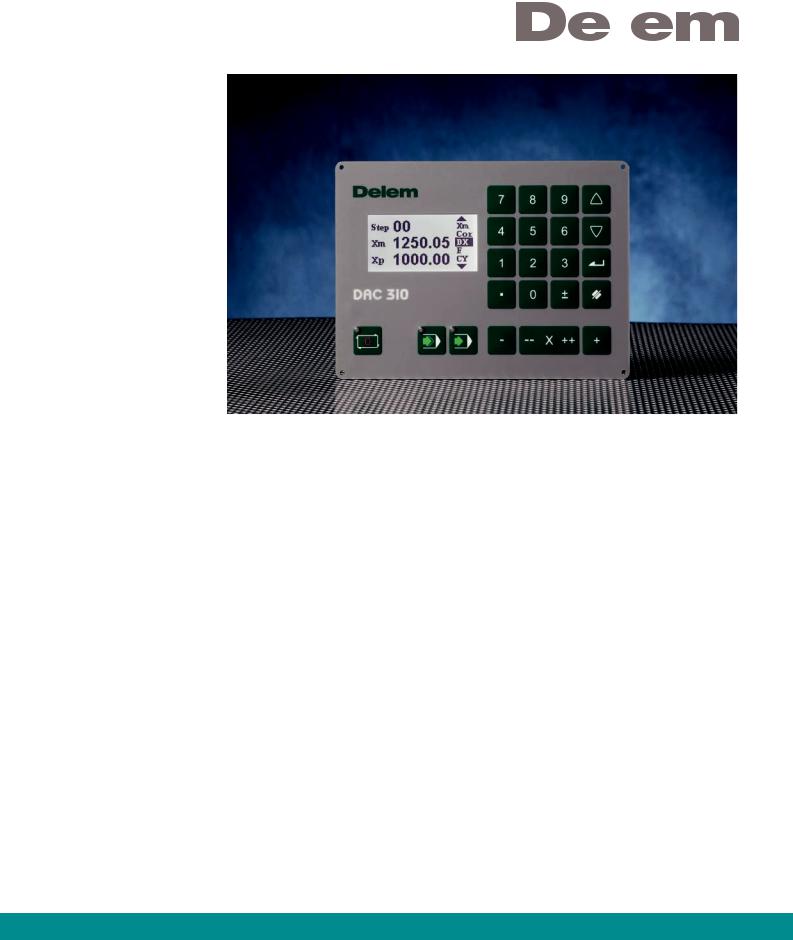
Die DAC-310 Scherensteuerung ist eine umfassende Anwendung zum Steuern einer Schere. Diese hochwertige elektronische Einheit umfasst eine Hinteranschlagssteuerung, die Öffnungssteuerung und die Hublängenbegrenzung und stellt somit eine vielseitig verwendbare Lösung dar.
Die Hinteranschlags-Achsensteuerung verfügt über eine Servosteuerung, eine AC-Steuerung mit zwei Geschwindigkeiten und eine unipolare Steuerung.
Welche Art der Positionierung auch gewählt wird, je nach Anwendung können Sie entweder die beidseitige Positionierung oder die einseitige Positionierung mit Eliminierung von Spindelfehlern wählen.
Die Referenzsuche kann entweder automatisch verlaufen oder aber dadurch, dass sich die DAC-310 immer die letzte Position des Systems beim Herunterfahren merkt.
Der Hinteranschlag kann von Hand bewegt werden, indem die Druckknöpfe in 2 Geschwindigkeiten betätigt werden.
Durch die gut lesbare LCD-Anzeige bietet die Steuerung eine deutliche, schnelle und einfache Möglichkeit zur Programmierung. Die aktuellen und die programmierten Positionsinformationen werden gleichzeitig dargestellt; der Produktzähler kann außerdem mit eingeblendet werden.
Bei jedem Schritt ermöglicht die Steuerung das Nachschieben durch Kettenmaß programmieren, den Rückzug und die Schrittwiederholung.
DAC-310 umfasst:
•Deutliches LCD Display
•Hinteranschlagssteuerung
•Schnittspaltsteuerung
•Begrenzung Hublänge
•Aktuelle und programmierte Positionsvisualisierung
•Produktzähler
•Bis zu 100 Schritte programmierbar
•Einbaugehäuse
•Servosteuerung / unipolar /
AC Zwei-Geschwindigkeitsregelung
E v e r y t h i n g u n d e r c o n t r o l
 Loading…
You can only view or download manuals with
Sign Up and get 5 for free
Upload your files to the site. You get 1 for each file you add
Get 1 for every time someone downloads your manual
Buy as many as you need