
Просмотр
Доступно к просмотру 143 страницы. Рекомендуем вам скачать файл инструкции, поскольку онлайн просмотр документа может сильно отличаться от оригинала.
-
Version 1.01 | 07/08/2013
User Manual
Wireless AC1200 Dual-Band Gigabit
Cloud Router USB 3.0
DIR-860L
-
Preface
D-Link reserves the right to revise this publication and to make changes in the content hereof without obligation to notify any
person or organization of such revisions or changes.
Manual Revisions
Revision               Date                                         Description
1.01              July 08, 2013         • Initial release
Trademarks
D-Link and the D-Link logo are trademarks or registered trademarks of D-Link Corporation or its subsidiaries in the United
States or other countries. All other company or product names mentioned herein are trademarks or registered trademarks of
their respective companies.
Copyright © 2013 by D-Link Corporation.
All rights reserved. This publication may not be reproduced, in whole or in part, without prior expressed written permission
from D-Link Corporation.
D-Link DIR-860L User Manual                                                                                                                     i
-
Table of Contents
Table of Contents
Preface..................................................................................i  L2TP ....................................................................................30
Manual Revisions ........................................................................... i  DS-Lite ...............................................................................31
Trademarks ...................................................................................... i  Wireless Settings .................................................................32
Wireless Connection Setup Wizard..........................33
Product.Overview...............................................................1      Add Wireless Device with WPS Wizard ...................36
Package Contents .........................................................................1  Manual Wireless Settings .................................................38
System Requirements .................................................................2  802.11n (2.4 GHz) ...........................................................38
Introduction ...................................................................................3  Draft 802.11ac (5 GHz) .................................................40
Features ............................................................................................4  Wireless Security ............................................................42
Hardware Overview .....................................................................5  Network Settings ................................................................46
Connections ...........................................................................5  Router Settings ...............................................................47
LEDs ...........................................................................................6
DHCP Server Settings ...................................................48
Installation..........................................................................7  DHCP Reservation .........................................................49
Before you Begin ...........................................................................7  Storage ...................................................................................50
Wireless Installation Considerations ......................................8  Media Server.........................................................................51
Manual Setup .................................................................................9  IPv6 ..........................................................................................52
IPv6 Internet Connection Setup Wizard ................53
Configuration....................................................................11   Manual IPv6 Local Connectivity Setup ..................58
D-Link Quick Setup Wizard .....................................................12  IPv6 Manual Setup.........................................................59
QRS Mobile App (iOS, Android) .............................................19  mydlink Settings .................................................................70
SharePort Mobile App (iOS, Android) .................................20   Advanced ......................................................................................71
Web-based Configuration Utility ..........................................24  Virtual Server ........................................................................71
Internet Connection Setup .............................................25  Port Forwarding ..................................................................72
Static IP ..............................................................................26  Application Rules ................................................................73
Dynamic IP (DHCP) ........................................................27  QoS Engine............................................................................74
PPPoE (Username/Password) ....................................28       Network Filters .....................................................................76
PPTP ....................................................................................29  Access Control .....................................................................77
D-Link DIR-860L User Manual                                                                                                                    ii
- 1
- 2
- 3
- 4
- 143

Русский
- Bedienungsanleitung D-Link DIR-860L — Wireless AC1200 Dual Band
- D-Link DIR-860L — Wireless AC1200 Dual Band User Manual
- Manual Usuario D-Link DIR-860L — Wireless AC1200 Dual Band
- Mode d’emploi D-Link DIR-860L — Wireless AC1200 Dual Band
- Istruzioni D-Link DIR-860L — Wireless AC1200 Dual Band
- инструкция D-Link DIR-860L — Wireless AC1200 Dual Band
- D-Link DIR-860L — Wireless AC1200 Dual Bandの取扱説明書
- Handleiding D-Link DIR-860L — Wireless AC1200 Dual Band
- Manual de uso D-Link DIR-860L — Wireless AC1200 Dual Band
Вам нужна инструкция? Мы поможем Вам ее найти и сэкономить Ваше время.
- 64 stron
- 11.21 mb
Изделие D-Link DIR-860L — Wireless AC1200 Dual Band, а также другие, которыми Вы пользуетесь ежедневно, наверняка вы получили в комплекте с инструкцией обслуживания. Из опыта наших пользователей мы знаем, что большинство из Вас не уделили этому особого внимания. Большая часть инструкций, сразу же после покупки попадает в корзину для мусора вместе с коробкой — это ошибка. Ознакомьтесь с информацией, касающейся инструкции D-Link DIR-860L — Wireless AC1200 Dual Band, которая поможет Вам в будущем сэкономить нервы и избежать головной боли.
Важная подсказка — не забывайте хотя бы раз прочитать инструкцию D-Link DIR-860L — Wireless AC1200 Dual Band
Если вы не хотите каждый раз читать информационные брошюры, касающиеся, тех или D-Link DIR-860L — Wireless AC1200 Dual Band иных изделий, достаточно, прочитать их раз — сразу же после покупки устройства. Вы получите основное знания, касающиеся поддержания изделия D-Link DIR-860L — Wireless AC1200 Dual Band в хорошем эксплуатационном состоянии, так, чтобы без проблем достигнуть его планируемого цикла работы. Затем инструкцию можно отложить на полку и вернуться к ней только в случае, если вы не уверены, правильно ли проводится техобслуживание изделия. Правильный уход является необходимым элементом Вашего удовольствия D-Link DIR-860L — Wireless AC1200 Dual Band.
Раз в году пересмотрите шкафчик, в котором держите инструкции для всех устройств, — выбросите те, которыми вы уже не пользуетесься. Это поможет Вам сохранять порядок в своей домашней базе инструкций обслуживания.
Summary of Contents for D-Link DIR-860L — Wireless AC1200 Dual Band
Что находится в инструкции D-Link DIR-860L — Wireless AC1200 Dual Band? Почему стоит ее прочитать?
- Гарантия и подробности, касающиеся техобслуживания изделия
Хорошей идеей будет прикрепить чек к странице инструкции. Если что-то плохое случится во время использования D-Link DIR-860L — Wireless AC1200 Dual Band, у вас будет комплект документов, необходимый для гарантийного ремонта. В этой части инструкции вы найдете информацию об авторизованных сервисных центрахD-Link DIR-860L — Wireless AC1200 Dual Band а также, как самостоятельно правильно ухаживать за оборудованием — так, чтобы не потерять гарантийных прав. - Указания по монтажу и Setup
Не терять нервов и времени на самостоятельную попытку установки и первого запуска изделия. Воспользуйтесь рекомендациями производителя D-Link DIR-860L — Wireless AC1200 Dual Band чтобы правильно запустить изделие, без лишнего риска повреждения оборудования. - Информация, касающаяся дополнительных запчастей (входящих в комплект а также являющихся опцией)
Пересматривая эту часть документа вы сможете проверить, доставлен ли ваш D-Link DIR-860L — Wireless AC1200 Dual Band с полним комплектом аксессуаров. Вы также сможете узнать, какие дополнительные запчасти или аксессуары для D-Link DIR-860L — Wireless AC1200 Dual Band Вы сможете найти и докупить к своему устройству. - Troubleshooting
Самые частые проблемы, касающиеся D-Link DIR-860L — Wireless AC1200 Dual Band и методы их решения. Это очень полезная часть руководства по обслуживанию — она позволит Вам сэкономить много времени на поиск решений. 90% проблем с D-Link DIR-860L — Wireless AC1200 Dual Band повторяется у многих пользователей. - Требования, касающиеся питания и энергетический класс
Информация, касающаяся количества потребляемой энергии, а также рекомендации, касающиеся установки и питания D-Link DIR-860L — Wireless AC1200 Dual Band. Прочитайте, чтобы оптимально пользоваться D-Link DIR-860L — Wireless AC1200 Dual Band и не использовать большего количества ресурсов, нежели это необходимо для правильной работы изделия. - Специальные функции D-Link DIR-860L — Wireless AC1200 Dual Band
Здесь вы можешь узнать, как персонализировать изделие D-Link DIR-860L — Wireless AC1200 Dual Band. Вы узнаете, какие дополнительные функции могут помочь Вам удобно использовать продукт D-Link DIR-860L — Wireless AC1200 Dual Band а также, какие функции Вашего устройства оптимальны для выполнения конкретной деятельности.
Как видите в инструкции вы найдете информацию, которая реально поможет Вам в использовании Вашего изделия. Стоит с ней ознакомиться, чтобы избежать разочарований, возникающих из более короткого, нежели предусматривалось, периода исправности изделия D-Link DIR-860L — Wireless AC1200 Dual Band. Если все же вы не хотите копить инструкции в своем доме, наш сайт поможет Вам в этом — вы должны найти у нас руководство по обслуживанию большинства из своих устройств, а также D-Link DIR-860L — Wireless AC1200 Dual Band.
Комментарии (0)
-
Инструкции по эксплуатации
1

D-Link DIR-860L инструкция по эксплуатации
(143 страницы)
- Языки:Русский
-
Тип:
PDF -
Размер:
11.49 MB -
Описание:
Беспроводной двухдиапазонный облачный гигабитный маршрутизатор AC1200 с портом USB 3.0
Просмотр
На NoDevice можно скачать инструкцию по эксплуатации для D-Link DIR-860L. Руководство пользователя необходимо для ознакомления с правилами установки и эксплуатации D-Link DIR-860L. Инструкции по использованию помогут правильно настроить D-Link DIR-860L, исправить ошибки и выявить неполадки.
В последнее время на страницах нашего ресурса все чаще встречается оборудование с поддержкой последнего поколения стандарта беспроводной связи 802.11ac. Правда и сегодня он обычно является прерогативой топовых моделей роутеров и смартфонов. При этом, несмотря на формальные 1300 Мбит/с для скорости соединения, найти клиентское устройство с поддержкой именно такой скорости непросто, поскольку обычно мы встречаем варианты с двумя или одной антеннами. На этом фоне вполне логично смотрится и предложение роутеров, имеющих менее трех антенн, которые оказываются доступнее своих старших соперников.
Правда, здесь стоит упомянуть еще об одном следствии такого сокращения. Если у вас роутер с «максимальными» параметрами, то независимо от клиента вы рассчитываете, что именно установленный в нем контроллер будет определять реальную скорость работы. Но если использовать упрощенную модель роутера, то может возникнуть неприятная ситуация, когда клиент не сможет реализовать свой потенциал. Особенно это относится к текущему переходному периоду. Например, если к 300+867 AC-роутеру с парой антенн подключается топовый для 802.11n адаптер со схемой 450+450, то на 5 ГГц он будет соединяться на 300 Мбит/с, а для диапазона 2,4 ГГц вполне возможна ситуация, когда будет получено всего 144 Мбит/с из-за использования роутером только одного канала.
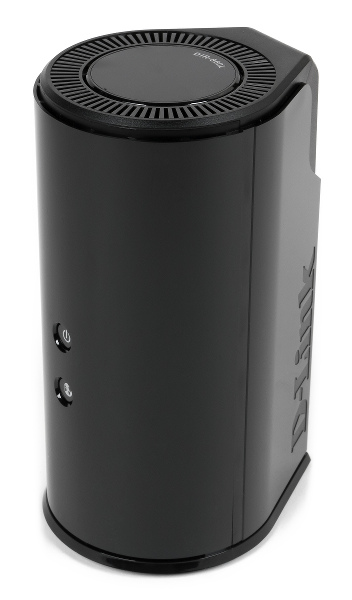
В этом материале мы познакомимся с роутером D-Link DIR-860L, который как раз использует конфигурацию из двух антенн. Это устройство оборудовано гигабитными сетевыми портами, имеет поддержку двух диапазонов с 802.11ac на 5 ГГц и порт USB 3.0 для подключения внешних устройств. Кроме того, стоит отметить необычный дизайн корпуса.
Комплект поставки
Устройство поставляется в стандартной картонной коробке. Оформлена она в фирменных тонах компании. На упаковке присутствуют фотографии устройства, схемы подключения, основные особенности, позиционирование в линейке, описания мобильных утилит и другая полезная информация. В нашем случае все тексты были исключительно на английском языке.

В комплект поставки входит внешний импульсный блок питания 12 В 2 А, один сетевой патч-корд, очень короткая инструкция по началу работу на нескольких языках (русский присутствует) и пара дополнительных листовок.
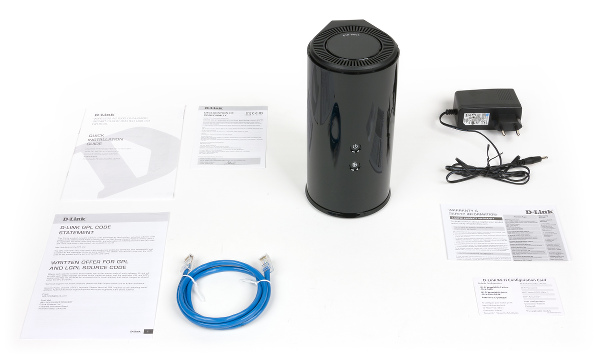
Набор вполне стандартный, замечание можно сделать только к сетевому кабелю — он имеет длину всего один метр, что сложно признать удобным. Да и голубой цвет пластика может не всем подойти.
Внешний вид
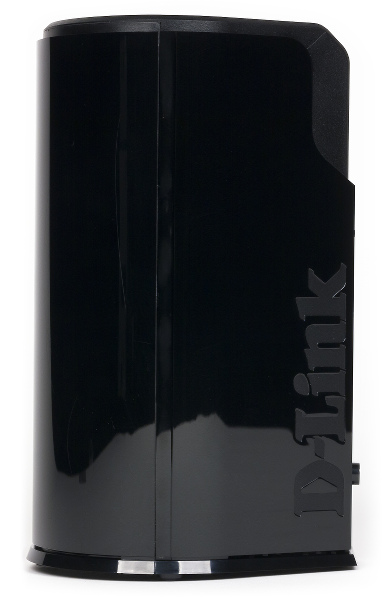
Корпус роутера вертикальный и имеет в проекции форму капли. Изготовлен он из черного пластика, который на большинстве деталей имеет непрактичное глянцевое покрытие. На первый взгляд, устройство рассчитано только на установку на столе, никаких вариантов крепления на стену нет.
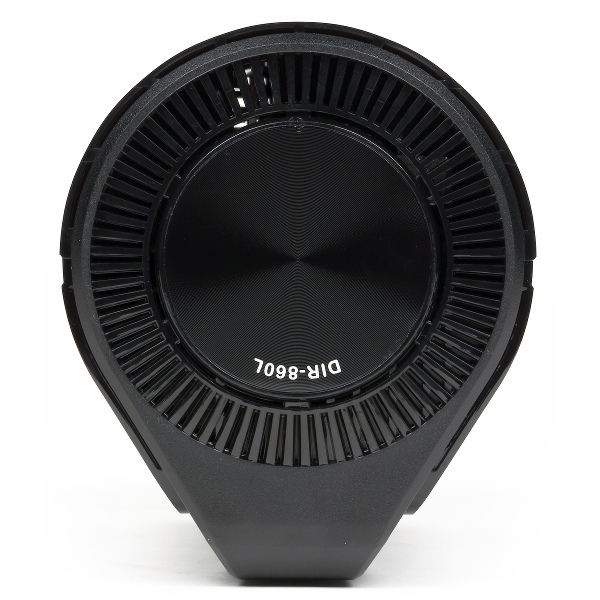
На верхнем торце мы видим решетку вентиляции, а вставка в центре имеет круговой узор. На ней же светлой краской указано название модели. Аналогичные решетки находятся и на дне устройства. Здесь же есть четыре невысокие резиновые ножки, отверстие скрытой кнопки сброса, табличка с информацией об устройстве (включая имена и пароли беспроводных сетей).
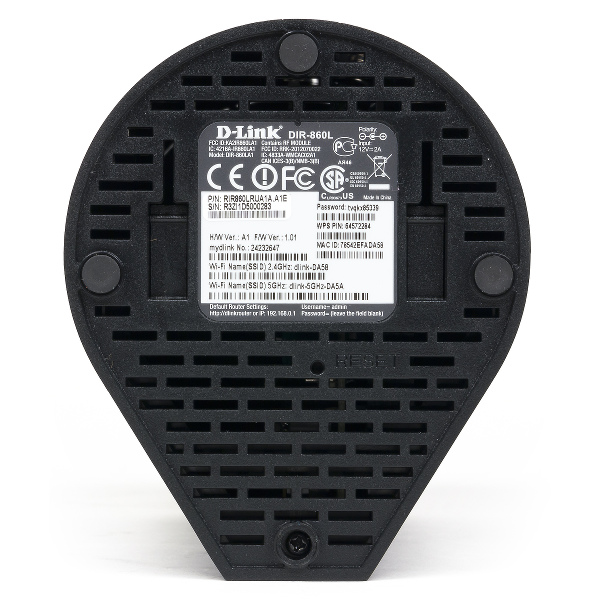
При более внимательном рассмотрении можно увидеть и специальные элементы для крепления роутера на стене. Хотя при его форме корпуса это будет смотреться несколько необычно. Отметим, что провода в этом случае будут направлены вниз.
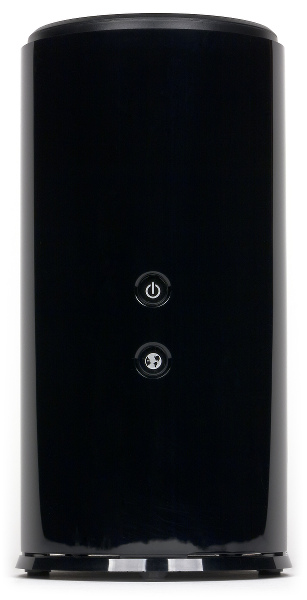
Обращенная к пользователю сторона цилиндра может похвастать парой светодиодных индикаторов средней яркости — первый показывает статус роутера, а второй — состояние подключения к интернету.

Сзади находятся вход блока питания и выключатель, сетевые порты (все гигабитные, без индикаторов), кнопка WPS и порт USB 3.0. Отметим, что основные разъемы (питание и WAN) установлены в нижней части корпуса, что наиболее удобно.

Производителя, безусловно, стоит похвалить за нестандартный подход к дизайну корпуса роутера. А вот материалы можно было бы выбрать и менее маркие.
Аппаратная конфигурация
Роутер не имеет простой возможности вскрытия корпуса, так что информация о его конфигурации собрана из доступных в интернете источников. Устройство основано на SoC Broadcom BCM47081. Этот чип имеет одно ядро с архитектурой ARM, работающее на частоте 800 МГц. Объемы оперативной и флэш-памяти составляют по 128 МБ. Для работы беспроводной сети 802.11b/g/n в диапазоне 2,4 ГГц установлен чип BCM43217, а работа с 802.11a/n/ac на 5 ГГц обеспечивается микросхемой BCM4352. На каждый диапазон установлено по две антенны, так что максимальные скорости соединения составляют 300 и 867 Мбит/с соответственно. Сетевой коммутатор с пятью гигабитными портами и контроллер USB 3.0 на один порт реализованы средствами основного процессора.
Большинство элементов размещены на одной печатной плате. На процессоре и радиоблоке на 2,4 ГГц установлены небольшие радиаторы. Радиоблок для 802.11a/n/ac представляет собой плату расширения с интерфейсом miniPCIe. Для нее используется отдельная достаточно крупная пластина, выполняющая роль радиатора. Три из четырех антенн находятся на микроплатах, закрепленных под верхней частью корпуса роутера, и подключены кабелями с микроразъемами. Последняя выполнена в виде металлической пластины сложной формы и прикреплена к основной печатной плате.
Вероятно, на плате есть и консольный разъем, но из-за сложностей со вскрытием корпуса его использование затруднено.
Тестирование роутера проводилось с прошивкой версии 1.08. Аппаратная версия представленного на тест устройства — A1.
Настройка и возможности
Основной интерфейс роутера в рассматриваемой версии прошивки представлен на английском языке. Формально есть возможность установки языковых пакетов, однако в разделе поддержки на сайте таких файлов не нашлось. При этом штатный помощник, который запускается после сброса настроек, имеет поддержку русского языка. Отметим наличие в прошивке встроенной справочной системы по всем пунктам меню настроек.
Доступ к интерфейсу традиционно закрыт паролем, пользователь может изменить его в настройках. Предусмотрена работа и через WAN-интерфейс, причем в этом случае можно выбрать номер порта, включить протокол HTTPS, использовать фильтр IP-адресов удаленных систем.
В системе нет кнопки выхода, однако если интерфейс будет неактивен некоторое время, то доступ будет закрыт. Интересно, что предусмотрен дополнительный уровень защиты, затрудняющий автоматизированный подбор пароля — знакомый графический ключ.
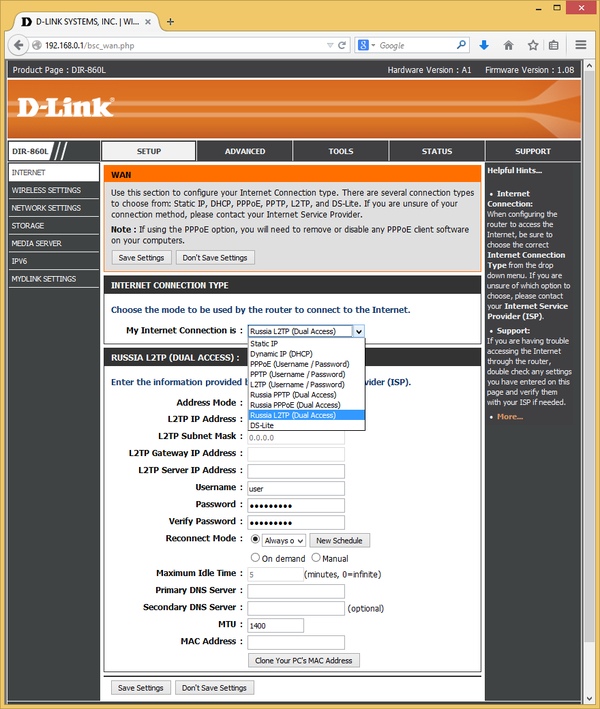
Для подключения к интернету можно использовать помощника или установить опции в ручном режиме. Устройство поддерживает работу с IPoE, PPPoE, PPTP и L2TP. Есть специальные режимы для России с сохранением доступа к сети провайдера при работе через сервер VPN. Из дополнительных опций упомянем изменение MTU и MAC, включение ответа на ping для внешнего интерфейса, принудительный выбор скорости порта WAN, включение поддержки мультикаст.

Клиенты в локальной сети, как обычно, могут использовать сервер DHCP. В его настройках можно выбрать диапазон адресов и назначить фиксированные соответствия MAC/IP.
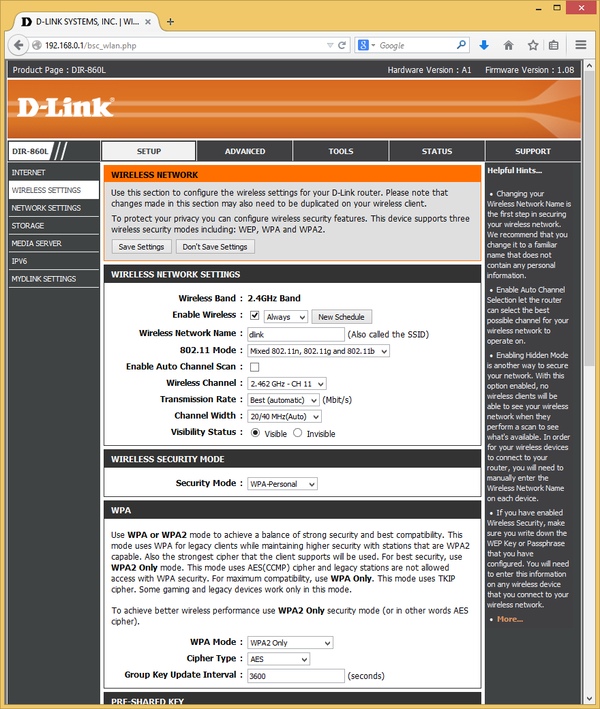
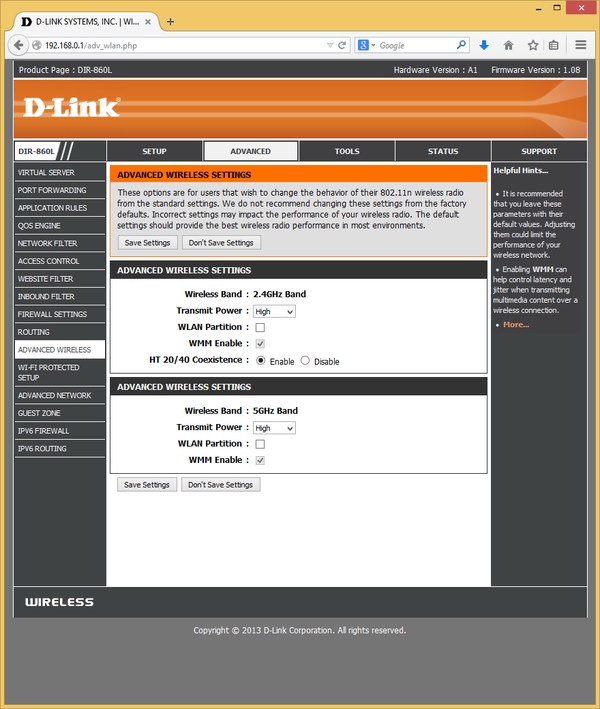
Роутер оборудован двумя независимыми беспроводными точками доступа. Стандартный набор опций позволяет установить имя сетей, режим 802.11, номер канала (для 5 ГГц поддерживаются каналы 36—64), его ширину, режим защиты (открытая сеть, WEP, WPA с паролем или через сервер RADIUS). Дополнительно можно использовать расписание и выбрать один из трех вариантов выходной мощности передатчиков. Упомянем также поддержку технологии WPS.
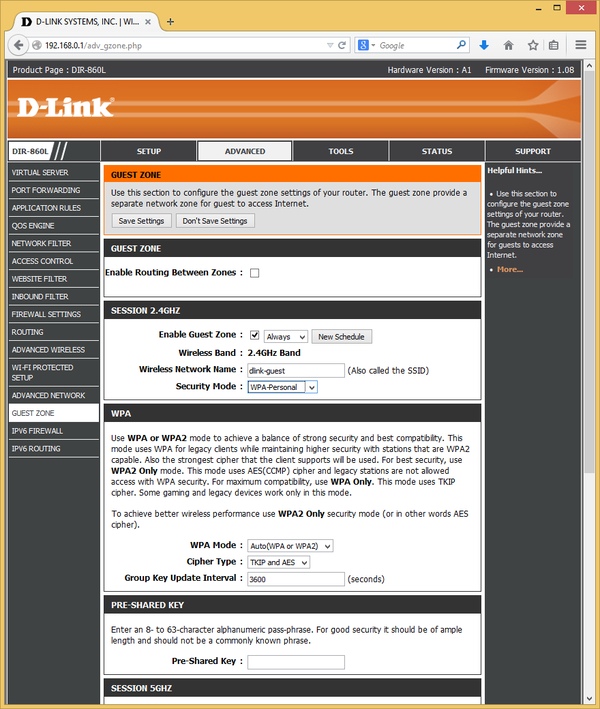
Есть возможность организации отдельных гостевых беспроводных сетей с собственными именами, защитой и расписанием. При этом клиенты будут иметь возможность работы только с интернетом, без доступа к основной локальной сети. При необходимости эту блокировку можно отключить.
При работе с белым IP-адресом можно воспользоваться клиентом DDNS, который поддерживает сервис DynDNS, в том числе брендированное специально для D-Link решение.
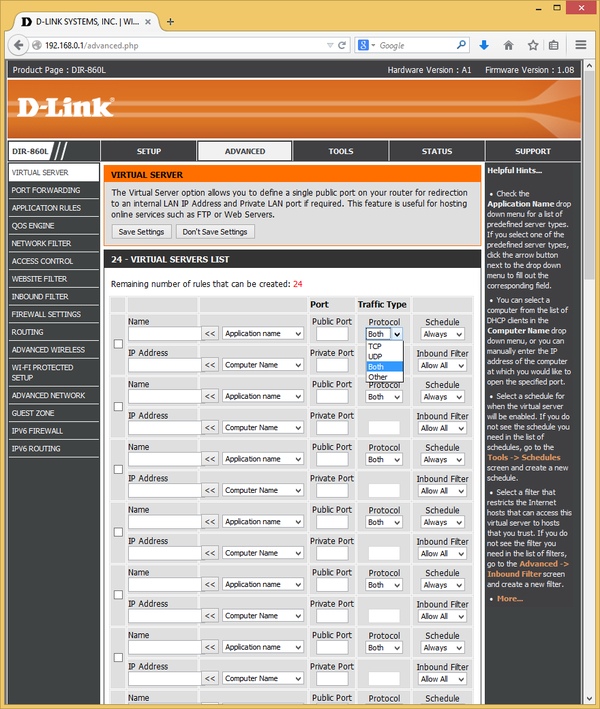
Доступность внутренних сервисов для клиентов из интернета обеспечивается механизмом трансляции портов. Для этого есть две таблицы — одна для одиночных портов, а вторая для диапазонов. Обе имеют объем в двадцать четыре записи.
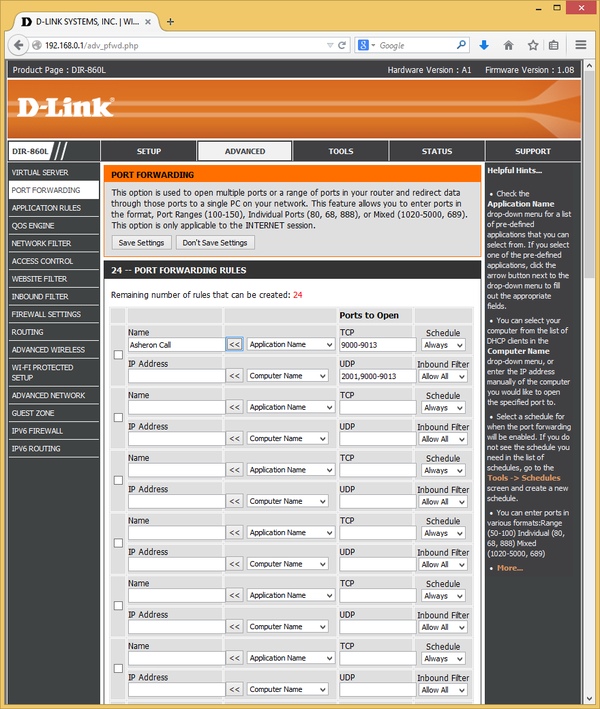
При этом в первой можно изменить номер транслируемого порта и выбрать протокол, а во второй — указать диапазоны или перечисления для TCP и UDP в одной записи. Дополнительно пользователь может использовать расписание работы правил, а также указать фильтр для адресов клиентов. Упомянем наличие поддержки DMZ, UPnP и ALG для некоторых протоколов.
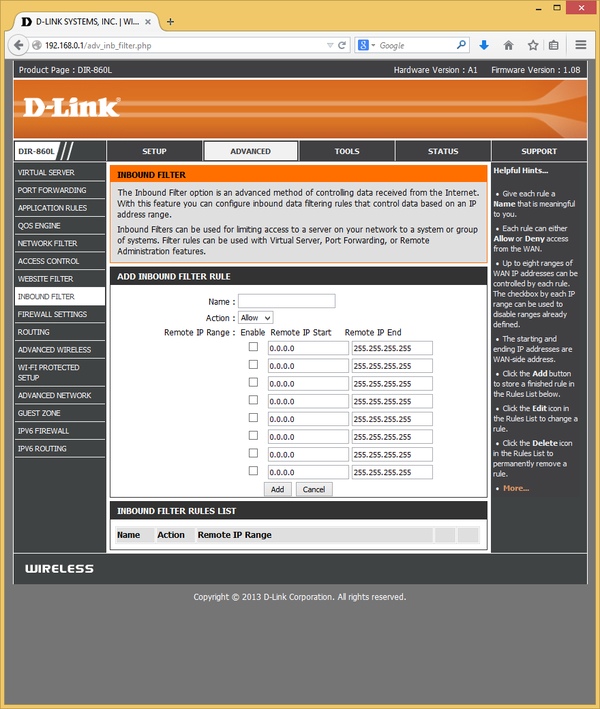
Фильтры адресов («Inbound Filter») не только работают с правилами трансляции портов, но и могут помочь ограничить удаленный доступ к интерфейсу системы. Правил может быть несколько, в каждом из них указываются диапазоны IP-адресов и действие — разрешение или блокировка.
Для некоторых приложений может пригодиться настройка правил переключения портов, когда при определенном исходящем соединении роутер автоматически открывает входящее к этому клиенту. Этот сервис также может работать по расписанию.
Предусмотрена работа с сервисом mydlink, который позволяет удаленно проверить статус роутера и изменить некоторые его настройки даже при отсутствии белого адреса. От пользователя потребуется зарегистрировать аккаунт и подтвердить адрес электронной почты. Этот же сервис используется и для других продуктов D-Link, в частности сетевых видеокамер.
В некоторых случаях может пригодиться возможность добавления собственных записей (до 32) в таблицу маршрутизации.

Средства защиты включают в себя SPI-экран и несколько фильтров. Первый из них позволяет ограничить работу клиентам по их MAC-адресу. В списке, переключаемом в белый или черный режим, можно указать двадцать четыре адреса. Фильтр ссылок/имен хостов насчитывает 40 записей. Для него также можно выбрать белый или черный вариант работы.
Расширенные правила блокировки устанавливаются в разделе «Access Control». Здесь можно указать расписание, адреса клиентов, адреса удаленных систем, протокол и номера портов. С одной стороны, схема гибкая, но с другой — не очень удобная в настройке.

В роутере реализована система управления трафиком (QoS). Пользователь может определить до 32 правил выделения фильтрации трафика в группы приоритета по адресам клиентов и серверов, портам или предопределенным протоколам. На практике активация данной системы приводит к значительному падению скорости маршрутизации. Так что, как и на большинстве устройств данного класса, эта функция не имеет большого практического значения.

Отдельно стоит упомянуть поддержку роутером протокола IPv6 в нескольких конфигурациях. Кроме того, для него можно использовать правила межсетевого экрана, расширять таблицу маршрутизации и проверять текущее состояние на страницах статуса роутера.

Как и у многих домашних роутеров, в рассматриваемой модели есть пункты для обновления прошивки из файла или через интернет, сохранения/восстановления/сброса конфигурации и перезагрузки.

Для проверки текущего состояние роутера предусмотрена группа страниц «Status». Кроме базовой информации о текущем подключении, беспроводных точках доступа и подключенных клиентах (для беспроводных можно узнать также скорость и качество сигнала), здесь можно получить множество другой полезной информации. В частности, есть статистика по принятым и переданным по разным интерфейсам пакетам, список открытых соединений с группировкой по клиентам, таблица маршрутизации. Журнал событий устройство ведет достаточно подробный. Предусмотрена работа с сервером Syslog (только в локальном сегменте сети) и отправка событий или всего журнала по электронной почте. Из утилит диагностики в данном роутере есть только ping.
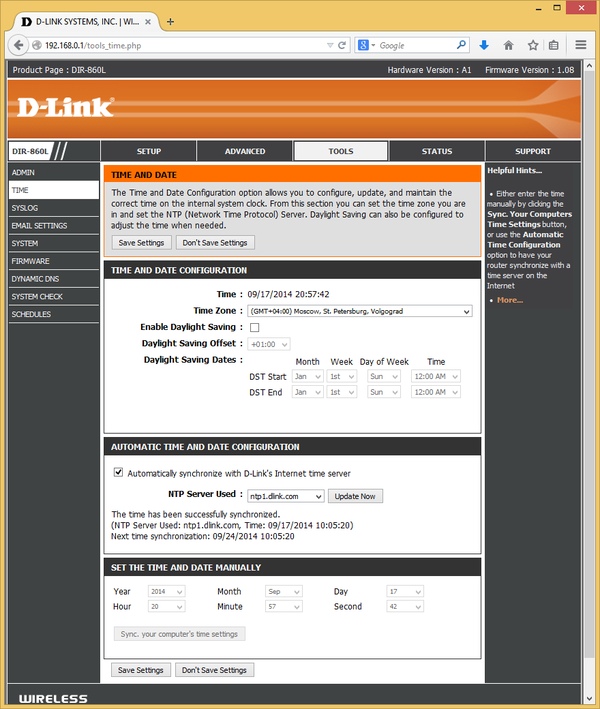
Для корректной работы системы есть возможность настройки встроенных часов, которые поддерживают и синхронизацию по протоколу NTP.
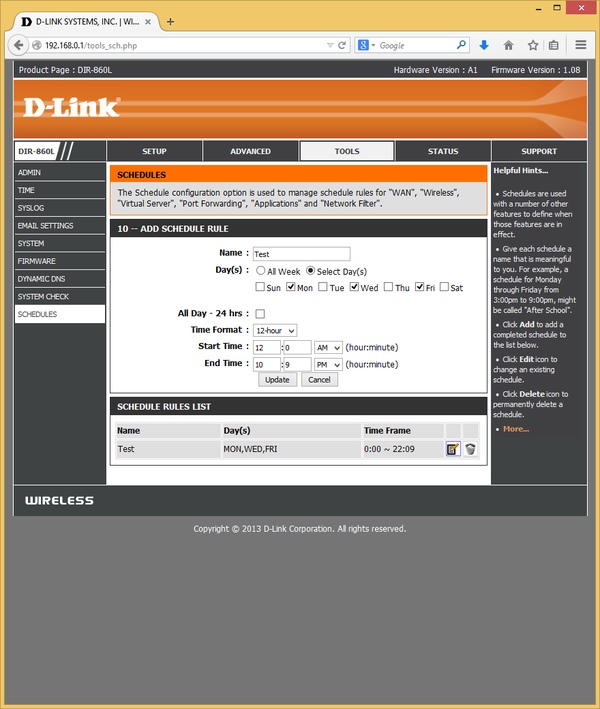
Интересно реализована работа с расписаниями. На специальной странице можно запрограммировать требуемые списки, в которых выбираются дни недели и временной интервал с точностью до минуты. Далее эти расписания можно использовать в различных сервисах, таких как Wi-Fi, трансляция портов, фильтр и других.
Работа с USB-устройствами
Наличие порта USB 3.0 позволяет реализовать на роутере некоторые функции сетевого накопителя. В случае необходимости работы более чем с одним устройством можно подключать их через USB-хаб.
На дисках можно использовать один или несколько разделов с файловыми системами FAT32 и NTFS. Возможности безопасного отключения диска мы не обнаружили.
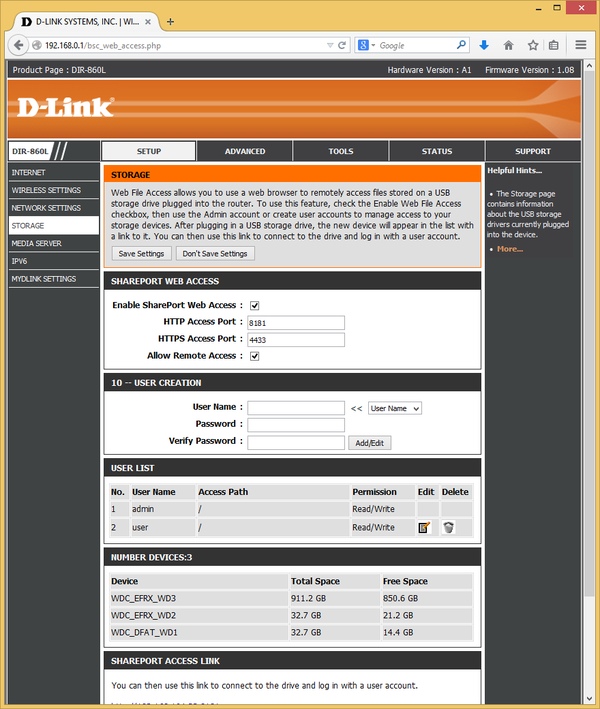
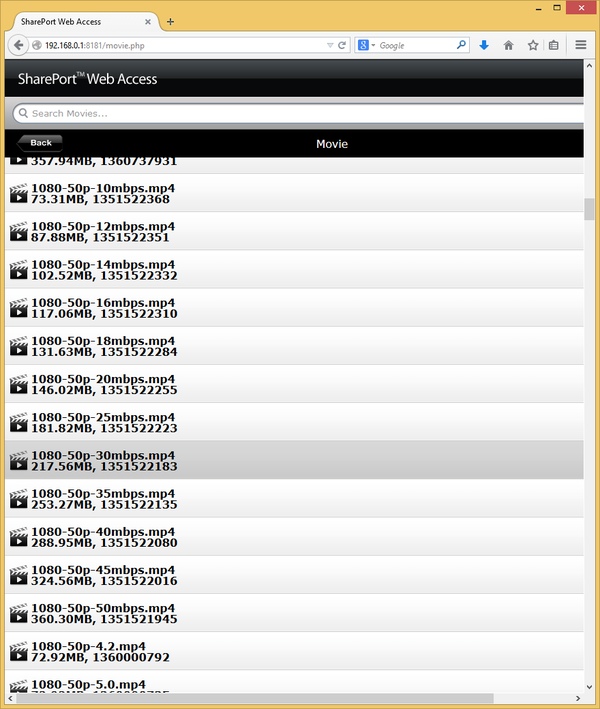
Доступ к накопителю осуществляется через стандартное сетевое окружение Windows или через веб-браузер. Последний вариант, названный производителем SharePort Web Access, позволяет реализовать и удаленный доступ к документам. Кроме того, он поддерживает протокол HTTPS и возможность изменения номеров портов. Кроме стандартного варианта организации данных по каталогам, при работе через браузер предусмотрена автоматическая группировка по типу файла для мультимедиа и документов. Предусмотрена также опция поиска. Кроме чтения, пользователю доступны операции создания новых папок, удаления и загрузки файлов.
При работе с сетью Windows потребуется использовать аккаунт администратора роутера, что не очень удобно. А вот для подключения через браузер можно запрограммировать нескольких пользователей и указать им права на отдельные директории.
Для проверки скорости работы мы использовали наш обычный бокс Agestar на чипе ASMedia с винчестером WD Red (WD10EFRX). К сожалению, даже включение USB 3.0 не помогло выйти за границы прошлой версии — скорость записи на диск составляет около 15 МБ/с, а чтения с диска — 23 МБ/с. От файловой системы эти результаты практически не зависят.
Отметим, что по умолчанию интерфейс USB работает по версии 2.0, для переключения в 3.0 необходимо снять одну из галочек в веб-интерфейсе. Сделано это для исключения возможного влияния работы USB 3.0 на беспроводную точку доступа 2,4 ГГц. Однако мы провели специальное тестирование в таком сценарии и не заметили негативного эффекта, по крайней мере с указанным контейнером.
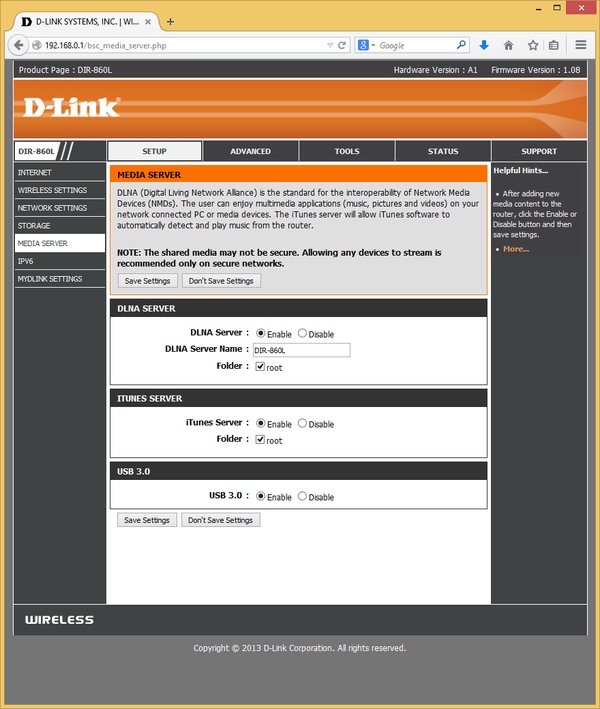
Подключаемые винчестеры можно использовать для организации медиабиблиотеки с доступом по протоколам DLNA и iTunes. Данные сервисы имеют минимум настроек — только выбор корневой папки для индексации файлов. DLNA поддерживает работу с файлами форматов JPEG, MP3, M4A, WMA, FLAC, WAV, AVI, MKV, MOV, MP4, MPEG, WMV и другими. Совместимые форматы для iTunes включают MP3 и M4A. Для корректного чтения тегов в MP3 они должны быть записаны в уникоде. Никаких средств мониторинга работы сервисов нет.
Проверка с телевизором производства LG показала, что сервер DLNA можно использовать для работы с «умными» моделями для просмотра современного высококачественного видео. Поддерживаются необходимые форматы файлов, замечаний к скорости также нет.

Второй вариант использования порта USB — подключение принтера или МФУ, работает только под Windows. Для этого используется специальная утилита SharePort Plus, которая организует виртуальный порт USB.
Мобильные утилиты
Для мобильных устройств на операционных системах Android и iOS компания предлагает две утилиты, доступные в соответствующих магазинах приложений. Для их работы потребуется завести аккаунт mydlink и указать его в роутере. Программа mydlink Lite используется для осуществления некоторых операций с устройством и его настройками. В частности, в ней можно увидеть статус устройства, включая текущие скорости, подключенных клиентов, данные подключений к интернету и других интерфейсов.

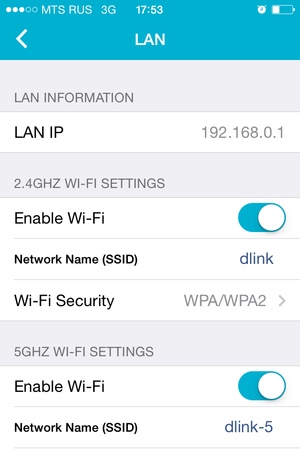
Пользователь может удаленно перезагрузить роутер, блокировать клиентов, включать/выключать и настраивать беспроводные интерфейсы. Отметим, что аналогичные возможности есть у портала mydlink, к которому можно обратиться из любого браузере (требуется поддержка Java).
Вторая программа — mydlink SharePort — позволяет получить удаленный доступ к файлам на подключенном к роутеру винчестере. В утилите есть встроенный плеер для некоторых форматов медиафайлов и возможность загрузки документов на устройство.
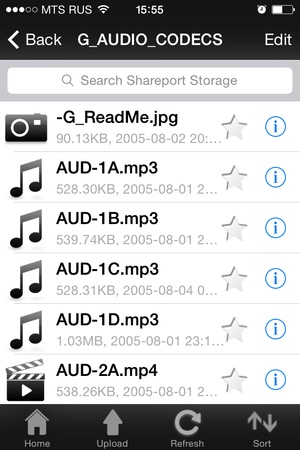

На момент проведения тестирования версия для Android не смогла подключиться к роутеру, а с вариантом для iOS проблем не было. Странно, что подобные возможности для ПК на портале mydlink не предусмотрены.
Отметим, что обе программы работоспособны и без белого адреса на WAN-интерфейсе роутера, что не может не радовать.
Производительность
Для оценки возможностей устройства в различных режимах использовалось тестирование на нашем стандартном стенде. Проверялись четыре конфигурации подключения к интернету — IPoE, PPPoE, PPTP и L2TP.
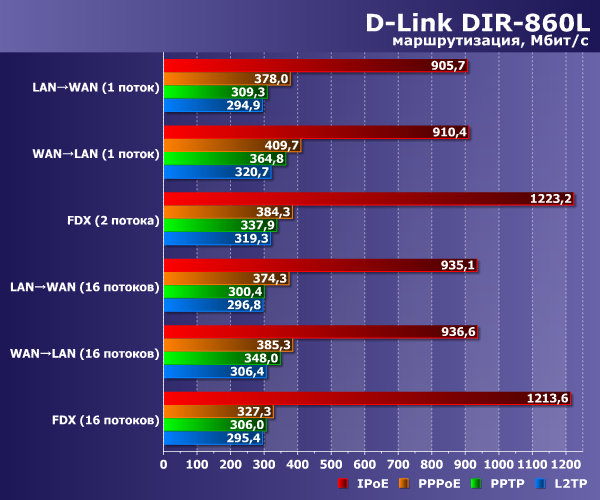
Для IPoE роутер обеспечивает близкие к скорости гигабитных портов показатели — более 900 Мбит/с. Странно, что для PPPoE аппаратный NAT уже не работает, и скорость снижается примерно до 400 Мбит/с. С подключениями PPTP и L2TP можно рассчитывать на 300-350 Мбит/с, что можно считать неплохим результатом для данного сегмента домашних роутеров.
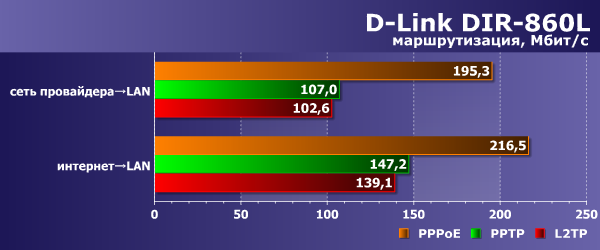
В режимах «Dual Access» скорости загрузки данных из сети провайдера и интернета распределяются равномерно, что видно по следующей диаграмме.
Тестирование скорости работы беспроводных точек доступа проводилось с адаптерами TP-Link TL-WDN4800 (802.11n, до 450 Мбит/с) и Asus PCE-AC68 (802.11n/ac, до 600 Мбит/с при 2,4 ГГц) в стандартных условиях на расстоянии четырех метров прямой видимости. Как обычно, проверялись сценарии с одним/двумя потоками и с восемью потоками. Роутер настраивался на максимальную производительность беспроводного модуля. В частности, для диапазона 2,4 ГГц форсировался режим канала 40 МГц, однако в многоквартирных домах мы бы рекомендовали использовать канал 20 МГц, что позволит меньше мешать соседним сетям. В этом случае реальная производительность при максимальной скорости подключения 144 Мбит/с составит 80-100 Мбит/с. В диапазоне 5 ГГц скорости подключения для 802.11n и 802.11ac составляли 300 и 867 Мбит/с соответственно.
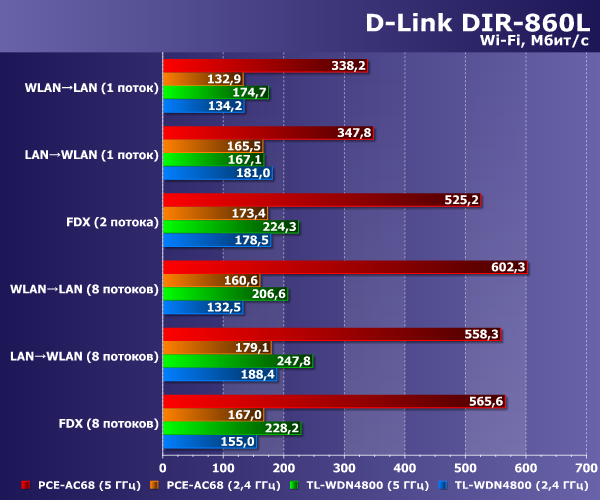
В диапазоне 2,4 ГГц с учетом вышесказанного можно получить 130-190 Мбит/с реальной пропускной способности. Переключение на 5 ГГц увеличивает результаты — до 250 Мбит/с на клиенте с поддержкой 802.11n и до 600 Мбит/с для адаптера с 802.11ac. Интересно заметить, что во втором случае реальные отличия от топовых роутеров с конфигурацией из трех антенн меньше, чем можно было бы ожидать по формальным характеристикам.
Выводы
К достоинствам роутера D-Link DIR-860L можно отнести оригинальный дизайн, гигабитные сетевые порты и поддержку современного стандарта 802.11ac. С точки зрения внешнего вида устройство выглядит неплохо. Отметим также возможность крепления на стене, хотя и не самым удобным образом.
С точки зрения технических характеристик роутер соответствует классу AC1200 и дополнен портом USB 3.0. Правда, в тестах производительности внешнего накопителя мы получили явно не соответствующие этому стандарту показатели. Да и возможности такого сценария работы показались не очень интересными по сравнению с решениями других производителей. Похвалить производителя здесь стоит за реализацию работы мобильных утилит, доступ через веб-браузер и виртуальный сетевой порт USB.
Что касается прошивки устройства, то и в ней особых расширенных функций мы не обнаружили. Интерес представляют гостевые сети, универсальные расписания, сервис mydlink, реализация протокола IPv6. Для отечественного пользователя полезной будет расширенная поддержка протоколов подключения к интернету.
В тестах скорости маршрутизации устройство имеет высокие для своего класса результаты. Для каналов 100 Мбит/с его возможности будут вполне достаточны. Если же вам требуются более высокие скорости, то надо обращать внимание на тип подключения, поскольку почти гигабит можно получить только с IPoE. Проверка работы беспроводных точек доступа показала, что в диапазоне 2,4 ГГц при работе с каналом 20 МГц роутер показывает вполне характерную для своей конфигурации скорость, которую можно существенно увеличить форсированием режима 40 МГц, если это не будет мешать соседям. Скорость работы на 5 ГГц также не вызывает замечаний. Для большинства современных клиентов в этом диапазоне роутер не будет являться узким местом.
Устройство будет интересно тем пользователям, которые рассматривают возможности перехода на 802.11ac в условиях ограниченного бюджета и не планируют использовать расширенные функции современных роутеров.
| Средняя цена роутера D-Link DIR-860L |
| $119(88) |
| T-10408290 |
| Розничные предложения |
| L-10408290-10 |
-
D-Link DIR-860L — page 1
U ser Manual V ersion 1.0 | April 19, 2013 DIR-860L W ir eless A C1200 Dual Band G i g a b i t Cloud Router …
-
D-Link DIR-860L — page 2
i D-Link DIR-860L User Manual D-Link reser ves the right to revise this publication and to make changes in the c ontent her eof without obligation to notify an y person or organization of such r evisions or changes. Manual Revisions T rademarks D-Link and the D -Link logo are trademarks or r egister ed trademarks of D -Link C orporation or its subs …
-
D-Link DIR-860L — page 3
ii D-Link DIR-860L User Manual T able of Con tents Prefac e ……………………………………………………………………… i Manual Revisions ………………………………………………………………… i T rademarks ………………………………………………………………………….. i Product Ov …
-
D-Link DIR-860L — page 4
iii D-Link DIR-860L User Manual T able of Con tents Aut oconguration …………………………………………… 68 PPP oE…………………………………………………………………. 69 IPv6 in IPv4 T unneling …………………………………….. 71 6 to 4 T unneling ……………………………………….. …
-
D-Link DIR-860L — page 5
iv D-Link DIR-860L User Manual T able of Con tents WPS/WCN 2.0 ………………………………………………………….. 129 Windo ws® XP ………………………………………………………………….. 130 WP A/WP A2 ………………………………………………………………. 131 T roubleshooting ………… …
-
D-Link DIR-860L — page 6
1 D-Link DIR-860L User Manual Section 1 — Product Over view P r oduc t O v er view P ack age C onten ts Note: Using a power supply with a di erent voltage r ating than the one included with the DIR -860L will cause damage and v oid the warr ant y for this product. If any of the above it ems are missing, please con tact your reseller . DIR-860L W …
-
D-Link DIR-860L — page 7
2 D-Link DIR-860L User Manual Section 1 — Product Over view Network Requir ements • An Ethernet-based broadband modem W eb -based C onguration Utility Requirements Comput er with the following: • Windows®, Macintosh, or Linux-based oper ating system • An installed Ethernet adapter or wireless adapt er Suppor ted Br owsers: • Internet Ex …
-
D-Link DIR-860L — page 8
3 D-Link DIR-860L User Manual Section 1 — Product Over view Introduction The DIR-860L Wir eless AC1200 Dual Band Gigabit Cloud Router pr ovides rev olutionar y Gigabit 802.11ac wireless speed — up to 1200Mbps – f or awless HD video streaming t o multiple devices. With g round-breaking my dlink Cloud Ser vices, y ou can monitor your home networ …
-
D-Link DIR-860L — page 9
4 D-Link DIR-860L User Manual Section 1 — Product Over view 3 1 4 5 6 2 Har dwar e O v er view C onnec tions 1 USB P or t Connect a USB ash drive to share c ontent thr oughout your network. 2 WPS Button Pr ess to star t the WPS process. The P ower LED will blink during this process . 3 LAN P or ts (1-4) Connect 10/100/1000 Ethernet devices such …
-
D-Link DIR-860L — page 10
5 D-Link DIR-860L User Manual Section 1 — Product Over view 1 P ower LED A solid green light indica tes a proper connection to the pow er supply . T he li g ht w il l be so l id o ra ng e d ur i ng bo ot -u p and will blink green during the WPS process. 2 Internet LED A solid light indicates a connection to the Internet port. I f the LED is orange …
-
D-Link DIR-860L — page 11
6 D-Link DIR-860L User Manual Section 2 — I nstallation Befor e you Begin Installation This section will walk you thr ough the installation process . Placement of the r outer is very impor tant. Do not place the rout er in an enclosed area such as a closet, cabinet, or in the a ttic or garage. • Please congure the r outer with the computer tha …
-
D-Link DIR-860L — page 12
7 D-Link DIR-860L User Manual Section 2 — I nstallation W ir eless I nstalla tion C onsiderations The D-Link wireless rout er lets you access y our network using a wireless connection from virtually anywhere within the operating range of y our wireless network. Keep in mind, how ever , that the number , thickness and location of walls, ceilings , o …
-
D-Link DIR-860L — page 13
8 D-Link DIR-860L User Manual Section 2 — I nstallation 1. T urn o and unplug your DSL or Cable modem. This is requir ed. C onnec t to y our Network Modem 2. Connect an Ethernet cable from the Internet port of the router to the Ethernet por t on y our DSL or Cable modem. 12V 2A USB WPS 1 2 3 LAN 4 INTERNET POWER Modem DIR-860L Ethernet Port Ethe …
-
D-Link DIR-860L — page 14
9 D-Link DIR-860L User Manual Section 2 — I nstallation 4. Plug the power back in to your DSL or C able modem. Please wait about one minute bef ore continuing . 3. Connect another Ethernet cable from the Ethernet por t on your comput er to one of the LAN por ts on the rout er . 12V 2A USB WPS 1 2 3 LAN 4 INTERNET POWER DIR-860L Computer Ethernet Ca …
-
D-Link DIR-860L — page 15
10 D-Link DIR-860L User Manual Section 2 — I nstallation 6. After the rout er has power ed up , verify that the pow er (green) and Internet (orange or g reen) LEDs are both lit. Please skip to page 13 to congure y our router and use the manual setup pr ocedur e to congure y our network and wireless settings . If you did not connect to the Int …
-
D-Link DIR-860L — page 16
11 D-Link DIR-860L User Manual Section 2 — I nstallation Note: It is strongly rec ommended to replace y our existing router with the DIR-860L inst ead of using both. If your modem is a combo router , you may w ant to contact your ISP or man ufacturer ’ s user guide to put the router into Bridge mode , which will ‘turn o ’ the router (NA T …
-
D-Link DIR-860L — page 17
12 D-Link DIR-860L User Manual Section 2 — I nstallation 5. Under Router Settings, enter an available IP addr ess and the subnet mask of your network. Click Sav e Settings to save y our settings. Use this new IP addr ess to acc ess the conguration utility of the router in the futur e. Close the br owser and change your comput er ’ s IP setting …
-
D-Link DIR-860L — page 18
13 D-Link DIR-860L User Manual Section 2 — I nstallation There ar e several di erent ways y ou can congure y our router t o connect to the Internet and connect to your clients: • QRS Mobile App — Use y our iPhone, iP ad, or Android devic e to congure y our router . R ef er to page 21 • D-Link Setup W izard — This wizard will launch whe …
-
D-Link DIR-860L — page 19
14 D-Link DIR-860L User Manual Section 3 — Conguration If this is your rst time logging into the r outer , this wizard will star t automatically . This wizard is desig ned to guide you thr ough a step-by-step process t o congure y our new D-Link router and connect to the Internet. Click Nex t to continue. Quick S etup W izard If this is yo …
-
D-Link DIR-860L — page 20
15 D-Link DIR-860L User Manual Section 3 — Conguration If the router does not detect a valid Ethernet connection from the Internet por t, this screen will appear . Connect your broadband modem to the Internet por t and then click C onnect . If the router detects an Ethernet connection but does not detect the t ype of Internet connection you have …
-
D-Link DIR-860L — page 21
16 D-Link DIR-860L User Manual Section 3 — Conguration If the router detected or you selected PPP oE , enter your PPP oE user name and passwor d and click Nex t to c ontinue. Note: Mak e sure to remo ve you r PPPoE softwar e from your c omputer . The software is no longer needed and will not work thr ough a router . If the router detected or you …
-
D-Link DIR-860L — page 22
17 D-Link DIR-860L User Manual Section 3 — Conguration If the router detected or you selected Static , en ter the IP and DNS settings supplied by your ISP . Click Nex t to c ontinue. F or both the 2.4GH z and 5GHz segments, cr eate a wireless network name (SSID) using up to 32 char ac ters . Creat e a wireless security passphrase or key (between …
-
D-Link DIR-860L — page 23
18 D-Link DIR-860L User Manual Section 3 — Conguration Selec t y our time zone from the dr op -down menu and click Nex t to continue . The Conrm Wi-F i S ettings window will displa y your wir eless settings. Click Nex t to continue. If you want to cr eate a bookmark to the router , click OK . Click Cancel if you do not wan t to creat e a book …
-
D-Link DIR-860L — page 24
19 D-Link DIR-860L User Manual Section 3 — Conguration T o use the mydlink service (mydlink.com or the my dlink Lite app), y ou must hav e an account. Select if you do hav e a my dlink account or if y ou need to crea te one. Click Nex t to continue . If you do not want to r egister at this time , click Skip . If you clicked Y es, I hav e a my dl …
-
D-Link DIR-860L — page 25
20 D-Link DIR-860L User Manual Section 3 — Conguration The m ydlink App will allow y ou to rec eive notices , brow se network users, and congur e your r outer from an iP hone/iP ad/iP od T ouch (iOS 3.0 or higher), or Android devic e (1.6 or higher). T o download the «mydlink lit e» app , visit the Apple Stor e, Google Play or h ttp …
-
D-Link DIR-860L — page 26
21 D-Link DIR-860L User Manual Section 3 — Conguration QRS Mobile App D-Link oers an app for y our iP ad, iPhone (iOS 4.3 or higher), or Andr oid device to install and c ongure your r outer . Step 1 F rom y our iOS device, go t o App Store , or from y our Android device, go t o Google Play , and search f or ‘D -Link ’ . Select QRS Mobi …
-
D-Link DIR-860L — page 27
22 D-Link DIR-860L User Manual Section 3 — Conguration 1. Inser t your USB ash drive into DIR-860L. 2. Scan the bar code to download the Shar eP or t Mobile app from the app store t o your iPhone, iP ad, or Android device . Shar eP or t M obile App 3. Fr om your iOS mobile device , click Settings. The ShareP or t Mobile app will allow you to …
-
D-Link DIR-860L — page 28
23 D-Link DIR-860L User Manual Section 3 — Conguration 4. Click Wi-F i, select the wireless network (SSID) that you cr eated in the setup and then enter your Wi-F i password. 5. Once connected, click on the ShareP or t Mobile icon. 6. The following scr een will appear . …
-
D-Link DIR-860L — page 29
24 D-Link DIR-860L User Manual Section 3 — Conguration 7. Click on Settings icon located on the right top c orner of the screen. Click Edit to enter y our User Name and P asswor d. Once you nish, click Done to continue . 8. F or the Movie section, click the movie icon to play your mo vie from your USB ash drive. 9. F or the Music section, …
-
D-Link DIR-860L — page 30
25 D-Link DIR-860L User Manual Section 3 — Conguration 10. F or the Photo section, click the photo icon to view y our photos from your USB ash drive . 11. F or the Files section, click on the les icon to view y our les from your USB ash drive. 12. For the F older section, click the folder icon to view your f olders from your USB a …
-
D-Link DIR-860L — page 31
26 D-Link DIR-860L User Manual Section 3 — Conguration W eb -based C ongur ation Utility Enter y our password and click L ogin . Note: If you did not create a passw ord with the Setup Wizard , leave the passwor d blank by default. Open a web br owser (e .g., Internet Explorer , Chrome , F irefo x , or S afari) and enter http://dlinkrout er .l …
-
D-Link DIR-860L — page 32
27 D-Link DIR-860L User Manual Section 3 — Conguration Internet C onnec tion S etup If you want to c ongure your r outer to c onnec t to the Internet using the wizard , click Internet C onnec tion Setup W izard . Please ref er to page 36. If you consider yourself an adv anced user , click Manual Internet C onnec tion Setup to configure y our …
-
D-Link DIR-860L — page 33
28 D-Link DIR-860L User Manual Section 3 — Conguration Select Static IP to manually enter the IP settings supplied by your ISP . Enter the IP address assig ned by your ISP . Enter the Subnet Mask assigned by y our ISP . Enter the Gatewa y assigned by your ISP . The DNS server information will be supplied by y our ISP (Internet Ser vice P rovider …
-
D-Link DIR-860L — page 34
29 D-Link DIR-860L User Manual Section 3 — Conguration Select Dynamic IP (DHCP) to obtain IP Addr ess information automatically from y our ISP . Selec t this option if your ISP does not give y ou any IP numbers to use . This option is commonly used for cable modem ser vices . The Host Name is optional but may be r equired by some ISP s. Leav e b …
-
D-Link DIR-860L — page 35
30 D-Link DIR-860L User Manual Section 3 — Conguration Select PPPoE (Username/P assword) from the dr op- down menu. Select Static IP if y our ISP assigned you the IP addr ess, subnet mask, gatewa y , and DNS ser v er addresses. In most cases, select Dynamic IP . Enter the IP address (S tatic PPP oE only). Enter your PPP oE user name. Enter y our …
-
D-Link DIR-860L — page 36
31 D-Link DIR-860L User Manual Section 3 — Conguration Select PPTP (Username/Passw ord) from the dr op- down menu. Select Static if y our ISP assigned you the IP address , subnet mask, gatewa y , and DNS server addresses. In most cases, select Dynamic IP . Enter the IP address (S tatic PPTP only). Enter the P rimar y and Secondar y DNS Ser v er …
-
D-Link DIR-860L — page 37
32 D-Link DIR-860L User Manual Section 3 — Conguration The DNS server information will be supplied by y our ISP (Internet Ser vice Pr ovider .) Maximum T ransmission Unit — you may need t o change the MTU for optimal performance with your specic ISP . 1400 is the default MT U. The default MA C Addr ess is set to the Internet por t’ s physic …
-
D-Link DIR-860L — page 38
33 D-Link DIR-860L User Manual Section 3 — Conguration Select L2TP (Username/P asswor d) from the drop-down menu. Select Static IP if y our ISP assigned you the IP address , subnet mask, gateway , and DNS ser ver addr esses. In most cases, sele c t Dynamic IP . Enter the L2TP IP address supplied b y your ISP (Static only). Enter the Subnet Mask …
-
D-Link DIR-860L — page 39
34 D-Link DIR-860L User Manual Section 3 — Conguration DNS Ser vers: MTU: MA C Address: Enter the P rimar y and Secondar y DNS Ser v er Addresses (Sta tic L2TP only). Maximum T ransmission Unit — you may need t o change the MTU for optimal performance with your specic ISP . 1400 is the default MT U. The default MA C Addr ess is set to the Int …
-
D-Link DIR-860L — page 40
35 D-Link DIR-860L User Manual Section 3 — Conguration Internet Setup DS-Lite My Internet Connection is: DS-Lite Congur ation: Select DS-Lite from the drop- down menu . Select the DS -Lite DHCPv6 Option to let the router alloca te the AFTR IPv6 address automatically . Select the Manual Configur ation option to ent er the AFTR IPv6 address in …
-
D-Link DIR-860L — page 41
36 D-Link DIR-860L User Manual Section 3 — Conguration Internet C onnec tion S etup W izard If you did not initially choose to install your r outer with the Quick Setup Wizard , you can click on Internet C onnec tion Setup W izard from the Setup > Internet scr een. This wizard is desig ned to guide you thr ough a step-by-step process t o con? …
-
D-Link DIR-860L — page 42
37 D-Link DIR-860L User Manual Section 3 — Conguration In order to secure y our router , enter a new passw ord. Click Nex t to continue . Selec t y our time zone from the dr op- down menu and click Next to continue . Selec t y our Internet connection t ype. Y ou can selec t DHCP C onnec tion (Dynamic IP Addr ess) if your Internet connection auto …
-
D-Link DIR-860L — page 43
38 D-Link DIR-860L User Manual Section 3 — Conguration If you selected DHCP Connection (Dynamic IP Address) y ou can click on Clone Y our PC’ s MA C Addr ess to cop y your computer’ s MA C address to y our router . Click N ex t to continue . If you selected PPPoE , en ter your PPP oE username and password and click Nex t to continue. Note: M …
-
D-Link DIR-860L — page 44
39 D-Link DIR-860L User Manual Section 3 — Conguration If you selected PPTP , enter your PPTP username , password , and other information supplied b y your ISP . Click N ex t to continue . If you selected L2TP , enter your L2TP username , password , and other information supplied b y your ISP . Click N ex t to continue . …
-
D-Link DIR-860L — page 45
40 D-Link DIR-860L User Manual Section 3 — Conguration If you selected Static , enter the IP and DNS settings supplied b y your ISP . Click Nex t to con tinue. When the setup proc ess is completed , you will see this screen. Click on C onnec t to sa ve your settings . …
-
D-Link DIR-860L — page 46
41 D-Link DIR-860L User Manual Section 3 — Conguration W ireless Settings If you want to c ongure the wireless settings on y our router using the wizard , click W ireless C onnection S etup W izard and r efer to the next page. Click Add W ireless Device with WPS if you w ant to add a wir eless device using Wi-F i Prot ected Setup ( WPS) and r …
-
D-Link DIR-860L — page 47
42 D-Link DIR-860L User Manual Section 4 — S ecurity W ireless C onnec tion Setup Wizar d T o run the secur ity wizard , click on Setup > W ireless Settings . Click the W ireless C onnection S etup W izard button. Enter a name f or your wir eless network (SSID), one for the 2.4GHz frequency and another for the 5GHz frequency . Do not use persona …
-
D-Link DIR-860L — page 48
43 D-Link DIR-860L User Manual Section 4 — S ecurity If you selected Automatically , the summary window will display your settings . Write down the security key and enter this on your wireless clients . Click S ave to save y our settings. If you selected Manually , the following scr een will appear . Crea te a passphrase f or your W ireless Securit …
-
D-Link DIR-860L — page 49
44 D-Link DIR-860L User Manual Section 4 — S ecurity F rom the Setup > W ireless Settings screen, click Add W ireless Device with WPS . Add W ireless Device with WPS Wizar d If you select Manual , a settings summar y screen will appear . Write down the security key and enter this on your wir eless clients. Click W ireless Sta tus to nish. Thi …
-
D-Link DIR-860L — page 50
45 D-Link DIR-860L User Manual Section 4 — S ecurity PIN: Select this option to use PIN method. In order to use this method you must know the wireless client’ s 8 digit PIN and click C onnec t . PBC: Select this option to use PBC (Push Button) method to add a wireless client. Click C onnec t . Once you click C onnec t , you will hav e a 120 secon …
-
D-Link DIR-860L — page 51
46 D-Link DIR-860L User Manual Section 3 — Conguration Check the box to enable the wir eless function. I f you do not w ant to use wireless, uncheck the bo x to disable all the wireless functions. Select the time frame that you would like your wir eless network enabled. The schedule may be set to Always . An y schedule you create will be availab …
-
D-Link DIR-860L — page 52
47 D-Link DIR-860L User Manual Section 3 — Conguration 802.11ac/n/a (5GHz) Check the box to enable the wir eless function. I f you do not w ant to use wireless, uncheck the bo x to disable all the wireless functions. Select the time frame that you would like your wir eless network enabled. The schedule may be set to Always . Any schedule y ou cr …
-
D-Link DIR-860L — page 53
48 D-Link DIR-860L User Manual Section 4 — S ecurity W ireless Security This section will show you the di erent lev els of security you can use to protect your data fr om intruders. The DIR-860L o ers the follo wing types of secur ity : • WP A2 ( Wi-F i Prot ected Access 2) • WP A2-PSK (Pr e -Shared Key) • WP A ( Wi-F i Prot ected Acces …
-
D-Link DIR-860L — page 54
49 D-Link DIR-860L User Manual Section 4 — S ecurity WP A/WP A2-P ersonal (PSK ) It is recommended to enable wireless security on your wir eless router bef ore y our wireless network adapters . Please establish wireless connectivity before enabling encryption. 1. L og into the web-based conguration b y opening a web bro wser and entering the IP …
-
D-Link DIR-860L — page 55
50 D-Link DIR-860L User Manual Section 4 — S ecurity It is recommended to enable wireless security on your wir eless router bef ore y our wireless network adapters . Please establish wireless connectivity before enabling encryption. 1. Log into the w eb-based conguration by opening a web br owser and entering the IP address of the r outer (192.1 …
-
D-Link DIR-860L — page 56
51 D-Link DIR-860L User Manual Section 4 — S ecurity 7. Next to RADIUS Ser ver P or t , enter the port you are using with your RADIUS ser ver . 1812 is the default por t. 8. Next to RADIUS Ser ver Shared Secret , ent er the securit y key . 9. Click Adv anced to ent er settings for a secondary RADIUS S erver . 10. Click Save Settings to sa ve your s …
-
D-Link DIR-860L — page 57
52 D-Link DIR-860L User Manual Section 3 — Conguration This section will allow you to change the local netw ork settings of the router and to congur e the DHCP settings. Network Settings Enter the IP address of the r outer . The default IP address is 192.168.0.1. If you change the IP address , once you click Sav e Settings , you will need to …
-
D-Link DIR-860L — page 58
53 D-Link DIR-860L User Manual Section 3 — Conguration DHCP Ser ver Settings DHCP stands for Dynamic Host Contr ol Pr otocol . The DIR-860L has a built-in DHCP ser ver . The DHCP Ser ver will aut omatically assign an IP address t o the computers on the LAN/privat e network . Be sure to set y our computers t o be DHCP clients by setting their T C …
-
D-Link DIR-860L — page 59
54 D-Link DIR-860L User Manual Section 3 — Conguration NetBIOS Node T ype: WINS IP Addr ess: Select the dierent type of NetBIOS node; Broadcast only , P oint-to-Poin t , Mixed-mode , and Hybrid . Enter your WINS Ser ver IP addr ess(es). …
-
D-Link DIR-860L — page 60
55 D-Link DIR-860L User Manual Section 3 — Conguration DHCP Reser vation If you want a computer or devic e to alway s have the same IP address assig ned, you can cr eate a DHCP reservation. The router will assign the IP address only to that c omputer or device . Note: This IP address must be within the DHCP IP A ddress Range. Check this box to e …
-
D-Link DIR-860L — page 61
56 D-Link DIR-860L User Manual Section 3 — Conguration Stor age This page will allow y ou to access les fr om a USB external hard drive or thumb drive tha t is plugged into the rout er from your local network or from the Internet using either a web br owser or an app f or your smartphone or tablet. Y ou can create users to be allow ed to acce …
-
D-Link DIR-860L — page 62
57 D-Link DIR-860L User Manual Section 3 — Conguration Ac cess F iles from the Internet Below are step-by-st ep instruc tions on how t o access les that ar e on your USB thumb drive or external hard drive tha t is connected to your rout er: Step 1 — Enable Shar ePort W eb Acc ess Check the Enable ShareP or t W eb Acc ess checkbox to enable . …
-
D-Link DIR-860L — page 63
58 D-Link DIR-860L User Manual Section 3 — Conguration Media S er v er This f eature allow s you to shar e music, pictures, and videos with an y devices connected to y our network. The iT unes S er v er allows iT unes sof tware t o automatically detect and play music from the r outer . Click on this button to enable the DLNA Server feature . Ent …
-
D-Link DIR-860L — page 64
59 D-Link DIR-860L User Manual Section 3 — Conguration IPv6 On this page, the user can c ongure the IPv6 Connection type. There ar e three wa ys to set up the IPv6 Internet connection. F or the beginner user that has not congured a r outer befor e, click on the IPv6 Internet C onnec tion Setup W izard button and the r outer will guide you …
-
D-Link DIR-860L — page 65
60 D-Link DIR-860L User Manual Section 3 — Conguration Click on Enable ULA. Y ou can check Use default ULA prex , or y ou can leav e the box unchecked and enter the pr ex manually in the ULA Prex te x t bo x. Click Sav e Settings. …
-
D-Link DIR-860L — page 66
61 D-Link DIR-860L User Manual Section 3 — Conguration IPv6 Internet C onnec tion Setup W izard On this page, the user can congur e the IPv6 Connection type using the IPv6 I nternet Connection Setup Wizard. Click the IPv6 Internet Connection Setup W izard button and the r outer will guide you through a f ew simple steps to get y our network u …
-
D-Link DIR-860L — page 67
62 D-Link DIR-860L User Manual Section 3 — Conguration Howev er , if the automatic detection fails, the user will be prompt t o either Tr y again or t o click on the Guide me through the IPv6 settings button to initiate the manual continual of the wizard . There ar e several connection types to choose from. If you ar e unsure of your connection …
-
D-Link DIR-860L — page 68
63 D-Link DIR-860L User Manual Section 3 — Conguration IPv6 over PPP oE After selecting the IPv6 over PPP oE option, the user will be able to congure the IPv6 Internet connection that requires a username and passwor d to get online. Most DSL modems use this type of connec tion. The follo wing parameters will be av ailable for conguration: …
-
D-Link DIR-860L — page 69
64 D-Link DIR-860L User Manual Section 3 — Conguration Static IPv6 Addr ess Connection This mode is used when your ISP pr ovides you with a set IPv6 addr esses that does not change. The IPv6 information is manually enter ed in your IPv6 conguration settings . Y ou must enter the IPv6 address, Subnet P rex Length, Default Gatewa y , Primar …
-
D-Link DIR-860L — page 70
65 D-Link DIR-860L User Manual Section 3 — Conguration The follo wing parameters will be av ailable for conguration: 6rd IPv6 Pr ex: Enter the 6rd IPv6 addr ess and prex value used here . IPv4 Address: Enter the IPv4 address used her e. Mask Length: Enter the IPv4 mask length used here. Assigned IPv6 Pr ex: Displays the IPv6 assigned …
-
D-Link DIR-860L — page 71
66 D-Link DIR-860L User Manual Section 3 — Conguration IPv6 Manual S etup There ar e several c onnection t ypes to choose from: Aut o Detection, Static IPv6, Autocongur ation (SLAA C/DHCPv6), PPP oE , IPv6 in IPv4 T unnel, 6to4, 6rd, and Local Connectivity Only . I f y ou are unsure of y our connection method, please contact your IPv6 Interne …
-
D-Link DIR-860L — page 72
67 D-Link DIR-860L User Manual Section 3 — Conguration Static IPv6 Select Static IPv6 from the drop- down menu . Enter the address settings supplied b y your Internet provider (ISP). Enter the LAN (local) IPv6 address f or the router . Displays the Router’ s LAN Link-L ocal Address . Check to enable the Aut oconguration f eature. Select Sta …
-
D-Link DIR-860L — page 73
68 D-Link DIR-860L User Manual Section 3 — Conguration A utocongur ation Select Aut ocongura tion (Stateless/DHCPv6) from the drop- down menu . Select either O btain DNS server address aut omatically or Use the f ollowing DNS Addr ess . Enter the primary and secondar y DNS ser ver addr esses. Enter the LAN (local) IPv6 address f or the rou …
-
D-Link DIR-860L — page 74
69 D-Link DIR-860L User Manual Section 3 — Conguration PPP oE Select PPPoE from the dr op- down menu. Enter the PPP oE account settings supplied by y our Internet provider (ISP). Select Create a new session if y ou have IPv6. Select Static IP if your ISP assigned y ou the IP address, subnet mask, gateway , and DNS ser ver addresses . In most cas …
-
D-Link DIR-860L — page 75
70 D-Link DIR-860L User Manual Section 3 — Conguration Enable DHCP-PD: LAN IPv6 Address: LAN IPv6 Link-Local Addr ess: Enable Automa tic IPv6 address assignment: Enable Automa tic DHCP- PD in LAN: Autoc onguration T ype: IPv6 Address Range Start: IPv6 Address Range End: Router Adv er tisement Lifetime: Check to enable DHCP -PD . Enter the LAN …
-
D-Link DIR-860L — page 76
71 D-Link DIR-860L User Manual Section 3 — Conguration IPv6 in IPv4 T unneling Select IP v6 in IPv4 T unnel from the drop- down menu. Enter the settings supplied by y our Internet provider (ISP). Select either O btain IPv6 DNS servers automatically or U se the following IPv6 DNS Servers Enter the primary and secondar y DNS ser ver addr esses. En …
-
D-Link DIR-860L — page 77
72 D-Link DIR-860L User Manual Section 3 — Conguration 6 to 4 T unneling Select 6 to 4 from the drop- down menu . Enter the IPv6 settings supplied by y our Internet provider (ISP). Enter the primary and secondar y DNS ser ver addr esses. Enter the LAN (local) IPv6 address f or the router . Displays the Router’ s LAN Link-L ocal Address . Check …
-
D-Link DIR-860L — page 78
73 D-Link DIR-860L User Manual Section 3 — Conguration 6rd Select 6 rd from the drop-down menu. Enter the address settings supplied b y your Internet provider (ISP). Enter the LAN (local) IPv6 address f or the router . Displays the Router’ s LAN Link-L ocal Address . Check to enable the Aut oconguration f eature. Select Stateful (DHCPv6), S …
-
D-Link DIR-860L — page 79
74 D-Link DIR-860L User Manual Section 3 — Conguration Select Local Connectivity Only from the drop- down menu. Displays the IPv6 address of the r outer . Click Save Settings . My IPv6 Connection is: LAN IPv6 Link-Local Addr ess: Local C onnec tivity …
-
D-Link DIR-860L — page 80
75 D-Link DIR-860L User Manual Section 3 — Conguration m y dlink Settings Displays whether y our device is regist ered with a my dlink account or not. If you ar e regist ered, y our mydlink e-mail address will be display ed. Click to go to the m ydlink websit e to register or edit y our settings. Please r efer to page 19 f or the registr ation s …
-
D-Link DIR-860L — page 81
76 D-Link DIR-860L User Manual Section 3 — Conguration This will allow y ou to open a single por t. If you w ould like to open a range of ports, ref er to the next page. Enter a name f or the rule or select an application from the drop- down menu . Selec t an application and click << to populate the elds . Enter the IP address of the c …
-
D-Link DIR-860L — page 82
77 D-Link DIR-860L User Manual Section 3 — Conguration This will allow y ou to open a single por t or a range of ports. P or t F or warding Enter a name f or the rule or select an application from the drop-down menu. Select an application and click << to populate the elds . Enter the IP address of the c omputer on your local network tha …
-
D-Link DIR-860L — page 83
78 D-Link DIR-860L User Manual Section 3 — Conguration Enter a name f or the rule. Y ou may select a pre- dened application from the dr op- down menu and click << . This is the port used to trigger the application. I t can be either a single por t or a range of ports. Select the protocol of the trigger por t ( TCP , UDP , or Both). This …
-
D-Link DIR-860L — page 84
79 D-Link DIR-860L User Manual Section 3 — Conguration QoS Engine This option is disabled by default. Enable this option f or better per formance and experience with online games and other interactive applications , such as V oIP . The speed at which data can be transf erred from the r outer to your ISP . This is determined by your ISP . The spe …
-
D-Link DIR-860L — page 85
80 D-Link DIR-860L User Manual Section 3 — Conguration The QoS Engine supports overlaps between rules, where mor e than one rule can match f or a specic message ow . I f more than one rule is found to ma tch the rule with the highest priority will be used. Creat e a name for the rule that is meaningful to y ou. The priority of the message …
-
D-Link DIR-860L — page 86
81 D-Link DIR-860L User Manual Section 3 — Conguration Network F ilters Select T urn MA C Filte ring O , Allow MA C addresses listed below , or Den y MA C addresses listed below from the drop-down menu. Enter the MA C address you would like to lt er . T o nd the MAC addr ess on a computer , please refer to the Networking Basics section …
-
D-Link DIR-860L — page 87
82 D-Link DIR-860L User Manual Section 3 — Conguration Ac cess C ontrol Check the Enable Ac cess C ontrol bo x, and then click on Add P olic y to start the W izard. Enable Ac cess Con trol: The A ccess Con trol section allows you t o control ac cess in and out of your network. Use this fea ture as P arental Contr ols to only grant ac cess to app …
-
D-Link DIR-860L — page 88
83 D-Link DIR-860L User Manual Section 3 — Conguration Enter a name f or the polic y and then click Nex t to continue . Selec t a schedule (i.e ., Always) fr om the drop- down menu and then click Nex t to continue. Enter the f ollowing inf ormation: • Address T ype — S elect IP , M AC , or Other Machines . • IP Address — Enter the IP addr es …
-
D-Link DIR-860L — page 89
84 D-Link DIR-860L User Manual Section 3 — Conguration Add P or t F ilter Rules : Enable — Check to enable the rule. Name — Enter a name f or your rule . Dest IP Start — Enter the star ting IP address . Dest IP End — Enter the ending IP addr ess. Prot ocol — Select the protocol. Dest P or t Start — Enter the star ting por t number . Dest P or t …
-
D-Link DIR-860L — page 90
85 D-Link DIR-860L User Manual Section 3 — Conguration Congur e W ebsite F ilter: W ebsite URL/ Domain: W ebsite F ilters Selec t either DEN Y computers ac cess to ONL Y these sites or ALL OW compute rs acc ess to ONL Y these sites . Enter the keywor ds or URLs that you want to allow or block. Click Sav e Settings . W ebsite Filt ers are used …
-
D-Link DIR-860L — page 91
86 D-Link DIR-860L User Manual Section 3 — Conguration Enter a name f or the inbound lter rule. Selec t Allo w or Den y . Check to enable rule . Enter the starting IP address. Enter the ending IP addr ess. Click the Add button to apply y our settings. This section will list any rules that ar e creat ed. Y ou may click the Edit ic on to change …
-
D-Link DIR-860L — page 92
87 D-Link DIR-860L User Manual Section 3 — Conguration SPI (Stateful P acket I nspection, also known as dynamic packet ltering) helps to prev ent cyber attacks by tracking more state per session. It validates that the trac passing through the session c onforms to the prot ocol. Select one of the following for T CP and UDP por ts: Endpoint …
-
D-Link DIR-860L — page 93
88 D-Link DIR-860L User Manual Section 3 — Conguration PPTP: IPSec ( VPN): RTS P: SIP: Allows multiple machines on the LAN t o connect to their corporate network using PPTP prot ocol. Allows multiple VPN clients to connect to their corporat e network using IPSec. Some VPN clients suppor t tra versal of IPSec through NA T . This AL G may inter fe …
-
D-Link DIR-860L — page 94
89 D-Link DIR-860L User Manual Section 3 — Conguration Enter a name f or your route . Enter the IP address of packets tha t will take this route . Enter the netmask of the rout e, please note that the octets must match your destina tion IP address . Enter your ne xt hop gateway to be taken if this route is used . The rout e metric is a value fro …
-
D-Link DIR-860L — page 95
90 D-Link DIR-860L User Manual Section 3 — Conguration Adv anced W ireless Set the transmit power of the ant ennas. This enables 802.11d operation. 802.11d is a wir eless specication developed to allo w implementation of wireless networks in countries that cannot use the 802.11 standard. This feature should only be enabled if you are in a c o …
-
D-Link DIR-860L — page 96
91 D-Link DIR-860L User Manual Section 3 — Conguration W i-F i Prot ec ted Setup ( WPS) Enable the Wi-F i Protected Setup featur e. Note: if this option is unchecked , the WPS button on the side of the router will be disabled. Displays the curren t WPS status. Locking the WPS -PIN Method pr events the settings fr om being changed by any external …
-
D-Link DIR-860L — page 97
92 D-Link DIR-860L User Manual Section 3 — Conguration This Wireless Wizar d helps you add wireless devices t o the wireless network. The wizard will either displa y the wireless network settings to guide you thr ough manual conguration, pr ompt you to ent er the PIN for the device , or ask you to pr ess the conguration button on the devic …
-
D-Link DIR-860L — page 98
93 D-Link DIR-860L User Manual Section 3 — Conguration T o use the Universal Plug and Play (UP nP ™ ) featur e check the box. UP nP provides c ompatibility with network ing equipment, software and peripherals. Checking the box will allow the DIR-860L to respond to pings. Unchecking the box ma y provide some extra security from hackers. Y ou ma …
-
D-Link DIR-860L — page 99
94 D-Link DIR-860L User Manual Section 3 — Conguration Guest Zone Check to allow netw ork connectivity bet ween th e dier ent zones creat ed. Check to enable the Guest Zone f eature . The schedule of time when the Guest Zone will be active. The schedule may be set to Alw ays , which will allow the particular ser vice to alw ays be enabled . Y …
-
D-Link DIR-860L — page 100
95 D-Link DIR-860L User Manual Section 3 — Conguration IPv6 F irew all The DIR-860L ’ s IPv6 Fir ewall fea ture allows y ou to congur e which kind of IP v6 trac is allo wed to pass thr ough the device. This f eature functions in a similar way to the IP F ilters featur e. Check the box to enable the IPv6 r ewall simple security . Selec …
-
D-Link DIR-860L — page 101
96 D-Link DIR-860L User Manual Section 3 — Conguration IPv6 Routing Check the box next to the rout e you wish to enable . Enter a specic name to identify this r oute. This is the IP address of the r outer used to reach the specied destination or enter the IPv6 address pr ex length of the packets that will take this route . Enter the met …
-
D-Link DIR-860L — page 102
97 D-Link DIR-860L User Manual Section 3 — Conguration Admin This page will allow y ou to change the Administr ator passwor d and also enable Remote Management. T ools Enter a new passwor d for the Admin login name . Enter again to verify passw ord. Enter a name for y our router . Enables a challenge -response t est to require users t o type let …
-
D-Link DIR-860L — page 103
98 D-Link DIR-860L User Manual Section 3 — Conguration T ime Displays the curren t date and time of the rout er . Select your Time Z one from the drop-down menu. Check to enable manual entry of daylight saving time. When daylight sa ving manual entr y is enabled, the oset value is one hour by default . Enter a start date, an end date , includ …
-
D-Link DIR-860L — page 104
99 D-Link DIR-860L User Manual Section 3 — Conguration SysLo g The DIR-860L keeps a running log of even ts and activities occurr ing on the Router . Y ou may send these logs to a SysL og ser ver on your network. Enable Logging t o Sy sLog Ser v er: Sy sLog Ser v er IP Addr ess: Check this box to send the r outer logs to a S ysLog Ser ver . The a …
-
D-Link DIR-860L — page 105
100 D-Link DIR-860L User Manual Section 3 — Conguration Email Settings The Email f eature can be used to send the sy stem log les, r outer aler t messages , and rmware upda te notication to y our email address . Enable Email Notication: Fr om Email Address: T o Email Address: Email Subject: SMTP Server Address: SMTP Server Port: Enab …
-
D-Link DIR-860L — page 106
101 D-Link DIR-860L User Manual Section 3 — Conguration Use this option to sav e the current r outer conguration settings t o a le on the hard disk of the computer y ou are using . F irst, click the Save Congur ation button. A le dialog will appear , allowing you t o select a location and le name for the settings. Use this option …
-
D-Link DIR-860L — page 107
102 D-Link DIR-860L User Manual Section 3 — Conguration F irm war e Choose F ile: Upload: After you ha ve downloaded the new rmw are, click Choose F ile to locate the rm ware updat e on your hard drive . Click Upload to complete the rmw are upgrade . Once you ha ve a rmwar e update on your c omputer , use this option to bro wse for t …
-
D-Link DIR-860L — page 108
103 D-Link DIR-860L User Manual Section 3 — Conguration Dynamic Domain Name System is a method of keeping a domain name linked to a changing IP Addr ess. Check the box t o enable DDNS. Select your DDNS provider from the drop- down menu or enter the DDNS server address. Enter the Host Name that y ou register ed with your DDNS service provider . E …
-
D-Link DIR-860L — page 109
104 D-Link DIR-860L User Manual Section 3 — Conguration Enable: IPv6 Addr ess: Check the box to enable DDNS f or IPv6 Hosts. Enter the IPv6 address of y our computer/server in your local network. Y ou can click the << button and select a computer/ser ver fr om the drop- down list. Dynamic DNS for IPv6 Hosts Host Name: IPv6 DDNS List: Enabl …
-
D-Link DIR-860L — page 110
105 D-Link DIR-860L User Manual Section 3 — Conguration The P ing T est is used to send Ping packets t o test if a computer is on the Internet. Ent er the IP address that you wish to P ing and click Ping . Enter the IPv6 address that y ou wish to P ing and click Ping . The results of y our ping attempts will be display ed here. Sy stem Check Pin …
-
D-Link DIR-860L — page 111
106 D-Link DIR-860L User Manual Section 3 — Conguration Enter a name f or your new schedule. Select a day , a range of days , or All W eek to include every day of the week. Check All Day — 24hrs or enter a start and end time for y our schedule. Y ou must click Add to sav e your schedule rule. The list of schedules will be listed her e. Click the …
-
D-Link DIR-860L — page 112
107 D-Link DIR-860L User Manual Section 3 — Conguration This page display s the current inf ormation for the DIR-860L. It will display the LAN, W AN (Internet), and Wireless inf ormation. If your Internet connection is set up for a Dynamic IP address then a Release button and a Renew button will be displa yed . Use Release to disc onnec t fr om …
-
D-Link DIR-860L — page 113
108 D-Link DIR-860L User Manual Section 3 — Conguration Logs Save L og F ile: Log T ype & Lev el: F irst Page: Last P age: Pr evious: Next: Clear: Link to Email Log Settings: Click S ave to save log le t o local hard drive . Y ou can select the t ype and level indica ting what you would like to keep tr ack of . Click to go to the rst p …
-
D-Link DIR-860L — page 114
109 D-Link DIR-860L User Manual Section 3 — Conguration Statistics The screen below displays the T rac Statistics . Her e you can view the amount of packets that pass thr ough the DIR-860L o n bo t h the W AN, LAN por ts and the wireless seg ments. The trac counter will r eset if the device is rebooted . …
-
D-Link DIR-860L — page 115
110 D-Link DIR-860L User Manual Section 3 — Conguration Internet Sessions The Internet Sessions page displays full details of active Internet sessions through your r outer . An Internet session is a con versation between a pr ogram or application on a LAN-side comput er and a progr am or application on a W AN-side computer . …
-
D-Link DIR-860L — page 116
111 D-Link DIR-860L User Manual Section 3 — Conguration The wireless clien t table displays a list of curren t connected wireless clients . This table also displays the connection rate and MA C address of the connected wir eless clients. W ireless …
-
D-Link DIR-860L — page 117
112 D-Link DIR-860L User Manual Section 3 — Conguration Routing This page will display y our current r outing table. …
-
D-Link DIR-860L — page 118
113 D-Link DIR-860L User Manual Section 3 — Conguration IPv6 The IPv6 page displays a summary of the Router ’ s IPv6 settings and lists the IPv6 address and host name of any IPv6 clients . …
-
D-Link DIR-860L — page 119
114 D-Link DIR-860L User Manual Section 3 — Conguration IPV6 Routing This page display s the IPV6 routing details congur ed for y our router . …
-
D-Link DIR-860L — page 120
115 D-Link DIR-860L User Manual Section 3 — Conguration Suppor t …
-
D-Link DIR-860L — page 121
116 D-Link DIR-860L User Manual Section 4 — S ecurity C onnec t a W ireless C lient t o y our R out er WPS Button Step 2 — Within two minutes , press the WPS button on your wir eless client (or launch the soft war e utility and star t the WPS process). The easiest and most secur e way to c onnec t y our wireless devices t o the router is WPS ( Wi-F …
-
D-Link DIR-860L — page 122
117 D-Link DIR-860L User Manual Section 4 — S ecurity W indow s® 8 1. Click on the wir eless computer ic on in your system tr ay (low er-right corner next to the time). 2. A list of available wireless networks will appear . 3. Click the wireless network (SSID) y ou want to c onnec t to and then click C onnec t . 4. I f the network is secure/encr y …
-
D-Link DIR-860L — page 123
118 D-Link DIR-860L User Manual Section 4 — S ecurity If you get a good signal but cannot acc ess the Internet, conrm the encr yption by reviewing the pr ole or check the T CP/IP settings for y our wireless adapter . Refer to the Networking Basics section in this manual for more inf ormation. 5. Click either to enable or disable le sharing …
-
D-Link DIR-860L — page 124
119 D-Link DIR-860L User Manual Section 4 — S ecurity W indow s® 7 It is recommended to enable wireless security ( WP A/WP A2) on your wir eless router or acc ess point befor e conguring your wireless adapter . I f you ar e joining an existing network, you will need to know the securit y key or passphrase being used . 1. Click on the wireless i …
-
D-Link DIR-860L — page 125
120 D-Link DIR-860L User Manual Section 4 — S ecurity 3. H ighlight the wir eless network (SSID) you w ould like to connect to and click the C onnec t button. If you get a good signal but cannot acc ess the Internet, check your T CP/IP settings for y our wireless adapter . R ef er to the Network ing Basics section in this manual for more inf ormati …
-
D-Link DIR-860L — page 126
121 D-Link DIR-860L User Manual Section 4 — S ecurity 5. Ent er the same security key or passphrase that is on your rout er and click C onnec t . Y ou can also connect by pushing the WPS button on the router . It may take 20-30 seconds to connect to the wireless network. If the connection fails, please verify that the security settings are c orrect …
-
D-Link DIR-860L — page 127
122 D-Link DIR-860L User Manual Section 4 — S ecurity WPS The WPS featur e of the DIR-860L can be congured using W indows® 7. Carry out the following steps to use Windows® 7 t o congure the WPS feature: 1. Click the Star t button and select C omputer from the Start menu. 2. Click Network on the lef t side . …
-
D-Link DIR-860L — page 128
123 D-Link DIR-860L User Manual Section 4 — S ecurity 3. Double — click the DIR-860L. 4. Input the WPS PIN number (display ed in the WPS window on the Router ’ s L CD screen or in the Setup > W ireless Setup menu in the Router ’ s W eb UI) and click N ex t . …
-
D-Link DIR-860L — page 129
124 D-Link DIR-860L User Manual Section 4 — S ecurity 5. T ype a name to identify the network . 6. T o congure advanc ed settings, click the icon. Click Nex t to continue. …
-
D-Link DIR-860L — page 130
125 D-Link DIR-860L User Manual Section 4 — S ecurity 7 . The f ollowing window appears while the Router is being congured . W ait for the conguration t o complete . 8. The f ollowing window inf orms you that WPS on the router has been setup successfully . Make a note of the security key as you may need to pr ovide this security key if adding …
-
D-Link DIR-860L — page 131
126 D-Link DIR-860L User Manual Section 5 — Connec ting to a Wir eless Network W indow s V ista® Windo ws Vista® users may use the built -in wireless utility . I f y ou are using another compan y ’ s utilit y , please refer t o the user manual of your wir eless adapter for help with c onnec ting to a wir eless network. M ost utilities will hav …
-
D-Link DIR-860L — page 132
127 D-Link DIR-860L User Manual Section 5 — Connec ting to a Wir eless Network WP A/WP A2 It is recommended to enable wireless security ( WP A/WP A2) on your wir eless router or acc ess point befor e conguring your wireless adapter . I f you ar e joining an existing network, you will need to know the securit y key or passphrase being used . 2. H …
-
D-Link DIR-860L — page 133
128 D-Link DIR-860L User Manual Section 5 — Connec ting to a Wir eless Network 3. Enter the same security key or passphrase that is on your r outer and click C onnec t . It may take 20-30 seconds t o connect to the wireless netw ork . If the connection fails, please verify that the security settings are corr ect. The key or passphrase must be exact …
-
D-Link DIR-860L — page 134
129 D-Link DIR-860L User Manual Section 5 — Connec ting to a Wir eless Network WPS/WCN 2.0 The rout er suppor ts Wi-F i protection, referr ed to as WCN 2.0 in Windo ws Vista®. The following instructions for setting this up depends on whether you ar e using Windows V ista® to congure the r outer or third party sof tware. When you rst set up …
-
D-Link DIR-860L — page 135
130 D-Link DIR-860L User Manual Section 5 — Connec ting to a Wir eless Network W indow s® XP Windo ws® XP users may use the built-in wir eless utility (Zero C onguration Utility). If you are using another compan y ’ s utilit y , please ref er to the user manual of your wir eless adapter f or help with connecting to a wireless network. Most u …
-
D-Link DIR-860L — page 136
131 D-Link DIR-860L User Manual Section 5 — Connec ting to a Wir eless Network It is recommended to enable WP A on your wireless r outer or acc ess point befor e conguring your wir eless adapter . I f y ou are joining an existing network, you will need to know the WP A key being used. 2 . Highlight the wireless network (SSID) y ou would like to …
-
D-Link DIR-860L — page 137
132 D-Link DIR-860L User Manual Section 5 — Connec ting to a Wir eless Network 3. The W ireless Netw ork C onnec tion bo x will appear . Enter the WP A-PSK passphrase and click C onnect . It may take 20-30 seconds t o connect to the wireless netw ork . If the connection fails, please verify that the WP A-PSK settings are c orrect. The WP A-PSK pass …
-
D-Link DIR-860L — page 138
133 D-Link DIR-860L User Manual Section 6 — T roubleshooting T roubleshooting This chapter pr ovides solutions to pr oblems that can occur during the installation and operation of the DIR-860L. Read the follo wing descriptions if you are ha ving problems. The examples below are illustr ated in Windo ws® XP . If you hav e a dier ent operating sy …
-
D-Link DIR-860L — page 139
134 D-Link DIR-860L User Manual Section 6 — T roubleshooting Reset Router/Forgot Password • Congur e your Internet settings: • Go to Start > S ettings > C ontrol P anel . D ouble -click the Internet Options Icon. F rom the Security tab , click the button to r estore the settings t o their defaults. • Click the C onnec tion tab and se …
-
D-Link DIR-860L — page 140
135 D-Link DIR-860L User Manual Section 6 — T roubleshooting 3. Why can ’t I c onnect to cer tain sites or send and r eceiv e e -mails when connecting through my r outer? If you are ha ving a problem sending or rec eiving e -mail, or connecting to secure sit es such as eBay , bank ing sites , and Hotmail, we suggest low ering the MTU in incr emen …
-
D-Link DIR-860L — page 141
136 D-Link DIR-860L User Manual Section 6 — T roubleshooting Y ou should star t at 1472 and work your w ay down by 10 each time . Once y ou get a reply , go up by 2 until you get a fr agmented packet. T ake that value and add 28 to the value t o account f or the various T CP/IP headers. F or example, lets say tha t 1452 was the proper value , the a …
-
D-Link DIR-860L — page 142
137 D-Link DIR-860L User Manual Appendix A — Wireless Basics D-Link wireless products are based on industr y standards t o provide easy -to-use and compatible high-speed wireless connectivity within your home, business or public acc ess wireless networks. Strictly adhering to the IEEE standard , the D -Link wireless family of pr oducts will allow y …
-
D-Link DIR-860L — page 143
138 D-Link DIR-860L User Manual Appendix A — Wireless Basics Wha t is W ireless? Wir eless or Wi-F i technology is another way of connecting your comput er to the network without using wires . Wi-F i uses radio frequency to connect wirelessly , so you hav e the freedom to c onnec t comput ers anywhere in your home or oc e network . Wh y D -Link …
-
D-Link DIR-860L — page 144
139 D-Link DIR-860L User Manual Appendix A — Wireless Basics W ireless P ersonal Area Network (WP AN) Bluetooth is the industr y standar d wireless technology used f or WP AN. Bluetooth devices in WP AN operate in a range up to 30 feet a way . Compar ed to WLAN the speed and wireless operation r ange are both less than WLAN, but in return it doesn …
-
D-Link DIR-860L — page 145
140 D-Link DIR-860L User Manual Appendix A — Wireless Basics Wher e is wireless used? Wir eless technology is expanding ev er ywhere not just at home or oce . P eople like the freedom of mobility and it’ s becoming so popular that more and mor e public facilities now pro vide wireless access t o attract people. The wireless c onnec tion in pub …
-
D-Link DIR-860L — page 146
141 D-Link DIR-860L User Manual Appendix A — Wireless Basics Security Don ’t let y ou next- door neighbors or intruders connect to y our wireless network. S ecur e your wireless network b y turning on the WP A or WEP security feature on the r outer . Refer to product manual for detail inf ormation on how to set it up . There ar e basically two mo …
-
D-Link DIR-860L — page 147
142 D-Link DIR-860L User Manual Appendix B — Networking Basics Networking B asics Check y our IP address W indows® XP U sers • Click on Star t > Run . In the run box type cmd and click OK . • At the prompt, type ipcong and press En ter . • This will display the IP addr ess, subnet mask, and the default gateway of y our adapter . W indo …
-
D-Link DIR-860L — page 148
143 D-Link DIR-860L User Manual Appendix B — Networking Basics W indows® 8 Users • Pr ess the W indow s key and then type IP . Click Settings on the r ight side and then click V iew Network C onnec tions . • R ight-click on the adapter which repr esents your D-Link wireless network adapter . • H ighlight Internet P rotoc ol V ersion 4 ( T CP …
-
D-Link DIR-860L — page 149
144 D-Link DIR-860L User Manual Appendix B — Networking Basics W indows® 7/ V ista® Users • Click on Star t > C ontrol P anel (make sure you are in Classic View). Double — click on the Netw ork and Sharing C enter icon. If you are using Windows Vista, click on Manage netw ork connections along the left panel in the window . For Windo ws® 7, …
-
D-Link DIR-860L — page 150
145 D-Link DIR-860L User Manual Appendix B — Networking Basics W indows® XP U sers • Click on Star t > Con trol P anel . Make sure you ar e in Classic View . Double — click on the Network Connections icon. • R ight-click on the Local Area C onnection which represents y our D-Link wireless network adapter (or other adapter) which will be con …
-
D-Link DIR-860L — page 151
146 D-Link DIR-860L User Manual Appendix C — T echnical Specications T echnical Specica tions 1 Maximum wireless signal rate deriv ed from IEEE Standard 802.11ac (draft), 802.11a, 802.11g , and 802.11n specications. Actual data throughput will vary . Network conditions and envir onmental factors, including volume of network trac, buildi …
-
D-Link DIR-860L — page 152
147 D-Link DIR-860L User Manual Appendix C — T echnical Specications 802.11g Radio/Modulation • BPSK • QPSK • 16QA M • 64QA M with OFDM Operating F requenc y 2.400 GHz ~ 2.483GH z ISM Band Media Ac cess Pr otocol • CSMA/CA with A CK 802.11a Radio/Modulation • BPSK • QPSK • 16QA M • 64QA M with OFDM Operating F requenc y • 5.1 …
-
D-Link DIR-860L — page 153
148 D-Link DIR-860L User Manual Appendix D — Contacting T echnical Suppor t C ontac ting T echnical Suppor t U .S. and Canadian customers can c ontact D -Link technical support through our web site or by phone . Befor e you contact technical support, please have the follo wing ready: • Model number of the product (e.g. DIR-860L) • Hardwar e Rev …
-
D-Link DIR-860L — page 154
149 D-Link DIR-860L User Manual Appendix E — GNU General Public Lic ense GPL C ode Stat ement This D-Link product includes sof tware c ode developed by third parties, including software code subject to the GNU General Public License (“ GPL ”) or GNU Lesser General P ublic License (“L GPL ”). As applicable, the terms of the GPL and L GPL, an …
-
D-Link DIR-860L — page 155
150 D-Link DIR-860L User Manual Appendix E — GNU General Public Lic ense Pr eamble The GNU General Public License is a fr ee, copyleft license f or software and other k inds of works . The licenses f or most soft war e and other practical works are designed to take a way your fr eedom to share and change the w orks. By contrast, the GNU General Pub …
-
D-Link DIR-860L — page 156
151 D-Link DIR-860L User Manual Appendix E — GNU General Public Lic ense TERMS AND CONDITIONS 0. Denitions. “ This License ” refers to v ersion 3 of the GNU General Public License . “C opyright” also means copyright-like law s that apply to other kinds of works, such as semiconductor masks. “ The Pr ogram ” refers t o any cop yrighta …
-
D-Link DIR-860L — page 157
152 D-Link DIR-860L User Manual Appendix E — GNU General Public Lic ense The “System Libraries ” of an executable work include an ything, other than the work as a whole , that (a) is included in the normal form of packaging a Major Component, but which is not part of that Major Component, and (b) serves only to enable use of the work with that …
-
D-Link DIR-860L — page 158
153 D-Link DIR-860L User Manual Appendix E — GNU General Public Lic ense 3. Prot ec ting U sers’ Legal Rights Fr om Anti-Circum ven tion Law . No cov ered work shall be deemed part of an eective technological measure under an y applicable law fullling obligations under article 11 of the WIPO copyright tr eaty adopted on 20 December 1996, or …
-
D-Link DIR-860L — page 159
154 D-Link DIR-860L User Manual Appendix E — GNU General Public Lic ense A compilation of a co vered w ork with other separate and independent works , which are not by their natur e extensions of the cover ed work, and which are not combined with it such as t o form a larger prog ram, in or on a volume of a stor age or distribution medium, is calle …
-
D-Link DIR-860L — page 160
155 D-Link DIR-860L User Manual Appendix E — GNU General Public Lic ense A “User Product” is either (1) a “ consumer product” , which means any tangible personal property which is nor mally used f or personal, family , or household purposes, or (2) anything desig ned or sold for incorpora tion into a dwelling . In determining whether a prod …
-
D-Link DIR-860L — page 161
156 D-Link DIR-860L User Manual Appendix E — GNU General Public Lic ense When you c onvey a c opy of a cov ered work, you may at y our option remov e any additional permissions from that c opy , or from any part of it. (A dditional permissions may be written to requir e their own remov al in cer tain cases when you modify the w ork). Y ou may place …
-
D-Link DIR-860L — page 162
157 D-Link DIR-860L User Manual Appendix E — GNU General Public Lic ense 8. T ermination. Y ou may not propagat e or modify a cover ed work ex cept as expressly pr ovided under this License. A ny attempt otherwise to propagate or modify it is void, and will aut omatically terminate y our rights under this License (including any pat ent licenses gra …
-
D-Link DIR-860L — page 163
158 D-Link DIR-860L User Manual Appendix E — GNU General Public Lic ense Y ou may not impose any further restrictions on the exercise of the rights g ranted or armed under this License . F or example, you ma y not impose a license fee , roy alty , or other charge for ex ercise of rights gr anted under this License , and you may not initiat e lit …
-
D-Link DIR-860L — page 164
159 D-Link DIR-860L User Manual Appendix E — GNU General Public Lic ense A patent license is “ discriminator y ” if it does not include within the scope of its cov erage, prohibits the e xercise of , or is conditioned on the non- exer cise of one or more of the rights that ar e specically granted under this License . Y ou may not conv ey a c …
-
D-Link DIR-860L — page 165
160 D-Link DIR-860L User Manual Appendix E — GNU General Public Lic ense Later license v ersions may giv e you additional or dier ent permissions. How ever , no additional obligations are imposed on any author or cop yright holder as a result of your choosing t o follow a la ter version. 15. Disclaimer of W arranty . THERE IS NO W ARR ANTY FOR T …
-
D-Link DIR-860L — page 166
161 D-Link DIR-860L User Manual Appendix F — Warran ty W arran t y Subject to the terms and conditions set forth herein, D-Link Systems, Inc. (“D-Link”) provides this Limited Warran ty : • Only to the person or entity that originally purchased the pr oduct from D -Link or its authorized r eseller or distributor , and • Only f or products pu …
-
D-Link DIR-860L — page 167
162 D-Link DIR-860L User Manual Appendix F — Warran ty Limited Sof tware W arranty: D-Link warrants that the soft war e por tion of the product (“Soft war e”) will substan tially conform to D-Link ’ s then current functional specications for the Software, as set f or th in the applicable documentation, fr om the date of original retail pur …
-
D-Link DIR-860L — page 168
163 D-Link DIR-860L User Manual Appendix F — Warran ty • After an RMA number is issued, the def ective product must be pack aged securely in the original or other suitable shipping package to ensure that it will not be damaged in tr ansit, and the RMA number must be prominen tly marked on the outside of the pack age. Do not include any manuals or …
-
D-Link DIR-860L — page 169
164 D-Link DIR-860L User Manual Appendix F — Warran ty • The cust omer is responsible for all in-bound shipping char ges to D-Link . No Cash on Delivery (“C OD”) is allowed. P roduc ts sent C OD will be rejected by D-Link. Products shall be fully insured by the customer and shipped t o D-Link Net works , Inc., 2525 Meadowvale Boulevard Missis …
-
D-Link DIR-860L — page 170
165 D-Link DIR-860L User Manual Appendix F — Warran ty Limitation of Liability: T O THE MAXIMUM EXTENT PERMIT TED BY LA W , D -LINK IS NO T LIABLE UNDER ANY C ONTRACT , NEGLIGENCE, STRIC T LIABILIT Y OR O THER LEGAL OR EQUIT ABLE THEORY FOR ANY L OSS OF USE OF THE PRODUC T , INC ONVENIENCE OR DAM AGES OF ANY CHARA C TER, WHE THER DIREC T , SPECIAL, …
-
D-Link DIR-860L — page 171
166 D-Link DIR-860L User Manual Appendix F — Warran ty FC C Statement: This equipment has been test ed and found to c omply with the limits for a Class B digital devic e, pursuant to P ar t 15 of the FC C Rules. These limits are designed to pr ovide reasonable pr otection against harmful inter fer ence in a residential installation. This equipment …
-
D-Link DIR-860L — page 172
167 D-Link DIR-860L User Manual Appendix F — Warran ty IC C Notice: Operation is subject to the follo wing two conditions: 1) This device may not cause interference and 2) This device must accept an y inter f erence, including in ter fer ence that may cause undesir ed operation of the device . IMPORT ANT NO TE: IC Radiation Exposure Stat ement: Thi …
-
D-Link DIR-860L — page 173
168 D-Link DIR-860L User Manual Appendix G — Registration V ersion 1.0 April 19, 2013 Pr oduct registration is entir ely voluntary and failure to complet e or return this form will not diminish y our warranty rights. Registr ation …
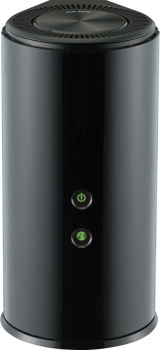
Рейтинг точки доступа:
(3.29 — 7 голосов)
Дать ссылку друзьям:
Рейтинг: Пока без рейтинга
Наличие инструкции подключения и альтернативной прошивки: В наличии
Настройка подключения
На данной странице вы узнаете как подключить Wi-Fi маршрутизатор к компьютеру, а также сможете найти инструкцию по настройке на русском языке.
Сотрудники нашего информационного портала ежедневно обновляют официальные прошивки для той или иной модели устройства.
Настройка Вай-Фай
Пошаговая настройка роутера D-Link DIR-860L для Ростелеком, Билайн и других интернет провайдеров займет у Вас несколько минут и после этого вы сможете наслаждаться всеми достоинствами Wi-Fi точки доступа Д-линк.
Настройка IPTV
Если вы хотите получить последнюю версию официальной прошивки и инструкцию по подключению VPN или PPPOE и настройка IPTV телевидения для этого устройства на русском языке на ваш Email, то вам следует оставить полный, развернутый отзыв о той или иной модели Вай-Фай устройства.
Скачать прошивку для маршрутизатораЧтобы скачать прошивку для D-Link DIR-860L вам достаточно внимательно ознакомиться со страницей, на которой вы сейчас находитесь. Не забывайте оставлять свои отзывы (форма для добавления отзывов находится в нижней части страницы). Если вас не затруднит, то вы можете поделиться ссылкой на прошивку со своими друзьями. Также, если вы не нашли ответ на свой вопрос, то вы можете задать его воспользовавшись формой в нижней части сайта. У нас вы найдете последние версии драйверов для беспроводных устройств. Чтобы скачать новый драйвер, вам необходимо перейти по ссылке «Скачать прошивку», которая расположена чуть ниже.
Скачать прошивку Настройки роутера Видео как настроить D-Link DIR-860L |
|