
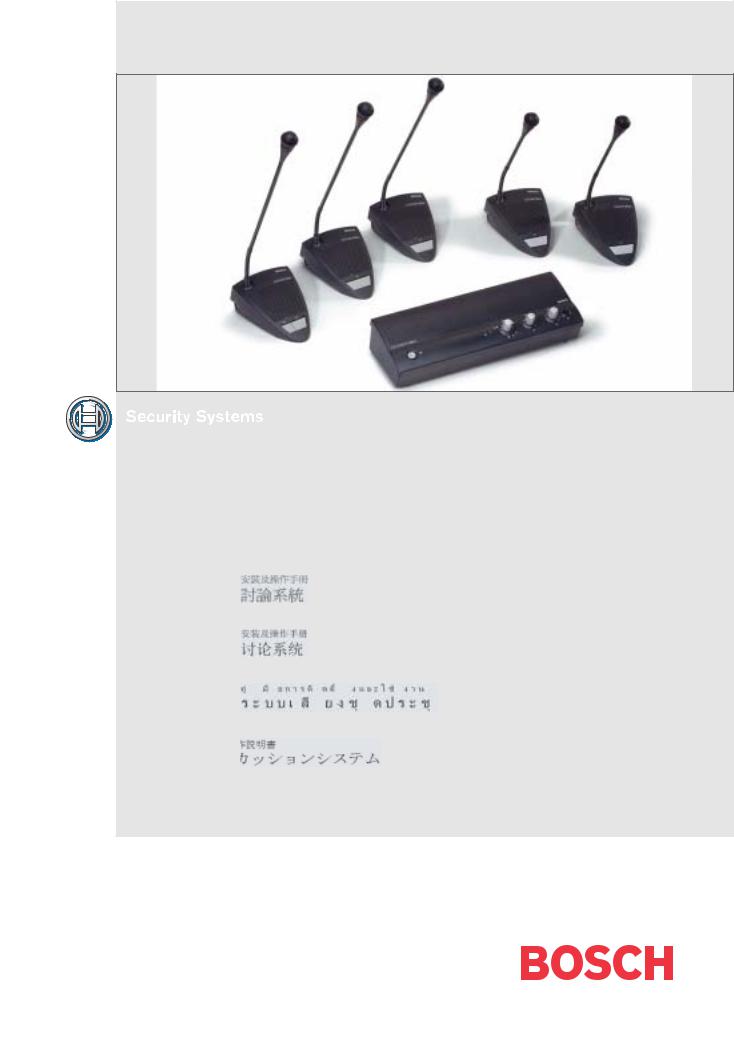
CCS 800 Ultro
|
en |
Installation and Operating Manual |
||||||||||
|
Discussion System |
|||||||||||
|
fr |
Manuel d’installation et d’utilisation |
||||||||||
|
Système de Discussion |
|||||||||||
|
zh-t |
de |
Installationsund Bedienungshandbuch |
|||||||||
|
Diskussionssystem |
|||||||||||
|
zh-s |
es |
Manual de instalación y funcionamiento |
|||||||||
|
Sistema de Conferencias |
|||||||||||
|
th |
nl |
Installatieen gebruikshandleiding |
|||||||||
|
Discussiesysteem |
|||||||||||
|
ja |
it |
Installazione e Manuale operativo |
|||||||||
|
Sistema audio congressuale |
|||||||||||
Page
|
en………………………………………………………………………………… |
3 |
Prior to installing or operating this product always read |
|
the Safety Instructions which are available as a separate |
||
|
document. |
||
|
fr ……………………………………………………………………………….. |
24 |
Avant d ‘installer ou d’utiliser ce produit, lisez toujours |
|
les Instructions de sécurité disponibles dans un docu- |
||
|
ment distinct. |
||
|
de …………………………………………………………………………….. |
46 |
Lesen Sie vor Installation oder Inbetriebnahme dieses |
|
Produkts in jedem Fall die Sicherheitshinweise, die als |
||
|
gesondertes Dokument vorliegen. |
||
|
es ………………………………………………………………… |
68 |
Antes de la instalación o utilización de este producto lea |
|
las Instrucciones de seguridad disponibles en un docu- |
||
|
mento independiente. |
||
|
nl …………………………………………………………………. |
90 |
Lees voor installatie of gebruik van dit product eerst de |
|
Veiligheidsvoorschriften die in een apart document |
||
|
staan. |
|
it …………………………………………………………………. |
112 |
|
zh-t……………………………………………………………. |
134 |
|
zh-s…………………………………………………………… |
155 |
|
th……………………………………………………………….. |
176 |
|
ja ……………………………………………………………….. |
198 |
Prima di installare o mettere in funzione questo prodotto, leggere sempre le Istruzioni di sicurezza, che vengono fornite in un documento separato.
|
CCS 800 Ultro | Installation and Operating Manual |
en | 5 |
1 About this manual 2 Introduction
This «Instructions For Use» manual provides all the information required to install and operate the CCS 800 Ultro Discussion System.
Conventions
Warning
Warnings draw attention to instructions that must be followed to prevent personal injury.
Caution
Cautions draw attention to instructions that must be followed to prevent damage to the equipment.
Note
Notes draw attention to special instruction tips or other useful information.
The CCS 800 Ultro Discussion System is a discussion system for use in meeting and conference venues with a limited number of participants.
A CCS 800 Ultro Discussion System consists of:
•One Control and Power Supply Unit (CPSU).
•Maximum 50 units of which one or more chairman unit(s).
•Extension cables if required (5m or 10m).
•Peripheral audio and/or telecommunication equipment.
The CPSU is the heart of the discussion system which controls the microphones of the chairman and delegate units as well as providing facilities for audio inputs and outputs. It also supplies the power for the CPSU itself, chairman unit(s) and delegate unit(s).
With the use of Digital Acoustic Feedback Suppression the loudspeaker volume can be increased significantly before feedback appears. Digital Acoustic Feedback Suppression is only available in LBB 3310/10.
A delegate unit enables participants to actively join in a discussion (i.e. speaking and listening) by means of a microphone, controlled by an on/off button and
a built-in loudspeaker or external headphone.
A chairman unit has the same function as a delegate unit with the addition of a ‘Priority’ button, that enables its operator to control the debate by temporary or permanently overruling and muting all active microphones, depending on an internal setting in the chairman unit.
Bosch Security Systems | 2003-06 | 3922 988 54284
|
CCS 800 Ultro | Installation and Operating Manual |
en | 6 |
3Control and power supply unit (CPSU)
|
CC |
||||||||||
|
S 800 |
ULTRO |
|||||||||
|
1 |
2 |
|||||||||
|
3 |
4 |
|||||||||
|
5 |
||||||||||
|
6 |
||||||||||
|
Trunk in/out |
Microphone |
Recorder |
Line |
Telephone Insertion |
||||||
|
In |
||||||||||
|
Gain Gain |
Out |
Digital Acoustic |
||||||||
|
Feedback Suppression |
||||||||||
|
90-260 V~ |
||||||||||
|
7 |
8 |
9 |
11 |
13 |
14 |
|||||
|
10 |
12 |
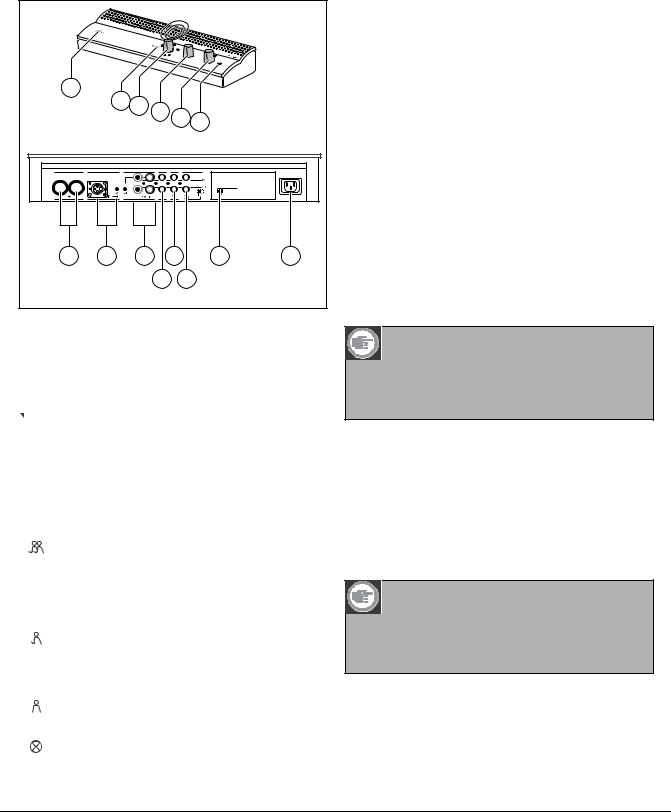
Figure 3.1
1 Mains On/Off switch.
2 Power On LED indicator (green).
3 Microphone-mode switch.
Open mode with auto switch-off. To select 
 the maximum number of delegate microphones
to be activated simultaneously (1, 2, 3 or 4). The microphone automatically switches off if the speaker does not speak for 30 seconds.
The microphone can manually be switched off by pushing the button on the delegate unit. Open mode. To select the maximum number
of delegate microphones to be activated simultaneously (1, 2, 3 or 4). The microphone must be switched on or off manually by pushing the button on the delegate unit.
Override mode. Only one delegate
microphone can be activated. If a new delegate presses his microphone button, the microphone unit of the current speaker will be switched off.
Chairman only mode. Only the chairman units can be activated.
Test mode. For proper installation check. All the light-rings and LED’s of the connected
units will lit, if properly connected.
4 Speaker volume control of all connected delegate and chairman units.
5Volume control of the speaker or headphone of the CPSU.
6Headphone connection with 3.5 mm stereo jackplug socket.
7Trunk output 1 and 2. For loopthrough connection of the delegate and chairman units. To each output a maximum of 25 units can be connected.
The maximum length of cable between the outputs of the CPSU and the last unit in the system is
100 m (328 ft).
8Microphone input with gain adjustment for external microphone. The external microphone will be muted when the priority button on the chairman unit is pressed.
9Recorder input with gain control and recorder output connection.
10Line input and output for connecting a PA-system or other audio equipment.
11Telephone coupler input and output for connecting a remote participant.
Note
The telephone input signal to the CPSU is not added to the telephone output signal from the CPSU to prevent line echo due to feedback.
12Insertion connection. To connect an external audio equalizer for speech quality improvement under difficult acoustic conditions (1 = without equalizer, 0 = insertion connection is internally open, providing means to connect an external equalizer in the path from microphone signals to delegate/ chairman loudspeakers).
Note
Position «1» required for internal loop-through of the microphone signals to the delegate/ chairman unit loudspeakers.
13Digital Acoustic Feedback Suppression (DAFS) switch to activate or deactivate the DAFS.
Bosch Security Systems | 2003-06 | 3922 988 54284
|
CCS 800 Ultro | Installation and Operating Manual |
en | 7 |
14Mains input connection. Use the included mains cord to connect the CPSU to the mains socket.
In some countries it may be necessary to replace the supplied mains cable by a local one. Brown = live, blue = neutral and green/yellow = earth.
(Replacement and colour indication not applicable to mains cords for North America).
9Chairman Priority button. When pressed emits chime tone, overrules/mutes all active microphones of delegate units in the system and keeps the chairman’s microphone on for as long as the button is pressed (setting can be changed in the chairman unit).
In systems with several chairman units these settings are independently selectable for each chairman unit.
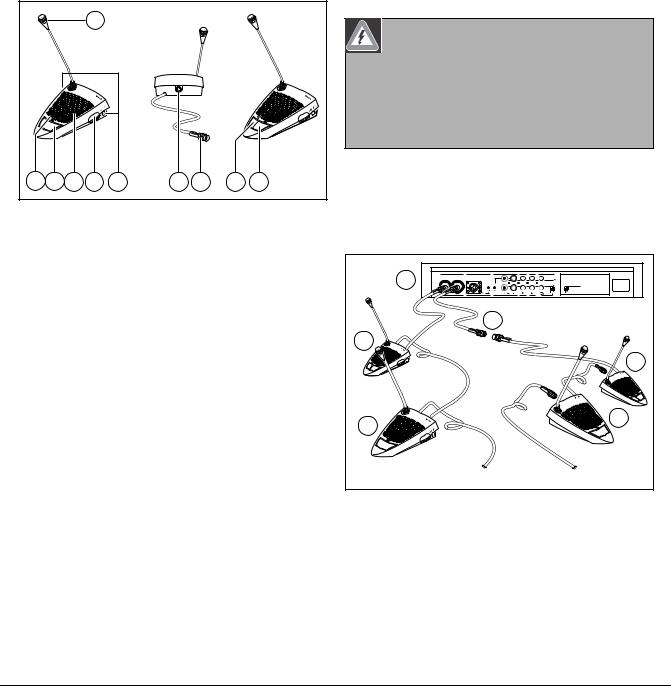
4Delegate and Chairman unit
5 Installation
1
|
4 |
8 |
3 |
7 |
2 |
5 |
6 |
9 |
8 |
Figure 4.1
The chairman unit (B) has the same function as a Delegate unit (A) with the exception of a ‘priority’ button.
1Microphone with red illuminated indicator ring, lights when the microphone is ON.
2Two 3.5 mm stereo headphone sockets, one at each side, for headphone or recorder connection. Insertion of a headphone jack in one or both sockets
automatically mutes the unit’s loudspeaker.
3Built-in loudspeaker, automatically muted when the microphone is on.
4 Red (LED) indicator above the microphone push button, for microphone ON indication.
5 7-pole circular female socket for loopthrough connection to the next unit.
6 2m flying lead connection cable with sturdy moulded 7-pole circular male connector for connection to the previous unit or CPSU.
7 Rotary volume control for headphones only.
8 Microphone ON/OFF push-button.
Warning
The CPSU must be earthed via the mains supply for safety reasons and to ensure the specified audio performance of the system. Do not open the CPSU and/or delegate/chairman units, no user serviceable parts inside.
5.1Connecting the delegate and chairman units
|
Trunk in/out |
Microphone |
Recorder |
Line |
Telephone Insertion |
||
|
1 |
In |
|||||
|
Out |
Digital Acoustic |
|||||
|
Gain Gain |
Feedback Suppression |
|||||
|
90-260 V~ |
||||||
|
4 |
||||||
|
3 |
||||||
|
1 |
3 |
|||||
|
1 |
||||||
|
2 |
2 |
2 |
||||
|
2 |
||||||
|
3…25 |
3…25 |
Figure 5.1
Connect the delegate (2) and chairman (3) units to the trunk connectors of the CPSU (1). Use an extension cable (4) if necessary.
Bosch Security Systems | 2003-06 | 3922 988 54284
|
CCS 800 Ultro | Installation and Operating Manual |
en | 8 |
5.2 Connecting up to 150 units
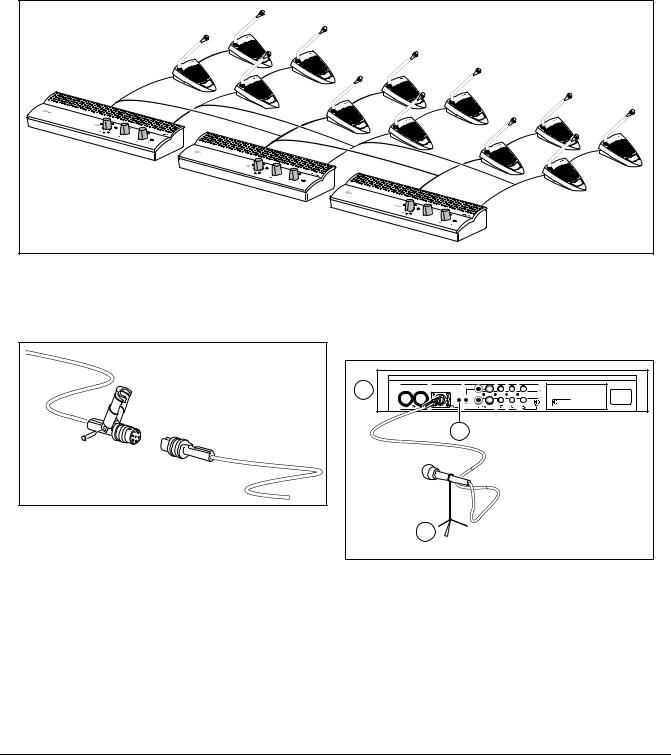
CCS 800 Ultro can be used with up to 150 units by adding maximum 2 additional control units acting as power supply units only. The system is controlled by the master LBB 3310. The cables necessary for these connections can be delivered by your local dealer.
|
max. 6 x 25 units |
|||
|
CCS 800 |
ULTRO |
||
|
CCS 800 |
ULTRO |
||
|
CCS 800 |
ULTRO |
||
|
Figure 5.2 |
5.3 Locking the extension cable
Figure 5.3
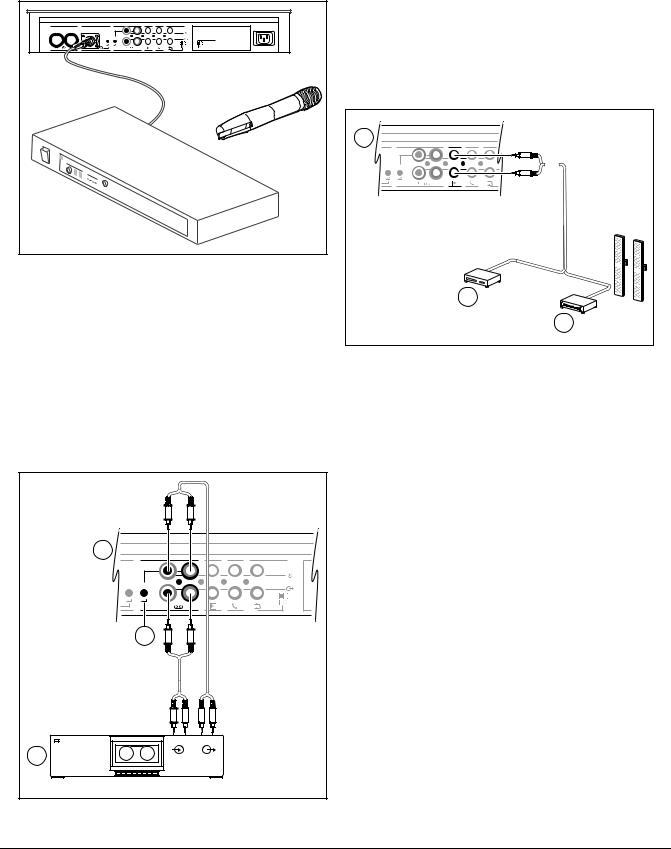
Cable locking clamps can be used in combination with the extension cables to prevent accidental disconnection.
5.4Connecting an external microphone
|
Trunk in/out |
Microphone |
Recorder |
Line |
Telephone |
Insertion |
|
|
1 |
In |
|||||
|
Gain |
Gain |
Out |
Digital Acoustic |
|||
|
Feedback Suppression |
||||||
|
90-260 V~ |
||||||
|
3 |
||||||
|
2 |
Figure 5.4
Put the external microphone (2) connector in the microphone input of the CPSU (1).
Adjust the sensitivity by use of the gain control (3). Use only microphones with balanced output.
The microphone input provides a 12V phantom power supply.
Bosch Security Systems | 2003-06 | 3922 988 54284
|
CCS 800 Ultro | Installation and Operating Manual |
en | 9 |
5.5Connecting a wireless microphone
|
Trunk in/out |
Microphone |
Recorder |
Line |
Telephone |
Insertion |
|
|
In |
||||||
|
Gain |
Gain |
Out |
Digital Acoustic |
|||
|
Feedback Suppression |
||||||
|
90-260 V~ |
||||||
|
receiver |
Figure 5.5
Connecting a wireless microphone to the external microphone input is possible with the included 50dB attenuator. This way of connection allows interruption of the wireless microphone by the chairman’s priority button.
5.6Recording/play back the conversation
|
1 |
|||
|
Recorder |
Line |
Telephone |
Insertion |
|
In |
|||
|
Gain Gain |
Out |
||
|
3 |
|||
|
RECORD |
PLAY |
||
|
In |
Out |
||
|
2 |
Figure 5.6
Connect the cabling of the tape recorder (2) to the recorder input and output of the CPSU (1). Use the gain control (3) to adjust the sensitivity of the recorder input of the CPSU.
5.7Connecting a PA-system or other external equipment
|
1 |
Recorder |
Line |
Telephone |
Insertion |
|
In |
||||
|
Gain |
Gain |
Out |
||
|
2 |
||||
|
3 |
Figure 5.7
Connect a PA-system (3) or other devices (2) to the inand output of the CPSU (1).
Connect audio sources to the line input, a PA amplifier or other sound-processing devices to the line output.
Bosch Security Systems | 2003-06 | 3922 988 54284
 Loading…
You can only view or download manuals with
Sign Up and get 5 for free
Upload your files to the site. You get 1 for each file you add
Get 1 for every time someone downloads your manual
Buy as many as you need
VideoJet 8008

VideoJet 8008 8‑channel MPEG‑4 Encoder,
4 pages
NBN-932
DINION IP dynamic 7000 HD [en] ,
7 pages
LTC 1271 Series
LTC 1271 Series Corner Phortress Cameras [en] ,
3 pages
ISC-PDL1-WA18G
Professional Series Dual Detectors ISC-PDL1-W18G and,
4 pages
LTC 1271 Series


Bosch LTC 1271 Series Instruction manual,
12 pages
NDN-733 FW5.6

— Bosch Security Systems,
122 pages
AMAX panel 2000 EN
AMAX panel 2000 / AMAX panel 2000 EN,
20 pages
LTC 4600 Series
LTC 4600 and 4700 Series Fiber Optics,
8 pages
DS7400Xi
Bosch DS7400Xi Specifications,
101 pages
LTC 8800
Bosch LTC 8800 Datasheet,
12 pages
LBB 1925
Bosch LBB 1925 Operating instructions,
30 pages
DS484Q
Bosch DS484Q Specifications,
20 pages
Solution 16i
Solution 16i Taking LCD icon technology to new levels.,
2 pages
DSDA ISCSI DISK ARRAY SERIES DSA-N2B20
Bosch DSDA ISCSI DISK ARRAY SERIES DSA-N2B20 Installation guide,
40 pages
DS7400XiV4-EXP
Control Panel DS7400XiV4-EXP [en] ,
10 pages
Carephone 52+
Bosch Carephone 52+ Specifications,
54 pages
LTC 8555
Bosch LTC 8555 Instruction manual,
126 pages
D9412GV2
Bosch D9412GV2 Installation guide,
158 pages
ICP-CC404
Data Sheet — Bosch Security Systems,
3 pages
UNPC Series
Bosch UNPC Series Instruction manual,
12 pages
- Manuals
- Brands
- Household Appliance
- Home Security System
-
Bosch Appliances
-
Household Appliance
-
Home Security System
 CCS 800 Ultro
Installation and Operating Manual
Discussion System
en
Manuel d’installation et d’utilisation
Système de Discussion
fr
Installations- und Bedienungshandbuch
Diskussionssystem
de
Installatie- en gebruikshandleiding
Discussiesysteemnl
Installazione e Manuale operativo
Sistema audio congressuale
it
Manual de instalación y funcionamiento
Sistema de Conferencias
es
zh-t
th
ja
zh-s
Хорошее руководство по эксплуатации
Законодательство обязывает продавца передать покупателю, вместе с товаром, руководство по эксплуатации Bosch Appliances CCS 800 Ultro. Отсутствие инструкции либо неправильная информация, переданная потребителю, составляют основание для рекламации в связи с несоответствием устройства с договором. В законодательстве допускается предоставлении руководства в другой, чем бумажная форме, что, в последнее время, часто используется, предоставляя графическую или электронную форму инструкции Bosch Appliances CCS 800 Ultro или обучающее видео для пользователей. Условием остается четкая и понятная форма.
Что такое руководство?
Слово происходит от латинского «instructio», тоесть привести в порядок. Следовательно в инструкции Bosch Appliances CCS 800 Ultro можно найти описание этапов поведения. Цель инструкции заключается в облегчении запуска, использования оборудования либо выполнения определенной деятельности. Инструкция является набором информации о предмете/услуге, подсказкой.
К сожалению немного пользователей находит время для чтения инструкций Bosch Appliances CCS 800 Ultro, и хорошая инструкция позволяет не только узнать ряд дополнительных функций приобретенного устройства, но и позволяет избежать возникновения большинства поломок.
Из чего должно состоять идеальное руководство по эксплуатации?
Прежде всего в инструкции Bosch Appliances CCS 800 Ultro должна находится:
— информация относительно технических данных устройства Bosch Appliances CCS 800 Ultro
— название производителя и год производства оборудования Bosch Appliances CCS 800 Ultro
— правила обслуживания, настройки и ухода за оборудованием Bosch Appliances CCS 800 Ultro
— знаки безопасности и сертификаты, подтверждающие соответствие стандартам
Почему мы не читаем инструкций?
Как правило из-за нехватки времени и уверенности в отдельных функциональностях приобретенных устройств. К сожалению само подсоединение и запуск Bosch Appliances CCS 800 Ultro это слишком мало. Инструкция заключает ряд отдельных указаний, касающихся функциональности, принципов безопасности, способов ухода (даже то, какие средства стоит использовать), возможных поломок Bosch Appliances CCS 800 Ultro и способов решения проблем, возникающих во время использования. И наконец то, в инструкции можно найти адресные данные сайта Bosch Appliances, в случае отсутствия эффективности предлагаемых решений. Сейчас очень большой популярностью пользуются инструкции в форме интересных анимаций или видео материалов, которое лучше, чем брошюра воспринимаются пользователем. Такой вид инструкции позволяет пользователю просмотреть весь фильм, не пропуская спецификацию и сложные технические описания Bosch Appliances CCS 800 Ultro, как это часто бывает в случае бумажной версии.
Почему стоит читать инструкции?
Прежде всего здесь мы найдем ответы касательно конструкции, возможностей устройства Bosch Appliances CCS 800 Ultro, использования отдельных аксессуаров и ряд информации, позволяющей вполне использовать все функции и упрощения.
После удачной покупки оборудования/устройства стоит посвятить несколько минут для ознакомления с каждой частью инструкции Bosch Appliances CCS 800 Ultro. Сейчас их старательно готовят или переводят, чтобы они были не только понятными для пользователя, но и чтобы выполняли свою основную информационно-поддерживающую функцию.