
[Comments and Questions]
Effective April 29th, 2023, travelers and returnees entering Japan are no longer required to submit a negative COVID-19 test certificate or proof of COVID-19 vaccination.
🎉 This means that COVID-19 restrictions for Japan have finally been lifted!
What you need to travel to Japan
❌ Vaccination Certificate or Negative Covid-19 Test Report (NOT Required)
✔️ Passport with validity of at least 6 months and visa if required
✔️ Fill out the Visit Japan Web or paper Immigration and Customs forms
Optional: Complete the “Visit Japan Web” to get ① Immigration QR Code ② Customs QR Code ③ Tax-free QR Code
ℹ️ So do you still need to use the Visit Japan Web?
Visit Japan Web is a service for smooth arrival procedures, that allows you to perform “immigration “, “customs ” declaration, and “Tax-free shopping service” online prior to your departure.
Although not compulsory, numerous travelers have recommended utilizing this service to acquire QR codes, which facilitates faster clearance through immigration and customs. However, if you face any problems while using the Visit Japan Web platform, it’s best not to waste too much time trying to resolve the issue. Instead, you can opt to manually fill out the immigration and customs declaration forms.
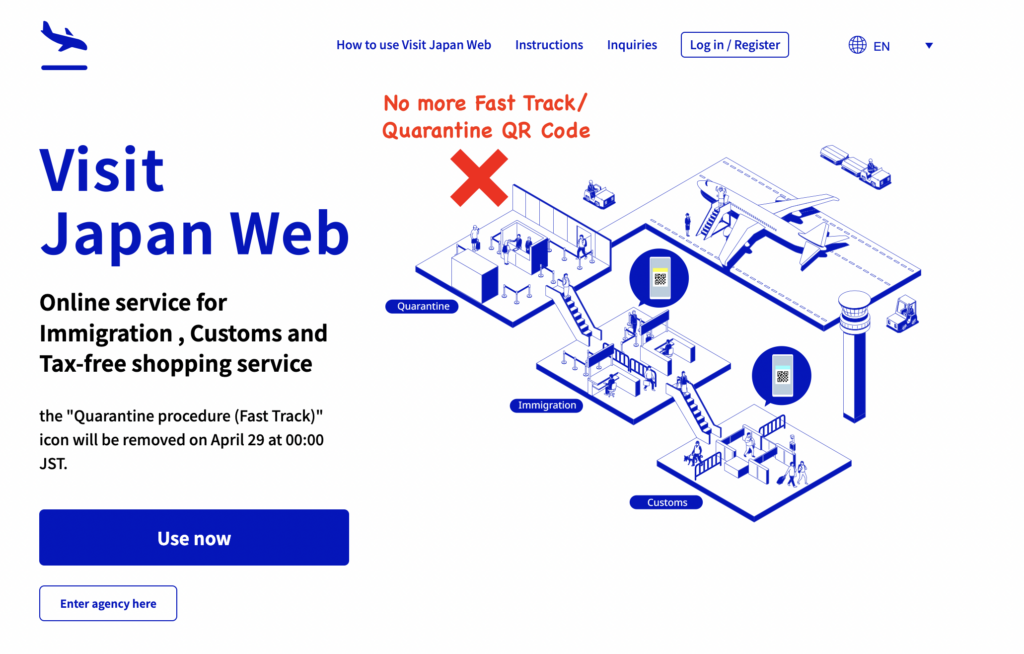
❌ “Visit Japan Web” Fast Track icon has been eliminated
The Visit Japan Web has introduced new features such as “Tax-Free Purchase,” “Passport OCR Input,” “VISA Linkage,” and “3rd Party Proxy Input.
📅 How Soon Can you Fill the Visit Japan Web?
You can register plans up to December 31 the following year, after purchasing the flight ticket.
How to Use the “Visit Japan Web”
- Go to the Visit Japan Web: vjw.digital.go.jp and click “Use Now”
- Sign up for a new account. The password has to have at least 10 characters with upper and lower case alphabets, number and symbol
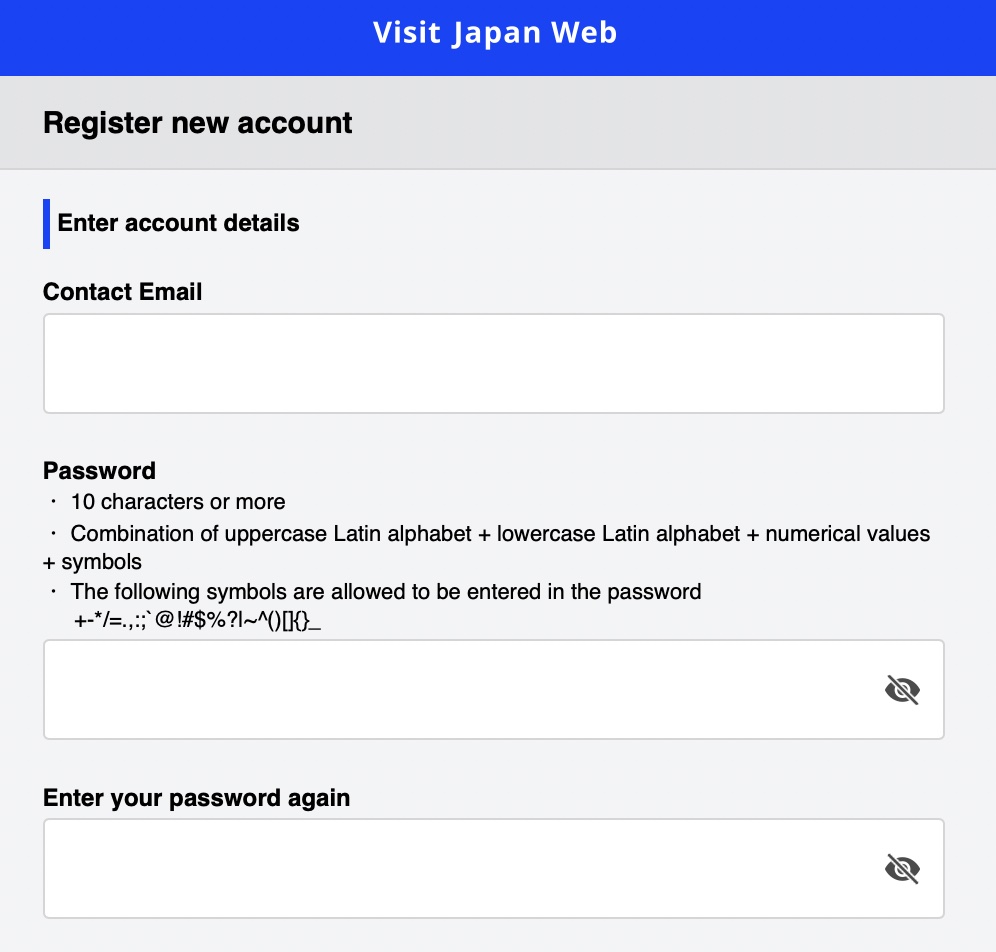
- Login
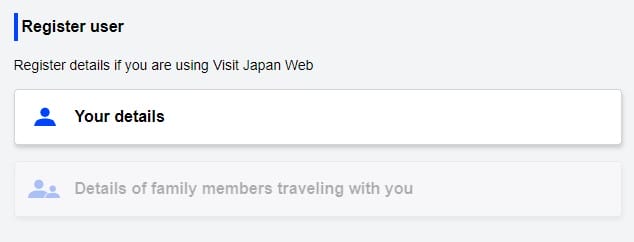
👤 Register User/ Users
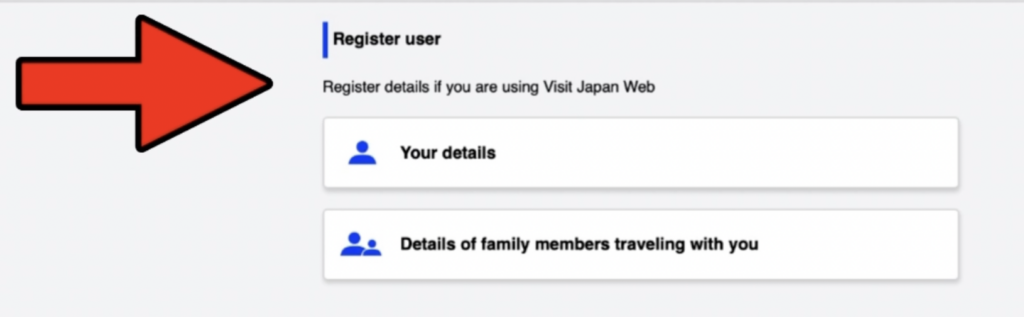
- Register your details and details of family members travelling with you, if any, which will be saved and can be used next time you travel to Japan
-
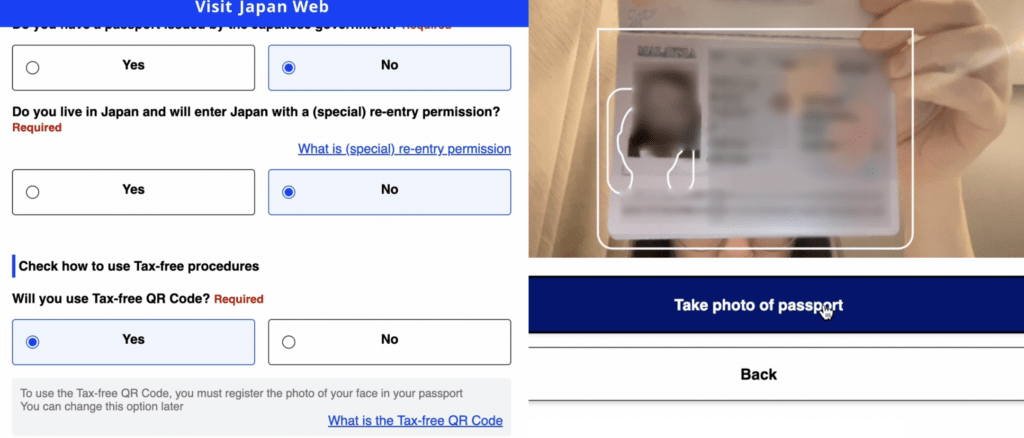
If you select YES to using the tax-free QR code, scanning your passport will be required.
-
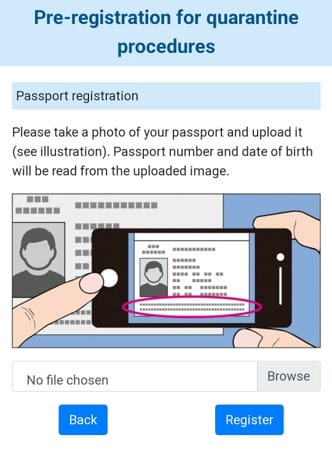
Position the passport information page within the white frame and hit the “Take photo of passport” button.
-
The passport information will then be populated automatically using OCR (Optical Character Recognition)
-
Please verify if the passport number is accurate. Click ‘Register’
-
Check Visa details
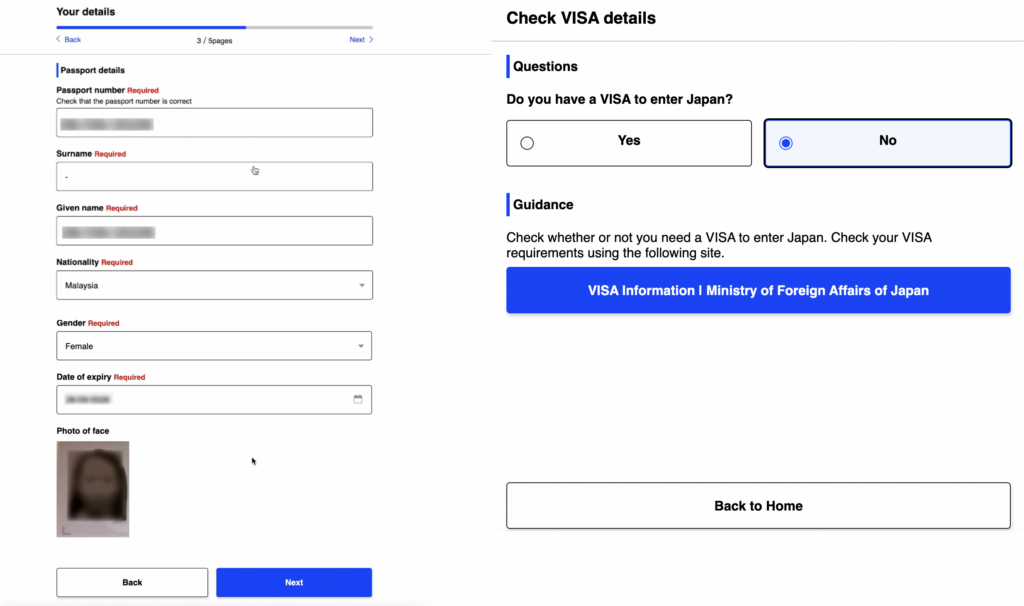
🧳 Japan Planned Entry/ Return Procedure
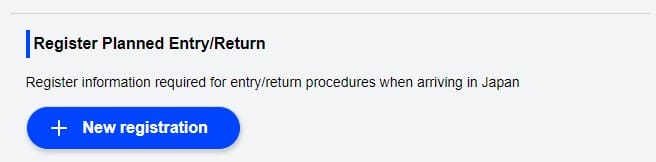
- Add a “+ New registration” of Planned Entry/ Return
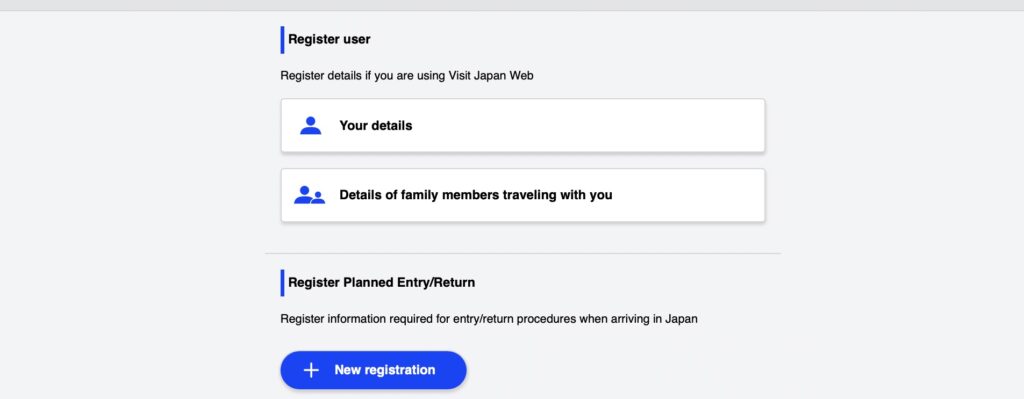
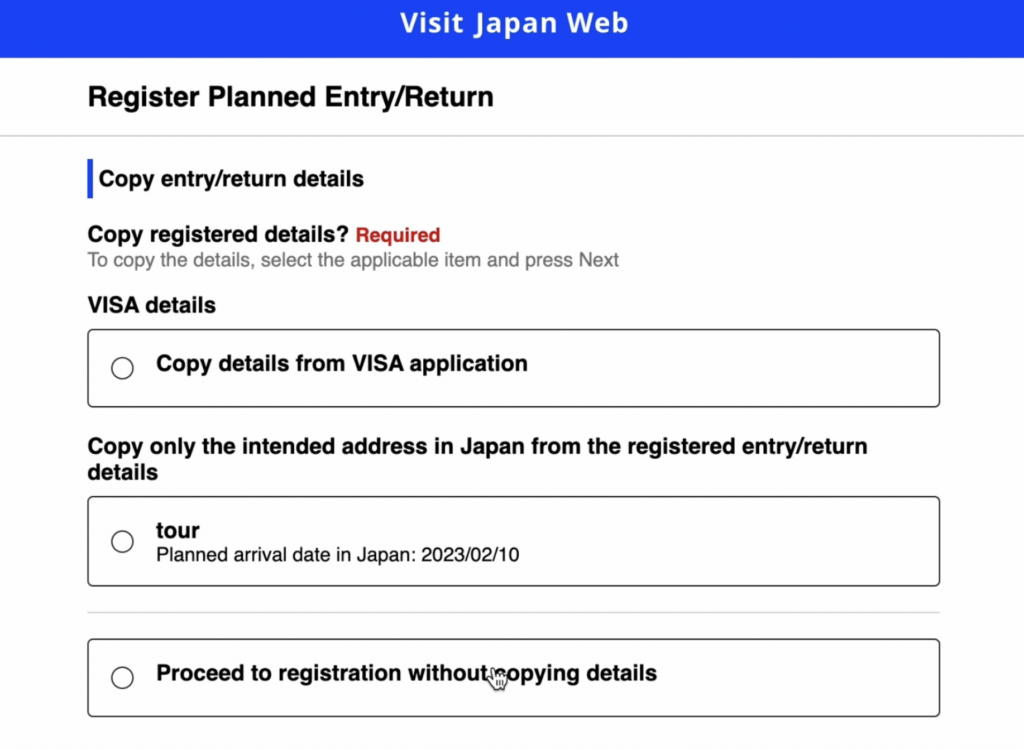
- If you have a valid VISA, you can copy the details from your VISA application
- Copy the intended address in Japan from the registered entry/ return details if the address is the same. Otherwise, “Proceed to registration without copying details”
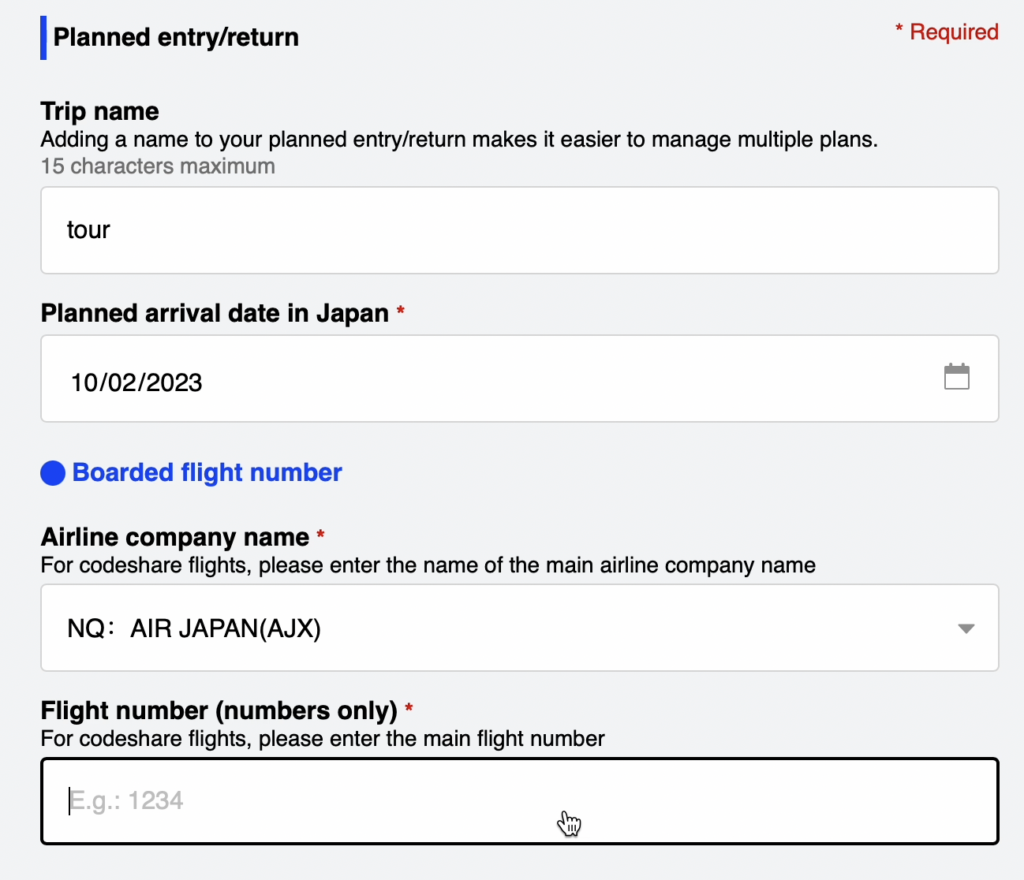
- Enter your upcoming trip details in the “Planned entry/return”
Planned Arrival Date in Japan
You can register planned arrival date in Japan up to December 31 the following year (Source)
Flight Number
If you are transiting in another country, enter the number of the flight that enters Japan
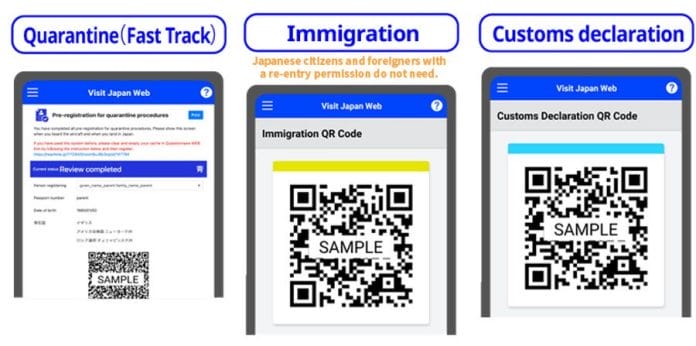
In the Entry/ Return Procedure, complete 2 registrations and print out or save the 2 QR Codes.
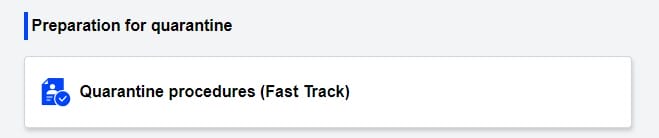
As a result of the recent change, the “Quarantine procedure (Fast Track)” icon has been eliminated, and travellers are no longer asked to respond to questions or submit any documents related to their COVID-19 status.
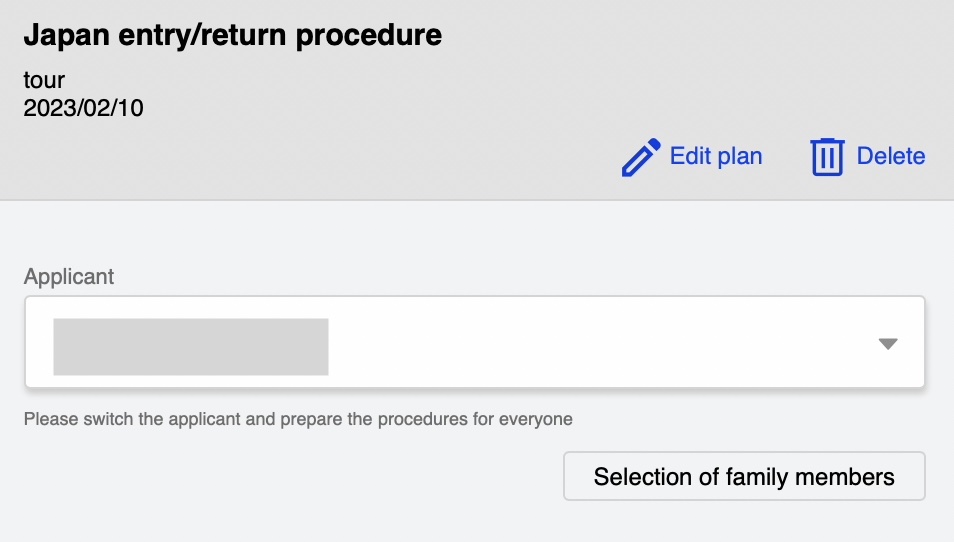
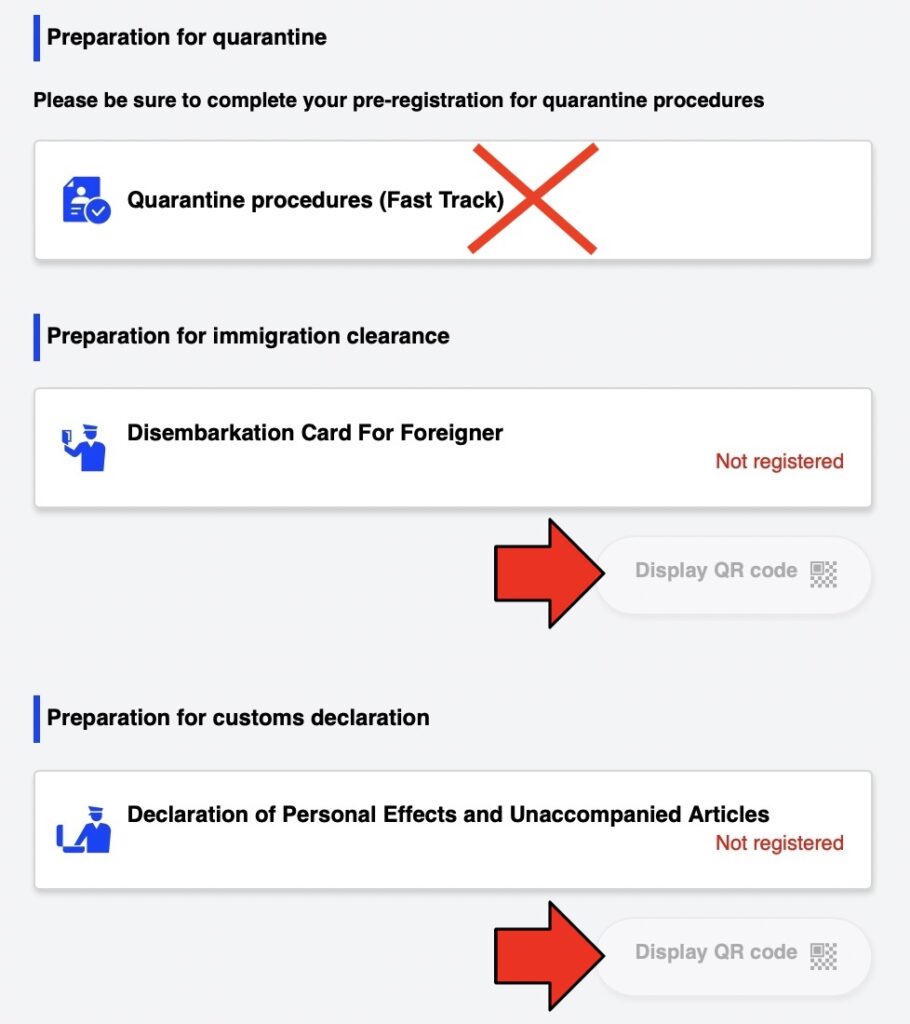
After you have registered the Immigration and Customs Declaration, you will get a QR Code for each of them
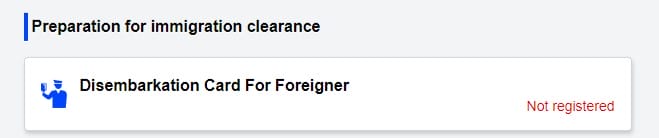
1. Preparation of Immigration Clearance
Register the “Disembarkation Card for Traveller” to generate the Immigration QR Code to be used at immigration clearance
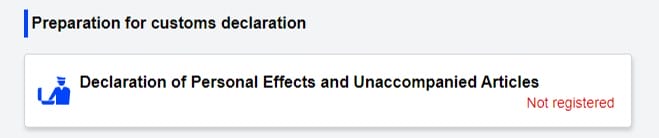
2. Preparation for Customs Declaration.
- Complete the “Declaration of Personal Effects and Unaccompanied Articles”
The data you have filled before will be populated automatically.
- Select your “Point of embarkation” from a list of city available. It is the last city you went through immigration before landing in Japan.
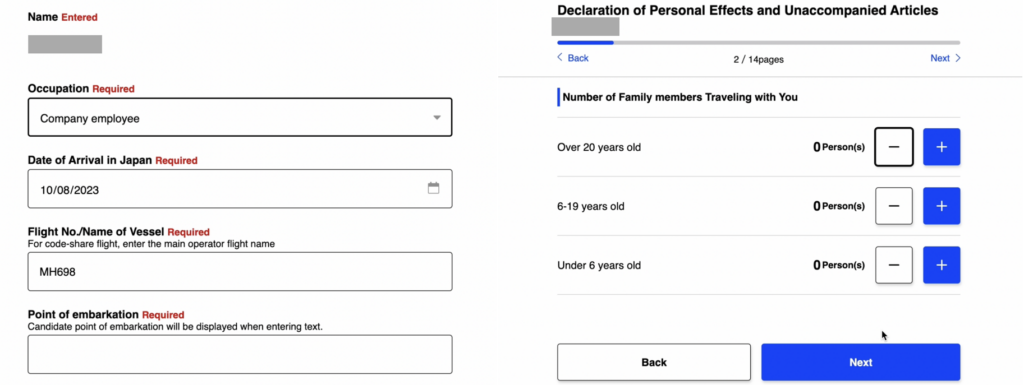
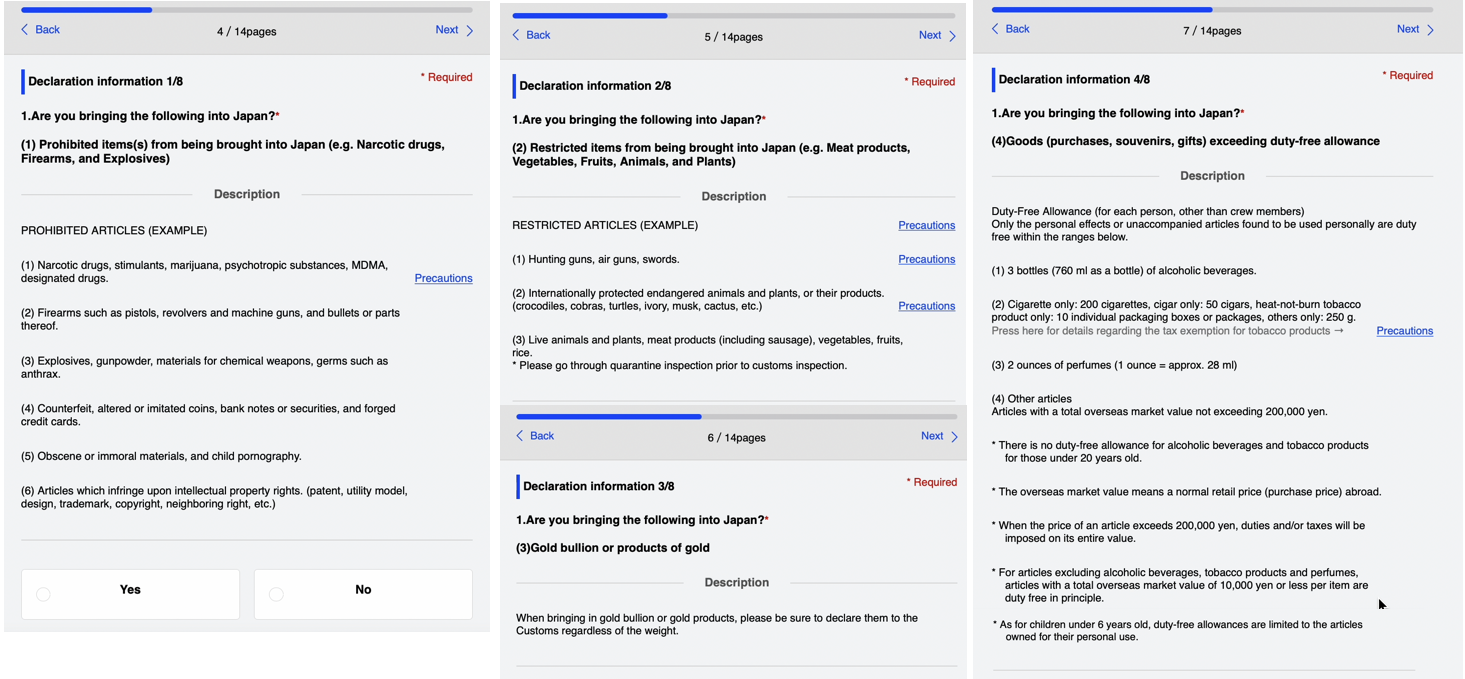
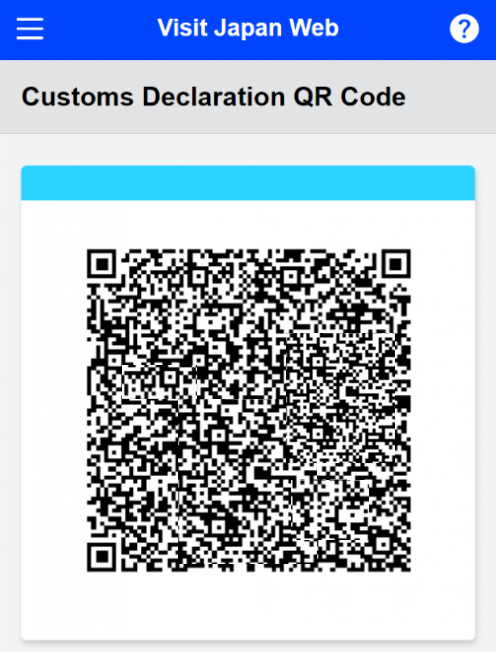
The Customs Declaration QR code will be generated.
At Japan’s Customs Inspection Area
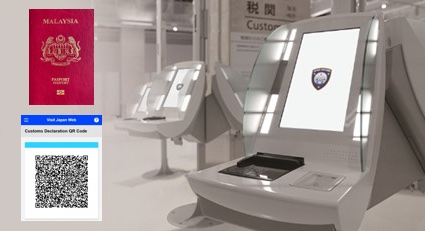
Scan Your Passport and the Customs Declaration QR code at the electronic declaration terminal in the customs inspection area.
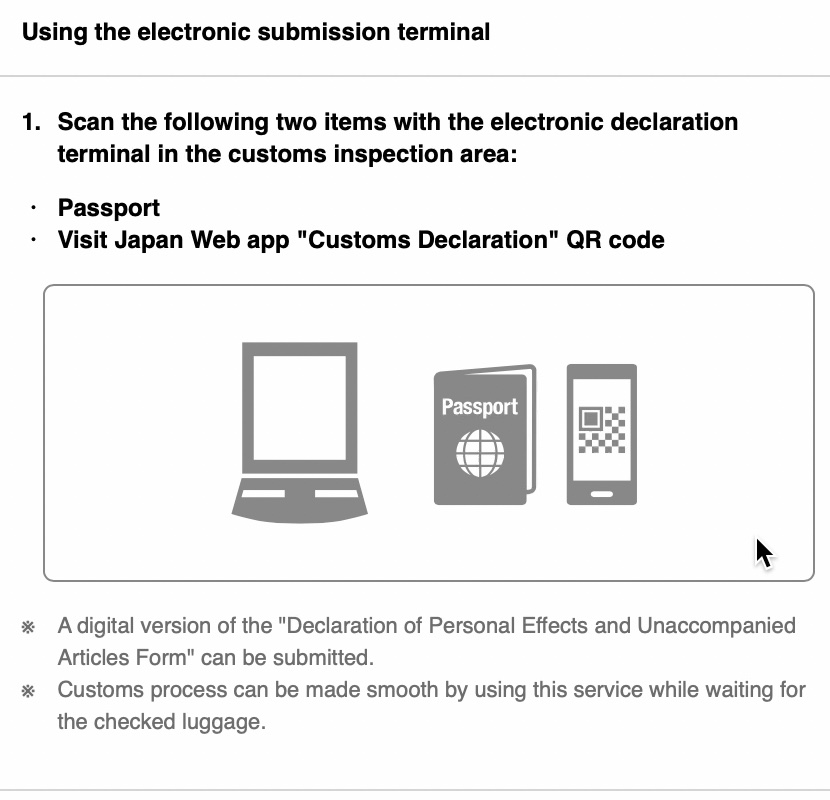
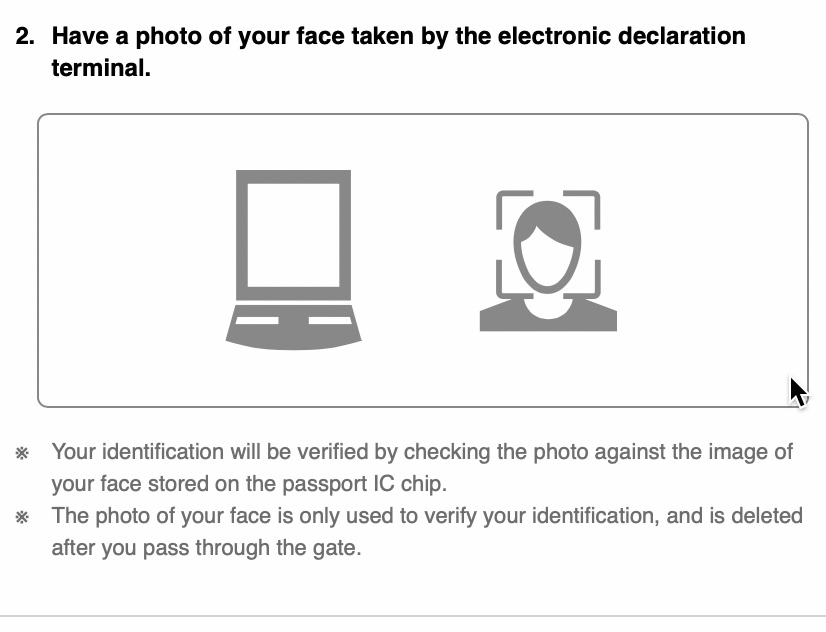
Have a photo of your face taken by the terminal.
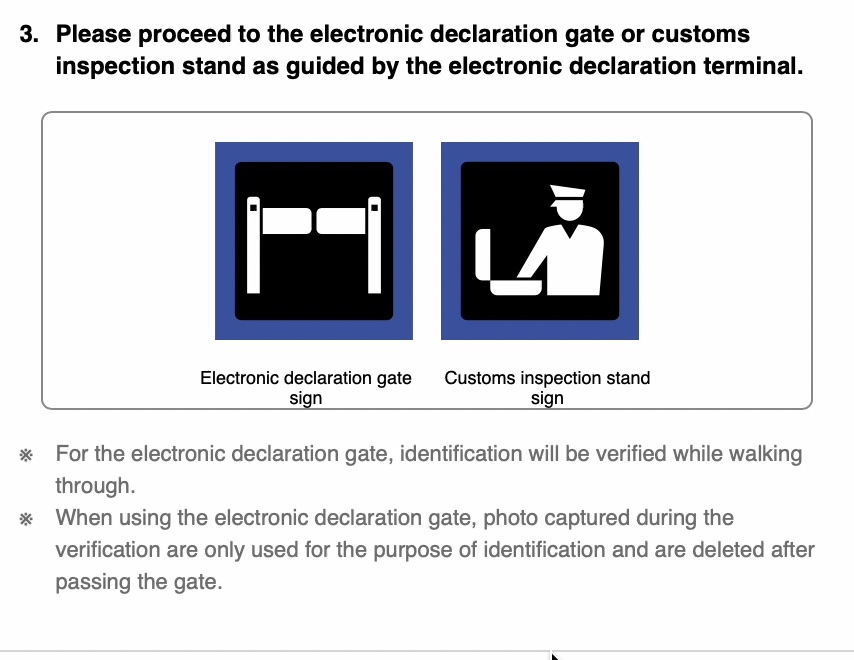
Proceed to the electronic gate or custom inspection as indicated in the terminal.
After entering Japan, you can create your Tax-free QR Code.
3. Create a Tax-free QR Code
For Tax-free purchases, instead of showing your passport, you can show the Tax-free QR Code from your Visit Japan Web to the store during checkout. However, please note that this option is only applicable to stores that have the capability to scan Tax-free QR codes.
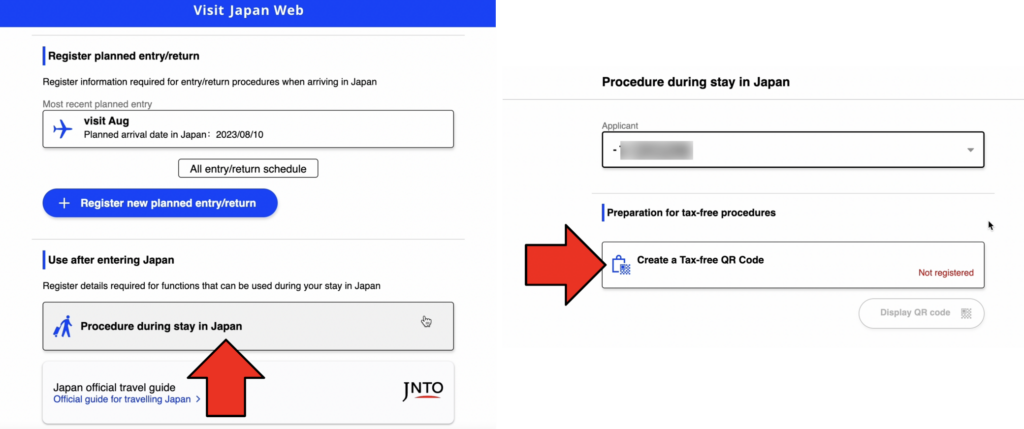
- Go back to Home of Visit Japan Web
- Click on “Procedure during stay in Japan” under “Use after entering Japan”
- Select the Applicant
- Click “Create a Tax-free QR Code”
- You will get a landing permission seal with a QR code affixed to your passport when you enter Japan
- Take photo of the landing permission QR code
- You will get a Tax-free QR Code
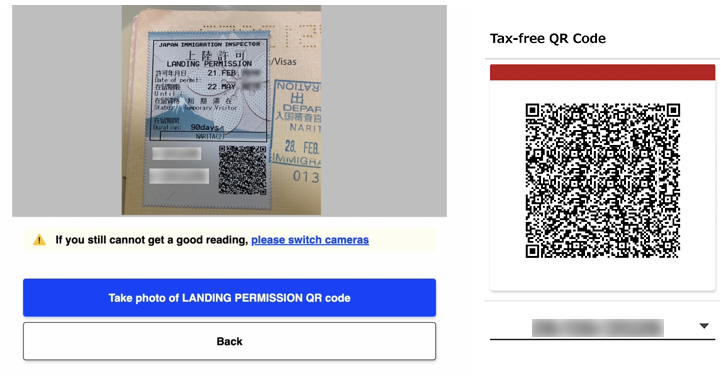
This Section below is NOT Required anymore
1. Quarantine Procedures Fast Track for Covid-19
1.a. Register your vaccination certificate if you have been vaccinated
The certificate must clearly show that you have received 3 doses of any of the following vaccines on the Emergency Use Listing of World Health Organization (WHO)
Certificate in Japanese or English or with translation (if other language), that contains Name, Date of birth or other identification such as passport number, Vaccine name or manufacturer, Date of vaccination, Number of doses administered
1.b. Negative Covid-19 Test
- Register Test result certificate for test taken less than 72 hours before departure if you are not fully vaccinated
Completion of Quarantine (Fast Track) Procedure
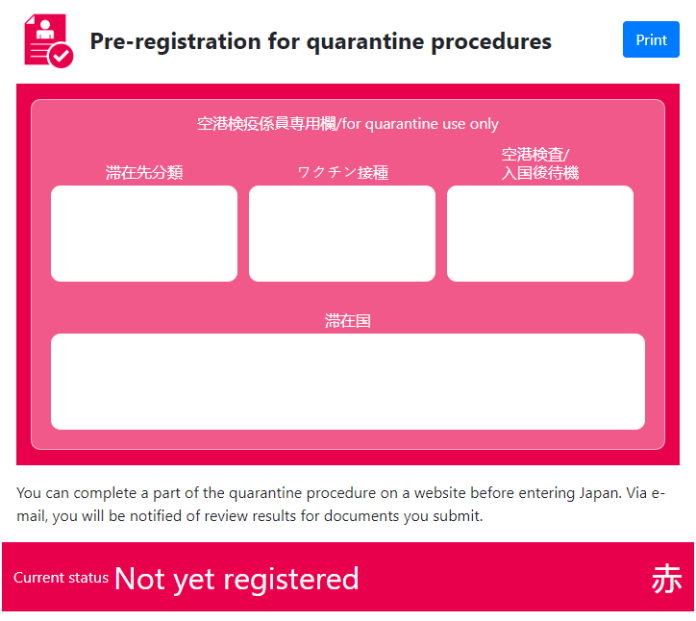
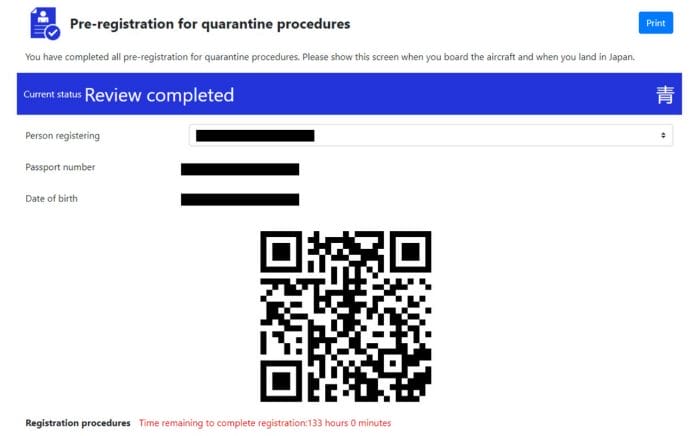
If you have completed the Fast Track Procedures, you will have to take screenshots of the Fast Track registration. After you have completed the Pre-registration for quarantine procedures (RED), the screen turns BLUE.
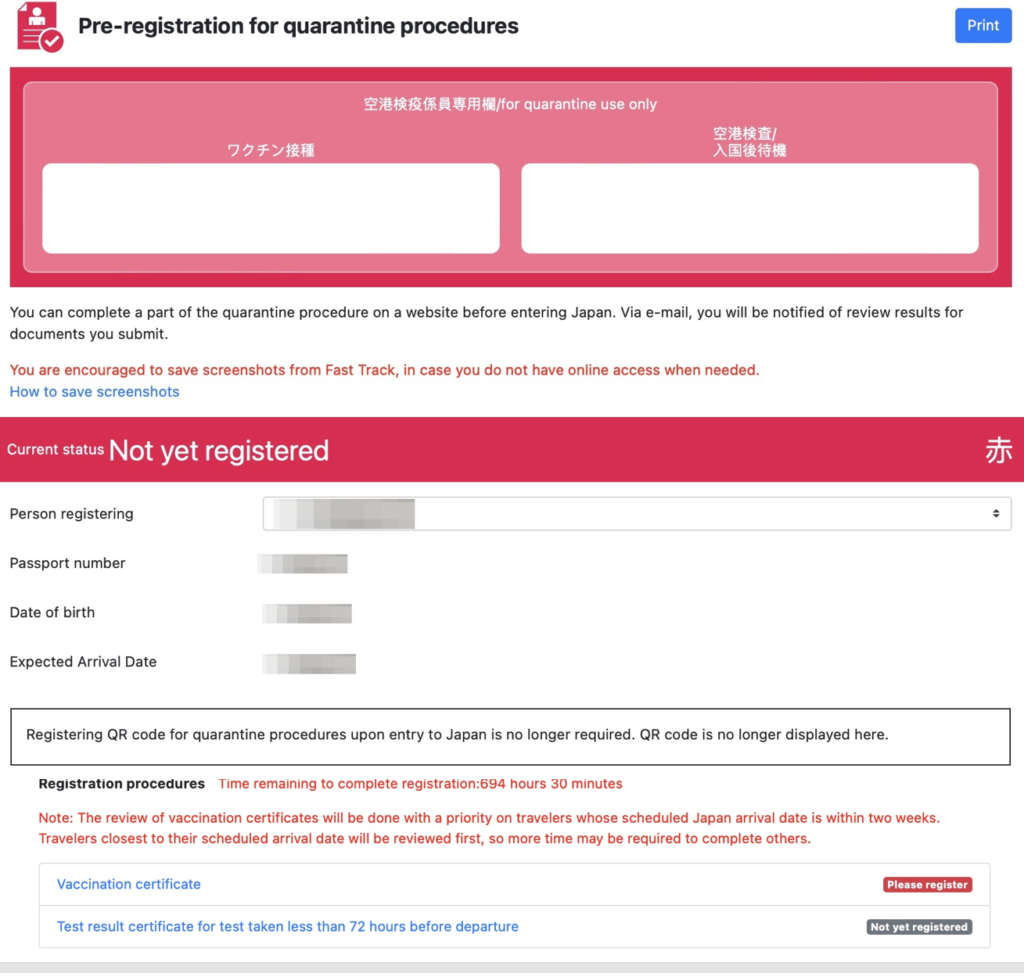
Registering QR code is no longer required. Not yet registered.
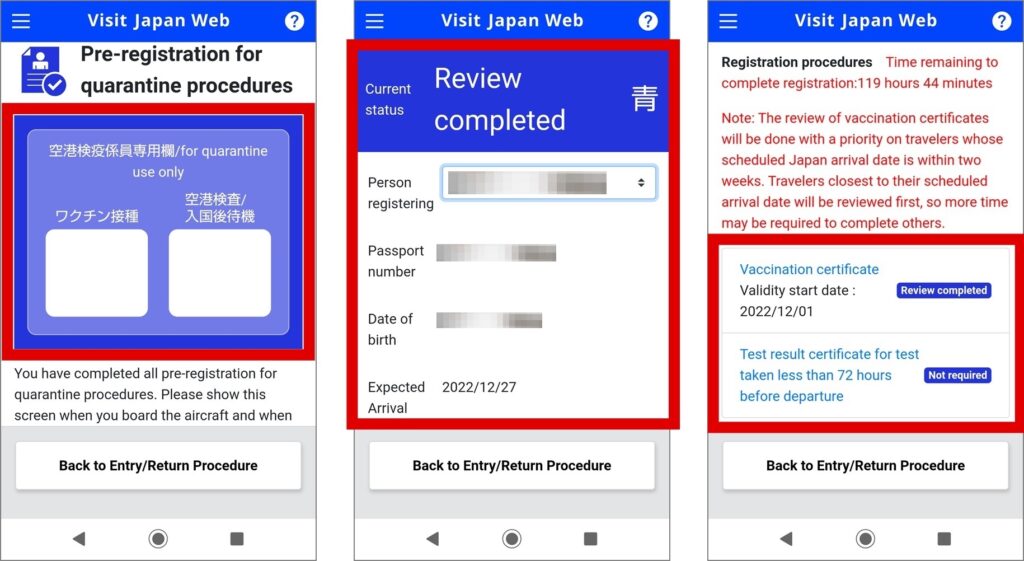
Take a screenshot of the Quarantine Procedure Fast Track Registration which is BLUE – Review completed
After landing in Japan, you can go where the sign says “Fast Track Blue” Lane for Covid-19 Requirements check at the airport.
Для ускорения прохождения процедур по прибытию рекомендуется заранее установить на смартфон приложение Visit Japan Web.
После установки программы в ней необходимо:
- Заполнить анкету на английском языке
- Загрузить ПЦР-тест
После правильного заполнения экран приложения станет синим.
По приезду вы проследуете по экспресс коридору (синему, по стрелкам).
Не заполнившие анкету заранее должны следовать по красному коридору (по стрелкам) и заполнять все данные на месте с сотрудниками иммиграции (процедуры займут от часа и более).
Инструкция по использованию системы на английском языке: https://vjw-lp.digital.go.jp/en/
COVID-19
При себе необходимо иметь оригинал справки об отрицательном тесте на коронавирус из носоглотки. Образцы справок: Japanese & English, Русский (PDF)
Тест должен быть взят не более, чем за 72 часа до вылета в Японию.
Справка не требуется при наличии сертификатов на три вакцины следующих компаний:
Comirnaty, Intramuscular injection / Pfizer
Spikevax, Intramuscular injection / Moderna
Nuvaxovid, Intramuscular injection / Novavax
Vaxzevria, Intramuscular injection / AstraZeneca
Jcovden / Janssen
Пояснение про верные и неверные версии справок, английский язык: https://www.mhlw.go.jp/content/000825144.pdf
ПЦР-тест должен быть сделан на основе мазка из носоглотки (Nasopharyngeal swab), мазка из носа (Nasal swab), анализа слюны (Saliva) или мазка из носоглотки и ротоглотки (Nasopharyngeal and Oropharyngeal swabs).
Обратите внимание, что взятие мазка из носа допускается лишь при следующем методе тестирования: Амплификация молекул нуклеиновой кислоты (Изотермическая LAMP-амплификация).
Результаты теста, сделанного на основе мазка из ротоглотки, не принимаются.
В справке на бумажном носителе должна быть указана на английском языке следующая информация: биоматериал для исследования (формулировка Nasopharyngeal swab, Saliva или Nasopharyngeal and Oropharyngeal swabs), метод диагностики, дата и время проведения теста и т.д.
Для детей до 6 лет, которые прибывают в Японию в сопровождении взрослого, справка о результатах ПЦР-тестирования не нужна.
Необходимо соблюдать следующие меры предотвращения распространения коронавирусной инфекции.
- ношение маски в общественных местах и внутри помещений (не требуется на улице)
- соблюдение социальной дистанции не менее 2 метров
- дезинфекция рук на входах в помещение (где установлены аппараты)
- измерение температуры специальными датчиками (если они установлены на входе в помещение)
- соблюдать указания сотрудников отелей, ресторанов и принимающей туристической компании
Перед выездом
Всем туристам, выезжающим в Россию и Белоруссию, в связи с действующими санкциями необходимо пройти досмотр таможенной службы до регистрации на рейс.
В связи с этим просим прибыть в аэропорт минимум за 1 час до начала регистрации на рейс (минимум за 3 часа до вылета рейса).
Во избежание неприятных ситуаций просьба внимательно изучить действующие ограничения на вывоз денежных средств и товаров из Японии!
Из Японии в РФ и Белоруссию запрещено вывозить следующие товары:
- стоимостью более 40 000 иен за единицу: алкогольные напитки, табачные изделия, парфюмерия, косметика, изделия из кожи и меха, ковры, ювелирные изделия, гончарные изделия и стеклянная посуда, снаряжение для дайвинга, часы с использованием обозначенного металла (серебро, золото, белое золото, иридий, осмий, палладий, родий и рутений) или металла, покрытого обозначенным металлом), персональные компьютеры-ноутбуки, произведения искусства, антиквариат.
- стоимостью более 100 000 иен за единицу: одежда, обувь, шляпы/кепки
- стоимостью более 200 000 иен за единицу: рояли
- стоимостью более 600 000 иен за единицу: мотоциклы
- стоимостью более 6 000 000 иен за единицу: автомобили
- Валюту (йены, доллары, рубли и т.п) можно вывозить в размере не превышающем 100000 йен на человека (т.е. 100000 йен или в эквиваленте другой валюты по текущему на день выезда курсу). Таможенная служба использует устройство для «просвечивания» и нахождения валюты, спрятанной на теле.
Страхование
До въезда в Японию необходимо оформить страховку с покрытием расходов на лечение коронавируса (в случае положительного теста туристы обязаны нести расходы на госпитализацию самостоятельно)!
Информация о стране:
Япония – островное государство в Восточной Азии, расположено на четырех относительно крупных островах Хоккайдо, Хонсю, Сикоку и Кюсю, а также на большом количестве более мелких островов, включая архипелаг Рюкю.
Столица
Токио
Время
Часовой пояс UTC+9. Разница во времени с Москвой +6 часов
Климат
Протянувшись с севера на юг примерно на 3000 км, Японские острова пересекают несколько климатических поясов от умеренного на севере до тропического — на южных островах.
Центральный район (о. Хонсю) с солнечной и сухой зимой (температура от +5 до +10 °С), умеренной осенью и весной (от +15 до +20 °С), а также жарким и влажным летом (+30 °С и выше).
На самом северном острове Японского архипелага (о. Хоккайдо) погодно-климатические условия схожи с российским Дальним Востоком.
Валюта
Иена
Язык
Японский
Население
127,7 млн человек
Религия
Буддизм и синтоизм
В отеле
В день приезда расселение осуществляется в соответствии с правилами, принятыми в отеле. Обычно начиная с 14-00 местного времени. Расчетный час, как правило, 12-00. Просим ознакомиться на месте с условиями предоставления услуг в отеле и придерживаться установленных отелем правил.
В день выезда до наступления расчетного часа (как правило, 12-00) необходимо освободить свой номер и оплатить дополнительные услуги: телефонные переговоры, мини-бар, заказ питания и напитков в номер, массаж и др. Свой багаж Вы можете оставить в камере хранения отеля и оставаться на территории отеля до прибытия трансфера. Если Вы не сдали номер до 12-00, стоимость комнаты оплачивается полностью за следующие сутки.
Чаевые
Индивидуальные чаевые не распространены в Японии. Вместо них в дорогих отелях и ресторанах к счету за обслуживание добавляется от 10 до 15 процентов.
Напряжение электросети
100 В.
Кухня
Японские жители питаются исключительно натуральными продуктами.
Самые популярные блюда:
— суши и роллы;
— рамен — представляет собой своеобразное ассорти, ведь в его составе любой компонент может быть заменен другим. Основа – мясной бульон из курицы, свинины, а иногда и рыбы. В бульоне варят широкую пшеничную или рисовую лапшу, приправляя ее яйцами, зеленым луком и водорослями;
— окономияки — что означает «лепешка с рыбой». В качестве основы для лепешки используется тертая капуста или тыква, мука, сыр, яйцо и вода
— сябу-сябу – это глубокая металлическая тарелка, которую можно нагревать в духовке или на открытом огне. В нее наливают бульон с овощами, тофу и лапшой;
— соба — это традиционное японское блюдо сделано из гречневой муки, придающей макаронам серо-коричневый цвет;
— суама — то пирожное готовится из рисовой муки и мелкого тростникового сахара: компоненты растирают в ступке, добавляя розовый краситель
Магазины
Крупные магазины и универмаги работают с 10.00 до 20.00. Есть сеть небольших магазинов круглосуточной торговли.
Магазины, имеющие указатели Tax Free или Duty Free, оформляют возврат потребительского налога (5 % от цены товара).
Возврат уплаченного налога в аэропортах не осуществляется.
Наиболее популярные товары у туристов в Японии: электронная техника, косметика, наборы для приготовления роллов и суши
Транспорт
Во всех городах довольно развито автобусное маршрутное сообщение, в некоторых имеется трамвайное движение.
Автобусы и трамваи, как правило, без кондукторов, оплата фиксированная, осуществляется при входе (в случае автобусной поездки) или выходе (при поездке на трамвае).
Метро. В больших городах есть метрополитен, проезд в метро по билетам, приобретаемым непосредственно на станции, стоимость билета определяется дальностью поездки.
Такси. Тарифы на поездку на такси в Японии одни из самых высоких в мире.
С 23 часов до 6 утра тарифные планы большинства таксомоторных компаний увеличивается на 30 %.
Аренда автомобиля
Для аренды автомобиля необходимо иметь японское водительское удостоверение, которое можно получить путем переоформления российских прав на японские (с предоставлением в полиции легализованного в Российском консульском загранучреждении российского водительского удостоверения) или сдачи экзамена.
Выдаваемые в России национальные водительские удостоверения, в том числе международного образца, в Японии не признаются. Управление автотранспортным средством без наличия страховки не допускается.
Телефон
Международный код Японии – 81.
Коды крупных городов:
Токио -3.
Йокогама – 175.
Киото -75
Звонок из Японии в Россию 0041 – 7 — (код города) – номер телефона
Экстренные телефоны.
Полиция — 110.
Скорая помощь, пожарная служба — 119
Памятка по стране
Для ускорения прохождения процедур по прибытию рекомендуется заранее установить на смартфон приложение Visit Japan Web.
После установки программы в ней необходимо:
- Заполнить анкету на английском языке
- Загрузить ПЦР-тест
После правильного заполнения экран приложения станет синим.
По приезду вы проследуете по экспресс коридору (синему, по стрелкам).
Не заполнившие анкету заранее должны следовать по красному коридору (по стрелкам) и заполнять все данные на месте с сотрудниками иммиграции (процедуры займут от часа и более).
Инструкция по использованию системы на английском языке: https://vjw-lp.digital.go.jp/en/
COVID-19
При себе необходимо иметь оригинал справки об отрицательном тесте на коронавирус из носоглотки. Образцы справок: Japanese & English, Русский (PDF)
Тест должен быть взят не более, чем за 72 часа до вылета в Японию.
Справка не требуется при наличии сертификатов на три вакцины следующих компаний:
Comirnaty, Intramuscular injection / Pfizer
Spikevax, Intramuscular injection / Moderna
Nuvaxovid, Intramuscular injection / Novavax
Vaxzevria, Intramuscular injection / AstraZeneca
Jcovden / Janssen
Пояснение про верные и неверные версии справок, английский язык: https://www.mhlw.go.jp/content/000825144.pdf
ПЦР-тест должен быть сделан на основе мазка из носоглотки (Nasopharyngeal swab), мазка из носа (Nasal swab), анализа слюны (Saliva) или мазка из носоглотки и ротоглотки (Nasopharyngeal and Oropharyngeal swabs).
Обратите внимание, что взятие мазка из носа допускается лишь при следующем методе тестирования: Амплификация молекул нуклеиновой кислоты (Изотермическая LAMP-амплификация).
Результаты теста, сделанного на основе мазка из ротоглотки, не принимаются.
В справке на бумажном носителе должна быть указана на английском языке следующая информация: биоматериал для исследования (формулировка Nasopharyngeal swab, Saliva или Nasopharyngeal and Oropharyngeal swabs), метод диагностики, дата и время проведения теста и т.д.
Для детей до 6 лет, которые прибывают в Японию в сопровождении взрослого, справка о результатах ПЦР-тестирования не нужна.
Необходимо соблюдать следующие меры предотвращения распространения коронавирусной инфекции.
- ношение маски в общественных местах и внутри помещений (не требуется на улице)
- соблюдение социальной дистанции не менее 2 метров
- дезинфекция рук на входах в помещение (где установлены аппараты)
- измерение температуры специальными датчиками (если они установлены на входе в помещение)
- соблюдать указания сотрудников отелей, ресторанов и принимающей туристической компании
Перед выездом
Всем туристам, выезжающим в Россию и Белоруссию, в связи с действующими санкциями необходимо пройти досмотр таможенной службы до регистрации на рейс.
В связи с этим просим прибыть в аэропорт минимум за 1 час до начала регистрации на рейс (минимум за 3 часа до вылета рейса).
Во избежание неприятных ситуаций просьба внимательно изучить действующие ограничения на вывоз денежных средств и товаров из Японии!
Из Японии в РФ и Белоруссию запрещено вывозить следующие товары:
- стоимостью более 40 000 иен за единицу: алкогольные напитки, табачные изделия, парфюмерия, косметика, изделия из кожи и меха, ковры, ювелирные изделия, гончарные изделия и стеклянная посуда, снаряжение для дайвинга, часы с использованием обозначенного металла (серебро, золото, белое золото, иридий, осмий, палладий, родий и рутений) или металла, покрытого обозначенным металлом), персональные компьютеры-ноутбуки, произведения искусства, антиквариат.
- стоимостью более 100 000 иен за единицу: одежда, обувь, шляпы/кепки
- стоимостью более 200 000 иен за единицу: рояли
- стоимостью более 600 000 иен за единицу: мотоциклы
- стоимостью более 6 000 000 иен за единицу: автомобили
- Валюту (йены, доллары, рубли и т.п) можно вывозить в размере не превышающем 100000 йен на человека (т.е. 100000 йен или в эквиваленте другой валюты по текущему на день выезда курсу). Таможенная служба использует устройство для «просвечивания» и нахождения валюты, спрятанной на теле.
Страхование
До въезда в Японию необходимо оформить страховку с покрытием расходов на лечение коронавируса (в случае положительного теста туристы обязаны нести расходы на госпитализацию самостоятельно)!
Информация о стране:
Япония – островное государство в Восточной Азии, расположено на четырех относительно крупных островах Хоккайдо, Хонсю, Сикоку и Кюсю, а также на большом количестве более мелких островов, включая архипелаг Рюкю.
Столица
Время
Часовой пояс UTC+9. Разница во времени с Москвой +6 часов
Климат
Протянувшись с севера на юг примерно на 3000 км, Японские острова пересекают несколько климатических поясов от умеренного на севере до тропического — на южных островах.
Центральный район (о. Хонсю) с солнечной и сухой зимой (температура от +5 до +10 °С), умеренной осенью и весной (от +15 до +20 °С), а также жарким и влажным летом (+30 °С и выше).
На самом северном острове Японского архипелага (о. Хоккайдо) погодно-климатические условия схожи с российским Дальним Востоком.
Валюта
Язык
Население
127,7 млн человек
Религия
Буддизм и синтоизм
В отеле
В день приезда расселение осуществляется в соответствии с правилами, принятыми в отеле. Обычно начиная с 14-00 местного времени. Расчетный час, как правило, 12-00. Просим ознакомиться на месте с условиями предоставления услуг в отеле и придерживаться установленных отелем правил.
В день выезда до наступления расчетного часа (как правило, 12-00) необходимо освободить свой номер и оплатить дополнительные услуги: телефонные переговоры, мини-бар, заказ питания и напитков в номер, массаж и др. Свой багаж Вы можете оставить в камере хранения отеля и оставаться на территории отеля до прибытия трансфера. Если Вы не сдали номер до 12-00, стоимость комнаты оплачивается полностью за следующие сутки.
Чаевые
Индивидуальные чаевые не распространены в Японии. Вместо них в дорогих отелях и ресторанах к счету за обслуживание добавляется от 10 до 15 процентов.
Напряжение электросети
Кухня
Японские жители питаются исключительно натуральными продуктами.
Самые популярные блюда:
— рамен — представляет собой своеобразное ассорти, ведь в его составе любой компонент может быть заменен другим. Основа – мясной бульон из курицы, свинины, а иногда и рыбы. В бульоне варят широкую пшеничную или рисовую лапшу, приправляя ее яйцами, зеленым луком и водорослями;
— окономияки — что означает «лепешка с рыбой». В качестве основы для лепешки используется тертая капуста или тыква, мука, сыр, яйцо и вода
— сябу-сябу – это глубокая металлическая тарелка, которую можно нагревать в духовке или на открытом огне. В нее наливают бульон с овощами, тофу и лапшой;
— соба — это традиционное японское блюдо сделано из гречневой муки, придающей макаронам серо-коричневый цвет;
— суама — то пирожное готовится из рисовой муки и мелкого тростникового сахара: компоненты растирают в ступке, добавляя розовый краситель
Магазины
Крупные магазины и универмаги работают с 10.00 до 20.00. Есть сеть небольших магазинов круглосуточной торговли.
Магазины, имеющие указатели Tax Free или Duty Free, оформляют возврат потребительского налога (5 % от цены товара).
Возврат уплаченного налога в аэропортах не осуществляется.
Наиболее популярные товары у туристов в Японии: электронная техника, косметика, наборы для приготовления роллов и суши
Транспорт
Во всех городах довольно развито автобусное маршрутное сообщение, в некоторых имеется трамвайное движение.
Автобусы и трамваи, как правило, без кондукторов, оплата фиксированная, осуществляется при входе (в случае автобусной поездки) или выходе (при поездке на трамвае).
Метро. В больших городах есть метрополитен, проезд в метро по билетам, приобретаемым непосредственно на станции, стоимость билета определяется дальностью поездки.
Такси. Тарифы на поездку на такси в Японии одни из самых высоких в мире.
С 23 часов до 6 утра тарифные планы большинства таксомоторных компаний увеличивается на 30 %.
Аренда автомобиля
Для аренды автомобиля необходимо иметь японское водительское удостоверение, которое можно получить путем переоформления российских прав на японские (с предоставлением в полиции легализованного в Российском консульском загранучреждении российского водительского удостоверения) или сдачи экзамена.
Выдаваемые в России национальные водительские удостоверения, в том числе международного образца, в Японии не признаются. Управление автотранспортным средством без наличия страховки не допускается.

Как все вы, конечно, знаете — в Японии до сих пор действуют некоторые ковидные ограничения, в числе которых просьба носить маски в общественных местах и иметь при себе отрицательный ПЦР тест.
Данный тест должен быть сделан в течение 72 часов до вылета из России в Японию, справка должна быть на английском языке, а кроме того Вам потребуется иметь при себе QR код, позволяющий быстро и безболезненно пройти процедуру иммиграционного контроля по прибытию.
Все это уже изложено в наших видео (о Mysos, действовавшем до 01.11.2022) и памятках (о VJW). Но все равно велик еще тот процент людей, кому неподвластны:
1) Компьютер
2) Английский язык
3) Компьютер и английский язык
4) Что-то еще.
Это не порок. Наши специалисты актуализируют все данные о вашей поездке и заполнят форму, избавив Вас от
проблем при заполнении.
Стоимость услуги 1000 рублей.
Visit Japan Web: How to register
If you’re planning to visit Japan, it’s highly recommended that you take time to complete the so-called “Fast-track registration” before travel. This expedites the arrivals process after you land, granting access to a special lane at the airport.
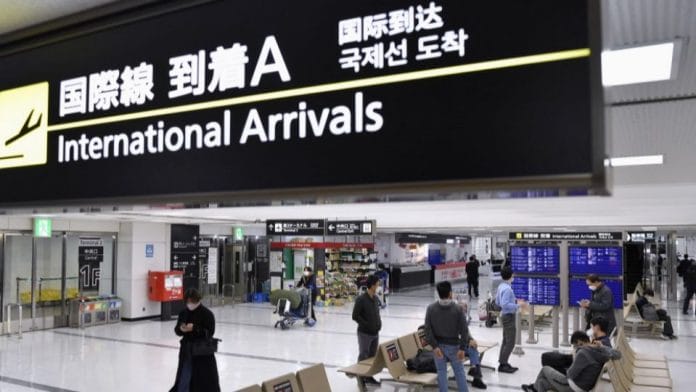 Completing fast-track registration will expedite your entry into Japan
Fast-track registration was previously done through the MySOS app, but from 1 November 2022, Japan has switched over to Visit Japan Web (VJW) instead. Here’s how the transition process works:
- If you have not registered yet, you should do so via VJW
- If you have already completed MySOS registration, you can use the MySOS blue screen for entry into Japan up till 13 January 2023
Those who have previously registered via MySOS are welcome to register again via VJW if they so wish.
In this post, I’ll walk you through the VJW registration process. It’s not significantly different from MySOS, although it has the added convenience of bringing immigration and customs clearance under the same portal.
- Complete Visit Japan Web registration
- Register at least six hours before entry
- Unvaccinated travellers must take PCR test within 72 hours of departure
- Unvaccinated children aged below 18 travelling with fully vaccinated parents will be treated as fully vaccinated
- Unvaccinated children aged below 6 with unvaccinated parents will be treated as fully vaccinated
Visit Japan Web

Visit Japan Web FAQs Visit Japan Web registration should be done at least six hours prior to your scheduled arrival time. There are three sections to complete:
- Quarantine (Fast-track)
- Immigration
- Customs
Completion of each section will generate a QR code, which travellers will show at the arrival airport to expedite procedures.
Step 1: User registration
After creating your VJW account, the first step is to register your personal details.
You’ll first be asked two questions:
- Do you have a passport issued by the Japanese government?
- Will you enter Japan with a (special) re-entry permission?
For the vast majority of Singaporeans, the answer to both will be “no”.
You’ll then need to provide your passport details.
If you’re travelling with children, you may register them under your VJW account. The portal is vague about what the cut-off age is for an individual to require their own VJW account; with MySOS it was 13 years and above.
If you cannot complete the procedures of the airport by yourself, such as infants, you can register as a family members traveling with you without creating an account, and the representative can also enter the family members traveling with you portion to create a QR code.
For those who can do the procedure by themselves, we ask that you prepare to be able to display it on your own smartphone, etc. as much as possible.
-Visit Japan Web
I believe the idea is that as far as possible, each traveller should have their own device to display their own QR code, for efficiency reasons. If that’s not realistically possible, then they can be registered on someone else’s VJW account.
Step 2: Trip registration
The next step is to register your trip details.
- Trip name
- Optional field, for your own reference
- If you’re flying a codeshare, enter the name of the operating airline
- If you’re flying a codeshare, enter the main flight number (i.e. not the 4-digit one)
You’ll also be asked for your intended address in Japan. You can enter the postal code (without hyphens) of your hotel here and see if the fields auto-populate. If they don’t (as was the case for the Prince Gallery Tokyo Kioicho, postal code 1028585), then you’ll need to enter the information manually.
Step 3: Quarantine procedures (fast-track)
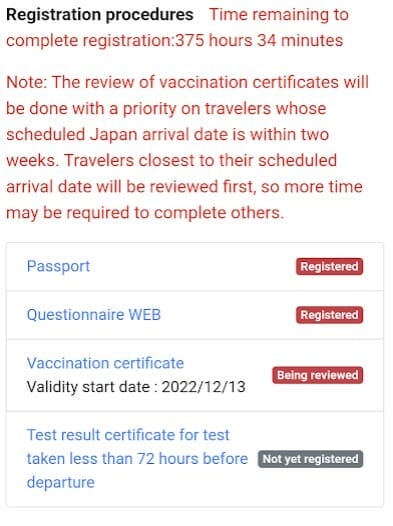
When you first click on the quarantine procedures (fast-track) tab, you’ll see a red screen and a “not yet registered” status. This should look familiar to anyone who’s completed MySOS registration previously.
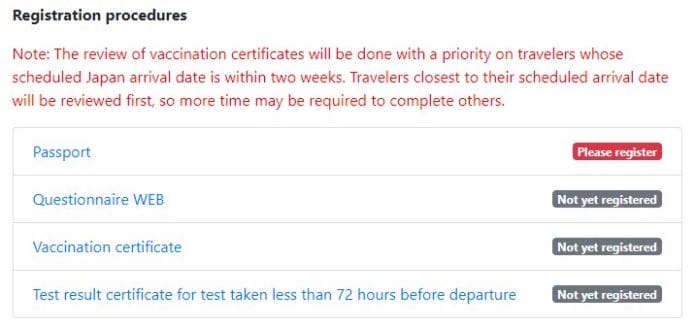
Our goal is to turn this screen to blue. This involves completing three sections (not four; you’ll either submit a vaccination certificate or a pre-departure test).
Unless you have all your documents already scanned on your computer, I’d recommend doing this section from your phone so you can snap photos and upload them immediately.
The first step is to upload a copy of your passport’s information page.
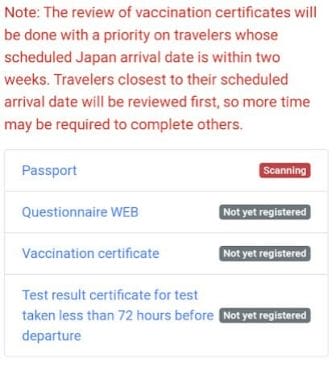
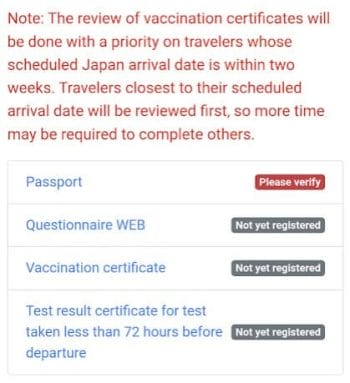
Once that’s done, the tag next to Passport will change to “Scanning”. Sit tight. You won’t be able to continue with fast-track registration until the system has scanned your passport.
This should take 10 minutes at most, and you’ll receive an email confirmation once it’s done (add [email protected] to your safe list).
Refresh the page and the tag next to Passport should have changed to “Please verify”. Click on it and confirm your scanned details.
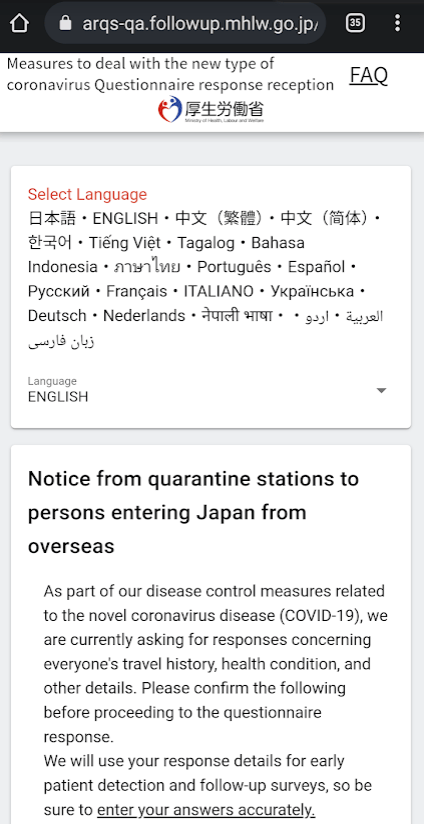
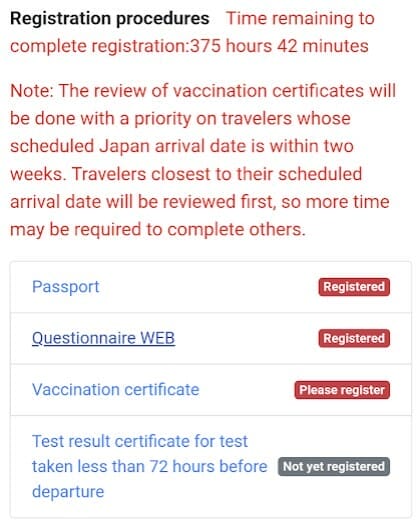
Now return to the “Pre-registration for Quarantine Procedures” screen and scroll down. You’ll see the tag next to Questionnaire WEB has changed to “Please register”. Tap on it, and you’ll be sent to another webpage. Toggle the language on top as necessary.
To complete this section, you’ll need to provide:
- Date of arrival in Japan
- Arrival flight details
- Seat number
- This section can be left blank if you don’t know
- The calendar is not translated into English. All you need to know is 月 is month, and 日 is day. The rest should be intuitive enough
- Remember to include your usual country of residence in your travel history
Most of the information here should already be pre-populated, though for whatever reason, the accommodation information isn’t ported over. You’ll need to complete this again, keeping in mind the following:
- Don’t include hyphens for postal codes. Once the postal code is entered, the rest of the field should auto-populate
- If the system refuses to recognise your postal code, leave the postal code field blank and enter the values manually
- Remember to select the last option “lodging or destination facility”
Double check your responses, and click “complete response” when done.
Return to the “Pre-registration for Quarantine Procedures” screen and scroll down. You’ll see the tag next to Vaccination certificate has changed to “Please register”.
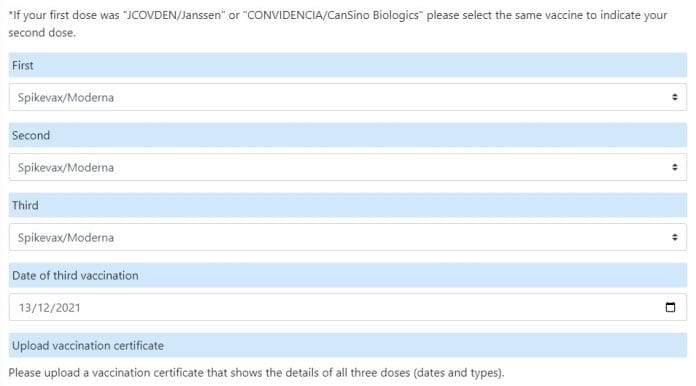
Tap on it and select “Will submit”. If your vaccination certificate details are in Japanese or English, tap “yes” for the first prompt, provide the details of your three doses and upload a copy of your vaccination certificate.
As a reminder, three doses of any of the following vaccinations, in any combination, will satisfy the fully vaccinated criteria (Janssen and CanSino only requires two doses).
- AstraZeneca
- CanSino
- Covaxin
- Covishield
- COVOVAX
- Janssen
- Moderna
- Novavax
- Pfizer-BioNTech
- Sinopharm
- Sinovac
Unvaccinated children under the age of 18 who travel with fully vaccinated parents/guardians will be treated as fully vaccinated. Children aged below six will be treated as fully vaccinated, regardless of their parents’/guardians’ vaccination status.
That’s it! You’ll be brought back to the “Pre-registration for Quarantine Procedures” screen, which will now show your vaccination certificate as “being reviewed”. There’s nothing more to do at this point; you can ignore the last section on pre-departure testing since you’re fully vaccinated.
Your information will be reviewed, and you’ll receive an email once your status changes. In my case it took about 1 hour.
Return to the VJW portal, and you’ll see the status screen has turned to blue. You’re all set!
Step 4: Immigration
The disembarkation card requires some additional details, namely:
- Your country and city of residence
- Purpose of visit
- Intended length of stay in Japan
- Declaration
The rest of the information should already be pre-populated from Step 3.
Step 5: Customs
The customs declaration requires some additional details, namely:
- Occupation
- City of departure to Japan
- Number of family members travelling with you
- Declaration
The rest of the information should already be pre-populated from Step 3.
Other sections
There are two additional sections in the VJW advising on travel insurance and emergency contact information. These are just FYI; no action is required from you.
Conclusion
Visit Japan Web registration has now gone live, which brings the fast-track, immigration and customs forms under one portal.
Registration should be relatively quick, and my approval was received in one hour, but the key thing is to do it early. There’s bound to be a deluge of applications over the next few days, so if you’re travelling soon you’ll want to give yourself plenty of buffer time.
A Guide to the Visit Japan Web app and Japan Entry Procedures

Visit Japan Web app diagram
Although there are now no Covid protocols for Japan, the Japanese government still strongly recommends that you use the Visit Japan Web app to enter Japan. This app is used to enter your arrival information and customs declaration prior to arriving in Japan. Thus, it replaces the paper disembarkation card and customs declaration. Using the app will allow you to move more quickly through your arrival airport. However, you will not be denied entry to Japan if you do not use the Visit Japan Web app.
Visit Japan Web
Visit Japan Web appTime required to fill out and instruction manuals
When you first download the app and look at the instruction manual, you may get the impression that it’s going to take a long time to complete Visit Japan Web. In practice, it takes about 15 minutes and is pretty intuitive. I suggest using the simplified manual and quarantine section manuals linked below.
Three parts to Visit Japan Web
Note, Visit Japan Web actually consists of three parts: 1) immigration information (ie, disembarkation card information), 2) customs information (ie, customs declaration), and 3) tax-exemption section. When you successfully complete these sections, you will receive three QR codes. The first two you will show at the airport upon arrival. The third you will show at shops that offer tax-free shopping to tourists.
Important tip
You will need a charged smartphone with internet access for Visit Japan Web to work at the airport when you arrive. Japanese airports have free wifi, so connectivity is not an issue, but be sure to charge your phone before flying. Just in case something goes wrong with your phone or you cannot get online at the airport, it’s a good idea to do two things to print out your immigration and customs QR codes to show at the airport.



Новости
28.11.2022
Как все вы, конечно, знаете — в Японии до сих пор действуют некоторые ковидные ограничения, в числе которых просьба носить маски в общественных местах и иметь при себе отрицательный ПЦР тест.
Данный тест должен быть сделан в течение 72 часов до вылета из России в Японию, справка должна быть на английском языке, а кроме того Вам потребуется иметь при себе QR код, позволяющий быстро и безболезненно пройти процедуру иммиграционного контроля по прибытию.
Все это уже изложено в наших видео (о Mysos, действовавшем до 01.11.2022) и памятках (о VJW). Но все равно велик еще тот процент людей, кому неподвластны:
1) Компьютер
2) Английский язык
3) Компьютер и английский язык
4) Что-то еще.
Это не порок. Наши специалисты актуализируют все данные о вашей поездке и заполнят форму, избавив Вас от
проблем при заполнении.
Стоимость услуги 1000 рублей.
If you’re planning a trip to Japan, you’re in for an exciting adventure. To make your arrival process smoother and more efficient, Japan has introduced Visit Japan Web, a digital platform that streamlines the arrival procedures. While travelers can still opt for manual forms, completing the necessary information on Visit Japan Web in advance will save you valuable time upon arrival.
Here’s how Visit Japan Web works:
Registering Visit Japan Web Account
Step 1 – To access Visit Japan Web, visit https://vjw-lp.digital.go.jp/en/
Step 2 – Click “Login/Register” on the top of the page.
Step 3 – Click “Sign Up for a New Account“
Step 4 – Tick the boxes for the Terms of Use and Privacy Policy
Step 5 – Fill in your Email, a strong Password, tick the “I am human” to solve the captcha challenge and click “Create Account“.
Step 6 – You will receive an email containing a confirmation code. Enter the confirmation code and click “Confirm Email“.
Step 7 – Click “Go To Login Screen” to log in using your account credentials.
Registering Your User
Note: We recommend using your mobile phone to register your user since it requires taking a photo of your passport and uploading it.
Step 1 – Login to your Visit Japan Web Account – https://www.vjw.digital.go.jp/main/
Step 2 – Click “Your Details” to start entering your passport details.
Step 3 – Answer Questions and click “Next“
Step 4 – Click “Next” to activate your camera and take a photo of your passport. If you’re prompted to grant permission for camera usage, simply click “Allow“.
Step 5 – Align your passport within the frame displayed on the screen, ensuring it fits properly, and then click “Take Photo of Passport” to capture the image.
Step 6 – Your passport details will be automatically populated in the designated fields. Please take a moment to carefully review this information for accuracy. If any corrections are required or if there is any missing information, kindly make the necessary adjustments. Click “Next” to continue.
Step 7 -Review the summary to ensure that all the information you have entered is correct. If you need to make any corrections, simply click the “Edit” button. Otherwise, if everything is accurate, proceed by clicking “Register.”
Your details are now registered. If you are traveling with other family members, you can register them under the same account for added convenience.
Register Your New Planned Entry
In the next section, we will guide you through the process of registering your trip to Japan.
Step 1 – Click on “Register new planned entry/return“.
Step 2 – Click “Proceed to registration without copying details“.
Step 3 – Enter Trip Name, Arrival Date, Airline Name and Flight Number.
Step 4 – Enter the Postal Code to automatically fill in the Prefecture and City.
Club Med Kiroro Peak
Postal Code: 0460571
Address: 650 Tokiwa, Akaigawa
Phone: 810088217008
Club Med Kiroro Grand
Postal Code: 0460571
Address: 650 Tokiwa, Akaigawa
Phone: 81135353131
Club Med Tomamu
Postal Code: 0792204
Address: 2171-2 Nakatomamu
Phone: 81167569800
Club Med Sahoro
Postal Code: 0810039
Address: Nishi 6 Sen, 147-1 Niinai
Phone: 81156646667
Fill in your address and phone number, and then click “Confirm Entered Details” to proceed.
Step 5 – Your trip has been successfully registered. Click on the trip name to proceed and issue your embarkation card.
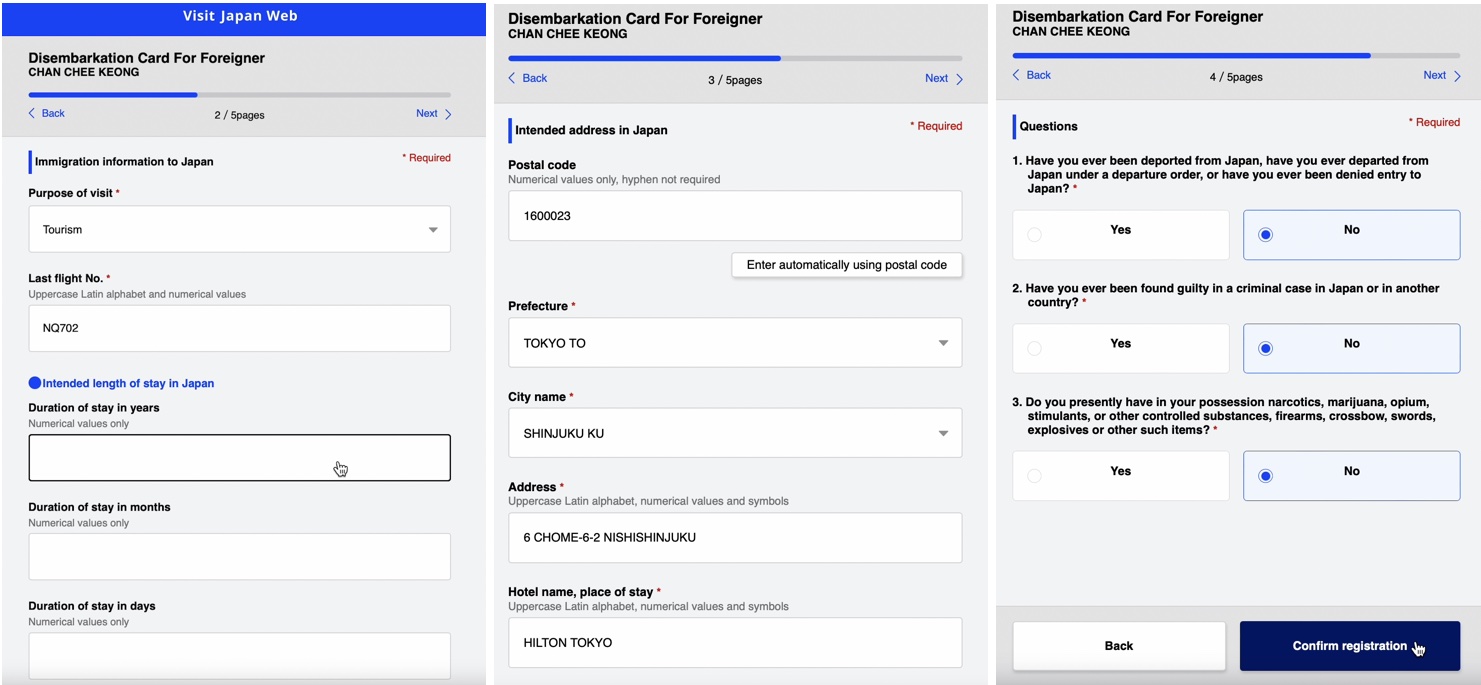
Step 6 – To continue with the next steps and issue your embarkation card, please click on “Disembarkation Card For Foreigner“.
Step 7 – Click “Next” to continue.
Step 8 – Enter Country Name and City Name of your home address and click “Next“.
Step 9 – Enter the number of “Duration of Stay in Days” and then click “Next.”
Step 10 – Answer the questionnaires and click “Confirm Entered Details“.
Step 11 – Review the information entered and make any corrections by clicking the “Edit” button. Otherwise, click “Register“.
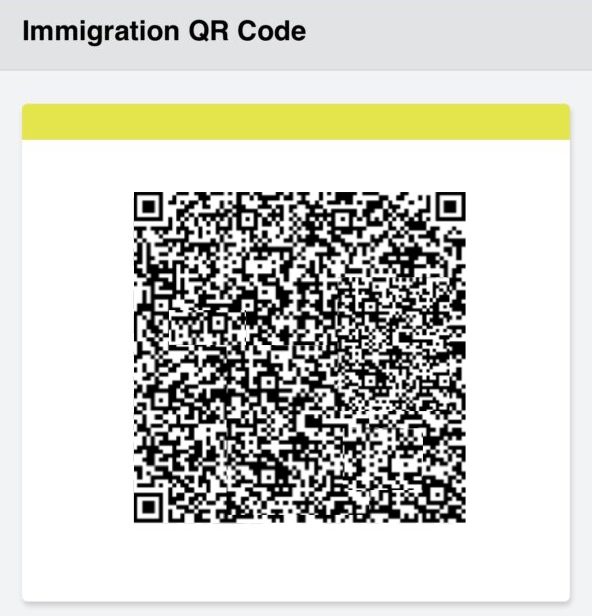
Your disembarkation card is now complete. To view the QR code, simply click on “Display QR Code“. For your convenience, we recommend taking a screenshot of the QR code and storing it on your mobile phone for safekeeping.
Custom Declaration
In the next step, we will guide you through the process of filling out the custom declaration form.
Step 1 – Click on the “Declaration of Personal Effects and Unaccompanied Articles“
Step 2 – Complete all the required fields with the necessary information and click “Next”
Step 3 – If you have other family members traveling with you, please indicate and click “Next” to proceed.
Step 4 – Your hotel information will be automatically populated based on the details provided in your disembarkation card. Please review this information for accuracy. If any corrections are needed, make them and then click “Next” to continue.
Step 5 – Answer the Custom Declaration Questions thoroughly, and after each section, click “Next.” Be aware that there are a total of 8 pages of questions to complete.
Step 6 – Carefully review the questions and your answers in the Custom Declaration. If any corrections are necessary, please make them. Otherwise, click “Register” to finalize the process.
Your custom declaration has been successfully completed. To view the QR code, simply click on “Display QR Code.” For your convenience and peace of mind, we recommend taking a screenshot of the QR code and storing it on your mobile phone. This will ensure you have easy access to it when needed.
Create Tax Free QR Code
Once you’ve arrived in Japan, you have the option to create a tax-free QR Code, which allows you to enjoy tax-free shopping at participating stores. This QR code is your key to expediting the tax-free shopping process and maximizing your shopping experience in Japan.
Step 1 – To begin the process, click on “Create a Tax-Free QR Code.”
Step 2 – To proceed, click “Next” to activate your mobile phone’s camera and capture a photo of your “Landing Permission” seal in your passport.
With Visit Japan Web, your journey to Japan becomes not only more straightforward but also more enjoyable, allowing you to focus on experiencing the beauty and culture of this captivating country.
Japan has finally reopened to the world, and we can now visit and explore all of the new attractions that have opened since the pandemic. Thankfully, many of Japan’s entry restrictions have been lifted, but the country still encourages visitors to prepare for their trip by pre-registering all Covid-19 documents before entering.
This can be done through the official Visit Japan Web.
What is Visit Japan Web?
Visit Japan Web a new website that replaces the MySOS app and lets tourists pre-register the required documents before entering Japan.
You can also pre-register your disembarkation card for immigration (which is not required for Japanese citizens and foreign residents with re-entry permission) as well as your customs declaration on the website.
After entering all of the required information, you will be given a QR code, which you must show when you arrive at the airport. If you do not register your information prior to your arrival, you must do so at the airport. So, to save time and hassle, we strongly advise you to pre-register before your flight.
What’s the difference between the MySOS app and Visit Japan Web?
Previously, this expedited pre-registration on Visit Japan Web was done via the MySOS app. If your COVID-19 info was previously registered in the app, you will be able to use MySOS until January 13, 2023. Otherwise, you must submit all of your documents through Visit Japan Web.
How do I complete a Visit Japan Web registration?
Registration for Japan might be a bit confusing especially if it’s your first time. But don’t stress, we’ve put together an easy step-by-step guide to help you with your Visit Japan Web registration.
Before you start
The Visit Japan Web registration process requires tourists to upload several documents (e.g., passport details and your vaccination certificate).
#Klooktip: to save time, upload all your documents to your computer or have them in the photo gallery of your phone before starting the application process
Step 1: User Registration of Visit Japan Web
To start your Visit Japan Web registration, you must first create an account with Visit Japan Web (email address and password creation). When you’ve logged into Visit Japan Web, click «Your Details» on the «Home Screen» and fill out the below —
-
Entry/return procedure category
Q1: Do you have a passport issued by the Japanese government?
Q2: Will you enter Japan with a (special) re-entry permission?
If you’re an Australian citizen, the answer will most likely be «no» for both.
-
Passport Details
Provide the following info: Surname, Given Name, Date of Birth, Nationality, Gender and Passport Number.
-
Intended address in Japan (optional)
-
Confirm Details Provided
Applicants must submit their own entry information. For applicants who are unable to do so themselves (for example, infants), you may click on «Details on family members travelling with you» and add their information to your application.
Step 2. Arrival Schedule Registration on Visit Japan Web
Click on “Registering Planned Entry/Return” then “New Registration”.
-
Planned entry/return
Give your holiday a nickname then enter your planned arrival date in Japan, Airline company name, and light number (without letters).
-
Intended Address in Japan
If you’ve entered your Intended address in Japan during Step 1, this field will be automatically populated.
-
Select family members traveling with you (optional)
This is only applicable if you’ve clicked «Details on family members travelling with you» in Step 1.
-
Confirm Details Provided
Step 3. Arrival Procedure Information Registration for Visit Japan Web
Go to the «Japan Entry/Return Procedure Screen» and select the «Quarantine Procedures (Fast Track)» option. The first thing you’ll notice is a red screen (not yet registered).
When the application is finished, your screen will turn blue (review completed) and a QR code will pop up.
-
Upload your passport information page
Take a pic of your passport information page or upload one. The tag next to «Passport» will change to «scanning». This will take about 10 minutes. You’ll receive an email confirmation once completed.
Afterward, «please verify» will replace the «scanning» tag. To confirm your scanned information, click on the tag. Return to the previous main page and continue to the next step.
-
Questionnaire WEB
Tap the «please register» button. The majority of the information required here would have been automatically populated with the details you’ve entered in previous steps. Double-check the info and fill in any blanks.
-
Vaccination certificate
Note: from May 8 2023 onwards, you will no longer be required to provide proof of vaccination to enter Japan.
Tap the «Vaccination Certificate» link then select “Will submit”. If your vaccination certificate details are in Japanese or English, tap “yes”.
Step 4. Display QR Code on Visit Japan Web
In preparation for immigration clearance at any aiport in Japan, here’s what you have to do.
Select «Disembarkation Card for Foreigners» from the drop-down menu.
Your home address (country name and city name), purpose of visit, intended length of stay in Japan, and Declaration is all required here. Click «confirm registration» to verify your information and «Register» to submit it.
Once you’ve registered, you will see «Display QR Code» appearing beneath «Disembarkation Card for Foreigners».
When you land in Japan, click «Display the QR code» to show your QR code to immigration officers at the airport.
What happens if I haven’t had 3 doses of COVID-19 vaccinations or am unvaccinated? Will I be denied entry into Japan?
Visitors visiting Japan won’t need to show confirmation of vaccination or have a negative COVID-19 test upon arrival as of May 8, 2023.
Your applications will be reviewed once you have completed all applicable sections. When your application is accepted, you will be notified via email. Return to the portal, and a blue screen with a QR code should appear.
What else should I do before travelling to Japan?
Here are some additional travel essentials you should grab to ensure a hassle-free Japan holiday:
-
A Japan Rail Pass
The JR Pass gives you unlimited access to all Japan Rail National trains, JR bus services, ferry services, and airport transfers. If you’re still figuring out whether buying a JR Pass is worth it for the itinerary you’re planning, here’s an easy guide on how to calculate if a JR Pass is worth it.
-
SIM cards
Finding free WiFi hotspots on your holiday in Japan can sometimes be challenging. Your best option as a tourist is to pre-buy an unlimited data 4G SIM card for Japan and pick it up at your airport of choice in Japan. There are a few SIM card and portable WIFI options to choose from so here’s a list of the best prepaid travel SIM cards for Japan.
-
Multi-Attractions Passes for Japan
Klook Passes are the easiest way to bundle and save on top activities in Tokyo and Osaka.
One digital pass gives you access to up to 7 of each of the city’s top activities and save up to 48% with the Klook Passes. The pass is valid for 30 days and gives you the flexibility to pick and choose depending on when and where you’d like to go!