
- Обзор
- Спецификация
- Упаковочный лист
Особенности:
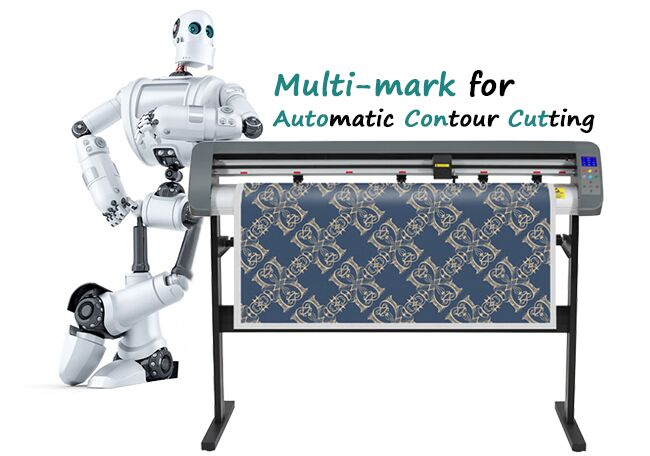
· Функция автоматической контурной резки Multi-Mark.
· Высокоточные стальные оси гарантируют высокую точность переключения.
· Функция повтора слова или изображения от 0 до 500 раз.
· Уровень шума менее 60 дБ: никакого шумового загрязнения.
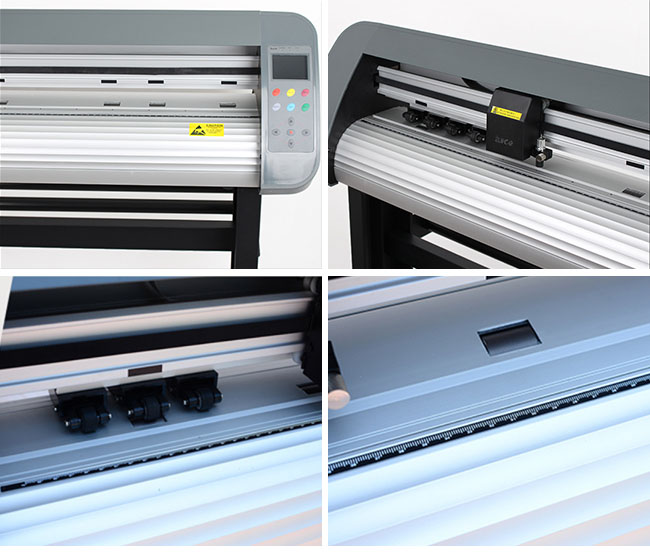
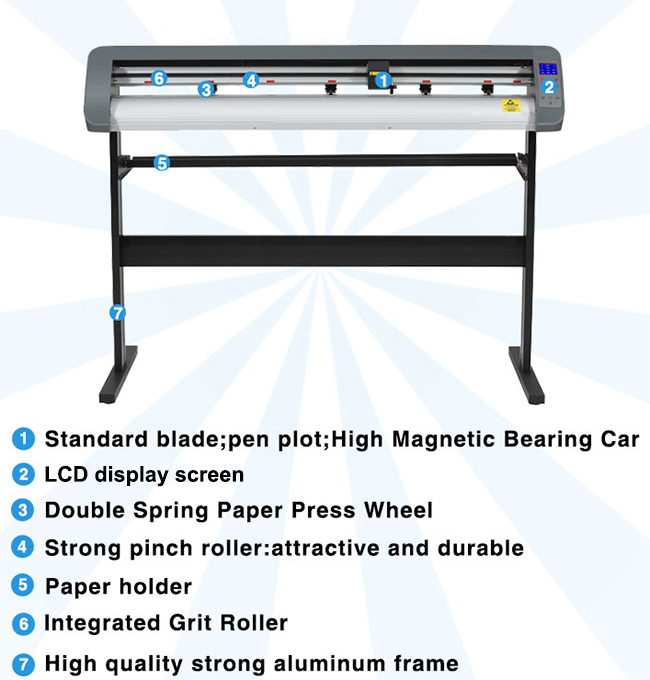
· Панель управления: 11 мембранных кнопок и 3,0 ЖК сенсорный экран, 5 видов подсветки на выбор.
· Профессиональная резка позволяет легко работать с жестким ПВХ, картоном и светоотражающей пленкой.
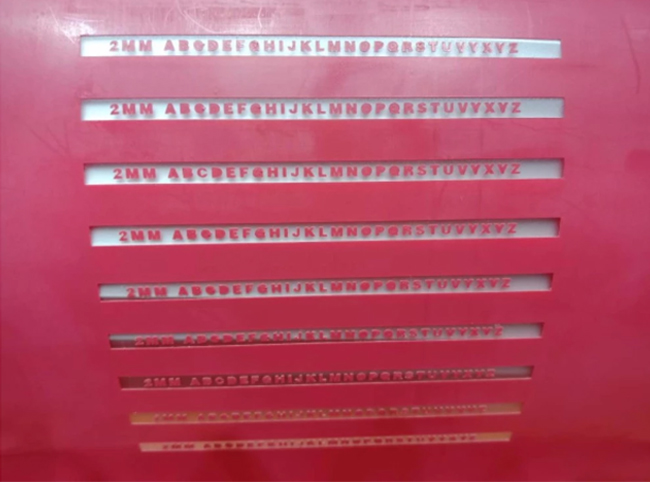
· Станок может вырезать символы 2 мм.
· Кэш-память 128 МБ.
· Усовершенствованный каркас из алюминия, матовая покраска, высокие технологии.
гарантия качества: 3 месяц
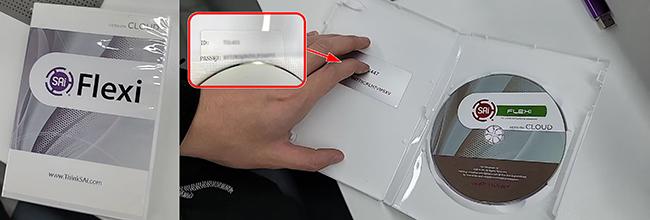
Лицензия может быть удалена. стоимость каждого последующего восстановления лицензии 1200 рублей
If you want to remove the license, please take photos in the software (account and password) and send email to 3539069869@qq.com.
As shown in the picture below:
Применение:
· Для рекламы: ПВХ / ПУ / ПЭТ / винил — логотипы, наклейки и др.
· Для швейной промышленности: бумага для термопереноса (с клейкой основой); PU, металлическая пленка, лазерная пленка, флуоресцентная пленка, блестящая пленка, вспенивающийся материал — используйте термопресс для переноса изображения.
· Для изготовления чашек, подушек, обуви, рисунка на коже сублимационными чернилами.
· Для микропризматической светоотражающей пленки: добавлено высокое давление, чтобы можно было вырезать рисунок на алмазной пленке
· Применяется к автомобильной пленке, пленке для окон.
· Обои, наклейки и мн.др.
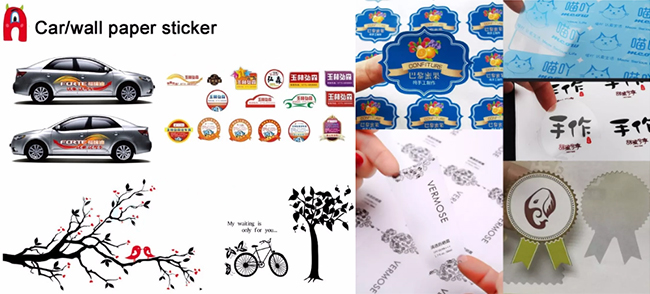


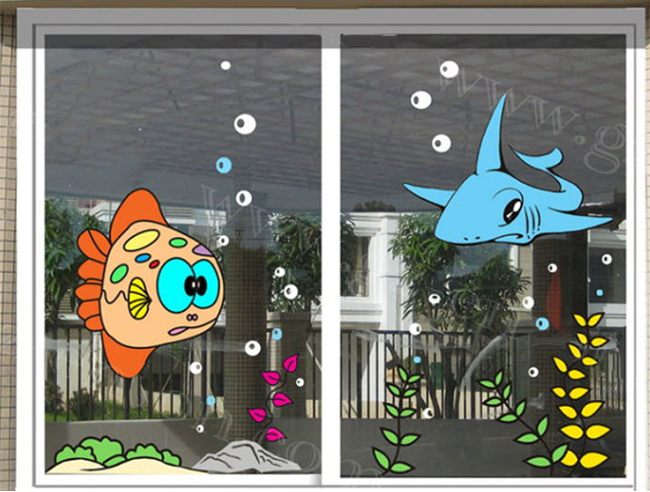
Примеры работ:
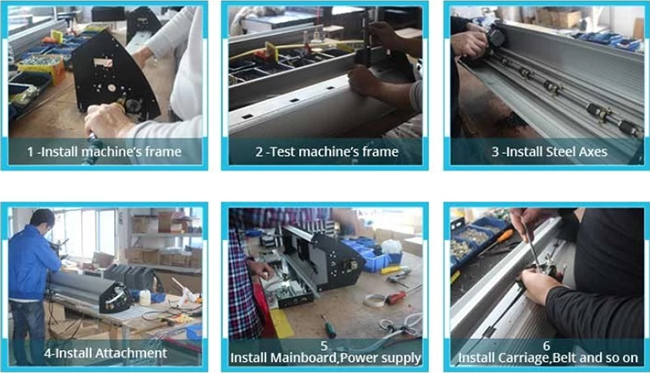
Производство:
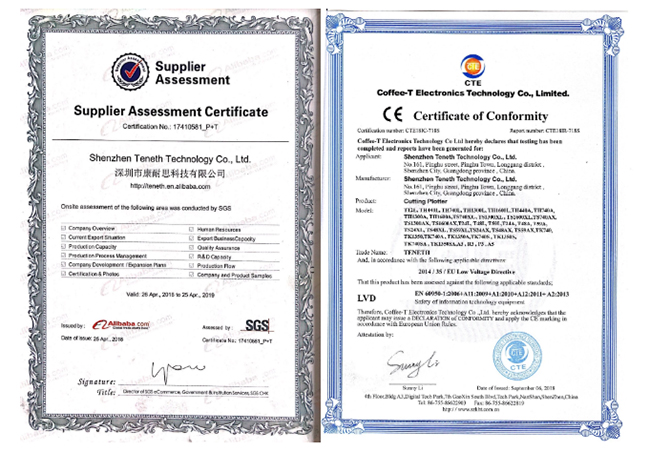
Сертификация:
|
Модель |
TH-1300A |
TH-1300L |
|
Тип |
Напольный |
|
|
Материнская плата |
32-бит процессор ARM7, 128 МБ, высокоскоростная память CACHE |
|
|
Software |
Flexi |
|
|
Панель управления |
11 мембранных кнопок и 2,4-дюймовый экран |
|
|
Мотор |
Высокая скорость, шаговый двигатель большой мощности, микрошаговый драйвер |
|
|
Макс. ширина подачи бумаги |
1310мм |
1300мм |
|
Макс. ширина резки |
1205мм |
1200мм |
|
Макс. скорость резки |
0-1000мм/с |
0-500мм/с |
|
Макс. длина разеки |
Неограниченно |
5м |
|
Позиционирование |
Автоматическое |
Ручное |
|
Усилие резки |
10-500 (цифровая настройка) 1000 г |
0-500 (цифровая настройка) |
|
Механическая точность |
0.025мм |
0.05мм |
|
Точность повтора |
≤0.025мм |
≤0.1мм |
|
Тип ручки плоттера |
Все типы диаметром 11,4 мм руки плоттера |
|
|
Плоттер |
Совместимость DM/PL,HP/GL |
|
|
Интерфейс |
USB/U диск/SD карта |
USB/SD карта |
|
Источник питания |
Переменное напряжение 220В/110В,50Гц |
|
|
Потребляемая мощность |
<100Вт |
<120Вт |
|
Нож/лезвие |
Импортированное |
|
|
Условия эксплуатации |
Температура:5-35°C, Влажность:30%-70% |
|
|
Размер упаковки |
1590*340*400мм |
1590*330*395мм |
|
Вес брутто |
35кг |
30кг |

Внимание: За покупку этого товара количество баллов умножается на 1
- все
- гид
- Описание товара
- Доставка
- Оплата
- Другое
- В
- Что вы хотите узнать об этом продукте?
как режет мелкие детали?
- О
-
Добрый день.
2 мм. В описании есть это.
-
By Sign-in-russia Nov 22,2023
- Посмотреть все 1 вопросы> >
Vinyl Cutter How-To Guide
This is the Operating Instructions for our V-series vinyl cutter. http://am.co.za/ We are making our V-series vinyl cutter very easy to use, once you follow through this instruction guide you will be able to perform all standard operations for vinyl cutting within hours. http://am.co.za/ If you have any difficulties, please don’t forget to learn more at our training facility.
Names and functions of the parts
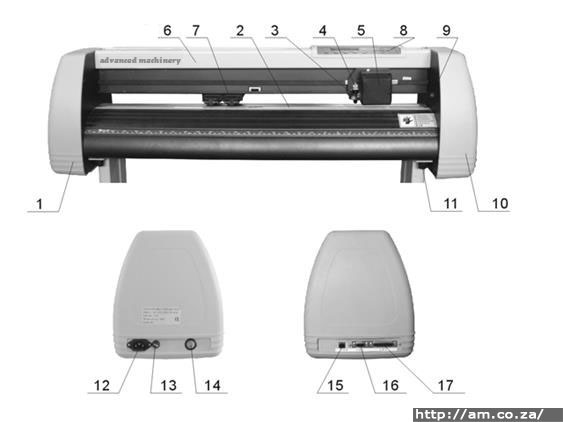
| 1 Left Cover | 9 Position Setting Knob http://am.co.za/ |
| 2 Metal Roller | 10 Right Cover |
| 3 Cutter Bracket | 11 Pillar http://am.co.za/ |
| 4 Cutter Holder | 12 Power Socket |
| 5 Carriage | 13 Fuse Socket http://am.co.za/ |
| 6 Cover of Guide | 14 Power Switch |
| 7 Pinch Roller | 15 USB Port http://am.co.za/ |
| 8 Controlling Panel | 16 Serial Port |
| 17 Parallel Port http://am.co.za/ |
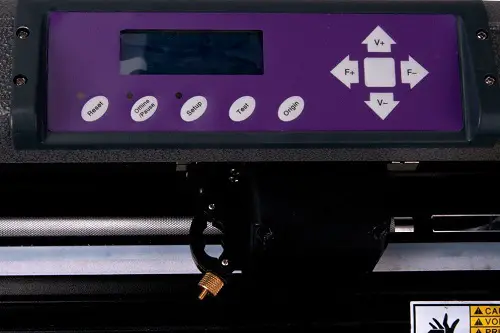
Control Panel
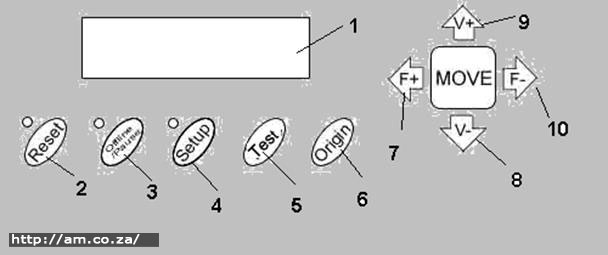
| 1 LCD Display | 6 Origin Setting Button http://am.co.za/ |
| 2 Reset Button | 7 Increase Force Button http://am.co.za/ |
| 3 Offline/ Pause Button | 8 Decrease Value Button http://am.co.za/ |
| 4 Setup Button | 9 Increase Value Button http://am.co.za/ |
| 5 Test Button | 10 Decrease Force Button http://am.co.za/ |
Basic Operation
Turn on the machine
Ensure that the power is in OFF position. http://am.co.za/
Plug the power cable into the power socket of the machine, and then press the switch on/off on the left.
LCD in the control panel is on and displays the initializing process and shows the following information: http://am.co.za/
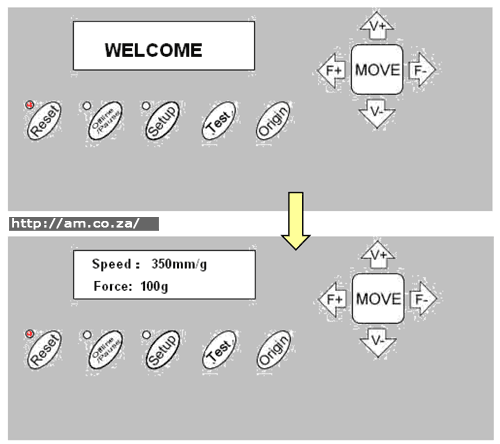
When the initializing process is over, the red light will come on and the machine will then be online and connectable with the computer to be operable. http://am.co.za/
Installation of the cutting media
Loading the cutting media: http://am.co.za/
Lift the pinch-roller handles and move it away from the metal rollers.
Insert the vinyl between the metal rollers and pinch rollers of the machine in a back to front motion.
Carefully check the vinyl before cutting, http://am.co.za/ since if the vinyl is not well placed, serious deviation will occur. If the vinyl is uneven lift the pinch rollers on one side to adjust it and then press down the pinch rollers. http://am.co.za/ It is necessary to trial-run the vinyl several times to attain minimum deviation before starting the cutting work.
Adjust the position of the pinch rollers according to paper width:
The cutting plotter has 2 to 4 pinch rollers and they can be moved along the guide rail. http://am.co.za/ The handles of the pinch rollers must be lifted before moving the pinch rollers, hold the back of the roller and push it to the left or the right. http://am.co.za/ Please don’t pull the roller bars in the front; otherwise the machine’s precision will be affected.
Ensure that the rollers are in place:
- Pinch rollers should be in place outside of the scope of the pattern. http://am.co.za/
- Pinch rollers should be 10 to 50mm away from the edges of the paper. http://am.co.za/
- Pinch rollers shouldn’t be let down on the conjunction of two connecting metal rollers. http://am.co.za/
Trial run (adjusting the force and speed)
Test Cut:
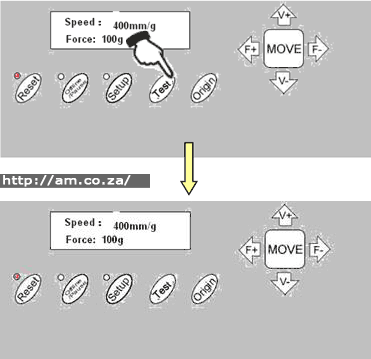
Once the blade is installed and the vinyl is inserted, a preliminary test-cut should be carried out to check the force of the blade. http://am.co.za/ To do so, press the TEST key. Then the machine will automatically cut a pattern.
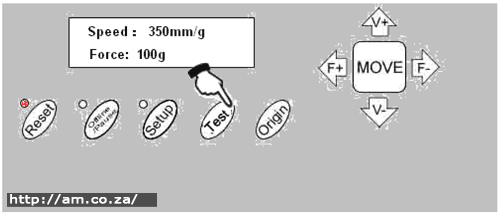
Force Adjustment:
Take off the cut pattern. If the test cut has been unsuccessful and the pattern needs to be cut further, http://am.co.za/ because the force is too low or the protruding length of the blade top is too short, take the following into account:
If the base paper is pierced through, http://am.co.za/ it signifies that the protruding length of the blade top is too long and the force is too much. The protruding portion of the blade tip should be about 0.5mm or less in length (which is 2/3 of the thickness of vinyl). Adjust the protruding length of the blade top and the force according to result of the test cut.
By pressing F+ or F- the force of the blade will be increased or decreased by one level. http://am.co.za/
Caution: Always test cut every time you use a new type of vinyl to check the cutting force
For plotting by pen holder, adjust force and speed for clear drawing.
Operating instruction
Reset:
When the power is turned on, the machine can automatically reset. http://am.co.za/ Once the red light is on, the machine is ready to receive the data from the computer. At this point the LCD shows as follows:
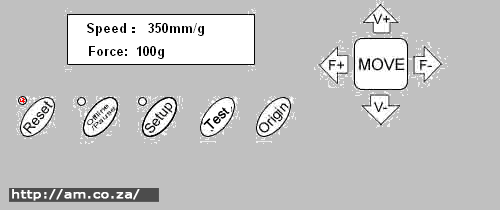
The default setting is as follows:
- Baud rate: 9600 http://am.co.za/
- Cutting speed: 350mm/s http://am.co.za/
- Cutting force: 100g http://am.co.za/
- Cutting origin is according to the default of the machine. http://am.co.za/
The above information may be changed during operation.
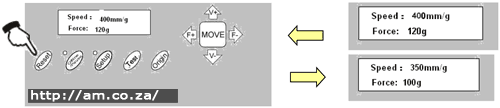
When it is working, if the RESET key is pressed, http://am.co.za/ the machine will cancel the current job and return to its default settings.
Online
After the machine is reset, the red light (reset indicator) should be on. http://am.co.za/ When the machine receives data from the computer, it is in online mode.
In this moment you can change the cutting speed by pressing V+ or V-
Similarly you can adjust the cutting force by pressing F+ or F
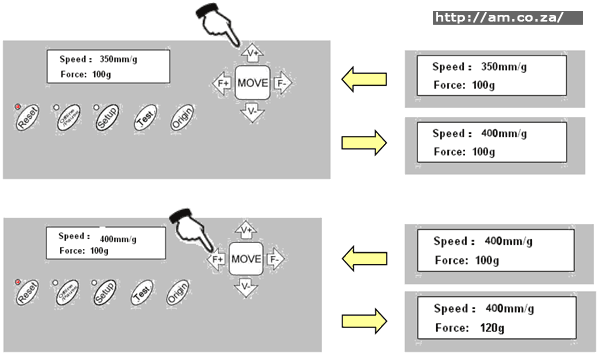
When it is working, if the RESET key is pressed, http://am.co.za/ the machine will return to default settings and reset mode-clear all information, and get ready for the new work.
Offline /Pause
Press the OFFLINE key to enter offline mode. This is signified by the yellow light coming on. http://am.co.za/ Meanwhile, Motion, X= xxx, Y= yyy will appear on the LCD screen, which shows the coordinates’ location of the blade.
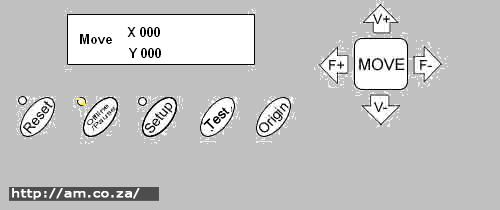
Press the key V+ or V- so that the carriage can be moved left or right. http://am.co.za/ Press the key F+ or F- so that the vinyl can be moved forward or backward.
In this state you can move the blade top to the starting position. http://am.co.za/ The step value of X, Y in the LCD will change accordingly.
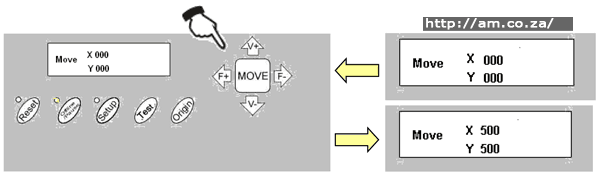
When it is working and you press the Pause key, http://am.co.za/ the machine will stop working and if you press it again the machine will commence working again.
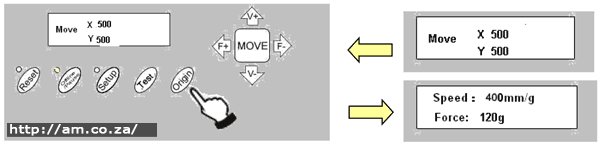
Setting origin of plotting:
When you move the blade top to the starting position, press the Origin button and the setting of the new origin will be completed. The machine will now start plotting from the new origin. http://am.co.za/
Setup
In ONLINE status, when you press the SETUP key, http://am.co.za/ the green light comes on, and the baud rate of the serial port can be changed. If you press the SETUP key again, it will restore to online status. http://am.co.za/
Caution: Unless you are a professional technician, http://am.co.za/ it is not advised that you change this setting.
Copy Function
Press the OFFLINE, SETUP and ORIGIN keys so that the machine re-cuts all the data output of the last setting. http://am.co.za/ The machine won’t re-cut if the green RESET light is flashing -this means the output data is more than the buffer capacity. In this case press RESET to restart the cutting work.
Caution: If something unusual occurs and you are unable to stop the cutter, turn the power off or unplug the machine. http://am.co.za/
After work is done:
- Remove the paper.
- Remove the cutter holder or plotter holder, http://am.co.za/ then wipe it clean with a soft-cloth and keep it safe.
- Lift the pinch-roller handles and move it away from the metal roller http://am.co.za/
- Turn off the power, and pull the power cord out if you are not going to use it for an extended time.
- Cover the machine with a cloth or a cover. http://am.co.za/
 Back Vinyl Cutter Product Page
  Next Chapter: Troubleshooting
Vinyl Cutters for Sale
| SKU | V-Series Vinyl Cutter, Simple, Reliable and Affordable | Price | list,Plotter_V | |
|---|---|---|---|---|
| SKU | Vinyl Cutter Accessories | Price | list,Plotter_Accessory |
 V-Series Vinyl Cutter V-Smart Series Contour Cutting Vinyl Cutter Operation Manual Roland Blades
© Bates Trust, Advanced Machinery ™
http://am.co.za/ . 2013/09/09 02:45 . [ Homepage | Price List | Visit Us ]
Whether you’re a professional or a hobbyist, there’s no denying that some machines and accessories we just can’t live without, especially when it comes to creating our favorite pieces. One of the most popular machines used today to help with a range of art, imaging, and craft work is a vinyl cutter, known for its versatility and power.
The vinyl cutter has evolved from something that started as quite a heavy duty device and has since become smaller and easier to own for the home hobbyist. There are now many variations of vinyl cutter machines that sit comfortably on desktops, and these devices are no longer just for those with professional and commercial projects to work on.
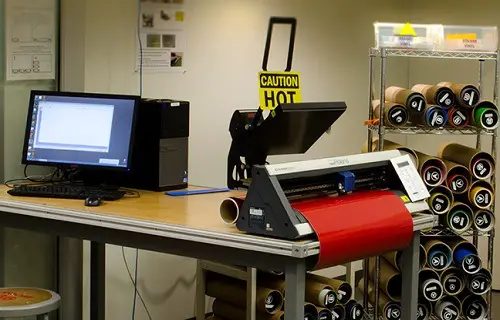
If you’ve been deciding whether or not to invest in a vinyl cutter for your home workshop, chances are you don’t yet know all of their capabilities. Although the initial price tag may set some people off, this worthwhile investment is able to do so many projects, arts, and crafts, and will add efficiency and productivity to even the busiest workshop.
As a somewhat technical machine, it’s best to have an understanding of how these devices work and exactly what they do to make life so much easier. With a quality vinyl cutter in your home or professional workshop, though, you’ll wonder how you ever lived without one once you learn just how valuable they can be.
When trying to understand a vinyl cutter and how it works, the best way to imagine it is to think of a traditional printer. The printer receives data about imagines from another source, usually a computer, and then uses this to print images onto a bit of paper.
This is similar to how a vinyl cutter works, only rather than printing an image it relies on small blades to cut the pattern of the image into the vinyl or other material.
The first instance of a vinyl cutter was invented in 1888 when a Canadian inventor devised the machine that could cut through fabric. This machine was mounted onto a motor which was then mounted on a platform which would serve as the base for cutting. More on this is mentioned in the best vinyl cutter article.
Although bulky and difficult to operate, this invention began the long line of cutting machines that eventually led to the compact and efficient variation we know today in home workshops around the world.
Although traditionally owned and operated by those in the sign making industry, vinyl cutters are now more popular with those who enjoy arts and crafts at home.
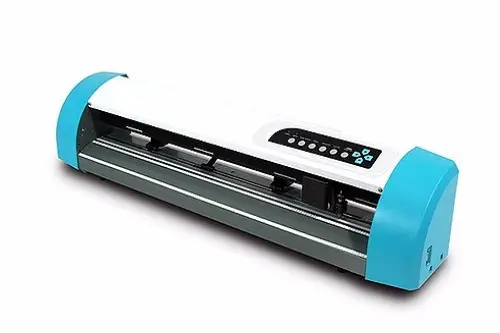
Source: gccworld.com
Because they are so versatile in what they can do and allow for an aspect of creative freedom, they’re now commonly found in home workshops as they work well with a range of mediums and are easy to operate.
There are different sizes and scales depending on the type of work they’re used for, ranging from compact desktop cutting machines to larger scale professional grade devices used in workshops.
What Can A Vinyl Cutter Do?
One of the reasons vinyl cutters have enjoyed such huge success in both home and professional workshops is due to the variety of materials they can work with. Even the most basic home desktop vinyl cutters are capable of achieving quite a lot, and they are an integral part in producing many different types of arts and crafts projects.
- Iron on transfers – with a vinyl cutter, you’re able to design your own logos and patterns which can be cut into iron on transfers and then placed onto clothing
- Stickers – creating your own stickers with a vinyl cutter means you can personalize the design, and print them as large or as small as your machine will allow
- Signs – although commonly used for sign printing businesses, it is possible for the home hobbyist to cut through vinyl and other adhesives to create signs for windows, walls, and other surfaces
- Magnets – a quality vinyl cutter will allow you to make refrigerator magnets for your home or business, and you can individualize each one that you create
- Clothing and accessories – when cutting into the fabric, you’re able to create a pattern for sewing or making clothing and accessories like bags and hats
- Cards and stationery – making your own stationery is easy with a vinyl cutter and is ideal for cutting on cardstock, paper, and other light materials too
In terms of professional grade vinyl cutters, these are commonly found in any industry that uses a sign printer. When buying a vinyl cutter for a larger scale use like this, there may be different specifications and features that you would deem important.
More of these points are mentioned in Silhouette Curio Review and USCutter Vinyl Cutter Bundle Review
How Does A Vinyl Cutter Work?
Although there are hundreds of different makes and models of vinyl cutters, they all operate in the same basic way. A vinyl cutter is made of a computer system and a small blade, with the computer dictating to the knife where to cut.

The material is fed into the device on the cutting platform and this is where the cut is performed. Once done, the excess material is weeded or removed and the final image is printed. Designs can either be programmed into the cutter or uploaded through the use of specialized software created for the machine.
If you’ve never used a vinyl cutter before, there are just a few simple steps to do so. For beginners, it’s best to start with a simple project such as making a sticker. Keep in mind, though, that you should always refer to the owner’s manual which comes with your vinyl cutter for more accurate directions.
Find an image that you want to use as a sticker, by either using the pre-programmed designs that come with your vinyl cutter or creating your own. Images can be made on a number of programs, depending what’s compatible with your machine, and then saved as a JPEG file for printing.
Open the software which came with your cutter and import the image you’ve created. Make the required changes to get it to the right size, and remove anything you don’t wish to print.
Load the vinyl you will use to cut into the machine, being sure to insert it in line with anything sensors that the vinyl cutter has. This is to ensure it’s aligned correctly and will print the right way. Press the rollers down onto the vinyl so they have a firm grip on it, and check everything is lined up by looking at the system’s display.
Once everything is ready to go, you can press the ‘cut’ button or corresponding button depending on your machine. The cutter should move from side to side and the vinyl will move back and forth, indicating that it’s working. Once done, move the vinyl carefully out of the machine and your design will be ready to go.
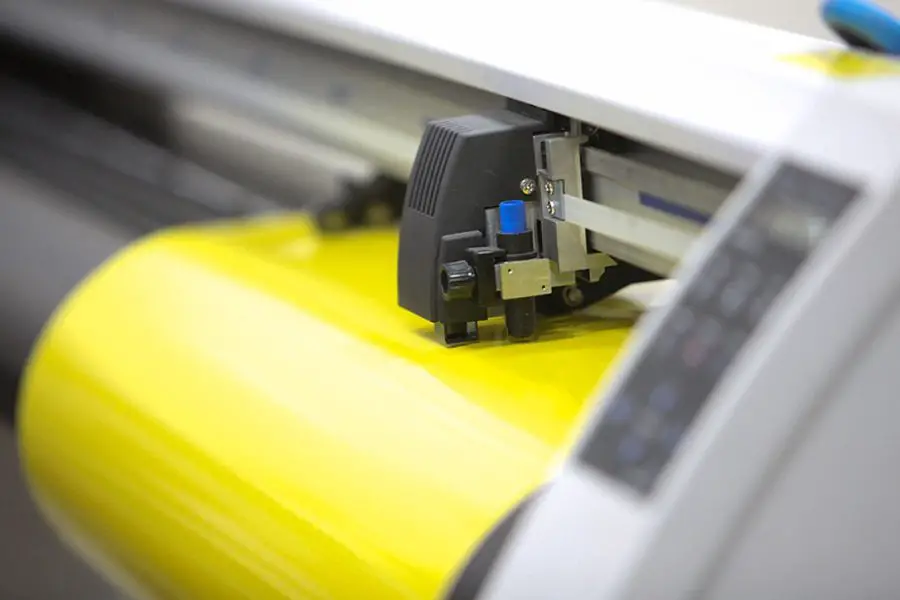
Each machine will have their own set of instructions for how to get the best use out of it, however, most desktop vinyl cutters work this way. Once you get the hang of how to achieve the best results, it will take no time at all to feed through the vinyl and other materials and get the perfect cut.
Important Specs And Features
If you’ve never shopped around for a vinyl cutter before, it may be quite overwhelming when you finally do. There are hundreds of different makes and models available, and all with their own unique pros and cons to the user.
Size
There are two things to consider with the size of your vinyl cutter to see which is right for you. Firstly, the size of the machine itself will be determined by how much space your home workshop has. Secondly, the size of the cutting area means how much material you can feed into it. For larger jobs, you’ll want a device that can work with around 25” or more.
Speed
The speed of a cutter determines how fast it can cut, and this is usually measured in millimeters per second. However, the speed of the cut is not a determination on how precise it is, so don’t consider this the most important feature when shopping around.
Memory
The memory of the vinyl cutter’s computer is responsible for storing past designs, and sometimes holding the pre-programmed patterns and designs that the manufacturer uploaded. These devices can often connect with a computer which can store the important details, so it’s not always important.
Blade Force Or Pressure
The force and pressure of the blade are important for determining how precise the cut will be, and the types of materials it works with. For home use, the force isn’t as crucial as it would be for a professional workshop cutter which is being used all day and for bulk projects.
Cutting Capabilities
The capabilities of a vinyl cutter refer to the different materials and surface it works with. Although called a vinyl cutter, these machines are actually designed to cut through things like fabric, tint, transfer material, cardstock, and paper. However, always refer to the manual of your specific machine to see what it works with best.
Optic Eye
This is a laser pointing device that allows your machine to contour cut. Contour cutting is ideal for use with materials such as iron on transfers, as it allows you to cut away the excess and just leave you with what’s needed for your design. This can give up to 0.1mm of accuracy which makes it the most precise cut available.
Scanner
Not every vinyl cutter comes with a scanner inbuilt, however, most modern ones do. This enables you to create a drawing which is then scanned into the machine, and then used to cut into the material of your choice. Scanners are measured in terms of DPI which indicates how high the resolution will be.
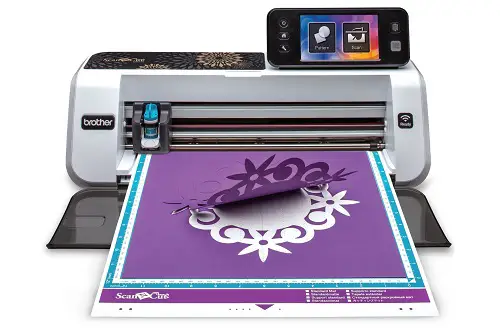
Source: craft-e-corner.com
Ultimately, finding the best vinyl cutter for your home workshop will depend greatly on the type of projects you’ll be using it for. Someone who makes signs and stickers professionally will have different needs to someone who creates iron on transfers for fun, so you should have a good idea of your own requirements before you even begin looking around.
The Importance Of The Vinyl Cutter’s Motor
One of the essential features to consider in a vinyl cutter is the motor, as this will have a huge impact on how it functions. There is often debate about whether stepper or servo drive motors are best in a vinyl cutter, but each has their good and bad points.
Basically speaking, a servo motor is just like a regular motor which has an encoder disk on the back. This disc is usually read by an optic and it has a brake in it too. As the motor spins, its position is read by the encoder disk and then breaks or stops the shaft as required.
A stepper motor is operated by different magnets that are cut up into different sections. These magnets rotate as they are pulsed, and can reach up to 200 notches per revolution depending on the motor.
Although it might sound complicated, there are a few simple ways that one might be better than the other. The biggest advantage to using a servo motor is that they’re far quieter than a stepper.
While this might not be a big deal in a professional workshop setting with other machinery running, it’s a major factor to consider when purchasing a home workshop vinyl cutter.
The stepper motor is not without its advantages, though, with the main one being their accuracy when working with thinner materials.
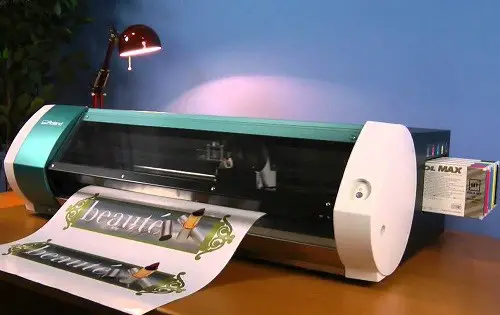
While it’s true that a servo motor might be best with thick materials like those over 0.03”, the reality is that not many home workshops will be using a desktop machine for this and so a stepper motor will give you a more accurate cut.
Before making your decision, you’ll also need to consider the cost of repairing the motor should anything go wrong, so you should factor in the price and availability of parts. For small desktop vinyl cutters it will be easiest to replace these under warranty, so ensure you are covered for breakages and faults with the device’s motor as well.
The Top Manufacturers Of Vinyl Cutters
Though there are hundreds of different vinyl cutters out there, just a few of these are trusted and reliable brands. For the home user especially, you need to shop around for a brand that is known for making innovative and efficient machines, as there’s nothing worse than getting your new vinyl cutter home to find out it can’t meet your needs.
Here are just a few of the top manufacturers of vinyl cutters, and how they stand out from the rest.
Roland
Known by anyone in the business of design, art, and technology, Roland has a knack for creating machines that are ideal for the home and professional workshop. A Roland vinyl cutter will always feature innovative aspects, and be made with the highest of quality.
Cricut
This brand is known for making just one thing, and they do it exceptionally well. The Cricut vinyl cutter comes in many different forms, and each of them has been specifically designed to suit the environment they’re in.
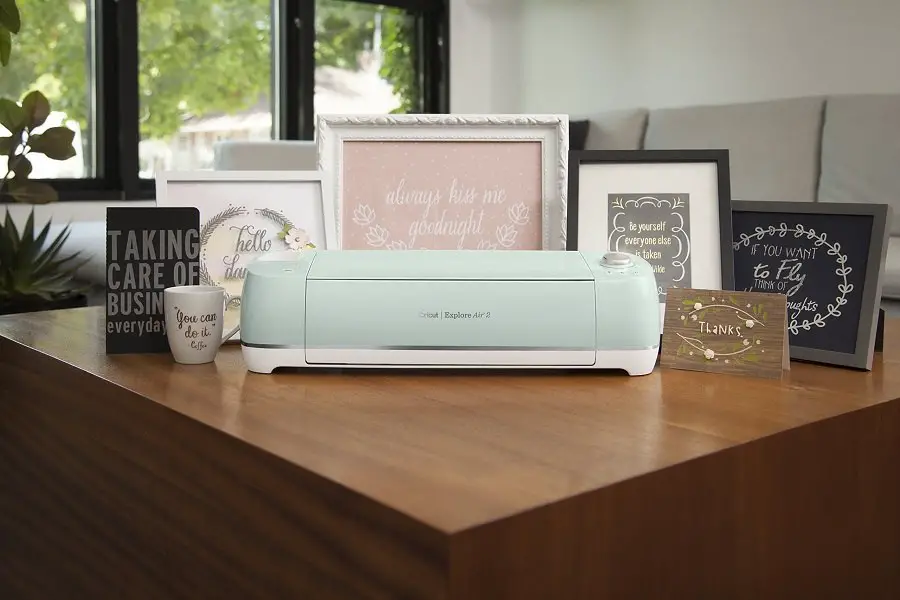
Whether it’s a small scale desktop machine or something larger and commercial, Cricut can help you be your creative best with devices that are user-friendly and easy to operate.
Silhouette
Loved by arts and crafts enthusiasts the world over, Silhouette is known for making imaging and printing machines that are best used at home. The range of Silhouette vinyl cutter gives the home user a simple and easy way to get creative, with plenty of machines, tools, and accessories that can help you achieve your passion.
GCC
Making everything from cutters to engravers and printers, GCC is no stranger at developing machines for the home and business. GCC vinyl cutter devices are both big and small, depending on your needs, and feature the latest innovative software. Whether you’re a professional sign maker or home hobbyist, GCC has a cutter out there for you.
Brother
Most people would have owned a Brother product at some point or another, thanks to this company’s continuing innovation in all digital and imaging devices used for the home and office.
The range of Brother vinyl cutter machines is designed mainly for home use and come with other built in functions such as scanners and printers so you can get more from just the one machine.
Maintenance For Your Vinyl Cutter
As a powerful machine that you’ve invested money and time purchasing, you want to be sure you’re caring for your vinyl cutter the best you can. Although most of them are covered by a generous warranty, there are some things you can do to ensure you get the most life out of them and that they stay operating to the best of their ability.
The blade of your vinyl cutter is the most important part, as it relies on this to perform a precision cut. Always check your blade to see if it’s showing signs of bluntness or wearing, as you’ll need to replace it as required to ensure it’s cutting as well as it should be.
The cutting strip runs parallel to the blade and will need to be replaced if there are signs of visible cuts. Keep this strip free from dust and debris so it works its best otherwise it will make a bumpy path for your cutter.
Regularly wipe down the outside of your machine to keep dust away from the buttons and smaller parts. Clean the blade and blade holder after every few uses to extend their life as well. Pressurized air is ideal for getting into the small cracks and crevices, being careful not to do any internal damage.
Never perform a cut outside of the guidelines otherwise you can damage the machine and blades. If you do damage it due to overreaching the guidelines, there’s a good chance your warranty will be void and you will have to pay for a whole new machine.
Just as you would with any electronic device, be careful to keep them away from water or open windows. Keep the dirt and dust out, and change the blades as required, and you will be rewarded with a high performing vinyl cutter that lasts for many years.
Conclusion
There aren’t many machines these days that offer the versatility of a vinyl cutter, and they’re a must have for anyone who enjoys arts and crafts at home. Whether you want to make a new t shirt, cut some fridge magnets, or create your own line of stickers, there isn’t much that this handy machine can’t do.
A vinyl cutter works just as well with vinyl, stickers, transfer sheets, cardstock, paper, and fabric, so this machine will only go as far as your imagination will take you.
Because a vinyl cutter can be such a huge expense, it always pays to do your research before you commit to a machine. You should have a good understanding of the capabilities you’re looking for in a vinyl cutter, and what you intend to create with your device. This will give you the best chance of finding a machine with the specs and features that suit your needs.
If you’re a home hobbyist who loves to make arts and crafts, there’s so much you can achieve by investing in this one simple machine. With the efficiency and innovation of a quality vinyl cutter in your workshop, you’ll be able to turn your small time passion into something more and possibly begin a home business thanks to your favorite new machine.
Resources:
Wikipedia
Wikihow
Quora
StahlsTv
Instructables

I specialize in machine based product reviews along with pen testing. Been writing about machines and gadgets for over 7 years now.
Лучшие машины для резки винила используются в различных предприятиях и домашних проектах, таких как печать и резьба на футболках, печать баннеров и даже для изготовления пазлов. Новичкам в этом бизнесе нелегко найти и проанализировать хорошие машины.
Проблема здесь заключается в том, как люди выбирают и решают, какие машины им следует покупать, поскольку большую часть времени они работают в рамках бюджета и забывают, какие функции должны быть у машины, что неверно.
Но как выбрать из такого количества продуктов, какой купить? Конечно, возникнет путаница, когда почти каждый продукт обещает одинаковые характеристики и долговечность, и, возможно, на них есть гарантия!
Гарантийный срок привлекает людей к продукту, но не обязательно означает, что машина самая лучшая.
Обзор лучшего резака для винила
| Продукт | Модель | Обзор | Цена | Оформить заказ |
|---|---|---|---|---|
| Brother CM350E 2 Резак для винила | 5/5 | $219.00 | Оформить заказ | |
| Станок для резки винила Silhouette Cameo 4 | 5/5 | $262.00 | Оформить заказ | |
| Cricut Explore Air 2 Машина для резки винила | 4.9/5 | $299.99 | Оформить заказ | |
| Vevor 34-дюймовый резак для винила | 4.9/5 | $315.00 | Оформить заказ | |
| Резак для винила US Cutter 28 дюймов MH | 4.9/5 | $329.99 | Оформить заказ | |
| Электронный автомат для резки DIY Brother ScanNCut | 4.8/5 | $399.00 | Оформить заказ | |
| Cricut Explore Машина для резки винила с воздухом | 4.8/5 | $379.99 | Оформить заказ | |
| Электронный инструмент для резки винила Silhouette Portrait 2 | 4.7/5 | $199.00 | Оформить заказ | |
| Машина радости Крикута | 4.6/5 | $180.00 | Оформить заказ | |
| USCutter 14-дюймовый резак для винила | 4.5/5 | $239.95 | Оформить заказ |
Чтобы решить эту большую проблему и найти подходящую машину для вас, вот список лучших машин для резки винила на рынке сегодня, и они будут обещать вам результаты каждый раз.
Лучшие машины для резки винила
1. Brother CM350E 2 Режущий станок

Эта дешевая машина для резки винила содержит примерно 631 дизайн, с которыми вы уже можете работать. Эти конструкции очень полезны и в то же время полезны. Эта лучшая машина для резки винила для дома может использоваться как дома, так и на работе, и может разрезать до 2 мм бумаги, винила, ткани и пены. В нем есть простые в использовании инструменты редактирования, которые полезны и позволяют работать прямо на машине.
ЖК-панель 4.85 дюйма обеспечивает бесперебойную работу без этих ручных кнопок. Нет необходимости подключать компьютер или мобильный телефон, все можно сделать прямо с присутствующей панели. Присутствует сканер, который помогает рисовать и сканировать сразу на резаке.
В дополнение к этому, есть 7 встроенных шрифтов и 100 дополнительных дизайнов лоскутных одеял, которые можно использовать для создания всего на машине. Вы можете добавить свои собственные файлы SVG, которые хотите использовать в своей работе, с помощью программного обеспечения Canvas Workspace, используя либо порт USB, либо беспроводные соединения, поддерживаемые машиной.
Лучшая машина для резки винила поставляется с дорожным ковриком 12 × 12, обычным лезвием и держателем, сенсорным пером, шпателем, сумкой для аксессуаров и некоторыми другими дополнительными аксессуарами. В целом, машина обладает прекрасными характеристиками и полезна как для домашних, так и для бизнес-проектов.
Цена: $219.00
Габаритные размеры: 23.25 х 11 х 11 дюймов
- Простой в использовании;
- Уменьшает количество ошибок.
- Экономия и эффективность.
- Отличный встроенный дизайн.
- Вы можете добавлять свои дизайны.
- Встроенный сканер.
- Не идеален для промышленного использования.
2. Станок для резки винила Silhouette Cameo 4
Эта машина оснащена резаком для винила с теплопередачей и ультра-интеллектуальным инструментом, который определяет, какой материал вы используете, а затем запускает программное обеспечение для создания силуэтов, чтобы соответствующим образом настроить желаемые масштабы резки. Если вы посмотрите на машину сзади, вы обнаружите, что в ней присутствует поперечный резак.
Он имеет выдвижной ящик, в котором вы можете установить виниловый рулон, и тепло будет напрямую передаваться на него. Cameo 4 сильно отличается от других машин и является идеальной моделью для всех новичков в этом бизнесе. Присутствует двухмоторная система, которая позволяет резать винил двумя разными способами. С помощью великолепных лезвий этой машины можно делать гладкие и детальные пропилы на желаемом материале.
Вы можете вырезать свои проекты быстрее с помощью этой машины, поскольку ее соленоидный двигатель работает в три раза быстрее, чем другие модели. В частности, вторая тележка работает быстрее и лучше, чем когда-либо, что помогает вам создавать ваши проекты с беспрецедентной мощностью.
Best Vinyl Cutter Machine имеет различные конструкции, которые можно использовать для разработки своих проектов. Его лезвия могут резать конструкции до 3 мм и справляться с ними без ущерба для качества работы. Единственное, чего не хватает, — это ЖК-панель, которую можно использовать для настройки желаемых результатов на машине.
Но вы получаете встроенный Bluetooth и устройство с портом USB, которое может помочь в передаче проектов с помощью накопителя или ПК / мобильного устройства. В целом, это отличный продукт, который очень хорошо работает со всеми видами материалов, к которым может приклеиваться резак для винила.
Цена: $262.00
Габаритные размеры: 7.9 х 22.4 х 6.7 дюймов
- Простой в использовании;
- Экономия и эффективность.
- Отличный встроенный дизайн.
- Вы можете добавлять свои дизайны с помощью Bluetooth или USB-порта.
- Может резать винил до 3 мм.
- Хорошая машина для промышленного использования.
- Немного дорого.
- ЖК-панель / светодиодная панель отсутствует.
- Работает в основном с набором кнопок.
3. Cricut Explore Air 2 Машина для резки винила
Это лучший вариант для резки винила для малого бизнеса и новичков, но в идеале его следует предпочесть в основном для домашней работы и проектов. Он может резать такие материалы, как винил премиум-класса, клейкую пленку, картон для плакатов, специальную бумагу, искусственную кожу, картон и винил высокого качества.
Вы можете использовать его в различных проектах, сделанных своими руками, и в изделиях, изготовленных по индивидуальному заказу, таких как одежда, наволочки, пазлы и т. Д. Эта лучшая машина для резки винила имеет коврик для резки 12 × 12, который помогает в эффективной резке, а также имеет тонкий острие ручка и острие лезвия. Создавайте все, что хотите, бесплатно в течение первых двух месяцев с помощью ПК, планшета или мобильного устройства в Cricut DesignSpace.
Самое приятное то, что без каких-либо проблем создается более 100,000 изображений, а резак позволяет вырезать почти в 2 раза быстрее, чем другие машины. Другими словами, если вы молчите и хотите, чтобы ваши продукты были напечатаны как можно скорее, тогда эта машина к вашим услугам.
Существует 80 различных настроек материала, и вы можете выбрать любой, который подходит вашему типу дизайна, а также он может справиться с большой толщиной. Кроме того, есть встроенный Bluetooth и другие беспроводные средства, которые помогут вам передавать созданные файлы на машину. В целом, если вы увлекаетесь дизайном и своими руками, этот продукт поможет вам во многих отношениях.
Цена: $299.99
Габаритные размеры: 24 х 9.5 х 9.5 дюймов
- Простой в использовании;
- Он может легко распечатать более 100,000 XNUMX дизайнов.
- Имеет лезвие для тонкой резки и ручку для печати.
- Может печатать в 2 раза быстрее
- Имеет конкретную дизайн-студию и сохраненные дизайны.
- Беспроводной встроенный присутствует.
- Нет ЖК-панели / светодиодной панели.
- Меньшие характеристики по сравнению с ценой.
- Также немного дороже.
4. Vevor 34-дюймовый резак для винила
Когда вы говорите о промышленных режущих машинах, эта машина идет на шаг впереди. Он может резать до 870 мм и легко выдерживать такую нагрузку, даже если он может справиться с таким большим весом и материалом, глубина резания может составлять максимум 3 мм. Давление резки составляет от 20 до 500 грамм и может быть отрегулировано в соответствии с вашими требованиями.
Имеется ЖК-дисплей с подсветкой, который помогает легко управлять машиной. Единственный недостаток этой машины заключается в том, что в ней очень мало функций. Поэтому, если вы хотите иметь машину с очень высокотехнологичными функциями, эта машина не для вас. Но есть хорошие вещи, которые нельзя игнорировать, например, у него хорошая скорость резания, которая делает вашу работу более плавной и легкой.
В дополнение к этому, если вы хотите импортировать файлы SVG или PDF, вы можете сделать это с помощью USB-порта, имеющегося на машине. Его конструкция с защитой от отклонений работает хорошо, поскольку он гарантирует, что на бумаге не будет расстояния. Это хорошая машина для компаний, которые
cricut виниловая машина
Регулярно протирайте виниловые пластинки, например, в рекламных или декоративных агентствах. В целом, это хорошая машина для резки винила, но единственная проблема связана с ее использованием, поскольку она обычно предназначена для использования в бизнесе и не может использоваться для ваших проектов DIY или развлекательных мероприятий.
Цена: $315.00
Габаритные размеры: 46.5 х 13.4 х 16.5 дюймов
- Имеет встроенную память 4М.
- Хорошая машина для промышленного использования.
- Регулируемое давление и скорость.
- Цена денег.
- Удобство использования и точность.
- Ограничения до USB-порта с точки зрения возможности подключения.
- Меньше возможностей по сравнению с малогабаритными.
- Не многоцелевой.
5. Резак для винила US Cutter 28 дюймов MH
Этот продукт довольно известен в Соединенных Штатах, и есть много положительных отзывов о машинах для резки винила, его характеристики довольно удивительны и достойны пользователя, и это делает его хорошей промышленной машиной для резки. Так же, как и Vevor, этот также лучший коммерческий резак для винила и может использоваться для крупных проектов.
Лучшая машина для резки винила имеет цифровой дисплей, который помогает вам установить желаемое давление и скорость. Машина оснащена 3 полностью регулируемыми прижимными роликами, которые немного облегчают вам задачу. Это хорошая машина, если вы только начинаете свой бизнес в хорошем масштабе и хотите в ближайшее время иметь больше машин.
В процессе подачи винила используется превосходная система с двумя роликами на шарикоподшипниках, которая упрощает весь процесс. Это хорошая машина для больших баннеров, плакатов, листов и т. Д., Но она не работает, если вы хотите использовать ее для проектов DIY. У него есть держатель USB, держатель ручки и держатель лезвия для машины, которая идет вместе с ним.
Машина может прикладывать усилие, если не более 350 граммов, и для ваших целей она поставляется с уже установленным программным обеспечением VinylMaster Cut. В целом, это высококачественная машина для резки винила с отличными характеристиками, и вы можете считать это разовой инвестицией.
Цена: $329.99
Габаритные размеры: Не упомянуто
- Хорошая машина для промышленного использования.
- Регулируемое давление и скорость.
- Цена денег.
- Удобство использования и точность.
- Он может оказывать сильное давление на предметы.
- Ограничения до USB-порта с точки зрения возможности подключения.
- Меньше возможностей по сравнению с малогабаритными.
- Не многоцелевой.
- Немного дорого.
6. Электронный автомат для резки DIY Brother ScanNCut
Это дешевая машина для резки винила — одна из тех немногих машин, которые поставляются со сканером. Чаще всего Brother — единственная компания, у которой есть встроенный сканер для рукописных рисунков человека. Это модель, выпущенная до CM350E, но столь же эффективная, в ней просто отсутствуют некоторые функции. Эта машина идеально подходит для тех, кто хочет иметь машину для резки винила для малого бизнеса и домашних хозяйств.
Имеется 682 встроенных дизайна, готовых к использованию, и в дополнение к этому вы можете напрямую рисовать и сканировать их и преобразовывать в вырезанный файл. Вам не нужно размещать материал, а затем выбирать цели резки и т. Д., Машина имеет автоматически настраиваемое лезвие, которое помогает снизить рабочую нагрузку и экономит ваше время.
Автоматический нож и автоматический держатель ножа используют технологию автоматического датчика для определения толщины материала. Иногда вы не можете полностью доверять машине, поэтому мы предлагаем вам выполнить пробный тест, а затем продолжить выполнение задачи. Фактически, не только мы, но и компания предпочитаем, чтобы вы сначала провели пробную версию.
Он может резать материалы толщиной до 3 мм, будь то винил, бумага, ДСП, пенопласт, войлок, все что угодно! Он поставляется с липким ковриком 12 × 12, черной ручкой, держателем для ручки, сенсорным пером, шпателем, сумкой для принадлежностей, а также автоматическим держателем для лезвия и лезвия. Лучшая машина для резки винила также имеет коллекцию рисунков, в которую входят 76 дополнительных рисунков. В целом, это прекрасная машина, но некоторые машины дают лучшие результаты.
Цена: $399.00
Габаритные размеры: 9.1 х 9.1 х 9.1 дюймов
- Хорошая машинка как для дома, так и для бизнеса.
- ЖК-панель с сенсорным экраном.
- Простота использования.
- Не нужно оставаться в сети, чтобы выполнить всю задачу.
- Меньше возможностей.
- Немного дорого.
- Требуется испытание и тестирование.
7. Cricut Explore Машина для резки винила с воздухом
Более низкий вариант новой Explore Air 2, виниловая машина cricut, может быть, немного отстает с точки зрения функций, но производительность отличная. Эта лучшая машина для резки винила является беспроводной и имеет встроенный Bluetooth и другие решения для подключения. В дополнение к этому он имеет двойную каретку на случай, если кто-то хочет вырезать и писать или вырезать и надрезать вместе.
Имеется интеллектуальный наборный циферблат, который помогает вам сохранять точные настройки материала. Имеются встроенные отделения для хранения вещей, которые помогают легко разместить материал на месте. Кроме того, вы получаете бесплатное программное обеспечение Cricut DesignSpace для себя и бесплатное приложение для iPad вместе с ним. В целом, это хороший продукт, но он немного отстает по характеристикам от других продуктов, представленных на рынке.
Если вы новичок и хотите машину с ограниченными функциями, то эта для вас. Есть ротатор, который может без проблем устанавливать настройки, а также может улучшить ваши навыки. Учитывая сумму, которую вы платите за это, должна быть цифровая панель для настроек, но, что удивительно, ее нет.
Вы можете загрузить свои дизайны, подключив машину с помощью Bluetooth к своему устройству, и вы можете настроить файлы SVG или PDF. Это хороший продукт, но он мог бы быть лучше, так как функции немного ограничены.
Цена: $379.99
Габаритные размеры: 25.4 х 10 х 9.2 дюймов
- Хорошая машинка как для дома, так и для бизнеса.
- Ротатор присутствует для настройки материала.
- Простота использования.
- Беспроводная связь.
- Многозадачность.
- Меньше возможностей.
- Немного дорого.
- Нет цифровой панели экрана.
8. Электронный инструмент для резки винила Silhouette Portrait 2
Этот компактный продукт среди больших идеально подходит для домашнего использования, поскольку он печатает и сокращает ограниченное количество элементов. Но это хорошая машина, независимо от размера и того, что утверждают отзывы о торговых платформах. В него встроен Bluetooth, который помогает передавать файлы, и автоматический нож, который может разрезать материал без каких-либо специальных настроек.
Он может разрезать картон, ткань, бумагу, пергамент и клейкий винил, что слишком велико, учитывая компактность этого продукта. Лучшая машина для резки винила поставляется с установленным программным обеспечением MAC и Windows, поэтому ее можно легко подключить к обоим устройствам. Многие устройства не поддерживают MAC OS, но, видимо, это поддерживает. Предустановлено 50 дизайнов, которые помогут вам создавать забавные предметы своими руками. В целом, верхний резак для винила обеспечивает желаемые результаты и работает без сбоев.
Но рекомендуется перед использованием обратиться к руководству. Эта машина работает немного иначе, чем другие, и может иметь другие настройки. Идите соответственно, и со временем вы будете знать, как его использовать. Он прост в использовании и в то же время дает отличные результаты.
Он совместим с ножом для глубокой резки и, следовательно, может работать с толщиной до 2 мм. Если вы занимаетесь DIY или вам нужны такие машины для выполнения заданий или проектов, то этот компактный размер для вас. Но если вы хотите его для массового использования или даже для малого бизнеса, это не идеальный вариант. Изделие поставляется с тепловым ковриком, который можно разместить под материалом, чтобы избежать несчастных случаев.
Цена: $199.00
Габаритные размеры: 12 х 4 х 5 дюймов
- Хорошая машина для небольших домашних проектов.
- Простота использования.
- Беспроводная связь.
- Компактная машина.
- Чрезвычайно ограниченные возможности.
- Немного дорого.
- Нет цифровой панели экрана.
- Не идеален и для домашнего использования.
9. Машина радости Крикута
Это еще одна компактная и простая в использовании машина для резки винила в домашних условиях. Если вы хотите иметь машину для небольших домашних мастеров или хотите поэкспериментировать с тем, как лучше всего работает машина для резки винила, то это хороший продукт для вас.
Cricut Joy Machine может создавать отличные разрезы с помощью режущего инструмента Cricut Smart Material Cutter, и, что самое приятное, нет необходимости размещать коврик для резки. Просто поместите свой предмет, например, винил для телевизора или этикетку, и все готово. В дополнение к этому, у вас есть возможность печатать этикетки с помощью этой машины.
Поэтому не нужно спешить за двумя разными машинами, когда у вас есть один хороший товар! Вы можете систематизировать дизайны с помощью Cricut DesignSpace. В целом, это хороший продукт для тех, кто плохо знаком с этой областью и хочет провести несколько испытаний. Но если мы сравним его с другими продуктами, которые имеют отличные функции и большую простоту использования, то он не идеален. Он совместим с более чем 50 материалами и, на самом деле, может выдерживать приличную толщину.
Цена: $180.00
Габаритные размеры: 8.4 х 5.4 х 4.2 дюймов
- Хорошая машинка для маленького дома профи
- Простота использования.
- Беспроводная связь.
- Компактная машина.
- Может выдерживать большую толщину.
- Чрезвычайно ограниченные возможности.
- Немного дорого.
- Нет цифровой панели экрана.
- Не идеален и для домашнего использования.
за 10 г. Станок для резки винила USCutter 14 ″
Эта машина немного больше и имеет несколько больше функций, чем две вышеупомянутые, но, в конце концов, качество работы имеет значение. Качество работы этой машины несколько ниже по сравнению с другими продуктами. Но у него есть 2 полностью регулируемых прижимных ролика, которые помогают подавать винил и создавать идеальный продукт. Кроме того, он дает вам возможность регулировать скорость и давление, что делает его удобной в использовании. Вместе с ним вы получаете бесплатное программное обеспечение для векторизации и резки, поэтому вам не нужно покупать и устанавливать другое.
Кроме того, учитывая цену, он работает отлично и ничего особенного в этом нет. Недостатком здесь является его функционирование, и этот лучший профессиональный резак для винила также утверждает, что он немного слаб с точки зрения эффективных результатов. Существует определенная необходимость попробовать и протестировать, прежде чем переходить к окончательному производству. Наряду с этим вы получаете инструменты для проектирования и редактирования, инструменты векторизации и функцию спулинга. Это может работать хорошо, но от этого нельзя ожидать слишком многого.
Цена: $239.95
Габаритные размеры: Не упомянуто
- Хорошая машина для небольших домашних проектов.
- Простота использования.
- Беспроводная связь.
- Цифровая панель экрана.
- Может выдерживать большую толщину.
- Немного дорого.
- Не точные результаты.
- Идеально подходит для максимального малого бизнеса.
Заключение: лучшие резаки для винила
Цена на лучшие машины для резки винила ниже бюджета, хороший резак для винила — это то, что работает с точной скоростью, долговечностью и имеет длительный срок службы. Даже если бюджет кажется приемлемым, тогда нужно искать возможности, загруженные функциями, кажущиеся надежными и способные применить большую силу с нужной скоростью. Вы можете купить недорогой резак для винила с небольшим бюджетом.
Если человек стремится к успеху и достижениям в этом секторе промышленности, то ему нужен лучший резак для винила. В следующий раз, когда вы сомневаетесь, какая машина подойдет вам лучше всего, рассмотрите этот список и обратите внимание на функции, которые вы хотите иметь. Как только вы определитесь со всем как по цене, так и по качеству, вы готовы к покупке и открытию своего бизнеса.
Однако, если бы мы дали какие-то предложения, мы бы порекомендовали вам резак для винила Brother CM350E и Silhouette Cameo 4. Это лучшие в своей области, так как их особенности в некоторой степени уникальны и различны.
Надеюсь, вам понравится этот обзор лучшего резака для винила.
Люди также спрашивают
Может ли резак для винила печатать одновременно с резкой?
В некоторых случаях да. Машины для резки винила бывают разные времена, и некоторые из них могут печатать, а некоторые — нет. Поэтому проверьте машину, если вам нужна эта функция, а затем покупайте.
Есть ли у станков для резки винила перо?
В наши дни перо занимает в этой области компульсивную позицию. В результате почти все новые машины имеют не только инструмент для пера, но и держатель для пера. Это важнейший элемент автоматов.
Можно ли загружать личные дизайны на виниловые машины?
Да, личные дизайны можно загружать в виде файлов SVG или PDF. Новые машины поставляются с опциями беспроводной связи, но если у выбранной вами машины нет, то дизайн можно загрузить с помощью USB-порта.
Есть ли у машин для резки винила промышленные особенности?
Да, идеальные машины нового типа созданы как для промышленного, так и для домашнего использования. Хотя, если вы ищете типичное промышленное оборудование, такие компании, как VEVOR и UsCutter, производят лучшее промышленное оборудование.
Стоит ли машина для резки винила своих денег?
Да, это. Поначалу это может показаться большим вложением, но как только вы начнете его использовать и начнете использовать его в повседневной жизни, вы действительно поймете, что это абсолютно того стоит.
Насколько просты в использовании машины для резки винила?
Да, эти машины очень просты в использовании. Будь то ручная машина или автомат, технически обе они очень просты в использовании.
Может ли резак для винила резать и тонкие металлические листы?
Нет, не может. Для этого есть разные машины. Что касается материалов, нож для резки винила может разрезать пену, войлок, картон, клей, высококачественный винил и винил премиум-класса.
Существуют ли машины для резки винила для регулярного использования в проектах?
Да, есть машины от Cricut и Silhouette, которые компактны и в то же время хорошо работают. Ознакомьтесь со списком этих продуктов.
Станки для резки винила экономичны?
Да, технически вы экономите много денег. С одноразовым вложением вы сэкономите безрассудные расходы на принтер, посещение типографии и многие другие вещи.
Есть ли гарантия на машины для резки винила?
Иногда да. Это зависит от того, предоставляет ли компания гарантию или продавец. Уточняйте у продавца перед покупкой товара.
The world of crafting is a huge and exciting place. So huge and exciting, in fact, that it can sometimes be difficult to find your starting point.
We’re here to introduce you to our favorite crafting niche: vinyl cutting.
It’s one of the most interesting emerging craft markets that’s catching on with artsy people across the world. It’s catching on so well, in fact, that there are multiple vinyl cutting home businesses starting up every day as people follow their passion and decide to make some money out of it.
Vinyl cutting is great fun whether you are treating it as a business or a hobby. It’s a popular way to enjoy scrapbooking and making your own home decor, or to get started in sign-making or selling vinyl decals. Vinyl cutting machines come in a variety of sizes and shapes, but they all have one thing in common: they use a blade to cut the material into shapes or designs.
We’ve compiled this beginner’s guide to vinyl cutting to get you off the ground running with your new craft hobby or business.
Time to get crafty!
Vinyl Cutting Machines – And Why We Love Them!
- What is Vinyl Cutting?
- Vinyl Cutters
- Manual Die Cutters
- Examples of Popular Vinyl Cutting Machines
- From Cricut
- From Silhouette America
- From Other Companies
- What Can I Make with a Vinyl Cutter?
- Vinyl Cutters for Hobbyists vs. Vinyl Cutters for Business
- Vinyl Cutters
- Why Vinyl Cutting is Cheaper Than Ever Before
- How to Choose a Good Vinyl Cutting Machine
- Electronic vs Manual Cutter
- What Size Should My Machine Cut?
- What Machines Offer The Best Quality Cuts?
- What Software Will I Need?
- What about Photoshop?
- What Support is Out There for Vinyl Cutters?
- What Tools Do I Need To Start Vinyl Cutting?
What is Vinyl Cutting?
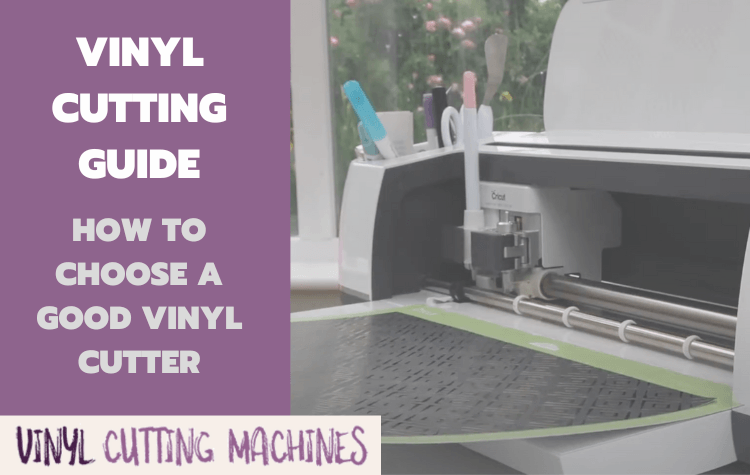
Vinyl cutting is the act of creating a design (sometimes in a software program) then sending that design through to a vinyl cutter, which will cut out your design using a blade on sheets of vinyl.
Once the vinyl cutter has done its work, you then need to weed the cut vinyl sheets — removing all the waste vinyl from the paper backed sheet — and transfer the final design onto wherever you want it to go — on a car, for instance, your walls, cards, scrapbooks, you name it!
Don’t worry — weeding and transferring are actually pretty easy once you get the hang of it.
Vinyl Cutters
There are two types of vinyl cutters – those that are controlled by computers, and those that are operated manually.
The most sophisticated vinyl cutters are those that function as computer controlled machines.
They often look and behave a lot like printers, but instead of having a pen reproducing your work onto printer paper, vinyl cutters use a blade to cut your design into certain materials.
The software you use to design will export your creation from your computer to the vinyl cutter, controlling the movements of the blade like it would do with a printer.

Vinyl cutters are also known as craft cutters, die-cutters and plotters because the truth is, they can do far more than just cut your vinyl designs.
Important: While we use the term vinyl cutter, don’t be fooled in to thinking these machines can only cut vinyl! Modern draft cutters like the Cricut Maker are capable of working with over 300 different materials – meaning you can cut much more than sheets of vinyl.
As well as vinyl, high quality vinyl cutters are able to cut your designs into paper, cardstock, tissue paper, reflectives, thermal transfer material and much more. Some can even emboss your designs on wood and aluminium!
You’ll see us refer to vinyl cutters as craft cutters, plotters, and even just ‘cutters’ throughout this site.
Manual Die Cutters
What is a Manual Die Cutter?
While electronic vinyl cutters occupy the top end of the market, manual die cutters — those operated with a hand crank — are exceptionally popular too. More simplistic and cheaper than electronic cutters, manual cutters don’t require design software or any computer at all to operate. Instead, you’ll use die cuts and embossing folders. Insert your material into the die, feed it through the machine and voilà — there’s your cut!
Here’s a look at how they work in action, using one of the most popular manual cutters — the Big Shot:
Examples of Popular Vinyl Cutting Machines
There are several companies that produce vinyl cutters, and you will undoubtedly be familiar with some of these names. They are major players in the craft space.
Let’s take a look at the top movers and shakers…
From Cricut
Cricut offers a wide variety of products for crafting, including machines, tools, materials, and accessories. We are in love with our Cricut Maker and it’s what we use for the many tutorials and projects on this site:

Cricut has three flagship craft cutters:
- Cricut Maker 3 — Billed as the most powerful desktop cutting machine Cricut has ever produced. This machine is capable of working with over 300 materials, using 13 custom tools (including engraving and debasing!). It cuts materials up to a width of 13 inches. [See Our Full Review]
- Cricut Explore 3 — Another popular desktop cutter. The Explore 3 works with 100+ materials, and 6 tools, but lacks the cutting force of the more expensive Maker. It shares the same cutting width of 13 inches. [See Our Full Review]
- Cricut Joy — A cheaper machine that is designed for smaller projects involving vinyl, yardstick and sticker paper. It cuts materials up to 5.5 inches wide. [See Our Full Review]
From Silhouette America
Silhouette America is the long-standing rival of Cricut, and an alternative producer of high quality vinyl cutters. They have two excellent machines that compete directly with the Cricut Maker and the Cricut Joy:
- Silhouette Cameo 4 — The Cameo 4 boasts comparable technology to the Cricut Maker and is known for its power, speed and cutting precision. Unlike the Maker, you can upsize to the Cameo PLUS for a 15 inch cutting width, or the Cameo 4 PRO for a mega 20 inch cutting width. If you need to cut large vinyl signage, this is the ‘dream machine’. [See Our Full Review]
- Silhouette Portrait 3 — A smaller and cheaper alternative to the Cameo 4, the Portrait 3 competes with the Cricut Joy as a portable cutter for small projects – but with a larger cutting width of 8 inches (vs the Joy’s 5.5″). [See Our Full Review]
From Other Companies
While Cricut and Silhouette are the biggest names in the craft cutting space, there are other companies selling vinyl cutters that will appeal to different needs.
- Sizzix sells one of the world’s most popular manual vinyl cutters — the Big Shot, which you can pick up in a cracking bundle deal over on Scrapbook.com. This is a lightweight die cutter that kids will absolutely adore – perfect for small craft projects with yardstick, vinyl or foam.
- Brother has had a cult following for its ScanNCut machine, which does… exactly what it says – letting you scan and cut projects to your heart’s content. More recently the company released the ScanNCut SDX series, which for our money is one of the most underrated machines in the vinyl cutting space. It’s the only option with a built-in scanner, which will appeal to anybody who wants to draw their own designs by hand before cutting.
- Finally, USCutter offers something different to the desktop cutters above. They have a variety of commercial cutters from best-in-class brands such as Roland and Graphtec. These machines cost thousands of dollars and are only really applicable to a full-scale signage business, but if that’s your jam? Worth checking out!
What Can I Make with a Vinyl Cutter?
You’re likely wondering, “that’s all very well, but what’s actually the point of craft cutting — what can I make with a vinyl cutter?”
The world is really your oyster in the vinyl cutting niche.
Here’s just a few things that crafters make with their vinyl cutters (like the popular Cricut Maker 3):
- Stickers and labels
- Home decor
- 3D objects
- Car wraps
- Electronic circuits
- Vinyl decals for laptops, smartphones and wallpaper
- T-shirt, cushion and mug transfers
- Cards and invitations
- Origami
- Paper crafts
- Signage
Put that imagination to work!
>>> 49 Things You Can Make With The Cricut Maker
Vinyl Cutters for Hobbyists vs. Vinyl Cutters for Business
Many readers will be considering small business ideas where they can turn their passion in to a source of income.
There are those who enjoy the thrill of making crafts at home, the ‘hobbyists’ if you will. And there are those who need the machine for commercial purposes, and have to cater to the demands of clients and their whims.
How To Launch A Successful Vinyl Cutting Business
If you are interested in setting up your own vinyl crafts business, or earning a side income by doing so, then we’d highly recommend checking out our extensive blueprint: How to Launch a Successful Vinyl Cutting Business.

The landscape is remarkably similar to the sewing crafts industry, where you have amateur enthusiasts buying the best DIY sewing machines for under $200, alongside power users who need something a little more ‘industrial’ for commercial sewing.
Anybody can get started on a budget.
But the exact needs will affect the type of machine required.
What types of businesses use a vinyl cutter?
Here’s some examples:
- Decal designers
- Signage businesses
- Home decor businesses
- Custom apparel brands
- Vehicle sticker brands and modders
- Small craft fans
Needless to say, many of the cheaper vinyl cutting machines are designed for light users and do not offer the precise cutting, or the larger printing surface, that is required by many businesses.
But these smaller, cheaper vinyl cutters are perfect for the hobbyists: they usually don’t take up too much space and are perfect for small designs. Some particularly high quality machines are able to deliver precision cuts for intricate designs.
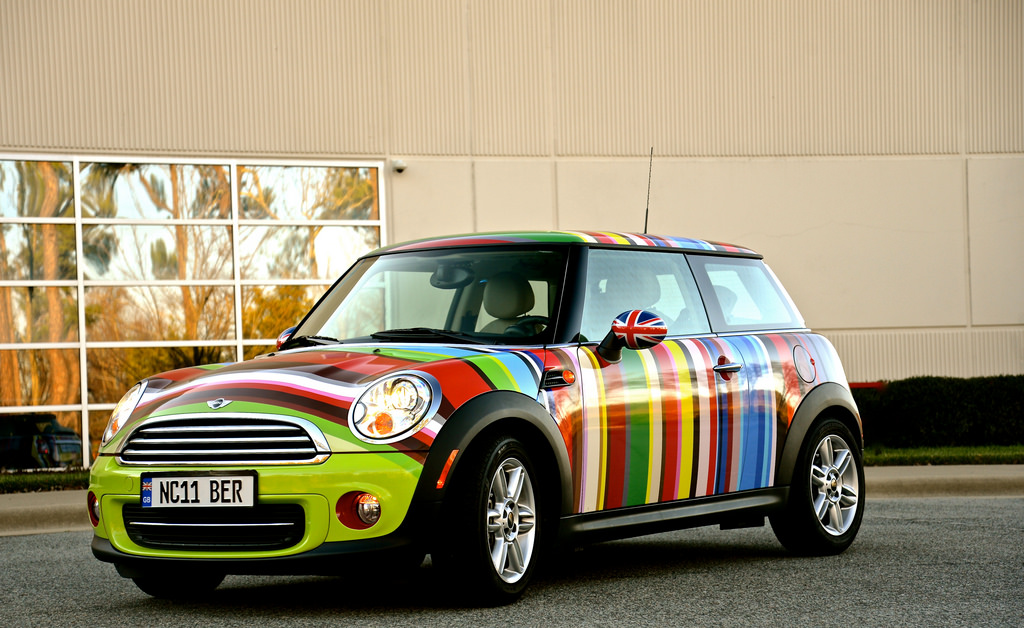
Some of the recent flagship cutters released by companies like Cricut and Silhouette, however, are perfectly designed for both hobbyists and small businesses.
While they may not be quite as large as some of the commercial machines, they otherwise perfectly straddle the boundary between hobby and business, offering precision cutting, supreme versatility, and incredible efficiency.
Why Vinyl Cutting is Cheaper Than Ever Before
There was a time when the only people with access to commercial vinyl cutting machines were the large businesses that could afford to pay big upfront sums for the technology.
If you wanted to launch your own signage business, for instance you’d be dipping in to savings, talking to the bank — or seeking investment.
Thankfully, the advance of technology has seen huge cost savings in the production of personal vinyl cutters.
When you throw in the explosion of online craft businesses thanks to platforms like Etsy, there is huge growing demand for better machines from professionals and hobbyists alike.
Some of the companies that once specialised in commercial cutters have moved on to produce bestselling digital machines that can be purchased for under $199.
Likewise, an ‘economy’ market has emerged for professional-grade cutters — meaning we can now buy incredibly powerful equipment for less than $500, or industrial strength machines for less than $1000.
As the internet continues to throw up opportunities for craft fans to learn, share and sell their creations, we will see prices continue to fall and mainstream cutting technology continue to improve.
Good news, indeed!
How to Choose a Good Vinyl Cutting Machine
Best Cutters
We’ve compiled a guide to the best vinyl cutting machines in 2021 but, in the meantime, you should ask yourself some ‘filtering’ questions to find out what type of machine is the best choice for your needs.
Electronic vs Manual Cutter
Do you want an electronic or a manual die cutter? They provide a completely different cutting experience so it’s worth thinking carefully about this before you buy.
Let’s have a look at how they compare:
Electronic
– Can cut larger designs
– Can cut more intricate and challenging designs
– Can cut more materials
– More versatile with additional capabilities like drawing, embossing, stippling etc
– More powerful
– Quicker and more efficient to use
– Not limited to designs offered by die cuts and embossing folders
Manual
– Smaller footprint
– Quieter
– No need to use design software
– No need to connect to a computer
– Easy to use for beginners and kids
– Much cheaper
As you can see, there are a lot of fundamental differences between these two types of machines.
Generally speaking, we think manual cutters are best suited to occasional crafters and people unlikely to get too much mileage out of their craft cutter. Beginners and even children tend to prefer these machines as they’re simple, cheap and fun to use.
Electronic cutters on the other hand, are more suited to people who are looking for a little bit more from their cutter. They want versatility and a machine that will grow with them.
While they’re a little more expensive and slightly more complex to learn, electronic craft cutters really do allow you to make whatever your imagination so desires. They’re highly versatile, efficient and ideal for hobbyists and small businesses alike.
What Size Should My Machine Cut?
One of the first things you’ll notice shopping around is that vinyl cutters come in a wide range of cutting widths: from tiny 6-inch cutters like the Sizzix Big Shot, to GraphTec’s monstrous 64-inch FC8600 machine.

The bestselling cutters offer a maximum cutting width somewhere usually between 9-12 inches, which should be perfect for hobbyists and makers of small crafts — but may prove restrictive for other users.
Somebody selling t-shirts or crafts will have a pretty good idea of what size machine they require, but if you are launching a signage business, you will likely need greater flexibility and the ability to scale up.
The best way to think of this is simply: “How bothered would I be if I couldn’t cut a graphic slightly wider than a piece of A4?”
If the answer is “Very“, then go for a bigger machine.
If the answer is “Meh“, then the bestselling Silhouette or Cricut machines are probably your best option.
Don’t worry about specific models for now, we’ve reviewed them all for you in our vinyl cutter guide.
Two important issues to remember:
- Machines that offer larger cutting sizes are not necessarily better machines
- Maximum media size and maximum cutting size are two very different things!
For example, some manufacturers offer larger cutting capacity at lower quality (often using a stepper motor instead of digital servo). This is not the right option if you need precision.
Likewise, when a machine is advertised as Cutter XYZ 24 Inches, this is usually to indicate the maximum media size (i.e. the size of your vinyl sheet) that can be fed in to the machine — not the maximum cutting size, which is often buried further down in the product specifications.
Space can be an issue with vinyl cutting machines. Many of the commercial die-cutters are free-standing beasts. Please check the size specifications if you are looking to house your cutter in a tight space.
What Machines Offer The Best Quality Cuts?
The expensive ones.
Sorry!
It’s true.
Let’s be realistic. You are not going to achieve the highest professional standards with a manual machine that costs you under $100. But don’t for one second simply write off this economy market — there are still good quality machines to be found.
Generally what we are looking for, quality-wise, is reliability, decent software, and a good motor.
Great cuts are also the result of great blades. So you’ll want a machine that supports the best of them — and you’ll need to be proactive at replacing them before they blunt!
Ideally, you’ll want one of the newest machines that are able to automatically adjust their pressure settings according to what material you feed it, like the Cameo 4 or the Cricut Maker 3. Older, less sophisticated machines made their users adjust the settings manually which resulted in a lot of errors, off cuts and ultimately waste — in both time and materials.
Regardless of what type of cutter you go for, your expectations play a big part. Don’t expect to find miracle products at bargain prices, but don’t neglect the cheaper models if you have less complex cutting needs either.
If you’re planning to run a craft business with your cutter, it’s worth considering whether you’ll have demanding clients who are likely to request intricate designs and very tight, precise maneuverings of your machine’s blades… that’s when you need to start paying up for more advanced technology.
What Software Will I Need?
Most vinyl cutters come with their own software that can be used to create basic designs, or to feed pre-existing templates and files that you’ve already created to the machine.
This is all you need to get started.
However, great cuts are born from great designs.
Many people assume that having access to the most expensive machine will dramatically improve their work, and in doing so they neglect the software where they actually create the work.
This is a big mistake.
Software is important.
The fastest way to improve your creations is to improve the design before it gets sent to the machine — i.e. in the software.
This involves practicing your design skills and making use of increasingly sophisticated software.
Three of the most popular design tools are:
- CorelDraw
- Adobe Illustrator
- AutoCAD
Take a look at this video on how to use Adobe Illustrator to create vinyl decals, for example:
What about Photoshop?
If you are a complete beginner… forget about this section. It’s best to first get familiar with the software that already comes with your vinyl cutter before attempting to master professional-grade software.
Photoshop is great for most design work. The problem is that it relies on pixels and dots to create what is known as raster graphics. These can be of exceptionally high quality, which gives a hint as to why Photoshop is so damn popular.
It’s why, for example, we ‘Photoshop’ our holiday photos and selfies.
If you’re wondering why we don’t ‘Illustrate’ them instead, it’s because Adobe Illustrator deals with vectors instead of raster graphics.
That is, it uses lines instead of dots.
Lines speak the same language that your vinyl cutter speaks.
Our machines aren’t capable of translating dots from Photoshop in to movements of a blade. They rely on lines — vectors — to define a path.
There are methods of converting raster graphics (from Photoshop) in to vectors, but these can be pretty crude and we generally recommend you save yourself the bother.
Use vector-based software that can handle SVG (scalable vector graphics) files instead — i.e. one of the three options above.
What Support is Out There for Vinyl Cutters?
10 years ago, the hook that many manufacturers used of ‘Free Lifetime Phone Support‘ would have made a big difference to a considerable number of buyers.
Vinyl cutters take time to master.
Indeed, for those lacking DIY smarts, some of them take time just to assemble!
Phone support is a nice fallback and we understand why some users would value it over a manufacturer that ships the machine but does a poor job of providing support.
That said, times have changed and some of the best support you are likely to receive is not from the instruction manual or the technician on the phone — it’s from your fellow craft cutting enthusiasts.
Forums are bursting with discussion and tip trading on how to get the best results with Machines X, Y and Z.
YouTube is stacked to the rafters with outstanding videos that go above and beyond the basic requirements of showing you how to use each cutter.
If you feel like you’re going to need a lot of help getting to grips with your new machine, our advice is to stop before you purchase:
- Go to YouTube
- Search for your cutter of choice
- Ask yourself, “Are there plenty of useful looking tutorials?”
If the machine is well-supported by its community, this can be worth just as much as having a company technician on the end of a phone.
What Tools Do I Need To Start Vinyl Cutting?
Before you start vinyl cutting, you’ll need a few tools to set you on the road to success.
Aside from the vinyl cutting machine itself, most of these tools are reasonably priced and — if you’re responsible with them — should last a while from a small investment.
Here’s what you’ll need:
- Vinyl cutting machine and software (>>> Find the best prices for the top machines)
- Materials, like vinyl!
- Squeegee
- X-Acto Double Knife Set for weeding
- Transfer Tape
- Application Fluid, for transfer
Thankfully, some of the best craft cutter brands do some really generous bundle deals which throw in a load of materials and tools with their machines.
And that’s everything you need to know about vinyl cutting and vinyl cutting machines — any questions?
Approaching the vinyl cutter market without enough information on how these machines work can be tricky since you can easily end up with a model that doesn’t offer much in terms of tracking or accuracy.
Vinyl cutters with servo motors are your best option since models equipped with stepper motors lack the accuracy to make intricate cuts. But, with so many options to choose from, it’s hard to know which one you should get.
So, in this article, we’re going to walk you through the advantages of vinyl cutters with servo motors and suggest several models you can use for commercial or DIY projects.
You should also take a look at our guide to the best vinyl cutters under $500 if you’re searching for an affordable machine you can use for DIY projects.
What is a Servo Motor?
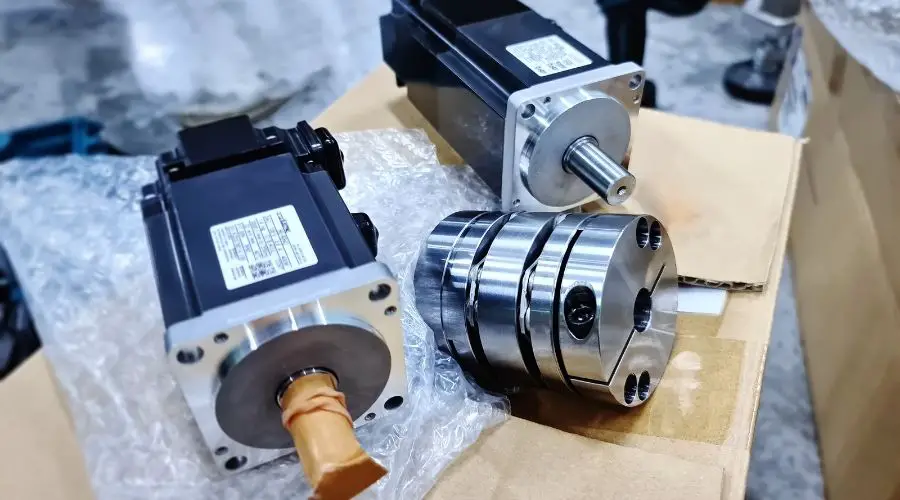
Servo motors are becoming a standard for all machinery that processes a material based on programmed input data. They contain a closed-loop servo-mechanism that utilizes error-sensing negative feedback to correct the machine’s actions.
These motors are coupled to a sensor that provides them with position feedback and allows them to drive the cutter’s blade in accordance with the input data.
Vinyl cutters equipped with servo motors utilize commands supplied by a computer system, and the user doesn’t have to adjust the machine’s settings manually.
Tracking Ability
Stepper motors have limited tracking capacities, resulting in difficulties creating outlines or correcting the blade’s path without crumpling the material.
The position sensor that comes with a servo motor allows the machine to keep track of its current position and move the material together with the blade.
Cutting Power
The servo motor’s closed-loop mechanism allows a vinyl cutter to continue to operate normally under a heavy load. Consequently, machines equipped with servo motors can cut through thick materials without jeopardizing their level of accuracy.
Accuracy Level
Models that come with servo motors can cut vinyl at 1/8-inch accuracy, which allows you to cut out images that contain a high amount of details. In addition, these machines always hit their programmed stopping point as their motors eliminate the system drag.
Noise Level
Quiet operation is also among the advantages servo motors offer, as it is hard to hear the motor during the cutting process. You can use vinyl cutters that have this type of motor at home or anywhere else without having to worry if they’re going to make too much noise.
Browse through our guide to the best hobby vinyl cutters to explore options that will enable you to make car stickers or decals from home.
Vinyl Cutter Servo vs. Stepper Motor
A stepper motor features built-in output steps that allow them to control the blade’s position, but they can easily miss their stopping point if the system experiences a drag. As a result, vinyl cutters that use stepper motors can’t process graphics smaller than half-inch accurately.
These motors have mechanical gears that prevent the machine from following the path smoothly, and instead, they often create rough edges that lower the quality of the product.
Besides, stepper motors generate a lot of noise, which makes vinyl cutters powered by these motors less than the ideal option for residential settings. Most importantly, stepper motors are not as durable as servo motors because their components tend to fail if they’re exposed to heavy loads continually.
The maximum cutting speed of a vinyl cutter depends on the motor it uses, so opting for a model equipped with a servo motor can save you a little bit of time during the cutting process.
Despite being more expensive than models that use stepper motors, vinyl cutters with servo motors are a more reliable option for DIY enthusiasts and seasoned professionals.
The high degree of precision, durability, or noiseless operation is just some of the reasons why designers so highly praise these vinyl cutters. We’ve shortlisted some of the best vinyl cutters with servo motors on the market, so let’s take a closer look at their features.
USCutter Titan 2

The aluminum frame ensures that the USCutter Titan 2 remains perfectly balanced during the cutting process, while four carriage wheels make it easy to move the machine. This vinyl cutter can apply up to 750g of downforce pressure on a media it is processing which allows you to work with thick materials.
The model’s maximum tracking length is 360-inches, and you can use it to process media that is up to 28-inches wide, but keep in mind that its maximum cutting width is limited to 24-inches.
The Titan 2 comes with VinylMaster Cut software that grants you access to a variety of tools you can use to create logos, shapes, or different types of typographies. This software supports manual and automatic contouring, but it is only compatible with the Windows OS.
Pros
- Features three Titan blades
- Pen holder supports plotting
- Compatible with a wide range of media types
- Wide cutting area
Cons
- The VinylMaster Cut isn’t compatible with macOS
- Setting up the machine can be difficult
Cricut Maker 3

A desktop vinyl cutter like the Cricut Maker 3 can be a great choice for novice designers. This model is compatible with more than 300 media types, including regular vinyl, but you must check if the version of the Circuit Marker 3 you want to buy ships with the tools you need to cut vinyl. Plus, it’s built with a servo motor, one of several improvements to previous models to make it faster and more precise.
Note that you cannot process media wider than 13-inches or longer than 12ft or 75ft if you’re working with smart materials with this cutting machine. The maximum thickness of media this model supports is limited to 2.4mm2.
In addition, you can pair the Cricut Maker 3 with a home printer if you want to print your design before you cut it.
The free Design Space app that is compatible with iOS, Android, macOS, and Windows operating systems is bundled with all Circuit’s products, but you must pay a small monthly fee if you want to use this app to create designs.
You can read our Cricut Make 3 review for more information about this cutter.
Pros
- Quiet operation
- USB and Bluetooth connectivity
- High cutting speed
- Compatible with smart vinyl media
Cons
- Narrow cutting width
- Some tools are sold separately
Check Price on Amazon
Roland GS24

The ability to apply between 30 and 350gf of force to the media it’s cutting makes the Roland CAMM-1 GS24 one of the most powerful desktop vinyl cutters on the market. This cutter can process materials that are 2 to 27-1/2-inches wide or 984.25-inches long, but only if they’re thinner than 0.4 inches.
Its maximum cutting speed is 20 inches per second in all directions, while its optical registration system detects crop marks and aligns media to ensure all cuts are made accurately.
You can control this vinyl cutter from the Roland DG CutStudio, but keep in mind that the base and CorelDraw plug-in versions of this software are only compatible with Windows OS. So, you must get the Roland DG CutStudio Adobe Illustrator plug-in if you have a Mac computer.
Pros
- 3-year warranty
- Wide operating temperature range
- Creates highly detailed cuts
- Generates less than 70dB of noise
Cons
- Works only with blades made specifically for models from the CAMM-1 series
- The stand for this vinyl cutter is sold separately
Learn More →
Graphtec CE7000-60


With a maximum cutting width of 24-inches, the Graphtec CE7000-60 is best suited for medium-sized projects. The brand’s CE7000 series also features a model that offers 50 inches of cutting width in case you need a vinyl cutter that allows you to create large designs.
The CE7000-60 has a grit roller with a digital servo drive system and two push rollers, while its maximum cutting speed is 36-inches per second at a 45-degree angle. The model’s cutting area with guaranteed accuracy is 23×79-inches, while the minimum character size you cut with this machine is 0.016-inches.
Graphtec’s vinyl cutter is compatible with macOS and Windows operating systems. In addition, the machine comes with Cutting Master 4 software that features plug-ins for Adobe Illustrator and CorelDraw and Graphtec Studio versions for Macs and PCs.
Pros
- Excellent automation options
- ARMS 8.0 system ensures smooth contour cutting
- Cutter’s blade is made of steel
- Compatible with vinyl, fluorescent, and reflective media types
Cons
- Not aimed at inexperienced users
- Very expensive
Learn More →
GCC Puma IV P4-60


Functionalities like the test cut, curve & arc smoothing, or overcut are some of the reasons why GCC Puma IV P4-60 is so highly regarded by industry professionals. This vinyl cutter utilizes the roller-type operational method and features the DC servo drive control.
The P4-60’s maximum media loading width is 28.3-inches, but the machine’s maximum cutting width is 23.6-inches. This GCC’s model can apply up to 500gf of downforce to a material, which enables you to work with media that is thinner than 0.03-inches.
Its maximum cutting speed at 45-degrees is 40.2 inches per second, and its distance accuracy is 0.01-inches. The P4-60 is compatible with GreatCut, FlexiSign 19, SignPal 19, Sure Cuts a Lot, and Sure Cuts a Lot Pro apps and software products that are compatible with Windows, macOS, and iOS.
Pros
- Triple port data transmission
- Features a tangential mode
- Intuitive LCD control panel
- Excellent tracking capacity
Cons
- Blades can become blunt quickly
- Decreased efficiency when processing media that isn’t approved by GCC
Graphtec FC8600


A brief look at the features the models from the Graphtec FC8600 offer reveals how powerful and versatile these vinyl cutters are. The Intelligent Scan Mode or the Segment Area compensation are some of the options that improve the machine’s precision.
The size of the cutting area depends on the model, and it is between 2 to 5 feet wide and 164 feet long. Hence, the maximum mountable media width spans from 30 inches to 73 inches.
The cutting area of guaranteed accuracy also depends on the model, and in most cases, you won’t be able to use materials longer than 50 feet or wider than 40 inches. These vinyl cutters can apply as much as 600gf of downforce to material, and they allow you to work with two tools simultaneously.
Pros
- Compatible with multiple blades
- It cuts different types of media efficiently
- Fast cutting process
- Features a 32-bit CPU
Cons
- Not a budget-friendly option
- Only suitable for commercial use
GCC Jaguar V J5-61LX
You should take a closer look at the GCC Jaguar V J5-61LX in case you’re searching for a 24-inch vinyl cutter. GCC’s Jaguar V series features six different models and LX versions of these models that are equipped with auto-rotation and automatic aligning features.
The J5-61LX has three pinch rollers that allow the machine to move the material smoothly during a cutting session. You can use various media with this vinyl cutter as long as they don’t exceed its 0.03-inch material thickness limit.
All models from the Jaguar V series, including the J5-61LX, have a tangential mode, a section cutting option, as well as copy and repeat functions that allow you to create multiple copies of the same design.
Also, the maximum cutting speed at a 45-degree angle Jaguar V vinyl cutters can offer is 60 inches per second.
Pros
- Users can acquire plug-ins for Adobe Illustrator and CorelDraw
- Offers up to 32 feet of tracking capacity
- Adjustable media support system
- Quick and easy setup
Cons
- The J5-61LX can’t accept media wider than 24-inches
- Performance capabilities of this vinyl cutter exceed the needs of most non-professional users
How to Pick the Right Vinyl Cutter With Servo Motor

Although servo motors offer a broad spectrum of advantages over stepper motors, there are other criteria you should pay attention to while deciding which model to choose.
We’ve shortlisted several aspects you should take into consideration during your search for a vinyl cutter with a servo motor, so let’s take a closer look at them.
Consider the Context
Where are you going to use your vinyl cutter? Knowing the answer to this question will make it much easier to find the vinyl cutter with a servo motor that fits your needs.
In case you’re planning to use this machine at home for your artistic projects, you should aim for a relatively compact model since you’re probably not going to process large materials.
On the other hand, if you’re starting a new business or looking to extend the range of services your business offers, you should search for high-end models equipped with features that can improve the quality of cuts you can produce.
Software Compatibility
Almost all vinyl cutters come with bundled software products that grant you access to the tools you need to design a banner or offer a preview of the cutting path.
However, these apps don’t always have plug-ins for vector graphics editors like CorelDraw or Adobe Illustrators that are commonly used to design signs, banners, or decals. That’s why you need to check if the vinyl cutter model you’d like to get comes with a plug-in for either of these design programs.
Vinyl cutters usually come with one of the following software products:
- Design Space
- GreatCut
- Cutting Master
- Graphtec Studio Pro
Browse through our guide to vinyl cutter file formats to find out which file formats you can use to cut your designs.
Maximum Cutting Depth and Speed
The choice of materials you’ll have at your disposal can be limited by the thickness of media the machine can accept. Most models allow you to use materials that are between 0.01 and 0.03-inches thick, although in some cases, you’ll be able to process media that is 0.07-inches thick.
The maximum cutting speed depends on the cutting angle, and it usually varies between 20 and 60 inches per second.
Blade’s Downforce
The amount of pressure or downforce a blade can apply to a material affects the machine’s cutting abilities. So, if a vinyl cutter doesn’t offer a lot of downforce, you won’t be able to use it to cut thick materials.
Ideally, the model you choose should be able to generate more than 350gf of force during the cutting process.
Range of Materials
Vinyl cutters with servo motors are often compatible with more than just one type of media, and they allow you to cut rubber or pounce paper. Checking which type of materials you can use with a particular vinyl cutter will enable you to know if you can work with plastic, leather, and various other materials.
Entry-level models are usually compatible with a handful of media types, and you must invest in a high-end model if you’re planning to cut different materials.
The Overcut Feature
This option is offered almost exclusively by vinyl cutters with servo motors, but it is far from being a standard feature on all models that have this type of motor. The overcut ensures that the machine goes through the material properly whenever it needs to turn a corner, and it eliminates poor weeding.
Getting a vinyl cutter that has this feature will make it easier to process thick media.