
|
83-00140F |
Printed in Japan |
DOC.No.OM-28573 REV.6 03/02

|
DOC.No.OM-28573 REV.6 03/02 |
SPOTCHEM EZ SP-4430 OPERATING MANUAL |
Premise
This manual contains important information on the functions of the SPOTCHEM EZ SP-4430
Distributed by : A.Menarini I.F.R. srl
Diagnostics Division
This manual is issued by: ARKRAY, Inc.
Read carefully prior to starting up the unit.
It is recommended to retain this manual for future use.
This product conforms to European Directive 98/79/EC.

|
SPOTCHEM EZ SP-4430 OPERATING MANUAL |
DOC.No.OM-28573 REV.6 03/02 |
Introduction
The SP-4430 is an automated biochemical analyzer using a dry chemistry system.
This manual contains outlines, instructions for the operation, maintenance and troubleshooting for the SPOTCHEM SP-4430. Before operating the SP-4430, read this manual carefully.
It is recommended to retain this manual for future use.
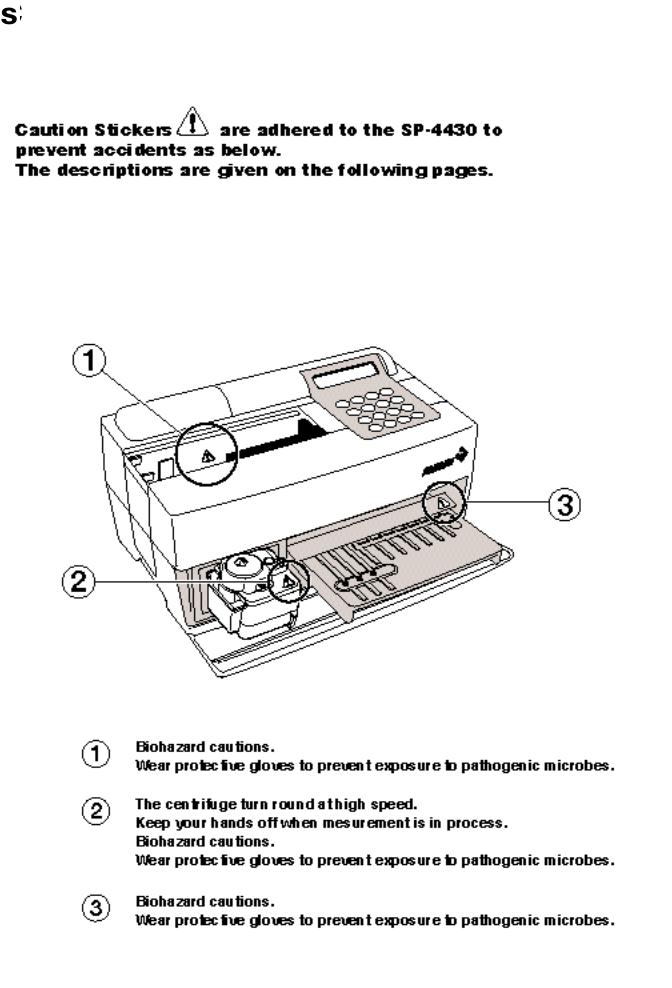
 Always be careful when handling blood samples or waste reagent strips. Incorrect or imprecise procedures may result in exposure to pathogenic microbes.
 This analyzer must only be operated by those trained in proper procedures for clinical testing and handling of hazardous waste. Anyone who operates the analyzer for the first time must be assisted by a trained person.
 Never touch the Reagent Table, Centrifuge-equipped Multi Rack, or other places where sample residue may collect with bare hands. When performing maintenance, always wear protective gloves to prevent exposure to pathogenic microbes.
 Separate used samples, tips and protective gloves from general waste and discard them according to local regulation on biohazardous waste.
All rights reserved. Reproduction of this manual is forbidden.
The contents of this manual are subject to change without further notice.
Although we take all possible measures to ensure the contents of this manual, please notify your distributorwhen you have questions, or find errors or omission.

|
DOC.No.OM-28573 REV.6 03/02 |
SPOTCHEM EZ SP-4430 OPERATING MANUAL |
Caution Marks
Pay careful attention to these caution marks in this Operating Manual.
 Regarding accident resulting in injury or death.
To prevent infection of yourself or others from pathogenic microbes, follow the instructions given herein.
To prevent injuries to yourself or others, or material damages, follow the instructions described.
 Regarding damage and performance of products.
Failure to follow the instructions may lead to incorrect results.
To prevent damage to the unit and assist you in making best use of the capabilities of the analyzer, additional explanations and notes are provided herein.
Reference information on operation, additional explanations and related functions are provided herein.
|
SPOTCHEM EZ SP-4430 OPERATING MANUAL |
DOC.No.OM-28573 REV.6 03/02 |


|
SPOTCHEM EZ SP-4430 OPERATING MANUAL |
DOC.No.OM-28573 REV.6 03/02 |
|
2-5 |
Calibration |
2-28 |
|
|
2-5-1 |
Overview of calibration |
2-28 |
|
|
2-5-2 |
Calibration by magnetic card |
2-29 |
|
|
2-5-3 Calibration by calibrator kit |
2-31 |
||
|
2-6 |
Interpreting measurement results |
2-39 |
|
|
2-6-1 |
Printing normal measurement results |
2-39 |
|
|
2-6-2 |
Printing calibration results |
2-42 |
|

|
DOC.No.OM-28573 REV.6 03/02 |
SPOTCHEM EZ SP-4430 OPERATING MANUAL |


|
SPOTCHEM EZ SP-4430 OPERATING MANUAL |
DOC.No.OM-28573 REV.6 03/02 |
Chapter 1
INTRODUCTION
The SP-4430 is an automated biochemical analyzer using a dry chemistry system. This chapter contains the information on the functions and measurement principles of the SP-4430.
1-1 Outline
1-1-1 Features
1-1-2 Measurement principles
1-1-3 Specifications
1-2 Shipping Carton
1-2-1 Analyzer
1-2-2 Accessories
1-3 Parts Description and Function
1-3-1 Front of the analyzer
1-3-2 Operator panel
1-3-3 Rear of the analyzer
1-4 Setting up the Analyzer
1-4-1 Cautions
1-4-2 Setting up the analyzer
1-4-3 First operation after setting up
1-4-4 Notes at transportation

|
DOC.No.OM-28573 REV.6 03/02 |
SPOTCHEM EZ SP-4430 OPERATING MANUAL |
1-1 Outline
Chapter 1 INTRODUCTION
1-1-1 Features
■Compact and lightweight design
The footprint of the SP-4430 is as small as that of a notebook computer. It weighs only 5 kg and can be easily carried by one person. The small unit contains various components such as a display, printer, 1- sample centrifuge and automatic tip disposal mechanism. No water supply or drainage system is required, therefore it is suitable for examinations in schools or bedside in hospitals. Power consumption is greatly reduced.
■Energy-saving design
■Automatic Sampling
■Built-in centrifuge for 1 sample
■Simple calibration using magnetic cards
■Sample Control by Bar code
■Online Network through two-way Transmission
Power consumption per 1 hour is approximately 50 W on average (AC 100V, 60Hz when continuous measurements are conducted).
The analyzer automatically absorbs samples set on the Centrifuge-equipped Multi Rack and drops them on reagent strips. Manual operation is not necessary, so that the sampling amount becomes constant and stable measurement results can be obtained.
The analyzer has a built-in centrifuge for 1 sample. By placing the whole blood sample in the centrifuge tube and setting it on the Centrifuge-equipped Multi Rack, the operation, centrifugation suction sampling is conducted automatically. This saves centrifugation of whole blood samples before measurement.
Calibration using magnetic cards Reagent Card are provided with the Reagent Strips
 is possible, without using the SPOTCHEM Calibrator Kit. By inserting magnetic cards into the magnetic card reader, differences between reagent strip lot number and daily deviations are automatically calibrated.
Optional Hand-held Bar Code Reader is available. By reading the bar code of each sample, the bar code is automatically allocated as patient ID.
With the optional Data Management Software and external devices, remote control of measurement results and remote update of parameter settings are possible.
|
SPOTCHEM EZ SP-4430 OPERATING MANUAL |
DOC.No.OM-28573 REV.6 03/02 |
1-1 SP-4430

Chapter 1 INTRODUCTION
1-1-2 Measurement principles
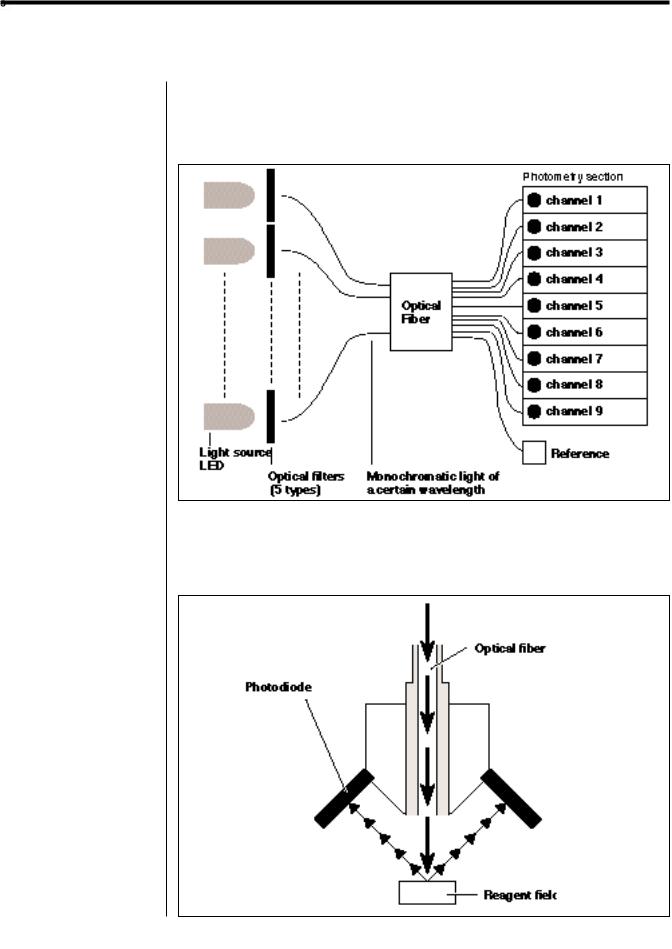
The light emitted from LED becomes monochromatic light of a certain wavelength after passing through an optical fiber (Five different types of optical filters are provided, and the optimum wavelength is selected for each test item). Monochromatic light is separated and transmitted to the photometry section of each channel by ten optical fibers.
In each photometry section, the monochromatic light transmitted by the optical fibers is irradiated on the reagent fields, which has a color reaction after sampling. Its reflected light is read with 2 photodiodes, and the system calculates measurement results by end-point assay (EPA) or reaction-rate assay (RRA).

|
DOC.No.OM-28573 REV.6 03/02 |
SPOTCHEM EZ SP-4430 OPERATING MANUAL |
1-1 SP-4430

Chapter 1 INTRODUCTION
1-1-3 Specifications
|
Sample |
Serum, Plasma, Whole blood (Only Hb) |
||
|
Measurement item |
General biochemical measurement items, 22 items |
||
|
Measurement wavelength |
5 wavelengths (405, 550, 575, 610 and 820 nm) |
||
|
Measurement principle |
Optical measurement of reflection intensity of |
||
|
reagent color reaction |
|||
|
Measurement Range |
Set for sach measurement item |
||
|
Reagent Strip |
SPOTCHEM Reagent Strip |
||
|
Processing speed |
63 samples per hour |
||
|
Minimum sample volume |
6 × the number of measurement items + 38μL: |
||
|
serum, plasma |
|||
|
Sample consumption |
4 6μL(per 1 measurement item): serum, plasma |
||
|
Sample container |
Whole blood: exclusive whole blood sample tube |
||
|
(Orange cap) |
|||
|
Centrifuge tube |
|||
|
Serum, plasma: exclusive serum sample tube |
|||
|
(Blue cap) |
|||
|
Simultaneous measurement |
3 Single Reagent Strips or 1 Multi Reagent Strip |
||
|
Maximum of 9 test items of continuous |
|||
|
measurement using Single Reagent Strips and a |
|||
|
Multi Reagent Strip is available. |
|||
|
Reagent reaction temperature |
37 |
||
|
Light source |
LED and Interference filter |
||
|
Calibration method |
Calibration by magnetic card (Reagent Card) |
||
|
Calibration by Calibrator Kit |
|||
|
Data storage volume |
100 tests |
||
|
Display |
20 digits |
2 lines LCD |
|
|
Built-in Printer |
36-character thermal printer (58 mm width) |
||
|
External Output |
RS-232C interface |
||
|
Transmission Method |
Single or Two-way Transmission |
||
|
Transmission Rate |
300, 600, 1200, 2400, 4800, 9600bps |
||
|
Measurement conditions |
Temperature: 10 30 |
||
|
Humidity: 20 |
80 % (Non-condensing) |
||
|
Power supply |
AC100 |
120V, 220 240V |
|
|
50/60Hz AC adapter method |
|||
|
Power input |
Max. 100VA |
||
|
Dimensions |
338 mm(W) |
203 mm(D) 167 mm(H) |
|
|
Weight |
Approximately 5.4 kg |
||

|
SPOTCHEM EZ SP-4430 OPERATING MANUAL |
DOC.No.OM-28573 REV.6 03/02 |
1-2 Shipping Carton
Chapter 1 INTRODUCTION
1-2-1 Analyzer
Open the package and confirm that all items are included.
|
NO. |
Item |
Description |
Qty. |
|
1 |
Analyzer |
SP-4430 |
1 |
|
2 |
Power cord |
1 |
|
|
3 |
AC adapter |
1 |
|
|
4 |
Accessory case |
1 |
|
|
5 |
Operating manual |
This book |
1 |
|
6 |
Warranty card |
Warranty card with case, Delivery label |
1set |

|
DOC.No.OM-28573 REV.6 03/02 |
SPOTCHEM EZ SP-4430 OPERATING MANUAL |
Open the package and confirm that all items are included.
|
NO. |
Item |
Description |
Qty. |
|
1 |
Tip |
10 tips |
1 Set |
|
2 |
Cleaning wire |
Nozzle cleaning |
1 Set |
|
3 |
Cleaner set |
Brush, Cotton swab |
1 Set |
|
4 |
Nozzle set (EZ) |
Nozzle with O-ring |
1 Set |
|
5 |
Wrench set for nozzle replacement |
2 Wrench, Adapter |
1 Set |
|
6 |
Centrifuge tube |
10 pieces |
1 Set |
|
7 |
Tip waste case |
2 pieces |
1 Set |
|
8 |
Protective cover |
2 pieces |
1 Set |
|
9 |
Thermal printer paper |
width 58 mm |
1 Set |

SPOTCHEM EZ SP-4430 OPERATING MANUAL DOC.No.OM-28573 REV.6 03/02
1-3 Parts Description and Function Chapter 1 INTRODUCTION
1-3-1 Front of the analyzer
|
NO. |
Item |
|
|
1 |
Reagent table |
For setting the Reagent Strip. The temperature is kept at 37 for the |
|
reaction conditions of Reagent. |
||
|
2 |
Centrifuge-equipped Multi Rack |
For setting the samples and tips. The centrifuge for 1 sample is built in. |
|
3 |
Port |
For setting the samples. |
|
4 |
Centrifuge |
For setting the whole blood samples that have not been centrifuged. |
|
5 |
Tip hole |
For setting tips. |
|
6 |
Tip waste case |
The container for used tips automatically discarded after sampling. |
|
Filled with 5 measurements. |
||
|
7 |
Black & white plates |
The standard reflection plates used for measurement of reflectivity. |
|
8 |
Table cover |
Prevents entering the external light. |
|
Slide forward the Reagent Table and Centrifuge-equipped Multi Rack to |
||
|
open. |
||
|
9 |
Operator panel |
For starting or stopping measurement and entering IDs. |
|
10 |
Display |
Displays information such as operating state of the unit and error messages. |
|
11 |
Magnetic card reader |
For inserting magnetic cards: Reagent Card and Calibration Cards. |
|
12 |
Built-in printer |
Thermal-type printer. Prints out measurement results and setting conditions. |
|
13 |
Maintenance cover |
Protects the Nozzle Driving Units. Also prevents the operator from contacting |
|
the nozzle during measurement. There are top and side covers. |
||
|
14 |
Protective cover |
Prevents the operator from contacting the Centrifuge Tube. |
|
Also protects spilling of samples. |
||
|
DOC.No.OM-28573 REV.6 03/02 |
SPOTCHEM EZ SP-4430 OPERATING MANUAL |
|
Item |
Function |
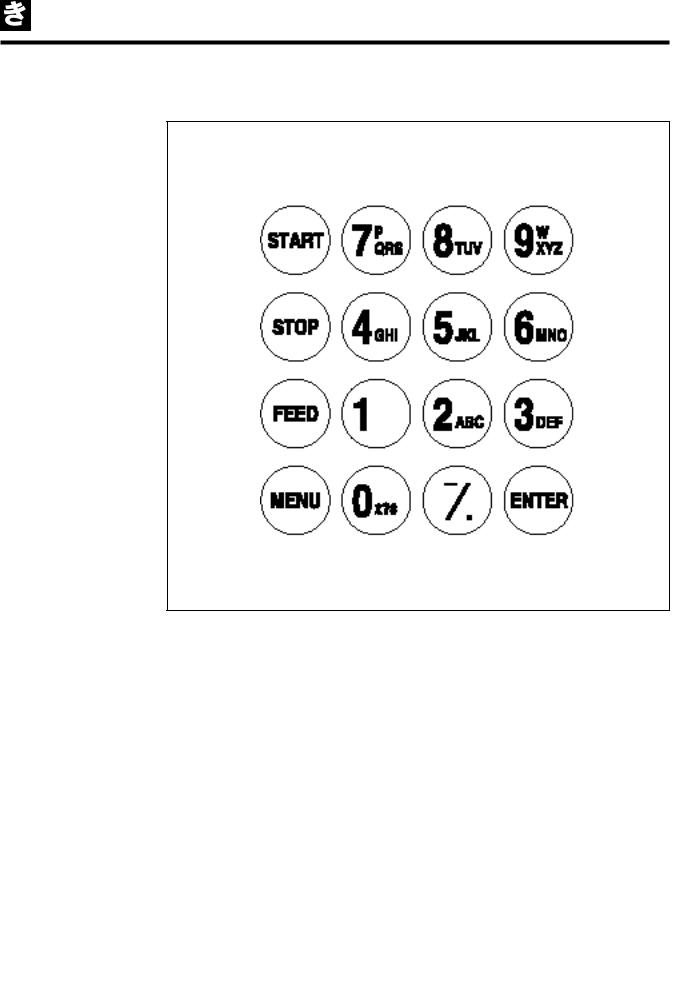
|
START |
Starts measurement. Select“Yes”from the Yes/No option. |
|
STOP |
Stops measurement. Select“No”from the Yes/No option. |
|
Cancels entry. |
|
|
FEED |
Feeds the built-in printer with paper while pressed. |
|
MENU |
Switches the page on each menu display. |
|
0~9 (ten key) |
Selects the menu number. Enter numerical values and ID. |
|
-/.(hyphen/period) |
Selects item, move cursor , switch the page on the display, |
|
and enter minus sign and decimal point. |
|
|
ENTER |
Determines the entry. |
|
Check message to proceed to the operation. |
|
|
SPOTCHEM EZ SP-4430 OPERATING MANUAL |
DOC.No.OM-28573 REV.6 03/02 |
1-1 SP-4430

Chapter 1 INTRODUCTION
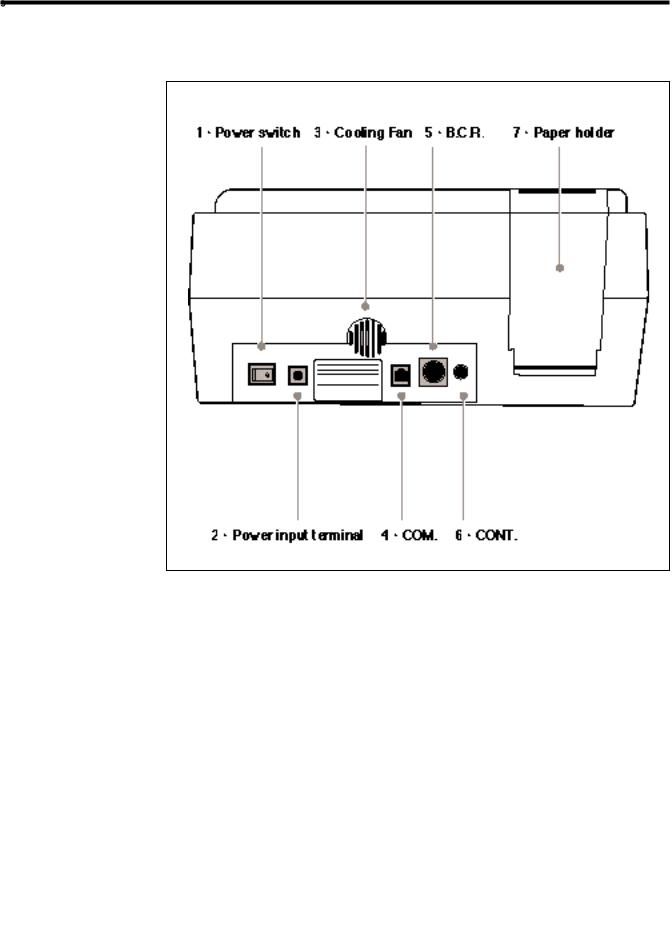
1-3-3 Rear of the analyzer
|
NO. |
Item |
Function |
|
1 |
Power switch |
For turning on and off the power supply to the analyzer. |
|
2 |
Power input terminal |
For the supplied AC adapter. |
|
3 |
Cooling Fan |
For Ventilating heated air in the unit to prevent overheating. |
|
4 |
COM. |
For the cable of the optional external device. |
|
5 |
B.C.R. |
Jack for the bar-code reader (option). |
|
6 |
CONT. |
For adjusting screen contrast. Turning clockwise to make |
|
the screen darker, counterclockwise makes it brighter. |
||
|
7 |
Paper holder |
For setting thermal printer paper. |

DOC.No.OM-28573 REV.6 03/02 SPOTCHEM EZ SP-4430 OPERATING MANUAL
|
1-4 Setting up the Analyzer |
Chapter 1 INTRODUCTION |
|
1-4-1 Cautions |
Before setting up the analyzer, read the following notes and always take proper safety precautions.
 Allow a space of 10 cm or more between the rear of the analyzer and the wall. Failure to do so may cause overheating. Excessive load on the cable connection may cause fire or incorrect measurement results.
 To avoid electric shock and/or fire, use the attached power cord to connect with a power outlet. For details, contact your distributer.
 Operate the analyzer with power of the correct voltage and frequency. Otherwise fire or damage may result.
 Connect the power plug directly to an outlet, not via an extension cord or power tap. The power supply for the analyzer is 100 VA. Before turning on the power switch, make sure that the total input of devices connected to a receptacle of the same circuit doesn’t exceed 1500 VA (100V, 15A).
 Do NOT unnecessarily disassemble or modify the analyzer. Such actions may invite danger of exposure to pathogenic microbes, and cause fire or damage.
 Place the analyzer on a stable and level surface free of vibration. Failure to do so may damage the analyzer, correct measurement results may not be obtained, and injury may result. Do NOT place the analyzer where there is a risk of falling.

|
SPOTCHEM EZ SP-4430 OPERATING MANUAL |
DOC.No.OM-28573 REV.6 03/02 |
1-1 SP-4430

Chapter 1 INTRODUCTION
Before setting up the analyzer, read the following notes and always take proper safety precautions.
 Do NOT set up the analyzer where chemicals are stored nearby, or where corrosive gases or electrical noise are generated. They may damage the analyzer, and malfunctions and/or injury may occur. Correct measurement results may not be obtained.
 Avoid exposing the analyzer to direct sunlight, condensation and wind. Otherwise, correct measurement results may not be obtained, and may cause deformation or malfunction of the analyzer.
 To connect the analyzer to external devices, be sure to use proper cables to avoid electric shock and/or fire. For details, contact your distributor.
 Place the analyzer in a room at temperatures between 10
  and 30
 with humidity between 20% and 80%. Otherwise, correct measurement results may not be obtained.
 Make sure that the room is well ventilated when a large amount of carbon dioxide is generated (when gas stoves, oil heaters and instantaneous water heaters are used in the room). This is because the pH of the Reagent Strips, which use an alkaline reaction reagent, decreases under the influence of carbon dioxide and correct measurement data may not be obtained.
Be careful not to be put hands under the analyzer.

DOC.No.OM-28573 REV.6 03/02 SPOTCHEM EZ SP-4430 OPERATING MANUAL
1-4 Chapter 1 INTRODUCTION
1-4-2 Setting up the analyzer
The parts in the analyzer are secured firmly in order to prevent scratches and/or damage due to transportation. Remove the fixing tapes before setting up the analyzer. Read 1-4-1 “Cautions on installation” carefully before setting up the analyzer.
1. Remove the fixing tape.
 Remove the tape fixing the table cover.
 Open the maintenance cover and remove the tape fixing the nozzle.
 Reattach the maintenance cover.
2. Connect the power cord.
 Make sure that the power switch on the rear of the analyzer is OFF.
 Connect the AC adapter to the receptacle on the rear panel of the analyzer, and plug the other end of the cord into the AC outlet.
3. Connecting an external device (if necessary)
 When using an external device, connect the exclusive connecting
cable to COM on the rear panel of
the analyzer.

|
SPOTCHEM EZ SP-4430 OPERATING MANUAL |
DOC.No.OM-28573 REV.6 03/02 |
1-1 SP-4430

Chapter 1 INTRODUCTION
1-4-3 First operation after setting up
 For error correction or troubleshooting, “see Chapter
5 Troubleshooting”.
IMPORTANT
This section explains the way to load thermal printer paper, and set data and time after turning on the power switch.
1. Turn on the power.
 Turn on the power switch on the rear panel of the analyzer.
“|” is displayed.
 After the analyzer name and system version are displayed, warm-up starts.
|
S PO TCHEM |
E Z |
|
S P V X X X X |
|
|
Wa r m i n g u p |
About 10 minutes after (room
|
temperature at 25 ), warm-up is |
. Me a s u r e . S u bme n u |
|
|
. C a l i b r a t e |
||
|
completed and the MAIN MENU is |
||
displayed as shown at right.
2. Set the thermal printer paper.
 Set the attached thermal printer paper (See 4-3-1 “Thermal printer
paper replacement”).
3. Confirm the time and date.
 Set the date and time (see “3-6
Built-in Clock Adjustment”).
If the date is not set correctly, correct measurement results may not be
obtained and an error may occur.
4. Remove the fixing tape on the protective cover.
 Press [1] on the MAIN MENU.
The Table Cover opens and the Reagent Table and Centrifugeequipped Multi Rack slide forward.

DOC.No.OM-28573 REV.6 03/02 SPOTCHEM EZ SP-4430 OPERATING MANUAL
1-4 Chapter 1 INTRODUCTION
1-4-4 Notes at transportation
If no key entry is made within 3 minutes after the Table Cover is opened, an alarm beeps and the Table Cover is closed.
If [STOP] key is pressed while the message “CANCEL” is displayed, the Table Cover remains open and the Standby screen is restored.
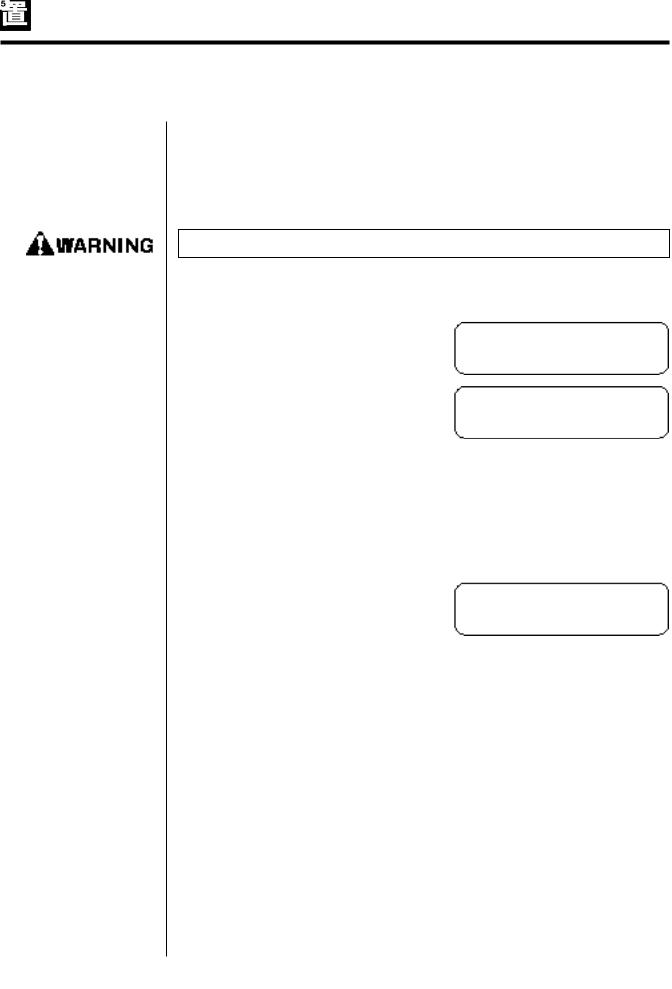
After the Table Cover is closed, a message shown at the right is displayed.
To restore the MAIN MENU, press [STOP] key.
When [ENTER] key is pressed, the Table Cover opens and the Standby screen is restored.
 Remove the tape fixing the protective cover.
 Set the maintenance cover and the tip waste case.
 Press [STOP] to close the table cover.
5. Turn off the power.
 When terminating the operation or setting, turn off the power after making sure that the MAIN MENU is displayed.
|
C o v e r |
i s |
c l o s i n g . |
|
|
C o v e r |
i s |
c l o s i n g . |
S t o p S TOP
|
B a c k |
t o |
MENU S TOP |
|
B a c k |
t o |
ME A S EN T ER |
. Me a s u r e . S u bme n u
. C a l i b r a t e
SPOTCHEM EZ SP-4430 OPERATING MANUAL DOC.No.OM-28573 REV.6 03/02
1-4 Chapter 1 INTRODUCTION
1-4-4 Notes at transportation
When carrying the analyzer in cars, use an exclusive carrying case. The carrying case is optional. Follow the following procedures to prevent exposure to pathogenic microbes and damage to the analyzer.
Wear protective gloves to prevent exposure to pathogenic microbes.
1. Inspect the inside of the analyzer.
 Press [1] on the MAIN MENU. The Table Cover opens and the Reagent Table and Centrifuge-equipped Multi Rack slide forward.
The Standby screen is displayed.
 Make sure that there are no used Reagent Strips or samples. If any, discard them.
 When there are used tips in the Tip Waste Case, discard them.
 Press [STOP] to return to the MAIN MENU and turn off the power switch.
2. Placing analyzer into carrying case.
 Place the analyzer, AC adapter and power code in the carrying case.
. Me a s u r e . S u bme n u
|
. C a l i b r a t e |
|
|
S t a n d b y |
|
|
I D |
I N FO |
. Me a s u r e . S u bme n u. C a l i b r a t e

|
DOC.No.OM-28573 REV.6 03/02 |
SPOTCHEM EZ SP-4430 OPERATING MANUAL |


|
SPOTCHEM EZ SP-4430 OPERATING MANUAL |
DOC.No.OM-28573 REV.6 03/02 |
Chapter 2
MEASUREMENT
The normal measurement and two types of calibration can be done with the SP-4430. This chapter describes the outline and operating procedures of each measurement.
2-1 Outline of Measurement
2-1-1 SPOTCHEM Reagent Strips
2-1-2 Normal measurement
2-1-3 Calibration
2-2 Cautions
2-2-1 Cautions
2-2-2 Handling samples
2-2-3 Handling Reagent Strips
2-2-4 Handling magnetic cards
2-2-5 Handling tips
2-2-6 Handling centrifuges
2-3 Preparation for Measurement
2-3-1 Preparation
2-3-2 Startup
2-3-3 Checks before measurement
2-3-4 Preparing samples
2-4 Measurement
2-4-1 Normal measurement
2-5 Calibration
2-5-1 Overview of calibration
2-5-2 Calibration by magnetic card
2-5-3 Calibration by calibrator kit
2-6 Interpreting measurement results
2-6-1 Printing normal measurement results
2-6-2 Printing calibration results

DOC.No.OM-28573 REV.6 03/02 SPOTCHEM EZ SP-4430 OPERATING MANUAL
2-1 Outline of Measurement Chapter 2 MEASUREMENT
2-1-1 SPOTCHEM Reagent Strips
SPOTCHEM Reagent Strips (optional) must be used with this analyzer. There are two types of SPOTCHEM Reagent Strips. Use the correct type of strips for the measurement purpose.
Multi Reagent Strip
A Multi Reagent Strip has 5~6 reagent fields for analyzing various items including normal screening, and liver or renal function screening.
Single Reagent Strip
A Single Reagent Strip has only one reagent field on it. Several different reagent items of Single Reagent Strips can be measured for one sample.
|
SPOTCHEM EZ SP-4430 OPERATING MANUAL |
DOC.No.OM-28573 REV.6 03/02 |
Chapter 2 MEASUREMENT
2-1-2 Normal measurement
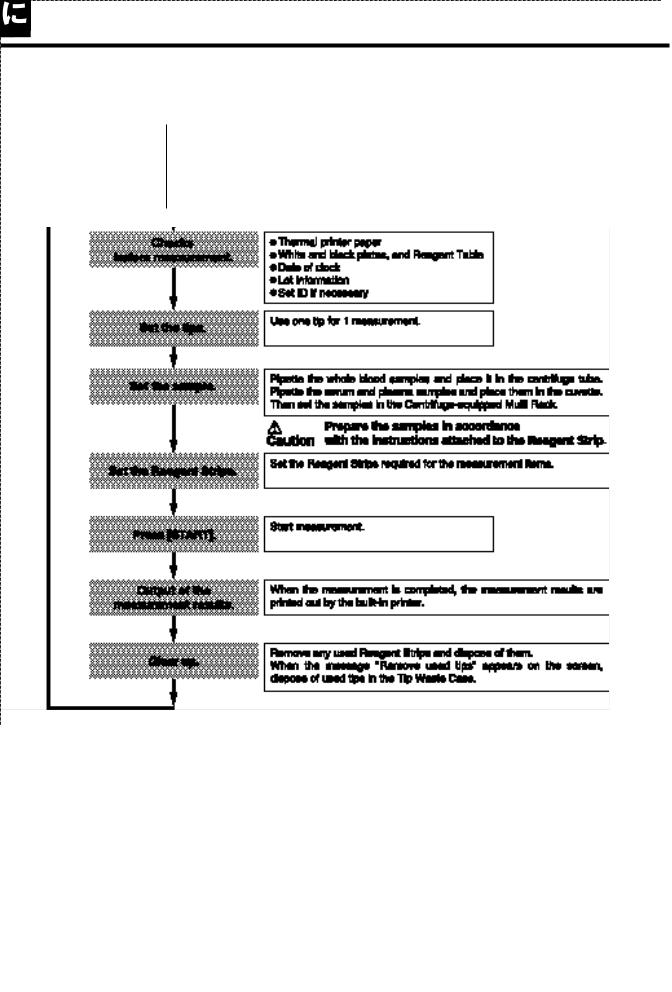
In normal measurement, more than one item can be measured at a time for one sample. The Reagent Strip Table can hold three Single Reagent Strips and one Multi Reagent Strip, so that simultaneous measurement of up to nine items is available. The operating procedure of normal measurement is described as shown below.

|
DOC.No.OM-28573 REV.6 03/02 |
SPOTCHEM EZ SP-4430 OPERATING MANUAL |
Chapter 2 MEASUREMENT
2-1-3 Calibration
This analyzer provides two types of calibration: Calibration by magnetic card (Reagent Card) and Calibration by Calibrator. Calibration must be performed for all fields of Reagent Strips (see “2-5-1 Outline of calibration” for details).
For calibration by Calibrator, the following two types of Calibrator Kit and Magnetic Card (Calibration Card) are used.
SPOTCHEM Calibrator Kit
For use with all items except Hemoglobin
SPOTCHEM Calibrator Hb Kit
For use with Hemoglobin
Each Calibrator Kit contains Low and High lyophilized serum and a Calibration Card. For detailed procedures, see the package insert of the Calibrator Kit.

|
SPOTCHEM EZ SP-4430 OPERATING MANUAL |
DOC.No.OM-28573 REV.6 03/02 |
Chapter 2 MEASUREMENT
The flowchart of calibration.

|
DOC.No.OM-28573 REV.6 03/02 |
SPOTCHEM EZ SP-4430 OPERATING MANUAL |
2-2 Cautions
2-2-1 Cautions
Chapter 2 MEASUREMENT
 Before turning ON the power, reconfirm “1-4-1 Cautions” so that the analyzer is always operated under proper conditions.
 If the analyzer is out of order, contact your distributor for repair. Do NOT attempt to repair or modify it by yourself. It may damage the analyzer or get injured.
 The analyzer has a temperature control function in order to yield correct measurement results at the room temperature of 10~30 . For more accurate measurement, measurement at the room temperature of 20~25
 and at humidity of 30~60% is recommended.
 Do NOT put a container with samples in it on the analyzer. If samples spill on the device, it may damage.
If there is anything wrong with the analyzer, or in case of odor or smoke, turn OFF the power immediately and unplug. Otherwise the analyzer may be damaged and cause fire.
 Do NOT move the analyzer during measurement. Such movement may cause malfunction, resulting in incorrect measurement results.
Perform proper maintenance following the instruction to ensure high accuracy.
Do NOT place anything in front of the Table Cover. It automatically opens during operation.
Use SPOTCHEM Reagent Strips only for the analyzer. The other types of Reagent Strips are unacceptable.

|
SPOTCHEM EZ SP-4430 OPERATING MANUAL |
DOC.No.OM-28573 REV.6 03/02 |
Chapter 2 MEASUREMENT
2-2-2 Handling samples
 Blood is used as a measurement sample with this analyzer. Be aware that blood may be contaminated with pathogenic microbes that may cause infectious disease. Exercise utmost care whenever handling blood. Incorrect or imprecise procedures may result in exposure to pathogenic microbes.
 Handling samples slightly differs depending on test items. Follow the instructions on the package insert of SPOTCHEM Reagent Strips.
2-2-3 Handling Reagent Strips
 Do NOT use expired Reagent Strips or deteriorated strips of which the reagent fields show any sign of discoloration or deformation, even if they are before the expiration date. Correct measurement results may not be obtained.
 Take Reagent Strips out of the refrigerator 20 minutes before measurement and allow them to reach room temperature (10 to 30 ). Otherwise, correct measurement results may not be obtained.
 Open a reagent strip package immediately before use. If the opened reagent strip is left for a while, it will absorb water from the air or gather dust, which may result in incorrect measurement results.
 Do NOT touch the reagent field on the strip with fingers. Sebum on the reagent field may result in incorrect measurement results.
 When a new reagent strip box is opened, perform calibration by magnetic card using the supplied Reagent Card (see 2-5-2).

|
DOC.No.OM-28573 REV.6 03/02 |
SPOTCHEM EZ SP-4430 OPERATING MANUAL |
Chapter 2 MEASUREMENT
2-2-4 Handling magnetic cards
 Do NOT place a magnetic card close to a magnetic object (magnet, TV set, etc.) Information on the magnetic card may become unreadable.
 Do NOT scratch the magnetic surface (stripe). Information on the magnetic card may become unreadable.
 Do NOT use a magnetic card (supplied with Reagent Strips or Calibrator) for SP-4420 or SP-4430 with other devices. The card may become jammed in the device.
2-2-5 Handling tips
 Do NOT touch the pointed end of a Tip with bare hands. If it becomes soiled, correct sampling may not be possible, resulting in incorrect measurement results.
 Do NOT reuse a tip. Water-repellent treatment is applied to each tip so that the sample can be pipetted correctly. If it is rinsed, the coating will come off and correct measurement results may not be obtained.

|
SPOTCHEM EZ SP-4430 OPERATING MANUAL |
DOC.No.OM-28573 REV.6 03/02 |
Chapter 2 MEASUREMENT
2-2-6 Handling centrifuges
 Pipette 250
  to 270
 whole blood into the centrifuge tube. Insufficient sample volume may result in incorrect measurement results. Excessive volume may cause blood to stain the cover.
 When it takes time before blood samples collected are brought into the centrifuge, the samples may begin to coagulate. The samples, which show heavy coagulation or deposition of fibrin, may not be subjected to measurement.
A syringe containing heparin can be used to prevent coagulation when it takes time before the samples are brought into the centrifuge, although the machinecontains heparin.
Heparin is contained as an anticoagulant. Close the cap tightly after setting a sample, and invert it and use the sample after removing the cap.
Remove air bubbles or skin on the surface of the sample, if any. Otherwise they may cause incorrect measurement results.
Wipe out the sample attached to the outside of centrifuge tube before placing it to the centrifuge, otherwise it may cause spattering the sample.
 Samples with extremely high hematocrit levels may yield incorrect measurement results.

DOC.No.OM-28573 REV.6 03/02 SPOTCHEM EZ SP-4430 OPERATING MANUAL
2-3 Preparation for Measurement Chapter 2 MEASUREMENT
2-3-1 Preparation
Prepare necessary instruments as described in the following table before starting Normal Measurement, Calibration by Magnetic Card or Calibration by Calibrator.
IMPORTANT
Take the Reagent Strips out of the
and leave them at room temperature
30 ) for 20 minutes.
IMPORTANT Using Reagent Strips without allowing them to reach room temperature may
result in incorrect measurement results.

|
SPOTCHEM EZ SP-4430 OPERATING MANUAL |
DOC.No.OM-28573 REV.6 03/02 |
Chapter 2 MEASUREMENT
2-3-2 Startup
NOTE
 To obtain the appropriate contrast on the screen, rotate the contrast adjustment knob (“CONT.”) on the rear of the analyzer.
 Warm-up time depends on the room temperature.
The operating procedures from turning ON the power to the MAIN MENU are described below.
Before turning ON the power, make sure that the maintenance cover is in position. If light enters into the analyzer during initialization, an error will occur.
Before turning ON the power, make sure that nothing is placed in front of the Table Cover. The Table Cover opens during initialization. If there is an obstruction, a problem may occur.
1. Turn ON the power.
 Turn ON the power at the rear of the analyzer. When the power is ON, “|” is displayed
 The name of the analyzer and the system version (“VXXXX” shown at the right) are displayed and warm-up starts.
 The screen appears during warm-up as shown at the right, and initialization and self-check of each function are performed.
 About 10 minutes after (when at 25 ), warm-up is completed and the MAIN MENU is displayed.
S PO TCHEM E Z
S P V X X X X
. Me a s u r e . S u bme n u
. C a l i b r a t e

|
DOC.No.OM-28573 REV.6 03/02 |
SPOTCHEM EZ SP-4430 OPERATING MANUAL |
Chapter 2 MEASUREMENT
2-3-3 Checks before measurement
Check each part before performing Normal Measurement or Calibration.
Wear protective gloves to prevent exposure to pathogenic microbes.
Discard used samples, tips and protective gloves separately from general waste according to the local regulations on biohazardous waste.
1. Thermal printer paper.
 If a red line appears on both sides of the printer paper, replace it with a new roll (see“4-3-1 Thermal printer paper replacement”).
2. Reagent Table.
 Check the Reagent Table and clean it if necessary (see “4-2-1 Cleaning the Reagent Table”).
3. Centrifuge-equipped Multi Rack.
 Make sure that the Centrifugeequipped Multi Rack has no used samples in it. If any, discard them.
 Install the Tip Waste Case.
4. Setting the parameters.
 Set the parameters as necessary. If the same parameter settings are continuously used, resetting is not necessary. See “Chapter 3 SUB MENU” for details.
IMPORTANT To check the present parameter settings, print them out (see “3-3-1 Printing parameters”).

|
SPOTCHEM EZ SP-4430 OPERATING MANUAL |
DOC.No.OM-28573 REV.6 03/02 |
Chapter 2 MEASUREMENT
2-3-4 Preparation of samples
The required volume of a serum or plasma sample is“6x (number of test items)+38 ”.For example, the required volume for 5 test items is : 6 x 5 + 38
 = 68
= 68 .
.
 A Serum or Whole blood Sample Tube has 2 lines marked on it for 100
 and 500
 .
.
IMPORTANT
 The Whole blood Sample Tube contains heparin as an
anticoagulant.
Prepare samples as described below except for Hb and HDL-C, which require different procedures (see pages 2-16 and 2-17 for sample preparation for Hb and HDL-C). Test items may be added or changed in the future. Read the package insert of SPOTCHEM Reagent Strips carefully for details on handling samples.
Wear protective gloves to prevent exposure to pathogenic microbes.
 Serum or plasma sample.
Prepare a Serum Sample Tube (blue cap).
Pipette serum or plasma. If measurement is not performed immediately, cap the tube to prevent contamination or evaporation.
Remove any air bubbles or skin on the surface of the sample.
They may cause incorrect measurement results.
 Whole blood.
Prepare a Whole blood Sample Tube (orange cap).
Uncap the tube and pipette whole blood.
Cap the tube tightly.
Invert the sample 5 to 6 times (see
“Inverting a sample” on the next page).

|
DOC.No.OM-28573 REV.6 03/02 |
SPOTCHEM EZ SP-4430 OPERATING MANUAL |
Chapter 2 MEASUREMENT
Even if the sample stays at the bottom after being inverted, heparin is well mixed with the sample. Do NOT shake the tube vigorously.
NOTE
IMPORTANT
Inverting a sample to mix
1 Gently invert a sample tube.
2 In 3 seconds, invert the sample again.
3 Wait for 3 seconds, and invert it again.
4 Repeat the above procedure several times.
 To use a whole blood sample tube, prepare a centrifuge.
When using an optionally available
centrifuge , carefully read the
operating manual of the centrifuge.
Place the samples in the centrifuge taking rotor balance into consideration (see the block below).
Centrifuge the samples for 3 minutes or more. It is not necessary to remove the supernatant from the centrifuged samples. Uncap the tubes and place them directly in the sample rack.
Remove any air bubbles or skin on the surface of the sample.
They may cause incorrect measurement results.
Ensuring rotor balance
Place sample tubes symmetrically against the rotation axis as illustrated at right. For centrifugation of 1 or 5 samples, use a dummy tube filled with an equal amount of water to make a total of 2 or 6 sample tubes.

|
SPOTCHEM EZ SP-4430 OPERATING MANUAL |
DOC.No.OM-28573 REV.6 03/02 |
Chapter 2 MEASUREMENT
A Centrifuge tube has 1 line marked on it for 250 .
.
Using a centrifuge
 Prepare a centrifuge.
 Uncap the tube and pipette 250
  of heparinized whole blood or plain blood into the centrifuge tube.
 The centrifuge tube includes Heparin as an anticoagulant.
 Close the cap tightly after setting a sample, and invert it.
Use the sample after removing the cap.
 Wipe out the sample attached to the outside of centrifuge tube before placing it to the centrifuge, otherwise it may spattering the sample.
 Place samples in the centrifuge ( see“ 2-4-1
Normal measurement”).
|
IMPORTANT |
Remove any air bubbles or skin on the surface of |
|
|
the sample. They may cause incorrect measurement |
||
|
results. |
||
|
Wipe out the sample attached to the outside of |
||
|
centrifuge tube before placing it to the centrifuge, |
||
|
otherwise it may cause spattering the sample . |
||
|
IMPORTANT |
The samples may coagulate when it takes time |
|
|
before the samples collected are brought into the |
||
|
machine. Those showing heavy coagulation or |
||
|
deposition of fibrin sometimes can not be measure. |
||
|
A syringe containing heparin can be used to |
||
|
prevent coagulation when it takes time before the |
||
|
samples are brought into the centrifuge, although |
||
|
the machine contains heparin. |
||

|
DOC.No.OM-28573 REV.6 03/02 |
SPOTCHEM EZ SP-4430 OPERATING MANUAL |
Chapter 2 MEASUREMENT
Measuring the Hb
When measuring Hb, dilute whole blood samples 6 times with distilled water.
 Prepare a Whole blood Sample Tube (orange cap).
 Uncap the tube and pipette the whole blood sample into the tube.
 Cap the tube tight.
 Invert the sample several times ( see “2-14
Inverting a sample”).
 Prepare a Serum Sample Tube(blue cap). Pipette 200
 of distilled water.
 Pipette 40
  of the prepared whole blood sample into the above Serum Sample Tube.
 Cap the tube tight.
 Invert the sample several times again.
IMPORTANT Remove any air bubbles or skin on the surface of the sample.
They may cause incorrect measurement results.
Портативный автоматический биохимический экспресс-анализатор, работающий по технологии «сухой химии».
Подробнее
- Описание
- Характеристики
- Реагенты
- Заявки на ремонт
- Заказ
реагентов - Файлы и видео
-
Spotchem SP-4430 легко выполняет биохимические измерения методом сухой химии с использованием твердофазного реагента (тест-полоски).
Встроенная компактная центрифуга уменьшает предварительную обработку образцов перед измерением.- Компактный и легкий – достаточно пространства с площадью А4
- Малый объем пробы
- Простая и быстрая операция измерения, с возможностью непрерывного измерения одновременно до 9 образцов
- Легкая калибровка с магнитной картой
- Многотипные тест-полоски (c 5 или 6 параметрами) для исследований заболеваний
- Доступно управление штрихкодом
- Возможность использования непосредственно у койки пациента
Аналиты
Glu • UA • T-Cho • TG • BUN • T-Bil • Ca • TP • Alb • GOT • GPT • LDH • CPK • Amy • GGT • ALP • Cre • HDL-C • FRA • IP • Mg
Одновременное измерение- 9 аналитов
- 3 моно-полоски и 1 мульти-полоска
-
Измеряемые аналиты
общая биохимия • 22 аналитаДлины волн
5 длин волн (405, 660, 575, 610, 820 нм)Диапазон измерений
для каждого аналита свой диапазонВремя преднагрева до 25°С
10 минутОбъём образца
6 × количествово тестов + 38 мкл сывороткиРасход образца
4 ~ 6 мкл на тестПробирки • цельная кровь
пробирки с оранжевой крышкой и пробирки для центрифугиПробирки • сыворотка
пробирки с синей крышкойТемпература реакции
37°СМетод калибровки
калибровочная магнитная карта, калибровочный наборЖидкокристаллический дисплей
20 знаков × 2 строкиИнтерфейс
RS-232CСчитыватель штрихкода
внешний, подключаемый через RS-232CТемпература окружающей среды
10 – 30 °СОтносительная влажность
20 – 80 %Электрическое питание
100-120 В или 220-240 В / 50/60 ГцПотребляемая мощность
100 ВтГабариты
336 × 206 × 167 ммКоличество проголосовавших
13Сумма оценок
40Рейтинг
3.1Тип анализатора
АвтоматДля экспресс-лаборатории
Для экспресс-лабораторииПроизводительность (тестов/час)
63?
ионоселективный модуль
Наличие ISE
нетПринцип измерения
измерение интенсивности отражённого светаМинимальный объем пробы (мкл.)
6Источник света
Интерференционные фильтры, СветодиодТип образца
Сыворотка, Цельная кровьПамять результатов
100Принтер
встроенныйПодключение к ПК
естьВес
5,4Реагенты
Тест-полоски для анализатора Spotchem - Тест-полоски для анализатора Spotchem
Заявка на ремонт
Заказ оборудования/реагентов
Описание
Автоматический биохимический анализатор SpotChem EZ (SP-4430)
Биохимический анализатор Spotchem EZ работает по технологии сухая химия и отлично зарекомендовал себя в дежурных и передвижных лабораториях, а также в реанимациях. Благодаря высокой производительности и скорости анализатора получаются быстрые результаты различных биохимических исследований.
Анализатор состоит из нескольких ключевых частей: блока измерения, дисплея, микроцентрифуги, встроенного штатива на девять полосок, считывателя магнитной карты, термопринтера и клавиатуры.
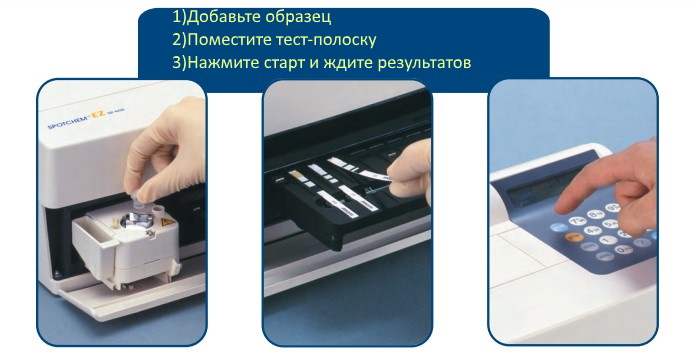
Ключевые особенности
- В прибор встроена микроцентрифуга при объеме образца в 250 мкл (кровь, все тесты) или 4-6 мкл для одного анализа
- Состоит из блока измерения, двухстрочного дисплея, клавиатуры, термопринтера, микроцентрифуги, встроенного штатива для 9 полосок, считывателя магнитной карты.
- Калибровка происходит с магнитной карты. При активации карты происходит автоматическое внесение всех данных, таким образом Spotchem EZ может сразу использовать откалиброванные полоски
- Подключение к компьютеру с помощью стандартного RS-232С, память в приборе на сто исследований. Возможна активация функции чтения штрих-кодов (идет опционально)
- Производительность анализатора 63 теста в час, при этом возможно измерение от одного до девяти параметров одновременно
- Память на 100 измерений
- Тип образца: цельная кровь для гемоглобина, для остальных биохимических параметров сыворотка или плазма
- Spotchem EZ может провести все этапы исследования в автоматическом режиме, в том числе подготовку образцов, калибровку (технология электронной калибровки, упрощающая пользование анализатором) и измерение биохимических тестов. От включения до загрузки первого анализа проходит не более десяти секунд
- Spotchem EZ очень понятно сконструирован, таким образом от оператора не требуется обладать какими-то особенными знаниями для управления прибором: стандартного инструктажа и внимательности вполне достаточно для уверенной работы
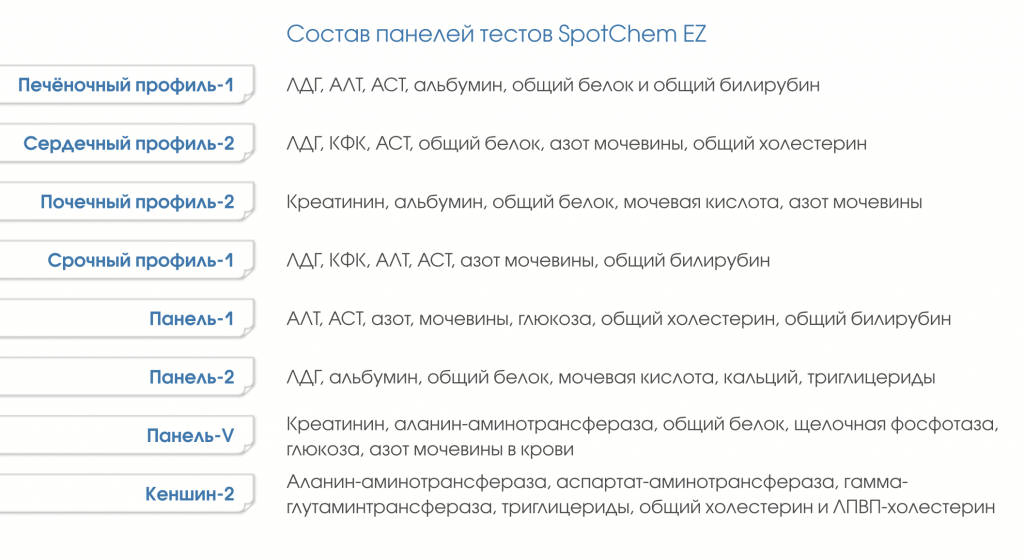
- Производитель Arkray выпускает не только тест-полоски однокомпонентного типа, но и многофункциональные полоски разных биохимических профилей, позволяющие исследовать состояние печени, почек и сердца
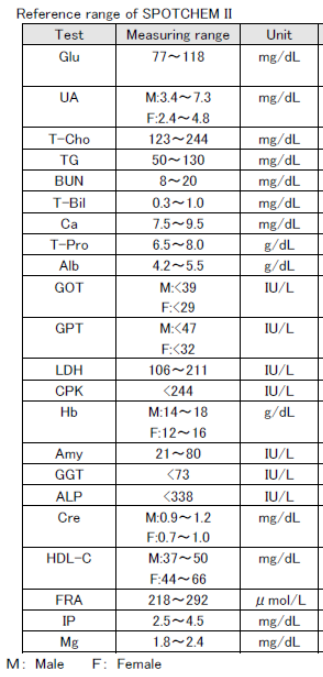
Референсные значения для человека (Для разных видов животных индивидуальные референсные значения).
Анализируемые параметры, точность измерения
|
Анализируемые параметры |
Нормальная концентрация CV |
Повышенная концентрация CV |
| Глюкоза | 2.3 | 4.6 |
| Мочевая кислота | 1.7 | 3.7 |
| Холестерин | 3.4 | 1.7 |
| Триглицериды | 1.9 | 1.7 |
| Мочевина | 3.1 | 3.6 |
| Общ билирубин | 3.5 | 2.3 |
| Кальций | 3.3 | 3.3 |
| Общ. белок | 3.1 | 5.0 |
| Альбумин | 2.9 | 2.2 |
| АЛТ | 5.1 | 2.1 |
| АСТ | 4.6 | 1.6 |
| ЛДГ | 2.4 | 2.0 |
| Креатинкиназа | 3.0 | 1.4 |
| Амилаза | 3.0 | 2.8 |
| ГГТП | 2.0 | 3.2 |
| Щелочная ф-за | 5.1 | 2.8 |
| Креатинин | 3.6 | 2.9 |
| Липиды выс. плотности | 3.6 | 3.0 |
| Фруктоза | 3.0 | 3.1 |
| Фосфор | 2.0 | 1.9 |
| Магний | 3.6 | 3.0 |
Расходные материалы
| Артикул | Тип | Наименование |
Количество в упаковке |
| 77182 | Набор тестов | Печеночный (Spotchem Liver-1) | 25 |
| 77183 | Набор тестов | Срочный (Spotchem Stat-1) | 25 |
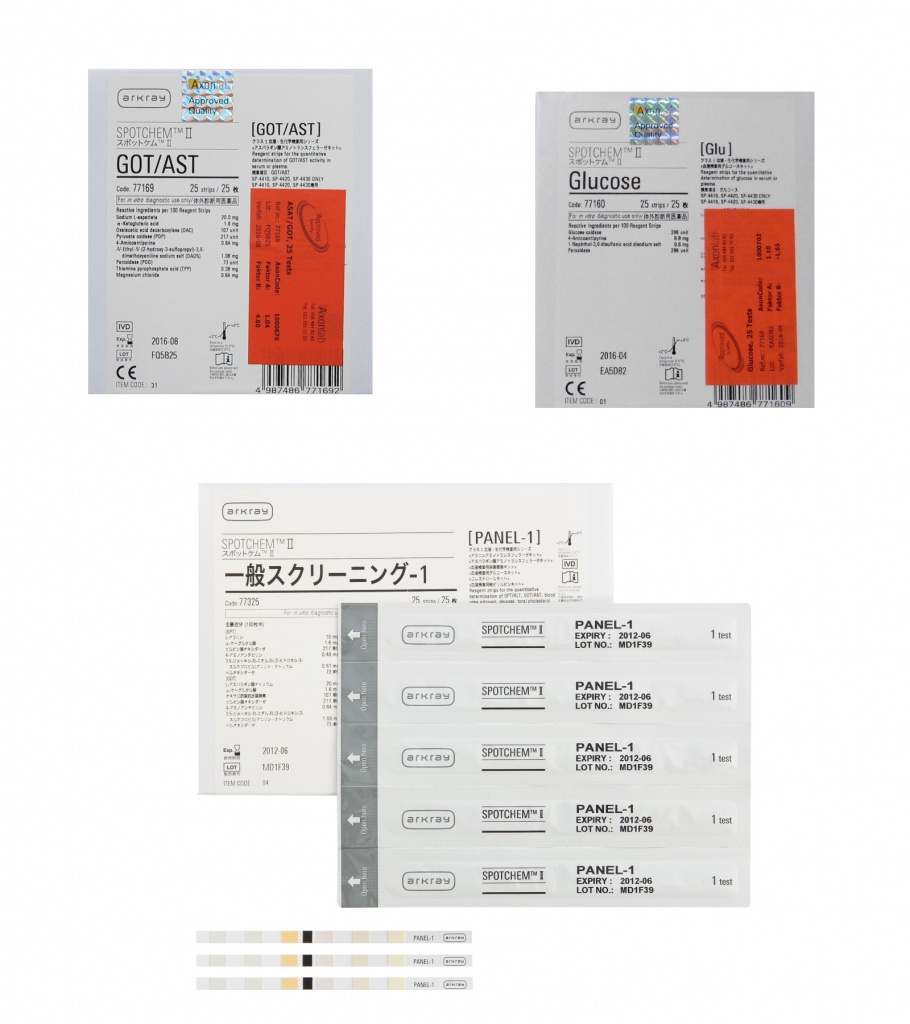
| 77184 | Набор тестов | Панель-1 (Spotchem Panel-1) | 25 |
| 77185 | Реагент для определения набора тестов | Панель-2 (Spotchem Panel-2) | 25 |
| 77186 | Набор тестов | Cердечный-2 (Spotchem Heart-2) | 25 |
| 77187 | Набор тестов | Почечный-2 (Spotchem Kidney-2) | 25 |
| 77189 | Набор тестов | Панель-V, Spotchem II Panel V | 25 |
| 77043 | Калибратор | Spotchem Calibrator Check | 4 |
| 10191 | Пробирки образца с голубой крышкой | Serum Sample Tube | 500 |
| 10712 | Пробирки для центрифуги | Centrifuge Tube | 100 |
| 10743 | Наконечники для пипетки | Tip set (EZ) | 500 |
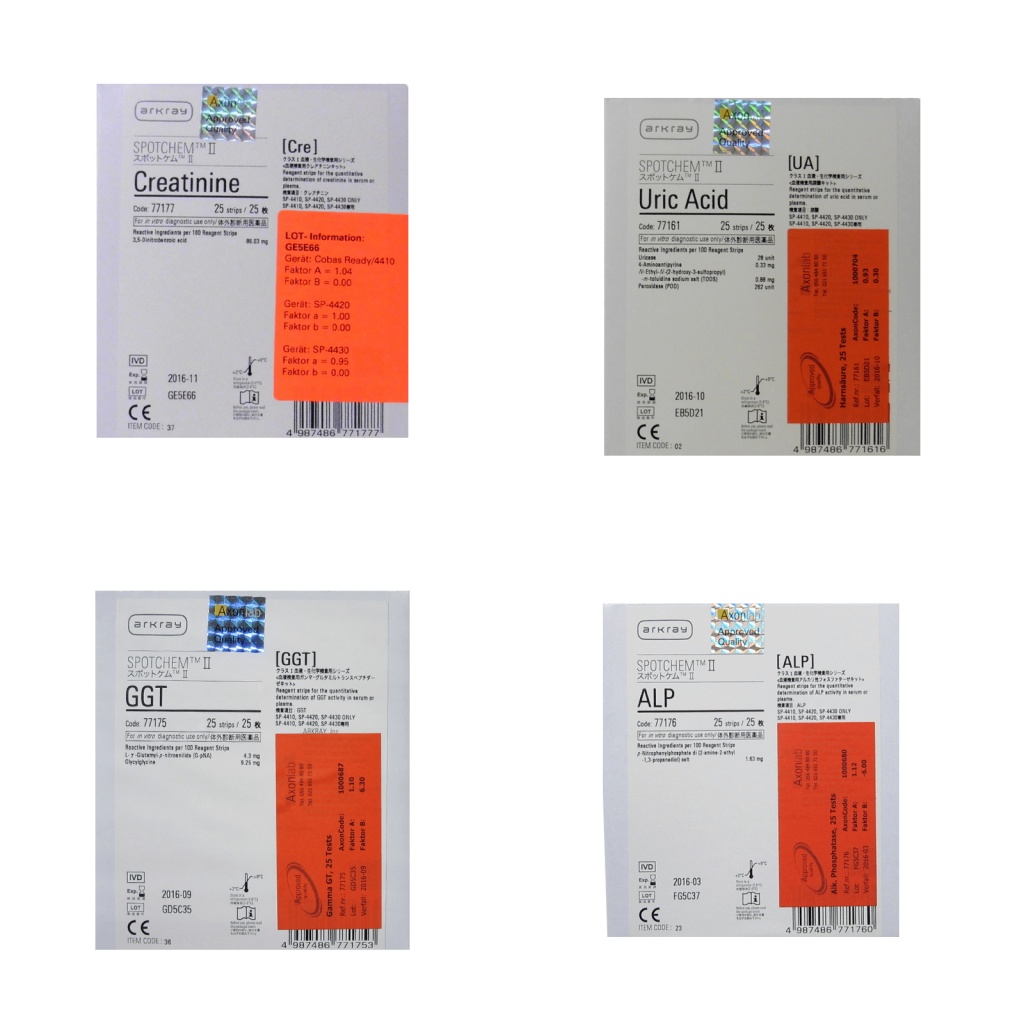
| 77160– 77180 | Реагенты |
Реагенты Spotchem для определения: глюкозы, мочевой кислоты, общего холестерина, триглицеридов, мочевины, общего билирубина, кальция, общего белка, альбумина, ГОТ/АСТ, ГПТ/АЛТ, ЛДГ, креатинкиназы, амилазы, ГГТ, щелочной фосфатазы, креатинина, фруктозамина, фосфора, магния, холестерина высокой плотности) |
25 |
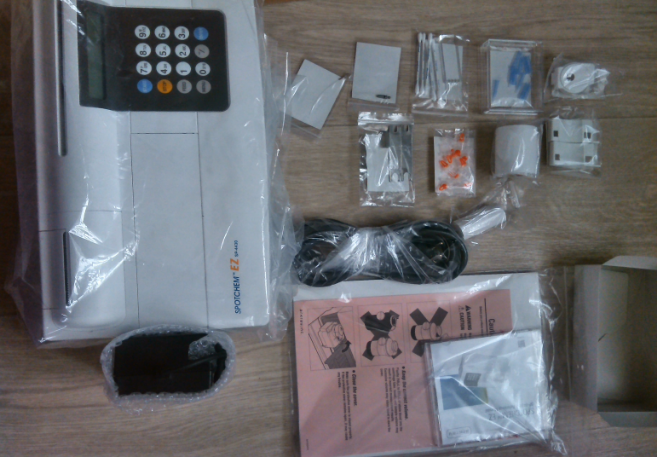
Комплектация Spotchem EZ SP-4430
- Анализатор EZ (SP-4430)
- Адаптер
- Кабель питания
- Руководство пользователя
- Ключ для замены носика
- Контейнер для отходов, 2 шт
- Крышка защитная, 2 шт
- Набор для чистки (щеточка, ушные палочки)
- Набор носика (носик, прокладка)
- Наконечник 10шт/уп
- Пробирка центрифужная, 10 шт
- Струна
- Термобумага, 58 мм
Spotchem EZ Vet
Ветеринарная версия SpotChem EZ VET также доступна для покупки, подробности уточняйте у менеджеров.
- Одно- и многопараметровые тесты
- Индивидуальная упаковка полосок
- Количество тестов — 21, панелей тестов — 8
- 3 шага для получения результата
Актуальность анализа мочи у животных:

* Используя тест-полоски «Aution Screen» можно проводить высокочувствительный анализ мочи (0,01 г/л) в любое время суток
** Тест-полоски типа «10РА» и «Aution Screen» позволяют измерять соответственно отношение белок/креатинин и альбумин/креатинин, что имеет исключительно важное клиническое значение при диагностике нефропатий!
Если у вас остались вопросы по биохимическим анализаторам Arkray Spotchem EZ или вы хотите купить другое оборудование — пишите/звоните +7 (921) 967-27-76 или 1@htmed.ru
Характеристики
|
Измеряемые параметры |
моно-полоски глюкоза, мочевая кислота, холестирин, триглицериды, мочевина, билирубин, Ca, Mg, общий белок, альбумин, АСТ, АЛТ, ЛДГ, креатинкиназа, Hgb (цельная кровь), амилаза, ГГТ, щелочная фосфатаза, креатинин, липиды высокой плотности, фруктозамин, фосфор. |
|
Особенность |
поддержка мульти-полосок |
|
83-00140F |
Printed in Japan |
DOC.No.OM-28573 REV.6 03/02
|
DOC.No.OM-28573 REV.6 03/02 |
SPOTCHEM EZ SP-4430 OPERATING MANUAL |
Premise
This manual contains important information on the functions of the SPOTCHEM EZ SP-4430
Distributed by : A.Menarini I.F.R. srl
Diagnostics Division
This manual is issued by: ARKRAY, Inc.
Read carefully prior to starting up the unit.
It is recommended to retain this manual for future use.
This product conforms to European Directive 98/79/EC.
|
SPOTCHEM EZ SP-4430 OPERATING MANUAL |
DOC.No.OM-28573 REV.6 03/02 |
Introduction
The SP-4430 is an automated biochemical analyzer using a dry chemistry system.
This manual contains outlines, instructions for the operation, maintenance and troubleshooting for the SPOTCHEM SP-4430. Before operating the SP-4430, read this manual carefully.
It is recommended to retain this manual for future use.
Always be careful when handling blood samples or waste reagent strips. Incorrect or imprecise procedures may result in exposure to pathogenic microbes.
This analyzer must only be operated by those trained in proper procedures for clinical testing and handling of hazardous waste. Anyone who operates the analyzer for the first time must be assisted by a trained person.
Never touch the Reagent Table, Centrifuge-equipped Multi Rack, or other places where sample residue may collect with bare hands. When performing maintenance, always wear protective gloves to prevent exposure to pathogenic microbes.
Separate used samples, tips and protective gloves from general waste and discard them according to local regulation on biohazardous waste.
All rights reserved. Reproduction of this manual is forbidden.
The contents of this manual are subject to change without further notice.
Although we take all possible measures to ensure the contents of this manual, please notify your distributorwhen you have questions, or find errors or omission.
|
DOC.No.OM-28573 REV.6 03/02 |
SPOTCHEM EZ SP-4430 OPERATING MANUAL |
Caution Marks
Pay careful attention to these caution marks in this Operating Manual.
Regarding accident resulting in injury or death.
To prevent infection of yourself or others from pathogenic microbes, follow the instructions given herein.
To prevent injuries to yourself or others, or material damages, follow the instructions described.
Regarding damage and performance of products.
Failure to follow the instructions may lead to incorrect results.
To prevent damage to the unit and assist you in making best use of the capabilities of the analyzer, additional explanations and notes are provided herein.
Reference information on operation, additional explanations and related functions are provided herein.
|
SPOTCHEM EZ SP-4430 OPERATING MANUAL |
DOC.No.OM-28573 REV.6 03/02 |
|
SPOTCHEM EZ SP-4430 OPERATING MANUAL |
DOC.No.OM-28573 REV.6 03/02 |
|
2-5 |
Calibration |
2-28 |
|
|
2-5-1 |
Overview of calibration |
2-28 |
|
|
2-5-2 |
Calibration by magnetic card |
2-29 |
|
|
2-5-3 Calibration by calibrator kit |
2-31 |
||
|
2-6 |
Interpreting measurement results |
2-39 |
|
|
2-6-1 |
Printing normal measurement results |
2-39 |
|
|
2-6-2 |
Printing calibration results |
2-42 |
|
|
DOC.No.OM-28573 REV.6 03/02 |
SPOTCHEM EZ SP-4430 OPERATING MANUAL |
|
SPOTCHEM EZ SP-4430 OPERATING MANUAL |
DOC.No.OM-28573 REV.6 03/02 |
Chapter 1
INTRODUCTION
The SP-4430 is an automated biochemical analyzer using a dry chemistry system. This chapter contains the information on the functions and measurement principles of the SP-4430.
1-1 Outline
1-1-1 Features
1-1-2 Measurement principles
1-1-3 Specifications
1-2 Shipping Carton
1-2-1 Analyzer
1-2-2 Accessories
1-3 Parts Description and Function
1-3-1 Front of the analyzer
1-3-2 Operator panel
1-3-3 Rear of the analyzer
1-4 Setting up the Analyzer
1-4-1 Cautions
1-4-2 Setting up the analyzer
1-4-3 First operation after setting up
1-4-4 Notes at transportation
|
DOC.No.OM-28573 REV.6 03/02 |
SPOTCHEM EZ SP-4430 OPERATING MANUAL |
1-1 Outline
Chapter 1 INTRODUCTION
1-1-1 Features
■Compact and lightweight design
The footprint of the SP-4430 is as small as that of a notebook computer. It weighs only 5 kg and can be easily carried by one person. The small unit contains various components such as a display, printer, 1- sample centrifuge and automatic tip disposal mechanism. No water supply or drainage system is required, therefore it is suitable for examinations in schools or bedside in hospitals. Power consumption is greatly reduced.
■Energy-saving design
■Automatic Sampling
■Built-in centrifuge for 1 sample
■Simple calibration using magnetic cards
■Sample Control by Bar code
■Online Network through two-way Transmission
Power consumption per 1 hour is approximately 50 W on average (AC 100V, 60Hz when continuous measurements are conducted).
The analyzer automatically absorbs samples set on the Centrifuge-equipped Multi Rack and drops them on reagent strips. Manual operation is not necessary, so that the sampling amount becomes constant and stable measurement results can be obtained.
The analyzer has a built-in centrifuge for 1 sample. By placing the whole blood sample in the centrifuge tube and setting it on the Centrifuge-equipped Multi Rack, the operation, centrifugation suction sampling is conducted automatically. This saves centrifugation of whole blood samples before measurement.
Calibration using magnetic cardsReagent Card are provided with the Reagent Stripsis possible, without using the SPOTCHEM Calibrator Kit. By inserting magnetic cards into the magnetic card reader, differences between reagent strip lot number and daily deviations are automatically calibrated.
Optional Hand-held Bar Code Reader is available. By reading the bar code of each sample, the bar code is automatically allocated as patient ID.
With the optional Data Management Software and external devices, remote control of measurement results and remote update of parameter settings are possible.
|
SPOTCHEM EZ SP-4430 OPERATING MANUAL |
DOC.No.OM-28573 REV.6 03/02 |
1-1 SP-4430
Chapter 1 INTRODUCTION
1-1-2 Measurement principles
The light emitted from LED becomes monochromatic light of a certain wavelength after passing through an optical fiber (Five different types of optical filters are provided, and the optimum wavelength is selected for each test item). Monochromatic light is separated and transmitted to the photometry section of each channel by ten optical fibers.
In each photometry section, the monochromatic light transmitted by the optical fibers is irradiated on the reagent fields, which has a color reaction after sampling. Its reflected light is read with 2 photodiodes, and the system calculates measurement results by end-point assay (EPA) or reaction-rate assay (RRA).
|
DOC.No.OM-28573 REV.6 03/02 |
SPOTCHEM EZ SP-4430 OPERATING MANUAL |
1-1 SP-4430
Chapter 1 INTRODUCTION
1-1-3 Specifications
|
Sample |
Serum, Plasma, Whole blood (Only Hb) |
||
|
Measurement item |
General biochemical measurement items, 22 items |
||
|
Measurement wavelength |
5 wavelengths (405, 550, 575, 610 and 820 nm) |
||
|
Measurement principle |
Optical measurement of reflection intensity of |
||
|
reagent color reaction |
|||
|
Measurement Range |
Set for sach measurement item |
||
|
Reagent Strip |
SPOTCHEM Reagent Strip |
||
|
Processing speed |
63 samples per hour |
||
|
Minimum sample volume |
6 × the number of measurement items + 38μL: |
||
|
serum, plasma |
|||
|
Sample consumption |
4 6μL(per 1 measurement item): serum, plasma |
||
|
Sample container |
Whole blood: exclusive whole blood sample tube |
||
|
(Orange cap) |
|||
|
Centrifuge tube |
|||
|
Serum, plasma: exclusive serum sample tube |
|||
|
(Blue cap) |
|||
|
Simultaneous measurement |
3 Single Reagent Strips or 1 Multi Reagent Strip |
||
|
Maximum of 9 test items of continuous |
|||
|
measurement using Single Reagent Strips and a |
|||
|
Multi Reagent Strip is available. |
|||
|
Reagent reaction temperature |
37 |
||
|
Light source |
LED and Interference filter |
||
|
Calibration method |
Calibration by magnetic card (Reagent Card) |
||
|
Calibration by Calibrator Kit |
|||
|
Data storage volume |
100 tests |
||
|
Display |
20 digits |
2 lines LCD |
|
|
Built-in Printer |
36-character thermal printer (58 mm width) |
||
|
External Output |
RS-232C interface |
||
|
Transmission Method |
Single or Two-way Transmission |
||
|
Transmission Rate |
300, 600, 1200, 2400, 4800, 9600bps |
||
|
Measurement conditions |
Temperature: 10 30 |
||
|
Humidity: 20 |
80 % (Non-condensing) |
||
|
Power supply |
AC100 |
120V, 220 240V |
|
|
50/60Hz AC adapter method |
|||
|
Power input |
Max. 100VA |
||
|
Dimensions |
338 mm(W) |
203 mm(D) 167 mm(H) |
|
|
Weight |
Approximately 5.4 kg |
||
|
SPOTCHEM EZ SP-4430 OPERATING MANUAL |
DOC.No.OM-28573 REV.6 03/02 |
1-2 Shipping Carton
Chapter 1 INTRODUCTION
1-2-1 Analyzer
Open the package and confirm that all items are included.
|
NO. |
Item |
Description |
Qty. |
|
1 |
Analyzer |
SP-4430 |
1 |
|
2 |
Power cord |
1 |
|
|
3 |
AC adapter |
1 |
|
|
4 |
Accessory case |
1 |
|
|
5 |
Operating manual |
This book |
1 |
|
6 |
Warranty card |
Warranty card with case, Delivery label |
1set |
|
DOC.No.OM-28573 REV.6 03/02 |
SPOTCHEM EZ SP-4430 OPERATING MANUAL |
Open the package and confirm that all items are included.
|
NO. |
Item |
Description |
Qty. |
|
1 |
Tip |
10 tips |
1 Set |
|
2 |
Cleaning wire |
Nozzle cleaning |
1 Set |
|
3 |
Cleaner set |
Brush, Cotton swab |
1 Set |
|
4 |
Nozzle set (EZ) |
Nozzle with O-ring |
1 Set |
|
5 |
Wrench set for nozzle replacement |
2 Wrench, Adapter |
1 Set |
|
6 |
Centrifuge tube |
10 pieces |
1 Set |
|
7 |
Tip waste case |
2 pieces |
1 Set |
|
8 |
Protective cover |
2 pieces |
1 Set |
|
9 |
Thermal printer paper |
width 58 mm |
1 Set |
SPOTCHEM EZ SP-4430 OPERATING MANUAL DOC.No.OM-28573 REV.6 03/02
1-3 Parts Description and Function Chapter 1 INTRODUCTION
1-3-1 Front of the analyzer
|
NO. |
Item |
|
|
1 |
Reagent table |
For setting the Reagent Strip. The temperature is kept at 37 for the |
|
reaction conditions of Reagent. |
||
|
2 |
Centrifuge-equipped Multi Rack |
For setting the samples and tips. The centrifuge for 1 sample is built in. |
|
3 |
Port |
For setting the samples. |
|
4 |
Centrifuge |
For setting the whole blood samples that have not been centrifuged. |
|
5 |
Tip hole |
For setting tips. |
|
6 |
Tip waste case |
The container for used tips automatically discarded after sampling. |
|
Filled with 5 measurements. |
||
|
7 |
Black & white plates |
The standard reflection plates used for measurement of reflectivity. |
|
8 |
Table cover |
Prevents entering the external light. |
|
Slide forward the Reagent Table and Centrifuge-equipped Multi Rack to |
||
|
open. |
||
|
9 |
Operator panel |
For starting or stopping measurement and entering IDs. |
|
10 |
Display |
Displays information such as operating state of the unit and error messages. |
|
11 |
Magnetic card reader |
For inserting magnetic cards: Reagent Card and Calibration Cards. |
|
12 |
Built-in printer |
Thermal-type printer. Prints out measurement results and setting conditions. |
|
13 |
Maintenance cover |
Protects the Nozzle Driving Units. Also prevents the operator from contacting |
|
the nozzle during measurement. There are top and side covers. |
||
|
14 |
Protective cover |
Prevents the operator from contacting the Centrifuge Tube. |
|
Also protects spilling of samples. |
||
|
DOC.No.OM-28573 REV.6 03/02 |
SPOTCHEM EZ SP-4430 OPERATING MANUAL |
|
Item |
Function |
|
START |
Starts measurement. Select“Yes”from the Yes/No option. |
|
STOP |
Stops measurement. Select“No”from the Yes/No option. |
|
Cancels entry. |
|
|
FEED |
Feeds the built-in printer with paper while pressed. |
|
MENU |
Switches the page on each menu display. |
|
0~9 (ten key) |
Selects the menu number. Enter numerical values and ID. |
|
-/.(hyphen/period) |
Selects item, move cursor , switch the page on the display, |
|
and enter minus sign and decimal point. |
|
|
ENTER |
Determines the entry. |
|
Check message to proceed to the operation. |
|
|
SPOTCHEM EZ SP-4430 OPERATING MANUAL |
DOC.No.OM-28573 REV.6 03/02 |
1-1 SP-4430
Chapter 1 INTRODUCTION
1-3-3 Rear of the analyzer
|
NO. |
Item |
Function |
|
1 |
Power switch |
For turning on and off the power supply to the analyzer. |
|
2 |
Power input terminal |
For the supplied AC adapter. |
|
3 |
Cooling Fan |
For Ventilating heated air in the unit to prevent overheating. |
|
4 |
COM. |
For the cable of the optional external device. |
|
5 |
B.C.R. |
Jack for the bar-code reader (option). |
|
6 |
CONT. |
For adjusting screen contrast. Turning clockwise to make |
|
the screen darker, counterclockwise makes it brighter. |
||
|
7 |
Paper holder |
For setting thermal printer paper. |
DOC.No.OM-28573 REV.6 03/02 SPOTCHEM EZ SP-4430 OPERATING MANUAL
|
1-4 Setting up the Analyzer |
Chapter 1 INTRODUCTION |
|
1-4-1 Cautions |
Before setting up the analyzer, read the following notes and always take proper safety precautions.
Allow a space of 10 cm or more between the rear of the analyzer and the wall. Failure to do so may cause overheating. Excessive load on the cable connection may cause fire or incorrect measurement results.
To avoid electric shock and/or fire, use the attached power cord to connect with a power outlet. For details, contact your distributer.
Operate the analyzer with power of the correct voltage and frequency. Otherwise fire or damage may result.
Connect the power plug directly to an outlet, not via an extension cord or power tap. The power supply for the analyzer is 100 VA. Before turning on the power switch, make sure that the total input of devices connected to a receptacle of the same circuit doesn’t exceed 1500 VA (100V, 15A).
Do NOT unnecessarily disassemble or modify the analyzer. Such actions may invite danger of exposure to pathogenic microbes, and cause fire or damage.
Place the analyzer on a stable and level surface free of vibration. Failure to do so may damage the analyzer, correct measurement results may not be obtained, and injury may result. Do NOT place the analyzer where there is a risk of falling.
|
SPOTCHEM EZ SP-4430 OPERATING MANUAL |
DOC.No.OM-28573 REV.6 03/02 |
1-1 SP-4430
Chapter 1 INTRODUCTION
Before setting up the analyzer, read the following notes and always take proper safety precautions.
Do NOT set up the analyzer where chemicals are stored nearby, or where corrosive gases or electrical noise are generated. They may damage the analyzer, and malfunctions and/or injury may occur. Correct measurement results may not be obtained.
Avoid exposing the analyzer to direct sunlight, condensation and wind. Otherwise, correct measurement results may not be obtained, and may cause deformation or malfunction of the analyzer.
To connect the analyzer to external devices, be sure to use proper cables to avoid electric shock and/or fire. For details, contact your distributor.
Place the analyzer in a room at temperatures between 10 and 30 with humidity between 20% and 80%. Otherwise, correct measurement results may not be obtained.
Make sure that the room is well ventilated when a large amount of carbon dioxide is generated (when gas stoves, oil heaters and instantaneous water heaters are used in the room). This is because the pH of the Reagent Strips, which use an alkaline reaction reagent, decreases under the influence of carbon dioxide and correct measurement data may not be obtained.
Be careful not to be put hands under the analyzer.
DOC.No.OM-28573 REV.6 03/02 SPOTCHEM EZ SP-4430 OPERATING MANUAL
1-4 Chapter 1 INTRODUCTION
1-4-2 Setting up the analyzer
The parts in the analyzer are secured firmly in order to prevent scratches and/or damage due to transportation. Remove the fixing tapes before setting up the analyzer. Read 1-4-1 “Cautions on installation” carefully before setting up the analyzer.
1. Remove the fixing tape.
Remove the tape fixing the table cover.
Open the maintenance cover and remove the tape fixing the nozzle.
Reattach the maintenance cover.
2. Connect the power cord.
Make sure that the power switch on the rear of the analyzer is OFF.
Connect the AC adapter to the receptacle on the rear panel of the analyzer, and plug the other end of the cord into the AC outlet.
3. Connecting an external device (if necessary)
When using an external device, connect the exclusive connecting
cable to COM on the rear panel of
the analyzer.
|
SPOTCHEM EZ SP-4430 OPERATING MANUAL |
DOC.No.OM-28573 REV.6 03/02 |
1-1 SP-4430
Chapter 1 INTRODUCTION
1-4-3 First operation after setting up
For error correction or troubleshooting, “see Chapter
5 Troubleshooting”.
IMPORTANT
This section explains the way to load thermal printer paper, and set data and time after turning on the power switch.
1. Turn on the power.
Turn on the power switch on the rear panel of the analyzer.
“|” is displayed.
After the analyzer name and system version are displayed, warm-up starts.
|
S PO TCHEM |
E Z |
|
S P V X X X X |
|
|
Wa r m i n g u p |
About 10 minutes after (room
|
temperature at 25 ), warm-up is |
. Me a s u r e . S u bme n u |
|
|
. C a l i b r a t e |
||
|
completed and the MAIN MENU is |
||
displayed as shown at right.
2. Set the thermal printer paper.
Set the attached thermal printer paper (See 4-3-1 “Thermal printer
paper replacement”).
3. Confirm the time and date.
Set the date and time (see “3-6
Built-in Clock Adjustment”).
If the date is not set correctly, correct measurement results may not be
obtained and an error may occur.
4. Remove the fixing tape on the protective cover.
Press [1] on the MAIN MENU.
The Table Cover opens and the Reagent Table and Centrifugeequipped Multi Rack slide forward.
DOC.No.OM-28573 REV.6 03/02 SPOTCHEM EZ SP-4430 OPERATING MANUAL
1-4 Chapter 1 INTRODUCTION
1-4-4 Notes at transportation
If no key entry is made within 3 minutes after the Table Cover is opened, an alarm beeps and the Table Cover is closed.
If [STOP] key is pressed while the message “CANCEL” is displayed, the Table Cover remains open and the Standby screen is restored.
After the Table Cover is closed, a message shown at the right is displayed.
To restore the MAIN MENU, press [STOP] key.
When [ENTER] key is pressed, the Table Cover opens and the Standby screen is restored.
Remove the tape fixing the protective cover.
Set the maintenance cover and the tip waste case.
Press [STOP] to close the table cover.
5. Turn off the power.
When terminating the operation or setting, turn off the power after making sure that the MAIN MENU is displayed.
|
C o v e r |
i s |
c l o s i n g . |
|
|
C o v e r |
i s |
c l o s i n g . |
S t o p S TOP
|
B a c k |
t o |
MENU S TOP |
|
B a c k |
t o |
ME A S EN T ER |
. Me a s u r e . S u bme n u
. C a l i b r a t e
SPOTCHEM EZ SP-4430 OPERATING MANUAL DOC.No.OM-28573 REV.6 03/02
1-4 Chapter 1 INTRODUCTION
1-4-4 Notes at transportation
When carrying the analyzer in cars, use an exclusive carrying case. The carrying case is optional. Follow the following procedures to prevent exposure to pathogenic microbes and damage to the analyzer.
Wear protective gloves to prevent exposure to pathogenic microbes.
1. Inspect the inside of the analyzer.
Press [1] on the MAIN MENU. The Table Cover opens and the Reagent Table and Centrifuge-equipped Multi Rack slide forward.
The Standby screen is displayed.
Make sure that there are no used Reagent Strips or samples. If any, discard them.
When there are used tips in the Tip Waste Case, discard them.
Press [STOP] to return to the MAIN MENU and turn off the power switch.
2. Placing analyzer into carrying case.
Place the analyzer, AC adapter and power code in the carrying case.
. Me a s u r e . S u bme n u
|
. C a l i b r a t e |
|
|
S t a n d b y |
|
|
I D |
I N FO |
. Me a s u r e . S u bme n u. C a l i b r a t e
|
DOC.No.OM-28573 REV.6 03/02 |
SPOTCHEM EZ SP-4430 OPERATING MANUAL |
|
SPOTCHEM EZ SP-4430 OPERATING MANUAL |
DOC.No.OM-28573 REV.6 03/02 |
Chapter 2
MEASUREMENT
The normal measurement and two types of calibration can be done with the SP-4430. This chapter describes the outline and operating procedures of each measurement.
2-1 Outline of Measurement
2-1-1 SPOTCHEM Reagent Strips
2-1-2 Normal measurement
2-1-3 Calibration
2-2 Cautions
2-2-1 Cautions
2-2-2 Handling samples
2-2-3 Handling Reagent Strips
2-2-4 Handling magnetic cards
2-2-5 Handling tips
2-2-6 Handling centrifuges
2-3 Preparation for Measurement
2-3-1 Preparation
2-3-2 Startup
2-3-3 Checks before measurement
2-3-4 Preparing samples
2-4 Measurement
2-4-1 Normal measurement
2-5 Calibration
2-5-1 Overview of calibration
2-5-2 Calibration by magnetic card
2-5-3 Calibration by calibrator kit
2-6 Interpreting measurement results
2-6-1 Printing normal measurement results
2-6-2 Printing calibration results
DOC.No.OM-28573 REV.6 03/02 SPOTCHEM EZ SP-4430 OPERATING MANUAL
2-1 Outline of Measurement Chapter 2 MEASUREMENT
2-1-1 SPOTCHEM Reagent Strips
SPOTCHEM Reagent Strips (optional) must be used with this analyzer. There are two types of SPOTCHEM Reagent Strips. Use the correct type of strips for the measurement purpose.
Multi Reagent Strip
A Multi Reagent Strip has 5~6 reagent fields for analyzing various items including normal screening, and liver or renal function screening.
Single Reagent Strip
A Single Reagent Strip has only one reagent field on it. Several different reagent items of Single Reagent Strips can be measured for one sample.
|
SPOTCHEM EZ SP-4430 OPERATING MANUAL |
DOC.No.OM-28573 REV.6 03/02 |
Chapter 2 MEASUREMENT
2-1-2 Normal measurement
In normal measurement, more than one item can be measured at a time for one sample. The Reagent Strip Table can hold three Single Reagent Strips and one Multi Reagent Strip, so that simultaneous measurement of up to nine items is available. The operating procedure of normal measurement is described as shown below.
|
DOC.No.OM-28573 REV.6 03/02 |
SPOTCHEM EZ SP-4430 OPERATING MANUAL |
Chapter 2 MEASUREMENT
2-1-3 Calibration
This analyzer provides two types of calibration: Calibration by magnetic card (Reagent Card) and Calibration by Calibrator. Calibration must be performed for all fields of Reagent Strips (see “2-5-1 Outline of calibration” for details).
For calibration by Calibrator, the following two types of Calibrator Kit and Magnetic Card (Calibration Card) are used.
SPOTCHEM Calibrator Kit
For use with all items except Hemoglobin
SPOTCHEM Calibrator Hb Kit
For use with Hemoglobin
Each Calibrator Kit contains Low and High lyophilized serum and a Calibration Card. For detailed procedures, see the package insert of the Calibrator Kit.
|
SPOTCHEM EZ SP-4430 OPERATING MANUAL |
DOC.No.OM-28573 REV.6 03/02 |
Chapter 2 MEASUREMENT
The flowchart of calibration.
|
DOC.No.OM-28573 REV.6 03/02 |
SPOTCHEM EZ SP-4430 OPERATING MANUAL |
2-2 Cautions
2-2-1 Cautions
Chapter 2 MEASUREMENT
Before turning ON the power, reconfirm “1-4-1 Cautions” so that the analyzer is always operated under proper conditions.
If the analyzer is out of order, contact your distributor for repair. Do NOT attempt to repair or modify it by yourself. It may damage the analyzer or get injured.
The analyzer has a temperature control function in order to yield correct measurement results at the room temperature of 10~30 . For more accurate measurement, measurement at the room temperature of 20~25and at humidity of 30~60% is recommended.
Do NOT put a container with samples in it on the analyzer. If samples spill on the device, it may damage.
If there is anything wrong with the analyzer, or in case of odor or smoke, turn OFF the power immediately and unplug. Otherwise the analyzer may be damaged and cause fire.
Do NOT move the analyzer during measurement. Such movement may cause malfunction, resulting in incorrect measurement results.
Perform proper maintenance following the instruction to ensure high accuracy.
Do NOT place anything in front of the Table Cover. It automatically opens during operation.
Use SPOTCHEM Reagent Strips only for the analyzer. The other types of Reagent Strips are unacceptable.
|
SPOTCHEM EZ SP-4430 OPERATING MANUAL |
DOC.No.OM-28573 REV.6 03/02 |
Chapter 2 MEASUREMENT
2-2-2 Handling samples
Blood is used as a measurement sample with this analyzer. Be aware that blood may be contaminated with pathogenic microbes that may cause infectious disease. Exercise utmost care whenever handling blood. Incorrect or imprecise procedures may result in exposure to pathogenic microbes.
Handling samples slightly differs depending on test items. Follow the instructions on the package insert of SPOTCHEM Reagent Strips.
2-2-3 Handling Reagent Strips
Do NOT use expired Reagent Strips or deteriorated strips of which the reagent fields show any sign of discoloration or deformation, even if they are before the expiration date. Correct measurement results may not be obtained.
Take Reagent Strips out of the refrigerator 20 minutes before measurement and allow them to reach room temperature (10 to 30 ). Otherwise, correct measurement results may not be obtained.
Open a reagent strip package immediately before use. If the opened reagent strip is left for a while, it will absorb water from the air or gather dust, which may result in incorrect measurement results.
Do NOT touch the reagent field on the strip with fingers. Sebum on the reagent field may result in incorrect measurement results.
When a new reagent strip box is opened, perform calibration by magnetic card using the supplied Reagent Card (see 2-5-2).
|
DOC.No.OM-28573 REV.6 03/02 |
SPOTCHEM EZ SP-4430 OPERATING MANUAL |
Chapter 2 MEASUREMENT
2-2-4 Handling magnetic cards
Do NOT place a magnetic card close to a magnetic object (magnet, TV set, etc.) Information on the magnetic card may become unreadable.
Do NOT scratch the magnetic surface (stripe). Information on the magnetic card may become unreadable.
Do NOT use a magnetic card (supplied with Reagent Strips or Calibrator) for SP-4420 or SP-4430 with other devices. The card may become jammed in the device.
2-2-5 Handling tips
Do NOT touch the pointed end of a Tip with bare hands. If it becomes soiled, correct sampling may not be possible, resulting in incorrect measurement results.
Do NOT reuse a tip. Water-repellent treatment is applied to each tip so that the sample can be pipetted correctly. If it is rinsed, the coating will come off and correct measurement results may not be obtained.
|
SPOTCHEM EZ SP-4430 OPERATING MANUAL |
DOC.No.OM-28573 REV.6 03/02 |
Chapter 2 MEASUREMENT
2-2-6 Handling centrifuges
Pipette 250 to 270 whole blood into the centrifuge tube. Insufficient sample volume may result in incorrect measurement results. Excessive volume may cause blood to stain the cover.
When it takes time before blood samples collected are brought into the centrifuge, the samples may begin to coagulate. The samples, which show heavy coagulation or deposition of fibrin, may not be subjected to measurement.
A syringe containing heparin can be used to prevent coagulation when it takes time before the samples are brought into the centrifuge, although the machinecontains heparin.
Heparin is contained as an anticoagulant. Close the cap tightly after setting a sample, and invert it and use the sample after removing the cap.
Remove air bubbles or skin on the surface of the sample, if any. Otherwise they may cause incorrect measurement results.
Wipe out the sample attached to the outside of centrifuge tube before placing it to the centrifuge, otherwise it may cause spattering the sample.
Samples with extremely high hematocrit levels may yield incorrect measurement results.
DOC.No.OM-28573 REV.6 03/02 SPOTCHEM EZ SP-4430 OPERATING MANUAL
2-3 Preparation for Measurement Chapter 2 MEASUREMENT
2-3-1 Preparation
Prepare necessary instruments as described in the following table before starting Normal Measurement, Calibration by Magnetic Card or Calibration by Calibrator.
IMPORTANT
Take the Reagent Strips out of the
and leave them at room temperature
30 ) for 20 minutes.
IMPORTANT Using Reagent Strips without allowing them to reach room temperature may
result in incorrect measurement results.
|
SPOTCHEM EZ SP-4430 OPERATING MANUAL |
DOC.No.OM-28573 REV.6 03/02 |
Chapter 2 MEASUREMENT
2-3-2 Startup
NOTE
To obtain the appropriate contrast on the screen, rotate the contrast adjustment knob (“CONT.”) on the rear of the analyzer.
Warm-up time depends on the room temperature.
The operating procedures from turning ON the power to the MAIN MENU are described below.
Before turning ON the power, make sure that the maintenance cover is in position. If light enters into the analyzer during initialization, an error will occur.
Before turning ON the power, make sure that nothing is placed in front of the Table Cover. The Table Cover opens during initialization. If there is an obstruction, a problem may occur.
1. Turn ON the power.
Turn ON the power at the rear of the analyzer. When the power is ON, “|” is displayed
The name of the analyzer and the system version (“VXXXX” shown at the right) are displayed and warm-up starts.
The screen appears during warm-up as shown at the right, and initialization and self-check of each function are performed.
About 10 minutes after (when at 25 ), warm-up is completed and the MAIN MENU is displayed.
S PO TCHEM E Z
S P V X X X X
. Me a s u r e . S u bme n u
. C a l i b r a t e
|
DOC.No.OM-28573 REV.6 03/02 |
SPOTCHEM EZ SP-4430 OPERATING MANUAL |
Chapter 2 MEASUREMENT
2-3-3 Checks before measurement
Check each part before performing Normal Measurement or Calibration.
Wear protective gloves to prevent exposure to pathogenic microbes.
Discard used samples, tips and protective gloves separately from general waste according to the local regulations on biohazardous waste.
1. Thermal printer paper.
If a red line appears on both sides of the printer paper, replace it with a new roll (see“4-3-1 Thermal printer paper replacement”).
2. Reagent Table.
Check the Reagent Table and clean it if necessary (see “4-2-1 Cleaning the Reagent Table”).
3. Centrifuge-equipped Multi Rack.
Make sure that the Centrifugeequipped Multi Rack has no used samples in it. If any, discard them.
Install the Tip Waste Case.
4. Setting the parameters.
Set the parameters as necessary. If the same parameter settings are continuously used, resetting is not necessary. See “Chapter 3 SUB MENU” for details.
IMPORTANT To check the present parameter settings, print them out (see “3-3-1 Printing parameters”).
|
SPOTCHEM EZ SP-4430 OPERATING MANUAL |
DOC.No.OM-28573 REV.6 03/02 |
Chapter 2 MEASUREMENT
2-3-4 Preparation of samples
The required volume of a serum or plasma sample is“6x (number of test items)+38 ”.For example, the required volume for 5 test items is : 6 x 5 + 38 = 68 .
A Serum or Whole blood Sample Tube has 2 lines marked on it for 100 and 500 .
IMPORTANT
The Whole blood Sample Tube contains heparin as an
anticoagulant.
Prepare samples as described below except for Hb and HDL-C, which require different procedures (see pages 2-16 and 2-17 for sample preparation for Hb and HDL-C). Test items may be added or changed in the future. Read the package insert of SPOTCHEM Reagent Strips carefully for details on handling samples.
Wear protective gloves to prevent exposure to pathogenic microbes.
Serum or plasma sample.
Prepare a Serum Sample Tube (blue cap).
Pipette serum or plasma. If measurement is not performed immediately, cap the tube to prevent contamination or evaporation.
Remove any air bubbles or skin on the surface of the sample.
They may cause incorrect measurement results.
Whole blood.
Prepare a Whole blood Sample Tube (orange cap).
Uncap the tube and pipette whole blood.
Cap the tube tightly.
Invert the sample 5 to 6 times (see
“Inverting a sample” on the next page).
|
DOC.No.OM-28573 REV.6 03/02 |
SPOTCHEM EZ SP-4430 OPERATING MANUAL |
Chapter 2 MEASUREMENT
Even if the sample stays at the bottom after being inverted, heparin is well mixed with the sample. Do NOT shake the tube vigorously.
NOTE
IMPORTANT
Inverting a sample to mix
1 Gently invert a sample tube.
2 In 3 seconds, invert the sample again.
3 Wait for 3 seconds, and invert it again.
4 Repeat the above procedure several times.
To use a whole blood sample tube, prepare a centrifuge.
When using an optionally available
centrifuge , carefully read the
operating manual of the centrifuge.
Place the samples in the centrifuge taking rotor balance into consideration (see the block below).
Centrifuge the samples for 3 minutes or more. It is not necessary to remove the supernatant from the centrifuged samples. Uncap the tubes and place them directly in the sample rack.
Remove any air bubbles or skin on the surface of the sample.
They may cause incorrect measurement results.
Ensuring rotor balance
Place sample tubes symmetrically against the rotation axis as illustrated at right. For centrifugation of 1 or 5 samples, use a dummy tube filled with an equal amount of water to make a total of 2 or 6 sample tubes.
|
SPOTCHEM EZ SP-4430 OPERATING MANUAL |
DOC.No.OM-28573 REV.6 03/02 |
Chapter 2 MEASUREMENT
A Centrifuge tube has 1 line marked on it for 250 .
Using a centrifuge
Prepare a centrifuge.
Uncap the tube and pipette 250 of heparinized whole blood or plain blood into the centrifuge tube.
The centrifuge tube includes Heparin as an anticoagulant.
Close the cap tightly after setting a sample, and invert it.
Use the sample after removing the cap.
Wipe out the sample attached to the outside of centrifuge tube before placing it to the centrifuge, otherwise it may spattering the sample.
Place samples in the centrifuge ( see“ 2-4-1
Normal measurement”).
|
IMPORTANT |
Remove any air bubbles or skin on the surface of |
|
|
the sample. They may cause incorrect measurement |
||
|
results. |
||
|
Wipe out the sample attached to the outside of |
||
|
centrifuge tube before placing it to the centrifuge, |
||
|
otherwise it may cause spattering the sample . |
||
|
IMPORTANT |
The samples may coagulate when it takes time |
|
|
before the samples collected are brought into the |
||
|
machine. Those showing heavy coagulation or |
||
|
deposition of fibrin sometimes can not be measure. |
||
|
A syringe containing heparin can be used to |
||
|
prevent coagulation when it takes time before the |
||
|
samples are brought into the centrifuge, although |
||
|
the machine contains heparin. |
||
|
DOC.No.OM-28573 REV.6 03/02 |
SPOTCHEM EZ SP-4430 OPERATING MANUAL |
Chapter 2 MEASUREMENT
Measuring the Hb
When measuring Hb, dilute whole blood samples 6 times with distilled water.
Prepare a Whole blood Sample Tube (orange cap).
Uncap the tube and pipette the whole blood sample into the tube.
Cap the tube tight.
Invert the sample several times ( see “2-14
Inverting a sample”).
Prepare a Serum Sample Tube(blue cap). Pipette 200 of distilled water.
Pipette 40 of the prepared whole blood sample into the above Serum Sample Tube.
Cap the tube tight.
Invert the sample several times again.
IMPORTANT Remove any air bubbles or skin on the surface of the sample.
They may cause incorrect measurement results.
 Loading…
Регистрационное удостоверение на медицинское изделие ФСЗ 2012/13500
Внимание, документ содержит изменения:
История вносимых изменений Информация о вносимых изменениях
Фактический адрес изготовителя
Юридический адрес изготовителя
140890
Анализатор биохимический Spotchem на основе принципа «сухой химии»: модель EZ (SP-4430), с принадлежностями
Анализатор биохимический Spotchem на основе принципа «сухой химии», в исполнении: модель EZ (SP-4430), с принадлежностямиКомплектация:
1. Адаптер (AC adapter).
2. Кабель питания (Power cord).
3. Руководство пользователя (Operator manual).
4. Принадлежности (Accessory case):
4.1. Ключ для замены носика (2 ключа, адаптер) (Wrench set for nozzle replacement (2 wrench, adapter).
4.2. Контейнер для отходов, 2 шт. (Tip waste case, 2 pcs.).
4.3. Крышка защитная, 2 шт. (Protective cover, 2 pcs.).
4.4. Набор для чистки (щеточка, ушные палочки) (Cleaner set: brush, cotton swab).
4.5. Набор носика (носик, прокладка) (Nozzle with O-ring).
4.6. Наконечник 10шт/уп. (Tip 10 tips/1 set).
4.7. Пробирка центрифужная, 10 шт. (Centrifuge tube, 10 pcs.).
4.8. Струна (Cleaning wire).
4.9. Термобумага, 58 мм (Thermal printer paper, 58 mm).
Подробнее
Развернуть
1
Произведена замена бланка РУ
11.06.2014
SpotChem EZ – минилаборатория для экспресс-диагностики. Анализатор предназначен для проведения срочных биохимических анализов в больничных учреждениях любого профиля. Идеально подходит для работы в реанимации и в дежурной лаборатории. Может использоваться в ветеринарии.
Анализатор имеет встроенную микроцентрифугу, что делает возможным проведение биохимических исследований в санаторных условиях и в условиях обычного медицинского пункта. Объем образца необходимый для одного анализа 4–6 мкл. Объем необходимый для проведения всех тестов для одного пациента с использованием микроцентрифуги — 250 мкл.
Анализатор использует специальную электронную калибровку. Вся калибровочная информация хранится на магнитной карте, которая поставляется вместе с каждым лотом реагентов. При считывании карты все данные автоматически заносятся в память анализатора и он сразу готов к использованию прокалиброванных тест-полосок.
В работе анализатор использует как тест-полоски для определения одного параметра, так и профильные многопараметровые полоски (до 6 параметров, профили — печеночный, сердечный, почечный и др.). На анализаторе возможно исследовать до 9 параметров одновременно.
SpotChem EZ сконструирован таким образом, чтобы обеспечить максимальную эффективность и быстроту при работе. Управление анализатором позволяет начать измерения через 10 мин после включения.