
-
Руководства по ремонту
1
-
Инструкции по эксплуатации
8
Языки:

Samsung MAX-B450 инструкция по эксплуатации
(23 страницы)
- Языки:Русский
-
Тип:
PDF -
Размер:
1.38 MB
Просмотр

Samsung MAX-B450 инструкция по эксплуатации
(23 страницы)
- Языки:Английский
-
Тип:
PDF -
Размер:
8.38 MB
Просмотр

Samsung MAX-B450 инструкция по эксплуатации
(26 страниц)
- Языки:Французский
-
Тип:
PDF -
Размер:
7.98 MB
Просмотр

Samsung MAX-B450 инструкция по эксплуатации
(25 страниц)
- Языки:Польский
-
Тип:
PDF -
Размер:
1.57 MB
Просмотр

Samsung MAX-B450 инструкция по эксплуатации
(26 страниц)
- Языки:Нидерландский
-
Тип:
PDF -
Размер:
8.13 MB
Просмотр

Samsung MAX-B450 инструкция по эксплуатации
(24 страницы)
- Языки:Испанский
-
Тип:
PDF -
Размер:
8.41 MB
Просмотр

Samsung MAX-B450 инструкция по эксплуатации
(26 страниц)
- Языки:Немецкий
-
Тип:
PDF -
Размер:
7.83 MB
Просмотр

Samsung MAX-B450 инструкция по эксплуатации
(14 страниц)
- Языки:Турецкий
-
Тип:
PDF -
Размер:
1.42 MB
Просмотр
На NoDevice можно скачать инструкцию по эксплуатации для Samsung MAX-B450. Руководство пользователя необходимо для ознакомления с правилами установки и эксплуатации Samsung MAX-B450. Инструкции по использованию помогут правильно настроить Samsung MAX-B450, исправить ошибки и выявить неполадки.
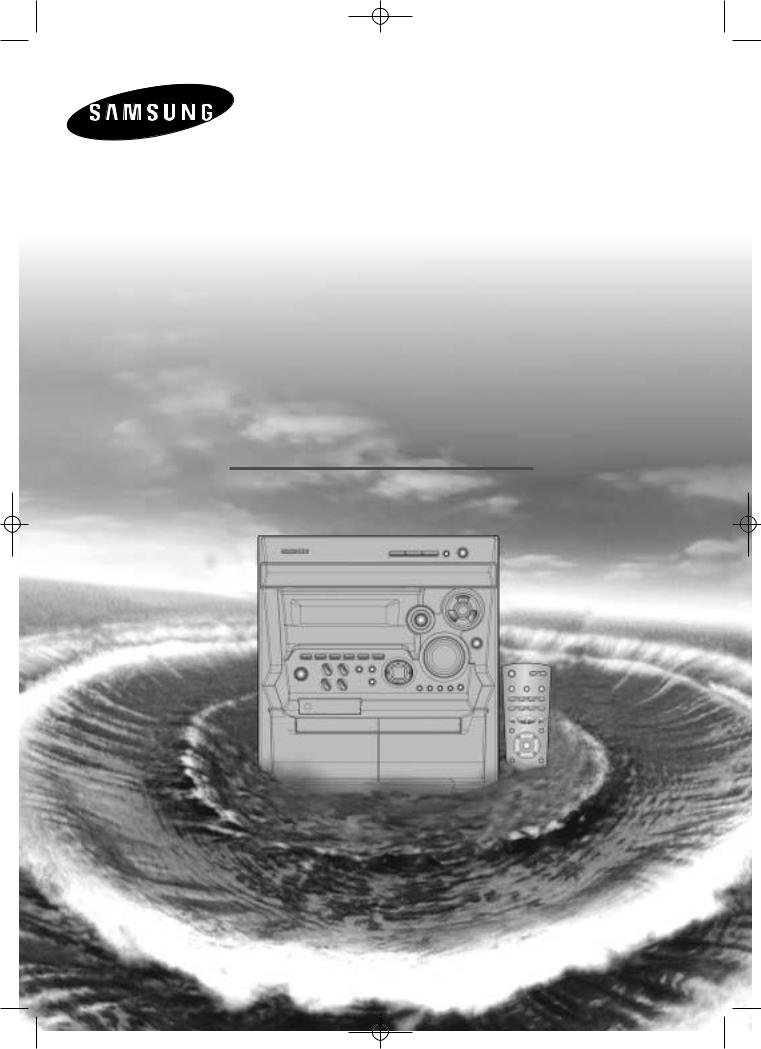
MAX-B420/B450GB no rds-1~14 1 5/16/02 11:11 PM Page 1
THREE-CD CHANGER
MINI-COMPACT SYSTEM
CD-R/RW PLAYBACK
MAX-B420/B450
Instruction Manual
MAX-B420/B450GB no rds-1~14 1 5/16/02 11:11 PM Page 2
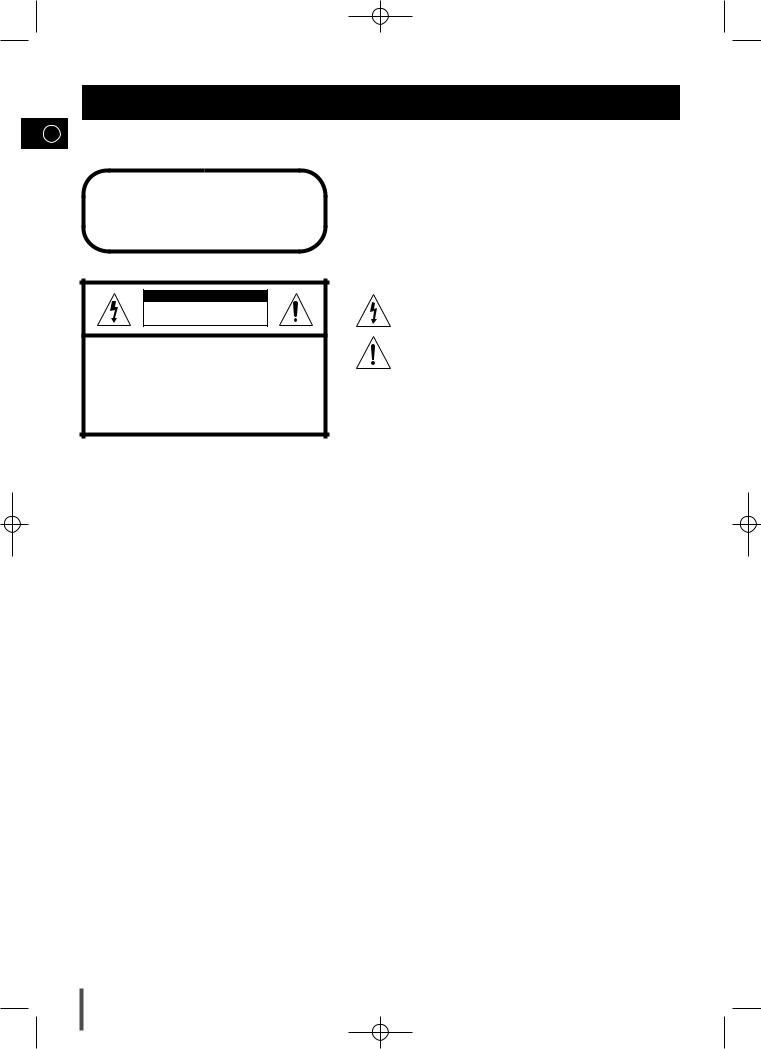
Safety Warnings
GB
CLASS 1 LASER PRODUCT
KLASSE 1 LASER PRODUKT
LUOKAN 1 LASER LAITE
KLASS 1 LASER APPARAT
PRODUCTO LASER CLASE 1
CAUTION
RISK OF ELECTRIC SHOCK.
DO NOT OPEN
CAUTION:
TO REDUCE THE RISK OF ELECTRIC SHOCK, DO NOT REMOVE REAR COVER. NO USER SERVICEABLE PARTS INSIDE. REFER SERVICING TO QUALIFIED SERVICE PERSONNEL.
CLASS 1 LASER PRODUCT
This Compact Disc player is classified as a CLASS 1 LASER product.
or performance of procedures other may result in hazardous radiation
LASER RADIATION WHEN OPEN AND INTERLOCKS DEFEATED, AVOID EXPOSURE TO BEAM.
This symbol indicates that dangerous voltage which can cause electric shock is present inside this unit.
This symbol alerts you to important operating and maintenance instructions accompanying the unit.
WARNING: To reduce the risk of fire or electric shock, do not expose this appliance to rain or moisture.
CAUTION: TO PREVENT ELECTRIC SHOCK, MATCH WIDE BLADE OF PLUG TO WIDE SLOT, FULLY INSERT.
2
MAX-B420/B450GB no rds-1~14 1 5/16/02 11:11 PM Page 3
Contents
Thank you for buying this
SAMSUNG mini-compact system.
Please take time to read these instructions.
They will allow you to operate your GB system with ease and take full advantage
of its features.
|
SAFETY WARNINGS ……………………………………………………………………………………………………………………………………………………………. |
2 |
|
INSTALLING YOUR MINI-COMPACT SYSTEM |
|
|
Front Panel View……………………………………………………………………………………………………………………………………………………………….. |
4 |
|
Remote Control …………………………………………………………………………………………………………………………………………………………………. |
5 |
|
Rear Panel View ……………………………………………………………………………………………………………………………………………………………….. |
6 |
|
Where to Install Your Mini-Compact System………………………………………………………………………………………………………………………….. |
7 |
|
Connecting your System to the Power Supply ………………………………………………………………………………………………………………………. |
7 |
|
Connecting the Loudspeakers ……………………………………………………………………………………………………………………………………………. |
7 |
|
Connecting the AM (MW)/LW Aerial …………………………………………………………………………………………………………………………………….. |
8 |
|
Connecting the FM Aerial …………………………………………………………………………………………………………………………………………………… |
8 |
|
Connecting the SW Aerial(OPTION) …………………………………………………………………………………………………………………………………….. |
8 |
|
Inserting Remote Control Batteries ………………………………………………………………………………………………………………………………………. |
9 |
|
Viewing the Various Functions on Your System and Dim Out for Display …………………………………………………………………………………. |
9 |
|
Setting the Clock ……………………………………………………………………………………………………………………………………………………………….. |
9 |
|
CD-PLAYER |
|
|
Loading and Changing Compact Discs…………………………………………………………………………………………………………………………………. |
10 |
|
Listening to a Compact Disc ……………………………………………………………………………………………………………………………………………….. |
10 |
|
Selecting a CD in the Disc changer …………………………………………………………………………………………………………………………………….. |
11 |
|
Selecting a Track……………………………………………………………………………………………………………………………………………………………….. |
11 |
|
Searching for a Specific Music Passage on a CD …………………………………………………………………………………………………………………. |
11 |
|
Shuffle Play Function ………………………………………………………………………………………………………………………………………………………… |
11 |
|
Repeating One or All Tracks on the Compact Discs……………………………………………………………………………………………………………….. |
12 |
|
Programming the Order of Playback…………………………………………………………………………………………………………………………………….. |
12 |
|
Checking or Changing Programmed Tracks ………………………………………………………………………………………………………………………….. |
13 |
|
TUNER |
|
|
Searching for and Storing the Radio Stations ………………………………………………………………………………………………………………………. |
13 |
|
Selecting a Stored Station…………………………………………………………………………………………………………………………………………………… |
14 |
|
Improving Radio Reception…………………………………………………………………………………………………………………………………………………. |
14 |
|
TAPE DECK |
|
|
Listening to a Cassette ………………………………………………………………………………………………………………………………………………………. |
15 |
|
CD Synchro Record Feature……………………………………………………………………………………………………………………………………………….. |
15 |
|
Recording a Compact Disc …………………………………………………………………………………………………………………………………………………. |
15 |
|
Recording a Radio Programme……………………………………………………………………………………………………………………………………………. |
16 |
|
Copying a Cassette (Dubbing) ……………………………………………………………………………………………………………………………………………. |
16 |
|
Tape Counter(MAX-B420) …………………………………………………………………………………………………………………………………………………… |
16 |
|
Selecting the Cassette Playback Mode (Deck 2 Only MAX-B450)……………………………………………………………………………………………. |
17 |
|
OTHER FUNCTIONS |
|
|
Timer Function …………………………………………………………………………………………………………………………………………………………………. |
17 |
|
Cancelling the Timer ………………………………………………………………………………………………………………………………………………………….. |
18 |
|
Mute Function …………………………………………………………………………………………………………………………………………………………………… |
18 |
|
Selecting an Equalizer Preset ……………………………………………………………………………………………………………………………………………… |
18 |
|
Power Sound Function ………………………………………………………………………………………………………………………………………………………. |
18 |
|
Setting the System to Switch off Automatically………………………………………………………………………………………………………………………. |
19 |
|
Super Bass Sound ……………………………………………………………………………………………………………………………………………………………. |
19 |
|
Connecting Headphones…………………………………………………………………………………………………………………………………………………….. |
19 |
|
Microphone Function(OPTION)……………………………………………………………………………………………………………………………………………. |
19 |
|
Connecting to an External Source ………………………………………………………………………………………………………………………………………. |
20 |
|
RECOMMENDATIONS FOR USE |
|
|
Safety Precautions ……………………………………………………………………………………………………………………………………………………………. |
20 |
|
Cleaning Your Mini-Compact System …………………………………………………………………………………………………………………………………… |
21 |
|
Precautions When Using Compact Discs ……………………………………………………………………………………………………………………………… |
21 |
|
Precautions When Using Audio Cassettes ……………………………………………………………………………………………………………………………. |
21 |
|
Before Contacting the After-Sales Service ……………………………………………………………………………………………………………………………. |
22 |
|
Technical Specifications …………………………………………………………………………………………………………………………………………………….. |
22 |
Symbols
|
Press |
Push |
Important |
Note |
3
MAX-B420/B450GB no rds-1~14 1 5/16/02 11:11 PM Page 4
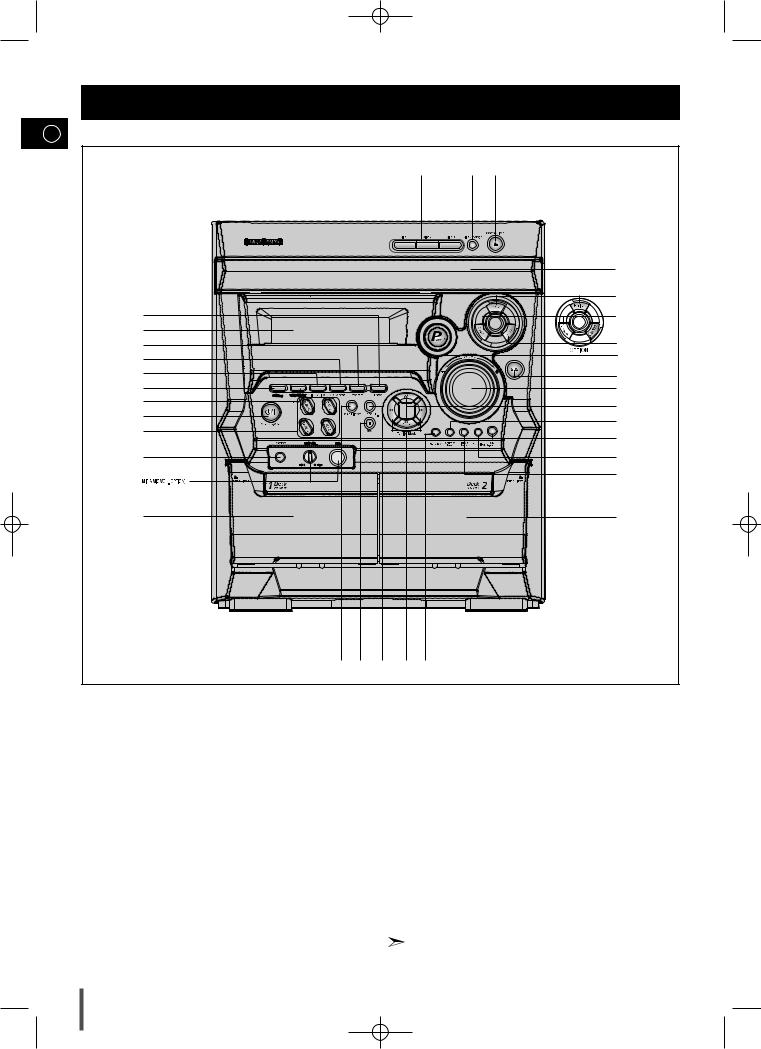
Front Panel View
GB
|
32 |
31 |
30 |
||
|
29 |
||||
|
28 |
||||
|
1 |
27 |
|||
|
2 |
26 |
|||
|
3 |
||||
|
4 |
25 |
|||
|
5 |
24 |
|||
|
6 |
23 |
|||
|
7 |
22 |
|||
|
8 |
||||
|
21 |
||||
|
9 |
||||
|
20 |
||||
|
10 |
19 |
|||
|
18 |
||||
|
11 |
17 |
|||
|
12 13 |
14 |
15 16 |
|
1. |
Enter |
17. |
Cassette Deck 2 |
|
2. |
Window Display |
18. |
REC/Pause |
|
3. |
Program |
19. |
TAPE Normal Dubbing |
|
4. |
CD Repeat |
20. |
CD Synchro Recording |
|
5. |
Timer/Clock |
21. |
Counter Reset |
|
6. |
AI Sleep |
22. |
Skip Function buttons |
|
7. |
Timer On/Off |
23. |
Volume |
|
8. |
Standby/On |
24. |
S.Bass |
|
9. |
Function Selection buttons |
25. |
Power Sound |
|
10. |
Headphone Jack Connector |
26. |
EQ Preset Rock or Samba |
|
11. |
Cassette Deck 1 |
27. |
EQ Preset Classic or Lambada |
|
12. |
Demo/Dimmer |
28. |
EQ Preset Pop or Salsa |
|
13. |
Stop button |
29. |
Compact Disc Compartment |
|
14. |
Mono/ST. |
30. |
CD Open/Close |
|
15. |
Search Function buttons |
31. |
Disc Change |
|
16. |
Deck 1/2 |
32. |
Disc Selection buttons |
EQ Preset Mode can be selected Salsa,Samba, and Lambada in Latin American
4
MAX-B420/B450GB no rds-1~14 1 5/16/02 11:11 PM Page 5
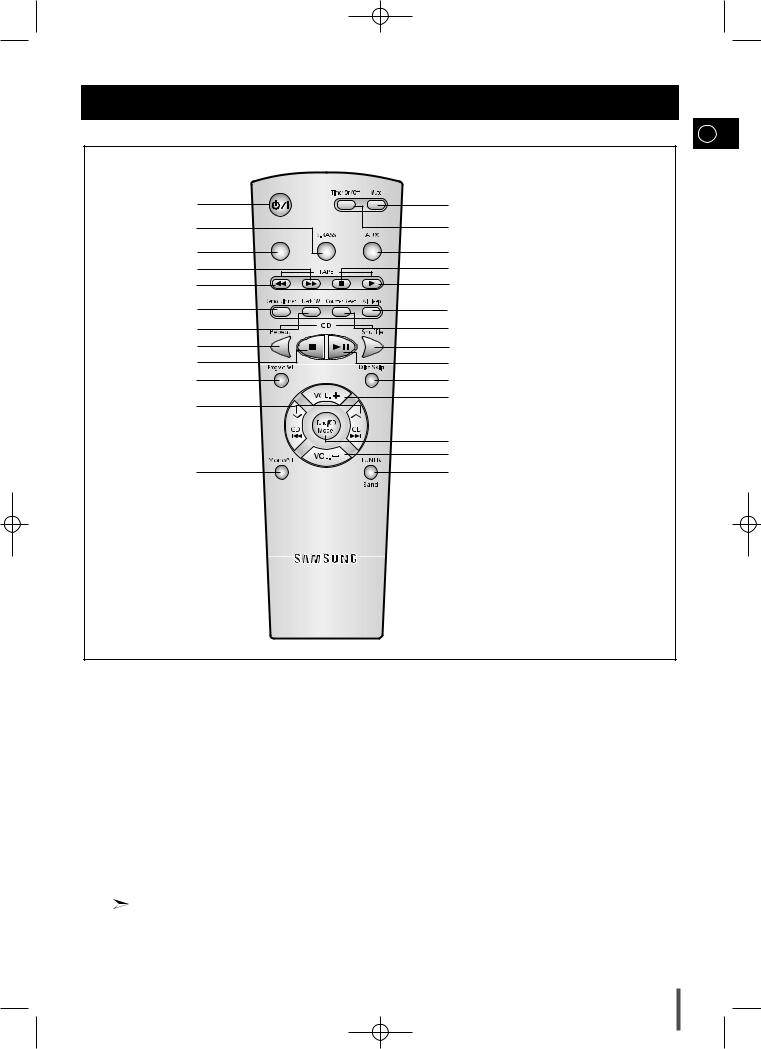
Remote Control
GB
|
1 |
26 |
|
|
2 |
25 |
|
|
3 |
24 |
|
|
4 |
23 |
|
|
5 |
22 |
|
|
6 |
21 |
|
|
20 |
||
|
7 |
||
|
8 |
19 |
|
|
9 |
18 |
|
|
17 |
||
|
10 |
||
|
11 |
16 |
|
|
15 |
||
|
14 |
||
|
12 |
13 |
|
1. |
Standby/On |
14. |
Volume Descrease |
|
|
2. |
S.BASS |
15. |
Tuning Mode(MANUAL,PRESET) |
|
|
3. |
Sound Mode or Latin Sound |
16. |
Volume Increase |
|
|
4. |
TAPE Fast-Forward |
17. |
Disc Skip |
|
|
5. |
TAPE Rewind |
18. |
CD Play/Pause |
|
|
6. |
Demo/Dimmer |
19. |
CD Shuffle Play |
|
|
7. |
Deck 1/2 |
20. |
Counter Reset |
|
|
8. |
CD Repeat |
21. |
AI Sleep |
|
|
9. |
CD Stop |
22. |
TAPE |
Play |
|
10. |
Program/Set |
23. |
TAPE |
Stop |
|
11. |
CD Track or Radio Station Search(Skip) |
24. AUX |
||
|
12. |
Mono/ST. |
25. |
Timer On/Off |
|
|
13. |
Tuner Band |
26. |
Mute |
EQ Preset Mode (Latin Sound) can be selected
Salsa,Samba, and Lambada in Latin American
5
MAX-B420/B450GB no rds-1~14 1 5/16/02 11:11 PM Page 6
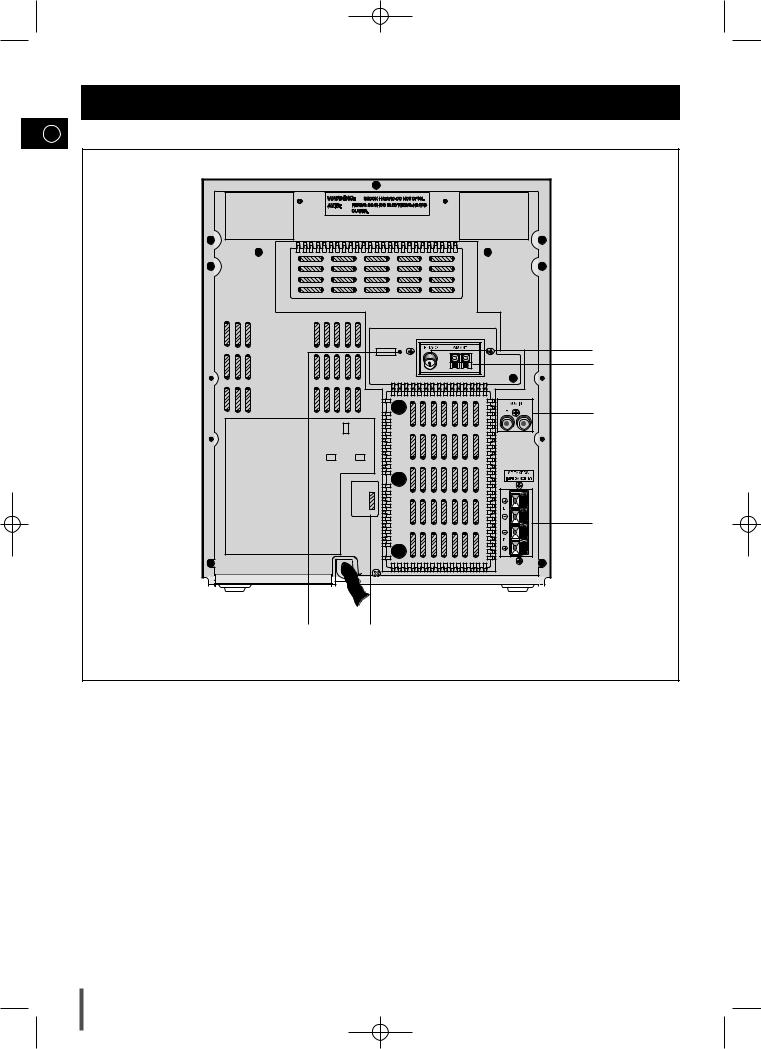
Rear Panel View
GB
1.FM Aerial Connector Terminal
2.AM Aerial Connector Terminal
3.AUX-Input
4.Loudspeaker Connector Terminals
5.Voltage Selector(Option)
6.SW Aerial(Option)
6
MAX-B420/B450GB no rds-1~14 1 5/16/02 11:11 PM Page 7
Where to Install Your
Mini-Compact System
To take full advantage of your new mini-compact system, follow these installation instructions before connecting the unit.
 Install the system on a flat, stable surface.
 Never place this unit on carpeting.
 Never place this unit in an outdoor area.
 Maintain an open space of approximately 6 inches (15 cm) on the sides and rear of the system, for ventilation purposes.
 Make sure that you have enough room to open the compact disc compartment easily.
 Place the loudspeakers at a reasonable distance on either side of the system to ensure good stereo sound.
 Direct the loudspeakers towards the listening area.
 For optimum performance, make sure that both speakers are placed at an equal distance above the floor.
Connecting your System to the Power Supply
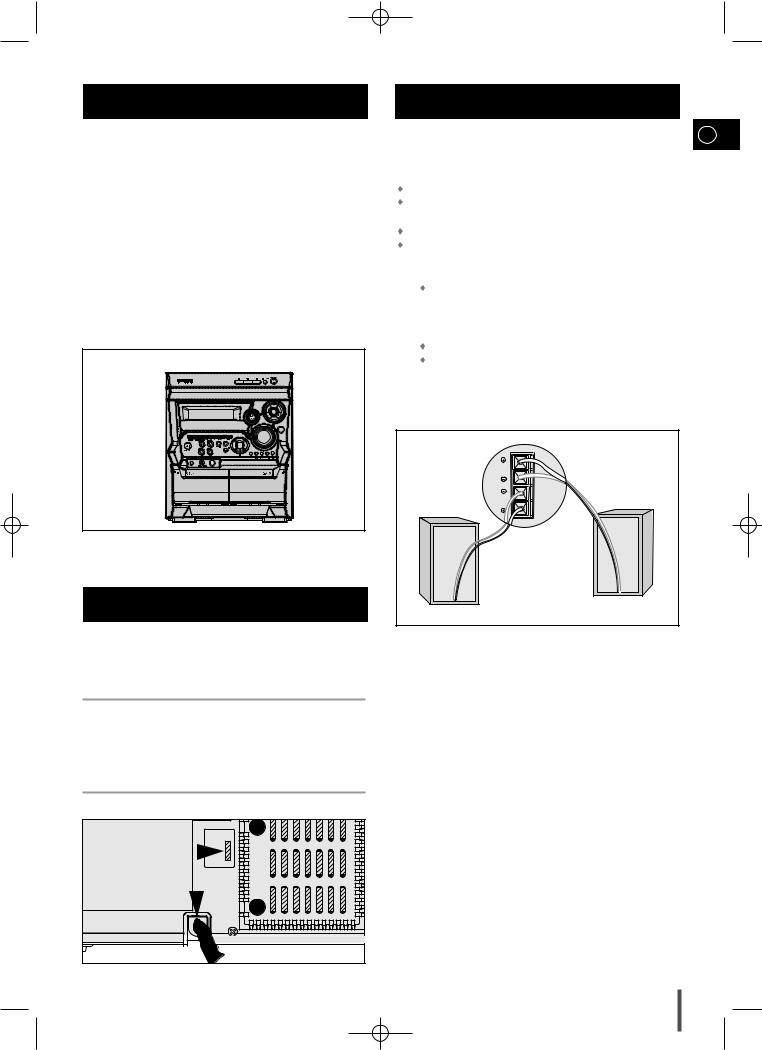
The main lead must be plugged into an appropriate socket.
 Before plugging your system into a main socket, you must check the voltage.
Connecting the Loudspeakers
GB
The loudspeaker connector terminals are located on the rear of the system.
There are four terminals on the system:
|
Two for the left speaker (marked L) |
|
|
Two for the right speaker (marked R) |
|
|
To achieve the correct sound quality, connect the: |
|
|
Red wire to the + terminals |
|
|
Black wire to the – terminals |
|
|
1 |
To connect a wire to a terminal, push the tab as far as it will go: |
|
To the right on the system |
|
|
2 |
Insert the wire, up to the plastic sheathing, in the hole. |
|
3 |
Push the tab back: |
|
To the left on the system, until it clicks into place |
|
|
To the top on the loudspeaker |
|
|
Result: The wire is pinched and held firmly in place. |
|
|
4 |
Repeat the operation for each wire. |
L
R
1 Check the position of the voltage selector on the rear of the system (OPTIONAL).
|
2 Plug the main lead (marked AC Cord on the rear of the system) into |
|
3 |
7
More products and manuals for CD players Samsung
| Models | Document Type |
|---|---|
|
MX-D630 |
User Manual
22 pages |
|
MAX-ZS750 |
User Manual
28 pages |
|
MAX-ZS530 |
User Manual
27 pages |
|
MM-E330D |
User Manual
37 pages |
|
MM-C330 |
User Manual
26 pages |
|
MM-D320 |
User Manual
26 pages |
|
MM-A25 |
User Manual
13 pages |
|
MXHS9000 |
User Manual
30 pages |
|
MAX-VB630 |
User Manual
30 pages |
|
YP-NDU64S |
User Manual
16 pages |
|
MM-J5 |
User Manual
12 pages |
|
MAX-VS940 |
User Manual
28 pages |
|
MAX-VB450 |
User Manual
28 pages |
|
MM-T6 |
User Manual
13 pages |
|
MAXVL85FH/UMG |
User Manual
30 pages |
|
MCD-MP67 |
User Manual
27 pages |
|
B450 |
User Manual
25 pages |
|
MM-G35 |
User Manual
26 pages |
|
MAX-ZL65 |
User Manual
27 pages |
|
MAX-VS720 |
User Manual
28 pages |


Выберите свое местоположение и язык.
- Manuals
- Brands
- Home Audio
- CD Player
-
Samsung
-
Home Audio
-
CD Player
1
23
Download
23 pages,
8.38 Mb
Success! {{ $ctrl.successMessage }}
Errors!
{{ error }}
<
>
1

2
3
4
5
6
7
8
9

Instruction Manual
THREE-CD CHANGER
MINI-COMPACT SYSTEM
CD-R/RW PLAYBACK
MAX-B420/B450
MAX-B420/B450GB no rds-1~14 1 5/16/02 11:11 PM Page 1
Руководства Samsung MAX-B450 Размер файлов: 4647 KB, Язык: English, Формат: pdf, Платформа: Windows/Linux, Дата: 2015-12-13
На данной странице вы можете скачать руководства Samsung MAX-B450. Мы предлагаем вам ознакомиться с руководством пользователя, инструкцией по сервисному обслуживанию и ремонту.
Также здесь вы найдете список заказных номеров на комплектующие Samsung MAX-B450.
Все файлы предоставляются исключительно в ознакомительных целях. И не являютя руководством по ремонту, а направлены лишь на то чтобы помочь вам более детально ознакомиться с принципом построения устройства.
Содержимое представленных здесь руководств требуют от вас знания технического английского языка.
Если вы собираетесь скачать руководство по сервисному обслуживанию Samsung MAX-B450, иными словами сервис мануал, вы дожны обладать хотя бы минимальными познаниями в области электроники и пониманием базовых принципов работы электромеханических устройств.
Для просмотра руководств вам понадобится Adobe Acrobat Reader версии 9 и выше либо другая программа для просмотра pdf файлов.
В связи с популярностью информации представленной на сайте и ее бесплатного предоставления конечному пользователю, убедительная просьба использовать специальные программные продукты для многопотокового скачивания файлов.
Руководства для Samsung MAX-B450
- Руководство пользователя (User manual)
- Руководство по сервисному обслуживанию (Service manual)
- Руководство по ремонту (Repair manual)
- Перечень комплектующих (PartList)