

Поделиться


Пульт ДУ, Универсальные
 RM-E661 (7 в 1) — универсальный обучаемый пульт дистанционного управления.
Кнопки Меню, Телетекст и FASTEXT.
Кнопки управления всеми важными и основными функциями.
Функция обучения для программирования с других пультов.
Прост в использовании и настройке.
Удобный дизайн.
Код сохраняется при смене батареек, благодаря функции встроенной памяти.
The Chunghop line of universal remotes is very diverse, they have produced a few hundred models over the years, using more than 15 code versions. This howto should cover the vast majority of Chunghop universal remote controls, but if none of the programming procedures presented here work for your remote, consult your model’s user manual.

Programming instructions (Version 1)
The following instructions shoud work for Chunghop 2128, 2136, H-1080E, H-1880E, M1E, Q-33E, Q-X33E, RC-133E, RM-033E, RM-08S, RM-09S, RM-109E, RM-118E, RM-128E, RM-139E, RM-139EX, RM-180E, RM-316E, RM-68E, RM-6US, RM-A1E universal remote controls using
3 digit v.1, 3 digit v.5 and 3 digit v.6 codes.
Code entry: Hold the «SET» key for a few seconds until the indicator LED illuminates and remains on, then type in a 3 digit code. See if it works. If not, try the next code from your brand’s list.
Manual search: Hold the «SET» key for a few seconds until the indicator LED illuminates and remains on. Aim the remote towards your TV. Press and release «VOL+» repeatedly until the volume symbol appears on your TV. Press «SET» to lock in your code.
Auto search: Hold the «SET» key for a few seconds until the indicator LED illuminates and remains on. Aim the remote towards your TV. Press and release the «Power» key. The LED will blink to indicate that it is sending out different codes. When the ‘Volume’ or ‘Mute’ symbol appears on your TV immediately press any key on your remote, to lock in your code.
Version 2

The following instructions shoud work for Chunghop E885, RM-101, RM-101X, RM-170, RM-188E, RM-233, RM-238, RM-332E, RM-333E, RM-409E, RM-426, RM-6133, RM-701E, RM-733, RM-790, RM-810, RM-836E, RM-861, RM-908, RM-920E, RM-933E, RM-938C, RM-939E, RM-962, RM-969E, RM-E87, RM-E877, RM-E98, RM-L003E, RM-L488, RM-L616, RM-L677, RM-L708, RM-X10, RM-X11, RM-X60, URC 08, URC 08T, URC 10, etc. universal remote controls using 3 digit v.2, 3 digit v.3, 3 digit v.4, 4 digit v.1 and 4 digit v.2 codes.
Code entry: Press and hold the «SET» and the device («TV», «DVD», etc.) keys together for a few seconds until the indicator LED illuminates and remains on, then type in a 3 or 4 digit code. See if it works. If not, try the next code from your brand’s list.
Manual search: Press and hold the «SET» and the device («TV», «DVD», etc.) keys together for a few seconds until the indicator LED illuminates and remains on. Press and release the «SET» key again. The LED will start to flash. Aim the remote towards your device. Keep pressing the «Power» button until your equipment turns off, then press the device button again to lock in your code.
Auto search: Press the device («TV», «DVD», etc.) key you want the code to be programmed to. Aim the remote towards your device. Press and hold the «SET» and «Power» keys together for a few seconds until the indicator LED illuminates and remains on. Ater releasing the two buttons, the LED will blink to indicate that it is sending out different codes. When your equipment turns off, press any other button on your remote (in 1.5 seconds), to lock in your code.
Version 3

The following instructions shoud work for Chunghop ia4, U6, RM-90, RM-M82, RM-M86, etc. universal remote controls using codes very similar to RCA 3digit v.1.
Code entry: Press and hold the «CODE SEARCH» key for a few seconds until the indicator LED illuminates and remains on. Press and release the device («TV», «DVD», etc.) key you want the code to be programmed to, then type in a 3 digit code. See if it works. If not, try the next code from your brand’s list.
Manual search: Press and hold the «CODE SEARCH» key for a few seconds until the indicator LED illuminates and remains on. Press and release the device («TV», «DVD», etc.) key you want the code to be programmed to. Aim the remote towards your device. Press the «ON-OFF» key again and again until your equipment turns off, then press «ENTER» to lock in your code.
Auto search: Press and hold the «CODE SEARCH» key for a few seconds until the indicator LED illuminates and remains on. Press and release the device («TV», «DVD», etc.) key you want the code to be programmed to. Aim the remote towards your device. Press the «ON-OFF» key once. When your device turns off, press «ENTER» to lock in your code.
Version 4

The following instructions shoud work for Chunghop E499, E772, RM-301E, RM-312, RM-366, RM-377E, RM-399C, RM-441E, RM-50, RM-828, RM-860, RM-868, RM-889, RM-A4, RM-E82, RM-E86, RM-E90, RM-S909, URC 03, etc. universal remote controls using 4 digit v.3 codes.
Code entry: Press the device (e.g. «TV») key you want to program. Press and hold the «Volume+» and «Channel+» keys together for a few seconds until the indicator LED illuminates and remains on. Type in a 4 digit code. See if it works. If not, try the next code from your brand’s list.
Code search: Press the device (e.g. «TV») key you want to program. Press and hold the «Volume+» and «Channel+» keys together for a few seconds until the indicator LED illuminates and remains on. Press and hold the «Power» button until your equipment turns off. When your device switches off, release the «Power» button and test if all functions work. If not, repeat the procedure.
Learning function: Press the device (e.g. «TV») key you want to learn a command into. Press and hold the «Volume+» and «Channel+» keys together for a few seconds until the indicator LED illuminates and remains on. Type in ‘9998’. The LED switches off and lights up again. Place the two remote controls facing each other at a distance of about 2-5cm. Press the key you want to be learned on your donor remote until the LED turns off. Press the key (except the device keys) you want to learn into. The LED will flash a few seconds, signalling successful learning and then remains on. Repeat the procedure for other commands. When you’re done, press the device button to exit learning mode.
Version 5

The following instructions shoud work for Chunghop UR130, UR616, UR616, UR618, UR668, UR772, UR881, UR938, UR1899, etc. universal remote controls specially manufactured for the South and North American market, using codes similar to GE V1.
Code entry: Press and hold the device (e.g. «TV», «DVD») key you want to program for a few seconds until the indicator LED illuminates and remains on. Type in a 4 digit code. See if it works. If not, try the next code from your brand’s list.
Manual search: Press and hold the device (e.g. «TV», «DVD») key you want to program for a few seconds until the indicator LED illuminates and remains on. Aim the remote towards your device. Press the «Channel+» key again and again (2s intervals) until your equipment turns off, then press the device (e.g. «TV», «DVD») key again to lock in your code.
Auto search: Press and hold the device (e.g. «TV», «DVD») key you want to program for a few seconds until the indicator LED illuminates and remains on. Aim the remote towards your device. Press the «POWER» key. The LED will flash rapidly to indicate that it is sending out different codes. When your equipment turns off, press the device (e.g. «TV», «DVD») key again to lock in your code.
Version 6

The following instructions shoud work for Chunghop E373, E407, E418, E488, E800, E969, etc. universal remote controls for the European market, using 4 digit v.4 codes.
Code entry: Press and release the device key (e.g. «TV», «DVD») you want to program the code into. Press and hold the «SET» key for a few seconds until the indicator LED illuminates and remains on. Type in a 4 digit code. See if it works. If not, try the next code from your brand’s list.
Manual search: Press and release the device key (e.g. «TV», «DVD») you want to program the code into. Press and hold the «SET» key for a few seconds until the indicator LED illuminates and remains on. Aim the remote towards your device. Press the «Channel+» key again and again (less than 1.5 second intervals) until your equipment turns off, then press the «OK» key to exit search mode. Note: If your equipment doesn’t have the «Channel+» function, you may use «Play» or «Power» instead.
Auto search: Press and release the device key (e.g. «TV», «DVD») you want to program the code into. Press and hold the «SET» key for a few seconds until the indicator LED illuminates and remains on. Aim the remote towards your device. Press the «Channel+»(or «Play»/»Power») key once. The LED will flash rapidly to indicate that it is sending out different codes. When your equipment turns off, press the «OK» key to exit search mode.
Learning function: Press and release the device key (e.g. «TV», «DVD») you want to learn a command into. Press and hold the «SET» key for a few seconds until the indicator LED illuminates and remains on. Press the «LEARN» key (or type in code ‘9980’). Place the two remote controls facing each other at a distance of about 2-5cm. Press a key (except the device keys, «SET» and «LEARN») you want to learn into. The LED will blink once. Press the key you want to be learned on your donor remote. The LED will blink, then remain on, signaling successful learning. Repeat the procedure for other commands. When you’re done, press «SET» to exit learning mode.
Version 7

The following instructions shoud work for Chunghop RM-436E, RM-618E, RM-686E, RM-808E, RM-80E, RM-828E, RM-841E, RM-914E, RM-977E, etc. universal remote controls for the European market, using 4 digit v.5 codes.
Code entry: Press and release the device key (e.g. «TV», «DVD») you want to program the code into. Press and hold the «CODE» key for a few seconds until the indicator LED illuminates and remains on. Type in a 4 digit code. See if it works. If not, try the next code from your brand’s list.
Auto search: Press and release the device key (e.g. «TV», «DVD») you want to program the code into. Press and hold the «CODE» key for a few seconds until the indicator LED illuminates and remains on. Aim the remote towards your device. Type in ‘1111’. The LED will start to flash indicating that is sending out different codes. When your equipment turns off, press the «CODE» key (within 2 seconds) to exit search mode.
Learning function: Press and release the device key (e.g. «TV», «DVD») you want to learn a command into. Press and hold the «CODE» key for a few seconds until the indicator LED illuminates and remains on. Type in ‘9999’. The LED will start to flash indicating that is ready to learn. Place the two remote controls facing each other at a distance of about 2-5cm. Press a key (except the device keys, «CODE» and «POWER») you want to learn into. The LED will stop flashing. Press the key you want to be learned on your donor remote. The LED will flash, signaling successful learning. Repeat the procedure for other commands. When you’re done, press «CODE» to exit learning mode.
История изменения цены
*Внимание! Указанная стоимость 430,00 руб. уже могла изменится.
| Месяц | Мин. | Макс. | Цена |
|---|---|---|---|
| 29.10.2023 | 512.36 | 538.56 | 525 руб. |
| 29.09.2023 | 507.74 | 532.16 | 519.5 руб. |
| 29.08.2023 | 426.81 | 447.38 | 436.5 руб. |
| 29.07.2023 | 499.38 | 524.29 | 511.5 руб. |
| 29.06.2023 | 434.27 | 456.79 | 445 руб. |
| 29.05.2023 | 490.43 | 515.12 | 502.5 руб. |
| 29.04.2023 | 486.19 | 510.6 | 498 руб. |
| 29.03.2023 | 482.0 | 506.87 | 494 руб. |
| 01.03.2023 | 477.29 | 501.35 | 489 руб. |
Видеообзор
1. Как настроить универсальный пульт к телевизору?

Видео:
2. Настраиваем универсальный пульт

Видео: Бакомба
3. HYAOU RM 36E++ настройка универсального пульта
Видео: Магазин Пультов Заряд Альфа
4. Как настроить универсальный пульт д-у-
Видео: Мастер Фломастер
Отзывы покупателей
*о других товарах на сайте
Отзывы о Пульт дистанционного управления универсальный CHUNGHOP RM-E661 [7в1
Здесь вы можете оставить свой отзыв о данном товаре.
Источник информации о товаре: Aliexpress.ru (10000249332609)| Источник видеообзоров: Youtube.com
Chunghop remote control… how to program it with a TV or DISC player? Programming your Chunghop remote is easy. Follow the instructions below and you will have your remote working. We have included the instructions to program your remote plus the remote codes for most TVs.
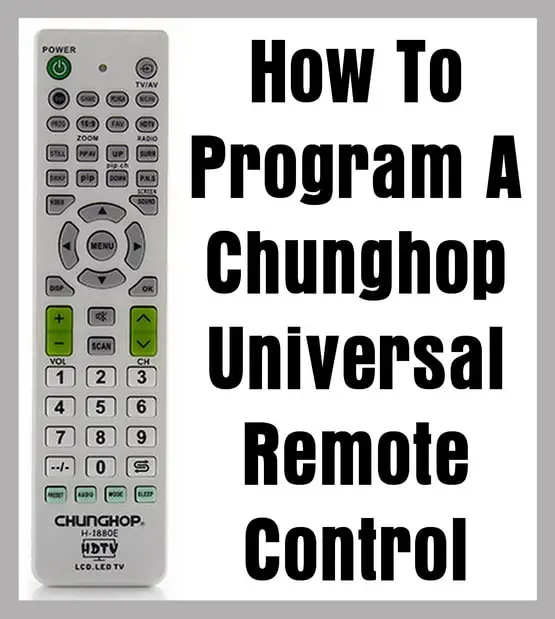
You can try manually inputting the codes from your Chunghop Remote…
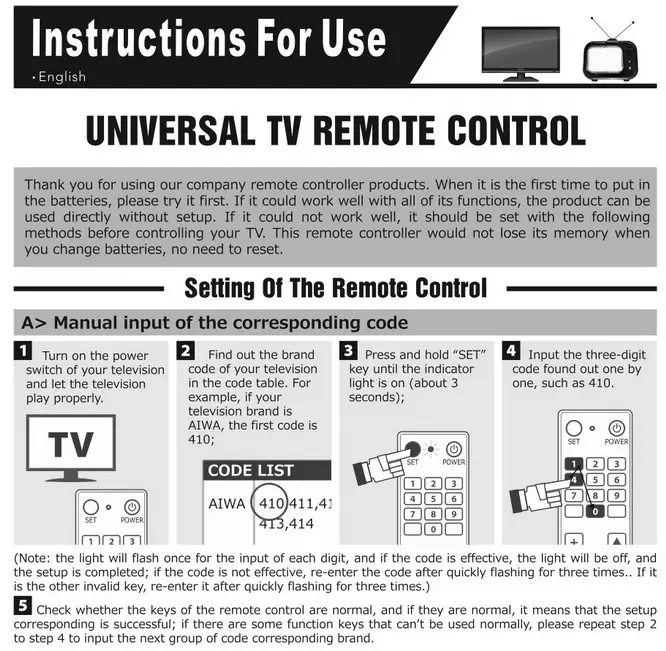
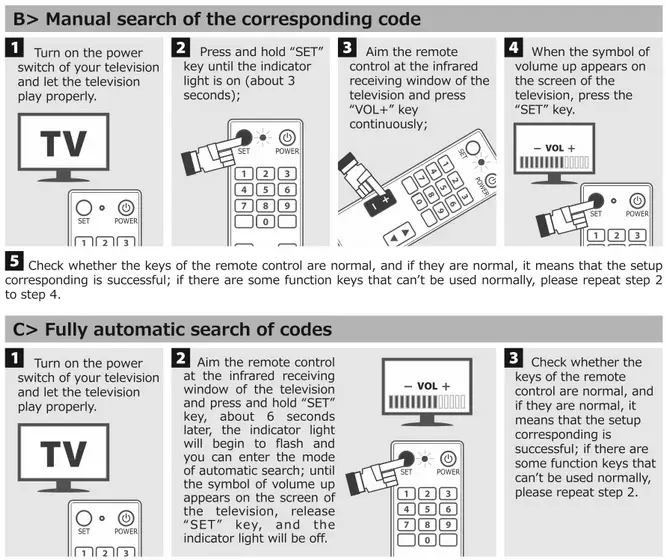
You can do a manual search or FULLY AUTOMATIC SEARCH of the codes using your Chunghop remote…
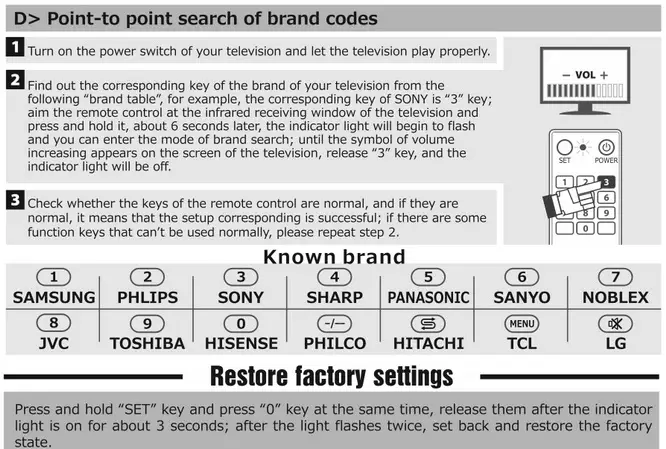
You can also do a point to point search of brand codes with your Chunghop universal remote…
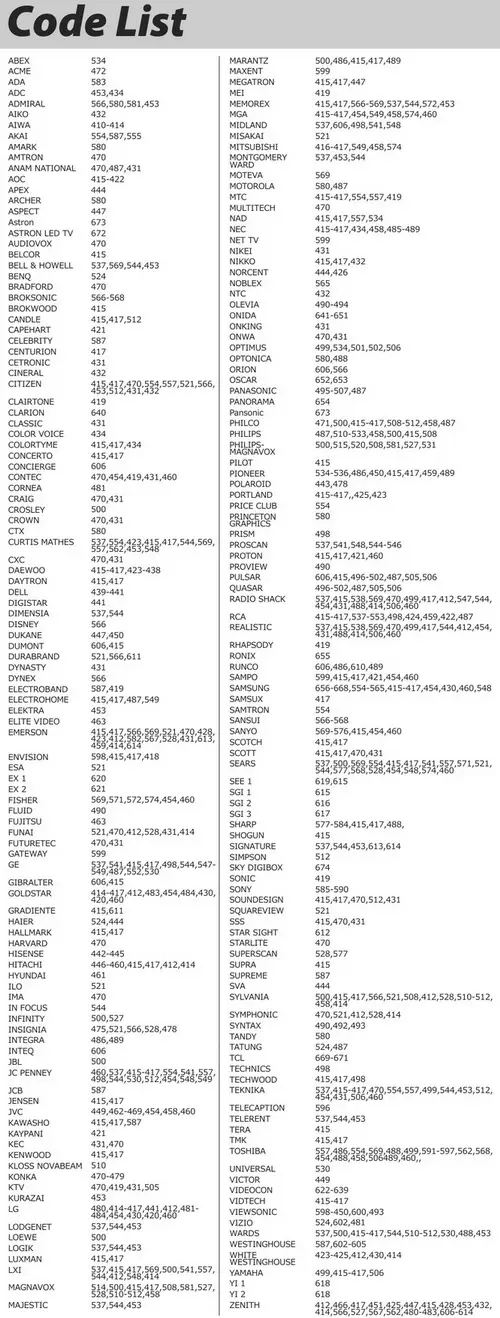
Once you understand HOW TO PROGRAM YOUR CHUNGHOP REMOTE, you can use the 3 digit remote codes in the lists below to get your remote programmed with whatever component (TV, DVD, VCR, SAT, CABLE, ETC) you need to control.
Below is the 3 digit remote code lost for your Chunghop Universal Remote that will work on all TVs…
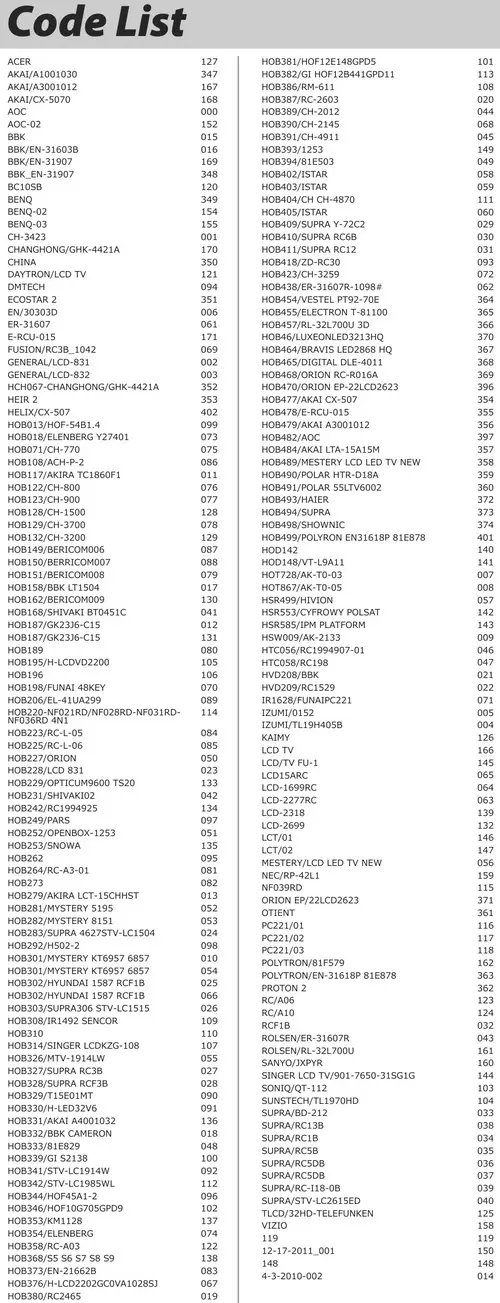
Below is the 3 digit remote code lost for your Chunghop Universal Remote that will work on CABLE, SAT, and MEDIA COMPONENTS…
Below are the different Chunghop Universal Remotes that should work with the programming methods above and the remote codes on this page.
If you need to purchase a new Chunghop remote, click on a remote to find out how much it costs and for specs.
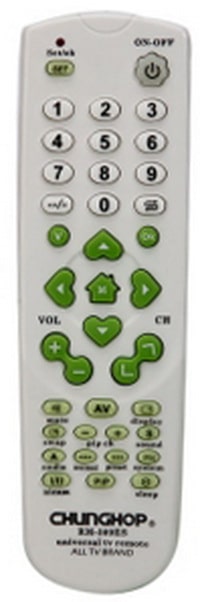 Chunghop 309ES Universal TV Remote Control
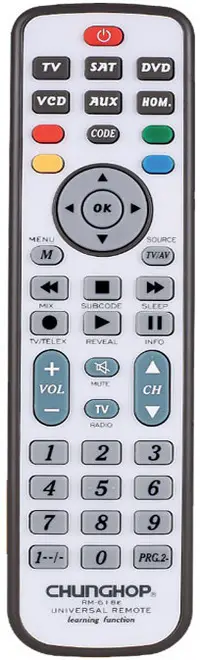 Chunghop 618 remote
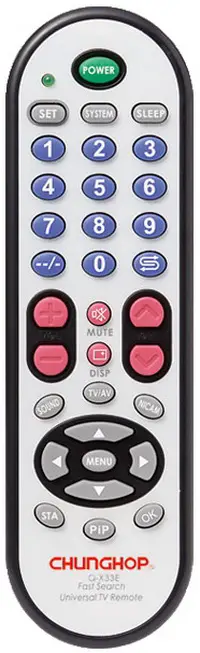 Chunghop remote Q-X33E TV Remote Controller
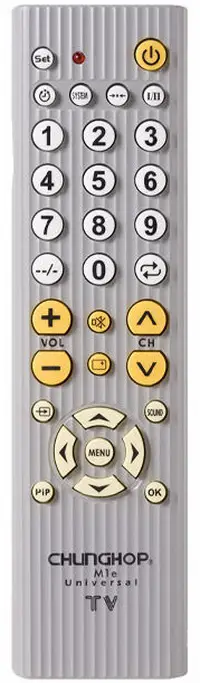 Chunghop Universal Remote Control M1E
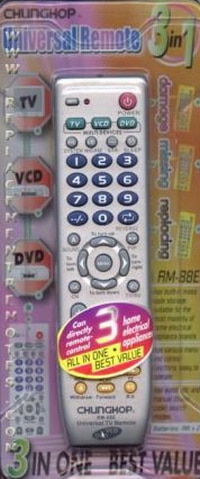 Chunghop Universal Remote RM-88E
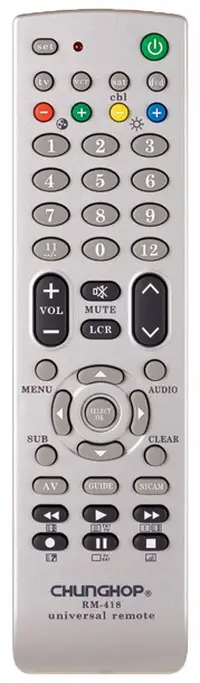 Chunghop universal remote RM418
If you have trouble, contact Chunghop to ask questions or to get advice on how to program or setup your remote.
Contact Chunghop for more info:
Chunghop Email = info@chunghop.com
Telephone Number = +86-20-82667022 / 82667023
E-S902 = Skyworth use LCD LED HDTV 3DTV FUNCTION
E-S903 = Samsung use LCD LED HDTV 3DTV FUNCTION
E-L905 = LG use LCD LED HDTV 3DTV FUNCTION
E-H907 = Hisense use LCD LED HDTV 3DTV FUNCTION
E-T908 = TCL use LCD LED HDTV 3DTV FUNCTION
E-K908 = Konka use LCD LED HDTV 3DTV FUNCTION
E-C910 = Changhong use LCD LED HDTV 3DTV FUNCTION
E-H910 = Haier use LCD LED HDTV 3DTV FUNCTION
E-P912 = Panasonic use LCD LED HDTV 3DTV FUNCTION
E-P914 = Philips use LCD LED HDTV 3DTV FUNCTION
E-S915 = Sharp use LCD LED HDTV 3DTV FUNCTION
E-S916 = Sony use LCD LED HDTV 3DTV FUNCTION
E-H918 = Hitachi use LCD LED HDTV 3DTV FUNCTION
E-T919 = Toshiba use LCD LED HDTV 3DTV FUNCTION
E-S920 = Sanyo use LCD LED HDTV 3DTV FUNCTION
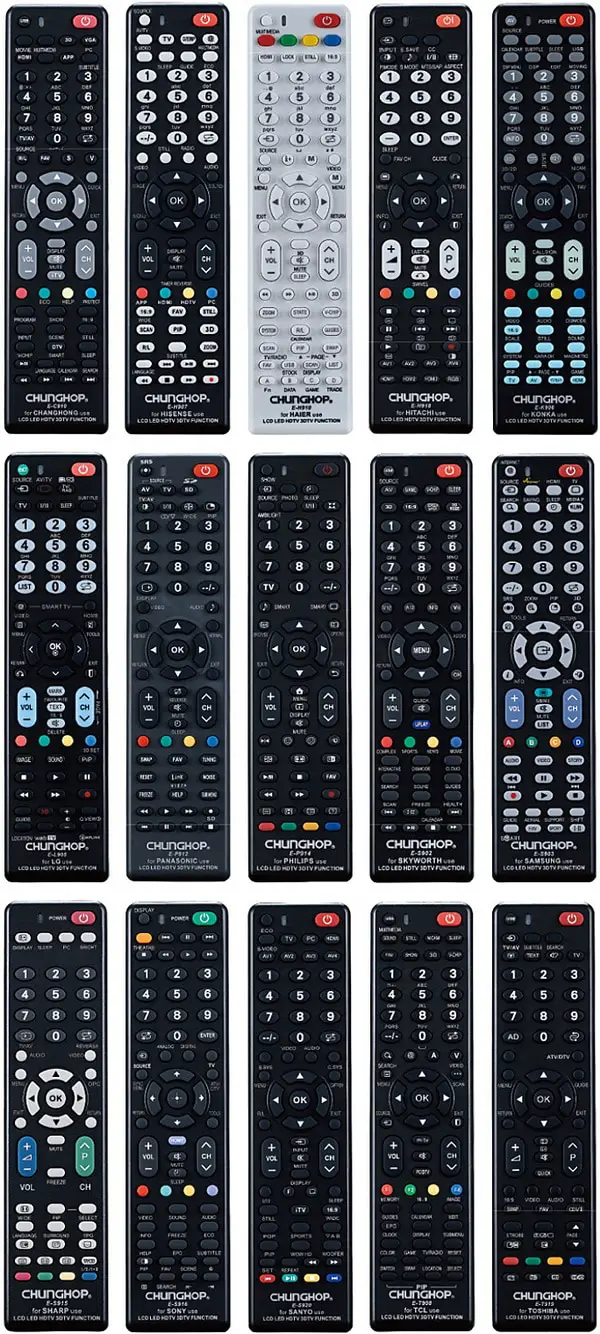
Chunghop universal remote controls
Do you have questions about How To Program A Chunghop Universal Remote Control? Please leave a comment below if you need other remote codes or methods for programming it to a TV or other component.