
Просмотр
Доступно к просмотру 108 страниц. Рекомендуем вам скачать файл инструкции, поскольку онлайн просмотр документа может сильно отличаться от оригинала.
-
РУКОВОДСТВО ПО ЭКСПЛУАТАЦИИ
FS-1120D
FS-1320D
-
Данное руководство по эксплуатации предназначено для моделей
FS-1120D и FS-1320D.
Примечание Это руководство по эксплуатации содержит
информацию по аппаратам, в которых используется как
дюймовая, так и метрическая система измерений.
В этом руководстве на снимках экрана показаны аппараты,
использующие дюймовую систему измерений. Если у Вас
аппарат с метрической системой измерений, сообщения для
дюймовой версии аппарата используйте только в качестве
справочных. Если дюймовые версии аппаратов отличаются
от метрических только использованием прописных букв, в
тексте даются сообщения только для дюймовых версий. Если
существует даже небольшая разница в сообщении, мы
вносим информацию для сопровождаемой дюймовой версии,
а в скобках - соответствующую информацию для метрической
версии.
Данное руководство по эксплуатации поможет вам правильно
работать с аппаратом, выполнять регулярное техническое
обслуживание и решать несложные проблемы по мере
необходимости, чтобы ваш аппарат всегда был в хорошем
состоянии.
Ознакомьтесь с данным руководством по эксплуатации перед
началом использования аппарата и храните его поблизости от
аппарата, чтобы при необходимости им можно было сразу же
воспользоваться.
Рекомендуется использовать только расходные материалы нашей
торговой марки. Мы не несем ответственности за какие-либо
повреждения данного аппарата, вызванные использованием
расходных материалов сторонних производителей.
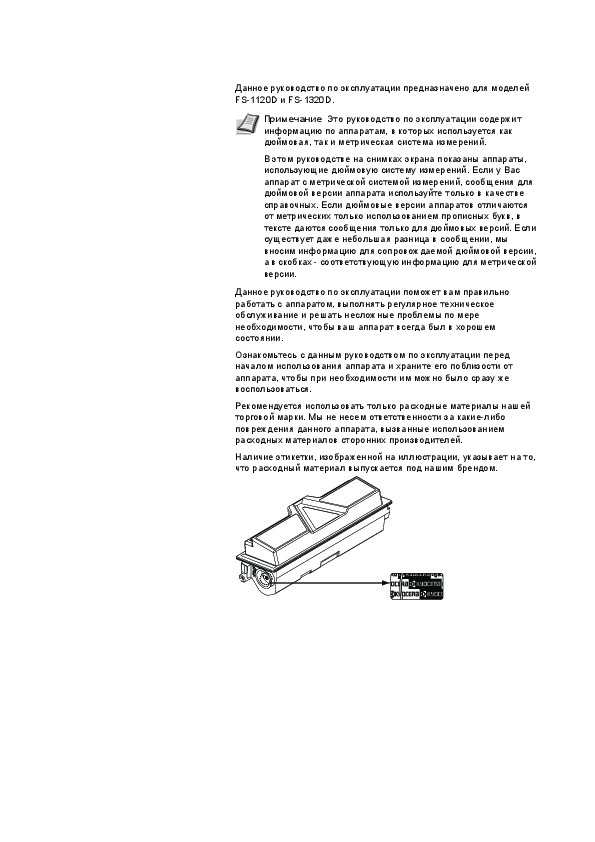
Наличие этикетки, изображенной на иллюстрации, указывает на то,
что расходный материал выпускается под нашим брендом.
-
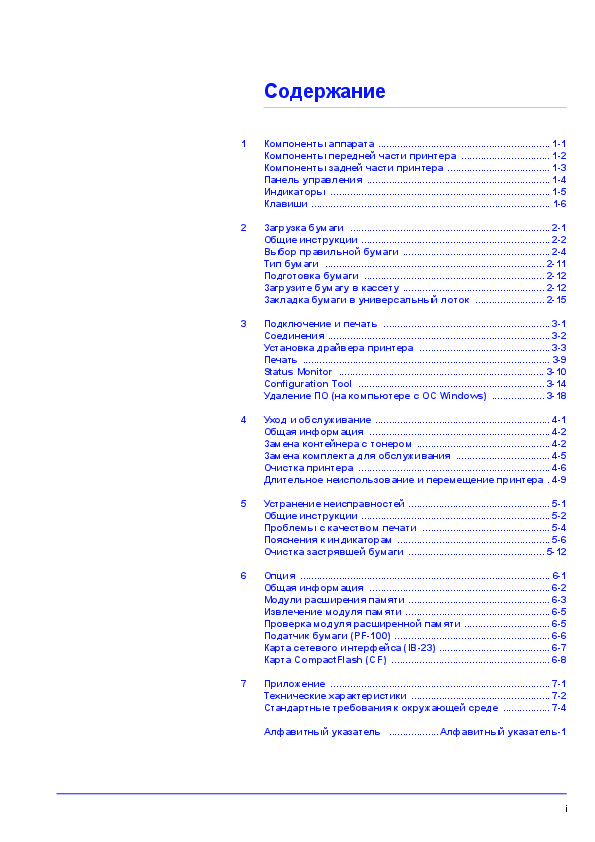
Содержание
1    Компоненты аппарата .............................................................. 1-1
Компоненты передней части принтера ................................ 1-2
Компоненты задней части принтера ..................................... 1-3
Панель управления .................................................................. 1-4
Индикаторы ............................................................................... 1-5
Клавиши ...................................................................................... 1-6
2    Загрузка бумаги ........................................................................ 2-1
Общие инструкции .................................................................... 2-2
Выбор правильной бумаги ..................................................... 2-4
Тип бумаги ............................................................................... 2-11
Подготовка бумаги ................................................................. 2-12
Загрузите бумагу в кассету ................................................... 2-12
Закладка бумаги в универсальный лоток ......................... 2-15
3    Подключение и печать ............................................................ 3-1
Соединения ................................................................................ 3-2
Установка драйвера принтера ............................................... 3-3
Печать ......................................................................................... 3-9
Status Monitor  .......................................................................... 3-10
Configuration Tool  ................................................................... 3-14
Удаление ПО (на компьютере с ОС Windows)  ................... 3-18
4    Уход и обслуживание ............................................................... 4-1
Общая информация ................................................................. 4-2
Замена контейнера с тонером ................................................ 4-2
Замена комплекта для обслуживания .................................. 4-5
Очистка принтера ..................................................................... 4-6
Длительное неиспользование и перемещение принтера .4-9
5    Устранение неисправностей ................................................... 5-1
Общие инструкции .................................................................... 5-2
Проблемы с качеством печати .............................................. 5-4
Пояснения к индикаторам ....................................................... 5-6
Очистка застрявшей бумаги ................................................. 5-12
6    Опция .......................................................................................... 6-1
Общая информация ................................................................. 6-2
Модули расширения памяти ................................................... 6-3
Извлечение модуля памяти .................................................... 6-5
Проверка модуля расширенной памяти ............................... 6-5
Податчик бумаги (PF-100) ........................................................ 6-6
Карта сетевого интерфейса (IB-23) ........................................ 6-7
Карта CompactFlash (CF)  ......................................................... 6-8
7    Приложение ............................................................................... 7-1
Технические характеристики .................................................. 7-2
Стандартные требования к окружающей среде ................. 7-4
Алфавитный указатель   ..................Алфавитный указатель-1
i
- 1
- 2
- 3
- 4
- 108

РУКОВОДСТВО ПО ЭКСПЛУАТАЦИИ
FS-1120D
FS-1320D

|
1 …………………………………………………….. |
1-1 |
|
|
………………………….. |
1-2 |
|
|
………………………………. |
1-3 |
|
|
………………………………………………………… |
1-4 |
|
|
……………………………………………………………………. |
1-5 |
|
|
………………………………………………………………………….. |
1-6 |
|
|
2 ……………………………………………………………… |
2-1 |
|
|
………………………………………………………….. |
2-2 |
|
|
…………………………………………….. |
2-4 |
|
|
……………………………………………………………………. |
2-11 |
|
|
……………………………………………………….. |
2-12 |
|
|
…………………………………………… |
2-12 |
|
|
……………………. |
2-15 |
|
|
3 …………………………………………………… |
3-1 |
|
|
…………………………………………………………………….. |
3-2 |
|
|
……………………………………….. |
3-3 |
|
|
…………………………………………………………………………….. |
3-9 |
|
|
Status Monitor ……………………………………………………………….. |
3-10 |
|
|
Configuration Tool …………………………………………………………. |
3-14 |
|
|
( |
Windows) ………………. |
3-18 |
|
4 ……………………………………………………… |
4-1 |
|
|
……………………………………………………….. |
4-2 |
|
|
………………………………………… |
4-2 |
|
|
……………………………. |
4-5 |
|
|
…………………………………………………………… |
4-6 |
|
|
. 4-9 |
||
|
5 |
…………………………………………… |
5-1 |
|
………………………………………………………….. |
5-2 |
|
|
………………………………………. |
5-4 |
|
|
………………………………………………. |
5-6 |
|
|
…………………………………………. |
5-12 |
|
|
6 ……………………………………………………………………………… |
6-1 |
|
|
……………………………………………………….. |
6-2 |
|
|
…………………………………………… |
6-3 |
|
|
……………………………………………. |
6-5 |
|
|
…………………………. |
6-5 |
|
|
(PF-100) ……………………………………………….. |
6-6 |
|
|
(IB-23) …………………………………. |
6-7 |
|
|
CompactFlash (CF) ………………………………………………… |
6-8 |
|
|
7 ……………………………………………………………………. |
7-1 |
|
|
………………………………………….. |
7-2 |
|
|
…………….. |
7-4 |
|
|
……………… |
-1 |
i

,,
.
:
iv vi x xiv xv xvii xix xx
iii

,
.
|
. |
|
|
. |
|
|
— |
|
|
. |
|
|
Kyocera Mita |
, |
|
, |
|
|
, |
. |
|
( |
). |
|
, |
, |
|
, |
|
|
. |
. |
|
— |
|
|
, |
, |
|
, |
|
|
Kyocera Mita Corporation |
. |
|
— |
|
|
, |
. |
|
PRESCRIBE — |
Kyocera |
||
|
Corporation. KPDL — |
Kyocera Corporation. Hewlett- |
||
|
Packard, PCL PJL — |
Hewlett- |
||
|
Packard Company. |
Adobe, Acrobat, Flash |
PostScript |
|
|
Adobe Systems Incorporated. |
Macintosh |
Bonjour |
|
|
Apple Computer, |
Microsoft |
Windows |
|
|
Microsoft. |
|||
|
Microsoft Windows Server |
|||
|
Microsoft Corporation. PowerPC — |
International |
||
|
Business Machines Corporation. CompactFlash — |
iv

IBM
.
THE DEVICE YOU HAVE PURCHASED CONTAINS ONE OR MORE
SOFTWARE PROGRAMS (“PROGRAMS”) WHICH BELONG TO
INTERNATIONAL BUSINESS MACHINES CORPORATION (“IBM”).
THIS DOCUMENT DEFINES THE TERMS AND CONDITIONS UNDER
WHICH THE SOFTWARE IS BEING LICENSED TO YOU BY IBM. IF
YOU DO NOT AGREE WITH THE TERMS AND CONDITIONS OF THIS
LICENSE, THEN WITHIN 14 DAYS AFTER YOUR ACQUISITION OF
THE DEVICE YOU MAY RETURN THE DEVICE FOR A FULL
REFUND. IF YOU DO NOT SO RETURN THE DEVICE WITHIN THE 14
DAYS, THEN YOU WILL BE ASSUMED TO HAVE AGREED TO THESE
TERMS AND CONDITIONS.
The Programs are licensed not sold. IBM, or the applicable IBM country organization, grants you a license for the Programs only in the country where you acquired the Programs. You obtain no rights other than those granted you under this license.
The term “Programs” means the original and all whole or partial copies of it, including modified copies or portions merged into other programs. IBM retains title to the Programs. IBM owns, or has licensed from the owner, copyrights in the Programs.
1. License
Under this license, you may use the Programs only with the device on which they are installed and transfer possession of the Programs and the device to another party.
If you transfer the Programs, you must transfer a copy of this license and any other documentation to the other party. Your license is then terminated. The other party agrees to these terms and conditions by its first use of the Program.
You may not:
1.use, copy, modify, merge, or transfer copies of the Program except as provided in this license;
2.reverse assemble or reverse compile the Program; or
3.sublicense, rent, lease, or assign the Program.
2. Limited Warranty
The Programs are provided “AS IS.”
THERE ARE NO OTHER WARRANTIES COVERING THE
PROGRAMS (OR CONDITIONS), EXPRESS OR IMPLIED,
INCLUDING, BUT NOT LIMITED TO, THE IMPLIED WARRANTIES OF
MERCHANTABILITY AND FITNESS FOR A PARTICULAR PURPOSE.
Some jurisdictions do not allow the exclusion of implied warranties, so
3. Limitation of Remedies
IBM’s entire liability under this license is the following;
For any claim (including fundamental breach), in any form, related in any way to this license, IBM’s liability will be for actual damages only and will be limited to the greater of:
vi

1.the equivalent of U.S. $25,000 in your local currency; or
2.IBM’s then generally available license fee for the Program
This limitation will not apply to claims for bodily injury or damages to real or tangible personal property for which IBM is legally liable.
IBM will not be liable for any lost profits, lost savings, or any incidental damages or other economic consequential damages, even if IBM, or its authorized supplier, has been advised of the possibility of such damages. IBM will not be liable for any damages claimed by you based on any third party claim. This limitation of remedies also applies to any developer of Programs supplied to IBM. IBM’s and the developer’s limitations of remedies are not cumulative. Such developer is an intended beneficiary of this Section. Some jurisdictions do not allow these limitations or exclusions, so they may not apply to you.
4. General
You may terminate your license at any time. IBM may terminate your license if you fail to comply with the terms and conditions of this license. In either event, you must destroy all your copies of the Program. You are responsible for payment of any taxes, including personal property taxes, resulting from this license. Neither party may bring an action, regardless of form, more than two years after the cause of action arose. If you acquired the Program in the United States, this license is governed by the laws of the State of New York. If you acquired the Program in Canada, this license is governed by the laws of the Province of Ontario. Otherwise, this license is governed by the laws of the country in which you acquired the Program
Monotype Imaging.
Helvetica, Palatino Times —
Linotype-Hell AG. ITC Avant Garde Gothic, ITC Bookman, ITC
ZapfChancery ITC Zapf Dingbats —
International Typeface.
Monotype Imaging License Agreement
.
1.”Software” shall mean the digitally encoded, machine readable, scalable outline data as encoded in a special format as well as the UFST Software.
2.You agree to accept a non-exclusive license to use the Software to reproduce and display weights, styles and versions of letters, numerals, characters and symbols (“Typefaces”) solely for your own customary business or personal purposes at the address stated on the registration card you return to Monotype Imaging. Under the terms of this License Agreement, you have the right to use the Fonts on up to three printers. If you need to have access to the fonts on more than three printers, you need to acquire a multi-user license agreement which can be obtained from Monotype Imaging. Monotype Imaging retains all rights, title and interest to the Software and Typefaces and no rights are granted to you other than a License to use the Software on the terms expressly set forth in this Agreement.
vii

3.To protect proprietary rights of Monotype Imaging, you agree to maintain the Software and other proprietary information concerning the Typefaces in strict confidence and to establish reasonable procedures regulating access to and use of the Software and Typefaces.
4.You agree not to duplicate or copy the Software or Typefaces, except that you may make one backup copy. You agree that any such copy shall contain the same proprietary notices as those appearing on the original.
5.This License shall continue until the last use of the Software and Typefaces, unless sooner terminated. This License may be terminated by Monotype Imaging if you fail to comply with the terms of this License and such failure is not remedied within thirty (30) days after notice from Monotype Imaging. When this License expires or is terminated, you shall either return to Monotype Imaging or destroy all copies of the Software and Typefaces and documentation as requested.
6.You agree that you will not modify, alter, disassemble, decrypt, reverse engineer or decompile the Software.
7.Monotype Imaging warrants that for ninety (90) days after delivery, the Software will perform in accordance with Monotype Imagingpublished specifications, and the diskette will be free from defects in material and workmanship. Monotype Imaging does not warrant that the Software is free from all bugs, errors and omissions.
8.THE PARTIES AGREE THAT ALL OTHER WARRANTIES, EXPRESSED OR IMPLIED, INCLUDING WARRANTIES OF FITNESS FOR A PARTICULAR PURPOSE AND MERCHANTABILITY, ARE EXCLUDED.
9.Your exclusive remedy and the sole liability of Monotype Imaging in connection with the Software and Typefaces is repair or replacement of defective parts, upon their return to Monotype Imaging.
10.IN NO EVENT WILL MONOTYPE IMAGING BE LIABLE FOR LOST PROFITS, LOST DATA, OR ANY OTHER INCIDENTAL OR CONSEQUENTIAL DAMAGES, OR ANY DAMAGES CAUSED BY ABUSE OR MISAPPLICATION OF THE SOFTWARE AND TYPEFACES.
11.Massachusetts U.S.A. law governs this Agreement.
12.You shall not sublicense, sell, lease, or otherwise transfer the Software and/or Typefaces without the prior written consent of Monotype Imaging.
13.Use, duplication or disclosure by the Government is subject to restrictions as set forth in the Rights in Technical Data and Computer Software clause at FAR 252-227-7013, subdivision (b)(3)(ii) or subparagraph (c)(1)(ii), as appropriate. Further use, duplication or disclosure is subject to restrictions applicable to restricted rights software as set forth in FAR 52.227-19 (c)(2).
14.YOU ACKNOWLEDGE THAT YOU HAVE READ THIS AGREEMENT, UNDERSTAND IT, AND AGREE TO BE BOUND BY ITS TERMS AND CONDITIONS. NEITHER PARTY SHALL BE BOUND BY ANY STATEMENT OR REPRESENTATION NOT CONTAINED IN THIS AGREEMENT. NO CHANGE IN THIS AGREEMENT IS EFFECTIVE UNLESS WRITTEN AND SIGNED BY PROPERLY AUTHORIZED REPRESENTATIVES OF EACH PARTY. BY OPENING THIS DISKETTE PACKAGE, YOU AGREE TO ACCEPT THE TERMS AND CONDITIONS OF THIS AGREEMENT.
viii

Compliance and Conformity
This equipment has been tested and found to comply with the limits for a Class B digital device, pursuant to Part 15 of the FCC Rules. These limits are designed to provide reasonable protection against harmful interference in a residential installation. This equipment generates, uses and can radiate radio frequency energy and, if not installed and used in accordance with the instructions, may cause harmful interference to radio communications. However, there is no guarantee that interference will not occur in a particular installation. If this equipment does cause harmful interference to radio or television reception, which can be determined by turning the equipment off and on, the user is encouraged to try to correct the interference by one or more of the following measures:
•Reorient or relocate the receiving antenna.
•Increase the separation between the equipment and receiver.
•Connect the equipment into an outlet on a circuit different from that to which the receiver is connected.
•Consult the dealer or an experienced radio/TV technician for help.
•The use of a non-shielded interface cable with the referenced device is prohibited.
CAUTION — The changes or modifications not expressly approved by the party responsible for compliance could void the user’s authority to operate the equipment.
This device complies with Part 15 of FCC Rules and RSS-Gen of IC Rules.
Operation is subject to the following two conditions; (1) this device may not cause interference, and (2) this device must accept any interference, including interference that may cause undesired operation of the device.
* The above warning is valid only in the United States of America.
ix

,
3B.
.
,
,
,
.
|
. |
||
|
(Kyocera Mita Corporation) |
, |
|
|
( |
), |
FS-1120D FS-1320D |
1999/5/EC.
,
,
.
x

2004/108/EC, 2006/95/EEC, 93/68/EEC, 1999/5/EC 2009/125/EC
, ,
,
.
EN55024
EN55022 Class B
EN61000-3-2
EN61000-3-3
EN60950-1
EN60825-1
EN300 330-1
EN300 330-2
EN62301
EN ISO 7779.
Maschinenlrminformations-Verordnung 3. GPSGV, 06.01.2004: Der hchste Schalldruckpegel betrgt 70 dB (A) oder weniger gem EN ISO 7779.
EK1-ITB 2000
Das Gerät ist nicht für die Benutzung im unmittelbaren Gesichtsfeld am Bildschirmarbeitsplatz vorgesehen. Um störende Reflexionen am Bildschirmarbeitsplatz zu vermeiden, darf dieses Produkt nicht im unmittelbaren Gesichtsfeld platziert werden.
Kyocera Mita
,
, ,
.
xii

:
!
.
VORSICHT: Der Netzstecker ist die Hauptisoliervorrichtung! Die anderen Schalter auf dem Gerät sind nur Funktionsschalter und können nicht verwendet werden, um den Stromfluß im Gerät zu unterbrechen.
,
,
,
.
.
.,
.
.
|
(ENERGY |
|
|
, |
|
|
Energy Star, |
, |
|
, |
. |
|
, |
. |
|
STAR®) |
xiii

|
, |
. |
||
|
, |
, |
, |
, |
|
, |
, |
||
|
. |
,
.,
|
. |
||||
|
. |
||||
|
— |
||||
|
, |
. |
|||
|
. |
||||
|
80% |
||||
|
. |
||||
|
20%. |
||||
|
, |
, |
|||
|
. |
||||
|
±0,7 . |
90°±0,2°. |
|||
|
: |
||||
|
Monarch, |
#10, |
#9, |
#6, |
C5, |
DL, Legal, Letter, Statement, Oficio II, Executive, ISO A4, ISO
A5, ISO A6, Folio, ISO B5, JIS B5, JIS B6, Hagaki, Ofuku-Hagaki,
|
Youkei 2, Youkei 4, 16 kai, |
( |
70 148 |
216 |
356 |
||
|
) |
||||||
|
297 |
, |
|||||
|
ISO A4, Officio II, Folio |
Legal. |
|||||
|
: |
||||||
|
Legal, Letter, Statement, Oficio II, Executive, ISO A4, ISO A5, A6 |
||||||
|
( |
), Folio, ISO B5, JIS B5, |
C5, 16 |
||||
|
kai, |
( |
. |
: 105 |
148 |
216 |
356 |
|
, |
: 148 |
210 |
216 356 |
) |
||
|
297 |
, |
|||||
|
ISO A4, Officio II, Folio |
Legal. |
.
.
)
2-4
-
Драйверы
7
-
Руководства по ремонту
5
-
Инструкции по эксплуатации
8


Kyocera FS-1120D 120V инструкция по эксплуатации
(96 страниц)
- Языки:Английский
-
Тип:
PDF -
Размер:
548.12 KB -
Описание:
Kyocera Net Viewer User Guide
The KYOCERA Net Viewer application lets you organize and monitor network device information. This guide provides instructions on how to use the features and settings of the application.

Kyocera FS-1120D 120V инструкция по эксплуатации
(119 страниц)
- Языки:Английский
-
Тип:
PDF -
Размер:
816.87 KB -
Описание:
Command Center RX User Guide
Command Center RX (Remote eXtension), is the web server that is built into the printing device. It allows you to verify the operating status of the device and make settings related to security, network printing, E-mail transmission and advanced networking.

На NoDevice можно скачать инструкцию по эксплуатации для Kyocera FS-1120D 120V. Руководство пользователя необходимо для ознакомления с правилами установки и эксплуатации Kyocera FS-1120D 120V. Инструкции по использованию помогут правильно настроить Kyocera FS-1120D 120V, исправить ошибки и выявить неполадки.
Страницы и текст этой инструкции
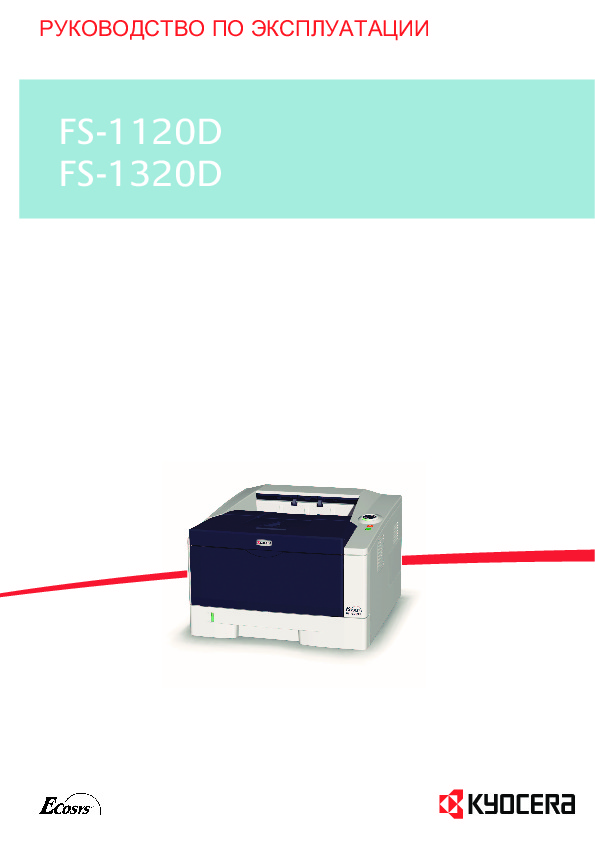 Инструкция лазерного принтера Kyocera FS-1120D
 Информация отображена на картинке
 Информация отображена на картинке
 Информация отображена на картинке
 Информация отображена на картинке
Как использовать наш сайт инструкций OnlineManuals.ru
Наша цель состоит в том, чтобы предоставить вам быстрый доступ к содержанию инструкции для лазерного принтера Kyocera FS-1120D.
С помощью онлайн просмотра, Вы можете быстро просмотреть содержимое инструкции и найти решение проблемы с лазерного принтера Kyocera FS-1120D.
Для Вашего удобства
Если листать руководство пользователя лазерного принтера Kyocera FS-1120D прямо на сайте, не очень удобно для Вас, есть два возможных решения:
• Просмотр в полноэкранном режиме — легко просмотреть руководство пользователя (без загрузки его на свой компьютер), Вы можете использовать режим полноэкранного просмотра.
Для просмотра инструкции пользователя лазерного принтера Kyocera FS-1120D на полном экране, используйте кнопку «Открыть в Pdf-viewer».
• Загрузка на компьютер — Вы можете также скачать Инструкция лазерного принтера Kyocera FS-1120D на свой компьютер и сохранить его в файлах.
Многие люди предпочитают читать документы не на экране, а в печатной версии.
Возможность печати руководства пользователя также была предусмотрена на нашем сайте,
и вы можете использовать ее, нажав на иконку «печать» в Pdf-viewer.
Нет необходимости печатать все руководство лазерного принтера Kyocera FS-1120D, можно выбрать только нужные страницы инструкции.