
Here you can view all the pages of manual HP Photosmart C4783 User Manual. The HP manuals for Printer are available online for free. You can easily download all the documents as PDF.
Page 1

HP Photosmart C4700 series
Page 2

Page 3
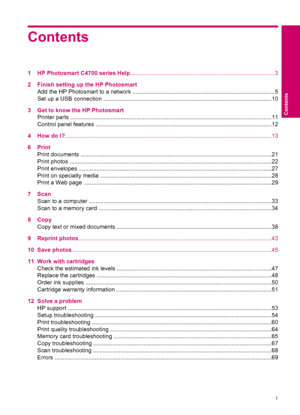
Contents
1 HP Photosmart C4700 series Help..........................................................................................3
2 Finish setting up the HP Photosmart
Add the HP Photosmart to a network ........................................................................................5
Set up a USB connection ........................................................................................................10
3 Get to know the HP Photosmart
Printer parts...
Page 4

14 Technical information
Notice .....................................................................................................................................105
Specifications ........................................................................................................................105
Environmental product stewardship program ........................................................................106
Regulatory notices...
Page 5
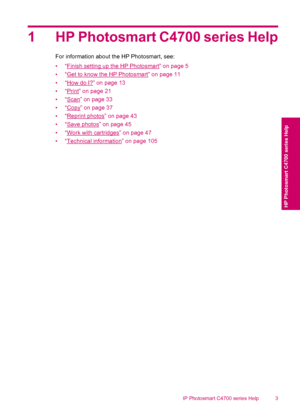
1 HP Photosmart C4700 series Help
For information about the HP Photosmart, see:
•“
Finish setting up the HP Photosmart” on page 5
•“
Get to know the HP Photosmart” on page 11
•“
How do I?” on page 13
•“
Print” on page 21
•“
Scan” on page 33
•“
Copy” on page 37
•“
Reprint photos” on page 43
•“
Save photos” on page 45
•“
Work with cartridges” on page 47
•“
Technical information” on page 105
HP Photosmart C4700 series Help 3
HP Photosmart C4700 series Help
Page 6

Chapter 1
4 HP Photosmart C4700 series Help
HP Photosmart C4700 series Help
Page 7
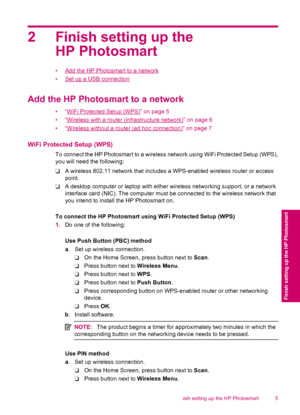
2 Finish setting up the
HP Photosmart
•Add the HP Photosmart to a network
•
Set up a USB connection
Add the HP Photosmart to a network
•“WiFi Protected Setup (WPS)” on page 5
•“
Wireless with a router (infrastructure network)” on page 6
•“
Wireless without a router (ad hoc connection)” on page 7
WiFi Protected Setup (WPS)
To connect the HP Photosmart to a wireless network using WiFi Protected Setup (WPS),
you will need the following:
❑A wireless 802.11 network that includes a WPS-enabled wireless router...
Page 8
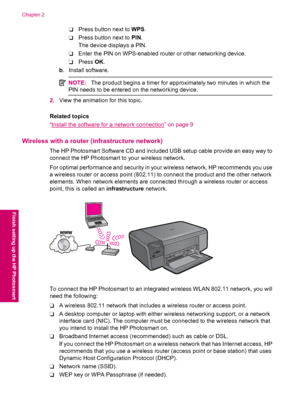
❑Press button next to WPS.
❑Press button next to PIN.
The device displays a PIN.
❑Enter the PIN on WPS-enabled router or other networking device.
❑Press OK.
b. Install software.
NOTE:The product begins a timer for approximately two minutes in which the
PIN needs to be entered on the networking device.
2.View the animation for this topic.
Related topics
“
Install the software for a network connection” on page 9
Wireless with a router (infrastructure network)
The HP Photosmart Software CD and included USB...
Page 9
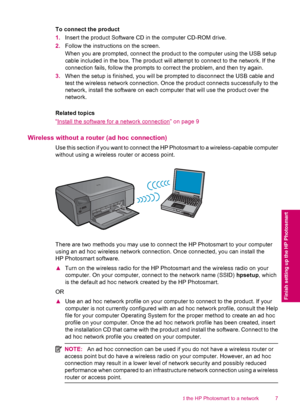
To connect the product
1.Insert the product Software CD in the computer CD-ROM drive.
2.Follow the instructions on the screen.
When you are prompted, connect the product to the computer using the USB setup
cable included in the box. The product will attempt to connect to the network. If the
connection fails, follow the prompts to correct the problem, and then try again.
3.When the setup is finished, you will be prompted to disconnect the USB cable and
test the wireless network connection. Once the...
Page 10
To connect the HP Photosmart to a Windows computer with an ad hoc connection, the
computer must have a wireless network adapter and an ad hoc profile. Create a network
profile for a Windows Vista or Windows XP computer using the directions below.
NOTE:If you have an operating system other than Windows Vista or Windows XP,
HP recommends that you use the configuration program that came with your wireless
LAN card. To find the configuration program for your wireless LAN card, access your
computers list of...
Start reading HP Photosmart C4783 User Manual
Related Manuals for HP Photosmart C4783 User Manual
All HP manuals
Инструкцию для HP Photosmart C4783 на русском языке, в формате pdf можно скачать с нашего сайта. Наш каталог предоставляем Вам инструкцию производителя фирмы HP, которая была взята из открытых источников. Ознакомившись с руководством по эксплуатации от HP, Вы на все 100% и правильно сможете воспользоваться всеми функциями устройства.
Для сохранения инструкции «Струйное МФУ HP Photosmart C4783» на русском языке на вашем компьютере либо телефоне, нажмите кнопку «Скачать инструкцию». Если активна кнопка «Инструкция онлайн», то Вы можете просмотреть документ (manual), в своём браузере онлайн.
Если у Вас нет возможности скачать инструкцию по эксплуатации либо просмотреть её, Вы можете поделиться ссылкой на эту страницу в социальных сетях и при удобном моменте скачать инструкцию. Либо добавьте эту страницу в закладки Вашего браузера, нажав кнопку «Добавить страницу в закладки браузера».
Ремонт принтеров
Лазерных и МФУ
- Ремонт лазерных принтеров и МФУ известных производителей;
- Ремонт плоттеров и широкоформатных принтеров;
- Ремонт полиграфического оборудования;
- Выезд и диагностика бесплатно;
- Точная диагностика по телефону;
- Поставка оригинальных и совместимых расходных материалов;
- Заправка и восстановление картриджей.
Скачивая, Вы соглашаетесь с лицензией HP.
Windows 8/8.1/10
Разрядность: 32/64
Язык: Русский
Версия: 14.8.0
Дата: 3.08.2015
- PS_AIO_06_C4700_140_408-5.exe — [145.7 MB].
Отключаем МФУ от компьютера, скачиваем полнофункциональное ПО, запускаем и следуем подсказкам мастера.
Windows XP/Vista/7
Разрядность: 32/64
Язык: Русский
Версия: 14.1.0
Дата: 06.01.2015 — полный / 16.10.2013 — базовый
- Полный — PS_AIO_06_C4700_USW_Full_Win_WW_140_175-4.exe — [149.7 MB];
- Базовый — PS_AIO_06_C4700_USW_Basic_Win_rus_140_175.exe — [67.4 MB].
В базовом драйвере нет дополнительного программного обеспечения для расширения возможностей устройства.
Инструкция
Язык: Русский
- Руководство пользователя — [PDF, 8.5 MB].
Мне удобно документы в формате PDF открывать с помощью браузера Google или Яндекс.
Мастер установки принтера HP — программа поможет скачать и установить самое последнее программное обеспечение для вашего устройства.
- Print and Scan Doctor — утилита поможет устранить неполадки при печати.
Главная
»
Инструкции
»
HP
»
Многофункциональные устройства
»
HP Photosmart C4783
На этой странице представлен список инструкций, включающий в себя руководство пользователя, сервисную инструкцию, инструкцию по установке, а также по эксплуатации и ремонту для HP Photosmart C4783 на различных языках. Выберите нужный тип инструкции и язык, на котором Вам удобнее будет ее читать и нажимайте кнопку «Скачать инструкцию».
Руководство пользователя HP Photosmart C4783
 |
Руководство пользователя HP Photosmart C4783
Языки: Русский
|
