

Print Specs for Bonneville Reference Guide
Page count: 120
Page trim side: 6.5 x 9
Color(s): 1 color — black
Special instructions
None

hp photosmart
7700 series
справочное руководство

содержание
1 добро пожаловать . . . . . . . . . . . . . . . . . . . . . . . . . . . . .1
поиск дополнительной информации. . . . . . . . . . . . . . . . . . . . 1 комплект поставки . . . . . . . . . . . . . . . . . . . . . . . . . . . . . . . . . . 2 общий обзор принтера . . . . . . . . . . . . . . . . . . . . . . . . . . . . . . . 3 вид спереди . . . . . . . . . . . . . . . . . . . . . . . . . . . . . . . . . . . . . 3 вид сзади . . . . . . . . . . . . . . . . . . . . . . . . . . . . . . . . . . . . . . . 3 панель управления . . . . . . . . . . . . . . . . . . . . . . . . . . . . . . . 4 индикаторы . . . . . . . . . . . . . . . . . . . . . . . . . . . . . . . . . . . . . 5 входной отсек . . . . . . . . . . . . . . . . . . . . . . . . . . . . . . . . . . . 5 структура меню. . . . . . . . . . . . . . . . . . . . . . . . . . . . . . . . . . . . . 6 опции главного меню . . . . . . . . . . . . . . . . . . . . . . . . . . . . . 6 опции подменю . . . . . . . . . . . . . . . . . . . . . . . . . . . . . . . . . . 7 информация о картридже . . . . . . . . . . . . . . . . . . . . . . . . . . . . 9 поддерживаемые картриджи . . . . . . . . . . . . . . . . . . . . . . . 9 установка и замена картриджей . . . . . . . . . . . . . . . . . . . 10
2 устранение неполадок при установке . . . . . . . . . . .13
Windows. . . . . . . . . . . . . . . . . . . . . . . . . . . . . . . . . . . . . . . . . . 13
3обслуживание пользователей и технические
характеристики . . . . . . . . . . . . . . . . . . . . . . . . . . . . . . .15
поддержка . . . . . . . . . . . . . . . . . . . . . . . . . . . . . . . . . . . . . . . . 15 обращение в службу технической поддержки hp по телефону . . . . . . . . . . . . . . . . . . . . . . . . . . . . . . . . . . . . . . 16
технические характеристики . . . . . . . . . . . . . . . . . . . . . . . . . 18 требования к системе . . . . . . . . . . . . . . . . . . . . . . . . . . . . 18 технические характеристики принтера . . . . . . . . . . . . . . 19 обслуживание аппаратных средств . . . . . . . . . . . . . . . . . . . 22 обслуживание программного обеспечения . . . . . . . . . . . . . 22 ограниченная гарантия HP. . . . . . . . . . . . . . . . . . . . . . . . . . . 23 соответствие требованиям и стандартам . . . . . . . . . . . . . . 25 природоохранные меры. . . . . . . . . . . . . . . . . . . . . . . . . . . . . 25 защита окружающей среды . . . . . . . . . . . . . . . . . . . . . . . 25 пластмассовые детали . . . . . . . . . . . . . . . . . . . . . . . . . . . 25 перечни характеристик безопасных материалов . . . . . . 25 программа утилизации отходов . . . . . . . . . . . . . . . . . . . . 25 авторские права и торговые марки . . . . . . . . . . . . . . . . . . . . 26

добро пожаловать
1
Благодарим вас за то, что вы выбрали принтер hp photosmart 7700 series! С новым фотопринтером Вы сможете печатать великолепные фотографии, сохранять фотографии в компьютере и без труда использовать их в самых разнообразных проектах.
поиск дополнительной информации
В комплект поставки принтера входит следующая документация, с помощью которой пользователь может начать работу и эффективно использовать все функции принтера.
•Руководство по установке — Руководство по установке hp photosmart содержит простые и краткие инструкции по установке принтера и требуемого для него программного обеспечения.
•Справочное руководство hp photosmart 7700 series —
Настоящее Справочное руководство содержит сведения по устранению неполадок программного обеспечения, а также объясняет, как получить помощь на Web-узле компании по адресу www.hp.com и как обратиться в службу технической поддержки HP.
•Справочная система принтера hp photosmart — Справочная система принтера hp photosmart объясняет, как пользоваться более сложными функциями принтера. В ней содержится информация по уходу и обслуживанию принтера, а также дополнительные сведения по устранению неполадок и описание сообщений об ошибках.
Установив на компьютер программное обеспечение принтера hp photosmart, можно ознакомиться и распечатать сведения справочной системы принтера hp photosmart.
Примечание. Для установки справочной системы принтера hp photosmart на арабском, хорватском, эстонском, латышском, литовском, словацком языках или иврите вставьте компакт-диск с этикеткой “User’s Guide”, который входит в комплект поставки принтера.
просмотр справочной системы принтера hp photosmart.
–ПК с ОС Windows: В меню кнопки Start (Пуск) выберите Programs (Программы) (в Windows XP выберите пункт All Programs (Все программы)), Hewlett-Packard, Photosmart 140, 240, 7200, 7600, 7700, 7900 series, Photo & Imaging Director. В программе Photo & Imaging Director нажмите Help.
–Macintosh: Вставьте компакт-диск hp photosmart. В папке User Docs (Документы пользователя) выберите требуемый язык, затем щелкните дважды на файле photosmart 7700 series.html.
печать справочной системы принтера hp photosmart
–ПК с ОС Windows: Нажмите кнопку Печать в верхней строке навигации диалогового окна «Справка по принтеру hp photosmart».
–Macintosh: Щелкните в той рамке, которую требуется распечатать. В меню File (Файл) выберите команду Print (Печать) или нажмите кнопку Print (Печать) в верхней строке навигации браузера.
глава 1
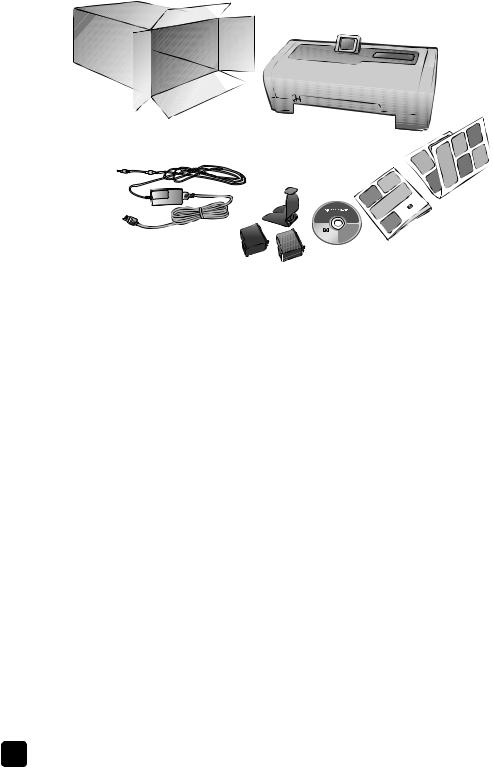
комплект поставки
1
 2 8
2 8 

3
В комплект поставки принтера входят следующие компоненты.
Примечание. Некоторые принадлежности могут быть различными в разных странах и регионах.
1Принтер hp photosmart 7700 series.
2Руководство по установке hp photosmart 7700 series.
3Справочное руководство hp photosmart 7700 series.
4Компакт-диск с программным обеспечением принтера hp photosmart 7700 series (в некоторых странах и регионах может быть несколько компакт-дисков)
5Трехцветный картридж HP №57 и фотокартридж HP №58
6Защитный контейнер
7Блок питания (блоки питания могут различаться по внешнему оформлению и иметь дополнительный шнур питания).
8Накладка на панель управления
|
2 |
hp photosmart 7700 series |
добро пожаловать
общий обзор принтера
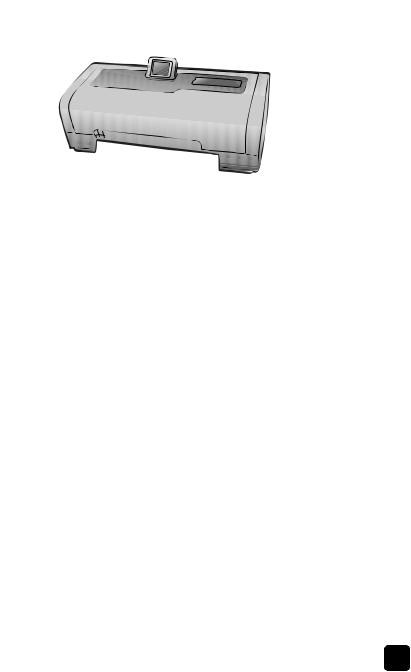
Более подробно об узлах принтера, упоминаемых в этом разделе, см. в справочной системе принтера hp photosmart.
вид спереди
Выходной лоток
Для загрузки материалов для печати небольшого формата и для устранения замятия бумаги этот лоток следует снять.
Приемный лоток
Для загрузки бумаги поднимите этот лоток.
Раскладной приемный лоток
Разложите этот лоток для  поддержки распечаток.
Направляющая ширины бумаги
Отрегулируйте положение этой направляющей, придвинув ее вплотную к краю бумаги во входном лотке.
Входной лоток
Этот лоток служит для загрузки бумаги или конвертов для печати.
|
Верхняя крышка |
ЖК-дисплей |
|
Поднимите верхнюю крышку |
ЖК-дисплей позволяет |
|
для замены картриджей. |
просматривать фотографии и |
|
пункты меню. |
|
|
Дверца входного |
|
|
отсека |
|
|
Поднимите эту дверцу |
|
|
для доступа к гнездам |
|
|
плат памяти и к порту |
|
|
прямой печати. |
|
|
Ползунок лотка для |
|
|
фотобумаги |
|
|
Этот ползунок служит |
|
|
для фиксации и |
|
|
освобождения лотка для |
|
|
фотобумаги. |
|
|
Направляющая длины |
Лоток для фотобумаги |
|
бумаги |
Для загрузки в лоток |
|
Отрегулируйте положение |
фотобумаги формата 10 |
|
этой направляющей, |
х 15 см (4 х 6 дюймов) |
|
придвинув ее вплотную к |
следует поднять |
|
краю бумаги во входном |
выходной лоток для |
|
лотке. |
фотобумаги. |
вид сзади
Разъем шнура питания
Этот разъем служит для подключения шнура  питания, который входит в комплект поставки принтера.
|
Задняя дверца |
Порт USB |
|
Снимите эту дверцу для |
Этот порт служит для |
|
извлечения замятой бумаги. |
подключения принтера к |
|
компьютеру. |
глава 1
панель управления
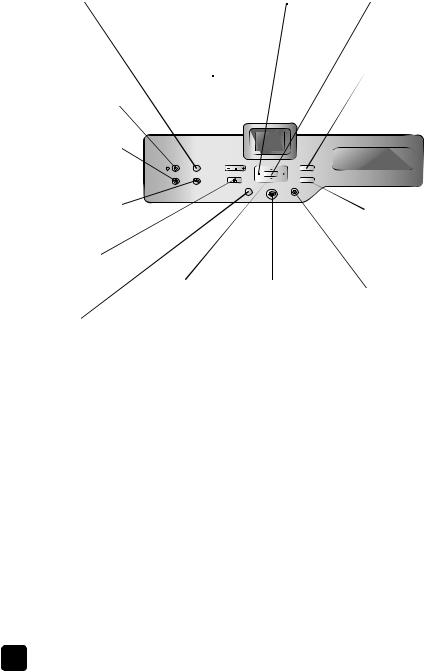
Print New (Печать новых фото)
Эта кнопка служит для автоматической печати последних фотографий, которые еще не распечатывались с панели управления принтера
On (Вкл.)
Эта кнопка служит для включения принтера, а также для перехода в режим энергосбережения.
Save (Сохранить)
Эта кнопка служит для копирования  фотографий с карты памяти в компьютер.
E-mail (Эл. почта)
Эта кнопка служит для  отправки фотографии по адресу электронной почты
Rotate (Поворот)
Эта кнопка служит для вращения текущей отображаемой фотографии
Menu (Меню)
Эта кнопка служит для вызова меню принтера.
Zoom +/Zoom – (Масштаб +/ Масштаб –)
Кнопка Zoom + (Масштаб +) служит для перехода в режим масштабирования, а кнопка Zoom – (Масштаб –) служит для перехода в режим одновременного просмотра девяти фотографий на ЖКдисплее принтера.
Select Photos (Выбор фото)
Эти кнопки служат для просмотра выбранных фотографий, для перемещения рамки выбора по увеличенной фотографии или для просмотра выборов меню.
Select Photos (Выбор фото)
Эти стрелки служат для просмотра всех фотографий или перемещения рамки выбора по увеличенной фотографии.
Print (Печать)
Эта кнопка служит для печати выбранных фотографий с карты памяти.
OK
Эта кнопка служит для выбора текущей фотографии, для ответа на вопросы, отображаемые на ЖКдисплее, а также для выбора пунктов меню.
Size (Формат)
 Эта кнопка служит для регулировки размера фотографий при печати.
 Copies (Копии)
Эта кнопка служит для указания количества требуемых для печати копий.
 Cancel (Отмена)
Эта кнопка служит для отмены выбора фотографий, для выхода из меню и для отмены заданной команды.
Совет: Нажмите и держите нажатой кнопку для быстрого изменения выбираемого значения. Например, нажмите и держите нажатой кнопку Select Photos (Выбор фото) , чтобы быстро перемещаться по фотографиям на карте памяти.
Более подробно о структуре меню при использовании этих кнопок см. в справочной системе принтера hp photosmart.
|
4 |
hp photosmart 7700 series |
|
добро пожаловать |
|
|
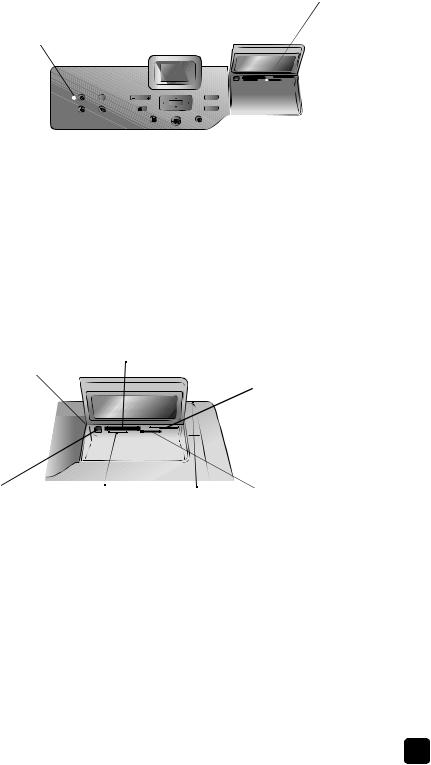
индикаторы |
|
|
Индикатор «Вкл./ |
Индикатор карты |
|
Внимание» |
памяти |
|
Горит (зеленый) |
Вкл. |
|
Питание включено. |
Карта памяти |
|
Выкл. |
установлена |
|
Принтер находится в |
правильно. |
|
режиме |
Выкл. |
|
энергосбережения. |
Карта памяти не |
|
Мигает (зеленый) |
установлена. |
|
Принтер занят. |
Мигает |
|
Мигает (красный) |
Выполняется |
|
Требуется |
передача данных с |
|
вмешательство |
карты памяти на |
|
пользователя. |
принтер или на |
|
компьютер. |
входной отсек
Входной отсек
Этот отсек служит для установки карты памяти и для подключения цифровой камеры HP с функцией прямой печати или портативного компьютера к порту прямой печати.
Порт прямой печати
Этот порт служит для подключения к принтеру портативного компьютера или цифровой камеры HP с функцией прямой печати.
Гнездо для карт памяти CompactFlash™/IBM® Microdrive
Это гнездо служит для установки карт памяти CompactFlash или IBM Microdrive.
Гнездо для карт памяти MultiMediaCard™/Secure
Digital™
Это гнездо служит для установки карт памяти MultiMediaCard или Secure Digital.
Гнездо для карт памяти SmartMedia™/xDPicture Card™
Верхняя часть этого гнезда служит для установки карты памяти SmartMedia™, а правая нижняя часть — для установки карты памяти xD-Picture Card™.
 Гнездо для карт памяти Sony Memory Stick
Это гнездо служит для установки поддерживаемой карты памяти Sony Memory Stick.

глава 1
структура меню
В данном разделе приведен обзор опций, доступных в главном меню и подменю на ЖК-дисплее принтера. Чтобы выбрать эти опции, нажмите кнопку Menu (Меню) на панели управления принтера.
опции главного меню
В этом разделе приведен обзор опций меню, доступных на ЖК-дисплее принтера.
|
Пункт меню |
Варианты выбора |
|
Особая печать |
Печать всех |
|
Создание альбома |
|
|
Печать диапазона |
|
|
Печать индексной страницы |
|
|
Печать листа пробных отпечатков |
|
|
Сканировать лист пробных отпечатков |
|
|
Улучшить фото |
Яркость фото |
|
Добавить рамку |
|
|
Изменить цвет |
|
|
Инструменты |
Показ фото |
|
Качество печати |
|
|
Печать пробной страницы |
|
|
Печать тестовой страницы |
|
|
Чистка картриджей |
|
|
Калибровка картриджей |
|
|
Настройка |
После печати |
|
Количество копий |
|
|
Формат фотографии |
|
|
Видеокомпоновка |
|
|
Дата/время на фото |
|
|
Без полей |
|
|
Печать Exif |
|
|
Повысить контраст |
|
|
Расширенные цвета |
|
|
Определение бумаги |
|
|
Выбор фото на камере |
|
|
Сброс параметров |
|
|
Язык |
|
|
6 |
hp photosmart 7700 series |
 Loading…
-
Инструкции по эксплуатации
1

HP Photosmart 7760(v)(w) инструкция по эксплуатации
(30 страниц)
- Языки:Русский
-
Тип:
PDF -
Размер:
806.86 KB -
Описание:
Струйный принтер
Просмотр
На NoDevice можно скачать инструкцию по эксплуатации для HP Photosmart 7760(v)(w). Руководство пользователя необходимо для ознакомления с правилами установки и эксплуатации HP Photosmart 7760(v)(w). Инструкции по использованию помогут правильно настроить HP Photosmart 7760(v)(w), исправить ошибки и выявить неполадки.
Как использовать наш сайт инструкций OnlineManuals.ru
Наша цель состоит в том, чтобы предоставить вам быстрый доступ к содержанию инструкции для Руководство пользователя, руководство по эксплуатации струйного принтера HP Photosmart 7760(v)(w).
С помощью онлайн просмотра, Вы можете быстро просмотреть содержимое инструкции и найти решение проблемы с Руководство пользователя, руководство по эксплуатации струйного принтера HP Photosmart 7760(v)(w).
Для Вашего удобства
Если листать руководство пользователя Руководство пользователя, руководство по эксплуатации струйного принтера HP Photosmart 7760(v)(w) прямо на сайте, не очень удобно для Вас, есть два возможных решения:
• Просмотр в полноэкранном режиме — легко просмотреть руководство пользователя (без загрузки его на свой компьютер), Вы можете использовать режим полноэкранного просмотра.
Для просмотра инструкции пользователя Руководство пользователя, руководство по эксплуатации струйного принтера HP Photosmart 7760(v)(w) на полном экране, используйте кнопку «Открыть в Pdf-viewer».
• Загрузка на компьютер — Вы можете также скачать Руководство пользователя, руководство по эксплуатации струйного принтера HP Photosmart 7760(v)(w) на свой компьютер и сохранить его в файлах.
Многие люди предпочитают читать документы не на экране, а в печатной версии.
Возможность печати руководства пользователя также была предусмотрена на нашем сайте,
и вы можете использовать ее, нажав на иконку «печать» в Pdf-viewer.
Нет необходимости печатать все руководство Руководство пользователя, руководство по эксплуатации струйного принтера HP Photosmart 7760(v)(w), можно выбрать только нужные страницы инструкции.
Перейти к контенту
Принтеры струйные HP

- Размер инструкции: 800.94 kB
- Формат файла: pdf
Если вы потеряли инструкцию от струйного принтера HP Photosmart 7760(v)(w), можете скачать файл для просмотра на компьютере или печати.
Инструкция для струйного принтера HP Photosmart 7760(v)(w) на русском языке. В руководстве описаны возможности и полезные функции, а также правила эксплуатации. Перед использованием внимательно ознакомьтесь с инструкцией.
Чтобы не читать всю инструкцию вы можете выполнить поиск по содержимому внутри инструкции и быстро найти необходимую информацию. Рекомендации по использованию помогут увеличить срок службы струйного принтера HP Photosmart 7760(v)(w). Если у вас появилась проблема, то найдите раздел с описанием неисправностей и способами их решения. В нем указаны типичные поломки и способы их решения.
4 welcome

Thank you for purchasing an HP Photosmart 7700 Series printer! With your new photo printer, you can print beautiful photos, save photos to your computer, and create fun and easy projects.
find more information
Your new printer comes with the following documentation to help you get started and get the most out of your printer:
- Setup Guide — The HP Photosmart Setup Guide contains quick and easy instructions to help you set up your printer and install the printer software.
- This HP Photosmart 7700 Series Reference Guide — This reference guide contains software troubleshooting information, describes how to get support from www.hp.com/support, and explains how to contact HP support.
- HP Photosmart Printer Help — The HP Photosmart Printer Help describes how to use the more advanced features of your new printer. It includes information about printer care and maintenance, advanced troubleshooting, and error messages.
After you have installed the HP Photosmart printer software on your computer, you can view and print the HP Photosmart Printer Help.
Note: If you are using a Windows PC and you want to install the HP Photosmart Printer Help in Arabic, Croatian, Estonian, Hebrew, Latvian, Lithuanian, or Slovak, insert the CD labeled “User’s Guide” that came in the box with your printer.
view the hp photosmart printer help
– Windows PC: From the Start menu, select Programs (in Windows XP, select All Programs); Hewlett-Packard; Photosmart 140, 240, 7200, 7600, 7700, 7900 Series; Photo & Imaging Director. From the Photo & Imaging Director, click Help.
– Macintosh: Insert the HP Photosmart CD. In the User Docs folder, select your language, then double-click the photosmart 7760.html file.
print the hp photosmart printer help
– Windows PC: Click Print in the top navigation bar of the HP Photosmart Printer Help window.
– Macintosh: Click the frame you want to print. From the File menu, select Print, or click Print in the top navigation bar of the browser.
reference guide 15
chapter 4
what’s in the box
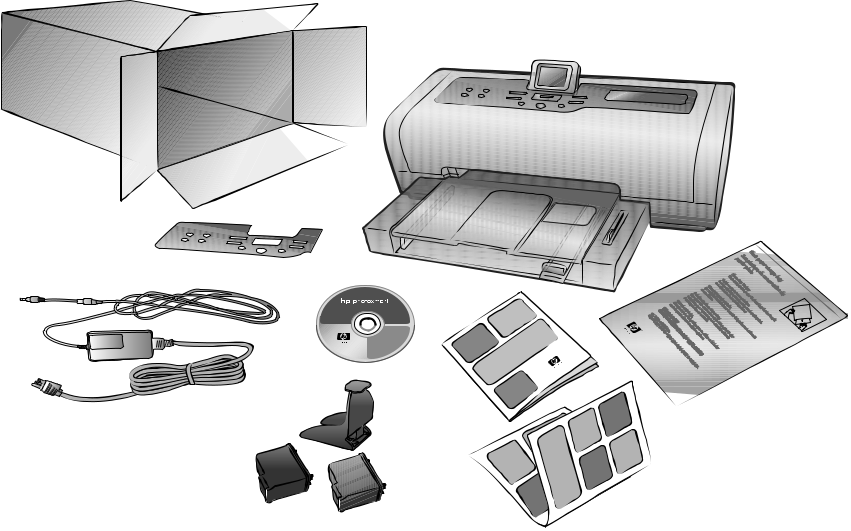
Your printer box contains the following items:
Note: Some contents may vary by country and region.
- The HP Photosmart 7700 Series printer
- A photo paper storage bag
- The HP Photosmart 7700 Series Setup Guide
- The HP Photosmart 7700 Series Reference Guide
- The HP Photosmart 7700 Series printer software CD (some countries/ regions may have more than one CD)
- A print cartridge protector
- The HP #57 tri-color print cartridge and the HP #58 photo print cartridge
- A power supply (power supplies may vary in appearance or have an additional power cord)
- A faceplate
16 hp photosmart 7700 series
welcome
printer overview
For more information about the features shown in this section, see the HP Photosmart Printer Help.
front
Out tray
Remove this tray to load small media and to clear a paper jam
Paper catch
Lift this tray to load paper
Paper catch extension
Flip this guide open to
catch the printed paper
Paper width guide
Adjust this guide to fit close to the edge of the paper in the In tray
In tray
Place paper or envelopes in this tray for printing
Top cover
Lift the top cover to change the print cartridges
Paper length guide
Adjust this guide to fit close to the end of the paper in the In tray
LCD screen
Use this screen to view your photos and menu options
Input bay door
Lift this door to access the memory card slots and the direct-printing port
Photo tray slider
Move this slider to engage or disengage the photo tray
Photo tray
Lift the paper catch to load photo paper in the photo tray
back
Power cord connection
Use this port to connect the
power cord included with
the printer
Rear access door
Remove this door to clear a
paper jam
USB port
Use this port to connect the printer to your computer
reference guide 17
chapter 4
control panel
PRINT NEW
Press this button to automatically print the most recent photos that have not yet been printed from the control panel
ON
Press this button to turn on the printer or put it into power save mode 
SAVE
Press this button to save photos from a memory card to your computer 
Press this button to send a photo to an E-mail address
ROTATE
Press this button to rotate the currently displayed photo
ZOOM +/ZOOM – Press Zoom + to enter into Zoom mode or press Zoom – to enter into 9-up view mode to view nine photos on the printer’s LCD screen at a time 

SELECT PHOTOS
SELECT PHOTOS
Use these arrows to view all photos or to move the selection box on a zoomed photo
OK
Press this button to select the current photo, to answer questions on the LCD screen, or to select menu options
SIZE
Press this button to adjust the print size of your photos
COPIES
Press this button to select the number of copies you want to print
MENU
Press this button to view the printer menu
| Use these arrows to view | |
| selected photos, to | Press this button to |
| move the selection box | |
| print selected photos | |
| on a zoomed photo, or | |
| from a memory card | |
| to view menu selections |
CANCEL
Press this button to deselect photos, to exit a menu, or to stop an action you have requested
Tip: Press and hold a button to change its value rapidly. For example, press and hold the SELECT PHOTOS button to move rapidly through the photos on a memory card.
For more information about the menu structure for these buttons, see the HP Photosmart Printer Help.
18 hp photosmart 7700 series
indicator lights
On/Attention light
On (Green)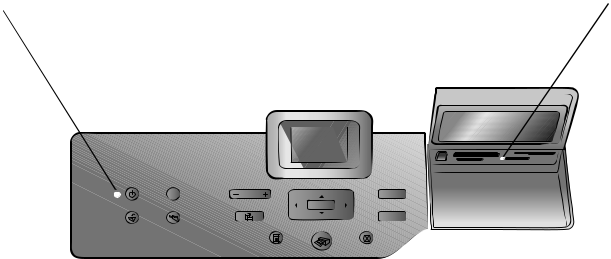
The power is on
Off
The printer is in
power-save mode
Blinking (Green)
The printer is busy
Blinking (Red)
The printer requires
attention
welcome
Memory card light
 On
On
The memory card is
inserted correctly
Off
No memory card is
inserted
Blinking
Information is being
transmitted between
the memory card and
the printer or
computer
input bay
Input bay
Use this bay to insert a memory card or to connect your HP direct- printing digital camera or your notebook computer to the direct-printing port
Direct-printing port
Use this port to connect a notebook computer or an HP direct-printing digital camera to the printer
CompactFlash™/IBM® Microdrive memory card slot You can insert a CompactFlash or an IBM Microdrive memory card into this slot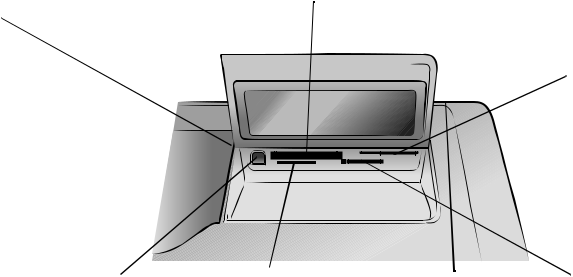
MultiMediaCard™/Secure
Digital™ memory card slot You can insert a MultiMediaCard or a Secure Digital memory card into this slot
SmartMedia™/xD-Picture
Card™ memory card slot You can insert a SmartMedia memory card into the upper portion of this slot or an xD-Picture Card memory card into the lower right portion of this slot
Sony® Memory Stick
memory card slot
You can insert a supported Sony Memory Stick memory card into this slot
reference guide 19
chapter 4
Use this section to review options that are available from the main menu on your printer’s LCD screen. To access the menu options, press the MENU button on the printer’s control panel.
| Menu Option | Choices |
| Print special | Print all |
| Create album | |
| Print range | |
| Print index page | |
| Print proof sheet | |
| Scan proof sheet | |
| Enhance image | Photo brightness |
| Add frame | |
| Add color effect | |
| Tools | Slide show |
| Print quality | |
| Print sample page | |
| Print test page | |
| Clean cartridges | |
| Calibrate printer | |
| Preferences | After printing |
| # of copies | |
| Photo size | |
| Video print | |
| Add date/time | |
| Borderless | |
| Exif printing | |
| Improve contrast | |
| Extend colors | |
| Paper detect | |
| Camera selections | |
| Restore defaults | |
| Language |
20 hp photosmart 7700 series
welcome
print cartridge information
This section contains a brief overview of supported print cartridges, and instructions on how to install or replace print cartridges. For more detailed print cartridge information, see the HP Photosmart Printer Help.
supported print cartridges
Your printer prints in color and in black and white. HP provides a range of print cartridges so that you can choose the best print cartridge for your project.
Your printer supports the following print cartridges. Installing a print cartridge that is not in this table may invalidate your printer warranty.
| To print… | Use these print cartridges… |
| Color or black and white | HP #57 (C6657A)—Tri-color print cartridge |
| documents | and |
| HP #56 (C6656A)—Black print cartridge | |
| Color photos | HP #57 (C6657A)—Tri-color print cartridge |
| and | |
| HP #58 (C6658A)—Photo print cartridge | |
| Black and white photos | HP #57 (C6657A)—Tri-color print cartridge |
| and | |
| HP #59 (C9359A)—Photo gray print cartridge | |
| (available Fall 2003) |
When you install a print cartridge, match the number on the print cartridge to the number on the print cartridge latch. The printer holds two print cartridges at a time.
Caution! Check that you are using the correct print cartridges. Also, note that HP does not recommend modifying or refilling HP print cartridges. Damage that results from modifying or refilling HP print cartridges is not covered by HP’s warranty.
You can interchange the following print cartridges in the right print cartridge carrier depending on your printing needs:
- HP #56 (C6656A)—Black print cartridge
- HP #58 (C6658A)—Photo print cartridge
- HP #59 (C9359A)—Photo gray print cartridge (available Fall 2003)
reference guide 21
chapter 4
install or replace the print cartridges
To get the best performance from your printer, use only genuine HP factory-filled print cartridges.
To get maximum use from your print cartridges, turn off the printer when it is not in use. Do not unplug the printer or turn off the power source (such as a power strip) until the On/Attention light is off. This allows the printer to store the print cartridges properly.
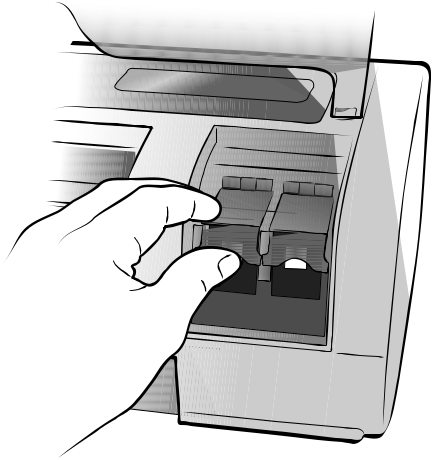
To install or replace the print cartridges:
- If the printer is off, press the ON button on the printer’s control panel to turn on the printer.
- Load plain paper in the In tray so the printer can print a calibration page after you install the print cartridges.
- Lift the top cover of the printer.
- Push down on the print cartridge latch and pull it forward. The print cartridge latch pops open.
22 hp photosmart 7700 series
welcome
- If you are replacing a print cartridge, slide out the old print cartridge and recycle or discard it.
Note: For information about recycling print cartridges, go to www.hp.com/ recycle.
- Take the new print cartridge out of its package.
- Grasp the pink tab and gently peel off the plastic tape. Make sure you remove only the plastic tape. Be sure to install the print cartridge immediately after removing the tape; ink nozzles exposed longer than one minute may dry out and cause printing problems later. Once the tape is removed, do not attempt to replace it.

Caution! Do not touch the ink nozzles or the copper contacts on the print cartridge. Touching these parts may cause the print cartridge to fail.
reference guide 23
chapter 4
- Insert the print cartridge:
– Hold the print cartridge so the copper contacts go into the printer first. Line up the ridges on the left and right sides of the top of the print cartridge with the grooves on the inside of the print cartridge cradle.
– Carefully slide the print cartridge into the cradle, then firmly push the print cartridge in until it stops.
– Push down on the print cartridge latch until it locks.
- Close the top cover and press the OK button. The printer prints a calibration page.
Your printer and print cartridges are calibrated to give you optimal printing results. You can discard the calibration page.
24 hp photosmart 7700 series
4 installation troubleshooting

Your HP Photosmart printer is designed to be reliable and easy to use. This chapter contains frequently asked questions about Windows PC installation. For detailed troubleshooting information about all aspects of your printer, including Macintosh installation and error messages, see the HP Photosmart Printer Help. For more information about viewing the printer help, see view the hp photosmart printer help on page 1.
Before contacting HP support, read this section for troubleshooting tips or go to the online support services at www.hp.com/support.
Note: In the presence of high electromagnetic fields, printed documents and photos may be slightly distorted.
Note: HP recommends using a USB cable of less than 10 feet (3 meters) in length to minimize injected noise due to potential high magnetic fields.
reference guide 15
chapter 4
16 hp photosmart 7700 series
reference guide 17
chapter 4
18 hp photosmart 7700 series
4 support and specifications
This chapter contains the following information about your printer:
- support on page 15
- specifications on page 18
- hardware services on page 21
- software services on page 22
- hp limited warranty statement on page 22
- safety information on page 24
- environmental statements on page 24
- regulatory statements on page 25
- copyrights and trademarks on page 26
support
If you have a problem, follow these steps:
- Go to the HP Photosmart Printer Help for detailed information about how to use your printer and troubleshoot problems. For information about viewing the HP Photosmart Printer Help, see view the hp photosmart printer help on page 1.
- If you are unable to solve the problem using the information in the HP Photosmart Printer Help, Web and E-mail support are available in the following languages: Dutch, English, French, German, Italian, Portuguese, Spanish, and Swedish.
– Go to www.hp.com/support to access online support pages or send HP an E-mail message for one-on-one answers to your questions.
– Go to www.hp.com to check for software updates.
- If you are unable to solve the problem using the HP Photosmart Printer Help or HP Web sites, call HP support using the number for your country or region. For a list of country and region phone numbers, see the following section.
reference guide 15
chapter 4
hp support by phone
Your printer comes with a limited time of free phone support. For more information, see support on page 15 or go to www.hp.com/support to check the duration of your free support.
After the free phone support period, help is available from HP at an additional cost. Contact your HP dealer or call the support phone number for your country or region for support options.
To receive HP support by phone, call the appropriate support phone number for your location. Standard phone company charges apply.
Note: Customers in Western Europe should go to www.hp.com/support to access phone support numbers in their country or region.
| Country | Phone number |
| Algeria | (+212) 22404747 |
| Bahrain | 800 728 |
| Czech Republic | 42 (0)2 6130 7310 |
| Egypt | 02 532 5222 |
| Greece | +3016073603 |
| Hungary | + 36 (0)1 382 1111 |
| Israel | 972 (0) 9 830 4848 |
| Morocco | (+212) 22404747 |
| Poland | + 48 22 865 98 00 |
| Romania | 01 315 44 42 |
| Russia, Moscow | 7 095 923 50 01 |
| Russia, St. Petersburg | 7 812 346 7997 |
| Saudi Arabia | 800 897 14440 |
| Slovakia | + 421–2–68208080 |
| South Africa | 086 000 1030 inside RSA |
| + 27–11 258 9301 outside RSA | |
| Tunisia | + 216 1 891 222 |
| Turkey | 1 216 579 71 71 |
| Ukraine | + 7 (380–44) 490–3520 |
| United Arab Emirates | 971 4 883 8454 |
16 hp photosmart 7700 series
support and specifications
place a call
Call HP support while you are near the computer and printer. Be prepared to provide the following information:
- Printer model number (located on the front of the printer).
- Printer serial number (located on the bottom of the printer).
- Computer operating system.
- Version of printer driver:
– Windows PC: To see the printer driver version, right-click the memory card icon in the Windows taskbar and select About.
– Macintosh: To see the printer driver version, use the Print dialog box.
- Messages displayed on the printer’s LCD screen or on the computer’s monitor.
- Answers to the following questions:
– Has the situation you are calling about happened before? Can you recreate the situation?
– Did you install any new hardware or software on your computer around the time that the situation occurred?
reference guide 17
chapter 4
specifications
This section lists minimum system requirements needed to install your HP Photosmart printer on a computer, and provides selected printer specifications.
For a complete list of printer specifications, see the HP Photosmart Printer Help. For information about viewing the Printer Help, see view the hp photosmart printer help on page 1.
system requirements
| Component | Minimum for Windows | Minimum for Macintosh |
| Operating system | Windows® 98, 2000 Professional, | Mac® OS 9 v9.1 or later, OS X |
| ME, XP Home, and XP Professional | v10.1 through 10.2 | |
| Processor | Pentium® II (or equivalent) or higher | G3 or greater |
| RAM | 64 MB (128 MB recommended) | Mac OS 9.1 and OS 9.2: 64 MB |
| (128 MB recommended) | ||
| Mac OS X v10.1 and OS X v10.2: | ||
| 128 MB | ||
| Free disk space | 500 MB | 500 MB |
| Video display | 800 x 600, 16-bit or higher | 800 x 600, 16-bit or higher |
| CD-ROM drive | 4x | 4x |
| Connectivity | USB: Front and back ports (Windows | USB 2.0 Full speed (Mac OS 9 v9.1 or |
| 98, 2000 Professional, ME, XP Home, | later, OS X v10.1 through 10.2) | |
| and XP Professional) | ||
| Browser | Microsoft® Internet Explorer 5.5 or | Not required for installation |
| higher |
18 hp photosmart 7700 series
support and specifications
printer specifications
Connectivity, maximum HP JetDirect External Print Servers: 175x, 310x, 380x
Connectivity, standard USB: Front and back ports
Windows 98, 2000 Professional, ME, XP Home, and XP
Professional
Mac OS 9 v9.1 or later, OS X v10.1 through v10.2
Image file formats JPEG Baseline
TIFF 24-bit RGB uncompressed interleaved
TIFF 24-bit YCbCr uncompressed interleaved
TIFF 24-bit RGB packbits interleaved
TIFF 8-bit gray uncompressed/packbits
TIFF 8-bit palette color uncompressed/packbits
TIFF 1-bit uncompressed/packbits/1D Huffman
In tray capacity 25 sheets of photo paper
100 sheets of plain paper
20–40 cards (depending on thickness)
15 envelopes
20 sheets of banner paper
20 sheets of labels
25 transparencies
25 sheets of iron-on transfers
Media sizes Photo paper (4 x 6 inches, 10 x 15 cm)
Photo paper with tab (4 x 6 inches with 0.5 inch tab, 10
x 15 cm with 1.25 cm tab)
Index cards (4 x 6 inches, 10 x 15 cm)
Hagaki cards (3.9 x 5.8 inches, 100 x 148 mm)
A6 cards (4.1 x 5.8 inches, 105 x 148 mm)
L-size cards (3.5 x 5 inches, 90 x 127 mm)
L-size cards with tab (3.5 x 5 inches with 0.5 inch tab, 90
x 127 mm with 12.5 mm tab)
Banner paper (8.5 x 234 inch, 216 x 5969 mm)
reference guide 19
| chapter 4 | |
| Media sizes, standard | Photo paper |
| 3 x 3 inches to 8.5 x 14 inches (76 x 76 mm to 216 x | |
| 356 mm) | |
| Plain paper | |
| Letter, 8.5 x 11 inches (216 x 280 mm) | |
| Legal, 8.5 x 14 inches (216 x 356 mm) | |
| Executive, 7.5 x 10 inches (190 x 254 mm) | |
| A4, 8.27 x 11.7 inches (210 x 297 mm) | |
| A5, 5.8 x 8.3 inches (148 x 210 mm) | |
| B5, 6.9 x 9.8 inches (176 x 250 mm) | |
| Cards | |
| Hagaki, 3.9 x 5.8 inches (100 x 148 mm) | |
| L-size, 3.5 x 5 inches (90 x 127mm) | |
| L-size with tab, 3.5 x 5 with 0.5 inch tab (90 x 127 mm | |
| with 12.5 mm tab) | |
| Index, 3 x 5 inches, 4 x 6 inches, and 5 x 8 inches (76 | |
| x 127 mm, 10 x 15 cm, and 127 x 203 mm) | |
| A6, 4.1 x 5.8 inches (105 x 148 mm) | |
| Envelopes | |
| No. 9, 3.875 x 8.875 inches (98.4 x 225.4 mm) | |
| No. 10, 4.125 x 9.5 inches (105 x 240 mm) | |
| A2 Invitation, 4.375 x 5.75 inches (110 x 146 mm) | |
| DL, 4.33 x 8.66 inches (110 x 220 mm) | |
| C6, 4.5 x 6.4 inches (114 x 162 mm) | |
| Custom | |
| 3 x 5 inches to 8.5 x 14 inches (76 x 127 mm to 216 x | |
| 356 mm) | |
| Transparencies | |
| Letter, 8.5 x 11 inches (216 x 280 mm) | |
| A4, 8.27 x 11.7 inches (210 x 297 mm) | |
| Label sheets | |
| Letter, 8.5 x 11 inches (216 x 280 mm) | |
| A4, 8.27 x 11.7 inches (210 x 297 mm) | |
| Banner paper | |
| (8.5 x 234 inch, 216 x 5969 mm) | |
| Media specifications, | Recommended maximum length: 14 inches (356 mm) |
| maximum | Recommended maximum width: 8.5 inches (216 mm) |
| Recommended maximum thickness: 11.5 mil (292 µm) | |
| per sheet | |
| Media types | Paper (plain, inkjet, photo, and banner) |
| Envelopes | |
| Transparencies | |
| Labels | |
| Cards (index, greeting, Hagaki, A6, L-size) | |
| Iron-on transfers | |
| Memory cards | CompactFlash™ Type I and II |
| IBM® Microdrive | |
| MultiMediaCard™ | |
| Secure Digital™ | |
| SmartMedia™ | |
| Sony® Memory Sticks | |
| xD-Picture Card™ | |
| Memory card-supported | Printing: Supported images and video file formats |
| file formats | Saving: All file formats |
| 20 | hp photosmart 7700 series |
To read more please download the PDFs below
Download HP Photosmart 7760 Manual
hp photosmart 7760 driver
hp photosmart 7760 price
hp photosmart 7760 driver software download
hp photosmart 7760 printer troubleshooting
hp photosmart 7760 printer ink cartridges
hp photosmart 7760 windows 10
hp photosmart 7760 power cord
is hp photosmart 7760 wireless
Руководства HP PHOTOSMART 7760 Размер файлов: 7674 KB, Язык: English, Формат: pdf, Платформа: Windows/Linux, Дата: 2015-11-15
На данной странице вы можете скачать руководства HP PHOTOSMART 7760. Мы предлагаем вам ознакомиться с руководством пользователя, инструкцией по сервисному обслуживанию и ремонту.
Также здесь вы найдете список заказных номеров на комплектующие HP PHOTOSMART 7760.
Все файлы предоставляются исключительно в ознакомительных целях. И не являютя руководством по ремонту, а направлены лишь на то чтобы помочь вам более детально ознакомиться с принципом построения устройства.
Содержимое представленных здесь руководств требуют от вас знания технического английского языка.
Если вы собираетесь скачать руководство по сервисному обслуживанию HP PHOTOSMART 7760, иными словами сервис мануал, вы дожны обладать хотя бы минимальными познаниями в области электроники и пониманием базовых принципов работы электромеханических устройств.
Для просмотра руководств вам понадобится Adobe Acrobat Reader версии 9 и выше либо другая программа для просмотра pdf файлов.
В связи с популярностью информации представленной на сайте и ее бесплатного предоставления конечному пользователю, убедительная просьба использовать специальные программные продукты для многопотокового скачивания файлов.
Руководства для HP PHOTOSMART 7760
- Руководство пользователя (User manual)
- Руководство по сервисному обслуживанию (Service manual)
- Руководство по ремонту (Repair manual)
- Перечень комплектующих (PartList)