
Беспроводной термостат используется для управления газовыми и электрическими котлами, инфракрасными обогревателями и другим отопительным оборудованием.
Терморегулятор PTC10 работает совместно с беспроводным приемником PTR10 или PTR16 (исполнительное реле). Отдельно PTC10 следует приобретать лишь для расширения существующей системы управления отоплением. Между собой PTC10 и PTR10/PTR16 связаны по радиоканалу 433/868 МГц.
Если требуется террмостат с функцией управления через Wi-Fi, то следует приобретать комплект управления с шлюзом Poer PTG10, для осуществления доступа термостата к Интернету.
Терморегулятор PTC10 позволяет программировать режим отопления 5+2дней/7дней/1день.
- Режим 5+2 дней позволяет установить программу для будних дней и программу для выходного дня.
- 7 дней — позволяет установить одну и ту же программу для каждого дня недели.
- Функционал 1 дня позволяет установить различные программы для каждого дня недели.
- Каждый тип программы позволяет установить 7 режимов времени и температуры.
- Дальность действия сигнала: 100 м.
Благодоря термостатам POER контроль и управление системой отопления можно осуществлять посредством мобильного приложения, находясь самому при этом сколь угодно далеко.
Страна производства:
Китай
Напряжение питания, (В):
- 230±10%
Максимальный ток нагрузки, (А):
- 16
Максимальная мощность нагрузки, (ВА):
- 3500
Способ размещения:
- В подрозетник
Тип управления:
- Цифровой
- Программируемый
- Беспроводной
Дисплей:
- ЖК-дисплей с подсветкой
Пределы регулировки:
- +7…32°C
Температурный гистерезис:
- 0,5 °С
Радиочастота RTH, (МГц):
- 433
- 868
Дальность действия RTH:
- 100 м
Сфера применения:
- ИК обогреватели / конвекторы
- Теплый пол
- Водяной теплый пол
-
Contents
-
Table of Contents
-
Bookmarks
Quick Links
Hangzhou Poer Tech., Co., Ltd
Add.: 19th. Floor, Xingtu Building, No.451
Wulianwang Street, Binjiang Zone, Hangzhou
City, 310051 Zhejiang Pro., CHN.
www.poersmart.com
Tel.: +86-571-85800292
Fax: +86-571-28190666
E-mail: support@poersmart.com
smart controls
User Manual
Wireless Programmable
Room Thermostat
Model No.: PTC10 / PTR10
Scan for App
Power to control your heating
Anytime, Anywhere
Summary of Contents for POER PTC10
This manual is also suitable for:
Ptr10
-
Contents
-
Table of Contents
-
Bookmarks
2. System Installation
Volt free contacts
N
L
A
B
100-230V~ 50/60Hz
call for
heating
heat
satisfide
or call
forcooling
Burner(direct control)
PTR 10
100-230V~
N
L
A
B
50/60Hz
<5A
L
N
Combi boiler
PTR 10
100-230V~
N
L
A
B
50/60Hz
<5A
L
N
C
A
B
C
Common
call for
heating
Common
heat
satisfide
or call
forcooling
24V-230V~
50/60HZ
A-C:5A
B-C:5A
L
C
A
B
C
N
24V-230V~
50/60HZ
T1
A-C:5A
B-C:5A
T2
L
C
A
B
C
N
2. System Installation
04
Electric heater
100-230V~
N
50/60Hz
<5A
L
N
Thermal actuator
100-230V~
N
50/60Hz
<5A
L
N
Zone valve
100-230V~
N
50/60Hz
<5A
L
N
24V-230V~
PTR 10
50/60HZ
A-C:5A
B-C:5A
L
A
B
C
A
B
24V-230V~
PTR 10
50/60HZ
A-C:5A
B-C:5A
L
A
B
C
A
B
24V-230V~
PTR 10
50/60HZ
A-C:5A
B-C:5A
L
A
B
C
A
B
05
L
C
N
Max
1.2KW
C
R
B
BR
BL
O
GR
BR
C
M
BL
G/Y
This manual is also suitable for:
Ptr10
Беспроводной термостат используется для управления газовыми и электрическими котлами, инфракрасными обогревателями и другим отопительным оборудованием.
Терморегулятор PTC10 работает совместно с беспроводным приемником PTR10 или PTR16 (исполнительное реле). Отдельно PTC10 следует приобретать лишь для расширения существующей системы управления отоплением. Между собой PTC10 и PTR10/PTR16 связаны по радиоканалу 433/868 МГц.
Если требуется террмостат с функцией управления через Wi-Fi, то следует приобретать комплект управления с шлюзом Poer PTG10, для осуществления доступа термостата к Интернету.
Терморегулятор PTC10 позволяет программировать режим отопления 5+2дней/7дней/1день.
- Режим 5+2 дней позволяет установить программу для будних дней и программу для выходного дня.
- 7 дней — позволяет установить одну и ту же программу для каждого дня недели.
- Функционал 1 дня позволяет установить различные программы для каждого дня недели.
- Каждый тип программы позволяет установить 7 режимов времени и температуры.
- Дальность действия сигнала: 100 м.
Благодоря термостатам POER контроль и управление системой отопления можно осуществлять посредством мобильного приложения, находясь самому при этом сколь угодно далеко.
Страна производства:
Китай
Напряжение питания, (В):
- 230±10%
Максимальный ток нагрузки, (А):
- 16
Максимальная мощность нагрузки, (ВА):
- 3500
Способ размещения:
- В подрозетник
Тип управления:
- Цифровой
- Программируемый
- Беспроводной
Дисплей:
- ЖК-дисплей с подсветкой
Пределы регулировки:
- +7…32°C
Температурный гистерезис:
- 0,5 °С
Радиочастота RTH, (МГц):
- 433
- 868
Дальность действия RTH:
- 100 м
Сфера применения:
- ИК обогреватели / конвекторы
- Теплый пол
- Водяной теплый пол


Производитель:

артикул: PTC10

Коротко о товаре:
Беспроводной комнатный терморегулятор
- Описание
- Характеристики
- Отзывы
- Похожие
POER PTC10 Комнатный беспроводной термостат
Беспроводной программируемый терморегулятор, очень простой в установке и использовании. Может использоваться к любой системе управления водяным отоплением, включая газовые и электрические котлы, в системах центрального и воздушного отопления. Подходит для монтажа новой системы или обновления существующей.
Обычно работает совместно с ресивером PTR10 по беспроводной сети, изменяя запрограммированную температуру воздуха в помещении.
Подключенный к сети нтернет с помощью шлюза PTG10, может управляться удаленно через приложение с мобильного телефона, ПК или планшета.
Без шлюза PTC10 может использоваться как обычный комнатный терморегулятор.
Особенности PTC 10
- Интегрирован с Amazon Alexa и Google Home.
- Push-уведомление о предупреждении о высокой и низкой температуре.
- Встроенный датчик влажности.
- Две группы контактов без напряжения, может быть подключен к газовому котлу и другим устройствам, требующим реле без напряжения.
- К приемнику POER PTR10 может подключать два PTC10 для управления двумя независимыми зонами отопления.
- Режимы регулирования по времени: 12 периодов времени в день, 5 + 2 дня (выходные) / на все 7 дней / на 1 день.
- Режимы поддержания температуры: автоматический, ручной, праздничный, ECO.
- Функция защиты от замерзания и залипания клапанов.
- Память хранит пользовательские программы при сбое электропитания.
- Большой, информативный ЖК-дисплей с подсветкой.
- Питание от батареек с индикатором их низкого заряда.
- Блокировка от детей.
- Настенный монтаж или настольная установка.
Технические характеристики термостата POER PTC10
Артикул: PTC10
Бренд: POER (Китай)
Тип: беспроводной программируемый терморегулятор
Предназначен для использования в системах отопления с электрическими или газовыми котлами
Диапазон рабочих температур, °C: от 0 до 50
Дисплей: жидкокристаллический с подсветкой
Радиочастота, МГц: 868, 433 (опция), двунаправленная
Дальность связи (открытое пространство), м: 100
Электропитание: 2 батарейки типа АА
Срок работы батареек: обычно 2 года
Потребляемая мощность, Ватт: менее 2
Максимальный ток нагрузки контактов, А: 5 (резистивная), 2 (индуктивная)
Диапазон регулирования температуры, °C: 7 — 32 ( с шагом 0,5°C)
Точность измерения температуры, °C: +/- 0,5
Регулировка гистерезиса PID-контроля: +/-0,3°C
Регулировка гистерезиса контроля температуры: +/-0,3°C
Интервал измерения температуры: 30 секунд
Цикл работы: 7дней. 5+2дня, 1 день
Защита от замерзания: 7°С
Измерение влажности: от 10 до 90% RH
Точность измерения влажности: +/-5% RH
Отображение времени: 12ч/24ч
Функция открытого окна: есть
Размеры, мм: 117,2 x 87,2 x 26,6
Класс защиты: IP30
Стандарт: СЕ, ЕАС
Вес, гр: 356
Гарантия: 12 месяцев или 24 месяца с даты производства
Отзывы
Еще нет отзывов об этом товаре.
Poer PTC10 WIRELESS Programmable Room Thermostat

Overview
- This wireless programmable room thermostat kit can be used to control gas or oil boiler, a variety of valves and actuators.
- II contains a wireless programmable room thermostat PTC10 and a wireless receiver PTR10, the two units are linked by Radio Frequency. (If your kit is Wi-Fi thermostat, there is a gateway PTG10 accessing your thermostat to internet)
- This thermostat is a programmable room thermostat 5+2 Days / 7 Days/1 day product. 5+2 days allows you to set a program for weekdays and a program for the weekend. 7 days allows you to set a same program for every day of the week. 1 day functionality allows you to set a different program for every day of the week. Each program type allows you to set 7 time and temperature events.
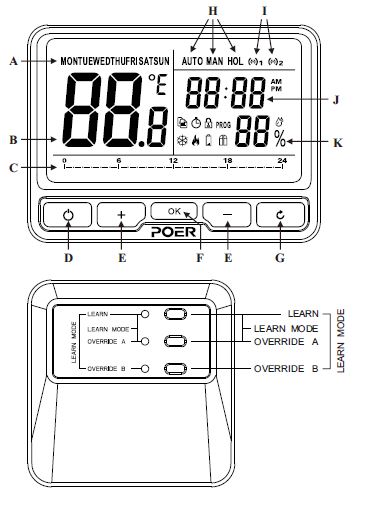
Controls and Display Layout
- A Days
B Temperature - C Program setting time
- D ECO
E + or – buttons for setting - F Confirm
- G Return
- H Auto, Manual, Holiday mode
- I RF
- J Time
- K Humidity
- Copy
- Clock set
- Child lock
- Program set
- Forst protection
- Heating
- Low battery warning
- Open window
System Installation
Install and Wiring Receiver
Install Receiver
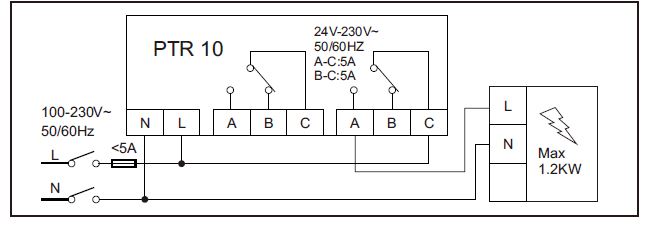
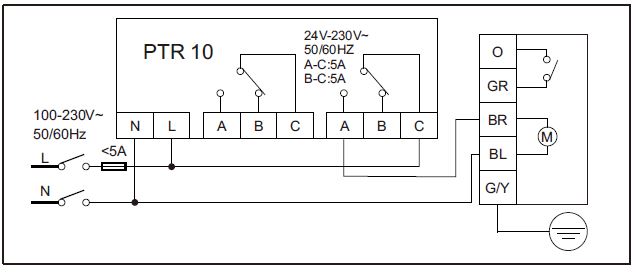
Follow the installation diagrams to install and connect the receiver PTR10 correctly.
Note:
Wiring Receiver
Note:
- Install in accordance with local wiring regulations.
- The wiring should be operated by trained personnel.
- Observe ambient temperature and current limits(see product specification).
- These diagrams must be read in conjunction with any boiler or cylinder manufactures instructions.
- Poer accepts no liability for any loss or damage arising from any errors or omissions that may be inadvertently contained within these diagrams. They are proposal diagrams only, not certified wiring diagrams
Volt free contacts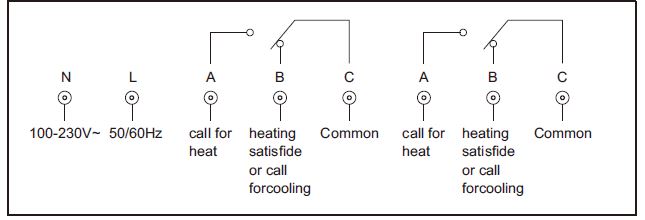
Combi boiler
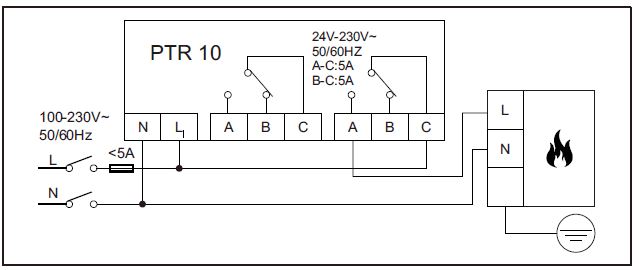
Burner(direct control)
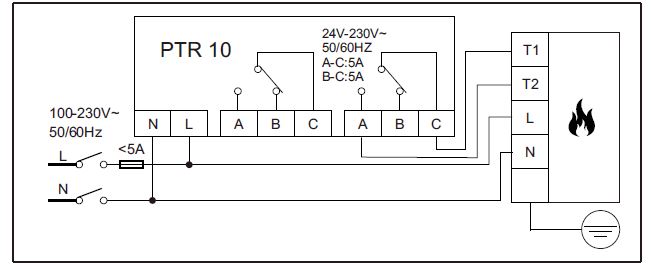
Electric heater
Zone valve
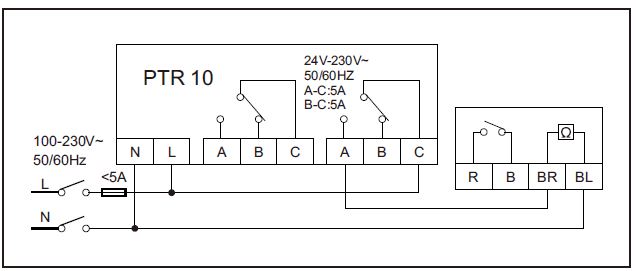
Thermal actuator
Activate Batteries and Install Thermostat
Activate Batteries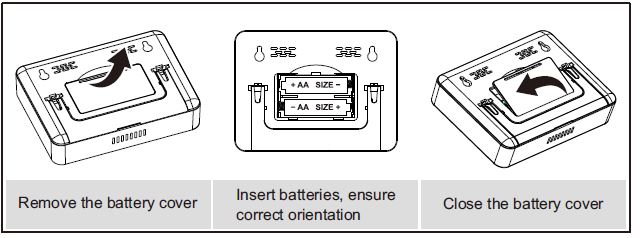
Install Thermostat
This thermostat could be desk-stand if open the back support, you just need to place it on any flat surface allows to receive RF signal.
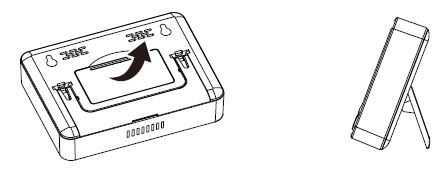
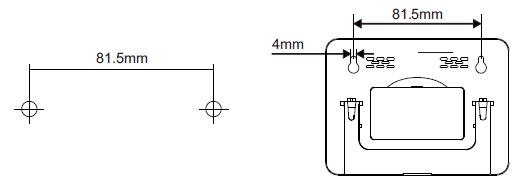
If you want to hang it on the wall, use the template provided.
Drill two holes in the wall and tighten the screws, ensuring two holes’ distance is 81.5mm; then, fix the thermostat’s back cover by putting it over the screw head.
System Check
RF Signal Pairing
The room thermostat has already been pre-bound with the receiver’s OVERRIDE I In kit PTC10/PTR10 when delivery. You may directly move to RF communication test, please refer to 2.3.2.
RF signal pairing between room thermostat and receiver
- Preparation: thermostat and receiver should be powered/wired correctly, make sure the visible distance between the thermostat and receiver is not more than 5 meters.
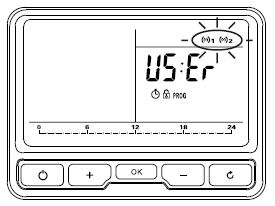
- Start the receiver’s RF pairing mode by hold-pressing the LEARN button until its light flashes.
- Press OVERRIDE Ⅰor Ⅱ(you must choose according to your real wiring work on the receiver) to pair with the thermostat; when the light of OVERRIDE Ⅰor Ⅱ is flashing, it means OVERRIDE Ⅰor Ⅱ is ready to pair with the thermostat next.
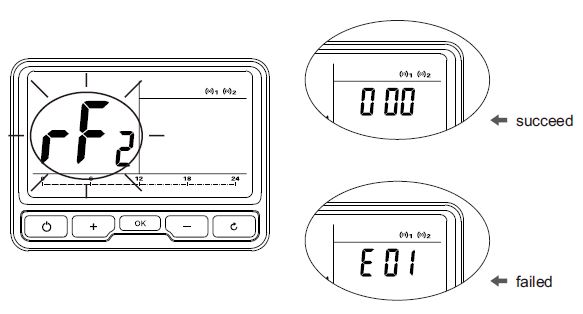
- The thermostat sends pairing command with receiver:
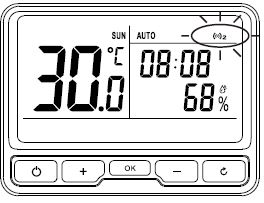
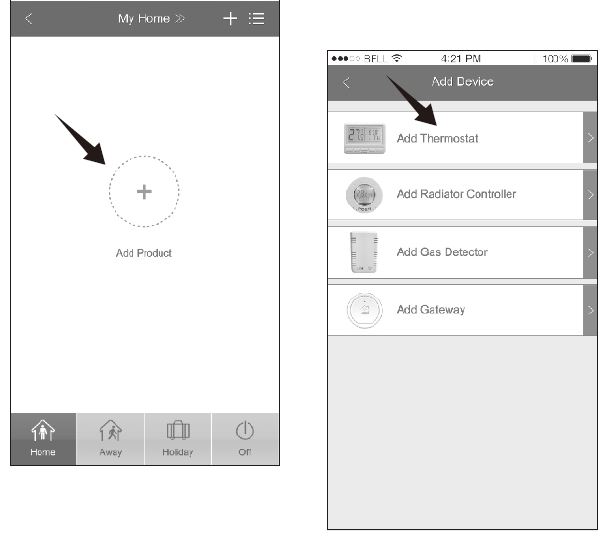
Automatically pairing thermostat with gateway by App on mobile phone
- Open the App. which is already connected with the gateway(how to add a gateway on App. please refer to gateway’s manual for details), choose Add Thermostat from the interface;
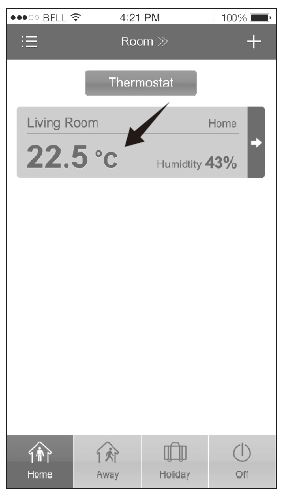
Manually paring thermostat with gateway
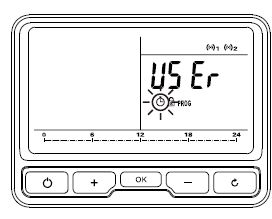
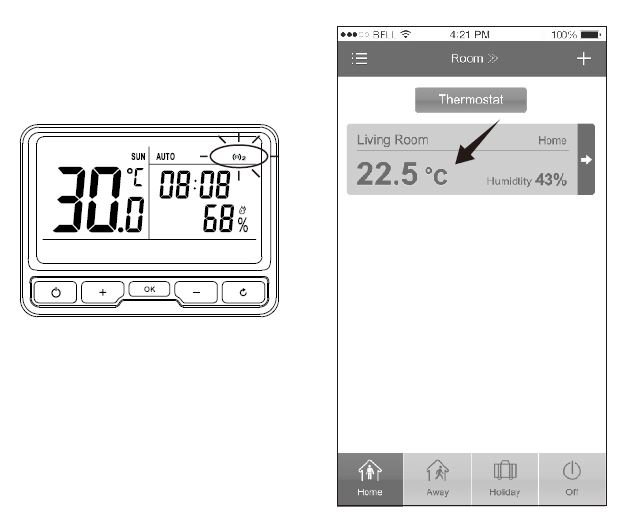
RF communication test
To make sure RF communication between thermostat and receiver, thermostat and gateway before using them regularly, you should take a RF communication test.
RF communication test between thermostat and receiver
Enter RF Communication Test by long pressing , when
 show up on screen’s left side, press
 to test RF communication between the thermostat and receiver; test result is good if
 shows up on the screen’s right side, otherwise, will show up on the screen’s right side, in this case, you need to relocate the thermostat and do the test once again.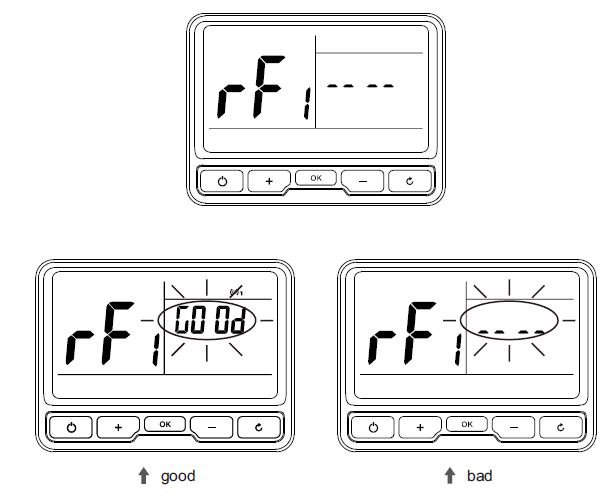
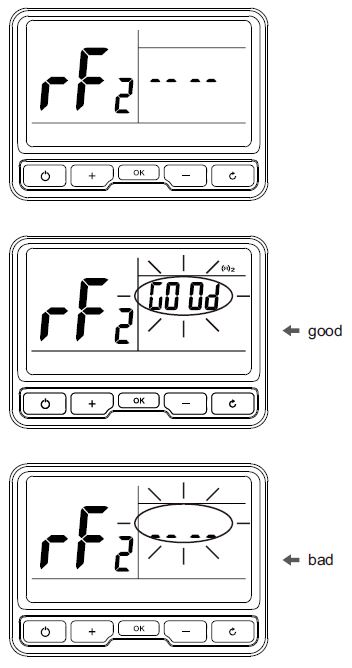
RF communication test between thermostat and gateway
Enter RF Communication Test by long pressing , when show up on screen’s left side, press to test RF communication between thermostat and gateway; test result is goodif show up on screen’s right side, otherwise, will show up on screen’s right side, in this case, you need relocate the thermostat and do the test once again
Operation Thermostat
Clock Setting
Clock setting should be done if thermostat was used for the first time or after batteries changed; automatically clocking setting will be done if thermostat was connected with Internet via Gateway
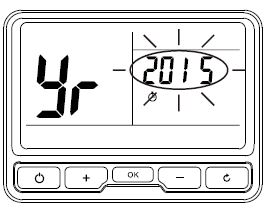
- Back to the last setting menu by pressing
Program Setting
Pre-set Program
This thermostat comes with the following default settings pre-programmed for your convenience:
Working days’ pre-set program
Weekend’s pre-set program (Sat., Sun.)
To adjust the pre-set program
- Enter Program Setting by Pressing
 when is flashing.
 - Enter 5+2 days/7 days/1 day program when Days flashing, select by press to confirm.
- Temperature flashing in Temperature Area, press to adjust the required temperature, press to confirm.
- Time flashing in Time Area, press to adjust the 1st time as required, press to confirm.
- Once the temperature and 1st time has been set, temperature flashing in Temperature Area again, then you repeat to set the next temperature and time periods, as above steps howing (checking from Step 3).
- To cancel the program by pressing , go back to Menu Selection by keeping pressing.
- Long press can copy the current flashing day’s program setting to other day; select target day by pressing , press to confirm and paste
 press
pressOverride Mode-to change temperature for a short period under AUTO mode
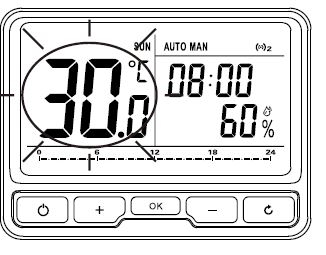
Manual Mode-to set a constant room temperature manually
- Switch between AUTO and Manual Mode by pressing
- Under Manual mode MAN, appeared on upper right and temperature flashing. Figure as following.
Holiday Mode
Make a holiday plan, it will keep your room at the pre-set temperature until your return time is coming. The default temperature for Holiday Mode is 7℃, you also can change this default value in User Options.
- Enter Holiday Mode by keep pressing until showing on upper right.
- Pre-set date and time for holiday start and return.
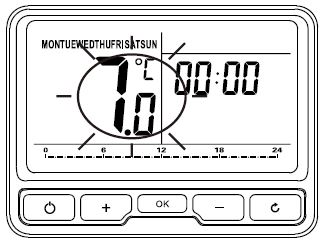
- Holiday Mode will start automatically when the holiday start time is coming, otherwise, it continue AUTO Mode.
- To cancel Holiday Mode’s setting by keep pressing.
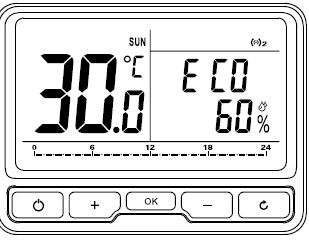
ECO Mode
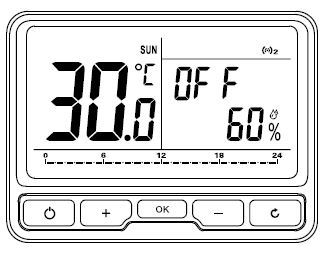
OFF Mode (Frost Protection)
Child Lock
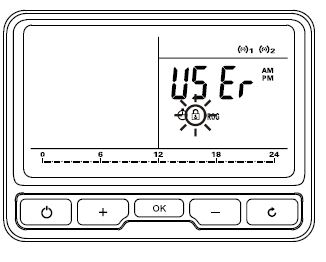
User Option
- You may change user operation after entered User Operation by Pressing when USER is flashing under Menu Selection.
- Under User Option, the option ID is showing on Temperature Area(screen left side), the Option Content is shown on Time Area(screen right side).
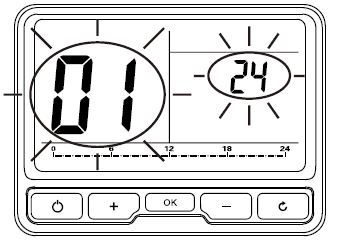
User Options Table
| ID | Option Content | Min. | Max. | Default |
| 1 | Change 12h or 24h clock | 12 | 24 | 24 |
|
2 |
Change to another pre-set programme |
1 |
3 |
1 |
| 3 | Switch on/off summer/winter time | OFF | ON | ON |
| 4 | Change temperature offset℃ | -5 | 5 | 0 |
| 5 | Restore the factory Settings | OFF | ON | OFF |
| 6 | To disable Off function | OFF | ON | OFF |
| 7 | Frost Protection | OFF | ON | ON |
| 8 | Pre-set the lowest temperature | 5 | 32 | 5 |
| 9 | Pre-set the highest temperature | 5 | 32 | 32 |
| 10 | Pre-set the ECO temperature | 5 | 32 | 9 |
|
11 |
Valve Protection(unit: min., if the valve has not been opened for 24hours, it will be automatically opened every 10:00am; “0” means no Valve Protection |
0 |
5 |
0 |
|
12 |
Activate Smart Remote Control (App remote control) |
OFF |
ON |
OFF
(ON for Wi-Fi thermosta) |
|
13 |
Change degrees Celsiusor or Fahrenhieit |
C |
F |
C |
Product Specification
| Operating Temperature | 0 to 50°C |
| Control mode | Heating system |
| Display | LCD with backlight |
| Transmitting frequency | 868 MHz(433 MHz-PTC10-433),
2 way |
| Communication Range (open space) |
100 meters |
| Power supply | 2 x AA alkaline batteries |
| Battery life | Typically 2 years |
| Temperature setting range | 5°C to 32°C (0.5°C step) |
| Temperature control accuracy | +/-0.3°C |
| Measurement interval | every minute |
| Frost protection temperature | 7°C |
| Humidity range | 10 to 90%RH |
| Humidity accuracy | +/-5%RH |
| Time display | 12 hour/24 hour |
| Dimensions(HxWxD) | 117.2 x 87.2 x 26.6mm |
| IP class | IP30 |
| Standard | CE |
| Weight | 211g with battery |
| Operating Temperature | 0 to 50°C |
| Transmitting frequency | 868 MHz(433 MHZ, PTR10-433),
2 way |
| Communication Range (open space) |
100 meters |
| Power | 2W |
| Power supply | 100VAC~240VAC, 50Hz |
| Switch rating | 240VAC 50Hz, 5A resistive, 2A inductive |
| Switch Type | SPDT relay |
| Dimensions (HxWxD) | 98.3x 98.3 x 31.3mm |
| IP class | IP30 |
| Standard | CE |
| Weight | 145g |
Reference
Download Manual:
Poer PTC10 WIRELESS Programmable Room Thermostat User Manual
Other Manual:
Poer PTC10 WIRELESS Programmable Room Thermostat Product Specification Guide

Poer PTC10 WIRELESS Programmable Room Thermostat User Manual