
Wireless Stereo Headset
Casque stéréo sans fil
Model, Modèle, Modelo, : YY2952
4
3
2
1
Operating Instructions
Mode d’emploi
Manual de instrucciones
Инструкция по эксплуатации
Bedienungsanleitung
Istruzioni per l’uso
Gebruiksaanwijzing
Instruções de operação
Betjeningsvejledning
Käyttöohjeet
Bruksanvisning
Bruksanvisning
Instrukcja obsługi
Kezelési útmutató
Návod k použití
Návod na obsluhu
Инструкции за
експлоатация
Instrucţiuni de utilizare
Navodila za uporabo
Upute za uporabu
Uputstva za korišćenje
Οδηγίες λειτουργίας
Інструкції з експлуатації
©2021 Sony Corporation
Printed in Vietnam / Imprimé en Vietnam
5-030-787-11(1)
WF-C500
“ Bluetooth
connected ”
Sony Headphones Connect
Bluetooth
WF-C500
Bluetooth
Bluetooth
Android™ iPhone
5s
“ Bluetooth
pairing ”
“ Bluetooth
connected ”
03 h:00 m
A
B
C
D
https://rd1.sony.net/help/mdr/wfc500/h_zz/
Online manual (Help Guide)
Manuel en ligne (Guide d’aide)
Manual online (Guía de ayuda)
Интерактивное руководство (справочное руководство)
Online-Anleitung (Hilfe)
Manuale online (Guida)
Onlinehandleiding (Helpgids)
Manual online (Guia de ajuda)
Onlinevejledning (Hjælpevejledning)
Online-opas (Käyttöopas)
Model, Modèle, Modelo, , , Модель, , Modell, Modello, Model, Modelo, Model, Malli, Modell, Modell, Model, Modell, Model, Model, Модел, Model, Model, Model, Model, Μοντέλο, Модель: YY2952
Elektronisk brukerveiledning (Hjelpeveiledning)
Handbok på Internet (Hjälpguide)
Podręcznik online (Przewodnik pomocniczy)
Online kézikönyv (Súgóútmutató)
Online příručka (Uživatelská příručka)
Príručka online (Príručka)
Онлайн ръководство (Помощно ръководство)
Manual online (Ghid de asistenţă)
Spletni priročnik (Vodnik za pomoč)
Online priručnik (Vodič za pomoć)
Uputstvo na mreži (Vodič za pomoć)
Ηλεκτρονικό εγχειρίδιο (Οδηγός βοήθειας)
Онлайновий посібник (Довідка)
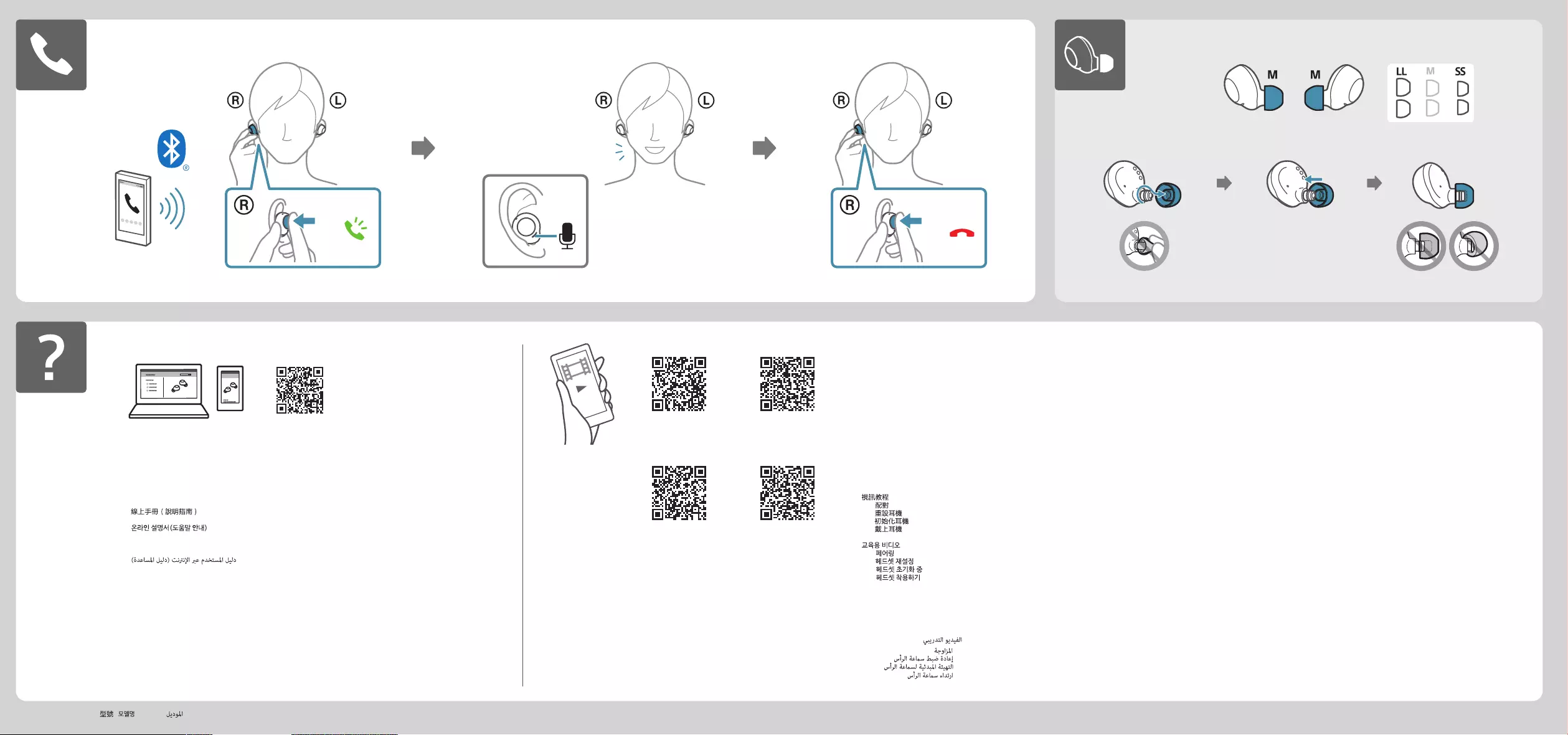
Instructional video
A : Pairing
B : Resetting the headset
C : Initializing the headset
D : Wearing the headset
Vidéo de démonstration
A : Pairage
B : Réinitialisation du casque
C : Initialisation du casque
D : Port du casque
Videotutorial
A : Emparejamiento
B : Reinicio de los auriculares
C : Inicialización de los auriculares
D : Ponerse los auriculares
A :
B :
C :
D :
A :
B :
C :
D :
Видеоруководство
A : Согласованием
B : Возврат гарнитуры в исходное состояние
C : Инициализация гарнитуры
D : Ношение гарнитуры
: A
: B
: C
: D
Anleitungsvideo
A : Kopplung
B : Zurücksetzen des Headsets
C : Initialisieren des Headsets
D : Tragen des Headsets
Video didattico
A : Associazione
B : Ripristino delle cue
C : Inizializzazione delle cue
D : Utilizzo delle cue
Instructievideo
A : Koppelen
B : De headset resetten
C : De headset initialiseren
D : De headset opzetten
Vídeo de instrução
A : Emparelhamento
B : Restaurar o sistema de auscultadores
C : A inicializar o sistema de auscultadores
D : Utilizar o sistema de auscultadores
Instruktionsvideo
A : Parring
B : Nulstilling af headsettet
C : Initialisering af headsettet
D : Tage headsettet på
Opasvideo
A : Pariliittäminen
B : Kuulokkeiden nollaaminen
C : Kuulokkeiden alustaminen
D : Kuulokkeiden käyttäminen
Instruksjonsvideo
A : Paring
B : Nullstille headsettet
C : Initialisere headsettet
D : Ha på headsettet
Videoposnetek z navodili
A : Seznanjanje
B : Ponastavitev slušalk
C : Inicializacija slušalk
D : Nošenje slušalk
Videoupute
A : Uparivanje
B : Resetiranje slušalica s mikrofonom
C : Inicijalizacija slušalica s mikrofonom
D : Nošenje slušalica s mikrofonom
Video sa instrukcijama
A : Uparivanje
B : Resetovanje slušalice sa mikrofonom
C : Inicijalizacija slušalica sa mikrofonom
D : Nošenje slušalica sa mikrofonom
Βίντεο οδηγιών
A : Ζεύξη
B : Επαναφορά των ακουστικών
C : Αρχικοποίηση των ακουστικών
D : Πώς να φορέσετε τα ακουστικά
Відео з інструкціями
A : Сполучення
B : Перезавантаження гарнітури
C : Ініціалізація гарнітури
D : Носіння гарнітури
Instruktionsvideo
A : Ihopparning
B : Återställa headsetet
C : Initierar headsetet
D : Bära headsetet
Wideo instruktazowe
A : Parowaniem
B : Resetowanie zestawu nagłownego
C : Inicjowanie zestawu nagłownego
D : Noszenie zestawu nagłownego
Útmutató videó
A : Párosításnak
B : A headset alaphelyzetbe állítása
C : A headset gyári értékekre állítása
D : A headset viselése
Instruktážní video
A : Párování
B : Resetování sluchátek
C : Inicializace sluchátek
D : Nošení sluchátek
Inštruktážne video
A : Párovanie
B : Resetovanie slúchadiel
C : Inicializácia slúchadiel
D : Nosenie slúchadiel
Видеоклип с инструкции
A : Сдвояване
B : Нулиране на слушалките
C : Инициализиране на слушалките
D : Носене на слушалките
Instrucțiuni video
A : Asocierea
B : Reinițializarea setului de căști
C : Inițializarea setului de căști
D : Purtarea setului de căști
Перейти к контенту

Русские электронные инструкции по эксплуатации
Постоянно обновляемый большой каталог документации по эксплуатации и использованию современных устройств и оборудования на русском языке. Бесплатное скачивание файлов.
Поиск:
Главная
♥ В закладки
Просмотр инструкции в pdf


Инструкция по эксплуатации наушников Sony WF-C500 Black.
Скачать инструкцию к наушникам Sony WF-C500 Black (225,86 КБ)

Инструкции наушников Sony
« Инструкция к наушникам Skullcandy PUSH ULTRA желтые (S2BDW-N746)
» Инструкция к наушникам Soundcore Liberty 3 Pro Silver (A3952GA1)
Вам также может быть интересно

Инструкция к беспроводным наушникам Sony MDR-XB950N1-BM

Инструкция к беспроводным наушникам Sony MDR-AS600BT-BC

Инструкция к беспроводным наушникам Sony MDR-ZX330BT-BC

Инструкция к смартфону Sony Xperia Z3 Dual D6633 White

Инструкция к беспроводным наушникам Sony Extra Bass WH-XB700 Blue

Инструкция к автомагнитоле Sony DSX-S100

Инструкция к телевизору Sony KDL49WE754

Инструкция к автомагнитоле Sony CDX-G3000UE
Добавить комментарий
Имя *
Email *
Сайт
Комментарий


Сохранить моё имя, email и адрес сайта в этом браузере для последующих моих комментариев.
- Добавить инструкцию
- Заказать инструкцию
- Политика конфиденциальности
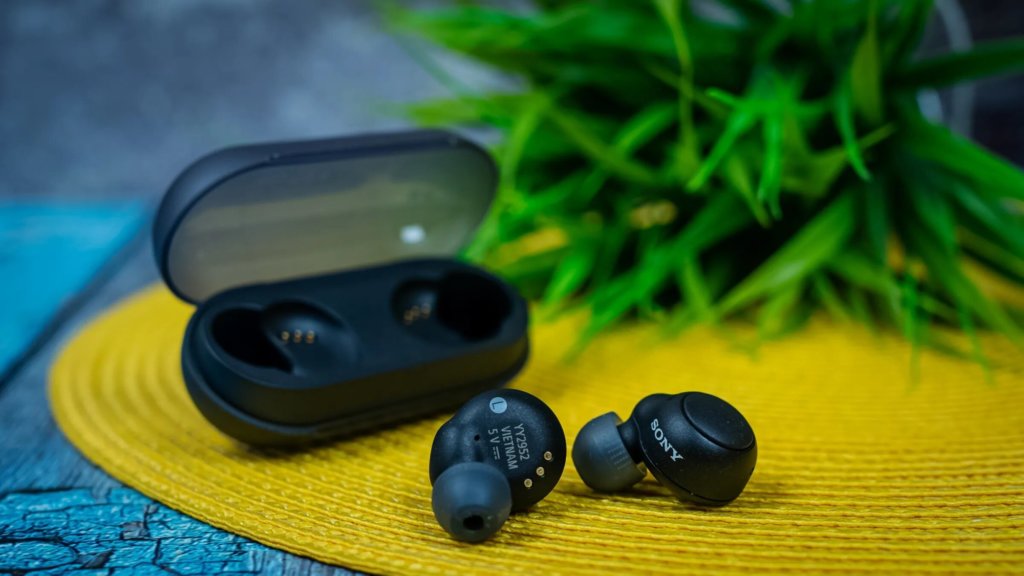
The Sony WF-C500 earbuds have an amazing battery life of 10 hours + 10 hours using the charging case, a dynamic driver of 5.8mm, the IPX4 dustproof, splash and sweat-resistant certification, A2DP, AVRCP, HFP, HSP codecs, and much more. Learn how to use them with this new Sony WF-C500 Manual.
If you are interested in purchasing these earbuds, you can easily do it using the Amazon official website. Also, if you want to give the original manual a look, you can do it here.
What’s Inside
Sony WF-C500 Specs Sheet
| Model | Sony WF-C500 |
| Weight | Earbuds: 5.4 grams each |
| Waterproof/IP ratings | IPX4 |
| Bluetooth version | V5.0 |
| Range/Distance | 10 meters |
| Driver | 5.8mm |
| Audio Decoding | SBC, AAC |
| Connectivity Port/Charging Cable | Type-C |
| Speaker frequency response | 20Hz – 20kHz |
| Battery Life | Earbuds: 10 hours Charging case: 10 hours |
| Charging Time | Earbuds: About 2 hours |
| App Support | Yes, Sony | Headphones Connect |
| Controls/Features | Play or pause music, skip to the beginning of the next song, skip to the beginning of the previous song (or the current track during playback), turn the volume up and down, voice assistant, cancel an outgoing call, change a call device back and forth between the earbuds and the connected device, answer, end, and reject a call |
| Accessories | Charging case, user manual, USB cable, ear tips |
| Price | 75 USD |
Sony WF-C500 Accessories
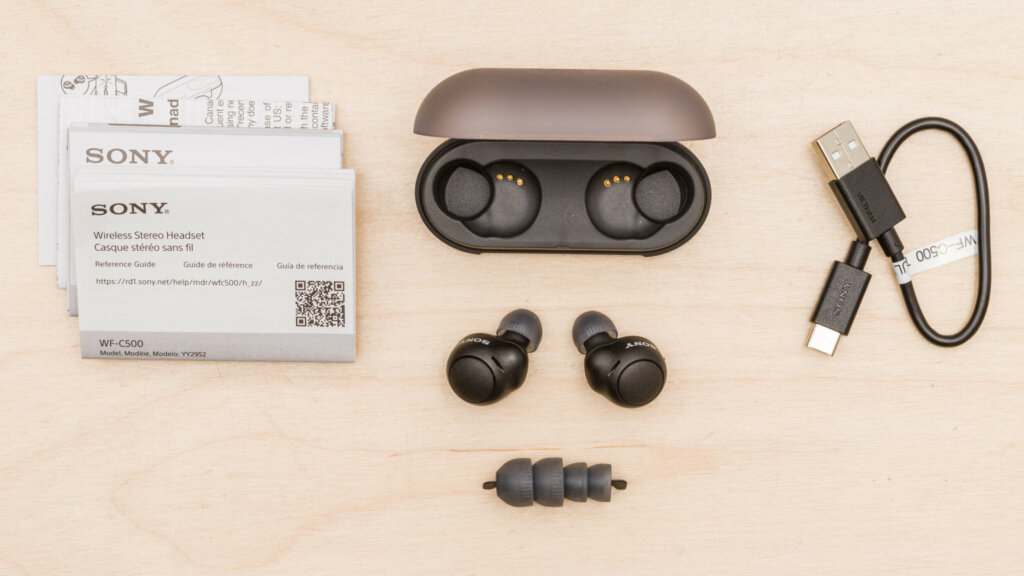
The earbuds come with the following accessories:
- Charging case.
- User manual.
- USB cable.
- Ear tips.
Sony WF-C500 Manual | Everything You Need To Know!
How To Pair The Earbuds?
To iOS and Android phones
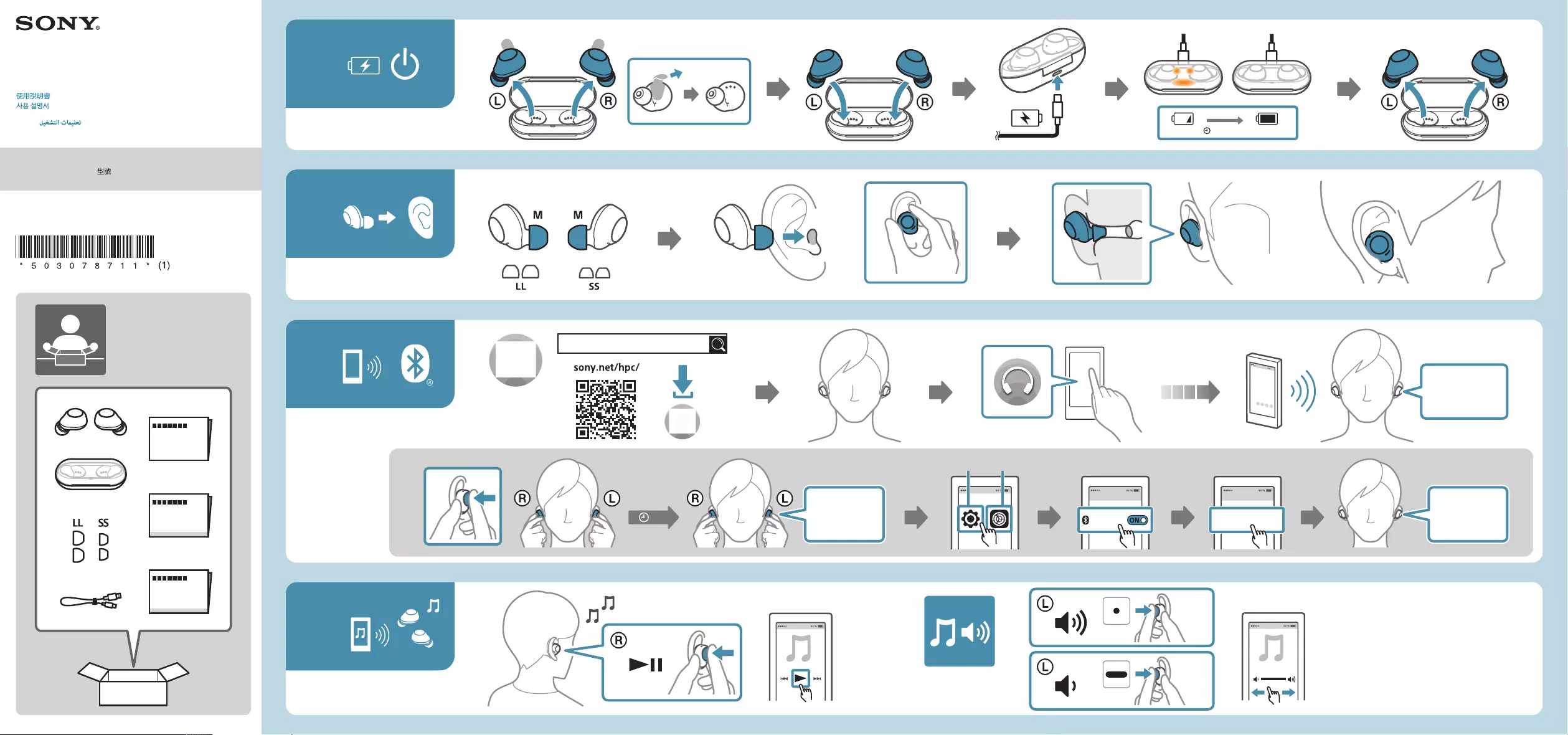
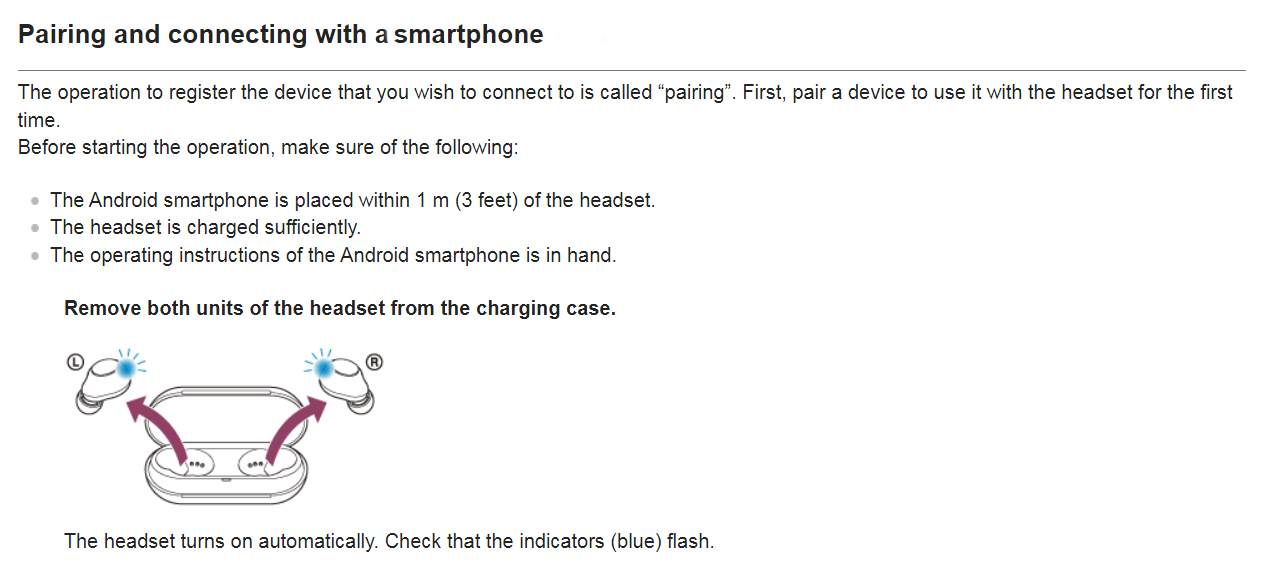
Step 1: Open the lid of the charging case and take the earbuds out. After that, the earbuds will turn on automatically. The “Power on” voice prompt will sound and a blue light will start flashing.
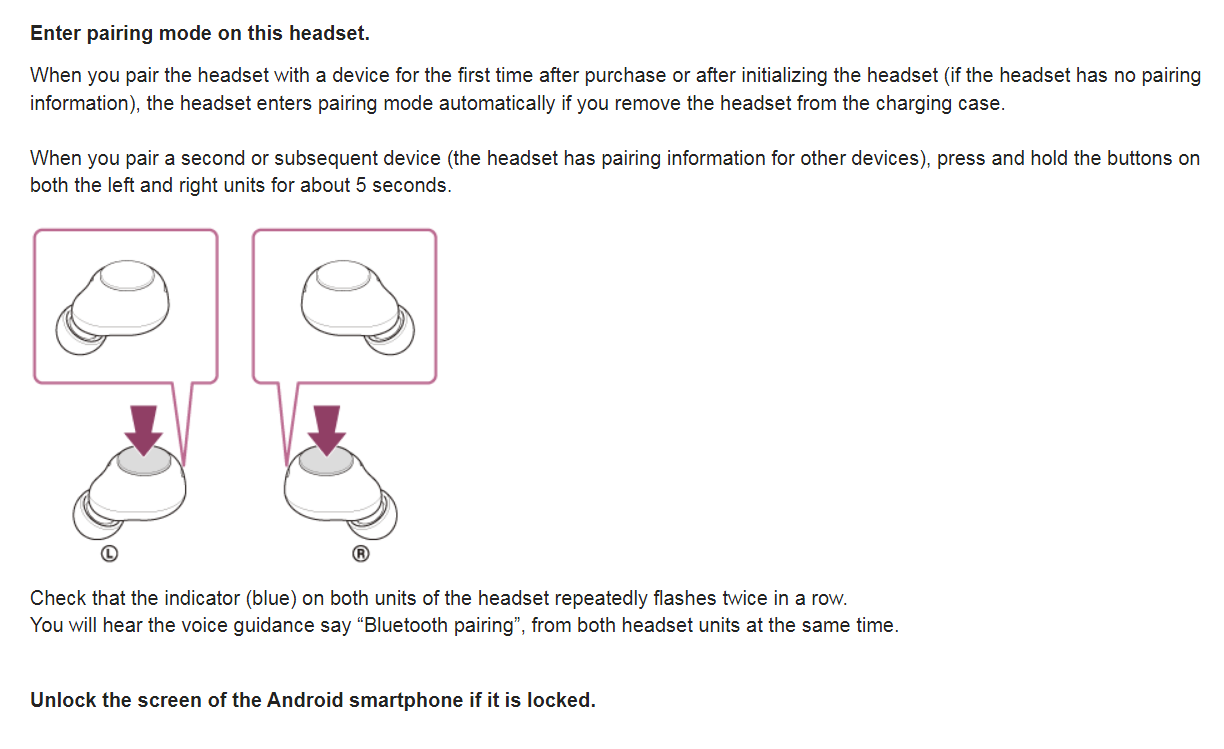
NOTE: If the earbuds don’t turn on automatically, then press the multifunction touch button on both earbuds for about 2 seconds. After that, the earbuds will turn on. The “Power on” voice prompt will sound and a blue light will start flashing.
Step 2: Press and hold the multifunction touch button on both earbuds for 5 seconds, so they turn into pairing mode. The “Bluetooth pairing” voice prompt will sound, and a blue light will flash two times in a row.
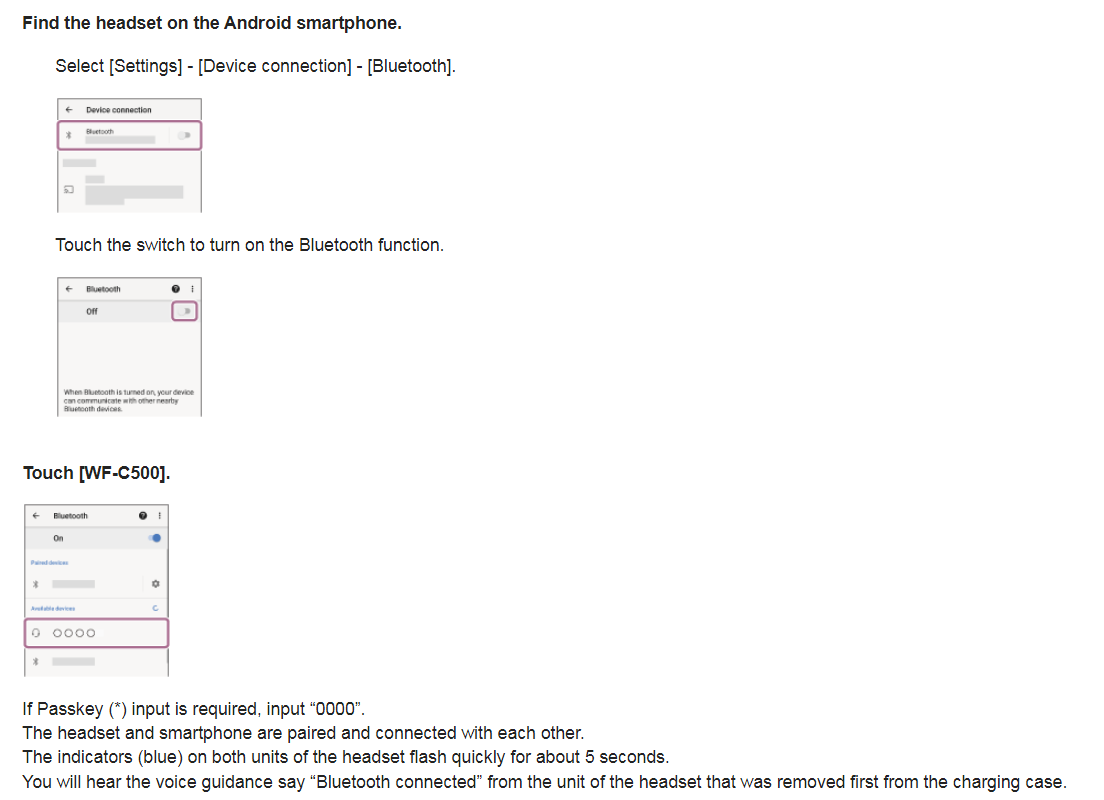
Step 3: Go to the device’s Bluetooth settings.
Step 4: Select “WF-C500”. If a password is needed, type “0000”. The “Bluetooth connected” voice prompt will sound
After that, the pairing will be done.
To PC (Windows)
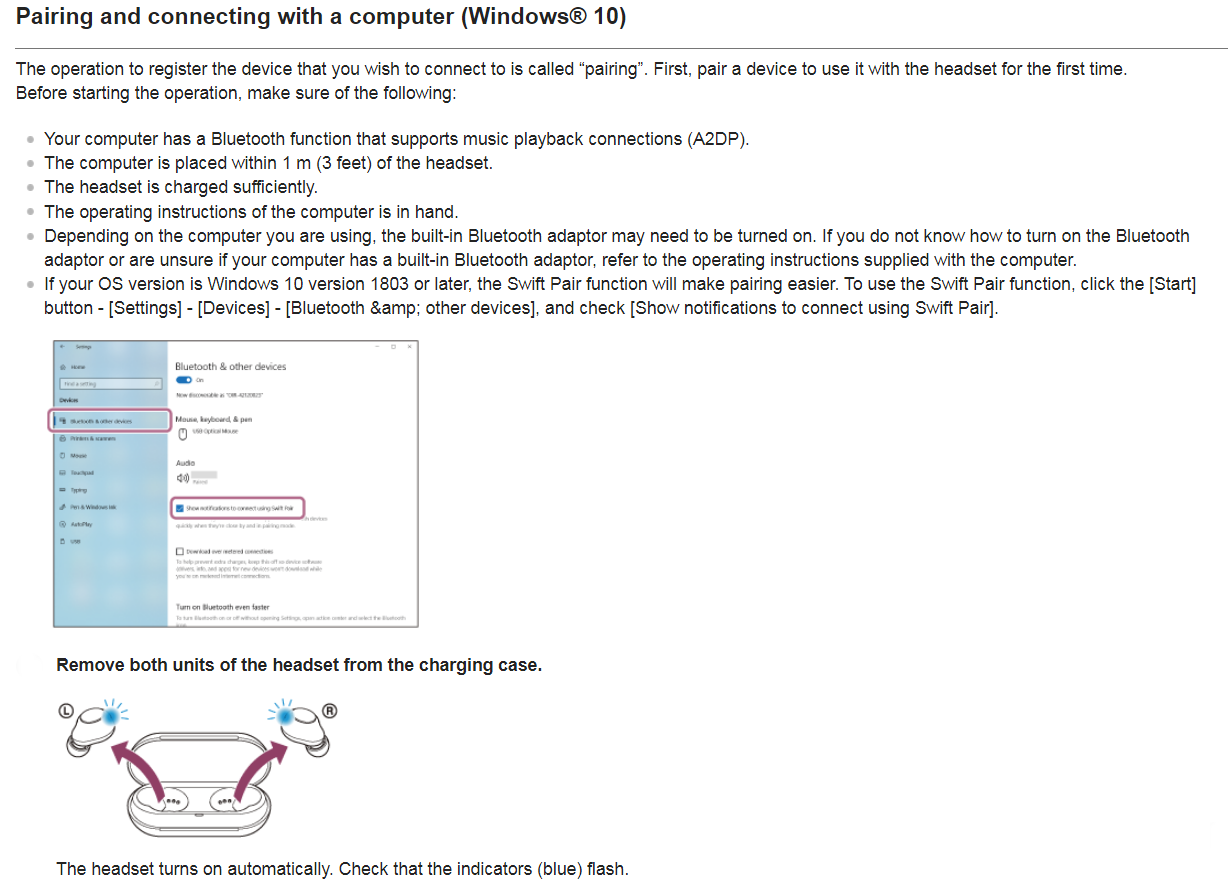
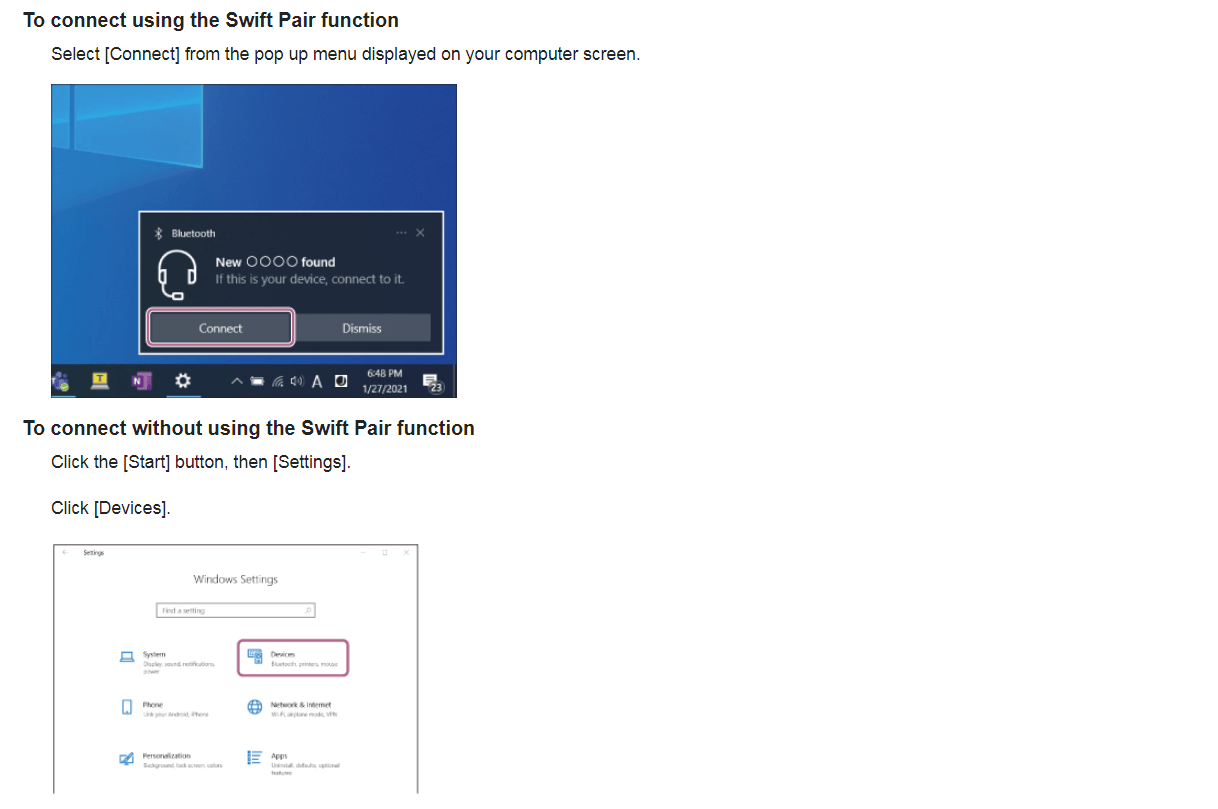
Step 1: Turn on the Window’s Bluetooth.
Step 2: Go to the settings.
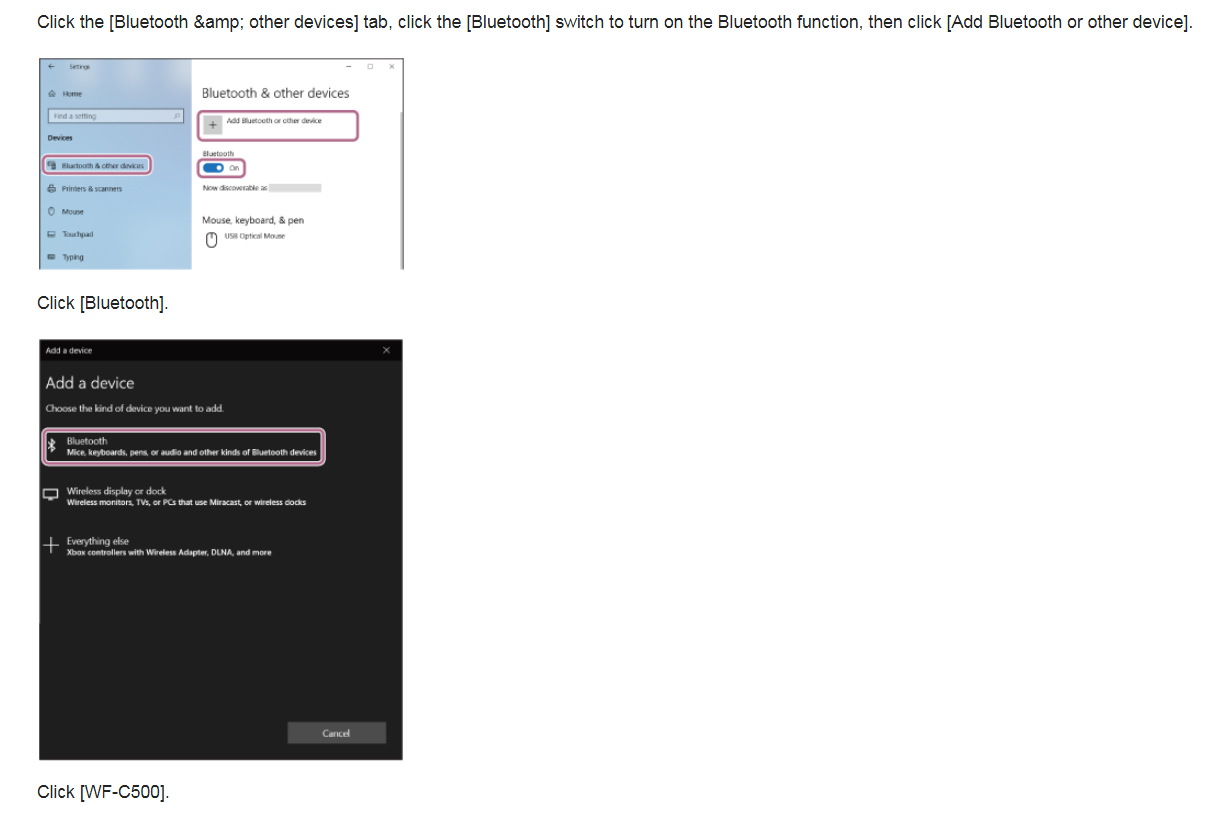
Step 3: Go to “Bluetooth and other devices”.
Step 4: Click on “Add device”.
Step 5: Click on Bluetooth.
Step 6: Open the lid of the charging case and take the earbuds out. After that, the earbuds will turn on automatically. The “Power on” voice prompt will sound and a blue light will start flashing.
NOTE: If the earbuds don’t turn on automatically, then press the multifunction touch button on both earbuds for about 2 seconds. After that, the earbuds will turn on. The “Power on” voice prompt will sound and a blue light will start flashing.
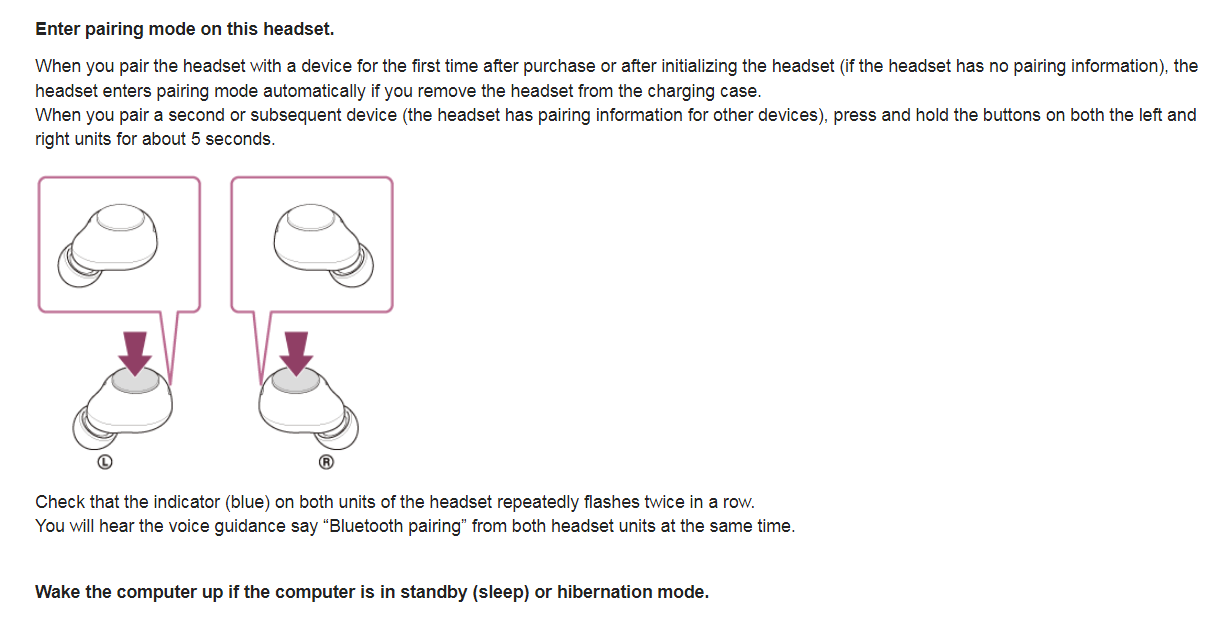
Step 7: Press and hold the multifunction touch button on both earbuds for 5 seconds, so they turn into pairing mode. The “Bluetooth pairing” voice prompt will sound, and a blue light will flash two times in a row.
Step 8: Select “WF-C500”. If a password is needed, type “0000”. The “Bluetooth connected” voice prompt will sound.
After that, the pairing will be done.
How To Wear These Earbuds?
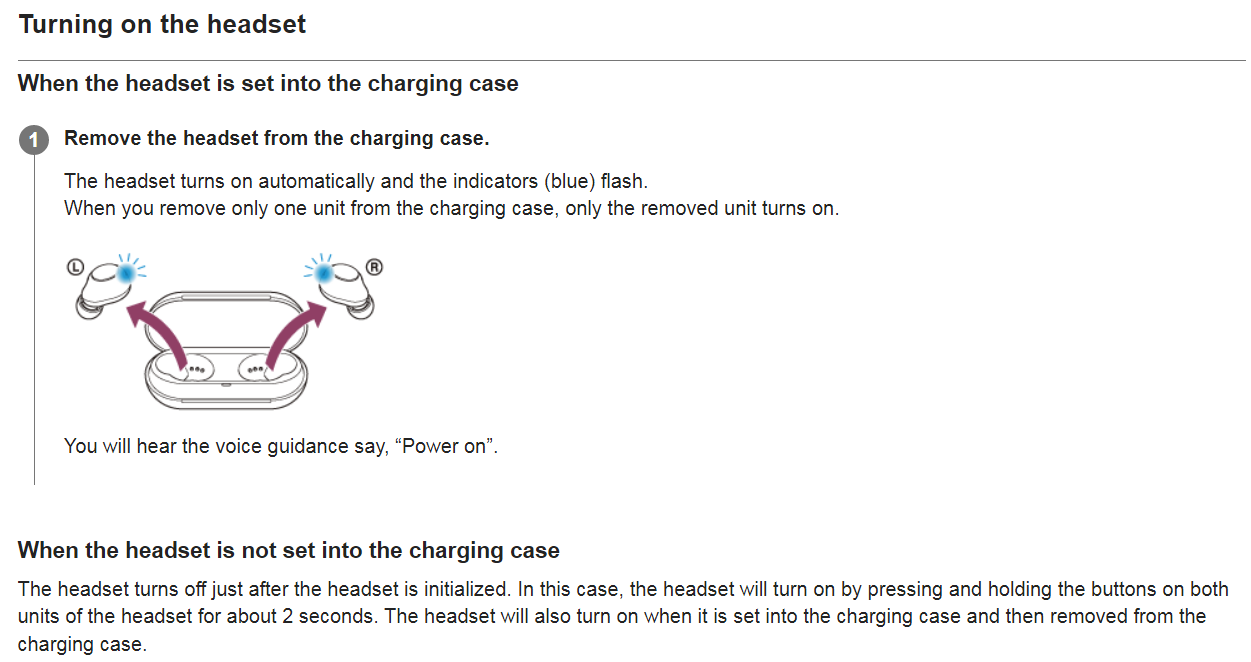
Turn on
Automatically: Open the lid of the charging case and take the earbuds out. After that, the earbuds will turn on automatically. The “Power on” voice prompt will sound and a blue light will start flashing.
Manually: Press the multifunction touch button on both earbuds for about 2 seconds. After that, the earbuds will turn on. The “Power on” voice prompt will sound and a blue light will start flashing.
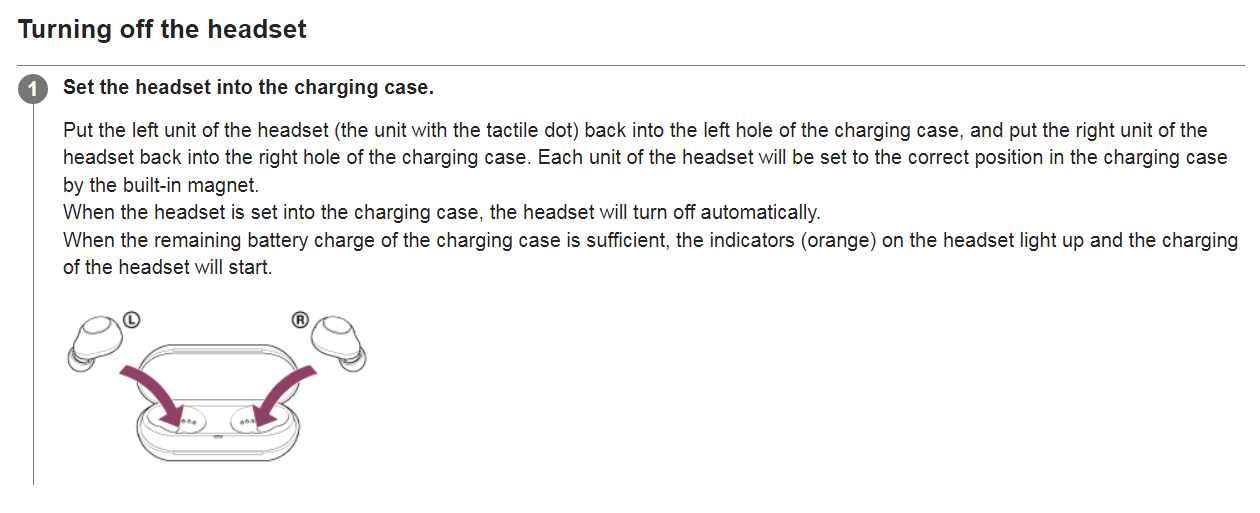
Turn off
Automatically: Place the earbuds into the charging case and close its lid. After that, the earbuds will turn off automatically. The “Power off ” voice prompt will sound.
How To Turn On And Off?
Step 1: Take both earbuds out of the charging case.
Step 2: Identify the left and right earbuds.
Step 3: Choose the ear tips that best suit your ears.
Step 4: Insert the headphones into the inner canal of the ears.
Step 5: Rotate for the best possible comfort and best fit, and make sure that the microphone is pointing to the mouth.
How to Control? / How to Operate? – Instructions
NOTE: The multifunction touch button is placed on the top circular part of the body of the earbuds.
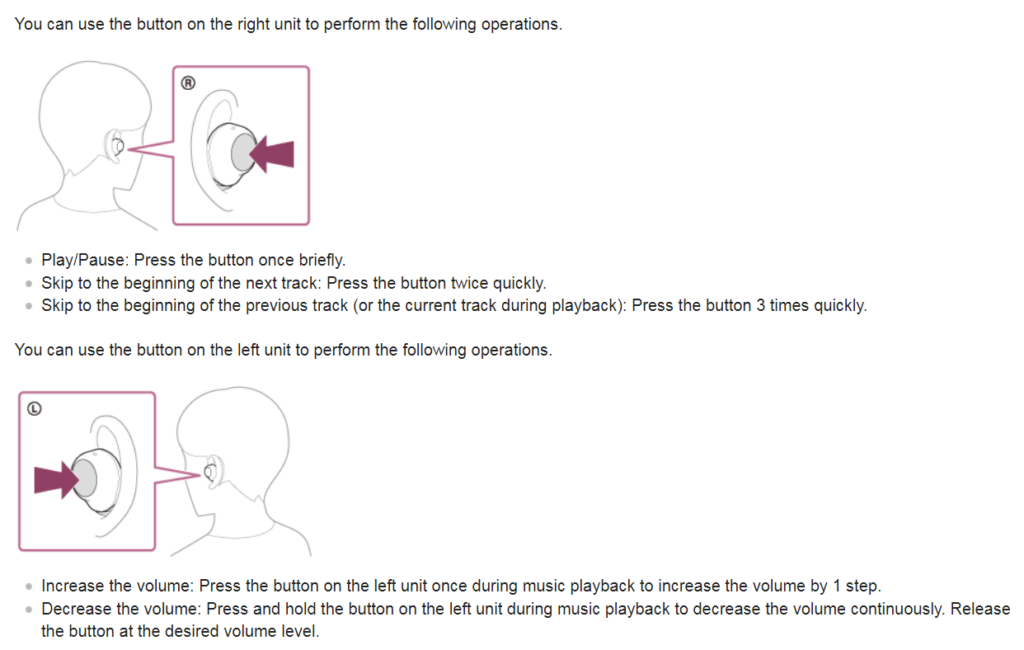
- Play or pause music: Press the multifunction touch button on the right earbud one time.
- Skip to the beginning of the next song: Press the multifunction touch button on the right earbud two times quickly.
- Skip to the beginning of the previous song (or the current track during playback): Press the multifunction touch button on the right earbud three times quickly.
- Turn the volume up: Press the multifunction touch button on the left earbud.
- Turn the volume down: Press and hold the multifunction touch button on the left earbud.
Calls With The HFP Supported Profile
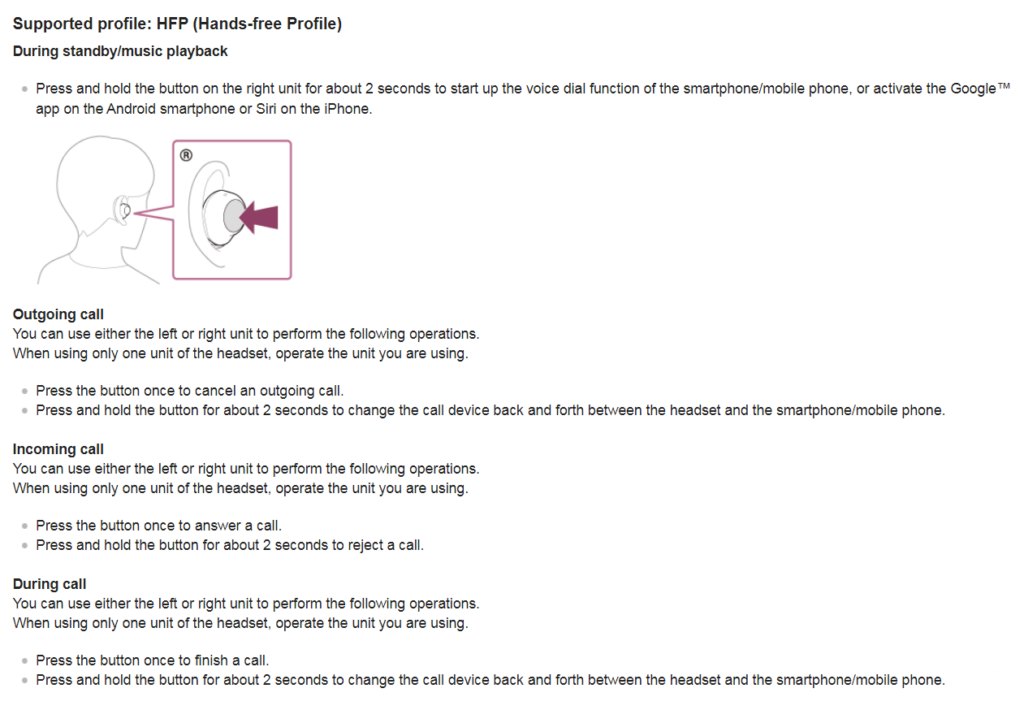
- Activate the voice assistant: Press and hold the multifunction touch button on the right earbud for about 2 seconds.
- Cancel an outgoing call: Press the multifunction touch button on any of the earbuds two times.
- Change a call device back and forth between the earbuds and the connected device: Press and hold the multifunction touch button on any of the earbuds for about 2 seconds.
- Answer an incoming call: Press the multifunction touch button on any of the earbuds one time.
- Reject an incoming call: Press and hold the multifunction touch button on any of the earbuds for about 2 seconds.
- End a current call: Press the multifunction touch button on any of the earbuds one time.
- Change a call device back and forth between the earbuds and the connected device: Press and hold the multifunction touch button on any of the earbuds for about 2 seconds.
Calls With The HSP Supported Profile
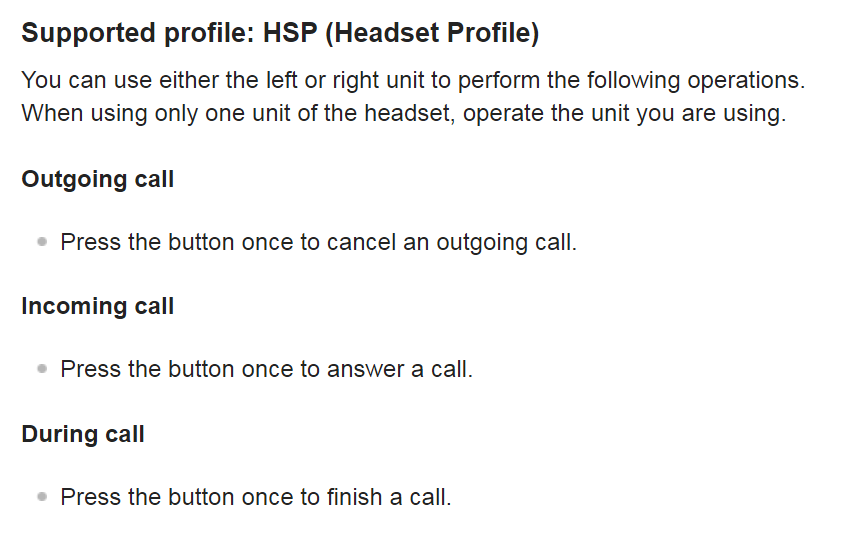
- Cancel an outgoing call: Press the multifunction touch button on any of the earbuds one time.
- Answer an incoming call: Press the multifunction touch button on any of the earbuds one time.
- End a current call: Press the multifunction touch button on any of the earbuds one time.
How To Activate The Mono Mode?
To activate or deactivate the mono mode in the Sony WF-1000XM4, all you have to do is to pair the earbuds to the device and take out one of the earbuds from the charging case. It will start working by itself.
How To Charge The Earbuds?
Earbuds
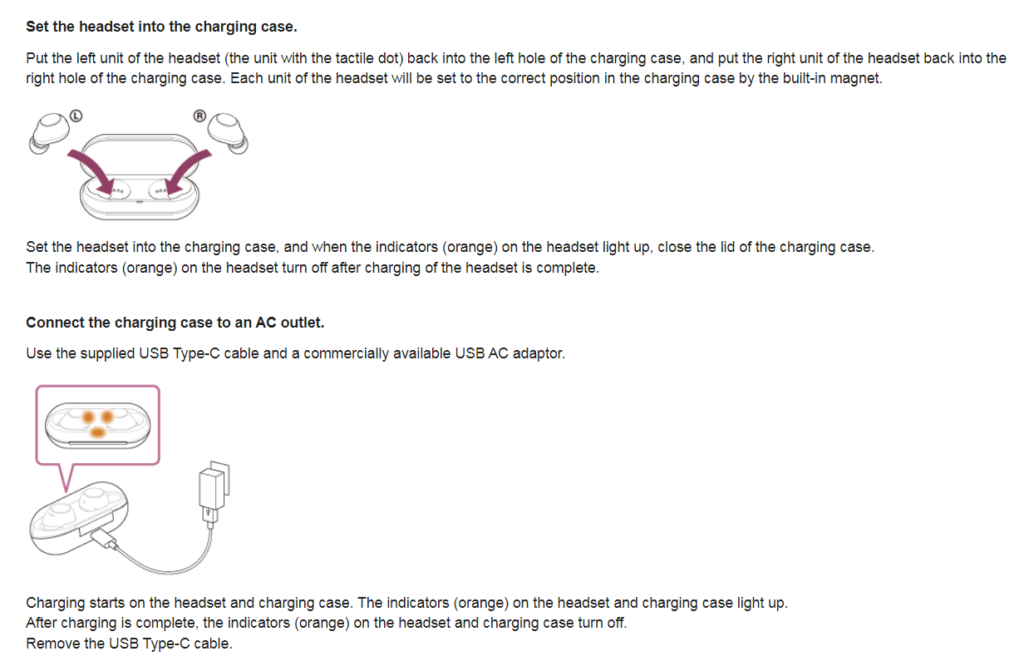
To charge the earbuds, all you have to do is to place them into the charging case and close the lid. The earbuds will start charging automatically.
Charging case
To charge the charging case, all you have to do is to connect the case to a USB charger or charging port with the included USB-A to C cable. It will start charging automatically.
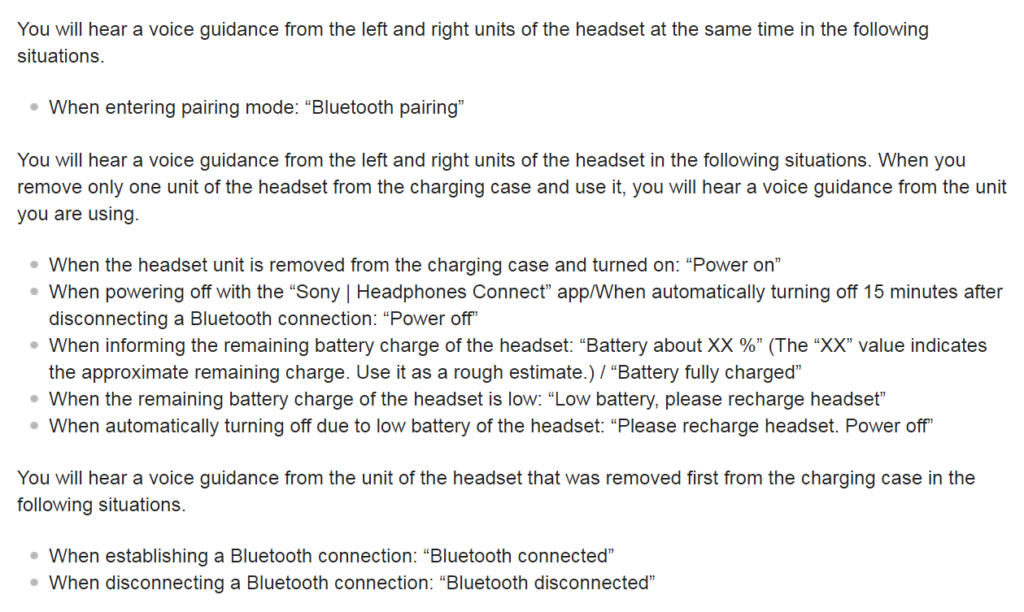
The Earbuds’ Voice Prompts
- Power on: The earbuds turn on.
- Power off: The earbuds turn off.
- Bluetooth pairing: The earbuds are now in pairing mode.
- Bluetooth connected: The earbuds are connected to the device.
- Bluetooth disconnected: The earbuds are now disconnected from the device.
- Battery about XX% (The “XX” value indicates the approximate remaining charge. Use it as a rough estimate).
- Battery fully charged: The earbuds are fully charged.
- Low battery, please recharge headset: The earbuds have a low battery level.
- Please recharge headset. Power off: The earbuds have no battery left.
How To Reset These Earbuds?
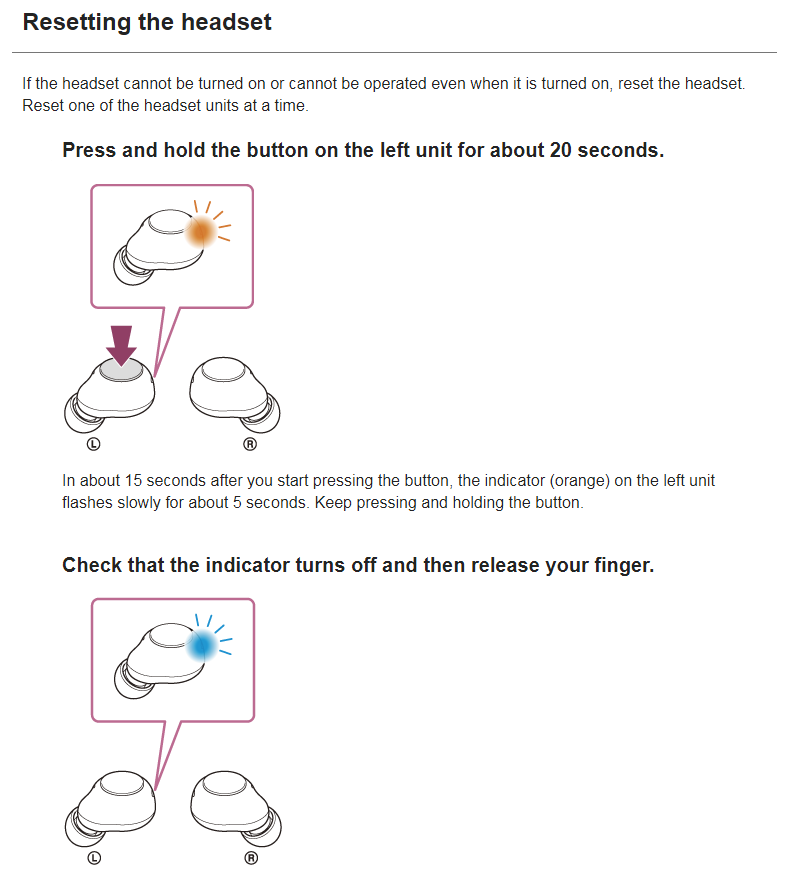
If the earbuds can’t be turned on or cannot be operated even when are turned on, reset them. Reset one of the earbuds at a time.
Step 1: Open the lid of the charging case and take the earbuds out. After that, the earbuds will turn on automatically. The “Power on” voice prompt will sound and a blue light will start flashing.
Step 2: Press the multifunction touch button on the left earbud for about 20 seconds. In about 15 seconds, an orange light on the left earbud will start flashing slowly for about 5 seconds. Keep pressing and holding the button.
Step 3: Check that the indicator turns off and then release your finger. The left unit of the headset will be reset and restarted. Make sure that a blue light starts flashing twice.
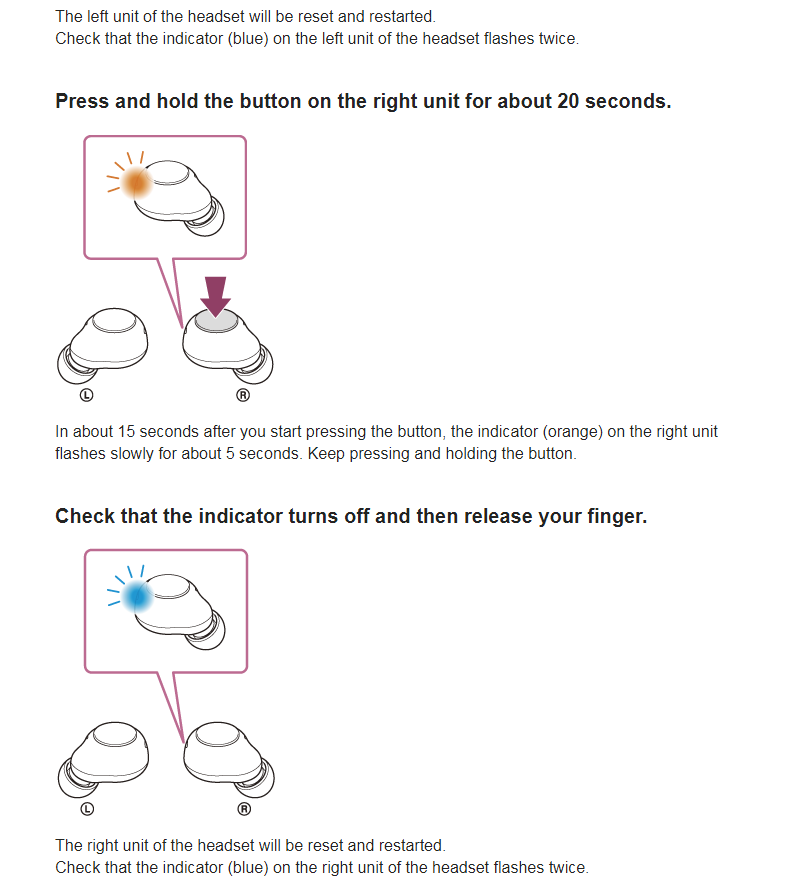
Step 4: Press the multifunction touch button on the right earbud for about 20 seconds. In about 15 seconds, an orange light on the right earbud will start flashing slowly for about 5 seconds. Keep pressing and holding the button.
Step 5: Check that the indicator turns off and then release your finger. The left unit of the headset will be reset and restarted. Make sure that a blue light starts flashing twice.
The device registration (pairing) information and other settings are retained. If the earbuds do not operate correctly even after resetting, initialize the headset to restore factory settings.
Initializing the headset to restore factory settings
If the earbuds do not operate correctly even after resetting, initialize the headset.
Step 1: Delete all pairing information about the earbuds on the connected device.
Step 2: Open the lid of the charging case and take the earbuds out. After that, the earbuds will turn on automatically. The “Power on” voice prompt will sound and a blue light will start flashing.
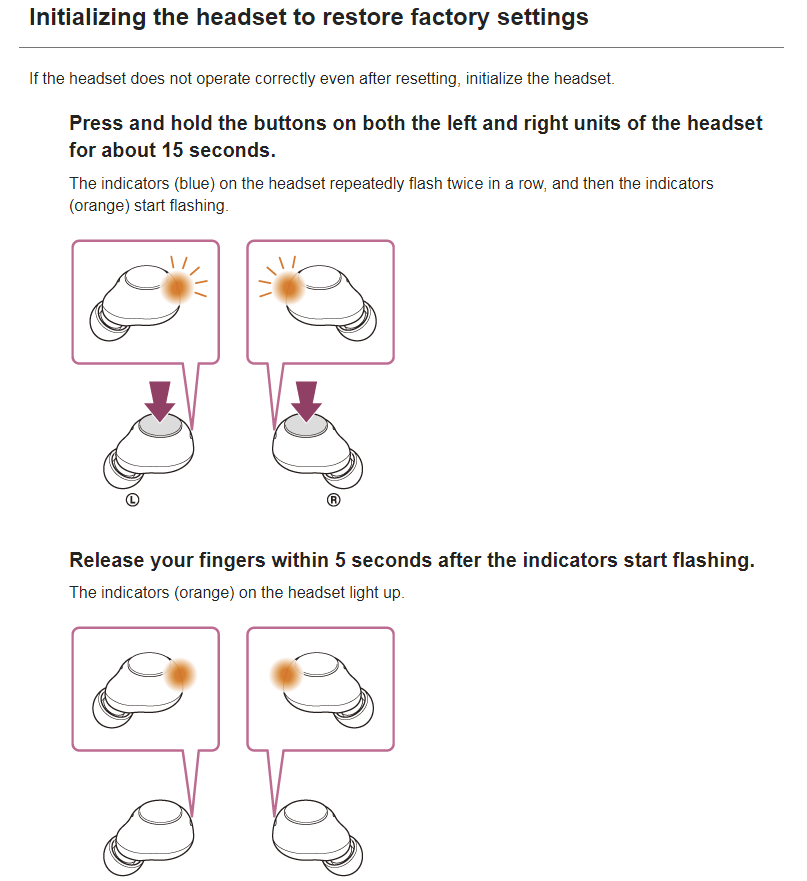
Step 3: Press the multifunction touch button on both earbuds for about 15 seconds. A blue light will flash two times in a row, and then it will change to a flashing orange light.
Step 4: Release your fingers within 5 seconds after the indicators start flashing. The orange lights will stay on.
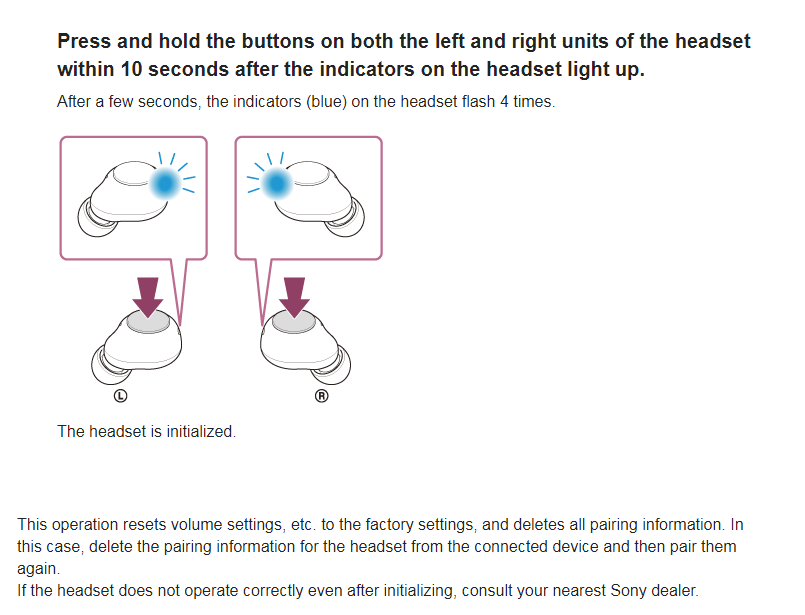
Step 5: Press the multifunction touch button on both earbuds for about 10 seconds after the lights stay on. After a few seconds, a blue light will flash on the earbuds four times.
This operation resets volume settings, etc. to the factory settings, and deletes all pairing information. If the earbuds don’t operate correctly even after initializing, consult your nearest Sony dealer.
See also
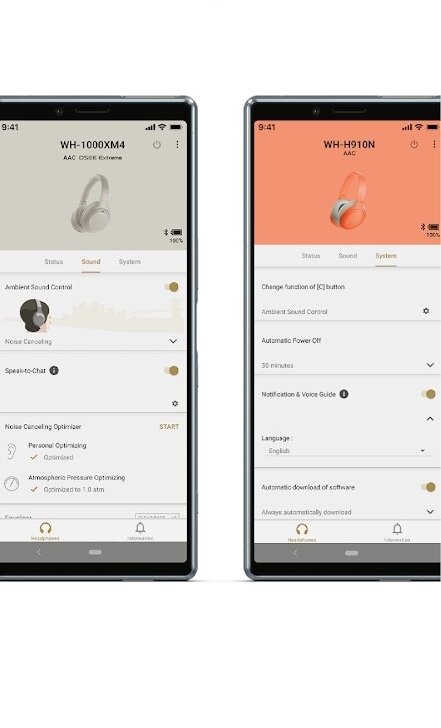
A Guide To Sony WF-C500 APP
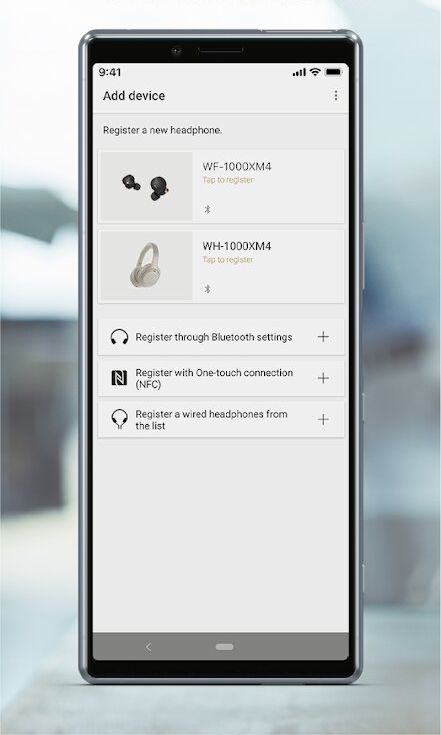
The Sony WF-C500 earbuds have an application specially made for them, and it is the Sony | Headphones Connect app, which is available on Play Store and App Store.
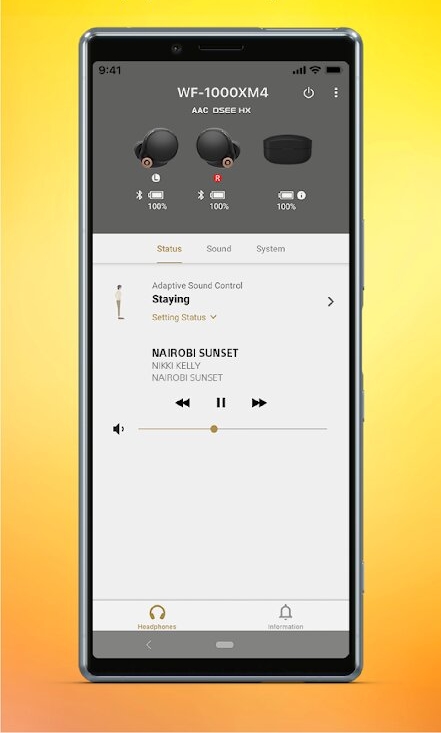
Right when you open the application, you will have the possibility to add any device you want. After doing that, you can enter the application as such, which has two parts: Headphones and Information. In “Information”, you will find general information about Sony products, while in “Headphones”, you will find three points:
- Status: In this first part, you can control the volume of the earbuds, as well as pause, skip or rewind the song or video that is being played.
- Sound: In this second part, some features of the earbuds can be customized, such as noise-canceling for calls and ambient sound control.
- System: Finally, in this third part, you can change the functions of the earbuds, as well as notifications and software updates, which are done by the application itself.
What Does The Lights Mean?
Earbuds
- A blue light flashing: The earbuds turn on.
- A blue light flashes two times in a row: The earbuds are now in pairing mode.
- An orange light while on the charging case: The earbuds are charging.
- An orange light flashing slowly for about 5 seconds on the left earbud while resetting: The earbud is resetting.
- The orange light turns off on the left earbud while resetting: The resetting is done.
- An orange light flashing slowly for about 5 seconds on the right earbud while resetting: The earbud is resetting.
- The orange light turns off on the right earbud while resetting: The resetting is done.
- A blue light will flash two times in a row, and then it will change to a flashing orange light while initializing: The earbuds are initializing.
- An orange light stays on while initializing: The earbuds are initializing.
- A blue light flashing 4 seconds while initializing: The earbuds are initializing.
Charging case
- An orange light while charging: The case is charging.
- An orange light flashing for about 15 seconds when the earbuds are taken out: The case has between 30% and 5% of battery.
- An orange light turns off immediately or doesn’t turn on when the earbuds are taken out: The case has about 5% of battery.

Some Common Problems & Troubleshooting
Left/Right/One side of the earbuds has stopped working
If this happens, it may be because it is low on battery or it did not connect correctly with the device. To fix this, you can do the following:
1. Try charging the earbud that is not working or both, placing them in the charging case.
2. Try factory resetting the earbuds.
3. Check if the earbuds are operating within a normal working range
If that doesn’t work, the earbud is probably faulty, and I can go for a refund or replacement of it.
Left/Right/One side of the earbuds has a low volume
If this happens, it may be because the earbuds are dirty or the volume is set low. To fix this, you can do the following:
1. Try cleaning the earbud using a cotton swab or carefully clean the mesh with a pin.
2. Try factory resetting the earbuds.
The microphone is not working
If this happens, it can be because the microphone is muted, or the earbuds are badly positioned. To fix this, you can do the following:
If the microphone is muted, check the device microphone volume. If that doesn’t work, that means that there might be a defect in the earbuds, so try replacing them or getting a refund.
The earbuds are not connecting to Windows/laptop/PC
If the earbuds are earbuds not connecting, it can be because the Bluetooth on the computer has a pairing problem. To fix this, you can do the following:
1. Try disabling Bluetooth from nearby devices >>> then activate the pairing mode of the earbuds, pair and connect earbuds from Settings >>> Bluetooth & other devices >>> Add a new device >>>> Select Bluetooth.
2. Try uninstalling and reinstalling the Bluetooth driver, or updating the Bluetooth driver. All can be done in Manage >>> Device Manager, reset earbuds (if available), and then repeat the step.
3. Try resetting the earbuds.
FAQs
Are Sony WF-C500 waterproof?
No, they are not waterproof (IPX6). The Sony WF-C500 have the IPX4 certification, which means they’re dustproof, splash and sweat-resistant.
Does Sony WF-C500 have a microphone?
Yes, the Sony WF-C500 have integrated microphones.
Do Sony WF-C500 have low latency/gaming mode?
No, the Sony WF-C500 don’t have a low latency/gaming mode.
Can Sony WF-C500 connect to PC and Laptop?
Yes, the Sony WF-C500 can connect to PCs, laptops.
We hope you now know how to operate the earbuds from the above Sony WF-C500 Manual. Want to know anything about the earphones? Do not hesitate to ask in the comments section.
Наушники TWS Sony WF-C500 белый
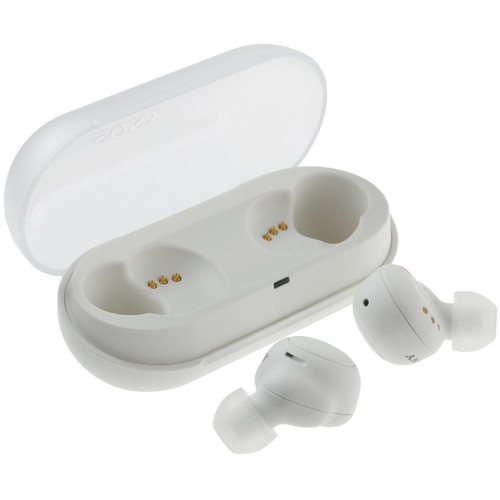
2.0, внутриканальные, 20 Гц — 20000 Гц, Bluetooth, 5.0
подробнее

58
Цвет:
Код товара: 4888968