
MIXINGI I CONSOLE
Owner’s’s Manuall Bedienungsanleitungi l i
Mode d’emploi’ l i Manuall de instruccionesi i
Features
|
Input Channels…………………………………………………….. |
page 10 |
With up to four mic/line inputs or up to three (four for MG102C) stereo inputs, the MG mixer can simultaneously connect to a wide range of devices: microphones, line-level devices, stereo synthesizers, and more.
Compression………………………………………………………….page 9
Compression increases the overall level without introducing distortion by compressing excessive peaks in the signals from microphones and guitars.
AUX Sends and Stereo AUX Return……………………….page 12
You can use the AUX SEND jack to feed the signal sent to an external signal processor, and then return the processed stereo signal through the RETURN jack.
|
High-quality digital effects (MG82CX)………………. |
page 13, 57 |
With digital effects built in, the MG82CX can deliver a wide range of sound variations all by itself.
Funktionen
|
Eingangskanäle……………………………………………………. |
Seite 23 |
Mit bis zu vier Mikrofon-/Line-Eingängen oder bis zu drei (vier beim MG102C) Stereoeingängen können viele Geräte gleichzeitig am MG-Mischpult angeschlossen werden: Mikrofone, Geräte mit Leitungspegel, Stereo-Synthesizer uvm.
Kompression…………………………………………………………Seite 22
Kompression erhöht den Durchschnittspegel, ohne Verzerrung hinzuzufügen, indem übermäßige Pegelspitzen der Signale von Mikrofonen oder Gitarren komprimiert werden.
AUX Sends und Stereo AUX Return……………………….Seite 25
Von der AUX SEND-Buchse können Sie das Signal einzeln an einen externen Signalprozessor führen, und das verarbeitete Stereosignal über die RETURN-Buchse zurück in das Pult führen.
|
Hochwertige Digitaleffekte (MG82CX)………………. |
Seite 26, 57 |
Mit den eingebauten digitalen Effekten kann das MG82CX aus sich heraus eine Reihe von Klangvariationen liefern.
Caractéristiques
|
Canaux d’entrée…………………………………………………….. |
page 36 |
Avec quatre entrées micro/ligne ou trois entrées stéréo maximum (quatre pour la console MG102C), la console de mixage MG peut connecter simultanément une grande variété d’appareils : micros, appareils de ligne, synthétiseurs stéréo, etc.
|
Compression…………………………………………………………. |
page 35 |
La compression augmente le niveau général sans engendrer de distorsion en comprimant les pics excessifs des signaux des micros et des guitares.
|
Envois AUX et retour AUX stéréo……………………………. |
page 38 |
Vous pouvez utiliser la prise jack AUX SEND pour envoyer le signal vers une unité de traitement de signaux externes, puis pour renvoyer le signal stéréo traité via la prise jack RETURN.
Effets numériques de qualité supérieure (MG82CX)…page 39, 57
Grâce aux effets numériques intégrés, la console MG82CX peut proposer de nombreuses variations de sons.
Características
|
Canales de entrada……………………………………………… |
página 49 |
Con un máximo de cuatro entradas de micrófono/línea o tres entradas estereofónicas (cuatro en el modelo MG102C), la mezcladora MG puede conectarse simultáneamente con una gran variedad de dispositivos: micrófonos, dispositivos de nivel de línea, sintetizadores estereofónicos, etc.
|
Compresión………………………………………………………… |
página 48 |
La compresión aumenta el nivel general sin causar distorsión, mediante la compresión del exceso de picos en las señales de los micrófonos y guitarras.
|
Envíos AUX y retorno AUX estereofónico…………….. |
página 51 |
Puede utilizar la toma AUX SEND para introducir la señal enviada en un procesador de señales externo y luego devolver la señal estereofónica procesada a través de la toma RETURN (retorno).
|
Efectos digitales de alta calidad (MG82CX)…….. |
página 52, 57 |
Gracias a sus efectos digitales incorporados, la mezcladora MG82CX puede producir por sí misma una amplia gama de variaciones de sonido.

|
IMPORTANT NOTICE FOR THE UNITED KINGDOM |
||
|
Connecting the Plug and Cord |
||
|
IMPORTANT. The wires in this mains lead are coloured in accordance with the following code: |
||
|
BLUE |
: NEUTRAL |
|
|
BROWN |
: LIVE |
|
|
As the colours of the wires in the mains lead of this apparatus may not correspond with the coloured makings identifying the terminals in |
||
|
your plug proceed as follows: |
||
|
The wire which is coloured BLUE must be connected to the terminal which is marked with the letter N or coloured BLACK. |
||
|
The wire which is coloured BROWN must be connected to the terminal which is marked with the letter L or coloured RED. |
||
|
Making sure that neither core is connected to the earth terminal of the three pin plug. |
||
|
• This applies only to products distributed by Yamaha-Kemble Music (U.K.) Ltd. |
(2 wires) |
|
FCC INFORMATION (U.S.A.) |
||||
|
1. IMPORTANT NOTICE: DO NOT MODIFY THIS UNIT! |
regulations does not guarantee that interference will not occur in |
|||
|
This product, when installed as indicated in the instructions con- |
all installations. If this product is found to be the source of interfer- |
|||
|
tained in this manual, meets FCC requirements. Modifications not |
ence, which can be determined by turning the unit “OFF” and “ON”, |
|||
|
expressly approved by Yamaha may void your authority, granted by |
please try to eliminate the problem by using one of the following |
|||
|
the FCC, to use the product. |
measures: |
|||
|
2. IMPORTANT: When connecting this product to accessories and/ |
Relocate either this product or the device that is being affected by |
|||
|
or another product use only high quality shielded cables. Cable/s |
the interference. |
|||
|
supplied with this product MUST be used. Follow all installation |
Utilize power outlets that are on different branch (circuit breaker or |
|||
|
instructions. Failure to follow instructions could void your FCC |
fuse) circuits or install AC line filter/s. |
|||
|
authorization to use this product in the USA. |
In the case of radio or TV interference, relocate/reorient the |
|||
|
3. NOTE: This product has been tested and found to comply with the |
||||
|
antenna. If the antenna lead-in is 300 ohm ribbon lead, change the |
||||
|
requirements listed in FCC Regulations, Part 15 for Class “B” digi- |
lead-in to co-axial type cable. |
|||
|
tal devices. Compliance with these requirements provides a rea- |
If these corrective measures do not produce satisfactory results, |
|||
|
sonable level of assurance that your use of this product in a |
||||
|
please contact the local retailer authorized to distribute this type of |
||||
|
residential environment will not result in harmful interference with |
||||
|
product. If you can not locate the appropriate retailer, please con- |
||||
|
other electronic devices. This equipment generates/uses radio fre- |
tact Yamaha Corporation of America, Electronic Service Division, |
|||
|
quencies and, if not installed and used according to the instruc- |
||||
|
6600 Orangethorpe Ave, Buena Park, CA90620 |
||||
|
tions found in the users manual, may cause interference harmful to |
||||
|
The above statements apply ONLY to those products distributed by |
||||
|
the operation of other electronic devices. Compliance with FCC |
||||
|
Yamaha Corporation of America or its subsidiaries. |
||||
|
* This applies only to the MG82CX distributed by YAMAHA CORPORATION OF AMERICA, not the MG102C. |
(class B) |
2 MG82CX/MG102C Owner’s Manual

PRECAUTIONS
PLEASE READ CAREFULLY BEFORE PROCEEDING
* Please keep this manual in a safe place for future reference.
 WARNING
Always follow the basic precautions listed below to avoid the possibility of serious injury or even death from electrical shock, short-circuiting, damages, fire or other hazards. These precautions include, but are not limited to, the following:
|
Power supply/Power cord |
Water warning |
•Only use the voltage specified as correct for the device. The required voltage is printed on the name plate of the device.
•Use only the specified AC power adaptor (PA-10) or an equivalent recommended by Yamaha).
If you intend to use the device in an area other than in the one you purchased, the included power cord may not be compatible. Please check with your Yamaha dealer.
•Do not place the power cord near heat sources such as heaters or radiators, and do not excessively bend or otherwise damage the cord, place heavy objects on it, or place it in a position where anyone could walk on, trip over, or roll anything over it.
Do not open
•Do not open the device or attempt to disassemble the internal parts or modify them in any way. The device contains no user-serviceable parts. If it should appear to be malfunctioning, discontinue use immediately and have it inspected by qualified Yamaha service personnel.
•Do not expose the device to rain, use it near water or in damp or wet conditions, or place containers on it containing liquids which might spill into any openings.
•Never insert or remove an electric plug with wet hands.
If you notice any abnormality
•If the power cord or plug becomes frayed or damaged, or if there is a sudden loss of sound during use of the device, or if any unusual smells or smoke should appear to be caused by it, immediately turn off the power switch, disconnect the electric plug from the outlet, and have the device inspected by qualified Yamaha service personnel.
•If this device or the AC power adaptor should be dropped or damaged, immediately turn off the power switch, disconnect the electric plug from the outlet, and have the device inspected by qualified Yamaha service personnel.
 CAUTION
Always follow the basic precautions listed below to avoid the possibility of physical injury to you or others, or damage to the device or other property. These precautions include, but are not limited to, the following:
Power supply/Power cord
•Remove the electric plug from the outlet when the device is not to be used for extended periods of time, or during electrical storms.
•When removing the electric plug from the device or an outlet, always hold the plug itself and not the cord. Pulling by the cord can damage it.
•To avoid generating unwanted noise, make sure there is 50cm or more between the AC power adaptor and the device.
•Do not cover or wrap the AC power adaptor with a cloth or blanket.
•Do not use the device in the vicinity of a TV, radio, stereo equipment, mobile phone, or other electric devices. Doing so may result in noise, both in the device itself and in the TV or radio next to it.
Connections
•Before connecting the device to other devices, turn off the power for all devices. Before turning the power on or off for all devices, set all volume levels to minimum.
Location
•Before moving the device, remove all connected cables.
•When setting up the device, make sure that the AC outlet you are using is easily accessible. If some trouble or malfunction occurs, immediately turn off the power switch and disconnect the plug from the outlet.
•Avoid setting all equalizer controls and faders to their maximum. Depending on the condition of the connected devices, doing so may cause feedback and may damage the speakers.
•Do not expose the device to excessive dust or vibrations, or extreme cold or heat (such as in direct sunlight, near a heater, or in a car during the day) to prevent the possibility of panel disfiguration or damage to the internal components.
•Do not place the device in an unstable position where it might accidentally fall over.
Handling caution
•When turning on the AC power in your audio system, always turn on the power amplifier LAST, to avoid speaker damage. When turning the power off, the power amplifier should be turned off FIRST for the same reason.
•Do not insert your fingers or hands in any gaps or openings on the device.
•Avoid inserting or dropping foreign objects (paper, plastic, metal, etc.) into any gaps or openings on the device If this happens, turn off the power immediately and unplug the power cord from the AC outlet. Then have the device inspected by qualified Yamaha service personnel.
•Do not use the device or headphones for a long period of time at a high or uncomfortable volume level, since this can cause permanent hearing loss. If you experience any hearing loss or ringing in the ears, consult a physician.
•Do not rest your weight on the device or place heavy objects on it, and avoid use excessive force on the buttons, switches or connectors.
(5)-4
|
MG82CX/MG102C Owner’s Manual |
3 |
XLR-type connectors are wired as follows (IEC60268 standard): pin 1: ground, pin 2: hot (+), and pin 3: cold (-).
Insert TRS phone jacks are wired as follows: sleeve: ground, tip: send, and ring: return.
Yamaha cannot be held responsible for damage caused by improper use or modifications to the device, or data that is lost or destroyed.
Always turn the power off when the device is not in use.
Even when the power switch is in the “STANDBY” position, electricity is still flowing to the device at the minimum level. When you are not using the device for a long time, make sure you unplug the power cord from the wall AC outlet.
The performance of components with moving contacts, such as switches, volume controls, and connectors, deteriorates over time. Consult qualified Yamaha service personnel about replacing defective components.
The MG mixer may heat up by as much as 15 to 20°C while the power is on. This is normal. Please note that the panel temperature may exceed 50°C in ambient temperatures higher than 30°C, and use caution to prevent burns.
*This Owner’s Manual applies to both the MG82CX and MG102C. The main difference between the two models is that the MG82CX includes digital effects while the MG102C has no internal effects.
*In this manual the term “MG mixsers” refers to both the MG82CX and MG102C. In cases where different features need to be described for each model, the MG82CX feature will be described first, followed by the MG102C feature in brackets: MG82CX (MG102C).
*Illustrations herein are for explanatory purposes only, and may not match actual appearance during operation.
*Company names and product names herein are trademarks or registered trademarks of their respective companies.
Copying of commercially available music or other audio data for purposes other than personal use is strictly prohibited by copyright law. Please respect all copyrights, and consult with a copyright specialist if you are in doubt about permissible use.
Specifications and descriptions in this owner’s manual are for information purposes only. Yamaha Corp. reserves the right to change or modify products or specifications at any time without prior notice. Since specifications, equipment or options may not be the same in every locale, please check with your Yamaha dealer.
4 MG82CX/MG102C Owner’s Manual
Introduction
Thank you for your purchase of the YAMAHA MG82CX/MG102C mixing console. The MG82CX/ MG102C feature input channels suitable for a wide range of usage environments. And the MG82CX includes high-quality built-in digital effects that can provide some very serious sound. The mixer combines ease of operation with support for multiple usage environments.
Please read through this manual carefully before beginning use, so that you will be able to take full advantage of this mixer’s superlative features and enjoy trouble-free operation for years to come.
Contents |
|
|
Introduction …………………………………… |
5 |
|
Contents ……………………………………………………….. |
5 |
|
Before Turning on the Mixer …………………………….. |
5 |
|
Turning the Power On……………………………………… |
5 |
|
■ Mixer Basics |
|
|
Quick Guide…………………………………… |
6 |
|
Making the Most of Your Mixer……….. |
7 |
|
Balanced, Unbalanced—What’s the Difference?…. 7 |
|
|
Signal Levels and the Decibel ………………………….. |
7 |
|
To EQ or Not to EQ ………………………………………… |
8 |
|
Ambience………………………………………………………. |
9 |
|
The Modulation Effects: …………………………………… |
9 |
|
Phasing, Chorus, and Flanging ………………………… |
9 |
|
Compression………………………………………………….. |
9 |
|
■ Reference |
|
|
Front & Rear Panels……………………… |
10 |
|
Channel Control Section………………………………… |
10 |
|
Master Control Section ………………………………….. |
11 |
|
DIGITAL EFFECT…………………………………………. |
13 |
|
Rear Input/Output Section ……………………………… |
13 |
|
Setup …………………………………………… |
14 |
|
Jack List………………………………………………………. |
14 |
Before Turning on the Mixer
1 Be sure that the mixer’s power switch is in the STANDBY position.
Use only the PA-10 adaptor included with this mixer. Use of a different adaptor may result in equipment
CAUTION damage, overheating, or fire.
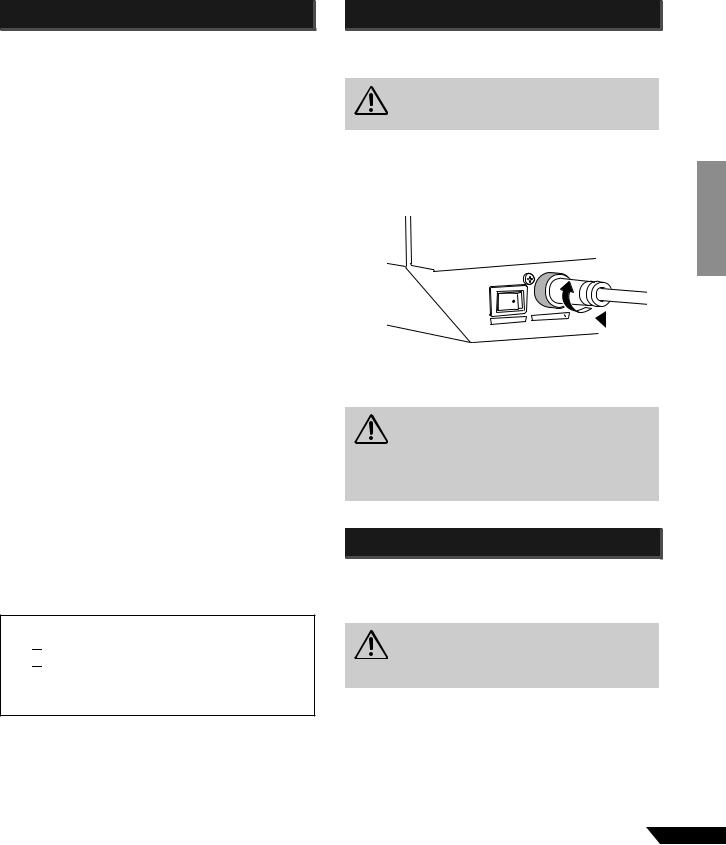
2 Connect the power adaptor to the AC ADAPTOR IN connector (1) on the rear of the mixer, and then turn the fastening ring clockwise (2) to secure the connection.)
 2
2  1
1
3 Plug the power adaptor into a standard household power outlet.
•Be sure to unplug the adaptor from the outlet when not using the mixer, or when there are lightning
|
CAUTION |
storms in the area. |
•To avoid generating unwanted noise, make sure there is 50 cm or more between the power adaptor and the mixer.
|
Troubleshooting…………………………… |
15 |
|
Mounting to a Microphone Stand…………………….. |
15 |
|
Specifications………………………………. |
55 |
Turning the Power On
Press the mixer’s power switch to the ON position. When you are ready to turn the power off, press the power switch to the STANDBY position.
Accessories
 Owner’s Manual
 AC power adaptor (PA-10)*
*May not be included depending on your particular area. Please check with your Yamaha dealer.
Note that trace current continues to flow while the switch is in the STANDBY position. If you do not plan
CAUTION to use the mixer again for a long while, please be sure to unplug the adaptor from the wall outlet.
|
MG82CX/MG102C Owner’s Manual |
5 |
Mixer Basics
Quick Guide
Mixer Basics
 Getting Sound to the Speakers
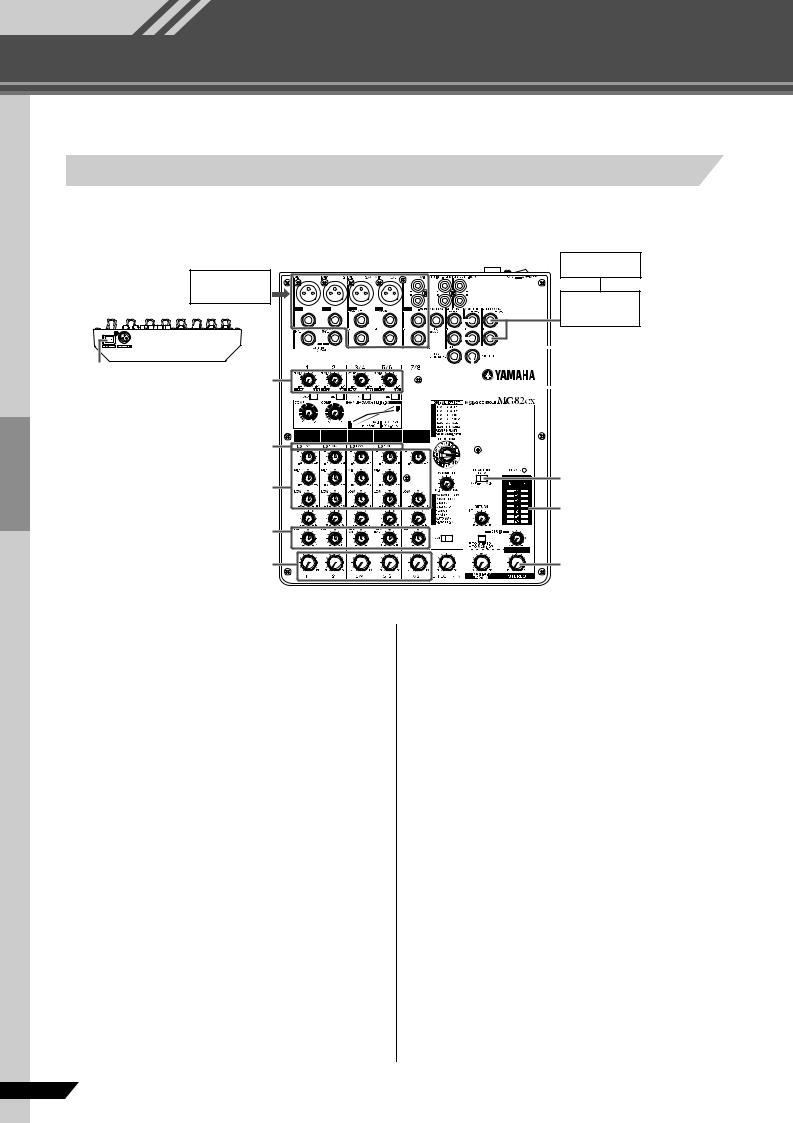
We begin by connecting a pair of speakers and generating some stereo output. Note that operations and procedures will vary somewhat according to the input devices you are using.
Speakers 2
Microphones, 2 instruments
Power Amp
|
1, 3 |
1, 4 |
|
POWER switch |
GAIN controls |
|
4 PEAK indicators |
|
|
Equalizer |
PAN
1, 6 Level controls
1 Be sure that your mixer is turned off and that all level* controls are turned all the way down.
*STEREO Master control, Level controls, Gain Control, etc.
NOTE
Set the equalizer and the pan controls to their t positions.
2 Turn off any other external devices, then connect microphones, instruments, and speakers.
NOTE
*For information on connecting external devices see the Connection Example on page 14.
*Connect electric guitars and basses through an intermediary device such as a direct box, preamp, or amp simulator. Connecting these instruments directly to the MG mixer may result in degraded sound and noise.
3 To avoid damage to your speakers, power up the devices in the following order: Peripheral devices → MG mixer → power amps (or powered speakers). Reverse this order when turning power off.
|
2 |
||||
|
Monitor Speakers |
||||
|
2 |
||||
|
Headphones |
||||
3 PHANTOM switch
6 Level meter
1, 5, 6
STEREO Master control
NOTE
If you are using microphones that require phantom power, turn the MG mixer’s phantom power switch on before turning on the power to the power amp or powered speakers. See page 12 for more detail.
4 Adjust the channel GAIN controls so that the corresponding peak indicators flash briefly on the highest peak levels.
5 Set the STEREO Master control to the “t” position.
6 Set the Level control to create the desired initial balance, then adjust the overall volume using the STEREO Master control.
NOTE
*Use the LEVEL meter to view the level being applied to the STEREO L/R buses.
*If the PEAK indicator lights frequently, lower the LEVEL controls a little to avoid distortion.
6 MG82CX/MG102C Owner’s Manual

Mixer Basics
Making the Most of Your Mixer
You’ve got yourself a mixer and now you’re ready to use it.
Just plug everything in, twiddle the controls, and away you go … right?
Well, if you’ve done this before you won’t have any problems, but if this is the first time you’ve ever used a mixer you might want to read through this little tutorial and pick up a few basics that will help you get better performance and make better mixes.
Balanced, Unbalanced—What’s the Difference?
In a word: “noise.” The whole point of balanced lines is noise rejection, and it’s something they’re very good at. Any length of wire will act as an antenna to pick up the random electromagnetic radiation we’re constantly surrounded by: radio and TV signals as well as spurious electromagnetic noise generated by power lines, motors, electric appliances, computer monitors, and a variety of other sources. The longer the wire, the more noise it is likely to pick up. That’s why balanced lines are the best choice for long cable runs. If your “studio” is basically confined to your desktop and all connections are no more than a meter or two in length, then unbalanced lines are fine—unless you’re surrounded by extremely high levels of electromagnetic noise. Another place balanced lines are almost always used is in microphone cables. The reason for this is that the output signal from most microphones is very small, so even a tiny amount of noise will be relatively large, and will be amplified to an alarming degree in the mixer’s high-gain head amplifier.
|
Balanced noise cancellation |
To summarize |
||||
|
Noise |
Microphones: |
Use balanced lines. |
|||
|
Hot (+) |
Short line-level |
Unbalanced lines |
|||
|
runs: |
are fine if you’re in a |
||||
|
Cold (–) |
relatively noise-free |
||||
|
Noise-free |
environment. |
||||
|
Phase |
|||||
|
Phase |
signal |
||||
|
inversion |
|||||
|
Ground |
Long line-level |
The ambient |
|||
|
inversion |
|||||
|
Noise cancelled |
runs: |
electromagnetic |
|||
|
Source |
Cable |
Receiving device |
noise level will be |
||
|
the ultimate |
|||||
|
deciding factor, but |
|||||
|
balanced is best. |
Signal Levels and the Decibel
|
Let’s take a look at one of the most commonly used units in |
Most professional mixers, |
|||||||
|
audio: the decibel (dB). If the smallest sound that can be heard |
power amplifiers, and other |
|||||||
|
by the human ear is given an arbitrary value of 1, then the |
+ 20 dBu |
types of equipment have |
||||||
|
inputs and outputs with a |
||||||||
|
loudest sound that can be heard is approximately 1,000,000 |
||||||||
|
nominal level of +4 dBu. |
||||||||
|
(one million) times louder. That’s too many digits to deal with |
||||||||
|
0 dBu |
0.775 V The inputs and outputs on |
|||||||
|
for practical calculations, and so the more appropriate |
||||||||
|
“decibel” (dB) unit was created for sound-related |
home-use audio gear |
|||||||
|
measurements. In this system the difference between the |
-20 dBu |
usually have a nominal level |
||||||
|
softest and loudest sounds that can be heard is 120 dB. This |
of –10 dBu. |
|||||||
|
is a non-linear scale, and a difference of 3 dB actually results |
Microphone signal levels |
|||||||
|
in a doubling or halving of the loudness. |
-40 dBu |
vary over a wide range |
||||||
|
You might encounter a number of different varieties of the dB: |
depending on the type of |
|||||||
|
dBu, dBV, dBM and others, but the dBu is the basic decibel |
microphone and the source. |
|||||||
|
unit. In the case of dBu, “0 dBu” is specified as a signal level of |
-60 dBu |
Average speech is about |
||||||
|
–30 dBu, but the twittering |
||||||||
|
0.775 volts. For example, if a microphone’s output level is –40 |
of a bird might be lower than |
|||||||
|
dBu (0.00775 V), then to raise that level to 0 dBu (0.775 V) in |
–50 dBu while a solid bass |
|||||||
|
the mixer’s preamp stage requires that the signal be amplified |
drum beat might produce a |
|||||||
|
by 100 times. |
level as high as 0 dBu. |
A mixer may be required to handle signals at a wide range of levels, and it is necessary match input and output levels as closely as possible. In most cases the “nominal” level for a mixer’s input and outputs is marked on the panel or listed in the owner’s manual.
|
MG82CX/MG102C Owner’s Manual |
7 |
 Loading…
МЕРЫ ПРЕДОСТОРОЖНОСТИ
Пожалуйста, внимательно Прочитайте Перед началом эксПлуатации устройства.
* пожалуйста, храните это руководство в надежном месте, чтобы при необходимости
вы могли к нему обратиться.
B вниманиE
Чтобы избежать серьезной травмы или летального исхода от электрического тока, короткого замыкания, пожара и др., всегда
соблюдайте ниже перечисленные меры предосторожности.  Эти меры включают, но не ограничены, следующим:
Электропитание/Сетевой кабель                             Внимание вода
•   Перед использованием убедитесь, что сетевое напряжение   •   Не оставляйте устройство под дождем, не используйте его
соответствует напряжению питания усилителя. Требуемое   вблизи источников влаги и не размещайте возле всевоз-
напряжение указано на корпусе устройства.         можных емкостей содержащих жидкости, которые могли бы
•   Используйте только адаптер питания AC (PA-10) или аналогич-  пролиться на прибор.
ный, рекомендуемый Yamaha.                     •   Никогда не вставляйте и не вынимайте электрическую вилку
Если Вы намереваетесь использовать устройство в другом   влажными руками.
регионе, включаемый в комплект сетевой кабель может быть
несовместимым. Обратитесь к дилеру Yamaha.           Устройство работает неправильно
•   Не размещайте шнур питания вблизи источников высокой
температуры типа обогревателей и радиаторов. Во избежание   •   Если сетевой шнур или вилка оказываются потертыми или пов-
повреждения шнура питания чрезмерно не перегибайте его и   режденными, если нет звука во время использования устройства,
не ставьте на него тяжелые предметы.              если появляются специфические запахи или дым, которые, как
Вам кажется, вызваны неисправностью устройства, немедленно
Не открывайте                        отключите питание, отсоедините электрическую вилку от розетки,
и доставьте устройство для осмотра квалифицированному обслу-
•   Не открывайте устройство и не пытайтесь разбирать внут-  живающему персоналу фирмы Yamaha.
ренние детали или что-либо переделывать во внутренней   •   Если устройство упало или повреждено, немедленно от-
схеме инструмента. Прибор не содержит никаких пригодных к   ключите питание, отсоедините кабель питания от розетки и
эксплуатации пользователем деталей. Если Вам кажется, что   предоставьте устройство для осмотра квалифицированному
устройство работает неправильно, немедленно прекратите   обслуживающему персоналу фирмы Yamaha.
использование и пригласите квалифицированного специалис-
та фирмы Yamaha.
B осторожно
Всегда следуйте основным мерам предосторожности, перечисленным ниже, чтобы избежать потенциальной опасности или
повреждения самого устройства. Эти меры включают, но не ограничены, следующим:
Электропитание/Сетевой кабель                 на, или других электрических устройств. Это может привести
к возникновению помех непосредственно в устройстве и в
•   Не оставляйте устройство включенным в сеть во время грозы.   приборах находящихся вблизи
Также выключайте его, если в течение длительного времени не
будете им пользоваться                                         Подключение
•   Не тяните за шнур при отключении кабеля питания, всегда
держите непосредственно вилку.                 •   Перед соединением системы с другими устройствами, вы-
•   Во избежание нежелательного шума, удостоверьтесь, что рас-  ключите питание на всех устройствах. Перед включением или
стояние между адаптером питания и микшером не менее 50 см  выключением питания каких-либо устройств, установите все
•   Не накрывайте сетевой кабель тканью или одеялом.  уровни громкости на минимум.
Местоположение                             Предосторожности при работе
•   Перед перемещением устройства, отсоедините все подклю-  •   При включении питания Вашей звуковой системы, данное
ченные к нему кабели.                             устройство всегда включайте ПОСЛЕДНИМ, чтобы избежать
•   Устанавливая устройство, оставьте достаточно места для   повреждения громкоговорителей. При выключении питания,
свободного доступа к розетке электропитания, чтобы при   устройство должно быть выключено ПЕРВЫМ по той же причи-
необходимости легко отключить вилку от розетки.   не.
•   Не устанавливайте все контроллеры эквалайзера и контролле-  •   Не вставляйте пальцы или руки в отверстия устройства.
ры уровня – LEVEL на максимум. В зависимости от состояния   •   Избегайте попадания инородных предметов в корпус устройс-
подключенных устройств, это может вызвать обратную связь и   тва (бумаги, пластмассовых или металлических объектов, и
повредить динамики.                               т.д.) Если это произошло, немедленно отключите питание и
•   Не устанавливайте инструмент в помещениях с повышенной   отсоедините сетевой шнур. Затем дайте осмотреть устройство
влажностью или запыленностью, под прямыми солнечными   квалифицированным специалистам от Yamaha.
лучами или в зоне вибрации, вне помещения или рядом с   •   Не используйте устройство в течение длительного периода
нагревательными приборами. Установка в таких местах может   времени на высоком уровне громкости, так как это может
повлечь за собой деформацию панели и повреждение внутрен-  привести к потере слуха. Если Вы испытываете какие-либо
них компонентов.                                  проблемы со слухом, проконсультируйтесь с врачом.
•   Не ставьте устройство на неустойчивую поверхность, оно   •   Не давите своим весом на устройство, и не размещайте на нем
может случайно упасть.                            тяжелых предметов, а также чрезмерно не давите на кнопки,
•   Не используйте устройство возле телевизоров, радиоприем-  выключатели или гнезда.
ников, стереофонического оборудования, мобильного телефо-
2   MG82CX/MG102C Руководство пользователя
Разъемы XLR-типа распаяны следующим образом: контакт 1 — земля, контакт 2 — «горячий» (+), контакт   — «холодный» (—). Вставляе-
мые штекеры TRS-типа распаяны следующим образом: рукав — земля, наконечник — посыл, кольцо — возврат.
Yamaha не несет ответственности за ущерб, вызванный неправильной эксплуатацией или модификациями устройства.
Всегда выключайте питание, когда не пользуетесь устройством.
Даже когда выключатель питания находится в положении STANDBY, небольшое напряжение все же поступает на модуль. Отключайте
кабель от розетки, если в течение длительного времени не будете пользоваться микшером.
Работа компонентов с перемещающимися контактами, типа выключателей, контроллеров громкости и гнезд, постепенно ухудшается.
Проконсультируйтесь с квалифицированным обслуживающим персоналом о возможности замены дефектных компонентов.
При работе, микшер может нагреваться от 15 до 20 С. Это нормально. Обратите внимание, что температура панели может превышать
50 С при температуре окружающей среды более  0 С. Примите все необходимые меры для предотвращения возгорания.
*   Руководство пользователя описывает обе модели MG82CX и MG102С. В отличие от MG102C Модель MG82CX оснащена блоком цифро-
вых эффектов.
*   В данном руководстве термин “MG микшер” используется для моделей MG82CX и MG102C. В случае различия параметров, в скобках
будут указаны данные для MG102C: MG82CX (MG102C).
*   Иллюстрации в руководстве служат только в информативных целях и могут не соответствовать реальному устройству во время работы.
*   Названия компаний и названия изделий - торговые марки или зарегистрированные торговые марки их соответствующих владельцев.
Копирование коммерческой музыки или аудио данных для других целей кроме личного использования строго запрещено в соответс-
твии с законом об авторском праве. Пожалуйста, уважайте авторские права, и проконсультируйтесь со специалистом по авторским
правам, если у Вас возникли сомнения в допустимости использования музыкального продукта.
Технические характеристики в руководстве служат только в информативных целях и могут не соответствовать реальному устройству во
время работы. Компания Yamaha оставляет за собой право изменять данные и технические характеристики устройств без предваритель-
ного уведомления
MG82CX/MG102C Руководство пользователя
More products and manuals for Audio Yamaha
| Models | Document Type |
|---|---|
|
MG206C-USB |
User Manual
35 pages |
|
MW10 |
User Manual
28 pages |
|
SP02R96 |
User Manual
2 pages |
|
EM5014C |
User Manual
37 pages |
|
EMX66M |
User Manual
30 pages |
|
WH39070 |
User Manual
290 pages |
|
MW8cx |
User Manual
31 pages |
|
QY 300 |
User Manual
13 pages |
|
MC802 |
User Manual
18 pages |
|
DM 2000 |
User Manual
13 pages |
|
DIGITAL MIXING STUDIO 01X |
User Manual
156 pages |
|
MX12/4 |
User Manual
16 pages |
|
MG166C-USB |
User Manual
37 pages |
|
MW10 |
User Manual
36 pages |
|
1009MWTO-F0 |
User Manual
80 pages |
|
WP17300 |
User Manual
1 pages |
|
IMX644 |
User Manual
28 pages |
|
MB02R96 |
User Manual
2 pages |
|
MX200-16 |
User Manual
57 pages |
|
DIGITAL SOUND PROJECTOR HTY-750 |
User Manual
98 pages |


На этой странице вы можете совершенно бесплатно скачать Инструкция по эксплуатации Yamaha MG82cx.
У документа PDF Инструкция по эксплуатации 20 страниц, а его размер составляет 1.86 Mb.
Читать онлайн Микшеры Yamaha MG82cx Инструкция по эксплуатации

Скачать файл PDF «Yamaha MG82cx Инструкция по эксплуатации» (1.86 Mb)
Популярность:
6341 просмотры
Подсчет страниц:
20 страницы
Тип файла:
Размер файла:
1.86 Mb
Прочие инструкции Yamaha MG82cx


Прочие инструкции Yamaha Микшеры



Прочие инструкции Yamaha






РУКОВОДСТВО ПОЛЬЗОВАТЕЛЯ
РУКОВОДСТВО ПОЛЬЗОВАТЕЛЯ
МИКШЕРНЫЙ ПУЛЬТ
МИКШЕРНЫЙ ПУЛЬТ
Отличительные особенности
Входные каналы ………………………………………………………………………стр. 9
Благодаря микрофонным / линейным входам (до 4-х) или стереофоническим входам (до трех, для MG102C —
до четырех), к микшеру MG можно одновременно подключать самые разнообразные устройства: микрофоны,
устройства линейного уровня, стереофонические синтезаторы и прочее.
Компрессия ……………………………………………………………………………стр. 8
Компрессия повышает общий уровень без привнесения искажений при сжатии очень сильных пиков сигнала
от микрофонов и гитар.
Передачи AUX и возврат стерофонического сигнала AUX …………………… стр. 11
Можно воспользоваться разъемом AUX SEND для подачи передаваемого сигнала на внешнее устройство
обработки сигналов, а затем возвращать обработанный стереофонический сигнал через разъем RETURN.
Высококачественные цифровые эффекты (MG82CX) ……………………. стр. 12, 18
С помощью встроенных цифровых эффектов MG82CX способен выдавать широкий диапазон вариаций
звука, которые все он формирует самостоятельно.