
Дата последнего обновления : 19-10-2023
Быстрая автоматическая разморозка — режим работы микроволновой печи для быстрого и равномерного размораживания продуктов.
Режим разморозки включает до пяти программ для разных типов продуктов:
- мяса;
- птицы;
- рыбы;
- овощей, фруктов или ягод;
- хлеба.

Примечание:
Наличие и количество программ зависит от модели микроволновой печи.
На более ранних моделях режим автоматической разморозки может отсутствовать.
Как включить режим разморозки в микроволновой печи
1
Подготовьте продукты к разморозке.
Удалите с продуктов всю упаковку: пакеты, пленку, лотки или подложки.
Уточните вес продукта или взвесьте его, чтобы убедиться, что размер порции пригоден для разморозки:
- Мясо, птица, рыба – 200–1500 г,
- Хлеб, выпечка – 125–1000 г,
- Фрукты, овощи, ягоды – 100–600 г.
Выложите мясо, птицу, рыбу или фрукты на керамическое или стеклянное блюдо, а хлеб – на кухонную бумагу.
Проверьте дополнительные инструкции к разморозке разных типов продуктов в руководстве пользователя к вашей модели печи.
Примечание:
Для разморозки используйте только ту посуду, которая предназначена для микроволновых печей.
2
Поставьте блюдо с замороженным продуктом в центр вращающегося подноса.
Закройте дверцу микроволновой печи.
3
Нажмите на кнопку Ускоренная разморозка, Быстрая разморозка или значок снежинки с капелькой.
Примеры панелей управления микроволновых печей и расположения на них кнопки режима разморозки на различных моделях:
Примечание:
Вид панели управления и расположение кнопок зависит от модели микроволновой печи.
4
Выберите программу разморозки.
- Если на вашей микроволновой печи доступен выбор программы, на дисплее появится цифра «1».
- Если на вашей микроволновой печи недоступен выбор программы, запустится выбор веса – на дисплее появится цифра «100», «125», «200» и т.п. Перейдите к следующему пункту инструкции.
Например:
Обычно программы разморозки и их коды перечислены на информационном стикере на дверце или внутри печи либо на самой панели управления.
Как правило, порядок программ следующий:
- Мясо,
- Птица,
- Рыба,
- Хлеб,
- Фрукты.
Для того, чтобы изменить программу, воспользуйтесь стрелками или поворотным переключателем. На некоторых моделях для переключения между программами нужно повторно нажать на кнопку разморозки.
Затем подтвердите выбор, чтобы перейти к выбору веса порции. Для этого нажмите кнопку ОК, Выбор или 100Г.
Например:
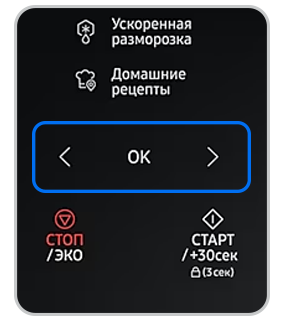
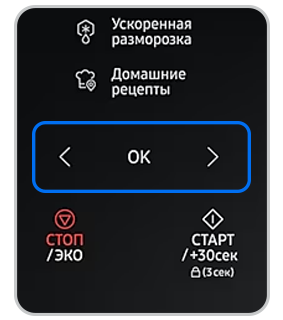
Воспользуйтесь стрелками для выбора программы, затем нажмите OK, чтобы перейти к установке веса.
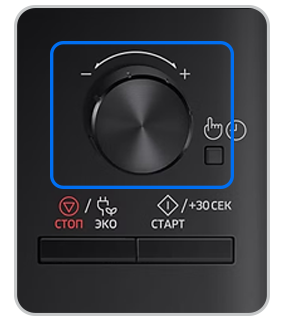
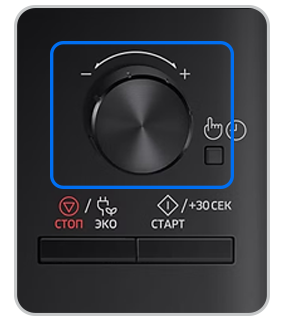
Воспользуйтесь поворотным переключателем для выбора программы, затем нажмите на него, чтобы перейти к установке веса.
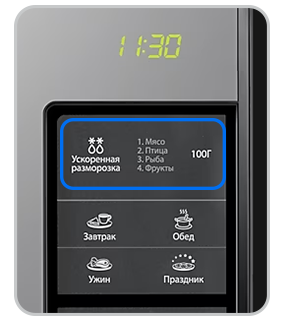
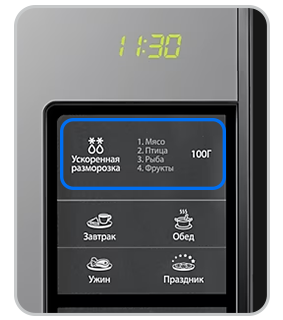
Несколько раз нажмите на кнопку Ускоренная разморозка для переключения между программами, затем нажмите 100Г, чтобы перейти к установке веса.
Примечание:
Коды программ разморозки и настройку параметров на вашей модели печи уточняйте в руководстве пользователя.
5
Установите вес продукта.
Для того, чтобы изменить вес продукта, воспользуйтесь стрелками или поворотным переключателем. На некоторых моделях для переключения между опциями веса нужно повторно нажать на кнопку 100Г.

6
Нажмите кнопку Старт для запуска режима разморозки.
Во время работы режима микроволновая печь будет подавать звуковые сигналы — это значит, что продукты необходимо перевернуть. Откройте дверцу печи, переверните продукты, закройте дверцу и снова нажмите кнопку Старт.
7
После того как прозвучит звуковой сигнал об окончании работы режима, оставьте блюдо в микроволновой печи — это необходимо, чтобы продукты до конца разморозились.
Время, на которое необходимо оставить блюдо в микроволновой печи, указано в инструкции (например: «Дайте постоять 5-30 минут»).
Примечание:
Если продукты глубоко промерзли и имеют большой вес, режим разморозки может разморозить их не до конца.
Благодарим за отзыв!
Перейти к контенту

Русские электронные инструкции по эксплуатации
Постоянно обновляемый большой каталог документации по эксплуатации и использованию современных устройств и оборудования на русском языке. Бесплатное скачивание файлов.
Поиск:
Главная
♥ В закладки
Просмотр инструкции в pdf


Инструкция по эксплуатации микроволновой печи Samsung MS23K3515AS.
Скачать инструкцию к микроволновой печи Samsung MS23K3515AS (4,29 МБ)

Инструкции микроволновых печей Samsung
« Инструкция к микроволновой печи Samsung MS23T5018AN
» Инструкция к умным часам Ginzzu GZ-503 Black
Вам также может быть интересно

Инструкция к телевизору Samsung QE49Q7CAMU

Инструкция к телевизору Samsung UE48J6500AU

Инструкция к телевизору Samsung UE55M6500AU

Инструкция к смартфону Samsung Galaxy A51 64GB White
.jpg)
Инструкция к наушникам Samsung EO-HS1303 Pink (EO-HS1303PEGRU)

Инструкция к кондиционеру Samsung AR09MSFPAWQNER

Инструкция к телевизору Smart TV Samsung QE65Q87TAU

Инструкция к телевизору Samsung UE65NU7300U
Добавить комментарий
Имя *
Email *
Сайт
Комментарий


Сохранить моё имя, email и адрес сайта в этом браузере для последующих моих комментариев.
- Добавить инструкцию
- Заказать инструкцию
- Политика конфиденциальности
Русский 19
Исполь
зов
ание микроволновой пе
чи
Использование режима быстрого размораживания продуктов
Функции Quick Defrost (Быстрая разморозка) позволяют размораживать мясо, птицу, рыбу,
замороженные овощи и замороженный хлеб. Время размораживания и уровень мощности
устанавливаются автоматически. Достаточно просто выбрать программу и вес продуктов.
ПРИМЕЧАНИЕ
Применяйте только посуду, безопасную для использования в микроволновой печи.
Откройте дверцу. Поместите замороженные продукты на керамическое блюдо в центр вращающегося подноса.
Закройте дверцу.
1
1. Нажмите кнопку Quick Defrost (Быстрая
разморозка).
2
2. Выберите тип приготовляемой пищи с помощью
кругового переключателя.
Затем нажмите кнопку Выбор/Часы.
4
5
3
3. Выберите размер порции с помощью кругового
переключателя.
(См. приведенную рядом таблицу.)
4. Нажмите кнопку START/+30s (СТАРТ/+30с).
Результат:
• Начинается размораживание продуктов.
• Во время размораживания печь подает
звуковые сигналы, напоминая о том, что нужно
перевернуть продукты.
5. Снова нажмите кнопку START/+30s (СТАРТ/+30с),
чтобы завершить процесс размораживания.
Результат:
1) Воспроизводится 4 звуковых сигнала.
2) Сигнал, напоминающий о завершении
приготовления, воспроизводится 3 раза
(один сигнал в минуту).
3) Затем вновь отображается текущее время.
Код/продукты
Размер
порции
Инструкции
14
Булгур
125 г
Используйте большое стеклянное блюдо с крышкой,
предназначенное для микроволновой печи.
Добавьте двойное количество холодной воды (250 мл).
Готовьте с закрытой крышкой. Перед тем как дать блюду постоять
в печи, перемешайте и добавьте соль и пряности.
Дайте постоять 2–5 минут.
15
Куриная грудка
300 г
Промойте кусочки и положите на керамическую тарелку.
Накройте пленкой для микроволновых печей. Проткните пленку.
Поставьте блюдо на вращающийся поднос. Дайте постоять 2 минуты.
16
Грудка индейки
300 г
Промойте кусочки и положите на керамическую тарелку.
Накройте пленкой для микроволновых печей. Проткните пленку.
Поставьте блюдо на вращающийся поднос. Дайте постоять 2 минуты.
17
Свежее рыбное филе
300 г
Промойте рыбу и поместите на керамическую тарелку, добавьте
1 ст. л. лимонного сока. Накройте пленкой для микроволновых
печей. Проткните пленку. Поставьте блюдо на вращающийся
поднос. Дайте постоять 1–2 минуты.
18
Свежее филе лосося
300 г
Промойте рыбу и поместите на керамическую тарелку, добавьте
1 ст. л. лимонного сока. Накройте пленкой для микроволновых
печей. Проткните пленку. Поставьте блюдо на вращающийся
поднос. Дайте постоять 1–2 минуты.
19
Свежие креветки
250 г
Промойте креветки и поместите на керамическую тарелку,
добавьте 1 ст. л. лимонного сока. Накройте пленкой для
микроволновых печей. Проткните пленку. Поставьте блюдо на
вращающийся поднос. Дайте постоять 1–2 минуты.
20
Свежая форель
200 г
Поместите 1 целую свежую рыбу на термостойкое блюдо.
Добавьте щепотку соли, 1 ст. л. лимонного сока и пряности.
Накройте пленкой для микроволновых печей. Проткните пленку.
Поставьте блюдо на вращающийся поднос.
Дайте постоять 2 минуты.
MS23K3555ES_LI_DE68-04422G-00_HE+RU+EN.indb 19
5/10/2016 1:30:02 PM
Samsung MS23K3515AS/EU MW3500K Solo Microwave Oven with Quick Defrost, 23L — Use Manual — Use Guide PDF.
Documents: Go to download!
- User Manual — (English)
- Installation
- Maintenance
- Oven features
- Oven use
- Cookware guide
- Cooking guide
- Troubleshooting and information code
- Technical specifications
Table of contents
User manual
Installation
Accessories
Depending on the model that you have purchased, you are supplied with several accessories that can be used in a variety of ways.
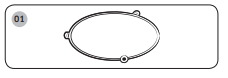
1. Roller ring, to be placed in the centre of the oven.
Purpose: The roller ring supports the turntable.
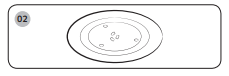
2. Turntable, to be placed on the roller ring with the centre fitting to the coupler.
Purpose: The turntable serves as the main cooking surface; it can be easily removed for cleaning.
Installation site
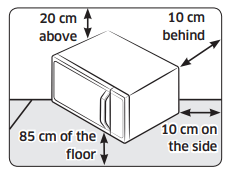
- Select a flat, level surface approx. 85 cm above the floor. The surface must support the weight of the oven.
- Secure room for ventilation, at least 10 cm from the rear wall and both sides, and cm from above.
- Do not install the oven in hot or damp surroundings, such as next to other microwave ovens or radiators.
- Conform to the power supply specifications of this oven. Use only approved extension cables if you need to use.
- Wipe the interior and the door seal with a damp cloth before using your oven for the first time.
Turntable
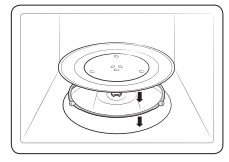
Remove all packing materials inside the oven. Install the roller ring and turntable.
Check that the turntable rotates freely.
Maintenance
Cleaning
Clean the oven regularly to prevent impurities from building up on or inside the oven. Also pay special attention to the door, door sealing, and turntable and roller ring (applicable models only).
If the door won’t open or close smoothly, first check if the door seals have built up impurities. Use a soft cloth in soapy water to clean both the inner and outer sides of the oven. Rinse and dry well.
To remove stubborn impurities with bad smells from inside the oven
- With an empty oven, put a cup of diluted lemon juice on the centre of the turntable.
- Heat the oven for 10 minutes at max power.
- When the cycle is complete, wait until the oven cools down. Then, open the door and clean the cooking chamber.
To clean inside swing-heater models
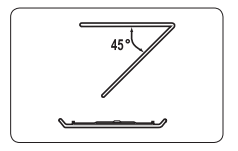
To clean the upper area of the cooking chamber, lower the top heating element by as shown. This will help clean the upper area. When done, reposition the top heating element.
Replacement (repair)
This oven has no user-removable parts inside. Do not try to replace or repair the oven yourself.
- If you encounter a problem with hinges, sealing, and/or the door, contact a qualified technician or a local Samsung service centre for technical assistance.
- If you want to replace the light bulb, contact a local Samsung service centre. Do not replace it yourself.
- If you encounter a problem with the outer housing of the oven, first unplug the power cord from the power source, and then contact a local Samsung service centre.
Care against an extended period of disuse
- If you don’t use the oven for an extended period of time, unplug the power cord and move the oven to a dry, dust-free location. Dust and moisture that builds up inside the oven may affect the performance of the oven.
Oven features
Oven
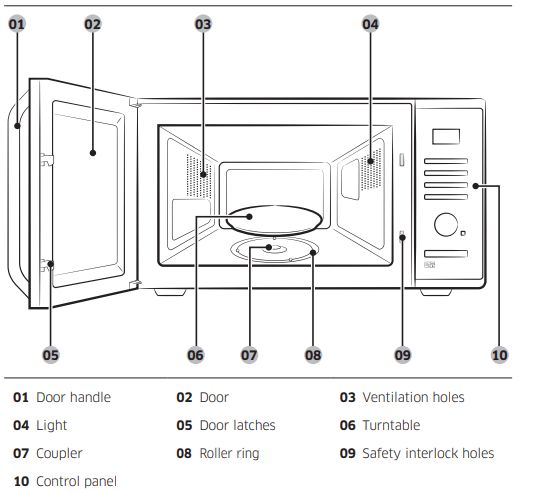
Control panel
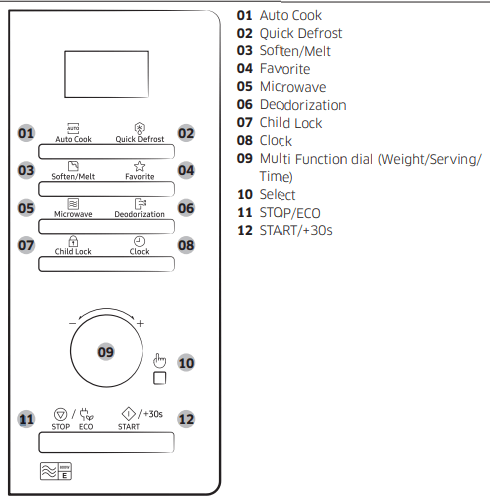
Oven use
How a microwave oven works
Microwaves are high-frequency electromagnetic waves; the energy released enables food to be cooked or reheated without changing either the form or the colour.
You can use your microwave oven to:
- Defrost
- Reheat
- Cook
Cooking principle.
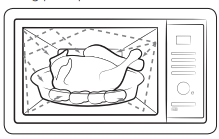
- The microwaves generated by the magnetron reflected at cavity and are distributed uniformly as the food rotates on the turntable. The food is thus cooked evenly.
- The microwaves are absorbed by the food up to a depth of about 1 inch cm). Cooking then continues as the heat is dissipated within the food.
- Cooking times vary according to the container used and the properties of the food:
- Quantity and density
- Water content
- Initial temperature (refrigerated or not)
Checking that your oven is operating correctly
The following simple procedure enables you to check that your oven is working correctly at all times. If you are in doubt, refer to the section entitled «Troubleshooting” on the pages 23 to 25.
Open the oven door by pulling the handle on the upper side of the door. Place a glass of water on the turntable. Close the door.
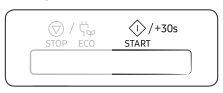
Press the START/+30s button and set the time to 4 or 5 minutes, by pressing the
START/+30s button the appropriate number of times.
The oven heats the water for 4 or minutes.
The water should then be boiling.
Cooking/Reheating
The following procedure explains how to cook or reheat food
Open the door. Place the food in the centre of the turntable. Close the door. Never switch the microwave oven on when it is empty.
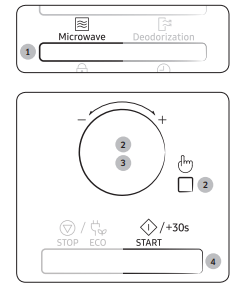
- Press the Microwave button. The 800 W (Maximum cooking power) indications are displayed:
 microwave mode)
 - Select the appropriate power level by turning the Multi Function dial. (Refer to the power level table.) And then press the Select button.
- Set the cooking time by turning the Multi Function dial. The cooking time is displayed.
- Press the START/+30s button. The oven light comes on and the turntable starts rotating. Cooking starts and when it has finished.
- The oven beeps 4 times.
- The end reminder signal will beep3 times (once every minute).
- The current time is displayed again.
 microwave mode)
Setting the time
When power is supplied, “88:88” and then “12:00” is automatically displayed on the display.
Please set the current time. The time can be displayed in either the 24-hour or 12- hour notation. You must set the clock:
- When you first install your microwave oven
- After a power failure
Do not forget to reset the clock when you switch to and from summer and winter time.
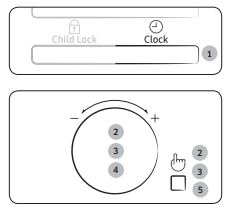
- Press the Clock button.
- Set the 24-hour or 12-hour notation by turning the Multi Function dial. And then press the Select button.
- Turn the Multi Function dial to set the hour. And then press the Select button.
- Turn the Multi Function dial to set the minute.
- When the right time is displayed, press the Select button to start the clock. The time is displayed whenever you are not using the microwave oven.
Power levels and time variations
The power level function enables you to adapt the amount of energy dissipated and thus the time required to cook or reheat your food, according to its type and quantity. You can choose between six power levels
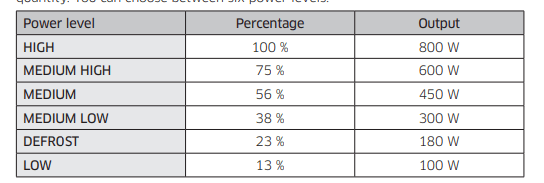
The cooking times given in recipes and in this booklet correspond to the specific power level indicated.

Adjusting the cooking time
You can increase the cooking time by pressing the START/+30s button once for each 30 seconds to be added.
- Check how cooking is progressing at any time simply by opening the door
- Increase the remaining cooking time
Method 1
To increase the cooking time of your food during cooking, press the START/+30s button once for each 30 seconds that you wish to add.
Example: To add three minutes, press the
START/+30s button six times.
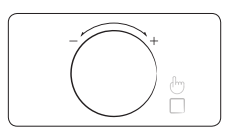
Method 2
Turn the Multi Function dial right or left to increase or decrease the cooking time.
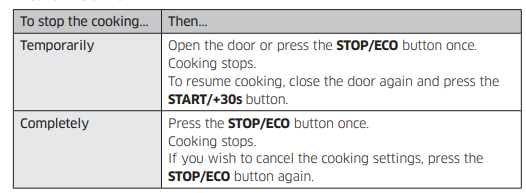
Stopping the cooking
You can stop cooking at any time so that you can:
- Check the food
- Turn the food over or stir it
- Leave it to stand
Setting the energy save mode
The oven has an energy save mode.
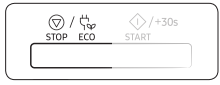
- Press the STOP/ECO button. Display off.
- To remove energy save mode, open the door or press the STOP/ECO button and then display shows current time. The oven is ready for use.
Auto energy saving function
If you do not select any function when appliance is in the middle of setting or operating with temporary stop condition, function is canceled and clock will be displayed after 25 minutes.
Oven Lamp will be turned off after 5 minutes with door open condition.
Using the auto cook features
The Auto Cook features has 20 pre-programmed cooking times. You do not need to set either the cooking times or the power level. You can adjust the type of the serving by turning the Multi Function dial
First, place the food in the centre of the turntable and close the door.
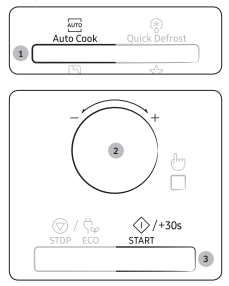
- Press the Auto Cook button.
- Select the type of food that you are cooking by turning the Multi Function dial.
- Press the START/+30s button. The food is cooked according to the preprogrammed setting selected.
- The oven beeps 4 times.
- The end reminder signal will beep 3 times (once every minute).
- The current time is displayed again
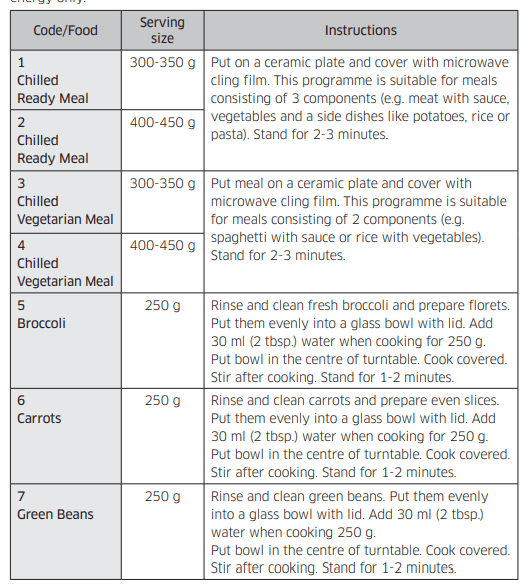
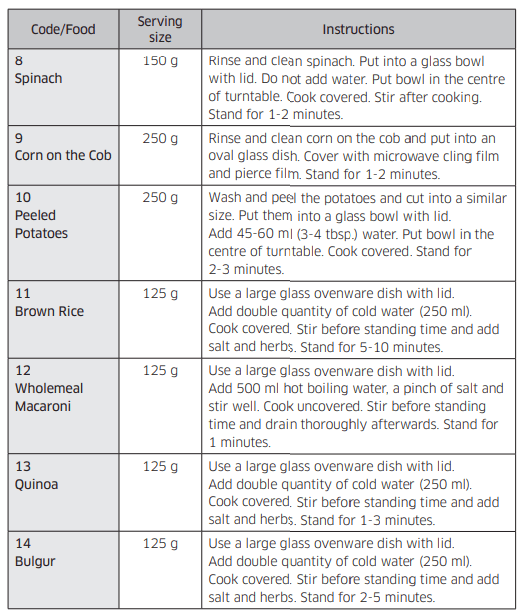
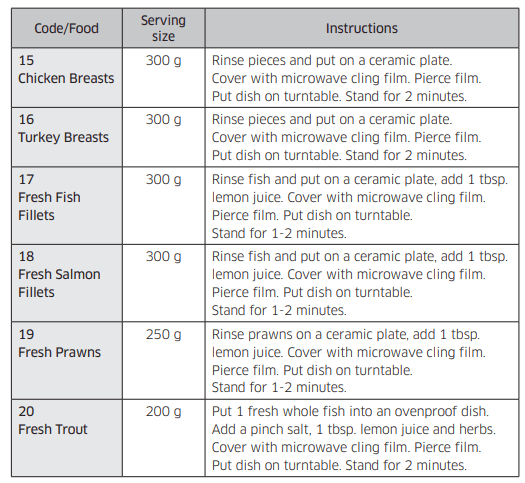
The following table presents quantities and appropriate instructions about 20 pre-programmed cooking options. Those programmes are running with microwave energy only
Using the quick defrost features
The Quick Defrost features enable you to defrost meat, poultry, fish, frozen vegetable and frozen bread. The defrost time and power level are set automatically. You simply select the programme and the weight.
Use only containers that are microwave-safe.
Open the door. Place the frozen food on a ceramic in the centre of the turntable. Close the door.
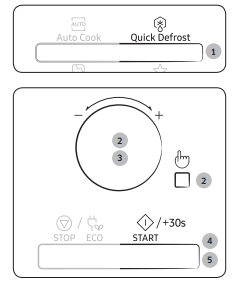
- Press the Quick Defrost button.
- Select the type of food that you are cooking by turning the Multi Function dial. And then press the Select button.
- Select the size of the serving by turning the Multi Function dial. (Refer to the table on the side.)
- Press the START/+30s button.
- Defrosting begins.
- The oven beeps through defrosting to remind you to turn the food over.
5. Press the START/+30s button again to finish defrosting.
- The oven beeps 4 times.
- The end reminder signal will beep 3 times (once every minute).
- The current time is displayed again.
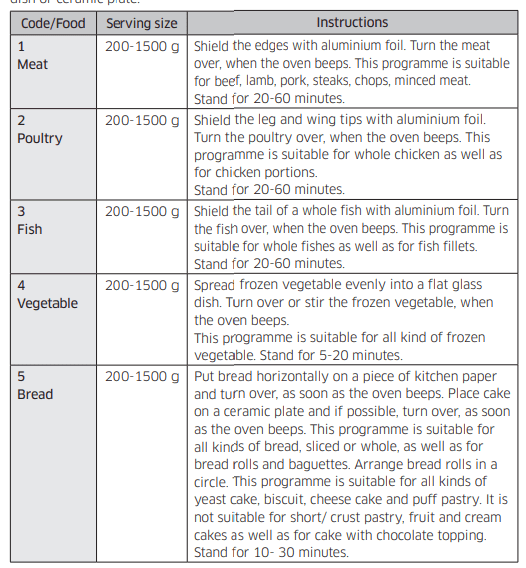
The following table presents the various Quick Defrost programmes, serving size, standing times and appropriate instructions. Remove all kind of package material before defrosting. Place meat, poultry, fish, vegetable and bread on a flat glass dish or ceramic plate.
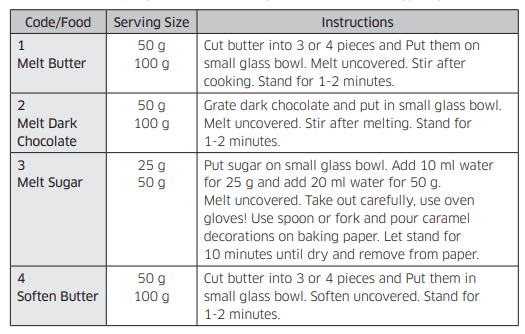
Using the soften/melt features
The Soften/Melt features has 4 pre-programmed cooking times. You do not need to set either the cooking times or the power level. You can adjust the number of servings by turning the Multi Function dial.
First, place the food in the centre of the turntable and close the door.
Use only containers that are microwave safe.
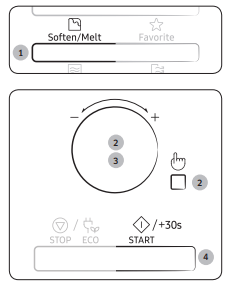
- Press the Soften/Melt button.
- Select the type of food that you are cooking by turning the Multi Function dial. And then press the Select button.
- Select the size of the serving by turning the Multi Function dial. (Refer to the table on the side.)
- Press the START/+30s button. The food is cooked according to the preprogrammed setting selected.
- The oven beeps 4 times.
- The end reminder signal will beep 3 times (once every minute).
- The current time is displayed again.
The following table presents the Soften/Melt programmes, quantities and appropriate instructions. Those programmes are running with microwave energy only.
Using the favorite features
If you often cook or reheat the same types of dishes, you can store the cooking times and power levels in the oven’s memory, so that you do not have to reset them each order.
You can store two different setting.
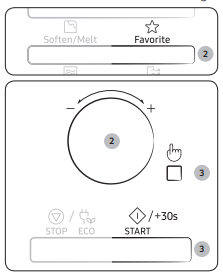
- Set your cooking programme as usual cooking time and power level) see Cooking/Reheating page again if necessary.
- Press Favorite button, then select the program that you want to save by turning the Multi Function dial.
P1 : First setting
P2 : Second setting
3. Press the Select button to finish the setting. Or, press the START/+30s button to start the program immediately. Your setting are now stored in the oven’s memory.
Example : If you want to store Microwave mode, Power 600 W and 3 minutes on P1.
- Press the Microwave button.
- Set the power 600 W by turning the Multi Function dial. And then press the Select button.
- Set the cooking time 3 minutes by turning the Multi Function dial.
- Press Favorite button, then select the P1.
- Press the Select button to finish the setting
To use the favorite setting
First, place the food in the centre of the turntable and close the door.
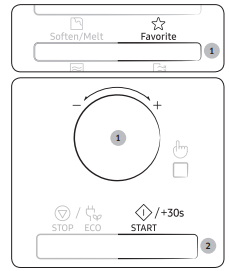
1. Press Favorite button, then select the program by turning the Multi Function dial.
P1 : First setting
P2 : Second setting
2. Press the START/+30s button. The food is cooked as requested.
Using the deodorization features
Use this features after cooking odorous food or when there is a lot of smoke in the oven interior.
First clean the oven interior.
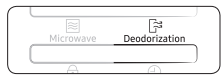
Press the Deodorization button after you have finished cleaning. As soon as you press the Deodorization button, the operation will start automatically. when it has finished, the oven beeps four times.
Using the child lock features
Your microwave oven is fitted with a special child lock programme, which enables the oven to be “locked” so that children or anyone unfamiliar with it cannot operate it accidentally.
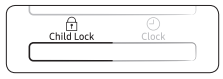
- Press the Child Lock button for 3 seconds.
- The oven is locked (no functions can be selected).
- The display shows “L”.
- To unlock the oven, press the Child Lock button for 3 seconds. The oven can be used normally.

Switching the beeper off
You can switch the beeper off whenever you want.
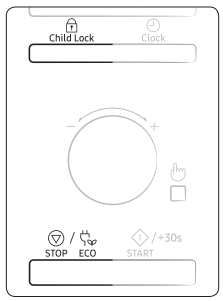
- Press the Child Lock and STOP/ECO button at the same time. The oven does not beep to indicate the end of a function.
- To switch the beeper back on, press the Child Lock and STOP/ECO button again at the same time. The oven operates normally
Cookware guide
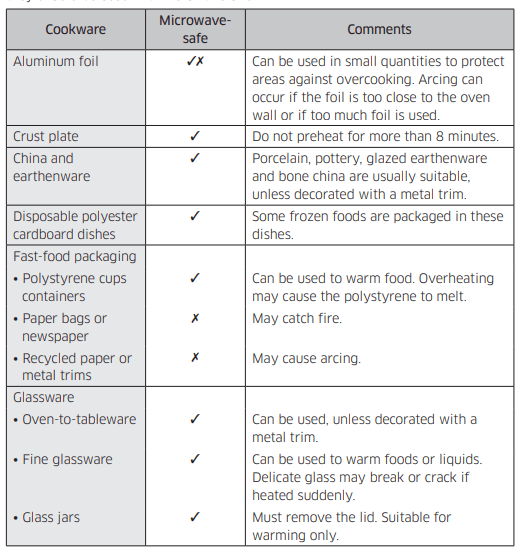
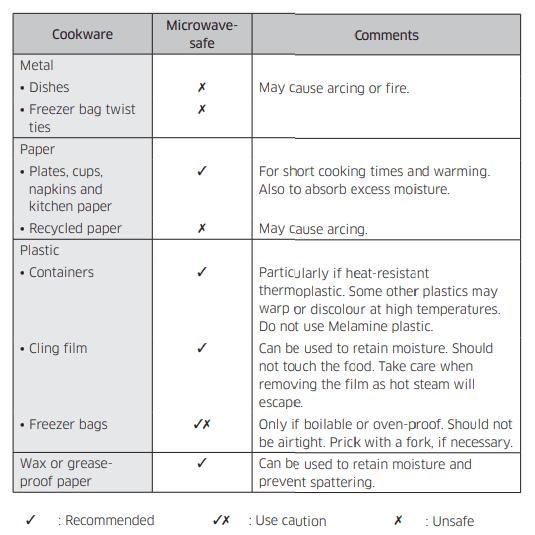
To cook food in the microwave oven, the microwaves must be able to penetrate the food, without being reflected or absorbed by the dish used.
Care must therefore be taken when choosing the cookware. If the cookware is marked microwave-safe, you do not need to worry.
The following table lists various types of cookware and indicates whether and how they should be used in a microwave oven.
Cooking guide
Microwaves
Microwave energy actually penetrates food, attracted and absorbed by its water, fat and sugar content.
The microwaves cause the molecules in the food to move rapidly. The rapid movement of these molecules creates friction and the resulting heat cooks the food.
Cooking
Cookware for microwave cooking:
Cookware must allow microwave energy to pass through it for maximum efficiency. Microwaves are reflected by metal, such as stainless steel, aluminium and copper, but they can penetrate through ceramic, glass, porcelain and plastic as well as paper and wood. So food must never be cooked in metal containers.
Food suitable for microwave cooking:
Many kinds of food are suitable for microwave cooking, including fresh or frozen vegetables, fruit, pasta, rice, grains, beans, fish, and meat. Sauces, custard, soups, steamed puddings, preserves, and chutneys can also be cooked in a microwave oven. Generally speaking, microwave cooking is ideal for any food that would normally be prepared on a hob. Melting butter or chocolate, for example (see the chapter with tips, techniques and hints).
Covering during cooking
To cover the food during cooking is very important, as the evaporated water rises as steam and contributes to cooking process. Food can be covered in different ways: e.g. with a ceramic plate, plastic cover or microwave suitable cling film.
Standing times
After cooking is over food the standing time is important to allow the temperature to even out within the food.
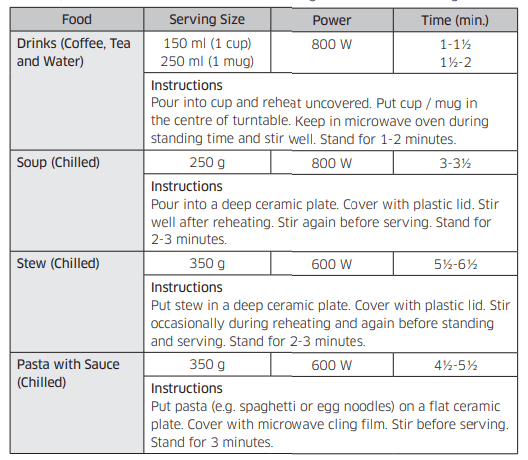
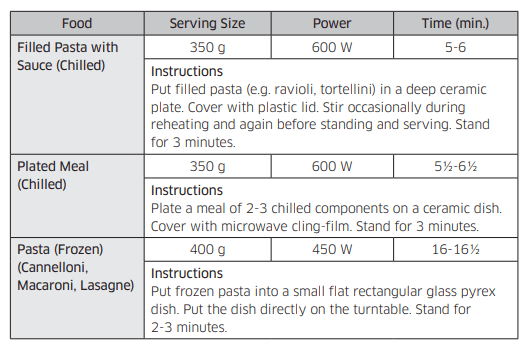
Reheating Liquids and Food
Use the power levels and times in this table as a guide lines for reheating.
Troubleshooting and information code
Troubleshooting
If you have any of the problems listed below try the solutions given
General
The buttons cannot be pressed properly
- Foreign matter may be caught between the buttons.
- Remove the foreign matter and try again.
- For touch models: Moisture is on the exterior.
- Wipe the moisture from the exterior.
- Child lock is activated.
- Deactivate Child lock.
The time is not displayed.
- The Eco (power-saving) function is set.
- Turn off the Eco function.
The oven does not work.
- Power is not supplied.
- Make sure power is supplied.
- The door is open.
- Close the door and try again.
- The door open safety mechanisms are covered in foreign matter.
- Remove the foreign matter and try again.
The oven stops while in operation.
- The user has opened the door to turn food over.
- After turning over the food, press the START/+30s button again to start operation.
The power turns off during operation.
- The oven has been cooking for an extended period of time.
- After cooking for an extended period of time, let the oven cool.
- The cooling fan is not working.
- Listen for the sound of the cooling fan.
- Trying to operate the oven without food inside.
- Put food in the oven.
- There is not sufficient ventilation space for the oven.
- There are intake/exhaust outlets on the front and rear of the oven for ventilation. Keep the gaps specified in the product installation guide.
- Several power plugs are being used in the same socket.
- Designate only one socket to be used for the oven.
There is a popping sound during operation, and the oven doesn’t work.
- Cooking sealed food or using a container with a lid may causes popping sounds.
- Do not use sealed containers as they may burst during cooking due to expansion of the contents.
The oven exterior is too hot during operation.
- There is not sufficient ventilation space for the oven.
- There are intake/exhaust outlets on the front and rear of the oven for ventilation. Keep the gaps specified in the product installation guide.
- Objects are on top of the oven.
- Remove all objects on the top of the oven.
The door cannot be opened properly
- Food residue is stuck between the door and oven interior.
- Clean the oven and then open the door.
Heating including the Warm function does not work properly.
- The oven may not work, too much food is being cooked, or improper cookware is being used.
- Put one cup of water in a microwave-safe container and run the microwave for 1-2 minutes to check whether the water is heated. Reduce the amount of food and start the function again. Use a cooking container with a flat bottom
The thaw function does not work.
- Too much food is being cooked.
- Reduce the amount of food and start the function again.
The interior light is dim or does not turn on.
- The door has been left open for a long time.
- The interior light may automatically turn off when the Eco function operates. Close and reopen the door or press the STOP/ECO button.
- The interior light is covered by foreign matter.
- Clean the inside of the oven and check again.
A beeping sound occurs during cooking
- If the Auto Cook function is being used, this beeping sound means it’s time to turn over the food during thawing.
- After turning over the food, press the START/+30s button again to restart operation
The oven is not level.
- The oven is installed on an uneven surface.
- Make sure the oven is installed on flat, stable surface.
There are sparks during cooking.
- Metal containers are used during the oven/thawing functions.
- Do not use metal containers.
When power is connected, the oven immediately starts to work.
- The door is not properly closed.
- Close the door and check again.
There is electricity coming from the oven.
- The power or power socket is not properly grounded.
- Make sure the power and power socket are properly grounded.
- Water drips.
- Steam emits through a door crack.
- Water remains in the oven.
- There may be water or steam in some cases depending on the food. This is not an oven malfunction.
- Let the oven cool and then wipe with a dry dish towel.
The brightness inside the oven varies.
- Brightness changes depending on power output changes according to function.
- Power output changes during cooking are not malfunctions. This is not an oven malfunction.
Cooking is finished, but the cooling fan is still running.
- To ventilate the oven, the cooling fan continues to run for about 3 minutes after cooking is complete.
- This is not an oven malfunction.
Turntable
While turning, the turntable comes out of place or stops turning.
- There is no roller ring, or the roller ring is not properly in place.
- Install the roller ring and then try again.
The turn table drags while turning
- The roller ring is not properly in place, there is too much food, or the container is too large and touches the inside of the microwave.
- Adjust the amount of food and do not use containers that are too large.
The turn table rattles while turning and is noisy
- Food residue is stuck to the bottom of the oven.
- Remove any food residue stuck to the bottom of the oven.
Information code
C-d0
- Control buttons are pressed over seconds.
- Clean the keys and check if there is water on the surface around key. If it occurs again, turn off the microwave oven over 30 seconds and try setting again. If it appears again, call your local SAMSUNG Customer Care Centre.
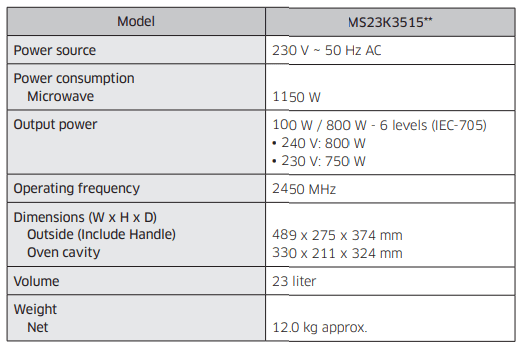
Technical specifications
SAMSUNG strives to improve its products at all times. Both the design specifications and these user instructions are thus subject to change without notice.
See other models: RS68N8330S9/EU RT46K6360SL/EU RH57J90407F/SS NV75J7570RS/EU WA75H4400SS/SP
Микроволновка является одним из самых популярных и удобных бытовых приборов в современной кухне. Использование микроволновой печи позволяет значительно сэкономить время на приготовление пищи. Однако, часто требуется разморозить продукты, чтобы приготовить их быстро и правильно. В этом случае вам на помощь придет функция Quick Defrost (Быстрое размораживание) в микроволновке Samsung.
Функция Quick Defrost разработана специально для быстрого и равномерного размораживания продуктов без их повреждения. Она оптимально распределяет мощность микроволновки и время обработки для получения наилучших результатов. Больше не нужно ждать несколько часов, чтобы разморозить продукты естественным путем. Благодаря Quick Defrost вы сможете сократить время размораживания до нескольких минут.
Чтобы воспользоваться функцией Quick Defrost в микроволновке Samsung, следуйте нескольким простым шагам. Во-первых, выберите функцию Quick Defrost на панели управления микроволновкой. Затем введите необходимый вес продукта, который требуется разморозить. Микроволновка автоматически расчитает оптимальное время для размораживания.
Содержание
- Что такое Samsung Quick Defrost?
- Как работает быстрое размораживание в микроволновке
- Преимущества использования Samsung Quick Defrost
- Как использовать функцию размораживания
Что такое Samsung Quick Defrost?
Благодаря Samsung Quick Defrost вы больше не будете тратить время на ожидание, когда продукт сам по себе растает. Функция Quick Defrost обеспечивает эффективное и быстрое размораживание путем автоматического расчета времени и мощности, необходимых для размораживания конкретного продукта.
Чтобы воспользоваться функцией Samsung Quick Defrost, достаточно выбрать в меню микроволновой печи опцию «Quick Defrost» и указать вес продукта. Печь самостоятельно определит оптимальное время размораживания и правильно настроит мощность, чтобы добиться наилучших результатов.
Кроме того, Samsung Quick Defrost также позволяет размораживать продукты не только равномерно, но и без повреждений. Функция заботится о том, чтобы продукт был разморожен только внутри, оставляя его поверхность холодной, что предотвращает рост бактерий и сохраняет внешний вид продукта.
Использование Samsung Quick Defrost позволяет значительно сократить время и усилия, затрачиваемые на размораживание продуктов, а также предотвращает потерю их полезных свойств и вкуса. Доверьтесь инновационным технологиям Samsung и наслаждайтесь легкостью и быстротой размораживания ваших любимых продуктов.
Как работает быстрое размораживание в микроволновке
Микроволновки серии Samsung Quick Defrost оснащены удобной функцией быстрого размораживания, которая позволяет размораживать продукты в намного более короткие сроки по сравнению с традиционными методами. Это происходит благодаря использованию специальных мощностей и настроек микроволновки.
Когда вы хотите разморозить какой-либо продукт, вам нужно выбрать функцию быстрого размораживания на панели управления микроволновкой Samsung Quick Defrost. Затем следуйте указаниям по времени, указанным в руководстве пользователя или на упаковке продукта.
Когда функция быстрого размораживания активирована, микроволновка начинает работать в режиме размораживания с помощью оптимальной комбинации мощности и времени. Это позволяет равномерно размораживать продукт без повреждения его структуры и качества.
- Время размораживания зависит от размера и типа продукта, поэтому важно следовать указаниям, указанным в руководстве пользователя, чтобы достичь наилучших результатов.
- Во время размораживания микроволновка выбирает оптимальные настройки мощности и времени, чтобы продукт разморозился равномерно со всех сторон.
- Если продукт не разморозился полностью, вы можете продолжить размораживание, добавив еще некоторое время. В этом случае вам следует проверить продукт через некоторое время и повторить процесс при необходимости.
Благодаря функции быстрого размораживания в микроволновках Samsung Quick Defrost вам больше не нужно предварительно размораживать продукты на протяжении нескольких часов. Теперь вы можете быстро и эффективно разморозить продукты прямо перед приготовлением, сэкономив время и силы.
Преимущества использования Samsung Quick Defrost
1. Быстрое и равномерное размораживание
С помощью функции Samsung Quick Defrost вы можете разморозить продукты за кратчайшее время. Технология равномерного размораживания позволяет сохранить структуру продукта и его вкусовые качества.
2. Максимальная удобность и простота
Функция Quick Defrost делает процесс размораживания максимально простым и удобным. Вам не нужно регулировать время размораживания вручную — система автоматически определит необходимое время и мощность для каждого типа продукта.
3. Сохранение полезных веществ
Благодаря точному и быстрому размораживанию с помощью Samsung Quick Defrost, вы можете сохранить максимальное количество полезных веществ в продуктах. Это особенно важно при размораживании мясных и рыбных продуктов.
4. Экономия времени и энергии
Функция Quick Defrost позволяет сэкономить ваше время и энергию, так как размораживание продуктов занимает гораздо меньше времени, чем при традиционных методах. Кроме того, микроволновая печь с функцией Quick Defrost потребляет намного меньше энергии, чем традиционный метод размораживания в холодильнике.
5. Многофункциональность
Вместе с функцией Quick Defrost, микроволновая печь Samsung предлагает множество других полезных функций, которые помогут вам готовить разнообразные блюда быстро и легко. Таким образом, вы сможете использовать свою микроволновку для размораживания, приготовления и подогрева на всех этапах приготовления пищи.
Как использовать функцию размораживания
Чтобы использовать функцию размораживания Samsung Quick Defrost в вашей микроволновке, следуйте простым шагам:
- Откройте дверцу микроволновки и поместите продукт, который хотите разморозить, на подходящую посуду или тарелку.
- Нажмите на кнопку «Размораживание» или выберите опцию «Quick Defrost» на панели управления микроволновки.
- Выберите вес продукта, который вам необходимо разморозить. Если вам неизвестен точный вес, выберите приблизительное значение, чтобы микроволновка могла определить время размораживания.
- Нажмите на кнопку «Старт» или подтвердите выбор опции размораживания на панели управления. Микроволновка начнет процесс размораживания.
- После завершения процесса размораживания микроволновка издаст звуковой сигнал, и вы сможете извлечь размороженный продукт.
Обратите внимание, что время размораживания может варьироваться в зависимости от типа продукта и его веса. Чтобы достичь наилучших результатов, рекомендуется следовать указаниям в инструкции к вашей микроволновке и проверять продукт во время размораживания, чтобы избежать его пересушки.
Темы статьи:
1. Подготовка к разморозке
2. Выбор функции Quick Defrost
3. Настройка веса продукта
4. Начало процесса разморозки
Пошаговая инструкция:
1. Подготовка к разморозке
Перед использованием функции Quick Defrost убедитесь, что продукт готов к размораживанию. Удалите пленку или упаковку, если они есть, и расставьте продукт по тарелке микроволновки равномерно, оставляя промежутки между кусочками.
2. Выбор функции Quick Defrost
Откройте дверцу микроволновки и нажмите на кнопку [Quick Defrost]. Обычно она расположена на главной панели управления, рядом с другими функциями разморозки.
3. Настройка веса продукта
После выбора функции Quick Defrost укажите вес продукта, который требуется разморозить. Для этого используйте цифровые кнопки, расположенные на панели управления. Нажимайте кнопки «+» или «-» для установки нужного веса.
4. Начало процесса разморозки
После настройки веса продукта нажмите на кнопку «Start» («Начать») для начала процесса размораживания. Микроволновка автоматически определит оптимальное время и мощность для разморозки продукта. В процессе размораживания микроволновка может потребовать переворот продукта или его перемешивание – следуйте инструкциям, которые появятся на экране.
Дополнительные советы:
— Не размораживайте продукты на больших скоростях, чтобы не испортить их вкус и текстуру.
— Перед размораживанием мяса и рыбы дайте им разморозиться в холодильнике.
— Если планируете приготовить продукт сразу после размораживания, укажите вес на 10-20% меньше, чтобы продукт не размяк и не потерял форму.
Чтобы включить функцию разморозки в микроволновке Samsung Quick Defrost 160, следуйте инструкциям:
1. Откройте дверцу микроволновки и поместите продукт внутрь.
2. Нажмите на кнопку Quick Defrost (Быстрая разморозка) на панели управления.
3. Введите вес продукта с помощью цифровых клавиш на клавиатуре.
4. Если нужно, выберите тип продукта или еду, которую вы собираетесь разморозить. В большинстве случаев этого не требуется.
5. Нажмите старт (Start), чтобы начать размораживание.
6. Микроволновка будет автоматически регулировать мощность и время размораживания в зависимости от типа и веса продукта.
7. Когда размораживание закончится, микроволновка издаст звуковой сигнал и прекратит работу.
8. Выньте продукт из микроволновки и проверьте его. Если продукт не полностью разморожен, повторите процедуру размораживания, но увеличьте время на несколько секунд.
Учитывайте, что каждая микроволновка может иметь свою собственную операционную систему, так что если у вас возникнут трудности с использованием функции Quick Defrost, обращайтесь к инструкции пользователя.