
Министерство
общего и профессионального образования
РФ
Пензенский
государственный университет
Кафедра «Автоматика
и телемеханика»
Семенов А.Д.
Проектирование
систем управления
Методические
указания к практическим занятиям
по
курсу «Автоматизация проектирования
систем и средств управления»
2011
Задание
на
практическую работу
-
По указанию
преподавателя выбрать технологический
объект, для которого нужно спроектировать
систему управления. -
Составить
техническое задание на проектирование. -
Составить
календарный план работ по проектированию
системы. -
Утвердить
техническое задание и календарный план
работ у преподавателя. -
Составить
математическую модель технологического
объекта и всей системы в Simulink. -
Провести настройку
параметров регуляторов, обеспечивающих
заданное качество регулирования. -
Подключить входные
и выходные параметры системы к ОРС –
серверу. -
Убедится в
правильном приеме и передачи данных
ОРС – сервером. -
«Рисование»
статических частей мнемосхемы в Data
Rate. -
Заполнение
мнемосхем динамическими элементами. -
«Подключение»
к разработанной математической
модели системы к Data
Rate
через ОРС –
сервер. -
Отладка системы.
-
Комплектация
системы. -
Оформление
технической документации.
1.
Экспериментальные методы настройки
ПИД – регуляторов
Экспериментальные
методы настройки регуляторов заключаются
в проведении экспериментов на действующей
системе регулирования или ее модели с
последующим изменением параметров
регулятора по результатам экспериментов.
Наиболее распространенным из этих
методов является метод, разработанный
американскими учеными Циглером и
Никольсом [60].
Метод
незатухающих колебаний. В
работающей системе отключаются
интегральная и дифференциальная
составляющие регулятора путем установки
времени изодрома
 и времени дифференцирования
 ,
,
т.е. в системе используется в П-закон
регулирования.
Путем
последовательного увеличения
 с
с
одновременной подачей небольшого
скачкообразного сигнала задания
добиваются возникновения в системе
незатухающих колебаний с периодом .
.
Это соответствует выведению системы
на границу колебательной устойчивости.
При возникновении данного режима работы
фиксируются значения критического
коэффициента усиления регулятора и периода критических колебаний в
системе При появлении критических колебаний
ни одна переменная системы не должна
выходить на уровень ограничения.
По
значениям
 и
и рассчитываются
параметры настройки модифицированного
ПИД-регулятора с передаточной функцией
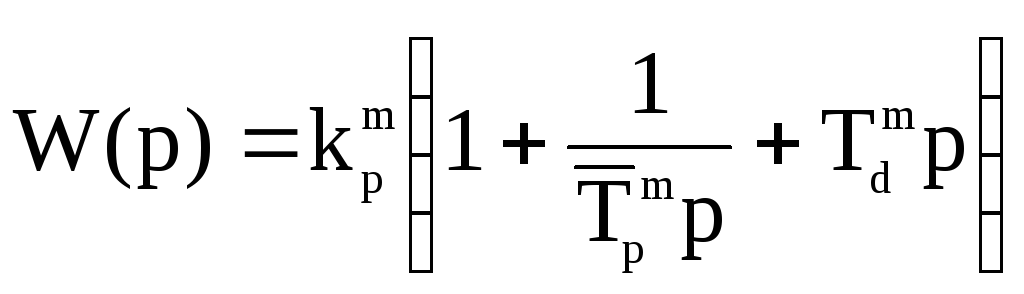 . (9.5)
П
— регулятор:  ;
;
ПИ
–регулятор: ,
, ;
;
ПИД
— регулятор:  ,
, ,
, .
.
Учитывая, что собственная частота
 ОУ совпадает с критической частотой
 колебаний
замкнутой системы с П-регулятором,
величины и
и могут быть определены по амплитуде и
периоду критических колебаний собственно
объекта управления.
В
том случае если выведение объекта на
границу колебательной устойчивости
нежелательно из — за возможности
возникновения аварийной ситуации или
к выпуску бракованной продукции
используется метод затухабщих колебаний.
Метод
затухающих колебаний. Применение
этого метода позволяет настраивать
регуляторы без выведения системы на
критические режимы работы. Также, как
и в предыдущем методе, для замкнутой
системы с П — регулятором, путем
последовательного увеличения
 добиваются возникновения в системе
колебательного переходного процесса
с логарифмическим декрементом затухания .
.
Далее определяется период этих колебаний и значения постоянных интегрирования
 и дифференцирования
 регулятора.
Для
ПИ-регулятора:
 .
.
Для
ПИД-регулятора:  ,
, .
.
После
установки вычисленных значений
 и
и на регуляторе производится дополнительная
подстройка коэффициента до получения исходного декремента
затухания ,
,
что обычно приводит к уменьшению на
на
20÷30 %. Аналогичный метод настройки
используется в адаптивных регуляторах
американской фирмы «Фоксборо».
OPC
(OLE for Process Control) — семейство программных
технологий, предоставляющих единый
интерфейс для управления объектами
автоматизации и технологическими
процессами.
Назначение
Стандарт
OPC
разрабатывался с целью сократить затраты
на создание и сопровождение приложений
промышленной автоматизации. В начале
90-х у разработчиков промышленного ПО
возникла потребность в универсальном
инструменте обмена данными с устройствами
разных производителей или по разным
протоколам обмена данными.
Суть
OPC
проста — предоставить разработчикам
промышленных программ универсальный
фиксированный интерфейс (то есть набор
функций) обмена данными с любыми
устройствами. В то же время разработчики
устройств предоставляют программу,
реализующую этот интерфейс (набор
функций).
Стандарты
OPC
— набор спецификаций стандартов. Каждый
стандарт описывает набор функций
определенного назначения. Текущие
стандарты:
OPC
DA
(Data
Access)
— основной и наиболее востребованный
стандарт. Описывает набор функций обмена
данными в реальном времени с ПЛК, РСУ,
ЧМИ, ЧПУ и другими устройствами.
OPC
AE
(Alarms
& Events)
— предоставляет функции уведомления
по требованию о различных событиях:
аварийные ситуации, действия оператора,
информационные сообщения и другие.
OPC
Batch
— предоставляет функции шагового и
рецептурного управления технологическим
процессом (в соответствии с стандартом
S88.01)
OPC
DX
(Data
eXchange)
— предоставляет функции организации
обмена данными между OPC-серверами
через сеть Ethernet.
Основное назначение — создание шлюзов
для обмена данными между устройствами
и программами разных производителей.
OPC
HDA
(Historical
Data
Access)
— в то время как OPC
Data
Access
предоставляет доступ к данным изменяющимся
в реальном времени, OPC
Historical
Data
Access
предоставляет доступ к уже сохраненным
данным.
OPC
Security
— определяет функции организации прав
доступа клиентов к данным системы
управления через OPC-сервер.
OPC
XML—DA
(XML—Data
Access)
— предоставляет гибкий, управляемый
правилами формат обмена данными через
SOAP
и HTTP.
OPC
UA
(Unified
Architecture)
— последняя по времени выпуска
спецификация, которая основана не на
технологии Microsoft
COM,
что предоставляет кросс-платформенную
совместимость.
Matrikon opc
Данный
свободно распространяемый программный
пакет состоит из трех частей:
-
MatrikonOPC
Analyzer -
MatrikonOPC
Explorer -
MatrikonOPC
Server for Simulation
-
MatrikonOPC
Analyzer
– утилита сбора системной информации.
Позволяет получить информацию о системе
(System
Information),
лог файлы (Log
Files),
конфигурационные файлы (Configuration
Files)
информацию о состоянии DCOM
в формате *.txt,
а так же их автоматическую упаковку в
zip-архив. -
MatrikonOPC
Explorer
– утилита, позволяющая находить и
подключаться к существующим OPC
– серверам, запущенным как на текущем
компьютере (local
host),
так и на любом компьютере в локальной
сети или сети интернет. -
MatrikonOPC
Server
for
Simulation
– утилита, позволяющая создавать
OPC-сервер.
Настройка
и
запуск
MatrikonOPC Server for Simulation и
MatrikonOPC Explorer.
Соседние файлы в папке Практика
- #
- #
- #
- #
- #
- #
Matrikon OPC Server for Allen Bradley
Page 23 of 49
4. M
ATRIKON
OPC E
XPLORER
Matrikon OPC Explorer is a general-purpose OPC client. It is included with all Matrikon OPC
Servers to ensure that users always have a reliable means to test the capabilities of the software.
Choose Matrikon OPC Explorer from the Start menu, directly under the Programs folder, to start
the program.
4.1 V
IEW
A
VAILABLE
OPC S
ERVERS
Matrikon OPC Explorer is an OPC client application. It connects to OPC server applications and
displays real-time values as they are received. When OPC Explorer starts up, it searches the
registry on the local computer and generates a list of program ID’s for available OPC servers. It
displays this list in a drop-down box at the top left-hand corner of
the window.
Every OPC server has a unique program ID. This is a human-
readable text string that is converted to a globally unique
identification number which COM then uses to identify the server.
Each server may have a version-specific program ID (with a
number appended to the end of the string), a version-independent
program ID (no number), or both. All Matrikon OPC Servers have
both types, but only the version- independent program ID shows up in the list.
If an error occurs during the communication session between OPC Explorer and an OPC server,
a message box appears explaining this. Click the Details button to get a more descriptive
explanation of the error. Deselect the “Disconnect Server” checkbox to ignore the error and
continue without disconnecting from the server. Choose Error Log from the View menu to
display a log of past errors. Right-click on the window and choose “Clear Log” to clear the log.
4.2 C
ONNECT TO AN
OPC S
ERVER
Select a program ID in the drop-down box. Choose Connect from the Server menu and then
choose either Local or Remote. The Local option will connect to a server running on the same
machine as the client while the Remote option will attempt to connect to an OPC server running
on another machine.
In the latter case, use the “Connect Remotely” dialog box to specify the remote machine. Remote
machines may be specified by UNC (i.e. “\\SYSDEV1”), DNS (i.e. “www.matrikon.com”), or IP
address (i.e. “198.162.0.1”). See the section on DCOM configuration for instructions on how to
configure OPC servers to receive remote connections.
COM will attempt to launch the OPC server if it is not currently running when the first client
attempts to connect to it. If the server runs as a local executable then COM will run it. If the
server runs as an NT service then COM will start it up.
Similarly, when the last client application disconnects from an OPC server, the server will shut
down. Matrikon OPC Servers wait for one minute before shutting down to avoid unnecessary
processing when client applications connect and disconnect frequently.
Your Donation Will Be Matched 1-to-1! Can You Chip In?
Dear Patron: Please don’t scroll past this. The Internet Archive is a nonprofit fighting for universal access to quality information. We build and maintain all our own systems, but we don’t charge for access, sell user information, or run ads. Instead, we’re powered by online donations averaging about $14. We’d be deeply grateful if you’d join the one in a thousand users that support us financially.
Right now, we have a matching gift campaign that will double the impact of every donation. We understand that not everyone can donate right now, but if you can afford to contribute this Tuesday, we promise it will be put to good use. Our resources are crucial for knowledge lovers everywhere—so if you find all these bits and bytes useful, please pitch in.
Your Donation Will Be Matched! Can You Chip In?
Dear Patron: Please don’t scroll past this. Right now we have a matching gift campaign that will double the impact of every donation. We understand that not everyone can give right now, but if you can afford to contribute this Tuesday, we promise it will be put to good use. If you find all these bits and bytes useful, please pitch in.

Contents
- 1 Matrikonopc Explorer User S Manual Matrikon Opc User
- 2 Matrikonopc Explorer Configuration
- 2.1 Conclusion
- 2.1.1 Related image with matrikonopc explorer user s manual matrikon opc user
- 2.1.2 Related image with matrikonopc explorer user s manual matrikon opc user
- 2.1 Conclusion
Unlock the transformative power of Matrikonopc Explorer User S Manual Matrikon Opc User with our thought-provoking articles and expert insights. Our blog serves as a gateway to explore the depths of Matrikonopc Explorer User S Manual Matrikon Opc User, empowering you with the information and inspiration to make informed decisions and embrace the opportunities that Matrikonopc Explorer User S Manual Matrikon Opc User presents. Join us as we navigate the dynamic world of Matrikonopc Explorer User S Manual Matrikon Opc User and unlock its hidden treasures. Matrikonopc a to v5-0-0-0 manual included explorer reliable intended servers users this manual should is introduction with explorer all test 9 software- the a of for ensure general use means it is capabilities which of- all client- with use matrikonopc Matrikonopc this always by have to the who manual opc is purpose users that users
Matrikonopc Explorer User S Manual Manualzz
Matrikonopc Explorer User S Manual Manualzz
This manual is intended for all users of matrikonopc explorer. it explains how to configure the software as well as how to perform common tasks. **connectivity issues? matrikon opc workshops can help!** more info get free access to this and hundreds of other downloads home > downloads > productmanuals > matrikonopc explorer manual. Matrikonopc explorer v5.0.0.0 user’s manual 9 introduction matrikonopc™ explorer is a general purpose opc client. it is included with all matrikonopc servers to ensure that users always have a reliable means with which to test the capabilities of the software. who should use this manual this manual is intended for use by all users of.

Matrikonopc Server For Simulation Matrikon Opc User Manual
Matrikonopc Server For Simulation Matrikon Opc User Manual
Matrikonopc explorer user’s manual matrikon opc user. user manual: open the pdf directly: view pdf . page count: 81 navigation menu. upload a user manual; versions of. Download now. configuration tool: use matrikon opc ua explorer to securely configurate and manage matrikon data broker nodes. with support opc ua reverse connect, ua explorer can be used locally and remotely. use ua explorer to manage mdb functionality like: opc ua server federation mdb reverse connect user configuration and more. Each opc server from matrikonopc has built in opc security and redundancy. free downloads are available. matrikonopc is the world’s largest provider of opc servers, opc clients and opc historians. matrikonopc is a charter member of the opc foundation, and has demonstrated a commitment to developing opc as the industrial connectivity standard. Each opc server from matrikonopc has built in opc security and redundancy. free downloads are available. matrikonopc is the world’s largest provider of opc servers, opc clients and opc historians. matrikonopc is a charter member of the opc foundation, and has demonstrated a commitment to developing opc as the industrial connectivity standard.

Matrikonopc Server For Simulation Matrikon Opc User Manual
Matrikonopc Server For Simulation Matrikon Opc User Manual
Each opc server from matrikonopc has built in opc security and redundancy. free downloads are available. matrikonopc is the world’s largest provider of opc servers, opc clients and opc historians. matrikonopc is a charter member of the opc foundation, and has demonstrated a commitment to developing opc as the industrial connectivity standard. Each opc server from matrikonopc has built in opc security and redundancy. free downloads are available. matrikonopc is the world’s largest provider of opc servers, opc clients and opc historians. matrikonopc is a charter member of the opc foundation, and has demonstrated a commitment to developing opc as the industrial connectivity standard. Matrikonopc explorer user’s manual en english deutsch français español português italiano român nederlands latina dansk svenska norsk magyar bahasa indonesia türkçe suomi latvian lithuanian český русский български العربية unknown. Matrikon opc ua tunneller provides an intuitive, user friendly interface to help you get your classic to classic opc connectivity and classic to opc ua bridging up and running quickly and efficiently. this manual is intended for all users of the matrikon opc ua tunneller, download it and start to use it and get ready for iiot.

Matrikonopc Server For Simulation Matrikon Opc User Manual
Matrikonopc Server For Simulation Matrikon Opc User Manual
Matrikonopc explorer user’s manual en english deutsch français español português italiano român nederlands latina dansk svenska norsk magyar bahasa indonesia türkçe suomi latvian lithuanian český русский български العربية unknown. Matrikon opc ua tunneller provides an intuitive, user friendly interface to help you get your classic to classic opc connectivity and classic to opc ua bridging up and running quickly and efficiently. this manual is intended for all users of the matrikon opc ua tunneller, download it and start to use it and get ready for iiot.
Matrikonopc Explorer Configuration
Matrikonopc Explorer Configuration
demonstrates the configuration of matrikonopc’s test client, opc explorer. tutorial básico del uso de las herramientas matrikon opc: matrikonopc server for dde matrikonopc explorer matrikonopc learn in few minutes how to configure the opc server for siemens plc. download here the opc server and try it yourself: how to configure opc server allen bradley in few minutes, now with opc ua option. try yourself and download the opc server how to configure the dcom with matrikon opc tunneller; download the matrikon opc tunneller and try it matrikonopc how to configure opc server siemens plc. tutorial: how to install a matrikon opc server. download any opc server from our list and start to see you data: download link: matrikonopc opc ua products opc ua explorer.aspx sk cz hu pl support: se habla sobre el opc y el software matrikonopc, dando una explicación del interfaz y su uso y un ejemplo simple en el connect matrikon desktop historian with ypkogawa exa opc gateway server and matrikon esay trend. matrikonopc how to configure opc server allen bradley. how to configure de opc server for modbus from matrikon opc. try it yourself, download the opc server for modbus here:
Conclusion
Having examined the subject matter thoroughly, there is no doubt that the post provides helpful knowledge about Matrikonopc Explorer User S Manual Matrikon Opc User. Throughout the article, the author demonstrates a deep understanding on the topic. Notably, the section on X stands out as a highlight. Thank you for this post. If you would like to know more, feel free to contact me via the comments. I am excited about hearing from you. Moreover, below are a few similar posts that might be helpful:
dOPC Explorer
An easy to use OPC DA test, diagnostic & network communication tool.
With dOPC Explorer you can connect to any Data Access OPC UA & Classic DA or OPC XML DA server. This OPC Browser is an easy to use OPC diagnostic and network communication tool.
You can browse for OPC DA servers, browse for OPC server items, read item properties, create OPC groups and write OPC items. Our OPC Explorer is compliant with the OPC UA Unified Architecture 1.x, OPC DA 1.0, 2.0 and 3.0 specification and OPC XML DA 1.01 specification from OPC Foundation.
Also helpful for integrators, developers and others using OPC, is the integrated trend/time graph. With the embedded Trend Graph you can view changes in data over time.
| OPC Explorer overview | |
|---|---|
| Designed for: Windows 11, 10, 8, 7, Vista, XP | |
| Connections to OPC UA (Unified Architecture) servers | |
| Connections to OPC Classic COM DA 1, 2 and 3 servers | |
| Connections to OPC XML DA servers | |
| Smart and simple user interface | |
| Multiple and remote OPC server connections supported | |
| Network support | |
| Trend/Time Graph | |
| Unicode support | |
| OPC portable software, e.g. executable from USB drive | |
| Free (for non commercial use) | |
| For mobile version: click here. |
Бесплатно
Скачать бесплатно с сайта MATRIKON, ссылка.
Лицензия: MatrikonOPC OPC Explorer, код MTKOPC-AP1120
- Наименование: OPC Explorer
- Артикул: MTKOPC-AP1120
- Налог: НДС не облагается
- Лицензия: ПО с ключом, в электронном виде
- Сроки: в течение 10-15 рабочих дней с момента предоплаты.
- Условия оплаты: 100% предоплата.
- Производитель: http://www.matrikonopc.com/.
В стоимость продукта входит 1 год технической поддержки от производителя. Стоимость поддержки со 2-го года владения лицензией необходимо запрашивать отдельно.
Лицензии Matrikon — именные. Для получения лицензии необходимо предоставить данные о конечном заказчике — владельце лицензии.
MatrikonOPC Explorer — это бесплатный клиент OPC с функциями тестирования и устранения неполадок серверов OPC и соединений OPC. В отличие от других клиентов OPC, MatrikonOPC Explorer легко устанавливается и быстро предоставляет результаты благодаря интуитивно понятному пользовательскому интерфейсу и оптимизированному рабочему процессу. Помимо простого тестирования соединения, MatrikonOPC Explorer предоставляет расширенные функции, включая нагрузочное тестирование сервера OPC, определение защищенных серверов OPC и возможность подключения к ним для проверки правильности конфигурации.
MatrikonOPC Explorer — это полнофункциональный клиент OPC, предназначенный для помощи во время установки, тестирования и настройки серверов, совместимых с OPC.
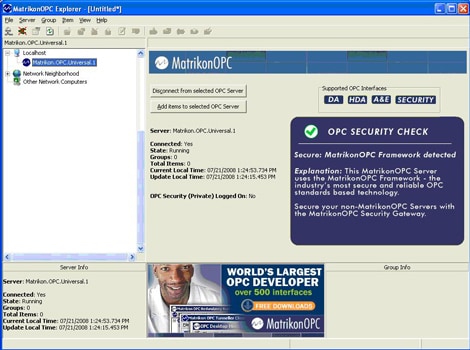
MatrikonOPC Explorer — это продвинутый клиент OPC, поскольку он предоставляет пользователям, какие интерфейсы OPC поддерживаются на их сервере OPC. Это будет включать DA, HDA, сигналы тревоги и события (A&E) и безопасность OPC. С добавлением OPC Security пользователи теперь смогут безопасно входить в систему для доступа к данным на своем сервере OPC.
Цены Matrikon
Смотреть всю продукцию MatrikonOPC
MatrikonOPC OPC Explorer, код MTKOPC-AP1120
Оплата возможна только после подтверждения менеджером!
Тип использования лицензии
Для сервера, Бесплатная
Акт передачи прав владения
Лицензионный, право владения
Единый реестр росс. ПО для ЭВМ и БД
Нет