
JBL Pulse 3 Manual

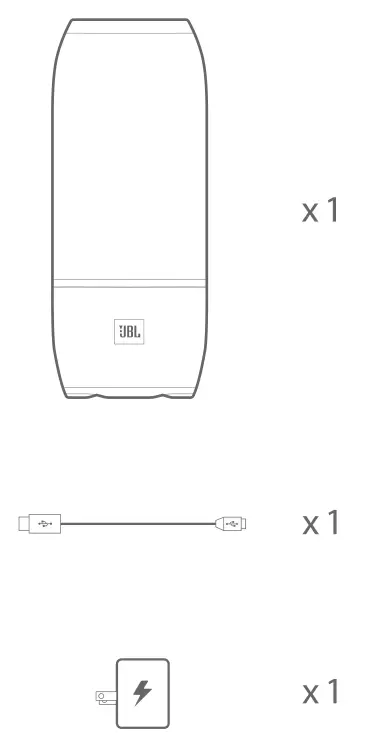
What’s in the box
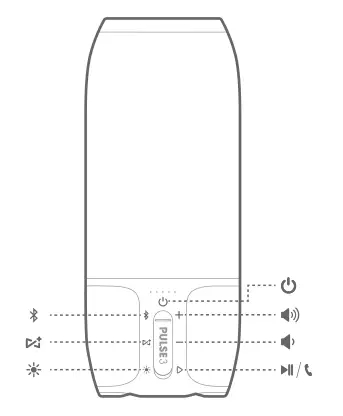
Buttons
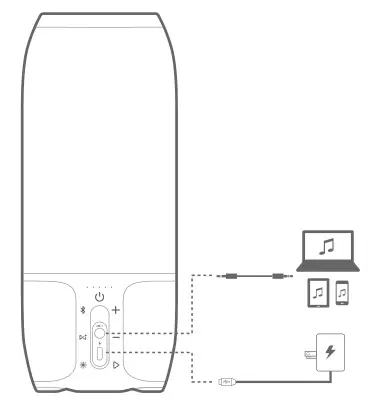
Connections
Bluetooth ®
Bluetooth connection

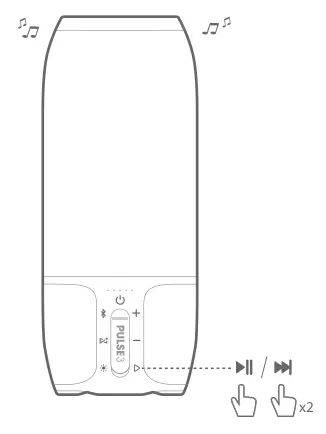
Music control
Speakerphone

Voice Assistant
Tap “Voice Assistant” in the JBL Connect app, to make the “ ” button as the activation key of Siri or Google Now on your phone. For JBL Connect app, Get it from Google Play or App Store
Press the “” button on the speaker to activate Siri or Google Now on your phone. Please make sure the Siri or Google Now is enabled on your phone.

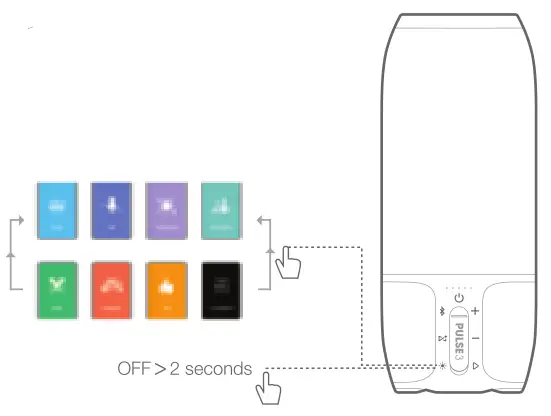
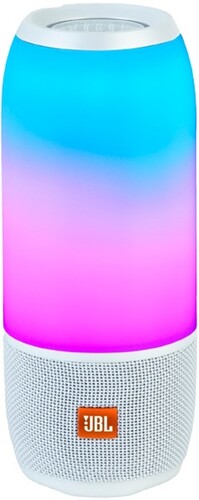
Lightshow
JBL Connect+
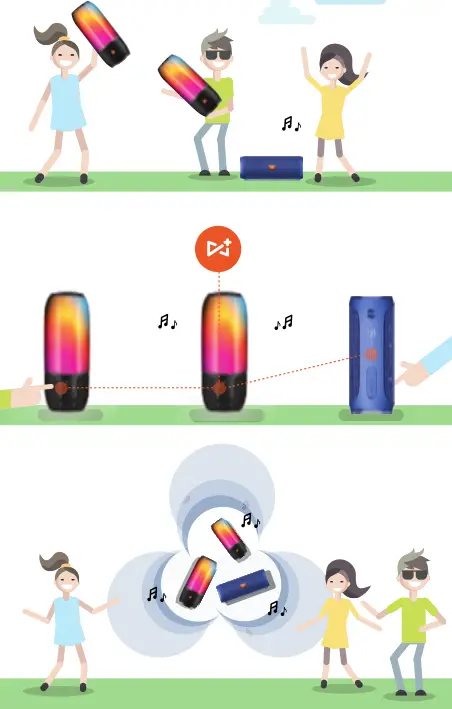
Wirelessly links more than 100 pcs JBL Connect+ compatible speakers together.
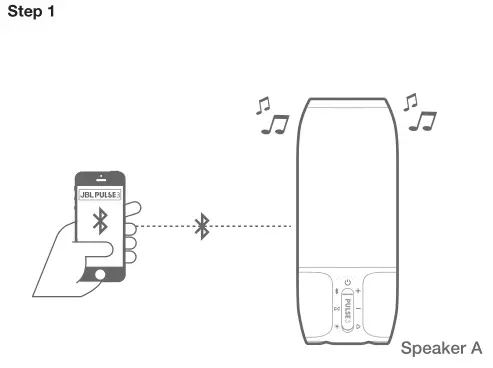
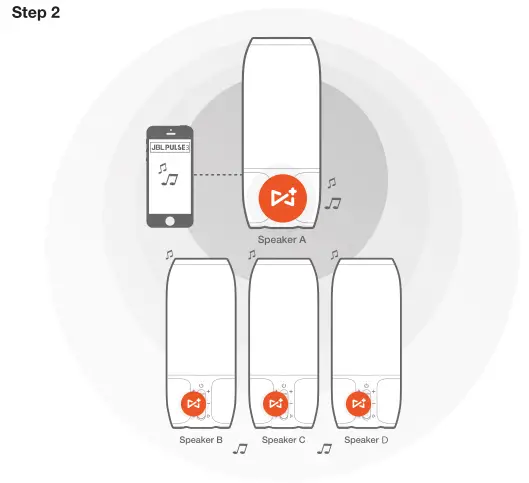
Play music on one of you JBL speakers and then press the JBL Connect+ button on all desired speakers to start pairing. All the other JBL speakers will play same music from the music source
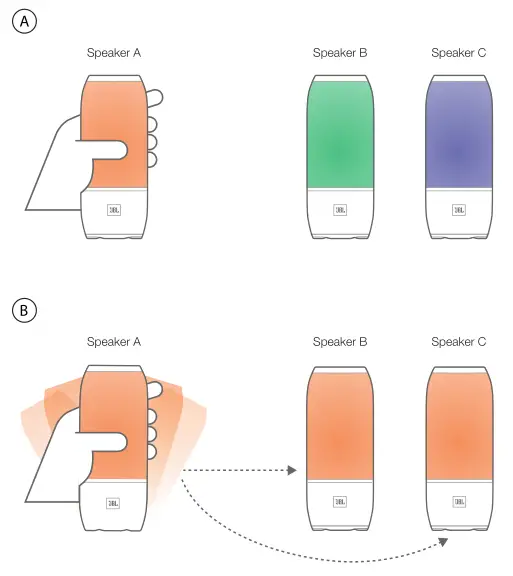
Color Sync
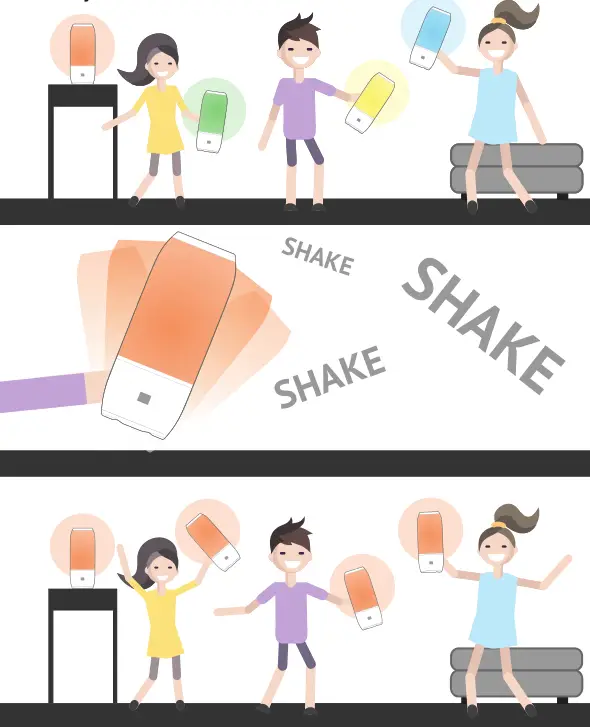
Lightshow with JBL Connect App
Swipe the screen left and right to change the lightshow
Tap icon to change Pulse 3 color
Tap icon to adjust Pulse 3 brightness

Download the JBL Connect app for the following features: stereo setup, firmware upgrade, and device renaming.
LED Behavior

Warning
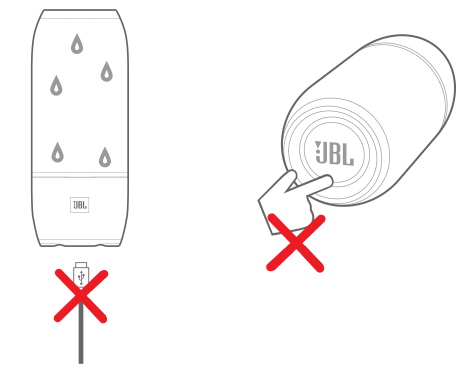
JBL Pulse 3 is IPX7 waterproof.
IMPORTANT: To ensure that the JBL Pulse 3 is waterproof, please remove all cable connections and tightly close the cap; exposing the JBL Pulse 3 to liquids without doing so may result in permanent damage to the speaker. And do not expose JBL Pulse 3 to water while charging, as doing so may result in permanent damage to the speaker or power source. IPX7 waterproof is defined as the speaker can be immersed in water up to 1m for up to 30 minutes.
Specification
- Bluetooth version: 4.2
- Support: A2DP V1.3, AVRCP V1.6, HFP V1.6, HSP V1.2
- Transducer: 3 x 40mm
- Output power: 20W
- Frequency response:65Hz – 20kHz
- Signal-to-noise ratio: ≥80dB
- Battery type: Lithium-ion polymer (3.7V, 6000mAh)
- Battery charge time:4.5 hours @ 5V 2.3A
- Music playing time: up to 12 hours (varies by volume level and audio content)
- Bluetooth transmitter power:0 – 9dBm
- Bluetooth transmitter frequency range: 2.402 – 2.480GHz
- Bluetooth transmitter modulation: GFSK, π/4-DQPSK, 8DPSK
- Dimensions (H x W x D):223 x 92 x 92 (mm)
- Weight: 960g

The Bluetooth ® word mark and logos are registered trademarks owned by Bluetooth SIG, Inc. and any use of such marks by HARMAN International Industries, Incorporated is under license. Other trademarks and trade names are those of their respective owners.



TR03626_F


Quick Start Guide
Guide de démarrage rapide
1 What’s in the box

Quick Start Guide
Guide de démarrage rapide
2 Buttons
3 Connections

Quick Start Guide
Guide de démarrage rapide
4Bluetooth®
1.Bluetooth connection
2. Music control
 x2
x2

Quick Start Guide
Guide de démarrage rapide
3. Speakerphone

Quick Start Guide
Guide de démarrage rapide
5 Voice Assistant
Tap “Voice Assistant” in the JBL Connect app, to make the “  ” button as the activation key of Siri or Google Now on your phone.
Si vous souhaitez que le bouton « Kit mains-libres » active Siri ou Google Now sur votre téléphone, touchez « » dans l’application JBL Connect. / Toque «Voice Assistant» (Asistente de voz) en la aplicación JBL Connect para que el botón »  » (Altavoz) sea la clave de activación de Siri o Google Now en su teléfono. / Toque em “Assistente de voz” no aplicativo JBL Connect para tornar o botão “ ” a chave de ativação da Siri ou do Google Now em seu telefone. / Tippe in der JBL Connect App auf „Voice Assistant“ (Sprachassistent), um die als Aktivierungstaste für Siri oder Google Now auf deinem Telefon zu verwenden. / Toccare “Voice Assistant” (Assistente vocale) nell’app JBL Connect, per rendere il pulsante “ ” (Vivavoce) il tasto di attivazione di Siri o di Google Now sul proprio telefono. / Tik op «Spraakassistent» in de JBL Connect-app om de knop » » tot activeringstoets te maken voor Siri of Google Now opje telefoon. / Trykk på «Voice Assistant» i appen JBL Connect for å gjøre » » til aktiveringstasten for Siri eller Google Now på telefonen. / Aseta ”
  ”-painike Sirin tai Google Now’n aktivointinäppäimeksipuhelimessasinapauttamalla ”Voice Assistant” JBL Connect -sovelluksessa. /
« » JBL Connect,
«  » Siri
Google Now . / Tryck på ”Voice Assistant” i appen JBL Connect, så blir ” ”-knappen aktiveringsknapp för Siri eller Google Now på din telefon. / Tryk på
|
«Voice Assistant» i JBL Connect appen for at gøre » » til aktiveringstast for Siri eller |
||
|
Google Now på din telefon. / JBL Connect [Voice Assistant] |
||
|
[ |
] Siri Google Now |
|
|
/ Za pomocą aplikacji JBL Connect |
||
|
wybierz opcję „Asystent głosowy”, aby przycisk „ |
” powodował uruchomienie aplikacji |
|
|
Siri lub Google Now w telefonie. / “ |
” Siri Google Now |
|
|
JBL Connect “Voice Assistant” . / JBL |
||
|
Connect “Voice Assistant” “ ” |
||
|
Siri Google / JBL Connect |
||
|
Siri Google Now / |
Ketuk “Voice Assistant” pada aplikasi JBL Connect, untuk membuat tombol “  ” sebagai tombol aktivasi Siri atau Google Now di ponsel Anda.
Siri  — JBL Connect Voice Assistant
. Google Now
Siri  JBL Connect • • Voice Assistant ••• • — € ‚ƒ
.„ … • Google Now

Quick Start Guide
Guide de démarrage rapide
Press the “ ” button on the speaker to activate Siri or Google Now on your phone. Please make sure the Siri or Google Now is enabled on your phone.
Appuyez sur le bouton « » de l’enceinte pour activer Siri ou Google Now sur votre téléphone. Veuillez vérifier que Siri ou Google Now sont activés sur votre téléphone. / Pulse el botón »
  » en el altavoz para activar Siri o Google Now en el teléfono. Compruebe que Siri o Google Now esté activado en el teléfono. / Pressione o botão “
  ” na caixa de som para ativar o Siri ou o Google Now em seu smartphone. Verifique se o Siri ou o Google Now estão ativados em seu dispositivo. /

Quick Start Guide
Guide de démarrage rapide
Drücke die „ “-Taste auf dem Lautsprecher, um Siri oder Google Now auf deinem Smartphone zu
aktivieren. Überprüfe bitte, ob Siri oder Google Now auf deinem Telefon aktiviert ist. / Premi il tasto « » sul diffusore per attivare Siri o Google Now sul telefono. Assicurati che Siri o Google Now siano abilitati sul telefono. / Druk op de «
 «-knop op de luidspreker om Siri of Google Now op je telefoon te activeren. Zorg ervoor dat Siri of Google Now is ingeschakeld op je telefoon. / Trykk på «
 «-knappen på høyttaleren for å aktivere Siri eller Google Now på telefonen. Sørg for at Siri eller Google Now er aktivert på telefonen. / Paina
  kaiuttimessa puhelimen Siritai Google Now -sovelluksen aktivoimiseksi. Varmista, että Siri tai Google Now on otettu käyttöön puhelimessasi. /
« » , Siri Google Now .
, Siri Google Now . / Tryck på »  » -knappen på högtalaren för att starta Siri eller Google Nu i telefonen. Se till att du har aktiverat Siri
eller Google Nu i telefonen. / Tryk derefter på » » på højttaleren for at aktivere Siri eller Google Now på din telefon. Sørg for, at Siri eller Google Now er aktiveret på din telefon. / Siri
Google Now Siri Google Now /
|
Naciśnij przycisk „ ” na głośniku, aby włączyć aplikację Siri lub Google Now na smartfonie. Upewnij |
||
|
się, że aplikacja Siri lub Google Now na smartfonie jest włączona. / “ ” |
||
|
Siri Google |
Now . Siri |
Google Now |
|
. |
/ “ ” Siri Google |
|
|
Siri Google |
Now / |
Siri |
Google Now Siri Google Now / Tekan tombol “ ” pada speaker
untuk mengaktifkan Siri atau Google Now di telepon Anda. Pastikan Siri atau Google Now dihidupkan di telepon Anda. /  Siri Google Now
. -Siri Google Now .
.ﻒﺗﺎﻬﻟا ﻲﻓ Google Now وأ Siri ﻂﻴﺸﻨﺘﻟ ﺔﻋﺎﻤﺴﻟا ﻰﻠﻋ »  » ﺔﻴﺟرﺎﺨﻟا ﻒﺗﺎﻬﻟا ﺔﻋﺎﻤﺳ رز ﻰﻠﻋ ﻂﻐﻀﻟا ﻦﻜﻤﻳ
.ﻒﺗﺎﻬﻟا ﻲﻓ نﺎﺘﻨﻜﻤّﻣُGoogle Now وأ Siri نأّ ﻦﻣ ﺪﻛﺄﺘﻟا ﻰﺟﺮﻳُ
6 Lightshow
OFF 2 seconds

Quick Start Guide
Guide de démarrage rapide
7 JBL Connect+
Wirelessly links more than 100 pcs JBL Connect+ compatible speakers together. / Connectez sans fil plus de 100 enceintes compatibles JBL Connect+. / Vincula de forma inalámbrica más de 100 unidades de altavoces compatibles con JBL Connect+. / Conecte mais de 100 caixas de som JBL Connect+ umas às outras / Verbindet mehr als 100 einzelne JBL Connect+-kompatible Lautsprecher miteinander. / Collega fra di loro senza fili più di 100 diffusori compatibili JBL Connect+. / Verbind draadloos meer dan 100 JBL Connect + compatibele luidsprekers met elkaar. / Linker trådløst sammen mer enn 100 stk JBL Connect+-kompatible høyttalere. / Linkittää langattomasti yli 100 kpl JBL Connect+ -yhteensopivia kaiuttimia. / 100 ,
• JBL Connect+ / Kopplar trådlöst samman över 100 st högtalare som är
kompatibla med JBL Connect+. / Forbinder mere end 100 JBL Connect+ kompatible højttalere trådløst. / 100 JBL
/ Łączy bezprzewodowo ponad 100 kompatybilnych głośników JBL Connect+. / 100
JBL Connect+ . / 100JBL Connect+ / 100 JBL Connect+ / Secara nirkabel menghubungkan lebih dari 100 speaker yang kompatibel dengan JBL Connect+ secara bersama-sama. /
.JBL Connect+ 100
.†‡ˆ ‰ Š‹ • JBL Connect+ ŒŽ ‘ ’•“ ”‡ 100 ‘ •– “•—
Step 1
Speaker A
 Loading…
Similar Devices: SP-100AWX-W, ESC-044, 49DPQ110
-
SP-100AWXSP-100AWX-WOwners’ Manual for Models:All Weather Extreme Speakers200 New Highway Amityville, New York 11701 • 631-957-8700 www.specotech.comWall Mounting:First, determine the best mounting hardware for the surface typewhere your AWX Speakers will be installed. For a wood base installation, use long screws. For less dense …
SP-100AWX-W, 2
-
AZATOM® Venture VT100User ManualThis manual is available to download online at www.azatom.comSpotify is the world’s most popular streaming service. If you subscribe to Spotify Premium, you can control your Venture VT100 with your phone or tablet via the Spotify app, by pressing the Spotify Connect icon and selecting your speaker. The Venture VT100 comes w …
Venture VT100, 24
-
Deutsch 3 — 12Ελληνικά 13 — 22English 23 — 32Español 33 — 42Français 43 — 52Magyar 53 — 62Italiano 63 — 72Nederlands 73 — 82Polski 83 — 92Português 93 — 102Русский язык 103 — 112Svenska 113 — 122Türkçe 123 — 132Imtron GmbHWankelstraße 585046 IngolstadtGermanywww.imtron.euwww.peaq-online.comDEBedienungsanleitungITManuale dell’utente …
PPA44BT-W, 133
-
User Manual Fugoo Style Bluetooth Speaker Model F6SP page 1 1/10/2020 Fugoo Style Bluetooth Speaker User Manual Version 2020-1 January 9, 2020 Model F6ST Contents In the Box ……………………………………………………………………………………………………………. …
Style, 9
-
COMPANION® 5©2007 Bose Corporation, The Mountain,Framingham, MA 01701-9168 USAAM295925 Rev.04MULTIMEDIA SPEAKER SYSTEMOwner’s GuideGuía de usarioNotice d’utilisationowners.bose.com/companion5Companion 5_Cover 3L.fm Page 1 Tuesday, February 10, 2009 10:04 AM …
Companion 5, 21
-
Portable exibility meets simplicity in the Sony® RDP-M7iP/PINK. Enjoy rich, full sound on the go, with up to 10 hour AAA battery life.3 Packaged with a full-function wireless remote control, all in a sleek and easy to use portable dock for iPod® and iPhone®. Rich, full sound Stereo speakers with rich bass tones deliver a more complete, enjoyable liste …
RDP-M7iPPINK, 2
-
PROCELLA AUDIO LIMITED WARRANTY Procella Audio components are warranted to be free from original manufacturing defects as follows: For all speaker and crossover components, for a period of five years from date of delivery to the original purchaser from an authorized dealer. For all amplifier components, for a period of two years from date of delivery to …
P1, 2
-
CROSSOVERNETWORK013-7600-05278-EPWOOFER16PR80BYG-DW02-EPTWEETER18DA25BF-DT01-EPBLKREDREDBLKLS326C104-c05278a00-ebacL1R3R2-T+C3W+C2R4R1W-abSWWIN-C1SWTIN+EXPLODEDVIEWWIRING DIAGRAM911117610543218JBL LS326C Studio™L SeriesJBL Loudspeaker Troubleshooting/Repair TipsMost customers prefer to do simple loudspeaker repairs themselves. By following the steps below, …
L Series, 1
Колонка портативная JBL Pulse 3
20 Вт, стерео, Bluetooth, AUX, 6000 мА*ч, время работы — 12 ч,белый
подробнее

18
Код товара: 1176316