
Перейти к контенту

Русские электронные инструкции по эксплуатации
Постоянно обновляемый большой каталог документации по эксплуатации и использованию современных устройств и оборудования на русском языке. Бесплатное скачивание файлов.
Поиск:
Главная
Просмотр инструкции в pdf


Инструкция по эксплуатации автоматической кофемашины Krups Roma Black EA810870.
Скачать инструкцию к автоматической кофемашине Krups Roma Black EA810870 (5,13 МБ)

Автоматические кофемашины
« Инструкция к автоматической кофемашине Krups Quattro Force EA82FD10
» Инструкция к автоматической кофемашине Krups Quattro Force EA82F010
Вам также может быть интересно

Инструкция к кофемашине Krups Arabica Espresso EA811010

Инструкция к автоматической кофемашине Krups Quattro Force EA82F810

Инструкция к кофемашине Krups Espresseria EA82FD10

Инструкция к кофемашине Krups Evidence Plus EA894810

Инструкция к кофемашине Krups EA891D10 Evidence

Инструкция к автоматической кофемашине Krups Roma White EA810570

Инструкция к кофеварке Krups Nespresso

Инструкция к кофеварке Krups Nescafe Dolce Gusto Genio KP160T10
Добавить комментарий
Имя *
Email *
Сайт
Комментарий


Сохранить моё имя, email и адрес сайта в этом браузере для последующих моих комментариев.
- Добавить инструкцию
- Заказать инструкцию
- Политика конфиденциальности
-
Home
-
Instructions for use
-
Beverages
-
Full automatic


User manual and frequently asked questions Essential Automatic Espresso
Essential Automatic Espresso
Delivering the essence of espresso straight to your cup
Documentation
FAQ
Yes, fully-automatic espresso machines are factory calibrated for a water hardness level of 3, but they can be recalibrated depending on the type of water in your area.
To determine the hardness of your water, (0 = very soft, 1 = soft, 2 = slightly hard, 3 = hard, 4 = very hard) dip one of the paper test strips provided with your device into your water for one second, then wait 1 minute for the result or contact your water provider. You can also contact your town hall to get this information.
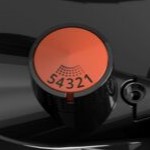
Turn the adjustment knob located in the coffee bean container.
This setting should be applied during grinding and notch by notch (you can hear the noise of the grinder before the coffee starts to flow).
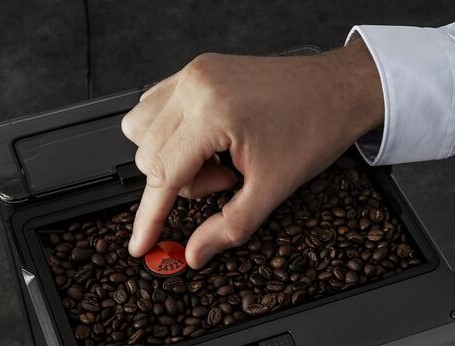
According to model:

The quality of the water has a strong influence on the quality of the flavours. Limescale and chlorine can affect the taste of your drinks.
In order to preserve all the flavours, we recommend that you use tap water (domestic drinking water) with the Claris Aqua Filter System cartridge, or bottled water with a dry residue of less than 800 mg/L (see bottle label).
Also remember to descale your machine if it indicates a descaling alert.
The Claris cartridge must be replaced approximately every 50 litres of water or at least every 2 months.
Depending on your model, the machine may automatically prompt you to replace it.
Scale deposits naturally form in your appliance and, without intervention, can affect the performance of the machine.
Regular descaling of your machine will preserve the proper functioning of your machine and ensure its longevity by eliminating all deposits of limescale or scale in all circuits that are in regular contact with water and susceptible to scaling.
All of our machines are equipped with an alert feature that lets you know when to descale.
It may be normal not to have any warning messages if your steam/hot water consumption is low.
Your espresso machine is equipped with a counter and automatically alerts you when descaling is necessary after a certain number of steam/hot water brews and according to several parameters: your consumption, the water hardness setting…
Your espresso machine is equipped with a counter and will automatically alert you when descaling is necessary after a certain number of steam/hot water brews and according to several parameters: your consumption, the water hardness setting, etc.
It is therefore normal not to receive alerts if your steam/hot water consumption is low.
It is not necessary to descale apart from the machine alerts.
Follow the instructions in the user manual for descaling your machine.
We recommend that you descale as soon as the machine displays the alert and that you use the descaling product whose dosage has been perfectly adapted and tested by our teams to act effectively against limescale and scale, without any risk of aggression or damage to the machine’s internal components.
It is not necessary to descale apart from warning messages.
After a certain number of coffees, it is important to clean and degrease the entire coffee circuit of the machine with a cleaning tablet to preserve the taste quality of your drinks.
The machine is equipped with a cleaning programme and automatically alerts you when it is necessary, depending on several parameters: your consumption, the water hardness setting, etc.
We recommend that you clean the machine as soon as it displays the alert and that you use the tablets whose dosage has been perfectly adapted and tested by our teams to act effectively, without any risk of aggression or damage to the machine’s internal components.
Your machine has a unique design using hydraulic technology to make perfect coffees.
This construction allows the coffee circuit to be rinsed under pressure and automatically drained after each cup: the guarantee of perfect hygiene.
This unique system :
- Ensures that there is no water residue inside the machine, limiting scaling and ensuring long-lasting performance. After each use, you can see that there is residual water in the drip tray, which is linked to this automatic rinsing/draining.
- Reduces the need for cleaning and maintenance to a minimum, giving you the pleasure of coffee without the hassle.
Drip tray
The drip tray is used to catch any water or coffee that spills out of the machine during and after brewing. It is important to always leave it in place and to empty it regularly. For hygienic purposes, we recommend that you remove the drip tray to clean it daily and let it air dry before putting it back in the machine.
When the floats are in the upper position, this indicates an overflow. It is then necessary to empty the drip tray.
Coffee grounds collector
The coffee grounds collector receives the extracted coffee grounds.
For hygienic reasons, we recommend that you clean the coffee grounds collector under hot soapy water every day and let it air dry before putting it back in the machine.
When it is necessary to empty the coffee grounds collector, the machine will indicate this.
You can empty it more regularly, but when the machine is switched on, put the collector back in so that the machine can record that it has been emptied.
Important:
• Not emptying the coffee grounds collector regularly as described above can damage your machine.
• Do not put the collector in the dishwasher.
Water tank
To preserve the aroma of your coffee and for hygienic reasons, we recommend that you use fresh water, clean the tank daily with hot water and a sponge, and let it air dry before putting it back on the machine.
Coffee bean container
Coffee beans can leave a greasy residue on the sides of the container, which can affect the quality of your coffee. To preserve its aroma and for hygienic reasons, we recommend that you wipe it with a clean, soft, dry cloth each time it needs to be filled.
Important:
Do not use water to clean the bean container, the presence of water in the container could damage your machine.
We recommend that you only descale your machine when it warns you to do so, to avoid damaging components that have not been scaled.
During the first few months of use, if the number of beverages made is not sufficient for descaling to be necessary, you will not be able to descale manually in advance (apart from the automatic alert).
After this number of drinks, it is possible to descale manually (depending on the model).
You do not have to run the cleaning programme immediately when the machine alerts you to do so, but you must do it within a short time.
If cleaning is postponed, the warning message will remain on the display until the operation is performed.
This can be due to a number of factors:
• There is no water in the tank; fill the tank,
• Your tank is not correctly installed; press firmly on the tank,
• The filter is blocked; the ground coffee is too fine. Clean the filter holder and try a less finely ground coffee,
• The pump is unprimed; refer to the instructions on how to prime it,
• Your appliance has scaled up; descale it,
• The Claris filter cartridge has been changed but not primed; refer to the instructions on how to prime it.
The appliance will automatically restart when the power returns and will be ready for a new cycle.
Make sure that the drip-tray has not overflowed and empty if necessary.
Verify that the drip-tray is correctly positioned.
Make sure the steam nozzle is not blocked.
After turning off your appliance and letting it cool: clean and unclog all the orifices of the nozzle with needle provided.
Unclog the orifice of the steam nozzle support pipe with a needle.
Remove the Claris cartridge.
Remove the water filter if your machine uses one. If this does not solve your problem, turn the fineness of grind button to the right to obtain a coarser grind (may depend on the type of coffee used).
Run one or several rinsing cycles.
In the case of repeated uses, a few drops may issue from the steam nozzle.
- Check that the coffee bean container has coffee in it and that it is dispensing correctly.
- Avoid using oily, caramelised or flavoured coffee.
- Make the drink in two cycles by using the 2 cups function.
- Adjust the fineness of ground coffee by turning the adjustment knob located in the coffee bean container.

According to model:

Check the temperature setting of the selected coffee and change it if necessary.
Heat the cups by rinsing them in hot water to avoid creating «thermal shock» with cold cups.
The coffee quality obtained will be even better.
Check the proper positioning of the tank on the device.
Make sure the magnetic float of the water tank moves freely.
Rinse the tank and descale if necessary.
Make sure that the tube inserted into the milk is not clogged.
Ensure that the flexible tube is inserted properly into the accessory to avoid air intake.
After turning off your appliance and allowing it to cool, unblock the outlet of the Auto-Cappuccino accessory.
We remind you that this accessory must be cleaned after each preparation.
Most of the noise produced by the machine comes from the mill. A bit of noise is therefore normal when the coffee is grinding.
Sometimes a foreign body finds its way into the grinder. In this case, empty the coffee bean container and vacuum out the interior near the grinder.
We recommend using good quality coffee beans to preserve the life of the integrated grinding wheels of the coffee grinder.
If your machine still makes an abnormal noise, we invite you to contact our customer service.
Turn the grinding fineness button to the left to obtain more finely ground coffee. Remove the Claris cartridge.
Only change the grinder setting when it is running.
After following the instructions in the user manual for starting the appliance, make sure that your electrical socket is working by plugging another appliance. If it still does not work, do not try to dismantle or repair the appliance yourself, instead, take it to an approved repair centre
Do not use your appliance. To avoid any danger, have it replaced by an approved repair centre.
Arabica beans give the best flavour and are naturally low in caffeine. Experiment with the different varieties, blends and degrees of roasting to find what suits your taste best. Generally speaking, the darker the roast, the stronger the coffee flavour. Light roasting brings out the full complement of aromas and results in a coffee that is both mild and full of flavour — that of the true connoisseur! Great coffees should only ever be lightly roasted to bring out their true richness, subtlety and complexity. Avoid very dark roasted beans as these tend to be more oily and can clog the machines. Check for any tiny stones mixed up with the beans which may also damage the machine.
The sign of a true Espresso is the froth which is created by pressure within the machine whilst the coffee is being made. The pressure is measured in bars (from 1.5 to 19) so the higher the bar pressure the richer and thicker the froth.
An expresso has a stronger aroma than a «normal» coffee.
In fact, an expresso can be distinguished by its rich aroma and the creamy foam on the surface of the cup.
This requires a pressure of 15 bar (achieved only by espresso machines), water heated to 90-92°C and finely ground and measured coffee (7 g per cup).
No, these appliances are specifically designed depending on the type of coffee used.
If you use the wrong coffee, remove it and refill with the correct type.
The best way to prolong the life of the beans is to put them straight into an airtight container and store them in the fridge. They should keep for at least 3 months in this way.
Your appliance contains valuable materials which can be recovered or recycled. Leave it at a local civic waste collection point.
If you believe that one part is missing, please call Consumer Services Center and we will help you find a suitable solution.
Please go to the “Accessories” section of the website to easily find whatever you need for your product.
Find more detailed information in the Guarantee section of this website.
See the offer of Accessories Store

Extends the life of your espresso coffee maker
Get the most out of your machine and your coffee
To prolong the life of your coffee grinder Espresso machine and preserve the authentic taste of your coffee
Essential tool for assembling the Claris F08801 filter cartridge
Preserve the aromas of your coffee!
Preserves the percolation chamber
Coffee grounds collector with a capacity of 9 coffees.
Silent and vibration-free use of your appliances!
Remember to empty it from time to time
Item no longer available to order
Item no longer available to order
Scroll To Top
Код: 51194
32 120
рублей
Бесплатная доставка
по Красноярску
?
в наличии
в Красноярске
Новости интернет-магазина «Лаукар»:
Дополнительная информация в категории Кофемашина:
В интернет-магазине бытовой техники «Лаукар» Вы можете скачать инструкцию к товару Кофемашина Krups EA810870 совершенно бесплатно.
Все инструкции, представленные на сайте интернет-магазина бытовой техники «Лаукар», предоставляются производителем товара.
Перед началом использования товара рекомендуем Вам ознакомиться с инструкцией по применению.
Для того чтобы скачать инструкцию, Вам необходимо нажать на ссылку «скачать инструкцию», расположенную ниже, а в случае, если ссылки нет,
Вы можете попробовать обратиться к данной странице позднее,
возможно специалисты интернет-магазина бытовой техники «Лаукар» еще не успели загрузить для скачивания инструкцию к товару:
Кофемашина Krups EA810870.

Фирма-производитель оставляет за собой право на внесение изменений в конструкцию, дизайн и комплектацию товара: Кофемашина Krups EA810870. Пожалуйста, сверяйте информацию о товаре с информацией на
официальном сайте компании производителя.
96
Промывка паровой системы:
Поставьте емкость под соплом для выпуска пара. Затем нажмите и удерживайте кнопку для запуска цикла
промывки паровой системы, который автоматически остановится после расхода 300 мл воды.
Программа чистки — полная длительность: приблизительно 13 минут
Прибор предупредит Вас о необходимости проведения очистки миганием светового индикатора «Очистка»
‘CLEAN’
.
Эта программа доступна только тогда, когда у прибора возникнет необходимость в очистке (приблизительно
после 300 рабочих циклов приготовления кофе или эспрессо).
Для соблюдения гарантийных условий необходимо выполнять цикл очистки прибора, когда он этого
требует. Старайтесь соблюдать правильный порядок проведения операций.
Используйте только таблетки для очистки KRUPS. Вы можете приобрести изделия для очистки в сервисных цен-
трах фирмы KRUPS.
Когда индикатор мигает, вы можете продолжать использовать устройство, но желательно выполнить программу
как можно быстрее.
Запустите программу очистки, нажав на кнопку . Индикатор
‘CLEAN’ lсветится непрерывно, а индикаторы и
мигают.
Извлеките, опорожните и очистите сборник кофейной гущи —
Рис.21.
Поставьте на место контейнер для отработанного кофе. —
рис.22.
Извлеките, опорожните и очистите поддон для сбора капель —
Рис. 23.
Установите все элементы на место.
Индикатор гаснет.
Снимите, заполните и поставьте на место резервуар для воды.
Установите под выходы для кофе емкость объемом не менее 0,6 л —
Рис. 24.
Откройте дверцу отсека для обслуживания
— Рис. 25 и положите очистительную таблетку KRUPS (XS3000) в
канал для очистки —
Рис. 26.
Нажмите кнопку для запуска цикла очистки.
Первый этап (около 10 мин) запускается. В конце этого этапа раздается звуковой сигнал каждые 10 се-
кунд, и вы можете опорожнить емкость с использованной водой и поддон для капель.
Установите поддон для капель и емкость на место для следующего этапа.
Снова нажмите кнопку , чтобы запустить последний этап. Звуковой сигнал прерывается.
Последний этап (± 3 мин.)
Программа продолжается. Она позволяет промыть устройство и устранить все остатки чистящего средства.
Когда цикл очистки завершен, индикатор
‘CLEAN’ гаснет.
Снимите и очистите емкость с использованной водой.
Слейте поддон для капель и поставьте его на место.
Наполните резервуар водой.
Устройство готово к работе.
Если при запуске программы в резервуаре недостаточно воды, прибор оповестит вас об этом с помощью
индикатора . Добавьте достаточное количество воды в резервуар, и цикл очистки будет автоматически про-
должаться.
Если вы отключите устройство от розетки во время очистки, нажмете кнопку или в случае сбоя
питания, программа очистки будет выполнена с самого начала. В этом случае вам понадобится
новая таблетка от накипи. Выполните полный цикл очистки, чтобы обеспечить надлежащий уход за
машиной.
Цикл очистки является прерывистым, во время его выполнения не следует подставлять руки под
выходы для воды ‘E ‘ и ‘W’.
Пользуйтесь только таблетками от накипи KRUPS (XS3000). Производитель не несет ответственности за ущерб,
причиненный в результате использования таблеток других марок.
Вы можете приобрести чистящие таблетки в сервисных центрах фирмы KRUPS.
Программа удаления накипи — полная длительность: приблизительно
20 минут
Количество накипи зависит от жесткости используемой воды. Прибор предупредит вас о необходимости проведе-
ния удаления накипи миганием светового индикатора «Накипь»
‘CALC’ .
Эта программа доступна только тогда, когда у прибора возникнет необходимость в очистке.
Для соблюдения гарантийных условий необходимо выполнять цикл удаления накипи, когда прибор
этого требует. Старайтесь соблюдать правильный порядок проведения операций. Когда индикатор горит,
вы можете продолжать использовать устройство, но желательно выполнить программу как можно быстрее.