
Highlight all
Match case
Current View
Current View
Enter the password to open this PDF file:
File name:
—
File size:
—
Title:
—
Author:
—
Subject:
—
Keywords:
—
Creation Date:
—
Modification Date:
—
Creator:
—
PDF Producer:
—
PDF Version:
—
Page Count:
—
Preparing document for printing…
0%
Highlight all
Match case
Current View
Current View
Enter the password to open this PDF file:
File name:
—
File size:
—
Title:
—
Author:
—
Subject:
—
Keywords:
—
Creation Date:
—
Modification Date:
—
Creator:
—
PDF Producer:
—
PDF Version:
—
Page Count:
—
Preparing document for printing…
0%


PC-PORTAL
МЕНЮ
Обновлено: 28.11.2023
























Читайте также:
- Mi band 2 не работает дисплей
- Raspbian настройка wifi через sd карту
- Well this is awkward discord как исправить
Инструкция по эксплуатации мини Wi-Fi камеры
видеонаблюдения Xiaomi Small Square Smart Camera
Подключение
Камера интегрируется в инфраструктуру умного дома Xiaomi MiHome, для этого есть
одноименное приложение.
Для Android:
play.google.com/store/apps/details?id=com.xiaomi.smarthome
Для iOS:
https://itunes.apple.com/us/app/mi-home-xiaomi-for-your-smarthome/id957323480?mt=8
Зарегистрировать Mi аккаунт по адресу https://account.xiaomi.com/pass/register (если его у вас нет).
Авторизоваться в программе MiHome с помощью полученного аккаунта, введя логин и пароль.
При первом запуске обязательно выбрать местоположение Материковый Китай по причине того,
что только там доступно все разнообразие поддерживаемого оборудования, в других местах
доступны лишь несколько устройств для добавления, среди них камер нет.
Тут есть один важный нюанс, несмотря на то, что интерфейс самой программы на английском или
русском, для управления каждым устройством она подгружает свои плагины, которые
исключительно на китайском языке, причем они довольно часто обновляются (уточнение: именно
для этой камеры плагин будет на английском, если зайти в настройки MiHome и выставить в
параметрах язык английский вместо по-умолчанию).
Подключаем камеру к питанию, даем ей загрузиться.
Сзади есть статусный индикатор, он бывает желтый или
синий. Делаем сброс настроек скрепкой в отверстие Reset
на дне камеры. Камера проиграет короткую мелодию и
будет постоянно говорить фразу на китайском о
готовности подключения, индикатор мигает желтым.
Запускаем приложение MiHome, нажимаем сверху справа
кнопку +, далее кнопку «Устройство».
Вероятно, что приложение само уже найдет камеру
автоматически или при нажатии внизу кнопки
«Сканирование устройств». Камера в этом режиме сама
создает свою точку доступа с названием типа isa-camera-
isc5… — ее приложение и видит.
Если нет, то нажимаем кнопку «Добавьте камеру», далее
ориентируемся по картинке. Дальше попросят сделать
сброс настроек, уже сделали.
FCC ID SENISC5 External-Photos, SEN ISC5, SENISC5, SEN1SC5, SENI5C5, SENISCS, 5ENI5C5
iSmart Alarm, Inc. SPOT ISC5
An FCC ID is the product ID assigned by the FCC to identify wireless products in the market. The FCC chooses 3 or 5 character «Grantee» codes to identify the business that created the product.
For example, the grantee code for FCC ID: SENISC5 is SEN. The remaining characters of the FCC ID, ISC5, are often associated with the product model, but they can be random. These letters are chosen by the applicant.
In addition to the application, the FCC also publishes internal images, external images, user manuals, and test results for wireless devices. They can be under the «exhibits» tab below.
Purchase on Amazon:
SPOT

*Please Check Individual Documents for more images
- Application: SPOT
- Equipment Class: DTS — Digital Transmission System
- Short Link: fcc.id/SENISC5
- Sources: FCC.gov | FCC.report
- Registered By: iSmart Alarm, Inc. — SEN (United States)
| App # | Purpose | Date | Unique ID |
|---|---|---|---|
| 1 | Original Equipment | 2015-12-09 | bLGoiOJOEE5E89F5C+GapQ== |
Operating Frequencies
| Frequency Range | Power Output | Rule Parts | Line Entry |
|---|---|---|---|
2.412-2.462 GHz  |
52.12 mW | 15C | 1 |
Exhibits
- All
| Document | Type | Submitted Available |
|---|---|---|
| WiFi channel declaration | Cover Letter(s) Adobe Acrobat PDF (63 kB) |
2015-12-09 2015-12-09 |
| Manual REV 1 | Users Manual Adobe Acrobat PDF (348 kB) |
2015-12-07 2015-12-09 |
| test setup photos | Test Setup Photos Adobe Acrobat PDF (380 kB) |
2015-12-07 2015-12-09 |
| FCC Part 4 15.247 Report REV 1 | Test Report Adobe Acrobat PDF (2937 kB) |
2015-12-07 2015-12-09 |
| FCC Part 3 15.247 Report REV 1 | Test Report Adobe Acrobat PDF (5371 kB) |
2015-12-07 2015-12-09 |
| FCC Part 2 15.247 Report REV 1 | Test Report Adobe Acrobat PDF (2552 kB) |
2015-12-07 2015-12-09 |
| FCC Part 1 15.247 Report REV 1 | Test Report Adobe Acrobat PDF (517 kB) |
2015-12-07 2015-12-09 |
| FCC MPE Report | RF Exposure Info Adobe Acrobat PDF (127 kB) |
2015-12-07 2015-12-09 |
| label locatlion | ID Label/Location Info Adobe Acrobat PDF (751 kB) |
2015-12-07 2015-12-09 |
| Internal Photos REV 1 | Internal Photos Adobe Acrobat PDF (1924 kB) |
2015-12-07 2015-12-09 |
| External Photos | External Photos Adobe Acrobat PDF (3835 kB) |
2015-12-07 2015-12-09 |
| Request of Confidentiality | Cover Letter(s) Adobe Acrobat PDF (671 kB) |
2015-12-07 2015-12-09 |
| WUBB-743GN SCH REV 1 | Schematics Adobe Acrobat PDF (167 kB) |
2015-12-07 |
| Letter BOM | Schematics Adobe Acrobat PDF (28 kB) |
2015-12-07 |
| WIFI Spercification | Operational Description Adobe Acrobat PDF (501 kB) |
2015-12-07 |
| block diagram of the WiFi module REV 1 | Block Diagram Adobe Acrobat PDF (283 kB) |
2015-12-07 |
| Operation description | Operational Description Adobe Acrobat PDF (187 kB) |
2015-12-07 |
| SCH REV 1 | Schematics Adobe Acrobat PDF (1493 kB) |
2015-12-07 |
| block diagram | Block Diagram Adobe Acrobat PDF (63 kB) |
2015-12-07 |
Application Forms
- 1 (2015-12-09)
Application for Equipment Authorization FCC Form 731 TCB Version
Applicant Information
| Applicant’s complete, legal business name: | iSmart Alarm, Inc. |
| FCC Registration Number (FRN): | 0022502181 |
| Alphanumeric FCC ID: | SENISC5 |
| Unique Application Identifier: | bLGoiOJOEE5E89F5C+GapQ== |
| Line one: | 1290 Kifer Road Suite 306, Sunnyvale, CA 94086, US |
| City: | Sunnyvale |
| State: | California |
| Country: | United States |
| Zip Code: | 94086 |
TCB Information
| TCB Application Email Address: | hotline@acbcert.com |
| TCB Scope: | A4: UNII devices & low power transmitters using spread spectrum techniques |
FCC ID
| Grantee Code: | SEN |
| Product Code: | ISC5 |
Person at the applicant’s address to receive grant or for contact
| Telephone Number: | 022-60526161 | Extension: | 8146 |
| Fax Number: | 022-60526162 |
| Email: | tiansai@jiuan.com |
Technical Contact
| Firm Name: |
GUANGZHOU GRG METROLOGY & TEST CO., LTD. |
| First Name: | Jane |
| Last Name: | Cao |
| Line 1: |
163 Ping Yun Rd., West of Huang Pu Ave, |
| City: | Guangzhou, Guangdong Provice |
| Country: |
China |
| Zip Code: | 510656 |
| Telephone Number: |
86-20-39699960 |
Extension: | 341 |
Long-Term Confidentiality
Does this application include a request for confidentiality for any portion(s) of the data
contained in this application pursuant to 47 CFR § 0.459 of the Commission Rules?:
Yes
Short-Term Confidentiality
| Does short-term confidentiality apply to this application?: No |
| If so, specify the short-term confidentiality release date (MM/DD/YYYY format): Note: If no date is supplied, the release date will be set to 45 calendar days past the date of grant. |
Software Defined/Cognitive Radio
Is this application for software defined/cognitive radio authorization?
No
Equipment Class
| Equipment Class: DTS — Digital Transmission System |
|
| Description of product as it is marketed: (NOTE: This text will appear below the equipment class on the grant): |
SPOT |
Related OET KnowledgeDataBase Inquiry
Is there a KDB inquiry associated with this application?
No
Modular Equipment
Modular Type:
Does not apply
Application Purpose
Application is for:
Original Equipment
Composite/Related Equipment
| Is the equipment in this application a composite device subject to an additional equipment authorization? No |
| Is the equipment in this application part of a system that operates with, or is marketed with, another device that requires an equipment authorization? No |
Test Firm Information
Name of test firm and contact person on file with the FCC:
| Telephone Number: | 862038699960 | Extension: | 3701 |
| Fax Number: 86 20 38695 |
| E-mail: wuym@grg.net.cn |
Grant Comments
| Enter any text that you would like to appear at the bottom of the Grant of Equipment Authorization: Power output is conducted. The device has been certified for mobile use and any co-location must be done through the use of FCC multi-transmitter product procedures. End-users must be provided with transmitter operating conditions for satisfying RF exposure compliance. This device has a 20 MHz and 40 MHz Bandwidth for WiFi function. |
| Set the grant of this application to be deferred to a specified date: No |
Equipment Authorization Waiver
| Is there an equipment authorization waiver associated with this application? No |
| If there is an equipment authorization waiver associated with this application, has the associated waiver been approved and all information uploaded?: No |
WILLFUL FALSE STATEMENTS MADE ON THIS FORM ARE PUNISHABLE BY FINE AND IMPRISONMENT
(U.S. CODE, TITLE 18, SECTION 1001), AND/OR REVOCATION OF ANY STATION LICENSE OR
CONSTRUCTION PERMIT (U.S. CODE, TITLE 47, SECTION 312(a)(1)), AND/OR FORFEITURE
(U.S. CODE, TITLE 47, SECTION 503).
SECTION 5301 (ANTI-DRUG ABUSE) CERTIFICATION:
The applicant must certify that neither the applicant nor any party to the application
is subject to a denial of Federal benefits, that include FCC benefits, pursuant to
Section 5301 of the Anti-Drug Abuse Act of 1988, 21 U.S.C. § 862 because of a conviction
for possession or distribution of a controlled substance. See 47 CFR 1.2002(b) for the
definition of a «party» for these purposes.
Does the applicant or authorized agent so certify?
Yes
Applicant/Agent Certification:
I certify that I am authorized to sign this application. All of the statements herein and the
exhibits attached hereto, are true and correct to the best of my knowledge and belief.
In accepting a Grant of Equipment Authorization as a result of the representations made in this
application, the applicant is responsible for (1) labeling the equipment with the exact FCC ID
specified in this application, (2) compliance statement labeling pursuant to the
applicable rules, and (3) compliance of the equipment with the applicable technical rules.
If the applicant is not the actual manufacturer of the equipment, appropriate arrangements
have been made with the manufacturer to ensure that production units of this equipment
will continue to comply with the FCC’s technical requirements.
Authorizing an agent to sign this application, is done solely at the applicant’s discretion;
however, the applicant remains responsible for all statements in this application.
If an agent has signed this application on behalf of the applicant, a written letter of
authorization which includes information to enable the agent to respond to the above section
5301 (Anti-Drug Abuse) Certification statement has been provided by the applicant.
It is understood that the letter of authorization must be submitted to the FCC upon request,
and that the FCC reserves the right to contact the applicant directly at any time.
| Signature of Authorized Person Filing: Jane Cao |
| Title of authorized signature: Manager |
Complete items below if agent signs the application:
| Firm Name: GUANGZHOU GRG METROLOGY & TEST CO., LTD. |
| Name: Jane Jane Jane |
| Line 1: Jane |
| Line 2: Jane |
| P.O. Box: Jane |
| City: Jane |
| State: Jane |
| Country: Jane |
| Zip Code: Jane |
| Telephone Number: | 86-20-39699960 | Extension: | 341 |
| Fax Number: 86-20-38695185 |
| E-mail: caoxw@grgtest.com |
Applications are submitted for FCC ID and Grant requests. Click an above application to view details
Grants
- 1 TCB (2015-12-09)
- 1 EAS (2015-12-09)
| TCB | GRANT OF EQUIPMENT AUTHORIZATION |
TCB |
| Certification | ||
| Issued Under the Authority of the | ||
| Federal Communications Commission | ||
| By: |
| ACB, Inc. 6731 Whittier Avenue Suite C110 McLean, VA 22101 |
Date of Grant: 12/09/2015Application Dated: 12/07/2015 |
| iSmart Alarm, Inc. |
| 1290 Kifer Road Suite 306, Sunnyvale, CA 94086, US |
| Sunnyvale, CA 94086 |
| Attention: Tision Tian |
| EQUIPMENT AUTHORIZATION is hereby issued to the named GRANTEE, and is VALID ONLY for the equipment identified hereon for use under the Commission’s Rules and Regulations listed below. |
| FCC IDENTIFIER: | SENISC5 |
| Name of Grantee: | iSmart Alarm, Inc. |
| Equipment Class: | Digital Transmission System |
| Notes: | SPOT |
| Grant Notes | FCC Rule Parts | Frequency Range (MHZ) |
Output Watts |
Frequency Tolerance |
Emission Designator |
| 15C | 2412.0 — 2462.0 |
0.05212 |
This device has a 20 MHz and 40 MHz Bandwidth for WiFi function.
| COPY | FEDERAL COMMUNICATIONS COMMISSION WASHINGTON, D.C. 20554 GRANT OF EQUIPMENT |
COPY |
| Certification |
| iSmart Alarm, Inc. 1290 Kifer Road Suite 306, Sunnyvale, CA 94086, US Sunnyvale, CA 94086 United States |
Date of Grant: 12/09/2015Application Dated: 12/07/2015 |
| EQUIPMENT AUTHORIZATION is hereby issued to the named GRANTEE, and is VALID ONLY for the equipment identified hereon for use under the Commission’s Rules and Regulations listed below. |
| FCC IDENTIFIER: | SENISC5 |
| Name of Grantee: | iSmart Alarm, Inc. |
| Equipment Class: | Digital Transmission System |
| Notes: | SPOT |
| Modular Type: | Does not apply |
| Grant Notes | FCC Rule Parts | Frequency Range (MHZ) |
Output Watts |
Frequency Tolerance |
Emission Designator |
| 15C | 2412.0 — 2462.0 |
0.05212 |
This device has a 20 MHz and 40 MHz Bandwidth for WiFi function.
Grants authorize equipment for operation at approved frequencies and sale within the USA. Click an above grant to view details
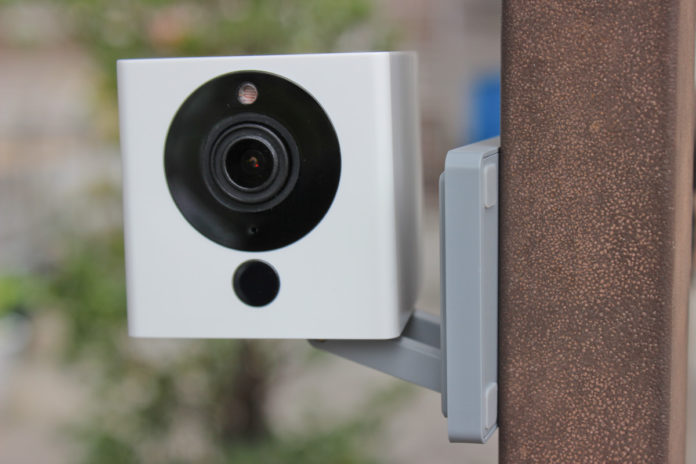
Xiaomi has a new stylish mini camera on the market. The Xiaofang offers easy to setup Smarthome security for the home. It monitors motion and sound, sending out an alarm once anything has triggered it.
Friendly Setup

Xiaomi has made their Smarthome products easy setup. Just mount it and plug it in. On the software side, their MI home app guides you through the WiFi setup.
The easy angle adjustment
For the perfect angle, you can simply adjust the mounts to outside your desired angle. Adjusting can also be made by simply twisting the base of the camera or raising the middle arm.
The magnetic mount

Having a magnet on the base means you can attach it long term to places other cameras would need a mount for, on a metal rafter or even a large enough screw it will have enough strength to hold its place. Xiaofang is also so light, it can also be mounted anywhere with double sided tape including on the ceiling.
The Xiaofang App

Everything is done on your phone, from the initial setup to setting motion detection alerts, the simple UI is a breeze to get through.
Xiaomi Mi Home Integration
The true power of the smart home comes with integration. You can join this with other Xiaomi Mi Home devices for an interconnected system where you can program triggers from other devices and make your hole control its self.
The Camera

Packing night vision and 1080 it is capable of securing your home in all conditions of light.
More Than A Camera
Xiaomi even integrated carbon monoxide and smoke detection, so it also functions as a smoke alarm.
The internal speaker also allows you to use it as a video calling device, you can call the camera from your phone and not only view the video but also send and receive audio.
USB powered

One of the other simple things is you can plug it into any USB power source, it runs off 5v and is completely safe. USB also means any simple power bank can be used to power the cam. Combine that with the ability of the camera to directly connect to your smartphone, and you have a mobile security solution. Ideal for securing areas even when you are on the road.
Looking to secure outside?
Looking for something more rugged and durable? The BlitzWolf SIC1 costs only a fraction more but offers a fully sealed membrane and is ideal for all environments.
Xiaomi also makes a more hardcore version with full camera controls and rotation, although it comes at almost 3 times the price, the Xiaomi Mi Jia.

For the inside tho, it is difficult to beat this latest camera from Xiaomi as on both price and aesthetics it is a great small box for $20.
2018 UPDATE: There is now a new version see the latest Xiaofang camera.