

Posted on 13 Apr, 2021
Model: 2021 BMW X3
Pages: 460
File size: 7 MB
Скачать руководство
Online Viewer

1
-
2
-
3
-
4
-
5
-
6
-
7
-
8
-
9
-
10
-
11
-
12
-
13
-
14
-
15
-
16
-
17
-
18
-
19
-
20
-
21
-
22
-
23
-
24
-
25
-
26
-
27
-
28
-
29
-
30
-
31
-
32
-
33
-
34
-
35
-
36
-
37
-
38
-
39
-
40
-
41
-
42
-
43
-
44
-
45
-
46
-
47
-
48
-
49
-
50
-
51
-
52
-
53
-
54
-
55
-
56
-
57
-
58
-
59
-
60
-
61
-
62
-
63
-
64
-
65
-
66
-
67
-
68
-
69
-
70
-
71
-
72
-
73
-
74
-
75
-
76
-
77
-
78
-
79
-
80
-
81
-
82
-
83
-
84
-
85
-
86
-
87
-
88
-
89
-
90
-
91
-
92
-
93
-
94
-
95
-
96
-
97
-
98
-
99
-
100
-
101
-
102
-
103
-
104
-
105
-
106
-
107
-
108
-
109
-
110
-
111
-
112
-
113
-
114
-
115
-
116
-
117
-
118
-
119
-
120
-
121
-
122
-
123
-
124
-
125
-
126
-
127
-
128
-
129
-
130
-
131
-
132
-
133
-
134
-
135
-
136
-
137
-
138
-
139
-
140
-
141
-
142
-
143
-
144
-
145
-
146
-
147
-
148
-
149
-
150
-
151
-
152
-
153
-
154
-
155
-
156
-
157
-
158
-
159
-
160
-
161
-
162
-
163
-
164
-
165
-
166
-
167
-
168
-
169
-
170
-
171
-
172
-
173
-
174
-
175
-
176
-
177
-
178
-
179
-
180
-
181
-
182
-
183
-
184
-
185
-
186
-
187
-
188
-
189
-
190
-
191
-
192
-
193
-
194
-
195
-
196
-
197
-
198
-
199
-
200
-
201
-
202
-
203
-
204
-
205
-
206
-
207
-
208
-
209
-
210
-
211
-
212
-
213
-
214
-
215
-
216
-
217
-
218
-
219
-
220
-
221
-
222
-
223
-
224
-
225
-
226
-
227
-
228
-
229
-
230
-
231
-
232
-
233
-
234
-
235
-
236
-
237
-
238
-
239
-
240
-
241
-
242
-
243
-
244
-
245
-
246
-
247
-
248
-
249
-
250
-
251
-
252
-
253
-
254
-
255
-
256
-
257
-
258
-
259
-
260
-
261
-
262
-
263
-
264
-
265
-
266
-
267
-
268
-
269
-
270
-
271
-
272
-
273
-
274
-
275
-
276
-
277
-
278
-
279
-
280
-
281
-
282
-
283
-
284
-
285
-
286
-
287
-
288
-
289
-
290
-
291
-
292
-
293
-
294
-
295
-
296
-
297
-
298
-
299
-
300
-
301
-
302
-
303
-
304
-
305
-
306
-
307
-
308
-
309
-
310
-
311
-
312
-
313
-
314
-
315
-
316
-
317
-
318
-
319
-
320
-
321
-
322
-
323
-
324
-
325
-
326
-
327
-
328
-
329
-
330
-
331
-
332
-
333
-
334
-
335
-
336
-
337
-
338
-
339
-
340
-
341
-
342
-
343
-
344
-
345
-
346
-
347
-
348
-
349
-
350
-
351
-
352
-
353
-
354
-
355
-
356
-
357
-
358
-
359
-
360
-
361
-
362
-
363
-
364
-
365
-
366
-
367
-
368
-
369
-
370
-
371
-
372
-
373
-
374
-
375
-
376
-
377
-
378
-
379
-
380
-
381
-
382
-
383
-
384
-
385
-
386
-
387
-
388
-
389
-
390
-
391
-
392
-
393
-
394
-
395
-
396
-
397
-
398
-
399
-
400
-
401
-
402
-
403
-
404
-
405
-
406
-
407
-
408
-
409
-
410
-
411
-
412
-
413
-
414
-
415
-
416
-
417
-
418
-
419
-
420
-
421
-
422
-
423
-
424
-
425
-
426
-
427
-
428
-
429
-
430
-
431
-
432
-
433
-
434
-
435
-
436
-
437
-
438
-
439
-
440
-
441
-
442
-
443
-
444
-
445
-
446
-
447
-
448
-
449
-
450
-
451
-
452
-
453
-
454
-
455
-
456
-
457
-
458
-
459
-
460


С удовольствием
за рулем
РУКОВОДСТВО ПО
ЭКСПЛУАТАЦИИ.
BMW X3.
LINK:
CONTENT & A-Z
Online Edition for Part no. 01405A10EA7 — VI/20
Other Manuals
- Manual do proprietário – 424 pages
- Instruktionsbog – 394 pages
- Brukerveiledning – 384 pages
- Omistajan käsikirja – 406 pages
- Manualul de utilizare – 410 pages
-
Page 1
LINK: CONTENT & A-Z The Ultimate Driving Machine® OWNER’S MANUAL. THE BMW X3. Online Edition for Part no. 01402989843 — II/18… -
Page 2
Online Edition for Part no. 01402989843 — II/18… -
Page 3
The more familiar you are with your vehicle, the better control you will have on the road. We therefore strongly suggest: Read this Owner’s Manual before starting off in your new BMW. Also use the Integrated Owner’s Manual in your vehicle. It contains important information on vehicle operation that will help you make full use of the technical features available in your BMW. -
Page 4: Table Of Contents
TABLE OF CONTENTS NOTES Information ……………………. QUICK REFERENCE Your BMW at a glance ………………..AT A GLANCE Cockpit ……………………..Idle state, standby state, and drive-ready state …………. iDrive ……………………..BMW Gesture Control ………………..Voice activation system ………………..General settings ………………….
-
Page 5
© 2018 Bayerische Motoren Werke Aktiengesellschaft Munich, Germany Reprinting, including excerpts, only with the written consent of BMW AG, Munich. US English II/18, 03 18 490 Printed on environmentally friendly paper, bleached without chlorine, suitable for recycling. Online Edition for Part no. 01402989843 — II/18… -
Page 6
Online Edition for Part no. 01402989843 — II/18… -
Page 7
NOTES Information ………………..8 Online Edition for Part no. 01402989843 — II/18… -
Page 8: Notes Information
Internet Updates made after the editorial The Owner’s Manual and general information on deadline BMW, for example on technology, are available Due to updates after the editorial deadline, differ‐ on the Internet: www.bmwusa.com. ences may exist between the printed Owner’s…
-
Page 9
››…‹‹ Answers generated by the voice Owner’s Manuals. activation system. Your BMW dealer’s service center is happy to Action steps answer any questions that you may have about the features and options applicable to your vehi‐ Action steps to be carried out are presented as cle. -
Page 10
BMW dealer’s service center. ▷ Information on the vehicle. Do not remove stickers. BMW parts and accessories have been tested by BMW for their safety and suitability in BMW vehi‐ ▷ Technical vehicle data. cles. ▷ The traffic, speed, and safety laws where the BMW warrants genuine BMW parts and acces‐… -
Page 11
Such damage is not cov‐ Service and warranty ered by the BMW New Vehicle Limited Warranty. We recommend that you read this publication thoroughly. Your vehicle is covered by the follow‐… -
Page 12
Information NOTES cle to function safely or provide assistance dur‐ shop can read out the information. The socket ing driving, for instance driver assistance for OBD Onboard Diagnosis required by law in systems. Furthermore, control devices facilitate the vehicle is used to read out the data. The data comfort or infotainment functions. -
Page 13
Information NOTES MP3 player. If this data is stored in the vehicle, it ter and receiver unit or via personal mobile devi‐ can be deleted at any time. This data is only ces brought into the vehicle, for instance smart‐ transmitted to third parties if expressly desired. -
Page 14
Information NOTES changed during this process. Information on the formation if they have access to the vehicle or way in which personal data is collected and used the EDR. in relation to services from third parties, the scope of such data, and its purpose, can be ob‐ Vehicle identification tained from the relevant service provider. -
Page 15
Na‐ tional Highway Traffic Safety Administration NHTSA, in addition to notifying BMW of North America, LLC, P.O. Box 1227, Westwood, New Jersey 07675-1227, Telephone 1-800-831-1117. -
Page 16
Online Edition for Part no. 01402989843 — II/18… -
Page 17: Quick Reference
QUICK REFERENCE Your BMW at a glance …………….18 Online Edition for Part no. 01402989843 — II/18…
-
Page 18: Your Bmw At A Glance
Your BMW at a glance QUICK REFERENCE Your BMW at a glance Opening and closing All vehicle access points are locked. The windows and the glass sunroof are closed, as long as the button on the remote control is Buttons on the remote control pressed.
-
Page 19
Your BMW at a glance QUICK REFERENCE Comfort Access Opening and closing the tailgate with no-touch activation Concept Concept The vehicle can be accessed without activating The tailgate can be opened and closed with no- the remote control. touch activation using the remote control you are All you need to do is to have the remote control carrying. -
Page 20
Your BMW at a glance QUICK REFERENCE Press button on the remote control for 3 Backrest tilt approx. 1 second. 4 Lumbar support Depending on the setting, the doors may be un‐ locked. Adjusting the head restraint Closing Adjusting the height: power head restraints ▷… -
Page 21
Your BMW at a glance QUICK REFERENCE Adjusting the exterior mirrors Storing Set the desired position. Press button. The writing on the but‐ ton lights up. Press selected button 1 or 2 at the door while the writing is lit. A signal sounds. -
Page 22
Your BMW at a glance QUICK REFERENCE Driver’s door Controller General information The buttons can be used to open the menus di‐ rectly. The Controller can be used to select menu items and enter the settings. Buttons on the Controller Button Function Press once: call up main menu. -
Page 23
Your BMW at a glance QUICK REFERENCE If no other commands are possible, operate the Press the Start/Stop button. function via iDrive. The engine is switched off. Set the parking brake. Terminating the voice activation system Press the button on the steering wheel Auto Start/Stop function or ›Cancel‹. -
Page 24
Your BMW at a glance QUICK REFERENCE Steptronic transmission Engaging P Engage selector lever position P only when the Engaging selector lever position D, vehicle is stationary. N, R Press button P. ▷ Neutral N. ▷ Drive mode D. Steptronic transmission, Sport ▷… -
Page 25
Your BMW at a glance QUICK REFERENCE High beams, headlight flasher, Lights and lighting turn signal Light functions High beams, headlight flasher Symbol Function Front fog lights. Lights off. Daytime running lights. Parking lights. Push the lever forward or pull it backward. -
Page 26
Your BMW at a glance QUICK REFERENCE Washer/wiper system Rain sensor Activating/deactivating Switching the wipers on/off and brief wipe Switching on To activate: press the lever up once from its standard position, arrow 1. To deactivate: press the lever back into the Press the lever up until the desired position is standard position. -
Page 27
Your BMW at a glance QUICK REFERENCE Rear window wiper Button Function Recirculated-air mode. Switching on the rear window wiper Air flow, manual. Air distribution, manual. Defrost and defog window. Turn the outer switch upward. ▷ Resting position of the wiper, position 0. -
Page 28
Your BMW at a glance QUICK REFERENCE Navigation destination entry Button Function Defrost and defog window. Entering a destination via address Rear window defroster. State/province «Navigation» Active seat ventilation. «Enter address» «State/Province?» Seat heating. Move the Controller to the right to select the state from the list. -
Page 29
Your BMW at a glance QUICK REFERENCE Connecting the mobile phone via passkey Use the thumbwheel on the steering wheel to entry select: «Accept» Via iDrive: ▷ Via gestures: point the index finger into the direction of the Control Display. -
Page 30
Owner’s Manual. Adding engine oil Diesel The engine of your BMW is designed for diesel General information with low sulfur content: Safely park the vehicle and switch off drive-ready Ultra-Low Sulfur Diesel ASTM D 975-xx. -
Page 31
Your BMW at a glance QUICK REFERENCE Adding «BMW Assist» «BMW Roadside Assistance» A voice connection is established with Road‐ side Assistance. Warning triangle, first-aid kit Warning triangle The warning triangle is located behind the left- hand cover in the cargo area. -
Page 32
The BMW Assist Concierge service offers infor‐ mation on events, gas stations or hotels, and provides phone numbers and addresses. Many hotels can be booked directly by the BMW Con‐ cierge service. The Concierge service is part of the optional BMW Assist Response Center. -
Page 33
Your BMW at a glance QUICK REFERENCE Online Edition for Part no. 01402989843 — II/18… -
Page 34
Online Edition for Part no. 01402989843 — II/18… -
Page 35
AT A GLANCE Cockpit ………………….36 Idle state, standby state, and drive-ready state ……..41 iDrive ………………….44 BMW Gesture Control …………….53 Voice activation system …………….56 General settings ………………59 Owner’s Manual media …………….72 Online Edition for Part no. 01402989843 — II/18… -
Page 36: At A Glance Cockpit
Cockpit AT A GLANCE Cockpit Vehicle features and It also describes features that are not necessarily available in your vehicle, e. g., due to the selected options options or country versions. This also applies to safety-related functions and systems. When us‐ This chapter describes all standard, country-spe‐…
-
Page 37
Cockpit AT A GLANCE Automatic headlight control 158 Steering and lane control assistant on/off 206 Adaptive light functions 159 High-beam Assistant 160 Cruise control: store speed beams 157 Pause or continue cruise control Instrument lighting 161 Active Cruise Control: increase dis‐ tance Right roadside parking light 158 Active Cruise Control: reduce dis‐… -
Page 38
Cockpit AT A GLANCE Rear window wiper 130 Horn, entire surface Clean the rear window 130 Heated steering wheel 111 Switch drive-ready state on/ 16 Adjust the steering wheel 111 off 120 Unlock hood 326 Auto Start/Stop function 121 18 Glove compartment 256 In the vicinity of the center console 1 Control Display 44 5 Radio/multimedia, see Owner’s Manual for… -
Page 39
Cockpit AT A GLANCE Parking brake 124 Driving Dynamics Control 137 SPORT driving mode Automatic Hold 125 COMFORT driving mode ECO PRO driving mode PDC Park Distance Control 210 Without Surround View: rearview camera 214 ADAPTIVE driving mode Surround View 217 Crossing traffic warning 229 DSC Dynamic Stability Con‐ Parking assistant 224 trol 192… -
Page 40
Cockpit AT A GLANCE Indicator light, front-seat passenger Interior lights 161 airbag 167 Reading lights 162 Online Edition for Part no. 01402989843 — II/18… -
Page 41: Idle State, Standby State, And Drive-Ready State
Idle state, standby state, and drive-ready state AT A GLANCE Idle state, standby state, and drive-ready state Vehicle features and Safety information options WARNING This chapter describes all standard, country-spe‐ An unsecured vehicle can begin to move and cific and optional features offered with the series. possibly roll away.
-
Page 42
Idle state, standby state, and drive-ready state AT A GLANCE Standby state ▷ After several minutes, if no operation takes place on the vehicle. ▷ If the charge state of the vehicle battery is Concept low. When standby state is switched on, most func‐ ▷… -
Page 43
Idle state, standby state, and drive-ready state AT A GLANCE Display in the instrument cluster When drive-ready state is switched on, the tach‐ ometer shows the current engine speed. Switching off drive-ready state Press the Start/Stop button to switch off drive- ready state. -
Page 44: Idrive
iDrive AT A GLANCE iDrive Vehicle features and Control elements options Overview This chapter describes all standard, country-spe‐ cific and optional features offered with the series. It also describes features that are not necessarily available in your vehicle, e. g., due to the selected options or country versions.
-
Page 45
iDrive AT A GLANCE Switching on/off automatically The Control Display is switched on automatically after unlocking. In certain situations, the Control Display is switched off automatically, for instance if no op‐ eration is performed on the vehicle for several minutes. Switching on/off manually ▷… -
Page 46
iDrive AT A GLANCE Controller without navigation Buttons on the Controller system Button Function General information Press once: call up main menu. The buttons can be used to open the menus di‐ Press twice: display all menu items of rectly. The Controller can be used to select the main menu. -
Page 47
iDrive AT A GLANCE Opening recently used menus All menu items of the main menu are dis‐ played. The recently used menus can be displayed. Select a menu item. Press and hold this button. To move the menu item to the desired posi‐ tion, tilt the Controller to the right or left. -
Page 48
iDrive AT A GLANCE : confirm entry. All letters for which there are entries are dis‐ played on the left edge. Deleting Select the first letter of the desired entry. The first entry of the selected letter is dis‐ Symbol Function played. -
Page 49
iDrive AT A GLANCE Entering letters and numbers General information Letters and numbers can be entered using the Controller or the touchscreen. The keyboard’s display changes automatically. Symbol Function Tapping the symbol: delete the letter or number. Menu items in the Owner’s Manual Tapping and holding the symbol for an extended period: delete all letters… -
Page 50
iDrive AT A GLANCE Selecting functions Input Operation «My Vehicle» Enter a hyphen. Swipe to the right in the up‐ «iDrive settings» per area of the touchpad. «Touchpad» Enter an under‐ Swipe to the right in the Select desired setting: score. -
Page 51
iDrive AT A GLANCE Specifying the number of Symbol Meaning displays SMS text message received. It is possible to specify the number of displays. Message received. Move the Controller to the right until the split Reminder. screen is selected. Press the Controller. Sending not possible. -
Page 52
iDrive AT A GLANCE tinations, phone numbers and menu entries or pages in the Integrated Owner’s Manual. Settings are stored for the driver profile currently used. Storing a function Select function via iDrive. Press and hold the desired button until a signal sounds. Running a function Press button. -
Page 53: Bmw Gesture Control
«Gestures» «Gesture control» Concept Settings Several iDrive functions can be operated by hand motion only using BMW Gesture Control. ▷ «Display tips»: the possible gesture is shown on the Control Display. Overview ▷ «Audio feedback»: an acoustic signal is emit‐…
-
Page 54
BMW Gesture Control AT A GLANCE Possible gestures Gesture Operation Function Move index finger forward and backward in the Accept call. direction of the screen. Select a highlighted entry in a list during voice activation. Confirm the «Resume guidance» pop-up. -
Page 55
BMW Gesture Control AT A GLANCE «Function assignment» Select the desired setting. System limits Gesture recognition by the camera can be distur‐ bed by the following circumstances: ▷ The camera lens is covered. ▷ Objects are located on the interior mirror. -
Page 56: Voice Activation System
Voice activation system AT A GLANCE Voice activation system Vehicle features and Functional requirements options To enable voice command recognition, a lan‐ guage must be set via iDrive that is supported by This chapter describes all standard, country-spe‐ the voice activation system. cific and optional features offered with the series.
-
Page 57
Voice activation system AT A GLANCE Example: opening the tone Voice command response is activated on the smartphone. settings Release the button. The commands of the menu items are spoken If activation is successful, a confirmation ap‐ just as they are selected via the Controller. pears on the Control Display. -
Page 58
Voice activation system AT A GLANCE Information for Emergency Activating voice recognition via the server Requests The voice recognition feature via the server pro‐ vides a dictation function and a natural method of Do not use the voice activation system to initiate entering destinations while improving the quality an Emergency Request. -
Page 59: General Settings
General settings AT A GLANCE General settings Vehicle features and «Time zone:» Select the desired setting. options The setting is stored for the driver profile cur‐ rently used. This chapter describes all standard, country-spe‐ cific and optional features offered with the series. Setting the time It also describes features that are not necessarily available in your vehicle, e.
-
Page 60
Concept displayed. If vehicle location has been activated, the current Press the Controller. vehicle position can be displayed in the BMW Make the settings for the month and year. Connected app or in the ConnectedDrive cus‐ tomer portal. Online Edition for Part no. 01402989843 — II/18… -
Page 61
General settings AT A GLANCE Activating/deactivating Depending on the light conditions, the bright‐ ness settings may not be clearly visible. Via iDrive: Selecting the contents of the «My Vehicle» main menu «Vehicle settings» «Vehicle tracking» For some menu items of the main menu, the dis‐ played contents can be selected. -
Page 62
Online data, for instance Favorites, cookies. The vehicle offers different functions, whose use ▷ Office data, for instance voice notes. requires a data transfer to BMW or a service pro‐ ▷ Login accounts. vider. The data transfer can be deactivated for some functions. -
Page 63
General settings AT A GLANCE Deleting data Function Connec‐ tion type Heed and follow the instructions on the Control Display. Making calls via the hands-free Bluetooth. Via iDrive: system. Using phone functions via iDrive. Switch on standby state. Using the smartphone Office «My Vehicle»… -
Page 64
Operating the integrated information systems Bluetooth interface. and communication devices while driving can ▷ The remote control or BMW display key is in distract from traffic. It is possible to lose control the vehicle. of the vehicle. There is a risk of an accident. -
Page 65
General settings AT A GLANCE Activate function to show the contact pic‐ that, the mobile device does not function as ex‐ tures. pected. Move the Controller to the left. In this case, the following explanations can help: Why could the mobile phone not be paired or Pairing the mobile device with the connected? vehicle… -
Page 66
General settings AT A GLANCE ▷ The number of phone book entries to be ▷ Loading of software updates, refer to stored is too high. page 70. ▷ Data volume of the contact too large, for in‐ Follow the following when connecting: stance due to stored information such as ▷… -
Page 67
General settings AT A GLANCE Connecting the device Hotspot name and hotspot code are dis‐ played on the Control Display. Connect the USB storage device using a suitable Search for WiFi networks on the device. Se‐ adapter cable to a USB interface, refer to lect network name on the device. -
Page 68
WiFi is switched on in the vehicle. Operation Switching on WiFi For more information, see the Integrated Own‐ Via iDrive: er’s Manual, Online Owner’s Manual, BMW Driv‐ «My Vehicle» er’s Guide app or the Owner’s Manual for Navi‐ «iDrive settings» gation, Entertainment, and Communication. -
Page 69
General settings AT A GLANCE Pairing a smartphone with Screen A symbol indicates, for which function a device is used. Mirroring Via iDrive: Symbol Function «My Vehicle» «Telephone» «iDrive settings» «Additional telephone» «Mobile devices» «Bluetooth® audio» «Connect new device» «Apps» «Screen Mirroring»… -
Page 70
«Connect device» Updates and related current information is availa‐ The functions that were assigned to the device ble at www.bmw.com/update. before disconnecting are assigned to the device when it is reconnected. If the device is already Displaying the installed software connected, these functions are deactivated. -
Page 71
General settings AT A GLANCE Wait for the update to complete. «Shut down system» If necessary, switch off the engine first. Restoring the software version The software version before the last software update and the version before the first software update can be restored. -
Page 72: Owner’s Manual Media
Integrated Owner’s Manual in the vehicle, re‐ «My Vehicle» fer to page 72. «Owner’s Manual» ▷ BMW Driver’s Guide app, refer to page 73. Select the required method of accessing the ▷ Online Owner’s Manual, refer to page 74. contents.
-
Page 73
Owner’s Manual on the Control Display and BMW Driver’s Guide App to alternate between the two displays: Concept Press button. The BMW Driver’s Guide app specifically de‐ «Owner’s Manual» scribes features and functions found in the vehi‐ Select the desired page in the Owner’s cle. -
Page 74
Owner’s Manual media AT A GLANCE Operating systems and language Additional information on availability, refer to page 75. The app is available for the iOS and Android op‐ erating systems. Quick Reference Guide The Owner’s Manual is downloaded in the lan‐ The Quick Reference Guide provides information guage of the device. -
Page 75
Owner’s Manual media AT A GLANCE Key features Printed Integrated Online All equipment included. — — — Equipment included in vehicle. — Quick Reference Guide. Search by illustrations. — Frequently asked questions. — — Quick links. — — Videos. — Smart Scan. -
Page 76
Online Edition for Part no. 01402989843 — II/18… -
Page 77
CONTROLS Opening and closing …………….. 78 Seats, mirrors, and steering wheel …………102 Transporting children safely …………..115 Driving ………………….. 120 Displays ………………… 140 Lights ………………….157 Safety ………………….164 Driving stability control systems …………192 Driver assistance systems …………..197 Driving comfort ……………… -
Page 78: Opening And Closing
Opening and closing CONTROLS Opening and closing Vehicle features and WARNING options For some country versions, unlocking from the inside is only possible with special knowledge. This chapter describes all standard, country-spe‐ Persons who spend a lengthy time in the vehi‐ cific and optional features offered with the series.
-
Page 79
Opening and closing CONTROLS After opening one of the front doors, the vehicle 3 Opening the tailgate is ready for operation, refer to page 42. 4 Press and hold or press three times in quick The light functions may depend on the ambient succession: panic mode brightness. -
Page 80
Opening and closing CONTROLS With Comfort Access: Tailgate convenient closing General information Safety information To avoid locking it in the vehicle, do not place the remote control in the cargo area. Depending on the vehicle equipment and coun‐ WARNING try version, it is also possible to have the doors With convenient closing, body parts can be unlocked. -
Page 81
Opening and closing CONTROLS ▷ Press button on the remote control Have old batteries disposed of by a deal‐ and hold for at least 3 seconds. er’s service center or another qualified service center or repair shop or take ▷ Briefly press the button on the remote control them to a collection point. -
Page 82
WARNING General information Unattended children or animals can cause the The BMW display key is supplied with an addi‐ vehicle to move and endanger themselves and tional mechanical key. If the display key is used, traffic, for instance due to the following actions: the mechanical key should be carried with you, ▷… -
Page 83
Opening and closing CONTROLS ▷ Opening and closing the doors or win‐ Without parked-car heating: the parked-car dows. ventilation can be operated. ▷ Engaging selector lever position N. ▷ Outside of the reception range of the vehicle, you can display the last transmitted status in‐ ▷… -
Page 84
Opening and closing CONTROLS ▷ «Connected»: the display key is within recep‐ Main menu Information/Function tion range. «Security ▷ «Updated»: the display key is not within re‐ information» Door status. ception range. It indicates when the last data transfer from the vehicle took place. Alarm system status. -
Page 85
Opening and closing CONTROLS may take some time before the display key BMW display key detection by the vehicle may can be used again. malfunction under the following circumstances: ▷ Due to the large number of USB chargers ▷ The battery of the display key is discharged. -
Page 86
Removing procedure. Resetting the BMW display key If the charged display key cannot be switched on anymore or if the display does not respond to entries anymore, the display key can be reset. -
Page 87
Opening and closing CONTROLS Overview Remove the cover. Unlock or lock the door lock using the integrated key. Buttons for the central locking system. The other doors must be unlocked or locked Locking from the inside. Press the button with the front doors Alarm system closed. -
Page 88
Opening and closing CONTROLS All you need to do is to have the remote control with you, such as in your pants pocket. The vehicle automatically detects the remote control when it is in close proximity or in the car’s interior. -
Page 89
Opening and closing CONTROLS Opening the tailgate Opening General information If the tailgate is opened via Comfort Access, locked doors are not unlocked. To avoid locking it in the vehicle, do not place the remote control in the cargo area. Safety information Press the button on tailgate’s exterior. -
Page 90
Opening and closing CONTROLS Tailgate Opening Adjusting the opening height General information You can set how far the tailgate should open. To avoid locking it in the vehicle, do not place the When adjusting the opening height, ensure that remote control in the cargo area. there is a clearance of at least 4 in/10 cm above Depending on the vehicle equipment and coun‐… -
Page 91
Opening and closing CONTROLS Press the button in the driver’s door downward. If the vehicle is locked, selector lever position P must be engaged first. With manual transmission: With the vehicle stationary, push the button in the storage compartment of the driver’s door downwards twice in quick succession. -
Page 92
Opening and closing CONTROLS Malfunction General information There are three driver profiles with which per‐ Safety information sonal vehicle settings can be stored. Every re‐ mote control has one of these driver profiles as‐ signed. WARNING If the vehicle is unlocked using a remote control, With manual operation of a blocked tailgate, it the assigned personal driver profile will be acti‐… -
Page 93
Opening and closing CONTROLS As soon as the engine is started or any key is Via iDrive: pressed, the last selected display is shown on «My Vehicle» the Control Display. «Driver profiles» To exit the welcome screen via iDrive: Select driver profile. «OK»… -
Page 94
66. General information ▷ Online Depending on the vehicle equipment and coun‐ Via the BMW ConnectedDrive customer try version, various settings for opening and clos‐ portal. ing are possible. Importing driver profiles These settings are stored for the driver profile currently used. -
Page 95
Opening and closing CONTROLS Unlocking The setting can be made for the driver profile marked with this symbol. Doors «Last seat position automatic» Via iDrive: When the vehicle is unlocked, the driver’s seat and exterior mirrors resume their last set posi‐ «My Vehicle»… -
Page 96
Opening and closing CONTROLS Automatic unlocking ▷ Changes in the vehicle tilt, e. g., during at‐ tempts at stealing a wheel or when towing Via iDrive: the vehicle. «My Vehicle» ▷ Disconnected battery voltage. «Vehicle settings» ▷ Improper use of the socket for OBD Onboard «Doors/Key»… -
Page 97
Opening and closing CONTROLS Interior motion sensor ▷ Briefly press the button on the remote control three times in succession. The windows and the glass sunroof must be closed for the system to function properly. To switch off the alarm: press any button. Avoiding unintentional alarms Indicator light on the interior mirror… -
Page 98
Opening and closing CONTROLS Power windows The window opens automatically. Pressing the switch again stops the motion. Convenient opening via the remote control, refer Safety information to page 79. Closing WARNING When operating the windows, body parts and ▷ Pull the switch to the resistance point. objects can be jammed. -
Page 99
Opening and closing CONTROLS The glass sunroof is ready for operation when Pull the switch past the resistance point standby state is switched on. again within approx. 4 seconds and hold it there. Safety information The window closes without jam protection. WARNING Safety switch Body parts can be jammed when operating the… -
Page 100
Opening and closing CONTROLS position. The sun protection Convenient opening via the remote control, refer does not move. to page 79. ▷ The tilted glass sunroof closes. Closing via Comfort Access, refer to page 87. Comfort position Opening/closing the glass In some models, the wind noises in the car’s in‐… -
Page 101
Opening and closing CONTROLS Closing from the raised position without jam protection If there is an external danger, push the switch forward past the resistance point and hold it. The glass sunroof closes without jam protection. Initializing after a power interruption General information After a power failure during the opening or clos‐… -
Page 102: Seats, Mirrors, And Steering Wheel
Seats, mirrors, and steering wheel CONTROLS Seats, mirrors, and steering wheel Vehicle features and WARNING options With a backrest inclined too far to the rear, the efficacy of safety gear, including safety belts This chapter describes all standard, country-spe‐ can no longer be ensured. There is a risk of cific and optional features offered with the series.
-
Page 103
Seats, mirrors, and steering wheel CONTROLS Overview Seat tilt 1 Backrest width Move switch up or down. 2 Forward/backward, height, seat tilt Backrest tilt 3 Backrest tilt 4 Lumbar support Forward/backward Move switch forward or backward. Thigh support Push switch forward or backward. Height Pull the lever at the front of the seat and push the thigh support forward or back. -
Page 104
Seats, mirrors, and steering wheel CONTROLS Rear seats of the spine. The lower back and the spine are supported for upright posture. General information Settings The backrest tilt can be adjusted for the rear ▷ Press the front/rear section of seats. -
Page 105
Seats, mirrors, and steering wheel CONTROLS The upper shoulder strap’s anchorage point will the safety belts checked after an accident at be correct for adult seat occupants of every build the dealer’s service center or another qualified if the seat is correctly adjusted. service center or repair shop. -
Page 106
Seats, mirrors, and steering wheel CONTROLS Press the red button in the safety belt buckle. If the belt tension does not loosen automatically, stop the vehicle and unbuckle the safety belt us‐ Guide the safety belt back into its roll-up ing the red button in the safety belt buckle. -
Page 107
Seats, mirrors, and steering wheel CONTROLS Removing ▷ Only use accessories that have been de‐ termined to be safe for attachment to a Only remove the head restraint if no one will be head restraint. sitting in the seat in question. ▷… -
Page 108
Seats, mirrors, and steering wheel CONTROLS Adjusting the height WARNING Body parts can be jammed when moving the head restraint. There is a risk of injury. Make sure that the area of movement is clear when moving the head restraint. WARNING Objects on the head restraint reduce the pro‐… -
Page 109
Seats, mirrors, and steering wheel CONTROLS Mirrors Adjusting electrically Press button. Exterior mirrors The selected mirror moves along with the button movement. General information Selecting a mirror The mirror on the front passenger side is more curved than the driver’s side mirror. To change over to the other mirror: The mirror setting is stored for the driver profile Slide the switch. -
Page 110
Seats, mirrors, and steering wheel CONTROLS Interior mirror, automatic mirror, refer to page 110, are used to control this. dimming feature Automatic Curb Monitor, exterior General information mirror The interior mirror is dimmed automatically. Photocells are used for control: Concept ▷… -
Page 111
Seats, mirrors, and steering wheel CONTROLS Memory function Manual steering wheel adjustment Concept The following settings can be stored and, if nec‐ essary, retrieved using the memory function: ▷ Seat position. ▷ Exterior mirror position. ▷ Height of the Head-up Display. General information Fold the lever down. -
Page 112
Seats, mirrors, and steering wheel CONTROLS Seat heating Overview Overview Front The memory buttons are located on the front doors. Storing Set the desired position. Seat heating Press button. The writing on the but‐ Rear ton lights up. Press desired button 1 or 2 while the LED is lit. -
Page 113
Seats, mirrors, and steering wheel CONTROLS Seat heating distribution Switching on The heating action in the seat cushion and the Press button once for each ventilation seat backrest can be distributed in different level. ways. Highest level if three bars are shown on the cli‐ Via iDrive: mate control display. -
Page 114
Seats, mirrors, and steering wheel CONTROLS Functional requirement The safety belt of the corresponding seat is buckled. Activating/deactivating Via iDrive: «My Vehicle» «Vehicle settings» «Climate functions» Select a menu item: ▷ «Steering wheel heating» ▷ «Seat heating» ▷ «Seat and steering wheel heating» ▷… -
Page 115: Transporting Children Safely
Transporting children safely CONTROLS Transporting children safely Vehicle features and Transport children younger than 13 years of age or shorter than 5 ft/150 cm only in the rear seat options in suitable child restraint systems designed for the age, weight and size of the child. Children This chapter describes all standard, country-spe‐…
-
Page 116
Transporting children safely CONTROLS Safety information sure that the child restraint system fits securely against the backrest. If possible, adjust the backrest tilt for all affected backrests and cor‐ WARNING rectly adjust the seats. Make sure that seats Active front-seat passenger airbags can injure a and backrests are securely engaged or locked. -
Page 117
Transporting children safely CONTROLS Mounts for the lower LATCH change the backrest width again and do not call up a memory position. anchors Child seat security General information The lower anchors may be used to attach the CRS to the vehicle seat up to a combined child and CRS weight of 65 lb/30 kg when the child is restrained by the internal harnesses. -
Page 118
Transporting children safely CONTROLS Before installing LATCH child child restraint systems to the upper retaining straps. restraint fixing systems Pull the safety belt away from the area of the child restraint system. Anchors The respective symbol shows the anchor Assembly of LATCH child for the upper retaining strap. -
Page 119
Transporting children safely CONTROLS Locking the doors and windows in the rear General information In certain situations it may be advisable to secure the rear doors and windows, for instance when transporting children. Doors Push the locking lever on the rear doors up. The door can now be opened from the outside only. -
Page 120: Driving
Driving CONTROLS Driving Vehicle features and life. Keep the exhaust pipe free and ensure suf‐ ficient ventilation. options This chapter describes all standard, country-spe‐ WARNING cific and optional features offered with the series. An unsecured vehicle can begin to move and It also describes features that are not necessarily possibly roll away.
-
Page 121
Driving CONTROLS Diesel engine Depending on the selected driving mode, refer to page 137, the system is automatically activated If the engine is cold and temperatures are below or deactivated. approx. 32 ℉/0 ℃, the start process may be de‐ layed somewhat due to automatic preheating. -
Page 122
Driving CONTROLS The display indicates that the ▷ Steptronic transmission: selector lever posi‐ conditions for an automatic en‐ tion in N or R. gine stop have not been met. ▷ After driving in reverse. ▷ Use of fuel with high ethanol content. Starting the engine Total time with switched-off engine ECO PRO, refer to page 280,… -
Page 123
Driving CONTROLS Using the button ▷ Where there is a risk of window condensation when the automatic climate control is switched on. ▷ The steering wheel is turned. ▷ Steptronic transmission: Change from selector lever position D to N or ▷… -
Page 124
Driving CONTROLS ▷ Selector lever position P is engaged auto‐ matically. WARNING Set the parking brake. Unattended children or animals can cause the vehicle to move and endanger themselves and Automatic deactivation traffic, for instance due to the following actions: ▷… -
Page 125
Driving CONTROLS Pull the switch and hold it. The vehicle brakes ▷ The driver’s door is opened while the vehicle hard while the switch is being pulled. is stationary. ▷ The moving vehicle is brought to a standstill The indicator light in the instrument clus‐ using the parking brake. -
Page 126
Driving CONTROLS There is a risk of accidents or injuries. Do not After stepping on the brake pedal, for instance leave children or animals unattended in the ve‐ when stopping at a traffic light, the vehicle is au‐ hicle. Take the remote control with you when tomatically secured against rolling. -
Page 127
Driving CONTROLS Triple turn signal activation Secure the vehicle against rolling away, for in‐ stance with a wheel chock, after existing the ve‐ Lightly tap the lever up or down. hicle. The triple turn signal duration can be adjusted. Via iDrive: After a power failure To reestablish parking brake functionality after a «My Vehicle»… -
Page 128
Driving CONTROLS Safety information Switching off and brief wipe WARNING If the wipers start moving in the folded away state, body parts can be jammed or damage may occur to parts of the vehicle. There is a risk of injury or risk of damage to property. Make sure that the vehicle is switched off when the wipers are in the folded away state and the wip‐… -
Page 129
Driving CONTROLS Activating Windshield washer system Safety information WARNING The washer fluid can freeze onto the window at low temperatures and obstruct the view. There is a risk of an accident. Only use the washer systems, if the washer fluid cannot freeze. Use antifreeze, if needed. -
Page 130
Driving CONTROLS Rear window wiper Safety information Overview WARNING If the wipers start moving in the folded away state, body parts can be jammed or damage may occur to parts of the vehicle. There is a risk of injury or risk of damage to property. Make sure that the vehicle is switched off when the wipers are in the folded away state and the wip‐… -
Page 131
U.S. EPA and many individual states; do not exceed the allowable washer fluid dilution ratio limits that apply. Follow the usage instructions on the washer fluid container. Use of BMW’s Windshield Washer Concentrate or the equivalent is recommended. Folding down the wipers WARNING After the wipers are folded back down, the wiper Washer fluid can ignite and catch fire on con‐… -
Page 132
Driving CONTROLS Overview ▷ On uphill grades or on a downhill slope, also secure the vehicle, for instance with a wheel chock. Selector lever positions Drive mode D Selector lever position for normal vehicle opera‐ tion. All gears for forward travel are activated au‐ tomatically. -
Page 133
Driving CONTROLS Engaging selector lever selector lever automatically returns to the center position when released. positions General information To prevent the vehicle from creeping after you select a drive mode, maintain pressure on the brake pedal until you are ready to start. Functional requirements Only when the drive-ready state is switched on and the brake pedal is depressed is it possible to… -
Page 134
Driving CONTROLS Activating the sport program In this way, standby state remains switched on, and a Check Control message is dis‐ played. The vehicle may roll. NOTE Selector lever position P is automatically en‐ gaged when standby state is switched off. There is a risk of damage to property. -
Page 135
M/S manual mode once the maximum speed is reached. Steptronic Sport transmission Depending on the BMW M drive configuration, With the appropriate transmission version, the this function is active independently of the driv‐ lowest possible gear can be selected by simulta‐… -
Page 136
Driving CONTROLS Displays in the instrument Release brake, as soon as the starter stops. cluster Maneuver the vehicle from the danger area and secure it against moving on its own. The selector lever position is dis‐ For additional information, see the chapter on played, for example P. -
Page 137
Driving CONTROLS Overview A flag symbol is displayed in the instrument cluster. The starting engine speed adjusts. Within 3 seconds, release the brake. Repeated use during a trip After Launch Control has been used, the trans‐ mission must cool down for approx. 5 minutes before Launch Control can be used again. -
Page 138
Driving CONTROLS SPORT ECO PRO Concept Concept Dynamic tuning for higher agility with an opti‐ Consumption-optimized tuning. mized chassis and suspension. Switching on Switching on Press button repeatedly until ECO PRO Press button repeatedly until SPORT is is displayed in the instrument cluster. displayed in the instrument cluster. -
Page 139
Driving CONTROLS Switching on Press button. ADAPTIVE is displayed in the instrument cluster. INDIVIDUAL configuration General information The individual configuration of the driving mode is stored for the active driver profile. The last set configuration is activated directly when the driv‐ ing mode is called up again. -
Page 140: Displays
Displays CONTROLS Displays Vehicle features and Variable displays options Service requirements 146 4 Instrument cluster with enhanced features: tachometer 145 This chapter describes all standard, country-spe‐ cific and optional features offered with the series. Instrument cluster with enhanced features: It also describes features that are not necessarily ECO PRO displays 280 available in your vehicle, e.
-
Page 141
Displays CONTROLS General information ▷ «STANDARD»: all displays on the instru‐ ment cluster are active. A Check Control message is displayed as a com‐ ▷ «REDUCED» all displays on the instru‐ bination of indicator or warning lights and SMS ment cluster are reduced to the essential. text messages in the instrument cluster and, if applicable, in the Head-up Display. -
Page 142
Displays CONTROLS Airbag system DSC Dynamic Stability Control is deactivated or DTC Dynamic Traction Airbag system and belt tensioner are not Control is activated working. DSC is deactivated or DTC is activated. Have the vehicle checked immediately by a dealer’s service center or another qualified DSC, refer to page 192, and DTC, refer service center or repair shop. -
Page 143
Displays CONTROLS Steering system Parking light/low beams, automatic headlight control, refer to page 157. Steering system may not be working. Have the system checked by a dealer’s Lane departure warning service center or another qualified serv‐ ice center or repair shop. The indicator light lights up: the system is activated. -
Page 144
«Check Control» Displaying stored Check Control Select the desired text message. messages Select desired setting: Via iDrive: ▷ «Call BMW Accident Assistance» «My Vehicle» Contact BMW Roadside Assistance. «Vehicle status» ▷ «Service request» Move the Controller to the left. Contact a dealer’s service center or an‐… -
Page 145
Displays CONTROLS Tachometer Display additional information about the Check Control message in the Integrated Owner’s Manual. Always avoid engine speeds in the red warning field. In this range, the fuel supply is reduced to Messages after trip completion protect the engine. Special messages displayed while driving are displayed again after drive-ready state is Standby state and drive-… -
Page 146
Displays CONTROLS Indicator light In the instrument With a low remaining range, a Check Control message is briefly displayed. With a dynamic cluster driving style, for instance taking curves aggres‐ A red indicator light is displayed. sively, the engine function is not always ensured. The Check Control message appears continu‐… -
Page 147
«Vehicle status» ice requirements from your remote control. Move the Controller to the left. Some information on service requirements can «Service required» also be shown on the BMW display key. «Vehicle inspection» Display «Date:» Select the desired setting. Detailed information on service… -
Page 148
Displays CONTROLS Overview On vehicles without a gear shift indicator, the en‐ gaged gear is displayed. Camera Example Description Fuel efficient gear is set. Shift into fuel efficient gear. Speed Limit Info The camera is installed near the interior mirror. Speed Limit Info Keep the windshield in front of the interior mirror clean and clear. -
Page 149
Displays CONTROLS «Instrument panel» ▷ If the speed limits vary with the time of day and the day of the week. «Road signs» ▷ In areas not covered by the navigation sys‐ Display tem. ▷ When roads differ from the navigation, such General information as due to changes in road routing. -
Page 150
Displays CONTROLS Activating a list and adjusting Calling up information the setting Press and hold button on signal lever. On the right side of the steering wheel, turn the Information is displayed in the instrument cluster. thumbwheel to activate the corresponding list. Pressing the button repeatedly displays addi‐… -
Page 151
Displays CONTROLS The setting is stored for the driver profile cur‐ Display rently used. Information in detail Odometer and trip odometer Displaying/resetting miles ▷ Press the knob to display the trip miles. ▷ Time of arrival, arrow 1. When the drive-ready state is switched off, miles and trip ▷… -
Page 152
Displays CONTROLS Onboard Computer on the ▷ Current fuel consumption, arrow 3. Control Display Average speed and average fuel consumption Concept The Onboard Computer displays different vehi‐ General information cle data on the Control Display, such as average Average speed and average fuel consumption values. -
Page 153
Displays CONTROLS «Trip computer» «Warning at:» Move the Controller to the left, if needed. Turn the Controller until the desired speed is displayed. ▷ «Reset»: all values are reset. Press the Controller. ▷ «Automatic reset»: all values are reset approx. 4 hours after the vehicle has Activating/deactivating the come to a standstill. -
Page 154
▷ «Engine oil level»: Electronic engine oil «Displays» level check, refer to page 328. «Head-Up Display» ▷ «Diesel exhaust fluid»: BMW Advanced «Head-Up Display» Diesel, refer to page 292. Display ▷ «Check Control»: Check Control mes‐ sages are stored in the background and can be displayed on the Control Display. -
Page 155
Displays CONTROLS Selecting displays in the Head-up Turn the Controller until the desired height is reached. Display Press the Controller. Via iDrive: The setting is stored for the driver profile cur‐ «My Vehicle» rently used. «iDrive settings» The height of the Head-up Display can also be «Displays»… -
Page 156
Displays CONTROLS For this reason, it is strongly suggested to have the special windshield replaced by a dealer’s service center or another qualified service center or repair shop, if necessary. Online Edition for Part no. 01402989843 — II/18… -
Page 157: Lights
Lights CONTROLS Lights Vehicle features and Symbol Function options Automatic headlight control. Adaptive light functions. This chapter describes all standard, country-spe‐ Low beams. cific and optional features offered with the series. It also describes features that are not necessarily available in your vehicle, e. g., due to the selected Instrument lighting.
-
Page 158
Lights CONTROLS Roadside parking lights LED light carpet When the vehicle is parked, a one-sided roadside parking light can be switched on. Button Function Right roadside parking light on/off. Left roadside parking light on/off. The light source is located in the position indi‐ Welcome lights and cated. -
Page 159
Lights CONTROLS Adaptive light functions General information A blue sky with the sun low on the horizon can cause the lights to be switched on. Concept Adaptive light functions enable dynamic illumina‐ Activating tion of the roadway. Position of switch: General information The indicator light in the instrument cluster is il‐… -
Page 160
Lights CONTROLS Adaptive headlight range The indicator light in the instrument clus‐ ter is illuminated when the low beams are control switched on. The headlights are automatically switched be‐ The adaptive headlight range control compen‐ tween low beams and high beams. sates for acceleration and braking operations in order not to blind the oncoming traffic and to The blue indicator light in the instrument… -
Page 161
Lights CONTROLS Resetting the sensitivity Switching on/off Pull the turn signal lever again for approx. 10 sec‐ Press button. onds. The sensitivity of the high-beam Assistant The green indicator light lights up if the is reset to the factory settings. front fog lights are switched on. -
Page 162
Lights CONTROLS Overview If the ambient light was deactivated via iDrive, it will not be switched on when the vehicle is un‐ locked. Buttons in the vehicle Switching on/off The ambient light is switched on when the vehi‐ cle is unlocked, and switched off when the vehi‐ cle is locked. -
Page 163
Lights CONTROLS Dimmed while driving Via iDrive: «My Vehicle» «Vehicle settings» «Lighting» «Interior lighting» «Dimmed for night driving» Some lights of the interior lighting are dimmed when the vehicle is driven in the dark. The selected setting is stored for the driver pro‐ file currently used. -
Page 164: Safety
Safety CONTROLS Safety Vehicle features and It also describes features that are not necessarily available in your vehicle, e. g., due to the selected options options or country versions. This also applies to safety-related functions and systems. When us‐ This chapter describes all standard, country-spe‐ ing these functions and systems, the applicable cific and optional features offered with the series.
-
Page 165
Vehicle modifications for a person with disabili‐ ▷ Always grasp the steering wheel on the ties may affect the air bag system; contact BMW steering wheel rim. Hold your hands at the Customer Relations for further information. 3 o’clock and 9 o’clock positions, to keep the… -
Page 166
Safety CONTROLS Functional readiness of the Automatic deactivation of the airbag system front-seat passenger airbags Safety information Concept The system reads if the front passenger seat is occupied by measuring the human body’s resist‐ WARNING ance. Individual components can be hot after trigger‐ Front, knee, and side airbag on the front pas‐… -
Page 167
Safety CONTROLS ▷ Do not attach covers, cushions, ball mats or restraint system has been detected and the other items to the front passenger seat un‐ front-seat passenger airbags are not activated. less they are specifically determined to be Strength of the driver’s and safe for use on the front passenger seat. -
Page 168
Safety CONTROLS Intelligent Safety WARNING Due to system limits, individual functions can Concept malfunction during tow-starting/towing with the Intelligent Safety enables central operation of the Intelligent Safety systems activated. There is a driver assistance system. risk of an accident. Switch all Intelligent Safety systems off prior to tow-starting/towing. -
Page 169
Safety CONTROLS «Configure INDIVIDUAL»: depending on the sections and junctions if a risk of collision with equipment version, the Intelligent Safety sys‐ crossing traffic is detected. tems can be individually configured. The individ‐ The approach control warning is available even if ual settings are activated and stored for the cruise control has been deactivated. -
Page 170
Safety CONTROLS Camera WARNING Indicators and warnings cannot serve as a sub‐ stitute for the driver’s personal judgment. Due to its limits, the system might not output warn‐ ings or reactions or these might be output late, incorrectly, or without justification. There is a risk of an accident. -
Page 171
Safety CONTROLS If all Intelligent Safety systems were switched off, The selected time is stored for the driver profile all systems are now switched on. currently used. «Configure INDIVIDUAL»: depending on the Warning with braking function equipment version, the Intelligent Safety sys‐ tems can be individually configured. -
Page 172
Safety CONTROLS Acute warnings can also be triggered without At speeds above approx. 130 mph/210 km/h, the previous forewarning. braking intervention occurs as a brief braking pressure. No automatic delay occurs. Brake intervention, City light The driver may cancel the braking intervention braking function by stepping on the accelerator pedal or by ac‐… -
Page 173
Safety CONTROLS Evasion assistance ▷ Vehicles that suddenly swerve in front of you, or sharply decelerating vehicles. ▷ Vehicles with an unusual rear appearance. Concept ▷ Two-wheeled vehicles ahead of you. The system supports the driver in making eva‐ ▷ Intersection warning: crossing vehicles if their sive maneuvers in certain situations, such as speed is higher than your own speed. -
Page 174
Safety CONTROLS WARNING Indicators and warnings cannot serve as a sub‐ stitute for the driver’s personal judgment. Due to its limits, the system might not output warn‐ ings or reactions or these might be output late, incorrectly, or without justification. There is a risk of an accident. -
Page 175
Safety CONTROLS Warning with evasion support Thus, a system reaction might not come or might come late. Display in the instrument cluster E.g., the following situations may not be de‐ tected: A warning symbol appears in the instrument cluster and in the Head-up Display if a collision ▷… -
Page 176
Safety CONTROLS When driving at city speeds, the system will is‐ Watch traffic closely and actively intervene sue a warning if there is imminent risk of a colli‐ where appropriate. sion with pedestrians, and support with a braking function. WARNING General information Indicators and warnings cannot serve as a sub‐… -
Page 177
Safety CONTROLS Camera Some Intelligent Safety systems cannot be indi‐ vidually switched off. Press and hold this button. All Intelligent Safety systems are switched off. Button Status Button lights up green: all Intelligent Safety systems are switched on. The camera is installed near the interior mirror. Button lights up orange: some Intelli‐… -
Page 178
Safety CONTROLS The braking intervention occurs only if vehicle ▷ If the driving stability control systems are de‐ stability has not been restricted, for instance by activated, for instance DSC OFF. deactivating the DSC Dynamic Stability Control. ▷ If the field of view of the camera or the wind‐ The driver may cancel the braking intervention shield is dirty or covered in the area of the in‐… -
Page 179
Safety CONTROLS brating. The system thus helps keep the vehicle Intelligent Safety in the lane. Camera Safety information WARNING The system cannot serve as a substitute for the driver’s personal judgment in assessing road and traffic safety. There is a risk of an accident. Adjust driving style to traffic conditions. -
Page 180
Safety CONTROLS Setting the force of the steering «ALL ON»: all Intelligent Safety systems are switched on. Basic settings are activated for the wheel vibration subfunctions. Via iDrive: «INDIVIDUAL»: the Intelligent Safety systems are «My Vehicle» switched on according to the individual settings. «Vehicle settings»… -
Page 181
Safety CONTROLS With side collision warning ▷ In the event of missing, worn, poorly visible, merging, diverging, or multiple lane markings If in the speed range up to 130 mph/210 km/h a such as in construction areas. lane marking is crossed, the system intervenes ▷… -
Page 182
Safety CONTROLS General information WARNING Indicators and warnings cannot serve as a sub‐ stitute for the driver’s personal judgment. Due to its limits, the system might not output warn‐ ings or reactions or these might be output late, incorrectly, or without justification. There is a risk of an accident. -
Page 183
Safety CONTROLS Switching on/off Button Status Button lights up green: all Intelligent Switching on automatically Safety systems are switched on. The Active Blind Spot Detection is automatically Button lights up orange: some Intelli‐ activated after departure if the function was gent Safety systems are switched off. -
Page 184
Safety CONTROLS Via iDrive: tion can be noticed on the steering wheel and can be manually overridden at any time. «My Vehicle» «Vehicle settings» Flashing of the light «Intelligent Safety» A flashing of the light during vehicle unlocking «Steering intervention» serves as system self-test. -
Page 185
Safety CONTROLS General information ▷ In the event of missing, worn, poorly visible, merging, diverging, or multiple lane markings such as in construction areas. ▷ When lane markings are covered in snow, ice, dirt or water. ▷ When the lane markings are not white. ▷… -
Page 186
Safety CONTROLS Functional requirements Always keep the bumper in the area of the radar sensors clean and unobstructed. The camera must detect the lane markings for the side collision warning with steering interven‐ Camera tion to be active. Overview Button in the vehicle The camera is installed near the interior mirror. -
Page 187
Safety CONTROLS System limits «ALL ON»: all Intelligent Safety systems are switched on. Basic settings are activated for the subfunctions. Safety information «INDIVIDUAL»: the Intelligent Safety systems are switched on according to the individual settings. WARNING Some Intelligent Safety systems cannot be indi‐ The system can react not at all, too late, incor‐… -
Page 188
Safety CONTROLS ▷ Up to 10 seconds after the start of the engine ▷ If the trailer power socket is in use, for in‐ via the Start/Stop button. stance during operation with trailer or bicycle rack. ▷ During calibration of the camera immediately after vehicle delivery. -
Page 189
Safety CONTROLS Active Protection System limits The system may not be fully functional in the fol‐ lowing situations: Concept ▷ When a vehicle is approaching at a speed Active Protection prepares occupants and the much faster than your own. vehicle for a possible accident in critical driving or ▷… -
Page 190
Safety CONTROLS Function the automatic braking function. This interrupts automatic braking. When the safety belt is fastened, the driver’s and passenger’s belt straps are automatically tight‐ Interrupting automatic braking ened once after driving away. It can be necessary to interrupt automatic brak‐ In accident-critical situations, the following indi‐… -
Page 191
Safety CONTROLS System limits ▷ Driving conditions, for instance length of trip. Starting at approx. 43 mph/70 km/h, the system The function may be limited in the following sit‐ is active and can also display a recommendation uations, for instance and will either output an in‐ to take a break. -
Page 192: Driving Stability Control Systems
Driving stability control systems CONTROLS Driving stability control systems Vehicle features and Adaptive brake assistant options In combination with Active Cruise Control, this system ensures that the brakes respond even This chapter describes all standard, country-spe‐ more rapidly when braking in critical situations. cific and optional features offered with the series.
-
Page 193
Driving stability control systems CONTROLS Safety information Deactivating/activating DSC General information WARNING When DSC is deactivated, driving stability is re‐ The system cannot serve as a substitute for the duced during acceleration and when driving in driver’s personal judgment in assessing the curves. -
Page 194
Driving stability control systems CONTROLS DTC Dynamic Traction Activating/deactivating DTC Control Activating DTC Press button. Concept TRACTION is displayed in the instru‐ DTC is a version of the DSC Dynamic Stability ment cluster and the indicator light for DSC OFF Control where forward momentum is optimized. -
Page 195
Driving stability control systems CONTROLS driving forces to the front and rear axles as de‐ When the system is active, the vehicle moves at manded by the driving situation and road surface. the speed set by the driver, without the driver having to depress the brake pedal. -
Page 196
Driving stability control systems CONTROLS Display in the instrument cluster Using the brake pedal While HDC is controlling the speed, the set de‐ A symbol and the selected de‐ sired speed can be reduced by depressing the sired speed are displayed. brake pedal. -
Page 197: Driver Assistance Systems
Driver assistance systems CONTROLS Driver assistance systems Vehicle features and WARNING options The use of the system can lead to an increased risk of accidents in the following situations, This chapter describes all standard, country-spe‐ for instance: cific and optional features offered with the series. ▷…
-
Page 198
Driver assistance systems CONTROLS Switching cruise control on/off Setting the speed Switching on Maintaining and storing the speed Press button on the steering wheel. The indicator lights in the instrument cluster light up and the mark in the speedometer is set to the current speed. -
Page 199
Driver assistance systems CONTROLS ▷ Each time the rocker switch is pressed to the ▷ Orange/white marking: system is interrupted, resistance point, the desired speed increases the marking indicates the stored speed. or decreases by 1 mph/1 km/h. ▷ No marking: system is switched off. ▷… -
Page 200
Driver assistance systems CONTROLS The system maintains the desired speed on In order to ensure that the vehicle is secured clear roads. For this purpose, the vehicle acceler‐ against rolling away, follow the following: ates or brakes automatically. ▷ Set the parking brake. If a vehicle is driving ahead of you, the system ▷… -
Page 201
Driver assistance systems CONTROLS Camera Button Function Pause cruise control, refer to page 202. Continue cruise control with the last setting, refer to page 203. Without steering and lane control as‐ sistant: Increase distance, refer to page 203. Without steering and lane control as‐ The camera is installed near the interior mirror. -
Page 202
Driver assistance systems CONTROLS Setting the speed Press button on the steering wheel. Maintaining and storing the speed The displays go out. The stored desired speed is deleted. Interrupting manually When active, press the button on the steering wheel. If interrupting the system while stationary, press on the brake pedal at the same time. -
Page 203
Driver assistance systems CONTROLS With steering and lane control ▷ Each time the rocker switch is pressed to the resistance point, the desired speed increases assistant: adjusting distance or decreases by 1 mph/1 km/h. Press button repeatedly until the de‐ ▷… -
Page 204
Driver assistance systems CONTROLS Distance to vehicle ahead of you Detected vehicle Selected distance to the vehicle ahead of you is Symbol Description shown. Green symbol: Symbol Description A vehicle has been detected Distance 1 ahead of you. The system main‐ tains the set distance to the ve‐… -
Page 205
Driver assistance systems CONTROLS Distance information Swerving vehicles The symbol is displayed when the dis‐ tance from the vehicle traveling ahead is too short. The distance information is active in the follow‐ ing situations: ▷ Active Cruise Control switched off. ▷… -
Page 206
Driver assistance systems CONTROLS Engine power The desired speed is also maintained downhill. The speed may not be maintained on uphill grades if the engine power is insufficient. In ECO PRO driving mode, the vehicle may in‐ tentionally exceed or drop below the set desired speed in some situations, for instance on down‐… -
Page 207
Driver assistance systems CONTROLS Depending on the speed, the system orients it‐ self according to the lane markings or vehicles in front. Sensors on the steering wheel detect whether the steering wheel is being touched. Safety information WARNING Front side bumper. The system cannot serve as a substitute for the driver’s personal judgment in assessing the traffic situation. -
Page 208
Driver assistance systems CONTROLS Interrupting automatically ▷ Sufficient lane width. ▷ Above approx. 43 mph, 70 km/h: lane mark‐ The system is automatically interrupted in the ing on both sides is detected. following situations: ▷ Below approx. 43 mph, 70 km/h: lane marking ▷… -
Page 209
Driver assistance systems CONTROLS Safety information Symbol Description Green steering wheel symbol, WARNING gray lane marking symbol: The system can react not at all, too late, incor‐ No lane marking detected, the rectly, or without justification due to the system vehicle follows the vehicle limits. -
Page 210
Driver assistance systems CONTROLS Drive attentively, and react to the current traffic situation. If necessary, intervene actively, for in‐ WARNING stance by braking, steering or evading. Due to high speeds when PDC Park Distance Control is activated, the warning can be de‐ layed due to physical circumstances. -
Page 211
Driver assistance systems CONTROLS Switching on/off WARNING Switching on automatically Signal tones The system switches on automatically in the fol‐ General information lowing situations: When approaching an object, an intermittent ▷ If selector lever position R is engaged when sound indicates the position of the object. E.g., if the engine is running. -
Page 212
Driver assistance systems CONTROLS Visual warning The function is available from walking speed while backing up or rolling backward. A press of the accelerator pedal interrupts the braking intervention. After emergency braking to a stop, further creep‐ ing toward an obstacle is possible. To creep to‐ ward the obstacle, lightly press the accelerator pedal and release it again. -
Page 213
Driver assistance systems CONTROLS ▷ When driving with a trailer. The area next to the vehicle must be newly cap‐ tured. If required, deactivate the system via iDrive where applicable. Side protection is not available, if the trailer power socket is in use. With parking assistant: side System limits protection… -
Page 214
Driver assistance systems CONTROLS ▷ With tow bars and trailer couplings of other ▷ Due to heavy exhaust. vehicles. ▷ When the trailer hitch cover is not on straight. ▷ With thin or wedge-shaped objects. ▷ Due to other ultrasound sources, for instance ▷… -
Page 215
Driver assistance systems CONTROLS Overview Switch the system back on, if needed. Depending on the vehicle Depending on the vehicle equipment: switching on/off equipment: button in the vehicle manually Press park assistance button. ▷ On: the LED lights up. ▷ Off: the LED goes out. -
Page 216
Driver assistance systems CONTROLS trol are displayed, refer to page 216, by Parking using pathway and turning radius markings. lines ▷ «Trailer hitch — zoom». Position the vehicle so that the red turning ra‐ dius line leads to within the limits of the park‐ A zoomed image of the trailer hitch is dis‐… -
Page 217
Driver assistance systems CONTROLS Surround View with parking A docking line dependent on the steering angle helps with aiming for the trailer with the trailer assistant Plus hitch. When zooming in, remember that the view may Concept no longer show certain obstacles. The system provides assistance in parking and maneuvering. -
Page 218
Driver assistance systems CONTROLS traffic and vehicle surroundings closely and ac‐ tively intervene where appropriate. Overview Buttons in the vehicle One camera is located at the bottom of each ex‐ terior mirror housing. The image quality may be impaired by dirt on the camera lenses. -
Page 219
With BMW Gesture Control: the movable camera perspective can be moved around the circle us‐ Selection window ing BMW Gesture Control, refer to page 53. The individual camera perspectives can be se‐ To leave the circle, move the Controller sideways lected in the selection window via iDrive. -
Page 220
Driver assistance systems CONTROLS ▷ «Settings»: apply settings, for instance to Turning radius lines use the activation points for Panorama View. Assistance functions General information More than one assistance function can be active at the same time. The following assistance functions can be man‐ ually activated: Turning radius lines can only be superimposed ▷… -
Page 221
Driver assistance systems CONTROLS Side protection The colored thresholds of the obstacle markings match the markings of the PDC Park Distance Control. Concept The system warns of obstacles on the side of the vehicle. Vehicle wash view Display The vehicle wash view assists when entering a vehicle wash by displaying the floor and the vehi‐… -
Page 222
Driver assistance systems CONTROLS General information Road users concealed by obstacles to the left and right of the vehicle can only be detected rel‐ atively late from the driver’s seat. The cameras in the front and rear capture the sideways traffic area to improve the view. -
Page 223
Driver assistance systems CONTROLS Move the Controller to the left. Via iDrive: «Add activation point» Move the Controller to the left. The current position is displayed. 2. ▷ «Brightness» «Add activation point» ▷ «Contrast» Activation points are, if possible, stored with Set the desired value. -
Page 224
For reasons of data protection, the function Remote 3D View can only be used three times within two hours. Concept Using the BMW Connected App and the camera Parking assistant images from Surround View, the vehicle sur‐ roundings can be displayed on a mobile device, Concept for instance a smartphone. -
Page 225
Driver assistance systems CONTROLS Steptronic transmission Overview The parking assistant calculates the best possi‐ Button in the vehicle ble parking line and takes control of the following functions during the parking procedure: ▷ Steering. ▷ Accelerating and braking. ▷ Changing the gears. Press and hold the park assistance button for the duration of the parking procedure. -
Page 226
Driver assistance systems CONTROLS ▷ Maximum distance to row of parked vehicles: The current status of the parking space search is 5 ft/1.5 m. indicated on the Control Display. To activate: «Parking Assistant» Suitable parking space Display on the Control Display General information: ▷… -
Page 227
Driver assistance systems CONTROLS ▷ The parking procedure is ac‐ ▷ Steptronic transmission: release the tive. Steering control has been park assistance button during the park‐ taken over by system. ing procedure. ▷ «Parking Assistant» Select the symbol on the Control Display. ▷… -
Page 228
Driver assistance systems CONTROLS Switching off ▷ On bumpy road surfaces such as gravel roads. The system can be switched off manually: ▷ On slippery ground. Press park assistance button. ▷ On steep uphill or downhill grades. ▷ With accumulations of leaves/snow in the Switching signal tone for parking space. -
Page 229
Driver assistance systems CONTROLS ▷ With obstacles and persons at the edge of The respective display is called up on the Con‐ the lane. trol Display. A signal tone may sound and the light in the exterior mirror may flash. ▷… -
Page 230
Driver assistance systems CONTROLS Radar sensors If reverse gear is engaged, the rear system is switched on. Depending on the vehicle equipment, the front system is switched on when a forward gear is engaged. Switching off automatically The system is automatically switched off in the following situations: ▷… -
Page 231
Driver assistance systems CONTROLS Display in the PDC Park Distance ▷ In tight curves. Control view ▷ If the bumper is dirty, iced up, or covered, for instance by stickers. ▷ If cargo protrudes. ▷ If crossing objects move at a very slow speed. ▷… -
Page 232: Driving Comfort
Driving comfort CONTROLS Driving comfort Vehicle features and Adaptive M chassis options Concept This chapter describes all standard, country-spe‐ The Adaptive M chassis is a controllable sport cific and optional features offered with the series. chassis/suspension. This system reduces unde‐ It also describes features that are not necessarily sirable vehicle motion when using a dynamic available in your vehicle, e.
-
Page 233: Climate Control
Climate control CONTROLS Climate control Vehicle features and Climate control functions options Button Function Temperature, refer to page 234. This chapter describes all standard, country-spe‐ cific and optional features offered with the series. It also describes features that are not necessarily available in your vehicle, e.
-
Page 234
Climate control CONTROLS Switching off When using the automatic climate control, con‐ densation water develops and collects under‐ Press and hold the left button until the neath the vehicle. system switches off. AUTO program Temperature Concept Concept Air flow, air distribution and temperature are con‐ The automatic climate control achieves the set trolled automatically. -
Page 235
Climate control CONTROLS Defrosting windows and With constant recirculated-air mode, the air qual‐ ity in the car’s interior deteriorates and the fog‐ removing condensation ging of the windows increases. Concept If there is window condensation, switch off recir‐ culated-air mode or defog the windows, refer to Ice and condensation are quickly removed from page 235. -
Page 236
Climate control CONTROLS Automatic climate control Button Function with enhanced features Defrost and defog window, refer to page 239. Overview Rear window defroster, refer to page 239. Buttons in the vehicle Active seat ventilation, refer to page 113. Seat heating, refer to page 112. Open the Climate menu, refer to page 236. -
Page 237
Climate control CONTROLS Temperature Maximum cooling Concept Concept The automatic climate control achieves the set The system is set to the lowest temperature, op‐ temperature as quickly as possible, if needed, by timum air flow and recirculated-air mode with the using the maximum cooling or heating capacity, drive-ready state switched on. -
Page 238
Climate control CONTROLS Recirculated-air mode The AUTO program is switched off automati‐ cally, when manual air distribution is set. Concept Intensity You may react to unpleasant odors or pollutants With the AUTO program switched on, the inten‐ in the immediate environment by temporarily sity can be set. -
Page 239
Climate control CONTROLS The air flow of the automatic climate control may The program is switched off automatically if the be reduced automatically to save battery power. settings on the front passenger side or in the rear are changed. Controlling the air distribution manually Defrosting windows and removing condensation… -
Page 240
Climate control CONTROLS Ventilation Via iDrive: «My Vehicle» Concept «Vehicle settings» If necessary, «Climate functions» The air flow directions can be individually ad‐ justed. «Temperature adjustment, upper body» Set the desired temperature. Adjusting the ventilation ▷ Toward blue: colder. ▷ Toward red: warmer. -
Page 241
Climate control CONTROLS Rear automatic climate The rear automatic climate control is not ready for operation if the automatic climate control is control switched off or if the function for defrosting the windows and removing condensation is active. Overview Using the button: switching on Press any button except for the following: Buttons in the vehicle ▷… -
Page 242
Climate control CONTROLS Depending on the selected temperature and out‐ hicle battery. The system will be available side influences, the air is directed to the upper again after the engine is started or after a body and into the floor area. short trip. -
Page 243
Climate control CONTROLS Via BMW display key Setting the departure time Switching on Via iDrive Switch on the display of the BMW display «My Vehicle» key. «Vehicle settings» «Precondit. setting» If necessary, «Climate functions» Tap the symbol or the symbol. -
Page 244
Climate control CONTROLS Safety information Via BMW display key Switch on the display of the BMW display key. WARNING «Precondit. setting» Refilled genuine BMW fragrance cartridges can Tap the symbol or the symbol. cause the emission of harmful substances, mal‐… -
Page 245
Climate control CONTROLS ▷ Interior temperature between 41 ℉/+5 ℃ When an empty fragrance cartridge is indicated, and 104 ℉/+40 ℃. the cartridge still contains a fluid carrying the fra‐ grance. However, it is not sufficient for fragranc‐ ▷ Open the vents to allow the fragrance to flow ing. -
Page 246
Climate control CONTROLS Removing the fragrance cartridge Insert the removed cover on the back side of the fragrance cartridge. The fragrance cartridges are located in the glove compartment. Open the glove compartment, refer to page 255. Press on the bottom of the cartridge holder. The cartridge holder slides down. -
Page 247
Climate control CONTROLS Recycling Empty fragrance cartridges can be taken to a dealer’s service center or another qualified service center or repair shop for recycling. Online Edition for Part no. 01402989843 — II/18… -
Page 248: Interior Equipment
Interior equipment CONTROLS Interior equipment Vehicle features and Safety information options WARNING This chapter describes all standard, country-spe‐ Body parts can be jammed when operating re‐ cific and optional features offered with the series. mote-controlled systems, such as the garage It also describes features that are not necessarily door, using the integrated Universal Remote available in your vehicle, e.
-
Page 249
Interior equipment CONTROLS Control elements on the interior Faster green flashing indicates that it is a roll‐ ing code wireless system. mirror If the LED does not flash faster after at least 60 seconds, change the distance between the interior mirror and the hand-held trans‐ mitter and repeat the step. -
Page 250
Interior equipment CONTROLS Synchronizing the universal remote control with Canada: if programming with the hand-held the system: transmitter was interrupted, hold down the in‐ terior mirror button and repeatedly press and Park the vehicle within range of the remote- release the hand-held transmitter button for controlled system. -
Page 251
Interior equipment CONTROLS Glare shield from the side Emptying Folding out Fold the sun visor down. Unhook it from the holder and swing it to the side. Folding up Proceed in the reverse order to close the sun vi‐ sor. Pull the ashtray with the closed cover out of the cup holder. -
Page 252
Interior equipment CONTROLS Front center console Do not damage the socket by using non-com‐ patible connectors. Safety information WARNING Devices and cables in the unfolding area of the airbags, such as portable navigation devices, can hinder the unfolding of the airbag or be thrown around in the car’s interior during un‐… -
Page 253
Interior equipment CONTROLS USB interface General information Follow the information regarding the connection of mobile devices to the USB interface in the section on USB connections, refer to page 66. In the center armrest A socket is located between the cup holders. Pull off the cover. -
Page 254
Interior equipment CONTROLS A USB interface is located in the center console. Online Edition for Part no. 01402989843 — II/18… -
Page 255: Storage Compartments
Storage compartments CONTROLS Storage compartments Vehicle features and ▷ Glove compartment on the driver’s side, refer to page 256. options ▷ Compartments in the doors, refer to page 256. This chapter describes all standard, country-spe‐ ▷ Storage compartment in the center console, cific and optional features offered with the series.
-
Page 256
Storage compartments CONTROLS Compartments in the doors The light in the glove compartment switches on. Closing WARNING Fold cover closed. Breakable objects, such as glass bottles or Locking glasses, can break in the event of an accident or a braking or evasive maneuver. Broken glass The glove compartment can be locked with an can be scattered in the car’s interior. -
Page 257
Storage compartments CONTROLS Center armrest Front Opening Front General information A storage compartment is located in the center armrest between the seats. Opening Slide the cover forward. Press button. Closing Press cover down until it engages. Two cup holders are located in the center con‐ sole. -
Page 258
Storage compartments CONTROLS Press button. Closing Press both covers inward back against each other. Clothes hooks Safety information WARNING Clothing articles on the clothes hooks can ob‐ struct the view while driving. There is a risk of an accident. When suspending clothing articles from the clothes hooks, ensure that they will not obstruct the driver’s view. -
Page 259: Cargo Area
Cargo area CONTROLS Cargo area Vehicle features and WARNING options Improperly stowed objects can shift and be thrown into the car’s interior, for instance in the This chapter describes all standard, country-spe‐ event of an accident or during braking and eva‐ cific and optional features offered with the series.
-
Page 260
Cargo area CONTROLS Lashing eyes in the cargo cargo and luggage load capacity calculated in Step 4. area If your vehicle will be towing a trailer, load from your trailer will be transferred to your ve‐ General information hicle. Consult this manual to determine how this reduces the available cargo and luggage Attach load securing aids, such as lashing straps, load capacity of your vehicle. -
Page 261
Cargo area CONTROLS Folding down To slide the lashing eyes, press the button, ar‐ row 1. Make sure that the lashing eyes latch at Press on the multi-function hook and turn until it the new position. engages. Storage compartments in Retaining function for the cargo floor panel the cargo area… -
Page 262
Cargo area CONTROLS Storage compartment on the Fold down the multi-function hook, refer to page 261. right side Lower the cargo floor panel, arrow 1, until it is resting on the multi-function hook, arrow 2. General information Depending on the vehicle equipment, a storage compartment is located on the right side. -
Page 263
Cargo area CONTROLS ▷ The rear seat backrests can be folded down. If possible, adjust the height of the head re‐ straints or remove them. ▷ The rear seat backrests can be moved into an upright loading position using the cargo set‐ ting. -
Page 264
Cargo area CONTROLS Folding down the rear seat Settings backrest from the cargo area Pull the lever and hold it there. Pull the lever inside the cargo area. Adjust the tilt of the rear seat backrest if re‐ quired. Left lever: the left and center rear seat backrests fold forward. -
Page 265
Cargo area CONTROLS Closing With the rear seat backrest folded down Fold down the rear seat backrests, refer to page 262. Open the front lids up on the roof frame until they engage. Pull out the cargo cover, arrow 1, and hook both sides into the brackets, arrow 2. -
Page 266
Cargo area CONTROLS With the rear seat backrest upright Remove the cargo cover, refer to page 264. Open the rear lids up on the roof frame until they engage. Insert each of the two top retaining pins of the cargo area partition net into the recepta‐ cles until they reach the stop, arrow 1, and push them forward. -
Page 267
Cargo area CONTROLS Online Edition for Part no. 01402989843 — II/18… -
Page 268
Online Edition for Part no. 01402989843 — II/18… -
Page 269: Driving Tips
DRIVING TIPS Things to remember when driving …………270 Trailer towing ………………. 275 Saving fuel ………………..279 Online Edition for Part no. 01402989843 — II/18…
-
Page 270: Things To Remember When Driving
Things to remember when driving DRIVING TIPS Things to remember when driving Vehicle features and Engine, transmission, and axle drive options Up to 1,200 miles/2,000 km This chapter describes all standard, country-spe‐ Do not exceed the maximum engine and road cific and optional features offered with the series.
-
Page 271
Things to remember when driving DRIVING TIPS Driving on poor roads wheels. Activate DTC Dynamic Traction Con‐ trol if available. Concept After a trip on poor roads Because of its greater ground clearance, the ve‐ After a trip on poor roads, check wheels and tires hicle can be driven on a variety of road types and for damage to maintain driving safety. -
Page 272
Things to remember when driving DRIVING TIPS Hydroplaning ply undercoating to them. Make sure that no combustible materials can come in contact with On wet or slushy roads, a wedge of water can hot vehicle parts in driving operation, idle or form between the tires and road surface. -
Page 273
Things to remember when driving DRIVING TIPS Pulsation of the brake pedal and sounds from the You can increase the engine’s braking effect by hydraulic circuits indicate that the Antilock Brake shifting down, going all the way to first gear, if System ABS is in its active mode. -
Page 274
Things to remember when driving DRIVING TIPS Roof-mounted luggage Driving on racetracks rack Higher mechanical and thermal loads during racetrack operation lead to increased wear. This General information wear is not covered by the warranty. The vehicle is not designed for use in motor sports competi‐ Installation only possible with roof rack. -
Page 275: Trailer Towing
Trailer towing DRIVING TIPS Trailer towing Vehicle features and Do not exceed the approved gross vehicle weight of the trailer and the permissible trailer options load of the vehicle. The smaller value applies in each case. This chapter describes all standard, country-spe‐ cific and optional features offered with the series.
-
Page 276
Trailer towing DRIVING TIPS Keep the activation times of the electronic sys‐ tems/power consumers short when towing a WARNING camper to save the vehicle battery power. The tire inflation pressure must be adjusted to the increased axle load in trailer towing. Driving Trailer tail lights with too low tire inflation pressure can damage ▷… -
Page 277
Trailer towing DRIVING TIPS High loads and external ▷ If a trailer with a high center of gravity tilts, be‐ fore swinging is detected. temperatures ▷ If DSC Dynamic Stability Control is deacti‐ vated or has malfunctioned. NOTE On long trips with heavy trailer loads, high ex‐ Activating trailer towing ternal temperatures and low tank content, the fuel system can overheat, which reduces the… -
Page 278
Trailer towing DRIVING TIPS Safety information Fittings for trailer safety chain WARNING During driving operation, high temperatures can occur underneath the vehicle body, for instance caused by the exhaust gas system. Contact with the hot components can cause burns. There is a risk of injury. Do not touch hot com‐ ponents. -
Page 279: Saving Fuel
Saving fuel DRIVING TIPS Saving fuel Vehicle features and Close the windows and options glass sunroof This chapter describes all standard, country-spe‐ Driving with the glass sunroof and windows open cific and optional features offered with the series. results in increased air resistance and raises fuel It also describes features that are not necessarily consumption.
-
Page 280
The flow of fuel is interrupted while coasting. Have the vehicle maintained regularly to achieve optimal vehicle efficiency and service life. BMW recommends that maintenance work be per‐ Switch off the engine formed by a BMW dealer’s service center. -
Page 281
Saving fuel DRIVING TIPS The achieved extended range is displayed in the «Driving Experience Control» instrument cluster as bonus range. «Configure ECO PRO INDIVIDUAL» Select the desired setting. General information The setting is stored for the driver profile cur‐ The system includes the following rently used. -
Page 282
Saving fuel DRIVING TIPS Fuel consumption display That is, it is possible to deviate slightly from the set temperature or to heat or cool the car’s inte‐ rior more slowly, to economize on fuel consump‐ Instrument cluster without enhanced tion. features The mirror heating is made available when exter‐… -
Page 283
Saving fuel DRIVING TIPS Selecting route length ▷ The total time that the engine has been switched off, refer to page 122, during auto‐ Via iDrive: matic engine stops. ▷ A gear shift indicator, refer to page 147, rec‐ Press button. ommending the use of a more fuel-efficient «Scaling:»… -
Page 284
Saving fuel DRIVING TIPS ▷ Accelerator pedal and brake pedal are not op‐ Indications on the Control Display erated. The coasting mode is displayed in ▷ The selector lever is in selector lever position EfficientDynamics while driving. The distance traveled in coasting mode is shown ▷… -
Page 285
Saving fuel DRIVING TIPS For this purpose, the driving style is analyzed. The table of values contains stars. The more effi‐ The assessment is done in various categories cient the driving style, the more stars are in‐ and is displayed on the Control Display. cluded in the table, arrow 2, and the faster the bonus range increases. -
Page 286
Online Edition for Part no. 01402989843 — II/18… -
Page 287: Mobility
MOBILITY Refueling ………………..288 Fuel ………………….290 Wheels and tires ………………296 Engine compartment …………….325 Engine oil ………………..328 Coolant …………………. 332 Maintenance ………………… 334 Replacing components …………….336 Breakdown assistance …………….344 Care ………………….351 Online Edition for Part no. 01402989843 — II/18…
-
Page 288: Refueling
Refueling MOBILITY Refueling Vehicle features and Fuel cap options Opening This chapter describes all standard, country-spe‐ Briefly press the rear edge of the fuel filler cific and optional features offered with the series. flap. It also describes features that are not necessarily available in your vehicle, e.
-
Page 289
Refueling MOBILITY Closing Safety information WARNING NOTE The retaining strap of the fuel cap can be jam‐ Fuels are toxic and aggressive. Overfilling of the med and crushed during closing. The cap can‐ fuel tank can damage the fuel system. Painted not be correctly closed. -
Page 290: Fuel
Fuel MOBILITY Fuel Vehicle features and Safety information options CAUTION This chapter describes all standard, country-spe‐ The use of poor-quality fuels may result in cific and optional features offered with the series. harmful engine deposits or damage. Addition‐ It also describes features that are not necessarily ally, problems relating to drivability, starting and stalling, especially under certain environmental available in your vehicle, e.
-
Page 291
M5 to M100. Low-Sulfur Diesel The engine of your BMW is designed for diesel NOTE with low sulfur content: Fuel that does not comply with the minimum Ultra-Low Sulfur Diesel ASTM D 975-xx. -
Page 292
BMW recommends that diesel exhaust fluid be At low temperatures, add diesel exhaust fluid added by the dealer’s service center within the only immediately before driving off. -
Page 293
Avoid contact of diesel exhaust fluid with Follow safety regulations posted at the gas sta‐ surfaces of the vehicle. tion. Suitable diesel exhaust fluid ▷ Recommended: BMW Diesel Exhaust Fluid. With this bottle and its special adapter, diesel Online Edition for Part no. 01402989843 — II/18… -
Page 294
Fuel MOBILITY Adding diesel exhaust fluid using a Adding diesel exhaust fluid bottle Open the fuel filler flap, refer to page 288. Open the fuel filler flap, refer to page 288. Turn the fuel cap of the diesel exhaust fluid tank counterclockwise and remove. -
Page 295
Fuel MOBILITY Pull back the bottle and unscrew it. Diesel exhaust fluid on minimum After filling, the indicator is still displayed. The drive-ready state can only be established after the indicator goes out. Press the Start/Stop button three times. The indicator goes out after approx. 1 minute. Press the Start/Stop button and establish the Replace the fuel cap and turn it clockwise. -
Page 296: Wheels And Tires
Wheels and tires MOBILITY Wheels and tires Vehicle features and Tire inflation pressure specifications options In the tire inflation pressure table This chapter describes all standard, country-spe‐ The tire inflation pressure table, refer to cific and optional features offered with the series. page 298, contains all tire inflation pressure It also describes features that are not necessarily specifications for the specified tire sizes at the…
-
Page 297
Wheels and tires MOBILITY Checking using tire inflation After correcting the tire inflation pressure specifications in the tire pressure inflation pressure table For run-flat tires: reinitialize run-flat tires. The tire inflation pressure specifications in the For the Tire Pressure Monitor TPM: in the case tire inflation pressure table only relate to cold of tires that are not included in the tire inflation tires or tires at the same temperature as the am‐… -
Page 298
Wheels and tires MOBILITY Tire inflation pressure values up X3 M40i to 100 mph/160 km/h Tire size Pressure specifica‐ tions in bar/PSI X3 xDrive30i, X3 sDrive30i Specifications in Tire size Pressure specifica‐ bar/PSI with cold tions in bar/PSI tires Specifications in bar/PSI with cold 245/50 R 19 105 2.2 / 32… -
Page 299
Wheels and tires MOBILITY table on the following pages. Otherwise, tire Tire size Pressure specifica‐ damage and accidents could occur. tions in bar/PSI Rear: 275/35 R 21 2.9 / 42 For speeds over 100 mph/160 km/h and for opti‐ 103 Y XL RSC mum driving comfort, note the pressure values in the tire inflation pressure table, refer to Emergency wheel:… -
Page 300
Wheels and tires MOBILITY Tire identification marks Tire age Recommendation Tire size Regardless of the tire tread, replace tires at least 245/45 R 18 96 Y every 6 years. 245: nominal width in mm Manufacture date 45: aspect ratio in % You can find the manufacture date of the tire on R: radial tire code the tire’s sidewall. -
Page 301
Wheels and tires MOBILITY Traction The traction grades, from highest to lowest, are Winter and all-season tires with better cold AA, A, B, and C. weather performance than summer tires. Those grades represent the tire’s ability to stop on wet pavement as measured under controlled Tire tread conditions on specified government test surfa‐… -
Page 302
Wheels and tires MOBILITY cause serious damage to wheels, tires and sus‐ ger of accidents and property damage. If possi‐ pension parts. This is more likely to occur with ble, drive around obstacles, or drive over them low-profile tires, which provide less cushioning slowly and carefully. -
Page 303
Wheels and tires MOBILITY Retreaded tires WARNING Incorrect wheel/tire combinations will have a WARNING negative impact on the vehicle’s handling and Retreaded tires can have different tire casing on the function of a variety of systems, such as structures. With advanced age the service life ABS or DSC. -
Page 304
Wheels and tires MOBILITY Run-flat tires General information If you are already using run-flat tires, for your own The wheels consist of tires that are self-support‐ safety you should replace them only with the ing, to a limited degree, and possibly special same kind. -
Page 305
Wheels and tires MOBILITY Label General information ▷ Follow the instructions on using the Mobility System found on the compressor and sealant container. ▷ Use of the Mobility System may be ineffec‐ tive if the tire puncture measures approx. 1/8 inches/4 mm or more. ▷… -
Page 306
Wheels and tires MOBILITY Sealant container ▷ Turn the steering wheel until the front wheels are in the straight-ahead position and engage the steering wheel lock. ▷ Have all vehicle occupants get out of the ve‐ hicle and ensure that they remain outside the immediate area in a safe place, such as be‐… -
Page 307
Wheels and tires MOBILITY Pull filling hose completely out of the cover of With the compressor switched off, insert the the sealant container. Do not kink the hose. plug into the power socket inside the vehicle. Slide the sealant container into the holder on With standby state switched on or the engine the compressor housing, ensuring that it en‐… -
Page 308
Wheels and tires MOBILITY Removing and stowing the sealant center or another qualified service center or repair shop. container If a tire inflation pressure of at least 2 bar is Unscrew the filling hose of the sealant con‐ reached, see Minimum tire inflation pressure tainer from the tire valve. -
Page 309
Wheels and tires MOBILITY Snow chains Insert the connector into the power socket in‐ side the vehicle. Safety information WARNING With the mounting of snow chains on unsuita‐ ble tires, the snow chains can come into con‐ tact with vehicle parts. There is a risk of acci‐ dents or risk of damage to property. -
Page 310
Wheels and tires MOBILITY Safety information Do not initialize the run-flat tires after mounting snow chains, as doing so may result in incorrect readings. WARNING Do not reset the Tire Pressure Monitor TPM af‐ The display of the target pressures is not a ter mounting snow chains, as doing so may re‐… -
Page 311
Wheels and tires MOBILITY Current tire inflation pressure placement, the settings of the tire sets used last can be selected. The current tire inflation pressure is displayed for each tire. Opening the menu The current tire inflation pressures may change Via iDrive: during driving operation or depending on the ex‐… -
Page 312
Wheels and tires MOBILITY All wheels green the following is displayed: «Tire Pressure Monitor active. See label for recommended pressures.». ▷ The system is active and bases warnings on You may interrupt this trip at any time. When you the displayed target pressures. continue the reset resumes automatically. -
Page 313
Wheels and tires MOBILITY If the tire inflation pressure is too Run-flat tires, refer to page 304, are labeled with a circular symbol containing the letters RSC marked on the tire’s sidewall. Message Messages: for tires with special A yellow warning light is illuminated in approval the instrument cluster. -
Page 314
Wheels and tires MOBILITY Reset the system. Sym‐ Possible cause If there is a significant loss of tire Inflation was not carried out accord‐ inflation pressure ing to specifications, e.g., the tire has not been sufficiently inflated. Message The system has detected a wheel A yellow warning light is illuminated in change, but no reset was done. -
Page 315
Wheels and tires MOBILITY If tire damage cannot be found, contact a Do not exceed a speed of 50 mph/80 km/h. dealer’s service center or another qualified Check the tire inflation pressure in all four service center or repair shop. tires at the next opportunity. -
Page 316
Wheels and tires MOBILITY System limits ▷ Interference caused by systems or devices with the same radio frequency: after leaving the area of the interference, the system auto‐ Temperature matically becomes active again. The tire inflation pressure depends on the tire’s ▷… -
Page 317
Wheels and tires MOBILITY function exists. When the malfunction indicator is «Vehicle status» illuminated, the system may not be able to de‐ «Flat Tire Monitor» tect or signal low tire pressure as intended. The status is displayed. TPMS malfunctions may occur for a variety of reasons, including the installation of replacement Initialization required or alternate tires or wheels on the vehicle that… -
Page 318
Wheels and tires MOBILITY Safety information If the tire inflation pressure in all four tires is correct, the Flat Tire Monitor may not have been initialized. In this case, initialize the sys‐ WARNING tem. A damaged regular tire with low or missing tire If identification of flat tire damage is not pos‐… -
Page 319
Wheels and tires MOBILITY Continued driving with a flat tire Do not continue driving. Contact a dealer’s serv‐ ice center or another qualified service center or Follow the following when continuing to drive repair shop. with a damaged tire: Avoid sudden braking and steering maneu‐ System limits vers. -
Page 320
Wheels and tires MOBILITY life. If the vehicle is raised, do not lie under the vehicle and do not start the engine. WARNING If the vehicle jack is not inserted into the jacking point provided for this purpose, the vehicle may DANGER be damaged or the vehicle jack may slip when it is being cranked up. -
Page 321
Wheels and tires MOBILITY On a slight downhill gradient Remove the adapter after unscrewing the lug bolt. Screwing on Attach the adapter to the lug bolt. If neces‐ sary, turn the adapter until it fits on the lug bolt. Screw on the lug bolt. The tightening torque is 140 Nm. -
Page 322
Wheels and tires MOBILITY Jacking points for the vehicle Jacking up the vehicle jack WARNING Hands and fingers can be jammed when using the vehicle jack. There is a risk of injury. Com‐ ply with the described hand position and do not change this position while using the vehicle jack. -
Page 323
Wheels and tires MOBILITY Mounting a wheel Extend the vehicle jack by turning the vehicle jack crank or lever clockwise. Mount one emergency wheel only, as required. Unscrew the lug bolts. Remove the wheel. Put the new wheel or emergency wheel on and screw in at least two lug bolts in a cross‐… -
Page 324
Wheels and tires MOBILITY tive tire. The emergency wheel is only intended Remove the cover. for temporary use until the defective tire/wheel has been replaced. General information Mount one emergency wheel only. Also check the tire inflation pressure of the emergency wheel in the cargo area regularly, and correct it as needed. -
Page 325: Engine Compartment
Engine compartment MOBILITY Engine compartment Vehicle features and It also describes features that are not necessarily available in your vehicle, e. g., due to the selected options options or country versions. This also applies to safety-related functions and systems. When us‐ This chapter describes all standard, country-spe‐…
-
Page 326
Engine compartment MOBILITY Hood WARNING Body parts can be jammed when opening and Safety information closing the hood. There is a risk of injury. Make sure that the area of movement of the hood is clear during opening and closing. WARNING Improperly executed work in the engine com‐… -
Page 327
Engine compartment MOBILITY Closing Energetically close the hood from approx. 20 in/50 cm. The hood must engage on both sides. Online Edition for Part no. 01402989843 — II/18… -
Page 328: Engine Oil
Engine oil MOBILITY Engine oil Vehicle features and NOTE options Too much engine oil can damage the engine or the catalytic converter. There is a risk of dam‐ This chapter describes all standard, country-spe‐ age to property. Do not add too much engine cific and optional features offered with the series.
-
Page 329
Engine oil MOBILITY Displaying the engine oil level «Measure engine oil level» «Start measurement» Via iDrive: The engine oil level is checked and displayed via «My Vehicle» a scale. «Vehicle status» «Engine oil level» Adding engine oil The engine oil level is displayed. System limits General information When making frequent short-distance trips or… -
Page 330
Open the hood, refer to page 326. Suitable engine oil types Open the lid counterclockwise. Add engine oils that meet the following oil rating standards: Gasoline engine BMW Longlife-01 FE. BMW Longlife-14 FE+. Diesel engine BMW Longlife-12 FE. Add engine oil. Close the cap. -
Page 331
Engine oil MOBILITY Viscosity grades Viscosity grades SAE 0W-20. SAE 0W-30. More information about suitable engine oil rat‐ ings and viscosities of engine oils can be re‐ quested from a dealer’s service center or another qualified service center or repair shop. Engine oil change NOTE Engine oil that is not changed in timely fashion… -
Page 332: Coolant
Coolant MOBILITY Coolant Vehicle features and Coolant level options General information This chapter describes all standard, country-spe‐ Vehicles with gasoline engine feature two cool‐ cific and optional features offered with the series. ing circuits. Always check the coolant levels of It also describes features that are not necessarily both coolant reservoirs and refill as needed.
-
Page 333
Coolant MOBILITY Open the coolant reservoir lid. The coolant level is correct if it lies between the minimum and maximum marks in the filler neck. Adding Let the engine cool. Turn the lid of the coolant reservoir slightly counterclockwise to allow any excess pres‐ sure to dissipate, then open it. -
Page 334: Maintenance
Therefore, hand the service advisor the remote control with which the vehicle was driven most BMW maintenance system recently. The maintenance system indicates required Storage periods maintenance measures, and thereby provides Storage periods during which the vehicle battery support in maintaining road safety and the opera‐…
-
Page 335
Maintenance MOBILITY Position ice center or repair shop. Records of regular maintenance and repair work should be retained. Socket for OBD Onboard Diagnosis General information Devices connected at the OBD socket trigger the alarm system when the vehicle is locked. Re‐ There is an OBD socket on the driver’s side for move any devices connected at the OBD socket checking the primary components in the vehi‐… -
Page 336: Replacing Components
Replacing components MOBILITY Replacing components Vehicle features and Replacing the front wiper blades options To change the wiper blades, fold up the wiper arms, refer to page 130. Lift the wiper all the way off of the windshield. This chapter describes all standard, country-spe‐ cific and optional features offered with the series.
-
Page 337
Replacing components MOBILITY Replacing the rear wiper blade evaporates after a short time. The headlight glass does not need to be changed. Lift off the wiper fully and pull off the wiper If despite driving with the headlights switched on, blade, arrow. -
Page 338
Replacing components MOBILITY Front lights Replacing a bulb In the wheel house, press the two retainer LED headlights tabs and fold down the cover. General information Follow the safety information, refer to page 337. The low-beam headlights, side lights, and day‐ time running lights and the turn signals in the ex‐… -
Page 339
Replacing components MOBILITY Replacing a bulb Overview Open the hood, refer to page 326. Unscrew the lid counterclockwise and re‐ move it. 1 Cornering light 2 Daytime running lights/parking lights 3 Low beams/high beams Pull the bulb holder out past the spring resist‐ 4 Turn signal ance point. -
Page 340
Replacing components MOBILITY Tail lights Replacing a bulb In the wheel house, press the two retainer General information tabs and fold down the cover. Follow the safety information, refer to page 337. With LED headlights or LED headlights with en‐ hanced features: the rear light features LED technology. -
Page 341
Replacing components MOBILITY Removing the exterior tail light Loosen the screw and remove the holder. Open the tailgate. Use the screwdriver from the onboard vehicle tool kit to loosen the clip, arrow 1, and re‐ move the cover, arrow 2. Remove the connector, arrow 1, and loosen the screw, arrow 2. -
Page 342
Replacing components MOBILITY Installing the tail light More information about the battery can be re‐ quested from a dealer’s service center or another Install the tail light in reverse order of removal qualified service center or repair shop. and attach the connector. The manufacturer of your vehicle recommends Install the holder for the warning triangle and that you have a dealer’s service center or another… -
Page 343
Replacing components MOBILITY Fuses Safety information NOTE Safety information Battery chargers for the vehicle battery can work with high voltages and currents, which WARNING means that the 12 volt on-board network can Incorrect and repaired fuses can overload elec‐ be overloaded or damaged. There is a risk of trical lines and components. -
Page 344: Breakdown Assistance
Breakdown assistance MOBILITY Breakdown assistance Vehicle features and Warning triangle options The warning triangle is located behind the left- hand cover in the cargo area. This chapter describes all standard, country-spe‐ cific and optional features offered with the series. Open the cover on the left side trim. It also describes features that are not necessarily available in your vehicle, e.
-
Page 345
You can launch Teleservice Help by requesting it Concept through Roadside Assistance. BMW Roadside Assistance can be contacted if Park the vehicle in a safe place. assistance is needed in the event of a break‐ down. Set the parking brake. -
Page 346
In addition, a text mes‐ sage appears on the Control Display. When BMW Accident Assistance is activated, Intelligent emergency call data on the vehicle’s condition is sent to BMW. Concept Requirements In case of an emergency, an Emergency Re‐… -
Page 347
E.g., the current position of the vehicle, if it can be established. Switch off the engine of the assisting vehicle. Even if you can no longer hear the BMW Re‐ Switch off any electronic systems/power con‐ sponse Center through the loudspeakers, the sumers in both vehicles. -
Page 348
Breakdown assistance MOBILITY Starting aid terminals battery, or to the corresponding engine or body ground of assisting vehicle. Attach the second terminal clamp to the neg‐ ative terminal of the battery, or to the corre‐ sponding engine or body ground of the vehi‐ cle to be started. -
Page 349
Breakdown assistance MOBILITY Steptronic transmission: Towing other vehicles transporting the vehicle General information General information Switch on the hazard warning system, depend‐ ing on local regulations. The vehicle is not permitted to be towed. If the electrical system has failed, clearly identify Safety information the vehicle being towed by placing a sign or a warning triangle in the rear window. -
Page 350
Breakdown assistance MOBILITY Screw thread for tow fitting Use nylon ropes or straps, which will enable the vehicle to be towed without jerking. Tow fitting General information Press on the mark on the edge of the cover to push it out. For covers which have an opening instead of a marking, pull the cover out by the opening. -
Page 351: Care
Care MOBILITY Care Vehicle features and Distances and temperature ▷ Maximum temperature: 140 ℉/60 ℃. options ▷ Minimum distance from sensors, cameras, seals: 12 in/30 cm. This chapter describes all standard, country-spe‐ cific and optional features offered with the series. ▷…
-
Page 352
There is a risk of damage to property. Do not General information switch standby state off in vehicle washes. BMW recommends using vehicle care and cleaning products from BMW. Suitable care General information products are available from a dealer’s service center or another qualified service center or re‐… -
Page 353
Care MOBILITY Leather care not use abrasive cleaning agents or steam jets above 140 ℉/60 ℃. Follow the manufacturer’s Remove dust from the leather regularly, using a instructions. cloth or vacuum cleaner. Aggressive, acidic or alkaline cleaning agents can Otherwise, particles of dust and road grime chafe destroy the protective layer of adjacent compo‐… -
Page 354
Care MOBILITY with a microfiber cloth. Dampen cloth lightly are securely fastened again after they were re‐ with water. moved, for instance for cleaning. Plastic components are e.g.: The floor mats can be removed from the car’s in‐ terior for cleaning. ▷… -
Page 355
Care MOBILITY Long-term vehicle storage When the vehicle is shut down for longer than three months, special measures must be taken. Further information is available from a dealer’s service center or another qualified service center or repair shop. Online Edition for Part no. 01402989843 — II/18… -
Page 356
Online Edition for Part no. 01402989843 — II/18… -
Page 357: Reference
REFERENCE Technical data ………………358 Appendix ………………..361 Everything from A to Z …………….368 Online Edition for Part no. 01402989843 — II/18…
-
Page 358: Technical Data
The specified heights do not take into account attached parts, for instance a roof antenna, roof BMW X3 Width with mirrors inches/mm 84.2/2,138 Width without mirrors inches/mm 74.4-74.7/1,891-1,897…
-
Page 359
937/425 Approved front axle load lbs/kg 2,513/1,140 Approved rear axle load lbs/kg 3,020/1,370 Approved roof load capacity lbs/kg 220/100 X3 M40i powered by BMW M Approved gross vehicle weight lbs/kg 5,412/2,455 Load lbs/kg 959/435 Approved front axle load lbs/kg 2,623/1,190… -
Page 360
Approved rear axle load lbs/kg 2,961/1,343 Approved gross vehicle weight lbs/kg 4,982/2,260 X3 M40i powered by BMW M Details about possible increases can be requested from a dealer’s service center or another qualified service center or repair shop. Without brakes lbs/kg 1,653/750… -
Page 361: Appendix
Appendix REFERENCE Appendix Any updates to the Owner’s Manual of the vehi‐ cle are listed here. Updates made after the editorial deadline These chapters of the printed Owner’s Manual Para maiores informações, consulte o site da contain updates made after the editorial dead‐ ANATEL www.anatel.gov.br line: Europe…
-
Page 362
Appendix REFERENCE Български English С настоящото Valeo Comfort and Driving Assis‐ Hereby, Valeo Comfort and Driving Assistance, tance декларира, че този тип declares that the model ID21A is in compliance радиосъоръжение ID21A е в съответствие с with the essential requirements and other rele‐ Директива… -
Page 363
Appendix REFERENCE Italiano Magyar Con la presente Valeo Comfort and Driving As‐ Alulírott, Valeo Comfort and Driving Assistance sistance dichiara che questo ID21A è conforme nyilatkozom, hogy a ID21A megfelel a vonatkozó ai requisiti essenziali ed alle altre disposizioni per‐ alapvető… -
Page 364
Appendix REFERENCE Japan Slovenský Valeo Comfort and Driving Assistance týmto vyh‐ lasuje, že ID21A spĺňa základné požiadavky a všetky príslušné ustanovenia Smernice 2014/53/ES. Úplné EÚ vyhlásenie o zhode je k dispozícii na tejto internetovej adrese: http:// www.valeo-clientportal.com Suomi Valeo Comfort and Driving Assistance vakuuttaa täten että… -
Page 365
Appendix REFERENCE Oman Serbia OMAN TRA Aproval number: R/4344/17 Aplicant number: D080134 Pakistan И005 17 Model: ID21A Singapore Model: ID21A Model: ID21A Complies with IMDA Standard Serial No.: (stored in Product EEPOM) DA 105282 Year of Manufacture: (stored in Product EEPOM) South Africa Philippines TA-2017/1087… -
Page 366
Appendix REFERENCE South Korea 前項合法通信,指依電信法規定作業之無線電通 信。低功 射頻電機須忍受合法通 信或工業、科 學及醫 用電波 射性電機設備之干擾。 Model: ID21A TRA REGISTERED No: ER54707/17 Dealer No.: DA45331/15 Ukraine 인증번호: MSIP 적합성평가를 받은 자의 상호 (또는 상호명): Va‐ leo Comfort and Driving Assistance 기자재 명칭 (또는 제품명칭): ID Geber 모델명: ID21C 제조시기… -
Page 367
Appendix REFERENCE (2) this device must accept any interference re‐ de l’appareil doit accepter tout brouillage radioé‐ ceived, including interference that may cause un‐ lectrique subi, même si le brouillage est suscep‐ desired operation. tible d’en compromettre le fonctionnement. Any unauthorized modifications or changes to these devices could void the user’s authority to operate this equipment. -
Page 368: Everything From A To Z
Everything from A to Z REFERENCE Everything from A to Z Index Alarm system Alarm, unintentional Alertness assistant ABS, Antilock Brake System All-season tires, see Winter tires Acceleration Assistant, see Launch Control All-wheel-drive, see xDrive Accessories and parts Ambient air package Accident Assistance Ambient light Accident prevention, see Active Protection…
-
Page 369
Camera, rearview camera, without Surround Entertainment, Communication View BMW Advanced Diesel Camera, see Surround View BMW Assist, see Owner’s Manual for Navigation, Can holder, see Cup holders Entertainment and Communication Care, Head-up Display BMW display key Care of displays, screens… -
Page 370
Everything from A to Z REFERENCE Cargo area, loading, see Stowing and securing Chrome-plated surfaces, care cargo Chrome surfaces, care Cargo area partition net Cigarette lighter Cargo area, storage compartments Cigarette lighter, front Cargo cover Cleaning displays, screens Cargo, stowing and securing Cleaning, Head-up Display Cargo straps, see Lashing eyes in the cargo Climate control 233,… -
Page 371
Diesel exhaust fluid at low temperatures Coolant Diesel exhaust fluid, having refilled Coolant level Diesel exhaust fluid on minimum Coolant temperature Diesel exhaust fluid, see BMW Advanced Die‐ Cooling, maximum Cooling system Diesel fuel Cornering light Diesel particulate filter, see Exhaust gas particu‐… -
Page 372
Everything from A to Z REFERENCE Driver profiles Engine, automatic Start/Stop function Driver profiles, welcome screen Engine compartment Driving Assistant, see Intelligent Safety Engine compartment, working in Driving comfort Engine coolant Driving Dynamics Control Engine idling when driving, see Coasting Driving instructions, break-in Engine oil Driving mode, ECO PRO… -
Page 373
Flat tire warning light, TPM General settings Flooding Gesture Control Floor carpet, care Gestures, see BMW Gesture Control Floor mats, care Glare shield, see Sun visor Fog, removing from the windows 235, Glass sunroof, electric Fold-away position of the wipers… -
Page 374
Everything from A to Z REFERENCE Headlight control, automatic iDrive Headlight courtesy delay feature Ignition key, see Remote control Headlight courtesy delay feature, switching Indicator and warning lights, see Check Con‐ trol Headlight flasher Individual activation Headlight glass Individual air distribution 235, Headlights, care Individual settings, see Driver profiles Headlights, see Lights and bulbs… -
Page 375
Locking using the remote control Kenaf, care Lock, lug bolts Keyless Go, see Comfort Access Locks, child safety Key, mechanical Low beams Key, see BMW display key Low beams, automatic, see High-beam Assis‐ Kickdown, Steptronic transmission tant Knee airbag Lower back support Low-Sulfur Diesel… -
Page 376
Everything from A to Z REFERENCE Measurement, units of Notes, see Owner’s Handbook for Navigation, Medical supplies, see First-aid kit Entertainment, Communication Memory function Nylon rope for tow-starting/towing Menu, instrument cluster, see Selection lists Menus, operating, see iDrive Messages OBD Onboard Diagnosis Messages, see Check Control Obstacle marking, rearview camera 216, Microfilter 235,… -
Page 377
Everything from A to Z REFERENCE Pairing, mobile devices, see Connections Panic alarm, see Panic mode Panic mode Queuing Assistant, see Steering and lane control Panorama View, see Surround View assistant Panoramic glass sunroof Park Distance Control PDC Parked-car ventilation Parking aid, see PDC Racetrack operation Parking assistant… -
Page 378
Everything from A to Z REFERENCE Remote control with display, see BMW display Safety belts, care Safety locks, doors and windows Remote services, app, see Owner’s Handbook Safety package, see Active Protection for Navigation, Entertainment, Communica‐ Safety switch, windows tion… -
Page 379
Everything from A to Z REFERENCE Signals when unlocking, see Confirmation sig‐ Standby state, idle state and drive-ready nals from the vehicle state Sitting safely Start/stop, automatic function Sizes, see Dimensions Start/Stop button Ski and snowboard bag Starting aid terminals Slide/tilt glass roof, see Glass sunroof Starting, see Drive-ready state Smallest turning radius… -
Page 380
Everything from A to Z REFERENCE SYNC program, automatic climate control Torque display, see Sport displays Touchpad Touchscreen Tow bar Tow fitting Tachometer Towing Tailgate via remote control Tow rope Tail lights, see Lights and bulbs Tow-starting Technical changes, see For Your Own Safety TPM Tire Pressure Monitor Technical data Traction control… -
Page 381
Everything from A to Z REFERENCE Unlocking, automatic Unlocking, settings Unlocking with the remote control Warning against cross traffic Unpaved roads, cross-country trips Warning and indicator lights, see Check Con‐ Updates made after the editorial deadline trol Update, software Warning light in the exterior mirror, see Active Upholstery material care Blind Spot Detection USB connection… -
Page 382
Everything from A to Z REFERENCE Wiper, see Washer/wiper system Wiper system Wireless charging dock, see Owner’s Handbook for Navigation, Entertainment, Communica‐ tion Wireless charging, see Wireless charging, see Owner’s Handbook for Navigation, Entertain‐ ment, Communication Wood parts, care Wordmatch principle, see Entry comparison Wrench, see Onboard vehicle tool kit xDrive Online Edition for Part no. -
Page 383
*BL298984300V* 01402989843 ue… -
Page 384
Online Edition for Part no. 01402989843 — II/18… -
Page 385
Online Edition for Part no. 01402989843 — II/18… -
Page 386
The Ultimate Driving Machine® BMW DRIVER’S GUIDE APP. Your customized Owner’s Manual as an app. Optimized for smartphones & tablets. Can be used offline. *BL298984300V* 01402989843 ue Online Edition for Part no. 01402989843 — II/18…
X3 M40dX (TX91) B57
G01 SAV Европа
Показать все детали для опции : S6U3A
Руководство по эксплуатации G01
Для автомобилей с
BMW Live кокпит Professional ( S6U3A Нет )
Для автомобилей с
BMW Live кокпит Professional ( S6U3A Да )
Для автомобилей с
BMW Live кокпит Professional ( S6U3A Нет )
Для автомобилей с
BMW Live кокпит Professional ( S6U3A Да )
Для автомобилей с
BMW Live кокпит Professional ( S6U3A Нет )
Для автомобилей с
BMW Live кокпит Professional ( S6U3A Да )
Для автомобилей с
BMW Live кокпит Professional ( S6U3A Нет )
Для автомобилей с
BMW Live кокпит Professional ( S6U3A Да )
Для автомобилей с
BMW Live кокпит Professional ( S6U3A Нет )
Для автомобилей с
BMW Live кокпит Professional ( S6U3A Да )
Для автомобилей с
BMW Live кокпит Professional ( S6U3A Нет )
Для автомобилей с
BMW Live кокпит Professional ( S6U3A Да )
Для автомобилей с
BMW Live кокпит Professional ( S6U3A Нет )
Для автомобилей с
BMW Live кокпит Professional ( S6U3A Да )
Для автомобилей с
BMW Live кокпит Professional ( S6U3A Нет )
Для автомобилей с
BMW Live кокпит Professional ( S6U3A Да )
Для автомобилей с
BMW Live кокпит Professional ( S6U3A Нет )
Для автомобилей с
BMW Live кокпит Professional ( S6U3A Да )
Для автомобилей с
BMW Live кокпит Professional ( S6U3A Нет )
Для автомобилей с
BMW Live кокпит Professional ( S6U3A Да )
Для автомобилей с
BMW Live кокпит Professional ( S6U3A Нет )
Для автомобилей с
BMW Live кокпит Professional ( S6U3A Да )
Для автомобилей с
BMW Live кокпит Professional ( S6U3A Нет )
Для автомобилей с
BMW Live кокпит Professional ( S6U3A Да )
Для автомобилей с
BMW Live кокпит Professional ( S6U3A Нет )
Для автомобилей с
BMW Live кокпит Professional ( S6U3A Да )
Для автомобилей с
BMW Live кокпит Professional ( S6U3A Нет )
Для автомобилей с
BMW Live кокпит Professional ( S6U3A Да )
Для автомобилей с
BMW Live кокпит Professional ( S6U3A Нет )
Для автомобилей с
BMW Live кокпит Professional ( S6U3A Да )
Для автомобилей с
BMW Live кокпит Professional ( S6U3A Нет )
Для автомобилей с
BMW Live кокпит Professional ( S6U3A Да )
Для автомобилей с
BMW Live кокпит Professional ( S6U3A Нет )
Для автомобилей с
BMW Live кокпит Professional ( S6U3A Да )
Для автомобилей с
BMW Live кокпит Professional ( S6U3A Нет )
Для автомобилей с
BMW Live кокпит Professional ( S6U3A Да )
Для автомобилей с
BMW Live кокпит Professional ( S6U3A Нет )
Для автомобилей с
BMW Live кокпит Professional ( S6U3A Да )
Для автомобилей с
BMW Live кокпит Professional ( S6U3A Нет )
Для автомобилей с
BMW Live кокпит Professional ( S6U3A Да )
Для автомобилей с
BMW Live кокпит Professional ( S6U3A Нет )
Для автомобилей с
BMW Live кокпит Professional ( S6U3A Да )
Для автомобилей с
BMW Live кокпит Professional ( S6U3A Нет )
Для автомобилей с
BMW Live кокпит Professional ( S6U3A Да )
Для автомобилей с
BMW Live кокпит Professional ( S6U3A Нет )
Для автомобилей с
BMW Live кокпит Professional ( S6U3A Да )
Для автомобилей с
BMW Live кокпит Professional ( S6U3A Нет )
Для автомобилей с
BMW Live кокпит Professional ( S6U3A Да )
Для автомобилей с
BMW Live кокпит Professional ( S6U3A Нет )
Для автомобилей с
BMW Live кокпит Professional ( S6U3A Да )
Для автомобилей с
BMW Live кокпит Professional ( S6U3A Нет )
Для автомобилей с
BMW Live кокпит Professional ( S6U3A Да )
Для автомобилей с
BMW Live кокпит Professional ( S6U3A Нет )
Для автомобилей с
BMW Live кокпит Professional ( S6U3A Да )
Для автомобилей с
BMW Live кокпит Professional ( S6U3A Нет )
Для автомобилей с
BMW Live кокпит Professional ( S6U3A Да )
Ремонт турбин в автомобилях BMW
Двигатели современных автомобилей BMW комплектуются турбонагнетателями. Если случается сбой работы турбонагнетателя, последствия проявляются в виде поломки турбины. Как правило, часто нарушается герметичность турбинного вала, случается его перекос, или теряет герметичность система смазки подшипников…
Двигатель BMW B48 надежность, эффективность и тюнинг
BMW B48 — рядный четырехцилиндровый бензиновый двигатель с турбонаддувом, представленный в 2014 году. Он входит в модульное семейство двигателей BMW серии B и пришел на смену двигателям N20 и N26. Двигатель B48 является, пожалуй, рабочей лошадкой марки и широко используется в различных моделях BMW, …
Обзор двигателя BMW S55 — технические характеристики, надежность и тюнинг
Двигатель BMW S55 прожил недолгую жизнь, но оставил неизгладимое впечатление в сообществе владельцев автомобилей M.
Двигатель BMW S55 — это мощная версия популярного N55, который дебютировал в 2009 г. как первый серийный двигатель с турбокомпрессором и двумя спиралями. Он также является пре…
Эксплуатация фар BMW
В зависимости от модели и от оснащения, в машинах BMW фары ближнего, дальнего света или противотуманные, могут быть: галогеновые, светодиодные или биксеноновые. Модели G-ряда опционально комплектуются лазерными фарами и системой адаптивного освещения.
Эксплуатационный срок фар
Как правило, сро…
Озонирование салона BMW
Находиться в салоне с неприятным запахом не комфортно, как для водителя, так и для пассажиров. Для борьбы с посторонними «ароматами» автовладельцы применяют различные методы: обращаются в химчистку или осуществляют генеральную уборку самостоятельно. Но, через некоторое время, запах все р…
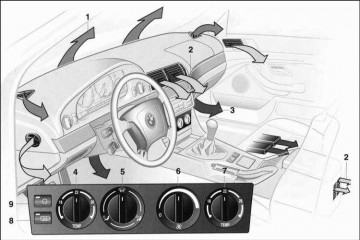
Система кондиционирования BMW
Сложная система кондиционирования в автомобилях BMW, в том числе и система климат-контроля, выполняют задачу поддержания параметров воздуха (температуры и влажности) в заданных пределах, обеспечивая комфортное нахождение водителю и пассажирам.
Различные функциональные части системы климат-контрол…
Замена амортизаторов BMW
Автомобили BMW комплектуются стойками амортизаторов двух типов: активные, жесткость которых регулируется электроникой и пассивные.
Эксплуатационный срок и признаки износа амортизаторов
Срок службы амортизаторов будет напрямую зависеть от стиля вождения и качества дорожного покрытия. Средний эк…
Замена тормозных колодок на автомобилях BMW
Продолжительность службы тормозных колодок
Обычно тормозные колодки на автомобилях BMW могут прослужить около 25 000 километров. С течением времени их толщина уменьшается до 3-4 миллиметров, что составляет около 70-80% изначальной толщины. Однако важно не ориентироваться только на пробег. Рекомен…
- Самые активные участники сообщества
-

-
-
-
-
-
-
-
-
-
-
-
-
-
-
-
-
-
-
-
-
-
-
-
-
-
-

















Select your BMW X3 PDF Download from the list below:
Other Manuals
29 Pages
BMW BMW X Series BMW X3 Misc Documents
View pdf
£9.99
Get your hands on the complete BMW factory workshop software
Download now
1950
Brochure
41 Pages
BMW — X3 — Brochure — 1950 — 1970
View pdf
£9.99
Get your hands on the complete BMW factory workshop software
Download now
2002
Other Manuals
27 Pages
BMW — X3 — Workshop Manual — 2002 — 2002
View pdf
£9.99
Get your hands on the complete BMW factory workshop software
Download now
Other Manuals
27 Pages
BMW — X325 — Workshop Manual — 2002 — 2002
View pdf
Other Manuals
27 Pages
BMW — X322 — Workshop Manual — 2002 — 2002
View pdf
2003
Other Manuals
132 Pages
BMW — X3 3.0i — Owners Manual — 2003 — 2003
View pdf
£9.99
Get your hands on the complete BMW factory workshop software
Download now
2004
Other Manuals
54 Pages
BMW — X3 2.5i — Workshop Manual — 2004 — 2006
View pdf
£9.99
Get your hands on the complete BMW factory workshop software
Download now
Other Manuals
4 Pages
BMW — X3 — Owners Manual — 2004 — 2004
View pdf
Other Manuals
129 Pages
BMW BMW X3 2004 BMW X3 3.0i SAV Owners Manual
View pdf
2005
Other Manuals
126 Pages
BMW — X3 2.5i SAV — Owners Manual — 2005 — 2010
View pdf
£9.99
Get your hands on the complete BMW factory workshop software
Download now
Other Manuals
24 Pages
BMW — X3 — Miscellaneous Documents — 2005 — 2005
View pdf
Other Manuals
116 Pages
BMW BMW X3 2005 BMW X3 3.0i SAV Owners Manual
View pdf
2006
Other Manuals
133 Pages
BMW — X3 2.5i — Owners Manual — 2006 — 2006
View pdf
£9.99
Get your hands on the complete BMW factory workshop software
Download now
Other Manuals
133 Pages
BMW — Auto — bmw-x3-2-5i-2006-owner-s-manual-17697
View pdf
2007
Other Manuals
139 Pages
BMW — X3 3.0si SAV — Owners Manual — 2007 — 2010
View pdf
£9.99
Get your hands on the complete BMW factory workshop software
Download now
Other Manuals
139 Pages
BMW — X3 3.0i — Owners Manual — 2007 — 2007
View pdf
Other Manuals
136 Pages
BMW — Auto — bmw-x3-3-0i-2007-owner-s-manual-17699
View pdf
2008
Other Manuals
140 Pages
BMW — X3 3.0si — Owners Manual — 2008 — 2010
View pdf
£9.99
Get your hands on the complete BMW factory workshop software
Download now
Other Manuals
140 Pages
Bmw — Auto — bmw-x3-3-0si-2008-owner-s-manual-17701
View pdf
2009
Brochure
31 Pages
BMW — X3 — Sales Brochure — 2009 — 2009
View pdf
£9.99
Get your hands on the complete BMW factory workshop software
Download now
Other Manuals
146 Pages
BMW — X3 xDrive30i — Owners Manual — 2009 — 2010
View pdf
Brochure
29 Pages
BMW — X3 — Brochure — (2009)
View pdf
2010
Other Manuals
60 Pages
BMW — X3 xDrive20d — Owners Manual — (2010) 1
View pdf
£9.99
Get your hands on the complete BMW factory workshop software
Download now
Other Manuals
45 Pages
BMW — X3 — Owners Manual — 2010 — 2010
View pdf
Other Manuals
48 Pages
BMW — X3 — Owners Manual — (2010)
View pdf
Other Manuals
144 Pages
BMW — X3 xDrive30i — Owners Manual — 2010 — 2010
View pdf
Best iPad Holder For Car
Find out more
Other Manuals
144 Pages
BMW — Auto — bmw-x3-xdrive28i-2010-owner-s-manual-17703
View pdf
Brochure
16 Pages
BMW — X3 — Brochure — 2010 — 2010
View pdf
2011
Other Manuals
54 Pages
BMW — X3 xDrive28i — Workshop Manual — 2011 — 2020
View pdf
£9.99
Get your hands on the complete BMW factory workshop software
Download now
Brochure
19 Pages
BMW — X3 — Brochure — 2011 — 2011
View pdf
Other Manuals
278 Pages
BMW — X3 xDrive28i — Owners Manual — 2011 — 2011
View pdf
Other Manuals
261 Pages
BMW BMW X3 2011 BMW X3 xDrive35i Owners Manual
View pdf
Best iPad Holder For Car
Find out more
Other Manuals
524 Pages
BMW — Auto — bmw-x3-xdrive35i-2011-owner-s-manual-17706
View pdf
Other Manuals
262 Pages
BMW — Auto — bmw-x3-xdrive35i-2011-owner-s-manual-17706_5d8a7f6d5a3676a27706334
View pdf
2012
Other Manuals
2 Pages
BMW — X3 — Workshop Manual — 2012 — 2012
View pdf
£9.99
Get your hands on the complete BMW factory workshop software
Download now
Other Manuals
278 Pages
BMW — Auto — bmw-x3-xdrive35i-2012-owner-s-manual-17708
View pdf
2013
Other Manuals
46 Pages
BMW — X3 — Owners Manual — 2013 — 2013
View pdf
£9.99
Get your hands on the complete BMW factory workshop software
Download now
Other Manuals
46 Pages
BMW — X3 xDrive28i — Owners Manual — 2013 — 2013
View pdf
Other Manuals
212 Pages
Cars & Automotive Accessories — BMW — X3 Sports Utility Vehicle 2013
View pdf
Other Manuals
211 Pages
BMW — X3 xDrive28i — Owners Manual — 2013 — 2014
View pdf
Best iPad Holder For Car
Find out more
Other Manuals
200 Pages
BMW BMW X3 2013 BMW X3 xDrive35i Owners Manual
View pdf
Other Manuals
30 Pages
BMW — X3 Series F25 — Workshop Manual — 2013 — 2013
View pdf
2014
Other Manuals
212 Pages
BMW — X3 — Parts Catalogue — 2014 — 2015
View pdf
£9.99
Get your hands on the complete BMW factory workshop software
Download now
Other Manuals
50 Pages
BMW — X3 sDrive28i — Workshop Manual — 2014 — 2015
View pdf
Other Manuals
208 Pages
Bmw — Auto — bmw-x3-xdrive35i-2014-owner-s-manual-55269
View pdf
Other Manuals
207 Pages
BMW BMW X3 2014 BMW X3 xDrive35i Owners Manual
View pdf
Best iPad Holder For Car
Find out more
Other Manuals
251 Pages
Cars & Automotive Accessories — BMW — X3 2014
View pdf
Brochure
27 Pages
BMW — X3 — Brochure — 2014 — 2014
View pdf
Brochure
27 Pages
BMW — X3 sDrive 18d — Brochure — 2014 — 2014
View pdf
Best Back Seat Organizer
Find out more
Brochure
27 Pages
BMW — X3 xDrive35i — Brochure — 2014 — 2014
View pdf
Brochure
27 Pages
BMW — X3 xDrive20d — Brochure — 2014 — 2014
View pdf
£9.99
Get your hands on the complete BMW factory workshop software
Download now
Brochure
27 Pages
BMW — X3 xDrive35d — Brochure — 2014 — 2014
View pdf
Best Car Creepers
Find out more
Brochure
27 Pages
BMW — X3 xDrive20i — Brochure — 2014 — 2014
View pdf
Brochure
27 Pages
BMW — X3 xDrive28i — Brochure — 2014 — 2014
View pdf
Brochure
27 Pages
BMW — X3 xDrive30d — Brochure — 2014 — 2014
View pdf
Best Tesla Model 3 Floor Mats
Find out more
Brochure
27 Pages
BMW — X3 sDrive20i — Brochure — 2014 — 2014
View pdf
2015
Brochure
36 Pages
BMW — X3 — Brochure — 2015 — 2015
View pdf
£9.99
Get your hands on the complete BMW factory workshop software
Download now
Other Manuals
257 Pages
BMW — X3 — Owners Manual — 2015 — 2015
View pdf
Other Manuals
1 Pages
BMW — X3 — Workshop Manual — 2015 — 2015
View pdf
Other Manuals
29 Pages
BMW — X3 — Workshop Manual — 2015 — 2015
View pdf
Best iPad Holder For Car
Find out more
Other Manuals
29 Pages
BMW — X3 Series F26 — Owners Manual — 2015 — 2015
View pdf
Brochure
16 Pages
BMW — X3 — Brochure — 2015 — 2016
View pdf
Brochure
15 Pages
BMW — X3 F25 LCI — Brochure — 2015 — 2015
View pdf
Best Back Seat Organizer
Find out more
2016
Other Manuals
25 Pages
BMW — X3 — Workshop Manual — 2016 — 2016
View pdf
£9.99
Get your hands on the complete BMW factory workshop software
Download now
Brochure
18 Pages
BMW — X3 — Brochure — 2016 — 2016
View pdf
Other Manuals
257 Pages
Bmw — Auto — bmw-x3-2016-owner-s-manual-83037
View pdf
Brochure
27 Pages
BMW — X3 xDrive35i — Brochure — 2016 — 2016
View pdf
Best iPad Holder For Car
Find out more
Brochure
27 Pages
BMW — X3 xDrive20i — Brochure — 2016 — 2016
View pdf
Brochure
27 Pages
BMW — X3 xDrive35d — Brochure — 2016 — 2016
View pdf
Brochure
27 Pages
BMW — X3 xDrive30d — Brochure — 2016 — 2016
View pdf
Best Back Seat Organizer
Find out more
2017
Brochure
104 Pages
BMW — X3 — Brochure — 2017 — 2017
View pdf
£9.99
Get your hands on the complete BMW factory workshop software
Download now
Brochure
22 Pages
BMW — X3 xDrive20i — Brochure — 2017 — 2017
View pdf
Brochure
15 Pages
BMW — X3 xDrive 30d — Brochure — 2017 — 2017
View pdf
2019
Other Manuals
15 Pages
BMW — X3 M — Workshop Manual — 2019 — 2019
View pdf
£9.99
Get your hands on the complete BMW factory workshop software
Download now
Other Manuals
15 Pages
BMW — X3 M Competition — Workshop Manual — 2019 — 2019
View pdf
2020
Other Manuals
25 Pages
BMW — X3 (G01) — Workshop Manual — 2020 — 2020 (2)
View pdf
£9.99
Get your hands on the complete BMW factory workshop software
Download now
Other Manuals
25 Pages
BMW — X3 (G01 LCI) — Workshop Manual — 2020 — 2020
View pdf
Brochure
22 Pages
BMW — X3 — Brochure — 2020 — 2020
View pdf
Other Manuals
24 Pages
BMW — X3M — Parts Catalogue — 2020 — 2020
View pdf
Best iPad Holder For Car
Find out more
Brochure
22 Pages
BMW — X3 xDrive30i — Brochure — 2020 — 2020
View pdf
Brochure
22 Pages
BMW — X3 xDrive20d — Brochure — 2020 — 2020
View pdf
2021
Brochure
22 Pages
BMW — X3 xDrive 30i — Brochure — 2021 — 2021
View pdf
£9.99
Get your hands on the complete BMW factory workshop software
Download now
Brochure
27 Pages
BMW — X3 M Competition — Brochure — 2021 — 2021 (2)
View pdf
Brochure
149 Pages
BMW — X3 sDrive30i — Brochure — 2021 — 2021.PDF
View pdf
Brochure
27 Pages
BMW — X3 sDrive20i — Brochure — 2021 — 2021
View pdf
Best iPad Holder For Car
Find out more
Brochure
149 Pages
BMW — X3 xDrive30i — Brochure — 2021 — 2021.PDF
View pdf
Brochure
22 Pages
BMW — X3 xDrive 20d — Brochure — 2021 — 2021
View pdf
Brochure
27 Pages
BMW — X3 — Brochure — 2021 — 2021
View pdf
Best Back Seat Organizer
Find out more
Brochure
149 Pages
BMW — X3 M — Brochure — 2021 — 2021.PDF
View pdf
Brochure
27 Pages
BMW — X3 xDrive30e — Brochure — 2021 — 2021
View pdf
£9.99
Get your hands on the complete BMW factory workshop software
Download now
90 BMW X3 Workshop, Owners, Service and Repair Manuals
Updated — August 23
We have 90 BMW
X3 manuals
covering a total of 71 years of production.
In the table below you can see 0
X3 Workshop Manuals,0
X3 Owners Manuals and 37 Miscellaneous
BMW X3 downloads.
Our most popular manual is the
BMW — X3 2.5i — Workshop Manual — 2004 — 2006
.
This (like all of our manuals) is available to download for free in PDF format.
How to download a BMW X3
Repair Manual (for any year)
These X3 manuals have been provided by our users,
so we can’t guarantee completeness. We’ve checked the years that the manuals cover
and we have BMW X3 repair manuals
for the following years; 1950, 2002, 2003, 2004, 2005, 2006, 2007, 2008, 2009, 2010, 2011, 2012, 2013, 2014, 2015, 2016, 2017, 2019, 2020 and 2021.
Go through the 90 different PDF’s that are displayed below,
for example this one. You’ll then be shown the first 10 pages of this specific
document, you can then scroll down and click ‘show full PDF’. Then you can click
download you’ve got a totally free car manual, forever!
What topics does the BMW X3
Service/Repair Manual cover?
In total, that’s over 7654 pages of content dedicated to your
BMW X3. Here’s a non exhaustive list
of what’s covered;
- BMW X3 service manual for roadside repairs
- BMW X3 owners manual covering weekly checks
- BMW X3 workshop manual covering Lubricants, fluids and tyre pressures
- BMW X3 service PDF’s covering routine maintenance and servicing
- Detailed BMW X3 Engine and Associated Service Systems (for Repairs and Overhaul) (PDF)
- BMW X3 Transmission data Service Manual PDF
- BMW X3 Brakes and suspension PDF
- BMW X3 Wiring Diagrams
Looking for a Free BMW X3 Haynes /
BMW X3 Chilton Manuals?
We get a lot of people coming to the site looking to get themselves a free
BMW X3 Haynes
manual. There are two things you need to know; firstly it’s illegal, and secondly —
there are much better ways of servicing and understanding your
BMW X3 engine than
the Haynes manual. That’s essentially what we’re here for — to give you an
alternative to the Haynes and Chilton, online and totally for free.
Show more
Show less