
Страницы и текст этой инструкции
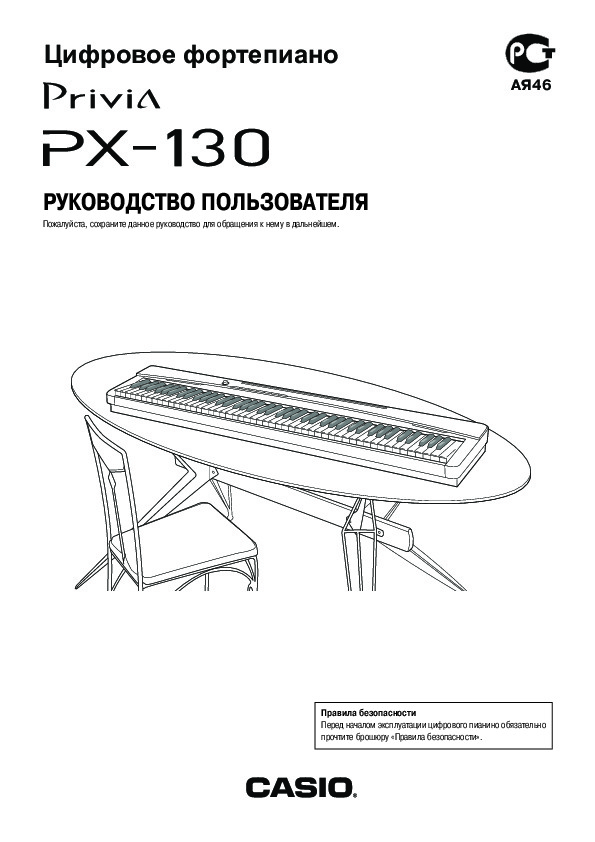 Инструкция — Privia PX-130
 Информация отображена на картинке
 Информация отображена на картинке
 Информация отображена на картинке
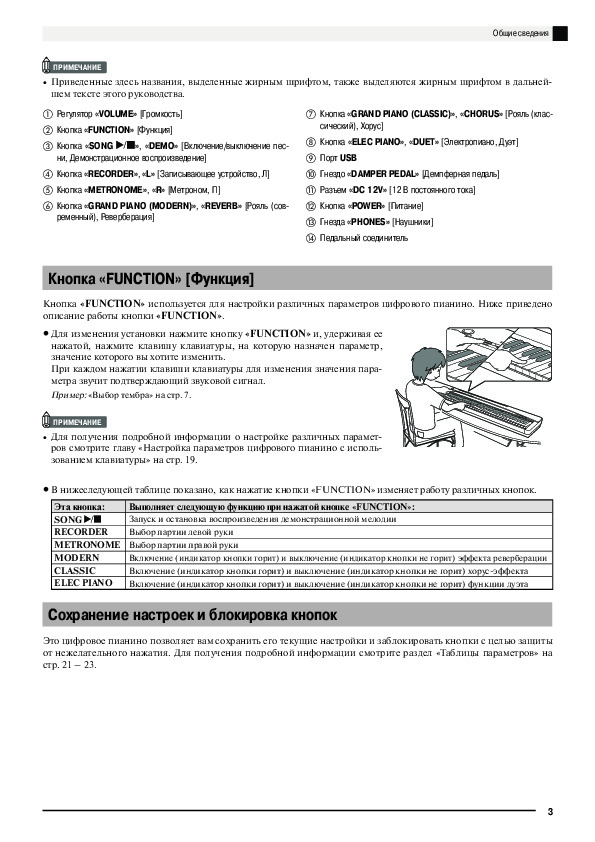 Информация отображена на картинке
Как использовать наш сайт инструкций OnlineManuals.ru
Наша цель состоит в том, чтобы предоставить вам быстрый доступ к содержанию инструкции для — Privia PX-130.
С помощью онлайн просмотра, Вы можете быстро просмотреть содержимое инструкции и найти решение проблемы с — Privia PX-130.
Для Вашего удобства
Если листать руководство пользователя — Privia PX-130 прямо на сайте, не очень удобно для Вас, есть два возможных решения:
• Просмотр в полноэкранном режиме — легко просмотреть руководство пользователя (без загрузки его на свой компьютер), Вы можете использовать режим полноэкранного просмотра.
Для просмотра инструкции пользователя — Privia PX-130 на полном экране, используйте кнопку «Открыть в Pdf-viewer».
• Загрузка на компьютер — Вы можете также скачать Инструкция — Privia PX-130 на свой компьютер и сохранить его в файлах.
Многие люди предпочитают читать документы не на экране, а в печатной версии.
Возможность печати руководства пользователя также была предусмотрена на нашем сайте,
и вы можете использовать ее, нажав на иконку «печать» в Pdf-viewer.
Нет необходимости печатать все руководство — Privia PX-130, можно выбрать только нужные страницы инструкции.
Справочник Пользователя (English)Справочник ПользователяИнструкцияИнструкцияИнструкцияИнструкцияИнструкцияИнструкция

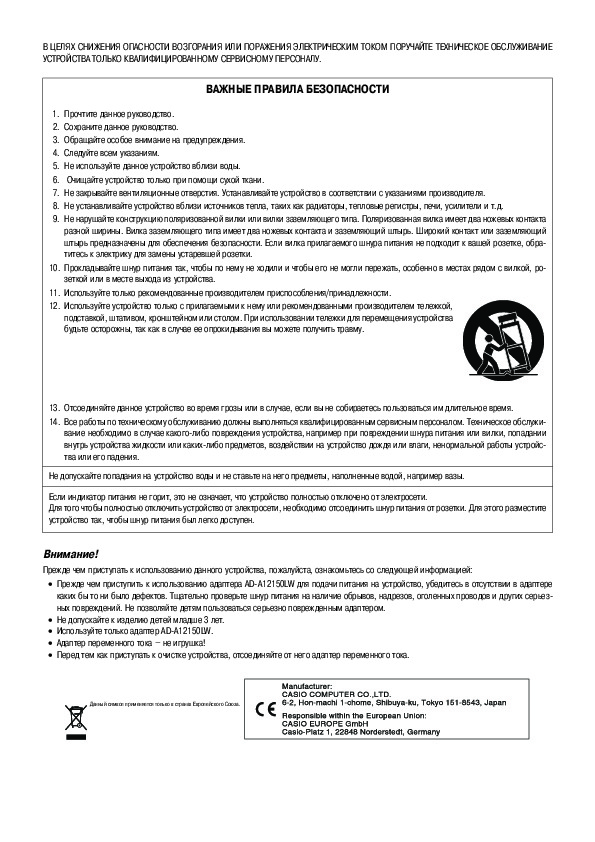
TO REDUCE THE RISK OF FIRE OR ELECTRIC SHOCK, REFER SERVICING TO QUALIFIED SERVICE PERSONNEL.
IMPORTANT SAFETY INSTRUCTIONS
1.Read these instructions.
2.Keep these instructions.
3.Heed all warnings.
4.Follow all instructions.
5.Do not use this apparatus near water.
6.Clean only with dry cloth.
7.Do not block any ventilation openings. Install in accordance with the manufacturer’s instructions.
8.Do not install near any heat sources such as radiators, heat registers, stoves, or other apparatus (including amplifiers) that produce heat.
9.Do not defeat the safety purpose of the polarized or grounding-type plug. A polarized plug has two blades with one wider than the other. A grounding type plug has two blades and a third grounding prong. The wide blade or the third prong are provided for your safety. If the provided plug does not fit into your outlet, consult an electrician for replacement of the obsolete outlet.
10.Protect the power cord from being walked on or pinched particularly at plugs, convenience receptacles, and the point where they exit from the apparatus.
11.Only use attachments/accessories specified by the manufacturer.
12.Use only with the cart, stand, tripod, bracket, or table specified by the manufacturer, or sold with the
apparatus. When a cart is used, use caution when moving the cart/apparatus combination to avoid injury from tip-over.
13.Unplug this apparatus during lightning storms or when unused for long periods of time.
14.Refer all servicing to qualified service personnel. Servicing is required when the apparatus has been damaged in any way, such as power-supply cord or plug is damaged, liquid has been spilled or objects have fallen into the apparatus, the apparatus has been exposed to rain or moisture, does not operate normally, or has been dropped.
The apparatus shall not be exposed to dripping or splashing and that no objects filled with liquids, such as vases, shall be placed on the apparatus.
The power indicator being unlit does not mean the apparatus is completely disconnected from the MAINS.
When you need to have the apparatus completely disconnected from the MAINS, you must unplug the power cord. For that purpose, locate the apparatus in a way that secures easy access to the power cord.
NOTICE
This equipment has been tested and found to comply with the limits for a Class B digital device, pursuant to Part 15 of the FCC Rules. These limits are designed to provide reasonable protection against harmful interference in a residential installation. This equipment generates, uses and can radiate radio frequency energy and, if not installed and used in accordance with the instructions, may cause harmful interference to radio communications. However, there is no guarantee that interference will not occur in a particular installation. If this equipment does cause harmful interference to radio or television reception, which can be determined by turning the equipment off and on, the user is encouraged to try to correct the interference by one or more of the following measures:
•Reorient or relocate the receiving antenna.
•Increase the separation between the equipment and receiver.
•Connect the equipment into an outlet on a circuit different from that to which the receiver is connected.
•Consult the dealer or an experienced radio/TV technician for help.
FCC WARNING
Changes or modifications not expressly approved by the party responsible for compliance could void the userís authority to operate the equipment.
Declaration of Conformity
Model Number: PX-130
Trade Name: CASIO COMPUTER CO., LTD. Responsible party: CASIO AMERICA, INC.
Address: 570 MT. PLEASANT AVENUE, DOVER, NEW JERSEY 07801 Telephone number: 973-361-5400
This device complies with Part 15 of the FCC Rules, Operation is subject to the following two conditions:
(1) This device may not cause harmful interference, and (2) this device must accept any interference received, including interference that may cause undesired operation.
Important!
Please note the following important information before using this product.
•Before using the AD-A12150LW Adaptor to power the unit, be sure to check the AC Adaptor for any damage first. Carefully check the power cord for breakage, cuts, exposed wire and other serious damage. Never let children use an AC adaptor that is seriously damaged.
•The product is not intended for children under 3 years.
•Use only CASIO AD-A12150LW adaptor.
•The AC adaptor is not a toy.
•Be sure to disconnect the AC adaptor before cleaning the product.
Manufacturer:
CASIO COMPUTER CO.,LTD.
6-2, Hon-machi 1-chome, Shibuya-ku, Tokyo 151-8543, Japan
This mark applies in EU countries only.
Responsible within the European Union: CASIO EUROPE GmbH
Casio-Platz 1, 22848 Norderstedt, Germany

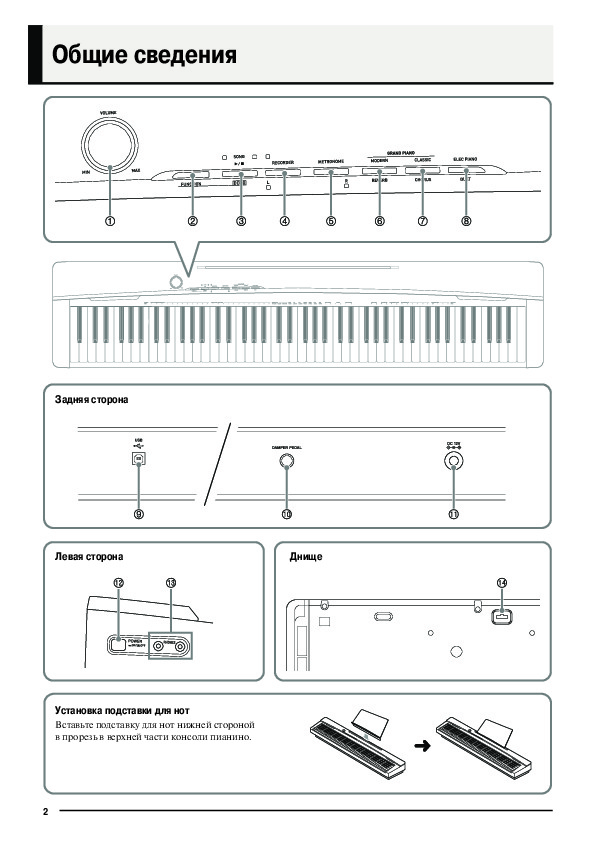
General Guide 

 NOTE
NOTE
• The names shown here are always indicated in bold when they appear within the text of this manual.
|
1 |
VOLUME controller |
8 |
ELEC PIANO, DUET button |
|
2 |
FUNCTION button |
9 |
USB port |
|
3 |
SONG a, DEMO button |
bk DAMPER PEDAL jack |
|
|
4 |
RECORDER (L) button |
bl DC 12V terminal |
|
|
5 |
METRONOME (R) button |
bm POWER button |
|
|
6 |
GRAND PIANO (MODERN), REVERB button |
bn PHONES jacks |
|
|
7 |
GRAND PIANO (CLASSIC), CHORUS button |
bo Pedal connector |
English
FUNCTION Button
The FUNCTION button is used when configuring a variety of different digital piano settings. The following are FUNCTION button basics.
z To change a setting, hold down the FUNCTION button as you press the keyboard key that is assigned the setting you want to select.
An operation confirmation tone will sound whenever you press a keyboard key to configure a setting.
Example: “To select a tone” on page E-7
 NOTE
NOTE
• For details about operations and settings, see “Configuring Settings with the Keyboard” on page E-19.
z The following table shows how pressing the FUNCTION button changes the operation of certain buttons.
|
This button: |
Does this while FUNCTION button is depressed: |
|
SONG a |
Starts and stops demo tune play. |
|
RECORDER |
Selects the left-hand part. |
|
METRONOME |
Selects the right-hand part. |
|
MODERN |
Toggles Reverb on (button lamp lit) and off (lamp unlit). |
|
CLASSIC |
Toggles Chorus on (button lamp lit) and off (lamp unlit). |
|
ELEC PIANO |
Toggles Duet on (button lamp lit) and off (lamp unlit). |
Saving Settings and Using Operation Lock
Your digital piano lets you save its current settings and lock its buttons to protect against operation errors. For details, see “Parameter List” on pages E-21 — E-23.
E-3


 Power Outlet
Your digital piano runs on standard household power. Be sure to turn off power whenever you are not using the digital piano.
Using an AC Adaptor
Use only the AC adaptor (JEITA Standard, with unified polarity plug) that comes with this digital piano. Use of a different type of AC adaptor can cause malfunction of the digital piano.
Specified AC Adaptor: AD-A12150LW
•Use the supplied power cord to connect the AC adaptor as shown in the illustration below.
Household power outlet
AC adaptor
|
DC 12V terminal |
Power cord |
Note the following important precautions to avoid damage to the power cord.
During Use
•Never pull on the cord with excessive force.
•Never repeatedly pull on the cord.
•Never twist the cord at the base of the plug or connector.
During Movement
•Before moving the digital piano, be sure to unplug the AC adaptor from the power outlet.
During Storage
•Loop and bundle the power cord, but never wind it around the AC adaptor.
 IMPORTANT!
•Never connect the AC adaptor (JEITA Standard, with unified polarity plug) that comes with this digital piano to any other device besides this piano. Doing so creates the risk of malfunction.
•Make sure the digital piano is turned off before plugging in or unplugging the AC adaptor.
•The AC adaptor will become warm to the touch after very long use. This is normal and does not indicate malfunction.


 Connections
Connecting a Pedal
Connecting the supplied pedal (SP-3) to the DAMPER PEDAL jack makes it possible to use the pedal as a damper pedal.
Pressing the damper pedal while playing will cause the notes you play to reverberate for a very long time.
•When a GRAND PIANO tone (MODERN, CLASSIC, VARIATION) is selected as the tone, pressing this pedal will cause notes to reverberate just like the damper pedal on an acoustic grand piano.
Back
DAMPER PEDAL jack
SP-3
Pedal Connector
You can connect the optionally available 3-Pedal Unit (SP-32) to the pedal connector on the bottom of the digital piano. You can then use the pedals for expression that is similar to that available on an acoustic piano.
Bottom
Pedal connector
SP-32 Pedal Functions
z Damper Pedal
In addition to the damper pedal functions described in the column to the left, the SP-32 pedal also supports half-pedal operation, so pressing the pedal part way applies only a partial damper effect.
z Soft Pedal
Pressing this pedal suppresses notes played on the keyboard after the pedal was pressed, and makes them sound softer.
z Sostenuto Pedal
Only the notes that are played while this pedal are depressed are sustained until the pedal is released.
|
Soft Pedal |
Damper Pedal |
||||||||||||
Sostenuto Pedal
 NOTE
NOTE
•The optional CS-67P stand is required in order to use the SP-32 Pedal Unit.
Bundled and Optional
Accessories
Use only accessories that are specified for use with this digital piano.
Use of unauthorized accessories creates the risk of fire, electric shock, and personal injury.
 NOTE
NOTE
•You can get information about accessories that are sold separately for this product from the CASIO catalog available from your retailer, and from the CASIO website at the following URL. http://world.casio.com/
E-6


 Playing with Different Tones
|
POWER |
VOLUME |
FUNCTION |
METRONOME |
ELEC PIANO |
||||||
|
SONG a |
GRAND PIANO |
|||||||||
Selecting and Playing a Tone
The piano comes with 16 built-in tones.
English
• The names of the tones are marked above the keyboard keys to which they are assigned.
To select a tone
1. Press the POWER button.
 IMPORTANT!
•When you turn on the digital piano, it performs a power up operation in order to initialize its system. During system initialization the tone button lamps cycle on and off in the sequence for about seven seconds to let you know that system initialization is in progress.
2. Select the tone you want.
zTo select GRAND PIANO (MODERN or CLASSIC) or ELEC PIANO
•Press one of the GRAND PIANO buttons (MODERN or CLASSIC) or the ELEC PIANO button to select the one you want.
zTo select one of the other tones
•While holding down the FUNCTION button, press the keyboard key that corresponds to the tone you want to select.
• The button lamp of the selected tone will light.
3. Use the VOLUME controller to adjust the volume.
E-7


 Playing with Different Tones
 NOTE
NOTE
•GRAND PIANO tones (MODERN, CLASSIC) Your digital piano has a total of 16 built-in tones. The MODERN and CLASSIC tones are stereo sampled tones that can be selected using the GRAND PIANO buttons. Try using the GRAND PIANO tones to familiarize yourself with their distinctive sounds and characteristics.
|
Tone Name |
Characteristics |
|
MODERN |
This tone provides a bright grand piano |
|
sound. The volume and timbre of this |
|
|
tone is quick to respond to different |
|
|
keyboard pressures, and it has |
|
|
relatively strong reverb. This tone is a |
|
|
good choice for dynamic and lively |
|
|
performances. |
|
|
CLASSIC |
This is a natural piano tone that closely |
|
resembles the sound of an acoustic |
|
|
grand piano. Reverb and other effects |
|
|
are kept to a minimum in order to |
|
|
enhance the impact of piano pedals |
|
|
operations (acoustic resonance), for |
|
|
musically delicate expressions. This |
|
|
tone is a good choice for lesson and |
|
|
practice sessions. |
|
•The GRAND PIANO tone (VARIATION) is best for playing along with an accompaniment.
Bass Tones (BASS 1, BASS 2)
Selecting either of the two BASS (LOWER) tones (1 or 2) in step 2 of the above procedure will assign the selected bass tone to the low range (left side) of the keyboard. The high range (right side) will be assigned the tone that was selected when you pressed the BASS 1 or BASS 2 key.
•BASS 1 and BASS 2 let you effectively split the keyboard between two different tones.
|
Split Point |
|
|
Low Range |
High Range |
|
BASS 1 |
PIPE ORGAN |
|
(Currently selected tone.) |
 NOTE
NOTE
•To return the keyboard to a single tone, select any tone other than BASS 1 or BASS 2.
•You cannot select BASS 1 or BASS 2 when recording to Track 2.
To adjust the brilliance of a tone
1. While holding down the FUNCTION button, use the BRILLIANCE keys to specify a brilliance value in the range of –3 to 0 to 3.
|
For this type of sound: |
Press this keyboard |
|
|
key: |
||
|
Mellower and softer |
T |
|
|
Brighter and harder |
S |
 NOTE
NOTE
•To return a tone to its initial default setting “0”, press T and S at the same time.
E-8
Перейти к контенту
Синтезаторы, цифровые пианино Casio

- Размер инструкции: 1.37 Мб
- Формат файла: pdf
Если вы потеряли инструкцию от синтезатора, цифрового пианино Casio PX-130, можете скачать файл для просмотра на компьютере или печати.
Инструкция для синтезатора, цифрового пианино Casio PX-130 на русском языке. В руководстве описаны возможности и полезные функции, а также правила эксплуатации. Перед использованием внимательно ознакомьтесь с инструкцией.
Чтобы не читать всю инструкцию вы можете выполнить поиск по содержимому внутри инструкции и быстро найти необходимую информацию. Рекомендации по использованию помогут увеличить срок службы синтезатора, цифрового пианино Casio PX-130. Если у вас появилась проблема, то найдите раздел с описанием неисправностей и способами их решения. В нем указаны типичные поломки и способы их решения.
Your Donation Will Be Matched 1-to-1! Can You Chip In?
Dear Patron: Please don’t scroll past this. The Internet Archive is a nonprofit fighting for universal access to quality information. We build and maintain all our own systems, but we don’t charge for access, sell user information, or run ads. Instead, we’re powered by online donations averaging about $14. We’d be deeply grateful if you’d join the one in a thousand users that support us financially.
Right now, we have a matching gift campaign that will double the impact of every donation. We understand that not everyone can donate right now, but if you can afford to contribute this Tuesday, we promise it will be put to good use. Our resources are crucial for knowledge lovers everywhere—so if you find all these bits and bytes useful, please pitch in.
Your Donation Will Be Matched! Can You Chip In?
Dear Patron: Please don’t scroll past this. Right now we have a matching gift campaign that will double the impact of every donation. We understand that not everyone can give right now, but if you can afford to contribute this Tuesday, we promise it will be put to good use. If you find all these bits and bytes useful, please pitch in.
23
MIDI и другие параметры
Параметр
Установки
Тип
операции
(стр. 19)
Описание
Примечания
Режим USB-устройс-
тва (USB DEVICE
MODE)
MIDI, Хранение
По умолчанию: MIDI
—
Цифровое пианино вхо-
дит в режим MIDI автома-
тически при подключении
к компьютеру с помощью
USB-кабеля. Выбирайте
установку хранения при
сохранении данных песен
из памяти записывающего
устройства на компьютер
или при загрузке данных
песен с компьютера в па-
мять цифрового пианино.
(стр. 25)
•
Когда выбрана установка хранения,
индикаторы кнопок «GRAND PIA-
NO» (MODERN, CLASSIC) и «ELEC
PIANO» мигают, а все остальные ин-
дикаторы выключены.
•
В этом режиме все операции цифро-
вого пианино недоступны.
•
При каждом нажатии клавиши режи-
ма USB-устройства происходит пере-
ключение между режимами MIDI и
хранения.
Канал передачи
От 01 до 16
По умолчанию: 01
В
Задает один из MIDI-ка-
налов (с 1 по16) в качест-
ве канала передачи MIDI-
сообщений на внешнее
устройство
Локальное управление Выкл., вкл.
По умолчанию: вкл.
А
При выключении локаль-
ного управления звуко-
вой источник цифрового
пианино отключается, и
при нажатии клавиш звук
не воспроизводится через
динамики пианино.
•
Установка локального управления не
может быть изменена во время вос-
произведения песни из музыкальной
библиотеки.
Звуковой сигнал
Выкл., вкл.
По умолчанию: вкл.
А
Выключение этой
функции отключает зву-
ковой сигнал при нажа-
тии клавиши клавиату-
ры, когда нажата кнопка
«FUNCTION».
•
Эта установка сохраняется даже при
выключении инструмента.
•
Установка звукового сигнала не может
быть изменена во время воспроизве-
дения песни из музыкальной библио-
теки, во время звучания метронома, а
также во время записи.
Сохранение настроек Выкл., вкл.
По умолчанию: выкл.
А
Когда эта функция вклю-
чена, цифровое пианино
сохранит текущие на-
стройки
*1
и восстановит
их при следующем вклю-
чении инструмента.
Когда эта функция вы-
ключена, для настроек
*2
восстанавливаются зна-
чения по умолчанию при
следующем включении
инструмента.
•
Установка функции сохранения на-
строек не может быть изменена во
время воспроизведения песни из му-
зыкальной библиотеки, во время зву-
чания метронома, в режиме дуэта, а
также во время записи.
*1
Следующие настройки не сохраня-
ются:
•
Режим дуэта
•
Установка «LR» (партии) песни
•
Локальное управление
*2
Кроме установки функции звукового
сигнала.
Блокировка кнопок
Выкл., вкл.
По умолчанию: выкл.
А
Включение этой функции
блокирует кнопки циф-
рового пианино (кроме
кнопки питания и кно-
пок, необходимых для
отмены блокировки), по-
этому никакие операции
не могут быть выполнены.
Включайте блокировку
кнопок, когда вы хотите
защитить инструмент от
случайного нажатия кно-
пок.
•
Установка функции блокировки кно-
пок не может быть изменена во время
воспроизведения песни из музыкаль-
ной библиотеки, во время звучания
метронома, а также во время записи.
Настройка параметров цифрового пианино с использованием клавиатуры