
|
B E O S O U N D O U V E R T U R E |
1 |
|
P R I N C I P L E S O F O P E R A T I O N |
The BeoSound Ouverture is a fully integrated music system with radio, compact disc player and tape recorder all in one unit.
The system can be placed anywhere you want music – on a wall in the specially designed wall bracket, on the specially designed stand, or on a table or sideboard.
No matter how, whenever you reach out to operate the BeoSound Ouverture, the glass doors slide open as if by magic, inviting you in to the music…
User’s guide

2
This User’s guide describes the operation of the BeoSound Ouverture music system. Each function described in this guide is accompanied by a set of buttons which will guide you through the operation step-by-step.
The BeoSound Ouverture may be used with various types of active Bang & Olufsen loudspeakers, or it may be used as a music centre in a Bang & Olufsen AV system. This guide applies to both situations.
Note: Complete setting-up and maintenance instructions are found in the Setting-up guide, which is also enclosed with the BeoSound Ouverture.
Be sure to keep the Setting-up guide. You will need it for cleaning and maintenance instructions, and when you move or rearrange your BeoSound Ouverture setup in the future.
4 Open to possibilities
6 Principles of operation
9 Using the radio
15 Using the CD player
21 Using the tape recorder
27 Timer programming
33 Nice to know
40 Remote control
Using BeoSound Ouverture in a link room with Beo4
Note: Detailed contents are found at the start of each major section.
|
4 |
O P E N T O P O S S I B I L I T I E S |
Your BeoSound Ouverture music system is versatile, mobile… and responsive!
You can move the whole system around at will and place it wherever you like – on the wall in a specially designed bracket, on a table, or on the specially designed stand.
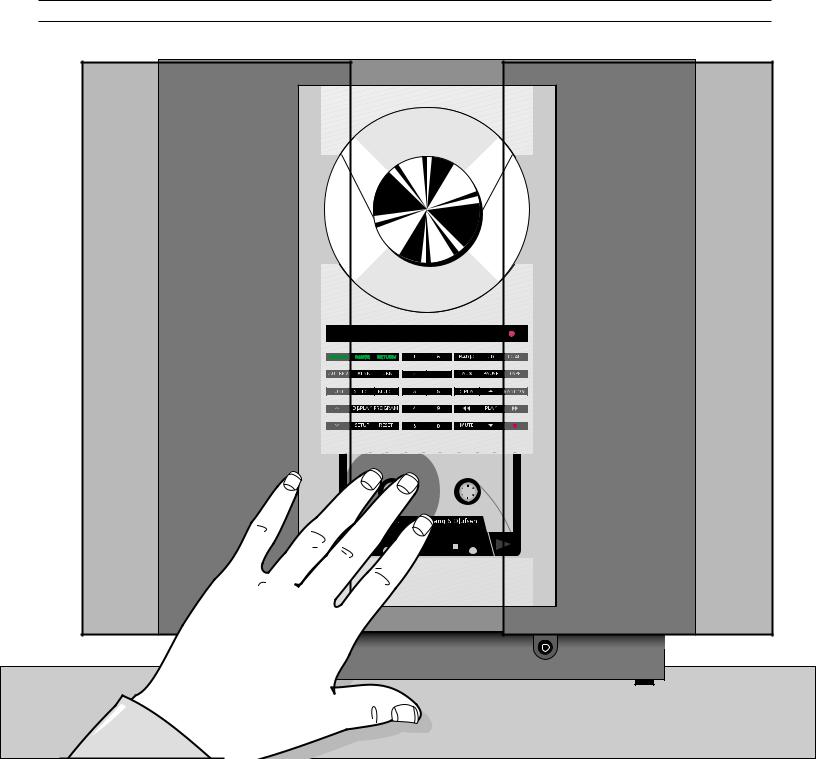
But no matter where you place your BeoSound Ouverture, it will always respond to a wave of your hand.
As soon as you reach out to touch the operation panel, the glass doors open automatically, revealing the music system concealed behind the screen.
5

|
6 |
P R I N C I P L E S O F O P E R A T I O N |
|
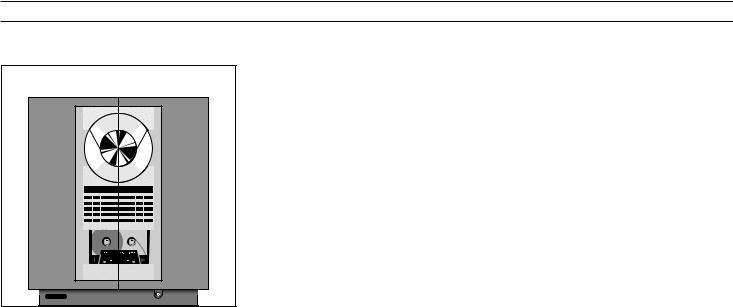
The top section holds the tray for |
|
|
compact discs. The disc is kept in |
|
|
place by a clamp, which can be |
|
|
raised or lowered by pressing the |
|
|
LOAD button (top right-hand |
|
|
button). Discs must always be loaded |
|
|
with the text side facing you! |
|
|
The BeoSound Ouverture radio only |
|
|
becomes visible when it is being used. |
|
|
The display then lights up with radio |
|
|
program information. |
|
|
The middle-section contains the |
|
|
display and the buttons for |
|
|
operating the system. |
|
|
The bottom section is for tape |
|
|
cassettes. Cassettes must be loaded |
|
|
with the tape slot pointing |
|
|
downwards! |
|
|
Socket for headphones. |

7
The open doors give you access to the operating panel and the display…
Number buttons
The number buttons enable you to key in radio program numbers, and to select specific tracks on a CD or a tape.
Status display
The display keeps you informed about what the system is doing and about any on-going operation.
|
Volume buttons |
|||||||||||||||
|
and allow you to raise and |
|||||||||||||||
|
lower the volume level. |
|||||||||||||||
|
Secondary functions |
Primary functions |
||||||||||||||
|
The buttons in the left-hand |
The buttons in the right-hand section give access to |
||||||||||||||
|
section give access to all the |
the primary functions in the system: |
||||||||||||||
|
secondary functions in the |
|||||||||||||||
|
system: Tuning in to radio |
RADIO, CD, or TAPE: Plays the radio, the CD or the |
||||||||||||||
|
stations and naming them, |
tape. |
||||||||||||||
|
controlling the tape, |
AUX: Switches on extra Bang & Olufsen equipment. |
||||||||||||||
|
programming a sequence of |
MUTE: Mutes or demutes the loudspeakers. |
||||||||||||||
|
tracks on the CD player, |
•: Switches the Ouverture to stand-by. |
||||||||||||||
|
For detailed operating instructions, |
adjusting sound, programming |
The step (▲ ▼) and wind (ss tt) buttons let you |
|||||||||||||
|
please refer to the relevant |
the Timer function, etc… |
||||||||||||||
|
sections in this guide. |
The three buttons with green |
step or wind through radio programs and tracks. |
|||||||||||||
|
text are used for recording only. |
REPEAT and RANDOM operate the special repeated |
||||||||||||||
|
and random playing functions in the CD player. |
|||||||||||||||

|
U S I N G T H E R A D I O |
9 |
10Switching displays
11Playing your radio programs
12Presetting radio stations
13Radio program list Clearing presets
14Fine tuning a radio station
Mono/stereo reception
Note: Proper FM and AM aerial connections must be made to the BeoSound Ouverture in order for the radio to pick up the stations available in your area. Please refer to the Setting-up guide for details about aerial connections.

|
10 |
U S I N G T H E R A D I O |
Turn on the radio
Press repeatedly to change the radio display indication
Switching displays
The display can give you three different types of information about the radio program you are listening to:
•Program name*
•Program number
•Radio frequency
To switch from one display to the other, you must press the DISPLAY button repeatedly while the radio is playing.
Your chosen display indication for the radio will be maintained until you select another via the DISPLAY button.
Program name indication*
Program number indication
Radio frequency indication
*Nice to know about RDS…
The program name function requires that your radio is equipped with the RDS facility.
RDS is not a standard feature in all BeoSound Ouverture radios. Please contact your Bang & Olufsen dealer for further information.
The RDS facility enables you to give a short name of your own choice to your radio programs. If you haven’t named a program yourself, the station’s own name may appear instead, provided such a name is being transmitted by the station.
In this way, the RDS facility enables you to remember a station not only by its program number, but also by a particular name.

|
B E O C E N T E R 9 3 0 0 |
11 |
Playing your radio programs
To turn on the radio simply press the RADIO button. The program you were last listening to starts playing, and you will see the indication RADIO followed by a program number in the display.
If you have given a name to the radio program, or if the radio station you are listening to transmits a name of its own, the display may read out that name instead*.
To switch to another program you can either use the step buttons ▲ or ▼, or you can key in the exact program number you want, using the number buttons.
* Note: The program name function requires that the radio is equipped with the RDS facility described on page 10.
If you select another source, the radio switches off automatically. To switch off the entire system, press the standby button •.
Note: Selecting radio programs as described here requires that you have tuned in to all your favourite radio stations and preset them on program numbers of their own. See how on the next few pages.
|
Turns on the radio |
RADIO |
|
Press to step through your radio |
|
|
programs |
or |
|
Alternatively, key in the exact |
|
|
0 |
|
|
program number you want (1-30) |
through |
|
9 |
|
|
Press to raise the volume |
|
|
Press to lower the volume |
|
|
Silences the speakers immediately |
|
|
MUTE |
|
|
Press again to recall the sound |
|
|
Switches the system to stand-by |
|
|
• |

12 > Using the radio
|
RADIO |
Turn on the radio |
|
then |
|
|
Press to access to the tuning |
|
|
TUNE |
|
|
function |
|
|
Switches from FM to AM, or vice |
|
|
versa |
|
|
then |
|
|
Press to accept FM or AM |
|
|
PLAY |
|
|
Press to search for a radio station |
|
|
or |
– up or down the frequency band |
|
then |
|
|
Press to accept the station you have |
|
|
PLAY |
|
|
found |
|
|
Press to change the displayed |
|
|
or |
program number (1-30), if you like |
|
then |
Press to store the radio station on |
|
PLAY |
|
|
the displayed program number |
|
|
If you want to name* the program: |
|
|
Press to reveal the characters one |
|
|
or |
by one |
|
Moves to the next character position |
|
|
tt |
|
|
or |
forwards or backwards |
|
ss |
Keep writing the name you want, |
|
using this method… |
|
|
Finally, press to store your new radio |
|
|
PLAY |
|
|
program |
Presetting radio stations
To be able to use the radio as described on the previous page, you must first tune in to your favourite radio stations and store them on program numbers of their own.
You can store up to 30 radio stations and, if your radio is equipped with the RDS facility, you will even be able to give a short name of your own choice to each program.
The TUNE button gives access to presetting radio stations. When you have pressed TUNE, presetting a radio station is like having a conversation with the BeoSound Ouverture display:
The display prompts you to do something; then press ▲ or ▼ to reveal other options. Pressing the PLAY button accepts any information that is currently shown in the display.
All in all, the tuning procedure takes
you through five stages…
1.First you must select the band in which you want to tune – FM or AM.
2.Then you can make the radio search for a station by pressing ▲ or ▼. Searching stops at the first station producing an acceptable signal. If this is not the station you want, just press ▲ or ▼ again to continue searching.
3.When you have found a station, you must store it on a program number of its own. The display automatically offers you a vacant program number, but you may select another if you like. If the number in the display is blinking, it is to indicate that the station you have found has already been stored once – and on that program number.
4.Then, if you like, you can give a short name of your own choice (8 characters) to your new radio program*; or you can skip the naming function by pressing PLAY – in that case, you will see the name transmitted by the radio station (if any) instead when you play the radio program*.
5.Finally, you must store your new radio program along with all the information you have keyed in with it.
* Note: This function is only available if your radio is equipped with the RDS facility. Please refer to page 10 for further information.
Note: If a station needs fine tuning, or if you wish to switch sound (mono/stereo) on a radio program, please refer to page 14.

Document your radio presets here
1
2
3
4
5
6
7
8
9
10
11
12
13
14
15
16
17
18
19
20
21
22
23
24
25
26
27
28
29
30
13
Clearing presets…
If you wish to clear (cancel) one of your
radio presets, you can do so via the
SETUP button. See how to the right…
When the program number has been cleared, the display reads CLEARED.
|
Switch on to the radio program you |
RADIO |
||
|
want to clear, |
then |
||
|
for example program number 5 |
|||
|
5 |
|||
|
Press to access the setup function |
|||
|
SETUP |
|||
|
then |
|||
|
Press twice until the display reads |
|||
|
CLEAR? |
|||
|
then |
|||
|
Press to confirm that you want to |
|||
|
PLAY |
|||
|
clear (cancel) the radio program |

14 > Using the radio
RADIO
then
5
TUNE
then
PLAY
TUNE
then
or
PLAY
Switch on to the radio program you wish to fine tune,
for example program number 5
Press to get access to the tuning function
Press again to get access to the fine tuning function
Fine tunes towards a higher or a lower frequency
Press to store your fine tuning
Fine tuning a radio station
If the sound from a radio station is not coming through clearly, it may be because the station needs fine tuning.
The fine tuning function enables you to move slowly through the frequencies, or to detune a station slightly because of noisy reception.
To do so, just follow the instructions to the left, and listen carefully as you proceed…
Mono/stereo reception
|
RADIO |
Switch on to the relevant radio |
||
|
then |
program, |
||
|
for example program number 5 |
|||
|
5 |
|||
|
Press to get access to the tuning |
|||
|
TUNE |
|||
|
then |
function |
||
|
PLAY |
|||
|
Press twice to display the current |
|||
|
TUNE |
|||
|
mono/stereo setting |
|||
|
then |
|||
|
Press to switch from stereo to |
|||
|
mono,or vice versa |
|||
|
Press to store your new setting on |
|||
|
PLAY |
|||
|
the program number |
|||
If you have tuned in to an FM station broadcasting a stereo signal, this signal will be stored along with the radio program.
The system automatically switches to mono if the stereo signal is not strong enough to produce an acceptable sound.
However, you can overrule this automatic function if you wish, and select mono or stereo manually. See how to the left on this page…
The current setting is indicated in the display – stereo or mono sound.
 Loading…
You can only view or download manuals with
Sign Up and get 5 for free
Upload your files to the site. You get 1 for each file you add
Get 1 for every time someone downloads your manual
Buy as many as you need
- Page / 44
- Table of contents
- BOOKMARKS
Rated. / 5. Based on customer reviews

-
1
-
2
-
3
-
4
-
5
-
6
-
7
-
8
-
9
-
10
-
11
-
12
-
13
-
14
-
15
-
16
-
17
-
18
-
19
-
20
-
21
-
22
-
23
-
24
-
25
-
26
-
27
-
28
-
29
-
30
-
31
-
32
-
33
-
34
-
35
-
36
-
37
-
38
-
39
-
40
-
41
-
42
-
43
-
44

BEOSOUND OUVERTURE
1
BeoSound Ouverture er et fuldt
integreret musiksystem med radio, CD-
afspiller og kassettebåndoptager i ét.
Systemet kan placeres hvor som helst
De ønsker musik – på væggen med
det specielt konstruerede vægbeslag,
på den specielle Stand, eller på et
bord eller en hylde.
Hver gang De rækker hånden frem
for at betjene BeoSound Ouverture,
åbner glaslågerne sig som ved et
trylleslag og lokker Dem ind i
musikkens verden…
Betjeningsvejledning
PRINCIPLES OF OPERATION
Summary of Contents
More documents for CD players Bang & Olufsen BeoSound Ouverture

Русский
- Bedienungsanleitung Bang Olufsen Beosound Ouverture
- Bang Olufsen Beosound Ouverture User Manual
- Manual Usuario Bang Olufsen Beosound Ouverture
- Mode d’emploi Bang Olufsen Beosound Ouverture
- Istruzioni Bang Olufsen Beosound Ouverture
- инструкция Bang Olufsen Beosound Ouverture
- Bang Olufsen Beosound Ouvertureの取扱説明書
- Handleiding Bang Olufsen Beosound Ouverture
- Manual de uso Bang Olufsen Beosound Ouverture
Вам нужна инструкция? Мы поможем Вам ее найти и сэкономить Ваше время.
- 44 stron
- 0.45 mb
Изделие Bang Olufsen Beosound Ouverture, а также другие, которыми Вы пользуетесь ежедневно, наверняка вы получили в комплекте с инструкцией обслуживания. Из опыта наших пользователей мы знаем, что большинство из Вас не уделили этому особого внимания. Большая часть инструкций, сразу же после покупки попадает в корзину для мусора вместе с коробкой — это ошибка. Ознакомьтесь с информацией, касающейся инструкции Bang Olufsen Beosound Ouverture, которая поможет Вам в будущем сэкономить нервы и избежать головной боли.
Важная подсказка — не забывайте хотя бы раз прочитать инструкцию Bang Olufsen Beosound Ouverture
Если вы не хотите каждый раз читать информационные брошюры, касающиеся, тех или Bang Olufsen Beosound Ouverture иных изделий, достаточно, прочитать их раз — сразу же после покупки устройства. Вы получите основное знания, касающиеся поддержания изделия Bang Olufsen Beosound Ouverture в хорошем эксплуатационном состоянии, так, чтобы без проблем достигнуть его планируемого цикла работы. Затем инструкцию можно отложить на полку и вернуться к ней только в случае, если вы не уверены, правильно ли проводится техобслуживание изделия. Правильный уход является необходимым элементом Вашего удовольствия Bang Olufsen Beosound Ouverture.
Раз в году пересмотрите шкафчик, в котором держите инструкции для всех устройств, — выбросите те, которыми вы уже не пользуетесься. Это поможет Вам сохранять порядок в своей домашней базе инструкций обслуживания.
Summary of Contents for Bang Olufsen Beosound Ouverture
Что находится в инструкции Bang Olufsen Beosound Ouverture? Почему стоит ее прочитать?
- Гарантия и подробности, касающиеся техобслуживания изделия
Хорошей идеей будет прикрепить чек к странице инструкции. Если что-то плохое случится во время использования Bang Olufsen Beosound Ouverture, у вас будет комплект документов, необходимый для гарантийного ремонта. В этой части инструкции вы найдете информацию об авторизованных сервисных центрахBang Olufsen Beosound Ouverture а также, как самостоятельно правильно ухаживать за оборудованием — так, чтобы не потерять гарантийных прав. - Указания по монтажу и Setup
Не терять нервов и времени на самостоятельную попытку установки и первого запуска изделия. Воспользуйтесь рекомендациями производителя Bang Olufsen Beosound Ouverture чтобы правильно запустить изделие, без лишнего риска повреждения оборудования. - Информация, касающаяся дополнительных запчастей (входящих в комплект а также являющихся опцией)
Пересматривая эту часть документа вы сможете проверить, доставлен ли ваш Bang Olufsen Beosound Ouverture с полним комплектом аксессуаров. Вы также сможете узнать, какие дополнительные запчасти или аксессуары для Bang Olufsen Beosound Ouverture Вы сможете найти и докупить к своему устройству. - Troubleshooting
Самые частые проблемы, касающиеся Bang Olufsen Beosound Ouverture и методы их решения. Это очень полезная часть руководства по обслуживанию — она позволит Вам сэкономить много времени на поиск решений. 90% проблем с Bang Olufsen Beosound Ouverture повторяется у многих пользователей. - Требования, касающиеся питания и энергетический класс
Информация, касающаяся количества потребляемой энергии, а также рекомендации, касающиеся установки и питания Bang Olufsen Beosound Ouverture. Прочитайте, чтобы оптимально пользоваться Bang Olufsen Beosound Ouverture и не использовать большего количества ресурсов, нежели это необходимо для правильной работы изделия. - Специальные функции Bang Olufsen Beosound Ouverture
Здесь вы можешь узнать, как персонализировать изделие Bang Olufsen Beosound Ouverture. Вы узнаете, какие дополнительные функции могут помочь Вам удобно использовать продукт Bang Olufsen Beosound Ouverture а также, какие функции Вашего устройства оптимальны для выполнения конкретной деятельности.
Как видите в инструкции вы найдете информацию, которая реально поможет Вам в использовании Вашего изделия. Стоит с ней ознакомиться, чтобы избежать разочарований, возникающих из более короткого, нежели предусматривалось, периода исправности изделия Bang Olufsen Beosound Ouverture. Если все же вы не хотите копить инструкции в своем доме, наш сайт поможет Вам в этом — вы должны найти у нас руководство по обслуживанию большинства из своих устройств, а также Bang Olufsen Beosound Ouverture.
Комментарии (0)

BANG-OLUFSEN BEOSOUND OUVERTURE

Type:  (PDF)
(PDF)
Size
22.7 MB
Page
126
Category
AUDIO
SERVICE MANUAL
If you get stuck in repairing a defective appliance
download
this repair information for help. See below.
Good luck to the repair!
Please do not offer the downloaded file for sell only
use it for personal usage!
Looking for similar bang manual?
Document preview [1st page]
Click on the link for free download!
Document preview [2nd page]

Click on the link for free download!
Please tick the box below to get download link:
- Also known:
BEOSOUND BANG OLUFSEN
- If you have any question about repairing write your question to the Message board. For this no need registration.
- If the site has helped you and you also want to help others, please Upload a manual, circuit diagram or eeprom that is not yet available on the site.
Have a nice Day! - See related repair forum topics below. May be help you to repair.
Warning!
If you are not familiar with electronics, do not attempt to repair!
You could suffer a fatal electrical shock! Instead, contact your nearest service center!
Note! To open downloaded files you need acrobat reader or similar pdf reader program. In addition,
some files are archived,
so you need WinZip or WinRar to open that files. Also some files are djvu so you need djvu viewer to open them.
These free programs can be found on this page: needed progs
If you use opera you have to disable opera turbo function to download file!
If you cannot download this file, try it with CHROME or FIREFOX browser.
Relevant AUDIO forum topics:
Hiya, am seeking a Penta amplifier circuit diagram. I have found a few on the web but this request relates to the input board. Early Penta Mark1s used an input board numbered 8002831 and used 6 transistors. my board is numbered 8002831E and looks similar — but in addition to TR1 to TR6 I have TR8 Tr9 TR10 TR16 TR16 on the circuit board. As its this board that is not working i’m quite keen to get hold of the right circuit diagram. The case says Penta 6602. Any help greatly appreciated. Happy New Year
Similar manuals:
If you want to join us and get
repairing help
please sign in or sign up by completing a simple electrical test
or write your question to the Message board without registration.
You can write in English language into the forum (not only in Hungarian)!
E-Waste Reduce