

SMAKLIG




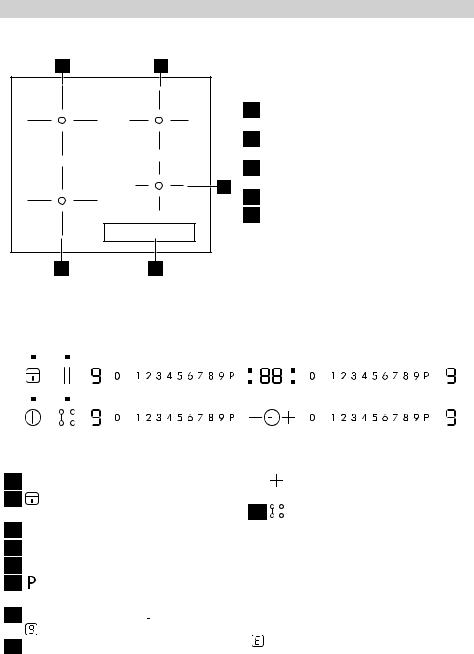
Product description
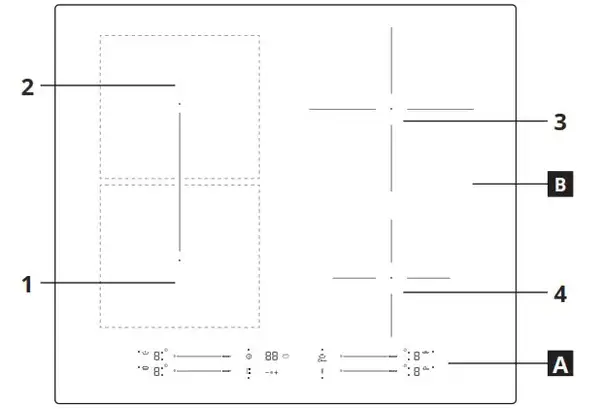
A. Control panel
B. Cooking zones: 1, 2, 3, 4
 Pot incorrectly positioned or missing
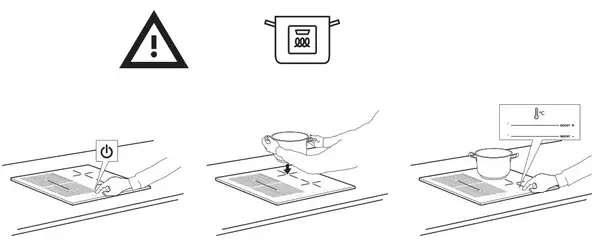
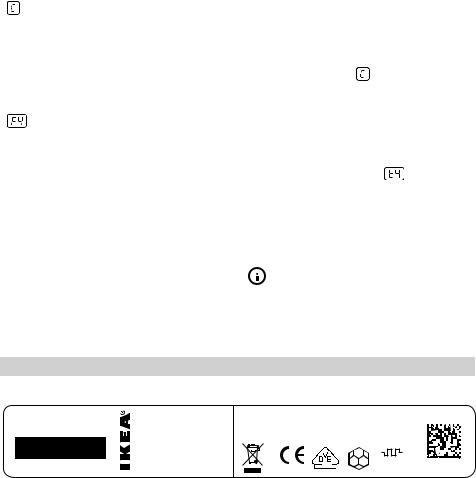
This symbol appears if the pot is not suitable for induction cooking, is not positioned correctly or is not of an appropriate size for the cooking zone selected. If no pot is detected within 30 seconds of making the selection, the cooking zone switches off.
 Residual heat
If the display shows “H”, the cooking zone is still hot. When the cooking zone cools down, the display goes off.
Control panel

| 1. Symbols of Automatic functions 2. Cooking level selected 3. Cooking zone off 4. Scroll keypad 5. Booster |
6. On/Off 7. Bridge+ Mode 8. Timer control 9. Cooking time indicator 10. Activation of Automatic Functions |
11. OK/Key lock button 12. Pause 13. Zone active Led 14. Timer Led 15. Timer symbol |
Daily use
POSITIONING
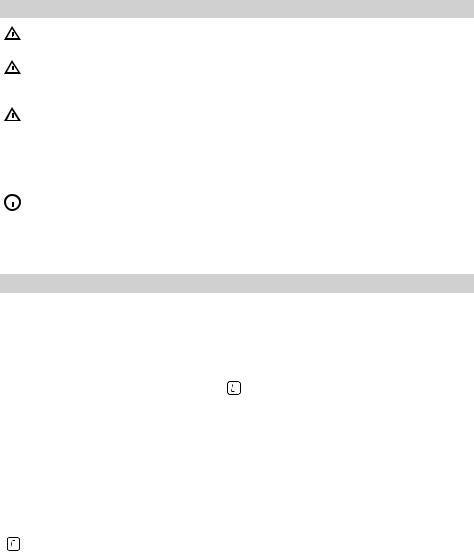
 CAUTION: Never cover the control panel with cookware or any other objects otherwise the product could enter in protection mode. To restore the working condition of the product, remove the cookware and wait at least 10 seconds before using the product. In the cooking zones close to the control panel, pots and pans must be kept inside the markings and centered within the cooking zones. When grilling or frying, is it recommended to use the rear cooking zones.

First Use
POWER LIMITATION
At the time of purchase, the hob is set to the maximum possible power. Adjust the setting in relation to the limits of the electrical system in your home as described in the following paragraph.
NOTE: in case of activation of the max power level of 2.5 kW, some features with more power demand will be not available.
To set the power of the hob:
Once you have connected the device to the mains power supply, you can set the power level within 60 seconds.
Press the timer “+” button for at least 5 seconds. The display
shows PL
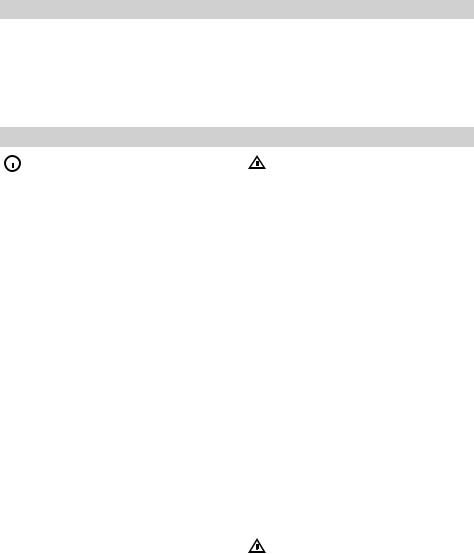
Press 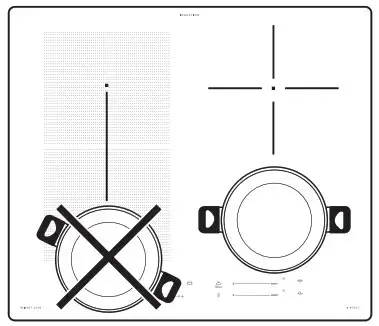 the button until the last power level selected appears.
| PL | 2.5kW | 4.0 kW | 6.0 kW | 7.2 kW |
| P | 2 | 4 | 6 | 7 |
| L | 5 | 0 | 0 | 2 |
Functions
 BRIDGE+ MODE
By selecting the “Bridge+ Mode” button, you can combine two cooking zones and use them at the same power by covering the entire surface with a large pot or partially with a round/oval pot. The function always remains on and, when using only one pot, can be moved over the entire area. In this case, both left-hand scroll keypads can be used indifferently. Ideal for cooking with oval or rectangular pots or with pan supports. To activate/deactivate the bridge + zone press the bridge+ button
 AUTOMATIC FUNCTIONS
Place the pot in position and select the cooking zone.
Press the automatic functions button. “A” will appear on the display. The indicator for the special feature available for the cooking zone will light up.
Press “ok” button to confirm, otherwise the special function indicator will start blinking, waiting for the ok. The power level during the special function is preset and cannot be modified. To deactivate the automatic functions, press the “0” button.
 Melting
This function allows you to bring food to the ideal temperature for melting and to maintain the condition of the food without risk of burning. This method is ideal, as it does not damage delicate foods such as chocolate, and prevents them from sticking to the pot.- Keep Warm
This feature allows you to keep your food at an ideal temperature, usually after cooking is complete, or when reducing liquids very slowly. Ideal for serving foods at the perfect temperature. - Simmering
This function is ideal for maintaining a simmering temperature, allowing you to cook food for long periods with no risk of burning. Ideal for long-cooking recipes (rice, sauces, roasts) with liquid sauces. - Boiling
This function allows you to bring water to the boil and keep it boiling, with lower energy consumption. About 2 litres of water (preferably at room temperature) should be placed in the pan, and left uncovered. In all cases, users are advised to monitor the boiling water closely, and check the amount of water remaining regularly.
 Melting
 Keep Warm
 Simmering
NOTE: in case of activation of the power management at 2.5kW, boiling function will not be available.
Troubleshooting
- Check that the electricity supply has not been shut off.
- If you are unable to turn the hob off after using it, disconnect it from the power supply.
- If alphanumeric codes appear on the display when the hob is switched on, consult the following table for instructions.
Please note:
The presence of water, liquid spilled from pots or any objects resting on any of the hob buttons can accidentally activate or deactivate the control panel lock function.
| Display code | Description | Possible causes | Solution |
| No Code | You cannot activate or operate the hob. | There is residual water or stains on the control panel. | Clean and dry the control panel. |
| No Code | The display does not react to the touch. | Part of the display is covered or the pots are placed too near to the display. | Remove the objects. Move the pots away from the display. If the problem persists wait 10 seconds. |
| FOE1 | Cookware is detected but it is not compatible with requested operation. | The cookware is not well positioned on the cooking zone, or it is not compatible with one or more cooking zones. | Press On/Off button twice to remove the FOE1 code and restore the functionality of the cooking zone. Then, try to use the cookware with a different cooking zone, or use different cookware. |
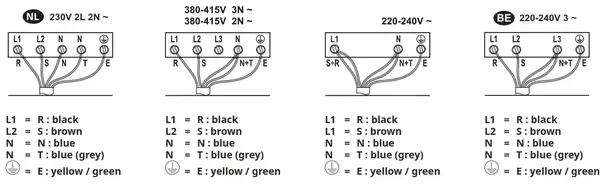
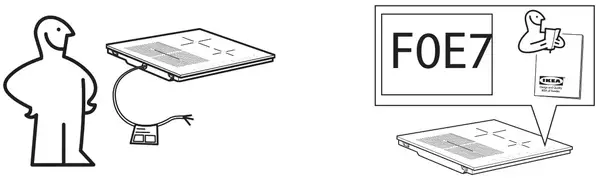
| FOE7 | Wrong power cord connection | The power supply connection is not exactly as indicated in “ELECTRICAL CONNECTION” paragraph. | Adjust the power supply connection according to “ELECTRICAL CONNECTION” paragraph. |
| FOEA | The control panel switches off because of excessively high temperatures. | The internal temperature of electronic parts is too high. | Wait for the hob to cool down before using it again. |
| FOE2, FOE4, FOE6, FOES, FOEC, F1E1, F6E1, F7E5, F7E6, F2E1 |
Disconnect the hob from the power supply. Wait a few seconds then reconnect the hob to the power supply. If the problem persists, call the service centre and specify the error code that appears on the display. |
||
e.g.  |
The hob does not allow a special function to be activated. | The power regulator limits the power levels in accordance with the maximum value set for the hob. | See paragraph “Power management”. |
| e.g. P→ 5 [Power level lower than level requested] |
The hob automatically sets a minimum power level to ensure that the cooking zone can be used. | The power regulator limits the power levels in accordance with the maximum value set for the hob. | See paragraph “Power management”. |
To download the full version visit www.ikea.com
| IKEA | SMAKLIG | 504.678.83 004.678.85 804.678.86 |
4 | 18,5 x 20,0 cm 18,5 x 20,0 cm 21,0 cm 15,0 cm |
37,5 x 20,0 cm | 196,2 188,3 180,2 176,8 | 191,7 | 186,7 | |||
| This appliance meets the Eco design require-ments of European Regulation n.66/2014, in conformity to the European Standard EN 60350-2 |
Brand | Model | Customer Article Number |
Type of hob : ELECTRIC |
Number of cooking zones |
Heating technology. induction |
Dimension of Heater (0 or LxW) |
Energy consumption (EC electric cooking) (Wh/Kg) | |||
| Left front Left rear Right rear Right front | Bridge’ Zone |
Left front Left rear Right rear Right front | Bridge• Zone |
of the hob |
UNITED KINGDOM – IRELAND
Phone number: 02076601517
Rate: Local rate
Opening hours:
Monday – Friday : 8.00am – 6.00pm
Saturday: 8.30am – 4.30pm
Sunday: 9.30am – 3.30pm

|
SMAKLIG |
IT |
|
|
GB |
||
|
DE |
||
|
FR |
||
|
ENGLISH |
4 |
|
DEUTSCH |
16 |
|
FRANÇAIS |
29 |
|
ITALIANO |
46 |
Contents
|
Safety information |
4 |
What to do if… |
10 |
|
Product description |
6 |
Technical information |
11 |
|
Daily use |
7 |
Installation |
12 |
|
Helpful hints and tips |
9 |
Environment concerns |
13 |
|
Care and cleaning |
10 |
IKEA GUARANTEE |
13 |
Subject to change without notice.
 Safety information
 For your safety and correct operation of the appliance, read this manual carefully before installation and use. Always keep these instructions with the appliance even if you move or sell it. Users must fully know the operation and safety features of
the appliance.
Correct use
•Do not leave the appliance unattended during operation.
•The appliance is designed exclusively for domestic use.
•The appliance must not be used as a work surface or as a storage surface.
•Do not place or store flammable liquids, highly inflammable materials or fusible objects (e.g. plastic film, plastic, aluminium) in or near the appliance.
•Watch out when connecting electric appliances to sockets nearby. Do not allow connecting leads to come into contact with or to catch underneath the appliance or hot cookware.
•Do not do repairs yourself to prevent injury and damage to the appliance. Always contact your local After Sales Service (refer to the Service chapter).
Child safety
•Only adults can use this appliance. Children must get supervision to make sure that they do not play with the appliance.
•Keep all packaging away from children. There is a risk of suffocation.
•Keep children away from the appliance when it is on.
Warning! Activate the child safety
 device to avoid small children and pets unintentionally switching the appliance on.
General safety
•This appliance is not intended for use by persons (including children) with reduced physical, sensory or mental capabilities, or lack of experience and knowledge, unless they have been given supervision or instruction concerning use of the appliance by a person responsible for their safety.
Installation
•Make sure that the appliance is not damaged because of transport. Do not connect a damaged appliance. If necessary, contact the After Sales Service (refer to the Service chapter).
•Only an authorized service engineer can install, connect or repair this appliance. Use only original spare parts.
•Built-in appliances can only be used after they are built into suitable built-in units and work surfaces that meet standards.
•Do not change the specifications or modify this product. Risk of injury and damage to the appliance.
Warning! Carefully obey the instructions for electrical and gas
connections.
•Do not install the appliance if it is damaged during the transportation.
Safety during use
•Remove all packaging, stickers and film from the appliance before the first use.

Warning! Fire hazard! Overheated fats and oils can ignite very quickly.
•Switch the cooking zones off after each use by its controls and do not rely on pan detector.
•Risk of burns! Do not place objects made of metal, such as knives, forks, spoons and saucepan lids on the cooking surface, as they can get hot.
Warning! The ventilation gap of 5 mm
 between the worktop and front of the unit underneath it must not be covered. For all safety distances between hob and cabinets refer to the Assembly Instruction.
Warning! Users with implanted
 pacemakers should keep their upper body at least 30 cm from induction cooking zones that are switched on.
Warning! Do not operate the
 appliance with wet hands and keep control panel surface dry. Lot of water on control panel keys will make them no longer operable.
 Warning! If the surface is cracked,
  switch off the appliance to avoid possibility of an electric shock and call the
After Sales Service (refer to the Service chapter).
How to avoid damage to the appliance
•The glass ceramic can be damaged by objects falling onto it, or knocked by the cookware.
•Cookware made of cast iron, cast aluminum or with damaged bottoms can scratch the glass ceramic if slid on the surface.
•To avoid damaging cookware and glass ceramics, do not allow saucepans or frying pans to boil dry.
•Do not use the cooking zones with empty cookware or without cookware.
•Never line any part of the appliance with aluminium foil. Never place plastic or any other material which may melt in or on the appliance.
Information on acrylamides
Important! According to the latest scientific knowledge, intensive browning of food, especially in products containing starch, can constitute a health risk due to acrylamides. Therefore, we recommend cooking at the lowest possible temperatures and not browning foods too much.
Product description
Cooking surface layout
12
1 Single cooking zone (210 mm) 2300 W, with Booster 3200 W
2 Single cooking zone (180 mm) 1800 W, with Booster 2500 W
3 Single cooking zone (145 mm) 1400 W,
3
with Booster 1800 W 4 Control panel
5 Single cooking zone (210 mm) 2300 W, with Booster 3200 W
54
Control panel layout
|
1 |
2 |
3 |
4 |
5 |
6 |
||||||||||||||||||||
|
10 |
9 |
8 |
7 |
1 to switch the hob on or off
2to activate and deactivate the Lock or the Child safety device
3 To activate Stop+Go function
4Cooking zones’ indicators of Timer 
5Timer display: 00 to  minutes
6to activate the Booster (Display shows a  )
)
7A heat setting display:  , from
  to
to
8Control bar to select heat settings
|
9 |
to increase , or |
to decrease the |
|
|
Timer |
10 to activate and deactivate the Bridge function.
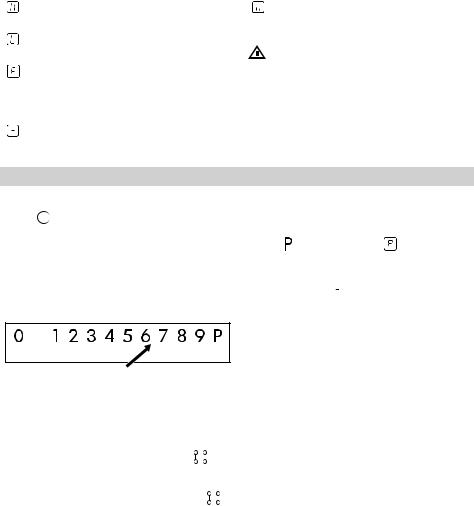
Touch Control sensor fields and displays
You operate the hob by touching sensor fields. Displays and acoustic signals (short beep) confirm the selection of a function.
|
Heat setting |
Description |
|
|
display |
||
|
A malfunction occurred |
||
|
Heat setting |
Description |
|
|
display |
||
|
A cooking zone is still |
||
|
hot |
||
|
The Child Safety Device |
||
|
is on |
||
|
Cookware is unsuitable, |
||
|
too small, or no cook- |
||
|
ware is on the cooking |
||
|
zone |
||
|
The Automatic Switch |
||
|
off is on |
|
Heat setting |
Description |
|
|
display |
||
|
The Stop+Go is on |
||
Residual heat indicator
Warning! Risk of burns from residual
 heat! After you switch the appliance off, the cooking zones need some time to cool down. Look at the residual heat
indicator  .
.
Use residual heat for melting and keeping food warm.
Daily use
 Switching on and off
Touch  for 2 seconds to switch the appliance on or off.
Adjusting the heat setting
Touch the control bar where there is a desired heat setting. Correct to the left or the right, if necessary. Do not release before you reach a desired heat setting.
Bridge function
The Bridge function connects two cooking zones and they operate as one.
First set the heat setting for one of the cooking zone.
To activate the Bridge function touch . To set or change the heat setting touch one of the control sensors.
|
To deactivate the Bridge function touch |
. |
|
The cooking zones operate independently. |
 Using the Booster function
The Booster function makes additional power available to the induction cooking zones.
Touch to switch it on, a lights up on a display. After maximum 10 minutes, the induction cooking zones automatically return
to cooking level  .
.
• Deactivate the appliance with .
elapsed acoustic signal appears and 00 flashes.
onds. The symbol comes on.
set the heat settings. Touch for 4 sec-
elapsed, acoustic signal appears, 00 flash- To deactivate the child safety device es, and cooking zone switches off. If cooking • Activate the appliance with . Do not
zone is not in use and the time set has
• Touch for 4 seconds. The symbol comes on.
• Deactivate the appliance with .
between 00 and 99 minutes. When the pilot light flashes more slowly, the time counts down. Set the heat settings.
If the heat setting is set and the time set has
Touch or of the Timer to set the time
To start this function touch . The symbol
comes on for 4 seconds. The Timer stays on.
To stop this function touch . The heat setting that you set before comes on.
When you stop the appliance, you also stop this function.
The child safety device
This function prevents an accidental operation of the appliance.
To activate the child safety device
• Activate the appliance with . Do not set the heat settings.
symbol comes on.
• To deactivate this function touch . The heat setting that you set before comes on.
Lock
When the cooking zones operate, you can
lock the control panel, but not . It prevents an accidental change of the heat setting.
First set the heat setting.
that operate to the lowest heat setting ( ).
When Stop+Go operates, you cannot change the heat setting.
The Stop+Go function does not stop the timer function.
• To activate this function touch . The
The Stop+Go function sets all cooking zones
STOP+GO
to 00 . The pilot light goes out.
Select for a cooking zone to switch off the function, and the pilot light of the cook-
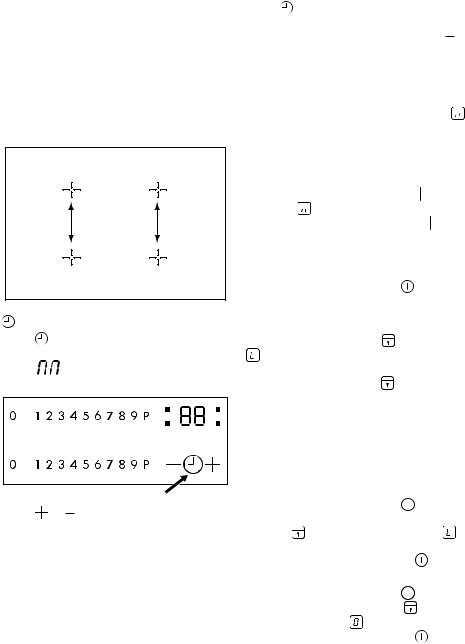
Using the Timer
Touch repeatedly until the pilot light of a desired cooking zone displays. For exam-
The power management shares the maxi-
mum available power between two cooking ing zone selected flashes faster. Touch zones generating a pair (see picture). Boosand the remaining time counts backwards ter function can cause, that the maximum
available power for a pair is exceeded. Then the second cooking zone will be automatically reduced to a lower power level. The display for the reduced zone alternates between selected and maximum available.
Power management
8
ENGLISH
ple, 
 for the front left zone.
ENGLISH
To override the child safety device for only one cooking time
|
• |
Activate the appliance with |
. The sym- |
|
|
• |
bol |
comes on. |
|
|
Touch |
for 4 seconds. Set the heat set- |
ting in 10 seconds. You can operate the appliance.
• When you deactivate the appliance with
 , the child safety device operates again.
Automatic Switch off
The function switches the hob off automatically if:
•all cooking zones are switched off.
•you do not set the heat setting after switching on the hob.
•you cover any sensor field with objects (a pan, a cloth, etc.) for longer than approx. 10 seconds. The cooking zone is switched off automatically and acoustic signal sounds until you uncover the sensor fields.
Helpful hints and tips
Cookware is suitable for induction cooking zones if marked by the manu-
facturer.
 When a cooking zone is switched on, it may hum briefly. This is a characteristic of all ceramic glass cooking zones and does
not impair either the function or the life of the appliance.
Cookware sizes
Induction cooking zones adapt automatically to the size of the bottom of the cookware. But, it must have a minimum diameter depending on the size of the cooking zone.
|
Cooking zone |
Minimum diameter |
|
of cookware base |
|
|
[mm] |
|
|
Right rear cooking |
145 |
|
zone |
9
•you do not switch a cooking zone off after a certain time, or you do not modify the heat setting, or if the overheating occurs (e.g. when a pan boils dry). The sym-
bol  lights up. Before using again, you must set the cooking zone to
  .
.
|
Heat setting |
Automatic switch off after |
|
— |
6 hours |
|
— |
5 hours |
|
4 hours |
|
|
— |
1.5 hours |
If cookware that is not suitable is used,
lights up in the display and after 2 minutes the indicator for the cooking zone switches itself off.
|
Cooking zone |
Minimum diameter |
|
of cookware base |
|
|
[mm] |
|
|
Right front cooking |
125 |
|
zone |
|
|
Left rear cooking |
125 |
|
zone |
|
|
Left front cooking |
125 |
|
zone |
Energy saving
•If possible, always place lids on the pans.
•Place cookware on the cooking zone before you switch it on.
•The bottom of the cookware should be as thick and flat as possible.
ENGLISH
Care and cleaning
Warning! Switch the appliance off and
let it cool down before you clean it.
Warning! For safety reasons, do not
 clean the appliance with steam blasters or high-pressure cleaners.
Warning! Sharp objects and abrasive
 cleaning agents will damage the appliance. Clean the appliance and remove the residues with water and washing up liquid after each use. Remove also the remnants of the cleaning agents!
 Scratches or dark stains on the glass ceramic that cannot be removed do not affect the functioning of the appliance.
10
Removing the residues and stubborn residues:
1.Food containing sugar, plastics, tin foil residues should be removed at once, best tool for cleaning glass surface is a scraper (not included with the appliance). Place a scraper on the glass ceramic surface at an angle and remove residues by sliding the blade over the surface. Wipe the appliance with a damp cloth and a little washing up liquid. Finally, rub the appliance dry using a clean cloth.
2.Limescale rings, water rings, fat splashes, shiny metallic discolorations should be removed after the appliance has cooled down using cleaner for glass ceramic or stainless steel.
What to do if…
|
Problem |
Possible cause |
Remedy |
|
|
The appliance cannot be |
More than 10 seconds have |
Switch the appliance on |
|
|
switched on or is not operat- |
passed since the appliance |
again. |
|
|
ing. |
was switched on. |
||
|
The child safety device is |
Deactivate child safety de- |
||
|
switched on |
. |
vice (See the section “Child |
|
|
safety device” ). |
|||
|
Several sensor fields were |
Only touch one sensor field. |
||
|
touched at the same time. |
|||
|
Acoustic signal sounds, ap- |
One or more sensor fields |
Uncover sensor field. |
|
|
pliance switches off. |
have been covered for lon- |
||
|
ger than 10 seconds. |
|||
|
Display is switching between |
Power management is re- |
See the section «Switching |
|
|
two heat settings. |
ducing the power of this |
the power function on and |
|
|
cooking zone. |
off». |
||
|
lights up on the heat set- |
Unsuitable cookware. |
Use suitable cookware. |
|
|
ting display. |
|||
|
No cookware on the cook- |
Place cookware on the |
||
|
ing zone. |
cooking zone. |
||
|
The diameter of the bottom |
Move onto a smaller cook- |
||
|
of the cookware is too small |
ing zone. |
||
|
for the cooking zone. |
|
Problem |
Possible cause |
Remedy |
|||
|
symbol plus a number |
Electronics fault. |
Disconnect the appliance |
|||
|
appears on the heat setting |
from the electrical supply for |
||||
|
display. |
a few minutes (Take the fuse |
||||
|
out of the house’s electric |
|||||
|
system) If after switching on |
|||||
|
again, |
is displayed |
||||
|
again, call the after sales |
|||||
|
service. |
|||||
|
lights up on the heat |
Overheating protection for |
Switch off the appliance. Re- |
|||
|
setting display. |
the cooking zone operates. |
move the hot cookware. Af- |
|||
|
ter approximately 30 sec- |
|||||
|
onds switch on the cooking |
|||||
|
zone again. |
should dis- |
||||
|
appear, residual heat indi- |
|||||
|
cator can stay. Cool down |
|||||
|
the cookware and check it |
|||||
|
with the section Cookware |
|||||
|
for the induction cooking |
|||||
|
zone. |
|||||
|
If there is a fault, first try to find a solution to |
If you operated the appliance wrongly, |
||||
|
the problem yourself. If you cannot find a |
or the installation was not carried out |
||||
|
solution to the problem yourself, contact |
by a registered engineer, the visit from the |
||||
|
your dealer or the After Sales Service. |
customer service technician or dealer may |
||||
|
not take place free of charge, even during |
|||||
|
the warranty period. |
Technical information
Rating Plate
|
Made in Germany |
Model SMAKLIG Typ 58 GAD DC AU 7,4kW |
7,4kW Induction |
|
© Inter IKEA Systems B.V. 1999 |
PNC 949 594 315 00 S NO …………… |
220V-240V AC 50-60 Hz |
|
202.228.30 |
230 V |
|
|
P Q M |
2 1 5 5 2 |
D G T |
The graphic above represents the rating plate of the appliance (without serial number which is generated dynamically during the production process), which is located at its underneath surface of the casing.
Dear Customer, please apply here aside the sticker you can find in the dedicate plastic bag inserted inside the hob packaging. This will allow us to assist you better, by identifying precisely your hob, in case you will need in future our assistance. Thank you for your help!
ENGLISH
Installation
Manufacturer is not responsible for any injury to persons and pets or damage to property caused by failure to comply following requirements.
Caution! To proceed with the
 installation refer to the assembly instructions.
Warning! Installation process must
 follow the laws, ordinances, directives and standards (electrical safety rules and regulations, proper recycling in accordance with the regulations, etc.) in force in the country of use!
Warning! The appliance must be
earthed!
Warning! Risk of injury from electrical current.
•The electrical mains terminal is live.
•Make electrical mains terminal free of voltage.
•Loose and inappropriate plug and socket connections can make the terminal overheat.
•Have the clamping connections correctly installed.
•Use strain relief clamp on cable.
•Follow the connection diagram (it is located on the underneath surface of the casting of the hob).
Important! You must observe the minimum distances to other appliances and furniture cabinets or other units according to Assembly Instruction.
If there is no oven beneath the hob insert a dividing panel at a minimum distance of 20 mm from the bottom of the hob.
12
Do not use silicon sealant between the appliance and the worktop. Avoid installing the appliance next to doors and under windows as hot cookware may be knocked off the rings when doors and windows are opened.
Only an authorized service engineer can install, connect or repair this appliance. Use only original spare parts.
Electrical connection
Before connecting, check that the nominal voltage of the appliance stated on the rating plate, corresponds to the available supply voltage. Also, check the power rating of the appliance and ensure that the wire is suitably sized to suit the appliance power rating (refer to the Technical data chapter). The rating plate is located on the lower casing of the hob.
The appliance is not provided with mains cable. Buy the right one from specialized dealer. Single-phase or two-phase connection requires the mains cable of type H05 BB-F/H05V2V2-F Tmax 90°C (equal or higher).
The appliance works perfectly on AC 230 V, AC220V~ or AC240V~ 50Hz electrical network.
You must have the means for disconnection incorporated in the fixed wiring. Have the appliance connected to the mains using a device that allows the appliance to be disconnected from the mains at all poles with a contact opening width of at least 3 mm, eg. automatic line protecting cut-out, earth leakage trips or fuse.
You must have the connection and the connecting links carried out as shown in the connection diagram (it is located on the underneath surface of the casting of the hob).
ENGLISH
The earth lead is connected to terminal
marked with the symbol  and must be longer than leads carrying electric current. Tighten the terminal screws securely! Finally, secure the connecting cable with the mains cable cleat and the covering closed by pressing firmly (lock into place).
Environment concerns
The symbol  on the product or on its packaging indicates that this product may not be treated as household waste. Instead it should be taken to the appropriate collection point for the recycling of electrical and electronic equipment. By ensuring this product is disposed of correctly, you will help prevent potential negative consequences for the environment and human health, which could otherwise be caused by inappropriate waste handling of this product. For more detailed information about recycling of this product, please contact your local council, your household
13
Warning! Once connected to the mains supply check that all cooking
zones are ready for use by briefly setting each to maximum power.
waste disposal service or the shop where you purchased the product.
Packaging materials
The materials with the symbol 
 are recyclable. Dispose the packaging in a suitable collection containers to recycle it.
Before disposal of appliance
Warning! Do these steps to dispose the appliance:
•Pull the mains plug out of the mains socket.
•Cut off the mains cable and discard it.
IKEA GUARANTEE
How long is the IKEA guarantee valid?
This guarantee is valid for five (5) years from the original date of purchase of Your appliance at IKEA, unless the appliance is named LAGAN in which case two (2) years of guarantee apply. The original sales receipt is required as proof of purchase. If service work is carried out under guarantee, this will not extend the guarantee period for the appliance,
Which appliances are not covered by the IKEA five (5) years guarantee?
The range of appliances named LAGAN and all appliances purchased in IKEA before 1st of August 2007
Who will execute the service?
IKEA service provider will provide the service through its own service operations or authorized service partner network.
What does this guarantee cover?
The guarantee covers faults of the appliance, which have been caused by faulty construction or material faults from the date of purchase from IKEA. This guarantee applies to domestic use only. The exceptions are specified under the headline “What is not covered under this guarantee?” Within the guarantee period, the costs to remedy the fault e.g. repairs, parts, labour and travel will be covered, provided that the appliance is accessible for repair without special expenditure. On these conditions the EU guidelines (Nr. 99/44/EG) and the respective local regulations are applicable. Replaced parts become the property of IKEA.
What will IKEA do to correct the problem?
IKEA appointed service provider will examine the product and decide, at its sole discretion, if it is covered under this guarantee. If considered covered, IKEA service provider or its authorized service partner through its own service operations, will then, at its sole discretion, either repair the defective product or replace it with the same or a comparable product.
What is not covered under this guarantee?
•Normal wear and tear.
•Deliberate or negligent damage, damage caused by failure to observe operating instructions, incorrect installation or by connection to the wrong voltage, damage caused by chemical or electro-chem- ical reaction, rust, corrosion or water damage including but not limited to damage caused by excessive lime in the water supply, damage caused by abnormal environmental conditions.
•Consumable parts including batteries and lamps.
•Non-functional and decorative parts which do not affect normal use of the appliance, including any scratches and possible color differences.
•Accidental damage caused by foreign objects or substances and cleaning or unblocking of filters, drainage systems or soap drawers.
•Damage to the following parts: ceramic glass, accessories, crockery and cutlery baskets, feed and drainage pipes, seals, lamps and lamp covers, screens, knobs, casings and parts of casings. Unless such damages can be proved to have been caused by production faults.
•Cases where no fault could be found during a technician’s visit.
•Repairs not carried out by our appointed service providers and/or an authorized service contractual partner or where nonoriginal parts have been used.
•Repairs caused by installation which is faulty or not according to specification.
•The use of the appliance in a non-domes- tic environment i.e. professional use.
•Transportation damages. If a customer transports the product to their home or other address, IKEA is not liable for any damage that may occur during transport. However, if IKEA delivers the product to the customer’s delivery address, then damage to the product that occurs during this delivery will be covered by this guarantee.
•Cost for carrying out the initial installation of the IKEA appliance. However, if an IKEA service provider or its authorized service partner repairs or replaces the appliance under the terms of this guarantee, the service provider or its authorized service partner will re-install the repaired appliance or install the replacement, if necessary.
This restriction do not apply to fault-free work carried out by a qualified specialist using our original parts in order to adapt the appliance to the technical safety specifications of another EU country.
How country law applies
The IKEA guarantee gives You specific legal rights, which covers or exceed local demands. However these conditions do not limit in any way consumer rights described in the local legislation
Area of validity
For appliances which are purchased in one EU country and taken to another EU country, the services will be provided in the framework of the guarantee conditions normal in the new country. An obligation to carry out services in the framework of the guarantee exists only if the appliance complies and is installed in accordance with:
•the technical specifications of the country in which the guarantee claim is made;
•the Assembly Instructions and User Manual Safety Information;
The dedicated After Sales Service for IKEA appliances:
Please do not hesitate to contact IKEA After Sales Service to:

1.make a service request under this guarantee;
2.ask for clarification on installation of the IKEA appliance in the dedicated IKEA kitchen furniture. The service won’t provide clarifications related to:
–the overall IKEA kitchen installation;
–connections to electricity (if machine comes without plug and cable), to water and to gas since they have to be executed by an authorized service engineer.
3.ask for clarification on user manual con-
tents and specifications of the IKEA appliance.
To ensure that we provide you with the best assistance, please read carefully the Assembly Instructions and/or the User Manual section of this booklet before contacting us.
How to reach us if You need our service
Please refer to the last page of this manual for the full list of IKEA appointed contacts and relative national phone numbers.
Important! In order to provide You with a quicker service, we recommend that You use the specific phone numbers listed at the end of this manual. Always refer to the numbers listed in the booklet of the specific appliance You need an assistance for. Before calling us, assure that You have to hand the IKEA article number (8 digit code) for the appliance of which you need our assistance.
Important! SAVE THE SALES RECEIPT! It is Your proof of purchase and required for the guarantee to apply. Note that the receipt reports also the IKEA article name and number (8 digit code) for each of the appliances you have purchased.
Do You need extra help?
For any additional questions not related to After Sales of your appliances, please contact our nearest IKEA store call centre. We recommend you read the appliance documentation carefully before contacting us.
Inhalt
|
Sicherheitshinweise |
16 |
Was tun, wenn … |
22 |
|
Gerätebeschreibung |
18 |
Technische Daten |
24 |
|
Täglicher Gebrauch |
19 |
Montage |
24 |
|
Praktische Tipps und Hinweise |
21 |
Umwelttipps |
25 |
|
Reinigung und Pflege |
22 |
IKEA GARANTIE |
26 |
Änderungen vorbehalten.
 Sicherheitshinweise
Zur Gewährleistung der Sicherheit und der richtigen Bedienung des Geräts le-
sen Sie diese Anleitung vor der Installation und Verwendung sorgfältig durch. Bewahren Sie diese Bedienungsanleitung in der Nähe des Geräts auf, auch wenn Sie dieses anderswo aufstellen oder verkaufen. Alle Benutzer müssen mit der Bedienung und den Sicherheitseigenschaften des Geräts vertraut sein.
Bestimmungsgemäße Verwendung
•Lassen Sie das Gerät bei Betrieb nicht unbeaufsichtigt.
•Das Gerät ist ausschließlich zur Verwendung im Haushalt bestimmt.
•Das Gerät darf nicht als Arbeitsoder Abstellfläche verwendet werden.
•Brennbare Flüssigkeiten, leicht entzündliche Materialien oder schmelzbare Materialien (z.B. Folien, Kunststoff, Aluminium) dürfen nicht auf dem Gerät oder in dessen Nähe abgestellt oder gelagert werden.
•Vorsicht bei Anschluss von Elektrogeräten an Steckdosen in Gerätenähe. Die Anschlussleitungen dürfen nicht unter dem Gerät oder heißem Kochgeschirr eingeklemmt werden oder damit in Berührung kommen.
•Versuchen Sie nicht, selbst Reparaturen auszuführen. Andernfalls besteht Unfallgefahr und das Gerät könnte beschädigt werden. Wenden Sie sich stets an Ihren lokalen Kundendienst (siehe hierzu den Abschnitt «Wartung»).
Sicherheit von Kindern
•Nur Erwachsene dürfen dieses Gerät bedienen. Kinder müssen beaufsichtigt werden, so dass sie nicht mit dem Gerät spielen können.
•Halten Sie das Verpackungsmaterial von Kindern fern. Andernfalls besteht Erstickungsgefahr.
•Halten Sie Kinder von dem Gerät fern, wenn es in Betrieb ist.
Warnung! Aktivieren Sie die
 Kindersicherung, um ein versehentliches Einschalten durch Kleinkinder und Haustiere zu verhindern.
Allgemeine Sicherheit
•Personen (einschließlich Kinder), die aufgrund ihrer physischen, sensorischen oder geistigen Fähigkeiten oder ihrer Unerfahrenheit oder Unkenntnis nicht in der Lage sind, das Gerät sicher zu bedienen, sollten dieses Gerät nicht ohne Aufsicht oder Anweisung durch eine verantwortliche Person benutzen.
Aufstellung
•Vergewissern Sie sich, dass das Gerät beim Transport nicht beschädigt wurde. Schließen Sie ein beschädigtes Gerät nicht an. Wenden Sie sich bei Bedarf an den Kundendienst (siehe hierzu den Abschnitt «Wartung»).
•Dieses Gerät darf nur von einem autorisierten Servicetechniker installiert, angeschlossen oder repariert werden. Verwenden Sie nur Originalersatzteile.
•Einbaugeräte dürfen nur nach dem Einbau in normgerechte, passende Einbauschränke und Arbeitsplatten betrieben werden.
•Nehmen Sie weder technische noch anderweitige Modifikationen am Gerät vor. Andernfalls besteht Unfallgefahr und das Gerät könnte beschädigt werden.
Warnung! Beachten Sie genau die Anweisungen zu den elektrischen und
Gasanschlüssen.
•Das Gerät niemals installieren, wenn es während des Transports beschädigt wurde.
Sicherheit während der Benutzung
•Entfernen Sie vor der ersten Benutzung des Geräts sämtliches Verpackungsmaterial sowie alle Aufkleber und Folien.
Warnung! Brandgefahr! Überhitzte Fette und Öle entzünden sich sehr
schnell.
•Schalten Sie nach jedem Gebrauch die Kochzonen mit den Bedienelementen aus und verlassen Sie sich nicht auf die Topferkennung.
•Verbrennungsgefahr! Legen Sie keine Metallgegenstände wie Messer, Gabeln, Löffel oder Deckel auf die Oberfläche des Kochfelds, da diese heiß werden können.
Warnung! Vergewissern Sie sich, dass
 zwischen der Arbeitsfäche und der Gerätevorderseite der Lüftungsspalt von 5 mm nicht verdeckt ist. Siehe die Montageanleitung zu den Sicherheitsabständen zwischen Kochfeld und Schränken.
Warnung! Träger von implantierten Herzschrittmachern müssen sich jedoch
mindestens 30 cm von eingeschalteten Kochfeldern fernhalten.
Warnung! Benutzen Sie das Gerät
 nicht mit nassen Händen und achten Sie darauf, dass die Oberfläche des Bedienfelds stets trocken ist. Die Bedienelemente am Bedienfeld verlieren ihre Funktionstüchtigkeit, wenn sie mit viel Wasser in Berührung kommen.
Warnung! Schalten Sie das Gerät
 sofort ab, wenn Sie Risse auf der Glaskeramikfläche feststellen, um die Gefahr eines Stromschlags zu vermeiden, und wenden Sie sich an den Kundendienst (siehe hierzu den Abschnitt «Wartung»).
Vermeidung von Schäden am Gerät
•Die Glaskeramik kann durch herabfallende Gegenstände oder durch das Kochgeschirr beschädigt werden.
•Kochgeschirr aus Gusseisen, Aluguss oder mit beschädigten Böden können beim Verschieben die Glaskeramik verkratzen.
•Das Leerkochen von Töpfen und Pfannen vermeiden. Es kann Beschädigungen am Kochgeschirr oder der Glaskeramik verursachen.
•Benutzen Sie die Kochzonen nicht mit leerem oder ohne Kochgeschirr.
•Legen Sie nie einen Teil des Gerätes mit Alu-Folie aus. Legen Sie keine Gegenstände aus Kunststoff oder aus anderem Material, das schmelzen kann, in oder auf auf das Gerät.
Hinweis zu Acrylamid
Wichtig! Nach neuesten wissenschaftlichen Erkenntnissen kann eine intensive Bräunung von Lebensmitteln, speziell bei stärkehaltigen Produkten, eine gesundheitliche Gefährdung durch Acrylamid verursachen. Daher empfehlen wir, möglichst bei niedrigen Temperaturen zu garen und die Speisen nicht zu stark zu bräunen.
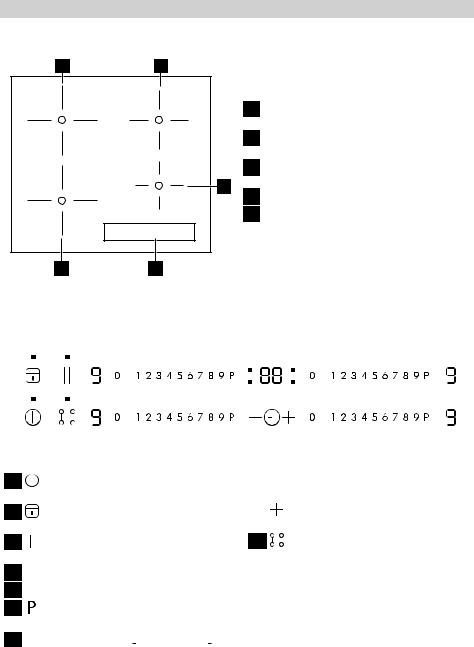
Gerätebeschreibung
Kochfeldanordnung
12
1 Einkreis-Kochzone (210 mm) 2300 W, mit Power-Funktion 3200 W
2 Einkreis-Kochzone (180 mm) 1800 W, mit Power-Funktion 2500 W
3 Einkreis-Kochzone (145 mm) 1400 W,
3
mit Power-Funktion 1800 W 4 Bedienfeld
5 Einkreis-Kochzone (210 mm) 2300 W, mit Power-Funktion 3200 W
54
Bedienfeldanordnung
|
1 |
2 |
3 |
4 |
5 |
6 |
||||||||||||||||||||
|
10 |
9 |
8 |
7 |
1 Zum Einund Ausschalten des Kochfelds
2Zum Einund Ausschalten der Tastenverriegelung oder Kindersicherung
3Zum Einschalten der Funktion Stop +Go
4Kochzonen-Anzeigen des Timers 
5Timer-Anzeige: 00 bis  Minuten
6Zum Einschalten der Power-Funktion (auf dem Display erscheint  )
)
7Kochstufenanzeige:  , von
, von  bis
bis 
|
Bedienleiste zur Auswahl der Kochstu- |
||||
|
8 |
||||
|
fen |
||||
|
zum Höherstellen oder |
zum Nied- |
|||
|
9 |
||||
|
rigerstellen des Timers |
10 Zum Einund Ausschalten der Brückenfunktion.
Touch Control-Sensorfelder und Anzeigen
Das Kochfeld wird durch Berühren der Sensorfelder bedient. Die Anzeigen und akustischen Signale (kurzer Signalton) bestätigen die Auswahl einer Funktion.
 Loading…
-
Инструкции по эксплуатации
1

Ikea СМАКЛИГ инструкция по эксплуатации
(72 страницы)
- Языки:Русский
-
Тип:
PDF -
Размер:
12.22 MB -
Описание:
Индукционная панель с функц мост
Просмотр
На NoDevice можно скачать инструкцию по эксплуатации для Ikea СМАКЛИГ. Руководство пользователя необходимо для ознакомления с правилами установки и эксплуатации Ikea СМАКЛИГ. Инструкции по использованию помогут правильно настроить Ikea СМАКЛИГ, исправить ошибки и выявить неполадки.
More products and manuals for Hobs IKEA
| Models | Document Type |
|---|---|
|
HÖGKLASSIG |
User Manual
56 pages |
|
MHGA1K |
User Manual
52 pages |
|
DAGLIG |
User Manual
20 pages |
|
DAGLIG |
User Manual
64 pages |
|
MHIN2K |
User Manual
88 pages |
|
FHGC4T |
User Manual
52 pages |
|
FHIN4T |
User Manual
56 pages |
|
FHGC4T |
User Manual
48 pages |
|
FHIN4S |
User Manual
56 pages |
|
DAGLIG |
User Manual
40 pages |
|
LHGC3K |
User Manual
20 pages |
|
OV19 |
User Manual
56 pages |
|
BARMHÄRTIG |
User Manual
64 pages |
|
MHGC2K |
User Manual
80 pages |
|
MHGA2K |
User Manual
36 pages |
|
MHGA2K |
User Manual
36 pages |
|
AVENTYRLIG |
User Manual
64 pages |
|
FHGC4K CA2 |
User Manual
44 pages |
|
DAGLIG |
User Manual
60 pages |
|
LHGC3K |
User Manual
20 pages |


Просмотр
Доступно к просмотру 68 страниц. Рекомендуем вам скачать файл инструкции, поскольку онлайн просмотр документа может сильно отличаться от оригинала.
-
SMAKLIG                                                            PL
TR
RU
SK
LT
-
POLSKI                   4
TURKCE                  17
РУССКИЙ                 29
SLOVENSKY               44
LIETUVIU                56
-
POLSKI                                                               4
Spis tresci
Informacje dotyczace bezpieczenstwa  4  Co zrobic, gdy…              10
Opis urzadzenia                  6  Dane techniczne                  12
Codzienna eksploatacja           7  Instalacja                      12
Przydatne rady i wskazowki       9  Ochrona srodowiska              13
Konserwacja i czyszczenie       10  GWARANCJA IKEA                   14
Producent zastrzega sobie mozliwosc wprowadzenia zmian bez wczesniejszego
powiadomienia.
Informacje dotyczace bezpieczenstwa
Aby zapewnic bezpieczenstwo uzytko-  Bezpieczenstwo dzieci
wania i prawidlowe dzialanie urza-  •Urzadzenie moze byc obslugiwane wy-
dzenia, przed przystapieniem do instalacji  lacznie przez osoby dorosle. Dzieciom
i obslugi nalezy dokladnie przeczytac ni-  nalezy zapewnic odpowiednia opieke,
niejsza instrukcje. Instrukcja powinna byc  aby miec pewnosc, ze nie bawia sie
przechowywana razem z urzadzeniem, na-  urzadzeniem.
wet w przypadku jego sprzedazy lub prze-  • Wszystkie materialy opakowaniowe na-
prowadzki. Uzytkownicy powinni w pelni  lezy przechowywac poza zasiegiem
zapoznac sie z obsluga oraz funkcjami bez-  dzieci. Istnieje ryzyko uduszenia.
pieczenstwa tego urzadzenia.        •Gdy urzadzenie dziala, dzieci nie moga
Prawidlowe uzytkowanie                sie do niego zblizac.
•Wlaczonego urzadzenia nie wolno po-    Ostrzezenie! Aby uniknac
zostawiac bez nadzoru.                 przypadkowego wlaczenia urzadzenia
•Urzadzenie jest przeznaczone wylacznie  przez dziecko lub zwierze domowe, nalezy
do uzytku w gospodarstwie domowym.  wlaczyc blokade uruchomienia.
•Urzadzenia nie wolno uzywac jako po-  Ogolne zasady bezpieczenstwa
wierzchni roboczej ani skladowac na nim
przedmiotow.                       • Niniejsze urzadzenie nie jest przeznaczo-
•W urzadzeniu, na nim lub w jego poblizu  ne do uzytku przez osoby (w tym dzieci)
nie wolno umieszczac ani przechowywac  o ograniczonych zdolnosciach fizycznych,
zadnych palnych cieczy ani latwopalnych  sensorycznych czy umyslowych, a takze
badz topliwych materialow (jak np. folia  nieposiadajace wiedzy lub doswiadcze-
plastikowa, przedmioty z aluminium lub  nia w uzytkowaniu tego typu urzadzen,
tworzywa sztucznego).                chyba, ze beda one nadzorowane lub
•Nalezy zachowac ostroznosc przy podla-  zostana poinstruowane na temat korzys-
czaniu urzadzen elektrycznych do gniaz-  tania z tego urzadzenia przez osobe od-
dek umieszczonych w poblizu urzadze-  powiedzialna za ich bezpieczenstwo.
nia. Nie wolno dopuscic do tego, aby  Instalacja
przewody zasilajace mialy kontakt lub  •Nalezy upewnic sie, ze urzadzenie nie
ocieraly sie o urzadzenie lub gorace na-  zostalo uszkodzone w czasie transportu.
czynia.
•Aby uniknac odniesienia obrazen, nie  Nie nalezy podlaczac uszkodzonego
urzadzenia do zrodla zasilania. Jesli to
wolno samodzielnie naprawiac urzadze-  konieczne, nalezy skontaktowac sie z ser-
nia. W razie potrzeby nalezy kontakto-  wisem (patrz rozdzial poswiecony serwi-
wac sie z miejscowym autoryzowanym   sowi).
serwisem (patrz rozdzial "Serwis").
- 1
- 2
- 3
- 4
- 68

СМАКЛИГ

СМАКЛИГ


Описание товара

A. Панель управления
B. Конфорки: 1, 2, 3, 4

A. Панель управления
B. Конфорки: 1, 2, 3, 4
Горшок неправильно установлен или отсутствует
Этот символ появляется, если кастрюля не подходит для приготовления пищи на индукционной плите, неправильно расположена или ее размер не соответствует выбранной конфорке. Если в течение 30 секунд после выбора кастрюля не обнаружена, конфорка выключается.
 Остаточное тепло
Если на дисплее отображается «H», конфорка еще горячая. Когда конфорка остывает, дисплей гаснет.
Панель управления

| 1. Символы автоматических функций 2. Выбран уровень приготовления 3. Конфорка выключена 4. Клавиатура прокрутки 5. Бустер |
6. Вкл. / Выкл. 7. Режим моста+ 8. Таймер. 9. Индикатор времени приготовления 10. Активация автоматических функций |
11. Кнопка OK/Блокировка кнопок 12. Пауза 13. Светодиод активной зоны 14. Индикатор таймера 15. Символ таймера |
Ежедневное использование
РАСПОЛОЖЕНИЕ
 ВНИМАНИЕ: Никогда не накрывайте панель управления посудой или любыми другими предметами, иначе продукт может войти в режим защиты. Для восстановления рабочего состояния изделия снимите посуду и подождите не менее 10 секунд перед использованием изделия. В зонах приготовления пищи рядом с панелью управления кастрюли и сковороды должны находиться внутри маркировки и располагаться по центру зон приготовления. При приготовлении на гриле или жарке рекомендуется использовать задние конфорки.
Первое использование
ОГРАНИЧЕНИЕ МОЩНОСТИ
На момент покупки варочная панель настроена на максимально возможную мощность. Отрегулируйте настройку в соответствии с ограничениями электрической системы в вашем доме, как описано в следующем параграфе.
ПРИМЕЧАНИЕ: в случае активации максимального уровня мощности 2.5 кВт некоторые функции с большим потреблением мощности будут недоступны.
Чтобы установить мощность варочной панели:
После подключения устройства к электросети вы можете установить уровень мощности в течение 60 секунд.
Нажмите кнопку таймера «+» не менее 5 секунд. Дисплей
показывает PL
Нажмите  кнопку, пока не появится последний выбранный уровень мощности.
| PL | 2.5кВт | 4.0 кВт | 6.0 кВт | 7.2 кВт |
| P | 2 | 4 | 6 | 7 |
| L | 5 | 0 | 0 | 2 |
функции
 МОСТ+ РЕЖИМ
Выбрав кнопку «Режим Мост+», вы можете объединить две конфорки и использовать их на одинаковой мощности, покрыв всю поверхность большой кастрюлей или частично круглой/овальной кастрюлей. Функция всегда остается включенной и при использовании только одного горшка может перемещаться по всей площади. В этом случае обе левые клавиши прокрутки могут использоваться независимо друг от друга. Идеально подходит для приготовления пищи в овальных или прямоугольных кастрюлях или на подставках для сковородок. Чтобы активировать/деактивировать мост + зону, нажмите кнопку мост +
 АВТОМАТИЧЕСКИЕ ФУНКЦИИ
Установите кастрюлю на место и выберите конфорку.
Нажмите кнопку автоматических функций. На дисплее появится «А». Загорится индикатор специальной функции, доступной для конфорки.
Нажмите кнопку «ОК» для подтверждения, в противном случае индикатор специальной функции начнет мигать, ожидая подтверждения. Уровень мощности во время специальной функции предустановлен и не может быть изменен. Чтобы отключить автоматические функции, нажмите кнопку «0».
ПРИМЕЧАНИЕ: в случае активации управления мощностью на 2.5 кВт функция кипячения будет недоступна.
Решение Проблем
- Убедитесь, что подача электроэнергии не отключена.
- Если вы не можете выключить плиту после использования, отключите ее от источника питания.
- Если при включении варочной панели на дисплее появляются буквенно-цифровые коды, обратитесь к следующей таблице за инструкциями.
Пожалуйста, обратите внимание:
Присутствие воды, пролитой жидкости из кастрюль или любых предметов, лежащих на любой из кнопок варочной панели, может случайно активировать или деактивировать функцию блокировки панели управления.
| Показать код | Описание | Возможные причины | Решения |
| Нет кода | Вы не можете активировать варочную панель или работать с ней. | На панели управления осталась вода или пятна. | Очистите и высушите панель управления. |
| Нет кода | Дисплей на прикосновения не реагирует. | Часть дисплея закрыта или горшки расположены слишком близко к дисплею. | Удалите предметы. Отодвиньте горшки от дисплея. Если проблема не исчезнет, подождите 10 секунд. |
| FOE1 | Посуда обнаружена, но она несовместима с запрошенной операцией. | Посуда неправильно установлена на конфорке или несовместима с одной или несколькими конфорками. | Дважды нажмите кнопку включения / выключения, чтобы удалить код FOE1 и восстановить работоспособность конфорки. Затем попробуйте использовать посуду с другой конфоркой или используйте другую посуду. |
| FOE7 | Неправильное подключение шнура питания | Подключение источника питания не совсем такое, как указано в параграфе «ЭЛЕКТРИЧЕСКОЕ ПОДКЛЮЧЕНИЕ». | Отрегулируйте подключение источника питания в соответствии с параграфом «ЭЛЕКТРИЧЕСКОЕ СОЕДИНЕНИЕ». |
| FOEA | Панель управления отключается из-за слишком высокой температуры. | Внутренняя температура электронных компонентов слишком высока. | Подождите, пока варочная панель остынет, прежде чем использовать ее снова. |
| ФОЭ2, ФОЭ4, ФОЭ6, FOES, FOEC, F1E1, F6E1, F7E5, F7E6, F2E1 |
Отключите варочную панель от электросети. Подождите несколько секунд, затем снова подключите варочную панель к источнику питания. Если проблема не исчезнет, позвоните в сервисный центр и укажите код ошибки, отображаемый на дисплее. |
||
например  |
Варочная панель не позволяет активировать специальную функцию. | Регулятор мощности ограничивает уровни мощности в соответствии с максимальным значением, установленным для варочной панели. | См. Параграф «Управление питанием». |
| например, P→ 5 [Уровень мощности ниже запрошенного] |
Варочная панель автоматически устанавливает минимальный уровень мощности, чтобы можно было использовать конфорку. | Регулятор мощности ограничивает уровни мощности в соответствии с максимальным значением, установленным для варочной панели. | См. Параграф «Управление питанием». |
Чтобы скачать полную версию, посетите www.ikea.com
| IKEA | СМАКЛИГ | 504.678.83 004.678.85 804.678.86 |
4 | 18,5 х 20,0 см 18,5 х 20,0 см 21,0 см 15,0 см |
37,5 х 20,0 см | 196,2 188,3 180,2 176,8 | 191,7 | 186,7 | |||
| Этот прибор соответствует требованиям к эко-дизайну Европейского регламента № 66/2014 в соответствии с Европейский стандарт EN 60350-2 |
Бренд | Модель | Клиент Статья Число |
Тип плита: ELECTRIC |
Число приготовления зоны |
Отопление технологии. индукционный |
Размер нагревателя (0 или ДхШ) |
Энергопотребление (электроприготовление EC) (Втч/кг) | |||
| Левая передняя Левая задняя Правая задняя Правая передняя | Мост’ зона |
Левая передняя Левая задняя Правая задняя Правая передняя | Мост• зона |
втулка |

ВЕЛИКОБРИТАНИЯ — ИРЛАНДИЯ
Телефон: 02076601517
Ставка: Местная ставка
Часы работы:
Понедельник — пятница: 8.00 — 6.00
Суббота: 8.30am — 4.30pm
Воскресенье: 9.30am — 3.30pm