
Stereo Bluetooth™
Headset
HBH-DS970
English
Hrvatski
Slovenčina
Slovenščina
This is the Internet version of the user’s guide © Print only for private use.
|
English …………………………………………………. |
3 |
|
Hrvatski ………………………………………………. |
17 |
|
Slovenčina ………………………………………….. |
31 |
|
Slovenščina ………………………………………… |
47 |
|
Declaration of conformity ………………………. |
61 |
1
This is the Internet version of the user’s guide © Print only for private use.
2
This is the Internet version of the user’s guide © Print only for private use.

English |
|
|
Introduction………………………………………….. |
4 |
|
Getting started ……………………………………… |
8 |
|
Listening to music………………………………. |
10 |
|
Calling functions ………………………………… |
13 |
|
Troubleshooting …………………………………. |
14 |
Sony Ericsson HBH-DS970
This manual is published by Sony Ericsson Mobile Communications AB, without any warranty. Improvements and changes to this manual necessitated by typographical errors, inaccuracies of current information, or improvements to programs and/or equipment, may be made by Sony Ericsson Mobile Communications AB at any time and without notice. Such changes will, however, be incorporated into new editions of this manual. All rights reserved.
©Sony Ericsson Mobile Communications AB, 2006
Publication number: LZT 108 8379/6 R1A
Some of the services in this manual are not supported by all networks. This also applies to the GSM International Emergency Number 112. Contact your network operator or service provider if you are in doubt whether you can use a particular service or not. The Bluetooth word mark and logos are owned by the Bluetooth SIG, Inc. and any use of such marks by Sony Ericsson is
under license.
This product is leadfree and halogenfree.
3
This is the Internet version of the user’s guide © Print only for private use.
Introduction
The Stereo Bluetooth™ Headset HBH-DS970 lets you stay in control of your incoming and outgoing phone calls. You can enjoy stereo audio from a phone or other Bluetooth device, such as a computer or a portable music player. When you receive or make a call, the music automatically pauses and starts playing again when the call ends.
Your phone or other device should support the following Bluetooth profiles:
•Bluetooth Handsfree or Bluetooth Headset.
•Bluetooth Advanced Audio Distribution.
•Bluetooth Audio/Video Remote Control profile.
4
This is the Internet version of the user’s guide © Print only for private use.
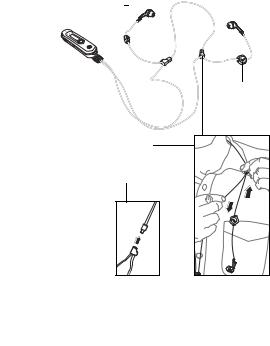
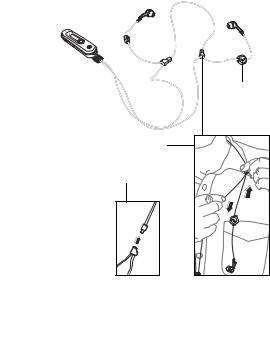
Overview |
||||||
|
Right earpiece (replaceable |
Left earpiece |
|||||
|
ear cushion) |
(replaceable ear |
|||||
|
Microphone |
cushion) |
|||||
Call handling button
Cord length adjustment
Safety release
5
This is the Internet version of the user’s guide © Print only for private use.
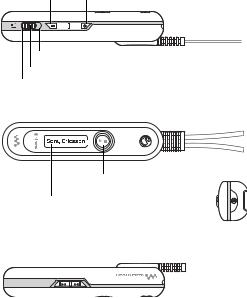
Buttons and display
Volume down Volume up
Multipoint mode
Selection button
Singlepoint mode
Music button
Display with backlight
|
Previous track Next track |
On/off button |
|||||
6
This is the Internet version of the user’s guide © Print only for private use.
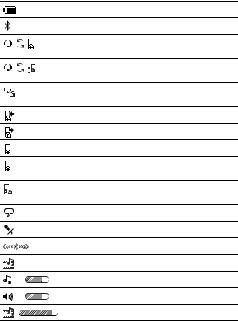
Display information
Battery status. Animated when charging.
The headset is on.
The headset is prepared to be added to a phone.
The headset is prepared to be added to a phone or other device.
The headset is successfully added to a phone or other device.
Incoming call.
Outgoing call.
Ongoing call.
Singlepoint mode – the headset can only connect to one phone.
Multipoint mode – the headset can connect to several devices.
Voice control is activated.
The microphone is muted.
Connecting to a phone or other device.
Music mode.
Adjusting the ringtone volume.
Adjusting the call volume.
Adjusting the music volume.
7
This is the Internet version of the user’s guide © Print only for private use.
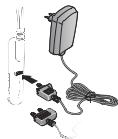
Getting started
To charge the headset
First time use: Charge approximately 8 hours before using the headset.
Adding the headset to the phone
Before you can use the headset with your phone it has to be added once to the phone. Follow the instructions from the phone user guide on how to turn on Bluetooth in your phone.
To add the headset to the phone
1 Turn on Bluetooth in your phone.
2Turn on Bluetooth visibility in your phone, and keep it close to the headset (20 cm).
8
This is the Internet version of the user’s guide © Print only for private use.
3Select singlepoint mode and make sure the headset is off.
4Press and hold the on/off button for 2 seconds. You hear a signal and the Sony Ericsson logo is displayed briefly. The display shows when the headset is prepared to be added to the phone. If not, make sure the headset is off, and press and hold the on/off button for 5 seconds. You hear a long beep
after the first signal.
5If your phone supports auto pairing, press YES when Add device? appears in your phone to complete the procedure. If not, continue with the
next step.
6Prepare your phone according to the phone user guide on how to add a Bluetooth device. Please note that for some phones you may need to enter a passcode. The headset passcode is 0000.
Note: For Bluetooth communication, we recommend a maximum distance of 10 metres, with no solid objects in between.
To turn the headset on or off
Press and hold the on/off button for 2 seconds. You hear a signal. The Sony Ericsson logo is displayed briefly.
To turn on the backlight
Press any button. The backlight turns off automatically.
9
This is the Internet version of the user’s guide © Print only for private use.
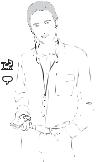
To reset the headset to default settings
1Make sure the headset is off, and press and hold the on/off button for 5 seconds. You hear a long beep after the first signal. The headset is prepared to be
added.
2Press and hold the on/off button and the call handling button simultaneously for 5 seconds. The headset is turned off.
Listening to music
Before you can listen to music, the headset has to be added once to your phone, see instructions on page 8.
10
This is the Internet version of the user’s guide © Print only for private use.
To play a music track
1 Start the media player in your phone, and select to use the headset.
2Press the music button. The headset connects to your phone, and the music starts playing.
3To pause the music or start playing again, press the music button.
To stop the music
1 Press and hold the music button. The music stops.
2To start the music again, press the music button. The headset connects to your phone, and the music starts playing.
To skip to another music track
Select Next or Previous.
To adjust the music volume
When you listen to music, press the volume button up or down.
Using another device as a music source
In singlepoint mode, the headset is connected only to your phone. In multipoint mode, you can use the headset together with your phone and one of your other Bluetooth devices, where music is saved.
Before you can listen to music from another device, the headset has to be added once to the device. The headset can be added to up to 10 devices. When you press the music button, the headset connects to the most recently used device.
11
This is the Internet version of the user’s guide © Print only for private use.
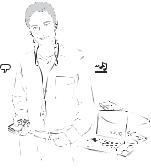
To add the headset to another device
|
1 |
Turn on Bluetooth in your device. |
|
2 |
Turn on Bluetooth visibility in your device, and |
|
3 |
keep it close to the headset (20 cm). |
|
Select multipoint mode and make sure the headset |
|
|
4 |
is off. |
|
Press and hold the on/off button for 5 seconds. |
|
|
You hear a long beep after the first signal. The |
|
|
headset is prepared to be added. |
5Prepare your device according to the device user guide on how to add a Bluetooth device. Please note that you may need to enter a passcode. The headset passcode is 0000.
12
This is the Internet version of the user’s guide © Print only for private use.
Calling functions
Your phone uses the headset for calls, even if you are listening to music from another device in multipoint mode.
To answer a call
Press the call handling button. The music pauses during the call.
To reject a call
Press and hold the call handling button for 2 seconds.
To end a call
Press the call handling button. The display shows the duration of the call. The music starts playing again.
To make a call using voice commands
1 Press the call handling button and the music is muted.
2 Say the name you want to call.
To be able to use this function, you first have to activate voice control in your phone and record voice commands. For more information on voice commands, and if your phone supports it, refer to the phone user guide.
To transfer sound from phone to headset
During an ongoing call in your phone, press the call handling button on the headset. To transfer from headset to phone, refer to the phone user guide.
13
This is the Internet version of the user’s guide © Print only for private use.
To switch between two calls
Press and hold the call handling button for 2 seconds.
To redial the last dialled number
Press the call handling button quickly twice.
To turn the microphone on or off (mute)
During a call, press both volume buttons.
To adjust the ringtone volume
When you have no ongoing call or music playing, press the volume button up or down.
To adjust the speaker volume for calls
During a call, press the volume button up or down.
Troubleshooting
No connection to phone or other device
•Before you can use your Stereo Bluetooth Headset with your phone or other device it has to be added once according to page 8.
•It is recommended to first add the headset to your phone, in singlepoint mode. Select singlepoint mode and add the headset to the phone again. In multipoint mode, the phone or other device that first adds the headset will be used for phone calls.
•Make sure the headset is charged and within range of the phone or other device. We recommend a maximum distance of 10 metres, with no solid objects in between.
14
This is the Internet version of the user’s guide © Print only for private use.
•Check or redo the Bluetooth settings in the phone or other device. For more information on Bluetooth and pairing, go to www.sonyericsson.com/learnabout.
Redial does not work
If the call list in the phone is empty you cannot use the redial function.
The headset does not connect to my music source
•Make sure your device is available, and supports Bluetooth Advanced Audio Distribution profile. The headset tries to connect to the most recent device used as a music source. You may have to restart the media player in your device.
•Check the setting of the singlepoint/multipoint mode selection button.
The remote control functions do not work
Make sure your device supports Bluetooth Audio/Video Remote Control profile.
The headset is switched off automatically
•The battery is too low. You hear a low beep.
•When you are adding the headset, it switches off if you do not add it to the phone within 10 minutes.
15
This is the Internet version of the user’s guide © Print only for private use.
Battery capacity
A battery that has been infrequently used or a new one, could have reduced capacity. It may need to be recharged a number of times.
Unexpected behaviour
Reset the headset according to page 10.
www.sonyericsson.com/support
16
This is the Internet version of the user’s guide © Print only for private use.

Hrvatski |
|
|
Uvod…………………………………………………… |
18 |
|
Početak rada ………………………………………. |
22 |
|
Slušanje glazbe…………………………………… |
24 |
|
Funkcije poziva…………………………………… |
27 |
|
Rješavanje problema…………………………… |
28 |
Sony Ericsson HBH-DS970
Izdavač ovog priručnika je Sony Ericsson Mobile Communications AB, bez ikakvih jamstava. Sony Ericsson Mobile Communications AB u bilo koje vrijeme i bez najave može izvršiti preinake
i poboljšanja ovog priručnika zbog ispravljanja tipografskih pogrešaka, netočnih tekućih informacija, ili poboljšanja programa i/ili opreme. Međutim, takve izmjene će biti uključene u nova izdanja ovog priručnika. Sva prava pridržana.
© Sony Ericsson Mobile Communications AB, 2006
Broj publikacije: LZT 108 8379/6 R1A
Sve mreže ne podržavaju sve usluge opisane u ovom priručniku. To se također odnosi na GSM Međunarodni broj hitnih službi 112. Obratite se svojem mrežnom operatoru ili davatelju usluga ako ste u nedoumici u pogledu dostupnosti pojedine usluge.
Riječ Bluetooth i odgovarajući logotipovi vlasništvo su tvrtke Bluetooth SIG, Inc., a Sony Ericsson je valjano ovlašten za njihovo korištenje.
Ovaj proizvod ne sadržava olovo niti halogen.
17
This is the Internet version of the user’s guide © Print only for private use.
Uvod
Stereo Bluetooth™ slušalica HBH-DS970 omogućuje vam upravljanje dolaznim i odlaznim telefonskim pozivima. Možete uživati u stereo zvuku s telefona ili drugog Bluetooth uređaja, poput računala ili portable svirača glazbe. Kada primite ili upućujete poziv, glazba se automatski zaustavlja, a nastavlja svirati kada završite poziv.
Vaš telefon ili drugi uređaj treba podržavati sljedeće Bluetooth postavke:
•Bluetooth Handsfree ili Bluetooth Headset.
•Bluetooth Advanced Audio Distribution.
•Bluetooth Audio/Video Remote Control postavku.
18
This is the Internet version of the user’s guide © Print only for private use.
Pregled |
||||||
|
Desna slušalica (izmjenjivi |
Lijeva slušalica |
|||||
|
ušni nastavak) |
(izmjenjivi ušni |
|||||
|
Mikrofon |
nastavak) |
|||||
Tipka za upravljanje pozivima
Podešavanje dužine kabela
Sigurnosna utičnica
19
This is the Internet version of the user’s guide © Print only for private use.
 Loading…
Страницы и текст этой инструкции
 Руководство пользователя гарнитуры bluetooth Sony Ericsson HBH-DS970 St
 Информация отображена на картинке
 Информация отображена на картинке
 Информация отображена на картинке
 Информация отображена на картинке
Как использовать наш сайт инструкций OnlineManuals.ru
Наша цель состоит в том, чтобы предоставить вам быстрый доступ к содержанию инструкции для гарнитуры bluetooth Sony Ericsson HBH-DS970 St.
С помощью онлайн просмотра, Вы можете быстро просмотреть содержимое инструкции и найти решение проблемы с гарнитуры bluetooth Sony Ericsson HBH-DS970 St.
Для Вашего удобства
Если листать руководство пользователя гарнитуры bluetooth Sony Ericsson HBH-DS970 St прямо на сайте, не очень удобно для Вас, есть два возможных решения:
• Просмотр в полноэкранном режиме — легко просмотреть руководство пользователя (без загрузки его на свой компьютер), Вы можете использовать режим полноэкранного просмотра.
Для просмотра инструкции пользователя гарнитуры bluetooth Sony Ericsson HBH-DS970 St на полном экране, используйте кнопку «Открыть в Pdf-viewer».
• Загрузка на компьютер — Вы можете также скачать Руководство пользователя гарнитуры bluetooth Sony Ericsson HBH-DS970 St на свой компьютер и сохранить его в файлах.
Многие люди предпочитают читать документы не на экране, а в печатной версии.
Возможность печати руководства пользователя также была предусмотрена на нашем сайте,
и вы можете использовать ее, нажав на иконку «печать» в Pdf-viewer.
Нет необходимости печатать все руководство гарнитуры bluetooth Sony Ericsson HBH-DS970 St, можно выбрать только нужные страницы инструкции.
Перейти к контенту
Гарнитуры Bluetooth Sony Ericsson

- Размер инструкции: 1.83 Мб
- Формат файла: pdf
Если вы потеряли инструкцию от гарнитуры bluetooth Sony Ericsson HBH-DS970 St, можете скачать файл для просмотра на компьютере или печати.
Инструкция для гарнитуры bluetooth Sony Ericsson HBH-DS970 St на русском языке. В руководстве описаны возможности и полезные функции, а также правила эксплуатации. Перед использованием внимательно ознакомьтесь с инструкцией.
Чтобы не читать всю инструкцию вы можете выполнить поиск по содержимому внутри инструкции и быстро найти необходимую информацию. Рекомендации по использованию помогут увеличить срок службы гарнитуры bluetooth Sony Ericsson HBH-DS970 St. Если у вас появилась проблема, то найдите раздел с описанием неисправностей и способами их решения. В нем указаны типичные поломки и способы их решения.

This is the Internet version of the user’s guide © Print only for private use.
Stereo Bluetooth™
Headset
HBH-DS970
English
Hrvatski
Slovenčina
Slovenščina

 Руководство пользователя стерео гарнитура Sony Ericsson HBH DS970 Bluetooth.
C помощью этого устройства можно принимать и посылать телефонные вызовы и прослушивать музыку.
А так же слушать различные звуковые файлы с любого другого устройства, имеющего функцию передачи данных через связь Bluetooth. Проще говоря, стерео гарнитура Sony Ericsson HBH DS970 Bluetooth — это наушники, через которые можно слушать звук, не подключаясь проводом к телефону или другому устройству, если у них имеется Bluetooth. Этому устройству есть аналог в виде такой штучки, которую крепят к одному уху, видели, наверное с ними некоторые водителя ездят, у которых механическая коробка передач. И в этом и в других устройствах с функцией Bluetooth для поддержания работоспособности в устройствах имеется маленький аккумулятор, в это их минус, потому, что его нужно периодически заряжать. Мануал на русском языке стерео гарнитура Sony Ericsson HBH DS970 Bluetooth настоятельно советует перед первым включением устройства зарядить аккумулятор в течение не менее 8 часов!
Устройства с функцией Bluetooth способны передавать сигнал на расстояние до 10 м.
загрузить инструкцию
Руководство пользователя стерео гарнитура Sony Ericsson HBH DS970 Bluetooth. формат djvu……File-Size: 347.58 кб
Руководство пользователя стерео гарнитура Sony Ericsson HBH DS970 Bluetooth. формат pdf……File-Size: 2.00 Мб
With this device, you can receive and send phone calls and listen to music. And also listen to various audio files from any other device that has the function of data transmission via Bluetooth communication. Simply put, the Sony Ericsson HBH DS970 Bluetooth stereo headset is headphones through which you can listen to sound without connecting a wire to a phone or other device, if they have Bluetooth. This device has an analogue in the form of such a thing, which is attached to one ear, they have probably seen some drivers driving with them, who have a manual transmission. And in this and in other devices with Bluetooth function, there is a small battery in the devices to maintain operability, this is their minus, because it needs to be charged periodically. Manual in Russian Sony Ericsson HBH DS970 Bluetooth stereo headset strongly advises to charge the battery for at least 8 hours before turning on the device for the first time!
Devices with Bluetooth function are capable of transmitting a signal at a distance of up to 10 m.
Скачать
This is the Internet version of the user’s guide © Print only for private use.
Stereo Bluetooth™
Headset
HBH-DS970
English
Hrvatski
Slovenčina
Slovenščina