

Spinner Factory — это интересная разработка инженеров LEGO. Данная робототехническая система позволяет раскручивать самодельные спиннеры в автоматическом режиме, порядок определяется по их цвету. После сборки, спиннеры раскручиваются до большой скорости и вылетают. Для сборки необходимы два набора 45544 и один 45560.
Комплектация
- большие моторы — 5 шт.
- средний мотор — 2 шт.
- МПК — 2 шт.
- датчик цвета — 2 шт.
- датчик касания — 2 шт.
Скачать инструкцию по сборке данного робота можно ниже. Инструкция состоит из 3-х частей.
Скачать инструкцию по программированию данного робота можно ниже


?>
X
Сайт может собирать метаданные пользователя (cookie, данные об IP-адресе и местоположении).
Если, прочитав это сообщение, вы остаетесь на нашем сайте, это означает, что вы не возражаете против использования этих технологий.
LEGO, логотип LEGO, Minifigure (Минифигурка), DUPLO и MINDSTORMS являются торговыми марками и/или охраняемой авторским правом собственностью LEGO Group.
©2023 The LEGO Group. Все права защищены. Использование этого вебсайта подтверждает ваше согласие с этим.

bjadams
any good place that sells this expansion set (or the expansion set for NXT) in europe as i need a good way to get some beams, etc
-

Chris Davidson
I got mine from the official Lego Education site but Amazon also do it. You might get lucky on ebay of course.
Happy hunting! Chris
-
Soohyun
I want your code.
send me the programming for stair climbing robot pleas!!-
Camilo
Can someone please share the stairclimber robot code with me?
Thanks -
I will try to From a kid who does high school Lego who’s only 9 for real From:Dominic09
-
-
-
Tehran
Hello. How can I get the code for the Stair Climber project?
-
Tehran
I made and programmed the stair climber and it worked. If anyone wants the code I can give.
-
ASHOK
please send me programming for ev3 stair climbing robot
-
-
Ramil
Please send me a copy of program
-
-
Pitter
Please, can you help to find the program files for ev3 stair climber
-
-
Simon graff
can you give it to me thanks?
-
conner
fuck yeah ill give it to you
-
-
Donald McNally
Could you send program code for Stair Climber?
-
-
Stacey
We would love the stairclimber code, if you are willing to share!
-
christian
hola amigo pido de favor que me ayudes con la programación gráfica del ev3 robot para subir escaleras….
gracias de ante mano.. -
Hans van Heeswijk
Hi,
My son likes to have the code for the Lego StairClimber, can you send it to me?
Thanks in advance,
Hans -
Laurenz Leupold
can you send me the code for the staire climber
-
Karen Fisher
Please send code for stair climber if you still have it? Do you have any other codes for the expansion set?
-
MHD
Hello!
Could you please send to me the Stair Climber project code to my Email?
my Email is (mhamad-hamwi@hotmail.com)
Thnx a lot -
Cheryl
I have some students interested in seeing your stair climber code. Would you please send it to me? Thanks!
-
Soohyun
I WANT YOUR CODE!!
PLEASE SEND ME THE PROGRAMMING FOR STAIR CLIMBING ROBOT PLEAS~~ -
maria
could you please email your program I am an educator would appreciate it. thanks in advance
-
Fabian
Please send me the code for the stair climber.
Thank you appreciate it.
-
-
theresa Ekstrom
I would love to share the coding for the stair climber with my students. – thanks
-
Darwin
Can you send me the code for the stair climber? and if you have the code for the gyro boy please send it also. thanks in advance.
-
Wei Jiang
please send me programming for ev3 stair climbing robot thanks!
-
Chris
Can I have the code please
-
Raffeullah
Please send me stair climber programme code.This program is helpful to my students
-
Niko
Si, por favor. Necesito el código para un trabajo. Me ayudaría mucho.
-
shubham
pls give me the code. i also made the whole project. only stucks at myblock command.
-
-
Norbi
Can you give me the stair climber project?
-
Naatan
Could you send me the programme? 🙂
-
-
Adithya NS
Dear Sir,
Can we do these robots using lego home edition and expansion kit?? or is it necessary to buy core set?? Thanks a lot in advance. -
Mann kann überhaupt nichts ohne das grundset bauen bei ihren modelen können sie mal was geben nur für ergänzung 45560


Salman Farsi
Thanks for sharing this links. Can you help to find the program files as well?
Thanks
Salman


Walkee, War
hey! Could you direct us to a place that gives the programming for these instructions… Thanks!

John
Hello where can the programing for these be downloaded? Thanks John

jeremie
hello,i’m a french teacher and i don’t find programs on these configurations.
is it possible to know where are they please?
(sorry for my english!)
thanks all
-
Gianci
They are on the Lego Education Software Disc that you can buy for 100$ in the Lego Education Shop.


Lionlfs
I just bought LEGO 45544+45560 completly set. And your website gives us lot help and fun. Basic on your guild have built some.
Thanks a lot and best regards,


Nestor Riquelme
Gracias por compartir los enlaces.
Thanks for sharing this links.

Phan Tuan Dung
Here are the programs of all Expansion set!
Elephant: [https://mega.co.nz/#!U4sChazY!sRlSlhxlcPVqB6jeocNQ6SbeBKWCQraWGb2cAIlRTY0]
Remote Control:
[https://mega.co.nz/#!4xEhlT6Y!6JxFYddTwP9qr77ctcZBNKbY5AdpJyh7KqDk5vuSWBk]
Stair Climber: [https://mega.co.nz/#!w4VkgJpI!La4eHGh2cc_NBpTBP1tmFm_hk6AN4rBhxAY6ZiGqdTo]
Tank Bot: [https://mega.co.nz/#!J8E2RaDB!0f4G-zARGcseIEQtcxz9ycaJFfhZTCMSE3J94yNhyWE]
Znap: [https://mega.co.nz/#!xoEQiLrC!eZbuAb2Is_voJzP_bk53kAKtxQ8g5YEnsPUrIDiFrnc]
Spinner Factory (Limited Time!*):
[https://mega.co.nz/#!gkcggDyK!6SeRmMQowVxuXoGWZO7uv5WcveHz9W-xjx4P0RA7ims]
Have fun!
*It means that this program will appear for a time and will disappear when the time expired. When it disappears, there’s only a word “Time Expired!” in the Content Editor. So, be quick!
-
Mesut
Hey Phan
is it posible that you reup the files
i am very interested in this stuffthx
mesut -
John
Sorry. This is actually NOT allowed.

Phan Tuan Dung
Programs deleted! Play on your own please!
-
AD
Hi Phan,
It would be a great pleasure for me. If you upload the programs again of EV3 core set models and expansion set models.
I will be really thankful to you.Regards,
-AD -
Martin Haber
Hi Phan! Can you re-upload the programs please! I tried to found for one week but dont found anything.
If you want you can send me by e-mail
Thank´s a lot!
-
ivan
hello
please send me program of the elephant. ev3
thanks
-
Edip
Hi,
Could you please send me the program for this?
Thanks in advance!
-
-
-
John
The software is now free… Also, giving you the programs here is not allowed. That’s why he deleted it.


Chris Schiavoni
More info on the spinner factory, please?
-
John
The Spinner Factory will take the spinner’s toppings that you choose and put it in the spinner, which is put at the “main station”. When finished, it will change into spinning mode, which will spin the spinner and release it.

roger
Hi! Please, could help me with a building guide of a humanoid with lego mindstorm education ev3 please.
Sorry for my english
-
Gianci
Buy the new book from Laurens! Its great!


rom
Hi,
could anybody to help me how to run spin factory? I suppose we have problem with daisy chain function. It is not clear what program to download to slave and what to master module. Or slave module has to run without a program at all. Thanks in advance for advice.

daniel
Can I use home edition with this expansion set?
-
Catherine
Yes, it is compatible. However, the expansion set has plenty of technic pieces, but does not have any sensors or motors. You can find these on shop.lego.com


Johnny
Hello!
Please send me the program of Znap.
Thanks!

James
Could you send me the code for Znap pls

frank cabrera
Hello people, I need the program of the elephant, please someone has the instructions of the program please??

Cristian
Please i need the program for the elephant cause it is a nightmare do it in myh own thanks

Johann
Please, can someone help me out with the program for Elephant, Stair Climber and possibly also the other models?
I promise to re-implement them in LeJOS Java and give this back to the community 🙂
Thank you so much!
-
Vishnu Suresh
Can someone please send me the code for the stair climber. I have been working for some time now and I am stuck.
Thanks,
Vishnu-
Vishnu Suresh
I need it urgently because I have to give my kit back to the school in the next few days.
-


Maike
Hi,
is it still possible to get the programms for the Elephant and the Stair Climber from you ?
Thanks ins advance !!

regie
HI,
Can someone please tell me where I can get the programs for znap, and the remote control, I’ m really curious on how the work. Please help
Thanks

Frans
The Mindstorms education software is now free of charge. You can login with your Lego ID and download it on the Lego education website.
This includes all building instructions and programs for both sets 45544 and 45560.
Frans
Johann
Frans, yes, great, thanks a lot for the hint!

anonymous
ERROR CODE 347
gibyvukeycnaosziyvuscnh zoifuhidhfuihodisufiwbye48ru9c8fwe7fuw90ybgr9f8nuisrg8t7iudfh888888888888gyiltsudfho;jkiogsptidfhbkjlvcblfgijvndflknvjfjidugbvfudhifuedsnhcuigfdnhohutrmovidfuhhgifdhgsunverhgiurnhiuvhtrheuivn 39817394246v879y73094579v2n00046075v8479wjefs84y975487993709v8b09743v9utieohwohjdfkgsg;dlsha;debov;tbe]we[v30v=3=594-=5vpenioy5bprknytodrhl; Harmony Code 7
anonymous
894_33320018574386
Code Sequence Alpha
Nexus R34 Region: International

John
First of all, the software is now free, so download it.
Second, no more asking for code or the program. Any replies with the code or program will be deleted. That’s what I know.

Alfonso
Do you have stair climber project?

William
Does anybody have the programming code for the spinning top machine
cheers

jordan
hi this is a good program

Gab
Do you have any program for those?

Ava
Hi
Can anyone help me to write stair climber program code in labview ?
Thank you

j mcgrath
please send elephant program

Andy
Hi guys
I also need the program for the elephant, please can anyone help?

Grushika
Does anyone have stair climber Lego NXT simulink model program?

Dear Laurens,
Hi
Can I have your stair climbing code too.
Thanking you in advance.

aman Gupta
Dear Lauren, We are looking for a small model factory to show a demo of our product. Please contact us so that we can take your guidance

LegoEV3
The spinner factory instruction needs 3 servo motor?

Paul Martin
Hi all am looking to instructions to build new models using the mindstorm education kits 45544/45560 thanks

Archie Alegre
Can I build the Elephant with the 31313 set + expansion?

Greeting from Suriname!!! Bosies en Brasass!!!!
Hello Robotsquare! We would like to receive a free lego mindstorm EV3 educational kit, for the students!!! Please help us, we are deparate! Love from Suriname!

tye5874y324euwiyasjdfghkjlDW;FDJKBGBGBGBGBGBGBGBGBGBGBGBGBGBGBGBGBGBGBGJK666sjhadasfhajlfsdhanfljkilluminati;dkqjkjdghasfiasghfafahhsdconfirmedkjdhfjhffjalsdhdlfjasdlfkjdflkHFIUKJBHKbsdkhBFhfnKJFHjlkfhFKHSKFghsfklsGHFKGkjfbSFByesaifhysdfjkbhjaithfjlkjfslis
ILLUMINATI IS PAPI YOU MUST RESPECT IT AND LOVE IT LIKE ITS YOUR MAMI
dearth is death with r and killing is K K K

Gary winthorp
this robot sucks

Hello,I log on to your new stuff named “LEGO MINDSTORMS EV3 Education Expansion Set 45560 Instructions – Robotsquare” like every week.Your humoristic style is witty, keep up the good work! And you can look our website about proxy.


musa
Please can you help with program.

GASSSSSSSSSY
Gassy Farted

Impasta
SUS amoung us dun dun dun dun dun dun dun dada dun
Собираем фабрику спиннеров из LEGO Ev3, модель фабрики спиннеров состоит из 2 основных наборов EV3 Education и 1 ресурсного набора.


[ СКАЧАТЬ Часть 1: Страница 001-160 — 6MB ]
[ ЗАГРУЗИТЬ Часть 2: Страница 161-320 — 5MB]
[ СКАЧАТЬ Часть 3: Страница 321-480 — 4MB]
When we built the factory, we thought that the EV3 Home (Scratch base) can support two bricks. However, no ever how much information we read, it is not what we expected. We were trying to modify factory by adding additional color sensor, so that we can use two separated program to control this, we really don’t want to deal with EV3-G (LabView) even it support EV3 daisy chain. Finally, we decided to go for EV3dev and it opened our eyes.
Go ahead to try EV3DEV2, Python is easy if you already know Scratch based programming. Don’t hesitating, start from PyBricks, the official one.
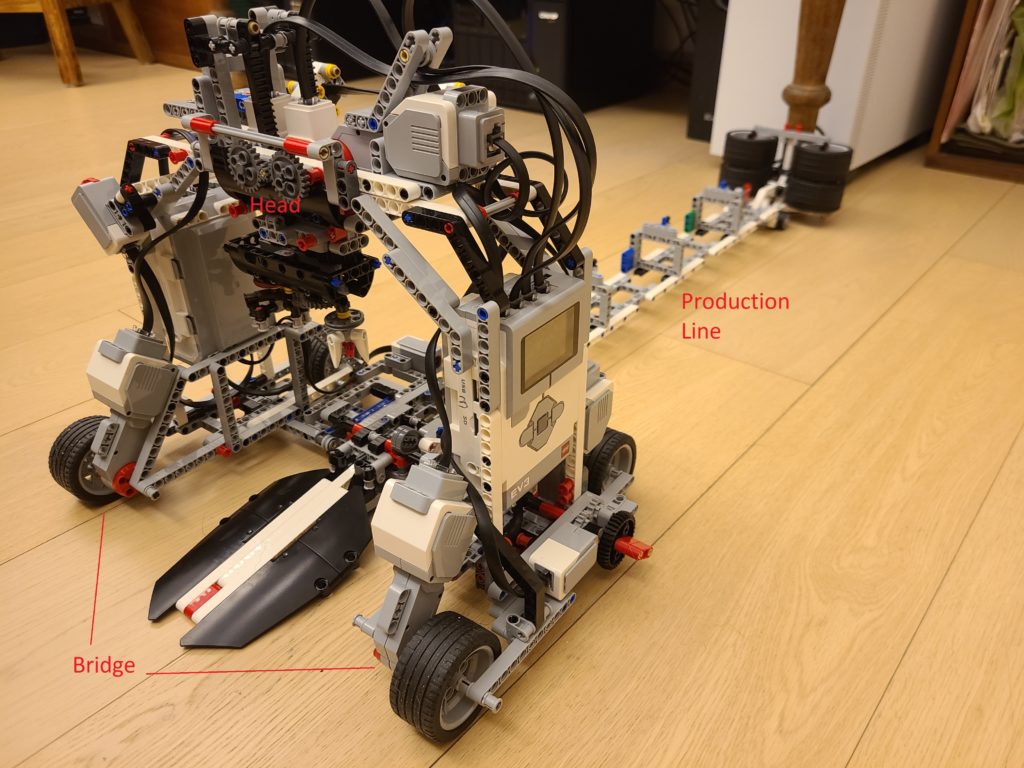
Features of the factory
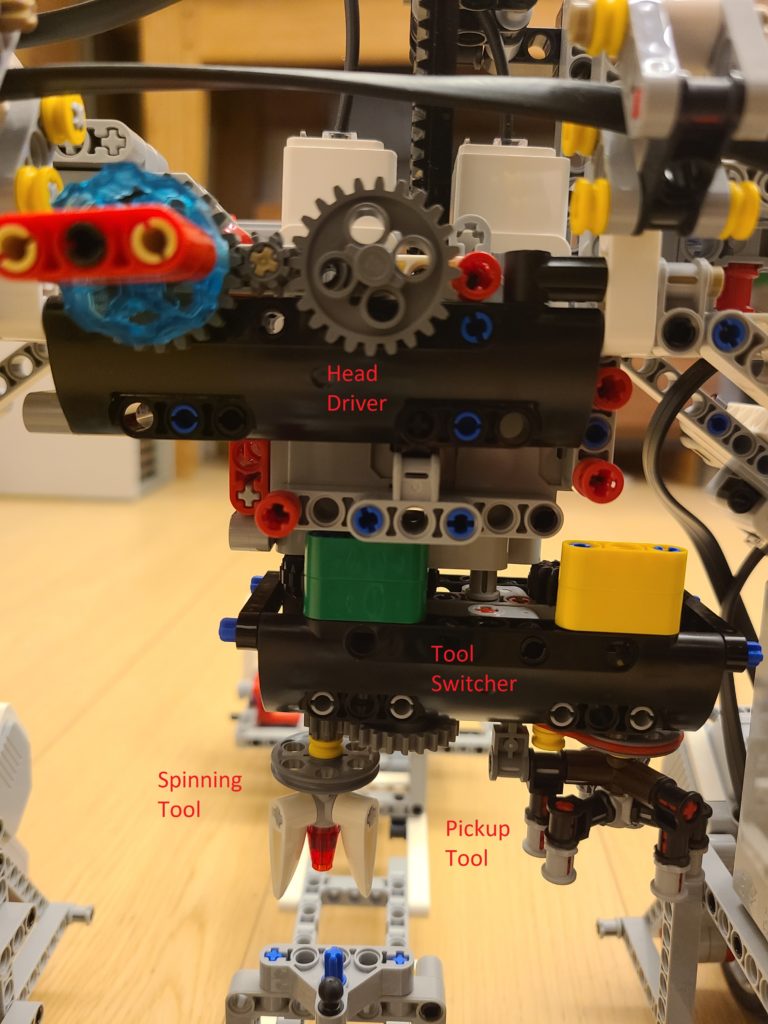
Head control – The first function is moving the head up and down getting the spinner parts. The second function is switching the tool for the head, one is to pickup the spinner parts and place it on the spinner holder, the other one is the spinning tool which will spin the finished product.
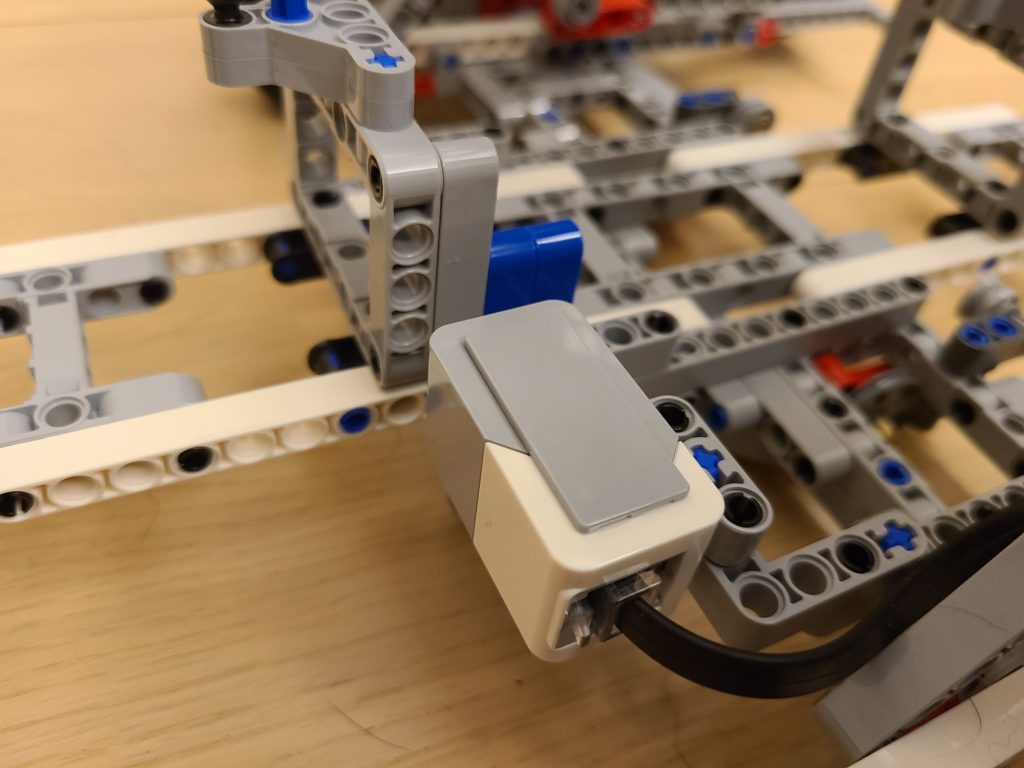
Color Sensor – This Color sensor is used for detecting the color, so that we can make the bridge go in the sequence you picked. For example, if you pick blue, green, yellow, and red, then the bridge will go in the order you have picked. We have also changed the color tags location, so that it will be easier to program the movement part and pickup the spinner part right at the spot where the bridge stops. The original design by LEGO will make it harder because you have to calculate how far the bridge need to travel after detecting the color tag. But, it is easier for operator to identify the part position.
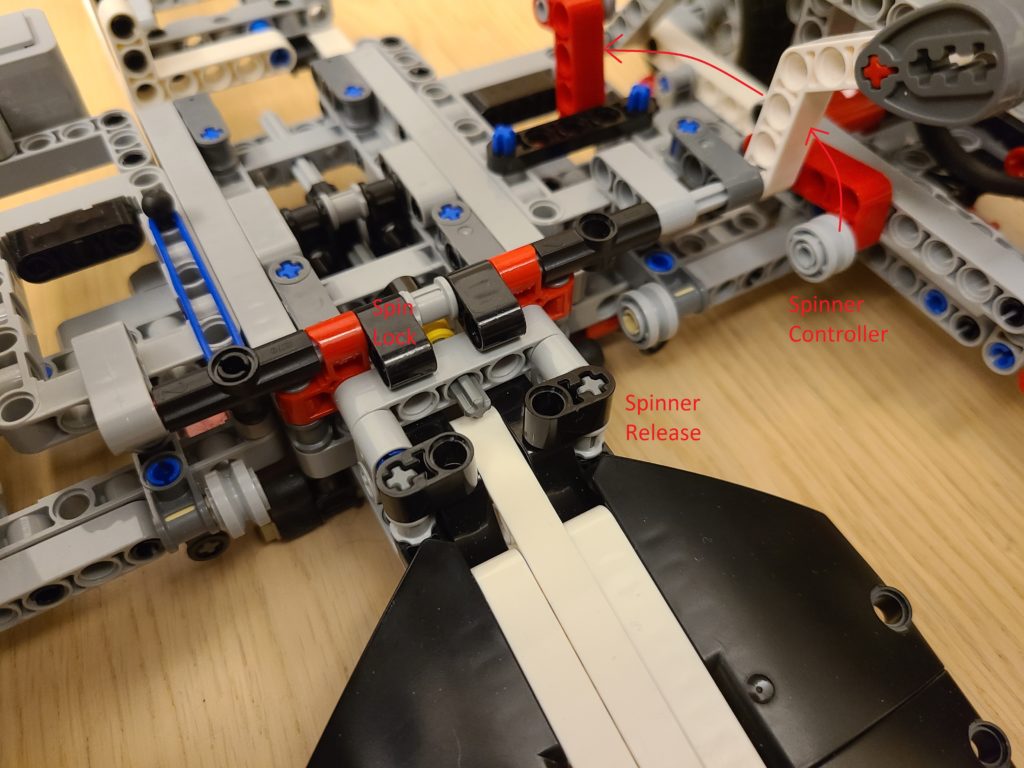
Spinner control – This is used to release the spinner after it was spun and it also controls the spin lock which lets the spinner lock it in place prior it can be spun. It works by using the motor to turn the red handle up to unlock the spin lock and let it spin. The second step is turning the handle to it’s maximum to release the spinner after it is spun.
However, we made some improvement by moving the bridge ahead to push the handle to maximum instead of using the spinner control. So that the spinner will not hit the the bridge wheels.
Calibration
The Bridge
def bridge_position():
    bridge_move(-180)

    while True:
        if rail_color_detect() == 1:
            bridge_move(0)
            ev3.speaker.beep()
            ev3.speaker.beep()
            break
    bridge_move(180) # Prepare a position to call for head calibration
    wait(600)
    bridge_move(0)
    mbox.send('Calibration')
    mbox.wait()
    bridge_move(-180)
    while True:
        if rail_color_detect() == 1:
            bridge_move(0)
            ev3.speaker.beep()
            ev3.speaker.beep()
            break
The Head
def calibration():
    # Height Control Calibration, max. drive = -526, best pickup position = -490
    height_control.dc(10)
    height_control.run_until_stalled(500,Stop.HOLD,50)
    height_control.reset_angle(0)

    # Switch tool : 200 is spinning tool 0 is pickup tool
    # Use 300 to hold the spinner, -300 to release, i.e. pickup tool
    switch_tools.run_until_stalled(-100,Stop.HOLD)
    spinning_tool.run_angle(500,-300,Stop.HOLD)
In the bridge program we made the bridge go back to the first color which is white (we added white ourselves), when the color sensor detects white, it will stop the bridge and move half a step forward whilst communicating with another program that controls the head. When the head received a message saying “calibration” the program will call the calibration program that we have defined as a function. In the function “calibration” we made the height of the head reset to the max which we made it go up to the top, after resetting the height of the head, we switched the tool back to the pickup tool, then we reset the pickup tool by opening the claw so that it can pick up the spinner. Then, the bridge will return the zero position, i.e. the white tag.
How does the program work?
It is not difficult to create the program from moving the bridge, control the head. However, it took us hours to fine tune all the parameters and settings.
Communication
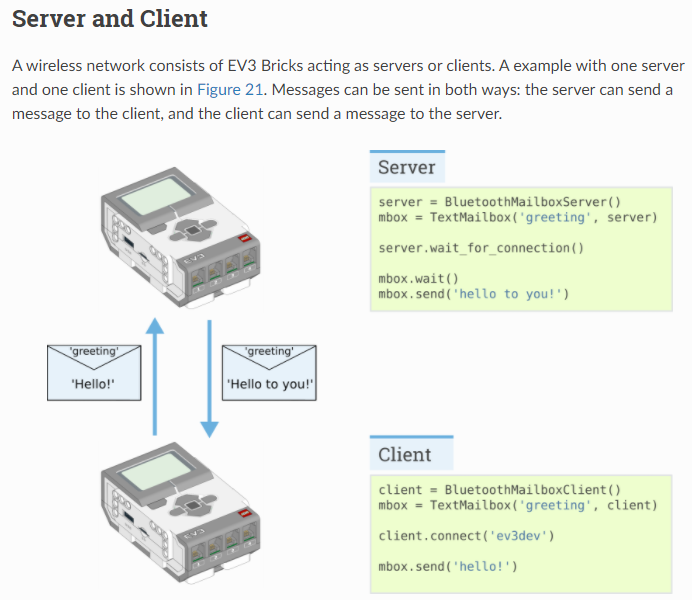
Since this factory using two EV3 Bricks. Using EV3-G (LabView) can support Daisy Chain, i.e. one program to control multiple devices. However, we don’t want to deal with EV3-G anymore and EV3 Classroom just support one device. So, we go for EV3DEV, we pair two EV3 Bricks via Bluetooth and communicate by messaging each others. You can refer to these link for EV3DEV Bluetooth messaging.
Color Detection
# Define the functions
def rail_color_detect():# 1 - White, 2 - Yellow, 3 - Blue, 4 - Green, 5 - Red, 0 - unstable, 99 - others
    for i in range(0,300):
        if i == 0:
            first_color = rail_detector.color()
        if rail_detector.color() != first_color:
            return 0
    if first_color == Color.WHITE:
        return 1
    if first_color == Color.YELLOW:
        return 2
    if first_color == Color.BLUE:
        return 3
    if first_color == Color.GREEN:
        return 4
    if first_color == Color.RED:
        return 5
    return 99
When we developed the program, we found that LEGO color sensor is running unstable, it would provide incorrect color (i.e. noise) occasionally and make our program actioning wrongly. To fix the color sensor misjudgment, we created a color detect function to detect the color 300 times. If all 300 detections are the same, then we can confirm the color detect correctly and return the color code – 1. White, 2. Yellow, 3. Blue, 4. Green and 5. Red. For wrong color detect, it will be 0. 99 for others.
The Bridge
# Start of the main program
ev3.speaker.beep()
bridge_position()

ev3.speaker.set_volume(100)
ev3.speaker.say("Scan the color now")
color_seq = []
color_selection()

ev3.speaker.beep()

for i in range(0,4):
    bridge_move(180)

    while True:
        if rail_color_detect() == color_seq[i]:
            bridge_move(0)
            mbox.send('Pickup')
            mbox.wait()

            bridge_move(-180)
            while True:
                if rail_color_detect() == 1:
                    bridge_move(0)
                    break

            mbox.send('Release')
            mbox.wait()
            break

mbox.send('Spin')
mbox.wait()
bridge_move(1500)
wait(1000)
bridge_move(0)
mbox.send('All Done')
In this program we reset the bridge to the starting point at “the white tag”, then we scan the color sequence that we want to pickup the spinner part in. The next part we make the bridge go to the color tag in the sequence, then call the head to pickup the spinner part. After it picks up the spinner part, the head will send a message back to the bridge and it will go back to the first tag “white” and again calls the head to releases the spinner part. These steps will be repeated until last part is placed.
The Head
while True:
    mbox.wait()
    message = mbox.read()
    if message == 'Calibration':
        calibration()
    if message == 'Pickup':
        pickup_parts()
    if message == 'Release':
        release_parts()
    if message == 'Spin':
        spin_spinner()
    if message == 'All Done':
        break
    mbox.send('Done')
The head receive a message from the bridge, if the message matches one of the defined message, it will do the corresponding function, such as Pickup – pickup the spinner part. Once the action is done, a message ‘Done’ will send back to the head to confirm that it’s finished.
Pickup Part
def pickup_parts():
    height_control.run_angle(500,-460)
    spinning_tool.run_angle(1000,300,Stop.HOLD)
    height_control.run_angle(500,460)
That’s pretty simple, makes the head go down, pickup the spinner, then go up.
Release Part
def release_parts():
    height_control.run_angle(500,-150)
    spinning_tool.stop()
    wait(300)
    switch_tools.run_angle(500,20,Stop.HOLD,wait=True)
    spinning_tool.run_angle(500,-300)
    switch_tools.run_angle(500,-20)
    height_control.run_angle(500,150)
In this function we made the head go down, adjust the pickup tool angle, release the part , then go up. Why do we need to adjust the tool angle? It is because when the bridge moves on the rail, the vibration will tilt the spinner holder a bit and causing the positioning to be wrong for the part placement, so we adjust the tool angle to compensate this.
Start the spinner and release it
def spin_spinner():
    switch_tools.run_until_stalled(1000)
    switch_tools.hold()
    height_control.run_angle(50,-130,Stop.HOLD,wait=False)

    for i in range(0,6):
        spinning_tool.run_angle(100,-30)
        spinning_tool.run_angle(100, 30)

    release_tool.run_angle(500,170)
    switch_tools.stop()
    spinning_tool.dc(-100) # Must rotate in Clockwise Direction, otherwise the head will be mis-aligned
    wait(5000)
    height_control.run_angle(1500,130,Stop.HOLD,wait=True)
    # release_tool.run_angle(1500,60)
    mbox.send('Move!')
    spinning_tool.dc(0)
It switch the tool switcher to the spinning tool. Then we make the head go down to a height that is considerable for the spinner to spin perfectly. While the head goes down the spinning tool will turn left & right for 10 times ( this is for locking in the angle so we get a better spinning angle). After the spinning tool locks on the spinner, it will spin in 1500 rotation per seconds for 5 seconds, then the bridge will move back quickly. When the bridge move back it will trigger the spinner controller to release the spinner. Originally, the spinner controller should be trigger by the handle. However, the spinner will hit the bridge wheel and failed the mission. So, we move the bridge front to avoid it.
Build instruction and the program
We created the program from scratch without referring any example, you can download from below.
LEGO official build instruction
# of view 2,981
オーナーは非公開です
2019/03/04
1.3 MB
詳細(Alt+→)
ev3-cuboid-dc93b2e60bed2981e76b3bac9ea04558.pdf
オーナーは非公開です
2019/03/04
780 KB
詳細(Alt+→)
ev3-rem-color-sensor-down-driving-base-d30ed30610c3d6647d56e17bc64cf6e2.pdf
オーナーは非公開です
2019/03/04
1.3 MB
詳細(Alt+→)
ev3-rem-driving-base-79bebfc16bd491186ea9c9069842155e.pdf
オーナーは非公開です
2019/03/04
7.4 MB
詳細(Alt+→)
ev3-ultrasonic-sensor-driving-base-61ffdfa461aee2470b8ddbeab16e2070.pdf
オーナーは非公開です
2019/03/04
1.6 MB
詳細(Alt+→)
オーナーは非公開です
2019/03/04
11.6 MB
詳細(Alt+→)
オーナーは非公開です
2019/03/04
2.5 MB
詳細(Alt+→)
オーナーは非公開です
2019/03/04
18.8 MB
詳細(Alt+→)
Lego mindstorms EV3 45544 инструкция по сборке Гироскоп.pdf
オーナーは非公開です
2019/03/04
4.6 MB
詳細(Alt+→)
Lego mindstorms EV3 45544 инструкция по сборке Роборука.pdf
オーナーは非公開です
2019/03/04
4.3 MB
詳細(Alt+→)
Lego mindstorms EV3 45544 инструкция по сборке Сортировщик.pdf
オーナーは非公開です
2019/03/04
4.4 MB
詳細(Alt+→)
Lego mindstorms EV3 45544 инструкция по сборке Транспортировщик.pdf
オーナーは非公開です
2019/03/04
5.4 MB
詳細(Alt+→)
Lego mindstorms EV3 45544 инструкция по сборке Щенок.pdf
オーナーは非公開です
2019/03/04
4.9 MB
詳細(Alt+→)
Lego mindstorms EV3 45560 инструкция по сборке Покоритель лестниц.pdf
オーナーは非公開です
2019/03/04
6.1 MB
詳細(Alt+→)
Lego mindstorms EV3 45560 инструкция по сборке Производитель волчков_часть 1.pdf
オーナーは非公開です
2019/03/04
5.9 MB
詳細(Alt+→)
Lego mindstorms EV3 45560 инструкция по сборке Производитель волчков_часть 2.pdf
オーナーは非公開です
2019/03/04
5.2 MB
詳細(Alt+→)
Lego mindstorms EV3 45560 инструкция по сборке Производитель волчков_часть 3.pdf
オーナーは非公開です
2019/03/04
4.1 MB
詳細(Alt+→)
Lego mindstorms EV3 45560 инструкция по сборке Робот-монстр.pdf
オーナーは非公開です
2019/03/04
5.1 MB
詳細(Alt+→)
Lego mindstorms EV3 45560 инструкция по сборке Слон.pdf
オーナーは非公開です
2019/03/04
8.7 MB
詳細(Alt+→)
Lego mindstorms EV3 45560 инструкция по сборке Танкбот.pdf
オーナーは非公開です
2019/03/04
2.2 MB
詳細(Alt+→)
オーナーは非公開です
2019/03/04
31.9 MB
詳細(Alt+→)
lego-ev3-6-in-1 — копия.pdf
オーナーは非公開です
2019/03/04
9.1 MB
詳細(Alt+→)
オーナーは非公開です
2019/03/04
9.1 MB
詳細(Alt+→)
lego-mindstorms-ev3-home-manual-rus.pdf
オーナーは非公開です
2019/03/04
7.8 MB
詳細(Alt+→)
オーナーは非公開です
2019/03/04
3.2 MB
詳細(Alt+→)
オーナーは非公開です
2019/03/04
9.1 MB
詳細(Alt+→)
オーナーは非公開です
2019/03/04
13 MB
詳細(Alt+→)
toddle bot-3dcad146d7f5deac4753f93e9dcc0739.pdf
オーナーは非公開です
2019/03/04
4.4 MB
詳細(Alt+→)
Комплектация 45544 Mindstorms EV3.pdf
オーナーは非公開です
2019/03/04
4.1 MB
詳細(Alt+→)
Комплектация 45560 Mindstorms EV3.pdf
オーナーは非公開です
2019/03/04
4.1 MB
詳細(Alt+→)