750 Tracker — SUPPORT
SERIAL NUMBER RECORD
1
750 Tracker — SUPPORT
SERIAL NUMBER RECORD
SUPPORT
1
SERIAL NUMBER RECORD
Record the serial numbers and date of purchase of your Subsite components in the spaces below.
Date of purchase:
Tracker serial number:
2
750 Tracker —
SERVICE PROCEDURE
SERVICE PROCEDURE
Notify Subsite immediately of any malfunction of Subsite equipment.
Always give model, serial number, and approximate date of purchase. This information should be recorded and placed on file by owner at time of purchase. Give detailed explanation of malfunction.
Return damaged parts to Subsite for inspection and warranty consideration.
Order genuine Subsite replacement or repair parts from your
Subsite dealer. Use of another manufacturer’s parts may void warranty.
2
750 Tracker —
SERVICE PROCEDURE
750 Tracker — FOREWORD
SERVICE PROCEDURE
3
750 Tracker — FOREWORD
SERVICE PROCEDURE
FOREWORD
This manual is an important part of your equipment. It provides safety information and operation instructions to help you use and maintain your Subsite Electronics equipment.
Read this manual before using your equipment. Keep it with the equipment at all times for future reference. If you sell your equipment, be sure to give this manual to the new owner.
If you need a replacement copy, contact your Subsite Electronics dealer.
The descriptions and specifications in this manual are subject to change. The Charles Machine Works, Inc. reserves the right to improve equipment. Some product improvements may have taken place after this manual was published.
Thank you for buying and using Subsite Electronics equipment.
3
4
750 Tracker — FOREWORD
SERVICE PROCEDURE
4
Operator’s Manual
750 Tracker
Issue No.2.2/OP-4/01
Part Number 754-050
Copyright 1999, 2000, 2001 by The Charles Machine Works, Inc.,
Perry, Oklahoma
Subsite is a registered trademark of The Charles Machine Works,
Inc.
U.S. Patent No. 5,065,098; 4,881,083. Other U.S. and foreign patents pending.
750 Tracker — FOREWORD
SERVICE PROCEDURE
750 Tracker — CONTENTS
SERVICE PROCEDURE
5
750 Tracker — CONTENTS
SERVICE PROCEDURE
CONTENTS
SUPPORT . . . . . . . . . . . . . . . . . . . . . . . . . . . . . . . . . . . . . . 1
Serial Number Record . . . . . . . . . . . . . . . . . . . . . . . . . 1
Service Procedure . . . . . . . . . . . . . . . . . . . . . . . . . . . . 2
FOREWORD . . . . . . . . . . . . . . . . . . . . . . . . . . . . . . . . . . . . 3
CONTROLS . . . . . . . . . . . . . . . . . . . . . . . . . . . . . . . . . . . . . 7
Overview . . . . . . . . . . . . . . . . . . . . . . . . . . . . . . . . . . . 7
Controls . . . . . . . . . . . . . . . . . . . . . . . . . . . . . . . . . . . . 8
Setup . . . . . . . . . . . . . . . . . . . . . . . . . . . . . . . . . . . . . 11
Display . . . . . . . . . . . . . . . . . . . . . . . . . . . . . . . . . . . . 12
SAFETY . . . . . . . . . . . . . . . . . . . . . . . . . . . . . . . . . . . . . . . 17
Classifications . . . . . . . . . . . . . . . . . . . . . . . . . . . . . . 18
Alerts . . . . . . . . . . . . . . . . . . . . . . . . . . . . . . . . . . . . . 19
OPERATION . . . . . . . . . . . . . . . . . . . . . . . . . . . . . . . . . . . 21
Beacon Tracking Modes . . . . . . . . . . . . . . . . . . . . . . . 21
Line Locating Mode . . . . . . . . . . . . . . . . . . . . . . . . . . 32
MAINTENANCE . . . . . . . . . . . . . . . . . . . . . . . . . . . . . . . . 35
General Care . . . . . . . . . . . . . . . . . . . . . . . . . . . . . . . 35
SPECIFICATIONS . . . . . . . . . . . . . . . . . . . . . . . . . . . . . . . 37
WARRANTY . . . . . . . . . . . . . . . . . . . . . . . . . . . . . . . . . . . 39
5
6
750 Tracker — CONTENTS
SERVICE PROCEDURE
6
750 Tracker — CONTENTS
SERVICE PROCEDURE
750 Tracker — CONTROLS
OVERVIEW
7
750 Tracker — CONTROLS
OVERVIEW
OVERVIEW
CONTROLS
7
The 750 Tracker performs well with a variety of beacons and can track shallow or deep bores. It can send beacon information to a display mounted on the drilling unit operator’s station. The 750
Tracker can also locate lines and cables. Available modes are 8 kHz active (when used with transmitter) and 60 or 50 Hz passive
(for locating power cables).
A brief description of the buttons and display on the 750 Tracker follows.
8
CONTROLS
On/Off
Pressing this button turns unit on and off.
750 Tracker — CONTROLS
CONTROLS
Fore/Aft/Left/Right
Pressing this button while in walkover tracking mode switches from fore/aft to left/right arrows.
Only one set of arrows will show at a time. See
OPERATION for further information.
Up
Pressing this button raises gain (increases signal).
Down
Pressing this button reduces gain (decreases signal).
Depth
This button estimates depth of properly located signal source when pressed. See OPERATION for information on locating signals.
Mode
Pressing this button changes location mode and operating frequency.
8
750 Tracker — CONTROLS
CONTROLS
750 Tracker — CONTROLS
CONTROLS
9
750 Tracker — CONTROLS
CONTROLS
9
Depth + On/Off
Pressing these buttons when tracker is on cycles volume from low to high to off. Pressing and holding depth button before turning tracker on changes signal strength display. See “Signal Strength” section later in this chapter for more information.
Depth + Fore/Aft/Left/Right
Pressing these buttons switches LCD backlight off and on.
Depth + Up
Pressing these buttons enters tracker into calibration mode. See
OPERATION for further information.
Depth + Down
Pressing these buttons selects radio channel. “CH-1” or “CH-2” or
“OFF” will appear in display.
Depth + Mode
Pressing these buttons changes depth units from default setting of feet:inches to inches, centimeters, or meters.
On + Up
Holding up button and pressing on button switches left/right arrows off and on.
On + Down
Holding down button and pressing on button switches all guidance arrows off and on. NOTE: If all arrows are disabled, remote guidance will not work.
10
750 Tracker — CONTROLS
CONTROLS
Fore/Aft/Left/Right + Mode
Pressing these buttons starts tracker control code transmission
(see OPERATION).
Fore/Aft/Left/Right + On/Off
Pressing these buttons advances first two digits of tracker control code (see OPERATION).
Fore/Aft/Left/Right + Depth
Pressing these buttons lowers first two digits of tracker control code (see OPERATION).
Fore/Aft/Left/Right + Up
Pressing these buttons advances last two digits of tracker control code (see OPERATION).
Fore/Aft/Left/Right + Down
Pressing these buttons lowers last two digits of tracker control code (see OPERATION).
10
750 Tracker — CONTROLS
CONTROLS
750 Tracker — CONTROLS
SETUP
11
750 Tracker — CONTROLS
SETUP
SETUP
Install batteries
Use 6 C-cell alkaline batteries in tracker. To install:
• unscrew battery cover
• insert batteries as indicated
• close cover and tighten screw
• check operation
11
Check Operation
Always check that tracker operates before leaving for jobsite and after every battery change. To check operation:
• turn on tracker
• entire display will light briefly
• battery level will be shown graphically
• unit defaults to 29 kHz mode
12
750 Tracker — CONTROLS
DISPLAY
DISPLAY
Mode
Tracker can track beacons and locate lines. Switch between modes by pressing mode button.
Beacon Mode Indicator
Line Mode Indicator
12
750 Tracker — CONTROLS
DISPLAY
750 Tracker — CONTROLS
DISPLAY
13
750 Tracker — CONTROLS
DISPLAY
Tracker Information
A variety of tracker information can be monitored in the display window. Additionally, several tracker display settings can be changed.
Battery Level
Tracker battery level is shown graphically.
Display shows battery status in 33% steps.
When tracker battery drops below 10%, tracker battery symbol outline flashes. Replace batteries immediately.
Volume Level
Speaker volume can be adjusted by pressing the depth and on/off buttons. Available settings are low, high and off.
Depth Units
Depth estimates can be displayed in four ways: feet:inches, inches, centimeters, or meters. To change depth units, press depth and mode buttons.
13
14
750 Tracker — CONTROLS
DISPLAY
Signal Strength
Signal strength is shown graphically on bars at top of display and in numeric display. It can be displayed two ways: building from both sides into the middle (a) or building from left to right (b). To change signal strength display, turn unit off. Then press and hold depth button while turning unit on.
14
Gain
Gain (amount of signal amplification) is shown on bars below signal strength indicator. Gain increases to the right.
750 Tracker — CONTROLS
DISPLAY
750 Tracker — CONTROLS
DISPLAY
15
750 Tracker — CONTROLS
DISPLAY
Beacon Information
Tracker displays a variety of information sent from the beacon.
Actual information sent depends on beacon used.
Temperature
Beacon temperature is continuously shown in
33% segments. Operator should monitor beacon temperature throughout bore.
Temperature icon will flash after third segment is lit. Watch for rapid changes in beacon temperature and cool beacon by pulling back a few inches and pumping fluid downhole.
Battery Level
Beacon battery level is continuously shown.
When beacon battery is below 10%, beacon battery outline will flash. Replace battery as soon as possible. Each segment represents
33% of battery life.
Roll
Beacon roll is shown in a twelve segment roll indicator for all beacons. The sections of the roll indicator light to indicate beacon roll position.
15
16
750 Tracker — CONTROLS
DISPLAY
Depth
In walkover tracking and line locating modes, estimated depth is shown in numeric display when depth button is pressed after beacon has been properly located.
In remote guidance mode, approximate distance from beacon to tracker is shown in numeric display every 5 seconds.
16
750 Tracker — CONTROLS
DISPLAY
750 Tracker — SAFETY
17
750 Tracker — SAFETY
17
SAFETY
Follow these guidelines before operating any jobsite equipment:
• Read and follow all safety precautions.
• Do not operate equipment unless you have completed proper training and read the operator’s manual.
• Use equipment only as directed.
• Wear personal protective gear.
• Check that equipment is clean and in good condition.
Contact your Subsite Electronics dealer if you have any question about operation, maintenance, or equipment use.
18
750 Tracker — SAFETY
CLASSIFICATIONS
CLASSIFICATIONS
Watch for the three safety alert levels: DANGER, WARNING and
CAUTION. Learn what each level means.
indicates an imminently hazardous situation which, if not avoided, will result in death or serious injury.
indicates a potentially hazardous situation which, if not avoided, could result in death or serious injury.
indicates a potentially hazardous situation which, if not avoided, may result in minor or moderate injury.
Watch for two other words: NOTICE and IMPORTANT.
NOTICE can keep you from doing something that might damage the machine or someone’s property. It can also alert you against unsafe practices.
IMPORTANT can help you do a better job or make your job easier in some way.
18
750 Tracker — SAFETY
CLASSIFICATIONS
750 Tracker — SAFETY
ALERTS
19
750 Tracker — SAFETY
ALERTS
ALERTS
19
Incorrect procedures could result in death, injury, or property damage. Learn to use equipment correctly.
Moving traffic — hazardous situation. Death or serious injury could result.
Avoid moving vehicles, wear high visibility clothing, post appropriate warning signs.
Jobsite hazards could cause death or serious injury.
Use correct equipment and work methods. Use and maintain proper safety equipment.
Explosion possible. Do not operate transmitter near explosive devices or blasting operations.
Potential radio frequency (RF) hazard. Operating this device within 4 in (10 cm) of your body may cause RF exposure levels to exceed FCC RF exposure limits and should be avoided.
20
750 Tracker — SAFETY
ALERTS
20
750 Tracker — SAFETY
ALERTS
750 Tracker — OPERATION
BEACON TRACKING MODES
21
750 Tracker — OPERATION
BEACON TRACKING MODES
21
OPERATION
The 750 tracker has four operation modes: tracker control, walkover beacon tracking, remote guidance, and line locating.
Potential radio frequency (RF) hazard. Operating this device within 4 in (10 cm) of your body may cause RF exposure levels to exceed FCC RF exposure limits and should be avoided.
IMPORTANT: Large metal objects, rebar, power lines and any other kinds of interference can adversely affect depth estimates.
BEACON TRACKING MODES
Set-up
You must calibrate tracker before beginning a beacon tracking job.
After calibration, tracker can estimate depths from approximately
9 in (0.2 m) to 100 ft (30.5 m) depending on beacon used. Keep the following in mind when calibrating system:
• Beacon and tracker should not be moved or rotated until calibration is complete.
• Only depth estimation is affected by calibration. Roll, pitch, left/right deviation, temperature, and battery status are not affected.
• Large metal objects, rebar, power lines, and any other kinds of interference will adversely affect calibration.
22
750 Tracker — OPERATION
BEACON TRACKING MODES
Calibration Procedure
1.
Install beacon into toolhead and place on ground exactly 10 ft (3 m) away from tracker. Make sure no metal objects including drilling unit and drill pipe are within 20 ft
(6 m) of tracker and toolhead.
2.
Position tracker parallel to center of toolhead.
3.
Turn tracker on and press and hold depth and up arrow keys until calibration mode is entered. Release keys.
4.
Verify calibration by moving tracker 15 ft (4.5 m) away from toolhead. Check depth. If reading is not 15 ft (4.5 m), recalibrate tracker.
22
750 Tracker — OPERATION
BEACON TRACKING MODES
750 Tracker — OPERATION
BEACON TRACKING MODES
23
750 Tracker — OPERATION
BEACON TRACKING MODES
Troubleshooting
23
If four dashes appear in the display, unit has not been calibrated or has been calibrated incorrectly, beacon is too close for depth estimate, or beacon is too far away for depth estimate.
24
750 Tracker — OPERATION
BEACON TRACKING MODES
Tracker Control Mode
Overview
Incorrect procedures could result in death, injury, or property damage. Learn to use equipment correctly.
This mode allows 750 Tracker operator to disable hydraulic power to drilling unit thrust and rotation within 16 seconds. This
mode will not stop thrust and rotation immediately.
When tracker and display communications cease, green tracker control light on drilling unit will come on and thrust and rotation will be disabled.
Troubleshooting tip: If thrust and rotation do not work, check whether tracker control light on drilling unit is on. If it is, communication has probably stopped between tracker and display or tracker is set to incorrect code. If communication cannot be restored, install tracker control key on drilling unit.
Tracker control light will go off and thrust and rotation will function.
IMPORTANT:
•
Tracker operator cannot stop thrust and rotation from tracker with tracker control key installed in drilling unit and turned to disable position.
• Tracker control mode is available on units with “TC” at the end of their serial numbers.
24
750 Tracker — OPERATION
BEACON TRACKING MODES
750 Tracker — OPERATION
BEACON TRACKING MODES
25
750 Tracker — OPERATION
BEACON TRACKING MODES
Operation
1.
Turn on drilling unit. Press and hold download button to display serial number on 750 Display.
25
2.
Turn on 750 Tracker and check four-digit display code.
• Hold fore/aft/left/right button and press mode to review and start sending code.
IMPORTANT: Continue to hold down fore/aft/left/right button to adjust code.
• Use on/off button to advance first two digits (1) and use depth button to lower first two digits.
• Use up arrow button to advance last two digits (2) and use down arrow to lower last two digits.
• Press and hold button to advance or lower value quickly.
26
750 Tracker — OPERATION
BEACON TRACKING MODES
3.
Remove tracker control key from drilling unit and keep in tracker operator’s possession.
4.
Drill and track bore until drill head enters target pit or exits ground.
5.
Turn off tracker. After 8-16 seconds, tracker control light on drilling unit will come on and hydraulic power to thrust and rotation will be disabled.
6.
Change downhole tools.
7.
If you are tracking backreamer’s path, turn on tracker and enable code transmission. After 8-16 seconds, tracker control light on drilling unit will go off and thrust and rotation will function.
If you are not tracking backreamer’s path, install tracker control key on drilling unit. Tracker control light on drilling unit will go off and thrust and rotation will function.
26
750 Tracker — OPERATION
BEACON TRACKING MODES
750 Tracker — OPERATION
BEACON TRACKING MODES
27
750 Tracker — OPERATION
BEACON TRACKING MODES
27
Walkover Tracking Mode
Location
1.
Turn on tracker. Make sure you can see fore/aft arrows in center of display. If you see left/right arrows, press fore/aft/ left/right key.
2.
Walk bore path with bottom of tracker parallel to beacon. Do not hold tracker at right angle to beacon.
IMPORTANT: A common problem when locating a beacon is secondary or ghost signals. A typical beacon signal pattern shows a main signal and two weaker secondary signals.
Track beacon at main signal. Familiarity with beacon signal pattern will lessen the effect of secondary signals. Also, the beacon tracking arrows will disappear when tracker is over secondary signal.
3.When both fore/aft arrows are on, sweep tracker from side to side and use signal strength display to find lateral location of beacon (point
A).
4.Step back until ghost is located (no arrows in center of clock face and low signal strength) and then move slightly forward until only one arrow is lit
(point B).
5.
Press fore/aft/left/right button to switch to left/right arrows and sweep tracker back and forth until both left/right arrows are on.
6.
Switch back to fore/aft arrows and move forward until both fore/aft arrows and target is lit.
7.
Take depth estimate and mark spot.
28
750 Tracker — OPERATION
BEACON TRACKING MODES
Remote Guidance Mode
Information is transmitted directly to display at drilling unit when tracker is in remote guidance mode. Approximate distance from tracker to beacon (not the estimated depth of the drill head) is shown every 5 seconds.
28
750 Tracker — OPERATION
BEACON TRACKING MODES
Distance will not be correct within one and a half times the toolhead depth. For example, if you are drilling at 4 ft (1.2 m), you will be able to drill within 6 ft (1.8 m) of tracker.
To operate in remote guidance mode, place unit in stand while it is turned off. Press and hold mode button while pressing on/off button.
Tracker and drill head can be up to 60 ft (18.3 m) apart when in remote guidance mode. IMPORTANT: Do not drill past tracker.
750 Tracker — OPERATION
BEACON TRACKING MODES
29
750 Tracker — OPERATION
BEACON TRACKING MODES
29
Displayed Information
Beacons send a variety of information to tracker. All Subsite
Electronics beacons send pitch, roll, temperature and battery information.
Roll
Beacon roll information is useful in determining the direction that the drilling tool will tend to travel when pushed without rotation.
The following chart shows typical tool face roll indications for directional drilling.
When beacon roll shows . . .
Drilling tool will move . . .
1 or 2 o’clock up and right
3 o’clock
4 or 5 o’clock right down and right
6 o’clock
7 or 8 o’clock
9 o’clock
10 or 11 o’clock
12 o’clock down down and left left up and left up
Depth
To estimate beacon depth, press depth button. Estimated depth to beacon will be displayed. To change depth units, press depth and mode buttons.
All tracking and locating systems are subject to interference. To quickly check for interference, raise tracker 1 ft (0.3 m) and make second depth estimate. If the difference between the two estimates is not 1 ft (0.3 m), there is interference.
30
750 Tracker — OPERATION
BEACON TRACKING MODES
Pitch
Tracker shows pitch (% grade) when used with beacons that provide this information (see specific beacon literature).
Pitch shows beacon grade in percentages from down arrow 99%
(45 degrees down) to up arrow 99% (45 degrees up). Tracker displays this information to the left of roll display.
Grade beacons will send pitch in 0.1% increments from 1-45% and in 1% increments from 45-90%.
% of grade
Rise/drop
US (metric)
1 1 in
(25 mm)
% of grade
12
Rise/drop
US (metric)
1 ft 2 in
(356 mm)
% of grade
Rise/drop
US (metric)
45 4 ft 1 in
(1.24 m)
2
3
4
2 in
(51 mm)
4 in
(102 mm)
5 in
(127 mm)
14 1 ft 5 in
(432 mm)
16 1 ft 7 in
(483 mm)
18 1 ft 9 in
(533 mm)
50 4 ft 6 in
(1.37 m)
55 4 ft 10 in
(1.47 m)
60 5 ft 2 in
(1.57 m)
5
6
6 in
(152 mm)
7 in
(178 mm)
7
8
9
8 in
(203 mm)
10 in
(254 mm)
11 in
(279 mm)
10 1 ft
(305 mm)
20
24
28
32 3 ft 1 in
36 3 ft 5 in
40
2 ft
(610 mm)
2 ft 4 in
(711 mm)
2 ft 8 in
(813 mm)
(940 mm)
(1.04 m)
3 ft 9 in
(1.14 m)
65
70
75
99
5 ft 5 in
(1.65 m)
5 ft 9 in
(1.75 m)
6 ft
(1.83 m)
80 6 ft 3 in
(1.91 m)
90 6 ft 8 in
(2.03 m)
7 ft
(2.13 m)
30
750 Tracker — OPERATION
BEACON TRACKING MODES
750 Tracker — OPERATION
FCC Statement — Internal Transmitter
31
750 Tracker — OPERATION
FCC Statement — Internal Transmitter
31
FCC Statement — Internal Transmitter
This equipment has been tested and found to comply with the limits for a Class B device, pursuant to Part 15 of the FCC rules.
These limits are designed to provide reasonable protection against harmful interference in a residential installation. This equipment generates, uses and can radiate radio frequency energy and, if not installed and used in accordance with the instructions, may cause harmful interference to radio communications. However, there is no guarantee that interference will not occur in a particular installation. If this equipment does cause harmful interference to radio or television reception, which can be determined by turning the equipment off and on, the user is encouraged to try to correct the interference by one or more of the following measures:
• Reorient or relocate the receiving antenna.
• Increase the separation between equipment and receiver.
• Consult the dealer or an experienced radio/TV technician for help.
Section 15.19 (a) (1) states: “Receivers associated with the operation of a licensed radio service, e.g. FM broadcast under
Part 73 of this chapter, land mobile operation under Part 90, etc., shall bear the following statement in a conspicuous location on the device: This device complies with Part 15 of the FCC rules.
Operation is subject to the condition that this device does not cause harmful interference.”
Changes or modifications not expressly approved in writing by
The Charles Machine Works, Inc. may void the user’s authority to operate this equipment.
32
750 Tracker — OPERATION
LINE LOCATING MODE
LINE LOCATING MODE
To locate power lines, select the following:
• line locating mode
• frequency (50 Hz power, 60 Hz power, or 8 kHz active)
IMPORTANT: Transmitter is required to locate 8 kHz.
Setup
If you are locating a line with the help of a transmitter, connect transmitter as directed in transmitter operator’s manual. Select frequency at transmitter to match tracker frequency.
Location
To locate a line:
1.
Sweep suspected area of line location.
2.
Strongest signal indicates location of line.
3.
Take depth reading.
32
750 Tracker — OPERATION
LINE LOCATING MODE
750 Tracker — OPERATION
LINE LOCATING MODE
33
750 Tracker — OPERATION
LINE LOCATING MODE
Troubleshooting
33
If four dashes appear in the display, signal appears to be above receiver and unit cannot estimate depth. This message is usually caused by interfering signals. Try relocating target signal.
34
750 Tracker — OPERATION
34
750 Tracker — OPERATION
750 Tracker — MAINTENANCE
GENERAL CARE
35
750 Tracker — MAINTENANCE
GENERAL CARE
35
MAINTENANCE
GENERAL CARE
The 750 tracker needs only minor maintenance under normal operating conditions. Following these care instructions can ensure longer equipment life.
• Do not drop the equipment.
• Do not expose the equipment to high heat (such as in the rear window of a car).
• Clean equipment with a damp cloth and mild soap. Never use scouring powder.
• Do not immerse in any liquid.
• Inspect housing daily for cracks or other damage. If housing is damaged, contact your Subsite Electronics dealer for replacement.
• Protect LCD from sharp blows from hard objects.
36
750 Tracker — MAINTENANCE
36
750 Tracker — MAINTENANCE
750 Tracker — SPECIFICATIONS
37
750 Tracker — SPECIFICATIONS
37
SPECIFICATIONS
Dimensions:
Length: 12.75 in (32.4 cm)
Height: 31.5 in (80 cm)
Width: 6 in (15.2 cm)
Operating Weight: 5.5 lb (2.5 kg)
Operating Temperature Range: -4°F to 122°F (-20°C to 50°C)
38
750 Tracker — SPECIFICATIONS
Antenna Configuration: peak
Operating Modes:
29K beacon
60 Hz power
50 Hz power
8 kHz line (active)
Maximum Locating Range:
Beacon: 0.75 ft — 99 ft 11 in (22.9 cm — 30 m)
Line: 0-10 ft (0-3 m)
Depth Calibration Tolerances * :
±4 in (10 cm) at 10 ft (3 m)
±5% from 10-20 ft (3-6.1 m)
±10% beyond 20 ft (6.1 m)
Line Location Tolerances:
Active mode: ±3% at 10 ft (3 m)
Passive mode: ±5% at 6 ft (1.8 m); ±10% at 10 ft (3 m)
Batteries: 6 C cell alkaline
Battery Life ** : approximately 20 hours
Battery Saver: unit shuts off after 5 minutes if no key is pressed
* Units are calibrated to these tolerances under test field conditions. Actual field conditions may cause signal distortions or may contain noise sources which result in depth estimates that vary from these figures.
** continuous use at 70°F (21°C)
38
750 Tracker — SPECIFICATIONS
750 Tracker — WARRANTY
39
750 Tracker — WARRANTY
39
WARRANTY
Ditch Witch Subsite Electronics
Limited Product Warranty Policy
Warranty Periods
New Product
A twelve-month period starts on the date of delivery to the end user:
Trackers: 66TKRW, 750 Tracker
Transmitters: 950T, 75T
Fault Finders: AF1, FT12
Remote Displays: 90D, 750 Display
Receivers: 950R, 75R, EML
A six-month period starts on the date of delivery to the end user:
Beacons: 11B, 86B, 86BH, 86RS, 86BHL, SBRP, 822
A three-month period starts on the date of delivery to the end user:
Beacons: BI
Accessories: cables, clamps
Used Product (Cosmetics)
A three-month warranty starts on the date of delivery to the end user, nonreturnable (RS added to serial number) for all products.
Service and Repair
A one-month warranty on labor starts on the date the unit is repaired, and a threemonth warranty on parts starts on the date the unit is repaired for all products.
Extended Warranty
The extended warranty may be purchased at the time the equipment is sold or within thirty days of ownership. The extension is for an additional twenty-four months, for a total coverage of thirty-six months.
40
750 Tracker — WARRANTY
Exclusions
• The warranty includes only Ditch Witch Subsite products and accessories that are manufactured and distributed by Ditch Witch Subsite Electronics. The warranty compensates on defects in material or workmanship.
• Defects will be determined through inspection by Ditch Witch Subsite
Electronics or authorized repair centers. Original purchaser must make the defective item available for inspection within 30 days of the date the part fails.
• The warranty is limited to replacement of defective part. The replacement part may be new or remanufactured. Repair and removal of defective part and installation will be at no charge when product or item is delivered to Ditch Witch
Subsite Electronics or an authorized repair center. The product or item will be returned at no charge for return freight.
• The warranty period does not represent the useful life of Ditch Witch Subsite
Electronics products and accessories.
• If Ditch Witch Subsite products are purchased for commercial purposes, as defined by the commerical code, no warranties extend beyond the specific terms set forth in this limited warranty. All other provisions of this limited warranty apply, including duties imposed.
• Ditch Witch Subsite products have been tested to deliver acceptable performance in most conditions. Therefore, to assure suitability, products should be operated under anticipated working conditions prior to purchase.
• This limited warranty applies to original purchaser only. Some states or jurisdictions do not allow exclusion or limitation of incidental or consequential damages so above limitation may not apply. This limited warranty gives original purchaser specific legal rights, and the original purchaser may also have other rights that vary from state to state or jurisdiction to jurisdiction.
• The Ditch Witch Subsite Equipment Registration Form must be completed for each serial numbered product and returned to Ditch Witch Subsite Electronics.
The information on the form is used to establish the warranty period start date.
• When the Ditch Witch Subsite Equipment Registration Form is not processed and received by Ditch Witch Subsite Electronics, the Ditch Witch Subsite shipping date is used to establish the warranty period start date.
40
750 Tracker — WARRANTY
750 Tracker —
41
750 Tracker —
41
• Out-of-warranty repairs are automatically processed when the cost is two hundred dollars U.S. or less (<U.S.$200.00). Repair estimates over two hundred dollars U.S. (>U.S.$200.00) are held for approval by the dealer or customer.
• Product inspection and estimates may require that the unit be disassembled and tested.
• Out-of-warranty inspection costs include labor accrued at the full labor rate plus return freight.
• Approved out-of-warranty repair estimate costs include parts, labor accrued at full labor rate plus return freight.
• Products declined for repair will be shipped back to the Dealer/Customer and charged return freight costs.
• Unwanted product from repair declines will be discarded at Ditch Witch Subsite
Electronics only with written authorization from the dealer/customer.
Revision C, February 2001
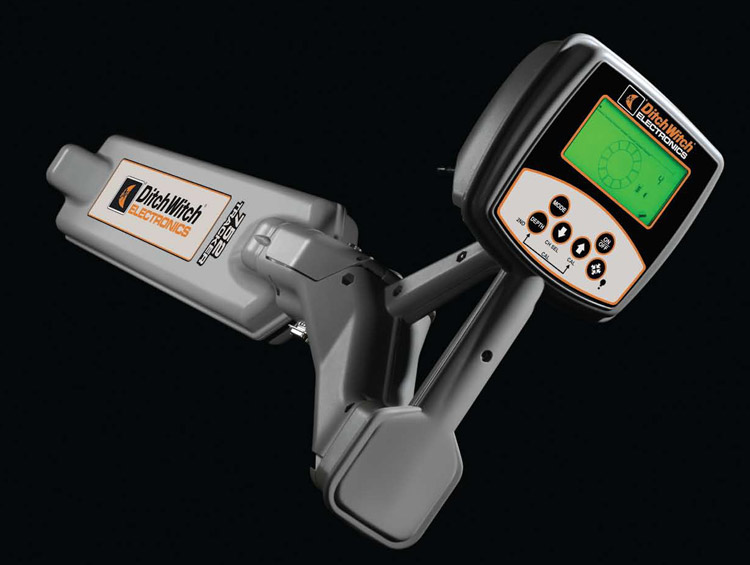
Модель 752 – самая распространенная в России система локации Ditch Witch®, отвечающая всем потребностям горизонтального бурения.
Возможно приобретение в лизинг
По вопросам приобретения системы локации 750/752
обращайтесь по телефону
+7 495 637-6622
- Тех. характеристики
- Особенности
- Описание
Локатор 750/752, габариты
- Системы локации Ditch Witch® оснащены специализированным зондом с двойной частотой, помогающей проходить участки с помехами от металлических предметов и арматуры, линий электропередач и других источников помех.
- Двухчастотная система локации позволяет менять частоту не прерывая работы, без выхода на поверхность.
- Дисплей оператора может получать данные на расстоянии до 619 метров, запоминать до 10 «работ» по 254 трубы в каждой и передавать данные программе TMS Plus.
- Уникальная система стрелок-маркеров Локатора 750/752 позволяет легко и быстро установить положение зонда.
- Информация с зонда передается быстро, с минимальными погрешностями, что влияет на скорость процесса бурения.
- Локатор 750/752 предоставляет исчерпывающую информацию при любой доступной глубине проходки;
- Все компоненты систем локации Ditch Witch® всегда в наличии на складе. Мы обеспечиваем гарантийное и пост гарантийное обслуживание, а также обучение пользованию.
- Локатор и дисплей системы локации 752 Ditch Witch® отличаются крайней надежностью. Дополненная зондом, данная система предназначена для определения положения буровой головки в земле при помощи показателей местоположения, глубины залегания, поворота, уклона и уровня силы сигнала, отображаемых на локаторе и дублируемых на дисплей оператора установки ГНБ.
- Ditch Witch® единственный производитель установок ГНБ, самостоятельно разрабатывающий для себя электронные системы локации.
Задать вопрос по приобретению системы локации 750/752
Пожалуйста, проверьте правильность заполнения отмеченных полей формы!
1 750/752 Tracker — SUPPORT1 SERIAL NUMBER RECORD750/752 Tracker — SUPPORT1 SERIAL NUMBER RECORDSUPPORTSERIAL NUMBER RECORDR ecord the serial numbers and date of purchase of your Ditch Witch components in the spaces of purchase: Tracker serial number:SUPPORTSERIAL NUMBER RECORDR ecord the serial numbers and date of purchase of your Ditch Witch components in the spaces of purchase: Tracker serial number:2750/752 Tracker — SUPPORTSERVICE PROCEDURE2750/752 Tracker — SUPPORTSERVICE PROCEDURESERVICE PROCEDUREN otify your authorized Ditch Witch dealer immediately of any malfunction of Ditch Witch equipment. Always give model, serial number, and approximate date of purchase. This information should be recorded and placed on file by owner at time of purchase.
2 Give detailed explanation of damaged parts to an authorized Ditch Witch dealer for inspection and warranty genuine Ditch Witch replacement or repair parts from your Ditch Witch dealer. Use of another manufacturer s parts may void PROCEDUREN otify your authorized Ditch Witch dealer immediately of any malfunction of Ditch Witch equipment. Always give model, serial number, and approximate date of purchase. This information should be recorded and placed on file by owner at time of purchase. Give detailed explanation of damaged parts to an authorized Ditch Witch dealer for inspection and warranty genuine Ditch Witch replacement or repair parts from your Ditch Witch dealer. Use of another manufacturer s parts may void Tracker — FOREWORD3 FCC Statement — Internal Transmitter750/752 Tracker — FOREWORD3 FCC Statement — Internal TransmitterFOREWORDThis Manual is an important part of your equipment.
3 It provides safety information and operation instructions to help you use and maintain your Ditch Witch equipment. Read this Manual before using your equipment. Keep it with the equipment at all times for future reference. If you sell your equipment, be sure to give this Manual to the new you need a replacement copy, contact your Ditch Witch descriptions and specifications in this Manual are subject to change. The Charles Machine Works, Inc. reserves the right to improve equipment. Some product improvements may have taken place after this Manual was you for buying and using Ditch Witch Statement — Internal TransmitterFCC ID: ITQ-CMW-R-75 TFCC ID: ITQ-752 TKRThis device complies with Part 15 of the FCC rules. Operation is subject to the following two conditions: (1) this device may not cause harmful interference, and (2) this device must accept any interference received, including interference that may cause undesired or modifications to the device not expressly approved by The Charles Machine Works, Inc.
4 Could void the user s authority to operate the Manual is an important part of your equipment. It provides safety information and operation instructions to help you use and maintain your Ditch Witch equipment. Read this Manual before using your equipment. Keep it with the equipment at all times for future reference. If you sell your equipment, be sure to give this Manual to the new you need a replacement copy, contact your Ditch Witch descriptions and specifications in this Manual are subject to change. The Charles Machine Works, Inc. reserves the right to improve equipment. Some product improvements may have taken place after this Manual was you for buying and using Ditch Witch Statement — Internal TransmitterFCC ID: ITQ-CMW-R-75 TFCC ID: ITQ-752 TKRThis device complies with Part 15 of the FCC rules.
5 Operation is subject to the following two conditions: (1) this device may not cause harmful interference, and (2) this device must accept any interference received, including interference that may cause undesired or modifications to the device not expressly approved by The Charles Machine Works, Inc. could void the user s authority to operate the Tracker — FOREWORDFCC Statement — Internal Transmitter4750/752 Tracker — FOREWORDFCC Statement — Internal TransmitterOperator’s Manual750 Tracker /752 TrackerIssue No. Number 054-080 Copyright 1999, 2000, 2001, 2005, 2007, 2008by The Charles Machine Works, Inc.,Perry, Oklahoma, Ditch Witch , CMW, AutoCrowd, Modularmatic, Jet Trac, Roto Witch , Subsite, Fluid Miser, Perma-Soil, Power Pipe, Super Witch , Super Witch II, Pierce Airrow, The Underground, and The Underground Authority Worldwide are registered trademarks of The Charles Machine Works, Patent No.
6 5,065,098; 4,881,083. Other and foreign patents ‘s Manual750 Tracker /752 TrackerIssue No. Number 054-080 Copyright 1999, 2000, 2001, 2005, 2007, 2008by The Charles Machine Works, Inc.,Perry, Oklahoma, Ditch Witch , CMW, AutoCrowd, Modularmatic, Jet Trac, Roto Witch , Subsite, Fluid Miser, Perma-Soil, Power Pipe, Super Witch , Super Witch II, Pierce Airrow, The Underground, and The Underground Authority Worldwide are registered trademarks of The Charles Machine Works, Patent No. 5,065,098; 4,881,083. Other and foreign patents Tracker — CONTENTS5 FCC Statement — Internal Transmitter750/752 Tracker — CONTENTS5 FCC Statement — Internal TransmitterCONTENTSSUPPORT .. 1 Serial Number Record .. 1 Service Procedure .. 2 FOREWORD.
7 3 CONTROLS .. 7 Overview .. 7 Controls .. 8 Setup .. 11 Display .. 12 SAFETY .. 17 Classifications .. 18 Alerts .. 19 OPERATION .. 21 Beacon Tracking Modes .. 21 Line Locating Mode .. 32 MAINTENANCE .. 35 General Care .. 35 SPECIFICATIONS .. 37 WARRANTY .. 39 CONTENTSSUPPORT .. 1 Serial Number Record .. 1 Service Procedure .. 2 FOREWORD .. 3 CONTROLS .. 7 Overview .. 7 Controls .. 8 Setup .. 11 Display .. 12 SAFETY .. 17 Classifications .. 18 Alerts .. 19 OPERATION .. 21 Beacon Tracking Modes .. 21 Line Locating Mode .. 32 MAINTENANCE .. 35 General Care .. 35 SPECIFICATIONS .. 37 WARRANTY .. 396750/752 Tracker — CONTENTSFCC Statement — Internal Transmitter6750/752 Tracker — CONTENTSFCC Statement — Internal Transmitter750/752 Tracker — CONTROLS7 OVERVIEW750/752 Tracker — CONTROLS7 OVERVIEWCONTROLSOVERVIEWThe 750/752 Tracker performs well with a variety of beacons and can track shallow or deep bores.
8 It can track both 12K and 29K beacons and send beacon information to a display mounted on the drilling unit operator s station. The 750/752 Tracker can also locate lines and cables. Available modes are 8 kHz active (when used with transmitter) and 60 or 50 Hz passive (for locating power cables). A brief description of the buttons and display on the 750/752 Tracker 750/752 Tracker performs well with a variety of beacons and can track shallow or deep bores. It can track both 12K and 29K beacons and send beacon information to a display mounted on the drilling unit operator s station. The 750/752 Tracker can also locate lines and cables. Available modes are 8 kHz active (when used with transmitter) and 60 or 50 Hz passive (for locating power cables).
9 A brief description of the buttons and display on the 750/752 Tracker Tracker — CONTROLSCONTROLS8750/752 Tracker — CONTROLSCONTROLSCONTROLSOn/OffPressing this button turns unit on and this button while in walkover tracking mode switches from fore/aft to left/right arrows. Only one set of arrows will show at a time. See OPERATION for further this button raises gain (increases signal).DownPressing this button reduces gain (decreases signal).DepthThis button estimates depth of properly located signal source when pressed. See OPERATION for information on locating this button changes location mode and operating frequency. CONTROLSOn/OffPressing this button turns unit on and this button while in walkover tracking mode switches from fore/aft to left/right arrows.
10 Only one set of arrows will show at a time. See OPERATION for further this button raises gain (increases signal).DownPressing this button reduces gain (decreases signal).DepthThis button estimates depth of properly located signal source when pressed. See OPERATION for information on locating this button changes location mode and operating frequency. 750/752 Tracker — CONTROLS9 CONTROLS750/752 Tracker — CONTROLS9 CONTROLSD epth + On/OffPressing these buttons when Tracker is on cycles volume from low to high to off. Pressing and holding depth button before turning Tracker on changes signal strength display. See Signal Strength section later in this chapter for more + Fore/Aft/Left/RightPressing these buttons switches LCD backlight off and + UpPressing these buttons enters Tracker into calibration mode.
Скачать материал

Скачать материал «Ditch Witch Серия TK Система локации для ГНБ»
Рабочие листы
к вашим урокам
Скачать
Описание презентации по отдельным слайдам:
-

1 слайд
Ditch Witch
Серия TK Система локации для ГНБ -
2 слайд
Система локации TK
ОБЗОР -
3 слайд
НоменклатураTK Серии
Overview
Локатор
Дисплей
Маяки
Программа -
4 слайд
Характеристики серии TK
Overview -
5 слайд
Взаимозаменяемость с TK серией
Overview
* Маяк будет работать но глубина меньше чем у TX;
86 маяк должен быть модернизирован до TX серии дилером -
6 слайд
TK HDD Система локации
“Система локации Ditch Witch TK обеспечивает высокую производительность, универсальность и простоту в использовании. Вы можете быть уверены в успешном выполнении работы”
Overview -
7 слайд
Особенности локации
Overview -
8 слайд
9м
18м
9м
18м
27м
27м
36м
36м
ГЛУБИНА
SE
F2
F5
TKD/TKQ
TK
5X
FX
FXL
ST
TXH
FXLДиапазон работы Локатор/Маяк
TXQ/TXQG
ГЛУБИНА -
9 слайд
Особенности локации
Overview -
10 слайд
Преимущества эксплуатации
Overview -
11 слайд
Преимущества эксплуатации
Дополнительно
Overview -
12 слайд
Система локации TK
Работа -
13 слайд
Экран локатора
Основной Экран
Operation
1
2
3
4
5
7
6
8
9
10
11
12
13 -
14 слайд
Экран локатора
Основной Экран
Operation
1
2
3
4
5
7
6
9
11
12
13
8
14
10 -
15 слайд
Экран повторителя
Основной Экран
Operation
1
2
6
4
5
3
8
7
9 -
16 слайд
Дисплей Локатора Меню
Кнопка Off/On/Menu вызывает экранное меню.
Кнопки навигации Up/Down позволяют выбрать нужный пункт.
Кнопка Select активирует выбранное подменю.
Для возврата используется кнопка Off/On/MenuUp
Down
On/Off/Menu
Select
Operation
-
17 слайд
Экран Локатора Drill-To Экран
1
2
3
5
6
* Точность показаний на экране локатора может меняться от положения маяка и локатора.
7
Operation
4 -
18 слайд
Экран повторителя Экран Drill-To
3
1
2
Operation
4
6
5
7 -
19 слайд
Экран локатора Меню маяка
Operation -
20 слайд
Экран локатора Меню коммуникации
Operation -
21 слайд
Экран повторителя Меню настроек
Operation -
22 слайд
Экран локатора Запись работы
Operation -
23 слайд
Экран локатора Системное меню
Operation -
24 слайд
Система локации TK Основные функции
-
25 слайд
Анализ помех
Настройка маяка
Калибровка маяка (глубина, часы, тангаж)
Легкая локация – поиск пиковой точки
Легкая локация – поиск передней и задней нулевой точки
Удаленное управление в реальном времени
Запись истории бурения (As-Built)25
Основные функции
Key Job Functions -
26 слайд
Определение
Любой электромагнитный сигнал сильнее чем маяк
Все что может отражать сигналТип электромагнитных помех
Активные- от действующих электрических сетей
Пассивные- отраженные и наведенные сигналыРезультат помех
Потеря маяка
Неустойчивый сигнал от маяка
Неправильное показание глубины
Трудность определения маяка
Электромагнитные помехи
Key Job Functions -
27 слайд
Поиск активных помех
Key Job Functions -
28 слайд
Поиск пассивных помех
Key Job Functions -
29 слайд
Локация TK имеет 4 частоты и 3 уровня мощности для преодоления помех
Помехи можно проанализировать 2-я способами :
Вручную – люки, сети, таблички
Локатором – степень помех и лучшую частоту для работы
Локатор не сможет определить пассивные помехи
Пассивные помехи должны быть определены путем обследования стройплощадки
Низкая частота (1.5 kHz) меньше подвержена помехам.Электромагнитные помехи
Анализ помех
Key Job Functions -
30 слайд
Для успешного бурения используйте «Определение помех» по всей длине трассы:
Убедитесь что поблизости нет работающего маяка.
Нажмите кнопку для начала работы функции.
Внизу экрана, графически будет отображаться лучшая частота маяка для этой местности
Определите помехи на каждой штанге
Лучшие частоты для работы представлены по самым низким точкам на экране
Key Job Functions
Электромагнитные помехи
Анализ помех -
-
32 слайд
Маяки TXQ и TXQG имеют двухсторонний Bluetooth радиоканал для связи с локатором
Настройки маяка могут быть изменены перед работой или быть оставлены без изменений.
маяк работает в двух частотах каждая имеет 3 уровня мощности.
Key Job Functions
Настройка маяка
Через Bluetooth -
33 слайд
Сначала включите маяк и локатор
Нажмите и выберете меню Ради Bluetooth
Выберете поиск устройств
Маяк будет отображаться как “TX_xxxx” где “xxxx” – это последние цифры серийного номера маяка
Выберете Соединить, локатор будет показывать Соединение и по завершении Соединение установленоКроме того, соединение может быть выполнено через меню информации маяка таким же образом
Key Job Functions
Настройка маяка
Через Bluetooth (продолжение) -
34 слайд
После того, как соединение установлено, Маяк Информационный экран будет отображать информацию о маяке:
При нажатии вам будет предложен выбор.
Следуйте инструкциям на экране, чтобы установить частоту, уровень мощности; любая комбинация частот и уровней мощности могут быть сохранены в двух доступных режимов маяк.Key Job Functions
Настройка маяка
Через Bluetooth (продолжение) -
35 слайд
Включить маяк на нужной частоте
Включить локатор
Войти в меню
Перейти в меню Маяк
Выбрать меню Частота
Теперь вы можете выбрать нужную вам частоту
Key Job Functions
Настройка маяка Начало работы -
36 слайд
Калибровка маяка Глубина
Установите маяк в буровую головку
Удалите на 9 метром маяк от крупных металлических предметов
Установите локатор на 305см от буровой головки
Расположите локатор параллельно буровой головки
Выберете Меню Маяк Калибровка глубины
Выберете частоту маяка для калибровки
На экране появится “Calibrating…”
Не трогайте локатор до появления “Calibration Complete”
Установите локатор на 4,5 метра и проверьте глубину
Используйте вешки при буренииKey Job Functions
-
37 слайд
Калибровка маяка Часы и тангаж
Меню Маяк Калибровка часов
Нажать Установка или сброс для
отмены калибровки
Меню Маяк Калибровка Тангажа
Нажать Установка или сброс для
отмены калибровкиПримечание: калибровка возможна только в пределах +/- 1% положения буровой головки
Часы
Тангаж
Key Job Functions -
-
39 слайд
Маяки TX серии излучают дипольное магнитное поле, которое имеет четкие границы, которые используются для определения местоположения маяка на поверхности земли. Эти границы включают сигнала («пик») и нулевые точки.
Легкая локация
Key Job Functions -
40 слайд
Когда маяк находится в горизонтальном положении, максимальная сила сигнала происходит непосредственно над маяком, как показано ниже:
Key Job Functions
Лёгкая локация Поиск максимального сигнала
Мощность сигнала
Когда локатор находится над «пиком», на дисплее будут гореть две стрелки, как показано ниже:
Максимум -
41 слайд
Биполярное поле обладает двумя нулевыми точками – одна спереди маяка другая сзади. Нулевые точки определяют точку максимального сигнала маяка. Каждую точку легко найти в двух измерениях в горизонтальной плоскости. Маяк всегда находится на линии, соединяющей две нулевые точки. Нулевые точки показаны на рисунках.
Side View
Top View
Tracker ViewKey Job Functions
Лёгкая локация Поиск нулевых точек -
42 слайд
Beacon Locate
Null Locate
Key Job Functions
Лёгкая локация
Arrow Lock “Window”
Когда локатор перемещается стрелка указывает направление локации. После обнаружения нулевой точки, необходимо переместить локатор вперед/назад до загорания двух стрелок. Диапазон чувствительности стрелок можно настроить на локаторе. -
43 слайд
Локаторы серии TK имеют два типа мощности – Чувствительность и Усиление (лёгкое и глубокое)
Усиление управляется автоматически или вручную.
Работа усилителя показывается на главном экране.Мощность
1
2
Чувстви-тельность
Key Job Functions
Лёгкая локация
Мощность антенн локатора -
44 слайд
Регулировка чувствительности осуществляется стрелками .
Когда чувствительность будет поднята до предела будет включен усилитель сигнала.
Регулируйте стрелками мощность усилителя.
Работа усилителей показана ниже:
Лёгкое
Глубокое
Key Job Functions
Лёгкая локация
Мощность антенн локатора -
45 слайд
Радиосигнал имеет два важных параметра – Нулевые точки и точка с максимальной силой сигнала.
В нулевой точке локатор будет показывать четыре стрелки.
Над маяком локатор будет показывать значок маяка и стрелки вперед/назад.
Сила сигнала отображается всегда и служит для поиска маяка, над маяком по ней определяется глубина.
Глубина показывается автоматически когда локатор над маяком. Для отправки глубины на повторитель нажмите
Для нахождения маяка используйте «пик» и нулевые точки
Key Job Functions
Лёгкая локация
Описание -
46 слайд
Идите вдоль линии бурения держа локатор вертикально.
Когда на экране загорятся две стрелки вперед/назад, вы над маяком. Переместите локатор влево и вправо, найдите точку с максимальным сигналом маяка.
Шагните назад до определения задней нулевой точки, перемещая локатор влево и вправо найдите точку с нулевым сигналом.
Шагните вперед к маяку для определения глубины и направления.
Установите уровень пузырька в окне по центру.
Запишите показания глубины маяка.Key Job Functions
Лёгкая локация
Обычный способ локации -
47 слайд
Идите вдоль линии бурения до обнаружения первой нулевой точки. Найдите участок с минимальным сигналом и отметьте его.
От первой точки идите вперед пока не обнаружите вторую нулевую точку. Отметьте ее.
Вернитесь назад вдоль линии бурения до обнаружения маяка. Загорятся стрелки вперед/назад.
Установите уровень пузырька в окне по центру.
Запишите показания глубины маякаKey Job Functions
Лёгкая локация
Поиск по трем точкам -
48 слайд
Когда будут найдены две нулевые точки, то положение маяка будет прямая проходящая через них.
Для проверки траектории бурения поверните локатор перпендикулярно маяку находясь над ним. В перпендикулярном положении уровень сигнала будет равен 0 и положение локатора будет показывать положение маякаKey Job Functions
Лёгкая локация
Три точки локации -
-
50 слайд
Удаленное управление
Drill-To
Key Job Functions
Из главного меню двойным нажатием кнопки локатор и повторитель перейдет в режим Drill To:Переместите локатор в сторону от маяка
Выровняйте локатор по боковым стрелкам
Ромб появится когда локатор будет находится на линии бурения
Двойным нажатием кнопки переключаются основные экраныЭкран локатора
Экран повторителя -
-
52 слайд
Создание плана бурения
Key Job Functions
Программа TSR и отчеты
— График по тангажу
— График по глубине
— Сводная таблица -
53 слайд
Меню сохранения работы
Выбор режима
Key Job Functions
Создание плана бурения -
54 слайд
Выбор файла
Файл и номер штанги
Значок активности памяти
Key Job Functions
Создание плана бурения -
55 слайд
Данные могут быть сохранены в TK и TD
Создайте новый файл перед работой
Авто и ручное сохранение
TK – Ручной режим: нажмите когда отображается глубина
TK – Авто режим: сохраняется автоматом при определении глубины
TD — Ручной режим : нажмите когда отображается глубина
Передача через Bluetooth:
— Используйте .tsl файл для программы TSR
— Используйте .750 файл для программы TMS+
Key Job Functions
Создание плана бурения -
-
57 слайд
Система локации TK
Продажа и продвижение -
58 слайд
Потенциальные покупатели
Замена существующей локации на новую
Настоящие пользователи 750/752/8500
Настоящие пользователи DCI Eclipse/Mark III/Mark V
Большая часть локации Ditch Witch & DCI в настоящее время является устаревшей!Покупатели нового оборудования
Покупатели ГНБ DW
Покупатели ГНБ других марок
Sales & Marketing -
59 слайд
Система локации TK
Сравнение и преимущества
“Система локации Ditch Witch TK обеспечивает высокую производительность, универсальность и простоту в использовании. Вы можете быть уверены в успешном выполнении работы”
Sales & Marketing -
60 слайд
Функции и достоинства
Sales & Marketing -
61 слайд
9м
18м
9м
18м
27м
27м
36м
36м
ГЛУБИНА
SE
F2
F5
TKD/TKQ
TK
5X
FX
FXL
ST
TXH
FXLДиапазон работы Локатор/Маяк
TXQ/TXQG
ГЛУБИНА -
62 слайд
Функции и достоинства
Sales & Marketing -
63 слайд
Функции и достоинства
Sales & Marketing -
64 слайд
Функции и достоинства
Sales & Marketing -
65 слайд
Преимущества в продаже
Экономия на зондах
— Одна частота или четыре(4)
— 86 маяки работают с локаторами TK и могут быть обновлены
— Новые маяки TX тоже ремонтируемые
Надежный и долговечный продукт
Работа от батарей и аккумуляторов
Послепродажное обслуживание
— 24 часа техническая поддержка
— Ремонт за 48 часов на заводе
Sales & Marketing -
66 слайд
Сравнение серии TK с 752
Sales & Marketing -
67 слайд
Sales & Marketing
Сравнение локаторов TK/SE -
68 слайд
Sales & Marketing
Сравнение локаторов TKD/F2 -
69 слайд
Sales & Marketing
Сравнение локаторов TKQ/F5 -
70 слайд
Existing Tracking Products Obsolescence Plan
Sales & Marketing -
71 слайд
When can dealers place orders for the TK System?
The system should be ready to accept orders by January 14th, 2013.What is the anticipated ship date for the TK System?
All TK system trackers, displays and beacons are planned to begin shipping to dealers by January 31, 2013, except for the least expensive of the three trackers, the TK. The TK will not ship until February 18th, 2013.
Does the TK System replace the 8500 system?
No. The 8500 has unique capabilities not offered with the TK system, including off-set locate and higher accuracy, as well as the ability to work with the Grade Pole system. However, the TD and TDR displays are compatible with the 8500TK and will replace the 850D, bringing greatly improved readability vs. the current display.
Will the 8500TK screen be upgraded to the TK screen technology?
Not in the immediate future. If/when we do so will depend, in part, on how much demand we have for the 8500TK after introducing the new TK system.
How long will the 750/752 system be in production?
We plan to continue producing the 750/752 for 3 months after the initial TK system ship date, to allow the sales force time to transition customers to the new TK series.
How long will CMW continue to support the 750/752 platform?
The lessor of 5 years from the date the product is discontinued, or when components become unavailable to procure.FAQ’s
-
72 слайд
How long will the 86Bv2 be in production?
We plan to keep producing the 86Bv2 for at least 24 months after the initial TK system ship date, while the sales force transitions customers to the TK series and its beacons.How long will CMW continue to support the 86Bv2?
The lessor of 5 years from the date the product is discontinued, or when components become unavailable..Will you offer a trade-In program for customers that have older tracking equipment?
No. We believe a customer can sell used equipment for a much greater value than an appropriate trade-in incentive. We believe the price and features of the TK products are compelling enough to motivate customers to buy. However, we will proactively develop incentive program options, in the event we determine a program is needed at some point in the future.Will you offer single frequency beacons in other frequencies besides 29 kHz? Will you offer a single frequency grade beacon?
No. One frequency and standard pitch were chosen to keep the offering simple and cost effective for the entry level TK tracker. The 29 kHz frequency performs well in most jobsite conditions. However, we will monitor sales and dealer feedback to confirm our perceptions are accurate.Will the 88B be replaced by a TX version?
No. The TK system has the ability to operate with the current 88B.FAQ’s
-
73 слайд
Will the 86BHL be replaced by a TX version?
No. The TK system has the ability to operate with the 86BHL. The TX beacons can be used with an existing tool adapter, part number 220-051.Does the TK system include a 1 ¼ “diameter, 15 or 19-inch long beacon, comparable
to what DCI sells?
Not initially. However our current product development plans include that product. In fact, the mechanical design is well underway.Does the TK system work with the Grade Pole?
No. The 8500 has unique capabilities required for the Grade Pole system.Can a TK or TKD be upgraded to a higher model?
Yes. A TK can be upgraded to a TKD or a TKQ, although the work must be done at the factory. Pricing and availability of these upgrades is still being determined.Can an 86Bv2 beacon be upgraded to a TX beacon?
Yes. The dealers will be able to perform this service themselves. The upgrade modules will be available on the January 31, 2013 TK system initial ship date.FAQ’s
-
74 слайд
Can existing Ditch Witch drills be retrofitted with the in-dash (TD) display?
Yes, with the exception of the JT5 and the JT922, they will require the TDR on-the-dash display. Additional information on kit numbers and price will be published when shipment starts.Does the new TK series of trackers have a stand?
Yes. We will have an option to purchase a stand the same diameter (approximately 15”) as the 750/752 stand. A smaller diameter stand (approximately 10”) will be shipped with each tracker.What is the Drill–To distance?
The distance varies based on the depth, beacon output power and the local noise. The maximum distance in ideal conditions can be up to 100 feet.Do the TK trackers have offset locate capability?
No. Offset locate capability requires two offset antennas like the 8500TK.FAQ’s
-


Рабочие листы
к вашим урокам
Скачать
Найдите материал к любому уроку, указав свой предмет (категорию), класс, учебник и тему:
6 456 289 материалов в базе
- Выберите категорию:
- Выберите учебник и тему
- Выберите класс:
-
Тип материала:
-
Все материалы
-
Статьи
-
Научные работы
-
Видеоуроки
-
Презентации
-
Конспекты
-
Тесты
-
Рабочие программы
-
Другие методич. материалы
-
Найти материалы
Другие материалы
- 12.12.2020
- 183
- 0
- 11.12.2020
- 206
- 0
- 21.11.2020
- 124
- 0
- 19.11.2020
- 83
- 0
- 15.11.2020
- 177
- 0
- 09.11.2020
- 890
- 5
- 27.10.2020
- 97
- 0
- 14.10.2020
- 137
- 1
Вам будут интересны эти курсы:
-
Курс профессиональной переподготовки «Управление персоналом и оформление трудовых отношений»
-
Курс повышения квалификации «Основы местного самоуправления и муниципальной службы»
-
Курс профессиональной переподготовки «Клиническая психология: теория и методика преподавания в образовательной организации»
-
Курс повышения квалификации «Организация практики студентов в соответствии с требованиями ФГОС педагогических направлений подготовки»
-
Курс профессиональной переподготовки «Организация деятельности по подбору и оценке персонала (рекрутинг)»
-
Курс повышения квалификации «Применение MS Word, Excel в финансовых расчетах»
-
Курс повышения квалификации «Маркетинг в организации как средство привлечения новых клиентов»
-
Курс повышения квалификации «Основы менеджмента в туризме»
-
Курс повышения квалификации «Источники финансов»
-
Курс профессиональной переподготовки «Деятельность по хранению музейных предметов и музейных коллекций в музеях всех видов»
-
Курс профессиональной переподготовки «Политология: взаимодействие с органами государственной власти и управления, негосударственными и международными организациями»
-
Курс профессиональной переподготовки «Гостиничный менеджмент: организация управления текущей деятельностью»
-
Курс профессиональной переподготовки «Организация и управление службой рекламы и PR»
-
Курс профессиональной переподготовки «Осуществление и координация продаж»
-
Курс профессиональной переподготовки «Технический контроль и техническая подготовка сварочного процесса»
-
Настоящий материал опубликован пользователем Прокопенко Мария Михайловна. Инфоурок является
информационным посредником и предоставляет пользователям возможность размещать на сайте
методические материалы. Всю ответственность за опубликованные материалы, содержащиеся в них
сведения, а также за соблюдение авторских прав несут пользователи, загрузившие материал на сайтЕсли Вы считаете, что материал нарушает авторские права либо по каким-то другим причинам должен быть удален с
сайта, Вы можете оставить жалобу на материал.Удалить материал
-

- На сайте: 2 года и 11 месяцев
- Подписчики: 0
- Всего просмотров: 70055
-
Всего материалов:
257