
3.0
Rated 3.0 out of 5
3.0 out of 5 stars (based on 1 review)
Your overall rating
DENTSPLY SIRONA DAC UNIVERSAL (01) PDF MANUAL
Click here to download DENTSPLY SIRONA DAC UNIVERSAL (01) PDF MANUAL
DENTSPLY SIRONA DAC UNIVERSAL (01) PDF MANUAL
FREE ENGLISH PDF
OPERATING INSTRUCTIONS
USER GUIDE – USER MANUAL
OWNER GUIDE – OWNER MANUAL
REFERENCE GUIDE – REFERENCE MANUAL
INSTRUCTION GUIDE – INSTRUCTION MANUAL
Your overall rating
- YouTube
DENTSPLY SIRONA DAC UNIVERSAL (01) PDF MANUAL
DENTSPLY SIRONA DAC UNIVERSAL (01) PDF MANUAL
 |
[Page 1] Sirona DAC UNIVERSAL DAC UNIVERSAL User Manual English |
 |
[Page 2] Sirona DAC UNIVERSAL DAC UNIVERSAL USER MANUAL 729050 — Version 16 S 2 60 53 362 D 3472 D3472.201.01.09.02 |
 |
[Page 3] Sirona DAC UNIVERSAL DAC UNIVERSAL USER MANUAL 729050 — Version 16 S 60 53 362 D3472 3 D3472.201.01.09.02 CONTENT 1. Introduction to the DAC UNIVERSAL ………………………………………………………………………………5 1.1 Safety a… |
 |
[Page 4] Sirona DAC UNIVERSAL DAC UNIVERSAL USER MANUAL 729050 — Version 16 S 4 60 53 362 D 3472 D3472.201.01.09.02 7.3 Warranty ………………………………………………………………………………………………………………… 42… |
 |
[Page 5] Sirona DAC UNIVERSAL DAC UNIVERSAL USER MANUAL 729050 — Version 16 S 60 53 362 D3472 5 D3472.201.01.09.02 1. Introduction to the DAC UNIVERSAL CAUTION: U.S. federal law restricts this device to sale by or on the order of a licensed healthcare profession… |
 |
[Page 6] Sirona DAC UNIVERSAL DAC UNIVERSAL USER MANUAL 729050 — Version 16 S 6 60 53 362 D 3472 D3472.201.01.09.02 Contraindications The DAC UNIVERSAL is not intended to sterilise instruments, liquids, cloth loads, biomedical waste or other devices or materi… |
 |
[Page 7] Sirona DAC UNIVERSAL DAC UNIVERSAL USER MANUAL 729050 — Version 16 S 60 53 362 D3472 7 D3472.201.01.09.02 Instruments: Dental handpieces, attachments, and motors placed on the adapters should not have clogged oil and water passages and should not be bagg… |
 |
[Page 8] Sirona DAC UNIVERSAL DAC UNIVERSAL USER MANUAL 729050 — Version 16 S 8 60 53 362 D 3472 D3472.201.01.09.02 Warning Symbols Be aware of high voltage Be aware of heat Warning Placed on the back plate of the DAC UNIVER… |
 |
[Page 9] Sirona DAC UNIVERSAL DAC UNIVERSAL USER MANUAL 729050 — Version 16 S 60 53 362 D3472 9 D3472.201.01.09.02 0123 0123 An electrostatic discharge is: perceptible at 3,000 V or higher audible at 5,000 V or higher (cracking, crackling) … |
 |
[Page 10] Sirona DAC UNIVERSAL DAC UNIVERSAL USER MANUAL 729050 — Version 16 S 10 60 53 362 D 3472 D3472.201.01.09.02 1.1.4 Electromagnetic emission The UNIT is intended for operation in the electromagnetic environment specified below. The customer or us… |
 |
[Page 11] Sirona DAC UNIVERSAL DAC UNIVERSAL USER MANUAL 729050 — Version 16 S 60 53 362 D3472 11 D3472.201.01.09.02 Radiated HF interfer- ence IEC 6000-4-3 3V/m 80MHz to 800MHz 1 3V/m 800MHz to 2,5GHz 1 3 Veff 3 Veff d = [1,2] P at … |
 |
[Page 12] Sirona DAC UNIVERSAL DAC UNIVERSAL USER MANUAL 729050 — Version 16 S 12 60 53 362 D 3472 D3472.201.01.09.02 Annotation 2 These guidelines may not be applicable in all cases. The propagation of electromagnetic waves is influenced by their absorption a… |
 |
[Page 13] Sirona DAC UNIVERSAL DAC UNIVERSAL USER MANUAL 729050 — Version 16 S 60 53 362 D3472 13 D3472.201.01.09.02 1.4 Lubrication of non-wrapped instruments Prior to the sterilization cycle the drive channels are cleaned and lubricated. When using the basket … |
 |
[Page 14] Sirona DAC UNIVERSAL DAC UNIVERSAL USER MANUAL 729050 — Version 16 S 14 60 53 362 D 3472 D3472.201.01.09.02 Post processing information: 5. After the DAC UNIVERSAL has finished the cycle, allow the handpieces/turbines to cool down before handling, as… |
 |
[Page 15] Sirona DAC UNIVERSAL DAC UNIVERSAL USER MANUAL 729050 — Version 16 S 60 53 362 D3472 15 D3472.201.01.09.02 2. Installation of the DAC UNIVERSAL The purpose of this chapter is to provide the user with information about how the installation of the DAC … |
 |
[Page 16] Sirona DAC UNIVERSAL DAC UNIVERSAL USER MANUAL 729050 — Version 16 S 16 60 53 362 D 3472 D3472.201.01.09.02 Therefore the drain outlet (the middle screw coupling — see figure 1 in section 2.2.3) must be connected with a drain tank (order no. 60 78 526… |
 |
[Page 17] Sirona DAC UNIVERSAL DAC UNIVERSAL USER MANUAL 729050 — Version 16 S 60 53 362 D3472 17 D3472.201.01.09.02 Maximum length of hand pieces and turbines: The six adapter positions on the adapter lid are each marked with dots, which symbolises the adapter-pos… |
 |
[Page 18] Sirona DAC UNIVERSAL DAC UNIVERSAL USER MANUAL 729050 — Version 16 S 18 60 53 362 D 3472 D3472.201.01.09.02 All adapters are delivered inclusive a small gasket and 2 fixation screws. i NOTE: When using Sirona TE adapters (order number 60 51 705) y… |
 |
[Page 19] Sirona DAC UNIVERSAL DAC UNIVERSAL USER MANUAL 729050 — Version 16 S 60 53 362 D3472 19 D3472.201.01.09.02 A tube size 6/4mm (0.24/0.16 inches) is required for the connection between the DAC UNIVERSAL air-inlet (see figure 1 in section 2.2.3) and the … |
 |
[Page 20] Sirona DAC UNIVERSAL DAC UNIVERSAL USER MANUAL 729050 — Version 16 S 20 60 53 362 D 3472 D3472.201.01.09.02 In order to be able to use the machine please go through steps 1-6. 1. Connect the machine to a power supply. The use of power for the au… |
 |
[Page 21] Sirona DAC UNIVERSAL DAC UNIVERSAL USER MANUAL 729050 — Version 16 S 60 53 362 D3472 21 D3472.201.01.09.02 Picture c: Introduce the oil-can upside down into the machine. Please be aware that the oil- bottle must meet the matching oil- bottle attachment t… |
 |
[Page 22] Sirona DAC UNIVERSAL DAC UNIVERSAL USER MANUAL 729050 — Version 16 S 22 60 53 362 D 3472 D3472.201.01.09.02 Please note that the water should be poured carefully into the tank. Otherwise, the water may run in between the tank and the autoclave its… |
 |
[Page 23] Sirona DAC UNIVERSAL DAC UNIVERSAL USER MANUAL 729050 — Version 16 S 60 53 362 D3472 23 D3472.201.01.09.02 7. Increasing expel of water If the user desires to increase the amount of time that air is blown thr… |
 |
[Page 24] Sirona DAC UNIVERSAL DAC UNIVERSAL USER MANUAL 729050 — Version 16 S 24 60 53 362 D 3472 D3472.201.01.09.02 2.5 Perform installation testing with Biological- /Chemical Indicators after machine-installation Follow appropriate agency sterilization moni… |
 |
[Page 25] Sirona DAC UNIVERSAL DAC UNIVERSAL USER MANUAL 729050 — Version 16 S 60 53 362 D3472 25 D3472.201.01.09.02 3. Operating the DAC UNIVERSAL We recommend you to study appendix 2 before this chapter is examined. App. 2 is a visual description of the display o… |
 |
[Page 26] Sirona DAC UNIVERSAL DAC UNIVERSAL USER MANUAL 729050 — Version 16 S 26 60 53 362 D 3472 D3472.201.01.09.02 When choosing Wrapped button the cleaning and lubrication cycle is automatically left out i.e. the lamps are out (no blue light) next… |
 |
[Page 27] Sirona DAC UNIVERSAL DAC UNIVERSAL USER MANUAL 729050 — Version 16 S 60 53 362 D3472 27 D3472.201.01.09.02 3.1 Use of the basket To sterilise solid instruments in the DAC UNIVERSAL you must purchase a complete basket (order no. 61 26 200), which cons… |
 |
[Page 28] Sirona DAC UNIVERSAL DAC UNIVERSAL USER MANUAL 729050 — Version 16 S 28 60 53 362 D 3472 D3472.201.01.09.02 3.2 Use of the wrapped lid To sterilise wrapped instruments (solid or rotating) in the DAC UNIVERSAL you must purchase a lid for wrapped i… |
 |
[Page 29] Sirona DAC UNIVERSAL DAC UNIVERSAL USER MANUAL 729050 — Version 16 S 60 53 362 D3472 29 D3472.201.01.09.02 Cleaning cycle Lubrication cycle Sterilization cycle for Wrapped instruments Before pressing the start button please… |
 |
[Page 30] Sirona DAC UNIVERSAL DAC UNIVERSAL USER MANUAL 729050 — Version 16 S 30 60 53 362 D 3472 D3472.201.01.09.02 3.4 Special program requirements It is possible to get the DAC UNIVERSAL autoclave to run a special program. Please see below. Leaving o… |
 |
[Page 31] Sirona DAC UNIVERSAL DAC UNIVERSAL USER MANUAL 729050 — Version 16 S 60 53 362 D3472 31 D3472.201.01.09.02 4. Run the DAC UNIVERSAL unit through a normal cleaning, lubrication and sterilization cycle. 5. Allow the chamber to cool and remove the biolog… |
 |
[Page 32] Sirona DAC UNIVERSAL DAC UNIVERSAL USER MANUAL 729050 — Version 16 S 60 53 362 D3472 32 D3472.201.01.08.02 3.7 Using the menu system The DAC UNIVERSAL has a menu system, which gives the user different options. The different options and how to use the men… |
 |
[Page 33] Sirona DAC UNIVERSAL DAC UNIVERSAL USER MANUAL 729050 — Version 16 S 60 53 362 D3472 33 D3472.201.01.09.02 3.8 Resetting the menu system Should you need to reset the menu back to factory settings: 1. The display mu�… |
 |
[Page 34] Sirona DAC UNIVERSAL DAC UNIVERSAL USER MANUAL 729050 — Version 16 S 34 60 53 362 D 3472 D3472.201.01.09.02 4. Errors If the DAC UNIVERSAL shows an error in the display, it is important to find out exactly, what this error means and what action to … |
 |
[Page 35] Sirona DAC UNIVERSAL DAC UNIVERSAL USER MANUAL 729050 — Version 16 S 60 53 362 D3472 35 D3472.201.01.09.02 85 Inlet pressure is too high … |
 |
[Page 36] Sirona DAC UNIVERSAL DAC UNIVERSAL USER MANUAL 729050 — Version 16 S 36 60 53 362 D 3472 D3472.201.01.09.02 5. Reports Sterilization To ensure sterilization, the instruments must be exposed to saturated steam at a certain temperature for a certain … |
 |
[Page 37] Sirona DAC UNIVERSAL DAC UNIVERSAL USER MANUAL 729050 — Version 16 S 60 53 362 D3472 37 D3472.201.01.09.02 6. Cleaning and maintenance After every 50 runs the DAC Universal will for 2 seconds give an acoustic alarm and the display will show the following … |
 |
[Page 38] Sirona DAC UNIVERSAL DAC UNIVERSAL USER MANUAL 729050 — Version 16 S 38 60 53 362 D 3472 D3472.201.01.09.02 5. Re-install drain-damper and lid — and put the drain tank back into service. 2. Cleaning the drain filter CA… |
 |
[Page 39] Sirona DAC UNIVERSAL DAC UNIVERSAL USER MANUAL 729050 — Version 16 S 60 53 362 D3472 39 D3472.201.01.09.02 or Procedure B) 1. Press the Menu/Enter button. 2. �… |
 |
[Page 40] Sirona DAC UNIVERSAL DAC UNIVERSAL USER MANUAL 729050 — Version 16 S 40 60 53 362 D 3472 D3472.201.01.09.02 12. Clean the water tank Drain the tank (see no. 10.). Remove power-plug from the autoclave i.e. disconnect the DAC UNIVERSAL from… |
 |
[Page 41] Sirona DAC UNIVERSAL DAC UNIVERSAL USER MANUAL 729050 — Version 16 S 60 53 362 D3472 41 D3472.201.01.09.02 Sparepart list for maintenance Product no.: Description 60 78 583 Drainfilter for filterhouse (6 pcs) 60 78 797 O-ring for Sirona Tu… |
 |
[Page 42] Sirona DAC UNIVERSAL DAC UNIVERSAL USER MANUAL 729050 — Version 16 S 42 60 53 362 D 3472 D3472.201.01.09.02 7. Safety, service, warranty, certificates & approvals This chapter deals with safety, service and warranty issues. We recommend the DAC UN… |
 |
[Page 43] Sirona DAC UNIVERSAL DAC UNIVERSAL USER MANUAL 729050 — Version 16 S 60 53 362 D3472 43 D3472.201.01.09.02 Appendix 1: DAC UNIVERSAL with description Adapter lid Oil bottle Water tank Displa… |
 |
[Page 44] Sirona DAC UNIVERSAL DAC UNIVERSAL USER MANUAL 729050 — Version 16 S 44 60 53 362 D 3472 D3472.201.01.09.02 Appendix 2: DAC UNIVERSAL display & keyboard Display/butt… |
 |
[Page 45] Sirona DAC UNIVERSAL DAC UNIVERSAL USER MANUAL 729050 — Version 16 S 60 53 362 D3472 45 D3472.201.01.09.02 Appendix 3: Connection to an external water treatment system The DAC UNIVERSAL is prepared for connection of automatic water supply (see section… |
 |
[Page 46] Sirona DAC UNIVERSAL ® Sirona Dental Systems GmbH Sprache: englisch Printed in Germany D 3472.201.01.09.02 09.2010 Ä.-Nr.: 112 377 Sirona Dental Systems GmbH Fabrikstraße 31 D-64625 Bensheim G… |
Medical Equipment:
-

60 53 362 D3472 2 D3472.201.10.20.02 07.2016 Dear Customer, Sirona Dental A/S Operating Instructions DAC UNIVERSAL Dear Customer, Thank you for purchasing a DAC UNIVERSAL unit. DAC UNIVERSAL cleans, oils and sterilizes / disinfects 6 instruments automatically. Wrapped and solid instruments can also be sterilized in next to no time and are therefore back in action quickly. DAC UNIVERSAL saves you time-consuming manual reprocessing and reliably protects you and your patie …
2
-
60 53 362 D3472 D3472.201.10.20.02 07.2016 3 Sirona Dental A/S Table of Contents Operating Instructions DAC UNIVERSAL båÖäáëÜ Table of Contents 1 General Information……………………………………………………………………………………. 9 1.1 Contact information ………………………………………………………………………….. 9 1.2 General notes……………………………………………………………………………….. …
3
-
60 53 362 D3472 4 D3472.201.10.20.02 07.2016 Table of Contents Sirona Dental A/S Operating Instructions DAC UNIVERSAL 3.2.4 Back of unit ………………………………………………………………………….. 31 3.2.5 Safety ring ……………………………………………………………………………. 32 3.2.6 Water tank with sieve …………………………………………………………….. 32 3.2.7 NitramOil #2 lubrication concentrate …….. …
4
-
60 53 362 D3472 D3472.201.10.20.02 07.2016 5 Sirona Dental A/S Table of Contents Operating Instructions DAC UNIVERSAL båÖäáëÜ 5.1.2.1 Testing with a chemical indicator……………………………….. 60 5.1.2.2 Testing with a PCD process challenge device …………….. 64 5.1.2.3 Testing with a protein residue test……………………………… 66 5.1.3 Adding/replacing the lubrication concentrate ……………………………. 66 5.1.4 Pumping lubrication concentr …
5
-
Sirona DAC UNIVERSAL | 60 53 362 D3472 6 D3472.201.10.20.02 07.2016 Table of Contents Sirona Dental A/S Operating Instructions DAC UNIVERSAL 6.4 Checking oil supply to the STANDARD lid of the DAC UNIVERSAL ADVANCED 124 6.5 Drain the water tank of the DAC UNIVERSAL ADVANCED ……………………. 125 6.5.1 Drain the water tank via the menu …………………………………………… 125 6.5.2 Drain the water tank via a hose……………………………………………. …
6
-
60 53 362 D3472 D3472.201.10.20.02 07.2016 7 Sirona Dental A/S Table of Contents Operating Instructions DAC UNIVERSAL båÖäáëÜ 8.2.4 Omitting parts of cycles DAC UNIVERSAL STANDARD ……………. 169 8.3 Reprocessing with DAC UNIVERSAL STANDARD ………………………………. 171 8.3.1 Switching ON/OFF/Standby mode DAC UNIVERSAL STANDARD 171 8.3.2 Reprocessing with the STANDARD lid DAC UNIVERSAL STANDARD 172 8.3.2.1 General placement of instru …
7
-
Sirona DAC UNIVERSAL | 60 53 362 D3472 8 D3472.201.10.20.02 07.2016 Table of Contents Sirona Dental A/S Operating Instructions DAC UNIVERSAL 9.16 Biennial Service ……………………………………………………………………………….. 210 10 Display messages DAC UNIVERSAL STANDARD …………………………………………. 211 10.1 Display messages and what they mean DAC UNIVERSAL STANDARD….. 212 10.2 Errors without a message …………………………………… …
8
-
60 53 362 D3472 D3472.201.10.20.02 07.2016 9 Sirona Dental A/S 1General Information Operating Instructions DAC UNIVERSAL 1.1Contact information båÖäáëÜ 1 General Information 1.1 Contact information Contact info rmation_Sirona Customer Service Center For technical questions, use the contact form on the Internet at www.sirona.com. Follow the menu items «CONTACT» / «Customer Service Center» and click on the «CONTACT FORM FOR TECHNICAL INQUIRIES&quo …
9
-
60 53 362 D3472 10 D3472.201.10.20.02 07.2016 1General Information Sirona Dental A/S 1.3Versions of the DAC UNIVERSAL Operating Instructions DAC UNIVERSAL 1.3 Versions of the DAC UNIVERSAL Versions_Siro na_Nitram without Japan This manual covers 2 different versions of the DAC UNIVERSAL. These versions have different user interfaces and are operated differently. Please check the serial number of your machine, in order to be able to know which type you have. The serial number is …
10
-
60 53 362 D3472 D3472.201.10.20.02 07.2016 11 Sirona Dental A/S 1General Information Operating Instructions DAC UNIVERSAL 1.6Structure of the document båÖäáëÜ 1.6 Structure of the document 1.6.1 Identification of the danger levels To prevent personal injury and material damage, please observe the warning and safety information provided in these operating instructions. Such information is highlighted as follows: Tip: Information on making work easier. 1.6.2 For …
11
-
60 53 362 D3472 12 D3472.201.10.20.02 07.2016 1General Information Sirona Dental A/S 1.7Warranty and liability Operating Instructions DAC UNIVERSAL 1.7 Warranty and liability The manufacturer guarantees that the product delivered to you (DAC UNIVERSAL) was subjected to a thorough quality test before it left the factory. A warranty period of 12 months is given for DAC UNIVERSAL starting on the day it is delivered. The warranty covers production and material …
12
-
60 53 362 D3472 D3472.201.10.20.02 07.2016 13 Sirona Dental A/S 1General Information Operating Instructions DAC UNIVERSAL 1.8Intended use båÖäáëÜ 1.8 Intended use The DAC UNIVERSAL is intended to clean, lubricate and steam sterilize dental handpieces. Dental handpieces is defined as rotating instruments split up into the categories straight handpieces, contra angles and turbines. The DAC UNIVERSAL is intended to clean and steam sterilize solid dental instru …
13
-
60 53 362 D3472 14 D3472.201.10.20.02 07.2016 1General Information Sirona Dental A/S 1.10Scope of delivery Operating Instructions DAC UNIVERSAL 1.10 Scope of delivery The scope of delivery of the DAC UNIVERSAL includes the following parts: ● STANDARD lid without adapter ● STANDARD indicator holder ● 1 bottle of NitramOil #2 lubrication concentrate ● Air filter ● Waste water hose ● CD User E-Guide ● Relevant international power plug * * included in some countries. The a …
14
-
Sirona DAC UNIVERSAL | 60 53 362 D3472 D3472.201.10.20.02 07.2016 15 Sirona Dental A/S 2Safety instructions Operating Instructions DAC UNIVERSAL 2.1Electrostatic discharge båÖäáëÜ 2 Safety instructions 2.1 Electrostatic discharge Protective measures Electrostatic discharge (abbreviated: ESD – ElectroStatic Discharge) Electrostatic discharge from people can damage electronic components when the components are touched. Damaged components usually have to be replaced. Repairs must be performed by quali …
15
-
60 53 362 D3472 16 D3472.201.10.20.02 07.2016 2Safety instructions Sirona Dental A/S 2.1Electrostatic discharge Operating Instructions DAC UNIVERSAL An electrostatic discharge is: ● perceptible at 3,000 V or higher ● audible at 5,000 V or higher (cracking, crackling) ● visible at 10,000 V or higher (arc-over) The transient currents resulting from these discharges have a magnitude of over 10 amps. They are not hazardous for humans because they last for only several nanosecond …
16
-
60 53 362 D3472 D3472.201.10.20.02 07.2016 17 Sirona Dental A/S 2Safety instructions Operating Instructions DAC UNIVERSAL 2.2Caution symbols on the device båÖäáëÜ 2.2 Caution symbols on the device Meaning: Warning of danger This symbol is found on the back of the DAC UNIVERSAL next to: ● The COM PORT: External computer hardware that is connected to this serial interface must be labeled «The connected device must comply with the UL 19 …
17
-
60 53 362 D3472 18 D3472.201.10.20.02 07.2016 2Safety instructions Sirona Dental A/S 2.3Flammable materials Operating Instructions DAC UNIVERSAL 2.3 Flammable materials 2.4 Reducing the risk of burns CAUTION Risk of explosion Never use the DAC UNIVERSAL in the presence of flammable anesthetics or gases. CAUTION Risk of explosion Do not hold the NitramOil #2 bottles near an open flame. CAUTION Danger of burning! The bottom of the DAC UNIVERSAL may be h …
18
-
Sirona DAC UNIVERSAL | 60 53 362 D3472 D3472.201.10.20.02 07.2016 19 Sirona Dental A/S 2Safety instructions Operating Instructions DAC UNIVERSAL 2.5Instruction of practice personnel båÖäáëÜ 2.5 Instruction of practice personnel The personnel responsible for operation and maintenance of the DAC UNIVERSAL must be instructed in the safe operation of the DAC UNIVERSAL by a service technician trained by the manufacturer. A person in the practice must be designated who is responsib …
19
-
60 53 362 D3472 20 D3472.201.10.20.02 07.2016 3Product description Sirona Dental A/S 3.1Functions Operating Instructions DAC UNIVERSAL 3 Product description 3.1 Functions The DAC UNIVERSAL reduces the risk of cross-contamination and ensures the proper maintenance of your instruments. DAC UNIVERSAL automatically cleans, lubricates, and sterilizes 6 instruments in about 16 minutes with the STANDARD lid. The instruments can be used again immediately after cooling down. …
20
-
60 53 362 D3472 D3472.201.10.20.02 07.2016 21 Sirona Dental A/S 3Product description Operating Instructions DAC UNIVERSAL 3.1Functions båÖäáëÜ Internal cleaning Internal cleaning ensures that the water and air channels of the instruments are rinsed thoroughly. For the internal cleaning of the instruments, water is forced through the channels using compressed air. Oil care Oil amount Sirona_without Japan After the internal cleaning, the transmission channel …
21
-
60 53 362 D3472 22 D3472.201.10.20.02 07.2016 3Product description Sirona Dental A/S 3.1Functions Operating Instructions DAC UNIVERSAL Sterilization After external cleaning, the instruments are sterilized. Saturated steam is forced into the chamber and then extracted back through the drive, air, and water channels (if available) of the instruments. This is known as the backflush method. Three different sterilization programs are available: ● 134°C (273°F) with a sterilizati …
22
-
60 53 362 D3472 D3472.201.10.20.02 07.2016 23 Sirona Dental A/S 3Product description Operating Instructions DAC UNIVERSAL 3.1Functions båÖäáëÜ See «NitraClean cleaning tablet [ → 241]» for more information on NitraClean cleaning tablets. Sterilization After external cleaning, the instruments are sterilized. Saturated steam is forced through the instruments and air is extracted from the chamber. Three different sterilization programs are available: ● 134°C (2 …
23
-
60 53 362 D3472 24 D3472.201.10.20.02 07.2016 3Product description Sirona Dental A/S 3.1Functions Operating Instructions DAC UNIVERSAL Sterilization The wrapped instruments are sterilized for 3 minutes at 134°C (273°F). Functions WRAPPED lid with ADVANCED For instructions for the sterilization cycle for wrapped instruments see «Reprocessing with the WRAPPED lid DAC UNIVERSAL ADVANCED [ → 110]» for the DAC UNIVERSAL ADVANCED and «Reprocessing with the WRAPPED l …
24
-
60 53 362 D3472 D3472.201.10.20.02 07.2016 25 Sirona Dental A/S 3Product description Operating Instructions DAC UNIVERSAL 3.1Functions båÖäáëÜ External cleaning The instruments are first cleaned 5 times with cold water in a pulse-wash procedure (multicyclic cleaning method). Then warm external cleaning / thermal disinfection is conducted up to 120°C (248°F). The total number of washes is 5 cold and 1 warm, in total 6 washes. The chamber is then heated to 134 …
25
-
Sirona DAC UNIVERSAL | 60 53 362 D3472 26 D3472.201.10.20.02 07.2016 3Product description Sirona Dental A/S 3.2Controls and functional elements of the DAC UNIVERSAL Operating Instructions DAC UNIVERSAL 3.2 Controls and functional elements of the DAC UNIVERSAL Display DAC UNIVERSAL ADVANCED With the DAC UNIVERSAL ADVANCED a new appearance has been introduced see „Overview DAC UNIVERSAL ADVANCED [ → 26]“. For an overview of the DAC UNIVERSAL STANDARD see „Overview DAC UNIVERSA …
26
-
60 53 362 D3472 D3472.201.10.20.02 07.2016 27 Sirona Dental A/S 3Product description Operating Instructions DAC UNIVERSAL 3.2Controls and functional elements of the DAC UNIVERSAL båÖäáëÜ 3.2.1.2 Overview DAC UNIVERSAL STANDARD ALid B Lubrication concentrate and oil dispenser C Water tank D Display with keyboard E Safety ring
…27
-
60 53 362 D3472 28 D3472.201.10.20.02 07.2016 3Product description Sirona Dental A/S 3.2Controls and functional elements of the DAC UNIVERSAL Operating Instructions DAC UNIVERSAL 3.2.2 Lid The following lids can be used for reprocessing in the DAC UNIVERSAL: STANDARD lid_DAC U. ADVANCED ● STANDARD lid for reprocessing unwrapped rotating handpieces. See «Functions with the STANDARD lid [ → 20]» for functions and «Reprocessing with the STANDARD lid DAC UNIVERSAL …
28
-
60 53 362 D3472 D3472.201.10.20.02 07.2016 29 Sirona Dental A/S 3Product description Operating Instructions DAC UNIVERSAL 3.2Controls and functional elements of the DAC UNIVERSAL båÖäáëÜ 3.2.3 Display and key pad Display DAC UNIVERSAL ADVANCED With the DAC UNIVERSAL ADVANCED a new appearance has been introduced see „Display and keyboard DAC UNIVERSAL ADVANCED [ → 29]“. Display DAC UNIVERSAL STANDARD For an overview of the DAC UNIVERSAL STANDARD see „Di …
29
-
60 53 362 D3472 30 D3472.201.10.20.02 07.2016 3Product description Sirona Dental A/S 3.2Controls and functional elements of the DAC UNIVERSAL Operating Instructions DAC UNIVERSAL 3.2.3.2 Display and keyboard DAC UNIVERSAL STANDARD Display/button Description A: Display The temperature and pressure in the chamber are displayed constantly. The pressure is indicated as an absolute value (including ambient air pressure). B: «Menu/Enter»-Key This key opens the menu. In additio …
30
-
Sirona DAC UNIVERSAL | 60 53 362 D3472 D3472.201.10.20.02 07.2016 31 Sirona Dental A/S 3Product description Operating Instructions DAC UNIVERSAL 3.2Controls and functional elements of the DAC UNIVERSAL båÖäáëÜ 3.2.4 Back of unit See also «Installation of DAC UNIVERSAL connections [ → 49]». I: «Wrapped»-Key The «Wrapped»-Key is for the cycle for reprocessing wrapped instruments. Cleaning and lubrication are then deactivated. When the program is active …
31
-
60 53 362 D3472 32 D3472.201.10.20.02 07.2016 3Product description Sirona Dental A/S 3.2Controls and functional elements of the DAC UNIVERSAL Operating Instructions DAC UNIVERSAL 3.2.5 Safety ring The DAC UNIVERSAL is equipped with a safety ring that serves as a cycle confirmation tool and prevents users from pinching their fingers when closing the lid. If there is an object between the chamber and the lid when the lid closes, the cycle is stopped immediately. T …
32
-
60 53 362 D3472 D3472.201.10.20.02 07.2016 33 Sirona Dental A/S 3Product description Operating Instructions DAC UNIVERSAL 3.3Programs and program selection båÖäáëÜ 3.2.7 NitramOil #2 lubrication concentrate The NitramOil #2 lubrication concentrate is for lubricating the transmission channels of the instruments and is screwed into the oil dispenser in the DAC UNIVERSAL. NitramOil #2 can be used only with the following DAC UNIVERSAL serial nu …
33
-
60 53 362 D3472 34 D3472.201.10.20.02 07.2016 3Product description Sirona Dental A/S 3.3Programs and program selection Operating Instructions DAC UNIVERSAL Select DAC U. ADVANCED lid Program for STANDARD lid One of the 3 programs listed above can be selected from the menu. If nothing is selected, the standard program is used. Program for BASKET lid One of the 3 programs listed above can be selected from the menu. If nothing is selected, the standar …
34
-
60 53 362 D3472 D3472.201.10.20.02 07.2016 35 Sirona Dental A/S 3Product description Operating Instructions DAC UNIVERSAL 3.4Technical data båÖäáëÜ 3.4 Technical data Manufacturer: Sirona Dental A/S Model: DAC UNIVERSAL Dimensions (H/W/D): Opened: 53 cm / 38 cm / 37 cm Closed with STANDARD lid: 35 cm / 38 cm / 37 cm Materials: Anodized aluminum, plastic Weight: (net without packaging) 23 kg / 51 pounds Weight: (gross with packaging) 25 kg / 55 pounds Noise: …
35
-
60 53 362 D3472 36 D3472.201.10.20.02 07.2016 3Product description Sirona Dental A/S 3.4Technical data Operating Instructions DAC UNIVERSAL The DAC UNIVERSAL complies with the requirements of the RoHS Directive 2011/65/EU. Symbols on the DAC UNIVERSAL packaging/external carton This way up Keep away from rain Handle with care Use no hooks Temperature limit: -40 ° C — +65 ° C -40 +65
…36
-
60 53 362 D3472 D3472.201.10.20.02 07.2016 37 Sirona Dental A/S 3Product description Operating Instructions DAC UNIVERSAL 3.5Presentation of the sterilization process båÖäáëÜ 3.5 Presentation of the sterilization process The following graphs show an overview of the process. This process overview shows the different temperature and pressure levels over time. Standard program Cycle time 16 The following graph shows temperature (°C) and pressure (bar) du …
37
-
60 53 362 D3472 38 D3472.201.10.20.02 07.2016 3Product description Sirona Dental A/S 3.5Presentation of the sterilization process Operating Instructions DAC UNIVERSAL Sensitive program The following graph shows temperature (°C) and pressure (bar) during the sensitive program, with standard settings, holding time 15 min and a total cycle time of 28 min: Sensitive program 1.A Pressure test with air 2.B Internal flush of the channels with water 3.C Oil care 4.D 3x External cold …
38
-
60 53 362 D3472 D3472.201.10.20.02 07.2016 39 Sirona Dental A/S 3Product description Operating Instructions DAC UNIVERSAL 3.5Presentation of the sterilization process båÖäáëÜ Prion program The following graph shows temperature (°C) and pressure (bar) during the prion program, with standard settings, holding time 18 min and a total cycle time of 32 min: Prion program 1.A Pressure test with air 2.B Internal flush of the channels with water 3.C Oil care 4.D 3x E …
39
-
60 53 362 D3472 40 D3472.201.10.20.02 07.2016 3Product description Sirona Dental A/S 3.5Presentation of the sterilization process Operating Instructions DAC UNIVERSAL BASKET lid The following graph shows temperature (°C) and pressure (bar) during the standard program with the BASKET lid, with standard settings, holding time 3 min and a total cycle time of 16 min: BASKET lid 1.A Pressure test with air 4.F Drain chamber 7.H Sterilization 8.I Ventil …
40
-
60 53 362 D3472 D3472.201.10.20.02 07.2016 41 Sirona Dental A/S 3Product description Operating Instructions DAC UNIVERSAL 3.5Presentation of the sterilization process båÖäáëÜ WRAPPED lid The following graph shows temperature (°C) and pressure (bar) during the standard program with the WRAPPED lid, with standard settings, holding time 3 min and a total cycle time of 20 min: WRAPPED lid 1.A Pressure test with air 2.F Drain chamber 4.H Steriliza …
41
-
60 53 362 D3472 42 D3472.201.10.20.02 07.2016 3Product description Sirona Dental A/S 3.5Presentation of the sterilization process Operating Instructions DAC UNIVERSAL Sterilization process FLEX lid FLEX lid The following graph shows temperature (°C) and pressure (bar) during the standard program with the FLEX lid, with standard settings, holding time 3 min and a total cycle time of 22 min: FLEX lid 1.A Pressure test with air 2.B Internal flush of the channels wit …
42
-
Sirona DAC UNIVERSAL | 60 53 362 D3472 D3472.201.10.20.02 07.2016 43 Sirona Dental A/S 3Product description Operating Instructions DAC UNIVERSAL 3.5Presentation of the sterilization process båÖäáëÜ The table below gives an overview of what is performed during which programs mentioned in «Functions [ → 20]“. Type test according to EN13060 related to programs on the DAC UNIVERSAL Sterilization cycle type S Wrapped instrument load Solid instrument load Handpieces and turbin …
43
-
60 53 362 D3472 44 D3472.201.10.20.02 07.2016 3Product description Sirona Dental A/S 3.6Electromagnetic compatibility Operating Instructions DAC UNIVERSAL 3.6 Electromagnetic compatibility In order to prevent possible risks caused by electromagnetic interference, no medical electrical or other equipment should be used near the DAC UNIVERSAL. The DAC UNIVERSAL complies with the currently valid standards for electromagnetic compatibility (IEC 60601-1-2). Only medic …
44
-
60 53 362 D3472 D3472.201.10.20.02 07.2016 45 Sirona Dental A/S 3Product description Operating Instructions DAC UNIVERSAL 3.6Electromagnetic compatibility båÖäáëÜ 3.6.2 Interference immunity The UNIT is intended for operation in the electromagnetic environment specified below. The customer or user of the UNIT should make sure that it is used in such an environment. Interference immunity tests IEC 60601-1-2 test level Compliance level Electromagnetic environment — guidelines …
45
-
60 53 362 D3472 46 D3472.201.10.20.02 07.2016 3Product description Sirona Dental A/S 3.6Electromagnetic compatibility Operating Instructions DAC UNIVERSAL 1. The higher frequency range applies at 80 MHz and 800 MHz. 2. The field strengths of fixed transmitters, such as base stations of radiotelephones and mobile agricultural radio broadcast services, amateur radio stations, AM and FM radio broadcast and TV broadcast cannot be predicted theoretically with accuracy. A site s …
46
-
60 53 362 D3472 D3472.201.10.20.02 07.2016 47 Sirona Dental A/S 3Product description Operating Instructions DAC UNIVERSAL 3.6Electromagnetic compatibility båÖäáëÜ 3.6.3 Working clearances Recommended working clearances between portable and mobile HF communication devices and the UNIT The UNIT is intended for operation in an electromagnetic environment, where radiated RF interference is checked. The customer or the user of the UNIT can help …
47
-
60 53 362 D3472 48 D3472.201.10.20.02 07.2016 3Product description Sirona Dental A/S 3.7Safety devices Operating Instructions DAC UNIVERSAL 3.7 Safety devices Safety valve The safety valve was developed according to the EN 4126-1 standard and calibrated according to the EN 764-7 standard. The safety valve in the DAC UNIVERSAL opens when the relative pressure in the chamber exceeds 3.5 bar. Absolute pressure sensor The DAC UNIVERSAL has an absolute pressure sensor and a …
48
-
60 53 362 D3472 D3472.201.10.20.02 07.2016 49 Sirona Dental A/S 4Installation Operating Instructions DAC UNIVERSAL 4.1Requirements of the location / Ambient conditions båÖäáëÜ 4 Installation 4.1 Requirements of the location / Ambient conditions Requirements To find a suitable location for the DAC UNIVERSAL, observe the following requirements: ● ● Open, well-ventilated area ● Position in the unclean area directly adjacent to the clean area in the hygiene room ● L …
49
-
Sirona DAC UNIVERSAL | 60 53 362 D3472 50 D3472.201.10.20.02 07.2016 4Installation Sirona Dental A/S 4.2Installation of DAC UNIVERSAL connections Operating Instructions DAC UNIVERSAL 4.2.1 Power supply The DAC UNIVERSAL must be connected to a supply voltage of 90 VAC – 120 VAC or 190 VAC – 240 VAC, 50 – 60 Hz, 1.100 W, at a grounded socket. 4.2.2 Compressed air connection The air pressure must be between 5 and 8 bar (short-term air consumption: approx. 60 L/min at 5 …
50
-
60 53 362 D3472 D3472.201.10.20.02 07.2016 51 Sirona Dental A/S 4Installation Operating Instructions DAC UNIVERSAL 4.2Installation of DAC UNIVERSAL connections båÖäáëÜ 4.2.3.1 Permanent water connection The following must be observed when connecting the DAC UNIVERSAL to a permanent water supply: Automatic al water connection _Sirona without Ja pan_Nitram To operate the DAC UNIVERSAL with a water conditioning unit, it must be switched to &qu …
51
-
Sirona DAC UNIVERSAL | 60 53 362 D3472 52 D3472.201.10.20.02 07.2016 4Installation Sirona Dental A/S 4.2Installation of DAC UNIVERSAL connections Operating Instructions DAC UNIVERSAL 4.2.4.1 Connecting the waste water tank If the DAC UNIVERSAL is not connected directly to the waste water drain, a drain tank with the condensation tube must be installed to collect waste water from the reprocessing process. For this connection, a size 6/4 mm PTFE tube must be used. The PTFE tube m …
52
-
60 53 362 D3472 D3472.201.10.20.02 07.2016 53 Sirona Dental A/S 4Installation Operating Instructions DAC UNIVERSAL 4.3Using the lubrication concentrate båÖäáëÜ 4.3 Using the lubrication concentrate The NitramOil #2 bottle is not yet mounted when the unit is delivered. The bottle must be mounted and oil pumped through the hoses before the first use of the DAC UNIVERSAL. For further information how to mount a oil bottle, see “Adding/replacing the lubrication concentrate [ → …
53
-
Sirona DAC UNIVERSAL | 60 53 362 D3472 54 D3472.201.10.20.02 07.2016 4Installation Sirona Dental A/S 4.4Mounting adapters Operating Instructions DAC UNIVERSAL 4.4.2 Mounting adapters on the FLEX lid The FLEX lid can contain 6 instruments in total, in 4 different configurations. These are following: ● 3 ultrasonic scaler handpieces or sprayvit nozzles and 3 scaler tips w/ torque wrench at a time. ● 4 ultrasonic scaler handpieces or sprayvit nozzles and 2 scaler tips w/ torque wrench at a …
54
-
60 53 362 D3472 D3472.201.10.20.02 07.2016 55 Sirona Dental A/S 4Installation Operating Instructions DAC UNIVERSAL 4.5Setting the display language on the DAC UNIVERSAL STANDARD båÖäáëÜ 3. Tighten the adapter with the 2 screws using the provided 1.5 mm Allen wrench. 4.5 Setting the display language on the DAC UNIVERSAL STANDARD We recommend that the main language in your country or the language most familiar to the users of the DAC UNIVERSAL is selected as di …
55
-
60 53 362 D3472 56 D3472.201.10.20.02 07.2016 4Installation Sirona Dental A/S 4.6Connecting to a documentation device Operating Instructions DAC UNIVERSAL 4.6 Connecting to a documentation device The batch can be documented with a printer, using the practice software (or network) or a USB data logger system (e.g. Segosoft or DIOS). Printer A thermal printer is available as a DAC UNIVERSAL accessory. This is used for documenting the reprocessing cycle. See «Pr …
56
-
60 53 362 D3472 D3472.201.10.20.02 07.2016 57 Sirona Dental A/S 4Installation Operating Instructions DAC UNIVERSAL 4.6Connecting to a documentation device båÖäáëÜ 4.6.1 Connecting to a documentation device DAC UNIVERSAL ADVANCED To connect a documentation device to the DAC UNIVERSAL ADVANCED, please proceed as follows: ✔ The DAC UNIVERSAL is switched on. 1. Connect the documentation device to the serial interface RS 232 of the DAC UNIVERSAL using a se …
57
-
60 53 362 D3472 58 D3472.201.10.20.02 07.2016 4Installation Sirona Dental A/S 4.7Validation Operating Instructions DAC UNIVERSAL 4.6.2 Connecting to a documentation device DAC UNIVERSAL STANDARD To connect a documentation device to the DAC UNIVERSAL STANDARD, please proceed as follows: ✔ The DAC UNIVERSAL is switched on. 1. Connect the documentation device to the serial interface RS 232 of the DAC UNIVERSAL using a serial cable. 2. Press the &qu …
58
-
Sirona DAC UNIVERSAL | 60 53 362 D3472 D3472.201.10.20.02 07.2016 59 Sirona Dental A/S 5Operation DAC UNIVERSAL ADVANCED Operating Instructions DAC UNIVERSAL 5.1Regular activities båÖäáëÜ 5 Operation DAC UNIVERSAL ADVANCED 5.1 Regular activities Introducti on regular activiti es The DAC UNIVERSAL was installed by a service technician according to the instructions in the «Installation [ → 49]» section. See below for an overview of the activities that must be conducted durin …
59
-
Sirona DAC UNIVERSAL | 60 53 362 D3472 60 D3472.201.10.20.02 07.2016 5Operation DAC UNIVERSAL ADVANCED Sirona Dental A/S 5.1Regular activities Operating Instructions DAC UNIVERSAL See «Testing with a chemical indicator [ → 60]» for details of the procedure. See «Testing with a PCD process challenge device [ → 64]» for details of the procedure. Daily monitoring: The manufacturer recommends using a chemical indicator for every cycle. A Class 5 chemical ind …
60
-
60 53 362 D3472 D3472.201.10.20.02 07.2016 61 Sirona Dental A/S 5Operation DAC UNIVERSAL ADVANCED Operating Instructions DAC UNIVERSAL 5.1Regular activities båÖäáëÜ The appropriate indicator holder is used with a Class 5 chemical indicator, when using the standard or sensitive program. The appropriate indicator holder is used with a Class 6 chemical indicator, when using the prion program. A chemical indicator can be used in combination with the appropriate ind …
61
-
60 53 362 D3472 62 D3472.201.10.20.02 07.2016 5Operation DAC UNIVERSAL ADVANCED Sirona Dental A/S 5.1Regular activities Operating Instructions DAC UNIVERSAL 2. Attach the STANDARD indicator holder in the groove on the center post of the STANDARD lid. 3. Start a cycle. See «Reprocessing with the STANDARD lid DAC UNIVERSAL ADVANCED [ → 99]» for the detailed procedure. 4. After the end of the cycle, check that the chemical indicator indicates the sterilization test was passe …
62
-
60 53 362 D3472 D3472.201.10.20.02 07.2016 63 Sirona Dental A/S 5Operation DAC UNIVERSAL ADVANCED Operating Instructions DAC UNIVERSAL 5.1Regular activities båÖäáëÜ 2. Attach the STANDARD indicator holder to one of the three wire brackets of the WRAPPED lid so the brackets of the indicator holder point to the center of the lid. 3. Press the STANDARD indicator holder toward the lid as far as possible. 4. Attach a wrapped instrument between t …
63
-
Sirona DAC UNIVERSAL | 60 53 362 D3472 64 D3472.201.10.20.02 07.2016 5Operation DAC UNIVERSAL ADVANCED Sirona Dental A/S 5.1Regular activities Operating Instructions DAC UNIVERSAL 5.1.2.2 Testing with a PCD process challenge device The PCD (process challenge device) is used in combination with a chemical indicator to simulate a steam penetration test and confirm proper sterilization. Checking using a PCD test device is necessary in the following cases: ● Before using a DAC UN …
64
-
Sirona DAC UNIVERSAL | 60 53 362 D3472 D3472.201.10.20.02 07.2016 65 Sirona Dental A/S 5Operation DAC UNIVERSAL ADVANCED Operating Instructions DAC UNIVERSAL 5.1Regular activities båÖäáëÜ 7. Press the PCD test device onto the ISO/ INTRAmatic adapter until you hear and feel a slight click. 8. Put instruments into the other 5 adapters as usual. 9. Pull lightly on the instruments to ensure that they are firmly attached to the adapters. 10. Start a standard cycle, see reprocessing with the STANDARD lid fo …
65
-
60 53 362 D3472 66 D3472.201.10.20.02 07.2016 5Operation DAC UNIVERSAL ADVANCED Sirona Dental A/S 5.1Regular activities Operating Instructions DAC UNIVERSAL 5.1.2.3 Testing with a protein residue test The protein test, e.g. „MediSafe MediCheck TM . MediSafe MediCheck TM is a quick protein test for all surfaces after the cleaning process. It is a quick test for detecting proteins on surfaces. It is not intended to be used as a microbiological monitoring …
66
-
60 53 362 D3472 D3472.201.10.20.02 07.2016 67 Sirona Dental A/S 5Operation DAC UNIVERSAL ADVANCED Operating Instructions DAC UNIVERSAL 5.1Regular activities båÖäáëÜ Place safety data sheet_Sirona Inserting the oil bottle ✔ The lid of the DAC UNIVERSAL water tank is open. 1. Remove the red transport plug on the oil dispenser. Please keep this plug (it can be placed on the bottle after it is screwed in). 2. Remove the lid from the new NitramOil …
67
-
60 53 362 D3472 68 D3472.201.10.20.02 07.2016 5Operation DAC UNIVERSAL ADVANCED Sirona Dental A/S 5.1Regular activities Operating Instructions DAC UNIVERSAL Replacement of the oil bottle ✔ The lid of the DAC UNIVERSAL water tank is open. 1. Unscrew the empty oil bottle counterclockwise and remove it from the oil dispenser. 2. Insert the new oil bottle thread down into the thread of the oil dispenser (next to the water tank). 3. Turn the oil bottle carefully clockwise unti …
68
-
60 53 362 D3472 D3472.201.10.20.02 07.2016 69 Sirona Dental A/S 5Operation DAC UNIVERSAL ADVANCED Operating Instructions DAC UNIVERSAL 5.1Regular activities båÖäáëÜ 5.1.5 Filling the water tank If no permanent water connection is selected, the DAC UNIVERSAL water tank must be filled with water manually. 1 filled water tank corresponds to approx. 2 complete cycles of the standard program. Capacity of the water tank: 1.8 liters / 0.40 imperial gallons Minimum filling of the water …
69
-
60 53 362 D3472 70 D3472.201.10.20.02 07.2016 5Operation DAC UNIVERSAL ADVANCED Sirona Dental A/S 5.2Using the menu and display information DAC UNIVERSAL ADVANCED Operating Instructions DAC UNIVERSAL 5.2 Using the menu and display information DAC UNIVERSAL ADVANCED With the DAC UNIVERSAL ADVANCED a graphical user interface has been introduced. The ready screen is the primary screen, which allows the user to get an overview of the status of the machine. It is display …
70
-
60 53 362 D3472 D3472.201.10.20.02 07.2016 71 Sirona Dental A/S 5Operation DAC UNIVERSAL ADVANCED Operating Instructions DAC UNIVERSAL 5.2Using the menu and display information DAC UNIVERSAL ADVANCED båÖäáëÜ 5.2.1 Display information DAC UNIVERSAL ADVANCED The display will show the current system status. Below examples of these status messages are shown. Please notice that these examples are from running a standard program with the standard lid. If an …
71
-
60 53 362 D3472 72 D3472.201.10.20.02 07.2016 5Operation DAC UNIVERSAL ADVANCED Sirona Dental A/S 5.2Using the menu and display information DAC UNIVERSAL ADVANCED Operating Instructions DAC UNIVERSAL Indicates that the BASKET lid has been selected for the current program. The user shall confirm that this cycle is in fact being run with this lid by pressing the “Down”-Key. If not the cycle is aborted by pressing the “Up”-Key. Indicates that the FLEX l …
72
-
Sirona DAC UNIVERSAL | 60 53 362 D3472 D3472.201.10.20.02 07.2016 73 Sirona Dental A/S 5Operation DAC UNIVERSAL ADVANCED Operating Instructions DAC UNIVERSAL 5.2Using the menu and display information DAC UNIVERSAL ADVANCED båÖäáëÜ Oil is internally added to lubricate the instruments. This is only performed with the STANDARD lid. Cold & warm rinse. Chamber is filled with water for external cleaning, instruments are pulse washed and a little oil is expelled. Afterwards the steam-pump is starte …
73
-
60 53 362 D3472 74 D3472.201.10.20.02 07.2016 5Operation DAC UNIVERSAL ADVANCED Sirona Dental A/S 5.2Using the menu and display information DAC UNIVERSAL ADVANCED Operating Instructions DAC UNIVERSAL Expel (If set in the menu at level 1, 2 or 3) — by air being blown through the instruments. For BASKET and WRAPPED lids this dries the instruments from the outside. The cycle has been completed. The lid will open a bit. The cycle number is displayed on …
74
-
60 53 362 D3472 D3472.201.10.20.02 07.2016 75 Sirona Dental A/S 5Operation DAC UNIVERSAL ADVANCED Operating Instructions DAC UNIVERSAL 5.2Using the menu and display information DAC UNIVERSAL ADVANCED båÖäáëÜ The error code is displayed in the top left hand corner; Displays when the water quality is insufficient. The water quality needs to be 3.0 μS/cm or better. For further troubleshooting, see «Display messages DAC UNIVERSAL ADVANCED [ → 140]». Press the � …
75
-
60 53 362 D3472 76 D3472.201.10.20.02 07.2016 5Operation DAC UNIVERSAL ADVANCED Sirona Dental A/S 5.2Using the menu and display information DAC UNIVERSAL ADVANCED Operating Instructions DAC UNIVERSAL The error code is displayed in the top left hand corner; Low water. Make sure the DAC UNIVERSAL is supplied with water from the water treatment system. For further troubleshooting, see «Display messages DAC UNIVERSAL ADVANCED [ → 140]». Press the “Up”-Key to return. Check & …
76
-
Sirona DAC UNIVERSAL | 60 53 362 D3472 D3472.201.10.20.02 07.2016 77 Sirona Dental A/S 5Operation DAC UNIVERSAL ADVANCED Operating Instructions DAC UNIVERSAL 5.2Using the menu and display information DAC UNIVERSAL ADVANCED båÖäáëÜ 5.2.2 Menu system DAC UNIVERSAL ADVANCED 5.2.2.1 Menu overview DAC UNIVERSAL ADVANCED Description The DAC UNIVERSAL has a structured menu system, which has the ready screen at the top. Under the ready screen, there is a left hand menu and a right hand menu. Left hand …
77
-
60 53 362 D3472 78 D3472.201.10.20.02 07.2016 5Operation DAC UNIVERSAL ADVANCED Sirona Dental A/S 5.2Using the menu and display information DAC UNIVERSAL ADVANCED Operating Instructions DAC UNIVERSAL Check oil in chamber Manual water operation Check water in chamber Manual water channels Check water bottom adapter Drain chamber Drain tank Flow Test Process Result Settings Oil settings Oil 1 Oil 2 Oil 3 Ambient sensitivity Level 1 Level 2 Level 3 Level 4 Level 5 Des …
78
-
60 53 362 D3472 D3472.201.10.20.02 07.2016 79 Sirona Dental A/S 5Operation DAC UNIVERSAL ADVANCED Operating Instructions DAC UNIVERSAL 5.2Using the menu and display information DAC UNIVERSAL ADVANCED båÖäáëÜ Ambient sensitivity 0 Ambient sensitivity 1 Ambient sensitivity 2 Ambient sensitivity 3 Ambient sensitivity 4 Printer Printer ON Printer OFF Repeat last print Printing Printer language settings English language English French language Rinse cycles Rinse cycles 4 Leve …
79
-
60 53 362 D3472 80 D3472.201.10.20.02 07.2016 5Operation DAC UNIVERSAL ADVANCED Sirona Dental A/S 5.2Using the menu and display information DAC UNIVERSAL ADVANCED Operating Instructions DAC UNIVERSAL Rinse cycles 5 Rinse cycles 6 Oil expel Oil expel 1 Oil expel 2 Oil expel 3 Oil expel 4 Oil expel 5 Expel: Expel 0 Expel 1 Expel 2 Expel 3 Set date Choose date Choose month Level 1 Level 2 Level 3 Level 4 Level 5 Description
…80
-
60 53 362 D3472 D3472.201.10.20.02 07.2016 81 Sirona Dental A/S 5Operation DAC UNIVERSAL ADVANCED Operating Instructions DAC UNIVERSAL 5.2Using the menu and display information DAC UNIVERSAL ADVANCED båÖäáëÜ Choose year Confirm date setting Set time 12 hour clock Choose AM/PM hours Choose minutes Confirm time setting 24 hour clock Choose hours Choose minutes Confirm time setting Display brightness 30% 40% 50% 60% Level 1 Level 2 Level 3 Level …
81
-
60 53 362 D3472 82 D3472.201.10.20.02 07.2016 5Operation DAC UNIVERSAL ADVANCED Sirona Dental A/S 5.2Using the menu and display information DAC UNIVERSAL ADVANCED Operating Instructions DAC UNIVERSAL 70% 80% 90% 100% Automatic water Automatic water ON Automatic water OFF History Cycles Cycle history Service Next service Errorbuffer Errors 1-3 Errors 4-6 Errors 7-9 Level 1 Level 2 Level 3 Level 4 Level 5 Description
…82
-
Sirona DAC UNIVERSAL | 60 53 362 D3472 D3472.201.10.20.02 07.2016 83 Sirona Dental A/S 5Operation DAC UNIVERSAL ADVANCED Operating Instructions DAC UNIVERSAL 5.2Using the menu and display information DAC UNIVERSAL ADVANCED båÖäáëÜ 5.2.2.2 Navigation in the menu structure DAC UNIVERSAL ADVANCED The current position in the menu structure is shown in the top left hand corner of the screen. This is indicated by the menu icon and the icon of the overlying category. ✔ The display shows the ready …
83
-
60 53 362 D3472 84 D3472.201.10.20.02 07.2016 5Operation DAC UNIVERSAL ADVANCED Sirona Dental A/S 5.2Using the menu and display information DAC UNIVERSAL ADVANCED Operating Instructions DAC UNIVERSAL 5.2.2.3.1 Program selection The program selection menu enables the user to select the appropriate program. Please refer to section „Programs and program selection [ → 33]“ for details. 5.2.2.3.2 Manual control Manual control is used to manually carry out …
84
-
Sirona DAC UNIVERSAL | 60 53 362 D3472 D3472.201.10.20.02 07.2016 85 Sirona Dental A/S 5Operation DAC UNIVERSAL ADVANCED Operating Instructions DAC UNIVERSAL 5.2Using the menu and display information DAC UNIVERSAL ADVANCED båÖäáëÜ Manual oil operation Oil can be manually pumped to the chamber by selecting this option. This can be used to ensure that the DAC UNIVERSAL is able to lubricate the instruments correctly. Please see section „Checking oil supply to the chamber of the DAC UN …
85
-
60 53 362 D3472 86 D3472.201.10.20.02 07.2016 5Operation DAC UNIVERSAL ADVANCED Sirona Dental A/S 5.2Using the menu and display information DAC UNIVERSAL ADVANCED Operating Instructions DAC UNIVERSAL Drain chamber Drains the chamber through the drain outlet. Select this function, if there’s residue in the chamber that needs to be drained. An empty lid must be inserted into the autoclave. About 60 seconds after starting this operation the lid wi …
86
-
60 53 362 D3472 D3472.201.10.20.02 07.2016 87 Sirona Dental A/S 5Operation DAC UNIVERSAL ADVANCED Operating Instructions DAC UNIVERSAL 5.2Using the menu and display information DAC UNIVERSAL ADVANCED båÖäáëÜ 5.2.2.3.3.2 Setting ambient sensitivity Standard setting: Level 1 (low ambient temperature sensitivity). ● Level 0: ambient temperature sensitivity deactivated (For clinics with a high / normal temperature). ● Level 1: Low ambient temperature sensitivit …
87
-
60 53 362 D3472 88 D3472.201.10.20.02 07.2016 5Operation DAC UNIVERSAL ADVANCED Sirona Dental A/S 5.2Using the menu and display information DAC UNIVERSAL ADVANCED Operating Instructions DAC UNIVERSAL 5.2.2.3.3.3 Printer settings The printer settings enable the user to control the printer attached to the serial port of the DAC UNIVERSAL. These settings are: ● Printer ON: If a printer is connected to the autoclave, the cycle info will be printed. ● Printer OFF: Nothing …
88
-
60 53 362 D3472 D3472.201.10.20.02 07.2016 89 Sirona Dental A/S 5Operation DAC UNIVERSAL ADVANCED Operating Instructions DAC UNIVERSAL 5.2Using the menu and display information DAC UNIVERSAL ADVANCED båÖäáëÜ 5.2.2.3.3.5 Oil expel Condensation and excess oil are purged from the instruments with air. Standard setting: Level 1. The maximum is level 5. Please note that oil is purged before sterilization and that increasing oil purging prolongs the total c …
89
-
60 53 362 D3472 90 D3472.201.10.20.02 07.2016 5Operation DAC UNIVERSAL ADVANCED Sirona Dental A/S 5.2Using the menu and display information DAC UNIVERSAL ADVANCED Operating Instructions DAC UNIVERSAL 5.2.2.3.3.7 Set date The date can be set on the DAC UNIVERSAL using these settings. 1. Choose the current date using the “Left/Right”-Keys accordingly. 2. Press the “Down”-Key to confirm the selection.
…90
-
Sirona DAC UNIVERSAL | 60 53 362 D3472 D3472.201.10.20.02 07.2016 91 Sirona Dental A/S 5Operation DAC UNIVERSAL ADVANCED Operating Instructions DAC UNIVERSAL 5.2Using the menu and display information DAC UNIVERSAL ADVANCED båÖäáëÜ 5.2.2.3.3.8 Set time The time can be set on the DAC UNIVERSAL using these settings. The clock can be set as a 12 hour clock or 24 hour clock. 1. Choose the desired clock format using the “Left/Right”-Keys accordingly. 2. Press the “Down”-Key …
91
-
60 53 362 D3472 92 D3472.201.10.20.02 07.2016 5Operation DAC UNIVERSAL ADVANCED Sirona Dental A/S 5.2Using the menu and display information DAC UNIVERSAL ADVANCED Operating Instructions DAC UNIVERSAL 5.2.2.3.3.9 Display brightness This section allows the display brightness to be changed. The brightness is adjustable in 10% steps, from 30 – 100%. Brightness settings from 60% and above are marked with a warning symbol on the display. This warning indicates that th …
92
-
60 53 362 D3472 D3472.201.10.20.02 07.2016 93 Sirona Dental A/S 5Operation DAC UNIVERSAL ADVANCED Operating Instructions DAC UNIVERSAL 5.2Using the menu and display information DAC UNIVERSAL ADVANCED båÖäáëÜ 5.2.2.3.4 History The History section persists of 3 subcategories: ● Cycles: Shows the number of cycles completed for each of the 3 programs. ● Service: Displays the remaining cycles until the next service or the date (dd/ mm/yyyy) on wh …
93
-
60 53 362 D3472 94 D3472.201.10.20.02 07.2016 5Operation DAC UNIVERSAL ADVANCED Sirona Dental A/S 5.2Using the menu and display information DAC UNIVERSAL ADVANCED Operating Instructions DAC UNIVERSAL 5.2.3 Standard settings and Resetting the menu DAC UNIVERSAL ADVANCED Standard settings Only for Japan: ambient temperature sensitivity is set at 4. Please note this when resetting the menu to standard settings the ambient temperature sensitivity will be set to 1. Resetti …
94
-
Sirona DAC UNIVERSAL | 60 53 362 D3472 D3472.201.10.20.02 07.2016 95 Sirona Dental A/S 5Operation DAC UNIVERSAL ADVANCED Operating Instructions DAC UNIVERSAL 5.2Using the menu and display information DAC UNIVERSAL ADVANCED båÖäáëÜ 5.2.4 Symbol definitions DAC UNIVERSAL ADVANCED Refer to this list to see the definition of symbols used on the display of the DAC UNIVERSAL. For symbols not explained here see ● „Display information DAC UNIVERSAL ADVANCED [ → 71]“ ● „Menu overview DAC U …
95
-
60 53 362 D3472 96 D3472.201.10.20.02 07.2016 5Operation DAC UNIVERSAL ADVANCED Sirona Dental A/S 5.2Using the menu and display information DAC UNIVERSAL ADVANCED Operating Instructions DAC UNIVERSAL Cycle. Progress bar. STANDARD lid STANDARD lid is selected. BASKET lid BASKET lid is selected. FLEX lid FLEX lid is selected. WRAPPED lid WRAPPED lid is selected. Press safety ring to start cycle number. Look in the operating instructions. Call your aut …
96
-
60 53 362 D3472 D3472.201.10.20.02 07.2016 97 Sirona Dental A/S 5Operation DAC UNIVERSAL ADVANCED Operating Instructions DAC UNIVERSAL 5.2Using the menu and display information DAC UNIVERSAL ADVANCED båÖäáëÜ 200 Cycles. Press the “Right”-Key to approve and continue. Warning service needed Error message Symbol Description
…97
-
60 53 362 D3472 98 D3472.201.10.20.02 07.2016 5Operation DAC UNIVERSAL ADVANCED Sirona Dental A/S 5.3Reprocessing with the DAC UNIVERSAL ADVANCED Operating Instructions DAC UNIVERSAL 5.3 Reprocessing with the DAC UNIVERSAL ADVANCED 5.3.1 Switching ON/OFF/Standby mode DAC UNIVERSAL ADVANCED Switch-on The DAC UNIVERSAL will power up and heat the steam generator once the DAC UNIVERSAL is connected to a power socket. Unless the DAC UNIVERSAL was put into standby mode before havi …
98
-
60 53 362 D3472 D3472.201.10.20.02 07.2016 99 Sirona Dental A/S 5Operation DAC UNIVERSAL ADVANCED Operating Instructions DAC UNIVERSAL 5.3Reprocessing with the DAC UNIVERSAL ADVANCED båÖäáëÜ 5.3.2 Reprocessing with the STANDARD lid DAC UNIVERSAL ADVANCED The STANDARD lid is used for reprocessing unwrapped rotating handpieces. Tip: If there are many instruments to be reprocessed or to ensure the instruments will be available again quickly, we r …
99
-
60 53 362 D3472 100 D3472.201.10.20.02 07.2016 5Operation DAC UNIVERSAL ADVANCED Sirona Dental A/S 5.3Reprocessing with the DAC UNIVERSAL ADVANCED Operating Instructions DAC UNIVERSAL General attachment Place the instruments on their respective adapters of the STANDARD lid. Depending on the instrument and the kind of adapter, you must press or click the instrument onto the adapter, activate a snap lock on the adapter, or tighten a threaded ring on the instrument. P …
100


Your Donation Will Be Matched 1-to-1! Can You Chip In?
Dear Patron: Please don’t scroll past this. The Internet Archive is a nonprofit fighting for universal access to quality information. We build and maintain all our own systems, but we don’t charge for access, sell user information, or run ads. Instead, we’re powered by online donations averaging about $14. We’d be deeply grateful if you’d join the one in a thousand users that support us financially.
Right now, we have a matching gift campaign that will double the impact of every donation. We understand that not everyone can donate right now, but if you can afford to contribute this Thursday, we promise it will be put to good use. Our resources are crucial for knowledge lovers everywhere—so if you find all these bits and bytes useful, please pitch in.
Your Donation Will Be Matched! Can You Chip In?
Dear Patron: Please don’t scroll past this. Right now we have a matching gift campaign that will double the impact of every donation. We understand that not everyone can give right now, but if you can afford to contribute this Thursday, we promise it will be put to good use. If you find all these bits and bytes useful, please pitch in.
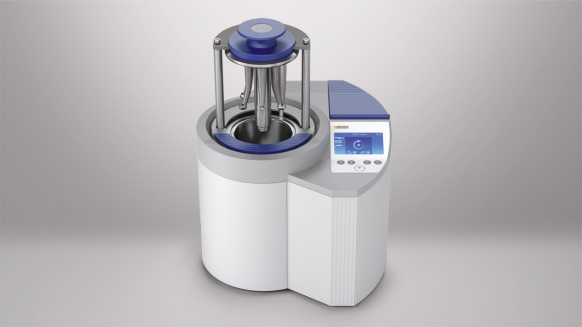
Соблюдение стандартов гигиены и защита от перекрестного загрязнения одним нажатием кнопки – это гигиеническая безопасность благодаря использованию DAC Universal. Ваши пациенты и сотрудники могут положиться на комплексную гигиеническую защиту благодаря лечению с использованием обработанных*, стерилизованных** инструментов.
DAC Universal – воспользуйтесь преимуществами множества удобных функций
Профессиональный подход к инструментам
Очистка изнутри и снаружи, смазка и, если необходимо, дезинфекция* и стерилизация** проводятся за один цикл работы.
Простая обработка
Обработка любых инструментов – от прямых и угловых наконечников, турбин, ультразвуковых инструментов до насадок многофункциональных шприцев и порошковых инструментов.
Полностью автоматическая обработка
Надежная и очень быстрая обработка шести инструментов, значительно экономящая время.
Экономически эффективная обработка
Нет необходимости использовать чистящие и дезинфицирующие средства.
Гигиеничность одним нажатием кнопки
Все, что вам нужно, чтобы закрыть крышку DAC Universal и запустить полностью автоматическую программу обработки, – это нажать на кнопку. Инструменты будут очищены, смазаны и дезинфицированы* или стерилизованы**. Так вы легко получите идеальные результаты и избежите возможных проблем с гигиеной.
Защита и сохранение гигиеничности ваших инструментов
Правильный уход за инструментами продлевает срок их службы. Аппарат для гигиены DAC Universal был протестирован и одобрен ведущими мировыми производителями прямых и угловых наконечников, турбин, ультразвуковых наконечников и насадок для пустеров.
- Автоматическая обработка.
- Быстрый повторный запуск цикла обработки.
- Минимальные затраты на приобретение дополнительных инструментов.
- Минимальные затраты на обслуживание.
- Снижение затрат на ремонт инструментов.
Варианты крышки для DAC Universal
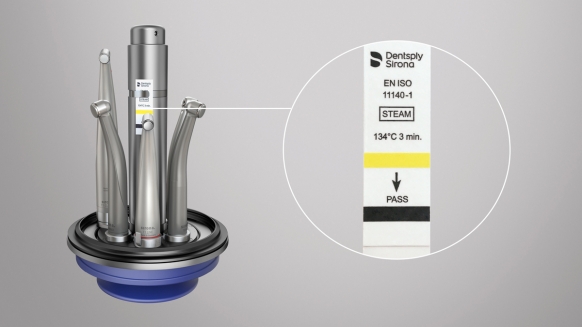
Крышка «Стандарт»
- Для обработки прямых и угловых наконечников, турбин и насадок на угловые наконечники.
- Выпуск партии: контроль партии выполняется с использованием химического индикатора класса 5.
- Держатель индикатора (арт. 60 51 788) с химическим индикатором класса 5 (арт. 58 92 059).
Обработка с использованием крышки «Стандарт»
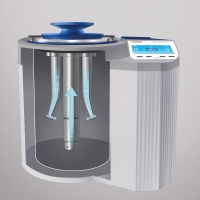
Очистка изнутри холодной водой
1. Проверка на утечку воды.
2. Очистка изнутри: внутренние каналы промываются водой.
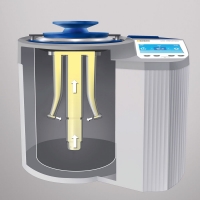
Полностью автоматическая смазка
3. Смазка каналов инструмента (достаточно только для одного сеанса обработки).
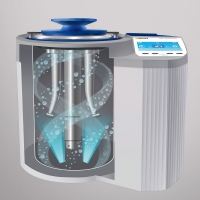
Очистка снаружи холодной и горячей водой
4. Инструменты очищаются с помощью пульсирующей промывки (многоцикличная процедура очистки).
5. Очистка внешних поверхностей горячей водой.
6. Нагрев до 134 °C.
7. Обратная циркуляция: насыщенный пар направляется на инструменты.
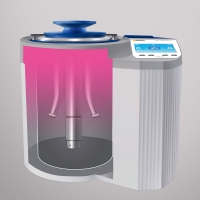
Стерилизация и сушка
8. Стерилизация в течение 3 минут при температуре 134 °C.
9. Процедура – сушки инструментов
10. Крышка слегка приоткрывается.
11. При нажатии кнопки «C» или кнопки «Стрелка вниз» крышка открывается полностью.
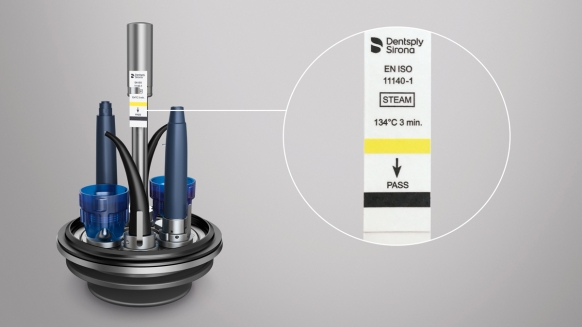
Крышка Flex
- Для любых ультразвуковых инструментов, насадок для пустеров и порошковых инструментов, не имеющих критического применения
- Выпуск партии: контроль партии выполняется с использованием химического индикатора класса 5.
- Держатель индикатора (арт. 65 42 489) с химическим индикатором класса 5 (арт. 58 92 059).
Обработка инструментов с крышкой Flex
(процесс обработки идентичен процессу обработки с крышкой «Стандарт», но отсутствует этап смазки)
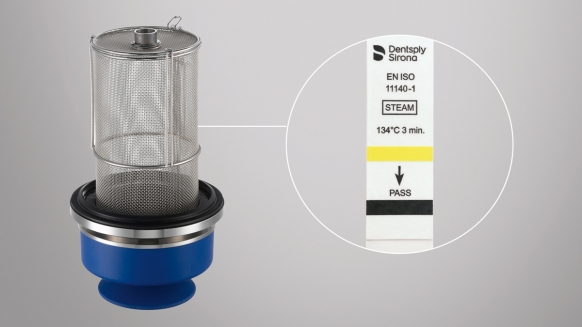
Крышка «Корзина» (для неразборных инструментов)
- Возможна очистка и стерилизация до пяти неразборных инструментов в одной корзине.
- Выпуск партии: контроль партии выполняется с использованием химического индикатора класса 5.
- Химический индикатор класса 5 (арт. 58 92 059).
Адаптеры
Для прямых и угловых наконечников
Чтобы посмотреть список всех доступных адаптеров, скачайте документ «Информация для заказа – адаптеры» в разделе «Документы для скачивания».
Документы для скачивания
Hygiene Info File
2 MB
Instrument reprocessing in the dental practice
Technical Data
782 kB
For DAC Universal and all Dentsply Sirona Hygiene Systems
Ordering information — Adapters
388 kB
Get information on the portfolio of adapters
Ordering information — Accessories
300 kB
Get information on accessories
Compatibility list Flex / Green lid DAC Universal GUI / Touch
125 kB
* Обработка с крышкой Flex.
** Обработка со стандартной крышкой.

Узнайте больше о системах для гигиены от Dentsply Sirona, запросив информацию о продукте. Благодарим вас за интерес к нашей продукции, мы будем рады отправить интересующую вас информацию.