
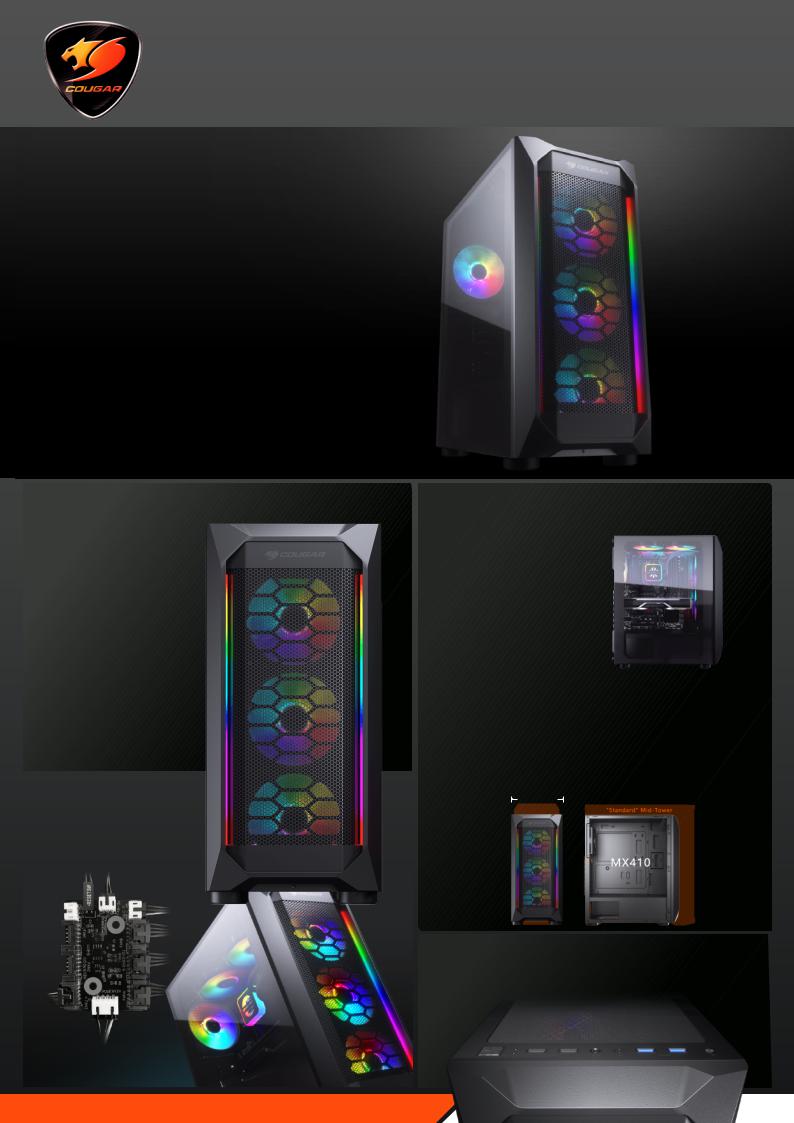
MX410 Mesh-G RGB
Powerful Airflow and Compact Mid — Tower Case
MX410 Mesh-G RGB sports an attractive and compact design with a massive mesh front panel for better air flow performance. The integrated lighting button with built-in LED controller allows it to display amazing lighting e ects. With a massive tempered glass left panel, MX410 Mesh-G RGB showcases a clean and tidy build. It has wider but more compact and powerful design,which allows you to have high-performance and abundant storage space.
Excellent Looks with Superior
Airflow
MX410 Mesh-G RGBʼs front panel combines with excellent appearance and su cient airflow. Let it breathe through the front panel!
Enjoy the Dazzling RGB Show
The integrated lighting button with built-in LED controller allows MX410 Mesh-G RGB to display amazing lighting e ects. It can also work to a compatible motherboardsʼ 5V connection for system-wide lighting synchronization.
Elegant Design with Massive Tempered Glass Left Panel
With the full-length PSU cover hides cables and a massive tempered glass left panel presents a clean and tidy build, you can easily build a pro-level system.
* Top fans and radiators are optional, specifications might vary depending on the country or region of sale.
Wider but More Compact and
Powerful
MX410 Mesh-G RGBʼs 210mm width allows much larger interior space with better cooling performance and cable management. However, its compact exterior dimension takes up less desktop space. MX410 Mesh-G RGB can surely fit a full-sized ATX Motherboard, 300mm-length Graphic card,
three 2.5” SSDs, and two 3.5” HDDs, which allow you to achieve the extreme
operation and abundant storage space.
210 mm
Abundant for Multiple USB
Devices
The front panel is equipped with two USB 3.0 ports and two USB 2.0 ports, let you easily connect multiple peripheral devices and accessory charging. Not only optimize your processing experiences, but also keep all USB devices without limitations.
* Top fans and radiators are optional, specifications might vary depending on the country or region of sale.
REAL GEAR FOR REAL GAMERS
www.cougargaming.com
| Document’s Content and Additional Information | Share Manual |
|---|---|
|
COUGAR MX410 MESH-G RGB Manual
Pages Preview: Document Transcription:
See Details |


User Manual
COUGAR MX410 說明書 00120 usermanual cougargaming fileadmin USERS MANUAL
MX410 Assembly Drawing H K L E B A G F D I J C H.D.D LED- POWER LED POWER LED POWER SW … ER POWER LED H.D.D LED USB HD AUDIO MX410 sports an attractive and compact design with dual RGB strips at the front panel. Elegant design and a massive transparent acrylic side panel bring you a s…
lang:en score:41 filesize: 3.17 M page_count: 2 document date: 2020-01-22

User Manual Dimension Guide
COUGAR MX410 G RGB usermanual g cougargaming fileadmin USERS MANUAL |||
Assembly Drawing M X 410 — G RGB A Power button / RGB control button B USB 3.0 / USB 2.0 / HD audio … ER LED POWER LED POWER SW USB3.0 POWERFUL AIRFLOW AND COMPACT MID-TOWER CASE WITH TEMPERED GLASS MX410-G RGB sports an attractive and compact design with dual RGB strips at the front panel. The int…
lang:en score:41 filesize: 1.69 M page_count: 2 document date: 2020-05-25

User Manual
COUGAR MX410 T 說明書 0121 usermanual cougargaming fileadmin USERS MANUAL
Assembly Drawing H K MX410-T L D I E B A G F J C H.D.D LED- POWER LED POWER LED POWER SW USB3.0 A Power button / RGB control button B USB 3.0 / USB 2.0 / HD audio ports C Front panel D Tempered Glass side panel E Right side panel F 3.5 HDD cage G 2.5 HDD/SSD drive bay H Air filter f…
lang:en score:41 filesize: 3 M page_count: 2 document date: 2020-01-22

User Manual
COUGAR MX410 Mesh G RGB 說明書 g usermanual cougargaming fileadmin USERS MANUAL
MX410 MESH-G RGB Assembly Drawing H K L E B A G F D I J C H.D.D LED- POWER LED POWER LED POWER SW USB3.0 A Power button / RGB control button B USB 3.0 / USB 2.0 / HD audio ports C Front panel D Tempered glass side panel E Right side panel F 3.5 HDD cage G 2.5 HDD/SSD drive bay H Air…
lang:en score:39 filesize: 3.45 M page_count: 2 document date: 2020-04-07

User Manual
COUGAR MX410 Mesh G RGB 說明書 User Manual g BG Index of GAMING CASE files asbis |||
MX410 MESH-G RGB H K L E B A G F D I J C H.D.D LED- POWER LED POWER LED POWER SW USB3.0 A / RGB B USB 3.0 / USB 2.0 / HD C D E F 3.5 HDD cage I / O G 2.5 HDD/SSD drive bay H I J 3 x 120mm RGB K 2 x 120mm L 120mm RGB USB 3.0 U…
lang:en score:39 filesize: 42.6 M page_count: 2 document date: 2020-11-19

User Manual
Technical Information Cougar LD2 Schumacher RC Racing Manual racing cars content files Info Instruction Manuals |||
S1574 Instruction Manual ISS01 www.racing-cars.com 71-73 Tenter Road Moulton Park Northampton NN3 … Csk Hd pk10 U7689 U7699 U7707 U7709 U7710 U7711 U7712 U7791 U7900 M3 Brass Inserts — pk10 Foam Strips 40 x 6 x 2mm thk — pk20 M3 Steel Washers pk10 M3 Black Alloy Washers 0.75mm pk10 M3 Black…
lang:en score:38 filesize: 93.64 M page_count: 42 document date: 2021-05-24

User Manual
COUGAR MX410 說明書 0113 Mesh usermanual cougargaming fileadmin USERS MANUAL
MX410 MESH Assembly Drawing H K L E B A G F D I J C H.D.D LED- POWER LED POWER LED RESET SW POWER SW USB3.0 A Power button / Reset button B USB 3.0 / USB 2.0 / HD audio ports C Front panel D Left side panel E Right side panel F 3.5 HDD cage G 2.5 HDD/SSD drive bay H Air filter for t…
lang:en score:38 filesize: 3.15 M page_count: 2 document date: 2020-01-22

User Manual Specifications
super cougar core alignment fusion splicer instruction manual 6028134 archive org manualzilla id
SUPER COUGAR CORE ALIGNMENT FUSION SPLICER INSTRUCTION MANUAL Please read through this manual completely before its first use. 1.800.5000.FIS 347 fiberinstrumentsales.com FiberExperts /FiberExperts fiberinstrumentsales.com 1.800.5000.FIS 347 1 TABLE OF CONTENTS I . For Your Safety …
lang:en score:37 filesize: 8.29 M page_count: 62 document date: 2013-03-12

User Manual Instructions Parts List Specifications Warranty
INSTRUCTION MANUAL AND PARTS LIST instruction manuals when properly installed operated and maintained During the warranty period CMCP s sole obligation liability shall be at option to A Replace or repair defective parts including replacement of entire unit so that will perform in accordance with manual OR Clarke Cougar User Manuall ftp isurplus au
INSTRUCTION MANUAL AND PARTS LIST COUGAR ULV SPRAYER TABLE OF CONTENTS COUGAR ULV SPRAYER Warranty Information 1 Setting Target Application Rate 27 Clarke Cougar Specifications 2 Setting the Maximum Speed 27 Forward 3 Setting Minimum Speed 28 Description 5 Setting the Flow Calibrat…
lang:en score:36 filesize: 3.33 M page_count: 68 document date: 2017-11-08

User Manual Instructions
ARMOUR VOLUME 7 USER MANUAL COUGAR PART TWO ARMAMENT To provide a description and operating instructions for the systems components of Cougar turret B GL 305 007 User Manual vol 2 Armament archive org
ARMOUR VOLUME 7 USER MANUAL — COUGAR B-GL-305-007/MS-002 PART TWO ARMAMENT BILINGUAL WARNING ALT … and b. the cradle. THE MANTLET 2. The mantlet is supported in the turret by trunnions. Two sealing strips are located in grooves on the right and left-hand faces to prevent water and dust from enteri…
lang:en score:35 filesize: 3.3 M page_count: 413 document date: 2004-03-23

User Manual
MX410 Mesh G usermanual g cougargaming fileadmin USERS MANUAL |||
Assembly Drawing MX410 MESH-G A Power button / Reset button B USB 3.0 / USB 2.0 / HD audio ports C Front panel D Tempered glass side panel E Right side panel F 3.5 HDD cage G 2.5 HDD/SSD drive bay H Air filter for top panel I Air filter for bottom panel J 3 x 120mm fans for front panel optional…
lang:en score:34 filesize: 1.64 M page_count: 2 document date: 2020-03-20

User Manual Instructions
Provided by ManualsAndMore Download User Manual Metra Electronics 99 5806 Installation Instructions 995806 manualsandmore |||
INSTALLATION INSTRUCTIONS FOR PART 99-5806 Ford Focus 2000-2004 Mercury Cougar 1999-2002 KIT FEATURES ISO DIN head unit provision with pocket DIN head unit provision with pocket KIT COMPONENTS A Radio Housing l B ISO Brackets l C Trim Plate 99-5806 B A C TOOLS REQUIRED: 86-5618 Head Uni…
lang:en score:33 filesize: 855.9 K page_count: 12 document date: 2019-07-23

User Manual Instructions Guide
Microsoft Word FIS Cougar Manual ENG f1287 Instruction manual Amazon S3 through this completely to avoid failures and safety accidents before you use it FOFS is designed easily but also contains potential danger Therefore all necessary instructions assure safe splice Please keep with the product time Optical fiber fusion splicer read its first Fusion Splicer s3 us west 1 amazonaws foscoshopify
Instruction manual Optical fiber fusion splicer FOFS Cougar Please read through this manual completely before its first use. Contents I. Safety guide II. Product structure 1. Parts of the splicer 2. Requirements for splicing III. Product guide 1. Outward of the main body 1 2. Parts for fusion…
lang:en score:31 filesize: 7.14 M page_count: 134 document date: 2011-07-07

User Manual Guide
Cougar Royal Electric Standing Desk PRO Assembly Guide 5 ore fa — 100 240VAC 50 60Hz ANSI BIFMA X5 2014 Durability Certification Meet RoHS SGS PROP 65 compliant Lifting Column Control Box Power Strip UL cougargaming fileadmin USERS MANUAL work |||
ROYAL ELECTRIC STANDING DESK FEATURES PARTS HARDWARE LIST Cougar Electric Standing Desk chooses outstanding Timotion lifting columns,control box and keypad with exceptional quality construction. With cable management attached to preserve you the tidy desk. Exclusively built-in 7-in-1 docking…
lang:es score:30 filesize: 1.29 M page_count: 2 document date: 2022-04-15

User Manual Specifications
COUGAR MX410 ARGB usermanual FEATURES Assembly Drawing A Power button RGB control G 2 5 HDD SSD drive bay B USB 3 0 HD audio ports H Air filter for top panel C Front I bottom D Transparent acrylic side J x 120mm fans front optional E Right K Specifications might vary depending on the country or region of Mid Tower Case cougargaming fileadmin USERS MANUAL |||
MX410 Assembly Drawing H K L E B A G F D I J C H.D.D LED- POWER LED POWER LED POWER SW … OWER LED H.D.D LED USB HD AUDIO MX410 ARGB sports an attractive and compact design with dual RGB strips at the front panel. Elegant design and a massive transparent acrylic side panel bring you a s…
lang:en score:30 filesize: 3.02 M page_count: 2 document date: 2022-12-28

User Manual Documentation Guide Decleration of Conformity
8530 Cougar VS User s Guide TSeggie Mettler Toledo Error ErrorsBase user guide vs software en mt ext files Editorial Generic 8 userguide 0x0000100840a9d7e940005cbc |||
8530 CougarTM Industrial Terminal User s Guide for VS Software B15339700A 10/99 .00 Mettler-To … ver, only one can receive data. Connections to the controller PCB are made using removable terminal strips. The wire size for these terminal strips ranges from 23 to 16 AWG. The controller PCB stores …
lang:en score:29 filesize: 416.34 K page_count: 42 document date: 2000-06-01

User Manual Instructions Troubleshooting Guide Parts List Warranty
CG COVER PAGE PMD aday JOHN DEERE 7X30 COUGAR BOOM Lawn Mower Manuals This manual contains information about many features of the Tiger mowing and roadside maintenance equipment Some these include Safety precautions Assembly instructions Operations Maintenance Parts will also assist you in proper break daily care andtroubleshooting your new mower 16 lawnmower manuals info d
JOHN DEERE 7X30 COUGAR BOOM Current as of 7/1/10 PARTS LISTING WITH MOUNTING AND OPERATING INSTRUCTIONS Tiger Corporation 3301 N. Louise Ave. Sioux Falls, SD 57107 1-800-843-6849 1-605-336-7900 www.tiger-mowers.com TO THE OWNER / OPERATOR / DEALER All implements with moving parts are potentially h…
lang:en score:29 filesize: 4.52 M page_count: 186 document date: 2011-07-29

User Manual Quick Start Guide Guide
Elite Dangerous Cougar Display Manual Brian Southon User This user guide is designed to get you started as quickly possible with minimal clicks If youre reading this for the first time then Quick Start Guide will up and running in a minute even if dont read it youll see something working know exactly whats going on! EDCD cougardisplay site RK 2 RS Ajods7v3Pk7 LvZ4y17hcqeAEPs |||
Version 1.20.0.1 May 2022 Elite Dangerous Cougar Display ED:CD User Manual This user guide is desi … el s font colour. Alternative galaxy images supported via material property ColouredBars Vertical strips of coloured bands Oscilloscope Draws background grid and a scope line as a single widget Par…
lang:en score:29 filesize: 5.53 M page_count: 138 document date: 2022-05-21

User Manual
COUGAR PANZER EVO RGB USER MANUAL cougar panzer evo rgb trovaprezzi it manuali |||
Questo manuale d istruzione fornito da trovaprezzi.it. Scopri tutte le offerte per Cougar Panzer Ev … nd four water cooling radiators COUGAR RGB Core Box included: Control your COUGAR RGB fans and LED strips with remote control COUGAR Vortex RGB PWM fans included, with 18 LEDs per fan and 100 light…
lang:de score:27 filesize: 12.03 M page_count: 2 document date: 2018-04-13

User Manual Warranty
COUGAR STX 12V cougargaming fileadmin USERS MANUAL
Super Silence Superior Reliability COUGAR Facebook English Introduction Dear customer: Thank you for choosing a COUGAR power supply unit. Before the installation please read the manual below carefully. If you have any questions, please contact our customer service: Warnings and safety notes Th…
lang:en score:26 filesize: 3.56 M page_count: 1 document date: 2016-02-19

User Manual Warranty
COUGAR BXM usermanual cougargaming fileadmin USERS MANUAL
BXM English Introduction Dear customer: Thank you for choosing a COUGAR power supply unit. Before the installation please read the manual below carefully. If you have any questions, please contact our customer service: Warnings and safety notes Never open the PSU cover. There is potential danger o…
lang:en score:26 filesize: 1.01 M page_count: 2 document date: 2019-10-29

User Manual Warranty
COUGAR POLAR UM cougargaming fileadmin USERS MANUAL |||
POLAR Introduction Dear customer: Thank you for choosing a COUGAR power supply unit. Before the installation please read the manual below carefully. If you have any questions, please contact our customer service: Warnings and safety notes Never open the PSU cover. There is potential danger of life d…
lang:en score:26 filesize: 1.02 M page_count: 2 document date: 2021-12-08

User Manual Warranty
COUGAR XTC usermanual cougargaming fileadmin USERS MANUAL |||
EFFICIENCY XTC SUPERIOR RELIABILITY AND SILENT OPERATION Introduction Dear customer: Thank you for choosing a COUGAR power supply unit. Before the installation please read the manual below carefully. If you have any questions, please contact our customer service: Warnings and safety notes Never open…
lang:en score:26 filesize: 1.37 M page_count: 2 document date: 2019-05-22

User Manual Warranty
COUGAR VTK usermanual cougargaming fileadmin USERS MANUAL |||
VTK 400/450/500/550 Introduction Dear customer: Thank you for choosing a COUGAR power supply unit. Before the installation please read the manual below carefully. If you have any questions, please contact our customer service: Warnings and safety notes Never open the PSU cover. There is potential da…
lang:en score:26 filesize: 1.03 M page_count: 2 document date: 2021-01-11

User Manual
COUGAR PANZER EVO RGB USER MANUAL 405151 bhphotovideo lit files |||
Assembly Drawing E Q RGB FAN 4 RGB FANS INCLUDED E R H F P G C A S PANZER K L VO RGB THE CR … nd four water cooling radiators COUGAR RGB Core Box included: Control your COUGAR RGB fans and LED strips with remote control COUGAR Vortex RGB PWM fans included, with 18 LEDs per fan and 100 light…
lang:de score:26 filesize: 12.02 M page_count: 2 document date: 2018-04-13

User Manual
COUGAR MX331 T usermanual cougargaming fileadmin USERS MANUAL
Assembly Drawing N O MX331-T M H F L G I J A B C K E D A Power button I 2.5 HDD/SSD drive b … Installing the Front I/O Connectors USB 3.0 USB 2.0 HD AUDIO POWER SW POWER LED H.D.D LED RGB STRIPS FAN SPEEDS FAN POWER CABLE POWER CABLE CONNECTORS H.D.D LED- POWER LED POWER LED POWER …
lang:en score:26 filesize: 1.24 M page_count: 2 document date: 2020-05-06

User Manual Warranty
COUGAR VTE X2 usermanual cougargaming fileadmin USERS MANUAL |||
VTE X2 600/650/700/750 Introduction Dear customer: Thank you for choosing a COUGAR power supply unit. Before the installation please read the manual below carefully. If you have any questions, please contact our customer service: Warnings and safety notes Never open the PSU cover. There is potential…
lang:en score:26 filesize: 1.03 M page_count: 2 document date: 2020-10-21

User Manual Owner’s Manual Installation Guide Instructions Guide Warranty Diagram
WINDLASS SERIAL NUMBER Jamahl Kelly Click Here for an Owner s Manual and Installation Guide this Product Muir Jaguar HR3500 Compact Horizontal Windlass 24 Volt DC 5 16 BBB Defender Marine 012443 OWNER defender |||
THE WORLD POWER IN ANCHORING SYSTEMS HR 3500 JAGUAR HORIZONTAL WINDLASS www.muir.com.au 1 THE WORLD POWER IN ANCHORING SYSTEMS Contents Introduction Important Information Safety Installation Chain pipe Fitting Manual Override System MORS Rope Chain Management System adjustment Depth of chain …
lang:en score:26 filesize: 1.53 M page_count: 20 document date: 2006-07-04

User Manual Warranty
COUGAR GEM usermanual Power Supply cougargaming fileadmin USERS MANUAL |||
GEM COMPACT 140MM GOLD PSU English Introduction Thank you for choosing a COUGAR power supply unit. Before the installation please read the manual below carefully. If you have any questions, please contact our customer service: Warnings and safety notes Never open the PSU cover. There is potential d…
lang:en score:26 filesize: 1.03 M page_count: 2 document date: 2022-08-26

User Manual Warranty
COUGAR GX F AURUM usermanual cougargaming fileadmin USERS MANUAL |||
English GX -F AURUM TOP QUALITY AND HIGH PERFORMANCE REAL GEAR FOR REAL GAMERS Introduction Dear customer: Thank you for choosing a COUGAR power supply unit. Before the installation please read the manual below carefully. If you have any questions, please contact our customer service: Warnings and…
lang:en score:26 filesize: 3.74 M page_count: 2 document date: 2019-06-06

User Manual Warranty
COUGAR ATLAS usermanual Power Supply cougargaming fileadmin USERS MANUAL |||
ATL AS 600 / 650 / 750 Introduction Dear customer: Thank you for choosing a COUGAR power supply unit. Before the installation please read the manual below carefully. If you have any questions, please contact our customer service: Warnings and safety notes Never open the PSU cover. There is potential…
lang:en score:26 filesize: 1.11 M page_count: 2 document date: 2022-10-05

User Manual
COUGAR RGB HPB120 COOLING KIT Use the included wireless controller to choose among 100 amazing lighting effects VORTEX fans and 4 strips is 40W please take this into This manual was created by Compucase Enterprise may not be vortex rgb hpb120CK fan cougargaming fileadmin USERS MANUAL 80
www.cougargaming.com USER MANUAL REAL GEAR FOR REAL GAMERS REAL GEAR FOR REAL GAMERS PWM MAXIMIZ … ase do not connect the fan to a 12V Non-addressable header. RGB Core Box for up to 8 fans and 4 LED strips, with 3 VORTEX RGB HPB120 Fans included. The electrical consumption of a fully installed COUG…
lang:en score:26 filesize: 446.72 K page_count: 2 document date: 2018-07-25

User Manual Warranty
COUGAR GES UM Power Supply cougargaming fileadmin USERS MANUAL |||
GES 550/650/750 Introduction Dear customer: Thank you for choosing a COUGAR power supply unit. Before the installation please read the manual below carefully. If you have any questions, please contact our customer service: Warnings and safety notes Never open the PSU cover. There is potential danger…
lang:en score:25 filesize: 1.01 M page_count: 2 document date: 2021-12-09

User Manual Warranty
COUGAR STC usermanual Power Supply cougargaming fileadmin USERS MANUAL |||
STC 400/500/600/700 Introduction Dear customer: Thank you for choosing a COUGAR power supply unit. Before the installation please read the manual below carefully. If you have any questions, please contact our customer service: Warnings and safety notes Never open the PSU cover. There is potential da…
lang:en score:25 filesize: 1.01 M page_count: 2 document date: 2022-08-26

User Manual
COUGAR Gemini M usermanual usermanal cougargaming fileadmin USERS MANUAL |||
Assembly Drawing GEMINI M COUGAR BRINGS YOU A NEW VERSION OF THE REVOLUTIONARY DESIGN OF GEMINI M … efit from integrated control of Gemini M s Trelux lighting system, up to eight fans and two RGB LED Strips by connecting the case with the included adaptor to a COUGAR Core Box v2 sold separately . T…
lang:en score:25 filesize: 7.31 M page_count: 2 document date: 2019-06-14

User Manual Installation Guide
COUGAR MX430 AIR RGB usermanual cougargaming fileadmin USERS MANUAL |||
MX430 AIR RGB COMPACT ARGB MID TOWER CASE WITH MODERN PATTERNED AIR VENTS We ve made COUGAR PC cases even better. The new patterned air vents and the LED strips create a special outlook for your amazing build. Three gorgeous ARGB fans, mighty support for up a 280mm radiator, a 320mm graphic card, a…
lang:en score:25 filesize: 3.03 M page_count: 2 document date: 2021-09-01

User Manual Warranty
COUGAR GEC SNOW usermanual Power Supply cougargaming fileadmin USERS MANUAL |||
GEC 550/650/750 Introduction Dear customer: Thank you for choosing a COUGAR power supply unit. Before the installation please read the manual below carefully. If you have any questions, please contact our customer service: Warnings and safety notes Never open the PSU cover. There is potential danger…
lang:en score:25 filesize: 1.03 M page_count: 2 document date: 2022-10-24

User Manual Instructions
Provided by ManualsAndMore Download User Manual Muir HR1600 Cougar manualsandmore |||
THE WORLD POWER IN ANCHORING SYSTEMS HR 1600 COUGAR HORIZONTAL WINDLASS HR1600 COUGAR www.muir.com.au THE WORLD POWER IN ANCHORING SYSTEMS IMPORTANT: MANUAL OVERIDE PAWL The pawl and bolt assembly herewith is to be fitted to forward side of Horizontal Windlass Housing, in the event of Manual Ove…
lang:en score:25 filesize: 2.53 M page_count: 23 document date: 2019-07-24

User Manual Accessories
COUGAR RGB LED STRIP 燈條 說明書 User Manual BG Index of GAMING ACCESSORIES files asbis |||
USER MANUAL www.cougargaming.com REAL GEAR FOR REAL GAMERS LED STRIP LET IT SHINE REAL GEAR FOR REAL GAMERS COUGAR RGB Core Box RGB LED RGB Core Box 4 LED . 1 2 3 RGB Core Box RGB Core Box RGB Core Box RGB LED 4 5 RGB Core Box RGB Core Box 5V ADDRESSABLE HEADER ADAPTER …
lang:en score:25 filesize: 347.42 K page_count: 2 document date: 2020-11-19

User Manual
COUGAR Purtity RGB usermanual PURITY cougargaming fileadmin USERS MANUAL |||
PURITY RGB Assembly Drawing H L M C A F G E J K I A Power button / Reset button H Air filter for top panel B RGB control button I Air filter for front panel C USB 3.0 / USB 2.0 / HD audio ports J Air filter for bottom panel D Front panel K 2 x 120mm fans for front panel optional E …
lang:en score:25 filesize: 3.29 M page_count: 2 document date: 2022-03-16

User Manual Specifications
COUGAR VK120 usermanual vortex argb vk120 usermanaul cougargaming fileadmin USERS MANUAL
REAL GEAR FOR REAL GAMERS www.cougargaming.com VORTEX ARGB VK120 PWM HDB EXCLUSIVE VORTEX DESIGN E … he motherboard s allowed limits of power rating and LED number when connecting multiple fans or LED strips. Connect Motherboard 5V Addressable Header Motherboard PWM Header VK120 INSTALLING CORE BO…
lang:en score:25 filesize: 545.28 K page_count: 2 document date: 2020-08-28

User Manual Specifications Warranty
COUGAR CONQUER 2 usermanual Cougar Conquer glass window Manual c2eaf5774e2db0c2831e3e55c035f4682b34 gzhls at blob ldb c 3 e f |||
Assembly Drawing CONQUER 2 Model Name Case Form Factor Dimension WxHxD Motherboard Formats I/O P … r Compatible ASUS, MSI , Gigabyte or ASRock Motherboards Core Box C for up to 8 fans 2 and 4 LED strips VC120 RGB LED Strip Optional CONTROL YOUR RGB LIGHTING Connect your case s RGB button to…
lang:en score:25 filesize: 2.08 M page_count: 2 document date: 2019-11-20

User Manual
COUGAR VORTEX RGB SPB120 cougargaming fileadmin USERS MANUAL
USER MANUAL www.cougargaming.com VORTEX SPB REAL GEAR FOR REAL GAMERS REAL GEAR FOR REAL GAMERS … der VORTEX RGB SPB120 RGB LED Strip Optional Core Box V2, Core Box C for up to 8 fans and 4 LED strips. 5V ADDRESSABLE HEADER ADAPTER I N S TA L L AT I O N VORTEX RGB SPB120 Optional Please ch…
lang:en score:25 filesize: 85.12 K page_count: 1 document date: 2018-07-26

User Manual
COUGAR Gemini S usermanual S2020 cougargaming fileadmin USERS MANUAL |||
Assembly Drawing GEMINI S A Power button / RGB Control Button B USB3.0 x 2 ,USB2.0 x 1 , Mic x 1, A … efit from integrated control of Gemini S s Trelux lighting system, up to eight fans and two RGB LED Strips by connecting the case with the included adaptor to a COUGAR Core Box v2 sold separately . T…
lang:en score:25 filesize: 2.68 M page_count: 2 document date: 2020-06-05

User Manual Warranty
COUGAR GEX usermanual English Introduction Dear customer Thank you for choosing a COUGAR® power supply unit Before the installation please read manual below carefully m cclonline content images cougargaming fileadmin USERS MANUAL
GEX English Introduction Dear customer: Thank you for choosing a COUGAR power supply unit. Before the installation please read the manual below carefully. If you have any questions, please contact our customer service: Warnings and safety notes Never open the PSU cover. There is potential danger o…
lang:en score:25 filesize: 1016.9 K page_count: 2 document date: 2019-10-01

Datasheet Safety Datasheet
MX410 T EDM Cougar glass window Data sheet bd1dc38d52a5c19e182f7b63c57411509aca gzhls at blob ldb c 8 5 |||
MX410-T Powerful and Compact Mid-Tower Case with Dual RGB Strips MX410-T sports an attractive and compact design with dual RGB strips at the front panel. With a massive tempered glass left panel, MX410-T showcases a clean and tidy build. It has wider but more compact and powerful design, which allo…
lang:en score:25 filesize: 2.15 M page_count: 3 document date: 2020-01-22

User Manual
COUGAR Gemini T usermanual dwn alza cz manual 66542 |||
GLASS WINGS GEMINI T RGB GLASS-WING MID-TOWER GEMINI T IS NOT DIFFERENT. IT S BETTER. THIS NEW CASE … efit from integrated control of Gemini T s Trelux lighting system, up to eight fans and two RGB LED Strips by connecting the case with the included adaptor to a COUGAR Core Box v2 sold separately . T…
lang:en score:25 filesize: 3.41 M page_count: 2 document date: 2018-08-21

User Manual Warranty
BXM1200 usermanual COUGAR BXM 1200 1000 Power Supply cougargaming fileadmin USERS MANUAL |||
BXM 1000 / 1200 English Introduction Dear customer: Thank you for choosing a COUGAR power supply unit. Before the installation please read the manual below carefully. If you have any questions, please contact our customer service: Warnings and safety notes Never open the PSU cover. There is potent…
lang:en score:24 filesize: 1.07 M page_count: 2 document date: 2022-10-21

User Manual Warranty
COUGAR XTC ARGB說明書 ARGB usermanual cougargaming fileadmin USERS MANUAL
XTC ARGB 450/550/650 Introduction Dear customer: Thank you for choosing a COUGAR power supply unit. Before the installation please read the manual below carefully. If you have any questions, please contact our customer service: Warnings and safety notes Never open the PSU cover. There is potential d…
lang:en score:24 filesize: 1.05 M page_count: 2 document date: 2020-08-28

User Manual Warranty
COUGAR GEX X2 usermanual Power Supply X987654 TESTING GEXX2 cougargaming fileadmin USERS MANUAL |||
ENGLISH Introduction Dear customer: Thank you for choosing a COUGAR power supply unit. Before the installation please read the manual below carefully. If you have any questions, please contact our customer service: Warnings and safety notes Never open the PSU cover. There is potential danger of life…
lang:en score:24 filesize: 997.4 K page_count: 2 document date: 2023-03-06
MX4 1 0
ME SH — G RGB
MX410 Mesh-G RGB sports an attractive and compact design with a massive mesh front panel
for better air flow performance. The integrated lighting button with built-in LED controller
allows it to display amazing lighting effects. With a massive tempered glass left panel,
MX410 Mesh-G RGB showcases a clean and tidy build. It has wider but more compact and
powerful design, which allows you to have high-performance and abundant storage space.
Excellent Looks with Superior Airflow
MX410 Mesh-G RGBʼs front panel combines with excellent appearance and sufficient airflow.
Let it breathe through the front panel!
Enjoy the Dazzling RGB Show
The integrated lighting button with built-in LED controller allows MX410 Mesh-G RGB to display
amazing lighting effects. It can also work to a compatible motherboardsʼ 5V connection for
system-wide lighting synchronization.
Elegant Design with Massive Tempered Glass Left Panel
With the full-length PSU cover hides cables and a massive tempered glass left panel
presents a clean and tidy build, you can easily build a pro-level system.
Wider but More Compact and Powerful
MX410 Mesh-G RGBʼs 210mm width allows much larger interior space with better cooling
performance and cable management. However, its compact exterior dimension takes up less
desktop space. MX410 Mesh-G RGB can surely fit a full-sized ATX Motherboard, 300mm-length
Graphic card, three 2.5″ SSDs, and two 3.5″ HDDs, which allow you to achieve the extreme
operation and abundant storage space.
Abundant for Multiple USB Devices
The front panel is equipped with two USB 3.0 ports and two USB 2.0 ports, let you easily
connect multiple peripheral devices and accessory charging. Not only optimize your processing
experiences, but also keep all USB devices without limitations.
Strong Cooling Performance
MX410 Mesh-G RGBʼs interior space supports up to 165mm height CPU air cooler, a 240mm water
cooling radiator, and high-end cooling components. It helps you to protect critical components
from overheating.
Model Name
MX410 Mesh-G RGB
Model No.
CGR-5VM6B-MESH-G-RGB
Case Form Factor
Mid Tower
Motherboard Type
Mini ITX / Micro ATX / ATX
Dimension
210 (W) x 455 (H) x 380 (D) mm / 8.3 (W) x 17.9 (H) x 15 (D) inch
I/O Panel
USB 3.0 x 2 , USB 2.0 x 2 , Mic x 1, Audio x 1 , RGB Control Button
3.5″ : 2 max.
Case Drive Bays
2.5″ : 3 max.
Expansion Slots
7
Front : 120mm x 3 (RGB fans x 3 pre-installed)
Cooling Fan Support
Top : 120mm x 2
Rear : 120mm x 1 (RGB fan x 1 pre-installed)
Maximum Number of Fans
6 Max.
*
Front : 240mm
/ 120mm
*
Water Cooling Radiator Support
Top : 240mm
/ 120mm ( Max. Component Height on Motherboard is 40mm )
Rear : 120mm
300 (mm) / 11.8 (in) (Only fans at the front panel)
Max. Graphics Card Length
270 (mm) / 10.6 (in) (Radiator with fans at the front panel)
165mm / 6.5inch
Max. CPU Cooler Height
Max. PSU Length
160mm / 6.3inch
Specifications might vary depending on the country or region of sale.
*Please choose either of front or top to install a 240mm radiator.
Assembly Drawing
H
K
L
D
I
FEATURES
ENGLISH
• Mesh front panel combines with excellent appearance and sufficient airflow
• Elegant design with massive tempered glass left panel
• Integrated RGB system with 5V RGB motherboard synchronization
• Support for up to six fans and a 240mm radiator
• Support for up to 300mm long graphics cards
• Support for two 3.5″ HDDs and three 2.5″ SSDs
DEUTSCH
• Mesh-Frontpanel kombiniert mit exzellentem Erscheinungsbild und
ausreichendem Luftstrom
• Elegantes Design mit linker Abdeckung aus massivem gehärtetem Glas
• Integriertes RGB-System mit 5-V-RGB-Motherboard-Synchronisierung
• Unterstützt bis zu sechs Lüfter und einen 240-mm-Kühlkörper
• Unterstützt Grafikkarten mit einer Länge von bis zu 300 mm
• Unterstützt zwei 3,5 Zoll-Festplatten und drei 2,5 Zoll-SSDs
РУССКИЙ
• Сетчатая передняя панель отлично сочетается с внешним
видом корпуса и мощным потоком воздуха
• Элегантный дизайн с массивной левой панелью из закаленного стекла
• Интегрированная система RGB подсветки с 5V синхронизацией
материнской платы
• Поддержка до шести вентиляторов и 240-мм радиатора
• Поддержка видеокарт длиной до 300 мм
• Поддержка двух 3.5-дюймовых жестких дисков и трех 2.5-дюймовых SSD
ESPAÑOL
• El panel frontal de malla, realiza una excelente combinación entre apariencia
y su sistema de flujo de aire
• Diseño elegante con panel izquierdo de vidrio templado
• Sistema RGB integrado con sincronización de placa base con 5V RGB
• Soporta hasta seis ventiladores y un radiador de 240mm
• Soporte para tarjetas gráficas de hasta 300mm de largo
• Soporte para dos HDD de 3.5″ y tres SSD de 2.5″a
FRANÇAIS
• Le panneau avant en maille se combine avec une excellente apparence et
un flux d’air suffisant
• Conception élégante avec un capot gauche en verre trempé massif
• Système RGB intégré avec synchronisation de la carte mère RGB 5V
• Prend en charge jusqu’à 6 ventilateurs et un radiateur de 240 mm
• Prend en charge les cartes graphiques jusqu’à 300 mm de longueur
• Prise en charge de deux disques durs 3,5″ et trois SSD 2,5″
E
B
G
A
F
J
C
C
PORTUGUÊS
• Painel frontal Mesh combina excelente design com alto fluxo de ar
• Design elegante com painel lateral esquerdo em vidro temperado
• Sistema RGB integrado com sincronização de placa mãe de 5V RGB
• Suporta até 6 ventoinhas e radiador de 240mm
• Suporta placas gráficas de até 300mm
• Suporta até 2 HDDs de 3.5″ e 3 SSDs de 2.5″
POLISH
• Siatkowy panel przedni łączy się z doskonałym wyglądem i
wystarczającym przepływem powietrza
• Elegancki wygląd dzięki lewej pokrywie z litego szkła hartowanego
• Zintegrowany system RGB zsynchronizowany z płytą główną przez
złącze RGB 5V
• Obsługa maksymalnie 6 wentylatorów i radiatora do 240 mm
• Możliwość montażu kart graficznych o długości do 300 mm
• Obsługa dwóch dysków twardych 3,5″ i trzy SSD 2,5″
한국어
• 우수한 외관과 충분한 공기 흐름이 결합 된 메쉬 전면 패널
• 강력한 강화 유리 좌측 덮개가 있는 우아한 디자인
• 5V RGB 마더 보드 동기화 기능이있는 통합 RGB 시스템
• 최대 6 개의 팬 및 240mm 라디에이터 지원
• 최대 300mm의 긴 그래픽 카드를 지원
• 3.5″ HDD 2개와 2.5″ SSD 3개
日本語
• フロントパネルはメッシュ設計で、優れた外観と十分な通気性を備えています
• 強化ガラスウィンドウでPCの内部が見えるので内部のパーツを引き立てます
• RGBシステムは5VのマザーボードのRGB効果に同期します
• 最大6つのファンと240mmの水冷ラジエーターを搭載可能です
• 最大300mmグラフィックカードに対応できます
• 2つの3.5インチのHDDと3つの2.5″ SSDを装着できます
中 文
• 铁网面板结合美观设计与畅通气流
• 高雅设计与全透钢化玻璃左侧盖
• RGB整合系统支援5V主机板灯效同步控制功能
• 最高可支援6个风扇与240mm的水冷散热器
• 支援长达300mm的显示卡
• 支持2个 3.5″ HDD硬盘与3个 2.5″ SSD硬盘
A
G
2.5″ HDD/SSD drive bay
Power button / RGB control button
B
H
Air filter for top panel
USB 3.0 / USB 2.0 / HD audio ports
C
I
Front panel
Air filter for bottom panel
D
J
Tempered glass side panel
3 x 120mm RGB fans for front panel (pre-installed)
E
K
2 x 120mm fans for top panel (optional)
Right side panel
F
L
3.5
«
HDD cage
120mm RGB fan for rear panel (pre-installed)
Installing the Front I/O Connectors
USB 3.0
HD AUDIO
POWER SW
POWER LED
USB 2.0
USB
HD AUDIO
ACCESSORY KIT
3.5″ HDD screws
Motherboard screws and 2.5″ SSD screws
Power supply screws
Stand-off
Fan screws
Cable ties
GLOBAL WARRANTY POLICY
WARRANTY PERIODS OF COUGAR GAMING DEVICES
Product : COUGAR MX410 Mesh-G RGB
Warranty : 1 Year
●
This warranty gives you specific legal rights. You may also have other rights granted under local law. These rights may vary.
●
Only for electrical components.
ДАТА ИЗГОТОВЛЕНИЯ ПРОДУКЦИИ
год и месяц изготовления продукции указаны в серийном номере продукта.
(существует 2 способа определения даты изготовления, оба способа описаны ниже)
A
После S/N: первые две цифры означают год, вторые две – месяц изготовления.
Например, S/N: H1702000001 означает, что товар был произведен в феврале 2017 года.
B
После S/N: если указаны буквы, то две буквы представляют цифры из таблицы ниже,и означают год,
последующие две цифры – месяц изготовления.
Например, S/N: DAG02REVI000001 означает, что товар был произведен в феврале 2017 года.
A
B
C
D
E
F
G
H
I
J
1
2
3
4
5
6
7
8
9
0
БЪЛГАРИЯ
• Подробни инструкции за употреба изтеглете от: https://cougargaming.com/bg
H.D.D LED
POWER
X 8
X 17
X 12
X 3
X 8
X 6
Например,
●
AG = 17 = 2017 год
България QR код
Removing side panels
1
3
2
120
Installing the internal 3.5
1
RIGHT
2
1
2
Installing water cooling radiators & cooling fans
(Top)
1
120
*240
120
(Rear)
1
3
120
2
120
* Please choose either of front or top to install a 240mm radiator.
* Max. component height on motherboard is 40mm.
«
HDDs
3
RIGHT
RIGHT
4
RIGHT
1
2
(Front)
3
2
*240
120
RIGHT
RIGHT
LED Strip 1
FAN1
FAN2
FAN3
First Mode: 16 Preset Lighting Effects
You can use the front panel’s RGB SW button to switch between the sixteen beautiful
lighting effects we have preset for you.
Second Mode: Motherboard Synchronization
Please use the included adaptor to connect to a compatible motherboard’s
3-pin 5V Addressable RGB header. Then, press and hold the RGB SW button
for 3-5 seconds.
※If you press the RGB SW button for 1 second again.
It will be returned to the First mode: 16 Preset Lighting Effects
First Mode: 16 Preset Lighting Effects
Press and hold the RGB button for 3-5 seconds
Second Mode: Motherboard Synchronization
Installing the internal 2.5
«
SSDs
RIGHT
1
1
2
LEFT
2
Controlling lighting modes
5V Addressable Header Adapter
RGB SW button
LED Strip 2
FAN6
FAN5
FAN4
Power Connector
* Please don’t remove the SATA connector from the PSU
Press the RGB button for one second
1
RIGHT
3
2
Installing PCI-E cards
LEFT
Support for graphics card up to 300mm-long
* 300 (mm) / 11.8 (in) (Only fans at the front panel)
* 270 (mm) / 10.6 (in) (Radiator with fans at the front panel)
COUGAR USA Technical Service
Tel: (833) 256-3778
Mail: rma@compucaseusa.com
https://cougargaming.com/support/contact/upload/
Compucase Enterprise Co.,Ltd.
No. 225, Lane 54, An Ho Road Sec. 2 Tainan, Taiwan, R.O.C
Tel:+886-6-356-0606
Service E-Mail:service@cougargaming.com
Fo r mo r e i n form a t i on , p le a se v i si t
w ww. c ou gar gam i ng . c om
C o mp u ca s e En te r p ri s e C o., L td .
Made in China
A ll ri g h t s r e s e rv e d .
MX4 1 0
ME SH — G RGB
MX410 Mesh-G RGB sports an attractive and compact design with a massive mesh front panel
for better air flow performance. The integrated lighting button with built-in LED controller
allows it to display amazing lighting effects. With a massive tempered glass left panel,
MX410 Mesh-G RGB showcases a clean and tidy build. It has wider but more compact and
powerful design, which allows you to have high-performance and abundant storage space.
Excellent Looks with Superior Airflow
MX410 Mesh-G RGBʼs front panel combines with excellent appearance and sufficient airflow.
Let it breathe through the front panel!
Enjoy the Dazzling RGB Show
The integrated lighting button with built-in LED controller allows MX410 Mesh-G RGB to display
amazing lighting effects. It can also work to a compatible motherboardsʼ 5V connection for
system-wide lighting synchronization.
Elegant Design with Massive Tempered Glass Left Panel
With the full-length PSU cover hides cables and a massive tempered glass left panel
presents a clean and tidy build, you can easily build a pro-level system.
Wider but More Compact and Powerful
MX410 Mesh-G RGBʼs 210mm width allows much larger interior space with better cooling
performance and cable management. However, its compact exterior dimension takes up less
desktop space. MX410 Mesh-G RGB can surely fit a full-sized ATX Motherboard, 300mm-length
Graphic card, three 2.5″ SSDs, and two 3.5″ HDDs, which allow you to achieve the extreme
operation and abundant storage space.
Abundant for Multiple USB Devices
The front panel is equipped with two USB 3.0 ports and two USB 2.0 ports, let you easily
connect multiple peripheral devices and accessory charging. Not only optimize your processing
experiences, but also keep all USB devices without limitations.
Strong Cooling Performance
MX410 Mesh-G RGBʼs interior space supports up to 165mm height CPU air cooler, a 240mm water
cooling radiator, and high-end cooling components. It helps you to protect critical components
from overheating.
Model Name
MX410 Mesh-G RGB
Model No.
CGR-5VM6B-MESH-G-RGB
Case Form Factor
Mid Tower
Motherboard Type
Mini ITX / Micro ATX / ATX
Dimension
210 (W) x 455 (H) x 380 (D) mm / 8.3 (W) x 17.9 (H) x 15 (D) inch
I/O Panel
USB 3.0 x 2 , USB 2.0 x 2 , Mic x 1, Audio x 1 , RGB Control Button
3.5″ : 2 max.
Case Drive Bays
2.5″ : 3 max.
Expansion Slots
7
Front : 120mm x 3 (RGB fans x 3 pre-installed)
Cooling Fan Support
Top : 120mm x 2
Rear : 120mm x 1 (RGB fan x 1 pre-installed)
Maximum Number of Fans
6 Max.
*
Front : 240mm
/ 120mm
*
Water Cooling Radiator Support
Top : 240mm
/ 120mm ( Max. Component Height on Motherboard is 40mm )
Rear : 120mm
300 (mm) / 11.8 (in) (Only fans at the front panel)
Max. Graphics Card Length
270 (mm) / 10.6 (in) (Radiator with fans at the front panel)
165mm / 6.5inch
Max. CPU Cooler Height
Max. PSU Length
160mm / 6.3inch
Specifications might vary depending on the country or region of sale.
*Please choose either of front or top to install a 240mm radiator.
Assembly Drawing
H
K
L
D
I
FEATURES
ENGLISH
• Mesh front panel combines with excellent appearance and sufficient airflow
• Elegant design with massive tempered glass left panel
• Integrated RGB system with 5V RGB motherboard synchronization
• Support for up to six fans and a 240mm radiator
• Support for up to 300mm long graphics cards
• Support for two 3.5″ HDDs and three 2.5″ SSDs
DEUTSCH
• Mesh-Frontpanel kombiniert mit exzellentem Erscheinungsbild und
ausreichendem Luftstrom
• Elegantes Design mit linker Abdeckung aus massivem gehärtetem Glas
• Integriertes RGB-System mit 5-V-RGB-Motherboard-Synchronisierung
• Unterstützt bis zu sechs Lüfter und einen 240-mm-Kühlkörper
• Unterstützt Grafikkarten mit einer Länge von bis zu 300 mm
• Unterstützt zwei 3,5 Zoll-Festplatten und drei 2,5 Zoll-SSDs
РУССКИЙ
• Сетчатая передняя панель отлично сочетается с внешним
видом корпуса и мощным потоком воздуха
• Элегантный дизайн с массивной левой панелью из закаленного стекла
• Интегрированная система RGB подсветки с 5V синхронизацией
материнской платы
• Поддержка до шести вентиляторов и 240-мм радиатора
• Поддержка видеокарт длиной до 300 мм
• Поддержка двух 3.5-дюймовых жестких дисков и трех 2.5-дюймовых SSD
ESPAÑOL
• El panel frontal de malla, realiza una excelente combinación entre apariencia
y su sistema de flujo de aire
• Diseño elegante con panel izquierdo de vidrio templado
• Sistema RGB integrado con sincronización de placa base con 5V RGB
• Soporta hasta seis ventiladores y un radiador de 240mm
• Soporte para tarjetas gráficas de hasta 300mm de largo
• Soporte para dos HDD de 3.5″ y tres SSD de 2.5″a
FRANÇAIS
• Le panneau avant en maille se combine avec une excellente apparence et
un flux d’air suffisant
• Conception élégante avec un capot gauche en verre trempé massif
• Système RGB intégré avec synchronisation de la carte mère RGB 5V
• Prend en charge jusqu’à 6 ventilateurs et un radiateur de 240 mm
• Prend en charge les cartes graphiques jusqu’à 300 mm de longueur
• Prise en charge de deux disques durs 3,5″ et trois SSD 2,5″
E
B
G
A
F
J
C
C
PORTUGUÊS
• Painel frontal Mesh combina excelente design com alto fluxo de ar
• Design elegante com painel lateral esquerdo em vidro temperado
• Sistema RGB integrado com sincronização de placa mãe de 5V RGB
• Suporta até 6 ventoinhas e radiador de 240mm
• Suporta placas gráficas de até 300mm
• Suporta até 2 HDDs de 3.5″ e 3 SSDs de 2.5″
POLISH
• Siatkowy panel przedni łączy się z doskonałym wyglądem i
wystarczającym przepływem powietrza
• Elegancki wygląd dzięki lewej pokrywie z litego szkła hartowanego
• Zintegrowany system RGB zsynchronizowany z płytą główną przez
złącze RGB 5V
• Obsługa maksymalnie 6 wentylatorów i radiatora do 240 mm
• Możliwość montażu kart graficznych o długości do 300 mm
• Obsługa dwóch dysków twardych 3,5″ i trzy SSD 2,5″
한국어
• 우수한 외관과 충분한 공기 흐름이 결합 된 메쉬 전면 패널
• 강력한 강화 유리 좌측 덮개가 있는 우아한 디자인
• 5V RGB 마더 보드 동기화 기능이있는 통합 RGB 시스템
• 최대 6 개의 팬 및 240mm 라디에이터 지원
• 최대 300mm의 긴 그래픽 카드를 지원
• 3.5″ HDD 2개와 2.5″ SSD 3개
日本語
• フロントパネルはメッシュ設計で、優れた外観と十分な通気性を備えています
• 強化ガラスウィンドウでPCの内部が見えるので内部のパーツを引き立てます
• RGBシステムは5VのマザーボードのRGB効果に同期します
• 最大6つのファンと240mmの水冷ラジエーターを搭載可能です
• 最大300mmグラフィックカードに対応できます
• 2つの3.5インチのHDDと3つの2.5″ SSDを装着できます
中 文
• 铁网面板结合美观设计与畅通气流
• 高雅设计与全透钢化玻璃左侧盖
• RGB整合系统支援5V主机板灯效同步控制功能
• 最高可支援6个风扇与240mm的水冷散热器
• 支援长达300mm的显示卡
• 支持2个 3.5″ HDD硬盘与3个 2.5″ SSD硬盘
A
G
2.5″ HDD/SSD drive bay
Power button / RGB control button
B
H
Air filter for top panel
USB 3.0 / USB 2.0 / HD audio ports
C
I
Front panel
Air filter for bottom panel
D
J
Tempered glass side panel
3 x 120mm RGB fans for front panel (pre-installed)
E
K
2 x 120mm fans for top panel (optional)
Right side panel
F
L
3.5
«
HDD cage
120mm RGB fan for rear panel (pre-installed)
Installing the Front I/O Connectors
USB 3.0
HD AUDIO
POWER SW
POWER LED
USB 2.0
USB
HD AUDIO
ACCESSORY KIT
3.5″ HDD screws
Motherboard screws and 2.5″ SSD screws
Power supply screws
Stand-off
Fan screws
Cable ties
GLOBAL WARRANTY POLICY
WARRANTY PERIODS OF COUGAR GAMING DEVICES
Product : COUGAR MX410 Mesh-G RGB
Warranty : 1 Year
●
This warranty gives you specific legal rights. You may also have other rights granted under local law. These rights may vary.
●
Only for electrical components.
ДАТА ИЗГОТОВЛЕНИЯ ПРОДУКЦИИ
год и месяц изготовления продукции указаны в серийном номере продукта.
(существует 2 способа определения даты изготовления, оба способа описаны ниже)
A
После S/N: первые две цифры означают год, вторые две – месяц изготовления.
Например, S/N: H1702000001 означает, что товар был произведен в феврале 2017 года.
B
После S/N: если указаны буквы, то две буквы представляют цифры из таблицы ниже,и означают год,
последующие две цифры – месяц изготовления.
Например, S/N: DAG02REVI000001 означает, что товар был произведен в феврале 2017 года.
A
B
C
D
E
F
G
H
I
J
1
2
3
4
5
6
7
8
9
0
БЪЛГАРИЯ
• Подробни инструкции за употреба изтеглете от: https://cougargaming.com/bg
H.D.D LED
POWER
X 8
X 17
X 12
X 3
X 8
X 6
Например,
●
AG = 17 = 2017 год
България QR код
Removing side panels
1
3
2
120
Installing the internal 3.5
1
RIGHT
2
1
2
Installing water cooling radiators & cooling fans
(Top)
1
120
*240
120
(Rear)
1
3
120
2
120
* Please choose either of front or top to install a 240mm radiator.
* Max. component height on motherboard is 40mm.
«
HDDs
3
RIGHT
RIGHT
4
RIGHT
1
2
(Front)
3
2
*240
120
RIGHT
RIGHT
LED Strip 1
FAN1
FAN2
FAN3
First Mode: 16 Preset Lighting Effects
You can use the front panel’s RGB SW button to switch between the sixteen beautiful
lighting effects we have preset for you.
Second Mode: Motherboard Synchronization
Please use the included adaptor to connect to a compatible motherboard’s
3-pin 5V Addressable RGB header. Then, press and hold the RGB SW button
for 3-5 seconds.
※If you press the RGB SW button for 1 second again.
It will be returned to the First mode: 16 Preset Lighting Effects
First Mode: 16 Preset Lighting Effects
Press and hold the RGB button for 3-5 seconds
Second Mode: Motherboard Synchronization
Installing the internal 2.5
«
SSDs
RIGHT
1
1
2
LEFT
2
Controlling lighting modes
5V Addressable Header Adapter
RGB SW button
LED Strip 2
FAN6
FAN5
FAN4
Power Connector
* Please don’t remove the SATA connector from the PSU
Press the RGB button for one second
1
RIGHT
3
2
Installing PCI-E cards
LEFT
Support for graphics card up to 300mm-long
* 300 (mm) / 11.8 (in) (Only fans at the front panel)
* 270 (mm) / 10.6 (in) (Radiator with fans at the front panel)
COUGAR USA Technical Service
Tel: (833) 256-3778
Mail: rma@compucaseusa.com
https://cougargaming.com/support/contact/upload/
Compucase Enterprise Co.,Ltd.
No. 225, Lane 54, An Ho Road Sec. 2 Tainan, Taiwan, R.O.C
Tel:+886-6-356-0606
Service E-Mail:service@cougargaming.com
Fo r mo r e i n form a t i on , p le a se v i si t
w ww. c ou gar gam i ng . c om
C o mp u ca s e En te r p ri s e C o., L td .
Made in China
A ll ri g h t s r e s e rv e d .