
PS2216 Компактный 16-портовый коммутатор
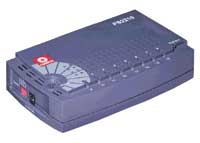
Настраиваемый коммутатор Compex PS2216 отличается небольшими размерами и многофункциональностью. На боковой стороне корпуса PS2216 расположен DIP-переключатель, что дает возможность без труда воспользоваться дополнительными возможностями коммутатора, такими как создание виртуальной ЛВС, группирование портов и установление их приоритетности, что делает его наиболее функциональным коммутатором в своей категории. Возможность создания виртуальной ЛВС предусматривает настройку 15ти отдельных более мелких сегментов на первом порте, как наиболее часто используемом для всех виртуальных ЛВС. Данная функция не только облегчает управление сетью, но и повышает степень защиты персональной информации каждой отдельно взятой виртуальной ЛВС. Функция группирования портов улучшает пропускную способность и скорость передачи информации между коммутаторами, что обеспечивает большую производительность сети. Функция определения приоритетности портов обеспечивает качество работы сети, сопоставимое со службами предоставления видео по заказу. Даная модель — высокоэффективный вариант для небольших и средних по величине офисов.
Изменения, внесенные в модель PS2216:
В модели PS2216 вместо DIP-переключателя, контроль над виртуальной ЛВС, Группирование портов, установление приоритетности портов осуществляется с помощью программного обеспечения “Winsmart Utility”. Это позволяет администраторам сети осуществлять удаленное конфигурирование и контроль за PS2216 посредством программного обеспечения, без физического контакта с DIP-переключателем.
Уровень производительности
При пропускной способности магистрали 3.2Гб/сек, средняя скорость передачи данных на каждом из 16 портов составляет 200 Мб/сек., при этом режим полной дуплексной передачи позволяет каждому узлу работать с максимальной производительностью.
Сегментирование сети
Коммутаторы S2216 позволяют сегментировать сеть на 15 отдельных виртуальных локальных сетей (ВЛВС). При этом первый порт является общим для всех ВЛВС.
Каскадирование
Функция группирования портов дает возможность подключения к магистрали более высокого уровня на следующем уровне коммутатора. Группирование портов дает возможность подключения 4 портов к другому коммутатору, что гарантирует более быструю и качественную передачу данных.
Качество обслуживания QoS (802.1p)
Функция установления приоритетности портов обеспечивает качество работы сети, сопоставимое по сетевому трафику со службами предоставления видео по заказу/работой с приложениями баз данных.
Управление
DIP-переключатель помогает быстро активировать дополнительные функции PS2216.
Операции Plug and Play
PS2216 может работать самостоятельно, не требуя дополнительного оборудования. Встроенная система автоматического согласования скорости передачи данных позволяет портам (10/100 Мб/сек) подстраивать скорость рабочих станций к адаптерам серверов Ethernet. Функция автоматического переключения Auto MDI/MDI-X используется на каждом порту, что позволяет использовать любой кабель Ethernet Категории 5.
Форм-фактор
Миниатюрность коммутатора позволяет ему легко вписаться в офис любого типа.
Информация для заказа:
| Партномер | Описание |
| PS2216 | Коммутатор 16х10/100Base-TX |
POCKET SWITCH PS2216
16-PORT COMPACT FAST ETHERNET SWITCH
product
datasheet
Copyright © 2005 Compex Systems. All rights reserved. COMPEX and the COMPEX logo, are registered trademarks of COMPEX Inc. While every effort is
made to ensure the information is accurate, Compex does not accept liability for any errors or mistakes that may arise. All specification is subject to change
without notice.
t Utility
The Compex PS2216 pocket switch is small in size but rich in features. The
WinSmart utility provided with PS2216 enables users to easily configure the
advance features of the switch such as Port-Based Virtual LAN, Port Trunking
and Port Priority making it the most feature rich switch in its category. The
Port-Based Virtual LAN feature allows setting up of 14 individual smaller
segments with the 9
th
& 16
th
port as the common port for all Virtual LANs. This
feature not only improves network management, but enhances privacy of the
individual Virtual LAN. Port Trunking improves the up-linking bandwidth and
transfer speed between switches providing better performance for your
network. Port Priority gives quality of service to your network traffic like
video-on-demand services. It is the cost effective switch for small and
medium size offices.
WinSmar
enables users to
easily configure
the advance
features of the
switch
Port Priority
feature provides
improved data
transmission
Port Trunking
feature provides
the ability to scale
up to a higher
bandwidth
Compact but yet
versatile features
makes PS2216 an
ideal solution for
any deployment
High-Performance — With its backplane capacity of 3.2Gbps, data transfer is at
an average of 200 Mbps at each of the 16 ports at full duplex mode allowing
every node to perform at their maximum capability.
Segment your Network — The PS2216 switch is able to segment network into
14 individual virtual local area networks (VLAN). The 9
th
& 16
th
port being the
common port for all the Virtual LANs.
Cascading — Port Trunking provides the ability to scale up to a higher
bandwidth with the next layer of switch. Port Trunking feature enables uplinking
of 4 ports to another switch that ensure faster and higher data bandwidth.
Quality of Service — The Port Priority feature allows quality of service for
bandwidth-intensive network traffic like video-on-demand, database
applications.
Plug and Play Operations — The PS2216 can operate out of the box with no
further configuration needed. Auto MDI/MDIX is featured in every port that
allows any type of Category 5 Ethernet cable to be used.
Switching Architecture — Full bandwidth, non-blocking and collision-free frame
forwarding enables data packets to be transfer at maximum performance
speed.
Port Priority — Giving quality of service to bandwidth-intensive network services
like video-on-demand.
Fig. 2 Port Trunking Configuration Screenshot
Fig. 1 Port VLAN Configuration Screenshot
♦
Industrial Standards
Complies with IEEE 802.3 10Base-T, IEEE 802.3u
100Base-TX and ANSI/IEEE 802.3 N-Way auto-
negotiation standards; FCC Class A; CE mark.
♦
Interface
Each unit has 16 10/100Mbps UTP ports (RJ-45).
♦
Port Speed/Mode
Auto-negotiation
Selection
♦
Link Distance
100Base-TX: can support up to 100M of ‘Category 5’
UTP cable to PC, hub or another switch.
10Base-T: can support up to 100M of ‘Category 3, 4,
and 5′ UTP cable to PC, hub or another switch.
♦
LED Indicators
LED indicators are provided for status monitoring.
These include LEDs for system power, port speed,
traffic activity and link.
♦
Dynamic memory
4M Bit
sharing In/Out buffer
♦
Forwarding Method
Store-and-Forward.
♦
Number of MAC
8K MAC Addresses
Addresses
♦
Dynamic Addresses
Yes.
Learning / Filtering
♦
Power Supply
External 3.3VDC, 3A
♦
Environment
Requirements
♦
Physical Dimensions
151 x 92x 35mm (L x W x H)
♦
Weight
About 0.26 kg
♦
Safety
UL, CSA, TUV/GS
5.
Installation of Compex PS2216
Compex PS2216 can be installed on a flat surface (desktop) or mounted on a
wall. Follow the steps below for proper installation.
Desktop installation
1. Unpack the switch.
2. Choose a location which is near to the electrical outlet. It is preferable to
place Compex PS2216 on a desktop with clear and sturdy surface.
3. Ensure that there is enough clearance around the unit to allow attachment
of network cables and power adapter.
4. Connect the power adapter to the switch. The POWER LED and the
respective PORT LED should be lighted up.
Wall installation
1. Measure the distance between the mounting holes at the bottom of the
switch and mark the wall to match the location of the mounting holes on
the switch.
2. Drill pilot holes at the two marked locations.
3. Fix two 5/16-inch diameters flat-head mounting screws into the wall,
with the heads of the screws protruded 1/8 inch out from the wall.
4. Carefully set the switch over the screws in the wall; then slide the switch
down onto the screws, pressing it slight to the wall.
5. Connect the power adapter to the switch. The POWER LED and PORT
LED for each connected port should be lighted up.
Now, Compex PS2216 is ready to operate.
6. Usage of DIP switch
Enable
Actions Taken
Enabled Trunk 1
Port 1,2,9 and 10 are set as Trunking Ports.
Enabled Trunk 2
Port 3, 4,11 and 12 are set as Trunking Ports.
Enabled Priority
Port 8 and 16 (High Priority) are set as Priority Ports.
Enabled VLAN
VLAN Port 1 will become an overlapping port in Compex
PS2216. The other ports will be separated into 15 individual
VLANs.
For example,
If VLAN DIP Switch is enabled, Port 1 will be able to link to any
of the ports from Port 2 to 16. However, the ports between 2 to 16
will not be able to communicate with each other.
Please note that the enabling of VLAN and Port Trunking cannot be set at the
same time.
Operating Temperature::
0°C to 40°C
Storage Temperature::
-5°C to 60°C
Operating Humidity:
10% RH to 90% RH
Storage Humidity::
5% to 80% RH
(non-condensing))
Descriptions
Disclaimer: Compex, Inc. provides this guide without warranty of any kind, either expressed or implied, including but not
limited to the implied warranties of merchantability and fitness for a particular purpose. Compex, Inc. may make
improvements and/or changes to the product and/or specifications of the product described in this guide, without prior notice.
Compex, Inc will not be liable for any technical inaccuracies or typographical errors found in this guide. Changes are
periodically made to the information contained herein and will be incorporated into later versions of the guide. The
information contained is subject to change without prior notice.
®
Trademark Information: Compex
, ReadyLINK
Windows and the Windows logo are the trademarks of Microsoft Corp. NetWare is the registered trademark of Novell Inc.
All other brand and product names are trademarks or registered trademarks of their respective owners.
©
Notice: Copyright
2003 by Compex, Inc. All rights reserved. Reproduction, adaptation, or translation without prior
permission of Compex, Inc. is prohibited, except as allowed under the copyright laws.
Manual Revision by Ong
Manual Number: M-0348-V1.2C
Version 1.2, March 2003
FCC NOTICE: This device has been tested and found to comply with the limits for a Class A digital device, pursuant to
Part 15 of the FCC Rules. These limits are designed to provide reasonable protection against harmful interference in a
residential installation. This device generates, uses and can radiate radio frequency energy and, if not installed and used in
accordance with the instructions, may cause harmful interference to radio communications. However, there is no guarantee
that interference will not occur in a particular installation. If this device does cause harmful interference to radio or television
reception, the user is encouraged to try to correct the interference by one or more of the following measures:
Reorient or relocate the receiving antenna.
Connect the computer into an outlet on a circuit
different from that to which the receiver is connected.
Caution: Any changes or modifications not expressly approved by the grantee of this device could void the user’s authority to
operate the equipment.
FCC Compliance Statement: This device complies with Part 15 of the FCC Rules. Operation is subject to the following two
conditions:
(1)
This device may not cause harmful interference, and
(2)
This device must accept any interference received, including interference that may cause undesired operation.
ICES 003 Statement
This Class A digital apparatus complies with Canadian ICES-003
Gost NOTE: This device (apparatus, equipment) complies with the radio interference limits established for Class A
equipment in accordance with GOST R 51318.22-99 (CISPR 22-97) and shall not be used in dwelling houses, commercial
and industrial districts with low electric power consumption and be connected to low-voltage distributions electric supply
networks.
DECLARATION OF CONFORMITY: Compex, Inc. declares that the product:
Product Name: Compex 16-Port 10/100 Mbps Fast Ethernet Desktop Switch
Model No.: Compex PS2216 conforms to the following Product Standards:
Radiated Emission Standards:
EN55022A, FCC Part 15 Class A
Conducted Emission Standards:
EN60555Pt2 conducted emission; EN55022A conducted emission, LVD 60950 standard, FCC Part 15 Class A
Immunity Standards:
IEC 801-2; IEC 801-3; IEC 801-4
Low Voltage Directive:
EN 60 950:1992+A1:1993+A2:1993+A3;1995+A4;1996+A11:1997.
Therefore, this product is in conformity with the following regional standards: FCC Class A following the provisions of
FCC Part 15 directive; CE Mark following the provisions of the EC directive.
Manufacturer’s Name: Compex, Inc.
Address: 4051 E. La Palma, Unit A,
Anaheim, CA 92807, USA
European Contact:
ReadyLINK Networktechnology GmbH,
Technical Support
Albert Einstein Straβe 34/M21,
63322 Rödermark, Germany
[Fax: +49 (60) 749-0668]
——
——Cut along the dotted line——
——Cut along the dotted line——
WARRANTY REGISTRATION CARD
You can register via Internet at:
Or E-mail: support@compex.com.sg with the following information:
To activate the warranty, please complete this card and return to Compex within ninety (90) days of
purchase date.
Product:
Purchase Date:
Name:
Company:
Address:
Postal/Zip Code:
Phone: (
)
Computer
in which this product
installed?
Network protocol
TCP/IP
(Check all that
NDIS
apply):
Network
Novell NetWare:
Operating
Microsoft Windows:
System
Linux:
Red Hat Ver:
(Check all that
Others NOS:
apply):
Applications used
Desktop Publishing
on network
CAD/CAM
processing
(Check all that
apply):
How did you
Work
Friend
learn about
Other:
Compex?
Note:
For purchases within U.S.A and Canada, please fax to Compex, Inc. at (714) 630-6521
For purchases outside U.S.A and Canada, please fax to Compex Systems Pte Ltd at (65) 6280-9947
®
®
and MicroHub
are registered trademarks of Compex, Inc. Microsoft
Increase the separation between the computer and
receiver.
Consult the dealer or an experienced radio/TV
technician for help.
th
19
March, 2003
_______________
Shi Jia Xiang
R&D Manager
——Cut along the dotted line——
[M-0088-V2.3C]
http://www.cpx.com or http://www.compex.com.sg
Revision:
Serial No:
Title:
E-mail:
Dept:
City:
State:
Country:
Extn:
Fax: (
is
Model:
Serial No:
IPX/ODI
XNS
OST
DLC
SNA
NBP
Other:
3.X
4.X
5.X
SCO Unix:
NT4.0
95
98
Win 2000
SUSe Ver:
Others:
Word Processing
Accounting
Spreadsheet
Database Management
Other:
Internet
Dealer
Magazine
—-
)
DECnet
Openserver Ver:
Ver:
.
Ver:
.
Exhibition
Configurando Switch Compex PS2216
configurando switch compex ps2216
Электромиостимулятор Compex для восстановления спортсменов
Похожие:
Наш проект живет и развивается для тех, кто ищет ответы на свои вопросы и стремится не потеряться в бушующем море зачастую бесполезной информации. На этой странице мы рассказали (а точнее — показали  вам Compex ps2216 как настроить. Кроме этого, мы нашли и добавили для вас тысячи других видеороликов, способных ответить, кажется, на любой ваш вопрос. Однако, если на сайте все же не оказалось интересующей информации — напишите нам, мы подготовим ее для вас и добавим на наш сайт!
Если вам не сложно — оставьте, пожалуйста, свой отзыв, насколько полной и полезной была размещенная на нашем сайте информация о том, Compex ps2216 как настроить.
POCKET SWITCH PS2216
16-PORT COMPACT FAST ETHERNET SWITCH
product
datasheet
Copyright © 2005 Compex Systems. All rights reserved. COMPEX and the COMPEX logo, are registered trademarks of COMPEX Inc. While every effort is
made to ensure the information is accurate, Compex does not accept liability for any errors or mistakes that may arise. All specification is subject to change
without notice.
t Utility
The Compex PS2216 pocket switch is small in size but rich in features. The
WinSmart utility provided with PS2216 enables users to easily configure the
advance features of the switch such as Port-Based Virtual LAN, Port Trunking
and Port Priority making it the most feature rich switch in its category. The
Port-Based Virtual LAN feature allows setting up of 14 individual smaller
segments with the 9
th
& 16
th
port as the common port for all Virtual LANs. This
feature not only improves network management, but enhances privacy of the
individual Virtual LAN. Port Trunking improves the up-linking bandwidth and
transfer speed between switches providing better performance for your
network. Port Priority gives quality of service to your network traffic like
video-on-demand services. It is the cost effective switch for small and
medium size offices.
WinSmar
enables users to
easily configure
the advance
features of the
switch
Port Priority
feature provides
improved data
transmission
Port Trunking
feature provides
the ability to scale
up to a higher
bandwidth
Compact but yet
versatile features
makes PS2216 an
ideal solution for
any deployment
High-Performance — With its backplane capacity of 3.2Gbps, data transfer is at
an average of 200 Mbps at each of the 16 ports at full duplex mode allowing
every node to perform at their maximum capability.
Segment your Network — The PS2216 switch is able to segment network into
14 individual virtual local area networks (VLAN). The 9
th
& 16
th
port being the
common port for all the Virtual LANs.
Cascading — Port Trunking provides the ability to scale up to a higher
bandwidth with the next layer of switch. Port Trunking feature enables uplinking
of 4 ports to another switch that ensure faster and higher data bandwidth.
Quality of Service — The Port Priority feature allows quality of service for
bandwidth-intensive network traffic like video-on-demand, database
applications.
Plug and Play Operations — The PS2216 can operate out of the box with no
further configuration needed. Auto MDI/MDIX is featured in every port that
allows any type of Category 5 Ethernet cable to be used.
Switching Architecture — Full bandwidth, non-blocking and collision-free frame
forwarding enables data packets to be transfer at maximum performance
speed.
Port Priority — Giving quality of service to bandwidth-intensive network services
like video-on-demand.
Fig. 2 Port Trunking Configuration Screenshot
Fig. 1 Port VLAN Configuration Screenshot
свич дельный.
интерестно есть подобный, но гигабитный, также поддерживающий VLAN. Или хотябы 1 гигабит…
Слава богу, вроде нету..
А почему такая реакция? Реализаци VLAN, насколько-бы ущербной она не была — вещ полезная, если народу нужно показывать один сервер, и никих внутренних связей.
У меня порядка 100 таких комутаторов стоит. Работают нормально, не виснут, после отключения электричества нормально стартуют. Все без бесперебойников.
Последние пошли с неисправными блоками питания, иногда новый свич не работает, питалово горит быстро, виснут. Но имхо, за 40$ — вполне нормальный свич. Только питалово поменять.
Но гигабит уже нужен, причем с таким же VLANным функционалом, и за такие же деньги. Пока не нахожу.
Compex PS2216 – это профессиональный сетевой коммутатор с шестнадцатью портами, который предлагает дополнительные возможности для настройки и управления сетевым трафиком. Если вы хотите настроить этот коммутатор для оптимальной работы с вашей сетью, то вам потребуется полное руководство по его настройке.
В этой статье мы расскажем вам, как правильно настроить Compex PS2216 с помощью различных параметров и функций. Мы покроем такие важные аспекты, как настройка VLAN, управление портами, настройка скорости передачи данных и дополнительные функции коммутатора.
Мы рекомендуем вам следовать этому руководству все шаги по порядку, чтобы избежать проблем и достичь наилучших результатов настройки Compex PS2216.
Сегодня многие сети все больше полагаются на сетевые коммутаторы для обеспечения эффективного и стабильного сетевого соединения. Настраивая Compex PS2216 по нашим рекомендациям, вы сможете максимально оптимизировать свою сеть и обеспечить ее безопасность и стабильность.
Содержание
- Основные этапы настройки
- Настройка IP-адреса коммутатора
- Настройка VLAN на коммутаторе
Основные этапы настройки
Настройка сетевого коммутатора Compex PS2216 включает несколько основных этапов, которые необходимо выполнить для корректной работы устройства.
- Подключение к компьютеру
- Назначение IP-адреса
- Настройка VLAN
- Установка параметров портов
- Настройка безопасности
- Настройка других параметров
Перед началом настройки необходимо подключить сетевой коммутатор к компьютеру с помощью Ethernet-кабеля.
Далее следует назначить IP-адрес сетевому коммутатору. Для этого необходимо открыть командную строку и выполнить команду telnet 192.168.0.1. В открывшемся окне необходимо ввести логин и пароль, чтобы войти в интерфейс управления коммутатором.
После входа в интерфейс управления следует настроить VLAN – виртуальные локальные сети. VLAN позволяют разделить сеть на несколько отдельных сегментов, что повышает безопасность и эффективность работы. Для этого необходимо указать номер VLAN, назначить порты, входящие в эту VLAN, и настроить параметры сети (IP-адрес, маску подсети) для каждого VLAN.
Затем следует установить параметры портов сетевого коммутатора, такие как режим работы (access или trunk), скорость, дуплекс, автоопределение скорости и дуплекса.
Также необходимо настроить безопасность, установив различные типы аутентификации (например, Port security) и настройки безопасного доступа (например, SSH).
Наконец, можно настроить другие параметры сетевого коммутатора, такие как QoS (Quality of Service), Spanning Tree Protocol (STP), управление широковещательным штормом и т.д.
После завершения всех этапов настройки необходимо сохранить изменения и перезагрузить сетевой коммутатор для применения настроек.
Настройка IP-адреса коммутатора
Для начала работы с коммутатором Compex PS2216 необходимо настроить IP-адрес устройства. Это позволит вам получить доступ к коммутатору через локальную сеть.
Для настройки IP-адреса коммутатора используйте следующие шаги:
- Подключитесь к коммутатору с помощью консольного кабеля. Откройте программу для работы с командной строкой (как, например, HyperTerminal или Putty) и выберите соответствующий порт, на котором подключен коммутатор.
- Введите логин и пароль для входа в коммутатор. По умолчанию логин — admin, пароль — admin. Если вы не изменили эти данные, введите указанные значения.
- По умолчанию, коммутатор настроен на использование DHCP для автоматического получения IP-адреса. Однако, если у вас нет DHCP-сервера, или вы хотите настроить статический IP-адрес, выполните следующие команды:
- Введите команду «ipconfig» для просмотра текущих настроек сетевого подключения коммутатора.
- Введите команду «set ipaddr» и укажите новый IP-адрес коммутатора.
- Введите команду «set subnetmask» и укажите маску подсети для нового IP-адреса.
- Введите команду «set gateway» и укажите IP-адрес шлюза по умолчанию.
- Введите команду «save» для сохранения настроек.
- После внесения изменений в настройки IP-адреса коммутатора, выполните команду «reboot» для перезагрузки устройства с новыми настройками.
После перезагрузки коммутатор будет готов к использованию с новым IP-адресом. Убедитесь, что ваш компьютер находится в той же сети, что и коммутатор, и попробуйте подключиться к устройству, используя новый IP-адрес.
Настройка VLAN на коммутаторе
Для настройки VLAN на коммутаторе Compex PS2216 необходимо выполнить следующие шаги:
- Подключите компьютер к коммутатору с помощью Ethernet-кабеля.
- Откройте веб-браузер и введите IP-адрес коммутатора в строку адреса.
- Войдите в интерфейс коммутатора, используя учетные данные администратора.
- Выберите вкладку «VLAN» в меню настроек коммутатора.
- Нажмите кнопку «Создать VLAN» и введите номер и название VLAN.
- Настройте параметры VLAN, такие как DHCP, IP-адрес и маску подсети.
- Добавьте порты коммутатора к созданной VLAN.
- Настройте параметры безопасности VLAN, например, VLAN Membership Policy и VLAN Tagging.
- Нажмите кнопку «Применить» для сохранения настроек VLAN.
После выполнения этих шагов коммутатор будет настроен для использования VLAN. Вы можете создать несколько VLAN для разных сегментов сети и настроить необходимые параметры для каждой VLAN в соответствии с требованиями вашей сети.
Важно помнить, что после настройки VLAN вам также может потребоваться настроить транки (trunks) между коммутаторами для передачи трафика между VLAN.