
Содержание:
- Базовые настройки
- Параметры фотографирования
- Настройки кодирования изображений
- Параметры видоискателя
- Инструменты камеры
- Баланс черного и белого
- Режим фокусировки
- Достоинства
- Недостатки
- Скачать Camera FV-5 бесплатно
- Вопросы и ответы: 1
В магазине Google Play Market присутствует большое количество полезных приложений для мобильных устройств. Среди них находятся специальные программы-камеры, предлагающие пользователям множество различных инструментов и функций. Camera FV-5 является одним из таких приложений, о нем и пойдет речь в нашей статье.
Базовые настройки
Перед фотографированием следует заглянуть в меню с настройками, дабы выбрать наиболее подходящую конфигурацию программы. В разделе «Базовые настройки» пользователям предлагают редактировать разрешение изображений, выбрать место сохранения выполненных фотографий или создать папку вручную.
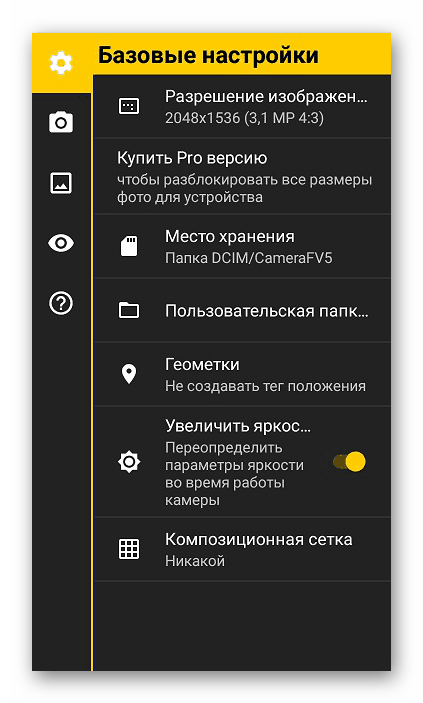
Обратите внимание на геометки. Активируйте данный параметр, когда необходимо к каждой фотографии прикреплять ваше текущее положение. Использоваться для этого будет встроенный в устройство GPS. Кроме всего прочего, в окне с базовыми настройками вы можете редактировать композиционную сетку и включить параметр увеличения яркости дисплея при использовании Camera FV-5.
Параметры фотографирования
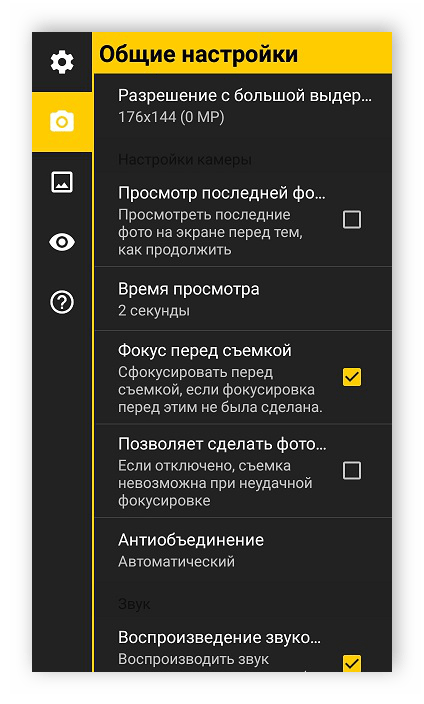
Далее рекомендуем переключиться к разделу «Общие настройки». Здесь задается конфигурация режиму съемки. Например, устанавливается время просмотра фотографии после выполнения снимка или выставляется громкость звуков камеры. Отдельно хочется рассмотреть параметр «Функция клавиш громкости». Данная настройка позволяет выбрать одну из множества присутствующих в программе функций и назначить ее на клавиши громкости. В случае подключения монопода похожее редактирование осуществляется и с этим устройством.
Настройки кодирования изображений
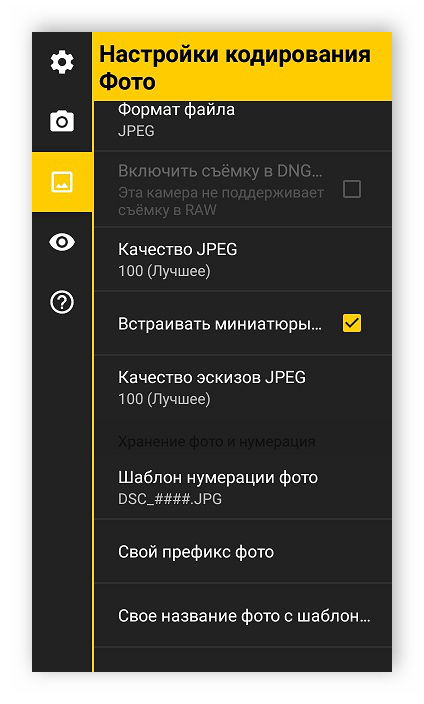
Camera FV-5 предоставляет пользователям возможность самостоятельно выбрать оптимальный формат сохранения готовых фотографий, настроить их качество, префиксы и названия. К сожалению, приложение позволяет выбрать только формат JPEG или PNG. Все эти настройки осуществляются в меню «Настройки кодирования Фото».
Параметры видоискателя
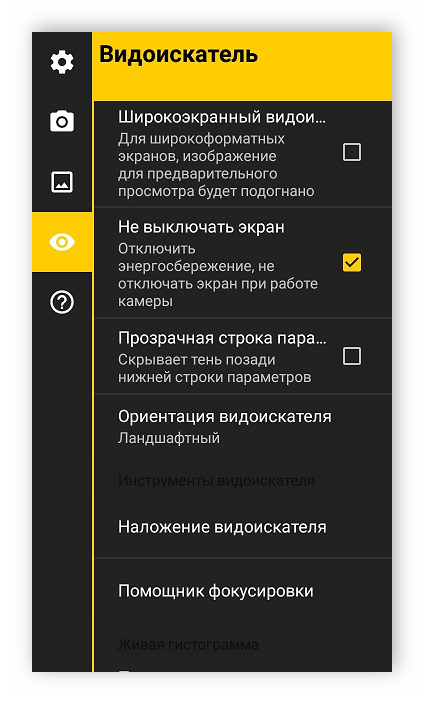
Видоискателем в подобных приложениях-камерах называют элемент, который является вспомогательным и служит для наблюдения за объектами. В Camera FV-5 поверх видоискателя наложено множество разных надписей и функций приложения, что иногда может мешать комфортно работать в программе. Подробные настройки видоискателя вы найдете в соответствующем разделе данного меню.
Инструменты камеры
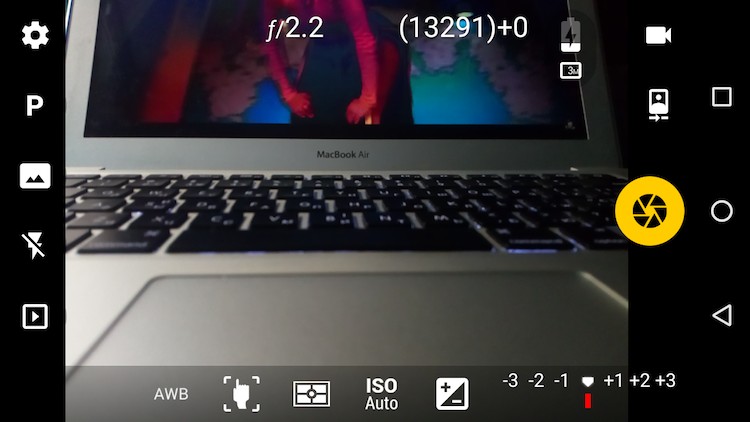
Находясь в режиме фотографирования, в окне приложения вы видите множество различных вспомогательных инструментов и настроек. Обратите внимание на верхнюю панель. На ней находится несколько кнопок, позволяющих выполнить настройку экспозиции, изменить режим создания снимка, включить вспышку или перейти в галерею.
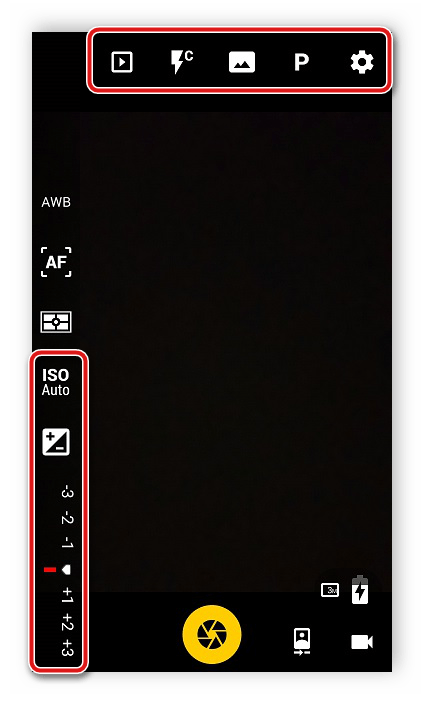
На панели сбоку выбираются различные режимы и фильтры, о которых мы подробнее поговорим далее. Сейчас обратите внимание на несколько параметров ниже. Здесь вам доступно изменение масштаба, конфигурация компенсации экспозиции и чувствительности сенсора.
Баланс черного и белого
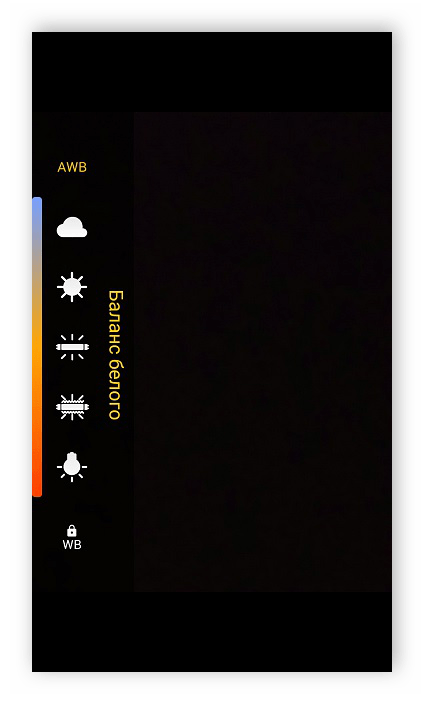
Практически в каждом приложении-камере присутствует настройка автоматического баланса черного и белого. Пользователю достаточно указать освещенность местности, где проводится фотографирование, или выставить баланс вручную, перемещая ползунок. Camera FV-5 позволяет вовсе отключить данную функцию.
Режим фокусировки
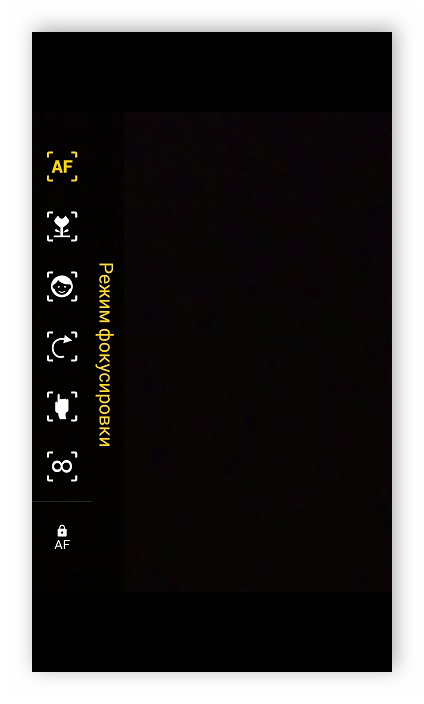
Программа может выполнять автоматическую фокусировку камеры в зависимости от тех параметров, которые вы указали в соответствующем меню. Во вкладке настроек позволяется выбрать объектный режим, портретный, ручной или вовсе отключить фокусировку. При отключенной фокусировке ее придется выполнять полностью вручную.
Достоинства
- Camera FV-5 распространяется бесплатно;
- Русифицированный интерфейс;
- Возможность настроить кодирование изображений;
- Детальные настройки фотографирования.
Недостатки
- Отсутствие встроенных визуальных эффектов;
- Некоторые настройки открываются только после покупки PRO-версии.
Для операционной системы Android присутствует большое количество приложений-камер, каждая из которых обладает уникальными инструментами и функциями. Выше мы подробно рассмотрели одну из таких программ — Camera FV-5. Надеемся, что наш обзор помог вам узнать все о данном приложении.
Загрузить последнюю версию приложения из Google Play Маркета
Поделиться статьей:
Помогла ли Вам статья?
-
8/10/2019 Camera FV5 Manual
1/5
Camera manual
Camera FV-5 is designed to resemble as close as possible a
traditional SLR camera,therefore all relevant photographic
parameters have dedicated on-screen buttons, as SLRwould do with hardware buttons. ou will be able to start using
Camera FV-5 without an!instruction if !ou have used a traditional
SLR camera before. «n!wa!, this documentserves as a reference guide for the camera usage.
Camera viewfinder
#he main interaction with the camera ta$es place through the
viewfinder. » part fromframing the picture, all the controls and
displa!s are laid out around the viewfinder.%n the top part&
F2.0 Aperture.#his serves as a reference onl!, since the
aperture in «ndroid mobiledevices is fi’ed and thus cannot be ad(usted.
1/33 Exposure time.#his shows the e’posure time being used,
displa!ed as afraction of a second, or in decimal format for longer
e’posures.ISO 100 ISO value sensitivit!».#his shows the selected )S%
value, or the automaticall!chosen value, in case )S% «uto is selected.
#302$% &emainin’ s(ots in memor! )ard.#his value is an
apro’imate value of theremaining shots calculated based on the selected storage medium,
the selectedresolution and picture format *+ or /0. )n some devices the
value is moreaccurate than others, since + compression hardware in
different devicesperform different and give smaller file si1es given the same
2ualit! level.*0
+(otos in ,uffer.hotos are processed and developed in the
bac$ground as !oucontinue with camera operation and picture ta$ing. 3hen ta$ing a
photo, it isstored in the buffer, and them are processed one-b!-one
in the bac$ground. )fenough R»4 is available, raw photos are stored in memor! to be
processed.3hen no more memor! is available, internal memor! is used to
store pendingpictures. #herefore, the amount of pictures in the buffer
depends on internalmemor! si1e. R»4 memor! t!picall! stores around or 6 photos,
whereasinternal memor! can hold hundreds. Camera FV-5 $eep
processing photos evenif !ou close the camera application, and !ou should see buffer
status ne’t time!ou open the application, in case that there were
still pending photos in thebuffer.
-atter! indi)ator.Shows in a 5 segment batter! indicator the
appro’imateremaining batter! charge available. -
8/10/2019 Camera FV5 Manual
2/5
o)ation fix indi)ator.)f the location tagging is enabled in
Settings, when alocation is available, this indicator is shown. %nl! if the
indicator is displa!ed,location information will be written to
photo metadata.-urst indi)ator.7ispla!ed when burst mode is activated. )f burst
mode isactive, tapping-and-holding the capture button or holding down
the camerahardware button will result in a continuous stream of
photographs beingcaptured and 2ueued in the buffer.AF Autofo)us lo) indi)ator.7ispla!ed when the focus loc$ is
active. #o releasethe loc$, tap on on focus toolbar.
AE Auto exposure lo) indi)ator.7ispla!ed when the auto e’posure
loc$ is active.#o release the loc$, tap on on light metering modes toolbar.
A- Auto w(ite ,alan)e lo) indi)ator.7ispla!ed when the auto
white balance loc$is active. #o release the loc$, tap on on white balance
toolbar.%n the right side&
uit.’it camera application.
Capture.#hat is the virtual shutter button. )f 8focus before
capturing8 inpreferences is enabled and focus is not ac2uired, the
«F s!stem will be triggered,and the picture will be ta$en. )f focus is ac2uired when
capturing, the photo is ta$enimmediatel!. )f 8allow ta$ing a photo without focus8 in
preferences is disabled andfocus is not ac2uired, if «F fails during focusing phase, the
photo will not be ta$en.«F is triggered b! tapping on the viewfinder, depending on
selected focus mode*see later0.
%n the bottom side&
(ite ,alan)e.ou can compensate white biasing because of
different illuminanttemperatures. «s of now, !ou can choose from different presets
*ordered fromwarmer to colder temperatures0&Cloud!
Sunn!
Fluorescent light
3arm fluorescent light
-
8/10/2019 Camera FV5 Manual
3/5
)ncandescent light
/ote that preset white balance settings depends on device
manufacturer support.%n «ndroid 9: devices !ou can loc$ the automatic white balance
algorithm.Auto w(ite ,alan)e lo).)f the white balance is set to auto, when
thetoggle is active, the automatic white balance algorithm will
stop running,$eeping the last calculated scene temperature. #ap again the
toggle to unloc$it and recalculate the scene color temperature.Fo)us mode.ou can choose from one of the following focus modes,
plus a focusloc$ switch.Autofo)us.Focus an!where on the picture. Focus priorit! depends
oncamera ma$er. #ap an!where on the viewfinder to trigger «F.a)ro.ives «F s!stem a hint to prioriti1e closer ob(ects. %n
somedevices, effectivel! lowers the allowed minimum focusing
distance.4ou)( fo)us.ives «F s!stem a hint to focus on the selected
ob(ect. #apan!where on the viewfinder to select the focus point and trigger
«F. #ouchfocus, under «ndroid .’, is onl! available on some 4otorola, ;#C
and/vidia camera drivers, plus some Samsung drivers. «ndroid
9.? -
8/10/2019 Camera FV5 Manual
4/5
>B stop is t!pical. )f e’posure brac$eting *RD0 is enabled,
the e’posurecompensation will compensate the brac$eting e’posures, and the
brac$etingnumber of pictures and step will limit the V range.%n the left side&
+referen)es.Show preferences dialog. See the summar! of camera
settings.+ro’ram mode.Switch between&
+ro’ram.’posure time is automaticall! set *aperture is
fi’ed0.Speed priorit!.’posure time is manuall! or semi-manuall!
set.S(ootin’ menu.;ere !ou can find&
Exposure ,ra)etin’.%pens the e’posure brac$eting dialog.
#he first displa! controls the number of frames to ta$e *from 6
to E0. 8>F8means disabling e’posure brac$eting. #he second displa! controls
the Vstep between frames. #he V step is limited b! the e’posure
compensationrange of !our device. «n V step of 8
-
8/10/2019 Camera FV5 Manual
5/5
grouping brac$eted e’posures ta$en during a intervalometer
session.)f the time interval between shots is shorter than the time
needed to createthe shot*s0, one or more picture slots will be omitted,
effectivel! loweringthe number of pictures finall! ta$en. #a$e care to properl!
measureBcalculatethe time needed to create the shot*s0, speciall!
when e’posure brac$eting isactivated.
Settings desired for the picture series, speciall! picture
focus, must be setprior starting the intervalometer. 3hen the intervalometer
starts, the «F isnot triggered. ;owever, !ou can still tap on the
viewfinder to manuall!trigger the «F s!stem while the intervalometer is running.
Focusmisad(ustments can affect the subse2uent pictures. #o avoid
accidental focuschanges during intervalometer operation, activate
the focus loc$ *»F-L0.Self timer.#a$e picture after a predefined dela! when tapping on
thecapture button. =seful for self portraits or to help camera
stabili1e on nightshots.Ima’e sta,ili5ation.»ctivates or deactivates the image
stabili1ation. %nmost devices, this is digital image stabili1ation. )f image
stabili1ation is notsupported on the device this button might not be present.
-urst mode.»ctivates or deactivates the burst mode. 3hen the
burst modeis active, tapping and holding the virtual shutter button or the
shutter $e! *ifthe device has one0 will result in a continuous flow of photos
being ta$en, aslong as the virtual shutter button or the shutter $e! are not
released.Flas( mode.Lets !ou choose the flash mode&
«utomatic.
«lwa!s on.
«lwa!s on, slow s!nc.
«lwa!s off.
)f the device lac$s a flash unit, the flash mode button will be
hidden.+la!.Shows the last ta$en picture on the predefined picture
viewer application. )fmore than one application is available, a dialog will be shown
in order to choosewhich application to use. ou can set one
application as the default in order to s$ipthe application chooser dialog in the future.
Когда я только услышал о данном приложении от своего знакомого, то не поверил. Он мне с уверенностью в лице рассказывал о том, что данная программу превращает обычный смартфон в настоящий зеркальный фотоаппарат. Естественно я в это вообще не поверил, так как никакая программа не может улучшить качество снимков, это просто невозможно. Однако, когда я сам попробовал Camera FV-5, то мнение пришлом изменить. Конечно, это лишь программная надстройка и никак на качество фотографии софт повлиять не может, но при помощи более гибких настроек вы можете действительно достичь более высокого уровня фотографии. Если у вас постоянно есть желание что-то снимать вокруг себя и делать это хочется более качественно и профессионально, то присмотритесь к данному софту — это очень круто. Сегодня я расскажу обо всех преимуществах и недостатках данного решения, чтобы вы понимали нужна вам программа или нет.
Настройки
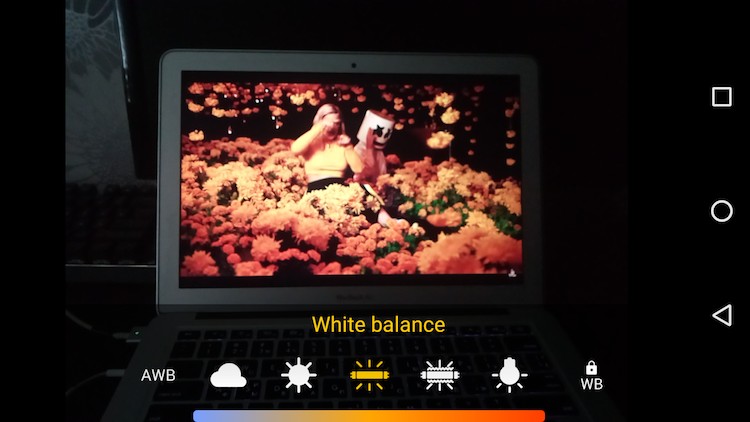
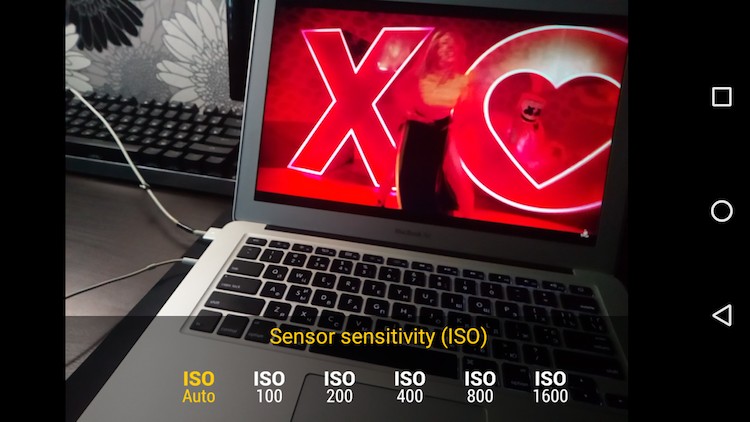
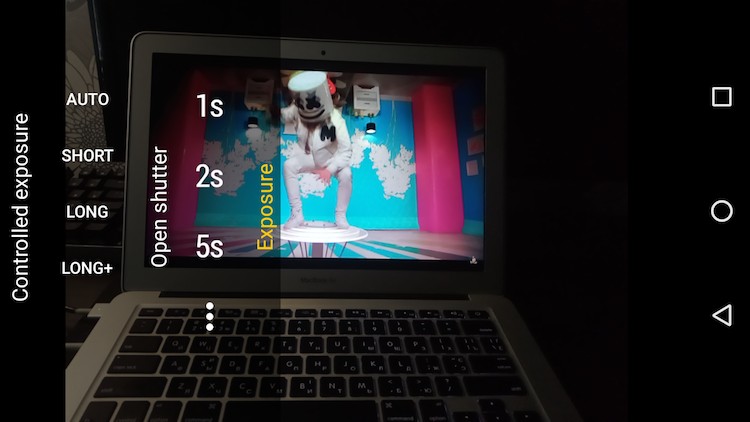
Начнем с того, что здесь можно настроить баланс белого. Это фишка исключительно полноразмерных фотоаппаратов, тогда как на смартфонах данная функция если и реализована, то только на очень дорогих моделях. Здесь же вы можете самостоятельно выбрить WB, чтобы получить более натуральную картинку. Советую использовать Авто-режим, если вы не сильно понимаете как это работает. Второй момент — можно выбрать ISO. Это позволит сделать картинку более светлой, но на более высоких значениях можно заметить шумы, что не всегда хорошо. Тем не менее, если вы снимаете в помещении или вечером и света не хватает, то неплохо было бы поднять ISO и получить более сочню картинку. Здесь даже есть возможность настройки экспозиции, хотя я слабо верю, что это реализовано правильным образом. Все же, у вас в руках смартфон, а не камера профессиональная, и такие измерения могут быть ошибочными.
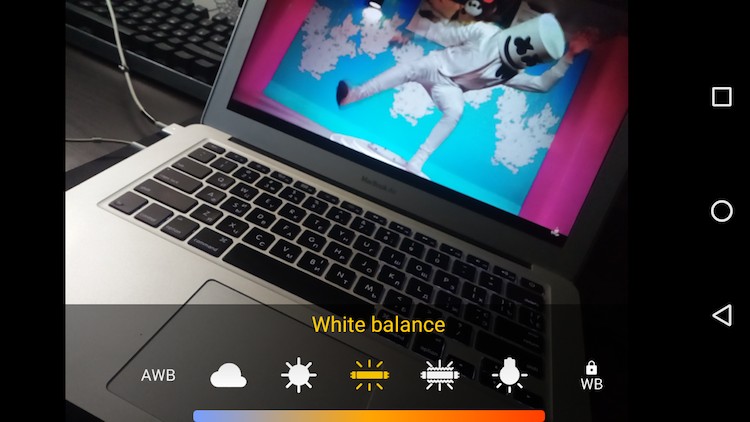
Помимо этого, у нас есть возможность выбора фокусировки. Для съемки на улице, где у вас постоянно много объектов в кадре, я советую взять автоматическую фокусировку и снимать так. Для предметной съемки или каких-то арт-решений лучше выбрать фокусировку по нажатию, тогда вы получите более точные снимки и сможете показать именно тот объект, который необходимо. Настроек здесь много, я рассказал лишь о самых основных, но если посмотреть все и потренироваться, то работать с кадром будет интереснее. Очень круто, что разработчик все так реализовал.
Настройки
Мне очень понравилось окно настроек, так как там есть масса элементов, делающих мою жизнь проще и легче. Например, если вам не обязательно снимать в полном разрешении, можно выбрать что-то более простое. Если вам нужно отснять пару сотен фотографий, а память ограничена, то лучше именно так и сделать. Помимо этого, есть масса более детальных настроек для тех, кто хочет знать геолокацию и время съемки, кто хочет изменить папку, куда снимки отправляются. Ничего лишнего, но вот нужные функции здесь имеются и это очень даже круто. Особенно если вы хотите все сделать удобно под себя любимого.
Итог
У камеры имеется Pro-версия, в которой можно еще работать с кривой цвета и менять уровень яркости отдельных оттенков на фотографии. Это уже слишком сложная штука, особенно если вы снимаете на смартфоне. Нужно понимать, что столь тонкие изменения в фотографии требуют детального просмотра и изучения снимка, чтобы вы не переборщили и не сделали фото пластилиновым. Стандартной версии хватает за глаза для того, что просто хочет снимать лучше, чем он делал это ранее. Проблема лишь в том, что если ваш смартфон изначально снимает не очень хорошо, то на шедевр рассчитывать не стоит.
Having applications that provide the necessary help to get the most out of the skills is very essential when progressing. If you are a person who likes photography a lot and everything related to this Camera FV-5 will be the complementary application for you.
What is Camera FV-5?
Camera FV-5 is an application for Android devices that allows you to have a camera with advanced settings that allows you to capture great images and videos. As well as you can download and install the iPhone camera on Android
It was developed by Flavio González Vázquez as an easy-to-open door for the most professional handling of the camera. Turning out to be a wonderful option for those who are now beginners, but hope to become experts with a little help.
This can be used both on mobile devices and on tablets and cameras that can be managed through an Android, it should be noted that you can configure a quick access to start the camera on Android
The service provided by this application contains a series of controls that you would normally see in so-called advanced compact cameras or reflex cameras (DSLR).
So it would be unlikely to find these controls offered by Camera FV-5 in the Android firmware in the case of applications belonging to the devices or third parties.
With this application you will be able to exploit each of the resources that your camera can provide and control a large number of modules.
This no matter what type of device you have (mobiles, tablets and cameras), since it is capable of handling more than 2000 models with wide compatibility. Thanks to this, the application is easier to detect in advance.
You will in turn see how and what is the most appropriate way to perform the entire procedure. Part of this includes not compressing the captured images or videos so that it maintains the quality and can be processed later.
The objective of Camera FV-5 is to give your photographs a more professional view, that is, each photograph will have the appropriate conditions.
You can download Camera FV-5 to your device from the official Android application store that is very well known as Google Play .
Why use Camera FV-5 to record instead of the device’s camera?
There are more than one reason why it will be a better option for you to use this application than the one that comes by default on your Android. This time we will only give an explanation of three of them in relation to focus, exposure or aperture and white balance. You can also learn to take good photos at night with your Android mobile
Focus
Fixing the focus of the video can be somewhat tedious from the original application of your devices, since an involuntary blur occurs when there is a sudden movement in the plane.
Exposure or diaphragm
Surely you have noticed that while recording there has been a sudden change in light that can cause a lot of fuss, why?
The final video would result in an image that fluctuates between a dark or very bright environment without maintaining the balance that is generally sought.
White balance
An area with good lighting can be an excellent setting for recording, but mixing more than one light can result in an image with altered colors (bluish or yellowish).
All this can be avoided with the advanced configurations offered by Camera FV-5, you just have to access the settings within the application and make the modifications to these parameters.
To solve the problem with exposure and white balance you must go to the “Video” section. There you will find the option “Video image configuration” and within it you will see the options that will allow you to block the desired parameters.
On the other hand, if you talk about audio monitoring, you just have to go to the “Audio” section. In the latter you will find everything you could want to know about it, such as its source or what the bit rate is.
The application allows customizations such as naming files, specifying destination folders and indicating which device buttons will serve as shortcuts for certain parameters.
You have more freedom in resolution than Android offers , and in terms of viewing, having a variety of grids will make it easier to frame.
24 февраля 2018, суббота
15:00
Camera FV-5

Знакомство
Если вы в душе фотограф и стандартное мобильное приложение для съемки фотографий не позволяет полноценно раскрыть ситуацию, тогда Camera FV-5 для android-устройств к вашим услугам.
Особенности приложения Camera FV-5:
- Все фотографические параметры настраиваются и всегда под рукой: компенсация экспозиции, ISO, режим замера экспозиции, режим фокусировки, баланса белого и режима программирования.
- DSLR-стиль видоискателя, то есть отображение выдержки, диафрагмы, EV, брекетинга и настройки.
- Полноценный брекетинг экспозиции: от 3 до 7 кадров, неограниченное расстояние остановки, а также пользовательские EV настройки.
- Встроенный интервалометр позволяет сделать потрясающие снимки Time-lapse.
- Программы и скорость приоритетных режимов.
- Длинные поддержки экспозиции сделают красивые фотографии с длительным временем экспозиции (до 60 секунд).
- Поддержка JPEG, а также RAW (PNG) графических форматов без потери качества, идеально подходят для последующей обработки.
- Поддержка EXIF и XMP метаданных.
- Таймер для задержки съемки.
- Автофокус, макросъемка, сенсорный фокус и бесконечный режим фокусировки, а также переключатель блокировки фокуса (AF-L).
- В фоновом режиме и во время обработки приложение позволяет гладко, бесперебойно работать камере.
Начало работы


При запуске Camera FV-5 вас будет ждать чуть ли не инструкция по правильной эксплуатации приложения. Здесь все уже достаточно серьезно.

А вот попав в меню, вы просто-напросто потеряетесь в различных иконках, пиктограммах и значениях. Если вы не фотограф и не имели дел с более-менее серьезными камерами, то разобраться в приложении и всевозможных данных будет непросто. Приложение имеет русский язык, каждый пункт имеет подробное описание, поэтому еще не все потеряно, так сказать.

По умолчанию программа работает исключительно в альбомной ориентации, как бы намекая нам, как именно нужно снимать. Впоследствии оказалось, что в настройках можно все это настроить, об этом позже.
Все органы управления, реализованные в Camera FV-5, разнесены по всем сторонам: слева размещены разнообразные настройки параметров приложения и режимов его работы, снизу – параметры фотосъемки и прочие нюансы, а справа – клавиша съемки фото, переключения камеры и перехода к записи видео.
Сразу упомяну, Camera FV-5 делает только фото, для видео необходимо установить из Google Play приложение Cinema FV-5, но это уже другая история.
рекомендации
Gigabyte 4060 Ti всего на 2тр дороже чем 3060 Ti
Ищем PHP-программиста для апгрейда конфы
Цена RTX 4060 равна цене 3060 в Регарде