
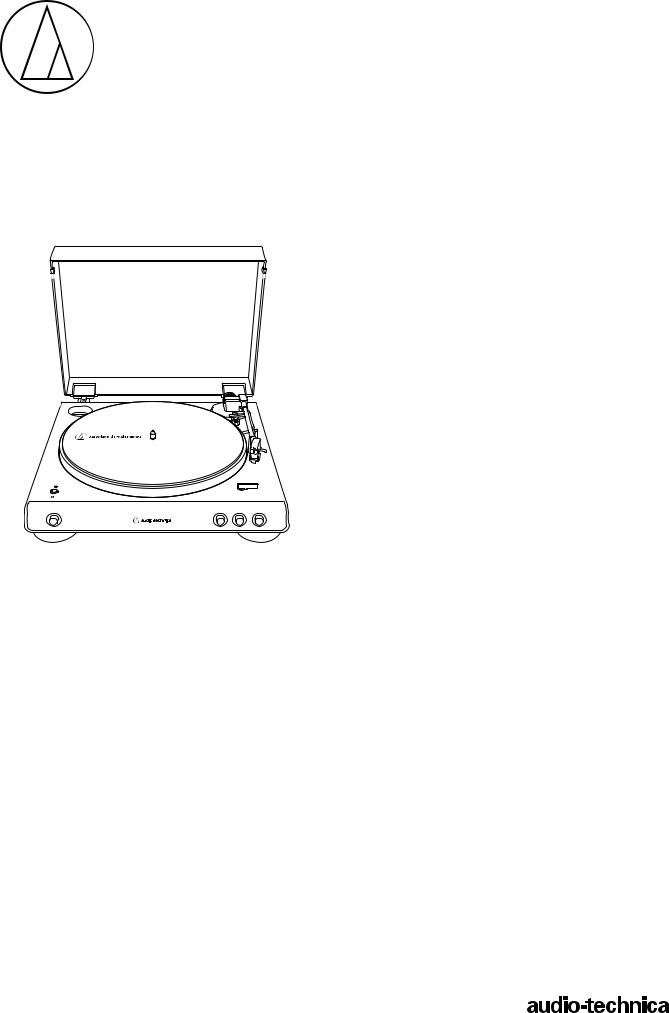
AT-LP60XBT
User Manual
Automatic Wireless Turntable
AT-LP60XBT
Introduction
Thank you for purchasing this Audio-Technica product.
Read through this user manual before using the product to ensure its correct use. Also, keep this manual for future reference.
This product can be used only in the countries where the product is sold. Make sure that the operating voltage and the plug of AC adapter of the product are correct for the country you live in.
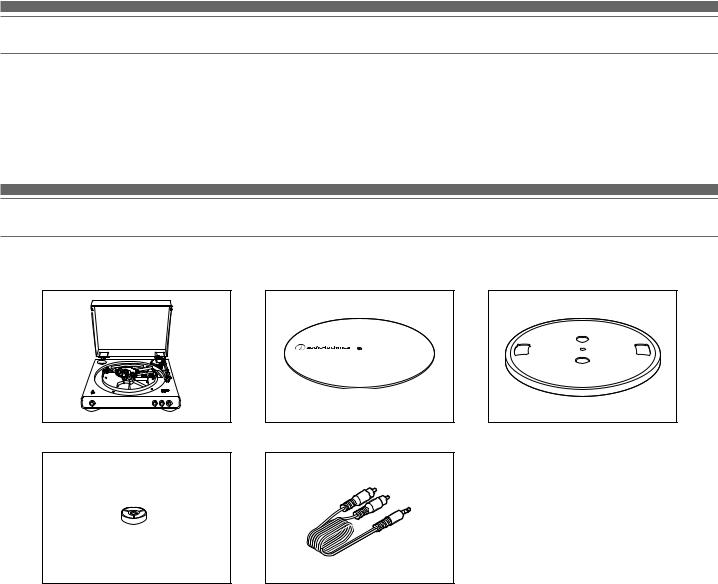
Package contents
Make sure that you have all the included items listed below before using this product.
If some items are missing or damaged, contact your local Audio-Technica dealer.
|
•• Turntable body |
•• Felt mat |
•• Platter (with drive belt) |
• AC adapter (approx. 1.5 m (4.9′))
• Quick start guide
• Caution guide
|
•• 45 RPM adapter |
•• RCA audio cable |
||
|
(approx. 1.2 m (3.9′)) |
After purchase, we suggest that you save all packaging materials for possible future storage, moving, or shipping.
1

Safety precautions
Although this product was designed to be used safely, failing to use it correctly may result in an accident. To ensure safety, observe all warnings and cautions while using the product.
Important information
Warning:
To prevent fire or shock hazard, do not expose this apparatus to rain or moisture.
Caution:
••Do not expose this apparatus to drips or splashes.
••To avoid electric shock, do not open the cabinet.
••Refer servicing to qualified personnel only.
••Do not expose this apparatus to excessive heat such as sunshine, fire or the like.
••Do not subject this apparatus to strong impact.
••This apparatus should be located close enough to the AC outlet so that you can easily grasp the AC adapter at any time.
••In case of emergency, disconnect the AC adapter quickly.
••Do not place any objects filled with liquids, such as vases, on this apparatus.
••To prevent fire, do not place any naked flame sources (such as lighted candles) on this apparatus.
••Do not install this apparatus in a confined space such as a bookcase or similar unit.
••Install this apparatus only in the place where ventilation is good.
For customers in the USA
FCC Notice
Warning:
This device complies with Part 15 of the FCC Rules. Operation is subject to the following two conditions: (1) This device may not cause harmful interference, and (2) this device must accept any interference received, including interference that may cause undesired operation.
Caution:
You are cautioned that any changes or modifications not expressly approved in this manual could void your authority to operate this equipment.
Note: This equipment has been tested and found to comply with the limits for a Class B digital device, pursuant to part 15 of the FCC Rules. These limits are designed to provide
reasonable protection against harmful interference in a residential installation. This equipment generates, uses and can radiate radio frequency energy and, if not installed and used in accordance with the instructions, may cause harmful interference to radio communications. However, there is no guarantee that interference will not occur in a particular installation. If this equipment does cause harmful interference to radio or television reception, which can be determined by turning the equipment off and on, the user is encouraged to try to correct the interference by one or more of the following measures:
––Reorient or relocate the receiving antenna.
––Increase the separation between the equipment and receiver. ––Connect the equipment into an outlet on a circuit different
from that to which the receiver is connected.
––Consult the dealer or an experienced radio/TV technician for help.
Safety precautions
RF Exposure Statement:
This transmitter must not be co-located or operated in conjunction with any other antenna or transmitter used in other systems. This device complies with FCC radiation exposure limits set forth for an uncontrolled environment and meets the FCC radio frequency (RF) Exposure Guidelines. This equipment has very low levels of RF energy that it deemed to comply without maximum permissive exposure evaluation (MPE). But it is desirable that it should be installed and operated keeping the radiator at least 20 cm or more away from person’s body.
For customers in Canada
IC statement:
CAN ICES-3 (B)/NMB-3(B)
This device complies with INDUSTRY CANADA R.S.S. 247. Operation is subject to the following conditions: (1) This device may not cause harmful interference and (2) this device must accept any interference received, including interference which may cause undesired operation. Under Industry Canada regulations, this radio transmitter may only operate using an antenna of a type and maximum (or lesser) gain approved for the transmitter by Industry Canada. To reduce potential radio interference to other users, the antenna type and its gain should be so chosen that the equivalent isotropically radiated power (e.i.r.p.) is not more than that necessary for successful communication. This equipment should be installed and
operated with minimum distance 20 cm between the radiator & your body.
Notes on use
Turntable body
••Do not set and use the product in locations that are considerably hot or humid, dirty, or subject to extreme vibrations.
••The product should be positioned on a flat, level surface.
••When closing the dust cover, close it completely. Do not open the dust cover during playback.
••Read the user manual for the Bluetooth receiver device.
Cartridge
••Attach the provided protector to the cartridge when the product is not in use.
••Do not touch the stylus of the cartridge with your finger.
••Do not allow the stylus to bump against the platter, felt mat, or edge of the record.
2
Part names and functions
7
1
2
3
4
5
6

12
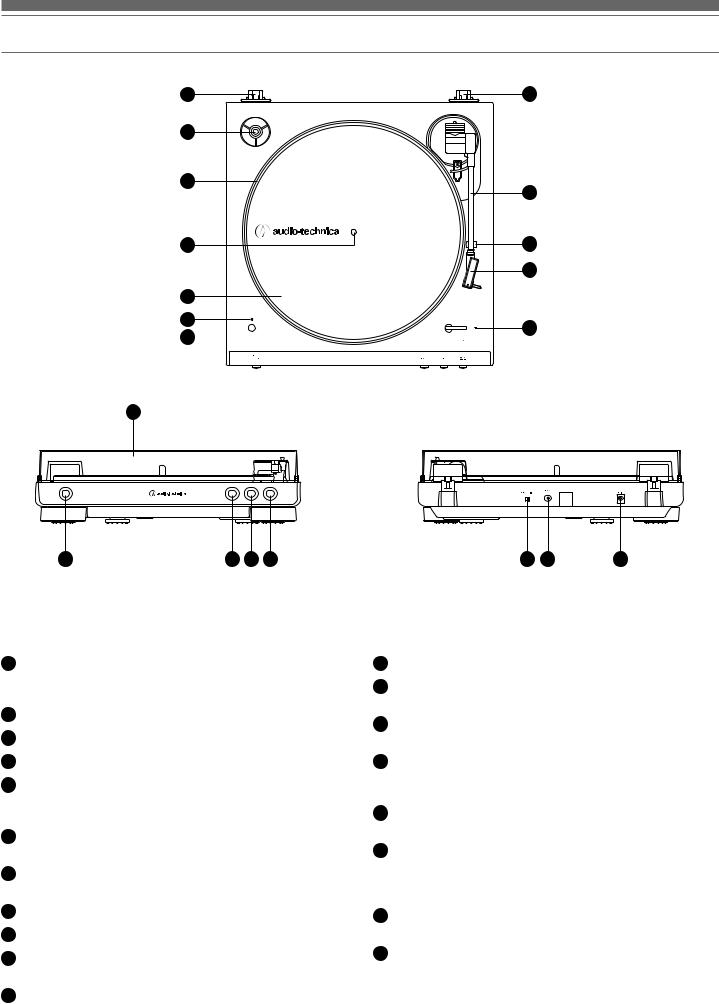
145 RPM adapter (shown in receptacle)
Adapts 7″ records with large center holes to fit center spindle.
2Platter
3Spindle
4Felt mat
5Indicator LED
Displays the Bluetooth connection status by blinking/ lighting.
6Wireless function button
Use to connect the product to a Bluetooth® device.
7Dust cover hinge holders
Attachment points for dust cover hinges.
8Tonearm
9Tonearm rest
10Headshell and cartridge
The cartridge (AT3600L) is attached to the headshell.
11Size selector
Switch between 12″ and 7″, according to the size of the record.
12Dust cover
13Platter speed button
Select the platter speed (33-1/3 or 45 RPM).
14START button
Spins the platter and moves the tonearm.
15STOP button
Returns the tonearm to its original position and stops the platter.
16Tonearm lift button
Lifts and lowers tonearm for manual selection.
17Pre-amplifier selector switch
If using an amplifier with a PHONO input jack, set this switch to the PHONO position. If connecting to the AUX jack of an amplifier, set this switch to the LINE position.
18Stereo output terminals
Connect the RCA audio cable.
19Power input jack
Connect the AC adapter.
3
Preparation for use
Installing the turntable
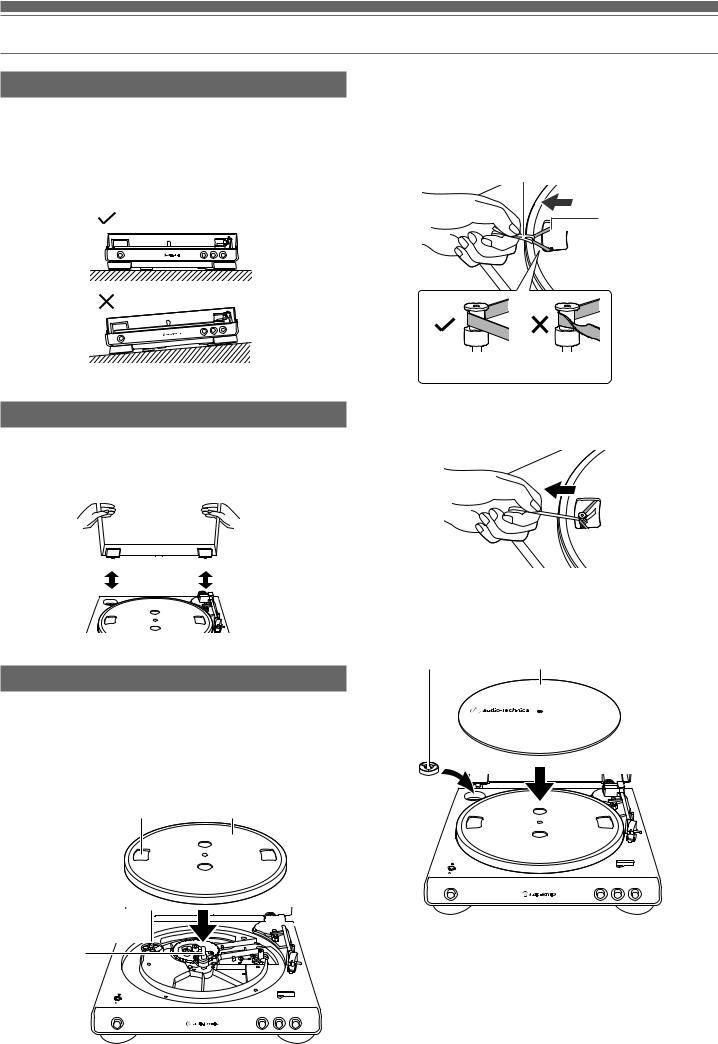
••Mount the product on a level surface.
••To avoid the effects of vibrations and acoustic pressure, do not mount the product next to such items as speakers.
••The product may pick up radio static if placed next to a radio. Therefore, try to keep the product away from radios.
••If the product is near equipment (cell phone, etc.) that emits strong radio waves, noise may occur.
2.Place the belt on the motor pulley (brass-colored).
•Align one of the platter openings with the brass motor pulley, and, while pulling both ends of the red ribbon that comes attached to the belt, place the belt on the motor pulley, as per the diagram. When doing this, be careful not to twist the belt.
Red ribbon
Belt
 Motor pulley
  (brass-colored)
Straight Twisted
Installing/removing the dust cover
3. Remove the red ribbon from the belt.
When removing the dust cover, slowly pull the dust cover out from the dust cover hinge holders. When attaching the dust cover, insert the hinges of the dust cover into the two dust cover hinge holders on the back of the body.
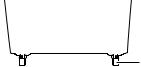 Hinge
Hinge
4. Set the felt mat on the platter.
• After setting the felt mat, put the 45 RPM adapter into the space made for it on the upper left.
Assembling the product
This product requires some assembly before using it for the first time.
Do not connect the AC adapter until assembly is complete.
1.Set the platter on the spindle.
•Make certain that the platter is fully seated on the spindle.
Opening Platter
Motor pulley 

 (brass-colored)


Spindle
AT-LP60XBT
AT-LP60XBT
4
 Loading…

Summary of Content for Audio-Technica AT-LP60XBT Turntable User Manual PDF
AT-LP60XBT
User Manual Automatic Wireless Turntable
AT-LP60XBT
1
Introduction
Thank you for purchasing this Audio-Technica product. Read through this user manual before using the product to ensure its correct use. Also, keep this manual for future reference.
This product can be used only in the countries where the product is sold. Make sure that the operating voltage and the plug of AC adapter of the product are correct for the country you live in.
Package contents
Make sure that you have all the included items listed below before using this product. If some items are missing or damaged, contact your local Audio-Technica dealer.
Turntable body Felt mat Platter (with drive belt)
AC adapter (approx. 1.5 m (4.9′)) Quick start guide Caution guide
45 RPM adapter RCA audio cable (approx. 1.2 m (3.9′))
After purchase, we suggest that you save all packaging materials for possible future storage, moving, or shipping.
2
Safety precautions
Although this product was designed to be used safely, failing to use it correctly may result in an accident. To ensure safety, observe all warnings and cautions while using the product.
Important information
Warning: To prevent fire or shock hazard, do not expose this apparatus to rain or moisture.
Caution: Do not expose this apparatus to drips or splashes. To avoid electric shock, do not open the cabinet. Refer servicing to qualified personnel only. Do not expose this apparatus to excessive heat such as sunshine, fire or the like.
Do not subject this apparatus to strong impact. This apparatus should be located close enough to the AC outlet so that you can easily grasp the AC adapter at any time.
In case of emergency, disconnect the AC adapter quickly. Do not place any objects filled with liquids, such as vases, on this apparatus.
To prevent fire, do not place any naked flame sources (such as lighted candles) on this apparatus.
Do not install this apparatus in a confined space such as a bookcase or similar unit.
Install this apparatus only in the place where ventilation is good.
For customers in the USA
FCC Notice
Warning: This device complies with Part 15 of the FCC Rules. Operation is subject to the following two conditions: (1) This device may not cause harmful interference, and (2) this device must accept any interference received, including interference that may cause undesired operation.
Caution: You are cautioned that any changes or modifications not expressly approved in this manual could void your authority to operate this equipment.
Note: This equipment has been tested and found to comply with the limits for a Class B digital device, pursuant to part 15 of the FCC Rules. These limits are designed to provide reasonable protection against harmful interference in a residential installation. This equipment generates, uses and can radiate radio frequency energy and, if not installed and used in accordance with the instructions, may cause harmful interference to radio communications. However, there is no guarantee that interference will not occur in a particular installation. If this equipment does cause harmful interference to radio or television reception, which can be determined by turning the equipment off and on, the user is encouraged to try to correct the interference by one or more of the following measures:
Reorient or relocate the receiving antenna. Increase the separation between the equipment and receiver. Connect the equipment into an outlet on a circuit different from that to which the receiver is connected. Consult the dealer or an experienced radio/TV technician for help.
Safety precautions
RF Exposure Statement: This transmitter must not be co-located or operated in conjunction with any other antenna or transmitter used in other systems. This device complies with FCC radiation exposure limits set forth for an uncontrolled environment and meets the FCC radio frequency (RF) Exposure Guidelines. This equipment has very low levels of RF energy that it deemed to comply without maximum permissive exposure evaluation (MPE). But it is desirable that it should be installed and operated keeping the radiator at least 20 cm or more away from persons body.
For customers in Canada
IC statement: CAN ICES-3 (B)/NMB-3(B)
This device complies with INDUSTRY CANADA R.S.S. 247. Operation is subject to the following conditions: (1) This device may not cause harmful interference and (2) this device must accept any interference received, including interference which may cause undesired operation. Under Industry Canada regulations, this radio transmitter may only operate using an antenna of a type and maximum (or lesser) gain approved for the transmitter by Industry Canada. To reduce potential radio interference to other users, the antenna type and its gain should be so chosen that the equivalent isotropically radiated power (e.i.r.p.) is not more than that necessary for successful communication. This equipment should be installed and operated with minimum distance 20 cm between the radiator & your body.
Notes on use
Turntable body
Do not set and use the product in locations that are considerably hot or humid, dirty, or subject to extreme vibrations.
The product should be positioned on a flat, level surface. When closing the dust cover, close it completely. Do not open the dust cover during playback.
Read the user manual for the Bluetooth receiver device.
Cartridge
Attach the provided protector to the cartridge when the product is not in use.
Do not touch the stylus of the cartridge with your finger. Do not allow the stylus to bump against the platter, felt mat, or edge of the record.
3
Part names and functions
AT-LP60XBT AT-LP60XBT
1 45 RPM adapter (shown in receptacle) Adapts 7″ records with large center holes to fit center spindle.
2 Platter
3 Spindle
4 Felt mat
5 Indicator LED Displays the Bluetooth connection status by blinking/ lighting.
6 Wireless function button Use to connect the product to a Bluetooth device.
7 Dust cover hinge holders Attachment points for dust cover hinges.
8 Tonearm
9 Tonearm rest
10 Headshell and cartridge The cartridge (AT3600L) is attached to the headshell.
11 Size selector Switch between 12″ and 7″, according to the size of the record.
12 Dust cover
13 Platter speed button Select the platter speed (33-1/3 or 45 RPM).
14 START button Spins the platter and moves the tonearm.
15 STOP button Returns the tonearm to its original position and stops the platter.
16 Tonearm lift button Lifts and lowers tonearm for manual selection.
17 Pre-amplifier selector switch If using an amplifier with a PHONO input jack, set this switch to the PHONO position. If connecting to the AUX jack of an amplifier, set this switch to the LINE position.
18 Stereo output terminals Connect the RCA audio cable.
19 Power input jack Connect the AC adapter.
1
2
4
5
6
3
7 7
8
9
10
11
13 14 1715 1816 19
12
4
Preparation for use
Installing the turntable
Mount the product on a level surface. To avoid the effects of vibrations and acoustic pressure, do not mount the product next to such items as speakers.
The product may pick up radio static if placed next to a radio. Therefore, try to keep the product away from radios.
If the product is near equipment (cell phone, etc.) that emits strong radio waves, noise may occur.
Installing/removing the dust cover
When removing the dust cover, slowly pull the dust cover out from the dust cover hinge holders. When attaching the dust cover, insert the hinges of the dust cover into the two dust cover hinge holders on the back of the body.
Assembling the product
This product requires some assembly before using it for the first time. Do not connect the AC adapter until assembly is complete.
1. Set the platter on the spindle.
Make certain that the platter is fully seated on the spindle.
2. Place the belt on the motor pulley (brass-colored).
Align one of the platter openings with the brass motor pulley, and, while pulling both ends of the red ribbon that comes attached to the belt, place the belt on the motor pulley, as per the diagram. When doing this, be careful not to twist the belt.
3. Remove the red ribbon from the belt.
4. Set the felt mat on the platter.
After setting the felt mat, put the 45 RPM adapter into the space made for it on the upper left.
AT-LP60XBT
AT-LP60XBT
AT-LP60XBT
AT-LP60XBT
Felt mat45 RPM adapter
Opening Platter
Spindle
Motor pulley (brass-colored)
Hinge
Straight Twisted
Motor pulley (brass-colored)
Belt
Red ribbon
5
Preparation for use
Rotating the platter
1. Using your hands, rotate the platter ten times.
Remove the tie that locks the tonearm and press the tonearm lift button to lift the tonearm. Slowly rotate the turntable ten times by hand in the direction of the arrow.
You may want to hold the tonearm to prevent it from moving. This step is for resetting the auto mechanism, getting rid of any twists in the belt and making sure the belt rides smoothly along the drive rim on the underside of the platter.
Connecting the AC adapter
This product does not have a power switch. A standby current is always running through the product, even when it is not being used; disconnect the AC adapter from the outlet when not using the product for a long period of time.
1. Connect the AC adapter to the outlet.
Connect the AC adapter to the outlet without removing the cartridges protector. If the platter has rotated, press the STOP button without touching the tonearm, and then wait until the tonearm returns to its original position.
Wireless/wired connection
You can connect to a speaker, etc. via Bluetooth technology or RCA audio cable. When using Bluetooth, refer to Connecting via Bluetooth wireless technology on p. 6.
When connecting with the RCA audio cable, refer to Connecting the device on p. 7.
Volume adjustment cannot be performed if there is no volume adjustment on the connected speakers, etc.
AT-LP60XBT AT-LP60XBT
AT-LP60XBT
Wired connection example
Active speaker
or
Amplifier
Wireless connection example
Wireless headphones
or
Wireless active speaker
Tonearm
6
Preparation for use
Connecting via Bluetooth wireless technology
The product supports Bluetooth wireless connection. It can be connected with Bluetooth-compatible headphones, active speakers and wireless stereo speakers (hereinafter referred to as Bluetooth receiver devices).
About pairing
When connecting a new Bluetooth receiver device, you need to pair it with the product. Once the Bluetooth receiver device and the product are paired, you do not need to pair them again. However, in the following cases you will need to pair again even if the Bluetooth receiver device was paired once:
If the product is deleted from the Bluetooth receiver devices connection history.
If the product is sent out for repair. If 9 or more devices are paired. (The product can save the pairing information of up to 8 devices. When you pair with a new device after pairing with 8 devices, pairing information for the device with the oldest connection date will be overwritten by the information for the new device.)
Pairing a Bluetooth device
Read the user manual for the Bluetooth receiver device. Place the device within 1 m (3.3′) of the product to perform pairing correctly.
1. Set your Bluetooth headphones, speakers, etc. to pairing mode.
2. Make sure the AC adapter is connected to an outlet, and then press and hold the wireless function button (about 2 seconds). The indicator LED will flash in red and blue alternately.
3. When pairing is complete, the indicator LED lights in blue.
The product stays in the pairing mode for 30 seconds. If pairing is not properly completed, follow the above steps again from the beginning.
About indicator LED display
The indicator LED indicates the product’s status as explained below. Status Indicator LED display pattern Red Blue
Pairing Searching for device
Flashing
Connection
Waiting to be connected
Connecting
Lit
Disconnecting
ON
2 SEC
Blue Red
Blue
7
Preparation for use
Setting pre-amplifier selector switch
This product has a built-in phono equalizer function. You can use the product even if you do not have a phono amplifier or connectable equipment with a built-in phono amplifier. Use the pre-amplifier selector switch to set the output, as shown below.
Connectable equipment being used
Position of pre-amplifier selector switch
Where to connect RCA audio cable
Device with phono input
PHONO Phono input jack and ground (earth) terminal of connectable equipment
Device without phono input
LINE AUX or line input jack of connectable equipment
PC sound card LINE PC sound cards line input jack*
*An audio adapter (sold separately) may be required to connect the RCA audio cable to the line input jack of the PC sound card.
When connecting via Bluetooth, using the pre-amplifier selector switch is not necessary.
Connecting the device
Align the settings for the pre-amplifier selector switch and connect the RCA audio cable to an input jack that is compatible with the connectable equipment you are using (amplifier, receiver, active speakers, sound card, etc.).
The RCA audio cable’s red jack is for the right (R) channel, and the white jack is for the left (L) channel.
AUX
L R
PHONO
L R
With PHONO
With PHONO
Without PHONO
Without PHONO
To outlet
To outlet
Connectable equipment (Amplifier, etc.)
8
Playing a record
Before playing a record
1. Remove the cartridges protector.
Pull the protector straight forward to remove it. Applying a downward force may cause the stylus to come
off the body. Only low volume is output if the stylus has come off, or is about to come off, so refer to Replacing the stylus on p. 10 to reattach the stylus correctly.
2. Place the record on the felt mat so that the center hole aligns with the spindle.
If playing a 45 RPM record with a large center hole, attach the 45 RPM adapter (see the right side of the diagram below).
Automatic operation
Lower the volume of the amplifier, speakers, etc. sufficiently.
1. Select the size with the size selector.
Select 12″ for an LP record with a 12″ diameter, and 7″ for a 45 RPM record with a 7″ diameter.
2. Press the speed with the platter speed button.
Select 33 for a 33-1/3 RPM record, and 45 for a 45 RPM record.
3. Press the START button.
Do not bump the product while the record is playing. Do not switch the record size selection while the record
is playing. Doing either of these can cause the product to malfunction.
Manual operation
Lower the volume of the amplifier, speakers, etc. sufficiently.
1. Press the tonearm lift button.
When you press the tonearm lift button, the tonearm rises from the tonearm rest.
2. Position the tonearm over the desired location (groove) on the record.
3. Press the tonearm lift button.
When you press the tonearm lift button, the tonearm descends slowly onto the record and play begins.
AT-LP60XBT
AT-LP60XBT
AT-LP60XBT
AT-LP60XBT
AT-LP60XBT
protector
45 RPM adapter
9
Playing a record
Pausing the record
1. After lowering the volume of the amplifier, speakers, etc. sufficiently, press the tonearm lift button to lift the tonearm.
Stopping the record
Once the record has played to the end, the tonearm will automatically return to the tonearm rest. To manually stop the record, do the following.
1. Lower the volume of the amplifier, speakers, etc. sufficiently.
2. Press the STOP button.
Once the record stops playing, the tonearm automatically returns to the tonearm rest.
3. Remove the record after the platter has come to a complete stop.
When the tonearm reaches the end (center) of the record, it will automatically lift and return to the tonearm rest. Do not interfere with its motion. Doing so can cause the product to malfunction. If the tonearm does not lift and return to the tonearm rest, press the STOP button to complete this operation.
If the felt mat gets dirty, it can easily scratch the record, so remove the felt mat periodically and wipe off any dust.
To prevent the record from scratches and warping, remove it after use.
Do not use a disk stabilizer. Do not use a platter other than the one provided. This product is not intended for DJs. Do not touch the record or
the platter while the record is playing.
How to use with Bluetooth connection
To connect for the first time, pair the product and your device via Bluetooth wireless technology.
Read the user manual for the Bluetooth receiver device. Note that Audio-Technica cannot guarantee the operation of displays, such as the battery level display, or applications via Bluetooth devices.
1. Turn on the Bluetooth receiver device.
Indicator LED turns blue when the product and Bluetooth receiver device are connected correctly.
When the indicator LED lights in red, press the wireless function button to connect Bluetooth communication.
2. Refer to Automatic operation on p. 8 or Manual operation on p. 8 to play a record.
When Bluetooth is connected, and you keep the wired connection (amplifier, speaker, etc.) turned on, the sound will be heard from both the wireless and wired devices. Turn on only the device you want to use for playback.
10
Care
Turntable body
When the turntable body is dirty or dusty, first disconnect the AC adapter, and then wipe off the dirt and dust with a soft, dry cloth.
Do not use benzenes, thinners, etc. When storing the product for a long time, disconnect the AC adapter from the outlet and wrap the product in plastic; do not allow it to become damp.
Stylus tip
If dirt and grime are stuck to the stylus tip, clean it with a commercially sold brush.
We recommend using a stylus cleaner (sold separately) if the stylus tip is considerably dirty. Clean the stylus tip by moving the brush from the rear to the front of the stylus tip.
Replacing the stylus
Removing the stylus
In addition to the deterioration of sound quality, records may also be damaged as the cartridges stylus tip wears down.
As a rule of thumb, replace the stylus after 400 hours of use. Be sure to disconnect the products AC adapter from the outlet.
When replacing the stylus, hold the headshell and the cartridge body tightly.
1. Rotate the front of the stylus in a forward and down motion.
Installing a new replacement stylus
1. Mount the new replacement stylus to the cartridge.
2. Lift the stylus up until you hear a click.
3. Make sure there is no gap between the headshell and the cartridge.
Engage in body first
11
Replacing the belt
The belt is a consumable part. Replace the belt if the speed of playback slows down or irregular rotation occurs. As a rule of thumb, we suggest replacing the belt once a year.
Before replacing the belt, be sure to disconnect the products AC adapter from the outlet.
1. Remove the felt mat.
2. Remove the platter, turn the platter over, and then remove the old belt.
Place your thumbs in the openings and pull up strongly.
3. Place the new belt around the inner circle.
Be careful not to twist the belt while doing this.
4. Attach the platter.
Align one of the openings with the position of the motor pulley (brass-colored).
Replacing the belt
5. Place the belt on the motor pulley (brass-colored).
Grasp the belt that was attached in step 3 and, while pulling it, place it on the brass motor pulley.
6. Using your hands, rotate the platter ten times.
Slowly rotate the turntable ten times by hand in the direction of the arrow.
When the turntable is moved
Using the product’s original packing materials, wrap the turntable in the reverse order from when you unwrapped it. If you do not have the packaging materials, take the following measures:
After disconnecting the AC adapter from the outlet, remove the felt mat and platter, and then wrap them so that they do not get damaged.
Attach the protector to the cartridge. Use a string or something similar to tie the tonearm to the rest so that it does not move.
Wrap the turntable body with paper or a soft cloth so that it does not get damaged.
AT-LP60XBT
Belt
Opening Motor pulley (brass-colored)
Place the belt
Motor pulley (brass-colored)
12
Troubleshooting
Problem Solution
The platter does not spin. Is the AC adapter connected to the outlet? Connect the AC adapter to the outlet. Has the belt slipped from the platter? Correctly place the belt on the platter. Is the belt placed on the motor pulley? Check that the belt is placed on the motor pulley (brass-colored) correctly.
Has the belt been damaged? Replace it with a new belt.
The platter spins, but there is no sound or the volume is not loud enough.
Are the function settings and input for connected equipment (amplifier, etc.) selected correctly? Check whether the settings for the connected equipment are correct.
Is the stylus damaged? Check the stylus and replace it, if necessary. Is the stylus placed correctly on the body of the cartridge? Check the cartridge and adjust it, if necessary.
Are the setting positions for the pre-amplifier selector switch correct? Check that the pre- amplifier settings are correct, noting the following common problems and their causes:
If there is no sound, or if the volume is not loud enough, the product is set to the PHONO position and connected to the amplifiers AUX/LINE input. If the volume is too loud or is distorted, the product is set to the LINE position, and the connectable equipment is connected to the PHONO input.
The stylus skips. Is the record warped? Check the record. Is the record scratched? Check the record.
There is howling. Is the product picking up excessive vibrations from the floor, surfaces of the walls, or nearby speakers? Decrease the vibrations or mount the product on a surface that is not subject to the effects of vibrations.
Is the product mounted on an unstable surface? Check whether the surface on which the product is mounted is suitable.
There is noise when the record is playing.
Is there dust on the cartridges stylus tip? If dust is stuck to the stylus tip, clean it with a commercially sold brush.
The sound when the record is playing is either too fast or too slow.
Are the speed settings for this product correct? Use the platter speed button to select the correct speed for the type of record being played.
Playback speed slows down or there is irregular rotation.
Is the belt stretched out? Replace it with a new belt.
Unable to pair. Confirm that the Bluetooth receiver device communicates using Ver. 2.1+EDR or higher. Place the product and the Bluetooth receiver device within 1 m (3.3′) of each other.
No sound is heard / Sound is faint.
Turn on the power of the product and the Bluetooth receiver device. Turn up the volume of the product and the Bluetooth receiver device. Move away from obstacles between the product and the Bluetooth receiver device, such as people, metal or walls, and place the product and the Bluetooth receiver device closer together.
Sound is distorted / Noise is heard / Sound cuts out.
Turn down the volume of the product and the Bluetooth receiver device. Keep the product away from devices that emit radio waves such as microwaves and wireless routers.
Keep the product away from TVs, radios, and devices with built-in tuners. These devices can also be affected by the product.
Move away from obstacles between the product and the Bluetooth receiver device, such as people, metal or walls, and place the product and the Bluetooth receiver device closer together.
For details about how to operate your Bluetooth receiver device, refer to the devices user manual.
13
Dimensions
Specifications
Communication specifications
Communication system Bluetooth version 5.0
Maximum RF output 10 mW EIRP
Maximum communication range
Line of sight — approx. 10 m (33′)
Frequency band 2.402 GHz to 2.480 GHz
Modulation method FHSS
Compatible Bluetooth profiles
A2DP
Support codec Qualcomm aptX audio, SBC
Specifications
Turntable
Type Belt-drive, fully automatic operation
Motor DC servo-controlled
Speeds 33-1/3 RPM, 45 RPM
Turntable platter Aluminum
Wow and flutter < 0.25% (WTD) at 3 kHz
Signal-to-noise ratio > 50 dB (DIN-B)
Cartridge Type VM
Outputs levels PHONO
LINE
2.5 mV nominal at 1 kHz, 5 cm/sec 150 mV nominal at 1 kHz, 5 cm/sec
Phono pre-amp gain 36 dB nominal, RIAA equalized
Power supply requirements 100 to 240 V, 50/60 Hz, 0.6 A Max.
Power consumption 1.5 W
AC adapter 12 V, 2 A
Dimensions 359.5 mm (14.15″) x 97.5 mm (3.84″) x 373.3 mm (14.70″) (W x H x D)
Weight 2.6 kg (5.73 lbs)
Accessories Dust cover, Felt mat, Platter (with drive belt), 45 RPM adapter, RCA audio cable (approx. 1.2 m (3.9′)), AC adapter (approx. 1.5 m (4.9′))
Replacement stylus (sold separately)
ATN3600L
Replacement belt (sold separately)
AT-LP60X exclusive belt
Specifications are subject to change without notice due to improvements.
The Bluetooth word mark and logos are owned by Bluetooth SIG, Inc. and any use of such marks by Audio-Technica Corporation is under license. All other trademarks are property of their respective owners.
Qualcomm aptX is a product of Qualcomm Technologies, Inc. and/or its subsidiaries. Qualcomm is a trademark of Qualcomm Incorporated, registered in the United States and other countries, used with permission. aptX is a trademark of Qualcomm Technologies International, Ltd., registered in the United States and other countries, used w
Manualsnet FAQs
If you want to find out how the AT-LP60XBT Audio-Technica works, you can view and download the Audio-Technica AT-LP60XBT Turntable User Manual on the Manualsnet website.
Yes, we have the User Manual for Audio-Technica AT-LP60XBT as well as other Audio-Technica manuals. All you need to do is to use our search bar and find the user manual that you are looking for.
The User Manual should include all the details that are needed to use a Audio-Technica AT-LP60XBT. Full manuals and user guide PDFs can be downloaded from Manualsnet.com.
The best way to navigate the Audio-Technica AT-LP60XBT Turntable User Manual is by checking the Table of Contents at the top of the page where available. This allows you to navigate a manual by jumping to the section you are looking for.
This Audio-Technica AT-LP60XBT Turntable User Manual consists of sections like Table of Contents, to name a few. For easier navigation, use the Table of Contents in the upper left corner.
You can download Audio-Technica AT-LP60XBT Turntable User Manual free of charge simply by clicking the “download” button in the upper right corner of any manuals page. This feature allows you to download any manual in a couple of seconds and is generally in PDF format. You can also save a manual for later by adding it to your saved documents in the user profile.
To be able to print Audio-Technica AT-LP60XBT Turntable User Manual, simply download the document to your computer. Once downloaded, open the PDF file and print the Audio-Technica AT-LP60XBT Turntable User Manual as you would any other document. This can usually be achieved by clicking on “File” and then “Print” from the menu bar.
View the manual for the Audio-Technica AT-LP60XBT here, for free. This user manual comes under the category turntables and has been rated by 1 people with an average of a 7.5. This manual is available in the following languages: English. Do you have a question about the Audio-Technica AT-LP60XBT? Ask your question here
The Audio-Technica AT-LP60XBT is a turntable that offers high-quality audio playback. Designed with precision and attention to detail, it delivers a clear and accurate sound reproduction. The turntable is equipped with built-in Bluetooth technology, allowing for wireless connectivity with compatible devices.
The AT-LP60XBT features a belt-drive design, which reduces vibration and ensures stable playback. It comes with a diamond stylus that tracks the grooves of records with precision, resulting in excellent audio fidelity. The turntable has a fully automatic operation, making it easy to use for both beginners and experienced users alike.
Constructed with quality materials, the AT-LP60XBT is built to last. Its sturdy construction ensures durability and long-lasting performance. The turntable also includes a built-in phono preamplifier, allowing for direct connection to audio systems or powered speakers.
With its sleek and compact design, the AT-LP60XBT is a stylish addition to any room. It is available in a range of colors, allowing users to choose the option that best suits their personal style.
In summary, the Audio-Technica AT-LP60XBT is a reliable and user-friendly turntable that offers excellent audio quality. Its wireless connectivity and automatic operation make it a convenient choice for music enthusiasts. With its durable construction and stylish design, it is a great addition to any home audio setup.
General
Can’t find the answer to your question in the manual? You may find the answer to your question in the FAQs about the Audio-Technica AT-LP60XBT below.
How can I best clean my turntable?
A slightly damp cleaning cloth or soft, dust-free cloth works best to remove fingerprints. Dust in hard-to-reach places is best removed with compressed air.
Is the manual of the Audio-Technica AT-LP60XBT available in English?
Yes, the manual of the Audio-Technica AT-LP60XBT is available in English .
Is your question not listed? Ask your question here
3.0
Rated 3.0 out of 5
3.0 out of 5 stars (based on 1 review)
Your overall rating
AUDIO-TECHNICA AT-LP60XBT (01) PDF MANUAL
Click here to download AUDIO-TECHNICA AT-LP60XBT (01) PDF MANUAL
AUDIO-TECHNICA AT-LP60XBT (01) PDF MANUAL
FREE ENGLISH PDF
OPERATING INSTRUCTIONS
USER GUIDE – USER MANUAL
OWNER GUIDE – OWNER MANUAL
REFERENCE GUIDE – REFERENCE MANUAL
INSTRUCTION GUIDE – INSTRUCTION MANUAL
Your overall rating
- YouTube
AUDIO-TECHNICA AT-LP60XBT (01) PDF MANUAL
AUDIO-TECHNICA AT-LP60XBT (01) PDF MANUAL