Copyright © 2015 ASUSTeK COMPUTER INC. All Rights Reserved.
No part of this manual, including the products and software described in it, may be reproduced,
transmitted, transcribed, stored in a retrieval system, or translated into any language in any form or by any
means, except documentation kept by the purchaser for backup purposes, without the express written
permission of ASUSTeK COMPUTER INC. (“ASUS”).
Product warranty or service will not be extended if: (1) the product is repaired, modified or altered, unless
such repair, modification of alteration is authorized in writing by ASUS; or (2) the serial number of the
product is defaced or missing.
ASUS PROVIDES THIS MANUAL “AS IS” WITHOUT WARRANTY OF ANY KIND, EITHER EXPRESS
OR IMPLIED, INCLUDING BUT NOT LIMITED TO THE IMPLIED WARRANTIES OR CONDITIONS OF
MERCHANTABILITY OR FITNESS FOR A PARTICULAR PURPOSE. IN NO EVENT SHALL ASUS, ITS
DIRECTORS, OFFICERS, EMPLOYEES OR AGENTS BE LIABLE FOR ANY INDIRECT, SPECIAL,
INCIDENTAL, OR CONSEQUENTIAL DAMAGES (INCLUDING DAMAGES FOR LOSS OF PROFITS,
LOSS OF BUSINESS, LOSS OF USE OR DATA, INTERRUPTION OF BUSINESS AND THE LIKE),
EVEN IF ASUS HAS BEEN ADVISED OF THE POSSIBILITY OF SUCH DAMAGES ARISING FROM ANY
DEFECT OR ERROR IN THIS MANUAL OR PRODUCT.
SPECIFICATIONS AND INFORMATION CONTAINED IN THIS MANUAL ARE FURNISHED FOR
INFORMATIONAL USE ONLY, AND ARE SUBJECT TO CHANGE AT ANY TIME WITHOUT NOTICE,
AND SHOULD NOT BE CONSTRUED AS A COMMITMENT BY ASUS. ASUS ASSUMES NO
RESPONSIBILITY OR LIABILITY FOR ANY ERRORS OR INACCURACIES THAT MAY APPEAR IN THIS
MANUAL, INCLUDING THE PRODUCTS AND SOFTWARE DESCRIBED IN IT.
Products and corporate names appearing in this manual may or may not be registered trademarks or
copyrights of their respective companies, and are used only for identification or explanation and to the
owners’ benefit, without intent to infringe.
DE158
First Edition
June 2015
STRIX SOAR

Регистрация устройства поможет вам управлять его гарантией, получать техническую поддержку и отслеживать статус ремонта.
Регистрация продукта
Руководства пользователя
- Руководства пользователя
- Декларация соответствия
Версия q9968
678.64 KB
STRIX Sound Card Series Quick Start Guide
Версия F11113
616.17 KB
STRIX RAID DLX User’s Manual ( French )
Версия E11113
650.22 KB
STRIX sound card series user Manual (English)
Версия E9967
673.46 KB
STRIX Sound Card Series User Manual
Версия DE158
2.33 MB
Sonic Studio Strix Series User Guide
-
Драйверы
10
-
Инструкции по эксплуатации
5
Языки:

ASUS STRIX SOAR инструкция по эксплуатации
(27 страниц)
- Языки:Английский
-
Тип:
PDF -
Размер:
650.22 KB -
Описание:
STRIX sound card series user Manual (English)
Просмотр

ASUS STRIX SOAR инструкция по эксплуатации
(27 страниц)
- Языки:Французский
-
Тип:
PDF -
Размер:
616.17 KB -
Описание:
STRIX RAID DLX User’s Manual ( French )
Просмотр

ASUS STRIX SOAR инструкция по эксплуатации
(27 страниц)
-
Тип:
PDF -
Размер:
673.46 KB -
Описание:
STRIX Sound Card Series User Manual
Просмотр

ASUS STRIX SOAR инструкция по эксплуатации
(64 страницы)
-
Тип:
PDF -
Размер:
2.33 MB -
Описание:
Sonic Studio Strix Series User Guide
Просмотр

ASUS STRIX SOAR инструкция по эксплуатации
(2 страницы)
-
Тип:
PDF -
Размер:
678.64 KB -
Описание:
STRIX Sound Card Series Quick Start Guide
Просмотр
На NoDevice можно скачать инструкцию по эксплуатации для ASUS STRIX SOAR. Руководство пользователя необходимо для ознакомления с правилами установки и эксплуатации ASUS STRIX SOAR. Инструкции по использованию помогут правильно настроить ASUS STRIX SOAR, исправить ошибки и выявить неполадки.
Регистрация устройства поможет вам управлять его гарантией, получать техническую поддержку и отслеживать статус ремонта.
Регистрация продукта
Руководства пользователя
- Руководства пользователя
- Декларация соответствия
Версия q9968
678.64 KB
STRIX Sound Card Series Quick Start Guide
Версия F11113
616.17 KB
STRIX RAID DLX User’s Manual ( French )
Версия E11113
650.22 KB
STRIX sound card series user Manual (English)
Версия E9967
673.46 KB
STRIX Sound Card Series User Manual
Версия DE158
2.33 MB
Sonic Studio Strix Series User Guide
Sonic Studio Strix Series
User Guide
-
Драйверы
10
-
Инструкции по эксплуатации
5
Языки:
ASUS STRIX SOAR инструкция по эксплуатации
(27 страниц)
- Языки:Английский
-
Тип:
PDF -
Размер:
650.22 KB -
Описание:
STRIX sound card series user Manual (English)
Просмотр
ASUS STRIX SOAR инструкция по эксплуатации
(27 страниц)
- Языки:Французский
-
Тип:
PDF -
Размер:
616.17 KB -
Описание:
STRIX RAID DLX User’s Manual ( French )
Просмотр
ASUS STRIX SOAR инструкция по эксплуатации
(27 страниц)
-
Тип:
PDF -
Размер:
673.46 KB -
Описание:
STRIX Sound Card Series User Manual
Просмотр
ASUS STRIX SOAR инструкция по эксплуатации
(64 страницы)
-
Тип:
PDF -
Размер:
2.33 MB -
Описание:
Sonic Studio Strix Series User Guide
Просмотр
ASUS STRIX SOAR инструкция по эксплуатации
(2 страницы)
-
Тип:
PDF -
Размер:
678.64 KB -
Описание:
STRIX Sound Card Series Quick Start Guide
Просмотр
На NoDevice можно скачать инструкцию по эксплуатации для ASUS STRIX SOAR. Руководство пользователя необходимо для ознакомления с правилами установки и эксплуатации ASUS STRIX SOAR. Инструкции по использованию помогут правильно настроить ASUS STRIX SOAR, исправить ошибки и выявить неполадки.
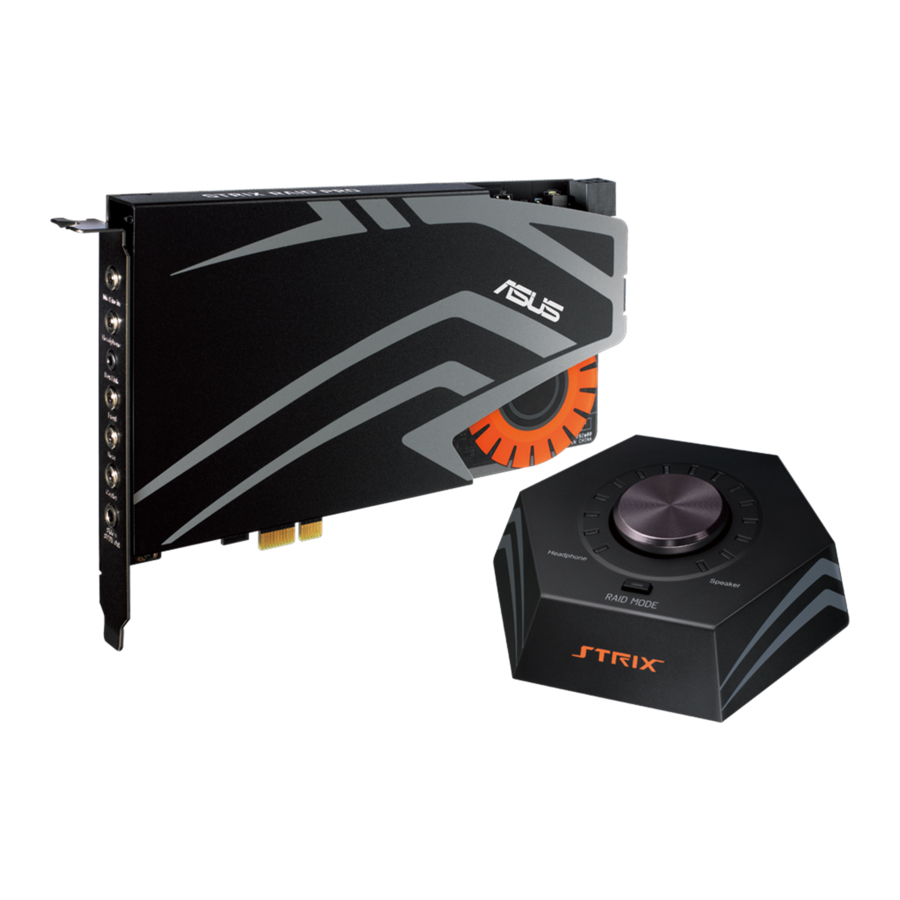
ASUS Strix Raid DLX/PRO, Strix Soar — Sound Card Quick Start Guide
Safety Information
- Read these instructions.
- Keep these instructions.
- Heed all warnings.
- Follow all instructions.
- Do not use this apparatus near water.
- Clean machine surface with a cloth (Do not apply any detergent or cleaning fluid).
- Do not block any ventilation openings. Install in accordance with the manufacturer’s instructions.
- Do not install near any heat sources such as radiators, heat registers, stoves or other apparatus (including amplifiers) that produce heat.
- The polarized or grounding type plug is for user safety. A polarized plug has two blades with one wider than the other other. A grounding -type plug has two blades and a third grounding prong. The wide blade or the third prong is provided for your safety. If the provided plug does not fit into your outlet, consult your electrician for installation of the appropriate type of power socket.
- Protect the power cord from being stepped on or compressed, particularly at the point where the cable is connected to the device.
- Only use attachments/accessories specified by the manufacturer.
- Use with only the cart, stand, tripod, bracket or table recommended by the manufacturer, or sold with the product. When a cart is used, use caution when moving the cart or trolley to avoid injury.
- Unplug the device during lightning storms or when left unused for long periods of time.
- Refer all repairs to qualified service personnel. Servicing is required when the product has been damaged in any way such as when the power cord or plug is damaged, liquid has been spilled or an object have fallen into the product, the product has been exposed to rain or moisture or does not operate normally or has been dropped.

Additional Safety Information
For your own safety please read the following important instructions carefully before attempting to connect this unit to the main power supply. The instructions provided will help you get the best performance from this device and prolong the life of this product.
Repairs
Do not attempt to repair or disassemble this product. Consult a qualified technician or professional for service or repairs. Package Contents
Package Contents
This package should contain the following:
- STRIX sound card series 7.1-Channel sound card
- S/PDIF TOSLINK optical adapter x 1
- Quick Start Guide
- Box link cable (Strix Raid DLX/Strix Raid Pro only)
- Strix control box (Strix Raid DLX/Strix Raid Pro only)
System Requirements
To ensure a successful installation of the ASUS Strix sound card series, your computer must meet the following requirements:
- One PCI Express 1.0 (or higher) compatible slot for the audio card
- One available 6-pin peripheral power cable connector from PC’s power supply unit
- Microsoft® Windows® 10/8.1/7 (32/64bit)
- Intel® Pentium® 4 1.4GHz or AMD Athlon 1400 CPU or faster CPU
- > 256 MB DRAM system memory
- > 60 MB available HDD space for driver installation package
- High-quality headphones, powered analog speakers, to enjoy the ultra-high fidelity sounds.
Hardware Features
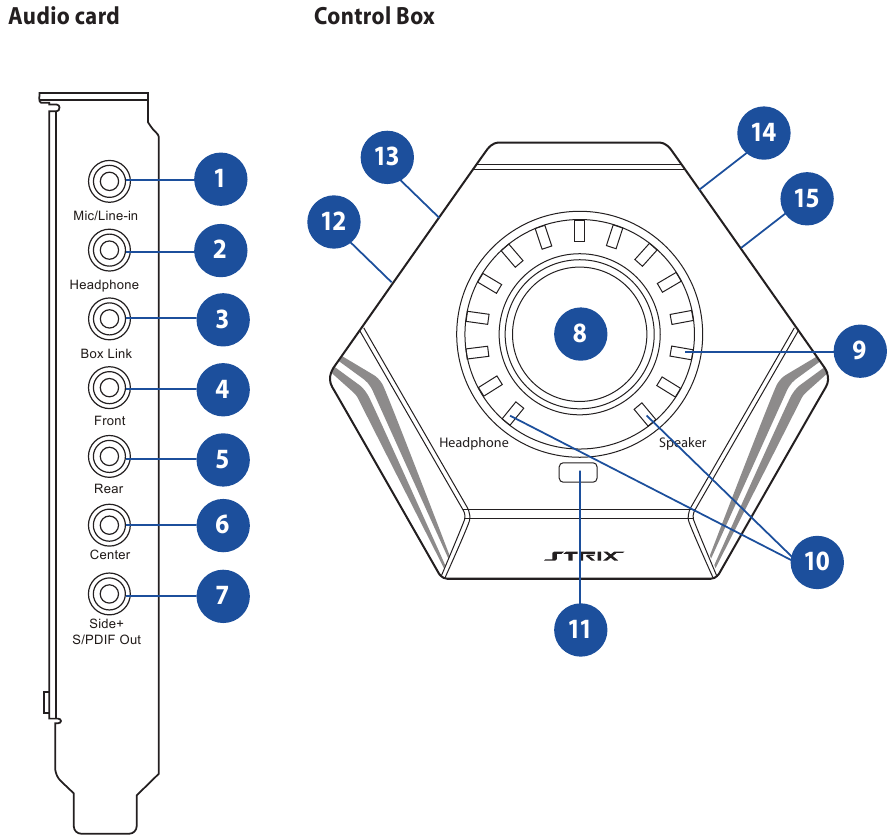
- Microphone In port
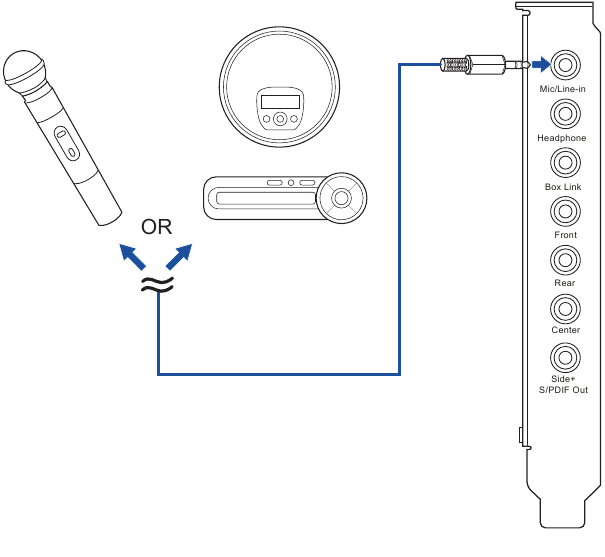
Connect your external PC microphone to this 3.5mm port for voice input. Built-in high-quality Microphone pre-amplifier.
Line In port
Connect analog devices like MP3 players, CD players, music synthesizers, and other line-level sound sources to this 3.5mm port for audio recording or processing. - Headphone Out port
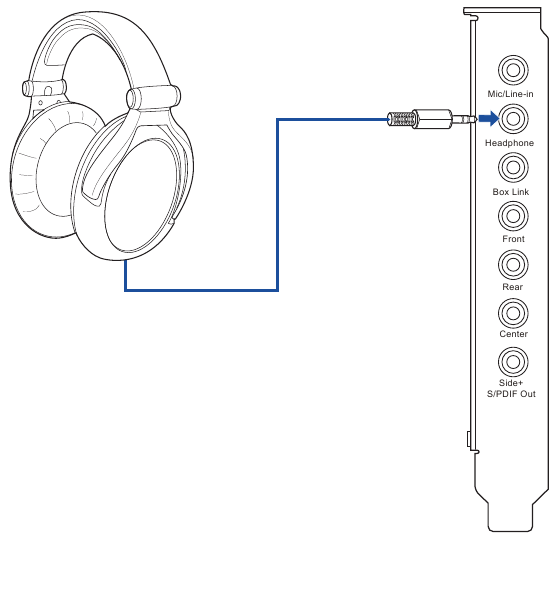
Connect your headphone to this port. - Box link
Connect Strix control box directly to this port - Front Out port
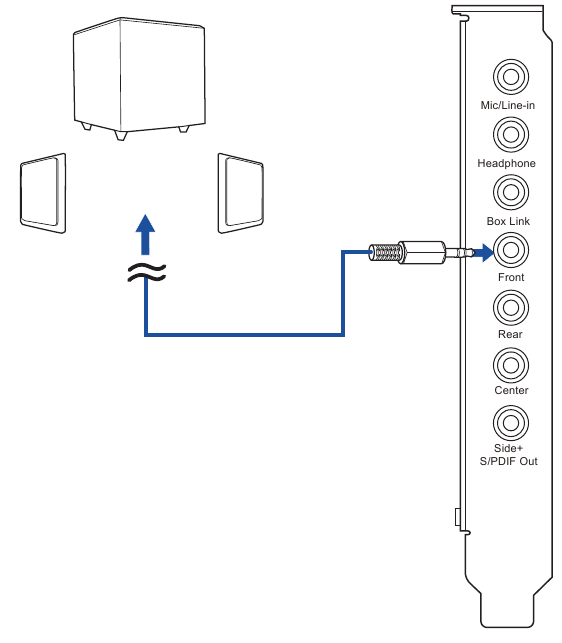
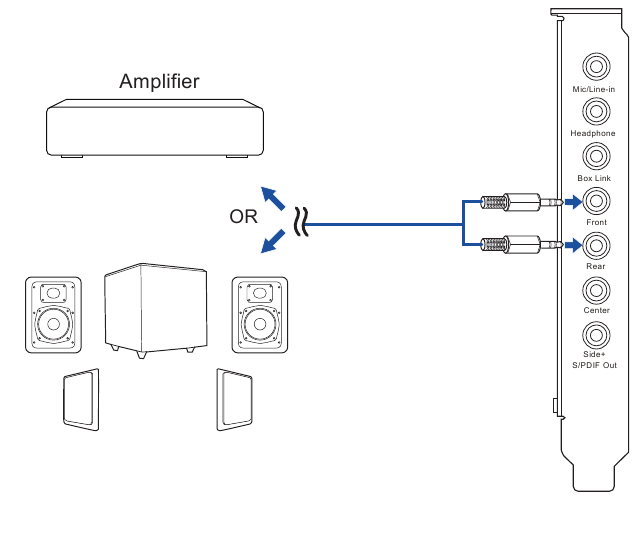
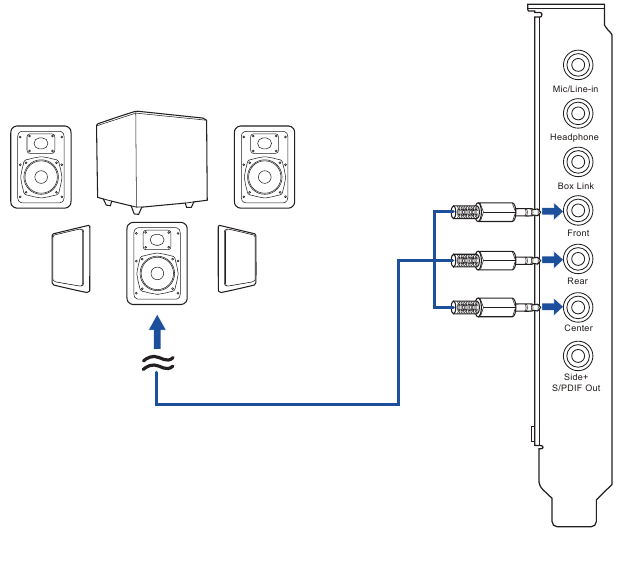
For 2 channel speaker systems, connects to the input on the powered speakers. - Rear Out port
Connect to the rear surround input on 4 powered analog speakers. - Center Out port
Connects to the center/subwoofer input on 4/5.1 powered analog speakers. - Side Out port
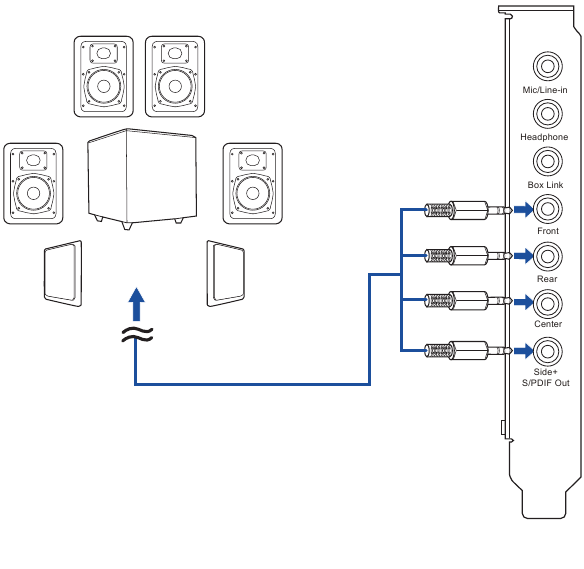
Connects to the side surround input on 7.1 powered analog speakers.
S/PDIF Out port
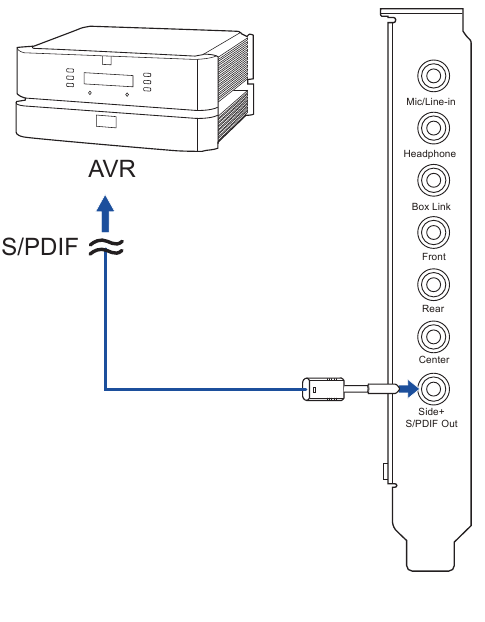
Optical digital output jack. Connects to external digital decoder or digital speaker systems, Home Theater systems, AV receivers for outputting digital audio including PCM, Dolby Digital, DTS, WMA-Pro, etc. Connect to the surround channel input on 4/5.1/7.1 powered analog speakers - Output Select /Volume Control
| Output Select /Volume Control | Description |
| Tab | Tab to select output source bewtween headphone and speaker. |
| Long Press | Long press to set selected output source to mute. |
| Turn | Turn knob clockwise or anti-clockwise to adjust volume level. |
| [Custom Mode]: Tab |
CUSTOM MODE (In conjuction with STRIX RAID MODE) Tab knob to turn on/off a selected effect. Note: This control knob is used in conjunction with the Strix RAID key. When Strix RAID Mode is selected, this goes into a custom mode. |
| [Custom Mode]: Turn | CUSTOM MODE (In conjuction with STRIX RAID MODE) Turn knob clockwise or anti-clockwise to adjust intensity level of a selected effect. |
- LED Indicators
LED indicator that displays intensity level of volume or effects. - Output Source LED Indicator
LED indicator that displays selected output device.
Note: W hen the device is under mute, the LED turns red.. - STRIX RAID Mode
| STRIX RAID Mode | This is a programmable key that can customize and lock a special effect from the Sonic Studio so that you can control and adjust effects spontaneously in game.
Press on/off to enter/exit Custom Mode. The LED turns Orange to indicate the Custom Mode. To set up this key, please go to the Sonic Studio and select desired effect to lock to the Strix RAID Mode. Now you can use the turn knob to turn on/off effects, as well as adjust the intensity level of the effect. |
- Headphone Output Port
Connect your headphones to this port. - Microphone Input Port
Connect your external PC microphone to this 3.5mm jack for voice input. - Kensington® Security Slot
Insert kensington lock to lock the device. - Box link
Connect Strix control box directly to this port
Connectivity Options
Connecting Strix Control Box
(Strix Raid DLX/PRO only)
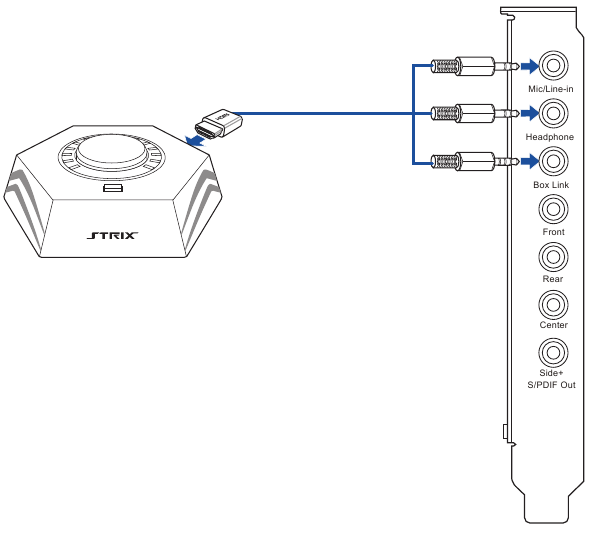
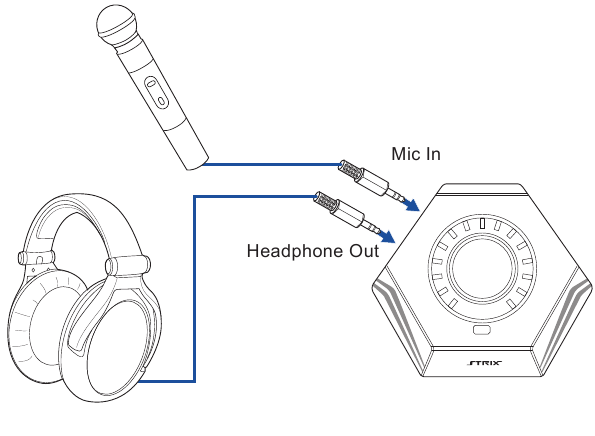
Connecting Strix Control Box with external microphone and headphone
(Strix Raid DLX/PRO only)
Connecting to TOSLINK and COAXIAL SPDIF input connection
Connecting Microphone/ Line In
Connecting Stereo Headphones
Connecting 2 channel speakers
Connecting 4 Channel Speakers / Power Amplifier
Connecting 5.1 Channel Speakers/ 5.1 Channel Headphone
Connecting 7.1 Channel Speakers
UKCA statement

Simplified UKCA Declaration of Conformity
ASUSTek Computer Inc. hereby declares that this device is in compliance with the essential requirements and other relevant provisions of related Regulations. Full text of UKCA declaration of conformity is available at https://www.asus.com/support/.
| Manufacturer | ASUSTeK Computer Inc. Tel: +886-2-2894-3447 Address: 1F., No. 15, Lide Rd., Beitou Dist., Taipei City 112, Taiwan |
| Authorised representative in United Kingdom | ASUSTEK (UK) LIMITED Tel./FAX No.: +44-01442-202-700 / +44-01442-245-882 Address: 1st Floor, Sackville House, 143-149 Fenchurch Street, London, EC3M 6BL, England, United Kingdom |
| Authorised representative in Europe | ASUS Computer GmbH Address: HARKORT STR. 21-23, 40880 RATINGEN, GERMANY |

https://www.asus.com/support

Documents / Resources
References
Download manual
Here you can download full pdf version of manual, it may contain additional safety instructions, warranty information, FCC rules, etc.
Download ASUS Strix Raid DLX/PRO, Strix Soar — Sound Card Quick Start Guide
Здравствуйте, друзья! Ещё в 2015 году была представлена линейка звуковых карт от Asus. В неё вошли Strix Raid DLX, Strix Raid Pro и Strix Soar. Вся серия позиционировалась как игровая. Тогда не было сомнений, что любая из этих карт будет лучше встроенной в материнскую плату, но на дворе 2021 год, а вопрос: какая карта лучше, снова стал открытым. Сегодня мы рассмотрим 7.1-канальную геймерскую звуковую карту Asus Strix Soar, которая была самой бюджетной из линейки, и определимся стоит ли её покупать.
Обзор звуковой карты ASUS STRIX SOAR
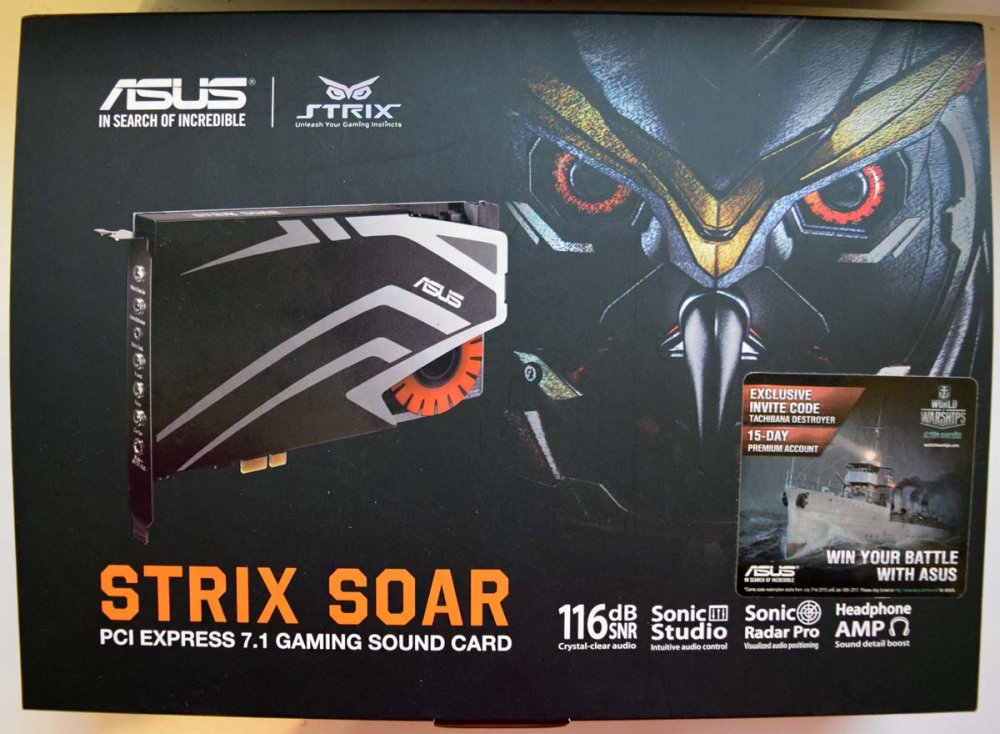
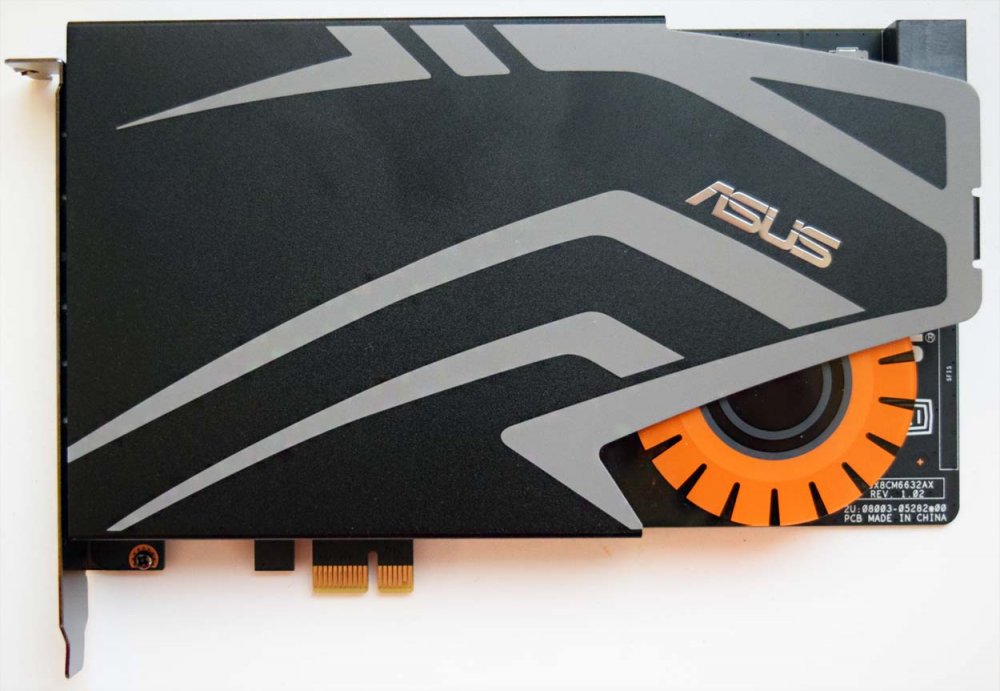 Как бы вы ни относились к продукции компании Asus, звуковые платы делать они умеют. Большая часть карты накрыта металлическим кожухом, который выполняет как защитную декоративную функцию, так и экранируют звуковой тракт от внешних источников помех. В общем дизайн у карты довольно геймерский, к тому же имеется подсветка, которая постоянно светит и ни настроить, ни отключить не предоставляется возможным. Размеры карты 190 х 130 х 22 мм. Кожух снимается без проблем, достаточно открутить несколько винтов с крестовой головкой. Рассмотрим наиболее важные элементы и характеристики звуковой карты.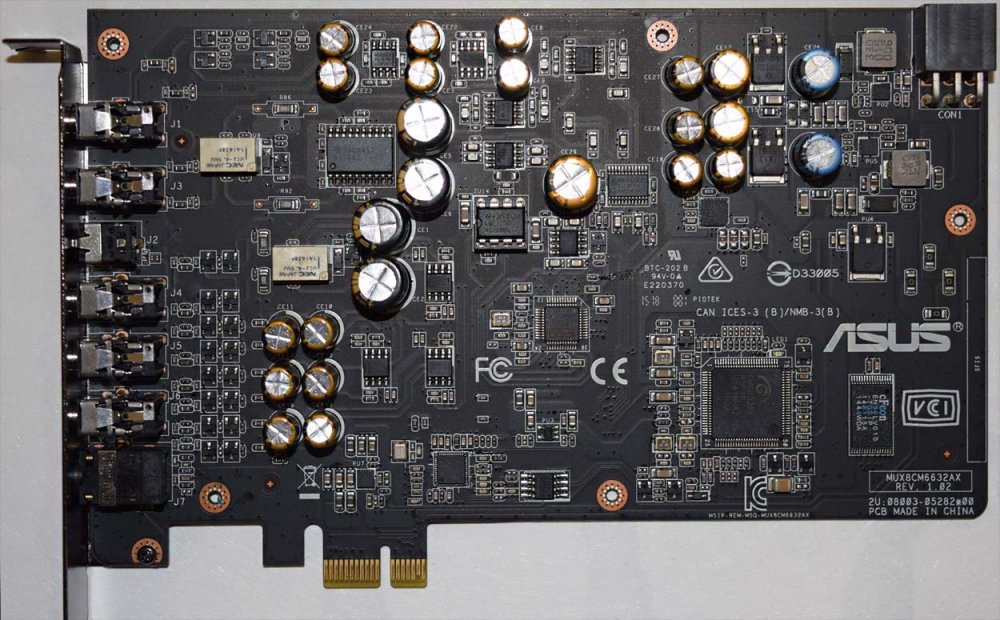
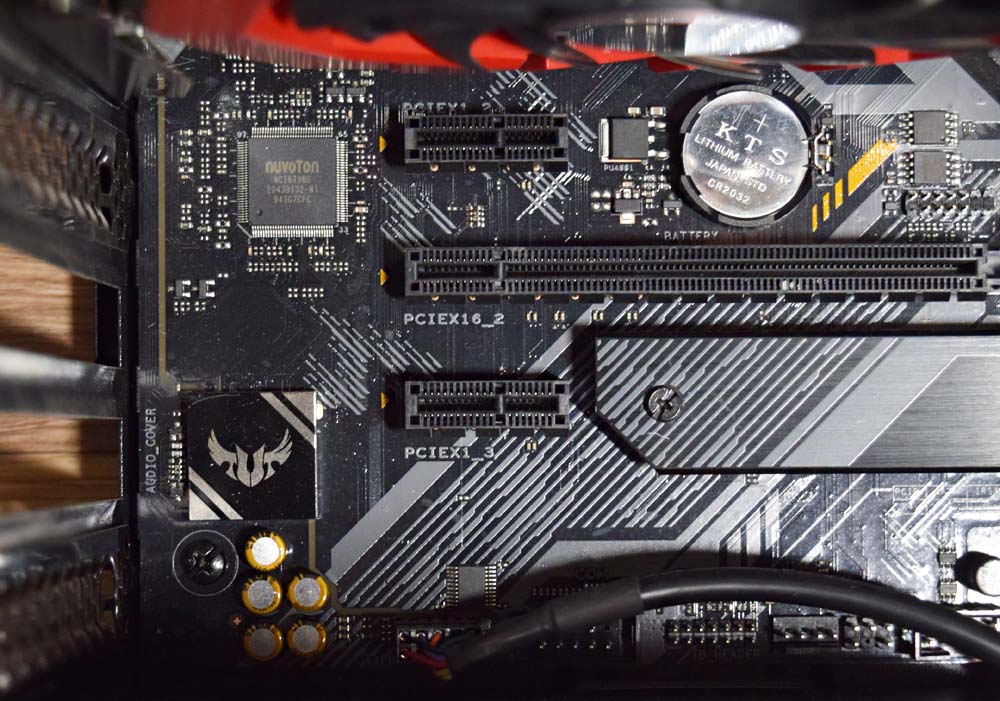
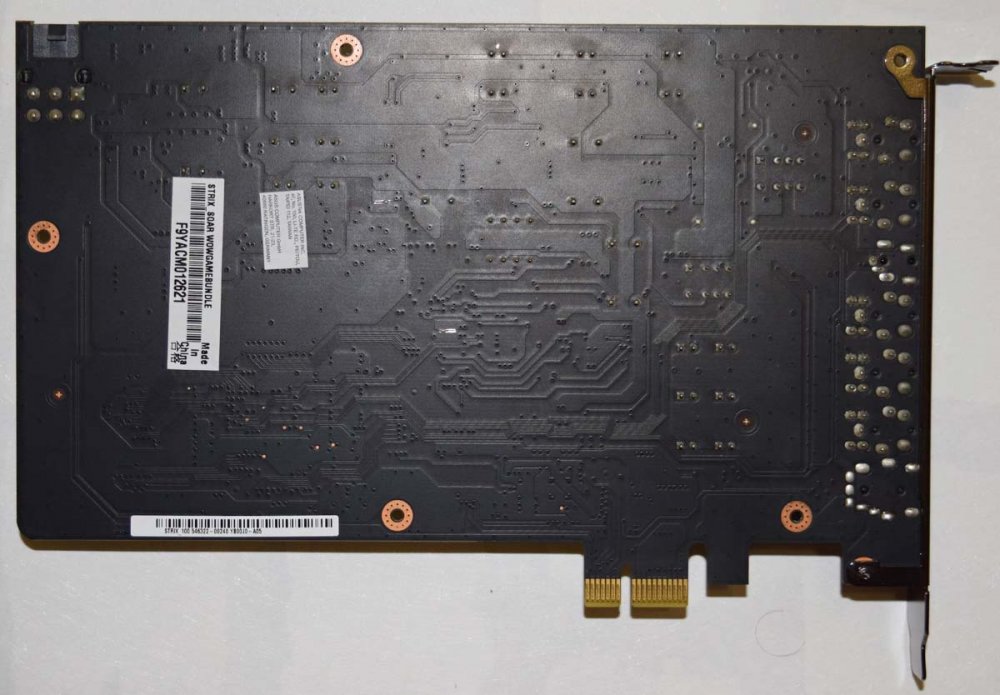 Она имеет интерфейс PCI-Express x1.
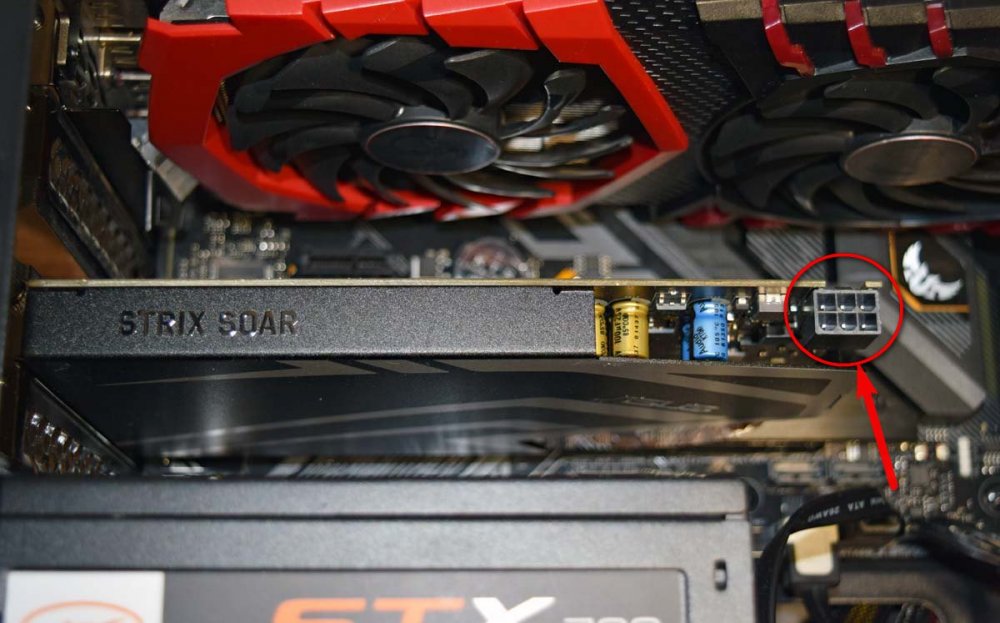
 Подключается карта через разъём на 6 контактов для внешнего питания, такой же, как для подключения видеокарты.
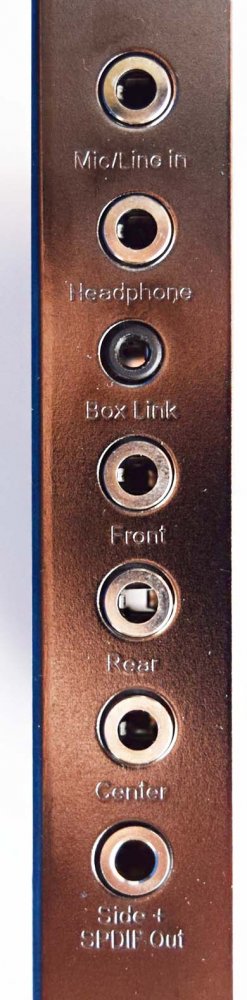
 С задней стороны доступны 5 разъёмов 3.5 мм, один аналоговый вход 3.5 мм и оптический выход S/PDIF. В главе карты стоит C-Media CM6632AX, аудиопроцессор, с поддержкой 5 синхронных I²S-выходов (8+2) и два синхронных I²S-входа (2+2). Основой карточки является ЦАП ESS SABRE9006A. Это 8-канальная 24-битная микросхема в линейке производителя с очень хорошими характеристиками. Динамический диапазон 120 децибел. Соотношение сигнал-шум – 116 децибел для линейного входа и 110 децибел для выхода наушников. На линейном входе также – 110 децибел. За усилительную часть отвечают микросхема и операционный усилитель от Texas Instruments TPA6120A2, кстати, эту связку часто применяют и в более дорогих устройствах. Операционный усилитель, отвечающий за усиление выхода на наушники, установлен в разъём и есть возможность его замены без пайки, но есть ли смысл этим заниматься в устройствах этой ценовой категории – большой вопрос. Реализована поддержка наушников с импедансом до 600 Ом, достигнуто это за счёт усилителя TI TPA6120A2, который часто ставят в профессиональное аудиооборудование.
 Особо хочется отметить использование высококачественных аудио конденсаторов Nichicon FG в аналоговом тракте. В цифровой части по питанию также используются конденсаторы Nichicon, но из более бюджетных серий. Реле NEC TOKIN UC2В позволяет избавиться от посторонних звуков, которые возникают при включении и выключении ПК, если на колонки уже подано питание. В целом начинка карточки создаёт крайне приятное впечатление. Asio 2.2 также имеется в наличии. Средняя задержка составляет около 1000 миллисекунд, а максимальной 1550 миллисекунд, что нельзя назвать хорошим результатом. Однако все это мелочи на фоне другой, более серьёзной проблемы. Некоторые пользователи жалуются, что периодически из левого наушника проскакивает небольшой треск, а при запуске любой игры наушники начинают транслировать звук дросселей видеокарты.
Стоит также сказать несколько слов по приложению Sonic studio, которое позволяет полностью управлять звуковой картой, режимами, эквалайзером и эффектами. Здесь можно выбрать и индивидуально настроить любой из десяти профилей. Предустановленные настройки эквалайзера обещают улучшить воспроизведение и запись. Программа позволяет также создать окружение и включить разного типа реверберации. Также можно настроить громкость каждого канала. Все необходимые настройки находятся в одном единственном окне и запутаться в интерфейсе просто невозможно.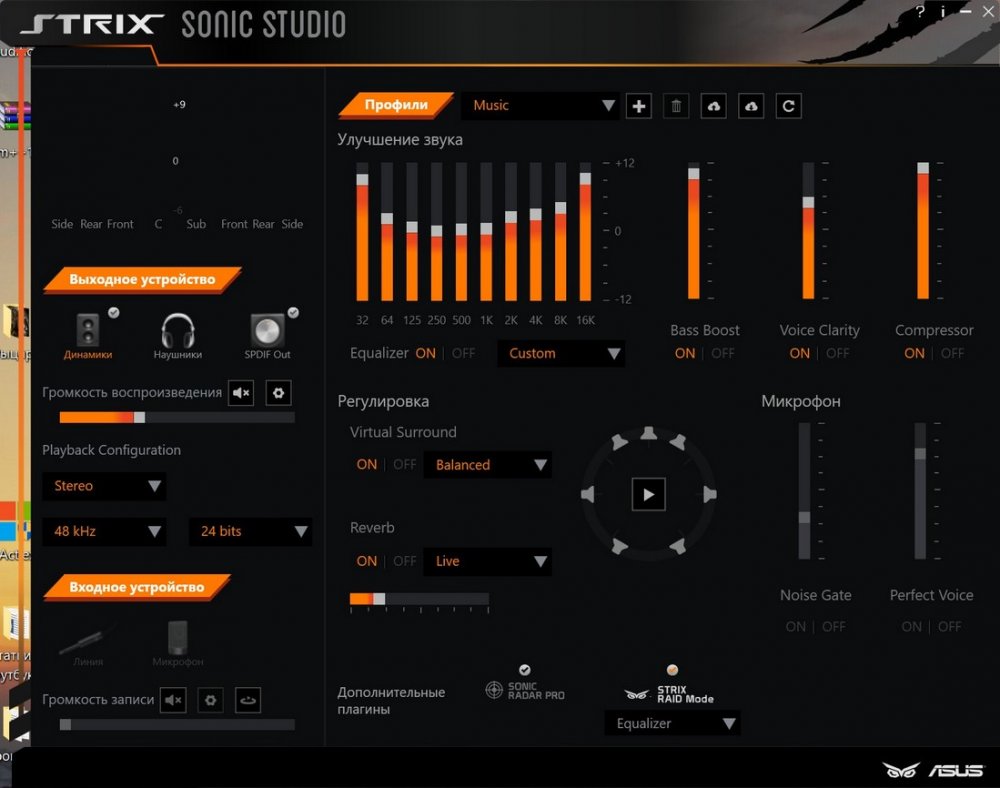
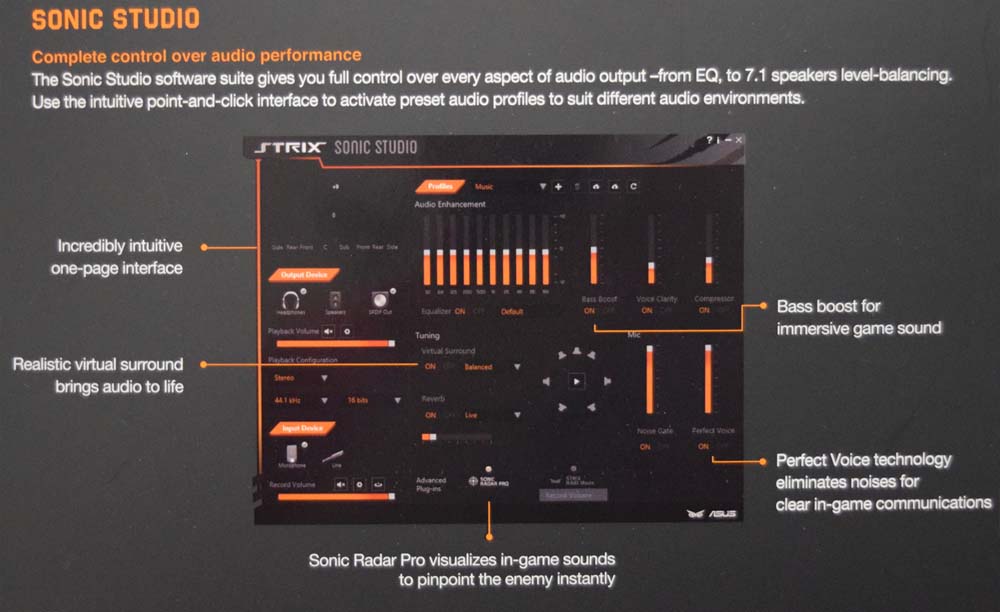 Звук в наушниках имеет очень классную проработку деталей, но при этом в звуке нет утомляющей стерильности или раздражающих перекосов, которые свойственны студийным интерфейсам. Даже при прослушивании на минимальной громкости присутствуют детали и приятный бас, а звуки не смешиваются в кучу. Хочется отметить большой запас по мощности усилителя. В играх очень радует позиционирование, то есть слышно, кто с какой стороны бежит и где стреляет. Реализовано это с помощью системы ASUS Sonic Radar Pro. В общем звуковая карта может обеспечить объёмный и приятный звук. Естественно, можно настроить каждый вид звуков по отдельности. Ещё один существенный недостаток — это необходимость тянуть кабель наушников в заднюю часть корпуса, но эта проблема актуальна для всех внутренних карточек и решается качественным удлинителем. Также, как отмечают некоторые пользователи, есть проблемы с драйверами, в некоторых играх пропадает звук, особенно в связке с Windows 10.
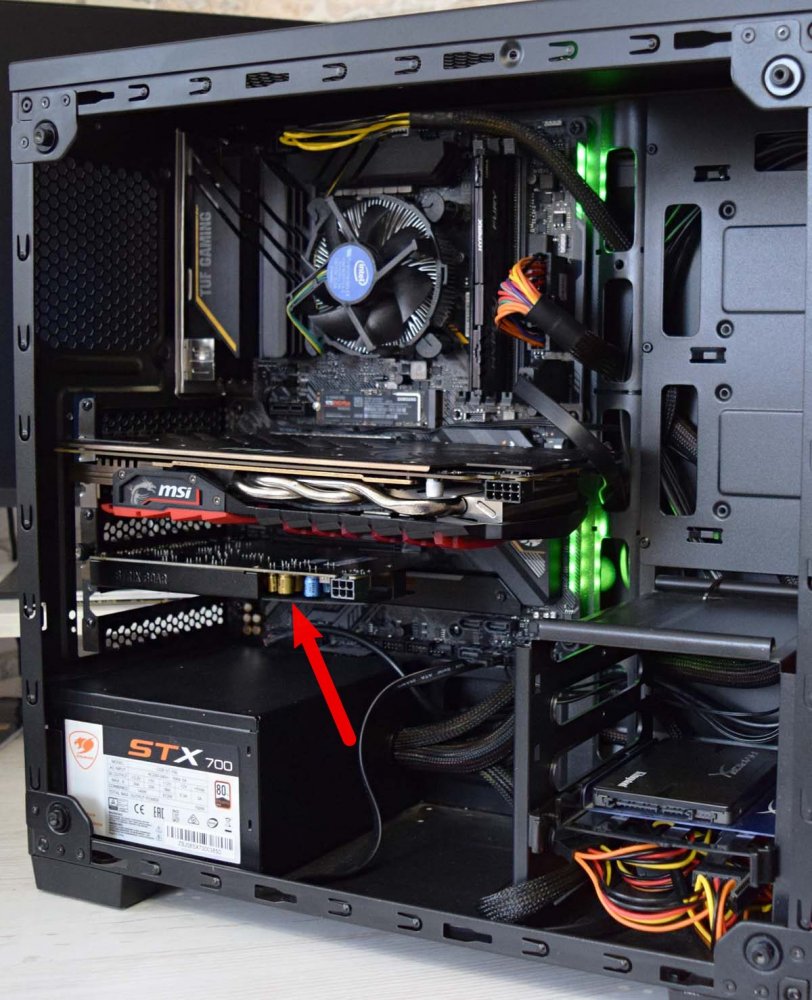 Однозначный вывод сделать сложно, с одной стороны эта карточка за сравнительно небольшие деньги является отличным вариантом, можно даже сказать, что при стоимости около 7 тысяч рублей, эту карту можно считать лучшим выбором по соотношению цена-качество. Но только в том случае, если на вашей системе не проявляются описанные проблемы. А с другой стороны, нужна ли она вам?
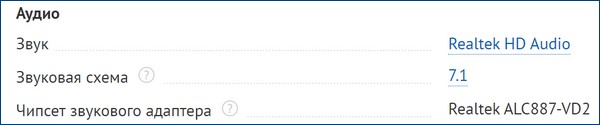
Что особенно хочется донести до читателя, так это то, что мы советуем к покупке эту карту, если у вас материнская плата со слабой встроенной звуковухой. В 2021 году множество карт уже имеют встроенную 7.1-канальную объёмную звуковую схему и по качеству не уступающую дискретным аудиопроцессорам. Например, если у вас уже имеется или вы планируете к покупке материнскую плату ASUS TUF B450-PLUS GAMING, ASUS PRIME B450-PLUS или почти любую другую такого уровня, то звуковая карта Asus Strix Soar будет почти бесполезна, звук у них практически одинаков.