

Version 1.0
Published December 2018
Copyright©2018 ASRock INC. All rights reserved.
Copyright Notice:
No part of this documentation may be reproduced, transcribed, transmitted, or translated in any language, in any form or by any means, except duplication of documentation by the purchaser for backup purpose, without written consent of ASRock Inc.
Products and corporate names appearing in this documentation may or may not be registered trademarks or copyrights of their respective companies, and are used only for identification or explanation and to the owners’ benefit, without intent to
infringe.
Disclaimer:
Specifications and information contained in this documentation are furnished for informational use only and subject to change without notice, and should not be constructed as a commitment by ASRock. ASRock assumes no responsibility for any errors or omissions that may appear in this documentation.
With respect to the contents of this documentation, ASRock does not provide warranty of any kind, either expressed or implied, including but not limited to the implied warranties or conditions of merchantability or fitness for a particular purpose.
In no event shall ASRock, its directors, officers, employees, or agents be liable for any indirect, special, incidental, or consequential damages (including damages for loss of profits, loss of business, loss of data, interruption of business and the like), even if ASRock has been advised of the possibility of such damages arising from any defect or error in the documentation or product.
This device complies with Part 15 of the FCC Rules. Operation is subject to the following two conditions:
(1)this device may not cause harmful interference, and
(2)this device must accept any interference received, including interference that may cause undesired operation.
CALIFORNIA, USA ONLY
The Lithium battery adopted on this motherboard contains Perchlorate, a toxic substance controlled in Perchlorate Best Management Practices (BMP) regulations passed by the California Legislature. When you discard the Lithium battery in California, USA, please follow the related regulations in advance.
“Perchlorate Material-special handling may apply, see www.dtsc.ca.gov/hazardouswaste/ perchlorate”
ASRock Website: http://www.asrock.com

AUSTRALIA ONLY
Our goods come with guarantees that cannot be excluded under the Australian Consumer Law. You are entitled to a replacement or refund for a major failure and compensation for any other reasonably foreseeable loss or damage caused by our goods. You are also entitled to have the goods repaired or replaced if the goods fail to be of acceptable quality and the failure does not amount to a major failure. If you require assistance please call ASRock Tel : +886-2-28965588 ext.123 (Standard International call charges apply)
The terms HDMI® and HDMI High-Definition Multimedia Interface, and the HDMI logo are trademarks or registered trademarks of HDMI Licensing LLC in the United States and other countries.

B365 Phantom Gaming 4
Motherboard Layout
|
/Mous Keyboard e |
PS2 |
USB: 2 |
USBT: US2 .B 1 0 |
|
|
HDMI1 |
||||
|
DP1 |
||||
|
USB 3.1 Gen1 |
||||
|
T: USB1 |
||||
|
B: USB2 |
||||
|
USB 3.1 Gen2 |
||||
|
T: USB31_TA_1 |
||||
|
B: USB31_TC_1 |
||||
|
USB 3.1 Gen1 |
Top: |
|||
|
T: USB3 |
RJ-45 |
|||
|
B: USB4 |
||||
|
27 |
||||
|
SPDIF Optical Bottom: |
REARSPK |
Center: |
Central/Bass |
Top: |
|
MI Bottom: CIN |
FRONT |
Center: |
LINEIN |
Top: |
|
26 |
LAN
USB 3.1 Gen2
CPU_FAN1
|
module) |
module) |
module) |
module) |
|||
|
(64A1DDR4bit,288-pin |
(64A2DDR4bit,288-pin |
(64B1DDR4bit,288-pin |
(64B2DDR4bit,288-pin |
ATXPWR1 |
6 |
|
|
CHA_FAN2/ |
CPU_FAN2/ |
|
WP |
WP |
LAN
B365 Phantom Gaming 4
|
5 6 |
7 |
|
|
M2 1 |
USB3 |
|
|
Ultra M.2 |
1 |
|
|
PCIe Gen3 x4 |
AUDIO
CODEC
25
HD_AUDIO1
1
PCIE3
1 

T B1
|
M2_2 |
CPU |
10 |
|||||||||
|
DRAM |
|||||||||||
|
PCIE4 |
VGA |
||||||||||
|
BOOT |
|||||||||||
|
RoHS |
SPK_PLED1 |
BIOS |
|||||||||
|
ROM |
|||||||||||
|
COM1 |
CHA_FAN1/ CHA_FAN3/ |
1 |
SATA3_5 |
SATA3_4 |
|||||||
|
WP |
WP |
USB_3_4 |
USB_5_6 |
PLED PWRBTN |
|||||||
|
TPMS1 1 |
ADDR_LED1 |
RGB_LED1 |
CLRMOS1 |
||||||||
|
1 |
1 |
1 |
1 |
1 |
1 |
1 |
|||||
|
HDLED RESET |
|||||||||||
|
PANEL1 |
|
24 |
23 |
22 |
21 |
20 |
19 |
18 |
17 |
16 |
15 |
14 |
13 |
12 |
11 |
English
1

No. Description
1ATX 12V Power Connector (ATX12V1)
2CPU Fan Connector (CPU_FAN1)
32 x 288-pin DDR4 DIMM Slots (DDR4_A1, DDR4_B1)
42 x 288-pin DDR4 DIMM Slots (DDR4_A2, DDR4_B2)
5RGB LED Header (RGB_LED2)
6ATX Power Connector (ATXPWR1)
7USB 3.1 Gen1 Header (USB3_5_6)
8SATA3 Connectors (SATA3_2_3)
9SATA3 Connectors (SATA3_0_1)
10Post Status Checker (PSC)
11SATA3 Connector (SATA3_4)
12SATA3 Connector (SATA3_5)
13System Panel Header (PANEL1)
14Power LED and Speaker Header (SPK_PLED1)
15Clear CMOS Jumper (CLRMOS1)
16USB 2.0 Header (USB_5_6)
17USB 2.0 Header (USB_3_4)
18Chassis/Water Pump Fan Connector (CHA_FAN3/WP)
19Chassis/Water Pump Fan Connector (CHA_FAN1/WP)
20RGB LED Header (RGB_LED1)
21Addressable LED Header (ADDR_LED1)
22COM Port Header (COM1)
23TPM Header (TPMS1)
24Front Panel Audio Header (HD_AUDIO1)
25Thunderbolt AIC Connector (TB1)
26Chassis/Water Pump Fan Connector (CHA_FAN2/WP)
27CPU/Water Pump Fan Connector (CPU_FAN2/WP)
English
2

B365 Phantom Gaming 4
I/O Panel
|
3 |
5 |
||||||||||||||||||||||
|
1 |
2 |
4 |
6 |
||||||||||||||||||||
|
15 |
14 |
13 |
12 |
10 |
9 |
8 |
7 |
||||||||||||||||
|
11 |
|||||||||||||||||||||||
|
No. |
Description |
No. |
Description |
||||||||||||||||||||
|
1 |
USB 2.0 Ports (USB_1_2) |
9 |
USB 3.1 Gen1 Ports (USB3_3_4) |
||||||||||||||||||||
|
2 |
LAN RJ-45 Port* |
10 |
USB 3.1 Gen2 Type-A Port (USB31_TA_1) |
||||||||||||||||||||
|
3 |
Central / Bass (Orange) |
11 |
USB 3.1 Gen2 Type-C Port (USB31_TC_1) |
||||||||||||||||||||
|
4 |
Rear Speaker (Black) |
12 |
USB 3.1 Gen1 Ports (USB3_1_2) |
||||||||||||||||||||
|
5 |
Line In (Light Blue) |
13 |
DisplayPort 1.2 |
||||||||||||||||||||
|
6 |
Front Speaker (Lime)** |
14 |
HDMI Port |
||||||||||||||||||||
|
7 |
Microphone (Pink) |
15 |
PS/2 Mouse/Keyboard Port |
||||||||||||||||||||
|
8 |
Optical SPDIF Out Port |
||||||||||||||||||||||
English
3

*There are two LEDs on each LAN port. Please refer to the table below for the LAN port LED indications.
ACT/LINK LED SPEED LED
|
LAN Port |
||||||
|
Activity / Link LED |
Speed LED |
|||||
|
Status |
Description |
Status |
Description |
|||
|
Off |
No Link |
Off |
10Mbps connection |
|||
|
Blinking |
Data Activity |
Orange |
100Mbps connection |
|||
|
On |
Link |
Green |
1Gbps connection |
|||
** If you use a 2-channel speaker, please connect the speaker’s plug into “Front Speaker Jack”. See the table below for connection details in accordance with the type of speaker you use.
|
Audio Output |
Front Speaker |
Rear Speaker |
Central / Bass |
Line In |
|
Channels |
(No.6) |
(No. 4) |
(No. 3) |
(No. 5) |
|
2 |
V |
— |
— |
— |
|
4 |
V |
V |
— |
— |
|
6 |
V |
V |
V |
— |
|
8 |
V |
V |
V |
V |
English
4

B365 Phantom Gaming 4
Chapter 1 Introduction
Thank you for purchasing ASRock B365 Phantom Gaming 4 motherboard, a reliable motherboard produced under ASRock’s consistently stringent quality control.
It delivers excellent performance with robust design conforming to ASRock’s commitment to quality and endurance.
Because the motherboard specifications and the BIOS software might be updated, the content of this documentation will be subject to change without notice. In case any modifications of this documentation occur, the updated version will be available on ASRock’s website without further notice. If you require technical support related to this motherboard, please visit our website for specific information about the model you are using. You may find the latest VGA cards and CPU support list on ASRock’s website as well. ASRock website http://www.asrock.com.
1.1 Package Contents
•ASRock B365 Phantom Gaming 4 Motherboard (ATX Form Factor)
•ASRock B365 Phantom Gaming 4 Quick Installation Guide
•ASRock B365 Phantom Gaming 4 Support CD
•1 x I/O Panel Shield
•2 x Serial ATA (SATA) Data Cables (Optional)
•3 x Screws for M.2 Socket (Optional)
•1 x Standoff for M.2 Socket (Optional)
English
5

English
1.2 Specifications
|
Platform |
• |
ATX Form Factor |
|
CPU |
• |
Supports 9th and 8th Gen Intel® CoreTM Processors (Socket |
|
1151) |
||
|
• Supports CPU up to 95W |
||
|
• |
Digi Power design |
|
|
• 8 Power Phase design |
||
|
• Supports Intel® Turbo Boost 2.0 Technology |
||
|
Chipset |
• |
Intel® B365 |
|
Memory |
• |
Dual Channel DDR4 Memory Technology |
|
• 4 x DDR4 DIMM Slots |
||
|
• Supports DDR4 2666/2400/2133 non-ECC, un-buffered |
||
|
memory |
||
|
• Supports ECC UDIMM memory modules (operate in non- |
||
|
ECC mode) |
||
|
• Max. capacity of system memory: 128GB |
||
|
• Supports Intel® Extreme Memory Profile (XMP) 2.0 |
||
|
• 15μ Gold Contact in DIMM Slots |
||
|
Expansion |
• |
2 x PCI Express 3.0 x16 Slots (PCIE1/PCIE3: single at x16 |
|
Slot |
(PCIE1); dual at x16 (PCIE1) / x4 (PCIE3)) |
|
|
* If PCIE2 or PCIE4 is occupied, PCIE3 will downgrade to x2 |
||
|
mode. |
||
|
* Supports NVMe SSD as boot disks |
||
|
• 2 x PCI Express 3.0 x1 Slots (Flexible PCIe) |
||
|
• Supports AMD Quad CrossFireXTM and CrossFireXTM |
||
|
• 1 x M.2 Socket (Key E), supports type 2230 WiFi/BT module |
||
|
• 15μ Gold Contact in VGA PCIe Slot (PCIE1) |
||
|
Graphics |
• |
Intel® UHD Graphics Built-in Visuals and the VGA outputs |
|
can be supported only with processors which are GPU |
||
|
integrated. |
6

B365 Phantom Gaming 4
|
• Supports Intel® UHD Graphics Built-in Visuals : Intel® |
||
|
Quick Sync Video with AVC, MVC (S3D) and MPEG-2 Full |
||
|
HW Encode1, Intel® InTruTM 3D, Intel® Clear Video HD |
||
|
Technology, Intel® InsiderTM, Intel® UHD Graphics |
||
|
• |
DirectX 12 |
|
|
• HWAEncode/Decode: AVC/H.264, HEVC/H.265 8-bit, |
||
|
HEVC/H.265 10-bit, VP8, VP9 8-bit, VP9 10-bit (Decode |
||
|
only), MPEG2, MJPEG, VC-1 (Decode only) |
||
|
• Dual graphics outputs: HDMI and DisplayPort 1.2 |
||
|
• Supports HDMI 1.4 with max. resolution up to 4K x 2K |
||
|
(4096×2160) @ 30Hz |
||
|
• Supports DisplayPort 1.2 with max. resolution up to 4K x 2K |
||
|
(4096×2304) @ 60Hz |
||
|
• Supports Auto Lip Sync, Deep Color (12bpc), xvYCC and |
||
|
HBR (High Bit Rate Audio) with HDMI Port 1.4 (Compliant |
||
|
HDMI monitor is required) |
||
|
• Supports HDCP 2.2 with HDMI 1.4 and DisplayPort 1.2 |
||
|
Ports |
||
|
• Supports 4K Ultra HD (UHD) playback with HDMI 1.4 and |
||
|
DisplayPort 1.2 Ports |
||
|
Audio |
• |
7.1 CH HD Audio with Content Protection (Realtek |
|
ALC1200 Audio Codec) |
||
|
• Premium Blu-ray Audio support |
||
|
• |
Supports Surge Protection |
|
|
• |
PCB Isolate Shielding |
|
|
• |
Gold Audio Jacks |
|
|
• |
Supports DTS Connect |
|
|
LAN |
• |
Gigabit LAN 10/100/1000 Mb/s |
|
• Giga PHY Intel® I219V |
||
|
• Supports Wake-On-LAN |
||
|
• |
Supports Lightning/ESD Protection |
|
|
• Supports Energy Efficient Ethernet 802.3az |
||
|
• |
Supports PXE |
English
7

English
|
Rear Panel |
• 1 x PS/2 Mouse/Keyboard Port |
|
I/O |
• 1 x HDMI Port |
|
• 1 x DisplayPort 1.2 |
|
|
• 1 x Optical SPDIF Out Port |
|
|
• 2 x USB 2.0 Ports (Supports ESD Protection) |
|
|
• 1 x USB 3.1 Gen2 Type-A Port (10 Gb/s) (Supports ESD |
|
|
Protection) |
|
|
• 1 x USB 3.1 Gen2 Type-C Port (10 Gb/s) (Supports ESD |
|
|
Protection) |
|
|
• 4 x USB 3.1 Gen1 Ports (Supports ESD Protection) |
|
|
• 1 x RJ-45 LAN Port with LED (ACT/LINK LED and SPEED |
|
|
LED) |
|
|
• HD Audio Jacks: Rear Speaker / Central / Bass / Line in / |
|
|
Front Speaker / Microphone (Gold Audio Jacks) |
|
|
Storage |
• 6 x SATA3 6.0 Gb/s Connectors, support RAID (RAID 0, |
|
RAID 1, RAID 5, RAID 10, Intel Rapid Storage Technology |
|
|
17), NCQ, AHCI and Hot Plug* |
*If M2_1 is occupied by a SATA-type M.2 device, SATA3_0 will be disabled.
•1 x Ultra M.2 Socket (M2_1), supports M Key type 2230/2242/2260/2280 M.2 SATA3 6.0 Gb/s module and M.2 PCI Express module up to Gen3 x4 (32 Gb/s)**
•1 x Ultra M.2 Socket (M2_2), supports M Key type 2230/2242/2260/2280/22110 M.2 PCI Express module up to Gen3 x4 (32 Gb/s)**
**Supports Intel® OptaneTM Technology
**Supports NVMe SSD as boot disks
**Supports ASRock U.2 Kit
|
Connector |
• 1 x COM Port Header |
•1 x TPM Header
•1 x Power LED and Speaker Header
•2 x RGB LED Headers
*Support in total up to 12V/3A, 36W LED Strip
•1 x Addressable LED Header
*Supports in total up to 5V/3A, 15W LED Strip
•1 x CPU Fan Connector (4-pin)
*The CPU Fan Connector supports the CPU fan of maximum 1A (12W) fan power.
8

B365 Phantom Gaming 4
•1 x CPU/Water Pump Fan Connector (4-pin) (Smart Fan Speed Control)
*The CPU/Water Pump Fan supports the water cooler fan of maximum 2A (24W) fan power.
•3 x Chassis/Water Pump Fan Connectors (4-pin) (Smart Fan Speed Control)
*The Chassis/Water Pump Fan supports the water cooler fan of maximum 2A (24W) fan power.
*CPU_FAN2/WP, CHA_FAN1/WP, CHA_FAN2/WP and CHA_FAN3/WP can auto detect if 3-pin or 4-pin fan is in use.
•1 x 24 pin ATX Power Connector
•1 x 8 pin 12V Power Connector
•1 x Front Panel Audio Connector
•1 x Thunderbolt AIC Connector (5-pin)
•2 x USB 2.0 Headers (Support 4 USB 2.0 ports) (Supports ESD Protection)
•1 x USB 3.1 Gen1 Header (Supports 2 USB 3.1 Gen1 ports) (Supports ESD Protection)
|
BIOS |
• |
AMI UEFI Legal BIOS with multilingual GUI support |
|
Feature |
• |
ACPI 6.0 Compliant wake up events |
|
• |
SMBIOS 2.7 Support |
|
|
• CPU, GT, DRAM, PCH 1.0V, VCCST Voltage Multi-adjust- |
||
|
ment |
||
|
Hardware |
• |
Temperature Sensing: CPU, CPU/Water Pump, Chassis/Wa- |
|
Monitor |
ter Pump Fans |
|
|
• Fan Tachometer: CPU, CPU/Water Pump, Chassis/Water |
||
|
Pump Fans |
||
|
• Quiet Fan (Auto adjust chassis fan speed by CPU tempera- |
||
|
ture): CPU, CPU/Water Pump, Chassis/Water Pump Fans |
||
|
• Fan Multi-Speed Control: CPU, CPU/Water Pump, Chassis/ |
||
|
Water Pump Fans |
||
|
• Voltage monitoring: +12V, +5V, +3.3V, CPU Vcore, DRAM, |
||
|
VPPM, PCH 1.0V, VCCSA, VCCST |
||
|
OS |
• |
Microsoft® Windows® 10 64-bit |
English
9

Chapter 2 Installation
This is a ATX form factor motherboard. Before you install the motherboard, study the configuration of your chassis to ensure that the motherboard fits into it.
Pre-installation Precautions
Take note of the following precautions before you install motherboard components or change any motherboard settings.
•Make sure to unplug the power cord before installing or removing the motherboard components. Failure to do so may cause physical injuries and damages to motherboard components.
•In order to avoid damage from static electricity to the motherboard’s components, NEVER place your motherboard directly on a carpet. Also remember to use a grounded wrist strap or touch a safety grounded object before you handle the components.
•Hold components by the edges and do not touch the ICs.
•Whenever you uninstall any components, place them on a grounded anti-static pad or in the bag that comes with the components.
•When placing screws to secure the motherboard to the chassis, please do not overtighten the screws! Doing so may damage the motherboard.
English
10

B365 Phantom Gaming 4
2.1Installing the CPU
1.Before you insert the 1151-Pin CPU into the socket, please check if the PnP cap is on the socket, if the CPU surface is unclean, or if there are any bent pins in the socket. Do not force to insert the CPU into the socket if above situation is found. Otherwise, the CPU will be seriously damaged.
2.Unplug all power cables before installing the CPU.
1
A
 B
B
2
English
11

12

B365 Phantom Gaming 4
Please save and replace the cover if the processor is removed. The cover must be placed if you wish to return the motherboard for after service.
English
13
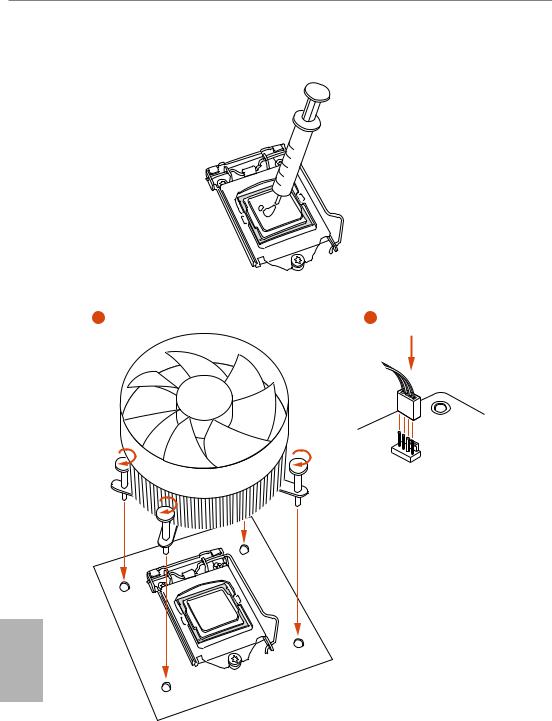
2.2 Installing the CPU Fan and Heatsink
N _FA PU C
English
14

B365 Phantom Gaming 4
2.3 Installing Memory Modules (DIMM)
This motherboard provides four 288-pin DDR4 (Double Data Rate 4) DIMM slots, and supports Dual Channel Memory Technology.
1.For dual channel configuration, you always need to install identical (the same brand, speed, size and chip-type) DDR4 DIMM pairs.
2.It is unable to activate Dual Channel Memory Technology with only one or three memory module installed.
3.It is not allowed to install a DDR, DDR2 or DDR3 memory module into a DDR4 slot; otherwise, this motherboard and DIMM may be damaged.
Dual Channel Memory Configuration
|
Priority |
DDR4_A1 |
DDR4_A2 |
DDR4_B1 |
DDR4_B2 |
|
1 |
Populated |
Populated |
||
|
2 |
Populated |
Populated |
Populated |
Populated |
The DIMM only fits in one correct orientation. It will cause permanent damage to the motherboard and the DIMM if you force the DIMM into the slot at incorrect orientation.
English
15

16

B365 Phantom Gaming 4
2.4 Expansion Slots (PCI Express Slots)
There are 4 PCI Express slots on the motherboard.
Before installing an expansion card, please make sure that the power supply is switched off or the power cord is unplugged. Please read the documentation of the expansion card and make necessary hardware settings for the card before you start the installation.
PCIe slots:
PCIE1 (PCIe 3.0 x16 slot) is used for PCI Express x16 lane width graphics cards. PCIE2 (PCIe 3.0 x1 slot) is used for PCI Express x1 lane width cards.
PCIE3 (PCIe 3.0 x16 slot) is used for PCI Express x4 lane width graphics cards. PCIE4 (PCIe 3.0 x1 slot) is used for PCI Express x1 lane width cards.
* If PCIE2 or PCIE4 is occupied, PCIE3 will downgrade to x2 mode.
PCIe Slot Configurations
|
PCIE1 |
PCIE3 |
||
|
Single Graphics Card |
x16 |
N/A |
|
|
Two Graphics Cards in |
x16 |
x4 |
|
|
CrossFireXTM Mode |
|||
For a better thermal environment, please connect a chassis fan to the motherboard’s chassis fan connector (CHA_FAN1/WP, CHA_FAN2/WP or CHA_FAN3/WP) when using multiple graphics cards.
English
17

2.5 Jumpers Setup
The illustration shows how jumpers are setup. When the jumper cap is placed on the pins, the jumper is “Short”. If no jumper cap is placed on the pins, the jumper is “Open”.
|
Clear CMOS Jumper |
Short: Clear CMOS |
|
|
(CLRCMOS1) |
2-pin Jumper |
Open: Default |
|
(see p.1, No. 15) |
||
CLRCMOS1 allows you to clear the data in CMOS. The data in CMOS includes system setup information such as system password, date, time, and system setup parameters. To clear and reset the system parameters to default setup, please turn off the computer and unplug the power cord, then use a jumper cap to short the pins on CLRCMOS1 for 3 seconds. Please remember to remove the jumper cap after clearing the CMOS. If you need to clear the CMOS when you just finish updating the BIOS, you must boot up the system first, and then shut it down before you do the clear-CMOS action.
English
18

B365 Phantom Gaming 4
2.6 Onboard Headers and Connectors
Onboard headers and connectors are NOT jumpers. Do NOT place jumper caps over these headers and connectors. Placing jumper caps over the headers and connectors will cause permanent damage to the motherboard.
System Panel Header
(9-pin PANEL1)
(see p.1, No. 13)
PLED+ PLED-
PWRBTN#
GND
1
GND RESET#
GND HDLED-
HDLED+
Connect the power button, reset button and system status indicator on the chassis to this header according to the pin assignments below. Note the positive and negative pins before connecting the cables.
PWRBTN (Power Button):
Connect to the power button on the chassis front panel. You may configure the way to turn off your system using the power button.
RESET (Reset Button):
Connect to the reset button on the chassis front panel. Press the reset button to restart the computer if the computer freezes and fails to perform a normal restart.
PLED (System Power LED):
Connect to the power status indicator on the chassis front panel. The LED is on when the system is operating. The LED keeps blinking when the system is in S1/S3 sleep state. The LED is off when the system is in S4 sleep state or powered off (S5).
HDLED (Hard Drive Activity LED):
Connect to the hard drive activity LED on the chassis front panel. The LED is on when the hard drive is reading or writing data.
The front panel design may differ by chassis. A front panel module mainly consists of power button, reset button, power LED, hard drive activity LED, speaker and etc. When connecting your chassis front panel module to this header, make sure the wire assignments and the pin assignments are matched correctly.
English
19

Power LED and Speaker
Header
(7-pin SPK_PLED1)
(see p.1, No. 14)
SPEAKER
DUMMY DUMMY +5V
1
PLED+
PLED+ PLED-
Please connect the chassis power LED and the chassis speaker to this header.
Serial ATA3 Connectors (SATA3_0_1:
see p.1, No. 9) (SATA3_2_3: see p.1, No.  (SATA3_4: see p.1, No. 11) (SATA3_5: see p.1, No. 12)
|
SATA3 2 |
SATA3 3 |
|
SATA3 0 |
SATA3 1 |
SATA3_5 SATA3_4
These six SATA3 connectors support SATA data cables for internal storage devices with up to 6.0 Gb/s data transfer rate. * If M2_1 is occupied by a SATA-type M.2 device, SATA3_0 will be disabled.
USB 2.0 Headers
(9-pin USB_3_4)
(see p.1, No. 17)
(9-pin USB_5_6)
(see p.1, No. 16)
USB_PWR
P- P+ GND DUMMY
1
GND
USBP_—PWRP+
There are two headers on this motherboard. Each USB 2.0 header can support two ports.
USB 3.1 Gen1 Header
(19-pin USB3_5_6)
(see p.1, No. 7)
Vbus
IntA_PA_SSRX-
IntA_PA_SSRX+
GND
IntA_PA_SSTX-
IntA_PA_SSTX+
GND
IntA_PA_D-
IntA_PA_D+
Vbus
IntA_PB_SSRX-
IntA_PB_SSRX+
GND
IntA_PB_SSTX-
IntA_PB_SSTX+
GND
IntA_PB_D-
IntA_PB_D+
Dummy
1
There is one header on this motherboard. This USB 3.1 Gen1 header can support two ports.
English
20

Front Panel Audio Header
(9-pin HD_AUDIO1)
(see p.1, No. 24)
GND PRESENCE#
MIC_RET
OUT_RET
1


OUT2_L J_SENSE
OUT2_R MIC2_R
MIC2_L
B365 Phantom Gaming 4
This header is for connecting audio devices to the front audio panel.
1.High Definition Audio supports Jack Sensing, but the panel wire on the chassis must support HDA to function correctly. Please follow the instructions in our manual and chassis manual to install your system.
2.If you use an AC’97 audio panel, please install it to the front panel audio header by the steps below:
A.Connect Mic_IN (MIC) to MIC2_L.
B.Connect Audio_R (RIN) to OUT2_R and Audio_L (LIN) to OUT2_L.
C.Connect Ground (GND) to Ground (GND).
D.MIC_RET and OUT_RET are for the HD audio panel only. You don’t need to connect them for the AC’97 audio panel.
E.To activate the front mic, go to the “FrontMic” Tab in the Realtek Control panel and adjust “Recording Volume”.
Chassis/Water Pump Fan
Connectors
(4-pin CHA_FAN1/WP)
(see p.1, No. 19)
(4-pin CHA_FAN2/WP)
(see p.1, No. 26)
(4-pin CHA_FAN3/WP)
(see p.1, No. 18)
4 3 2 1
FAN_SPEED_CONTROL
CHA_FAN_SPEED FAN_VOLTAGE
GND
This motherboard provides three 4-Pin water cooling chassis fan connectors. If you plan to connect a 3-Pin chassis water cooler fan, please connect it to Pin 1-3.
CPU Fan Connector
(4-pin CPU_FAN1)
(see p.1, No. 2)
FAN_SPEED_CONTROL CPU_FAN_SPEED FAN_VOLTAGE
GND
1 2 3 4
This motherboard provides a 4-Pin CPU fan (Quiet Fan) connector. If you plan to connect a 3-Pin CPU fan, please connect it to Pin 1-3.
English
21

English
CPU/Water Pump Fan
Connector
(4-pin CPU_FAN2/WP)
(see p.1, No. 27)
4 3 2 1
GND FAN_VOLTAGE
CPU_FAN_SPEED FAN_SPEED_CONTROL
This motherboard provides a 4-Pin water cooling CPU fan connector. If you plan to connect a 3-Pin CPU water cooler fan, please connect it to Pin 1-3.
ATX Power Connector
12 24
(24-pin ATXPWR1)
(see p.1, No. 6)
1 13
This motherboard provides a 24-pin ATX power connector. To use a 20-pin ATX power supply, please plug it along Pin 1 and Pin 13.
ATX 12V Power
Connector
(8-pin ATX12V1)
(see p.1, No. 1)
This motherboard provides an 8-pin ATX 12V power connector. To use a 4-pin ATX power supply, please plug it along Pin 1 and Pin 5.
|
Thunderbolt AIC |
Please connect a Thunderbolt™ |
||||||||
|
Connectors |
add-in card (AIC) to the |
||||||||
|
(5-pin TB1) |
Thunderbolt AIC connector via |
||||||||
|
(see p.1, No. 25) |
the GPIO cable. |
||||||||
|
*Please install the Thunderbolt™ |
|||||||||
|
AIC card to PCIE3 (default |
|||||||||
|
slot). |
|||||||||
|
Serial Port Header |
DDTR#1 |
This COM1 header |
|||||||
|
RRXD1 |
|||||||||
|
(9-pin COM1) |
DDSR#1 |
supports a serial port |
|||||||
|
CCTS#1 |
|||||||||
|
(see p.1, No. 22) |
1 |
RRI#1 |
module. |
||||||
|
RRTS#1 |
|||||||||
|
GND |
|||||||||
|
TTXD1 |
|||||||||
|
DDCD#1 |
|||||||||
22

|
TPM Header |
# |
PCICLK |
||||||
|
GND |
+3VSB |
LAD0 |
LAD3 |
PCIRST |
FRAME |
|||
|
(17-pin TPMS1) |
+3V |
|||||||
|
(see p.1, No. 23) |
1 |
|||||||
|
GND |
SERIRQ# |
S PWRDWN# GND |
LAD1 |
LAD2 |
SMB DATA MAIN |
SMB CLK MAIN |
DGN |
|
|
RGB LED Headers |
1 |
|||||||
|
12V G |
R |
B |
(4-pin RGB_LED1)
(see p.1, No. 20)
(4-pin RGB_LED2)
(see p.1, No. 5)
|
Addressable LED Header |
1 |
||
|
(3-pin ADDR_LED1) |
GND |
||
|
(see p.1, No. 21) |
DO_ADDR |
||
|
VOUT |
B365 Phantom Gaming 4
This connector supports Trusted Platform Module (TPM) system, which can securely store keys, digital certificates, passwords, and data. A TPM system also helps enhance network security, protects digital identities, and ensures platform integrity.
These two RGB headers are used to connect RGB LED extension cable which allows
users to choose from various LED lighting effects.
Caution: Never install the RGB LED cable in the wrong orientation; otherwise, the cable may be damaged.
*Please refer to page 32 for further instructions on this header.
This header is used to connect Addressable LED extension cable which allows users to choose from various LED lighting effects.
Caution: Never install the Addressable LED cable in the wrong orientation; otherwise, the cable may be damaged.
*Please refer to page 33 for further instructions on this header.
English
23

2.7 Post Status Checker
Post Status Checker (PSC) diagnoses the computer when users power on the machine. It emits a red light to indicate whether the CPU, memory, VGA or storage is dysfunctional. The lights go off if the four mentioned above are functioning normally.
English
24

B365 Phantom Gaming 4
2.8 M.2 WiFi/BT Module Installation Guide
The M.2, also known as the Next Generation Form Factor (NGFF), is a small size and versatile card edge connector that aims to replace mPCIe and mSATA. The M.2 Socket (Key E) supports type 2230 WiFi/BT module.
Installing the WiFi/BT module
Step 1
Prepare a type 2230 WiFi/BT module and the screw.
Step 2
Find the nut location to be used.
PCB Length: 3cm
Module Type: Type2230
A
Step 3
Gently insert the WiFi/BT module into the M.2 slot. Please be aware that the module only fits in one orientation.
A
English
A 20o
25

Step 4
Tighten the screw with a screwdriver to secure the module into place. Please do not overtighten the screw as this might damage the module.
English
26

B365 Phantom Gaming 4
2.9M.2_SSD (NGFF) Module Installation Guide (M2_1 and M2_2)
The M.2, also known as the Next Generation Form Factor (NGFF), is a small size and versatile card edge connector that aims to replace mPCIe and mSATA. The Ultra M.2 Socket (M2_1) supports M Key type 2230/2242/2260/2280 M.2 SATA3 6.0 Gb/s module and M.2 PCI Express module up to Gen3 x4 (32 Gb/s). The M.2 Socket (M2_2) supports M Key type 2230/2242/2260/2280/22110 M.2 PCI Express module up to Gen3 x4 (32 Gb/s).
* If M2_1 is occupied by a SATA-type M.2 device, SATA3_0 will be disabled.
Installing the M.2_SSD (NGFF) Module
The following is an example of installing M.2_SSD (NGFF) module into the M2_2.
|
Step 1 |
|
|
Prepare a M.2_SSD (NGFF) module |
|
|
and the screw. |
|
|
5 |
Step 2 |
|
4 |
|
|
3 |
Depending on the PCB type and |
length of your M.2_SSD (NGFF) module, find the corresponding nut
location to be used.
2
1
E D C B A
|
No. |
1 |
2 |
3 |
4 |
5 |
|
Nut Location |
A |
B |
C |
D |
E |
|
PCB Length |
3cm |
4.2cm |
6cm |
8cm |
11cm |
|
Module Type |
Type2230 |
Type 2242 |
Type2260 |
Type 2280 |
Type 22110 |
English
27

|
1 |
Step 3 |
|
|
Before installing a M.2 (NGFF) SSD |
||
|
module, please loosen the screws to |
||
|
2 |
remove the M.2 heatsink. |
1
English
|
Step 4 |
|||||
|
Prepare the M.2 standoff that comes |
|||||
|
with the package. Then hand tighten |
|||||
|
the standoff into the desired nut |
|||||
|
location on the motherboard. Align |
|||||
|
E |
D |
C |
B |
A |
and gently insert the M.2 (NGFF) |
|
SSD module into the M.2 slot. Please |
|||||
|
be aware that the M.2 (NGFF) SSD |
|||||
|
module only fits in one orientation. |
|||||
|
E |
D |
C |
20o |
Step 5
Tighten the screw with a screwdriver to secure the module into place. Please do not overtighten the screw
E D
as this might damage the module.
28

B365 Phantom Gaming 4
M.2_SSD (NGFF) Module Support List (M2_1)
|
Vendor |
Interface |
P/N |
|
ADATA |
SATA3 |
AXNS330E-32GM-B |
|
ADATA |
SATA3 |
AXNS381E-128GM-B |
|
ADATA |
SATA3 |
AXNS381E-256GM-B |
|
ADATA |
SATA3 |
ASU800NS38-256GT-C |
|
ADATA |
SATA3 |
ASU800NS38-512GT-C |
|
ADATA |
PCIe3 x4 |
ASX7000NP-128GT-C |
|
ADATA |
PCIe3 x4 |
ASX8000NP-256GM-C |
|
ADATA |
PCIe3 x4 |
ASX7000NP-256GT-C |
|
ADATA |
PCIe3 x4 |
ASX8000NP-512GM-C |
|
ADATA |
PCIe3 x4 |
ASX7000NP-512GT-C |
|
Apacer |
PCIe3 x4 |
AP240GZ280 |
|
Corsair |
PCIe3 x4 |
CSSD-F240GBMP500 |
|
Crucial |
SATA3 |
CT120M500SSD4 |
|
Crucial |
SATA3 |
CT240M500SSD4 |
|
Intel |
SATA3 |
Intel SSDSCKGW080A401/80G |
|
Intel |
PCIe3 x4 |
SSDPEKKF256G7 |
|
Intel |
PCIe3 x4 |
SSDPEKKF512G7 |
|
Kingston |
SATA3 |
SM2280S3 |
|
Kingston |
PCIe3 x4 |
SKC1000/480G |
|
Kingston |
PCIe2 x4 |
SH2280S3/480G |
|
OCZ |
PCIe3 x4 |
RVD400 -M2280-512G (NVME) |
|
PATRIOT |
PCIe3 x4 |
PH240GPM280SSDR NVME |
|
Plextor |
PCIe3 x4 |
PX-128M8PeG |
|
Plextor |
PCIe3 x4 |
PX-1TM8PeG |
|
Plextor |
PCIe3 x4 |
PX-256M8PeG |
|
Plextor |
PCIe3 x4 |
PX-512M8PeG |
|
Plextor |
PCIe |
PX-G256M6e |
|
Plextor |
PCIe |
PX-G512M6e |
|
Samsung |
PCIe3 x4 |
SM961 MZVPW128HEGM (NVM) |
|
Samsung |
PCIe3 x4 |
PM961 MZVLW128HEGR (NVME) |
|
Samsung |
PCIe3 x4 |
960 EVO (MZ-V6E250) (NVME) |
|
Samsung |
PCIe3 x4 |
960 EVO (MZ-V6E250BW) (NVME) |
|
Samsung |
PCIe3 x4 |
SM951 (NVME) |
|
Samsung |
PCIe3 x4 |
SM951 (MZHPV256HDGL) |
|
Samsung |
PCIe3 x4 |
SM951 (MZHPV512HDGL) |
|
Samsung |
PCIe3 x4 |
SM951 (NVME) |
|
Samsung |
PCIe x4 |
XP941-512G (MZHPU512HCGL) |
|
SanDisk |
PCIe |
SD6PP4M-128G |
|
SanDisk |
PCIe |
SD6PP4M-256G |
|
Team |
SATA3 |
TM4PS4128GMC105 |
|
Team |
SATA3 |
TM4PS4256GMC105 |
|
Team |
SATA3 |
TM8PS4128GMC105 |
|
Team |
SATA3 |
TM8PS4256GMC105 |
English
29

|
TEAM |
PCIe3 x4 |
TM8FP2240G0C101 |
|
TEAM |
PCIe3 x4 |
TM8FP2480GC110 |
|
Transcend |
SATA3 |
TS256GMTS400 |
|
Transcend |
SATA3 |
TS512GMTS600 |
|
Transcend |
SATA3 |
TS512GMTS800 |
|
V-Color |
SATA3 |
VLM100-120G-2280B-RD |
|
V-Color |
SATA3 |
VLM100-240G-2280RGB |
|
V-Color |
SATA3 |
VSM100-240G-2280 |
|
V-Color |
SATA3 |
VLM100-240G-2280B-RD |
|
WD |
SATA3 |
WDS100T1B0B-00AS40 |
|
WD |
SATA3 |
WDS240G1G0B-00RC30 |
|
WD |
PCIe3 x4 |
WDS256G1X0C-00ENX0 (NVME) |
|
WD |
PCIe3 x4 |
WDS512G1X0C-00ENX0 (NVME) |
For the latest updates of M.2_SSD (NFGG) module support list, please visit our website for details: http://www.asrock.com
English
30

B365 Phantom Gaming 4
M.2_SSD (NGFF) Module Support List (M2_2)
|
Vendor |
Interface |
P/N |
|
ADATA |
PCIe3 x4 |
ASX7000NP-128GT-C |
|
ADATA |
PCIe3 x4 |
ASX8000NP-256GM-C |
|
ADATA |
PCIe3 x4 |
ASX7000NP-256GT-C |
|
ADATA |
PCIe3 x4 |
ASX8000NP-512GM-C |
|
ADATA |
PCIe3 x4 |
ASX7000NP-512GT-C |
|
Apacer |
PCIe3 x4 |
AP240GZ280 |
|
Corsair |
PCIe3 x4 |
CSSD-F240GBMP500 |
|
Intel |
PCIe3 x4 |
SSDPEKKF256G7 |
|
Intel |
PCIe3 x4 |
SSDPEKKF512G7 |
|
Kingston |
PCIe3 x4 |
SKC1000/480G |
|
Kingston |
PCIe2 x4 |
SH2280S3/480G |
|
OCZ |
PCIe3 x4 |
RVD400 -M2280-512G (NVME) |
|
PATRIOT |
PCIe3 x4 |
PH240GPM280SSDR NVME |
|
Plextor |
PCIe3 x4 |
PX-128M8PeG |
|
Plextor |
PCIe3 x4 |
PX-1TM8PeG |
|
Plextor |
PCIe3 x4 |
PX-256M8PeG |
|
Plextor |
PCIe3 x4 |
PX-512M8PeG |
|
Plextor |
PCIe |
PX-G256M6e |
|
Plextor |
PCIe |
PX-G512M6e |
|
Samsung |
PCIe3 x4 |
SM961 MZVPW128HEGM (NVM) |
|
Samsung |
PCIe3 x4 |
PM961 MZVLW128HEGR (NVME) |
|
Samsung |
PCIe3 x4 |
960 EVO (MZ-V6E250) (NVME) |
|
Samsung |
PCIe3 x4 |
960 EVO (MZ-V6E250BW) (NVME) |
|
Samsung |
PCIe3 x4 |
SM951 (NVME) |
|
Samsung |
PCIe3 x4 |
SM951 (MZHPV256HDGL) |
|
Samsung |
PCIe3 x4 |
SM951 (MZHPV512HDGL) |
|
Samsung |
PCIe3 x4 |
SM951 (NVME) |
|
Samsung |
PCIe x4 |
XP941-512G (MZHPU512HCGL) |
|
SanDisk |
PCIe |
SD6PP4M-128G |
|
SanDisk |
PCIe |
SD6PP4M-256G |
|
TEAM |
PCIe3 x4 |
TM8FP2240G0C101 |
|
TEAM |
PCIe3 x4 |
TM8FP2480GC110 |
|
WD |
PCIe3 x4 |
WDS256G1X0C-00ENX0 (NVME) |
|
WD |
PCIe3 x4 |
WDS512G1X0C-00ENX0 (NVME) |
For the latest updates of M.2_SSD (NFGG) module support list, please visit our website for details: http://www.asrock.com
English
31

English
2.10 ASRock RGB LED
ASRock RGB LED is a lighting control utility specifically designed for unique individuals with sophisticated tastes to build their own stylish colorful lighting system. Simply by connecting the LED strip, you can customize various lighting schemes and patterns, including Static, Breathing, Strobe, Cycling, Music, Wave and more.
Connecting the LED Strip
Connect your RGB LED strips to the RGB LED Headers (RGB_LED1, RGB_LED2) on the motherboard.
|
RGB_LED2 |
||||
|
1 |
||||
|
12V |
G |
R |
B |
|
|
RGB_LED1 |
||||
|
1 |
||||
|
B365 Phantom Gaming 4 |
12V |
G |
R |
B |
|
1 |
B |
|||
|
G |
R |
|||
|
V |
||||
|
2 |
||||
|
1 |
1.Never install the RGB LED cable in the wrong orientation; otherwise, the cable may be damaged.
2.Before installing or removing your RGB LED cable, please power off your system and unplug the power cord from the power supply. Failure to do so may cause damages to motherboard components.
1.Please note that the RGB LED strips do not come with the package.
2.The RGB LED header supports standard 5050 RGB LED strip (12V/G/R/B), with a maximum power rating of 3A (12V) and length within 2 meters.
32

B365 Phantom Gaming 4
Connecting the Addressable RGB LED Strip
Connect your Addressable RGB LED strip to the Addressable LED Header (ADDR_LED1) on the motherboard.
ADDR_LED1
1 
GND DO_ADDR
VOUT
B365 Phantom Gaming 4
1

1. Never install the RGB LED cable in the wrong orientation; otherwise, the cable may be damaged.
2.Before installing or removing your RGB LED cable, please power off your system and unplug the power cord from the power supply. Failure to do so may cause damages to motherboard components.
1.Please note that the RGB LED strips do not come with the package.
2.The RGB LED header supports WS2812B addressable RGB LED strip (5V/Data/ GND), with a maximum power rating of 3A (5V) and length within 2 meters.
English
33

ASRock RGB LED Utility
Now you can adjust the RGB LED color through the ASRock RGB LED utility. Download this utility from the ASRock Live Update & APP Shop and start coloring your PC style your way!
Toggle on/off the RGB LED switch
Sync RGB LED effects for all LED regions of the motherboard
Drag the tab to customize your preference.
Select a RGB LED light effect from the drop-down menu.
English
34

B365 Phantom Gaming 4
1 Einleitung
Vielen Dank, dass Sie sich für das ASRock B365 Phantom Gaming 4 entschieden haben – ein zuverlässiges Motherboard, das konsequent unter der strengen Qualitätskontrolle von ASRock hergestellt wurde. Es liefert ausgezeichnete Leistung mit robustem Design, das ASRock Streben nach Qualität und Beständigkeit erfüllt.
Da die technischen Daten des Motherboards sowie die BIOS-Software aktualisiert werden können, kann der Inhalt dieser Dokumentation ohne Ankündigung geändert werden. Falls diese Dokumentation irgendwelchen Änderungen unterliegt, wird die aktualisierte Version ohne weitere Hinweise auf der ASRock-Webseite zur Verfügung gestellt. Sollten Sie technische Hilfe in Bezug auf dieses Motherboard benötigen, erhalten Sie auf unserer Webseite spezifischen Informationen über das von Ihnen verwendete Modell. Auch finden Sie eine aktuelle Liste unterstützter VGA-Karten und Prozessoren auf der ASRock-Webseite: ASRock-Webseite http://www.asrock.com.
1.1 Lieferumfang
•ASRock B365 Phantom Gaming 4-Motherboard (ATX-Formfaktor)
•ASRock B365 Phantom Gaming 4-Schnellinstallationsanleitung
•ASRock B365 Phantom Gaming 4-Support-CD
•1 x E/A-Blendenabschirmung
•2 x Serial-ATA- (SATA) Datenkabel (optional)
•3 x Schrauben für M.2-Sockel (optional)
•1 x Abstandhalter für M.2-Sockel (optional)
Deutsch
35

Deutsch
1.2 Technische Daten
|
Plattform |
• |
ATX-Formfaktor |
|
Prozessor |
• |
Unterstützt Intel® CoreTM-Prozessoren (Sockel 1151) der 8ten & |
|
9ten Generation |
||
|
• Unterstützt CPU bis 95 W |
||
|
• |
Digi Power design |
|
|
• |
8-Leistungsphasendesign |
|
|
• Unterstützt Intel® Turbo Boost 2.0-Technologie |
||
|
Chipsatz |
• |
Intel® B365 |
|
Speicher |
• |
Dualkanal-DDR4-Speichertechnologie |
|
• |
4 x DDR4-DIMM-Steckplätze |
|
|
• |
Unterstützt ungepufferten DDR4-2666/2400/2133-Non-ECC- |
|
|
Speicher |
||
|
• Unterstützt ECC-UDIMM-Speichermodule (Betrieb im non- |
||
|
ECC-Modus) |
||
|
• Systemspeicher, max. Kapazität: 128GB |
||
|
• Unterstützt Intel® Extreme Memory Profile (XMP) 2.0 |
||
|
• |
15-μ-Goldkontakt in DIMM-Steckplätze |
|
|
Erweiter- |
• |
2 PCI Express 3.0 x16-Steckplätze (PCIE1/PCIE3:einzeln bei |
|
ungssteck- |
x16 (PCIE1); doppelt bei x16 (PCIE1) / x4 (PCIE3)) |
|
|
platz |
* Wenn der PCIE2oder PCIE4-Steckplatz belegt ist, wird PCIE3 |
|
|
auf den x2-Modus herabgesetzt. |
||
|
* Unterstützt NVMe-SSD als Bootplatte |
||
|
• 2 x PCI-Express 3.0-x1-Steckplätze (Flexible PCIe) |
||
|
• Unterstützt AMD Quad CrossFireXTM und CrossFireXTM |
||
|
• 1 x M.2-Sockel (Key E), unterstützt Typ-2230-Wi-Fi-/-BT- |
||
|
Modul |
||
|
• 15-μ-Goldkontakt in VGA-PCIe-Steckplatz (PCIE1) |
||
|
Grafikkarte |
• |
Integrierte Intel® UHD Graphics-Visualisierung und VGA- |
|
Ausgänge können nur mit Prozessoren unterstützt werden, die |
||
|
GPU-integriert sind. |
36

B365 Phantom Gaming 4
|
• Unterstützt integrierte Intel® UHD Graphics-Visualisierung: |
||
|
Intel® Quick Sync Video mit AVC, MVC (S3D) und MPEG- |
||
|
2 Full HW Encode1, Intel® InTruTM 3D, Intel® Clear Video HD |
||
|
Technology, Intel® InsiderTM, Intel® UHD Graphics |
||
|
• |
DirectX 12 |
|
|
• HWA encodieren/decodieren: AVC/H.264, HEVC/H.265 |
||
|
8 bit, HEVC/H.265 10 bit, VP8, VP9 8 bit, VP9 10 bit (nur |
||
|
Dekodierung), MPEG2, MJPEG, VC-1 (nur Dekodierung) |
||
|
• Dualer Grafikkartenausgänge: HDMIund DisplayPort 1.2 |
||
|
• Unterstützt HDMI 1.4 mit maximaler Auflösung von 4K x 2K |
||
|
(4096 x 2160) bei 30Hz |
||
|
• Unterstützt DisplayPort 1.2 mit maximaler Auflösung von |
||
|
4K x 2K (4096 x 2304) bei 60 Hz |
||
|
• Unterstützt Auto-Lippensynchronizität, hohe Farbtiefe |
||
|
(12 bpc), xvYCC und HBR (Audio mit hoher Bitrate) mit |
||
|
HDMI 1.4-Port (konformer HDMI-Monitor erforderlich) |
||
|
• Unterstützt HDCP 2.2 mit HDMI 1.4- und DisplayPort |
||
|
1.2-Ports |
||
|
• Unterstützt 4K-Ultra-HD- (UHD) Wiedergabe mit HDMI 1.4- |
||
|
und DIsplayPort-1.2-Ports |
||
|
Audio |
• |
7.1-Kanal-HD-Audio mit Inhaltsschutz |
|
(Realtek ALC1200-Audiocodec) |
||
|
• |
Erstklassige Blu-ray-Audiounterstützung |
|
|
• |
Unterstützt Überspannungsschutz |
|
|
• PCB-isolierte Abschirmung |
||
|
• |
Goldene Audioanschlüsse |
|
|
• |
Unterstützt DTS Connect |
|
|
LAN |
• |
Gigabit LAN 10/100/1000 Mb/s |
|
• Giga PHY Intel® I219V |
||
|
• |
Unterstützt Wake-On-LAN |
|
|
• Unterstützt Schutz gegen Blitzschlag/elektrostatische Entladung |
||
|
• Unterstützt energieeffizientes Ethernet 802.3az |
||
|
• |
Unterstützt PXE |
Deutsch
37

Deutsch
|
Rückblende, |
• |
1 x PS/2-Maus-/Tastaturanschluss |
|
E/A |
• |
1 x HDMI-Port |
|
• 1 x DisplayPort 1.2 |
||
|
• 1 x Optischer SPDIF-Ausgang |
||
|
• 2 x USB-2.0-Ports (unterstützt Schutz gegen elektrostatische |
||
|
Entladung) |
||
|
• 1 x USB 3.1-Gen2-Typ-A-Port (10 Gb/s) (unterstützt Schutz |
||
|
gegen elektrostatische Entladung) |
||
|
• 1 x USB 3.1-Gen2-Typ-C-Port (10 Gb/s) (unterstützt Schutz |
||
|
gegen elektrostatische Entladung) |
||
|
• 4 x USB-3.1-Gen1-Ports (unterstützt Schutz gegen |
||
|
elektrostatische Entladung) |
||
|
• 1 x RJ-45-LAN-Port mit LED (Aktivität/Verbindung-LED und |
||
|
Geschwindigkeit-LED) |
||
|
• HD-Audioanschlüsse: Hintere Lautsprecher / Zentral / |
||
|
Bass / Line-in / Vorderer Lautsprecher / Mikrofon (goldene |
||
|
Audioanschlüsse) |
||
|
Speicher |
• 6 x SATA-III-6,0-Gb/s-Abschluss, unterstützt RAID (RAID 0, |
|
|
RAID 1, RAID 5, RAID 10, Intel Rapid Storage Technology 17), |
||
|
NCQ, AHCI und Hot-Plugging* |
* Wenn M2_1 durch ein SATA-Typ-M.2-Gerät belegt ist, wird SATA3_0 deaktiviert.
• 1 x Ultra-M.2-Sockel (M2_1), unterstützt M-Key-Typ-2230/ 2242/2260/2280-M.2-SATA-III-6,0-Gb/s-Modul und M.2-PCI-Express-Modul bis Gen. 3 x 4 (32 Gb/s)**
• 1 x Ultra-M.2-Sockel (M2_2), unterstützt M-Key-Typ-2230/
|
2242/2260/2280/22110-M.2-PCI-Express-Modul bis Gen3 x 4 |
||
|
(32 Gb/s)** |
||
|
** Unterstützt Intel® OptaneTM-Technologie |
||
|
** Unterstützt NVMe-SSD als Bootplatte |
||
|
** Unterstützt ASRock U.2-Kit |
||
|
Anschluss |
• |
1 x COM-Anschluss-Stiftleiste |
|
• |
1 x TPM-Stiftleiste |
|
|
• 1 x Betrieb-LED- und Lautsprecher-Stiftleiste |
||
|
• |
2 x RGB-LED-Stiftleisten |
|
|
* Unterstützt insgesamt bis zu 12 V/3 A, 36-W-LED-Streifen |
||
|
• |
1 x Adressierbare-LED-Stiftleiste |
|
|
* Unterstützt insgesamt bis zu 5 V/3 A, 15-W-LED-Streifen |
||
|
• 1 x CPU-Lüfteranschluss (4-polig) |
* Der CPU-Lüfteranschluss unterstützt einen CPU-Lüfter mit einer maximalen Lüfterleistung von 1 A (12 W).
38

B365 Phantom Gaming 4
•1 x Anschluss für CPU-/Wasserpumpenlüfter (4-polig) (intelligente Lüftergeschwindigkeitssteuerung)
*Der CPU-/Wasserpumpenlüfter unterstützt einen Wasserkühlerlüfter mit einer maximalen Lüfterleistung von 2A (24 W).
•3 x Anschlusse für Gehäuse-/Wasserpumpenlüfter (4-polig) (intelligente Lüftergeschwindigkeitssteuerung)
*Der Gehäuse-/Wasserpumpenlüfter unterstützt einen Wasserkühlerlüfter mit einer maximalen Lüfterleistung von 2A (24 W).
*CPU_FAN2/WP, CHA_FAN1/WP, CHA_FAN2/WP und CHA_ FAN3/WP können automatisch erkennen, ob ein 3- oder 4-poliger Lüfter verwendet wird.
•1 x 24-poliger ATX-Netzanschluss
•1 x 8-poliger 12-V-Netzanschluss
•1 x Audioanschluss an Frontblende
•1 x Thunderbolt Erweiterungskartenanschluss (5-polig)
•2 x USB 2.0-Stiftleisten (unterstützt 4 USB 2.0-Ports) (unterstützt Schutz gegen elektrostatische Entladung)
•1 x USB 3.1 Gen1-Stiftleiste (unterstützt zwei USB 3.1 Gen1Ports) (unterstützt Schutz gegen elektrostatische Entladung)
|
BIOS- |
• |
AMI-UEFI-Legal-BIOS mit Unterstützung mehrsprachiger |
|
Funktion |
grafischer Benutzerschnittstellen |
|
|
• ACPI 6.0-konforme Aufweckereignisse |
||
|
• |
SMBIOS 2.7-Unterstützung |
|
|
• CPU, GT, DRAM, PCH 1,0V, VCCST / Mehrfachspannungsan- |
||
|
passung |
||
|
Hard- |
• |
Temperaturerkennung: CPU-, CPU-/Wasserpumpen-, Ge- |
|
wareüberwa- |
häuse-/Wasserpumpenlüfter |
|
|
chung |
• |
Lüftertachometer: CPU-, CPU-/Wasserpumpen-, Gehäuse-/ |
|
Wasserpumpenlüfter |
||
|
• Lautloser Lüfter (automatische Anpassung der Gehäuselüfterg- |
||
|
eschwindigkeit durch CPU-Temperatur): CPU-, CPU-/Wasser- |
||
|
pumpen-, Gehäuse-/Wasserpumpenlüfter |
||
|
• |
Mehrfachgeschwindigkeitssteuerung: CPU-, CPU-/Wasser- |
|
|
pumpen-, Gehäuse-/Wasserpumpenlüfter |
||
|
• Spannungsüberwachung: +12 V, +5 V, +3,3 V, CPU Vcore, |
||
|
DRAM, VPPM, PCH 1,0V, VCCSA, VCCST |
||
|
Betriebssys- |
• |
Microsoft® Windows® 10, 64 Bit |
|
tem |
Deutsch
39

|
Zertifi- |
• |
FCC, CE |
|
zierungen |
• |
ErP/EuP ready (ErP/EuP ready-Netzteil erforderlich) |
* Detaillierte Produktinformationen finden Sie auf unserer Webseite:http://www.asrock.com
Bitte beachten Sie, dass mit einer Übertaktung, zu der die Anpassung von BIOS-Einstellungen, die Anwendung der Untied Overclocking Technology oder die Nutzung von Übertaktungswerkzeugen von Drittanbietern zählen, bestimmte Risiken verbunden sind. Eine Übertaktung kann sich auf die Stabilität Ihres Systems auswirken und sogar Komponenten und Geräte Ihres Systems beschädigen. Sie sollte auf eigene Gefahr und eigene Kosten durchgeführt werden. Wir übernehmen keine Verantwortung für mögliche Schäden, die durch eine Übertaktung verursacht wurden.
Deutsch
40

B365 Phantom Gaming 4
1.3 Jumpereinstellung
Die Abbildung zeigt, wie die Jumper eingestellt werden. Wenn die Jumper-Kappe auf den Kontakten angebracht ist, ist der Jumper „kurzgeschlossen“. Wenn keine JumperKappe auf den Kontakten angebracht ist, ist der Jumper „offen“.
|
CMOS-löschen-Jumper |
Kurzgeschlossen: CMOS löschen |
|
|
(CLRCMOS1) |
2-poliger Jumper |
Offen: Standard |
|
(siehe S. 1, Nr. 15) |
||
CLRCMOS1 ermöglicht Ihnen die Löschung der Daten im CMOS. Die Daten im CMOS beinhaltet Systemeinrichtungsinformationen, wie Systemkennwort, Datum, Zeit und Systemeinrichtungsparameter. Zum Löschen und Rücksetzen
der Systemparameter auf die Standardeinrichtung schalten Sie den Computer bitte ab und ziehen das Netzkabel; schließen Sie dann die Kontakte an CLRCMOS1 3 Sekunden mit einer Jumper-Kappe kurz. Bitte denken Sie daran, die Jumper-Kappe nach der CMOS-Löschung zu entfernen. Falls Sie den CMOS direkt nach Abschluss der BIOS-Aktualisierung löschen müssen, starten Sie das System zunächst; fahren Sie es dann vor der CMOS-Löschung herunter.
Deutsch
41

1.4 Integrierte Stiftleisten und Anschlüsse
Integrierte Stiftleisten und Anschlüsse sind KEINE Jumper. Bringen Sie KEINE Jumper-Kappen an diesen Stiftleisten und Anschlüssen an. Durch Anbringen von Jumper-Kappen an diesen Stiftleisten und Anschlüssen können Sie das Motherboard dauerhaft beschädigen.
Systemblende-Stiftleiste
(9-polig, PANEL1)
(siehe S. 1, Nr. 13)
PLED+ PLED-
PWRBTN#
GND
1
GND RESET#
GND HDLED-
HDLED+
Verbinden Sie Ein-/ Austaste, Reset-Taste und
Systemstatusanzeige am Gehäuse entsprechend der nachstehenden Pinbelegung mit dieser Stiftleiste. Beachten Sie vor Anschließen der Kabel die positiven und negativen Kontakte.
PWRBTN (Ein-/Austaste):
Mit der Ein-/Austaste an der Frontblende des Gehäuses verbinden. Sie können die Abschaltung Ihres Systems über die Ein-/Austaste konfigurieren.
RESET (Reset-Taste):
Mit der Reset-Taste an der Frontblende des Gehäuses verbinden. Starten Sie den Computer über die
Reset-Taste neu, wenn er abstürzt oder sich nicht normal neu starten lässt.
PLED (Systembetriebs-LED):
Mit der Betriebsstatusanzeige an der Frontblende des Gehäuses verbinden. Die LED leuchtet, wenn das System läuft. Die LED blinkt, wenn sich das System im S1/S3-Ruhezustand befindet. Die LED ist aus, wenn sich das System im S4-Ruhezustand befindet oder ausgeschaltet ist (S5).
HDLED (Festplattenaktivitäts-LED):
Mit der Festplattenaktivitäts-LED an der Frontblende des Gehäuses verbinden. Die LED leuchtet, wenn die Festplatte Daten liest oder schreibt.
Das Design der Frontblende kann je nach Gehäuse variieren. Ein Frontblendenmodul besteht hauptsächlich aus Ein-/Austaste, Reset-Taste, Betrieb-LED, Festplattenaktivität-LED, Lautsprecher etc. Stellen Sie beim Anschließen Ihres Frontblendenmoduls an diese Stiftleiste sicher, dass Kabelund Pinbelegung richtig abgestimmt sind.
Deutsch
42

Betrieb-LED- und Lautsprecher-Stiftleiste (7-polig, SPK_PLED1) (siehe S. 1, Nr. 14)
SPEAKER
DUMMY DUMMY +5V
1
PLED+
PLED+ PLED-
B365 Phantom Gaming 4
Bitte verbinden Sie die Be- trieb-LED des Gehäuses und den Gehäuselautsprecher mit dieser Stiftleiste.
|
Serial-ATA-III-Anschlüsse |
2 |
3 |
Diese sechs SATA-III-Anschlüsse |
|
|
(SATA3_0_1: |
_ |
_ |
unterstützen SATA-Datenka- |
|
|
SATA3 |
SATA3 |
|||
|
siehe S. 1, Nr. 9) |
bel für interne Speichergeräte |
|||
|
(SATA3_2_3: |
0 |
1 |
mit einer Datenübertragungs- |
|
|
siehe S. 1, Nr. |
_ |
_ |
geschwindigkeit bis 6,0 Gb/s. * |
|
|
SATA3 |
SATA3 |
|||
|
(SATA3_4: |
Wenn M2_1 durch ein SATA- |
|||
|
siehe S. 1, Nr. 11) |
Typ-M.2-Gerät belegt ist, wird |
|||
|
(SATA3_5: |
SATA3_5 SATA3_4 |
SATA3_0 deaktiviert. |
||
|
siehe S. 1, Nr. 12) |
USB 2.0-Stiftleisten
(9-polig, USB_3_4)
(siehe S. 1, Nr. 17)
(9-polig, USB_5_6)
(siehe S. 1, Nr. 16)
USB_PWR
P- P+ GND DUMMY
1
GND
USBP_—PWRP+
Es gibt zwei Stiftleisten an diesem Motherboard. Jede USB 2.0-Stiftleiste kann zwei Ports unterstützen.
USB 3.1 Gen1-Stiftleiste
(19-polig, USB3_5_6)
(siehe S. 1, Nr. 7)
Vbus
IntA_PA_SSRX-
IntA_PA_SSRX+
GND
IntA_PA_SSTX-
IntA_PA_SSTX+
GND
IntA_PA_D-
IntA_PA_D+
Vbus
IntA_PB_SSRX-
IntA_PB_SSRX+
GND
IntA_PB_SSTX-
IntA_PB_SSTX+
GND
IntA_PB_D-
IntA_PB_D+
Dummy
1
Es gibt eine Stiftleiste an diesem Motherboard. Diese USB-3.1- Gen1-Stiftleiste kann zwei Ports unterstützen.
Deutsch
43

Deutsch
|
Audiostiftleiste |
GND |
Diese Stiftleiste dient dem An- |
|||||||||||
|
(Frontblende) |
PRESENCE# |
schließen von Audiogeräten an |
|||||||||||
|
OUT_RET |
|||||||||||||
|
MIC_RET |
|||||||||||||
|
(9-polig, HD_AUDIO1) |
der Frontblende. |
||||||||||||
|
(siehe S. 1, Nr. 24) |
1 |
||||||||||||
|
OUT2_L |
|||||||||||||
|
J_SENSE |
|||||||||||||
|
OUT2_R |
|||||||||||||
|
MIC2_R |
|||||||||||||
|
MIC2_L |
1.High Definition Audio unterstützt Anschlusserkennung, der Draht am Gehäuse muss dazu jedoch HDA unterstützt. Bitte befolgen Sie zum Installieren Ihres Systems die Anweisungen in unserer Anleitung und der Anleitung zum Gehäuse.
2.Bei Nutzung eines AC’97-Audiopanels dieses bitte anhand folgender Schritte an der Audiostiftleiste der Frontblende installieren:
A.Mic_IN (Mikrofon) mit MIC2_L verbinden.
B.Audio_R (RIN) mit OUT2_R und Audio_L (LIN) mit OUT2_L verbinden.
C.Erde (GND) mit Erde (GND) verbinden.
D.MIC_RET und OUT_RET sind nur für das HD-Audiopanel vorgesehen. Sie müssen sie nicht für das AC’97-Audiopanel verbinden.
E.Rufen Sie zum Aktivieren des vorderen Mikrofons das „FrontMic (Vorderes Mikrofon)“-Register in der Realtek-Systemsteuerung auf und passen „Recording Volume (Aufnahmelautstärke)“ an.
Gehäuse-/Wasserpump- en-Lüfteranschlusse (4-polig, CHA_FAN1/WP) (siehe S. 1, Nr. 19) (4-polig, CHA_FAN2/WP) (siehe S. 1, Nr. 26) (4-polig, CHA_FAN3/WP) (siehe S. 1, Nr. 18)
4 3 2 1
FAN_SPEED_CONTROL
CHA_FAN_SPEED FAN_VOLTAGE
GND
Dieses Motherboard bietet drei 4-polige Wasserkühlung-Ge- häuselüfteranschlüsse. Falls Sie einen 3-poligen Gehäuse-Was- serkühlerlüfter anschließen möchten, verbinden Sie ihn bitte mit Kontakt 1 bis 3.
CPU-Lüfteranschluss
(4-polig, CPU_FAN1)
(siehe S. 1, Nr. 2)
FAN_SPEED_CONTROL CPU_FAN_SPEED FAN_VOLTAGE
GND
1 2 3 4
Dieses Motherboard bietet einen 4-poligen CPU-Lüfteran- schluss (lautloser Lüfter). Falls Sie einen 3-poligen CPU-Lüfter anschließen möchten, verbinden Sie ihn bitte mit Kontakt 1 bis 3.
44

B365 Phantom Gaming 4
CPU-/Wasserpumpen-
Lüfteranschluss
(4-polig, CPU_FAN2/WP)
(siehe S. 1, Nr. 27)
4 3 2 1
GND FAN_VOLTAGE
CPU_FAN_SPEED FAN_SPEED_CONTROL
Dieses Motherboard bietet einen 4-poligen Was- serkühlung-CPU-Lüfteran-
schluss. Falls Sie einen 3-poligen CPU-Wasserkühlerlüfter anschließen möchten, verbinden Sie ihn bitte mit Kontakt 1 bis 3.
|
ATX-Netzanschluss |
12 |
24 |
|
(24-polig, ATXPWR1) |
||
|
(siehe S. 1, Nr. 6) |
||
|
1 |
13 |
Dieses Motherboard bietet einen 24-poligen ATX-Netzan- schluss. Bitte schließen Sie es zur Nutzung eines 20-poligen ATX-Netzteils entlang Kontakt 1 und Kontakt 13 an.
ATX-12-V-Netzanschluss
(8-polig, ATX12V1)
(siehe S. 1, Nr. 1)
Dieses Motherboard bietet einen 8-poligen ATX-12-V-Net- zanschluss. Bitte schließen Sie es zur Nutzung eines 4-poligen ATX-Netzteils entlang Kontakt 1 und Kontakt 5 an.
|
Thunderbolt- |
Bitte verbinden Sie eine Thun- |
|||||
|
Erweiterungskarten |
derbolt™-Erweiterungskarte |
|||||
|
anschlüsse |
über das GPIO-Kabel mit |
|||||
|
(5-polig, TB1) |
diesem Thunderbolt-AIC-An- |
|||||
|
(siehe S. 1, Nr. 25) |
schluss. |
|||||
|
*Bitte installieren Sie die Thun- |
||||||
|
derbolt™-AIC-Karte am PCIE3 |
||||||
|
(Standardsteckplatz). |
Serieller-Port-Stiftleiste
(9-polig, COM1)
(siehe S. 1, Nr. 22)
RRXD1
DDTR#1
DDSR#1
CCTS#1
1
RRI#1
RRTS#1 GND
TTXD1
DDCD#1
Diese COM1-Stiftleiste unterstützt ein Modul für serielle Ports.
Deutsch
45

Deutsch
|
TPM-Stiftleiste |
# |
PCICLK |
||||||
|
(17-polig, TPMS1) |
GND |
+3VSB |
LAD0 |
+3V |
LAD3 |
PCIRST |
FRAME |
|
|
(siehe S. 1, Nr. 23) |
1 |
|||||||
|
GND |
SERIRQ# S PWRDWN# |
GND |
LAD1 |
LAD2 |
SMB DATA MAIN |
SMB CLK MAIN |
DGN |
RGB-LED-Stiftleisten
(4-polig, RGB_LED1)
1
(siehe S. 1, Nr. 20) 12V G R B (4-polig, RGB_LED2)
(siehe S. 1, Nr. 5)
|
Adressierbare-LED-Stift- |
1 |
||
|
leiste |
|||
|
GND |
|||
|
(3-polig, ADDR_LED1) |
|||
|
DO_ADDR |
|||
|
(siehe S. 1, Nr. 21) |
VOUT |
||
Dieser Anschluss unterstützt das Trusted Platform Module- (TPM) System, das Schlüssel, digitale Zertifikate, Kennwörter und Daten sicher aufbewahren kann. Ein TPM-System hilft zudem bei der Stärkung der Netzwerksicherheit, schützt digitale Identitäten und gewährleistet die Plattformintegrität.
Diese beiden RGB-Stiftleisten dienen dem Anschließen eines RGB-LED-Erweiterungskabels, das dem Nutzer die Auswahl zwischen verschiedenen LED-Lichteffekten ermöglicht.
Achtung: Installieren Sie das RGB-LED-Kabel niemals falsch herum; andernfalls könnte das Kabel beschädigt werden.
*Weitere Anweisungen zu dieser Stiftleiste finden Sie auf Seite 32.
Diese Stiftleiste dient der Verbindung des Adressier- bare-LED-Verlängerungskabels, womit Nutzer zwischen verschiedenen LED-Lichteffekten wählen können.
Achtung: Installieren Sie das Adressierbare-LED-Ka- bel niemals falsch herum; andernfalls könnte das Kabel beschädigt werden.
*Weitere Anweisungen zu dieser Stiftleiste finden Sie auf Seite 33.
46

B365 Phantom Gaming 4
1 Introduction
Nous vous remercions d’avoir acheté cette carte mère ASRock B365 Phantom Gaming 4, une carte mère fiable fabriquée conformément au contrôle de qualité rigoureux et constant appliqué par ASRock. Fidèle à son engagement de qualité et de durabilité, ASRock vous garantit une carte mère de conception robuste aux performances élevées.
Les spécifications de la carte mère et du logiciel BIOS pouvant être mises à jour, le contenu de ce document est soumis à modification sans préavis. En cas de modifications du présent document, la version mise à jour sera disponible sur le site Internet ASRock sans notification préalable. Si vous avez besoin d’une assistance technique pour votre carte mère, veuillez visiter notre site Internet pour plus de détails sur le modèle que vous utilisez. La liste la plus récente des cartes VGA et des processeurs pris en charge est également disponible sur le site Internet de ASRock. Site Internet ASRock http://www.asrock.com.
1.1 Contenu de l’emballage
•Carte mère ASRock B365 Phantom Gaming 4 (facteur de forme ATX)
•Guide d’installation rapide ASRock B365 Phantom Gaming 4
•CD d’assistance ASRock B365 Phantom Gaming 4
•1 x panneau de protection E/S
•2 x câbles de données Serial ATA (SATA) (Optionnel)
•3 x vis pour sockets M.2 (Optionnel)
•1 x Entretoise pour douille M.2 (Optionnel)
Français
47

Français
1.2 Spécifications
|
Plateforme |
• |
Facteur de forme ATX |
|
Processeur |
• |
Prend en charge les processeurs 8e et 9e génération Intel® CoreTM |
|
(socket 1151) |
||
|
• Prend en charge les unités centrales jusqu’à 95W |
||
|
• |
Digi Power design |
|
|
• Alimentation à 8 phases |
||
|
• Prend en charge la technologie Intel® Turbo Boost 2.0 |
||
|
Chipset |
• |
Intel® B365 |
|
Mémoire |
• |
Technologie mémoire double canal DDR4 |
|
• 4 x fentes DIMM DDR4 |
||
|
• Prend en charge les mémoires sans tampon non ECC DDR4 |
||
|
2666/2400/2133 |
||
|
• Prend en charge les modules mémoire UDIMM ECC |
||
|
(fonctionne en mode non-ECC) |
||
|
• Capacité max. de la mémoire système : 128Go |
||
|
• Prend en charge Intel® Extreme Memory Profile (XMP) 2.0 |
||
|
• Contacts dorés 15μ sur fentes DIMM |
||
|
Fente |
• |
2 x fentes PCI Express 3.0 x 16 (PCIE1/PCIE3 :simple en mode |
|
d’expansion |
x16 (PCIE1), double à x16 (PCIE1) / x4 (PCIE3)) |
|
|
* Si PCIE2 ou PCIE4 est occupé, PCIE3 passe en mode x2. |
||
|
* Prend en charge les SSD NVMe comme disques de démarrage |
||
|
• 2 x fentes PCI Express 3.0 x 1 (Flexible PCIe) |
||
|
• Prend en charge AMD Quad CrossFireXTM et CrossFireXTM |
||
|
• 1 x socket M.2 (Touche E), prend en charge les modules WiFi/ |
||
|
BT type 2230 |
||
|
• Contact doré 15μ dans fente VGA PCIe (PCIE1) |
||
|
Graphiques |
• |
La technologie Intel® UHD Graphics Built-in Visuals et |
|
les sorties VGA sont uniquement prises en charge par les |
||
|
processeurs intégrant un contrôleur graphique. |
48
 Loading…
-
55 B365 Phantom Gaming 4 Français Français Prise DEL d’alimentation et haut-parleur (SPK_PLED1 à 7 broches) (voir p.1, No. 14) Veuillez brancher la DEL d’alimentation du châssis et le haut-parleur du châssis sur ce connecteur. Connecteurs Serial ATA3 (SATA3_0_1: voir p.1, No. 9) (SATA3_2_3: voir p.1, No.
 (SATA3_4: voir p.1, No. 11) (SATA3_5: voir p.1, No. 12) Ces six connecteurs SATA3 sont compatibles avec les câbles de données SATA p
 -
ASROCK B365 PHANTOM GAMING 4 49 B365 Phantom Gaming 4 Français Français • Prend en charge la technologie Intel® UHD Graphics Built- in Visuals : Intel® Quick Sync Video avec AVC, MVC (S3D) et MPEG-2 Full HW Encode1, Intel® InTru TM 3D, Intel® Clear Video HD Technology, Intel® Insider TM , Intel® UHD Graphics • DirectX 12 • Codage/Décodage HWA : AVC/H.264, HEVC/H.265 8bits, HEVC/H.265 10bits, VP8, VP9 8bits, VP9 10bits (Encodage uniquement), MPEG2, MJPEG, VC-1 (Encodage uniquement) • Double sorties graphiques : HDMI et D
-
ASROCK B365 PHANTOM GAMING 4 English 32 2.10 ASRock RGB LED ASRock RGB LED is a lighting control utility specically designed for unique individuals with sophisticated tastes to build their own stylish colorful lighting system. Simply by connecting the LED strip, you can customize various lighting schemes and patterns, including Static, Breathing, Strobe, Cycling, Music, Wave and more. Connecting the LED Strip Connect your RGB LED strips to the RGB LED Headers (RGB_LED1, RGB_LED2) on the motherboard. B365 Phantom G aming 4 1. Never install the RGB LE
-
English 11 B365 Phantom Gaming 4 2.1 Installing the CPU 1. Before you insert the 1151-Pin CPU into the socket, please check if the PnP cap is on the socket, if the CPU surface is unclean, or if there are any bent pins in the socket. Do not force to insert the CPU into the socket if above situation is found. Otherwise, the CPU will be seriously damaged. 2. Unplug all power cables before installing the CPU. 1 2 A B
-
ASROCK B365 PHANTOM GAMING 4 135 B365 Phantom Gaming 4 日本語 • 1 x CPU/ ウォーターポンプファンコネクタ(4 ピン)(スマート ファン速度制御) * CPU/ウォーターポンプファンは最大 2A (24W) の出力のウォー タークーラーに対応します。 • 3 x シャーシ / ウォーターポンプファンコネクタ(4 ピン)(スマ ートファン速度制御) * シャーシ / ウォーターポンプファンは最大 2A (24W) の出力の ウォータークーラーに対応します。 * CPU_FAN2/WP、CHA_FAN1/WP、CHA_FAN2/WP および C
-
67 B365 Phantom Gaming 4 Italiano Italiano Connettore LED alimentazione e altoparlante (SPK_PLED1 a 7 pin) (vedere pag. 1, n. 14) Collegare i LED alimentazione e l’altoparlante a questo connet- tore. Connettori Serial ATA3 (SATA3_0_1: vedere pag.1, n. 9) (SATA3_2_3: vedere pag. 1, n.
(SATA3_4: vedere pag. 1, n. 11) (SATA3_5: vedere pag. 1, n. 12) Questi sei connettori SATA3 sup- portano cavi dati SATA per dis- positivi di archiviazione interna, con una velocità di tras -
ASROCK B365 PHANTOM GAMING 4 English 9 B365 Phantom Gaming 4 • 1 x CPU/Water Pump Fan Connector (4-pin) (Smart Fan Speed Control) * e CPU/Water Pump Fan supports the water cooler fan of maximum 2A (24W) fan power. • 3 x Chassis/Water Pump Fan Connectors (4-pin) (Smart Fan Speed Control) * e Chassis/Water Pump Fan supports the water cooler fan of maximum 2A (24W) fan power. * CPU_FAN2/WP, CHA_FAN1/WP, CHA_FAN2/WP and CHA_FAN3/WP can auto detect if 3-pin or 4-pin fan is in use. • 1 x 24 pin ATX Power Connector • 1 x 8 pin 12V Power Connector • 1 x Front Panel Audio Connect
-
ASROCK B365 PHANTOM GAMING 4 115 B365 Phantom Gaming 4 Polski Polski Dioda LED zasilania i złącze główkowe głośnika (7-pinowe SPK_PLED1) (sprawdź s.1, Nr 14) Podłącz to tego złącza główkowego diodę LED zasila- nia obudowy i głośnik obudowy . Złącza Serial ATA3 (SATA3_0_1: sprawdź s.1, Nr 9) (SATA3_2_3: sprawdź s.1, Nr 8 (SATA3_4: sprawdź s.1, Nr 11 (SATA3_5: sprawdź s.1, Nr 12 Te sześć złączy SATA3 obsłu- guje kable danych SATA dla ze- wnętrznych urządzeń pamięci z szybkością transferu danych do 6,0 Gb/s. * Jeśli gniazdo M2_1 jest zajęte przez urządzenie M.2 typu SATA, zostanie w
-
ASROCK B365 PHANTOM GAMING 4 47 B365 Phantom Gaming 4 Français Français 1 Introduction Nous vous remercions d’avoir acheté cette carte mère ASRock B365 Phantom Gaming 4, une carte mère able fabriquée conformément au contrôle de qualité rigoureux et constant appliqué par ASRock. Fidèle à son engagement de qualité et de durabilité, ASRock vous garantit une carte mère de conception robuste aux performances élevées. 1.1 Contenu de l’emballage • Carte mère ASRock B365 Phantom Gaming 4 (facteur de forme ATX) • Guide d’installation rapide ASRock B365 Phantom Gaming 4 • CD d’assistance ASRock B365 Phantom Gaming 4 •�
-
ASROCK B365 PHANTOM GAMING 4 English 24 2.7 Post Status Checker Post Status Checker (PSC) diagnoses the computer when users power on the machine. It emits a red light to indicate whether the CPU, memory, VGA or stor- age is dysfunctional. e lights go o if the four mentioned above are functioning normally.
-
148 简体中文 简体中文 须认识到超频会有一定风险,包括调整 BIOS 设置,应用“自由超频技术”,或使用第三 方超频工具。超频可能会影响到系统的稳定性,甚至对系统的组件和设备造成损坏。执 行这项工作您应自担风险和费用。我们对由于超频而造成的损坏概不负责。 * 有关详细产品信息,请访问我们的网站:http://www.asrock.com
-
ASROCK B365 PHANTOM GAMING 4 159 B365 Phantom Gaming 4 繁體中文 後面板 I/O • 1 x PS/2 滑鼠/鍵盤連接埠 • 1 x HDMI 連接埠 • 1 x DisplayPort 1.2 • 1 x 光纖 SPDIF 輸出連接埠 • 2 x USB 2.0 連接埠(支援靜電保護) • 1 x USB 3.1 Gen2 A 類型連接埠 (10 Gb/s) (支援靜電保護) • 1 x USB 3.1 Gen2 C 類型連接埠 (10 Gb/s) (支援靜電保護) • 4 x USB 3.1 Gen1 連接埠(支援靜電保護) • 1 x RJ-45 LAN 連接埠,含 LED(ACT/LINK LED 及 SPEED LED) • HD 音訊插孔: 後置喇叭 / 中置 / 低音 / 線路輸入 / 前置喇 叭 / 麥克風(金色音訊插
-
171 B365 Phantom Gaming 4 Bahasa Indonesia • 1 x Konektor Kipas CPU/Pompa Air (4-pin) (Kontrol Kecepatan Kipas Pintar) * CPU/Kipas Pompa Air mendukung kipas berpendingin air dengan daya kipas maksimum 2A (24W). • 3 x Konektor Sasis/Kipas Pompa Air (4-pin) (Kontrol Kecepatan Kipas Pintar) * Chassis/Kipas Pompa Air mendukung kipas berpendingin air den- gan daya kipas maksimum 2A (24W). * CPU_FAN2/WP, CHA_FAN1/WP, CHA_FAN2/WP, dan CHA_ FAN3/WP dapat mendeteksi otomat
-
ASROCK B365 PHANTOM GAMING 4 144 简体中文 简体中文 1.2 规格 平台 • ATX 规格尺寸 CPU • 支持第 8 代和第 9 代 Intel® Core TM 处理器(插座 1151) • 支持最高 95W 的 CPU • Digi Power design • 8 电源相设计 • 支持 Intel® Turbo Boost 2.0 技术 芯片集 • Intel® B365 内存 • 双通道 DDR4 内存技术 • 4 x DDR4 DIMM 槽 • 支持 DDR4 2666/2400/2133 非 ECC,非缓冲内存 • 支持 ECC UDIMM 内存模块(非 ECC 模式操作) • 支持系统内存最大容量:128GB • 支持 Intel® Extreme Me
-
ASROCK B365 PHANTOM GAMING 4 172 Bahasa Indonesia Sertikasi • FCC, CE • Mendukung ErP/EuP (memerlukan catu daya untuk ErP/EuP) Perlu diketahui, overclocking memiliki risiko tertentu, termasuk menyesuaikan pengaturan pada BIOS, menerapkan Teknologi Untied Overclocking, atau menggunakan alat bantu overclocking pihak ketiga. Overclocking dapat mempengaruhi stabilitas sistem, atau bahkan mengakibatkan kerusakan komponen dan perangkat sistem. Risiko dan biaya apa pun menjadi tanggungan Anda. Kami tidak bertanggung jawab atas kemungk
-
ASROCK B365 PHANTOM GAMING 4 EU Declaration of Conformity For the following equipment: Motherboard (Product Name) B365 Phantom Gaming 4 / ASRock (Model Designation / Trade Name) ASRock Incorporation (Manufacturer Name) 2F., No.37, Sec. 2, Jhongyang S. Rd., Beitou District, Taipei City 112, Taiwan (R.O.C.) (Manufacturer Address) ASRock EUROPE B.V. (Company Name) Bijsterhuizen 1111 6546 AR Nijmegen e Netherlands (Company Address) Person responsible for making this declaration: (Name, Surname) A.V.P (Position / Title) January 25, 2019 (Date) P/N: 15G062146000AK V1.0 EMC — Directive 2014/30/EU (from April
-
ASROCK B365 PHANTOM GAMING 4 62 Italiano Italiano I/O pannello posteriore • 1 x porta mouse/tastiera PS/2 • 1 x porta HDMI • 1 x DisplayPort 1.2 • 1 x porta uscita SPDIF ottico • 2 x porte USB 2.0 (supporto protezione da scariche elettrostatiche) • 1 x Porta USB 3.1 Gen2 di tipo A (10 Gb/s) (Supporto protezione ESD) • 1 x Porta USB 3.1 Gen2 di tipo C (10 Gb/s) (Supporto protezione ESD) • 4 x porte USB 3.1 Gen1 (supporto protezione da scariche elettrostatiche) • 1 x porta LAN RJ-45 con LED (ACT/LINK LED e SPEED LED) • Connettori audio HD: altoparlante
-
ASROCK B365 PHANTOM GAMING 4 71 B365 Phantom Gaming 4 Español 1 Introducción Gracias por comprar la placa base ASRock B365 Phantom Gaming 4, una placa base able fabricada según el rigurosísimo control de calidad de ASRock. Ofrece un rendimiento excelente con un diseño resistente de acuerdo con el compromiso de calidad y resistencia de ASRock. 1.1 Contenido del paquete • Placa base ASRock B365 Phantom Gaming 4 (Factor de forma ATX) • Guía de instalación rápida de ASRock B365 Phantom Gaming 4 • CD de soporte de ASRock B365 Phantom Gaming 4 �
-
ASROCK B365 PHANTOM GAMING 4 69 B365 Phantom Gaming 4 Italiano Italiano Connettore ventola CPU / pompa dell’acqua (CPU_FAN2/WP a 4 pin) (vedere pag. 1, n. 27) Questa scheda madre è dotata di un connettore per la ventola della CPU con rareddamento ad acqua a 4 pin. Se si decide di collegare una ventola della CPU con rareddamento ad acqua a 3 pin, collegarla al pin 1-3. Connettore di alimentazione ATX (ATXPWR1 a 24 pin) (vedere pag. 1, n. 6) Questa scheda madre è dotata di un connettore di alimentazi- one ATX a 24 pin. Per utilizza- re un’a
-
42 Deutsch 1.4 Integrierte Stiftleisten und Anschlüsse Systemblende-Stileiste (9-polig, PANEL1) (siehe S. 1, Nr. 13) Verbinden Sie Ein-/ Austaste, Reset-Taste und Systemstatusanzeige am Gehäuse entsprechend der nachstehenden Pinbelegung mit dieser Stileiste. Beachten Sie vor Anschließen der Kabel die positiven und negativen Kontakte. GND R ESET# PWRBTN# PLED- PLED+ GND HDLED- HDLED+ 1 GND Integrierte Stileisten und Anschlüsse sind KEINE Jumper. Bringen Sie
-
122 한 국 어 후면 패널 I/O • PS/2 마우스 / 키보드 포트 1 개 • HDMI 포트 1 개 • DisplayPort 1.2 1 개 • 광학 SPDIF 출력 포트 1 개 • USB 2.0 포트 2 개 (ESD 보호 지원 ) • USB 3.1 Gen2 타입 A 포트 1 개 (10 Gb/s) (ESD 보호 지원 ) • USB 3.1 Gen2 타입 C 포트 1 개 (10 Gb/s) (ESD 보호 지원 ) • USB 3.1 Gen1 포트 4 개 (ESD 보호 지원 ) • LED 장착 RJ-45 LAN 포트 1 개 (ACT/LINK LED 및 SPEED LED) • HD 오디오 잭 : 후면 스피커 / 중앙 /
-
English 31 B365 Phantom Gaming 4 For the latest updates of M.2_SSD (NFGG) module support list, please visit our website for details: http://www.asrock.com M.2_SSD (NGFF) Module Support List (M2_2) Vendor Interface P/N ADATA PCIe3 x4 ASX7000NP-128GT-C ADATA PCIe3 x4 ASX8000NP-256GM-C ADATA PCIe3 x4 ASX7000NP-256GT-C ADATA PCIe3 x4 ASX8000NP-512GM-C ADATA PCIe3 x4 ASX7000NP-512GT-C Apacer PCIe3 x4 AP240GZ280 Corsair PCIe3 x4 CSSD-F240GBMP500 Intel PCIe3 x4 SSDPEKKF256G7 Intel PCIe3 x4 SSDPEKKF512G7 Kingston PCIe3 x4 SKC1000/480G Kingston PCIe2 x4 SH2280S3/480G OCZ PCIe3 x
-
English 4 Chapter 1 Introduction ank you for purchasing ASRock B365 Phantom Gaming 4 motherboard, a reliable motherboard produced under ASRock’s consistently stringent quality control. It delivers excellent performance with robust design conforming to ASRock’s commitment to quality and endurance. 1.1 Package Contents • ASRock B365 Phantom Gaming 4 Motherboard (ATX Form Factor) • ASRock B365 Phantom Gaming 4 Quick Installation Guide • ASRock B365 Phantom Gaming 4 Support CD • 1 x I/O Panel Shield • 2 x Serial ATA (SATA) Dat
-
ASROCK B365 PHANTOM GAMING 4 English 21 B365 Phantom Gaming 4 Front Panel Audio Header (9-pin HD_AUDIO1) (see p.1, No. 24) is header is for connecting audio devices to the front audio panel. Chassis/Water Pump Fan Connectors (4-pin CHA_FAN1/WP) (see p.1, No. 19) (4-pin CHA_FAN2/WP) (see p.1, No. 26) (4-pin CHA_FAN3/WP) (see p.1, No. 18) is motherboard provides three 4-Pin water cooling chassis fan connectors. If you plan to connect a 3-Pin chassis water cooler fan, please connect it to Pin 1-3. CPU Fan Connector (4-pin CPU_FAN1) (see p.1, No. 2) is motherboard provides a 4-Pin CPU fan (Quiet Fan) connector. If you plan to co
-
ASROCK B365 PHANTOM GAMING 4 60 Italiano Italiano 1.2 Speciche Piattaforma • Fattore di forma ATX CPU • Supporta processori 8 th Gen e 9 th Generation Intel® Core TM (Socket 1151) • Supporto di CPU no a 95W • Digi Power design • Potenza a 8 fasi • Supporta la tecnologia Intel® Turbo Boost 2.0 Chipset • Intel® B365 Memoria • Tecnologia memoria DDR4 Dual Channel • 4 x alloggi DIMM DDR4 • Supporto di memoria DDR4 2666/2400/2133 non-ECC, un- buered • Supporta moduli di memoria ECC UDIMM (funziona in modalità non ECC) • Capacità max.
-
ASROCK B365 PHANTOM GAMING 4 110 Polski Polski Tylny panel Wejścia/ Wyjścia • 1 x port myszy/klawiatury PS/2 • 1 x port HDMI • 1 x DisplayPort 1.2 • 1 x port optycznego wyjścia SPDIF • 2 x porty USB 2.0 (Obsługa zabezpieczenia ESD) • 1 x port USB 3.1 Gen2 typu A (10 Gb/s) (Obsługa zabezpieczenia ESD) • 1 x port USB 3.1 Gen2 typu C (10 Gb/s) (Obsługa zabezpieczenia ESD) • 4 x porty USB 3.1 Gen1 (Obsługa zabezpieczenia ESD) • 1 x port LAN RJ-45 z LED (LED ACT/LINK i LED SPEED) • Gniazda audio HD: Głośnik tylny / Centralny / Basy / Wejście liniowe / Głośnik przedni / Mikrofon (Pozłacane gniazda audio) Przechow
-
ASROCK B365 PHANTOM GAMING 4 96 Português 1.2 Especicações Plataforma • Formato ATX CPU • Suporta 8 ª Ger. e 9 ª Geraão de Processadores Intel® Core TM (Soquete 1151) • Suporta CPU até 95W • Digi Power design • Design com 8 fases de alimentação • Suporta a tecnologia Intel® Turbo Boost 2.0 Chipset • Intel® B365 Memória • Tecnologia de memória DDR4 de dois canais • 4 x Slots DIMM DDR4 • Suporta memória DDR4 2666/2400/2133, não ECC, sem memória intermédia • Suporta módulos de memória ECC UDIMM (opera em modo não-ECC) • Capacidade máxima da mem�
-
143 B365 Phantom Gaming 4 简体中文 简体中文 1 简介 感谢您购买华擎 B365 Phantom Gaming 4 主板,这是按照华擎一贯严格质量控 制标准生产的性能可靠的主板。它提供符合华擎质量和耐久性承诺的精良设计 和卓越性能。 1.1 包装清单 • 华擎 B365 Phantom Gaming 4 主板(ATX 规格尺寸) • 华擎 B365 Phantom Gaming 4 快速安装指南 • 华擎 B365 Phantom Gaming 4 支持光盘 • 1 x I/O 面板 • 2 x 串行 ATA (SATA) 数据线(选购) • 3 x 螺丝(供 M.2 插座使用)(选购)
-
140 日本語 フロントパネルオーディ オヘッダ ー (9 ピン HD_AUDIO1) (p.1、No. 24 参照) このヘッダーは、フロントオー ディオ パネ ル にオー ディオデ バイスを接続するためのもの です。 シャーシ / ウォーターポ ンプファンコネクタ (4 ピン CHA_FAN1/WP) (p.1、No. 19 参照) (4 ピン CHA_FAN2/WP) (p.1、No. 26 参照) (4 ピン CHA_FAN3/WP) (p.1、No. 18 参照) このマザーボードには 3 つの 4 ピン水冷却シャーシがコネク タ用に装備されています。3
-
Version 1.0 Published December 2018 Copyright©2018 ASRock INC. All rights reserved. Copyright Notice: No part of this documentation may be reproduced, transcribed, transmitted, or translated in any language, in any form or by any means, except duplication of documentation by the purchaser for backup purpose, without written consent of ASRock Inc. Products and corporate names appearing in this documentation may or may not be registered trademarks or copyrights of their respective companies, and are used only for identication or explanation and to the owners’ be
-
ASROCK B365 PHANTOM GAMING 4 79 B365 Phantom Gaming 4 Español LED de alimentación y base de conexiones para la altavoz (SPK_PLED1 de 7 contactos) (consulte la pág. 1, nº 14) Conecte el LED de alimentación del chasis y el altavoz del chasis a esta base de conexiones. Conectores Serie ATA3 (SATA3_0_1: consulte la pág. 1, N.º 9) (SATA3_2_3: consulte la pág.1, nº
(SATA3_4: consulte la pág.1, nº 11) (SATA3_5: consulte la pág.1, nº 12) Estos seis conectores SATA3 son compatibles con cables de datos SATA para dispositivos de almacenamiento interno con una velocidad de transferencia de datos de hasta 6,0 Gb/s. * Si M2_1 se o -
94 Русский Колодка ТРМ (17-контактов, TPMS1) (см. стр. 1, № 23) Этот разъем обеспечивает поддержку системы Trusted Platform Module (TPM), которая способна обеспечить надежное хранение ключей, цифровых сертификатов, паролей и данных. Система ТРМ также повышает уровень сетевой безопасн�
-
53 B365 Phantom Gaming 4 Français Français 1.3 Conguration des cavaliers (jumpers) L’illustration ci-dessous vous renseigne sur la conguration des cavaliers (jumpers). Lorsque le capuchon du cavalier est installé sur les broches, le cavalier est «court- circuité». Si le capuchon du cavalier n’est pas installé sur les broches, le cavalier est «ouvert». Cavalier Clear CMOS (CLRCMOS1) (voir p.1, No. 15) Court-circuité: Fonction Clear CMOS Ouvert: Par d�
-
58 Français Français Embase TPM (TPMS1 à 17 broches) (voir p.1, No. 23) Ce connecteur prend en charge un module TPM (Trusted Platform Module – Module de plateforme sécurisée), qui per- met de sauvegarder clés, certi- cats numériques, mots de passe et données en toute sécurité. Le système TPM permet égale- ment de renforcer la sécurité du réseau, de protéger les identités numériques et de préserver l’intégrité de la plateforme. Embase LED RVB (RGB_LED1 à 4 broches) (voir p.1, No. 20) (RGB_LED
-
ASROCK B365 PHANTOM GAMING 4 45 B365 Phantom Gaming 4 Deutsch CPU-/Wasserpumpen- Lüeranschluss (4-polig, CPU_FAN2/WP) (siehe S. 1, Nr. 27) Dieses Motherboard bie- tet einen 4-poligen Was- serkühlung-CPU-Lüeran- schluss. Falls Sie einen 3-poligen CPU-Wasserkühlerlüer an- schließen möchten, verbinden Sie ihn bitte mit Kontakt 1 bis 3. ATX-Netzanschluss (24-polig, ATXPWR1) (siehe S. 1, Nr. 6) Dieses Motherboard bietet einen 24-poligen ATX-Netzan- schluss. Bitte schließen Sie es zur Nutzung eines 20-poligen ATX-Netzteils entlang Kontakt 1 und Konta
-
ASROCK B365 PHANTOM GAMING 4 113 B365 Phantom Gaming 4 Polski Polski 1.3 Ustawienia zworek Ta ilustracja pokazuje ustawienia zworek. Po umieszczeniu nasadki zworki na pinach, zworka jest “Zwarta”. Jeśli nasadka zworki nie jest umieszczona na pinach, zworka jest “Otwarta”. Zworka usuwania danych z pamięci CMOS (CLRCMOS1) (sprawdź s.1, Nr 15) Zwarcie: Usunięcie danych z pamięci CMOS Otwarcie: Domyślne CLRCMOS1 umożliwia usunięcie wszystkich danych z pamięci CMOS. Dane w pamięci CMOS obejmują informacje o konguracji systemu, takie jak hasło do systemu, datę, czas i parametry konguracji systemu. W celu usunięcia i zresetowania parametrów syst
-
ASROCK B365 PHANTOM GAMING 4 57 B365 Phantom Gaming 4 Français Français Connecteur pour ventilateur de processeur / pompe à eau (CPU_FAN2/WP à 4 broches) (voir p.1, No. 27) Cette carte mère est dotée d’un connecteur pour ventilateur de processeur à refroidissement par eau à 4 broches. Si vous envis- agez de connecter un ventilateur de refroidisseur d’eau pour processeur à 3 broches, veuillez le brancher sur la Broche 1-3. Connecteur d’alimentation ATX (ATXPWR1 à 24 broches) (voir p.1, No. 6) Cette carte mère est dotée d’un connecteur d’alimenta
-
ASROCK B365 PHANTOM GAMING 4 125 B365 Phantom Gaming 4 한 국 어 1.3 점퍼 설정 그림은 점퍼를 어떻게 설정하는지 보여줍니다 . 점퍼 캡을 핀에 씌우면 점퍼가 “단락” 됩니다 . 점퍼 캡을 핀에 씌우지 않으면 점퍼가 “단선”됩니다 . Clear CMOS 점퍼 (CLRCMOS1) (1 페이지 , 15 번 항목 참조 ) 단락 : Clear CMOS 단선 : 기본값 CLRCMOS1 을 사용하여 CMOS 에 저장된 데이터를 지울 수 있습니다 . CMOS 에 저장된 데이터에는 시스템 암호 , 날짜 , 시
-
102 Português 1.4 Suportes e conectores onboard Suporte do painel de sistema (PAINEL1 de 9 pinos) (ver p.1, N.º 13) Ligue o botão de alimentação, o botão de reinicialização e o indicador do estado do sistema no chassi deste suporte, de acordo com a descrição abaixo. Observe os pinos positivos e negativos antes de conectar os cabos. GND R ESET# PWRBTN# PLED- PLED+ GND HDLED- HDLED+ 1 GND Os conectores e suportes onboard NÃO são jumpers. NÃO coloque tampas de jumpers sobre estes terminais e conectores Colocar tampas de jumpers so
-
129 B365 Phantom Gaming 4 한 국 어 CPU/ 워터 펌프 팬 커넥터 (4 핀 CPU_FAN2/WP) (1 페이지 , 27 번 항목 참조 ) 이 마더보드에는 4 핀 수냉식 CPU 팬 커넥터가 탑재되어 있 습니다 . 3 핀 CPU 수냉식 쿨 러 팬을 연결하려는 경우 핀 1-3 에 연결하십시오 . ATX 전원 커넥터 (24 핀 ATXPWR1) (1 페이지 , 6 번 항목 참조 ) 이 마더보드에는 24 핀 ATX 전원 커넥터가 탑재되어 있습 니다 . 20 핀 ATX 전원공급장 치를 사용하려
-
154 简体中文 简体中文 TPM 接脚 (17 针 TPMS1) (见第 1 页,第 23 个) 此接口支持 Trusted Platform Module(信任平台模块, TPM)系统,可以安全地存 储密钥、数字证书、密码和 数据。TPM 系统也可以帮助 增强网络安全,保护数字身 份和确保平台完整性。 RGB LED 接脚 (4 针 RGB_LED1) (见第 1 页,第 20 个) (4 针 RGB_LED2) (见第 1 页,第 5 个) 这两个 RGB 接脚用于连接 RGB LED 延长线,
-
65 B365 Phantom Gaming 4 Italiano Italiano 1.3 Impostazione jumper L’illustrazione mostra in che modo vengono impostati i jumper. Quando il cappuccio del jumper è posizionato sui pin, il jumper è «cortocircuitato». Se sui pin non è posizionato alcun cappuccio del jumper, il jumper è «aperto». Jumper per azzerare la CMOS (CLRCMOS1) (vedere pag. 1, n. 15) Cortocircuitato: Azzerare la CMOS Aperto: Predenito CLRCMOS1 consente di azzerare i dati pr
-
164 繁體中文 電源 LED 及喇叭排針 (7-pin SPK_PLED1) (請參閱第 1 頁,編號 14) 請將機殼電源 LED 及機殼喇 叭連接至此排針。 Serial ATA3 接頭 (SATA3_0_1: 請參閱第 1 頁,編號 9) (SATA3_2_3: 請參閱第 1 頁,編號 8) (SATA3_4: 請參閱第 1 頁,編號 11) (SATA3_5: 請參閱第 1 頁,編號 12) 這六組 SATA3 接頭皆支援內 部儲存裝置的 SATA 資料纜 線,最高可達 6.0 Gb/s 資料傳 輸率。 * 若 M
-
ASROCK B365 PHANTOM GAMING 4 English 22 CPU/Water Pump Fan Connector (4-pin CPU_FAN2/WP) (see p.1, No. 27) is motherboard provides a 4-Pin water cooling CPU fan connector. If you plan to connect a 3-Pin CPU water cooler fan, please connect it to Pin 1-3. ATX Power Connector (24-pin ATXPWR1) (see p.1, No. 6) is motherboard provides a 24-pin ATX power connector. To use a 20-pin ATX power supply, please plug it along Pin 1 and Pin 13. ATX 12V Power Connector (8-pin ATX12V1) (see p.1, No. 1) is motherboard provides an 8-pin ATX 12V power connector. To use a 4-pin ATX power supply, please plug it alo
-
ASROCK B365 PHANTOM GAMING 4 134 日本語 リアパ ネ ル I/O • 1 x PS/2 マウス / キ ー ボードポ ート • 1 x HDMI ポート • 1 x DisplayPort 1.2 • 1 x 光 SPDIF 出力ポート • 2 x USB 2.0 ポート(静電気放電(ESD)保護に対応) • 1 x USB 3.1 Gen2 Type-A ポ ー ト( 10 Gb/s)(静電気放電(ESD) 保護に対応) • 1 x USB 3.1 Gen2 Type-C ポ ー ト( 10 Gb/s)(静電気放電(ESD) 保護に対応) • 4 x USB 3.1 Gen1 ポート(静電気放電(ESD)保護に対応) • LED 付き 1 x RJ-45 LAN ポ ー ト( ACT/LINK LED と SPEED LED�
-
155 B365 Phantom Gaming 4 简体中文 简体中文 电子信息产品污染控制标示 依据中国发布的「电子信息产品污染控制管理办法」及 SJ/T 11364-2006「电子 信息产品污染控制标示要求」,电子信息产品应进行标示,藉以向消费者揭露 产品中含有的有毒有害物质或元素不致发生外泄或突变从而对环境造成污染或 对人身、财产造成严重损害的期限。依上述规定,您可于本产品之印刷电路板 上看见图一之标示。图一中之数字为产品之环
-
ASROCK B365 PHANTOM GAMING 4 66 Italiano Italiano 1.4 Header e connettori su scheda Header sul pannello del sistema (PANEL1 a 9 pin) (vedere pag. 1, n. 13) Collegare il tasto d’alimentazione, il tasto di ripristino e l’indicatore di stato del sistema del telaio a questa basetta in base all’assegnazione dei pin denita di seguito. Annotare i pin positivi e negativi prima di collegare i cavi. GND R ESET# PWRBTN# PLED- PLED+ GND HDLED- HDLED+ 1 GND Gli header e i connettori sulla scheda NON sono jumper. NON posizionare cappucci del jumper su questi header e connettori. Il posizionamento di cappucci del jumper su header e con
-
ASROCK B365 PHANTOM GAMING 4 76 Español Certica- ciones • FCC y CE • Preparado para ErP/EuP (se necesita una fuente de alimentac- ión preparada para ErP/EuP) Tenga en cuenta que hay un cierto riesgo implícito en las operaciones de overclocking, incluido el ajuste de la BIOS, aplicando la tecnología de overclocking liberada o utilizando las herramientas de overclocking de otros fabricantes. El overclocking puede afectar a la estabilidad del sistema e, incluso, dañar los componentes y dispositivos del sistema. Esta operación se debe realizar bajo su propia responsabilidad y usted debe asumir los costos. No asumimos ninguna responsabilidad por l
-
95 B365 Phantom Gaming 4 Português 1 Introdução Obrigado por adquirir a placa mãe ASRock B365 Phantom Gaming 4, uma conável placa mãe ASRock produzida sob rigoroso controle de qualidade consistente. Esta placa principal oferece um excelente desempenho com um design robusto em conformidade com o compromisso da ASRock em fabricar produtos de qualidade e resistentes. 1.1 Conteúdo da embalagem • Placa Mãe ASRock B365 Phantom Gaming 4 (Fator de Forma ATX) • Guia de Instalação Rápida da ASRock B365 Phantom Gaming 4 • CD
-
ASROCK B365 PHANTOM GAMING 4 106 Português Suporte TPM (TPMS1 de 17 pinos) (ver p.1, N.º 23) Este conector suporta um siste- ma com Módulo de Plataforma Conável (TPM), que pode armazenar com segurança chaves, certicados digitais, senhas e dados. Um sistema TPM também ajuda a melhorar a segurança de rede, a proteger identidades digitais e a garantir a integridade da plataforma. Cabeçotes de LED RGB (RGB_LED1 de 4 pinos) (ver p.1, N.º 20) (RGB_LED2 de 4 pinos) (ver p.1, N.º 5) Estes dois cabeçotes RGB são usados para conectar o cabo de extensão de LED RGB que per- mite aos usuários escolher entre vários efeitos de iluminação LED. Aten
-
ASROCK B365 PHANTOM GAMING 4 77 B365 Phantom Gaming 4 Español 1.3 Instalación de los puentes La instalación muestra cómo deben instalarse los puentes. Cuando la tapa de puente se coloca en los contactos, el puente queda “Corto”. Si no coloca la tapa de puente en los contactos, el puente queda “Abierto”. Puente de borrado de CMOS (CLRCMOS1) (consulte la pág. 1, nº 15) Corto: Borrado de CMOS Abierto: Predeterminado CLRCMOS1 le permite borrar los datos del CMOS. Los datos del CMOS incluyen información de instalación del sistema como, por ejemplo, la contraseña, la fecha y la hora del sistema y los parámetros de instalación del sistem
-
ASROCK B365 PHANTOM GAMING 4 48 Français Français 1.2 Spécications Plateforme • Facteur de forme ATX Processeur • Prend en charge les processeurs 8 e et 9 e génération Intel® Core TM (socket 1151) • Prend en charge les unités centrales jusqu’à 95W • Digi Power design • Alimentation à 8 phases • Prend en charge la technologie Intel® Turbo Boost 2.0 Chipset • Intel® B365 Mémoire • Technologie mémoire double canal DDR4 • 4 x fentes DIMM DDR4 • Prend en charge les mémoires sans tampon non ECC DDR
-
ASROCK B365 PHANTOM GAMING 4 162 繁體中文 1.3 跳線設定 圖例顯示設定跳線的方式。當跳線帽套在針腳上時,該跳線為「短路」。若沒 有跳線帽套在針腳上,該跳線為「開啟」。 清除 CMOS 跳線 (CLRCMOS1) (請參閱第 1 頁,編號 15) 短路: 清除 CMOS 開啟: 預設 您可利用 CLRCMOS1 清除 CMOS 中的資料。CMOS 中的資料包含系統設定資 訊,如系統密碼、日期、時間及系統設定參數。若要清除並重設系統參數為預 設設定,請先關閉電腦電源及拔下電源線,然後使用跳線蓋讓 CLRCMOS1 上 的針腳短路約 3
-
ASROCK B365 PHANTOM GAMING 4 English 2 No. Description 1 ATX 12V Power Connector (ATX12V1) 2 CPU Fan Connector (CPU_FAN1) 3 2 x 288-pin DDR4 DIMM Slots (DDR4_A1, DDR4_B1) 4 2 x 288-pin DDR4 DIMM Slots (DDR4_A2, DDR4_B2) 5 RGB LED Header (RGB_LED2) 6 ATX Power Connector (ATXPWR1) 7 USB 3.1 Gen1 Header (USB3_5_6) 8 SATA3 Connectors (SATA3_2_3) 9 SATA3 Connectors (SATA3_0_1) 10 Post Status Checker (PSC) 11 SATA3 Connector (SATA3_4) 12 SATA3 Connector (SATA3_5) 13 System Panel Header (PANEL1) 14 Power LED and Speaker Header (SPK_PLED1) 15 Clear CMOS Jumper
-
ASROCK B365 PHANTOM GAMING 4 130 한 국 어 TPM 헤더 (17 핀 TPMS1) (1 페이지 , 23 번 항목 참조 ) 이 커넥터는 키 , 디지털 인증 서 , 암호 및 데이터를 안전하 게 보관할 수 있는 TPM(Trust- ed Platform Module) 시스템을 지원합니다 . TPM 시스템은 네트워크 보안을 강화하고 , 디지털 신원을 보호하며 플랫 폼 무결성을 유지합니다 . RGB LED 헤더 (4 핀 RGB_LED1) (1 페이지 , 20 번 항목 참조 ) (4 핀 RGB_LED2) (1 페이지 , 5 번 항목 참조 ) 이 2 개의 RGB 헤더는 다양한 LED 조명 효과를 선택할 수 있는 RGB LED 연장 케이블을 연�
-
ASROCK B365 PHANTOM GAMING 4 119 B365 Phantom Gaming 4 한 국 어 1 개요 ASRock B365 Phantom Gaming 4 마더보드를 구입해 주셔서 감사합니다 . 이 마더 보드는 ASRock 의 일관되고 엄격한 품질관리 하에 생산되어 신뢰성이 우수합니 다 . 품질과 내구성에 대한 ASRock 의 기준에 부합하는 우수한 성능과 견고한 설 계를 제공합니다 . 1.1 포장 내용물 • ASRock B365 Phantom Gaming 4 마더보드 (ATX 폼 팩터 ) • ASRock B365 Phantom Gaming 4 간편 설치 안내서 • ASRock B365 Phantom Gaming 4
-
ASROCK B365 PHANTOM GAMING 4 100 Português Certi- cações • FCC, CE • Preparada para ErP/EuP (é necessária uma fonte de alimen- tação preparada para ErP/EuP) Por favor, observe que existe um certo risco envolvendo overclocking, incluindo o ajuste das denições na BIOS, a aplicação de tecnologia Untied Overclocking ou a utilização de ferramentas de overclocking de terceiros. O overclocking poderá afetar a estabilidade do sistema ou mesmo causar danos nos componentes e dispositivos do seu sistema. Ele deve ser realizado po
-
English 33 B365 Phantom Gaming 4 Connecting the Addressable RGB LED Strip Connect your Addressable RGB LED strip to the Addressable LED Header (ADDR_LED1) on the motherboard. B365 Phantom G aming 4 1. Never install the RGB LED cable in the wrong orientation; otherwise, the cable may be damaged. 2. Before installing or removing your RGB LED cable, please power o your system and unplug the power cord from the power supply. Failure to do so may cause damages to mot
-
English 14 2.2 Installing the CPU Fan and Heatsink 1 2 CPU_ FAN
-
59 B365 Phantom Gaming 4 Italiano Italiano 1 Introduzione Congratulazioni per l’acquisto della scheda madre ASRock B365 Phantom Gaming 4, una scheda madre adabile prodotta secondo i severissimi controlli di qualità ASRock. La scheda madre ore eccellenti prestazioni con un design robusto che si adatta all’impegno di ASRock di orire sempre qualità e durata. 1.1 Contenuto della confezione • Scheda madre ASRock B365 Phantom Gaming 4 (For
-
ASROCK B365 PHANTOM GAMING 4 124 한 국 어 인증 • FCC, CE • ErP/EuP 사용 가능 (ErP/EuP 사용 가능 전원공급장치 필요) BIOS 설정을 조정하거나 Untied Overclocking Technology 를 적용하거나 타업체의 오버클로 킹 도구를 사용하는 것을 포함하는 오버클로킹에는 어느 정도의 위험이 따른다는 것을 유 념하십시오 . 오버클로킹은 시스템 안정성에 영향을 주거나 심지어 시스템의 구성 요소와 장치에 손상을 입힐 수도 있습니다 . 오버클로킹은 사용자 스스로 위�
-
ASROCK B365 PHANTOM GAMING 4 English 23 B365 Phantom Gaming 4 TPM Header (17-pin TPMS1) (see p.1, No. 23) is connector supports Trusted Platform Module (TPM) system, which can securely store keys, digital certicates, passwords, and data. A TPM system also helps enhance network security, protects digital identities, and ensures platform integrity. RGB LED Headers (4-pin RGB_LED1) (see p.1, No. 20) (4-pin RGB_LED2) (see p.1, No. 5) ese two RGB headers are used to connect RGB LED extension cable which allows users to choose from various LED lighting eects. Caution: Never install the RGB LED cable in the wron
-
ASROCK B365 PHANTOM GAMING 4 English 3 B365 Phantom Gaming 4 I/O Panel No. Description No. Description 1 USB 2.0 Ports (USB _ 1_2) 9 USB 3.1 Gen1 Ports (USB3_3_4) 2 LAN RJ-45 Port* 10 USB 3.1 Gen2 Type-A Port (USB31_TA_1) 3 Central / Bass (Orange) 11 USB 3.1 Gen2 Type-C Port (USB31_TC_1) 4 Rear Speaker (Black) 12 USB 3.1 Gen1 Ports (USB3_1_2) 5 Line In (Light Blue) 13 DisplayPort 1.2 6 Front Speaker (Lime)** 14 HDMI Port 7 Microphone (Pink) 15 PS/2 Mouse/Keyboard Port 8 Optical SPDIF Out Port 7815 14 13 4 3 1 6 5 12 10 9 11 2
-
ASROCK B365 PHANTOM GAMING 4 127 B365 Phantom Gaming 4 한 국 어 전원 LED 및 스피커 헤더 (7 핀 SPK_PLED1) (1 페이지 , 14 번 항목 참조 ) 섀시 전원 LED 와 섀시 스피커 를 이 헤더에 연결하십시오 . 시리얼 ATA3 커넥터 (SATA3_0_1: 1 페이지 , 9 번 항목 참조 ) (SATA3_2_3: 1 페이지 , 8 번 항목 참조 ) (SATA3_4: 1 페이지 , 11 번 항목 참조 ) (SATA3_5: 1 페이지 , 12 번 항목 참조 ) 이들 6 개의 SATA3 커넥터는 최대 6.0 Gb/s 데이터 전송 속 도를 제공하는 내부 저장 장치 �
-
ASROCK B365 PHANTOM GAMING 4 43 B365 Phantom Gaming 4 Deutsch Betrieb-LED- und Lautsprecher-Stileiste (7-polig, SPK_PLED1) (siehe S. 1, Nr. 14) Bitte verbinden Sie die Be- trieb-LED des Gehäuses und den Gehäuselautsprecher mit dieser Stileiste. Serial-ATA-III-Anschlüsse (SATA3_0_1: siehe S. 1, Nr. 9) (SATA3_2_3: siehe S. 1, Nr.
(SATA3_4: siehe S. 1, Nr. 11) (SATA3_5: siehe S. 1, Nr. 12) Diese sechs SATA-III-Anschlüsse unterstützen SATA-Datenka- bel für interne Speichergeräte mit einer Datenübertragungs- geschwindigkeit bis 6,0 Gb/s. * Wenn M2_1 du -
105 B365 Phantom Gaming 4 Português Conector da ventoinha de bomba de água/CPU (CPU_FAN2/WP de 4 pinos) (ver p.1, N.º 27) Esta placa mãe inclui um conec- tor de ventilador da CPU de refrigeração a água de 4 pinos. Se você pretende conectar um ventilador de refrigeração a água da CPU de 3 pinos, por favor, conecte-o ao Pino 1-3. Conector de alimentação ATX (ATXPWR1 de 24 pinos) (ver p.1, N.º 6) Esta placa-mãe inclui um conec- tor de alimentação ATX de 24 pinos.
-
111 B365 Phantom Gaming 4 Polski Polski • 1 x złącze wentylatora CPU/pompy wodnej (4-pinowe) (Inteli- gentne sterowanie prędkością obrotową wentylatora) * Złącze wentylatora CPU/pompy wodnej obsługuje wentylator układu chłodzenia maksymalnym prądem zasilania wentylatora 2A (24W). • 3 x złącza wentylatora obudowy/pompy wodnej (4-pinowe) (Inteligentne sterowanie prędkością obrotową wentylatora) * Złącze wentylatora obudowy/pompy wodnej obsługuje wentylator układu chłodzenia maksyma
-
82 Español Cabezal TPM (TPMS1 de 17 contactos) (consulte la pág. 1, nº 23) Este conector es compatible con el sistema Módulo de Plata- forma Segura (TPM, en inglés), que puede almacenar de forma segura claves, certicados dig- itales, contraseñas y datos. Un sistema TPM también ayuda a aumentar la seguridad en la red, protege las identidades digitales y garantiza la integridad de la plataforma. Cabezales de LED RGB (RGB_LED1 de 4 contactos) (consulte la pág. 1, nº
-
38 Deutsch Rückblende, E/A • 1 x PS/2-Maus-/Tastaturanschluss • 1 x HDMI-Port • 1 x DisplayPort 1.2 • 1 x Optischer SPDIF-Ausgang • 2 x USB-2.0-Ports (unterstützt Schutz gegen elektrostatische Entladung) • 1 x USB 3.1-Gen2-Typ-A-Port (10 Gb/s) (unterstützt Schutz gegen elektrostatische Entladung) • 1 x USB 3.1-Gen2-Typ-C-Port (10 Gb/s) (unterstützt Schutz gegen elektrostatische Entladung) • 4 x USB-3.1-Gen1-Ports (unterstützt Schu
-
ASROCK B365 PHANTOM GAMING 4 English 12 4 5 3
-
English 34 ASRock RGB LED Utility Now you can adjust the RGB LED color through the ASRock RGB LED utility. Download this utility from the ASRock Live Update & APP Shop and start coloring your PC style your way! Toggle on/o the RGB LED switch Sync RGB LED eects for all LED regions of the motherboard Select a RGB LED light eect from the drop-down menu. Drag the tab to customize your preference.
-
ASROCK B365 PHANTOM GAMING 4 83 B365 Phantom Gaming 4 Русский 1 Введение Благодарим вас за приобретение надежной материнской платы ASRock B365 Phantom Gaming 4, выпускаемой под постоянным строгим контролем компании ASRock. Эта материнская плата обеспечивает великолепную производительность и отличается надежной конструкцией в соответствии с требованиями компании ASRock в отнош�
-
147 B365 Phantom Gaming 4 简体中文 简体中文 • 1 x CPU/ 水泵风扇接口(4 针)(智能风扇速度控制) * CPU/ 水泵风扇支持最高 2A (24W) 功率的水冷风扇。 • 3 x 机箱 / 水泵风扇接口(4 针)(智能风扇速度控制) * 机箱 / 水泵风扇支持最高 2A (24W) 功率的水冷风扇。 * CPU_FAN2/WP、CHA_FAN1/WP、CHA_FAN2/WP 和 CHA_ FAN3/WP 可以自动检测 3 针脚或 4 针脚风扇是否在使用。 • 1 x 24 针 ATX 电源接口 �
-
ASROCK B365 PHANTOM GAMING 4 165 B365 Phantom Gaming 4 繁體中文 前面板音訊排針 (9-pin HD_AUDIO1) (請參閱第 1 頁,編號 24) 本排針適用於連接音訊裝置 至前面板音訊。 機殼/水冷幫浦風扇接頭 (4-pin CHA_FAN1/WP) (請參閱第 1 頁, 編號 19) (4-pin CHA_FAN2/WP) (請參閱第 1 頁, 編號 26) (4-pin CHA_FAN3/WP) (請參閱第 1 頁, 編號 18) 本主機板配備三個 4-Pin 水冷 機殼風扇接頭。若您計畫連 接 3-Pin CPU 機殼水冷風扇, 請接至 Pin 1-3。 CPU 風扇接頭 (4-pin CPU_FAN1) (請參閱第 1 頁, 編號 2) 本主機板配備 4-Pin CPU 風�
-
ASROCK B365 PHANTOM GAMING 4 DECLARATION OF CONFORMITY Per FCC Part 2 Section 2.1077(a) Responsible Party Name: ASRock Incorporation Address: 13848 Magnolia Ave, Chino, CA91710 +1-909-590-8308/+1-909-590-1026 Phone/FaxNo: hereby declares that the product Product Name : Motherboard Model Number : Conforms to the following specications: FCC Part 15, Subpart B, Unintentional Radiators Supplementary Information: is device complies with part 15 of the FCC Rules. Operation is subject to the fol
-
ASROCK B365 PHANTOM GAMING 4 142 日本語 TPM ヘッダ ー (17 ピン TPMS1) (p.1、No. 23 参照) このコネクタはトラステッド プラットフォームモジュール (TPM)システムをサポートし、 鍵、デジタル証明書、パスワー ド、データを安全に保管するこ とができます。TPM システムは また、ネットワークセキュリティ を高め、デジタル証明書を保 護し、プラットフォームの完全 性を保証します。 RGB LED ヘッダー (4 ピン RGB_LED1) (p.1、No. 20 参照) (4 ピン RGB_LED2) (p.1、No. 5 参照) これら 2 つの RGB ヘ
-
English 30 For the latest updates of M.2_SSD (NFGG) module support list, please visit our website for details: http://www.asrock.com TEAM PCIe3 x4 TM8FP2240G0C101 TEAM PCIe3 x4 TM8FP2480GC110 Transcend SATA3 TS256GMTS400 Transcend SATA3 TS512GMTS600 Transcend SATA3 TS512GMTS800 V-Color SATA3 VLM100-120G-2280B-RD V-Color SATA3 VLM100-240G-2280RGB V-Color SATA3 VSM100-240G-2280 V-Color SATA3 VLM100-240G-2280B-RD WD SATA3 WDS100T1B0B-00AS40 WD SATA3 WDS240G1G0B-00RC30 WD PCIe3 x4 WDS256G1X0C-00ENX0 (NVME) WD PCIe3 x4 WDS512G1X0C-00ENX0 (NVME)
-
ASROCK B365 PHANTOM GAMING 4 70 Italiano Italiano Header TPM (TPMS1 a 17 pin) (vedere pag. 1, n. 23) Questo connettore supporta il sistema Trusted Platform Mod- ule (TPM), che può archiviare in modo sicuro chiavi, certicati digitali, password e dati. Un sistema TPM permette anche di potenziare la sicurezza della rete, di proteggere identità digi- tali e di garantire l’integrità della piattaforma. Collettore LED RGB (RGB_LED1 a 4 pin) (vedere pag. 1, n. 20) (RGB_LED2 a 4 pin) (vedere pag. 1, n. 5) Questi due collettori RGB vengono utilizzati per collegare la prolunga LED RGB, che consente agli utenti di scegliere tra
-
ASROCK B365 PHANTOM GAMING 4 85 B365 Phantom Gaming 4 Русский • Поддерживаемые встроенные технологии визуализации Intel® UHD Graphics: Intel® Quick Sync Video с полностью аппаратным кодированием1 в форматах AVC, MVC (S3D) и MPEG-2, Intel® InTru TM 3D, технология Intel® Clear Video HD, Intel® Insider TM , Intel® UHD Graphics • DirectX 12 • Программно-аппаратное кодирование-декодирование: AVC/H.264, HEVC/H.265 8 бит, HEVC/H.265 10
-
ASROCK B365 PHANTOM GAMING 4 156 繁體中文 1 簡介 感謝您購買華擎 B365 Phantom Gaming 4 主機板,本主機板經華擎嚴格品管製 作,是一套讓人信賴的可靠產品。本產品採耐用設計所展現的優異效能,完全 符合華擎對品質及耐用度的承諾。 1.1 包裝內容 • 華擎 B365 Phantom Gaming 4 主機板(ATX 尺寸) • 華擎 B365 Phantom Gaming 4 快速安裝指南 • 華擎 B365 Phantom Gaming 4 支援光碟 • 1 x I/O 面板外罩 • 2 x Serial ATA (SATA) 資料纜線(選用) • 3 x 螺絲(適用於 M.2 插座)(選用) • 1 x 銅柱適用於 M.2 插槽 ( 選購 )
-
English 29 B365 Phantom Gaming 4 M.2_SSD (NGFF) Module Support List (M2_1) Vendor Interface P/N ADATA SATA3 AXNS330E-32GM-B ADATA SATA3 AXNS381E-128GM-B ADATA SATA3 AXNS381E-256GM-B ADATA SATA3 ASU800NS38-256GT-C ADATA SATA3 ASU800NS38-512GT-C ADATA PCIe3 x4 ASX7000NP-128GT-C ADATA PCIe3 x4 ASX8000NP-256GM-C ADATA PCIe3 x4 ASX7000NP-256GT-C ADATA PCIe3 x4 ASX8000NP-512GM-C ADATA PCIe3 x4 ASX7000NP-512GT-C Apacer PCIe3 x4 AP240GZ280 Corsair PCIe3 x4 CSSD-F240GBMP500 Crucial SATA3 CT120M500SSD4 Crucial SATA3 CT240M5
-
ASROCK B365 PHANTOM GAMING 4 101 B365 Phantom Gaming 4 Português 1.3 Conguração dos jumpers A imagem abaixo mostra como os jumpers são congurados. Quando a tampa do jumper é colocada nos pinos, o jumper é «Curto». Se não for colocada uma tampa de jumper nos pinos, o jumper é «Aberto». Apagar o Jumper CMOS (CLRCMOS1) (ver p.1, N.º 15) Curto: Apagar CMOS Abrir: Padrão CLRCMOS1 permite que você apague os dados no CMOS. Os dados no CMOS incluem informações de conguração do sistema, tal como senha do sistema, data, hora e parâmetros de conguração do sistema. Para apagar e reinicializar os parâmetros d
-
ASROCK B365 PHANTOM GAMING 4 68 Italiano Italiano Header audio pannello anteriore (HD_AUDIO1 a 9 pin) (vedere pag. 1, n. 24) Questo header serve a collegare i dispositivi audio al pannello audio anteriore. Connettori ventola chassis / pompa dell’acqua (CHA_FAN1/WP a 4 pin) (vedere pag. 1, n. 19) (CHA_FAN2/WP a 4 pin) (vedere pag. 1, n. 26) (CHA_FAN3/WP a 4 pin) (vedere pag. 1, n. 18) Questa scheda madre è dotata di tre connettori ventola a 4 pin per il rareddamento ad acqua del telaio. Se si decide di collegare una ventola telaio con raredd

Manufacturer:ASRock
Category:Computers & Peripherals
Device:ASRock B365 Phantom Gaming 4
Name:User Manual
Language:日本語
Pages:114
Size:4.38 MB

Manufacturer:ASRock
Category:Computers & Peripherals
Device:ASRock B365 Phantom Gaming 4
Name:RAID Installation Guide
Language:中文(简体)中文(繁體)
Pages:17
Size:711.11 KB

Manufacturer:ASRock
Category:Computers & Peripherals
Device:ASRock B365 Phantom Gaming 4
Name:RAID Installation Guide
Language:中文(简体)
Pages:25
Size:685.00 KB

Manufacturer:ASRock
Category:Computers & Peripherals
Device:ASRock B365 Phantom Gaming 4
Name:RAID Installation Guide
Language:English
Pages:17
Size:560.73 KB

Manufacturer:ASRock
Category:Computers & Peripherals
Device:ASRock B365 Phantom Gaming 4
Name:Quick Installation Guide
Language:Multilingual
Pages:177
Size:1.89 MB

Manufacturer:ASRock
Category:Computers & Peripherals
Device:ASRock B365 Phantom Gaming 4
Name:User Manual
Language:English
Pages:95
Size:2.38 MB
Download or browse on-line these Manual for ASROCK B365 PHANTOM GAMING 4 Motherboard.
More Manuals:
In case you failed to obtain relevant information in this document, please, look through related operating manuals and user instructions for ASROCK B365 PHANTOM GAMING 4.
Just click one of the links below to go to the selected manual:

Summary of Contents:
 |
[Page 1] ASROCK B365 PHANTOM GAMING 4 Version 1.0 Published December 2018 Copyright©2018 ASRock INC. All rights reserved. Copyright Notice: No part of this documentation may be reproduced, transcribed, transmitted, or translated in any language, in any form or by any means, except du… |
 |
[Page 2] ASROCK B365 PHANTOM GAMING 4 AUSTRALIA ONLY Our goods come with guarantees that cannot be excluded under the Australian Consumer Law. You are entitled to a replacement or refund for a major failure and compensation for any other reasonably foreseeable loss or damage caused by … |
 |
[Page 3] ASROCK B365 PHANTOM GAMING 4 English 1 B365 Phantom Gaming 4 Intel B365 DDR4_A2 (64 bit, 288-pin module) DDR4_A1 (64 bit, 288-pin module) DDR4_B2 (64 bit, 288-pin module) DDR4_B1 (64 bit, 288-pin module) ATX 12V1 PCIE1 Top: RJ-45 Top: Central/Bass Cen ter: REA R SPK Top: LIN E … |
 |
[Page 4] ASROCK B365 PHANTOM GAMING 4 English 2 No. Description 1 ATX 12V Power Connector (ATX12V1) 2 CPU Fan Connector (CPU_FAN1) 3 2 x 288-pin DDR4 DIMM Slots (DDR4_A1, DDR4_B1) 4 2 x 288-pin DDR4 DIMM Slots (DDR4_A2, DDR4_B2) 5 RGB LED Header (RGB_LED2) 6 ATX Power Connector (ATXPWR1)… |
 |
[Page 5] ASROCK B365 PHANTOM GAMING 4 English 3 B365 Phantom Gaming 4 I/O Panel No. Description No. Description 1 USB 2.0 Ports (USB _ 1_2) 9 USB 3.1 Gen1 Ports (USB3_3_4) 2 LAN RJ-45 Port* 10 USB 3.1 Gen2 Type-A Port (USB31_TA_1) 3 Central / Bass (Orange) 11 USB 3.1 Gen2 Type-C Port (US… |
 |
[Page 6] ASROCK B365 PHANTOM GAMING 4 English 4 Chapter 1 Introduction ank you for purchasing ASRock B365 Phantom Gaming 4 motherboard, a reliable motherboard produced under ASRock’s consistently stringent quality control. It delivers excellent performance with robust design con… |
 |
[Page 7] ASROCK B365 PHANTOM GAMING 4 English 5 B365 Phantom Gaming 4 Chapter 1 Introduction ank you for purchasing ASRock B365 Phantom Gaming 4 motherboard, a reliable motherboard produced under ASRock’s consistently stringent quality control. It delivers excellent performance … |
 |
[Page 8] ASROCK B365 PHANTOM GAMING 4 English 6 1.2 Specications Platform • ATX Form Factor CPU • Supports 9 th and 8 th Gen Intel® Core TM Processors (Socket 1151) • Supports CPU up to 95W • Digi Power design • 8 Power Phase design • Supports … |
 |
[Page 9] ASROCK B365 PHANTOM GAMING 4 English 7 B365 Phantom Gaming 4 • Supports Intel® UHD Graphics Built-in Visuals : Intel® Quick Sync Video with AVC, MVC (S3D) and MPEG-2 Full HW Encode1, Intel® InTru TM 3D, Intel® Clear Video HD Technology, Intel® Insider TM , Intel® … |
 |
[Page 10] ASROCK B365 PHANTOM GAMING 4 English 8 Rear Panel I/O • 1 x PS/2 Mouse/Keyboard Port • 1 x HDMI Port • 1 x DisplayPort 1.2 • 1 x Optical SPDIF Out Port • 2 x USB 2.0 Ports (Supports ESD Protection) • 1 x USB 3.1 Gen2 Type-A Port (10 Gb/s) (Support… |
 |
[Page 11] ASROCK B365 PHANTOM GAMING 4 English 9 B365 Phantom Gaming 4 • 1 x CPU/Water Pump Fan Connector (4-pin) (Smart Fan Speed Control) * e CPU/Water Pump Fan supports the water cooler fan of maximum 2A (24W) fan power. • 3 x Chassis/Water Pump Fan Connectors (4-pin) … |
 |
[Page 12] ASROCK B365 PHANTOM GAMING 4 English 10 is is a ATX form factor motherboard. Before you install the motherboard, study the conguration of your chassis to ensure that the motherboard ts into it. Pre-installation Precautions Take note of the following precautions before … |
 |
[Page 13] ASROCK B365 PHANTOM GAMING 4 English 11 B365 Phantom Gaming 4 2.1 Installing the CPU 1. Before you insert the 1151-Pin CPU into the socket, please check if the PnP cap is on the socket, if the CPU surface is unclean, or if there are any bent pins in the socket. Do not force … |
 |
[Page 14] ASROCK B365 PHANTOM GAMING 4 English 12 4 5 3 |
 |
[Page 15] ASROCK B365 PHANTOM GAMING 4 English 13 B365 Phantom Gaming 4 Please save and replace the cover if the processor is removed. e cover must be placed if you wish to return the motherboard for aer service. |
 |
[Page 16] ASROCK B365 PHANTOM GAMING 4 English 14 2.2 Installing the CPU Fan and Heatsink 1 2 CPU_ FAN |
 |
[Page 17] ASROCK B365 PHANTOM GAMING 4 English 15 B365 Phantom Gaming 4 2.3 Installing Memory Modules (DIMM) is motherboard provides four 288-pin DDR4 (Double Data Rate 4) DIMM slots, and supports Dual Channel Memory Technology. Dual Channel Memory Conguration e DIMM only t… |
 |
[Page 18] ASROCK B365 PHANTOM GAMING 4 English 16 1 2 3 |
 |
[Page 19] ASROCK B365 PHANTOM GAMING 4 English 17 B365 Phantom Gaming 4 2.4 Expansion Slots (PCI Express Slots) ere are 4 PCI Express slots on the motherboard. PCIe slots: PCIE1 (PCIe 3.0 x16 slot) is used for PCI Express x16 lane width graphics cards. PCIE2 (PCIe 3.0 x1 slot) is u… |
 |
[Page 20] ASROCK B365 PHANTOM GAMING 4 English 18 2.5 Jumpers Setup e illustration shows how jumpers are setup. When the jumper cap is placed on the pins, the jumper is “Short”. If no jumper cap is placed on the pins, the jumper is “Open”. Clear CMOS Jumper (CLRCMOS1) (see … |
 |
[Page 21] ASROCK B365 PHANTOM GAMING 4 English 19 B365 Phantom Gaming 4 2.6 Onboard Headers and Connectors System Panel Header (9-pin PANEL1) (see p.1, No. 13) Connect the power button, reset button and system status indicator on the chassis to this header according to the pin assig… |
 |
[Page 22] ASROCK B365 PHANTOM GAMING 4 English 20 Power LED and Speaker Header (7-pin SPK_PLED1) (see p.1, No. 14) Please connect the chassis power LED and the chassis speaker to this header. Serial ATA3 Connectors (SATA3_0_1: see p.1, No. 9) (SATA3_2_3: see p.1, No. |
 |
[Page 23] ASROCK B365 PHANTOM GAMING 4 English 21 B365 Phantom Gaming 4 Front Panel Audio Header (9-pin HD_AUDIO1) (see p.1, No. 24) is header is for connecting audio devices to the front audio panel. Chassis/Water Pump Fan Connectors (4-pin CHA_FAN1/WP) (see p.1, No. 19) (4-pin CH… |
 |
[Page 24] ASROCK B365 PHANTOM GAMING 4 English 22 CPU/Water Pump Fan Connector (4-pin CPU_FAN2/WP) (see p.1, No. 27) is motherboard provides a 4-Pin water cooling CPU fan connector. If you plan to connect a 3-Pin CPU water cooler fan, please connect it to Pin 1-3. ATX Power C… |
 |
[Page 25] ASROCK B365 PHANTOM GAMING 4 English 23 B365 Phantom Gaming 4 TPM Header (17-pin TPMS1) (see p.1, No. 23) is connector supports Trusted Platform Module (TPM) system, which can securely store keys, digital certicates, passwords, and data. A TPM system also helps enhanc… |
 |
[Page 26] ASROCK B365 PHANTOM GAMING 4 English 24 2.7 Post Status Checker Post Status Checker (PSC) diagnoses the computer when users power on the machine. It emits a red light to indicate whether the CPU, memory, VGA or stor- age is dysfunctional. e lights go o if the four menti… |
 |
[Page 27] ASROCK B365 PHANTOM GAMING 4 English 25 B365 Phantom Gaming 4 2.8 M.2 WiFi/BT Module Installation Guide e M.2, also known as the Next Generation Form Factor (NGFF), is a small size and versatile card edge connector that aims to replace mPCIe and mSATA. e M.2 Socket (Key … |
 |
[Page 28] ASROCK B365 PHANTOM GAMING 4 English 26 A Step 4 Tighten the screw with a screwdriver to secure the module into place. Please do not overtighten the screw as this might damage the module. |
 |
[Page 29] ASROCK B365 PHANTOM GAMING 4 English 27 B365 Phantom Gaming 4 2.9 M.2_SSD (NGFF) Module Installation Guide (M2_1 and M2_2) e M.2, also known as the Next Generation Form Factor (NGFF), is a small size and versatile card edge connector that aims to replace mPCIe an… |
 |
[Page 30] ASROCK B365 PHANTOM GAMING 4 English 28 Step 3 Before installing a M.2 (NGFF) SSD module, please loosen the screws to remove the M.2 heatsink. ABCDE 20 o ABCDE Step 4 Prepare the M.2 stando that comes with the package. en hand tighten the stando into the desired nu… |
 |
[Page 31] ASROCK B365 PHANTOM GAMING 4 English 29 B365 Phantom Gaming 4 M.2_SSD (NGFF) Module Support List (M2_1) Vendor Interface P/N ADATA SATA3 AXNS330E-32GM-B ADATA SATA3 AXNS381E-128GM-B ADATA SATA3 AXNS381E-256GM-B ADATA SATA3 ASU800NS38-256GT-C ADATA SATA3 ASU800NS38-512GT-C ADATA … |
 |
[Page 32] ASROCK B365 PHANTOM GAMING 4 English 30 For the latest updates of M.2_SSD (NFGG) module support list, please visit our website for details: http://www.asrock.com TEAM PCIe3 x4 TM8FP2240G0C101 TEAM PCIe3 x4 TM8FP2480GC110 Transcend SATA3 TS256GMTS400 Transcend SATA3 TS512GMTS600… |
 |
[Page 33] ASROCK B365 PHANTOM GAMING 4 English 31 B365 Phantom Gaming 4 For the latest updates of M.2_SSD (NFGG) module support list, please visit our website for details: http://www.asrock.com M.2_SSD (NGFF) Module Support List (M2_2) Vendor Interface P/N ADATA PCIe3 x4 ASX7000NP-128GT-… |
 |
[Page 34] ASROCK B365 PHANTOM GAMING 4 English 32 2.10 ASRock RGB LED ASRock RGB LED is a lighting control utility specically designed for unique individuals with sophisticated tastes to build their own stylish colorful lighting system. Simply by connecting the LED strip, you can c… |
 |
[Page 35] ASROCK B365 PHANTOM GAMING 4 English 33 B365 Phantom Gaming 4 Connecting the Addressable RGB LED Strip Connect your Addressable RGB LED strip to the Addressable LED Header (ADDR_LED1) on the motherboard. B365 Phantom G aming 4 1. Never install the RGB LED cable in the wr… |
 |
[Page 36] ASROCK B365 PHANTOM GAMING 4 English 34 ASRock RGB LED Utility Now you can adjust the RGB LED color through the ASRock RGB LED utility. Download this utility from the ASRock Live Update & APP Shop and start coloring your PC style your way! Toggle on/o the RGB LED swi… |
 |
[Page 37] ASROCK B365 PHANTOM GAMING 4 35 B365 Phantom Gaming 4 Deutsch 1 Einleitung Vielen Dank, dass Sie sich für das ASRock B365 Phantom Gaming 4 entschieden haben – ein zuverlässiges Motherboard, das konsequent unter der strengen Qualitätskontrolle von ASRock hergestellt wurde… |
 |
[Page 38] ASROCK B365 PHANTOM GAMING 4 36 Deutsch 1.2 Technische Daten Plattform • ATX-Formfaktor Prozessor • Unterstützt Intel® Core TM -Prozessoren (Sockel 1151) der 8 ten & 9 ten Generation • Unterstützt CPU bis 95 W • Digi Power design • 8-Leis… |
 |
[Page 39] ASROCK B365 PHANTOM GAMING 4 37 B365 Phantom Gaming 4 Deutsch • Unterstützt integrierte Intel® UHD Graphics-Visualisierung: Intel® Quick Sync Video mit AVC, MVC (S3D) und MPEG- 2 Full HW Encode1, Intel® InTru TM 3D, Intel® Clear Video HD Technology, Intel® Insider … |
 |
[Page 40] ASROCK B365 PHANTOM GAMING 4 38 Deutsch Rückblende, E/A • 1 x PS/2-Maus-/Tastaturanschluss • 1 x HDMI-Port • 1 x DisplayPort 1.2 • 1 x Optischer SPDIF-Ausgang • 2 x USB-2.0-Ports (unterstützt Schutz gegen elektrostatische Entladung) • 1 x USB 3… |
 |
[Page 41] ASROCK B365 PHANTOM GAMING 4 39 B365 Phantom Gaming 4 Deutsch • 1 x Anschluss für CPU-/Wasserpumpenlüer (4-polig) (intelli- gente Lüergeschwindigkeitssteuerung) * Der CPU-/Wasserpumpenlüer unterstützt einen Wasserkühler- lüer mit einer maximalen Lüer… |
 |
[Page 42] ASROCK B365 PHANTOM GAMING 4 40 Deutsch Zerti- zierungen • FCC, CE • ErP/EuP ready (ErP/EuP ready-Netzteil erforderlich) Bitte beachten Sie, dass mit einer Übertaktung, zu der die Anpassung von BIOS-Einstellungen, die Anwendung der Untied Overclocking Technology o… |
 |
[Page 43] ASROCK B365 PHANTOM GAMING 4 41 B365 Phantom Gaming 4 Deutsch 1.3 Jumpereinstellung Die Abbildung zeigt, wie die Jumper eingestellt werden. Wenn die Jumper-Kappe auf den Kontakten angebracht ist, ist der Jumper „kurzgeschlossen“. Wenn keine Jumper- Kappe auf den Kontakten … |
 |
[Page 44] ASROCK B365 PHANTOM GAMING 4 42 Deutsch 1.4 Integrierte Stiftleisten und Anschlüsse Systemblende-Stileiste (9-polig, PANEL1) (siehe S. 1, Nr. 13) Verbinden Sie Ein-/ Austaste, Reset-Taste und Systemstatusanzeige am Gehäuse entsprechend der nachstehenden Pinbelegung mit … |
 |
[Page 45] ASROCK B365 PHANTOM GAMING 4 43 B365 Phantom Gaming 4 Deutsch Betrieb-LED- und Lautsprecher-Stileiste (7-polig, SPK_PLED1) (siehe S. 1, Nr. 14) Bitte verbinden Sie die Be- trieb-LED des Gehäuses und den Gehäuselautsprecher mit dieser Stileiste. Serial-ATA-III-Anschlü… |
 |
[Page 46] ASROCK B365 PHANTOM GAMING 4 44 Deutsch Audiostileiste (Frontblende) (9-polig, HD_AUDIO1) (siehe S. 1, Nr. 24) Diese Stileiste dient dem An- schließen von Audiogeräten an der Frontblende. Gehäuse-/Wasserpump- en-Lüeranschlusse (4-polig, CHA_FAN1/WP) (siehe S. 1, … |
 |
[Page 47] ASROCK B365 PHANTOM GAMING 4 45 B365 Phantom Gaming 4 Deutsch CPU-/Wasserpumpen- Lüeranschluss (4-polig, CPU_FAN2/WP) (siehe S. 1, Nr. 27) Dieses Motherboard bie- tet einen 4-poligen Was- serkühlung-CPU-Lüeran- schluss. Falls Sie einen 3-poligen CPU-Wasserkühlerlü�… |
 |
[Page 48] ASROCK B365 PHANTOM GAMING 4 46 Deutsch TPM-Stileiste (17-polig, TPMS1) (siehe S. 1, Nr. 23) Dieser Anschluss unterstützt das Trusted Platform Module- (TPM) System, das Schlüssel, digitale Zertikate, Kennwörter und Daten sicher auewahren kann. Ein TPM-System hil… |
 |
[Page 49] ASROCK B365 PHANTOM GAMING 4 47 B365 Phantom Gaming 4 Français Français 1 Introduction Nous vous remercions d’avoir acheté cette carte mère ASRock B365 Phantom Gaming 4, une carte mère able fabriquée conformément au contrôle de qualité rigoureux et constant appl… |
 |
[Page 50] ASROCK B365 PHANTOM GAMING 4 48 Français Français 1.2 Spécications Plateforme • Facteur de forme ATX Processeur • Prend en charge les processeurs 8 e et 9 e génération Intel® Core TM (socket 1151) • Prend en charge les unités centrales jusqu’�… |
 |
[Page 51] ASROCK B365 PHANTOM GAMING 4 49 B365 Phantom Gaming 4 Français Français • Prend en charge la technologie Intel® UHD Graphics Built- in Visuals : Intel® Quick Sync Video avec AVC, MVC (S3D) et MPEG-2 Full HW Encode1, Intel® InTru TM 3D, Intel® Clear Video HD Technol… |
 |
[Page 52] ASROCK B365 PHANTOM GAMING 4 50 Français Français Connectique du panneau arrière • 1 x port souris/clavier PS/2 • 1 x port HDMI • 1 x DisplayPort 1.2 • 1 x port sortie optique SPDIF • 2 x ports USB 2.0 (Protection contre les décharges électrosta… |
 |
[Page 53] ASROCK B365 PHANTOM GAMING 4 51 B365 Phantom Gaming 4 Français Français • 1 x connecteur pour ventilateur de processeur /pompe à eau (4 broches) (contrôle de vitesse de ventilateur intelligent) * Le ventilateur de processeur /pompe à eau prend en charge un ventilate… |
 |
[Page 54] ASROCK B365 PHANTOM GAMING 4 52 Français Français Certica- tions • FCC, CE • ErP/EuP Ready (alimentation ErP/EuP ready requise) Il est important de signaler que l’overclocking présente certains risques, incluant des modications du BIOS, l’application d’… |
 |
[Page 55] ASROCK B365 PHANTOM GAMING 4 53 B365 Phantom Gaming 4 Français Français 1.3 Conguration des cavaliers (jumpers) L’illustration ci-dessous vous renseigne sur la conguration des cavaliers (jumpers). Lorsque le capuchon du cavalier est installé sur les broches, le cava… |
 |
[Page 56] ASROCK B365 PHANTOM GAMING 4 54 Français Français 1.4 Embases et connecteurs de la carte mère Embase du panneau sys- tème (PANNEAU1 à 9 broches) (voir p.1, No. 13) Branchez le bouton de mise en marche, le bouton de réinitialisation et le témoin d’état du système p… |
 |
[Page 57] ASROCK B365 PHANTOM GAMING 4 55 B365 Phantom Gaming 4 Français Français Prise DEL d’alimentation et haut-parleur (SPK_PLED1 à 7 broches) (voir p.1, No. 14) Veuillez brancher la DEL d’alimentation du châssis et le haut-parleur du châssis sur ce connecteur. Connect… |
 |
[Page 58] ASROCK B365 PHANTOM GAMING 4 56 Français Français Embase audio du panneau frontal (HD_AUDIO1 à 9 broches) (voir p.1, No. 24) Cette embase sert au branche- ment des appareils audio au panneau audio frontal. Connecteurs du ventilateur de châssis/pompe à eau (CHA_FAN1/WP �… |
 |
[Page 59] ASROCK B365 PHANTOM GAMING 4 57 B365 Phantom Gaming 4 Français Français Connecteur pour ventilateur de processeur / pompe à eau (CPU_FAN2/WP à 4 broches) (voir p.1, No. 27) Cette carte mère est dotée d’un connecteur pour ventilateur de processeur à refroidissement … |
 |
[Page 60] ASROCK B365 PHANTOM GAMING 4 58 Français Français Embase TPM (TPMS1 à 17 broches) (voir p.1, No. 23) Ce connecteur prend en charge un module TPM (Trusted Platform Module – Module de plateforme sécurisée), qui per- met de sauvegarder clés, certi- cats numériques, m… |
 |
[Page 61] ASROCK B365 PHANTOM GAMING 4 59 B365 Phantom Gaming 4 Italiano Italiano 1 Introduzione Congratulazioni per l’acquisto della scheda madre ASRock B365 Phantom Gaming 4, una scheda madre adabile prodotta secondo i severissimi controlli di qualità ASRock. La scheda madre o�… |
 |
[Page 62] ASROCK B365 PHANTOM GAMING 4 60 Italiano Italiano 1.2 Speciche Piattaforma • Fattore di forma ATX CPU • Supporta processori 8 th Gen e 9 th Generation Intel® Core TM (Socket 1151) • Supporto di CPU no a 95W • Digi Power design • Potenza … |
 |
[Page 63] ASROCK B365 PHANTOM GAMING 4 61 B365 Phantom Gaming 4 Italiano Italiano • Supporta la videograca integrata della scheda video UHD Intel®: Intel® Quick Sync Video con AVC, MVC (S3D) e MPEG- 2 Full HW Encode1, Intel® InTru TM 3D, Intel® Clear Video HD Technology, In… |
 |
[Page 64] ASROCK B365 PHANTOM GAMING 4 62 Italiano Italiano I/O pannello posteriore • 1 x porta mouse/tastiera PS/2 • 1 x porta HDMI • 1 x DisplayPort 1.2 • 1 x porta uscita SPDIF ottico • 2 x porte USB 2.0 (supporto protezione da scariche elettrostatiche) •�… |
 |
[Page 65] ASROCK B365 PHANTOM GAMING 4 63 B365 Phantom Gaming 4 Italiano Italiano • 1 x connettore ventola CPU/ventola pompa dell’acqua (4 pin) (Controllo intelligente della velocità della ventola) * La ventola CPU/ventola pompa dell’acqua supporta ventole di sistemi di ra… |
 |
[Page 66] ASROCK B365 PHANTOM GAMING 4 64 Italiano Italiano Certicazioni • FCC, CE • ErP/EuP Ready (è necessaria alimentazione ErP/EuP ready) Prestare attenzione al potenziale rischio previsto nella pratica di overclocking, inclusa la regolazione delle impostazioni nel BIOS… |
 |
[Page 67] ASROCK B365 PHANTOM GAMING 4 65 B365 Phantom Gaming 4 Italiano Italiano 1.3 Impostazione jumper L’illustrazione mostra in che modo vengono impostati i jumper. Quando il cappuccio del jumper è posizionato sui pin, il jumper è «cortocircuitato». Se sui pin non �… |
 |
[Page 68] ASROCK B365 PHANTOM GAMING 4 66 Italiano Italiano 1.4 Header e connettori su scheda Header sul pannello del sistema (PANEL1 a 9 pin) (vedere pag. 1, n. 13) Collegare il tasto d’alimentazione, il tasto di ripristino e l’indicatore di stato del sistema del telaio a … |
 |
[Page 69] ASROCK B365 PHANTOM GAMING 4 67 B365 Phantom Gaming 4 Italiano Italiano Connettore LED alimentazione e altoparlante (SPK_PLED1 a 7 pin) (vedere pag. 1, n. 14) Collegare i LED alimentazione e l’altoparlante a questo connet- tore. Connettori Serial ATA3 (SATA3_0_1: vedere pa… |
 |
[Page 70] ASROCK B365 PHANTOM GAMING 4 68 Italiano Italiano Header audio pannello anteriore (HD_AUDIO1 a 9 pin) (vedere pag. 1, n. 24) Questo header serve a collegare i dispositivi audio al pannello audio anteriore. Connettori ventola chassis / pompa dell’acqua (CHA_FAN1/WP a 4 … |
 |
[Page 71] ASROCK B365 PHANTOM GAMING 4 69 B365 Phantom Gaming 4 Italiano Italiano Connettore ventola CPU / pompa dell’acqua (CPU_FAN2/WP a 4 pin) (vedere pag. 1, n. 27) Questa scheda madre è dotata di un connettore per la ventola della CPU con rareddamento ad acqua a 4 pin. … |
 |
[Page 72] ASROCK B365 PHANTOM GAMING 4 70 Italiano Italiano Header TPM (TPMS1 a 17 pin) (vedere pag. 1, n. 23) Questo connettore supporta il sistema Trusted Platform Mod- ule (TPM), che può archiviare in modo sicuro chiavi, certicati digitali, password e dati. Un sistema TPM perme… |
 |
[Page 73] ASROCK B365 PHANTOM GAMING 4 71 B365 Phantom Gaming 4 Español 1 Introducción Gracias por comprar la placa base ASRock B365 Phantom Gaming 4, una placa base able fabricada según el rigurosísimo control de calidad de ASRock. Ofrece un rendimiento excelente con un diseño… |
 |
[Page 74] ASROCK B365 PHANTOM GAMING 4 72 Español 1.2 Especicaciones Plataforma • Factor de forma ATX CPU • Compatible con 8 a y 9 a generación de procesadores Intel® Core TM (Socket 1151) • Admite CPU de hasta 95 W. • Digi Power design • Diseño d… |
 |
[Page 75] ASROCK B365 PHANTOM GAMING 4 73 B365 Phantom Gaming 4 Español • Admite Intel® UHD Graphics Built-in Visuals: Intel® Quick Sync Video con AVC, MVC (S3D) y MPEG-2 Full HW Encode1, Intel® InTru TM 3D, Intel® Clear Video HD Technology, Intel® Insider TM , Intel® UHD … |
 |
[Page 76] ASROCK B365 PHANTOM GAMING 4 74 Español E/S en panel posterior • 1 x puerto de ratón/teclado PS/2 • 1 x puerto HDMI • 1 x DisplayPort 1.2 • 1 x puerto de salida SPDIF óptica • 2 x Puertos USB 2.0 (admite protección contra descargas electrostática… |
 |
[Page 77] ASROCK B365 PHANTOM GAMING 4 75 B365 Phantom Gaming 4 Español • 1 x Conector (4 contactos) para el ventilador de la bomba de agua/CPU (control de velocidad de ventilador inteligente) * El ventilador de la CPU/bomba de agua admite ventilador del disipador por agua con un… |
 |
[Page 78] ASROCK B365 PHANTOM GAMING 4 76 Español Certica- ciones • FCC y CE • Preparado para ErP/EuP (se necesita una fuente de alimentac- ión preparada para ErP/EuP) Tenga en cuenta que hay un cierto riesgo implícito en las operaciones de overclocking, incluido el ajust… |
 |
[Page 79] ASROCK B365 PHANTOM GAMING 4 77 B365 Phantom Gaming 4 Español 1.3 Instalación de los puentes La instalación muestra cómo deben instalarse los puentes. Cuando la tapa de puente se coloca en los contactos, el puente queda “Corto”. Si no coloca la tapa de puente en los c… |
 |
[Page 80] ASROCK B365 PHANTOM GAMING 4 78 Español 1.4 Conectores y cabezales incorporados Cabezal del panel del sistema (PANEL1 de 9 contactos) (consulte la pág. 1, nº 13) Conecte el botón de alimentación, el botón de restablecimiento y el indicador de estado del sistema que se … |
 |
[Page 81] ASROCK B365 PHANTOM GAMING 4 79 B365 Phantom Gaming 4 Español LED de alimentación y base de conexiones para la altavoz (SPK_PLED1 de 7 contactos) (consulte la pág. 1, nº 14) Conecte el LED de alimentación del chasis y el altavoz del chasis a esta base de conexiones. Cone… |
 |
[Page 82] ASROCK B365 PHANTOM GAMING 4 80 Español Cabezal de audio del panel frontal (HD_AUDIO1 de 9 contactos) (consulte la pág. 1, nº 24) Este cabezal se utiliza para conectar dispositivos de audio al panel de audio frontal. Conectores del ventilador de la bomba de agua/chasis… |
 |
[Page 83] ASROCK B365 PHANTOM GAMING 4 81 B365 Phantom Gaming 4 Español Conector del ventilador de la bomba de agua/CPU (CPU_FAN2/WP de 4 contactos) (consulte la pág. 1, nº 27) Esta placa base proporciona un conector de ventilador de CPU de refrigeración por agua de 4 con- tactos… |
 |
[Page 84] ASROCK B365 PHANTOM GAMING 4 82 Español Cabezal TPM (TPMS1 de 17 contactos) (consulte la pág. 1, nº 23) Este conector es compatible con el sistema Módulo de Plata- forma Segura (TPM, en inglés), que puede almacenar de forma segura claves, certicados dig- itales, contr… |
 |
[Page 85] ASROCK B365 PHANTOM GAMING 4 83 B365 Phantom Gaming 4 Русский 1 Введение Благодарим вас за приобретение надежной материнской платы ASRock B365 Phantom Gaming 4, выпускаемой под постоянным… |
 |
[Page 86] ASROCK B365 PHANTOM GAMING 4 84 Русский 1.2 Технические характеристики Платформа • Форм-фактор ATX ЦП • Поддержка процессоров 8 го и 9 го поколения Intel® Core TM (Socket 1151)… |
 |
[Page 87] ASROCK B365 PHANTOM GAMING 4 85 B365 Phantom Gaming 4 Русский • Поддерживаемые встроенные технологии визуализации Intel® UHD Graphics: Intel® Quick Sync Video с полностью аппаратным кодиров�… |
 |
[Page 88] ASROCK B365 PHANTOM GAMING 4 86 Русский Порты ввода- вывода на задней панели • 1 порт PS/2 для мыши/клавиатуры • 1 порт HDMI • 1 порт DisplayPort 1.2 • 1 оптический выход SPDIF… |
 |
[Page 89] ASROCK B365 PHANTOM GAMING 4 87 B365 Phantom Gaming 4 Русский • 1 разъем для вентилятора или водяной помпы водяного охлаждения ЦП (4-контактный) (смарт-регулятор скорости вен�… |
 |
[Page 90] ASROCK B365 PHANTOM GAMING 4 88 Русский Сертификация • FCC, CE • Совместимость с ErP/EuP (необходим блок питания, соответствующий стандарту ErP/EuP) Следует учитывать, что … |
 |
[Page 91] ASROCK B365 PHANTOM GAMING 4 89 B365 Phantom Gaming 4 Русский * С дополнительной информацией об изделии можно ознакомиться на веб-сайте:http://www.asrock.com 1.3 Установка перемычек Уста… |
 |
[Page 92] ASROCK B365 PHANTOM GAMING 4 90 Русский 1.4 Колодки и разъемы, расположенные на системной плате Колодка системной панели (9-контактная, PANEL1) (см. стр.1,№ 13) Подключите… |
 |
[Page 93] ASROCK B365 PHANTOM GAMING 4 91 B365 Phantom Gaming 4 Русский Колодка светодиодного индикатора питания и динамика корпуса (7-контактная, SPK_PLED1) (см. стр. 1, № 14) Предназначена дл… |
 |
[Page 94] ASROCK B365 PHANTOM GAMING 4 92 Русский Аудиоколодка передней панели (9-контактов, HD_AUDIO1) (см. стр. 1, № 24) Эта колодка предназначена для подключения аудиоустройств к �… |
 |
[Page 95] ASROCK B365 PHANTOM GAMING 4 93 B365 Phantom Gaming 4 Русский Разъем для вентилятора или помпы водяного охлаждения ЦП (4-контактный CPU_FAN2/WP) (см. стр.1,№ 27) Данная материнская �… |
 |
[Page 96] ASROCK B365 PHANTOM GAMING 4 94 Русский Колодка ТРМ (17-контактов, TPMS1) (см. стр. 1, № 23) Этот разъем обеспечивает поддержку системы Trusted Platform Module (TPM), которая способна обе… |
 |
[Page 97] ASROCK B365 PHANTOM GAMING 4 95 B365 Phantom Gaming 4 Português 1 Introdução Obrigado por adquirir a placa mãe ASRock B365 Phantom Gaming 4, uma conável placa mãe ASRock produzida sob rigoroso controle de qualidade consistente. Esta placa principal oferece um excelen… |
 |
[Page 98] ASROCK B365 PHANTOM GAMING 4 96 Português 1.2 Especicações Plataforma • Formato ATX CPU • Suporta 8 ª Ger. e 9 ª Geraão de Processadores Intel® Core TM (Soquete 1151) • Suporta CPU até 95W • Digi Power design • Design com 8 fases de … |
 |
[Page 99] ASROCK B365 PHANTOM GAMING 4 97 B365 Phantom Gaming 4 Português • Suporta grácos incorporados Intel® UHD: Intel® Quick Sync Video com AVC, MVC (S3D) e MPEG-2 Full HW Encode1, Intel® InTru TM 3D, Tecnologia Intel® Clear Video HD, Intel® Insider TM , Grácos … |
 |
[Page 100] ASROCK B365 PHANTOM GAMING 4 98 Português E/S do painel posterior • 1 x Porta PS/2 para mouse/teclado • 1 x Porta HDMI • 1 x DisplayPort 1.2 • 1 x Porta de saída SPDIF ótica • 2 x Portas USB 2.0 (Suporta Proteção ESD) • 1 x Porta USB 3.1 Gen2… |
| Document’s Content and Additional Information | Share Manual |
|---|---|
|
ASROCK B365 PHANTOM GAMING 4 Manual
Pages Preview: Document Transcription:
See Details |
|
|
ASROCK B365 PHANTOM GAMING 4 Operation & user’s manual
See Details |


Version 1.0
Published December 2018
Copyright©2018 ASRock INC. All rights reserved.
Copyright Notice:
No part of this documentation may be reproduced, transcribed, transmitted, or
translated in any language, in any form or by any means, except duplication of
documentation by the purchaser for backup purpose, without written consent of
ASRock Inc.
Products and corporate names appearing in this documentation may or may not
be registered trademarks or copyrights of their respective companies, and are used
only for identification or explanation and to the owners’ benefit, without intent to
infringe.
Disclaimer:
Specifications and information contained in this documentation are furnished for
informational use only and subject to change without notice, and should not be
constructed as a commitment by ASRock. ASRock assumes no responsibility for
any errors or omissions that may appear in this documentation.
With respect to the contents of this documentation, ASRock does not provide
warranty of any kind, either expressed or implied, including but not limited to
the implied warranties or conditions of merchantability or fitness for a particular
purpose.
In no event shall ASRock, its directors, officers, employees, or agents be liable for
any indirect, special, incidental, or consequential damages (including damages for
loss of profits, loss of business, loss of data, interruption of business and the like),
even if ASRock has been advised of the possibility of such damages arising from any
defect or error in the documentation or product.
This device complies with Part 15 of the FCC Rules. Operation is subject to the following
two conditions:
(1) this device may not cause harmful interference, and
(2) this device must accept any interference received, including interference that
may cause undesired operation.
CALIFORNIA, USA ONLY
The Lithium battery adopted on this motherboard contains Perchlorate, a toxic substance
controlled in Perchlorate Best Management Practices (BMP) regulations passed by the
California Legislature. When you discard the Lithium battery in California, USA, please
follow the related regulations in advance.
“Perchlorate Material-special handling may apply, see www.dtsc.ca.gov/hazardouswaste/
perchlorate”
ASRock Website: http://www.asrock.com