
Медик-Сервис – официальный дистрибьютор Mindray в России
Портативный ультразвуковой сканер Mindray DP-50
Mindray DP-50 – портативная цифровая ультразвуковая система с ЖК монитором 15 дюймов (1024Х768)
и встроенными аккумуляторными батареями (опция) позволяющими работать в автономном режиме до 2-х часов.
Достоинства Mindray DP-50:
— THI — режим тканевой гармоники
— IMT автоматический расчет толщины стенок сосудов
— iTouch автоматической оптимизации изображения нажатием одной клавиши
— iClear технология подавления помех и получения четких ультразвуковых изображений высокого разрешения
— 4 USB порта: два сзади и два сбоку, Wi-Fi — беспроводная передача данных
— диапазон сканируемых частот от 2,0 до 14,0 МГц
— карты колоризации (псевдоокрашивание).
— время загрузки прибора до рабочего состояния — всего 6 с
— два порта для одновременного подключения 2-ух датчиков.
DP-50 – портативный УЗИ сканер разработан на базе новой платформы X-treme engine, используемой в хорошо зарекомендовавших себя цветных сканерах с доплером моделей DC-3, DC-7, DC-6. Эта платформа открывает возможности для расширений до уровня цветных сканеров и совместимости с широким диапазоном периферийного оборудования. X-treme означает интеллект, высокую скорость обработки данных, многоуровневую передачу сигналов, а также возможность оптимизации изображения и модульного расширения.
Эргономичность:
— портативность и легкий вес
— большой монитор с широким углом зрения
— высокая мобильность
— решение проблемы энергопитания
Качество изображения:
— iBeam: функция улучшения разрешающей способности изображения
— iClear: функция подавления шумов на изображении для улучшения детализации и контрастности изображения
— изображение на основе гармоник с фазовым сдвигом
— трапецевидное изображение, псевдоокрашивание и B Steer
Продуктивность:
— iTouch: функция оптимизации изображения нажатием одной клавиши
— iZoom: увеличение рассматриваемого участка изображения на весь экран
— iStation: интеллектуальная платформа управления информацией о пациенте
Область использования:
— у постели больного
— в полевых условиях
— в операционных
— в спортивной медицине
Технические параметры:
— монитор: ЖК 15 дюймов (1024 Х 768), с регулировкой угла наклона
— операционная система: LINUX
— клавиатура: два уровня задней подсветки
— трекбол: оптический с возможностью устанавливать расцветку
— время загрузки ультразвуковой системы: 6 секунд
— масса: 7,5 кг
Применяемые датчики DP-50:
Конвексный датчик 35C50EA (2.0/3.5/4.5/5.0/Н5.0/Н6.0) R50
Линейный датчик 75L38EA (5.0/7.5/8.5/10.0/Н8.0/Н10.0 МГц, 38 мм)
Линейный датчик 75L53EA (5.0/7.5/8.5/10.0/Н8.0/Н10.0 МГц, 50 мм)
Линейный датчик высокочастотный 10L24EA (8.0/10.0/12.0/14.0/Н10.0/Н12.0 МГц, 24 мм)
Микроконвексный датчик 65C15EA (5.0/6.5/7.5/8.5/Н8.0/Н9.0 МГц, R-15 )
Внутриполостной датчик 65EC10EA (5.0/6.5/7.5/8.5/Н8.0/Н9.0 МГц, R-10 )
Би-плановый внутриполосной двухплоскостной датчик 65EB10EA (5.0/6.5/7.5/8.5/Н8.0/Н9.0 МГц, R-10 )
(5.0/6.5/7.5/8.5/Н8.0/Н9.0 МГц, R-10 )
:
Необходима 100% предоплата
:
Общая диагностика, Акушерство и гинекология, Ветеринария
Mindray DP-50 – портативный УЗИ сканер разработан на базе новой платформы X-treme engine, используемой в хорошо зарекомендовавших себя цветных сканерах с доплером моделей Mindray DC-3, Mindray DC-7 и DC-6. Эта платформа открывает возможности для расширений до уровня цветных сканеров и совместимости с широким диапазоном периферийного оборудования. X-treme означает интеллект, высокую скорость обработки данных, многоуровневую передачу сигналов, а также возможность оптимизации изображения и модульного расширения.
Эргономичность:
- портативность и небольшой вес
- большой монитор с широким углом зрения
- мобильность
- решение проблемы энергопитания
Качество изображения:
- iBeam: функция улучшения разрешающей способности изображения
- iClear: функция подавления шумов на изображении для улучшения детализации и контрастности изображения
- изображение на основе гармоник с фазовым сдвигом
- трапецевидное изображение, псевдоокрашивание и B Steer
Продуктивность:
- iTouch: функция оптимизации изображения нажатием одной клавиши
- iZoom: увеличение рассматриваемого участка изображения на весь экран
- iStation: интеллектуальная платформа управления информацией о пациенте
Область использования:
- у постели больного
- в полевых условиях
- в операционных
- в спортивной медицине
ВНИМАНИЕ!!! С 2021 года УЗИ аппараты Mindray поставляются с завода комплектами. Ниже приведён пример максимальной комплектации SS-4P:
- DP-50 VP3.1.1 основной блок SS-3P
- 15″ LCD монитор
- Два встроенных активных порта для датчиков
- 1 TB встроенный жесткий диск и база данных пациентов iStation™ iBeam™ — многолучевое сложносоставное сканирование
- iClear™ — адаптивный алгоритм подавления зернистости
- iTouch™ — автоматическая оптимизация изображений
- PSH™ Тканевая гармоника с инверсией импульса
- Трапециевидное сканирование/ExFOV
- Режимы сканирования: B/2B/4B/M/B+M
- iScanHelper (Встроенное обучающее программное обеспечение)
- Компенсация усиления по глубине (TGC) — 8 уровней
- MedSight™ передача информации на электронные устройства пациента (Доступна для операционных систем IOS/Android)
- Система интеллектуальных оповещений (Smart Installment Reminder)
- Shared Service Package — предустановленные параметры, аннотации, маркеры, программы измерений, отчеты и т.д.
- Smart Bladder — программа для автоматического оконтуривания полости мочевого пузыря и расчета его объема
- Smart 3D — трехмерная реконструкция методом «свободной руки»
- Smart OB — программное обеспечение для автоматического измерения основных параметров биометрии плода в акушерстве IMT — программное обеспечение для автоматического измерения толщины комплекса интима-медиа
- DICOM Basic — базовый набор опций DICOM: сохранение на сервер и медиа-носители, печать
- DICOM Worklist — опция загрузки списка задач с DICOM-сервера
- DICOM MPPS — опция DICOM, позволяющая загружать на сервер дополнительную информацию об условиях проведения обследования
- DICOM Query/Retrieve — запрос и получение данных пациента и изображений с сервера
- Литий-ионная батарея
- Конвексный датчик 35C50EA, 1.7 — 6.0 МГц, рад.кривизны 50 мм
- Линейный датчик 75L38EA, 3.3 — 13.0 МГц, апертура 38 мм
- Внутриполостной датчик 65EC10EA, 3.0 — 12.5 МГц, рад. кривизны 10 мм
Стоимость необходимой комплектации рассчитывается индивидуально.
Получите консультацию по телефону:
8 (800) 551-7003
Применяемые датчики DP-50 (дополнительно):
- линейный датчик 75L53EA (5.0/7.5/8.5/10.0/Н8.0/Н10.0 МГц, 53 мм)
- линейный датчик высокочастотный 10L24EA (8.0/10.0/12.0/14.0/Н10.0/Н12.0 МГц, 24 мм)
- микроконвексный датчик 65C15EA (5.0/6.5/7.5/8.5/Н8.0/Н9.0 МГц, R15 )
- Би-плановый внутриполосной двухплоскостной датчик 65EB10EA (5.0/6.5/7.5/8.5/Н8.0/Н9.0 МГц, R-10)
- (5.0/6.5/7.5/8.5/Н8.0/Н9.0 МГц, R10 )
Дополнительные устройства:
- Мобильная тележка UMT-150
- Водонепроницаемый ножной переключатель (максимум 3 клавишами), с функцией программирования
- Наборы для биопсии для всех типов датчиков
- Сумка-рюкзак для быстрой транспортировки
- Термовидеопринтер для печати фотографий
- DVR-RW рекордер для записи на CD/DVD диски
WATO EX-65 Anesthesia
Machine
Operator’s Manual

CE Marking
The product bears CE mark indicating its conformity with the provisions of the Council Directive 93/42/EEC concerning medical devices and fulfils the essential requirements of Annex I of this directive.
The product is in radio-interference protection Group I Class B in accordance with EN55011.
The product complies with the requirement of standard EN60601-1-2 “Electromagnetic Compatibility – Medical Electrical Equipment”.
Revision History
This manual has a revision number. This revision number changes whenever the manual is updated due to software or technical specification change. Contents of this manual are subject to change without prior notice. Revision 1.0 is the initial release of the document.
|
Revision number: |
1.0 |
|
|
Release time: |
2009-1 |
© Copyright 2009 Shenzhen Mindray Bio-Medical Electronics Co., Ltd. All rights reserved.
 WARNING
zFederal Law (USA) restricts this device to sale by or on the order of a physician.
I

Intellectual Property Statement
SHENZHEN MINDRAY BIO-MEDICAL ELECTRONICS CO., LTD. (hereinafter called Mindray) owns the intellectual property rights to this product and this manual. This manual may refer to information protected by copyrights or patents and does not convey any license under the patent rights of Mindray, nor the rights of others.
Mindray intends to maintain the contents of this manual as confidential information. Disclosure of the information in this manual in any manner whatsoever without the written permission of Mindray is strictly forbidden. Release, amendment, reproduction, distribution, rental, adaption and translation of this manual in any manner whatsoever without the written permission of Mindray is strictly forbidden
 ,
,  and WATO are the registered trademarks or trademarks owned by
Mindray in China and other countries. All other trademarks that appear in this manual are used only for editorial purposes without the intention of improperly using them. They are the property of their respective owners.
Contents of this manual are subject to changes without prior notice.
II

Manufacturer’s Responsibility
All information contained in this manual is believed to be correct. Mindray shall not be liable for errors contained herein nor for incidental or consequential damages in connection with the furnishing, performance, or use of this manual.
Mindray is responsible for the effects on safety, reliability and performance of this product only if:
all installation operations, expansions, changes, modifications and repairs of this product are conducted by Mindray authorized personnel; and
the electrical installation of the relevant room complies with the applicable national and local requirements; and
the product is used in accordance with the instructions for use.
Warranty
This warranty is exclusive and is in lieu of all other warranties, expressed or implied, including warranties of merchantability or fitness for any particular purpose.
Exemptions
Mindray’s obligation or liability under this warranty does not include any transportation or other charges or liability for direct, indirect or consequential damages or delay resulting from the improper use or application of the product or the use of parts or accessories not approved by Mindray or repairs by people other than Mindray authorized personnel.
This warranty shall not extend to
Any Mindray product which has been subjected to misuse, negligence or accident; or
Any Mindray product from which Mindray’s original serial number tag or product identification markings have been altered or removed; or
Any product of any other manufacturer.
III

Return Policy
In the event that it becomes necessary to return a unit to Mindray, follow the instructions below.
1.Return authorization.
Contact the Customer Service Department and obtain a Customer Service Authorization number. This number must appear on the outside of the shipping container. Returned shipments will not be accepted if the number is not clearly visible. Please provide the model number, serial number, and a brief description of the reason for return.
2.Freight policy
The customer is responsible for freight charges when this product is shipped to Mindray for service (this includes customs charges).
3.Return address
Please send the part(s) or equipment to the address offered by the Customer Service Department.
Contact Information
|
Manufacturer: |
Shenzhen Mindray Bio-Medical Electronics Co., Ltd. |
|
|
Address: |
Mindray Building, Keji 12th Road South, Hi-tech Industrial Park, |
|
|
Nanshan, Shenzhen 518057 P.R. China |
||
|
Tel: |
+86 755 26582479 |
+86 755 26582888 |
|
Fax: |
+86 755 26582934 |
+86 755 26582500 |
|
Website: |
www.mindray.com |
|
|
EC-Representative: |
Shanghai International Holding Corp. GmbH (Europe) |
|
|
Address: |
Eiffestraße 80, Hamburg 20537, Germany |
|
|
Tel: |
0049-40-2513175 |
|
|
Fax: |
0049-40-255726 |
IV

Preface
Manual Purpose
This manual contains the instructions necessary to operate the product safely and in accordance with its function and intended use. Observance of this manual is a prerequisite for proper product performance and correct operation and ensures patient and operator safety.
This manual is based on the maximum configuration and therefore some contents may not apply to your product. If you have any question, please contact us.
This manual is an integral part of the product. It should always be kept close to the equipment so that it can be obtained conveniently when needed.
Intended Audience
This manual is geared for clinical professionals who are expected to have a working knowledge of medical procedures, practices and terminology as required for monitoring of critically ill patients.
Illustrations
All illustrations in this manual serve as examples only. They may not necessarily reflect the setup or data displayed on your anesthesia machine.
Conventions
Italic text is used in this manual to quote the referenced chapters or sections.
[ ] is used to enclose screen texts.
→ is used to indicate operational procedures.
V

FOR YOUR NOTES
VI
Contents
|
1 Safety………………………………………………………………………………………………………………… |
1-1 |
|
|
1.1 |
Safety Information ……………………………………………………………………………………………. |
1-1 |
|
1.1.1 Dangers ……………………………………………………………………………………………….. |
1-2 |
|
|
1.1.2 Warnings………………………………………………………………………………………………. |
1-2 |
|
|
1.1.3 Cautions ………………………………………………………………………………………………. |
1-3 |
|
|
1.1.4 Notes …………………………………………………………………………………………………… |
1-4 |
|
|
1.2 |
Equipment Symbols ………………………………………………………………………………………….. |
1-5 |
|
2 The Basics …………………………………………………………………………………………………………. |
2-1 |
|
|
2.1 |
System Description …………………………………………………………………………………………… |
2-1 |
|
2.1.1 Intended Use…………………………………………………………………………………………. |
2-1 |
|
|
2.1.2 Contraindications ………………………………………………………………………………….. |
2-1 |
|
|
2.1.3 Components …………………………………………………………………………………………. |
2-2 |
|
|
2.2 |
Equipment Appearance ……………………………………………………………………………………… |
2-3 |
|
2.2.1 Front View……………………………………………………………………………………………. |
2-3 |
|
|
2.2.2 Rear View…………………………………………………………………………………………….. |
2-7 |
|
|
2.3 |
Batteries ………………………………………………………………………………………………………… |
2-12 |
|
3 System Controls and Basic Settings…………………………………………………………………….. |
3-1 |
|
|
3.1 |
Display Control ………………………………………………………………………………………………… |
3-1 |
|
3.2 |
Display Screen …………………………………………………………………………………………………. |
3-3 |
|
3.3 |
Basic Settings…………………………………………………………………………………………………… |
3-5 |
|
3.3.1 Adjust Screen Brightness ……………………………………………………………………….. |
3-5 |
|
|
3.3.2 Adjust Sound Volume…………………………………………………………………………….. |
3-5 |
|
|
3.3.3 Set System Time……………………………………………………………………………………. |
3-6 |
|
|
3.3.4 Set Language………………………………………………………………………………………… |
3-6 |
|
|
3.3.5 Set Unit ……………………………………………………………………………………………….. |
3-6 |
|
|
3.3.6 Restore Default Configurations……………………………………………………………….. |
3-6 |
|
|
3.3.7 Set the IP Address of Anesthesia Information System (CIS) ……………………….. |
3-7 |
|
4 Operations and Ventilation Setup……………………………………………………………………….. |
4-1 |
|
|
4.1 |
Turn on the System …………………………………………………………………………………………… |
4-1 |
|
4.2 |
Turn off the System…………………………………………………………………………………………… |
4-1 |
|
4.3 |
Input Fresh Gas ………………………………………………………………………………………………… |
4-2 |
|
4.3.1 Set O2, N2O and Air Inputs ……………………………………………………………………… |
4-2 |
|
|
4.3.2 Set Anesthetic Agent ……………………………………………………………………………… |
4-3 |
|
|
4.4 |
Set Ventilation Mode…………………………………………………………………………………………. |
4-4 |
|
4.4.1 Set Manual Ventilation Mode………………………………………………………………….. |
4-4 |
|
|
4.4.2 Make Settings before Starting Mechanical Ventilation Mode………………………. |
4-5 |
|
|
1 |

|
4.4.3 Volume Control Ventilation (VCV)………………………………………………………….. |
4-5 |
|
|
4.4.4 Pressure Control Ventilation (PCV) …………………………………………………………. |
4-8 |
|
|
4.4.5 Synchronized Intermittent Mandatory Ventilation (SIMV)…………………………. |
4-11 |
|
|
4.4.6 Pressure Support Ventilation (PSV) ……………………………………………………….. |
4-17 |
|
|
4.5 |
Start Mechanical Ventilation …………………………………………………………………………….. |
4-21 |
|
4.6 |
Set the Timer ………………………………………………………………………………………………….. |
4-22 |
|
4.6.1 Start the Timer…………………………………………………………………………………….. |
4-22 |
|
|
4.6.2 Stop the Timer …………………………………………………………………………………….. |
4-22 |
|
|
4.6.3 Reset the Timer …………………………………………………………………………………… |
4-22 |
|
|
4.7 |
Stop Mechanical Ventilation …………………………………………………………………………….. |
4-23 |
|
5 User Interface and Parameter Monitoring ………………………………………………………….. |
5-1 |
|
|
5.1 |
Screen Layout ………………………………………………………………………………………………….. |
5-1 |
|
5.1.1 Standby Screen……………………………………………………………………………………… |
5-2 |
|
|
5.1.2 Normal Screen………………………………………………………………………………………. |
5-3 |
|
|
5.1.3 Special Screen ………………………………………………………………………………………. |
5-4 |
|
|
5.2 |
Screen Setup…………………………………………………………………………………………………….. |
5-5 |
|
5.3 |
Parameter Monitoring ……………………………………………………………………………………….. |
5-5 |
|
5.3.1 O2 Concentration Monitoring …………………………………………………………………. |
5-5 |
|
|
5.3.2 Anesthetic Agent (AA) Concentration Monitoring …………………………………….. |
5-7 |
|
|
5.3.3 CO2 Concentration Monitoring ………………………………………………………………. |
5-8 |
|
|
5.3.4 Pressure Monitoring ………………………………………………………………………………. |
5-9 |
|
|
5.3.5 Tidal Volume Monitoring ……………………………………………………………………… |
5-10 |
|
|
5.3.6 Tidal Volume Compensation …………………………………………………………………. |
5-12 |
|
|
5.3.7 Volume Monitoring ……………………………………………………………………………… |
5-13 |
|
|
5.3.8 Breath Rate Monitoring………………………………………………………………………… |
5-13 |
|
|
5.3.9 BIS Monitoring …………………………………………………………………………………… |
5-14 |
|
|
5.4 |
Display Electronic Flowmeter…………………………………………………………………………… |
5-16 |
|
5.5 |
Spirometry Loop …………………………………………………………………………………………….. |
5-16 |
|
6 Preoperative Test……………………………………………………………………………………………….. |
6-1 |
|
|
6.1 |
Preoperative Test Schedules……………………………………………………………………………….. |
6-1 |
|
6.1.1 Test Intervals ………………………………………………………………………………………… |
6-1 |
|
|
6.2 |
Inspect the System ……………………………………………………………………………………………. |
6-2 |
|
6.3 |
Power Failure Alarm Test…………………………………………………………………………………… |
6-2 |
|
6.4 |
Pipeline Tests …………………………………………………………………………………………………… |
6-3 |
|
6.4.1 O2 Pipeline Test ……………………………………………………………………………………. |
6-3 |
|
|
6.4.2 N2O Pipeline Test …………………………………………………………………………………. |
6-4 |
|
|
6.4.3 Air Pipeline Test ……………………………………………………………………………………. |
6-4 |
|
|
6.5 |
Cylinder Tests…………………………………………………………………………………………………… |
6-4 |
|
6.5.1 Check the Cylinder in Full Status…………………………………………………………….. |
6-4 |
|
|
6.5.2 O2 Cylinder High Pressure Leak Test………………………………………………………. |
6-5 |
|
|
6.5.3 N2O Cylinder High Pressure Leak Test ……………………………………………………. |
6-5 |
|
|
6.6 |
Flow Control System Tests ………………………………………………………………………………… |
6-5 |
|
2 |

|
6.6.1 Without O2 Sensor ………………………………………………………………………………… |
6-5 |
|
|
6.6.2 With O2 Sensor …………………………………………………………………………………….. |
6-7 |
|
|
6.7 |
Vaporizer Back Pressure Test ……………………………………………………………………………… |
6-8 |
|
6.8 |
Breathing System Tests ……………………………………………………………………………………… |
6-9 |
|
6.8.1 Bellows Test …………………………………………………………………………………………. |
6-9 |
|
|
6.8.2 Breathing System Leak Test in Mechanical Ventilation Status …………………… |
6-10 |
|
|
6.8.3 Breathing System Leak Test in Manual Ventilation Status………………………….. |
6-11 |
|
|
6.8.4 APL Valve Test …………………………………………………………………………………….. |
6-11 |
|
|
6.9 Alarm Tests…………………………………………………………………………………………………….. |
6-12 |
|
|
6.9.1 Prepare for Alarm Tests………………………………………………………………………… |
6-12 |
|
|
6.9.2 Test the O2 Concentration Monitoring and Alarms…………………………………… |
6-13 |
|
|
6.9.3 Test the Low Minute Volume Alarm ………………………………………………………. |
6-13 |
|
|
6.9.4 Test the Apnea Alarm …………………………………………………………………………… |
6-14 |
|
|
6.9.5 Test the Sustained Airway Pressure Alarm………………………………………………. |
6-14 |
|
|
6.9.6 Test the High Paw Alarm………………………………………………………………………. |
6-14 |
|
|
6.9.7 Test the Low Paw Alarm ………………………………………………………………………. |
6-15 |
|
|
6.9.8 Test the AG Module Alarm …………………………………………………………………… |
6-15 |
|
|
6.10 Preoperative Preparations……………………………………………………………………………….. |
6-15 |
|
|
6.11 Inspect the AGSS ………………………………………………………………………………………….. |
6-16 |
|
|
7 User Maintenance………………………………………………………………………………………………. |
7-1 |
|
|
7.1 |
Repair Policy……………………………………………………………………………………………………. |
7-1 |
|
7.2 |
Maintenance Schedule ………………………………………………………………………………………. |
7-2 |
|
7.3 |
Breathing System Maintenance…………………………………………………………………………… |
7-3 |
|
7.4 |
Flow Sensor Calibration…………………………………………………………………………………….. |
7-3 |
|
7.5 |
O2 Sensor Calibration ……………………………………………………………………………………….. |
7-5 |
|
7.5.1 21% O2 Calibration……………………………………………………………………………….. |
7-5 |
|
|
7.5.2 100% O2 Calibration……………………………………………………………………………… |
7-6 |
|
|
7.6 |
Water Build-up in the Flow Sensor ……………………………………………………………………… |
7-7 |
|
7.6.1 Prevent Water Build-up ………………………………………………………………………….. |
7-7 |
|
|
7.6.2 Clear Water Build-up……………………………………………………………………………… |
7-8 |
|
|
7.7 Airway Pressure Gauge Zeroing …………………………………………………………………………. |
7-8 |
|
|
7.8 AGSS Transfer Tube Maintenance…………………………………………………………………….. |
7-10 |
|
|
8 CO2 Monitoring ………………………………………………………………………………………………… |
8-1 |
|
|
8.1 |
Introduction……………………………………………………………………………………………………… |
8-1 |
|
8.2 |
Identify CO2 Module ………………………………………………………………………………………… |
8-2 |
|
8.3 |
Use a Sidestream CO2 Module …………………………………………………………………………… |
8-3 |
|
8.3.1 Prepare to Measure CO2 ………………………………………………………………………… |
8-3 |
|
|
8.3.2 Make CO2 Settings ……………………………………………………………………………….. |
8-4 |
|
|
8.3.3 Measurement Limitations……………………………………………………………………….. |
8-6 |
|
|
8.3.4 Troubleshooting…………………………………………………………………………………….. |
8-6 |
|
|
8.3.5 Scavenge the Sample Gas ………………………………………………………………………. |
8-7 |
|
|
8.3.6 Zero the Sensor …………………………………………………………………………………….. |
8-7 |
|
|
3 |

|
8.3.7 Calibrate the Sensor ………………………………………………………………………………. |
8-7 |
||
|
8.4 |
Use a Microstream CO2 Module ………………………………………………………………………… |
8-8 |
|
|
8.4.1 Prepare to Measure CO2 ………………………………………………………………………… |
8-8 |
||
|
8.4.2 Make CO2 Settings ……………………………………………………………………………….. |
8-8 |
||
|
8.4.3 Measurement Limitations………………………………………………………………………. |
8-11 |
||
|
8.4.4 Scavenge the Sample Gas ……………………………………………………………………… |
8-11 |
||
|
8.4.5 Zero the Sensor …………………………………………………………………………………… |
8-12 |
||
|
8.4.6 Calibrate the Sensor …………………………………………………………………………….. |
8-12 |
||
|
8.4.7 Oridion Information …………………………………………………………………………….. |
8-12 |
||
|
8.5 |
Use a Mainstream CO2 Module………………………………………………………………………… |
8-13 |
|
|
8.5.1 Prepare to Measure CO2 ………………………………………………………………………. |
8-13 |
||
|
8.5.2 Make CO2 Settings ……………………………………………………………………………… |
8-14 |
||
|
8.5.3 Measurement Limitations……………………………………………………………………… |
8-16 |
||
|
8.5.4 Zero the Sensor …………………………………………………………………………………… |
8-16 |
||
|
8.5.5 Calibrate the Sensor …………………………………………………………………………….. |
8-16 |
||
|
9 AG and O2 Concentration Monitoring ……………………………………………………………….. |
9-1 |
||
|
9.1 |
Introduction……………………………………………………………………………………………………… |
9-1 |
|
|
9.2 |
Understand MAC Values……………………………………………………………………………………. |
9-2 |
|
|
9.3 |
Identify AG Modules…………………………………………………………………………………………. |
9-3 |
|
|
9.4 |
Prepare to Measure AG ……………………………………………………………………………………… |
9-3 |
|
|
9.5 |
Make AG Settings …………………………………………………………………………………………….. |
9-5 |
|
|
9.5.1 Set Anesthetic Agent ……………………………………………………………………………… |
9-5 |
||
|
9.5.2 Set Pump Rate………………………………………………………………………………………. |
9-5 |
||
|
9.5.3 Set O2 Compensation…………………………………………………………………………….. |
9-5 |
||
|
9.5.4 Set Working Mode…………………………………………………………………………………. |
9-5 |
||
|
9.5.5 Set CO2 Unit………………………………………………………………………………………… |
9-6 |
||
|
9.5.6 Restore Defaults……………………………………………………………………………………. |
9-6 |
||
|
9.5.7 Set CO2 Waveform ……………………………………………………………………………….. |
9-6 |
||
|
9.6 |
Change Anesthetic Agent …………………………………………………………………………………… |
9-6 |
|
|
9.7 |
Measurement Limitations…………………………………………………………………………………… |
9-7 |
|
|
9.8 Troubleshooting ……………………………………………………………………………………………….. |
9-7 |
||
|
9.9 |
Scavenge the Sample Gas ………………………………………………………………………………….. |
9-8 |
|
|
9.10 |
Calibrate the AG Module …………………………………………………………………………………. |
9-8 |
|
|
10 BIS Monitoring………………………………………………………………………………………………. |
10-1 |
||
|
10.1 |
Introduction………………………………………………………………………………………………….. |
10-1 |
|
|
10.2 |
Identify the BIS Module…………………………………………………………………………………. |
10-1 |
|
|
10.3 |
Safety Information ………………………………………………………………………………………… |
10-2 |
|
|
10.4 |
Understand BIS Parameters ……………………………………………………………………………. |
10-3 |
|
|
10.5 |
Prepare to Measure BIS …………………………………………………………………………………. |
10-4 |
|
|
10.6 |
Continuous Impedance Check…………………………………………………………………………. |
10-5 |
|
|
10.7 |
Cyclic Impedance Check………………………………………………………………………………… |
10-6 |
|
|
10.8 |
BIS Sensor Check Window…………………………………………………………………………….. |
10-6 |
|
|
4 |

|
10.9 Set BIS Smoothing Rate…………………………………………………………………………………. |
10-7 |
|
10.10 Restore Defaults………………………………………………………………………………………….. |
10-7 |
|
10.11 Set BIS Related Waveforms ………………………………………………………………………….. |
10-8 |
|
11 Alarms ……………………………………………………………………………………………………………. |
11-1 |
|
11.1 Introduction …………………………………………………………………………………………………… |
11-1 |
|
11.1.1 Alarm Categories………………………………………………………………………………… |
11-1 |
|
11.1.2 Alarm Levels ……………………………………………………………………………………… |
11-2 |
|
11.2 Alarm Indicators…………………………………………………………………………………………….. |
11-2 |
|
11.2.1 Alarm Lamp……………………………………………………………………………………….. |
11-2 |
|
11.2.2 Audible Alarm Tones…………………………………………………………………………… |
11-3 |
|
11.2.3 Alarm Message…………………………………………………………………………………… |
11-3 |
|
11.2.4 Flashing Alarm Numeric ……………………………………………………………………… |
11-3 |
|
11.2.5 Alarm Status Symbols …………………………………………………………………………. |
11-3 |
|
11.3 Set Alarm Volume ………………………………………………………………………………………….. |
11-4 |
|
11.4 Set Alarm Limits ……………………………………………………………………………………………. |
11-4 |
|
11.4.1 Set Ventilator Alarm Limits………………………………………………………………….. |
11-4 |
|
11.4.2 Set CO2 Alarm Limits…………………………………………………………………………. |
11-4 |
|
11.4.3 Set AG Alarm Limits…………………………………………………………………………… |
11-5 |
|
11.4.4 Set BIS Alarm Limits ………………………………………………………………………….. |
11-5 |
|
11.5 Set Alarm Level……………………………………………………………………………………………… |
11-5 |
|
11.6 Set Cardiopulmonary Bypass (CPB) Alarm……………………………………………………….. |
11-5 |
|
11.7 Set MV&TVe Alarm……………………………………………………………………………………….. |
11-6 |
|
11.8 Set Apnea Alarm…………………………………………………………………………………………….. |
11-6 |
|
11.9 Alarm Silence ………………………………………………………………………………………………… |
11-7 |
|
11.9.1 Set 120 s Alarm Silence……………………………………………………………………….. |
11-7 |
|
11.9.2 Cancel 120 s Alarm Silence………………………………………………………………….. |
11-7 |
|
11.10 When an Alarm Occurs …………………………………………………………………………………. |
11-7 |
|
12 Trend and Logbook………………………………………………………………………………………… |
12-1 |
|
12.1 Trend Graph …………………………………………………………………………………………………. |
12-1 |
|
12.2 Trend Table…………………………………………………………………………………………………… |
12-2 |
|
12.3 Alarm Logbook …………………………………………………………………………………………….. |
12-3 |
|
13 Installations and Connections …………………………………………………………………………. |
13-1 |
|
13.1 Install the Breathing System …………………………………………………………………………… |
13-1 |
|
13.1.1 Breathing System Diagrams………………………………………………………………… |
13-2 |
|
13.1.2 Circuit Adapter Diagram …………………………………………………………………….. |
13-3 |
|
13.1.3 Install the Breathing system ………………………………………………………………… |
13-4 |
|
13.1.4 Install the Bag Arm ……………………………………………………………………………. |
13-6 |
|
13.1.5 Install the Bellows……………………………………………………………………………… |
13-7 |
|
13.1.6 Install the Flow sensor………………………………………………………………………… |
13-9 |
|
13.1.7 Install the O2 Sensor ………………………………………………………………………… |
13-10 |
|
13.1.8 Install the Sodalime Canister……………………………………………………………… |
13-12 |
|
5 |

|
13.2 |
Install the Breathing Tubes……………………………………………………………………………. |
13-19 |
|
13.3 |
Install the Manual Bag …………………………………………………………………………………. |
13-20 |
|
13.4 |
Install the Vaporizer …………………………………………………………………………………….. |
13-21 |
|
13.4.1 Assemble the Vaporizer…………………………………………………………………….. |
13-21 |
|
|
13.4.2 Fill the Vaporizer……………………………………………………………………………… |
13-25 |
|
|
13.4.3 Drain the Vaporizer ………………………………………………………………………….. |
13-27 |
|
|
13.5 |
Install/Replace the Gas Cylinder……………………………………………………………………. |
13-29 |
|
13.6 |
Install Modules……………………………………………………………………………………………. |
13-31 |
|
13.6.1 Install the CO2 Module…………………………………………………………………….. |
13-31 |
|
|
13.6.2 Install the AG Module………………………………………………………………………. |
13-31 |
|
|
13.6.3 Install the BIS Module ……………………………………………………………………… |
13-32 |
|
|
13.7 |
Pneumatic Connectors………………………………………………………………………………….. |
13-32 |
|
13.7.1 Connect the Pipeline Gas Supplies……………………………………………………… |
13-33 |
|
|
13.7.2 Install the Gas Cylinder…………………………………………………………………….. |
13-34 |
|
|
13.8 |
CIS Connector…………………………………………………………………………………………….. |
13-34 |
|
13.9 |
Scavenging …………………………………………………………………………………………………. |
13-34 |
|
13.10 AGSS Transfer and Receiving System………………………………………………………….. |
13-35 |
|
|
13.10.1 Components…………………………………………………………………………………… |
13-35 |
|
|
13.10.2 Assemble the AGSS ……………………………………………………………………….. |
13-36 |
|
|
13.10.3 Waste Gas Disposal System …………………………………………………………….. |
13-37 |
|
|
14 Cleaning and Disinfection……………………………………………………………………………….. |
14-1 |
|
|
14.1 |
Clean and Disinfect the Anesthesia Machine Housing………………………………………… |
14-2 |
|
14.2 |
Disassemble the Breathing System Cleanable Parts …………………………………………… |
14-2 |
|
14.2.1 O2 Sensor…………………………………………………………………………………………. |
14-3 |
|
|
14.2.2 Manual Bag ………………………………………………………………………………………. |
14-4 |
|
|
14.2.3 Breathing Tubes ………………………………………………………………………………… |
14-5 |
|
|
14.2.4 Airway Pressure Gauge ………………………………………………………………………. |
14-6 |
|
|
14.2.5 Bag Arm …………………………………………………………………………………………… |
14-6 |
|
|
14.2.6 Bellows Assembly……………………………………………………………………………… |
14-7 |
|
|
14.2.7 Flow Sensor………………………………………………………………………………………. |
14-8 |
|
|
14.2.8 Expiratory Check Valve Assembly……………………………………………………….. |
14-9 |
|
|
14.2.9 Inspiratory Check Valve Assembly ………………………………………………………. |
14-9 |
|
|
14.2.10 Sodalime Canister ………………………………………………………………………….. |
14-10 |
|
|
14.2.11 Water Collection Cup ………………………………………………………………………. |
14-11 |
|
|
14.2.12 Breathing system……………………………………………………………………………. |
14-12 |
|
|
14.2.13 AGSS Transfer and Receiving System………………………………………………. |
14-13 |
|
|
14.3 |
Clean&Disinfect and Re-install the Breathing System ……………………………………… |
14-15 |
|
14.3.1 Breathing system……………………………………………………………………………… |
14-17 |
|
|
14.3.2 Water Collection Cup ……………………………………………………………………….. |
14-17 |
|
|
14.3.3 Manual Bag …………………………………………………………………………………….. |
14-17 |
|
|
14.3.4 Breathing Mask ……………………………………………………………………………….. |
14-18 |
|
|
14.3.5 Inspiratory and Expiratory Check Valves Assembly ……………………………… |
14-18 |
|
|
14.3.6 Bellows Assembly……………………………………………………………………………. |
14-18 |
|
|
6 |

|
14.3.7 Sodalime Canister ……………………………………………………………………………. |
14-19 |
|
|
14.3.8 Breathing Tubes and Y Piece……………………………………………………………… |
14-20 |
|
|
14.3.9 Flow Sensor…………………………………………………………………………………….. |
14-20 |
|
|
14.3.10 O2 Sensor……………………………………………………………………………………… |
14-21 |
|
|
14.3.11 AGSS Transfer and Receiving System ………………………………………………. |
14-21 |
|
|
15 Accessories …………………………………………………………………………………………………….. |
15-1 |
|
|
A Theory of Operation…………………………………………………………………………………………. |
A-1 |
|
|
A.1 Pneumatic Circuit System ………………………………………………………………………………… |
A-1 |
|
|
A.2 Electrical System Structure ………………………………………………………………………………. |
A-4 |
|
|
B Product Specifications……………………………………………………………………………………….. |
B-1 |
|
|
B.1 |
Safety Specifications ………………………………………………………………………………………… |
B-1 |
|
B.2 |
Environmental Specifications…………………………………………………………………………….. |
B-2 |
|
B.3 |
Power Requirements…………………………………………………………………………………………. |
B-2 |
|
B.4 |
Physical Specifications……………………………………………………………………………………… |
B-3 |
|
B.5 |
Pneumatic Circuit System Specifications…………………………………………………………….. |
B-4 |
|
B.6 |
Breathing System Specifications………………………………………………………………………… |
B-5 |
|
B.7 |
Ventilator Specifications……………………………………………………………………………………. |
B-7 |
|
B.8 |
Ventilator Accuracy ………………………………………………………………………………………….. |
B-9 |
|
B.9 Anesthetic vaporizer ……………………………………………………………………………………….. |
B-10 |
|
|
B.10 AGSS Transfer and Receiving System Specifications………………………………………… |
B-10 |
|
|
B.11 O2 Sensor Specifications……………………………………………………………………………….. |
B-11 |
|
|
B.12 CO2 Module Specifications …………………………………………………………………………… |
B-14 |
|
|
B.13 AG Module Specifications …………………………………………………………………………….. |
B-17 |
|
|
B.14 BIS Module Specifications…………………………………………………………………………….. |
B-21 |
|
|
C EMC ……………………………………………………………………………………………………………….. |
C-1 |
|
|
D Alarm Messages……………………………………………………………………………………………….. |
D-1 |
|
|
D.1 Physiological Alarm Messages………………………………………………………………………….. |
D-1 |
|
|
D.2 Technical Alarm Messages……………………………………………………………………………….. |
D-4 |
|
|
E Symbols and Abbreviations ……………………………………………………………………………….. |
E-1 |
|
|
E.1 Symbols ………………………………………………………………………………………………………….. |
E-1 |
|
|
E.2 Abbreviations…………………………………………………………………………………………………… |
E-3 |
|
|
F Factory Defaults………………………………………………………………………………………………… |
F-1 |
|
|
F.1 CO2 Module…………………………………………………………………………………………………….. |
F-1 |
|
|
F.2 AG Module………………………………………………………………………………………………………. |
F-2 |
|
|
F.3 BIS Module ……………………………………………………………………………………………………… |
F-3 |
|
|
F.4 Ventilator …………………………………………………………………………………………………………. |
F-4 |
7

FOR YOUR NOTES
8

1 Safety
1.1 Safety Information
 DANGER
zIndicates an imminent hazard that, if not avoided, will result in death or serious injury.
 WARNING
zIndicates a potential hazard or unsafe practice that, if not avoided, could result in death or serious injury.
 CAUTION
zIndicates a potential hazard or unsafe practice that, if not avoided, could result in minor personal injury or product/property damage.
NOTE
zProvides application tips or other useful information to ensure that you get the most from your product.
1-1

1.1.1 Dangers
There are no dangers that refer to the product in general. Specific “Danger” statements may be given in the respective sections of this manual.
1.1.2 Warnings
 WARNING
zBefore putting the system into operation, the operator must verify that the equipment, connecting cables and accessories are in correct working order and operating condition.
zThe equipment must be connected to a properly installed power outlet with protective earth contacts only. If the installation does not provide for a protective earth conductor, disconnect it from the power line.
zUse AC power source before the batteries are depleted.
zTo avoid explosion hazard, do not use the equipment in the presence of flammable anesthetic agent, vapors or liquids.
zDo not open the equipment housings. All servicing and future upgrades must be carried out by the personnel trained and authorized by us only.
zDo not rely exclusively on the audible alarm system for patient monitoring. Adjustment of alarm volume to a low level may result in a hazard to the patient. Remember that alarm settings should be customized according to different patient situations and always keeping the patient under close surveillance is the most reliable way for safe patient monitoring.
zThe physiological parameters and alarm messages displayed on the screen of the equipment are for doctor’s reference only and cannot be directly used as the basis for clinical treatment.
zDispose of the package material, observing the applicable waste control regulations and keeping it out of children’s reach.
zTo avoid explosion hazard, do not use flammable anesthetic agent such as ether and cyclopropane for this equipment. Only non-flammable anesthetic agents which meet the requirements specified in IEC 60601-2-13 can be applied to this equipment. This anesthesia machine can be used with halothane, enflurane, isoflurane, sevoflurane and desflurane. Only one of the five anesthetic agents can be used at a time.
zDo not touch the patient, table, or instruments during defibrillation.
1-2

 WARNING
zUse appropriate electrodes and place them according to the instructions provided by the manufacturer. The display restores to normal within 10 seconds after defibrillation.
1.1.3 Cautions
 CAUTION
zTo ensure patient safety, use only parts and accessories specified in this manual.
zAt the end of its service life, the equipment, as well as its accessories, must be disposed of in compliance with the guidelines regulating the disposal of such products.
zMagnetic and electrical fields are capable of interfering with the proper performance of the equipment. For this reason make sure that all external devices operated in the vicinity of the equipment comply with the relevant EMC requirements. Mobile phone, X-ray equipment or MRI devices are a possible source of interference as they may emit higher levels of electromagnetic radiation.
zThis system operates correctly at the electrical interference levels identified in this manual. Higher levels can cause nuisance alarms that may stop mechanical ventilation. Pay attention to false alarms caused by high-intensity electrical fields.
zBefore connecting the equipment to the power line, check that the voltage and frequency ratings of the power line are the same as tube indicated on the equipment’s label or in this manual.
zAlways install or carry the equipment properly to avoid damage caused by drop, impact, strong vibration or other mechanical force.
zThe anesthesia machine keeps stable with a 10º tilt in typical configuration. Do not hang articles on both sides of the anesthesia machine for fear of getting tilted.
1-3

1.1.4 Notes
NOTE
zPut the equipment in a location where you can easily see the screen and access the operating controls.
zKeep this manual close to the equipment so that it can be obtained conveniently when needed.
zThe software was developed in compliance with IEC 60601-1-4. The possibility of hazards arising from software errors is minimized.
zThis manual describes all features and options. Your equipment may not have all of them.
1-4

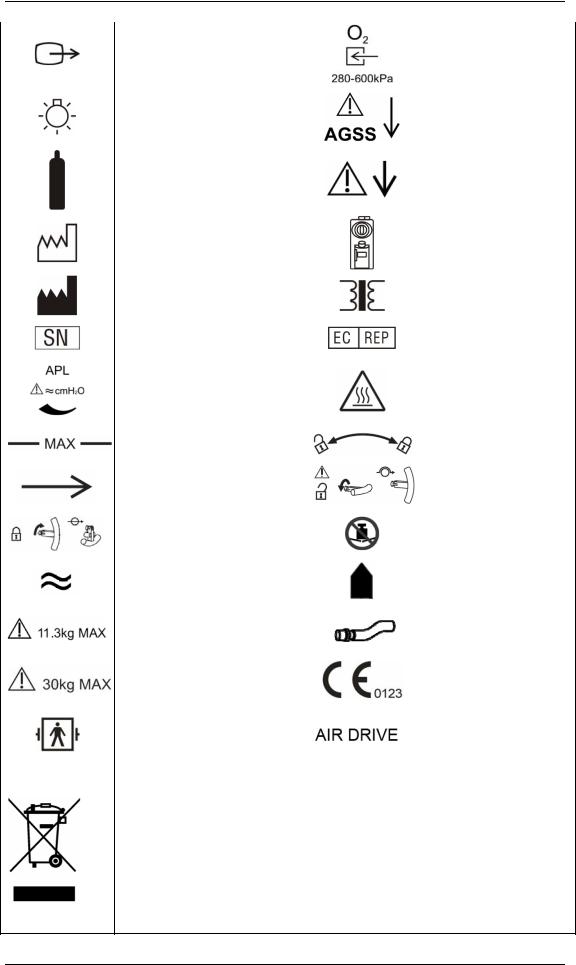
1.2 Equipment Symbols
|
Attention: Consult |
|||||||
|
accompanying documents (this |
Dangerous voltage |
||||||
|
manual) |
|||||||
|
Alternating current |
Fuse |
||||||
|
Battery |
Equipotential |
||||||
|
Operating state |
Autoclavable |
||||||
|
Material description |
Not autoclavable |
||||||
|
Power On |
Power Off |
||||||
|
Reset |
Standby |
||||||
|
Alarm silence key |
MV&TVe alarm key |
||||||
|
Normal screen key |
O2 flush button |
||||||
|
ACGO On |
ACGO Off |
||||||
|
Bag position/ manual |
Mechanical ventilation |
||||||
|
ventilation |
|||||||
|
Lock |
Unlock |
||||||
|
Network connector |
Flow control |
||||||
|
USB connector |
O2 sensor connector |
||||||
|
Air supply connector |
N2O supply connector |
||||||
|
Upward (Pop-off valve) |
Sample gas return port |
||||||
|
(to the AGSS) |
|||||||
|
1-5 |
|
VGA connector |
O2 supply connector |
|
|
Table top light |
AGSS outlet |
|
|
Cylinder |
PEEP outlet |
|
|
Manufacture date |
Vaporizer |
|
|
Manufacturer |
Isolation transformer |
|
|
Serial number |
European community |
|
|
representative |
||
|
APL valve |
CAUTION HOT |
|
|
Maximum level of the |
Lock or unlock as the |
|
|
sodalime canister |
arrow shows |
|
|
Gas input direction |
Unlock the lifting device |
|
|
Lock the lifting device |
Do Not Crush |
|
|
Approximate |
Please align! |
|
|
Max. weight: 11.3 kg |
Pipeline |
|
|
Max. weight: 30 kg |
CE marking |
|
|
Type BF applied part. |
The anesthesia machine |
|
|
Defibrillation-proof protection |
||
|
is driven by Air. |
||
|
against electric shock. |
||
The following definition of the WEEE label applies to EU member states only. This symbol indicates that this product should not be treated as household waste. By ensuring that this product is disposed of correctly, you will help prevent bringing potential negative consequences to the environment and human health. For more detailed information with regard to returning and recycling this product, please consult the distributor from whom you purchased it.
* For system products, this label may be attached to the main unit only.
1-6

2 The Basics
2.1 System Description
2.1.1 Intended Use
The anesthesia machine is intended to provide breathing anesthesia for adult, pediatric and infant patients during surgery.
The anesthesia machine must only be operated by qualified anesthesia personnel who have received adequate training in its use.
 WARNING
zThis anesthesia machine is intended for use by qualified anesthesia personnel only or under their guidance. Anyone unauthorized or untrained must not perform any operation on it.
zThis anesthesia machine is not suitable for use in an MRI environment.
2.1.2 Contraindications
The anesthesia machine is contraindicated for use on patients who suffer pneumothorax or severe pulmonary incompetence.
2-1

2.1.3 Components
The anesthesia machine consists of a main unit, vaporizer (five optional anesthetic agents: enflurane, isoflurane, sevoflurane, desflurane and halothane), anesthetic ventilator, electronic flowmeter assembly, breathing system etc.
The anesthesia machine provides monitoring and displaying of respiratory mechanics (RM) parameters (airway resistance and compliance) and spirometry loops as well. It is configured with the following ventilation modes: volume control ventilation (VCV), pressure control ventilation (PCV), pressure support ventilation (PSV), synchronized intermittent mandatory ventilation—volume control (SIMV-VC) and synchronized intermittent mandatory ventilation—pressure control (SIMV-PC).
The anesthesia machine can be externally connected to a patient monitor which is in compliance with the requirements of relevant international standard and can be configured with anesthesia information system (CIS).
The anesthesia machine features the following:
Automatic leak detection
Breathing system gas leak compensation and automatic compliance compensation
Cylinder and pipeline connections available for gas supplies
Electronic flowmeter and electronic PEEP
Timer which counts the duration between the start and end of an operation
Table top light
Information displayed in big numerics
User-adjustable display screen
Alarm events storage and review, fault status and maintenance information recording
Auxiliary O2 supply and active anesthesia gas scavenging system (AGSS)
N2O cut-off
Modular AG, CO2 and BIS modules
Sample gas return to the AGSS
Setting CPB alarm mode
2-2
2.2 Equipment Appearance
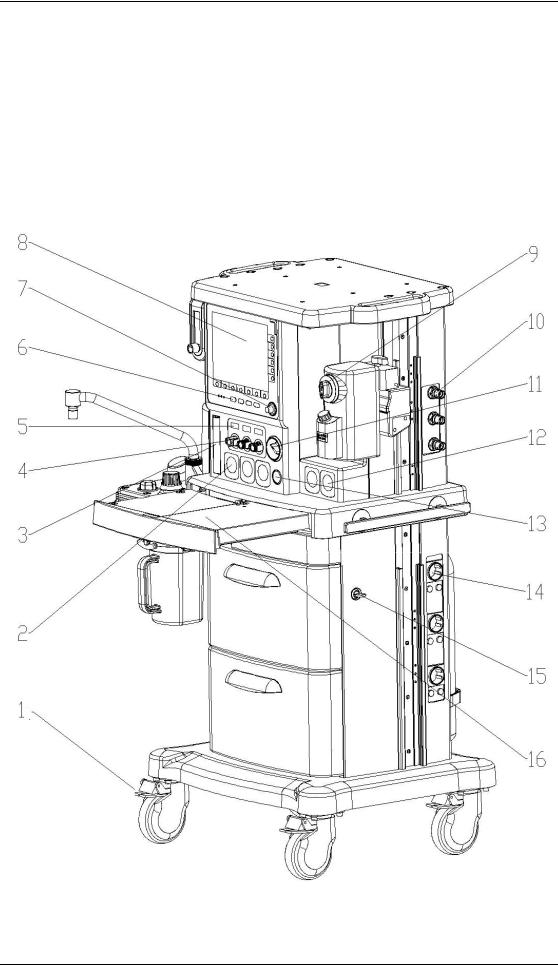
2.2.1 Front View
——Display and control panel
2-3

1.Brake
2.Pipeline pressure gauge (s)
Displays the pipeline pressure or the cylinder pressure after relief.
3.Total flowmeter
The medium level of flowtube float indicates the current flow of the mixed gas.
4Flow control (s)
When the system switch is set to the ON position:
Turn the control counterclockwise to increase the gas flow.
Turn the control clockwise to decrease the gas flow.
5Electronic flowmeter
Displays the current flow of the corresponding gas.
6.Ventilator control panel
7.Control knob
8.Display
9.Vaporizer
A.Concentration control
Push and turn the concentration control to set the concentration of anesthetic agent.
B.Locking lever
Turn the locking lever clockwise to lock the vaporizer in position.
10.Gas supply connector (s)
O2 , N2O and AIR connectors are provided.
11.System switch
Set the switch to the  position to enable gas flow and to turn on the system.
Set the switch to the  position to disable gas flow and to turn off the system.
12.Cylinder pressure gauge (s)
High-pressure pressure gauge (s) that displays cylinder pressure before relief.
13.O2 flush button
Push to supply high flows of O2 to the breathing system.
14.Auxiliary electrical outlet
Three auxiliary electrical outlets are provided when the anesthesia machine is configured with an isolation transformer.
15 Drawer lock
16. Worktable (with drawer)
2-4
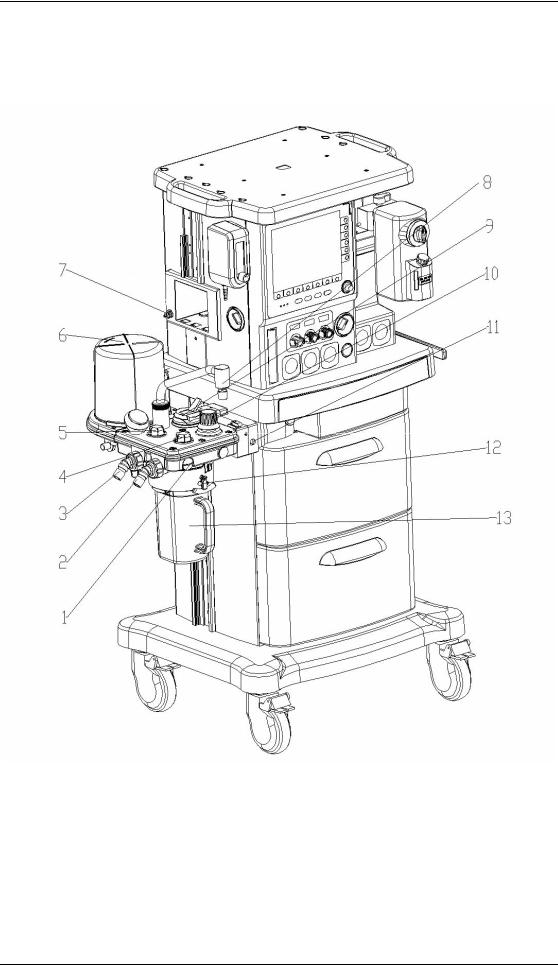
——Breathing system
2-5

1.O2 sensor connector
2.Inspiration connector
3.Expiration connector
4.Inspiratory check valve
5.Expiratory check valve
6.Bellows housing
7.Sample gas return port (to the AGSS)
8.Manual bag port
9.Bag/mechanical ventilation switch
Select the  position to use bag for manual ventilation.
Select the  position to use ventilator for mechanical ventilation.
10.APL (airway pressure limit) valve
Adjusts breathing system pressure limit during manual ventilation. The scale shows approximate pressures. Above 30 cmH2O, you will feel clicks as the v turns. Turn clockwise to increase.
11.O2 sensor connector
12.Rotary handle
13.Sodalime canister
The sodalime inside the canister absorbs the CO2 the patient exhales, which enables cyclic use of the patient exhaled gas.
2-6

2.2.2 Rear View
——Power supply
2-7

1.Cylinder connector (s)
2.Equipotential stud
3.Fan
4.Mains inlet
5.Network connector
6.CIS 12 V power supply connector
7.Speaker
8.Auxiliary O2 supply
9.ACGO (Auxiliary Common Gas Outlet) switch
Set the switch to the  position to stop mechanical ventilation. Then, fresh gas is sent to the externally connected manual breathing system through the ACGO outlet and the technical alarm of [ACGO On] is triggered. The system monitors airway pressure and O2 concentration instead of volume.
Set the switch to the position to apply mechanical or manual ventilation to the patient through the breathing system.
10.Module slot
CO2, AG and BIS modules mentioned in this manual can be inserted into the slot and identified. The CO2 and AG modules cannot be used simultaneously.
11.AGSS outlet
12.AGSS Transfer and Receiving System
2-8

——Anesthesia information system (CIS)
2-9

This rear view is based on the situation that the anesthesia machine is configured with anesthesia information system (CIS).
1.Display
2.Rail
3.Mounting bracket
4.Keyboard
5.CIS main unit
A
B
C
F E D C
A.Reset key
 : Press to restart the CIS.
B.CIS switch
 : Press to switch on/off the CIS.
C.USB connector
D.Network connector
E.Electrical outlet
F.Display connector
2-10

 WARNING
zConnect to the AC mains in compliance with B.3 Power Requirements. Failure to do so may cause damage to the equipment or affect its normal operation.
zMake sure that the jacket on the electrical outlet is already fixed to avoid power cord off during surgery.
NOTE
zIf the equipment cannot be powered by the AC mains, check if the fuse inside the electrical outlet is normal. If AC mains supply still fails after the fuse is replaced, contact the service personnel.
zWhen the auxiliary electrical outlet does not work normally, check if the corresponding fuse is burned.
zEquipment connected to the auxiliary electrical outlet shall be authorized. Otherwise, leakage current above the allowable limit will result, which may endanger the patient or operator, and damage the anesthesia machine or externally connected equipment. When the anesthesia machine is configured with only one auxiliary electrical outlet, this electrical outlet is only used for connecting the adapter for Desflurane vaporizer. When the anesthesia machine is configured with multiple auxiliary electrical outlets, the equipment connected shall comply with the voltage and current specifications of the auxiliary electrical outlets.
zAll analog or digital products connected to this system must be certified passing the specified IEC standards (such as IEC 60950 for data processing equipment and IEC 60601-1 for medical electrical equipment). All configurations shall comply with the valid version of IEC 60601-1-1. The personnel who are responsible for connecting the optional equipment to the I/O signal port shall be responsible for medical system configuration and system compliance with IEC 60601-1-1 as well.
2-11

2.3 Batteries
NOTE
zUse batteries at least once every month to extend their life. Charge the batteries before their capacities are worn out.
zInspect and replace batteries regularly. Battery life depends on how frequent and how long it is used. For a properly maintained and stored lithium battery, its life expectancy is approximately 3 years. For more aggressive use models, life expectancy can be shortened. We recommend replacing lithium batteries every 3 years.
zThe operating time of a battery depends on equipment configuration and operation. For example, starting module monitoring frequently will shorten the operating time of the batteries.
zIn case of battery failure, contact us or have your service personnel replace it. Do not replace the battery without permission.
The anesthesia machine is designed to operate on battery power whenever AC power becomes interrupted. When the anesthesia machine is connected to the AC power source, the batteries are charged regardless of whether or not the anesthesia machine is currently on. In case of power failure, the anesthesia machine will automatically be powered by the internal batteries. When AC power source is restored within the specified time, power supply is switched from battery to AC automatically to ensure continuous system use.
On-screen battery icon indicates the battery statuses as follows:
 : indicates that the batteries operate normally. The solid portion represents the current charge level of the batteries in proportion to its maximum charge level.
 : indicates low battery and the batteries need to be charged.
 : indicates too low battery and the batteries need to be charged immediately.
The capacity of the internal battery is limited. If the battery capacity is too low, a high-level alarm will be triggered and the [Low Battery Voltage!] message displayed in the technical alarm area. In this case, apply AC power to the anesthesia machine.
2-12

3 System Controls and Basic Settings
3.1 Display Control
1.Alarm lamp
High level alarms: the lamp quickly flashes red.
Medium level alarms: the lamp slowly flashes yellow.
Low level alarms: the lamp turns yellow without flashing.
2.Menu shortcut key(s)
Push the menu shortcut key to access the corresponding menu.
3.Control knob
Push the control knob to select a menu option or confirm your setting. Turn the control knob clockwise or counterclockwise to scroll through the menu options or change your settings.
3-1

4.MV&TVe alarm key
In case of manual ventilation mode: Push the key to switch off MV and TVe overrange alarms and apnea alarm. Push the key again to switch on MV and TVe overrange alarms and apnea alarm.
In case of mechanical ventilation mode: Push the key to switch off MV and TVe overrange alarms. Push the key again to switch on MV and TVe overrange alarms.
5.Normal screen key
Push the key to close all menus displayed.
6.Standby key
Push the key to enter or exit standby mode.
7.Alarm silence key
To set alarm silence state, push this key to enter 120 s alarm silenced status. The alarm silence symbol  and 120 s countdown time appear in the upper right corner of the screen.
To clear alarm silence, push this key again.
8.Operating state LED
On: when the anesthesia machine is operating.
Off: when the anesthesia machine is turned off.
9.AC power LED
On: when the anesthesia machine is connected to the AC power source.
Off: when the anesthesia machine is not connected to the AC power source.
10.Battery LED
On: when the anesthesia machine is equipped with batteries and is connected to the AC power source, and the batteries are being charged.
Off: when the anesthesia machine is not equipped with batteries or is switched off.
Flash: when the anesthesia machine is being battery powered.
11.Ventilator parameter setup shortcut key(s)
Push the parameter setup shortcut key to change the corresponding setting. Turn the control knob to change the specific setting and push the control knob to activate the selected setting.
12.Display screen
Refer to 3.2Display Screen for details.
3-2

3.2 Display Screen
This anesthesia machine adopts a high-resolution color TFT LCD to display various parameters and graphs, such as ventilation parameters and pressure/flow/volume waveforms. Depending on how your anesthesia machine is configured, it may display gas module parameters and waveforms, BIS parameters, BIS trend waveform, spirometry loops etc.The following is a standard display screen. For descriptions of other screens, refer to5 User Interface and Parameter Monitoring.
|
1 |
2 |
3 |
4 |
5 |
6 |
7 |
8 |
9 |
||||||
10
11
12
18
13
14
15
17
16
1.Ventilation mode prompt area
Displays the current ventilation mode. If manual ventilation is selected for the bag/mechanical ventilation switch,  is displayed in this area. If mechanical
ventilation is selected for the bag/mechanical ventilation switch, the currently selected mechanical ventilation mode is displayed.
2.Lung icon area
The icon  is displayed when SIMV-VC or SIMV-PC mode is selected and inspiration triggering is performed currently.
3.MV&TVe alarm off icon
Displays the MV&TVe alarm off icon when MV&TVe alarm is switched off.
3-3

4.Physiological alarm area
Displays physiological alarm messages.
5.Apnea alarm off icon area
Displays apnea alarm off icon  when apnea alarm is switched off in non-mechanical ventilation mode.
6.Alarm silence icon area
Displays alarm silence icon and 120 s countdown time.
7.System time area
Displays system time of the anesthesia machine.
8.Technical alarm area
Displays technical alarm messages. When multiple alarms occur, they are displayed cyclically.
9.Power supply state icon area
Displays power source or battery icon.The icon  is displayed when the anesthesia machine is powered by AC power source. The battery icon is displayed when the anesthesia machine is battery powered to indicate battery capacity. For details, refer to2.3 Batteries.
10. [Vent Mode] shortcut key Used to select mechanical ventilation mode.
11.[Alarm Setup] shortcut key
Used to change the alarm settings for the anesthetic ventilator, gas modules or BIS module.
12.[Screens] shortcut key Used to set user screen.
13.[User Setup] shortcut key
Used to change the settings for TV compensation, O2 monitoring source, gas module, BIS module, screen, sound etc.
14.[Maintenance] shortcut key
Used to perform leak test, calibrate O2 sensor and flow sensor, view trend graph, trend table and alarm logbook, and set language, system time, pressure unit, IP address etc.
15.Timer setup shortcut key
Used to start, stop and reset the timer.
16.Parameter setup shortcut keys area
Used to set the parameters related to the selected mechanical ventilation mode. The arrangement of the shortcut keys in this area varies depending on the selected mechanical ventilation mode. For details, refer to 4 Operations and Ventilation Setup.
17 System prompt message area
3-4

Displays information about system operating state.
18Parameter&graph area
Displays the parameters, waveforms, spirometry loops, or electronic flowmeter graphs which the anesthesia ventilator, gas module or BIS module monitors. Different types of screens are displayed based on the actual system configuration or screen layout settings. For details, refer to 5 User Interface and Parameter Monitoring.
3.3Basic Settings
This chapter covers only general settings of the anesthesia machine, such as language, screen brightness, system time etc. Parameter settings and other settings can be referred to in the respective sections.
3.3.1 Adjust Screen Brightness
1.Select the [User Setup] shortcut key and select [Screen and Audio Setup >>].
2.Select [Screen Brightness] and select the appropriate value (ranging from 1 to 10) for screen brightness. The value 10 is for the brightest and 1 the least bright. If the anesthesia machine is battery powered, you can select less brightness to save battery capacity.
3.3.2 Adjust Sound Volume
3.3.2.1 Key Sound Volume
1. Select the [User Setup] shortcut key and select [Screen and Audio Setup >>].
2. Select [Key Sound Volume] and select the appropriate value (ranging from 0 to 10) for key sound volume. The value 0 is for audio off and 10 for the loudest.
3.3.2.2 Alarm Sound Volume
1.Select the [User Setup] shortcut key and select [Screen and Audio Setup >>].
2.Select [Alarm Sound Volume] and select the appropriate value (ranging from 1 to 10) for alarm sound volume. The value 1 is for the lowest and 10 for the loudest.
3-5

3.3.3 Set System Time
1.Select the [Maintenance] shortcut key → [User Maintenance >>] → [Set System Time >>].
2.Set [Date] and [Time].
3.Select [Date Format] and toggle between [YYYY-MM-DD], [MM-DD-YYYY] and [DD-MM-YYYY].
4.Select [Time Format] and toggle between [24 h] and [12 h].
 CAUTION
zChanging date and time will affect the storage of trends and log information. It may also cause loss of data.
3.3.4 Set Language
1. Select the [Maintenance] shortcut key and select [User Maintenance >>]. 2. Select [Language] and select the desired language.
3. Restart the anesthesia machine to activate the language setting.
3.3.5 Set Unit
1.Select the [Maintenance] shortcut key and select [User Maintenance >>].
2.Select [Paw Unit] and toggle between cmH2O, hPa and mbar.
If the anesthesia machine is configured with CO2 or AG module, you can set the display units of FiCO2 and EtCO2. For details, refer to 8 CO2 Monitoring.
3.3.6 Restore Default Configurations
3.3.6.1 Restore the Factory Default Configuration of the Ventilator
To restore the factory default configuration of the ventilator, do as follows:
1.Select the [Maintenance] shortcut key → [User Maintenance >>] → [Ventilator Defaults].
3-6

2.Select [Ok] from the pop-up menu.
After [Ok] is selected, the following settings restore their default values:
User screen
Ventilator parameters
Alarm limits of ventilator-related parameters
O2 monitoring source
Alarm sound volume and key sound volume
Screen brightness
Paw display unit
3.3.6.2 Restore the Factory Default Configuration of the Gas Module
If the anesthesia machine is configured with CO2 or AG module, you can directly restore the factory default configuration of the corresponding module. For details, refer to 8 CO2 Monitoring and 9 AG and O2 Concentration Monitoring.
3.3.6.3 Restore the Factory Default Configuration of the BIS Module
If the anesthesia machine is configured with BIS module, you can directly restore the factory default configuration of the corresponding module. For details, refer to 10 BIS Monitoring.
3.3.7 Set the IP Address of Anesthesia Information System
(CIS)
To set the IP address of anesthesia information system (CIS), do as follows:
1.Select the [Maintenance] shortcut key → [User Maintenance >>] → [Set IP Address >>].
2.In the [Set IP Address] menu, set the correct IP address of the CIS.
3.Select [Ok] to activate the IP address setting.
3-7

FOR YOUR NOTES
3-8

4 Operations and Ventilation Setup
 WARNING
zBefore using this anesthesia machine on the patient, make sure that the system is correctly connected and in good condition, and that all the tests described in 6 Preoperative Test are already completed. In case of test failure, do not use the system. Have a qualified service representative repair the system.
4.1Turn on the System
1.Connect the power cord to the AC power source. Make sure that the AC power LED is illuminated.
2.Set the system switch to ON. Make sure that both the operating state LED and battery LED are illuminated (the battery is being charged or fully charged).
3.The alarm lamp flashes yellow and red once in turn and then a beep is given.
4.The display shows the start-up screen and then enters the standby screen after half a minute.
 WARNING
zDo not use the anesthesia machine if it generates alarms during start-up or fails to operate normally. Contact your service personnel or us.
4.2Turn off the System
To turn off the system, do as follows:
1.Confirm that system use is finished.
2.Set the system switch to OFF.
NOTE
zFor the first mechanical ventilation of each patient, do not exit the standby screen if mechanical ventilation related parameters are not set properly. Adjust fresh gas and anesthetic agent concentrations (if necessary) on the standby screen and set ventilation parameters properly based on the patient’s conditions before applying mechanical ventilation.
4-1

4.3 Input Fresh Gas
4.3.1 Set O2, N2O and Air Inputs
1.Connect the gas supplies correctly and ensure adequate gas pressure.
2.You can control the O2, N2O and Air flows in the fresh gas through the O2, N2O and Air flow controls. Readings of the gas flow can be seen on the respective electronic flowmeter. On the left hand of the electronic flowmeters is the total flowmeter showing the flow of the mixed gas.
The O2 and N2O flow controls constitute a chain linkage:
Turn the N2O flow control counterclockwise to increase the N2O flow to some extent. Then continuing turning the N2O flow control will cause the O2 flow control to turn counterclockwise together to increase the O2 flow, keeping the O2 concentration in the mixed gas above 25%.
Turn the O2 flow control clockwise to decrease the O2 flow to some extent. Then continuing turning the O2 flow control will cause the N2O flow control to turn clockwise together to decrease the N2O flow, keeping the O2 concentration in the mixed gas above 25%.
NOTE
zThis anesthesia machine can be used alone as a ventilator. You can adjust O2 concentration in the breathing system through the O2 flow control.
zThe O2 concentration in the fresh gas may be quite different from that in the breathing system.
zThe total flowmeter is calibrated based on 100% O2. The accuracy of the flowmeter may degrade with other gas or mixed gas.
zWhen viewing the readings on the total flowmeter, keep your visual angle at the same level of the float. The reading of a same scale may vary when viewed at a different angle.
zIf the readings shown on the electronic flowmeters differ from that on the total flowmeter, the former shall prevail and the latter is an approximate value.
4-2

4.3.2 Set Anesthetic Agent
NOTE
zYou do not need to perform this operation if inspiratory anesthetic agent is not used.
zThis anesthesia machine can be mounted with vaporizers corresponding with halothane, enflurane, isoflurane, sevoflurane and desflurane. Only one of the five vaporizers can be opened at a time because the vaporizers are featured with interlock.
4.3.2.1 Select the Desired Anesthetic Agent
1.Determine the anesthetic agent to be used and then fill the vaporizer. For details, refer to
13.4.2 Fill the Vaporizer.
2.Mount the vaporizer filled with anesthetic agent onto the anesthesia machine. For details, refer to 13.4 Install the Vaporizer.
4.3.2.2 Adjust the Concentration of Anesthetic Agent
Push and turn the concentration control on the vaporizer to set the appropriate concentration of anesthetic agent.
NOTE
zInspect the color of the sodalime in the canister before using the anesthetic agent. Replace the sodalime immediately if obvious color change is detected.
zFor details about how to use the anesthetic agent, refer to the Vaporizer Instructions for Use.
4-3

4.4 Set Ventilation Mode
4.4.1 Set Manual Ventilation Mode
1.Turn the APL valve control to adjust the pressure in the breathing system within the appropriate range.
2.Set the bag/mechanical ventilation switch to the  position. The ventilation mode
prompt area displays the icon for manual ventilation mode. Besides, the system prompt message area displays [Manual Vent.].
3.Push the O2 flush button  to inflate the bag if necessary.
In the manual ventilation mode, you can use the APL valve to adjust the breathing system pressure limit and gas volume in the manual bag. When the pressure in the breathing system reaches the pressure limit set for the APL valve, the valve opens to release excess gas.
The following figures show the Paw waveform and flow waveform in the manual ventilation
mode.
4-4

NOTE
zWhen using the anesthesia machine on the patient, make sure that manual ventilation mode is available.
4.4.2 Make Settings before Starting Mechanical Ventilation
Mode
1.Make sure that the system is Standby.
2.Set the appropriate Plimit value in the parameter setup shortcut keys area.
3.Check the ACGO switch to make sure that it is OFF.
4.Set the bag/mechanical ventilation switch to the  position.
5.If necessary, push the O2 flush button  to inflate the bellows.
NOTE
zThe default mechanical ventilation mode of the anesthesia machine is VCV. Other mechanical ventilation modes are optional. For the ventilation mode not configured for your anesthesia machine, operations of the corresponding menu options are disabled.
4.4.3 Volume Control Ventilation (VCV)
4.4.3.1 Description
Volume control ventilation (hereinafter referred to as VCV) mode is a basic fully-mechanical ventilation mode. In the VCV mode, each time mechanical ventilation starts, gas is delivered to the patient at a constant flow, which reaches the preset TV within the gas delivery time. To ensure a certain amount of TV, the resulted airway pressure (Paw) changes based on patient pulmonary compliance and airway resistance. In the VCV mode, as long as Paw is less than Plimit and the gas delivery flow is kept constant, expirations starts immediately after Plimit is reached.
In the VCV mode, you need to set [Plimit] to prevent high airway pressure from injuring the patient. In this mode, you can select to set [TIP :TI] to improve patient pulmonary gas distribution and [PEEP] to improve expiration of end-tidal carbon dioxide and to increase oxygenation of breathing process.
4-5

To ensure the set tidal volume gas delivery, the ventilator adjusts gas flow based on the measured inspiratory volume, dynamically compensates for the loss of tidal volume arising from breathing system compliance and system leakage and eliminates the effect of fresh gas as well. This is called tidal volume compensation.
In the VCV mode, if tidal volume compensation is turned off or failed, the anesthesia machine can continue delivering gas stably but cannot compensate for the effects of fresh gas flow and breathing system compliance losses.
4.4.3.2 Waveforms
The following figures show the Paw waveform and flow waveform in the VCV mode.
Generally, in the VCV mode, the flow waveform is at a constant flow during inspiration and the Paw waveform rises in the same period.
4.4.3.3 Start VCV Mode
1.Select the [Vent Mode] shortcut key to open the [Vent Mode Setup] menu.
2.Select [VCV] in the [Vent Mode Setup] menu.
3.After confirming the selection, the[TV] shortcut key (the first key from the left in the parameter setup shortcut keys area) is highlighted.
4.Make sure that TV is appropriately set for the patient. Push the control knob to confirm the setting so as to start VCV mode.
4-6

NOTE
zWhen it is necessary to switch over to VCV mode, confirm the setting of TV first. Otherwise, the system works in the previous ventilation mode. If the setting of TV is not confirmed for 10 s, the screen returns to the previous mode automatically.
zBefore activating a new mechanical ventilation mode, make sure that all related parameters are set appropriately.
4.4.3.4 Parameter Setup Shortcut Keys Area in VCV Mode
When selection of VCV mode is confirmed, the parameter setup shortcut keys area at the bottom of the screen is automatically switched over to the parameter setup area in this mode. The following figure shows all related parameters to be set in VCV mode.
|
1. |
[TV]: |
Tidal volume |
|
2. |
[Rate]: |
Breath rate |
|
3. |
[I:E]: |
Ratio of inspiratory time to expiratory time |
|
4. |
[TIP:TI]: |
Percentage of inspiratory plateau time in inspiratory time |
|
5. |
[Plimit]: |
Pressure limit level |
|
6 |
[PEEP]: |
Positive end-expiratory pressure |
4.4.3.5 Set Parameters in VCV Mode
You can use the shortcut keys and control knob to set the parameters in VCV mode. The following takes setting of TV as an example.
1.Select the [TV] shortcut key.
2.Push the control knob and turn it to set [TV] to the appropriate value.
3.Push the control knob to confirm the setting.
4.Set other parameters in this mode in the similar way.
4-7

NOTE
zIf the parameter value is adjusted outside of the range, the system prompt message area displays [Parameter Settings Outside the Safety Range].
zConfirm the adjustment of one parameter before adjusting another parameter. If you want to restore the value before adjustment, you have to reset the parameter value.
4.4.3.6 Parameter Range and Default Value in VCV Mode
|
Parameter |
Range |
Step |
Default |
|
|
20 to 100 ml: 5 ml |
||||
|
TV |
20 to 1500 ml |
100 to 300 ml: 10 ml |
500 ml |
|
|
300 to 1500 ml: 25 ml |
||||
|
Rate |
4 to 100 BPM |
1 BPM |
12 BPM |
|
|
I:E |
4:1 to 1:8 |
0.5 |
1:2 |
|
|
Plimit |
10 to 100 cmH2O |
1 cmH2O |
30 cmH2O |
|
|
PEEP |
OFF, 4 to 30 cmH2O |
1 cmH2O |
OFF |
|
4.4.4 Pressure Control Ventilation (PCV)
4.4.4.1 Description
Pressure control ventilation (hereinafter referred to as PCV) mode is a basic fully-mechanical ventilation mode. In the PCV mode, each time mechanical ventilation starts, Paw rises rapidly to the preset Plimit. Then gas flow slows down through the feedback system to keep Paw constant until expiration starts at the end of inspiration. The tidal volume delivered in the PCV mode changes based on patient pulmonary compliance and airway resistance.
In the PCV mode, you need to set Plimit to prevent high airway pressure from injuring the patient.
In the PCV mode, you can also select to set [PEEP] to improve expiration of end-tidal carbon dioxide and to increase oxygenation of breathing process.
4-8
 Loading…
Как качественно объёмно визуализировать плод на УЗИ аппарате?
Посмотрите видео Mindray с подробной инструкцией.
Шаг первый: получение качественного 2D изображения
Сначала нажмите [кнопку питания] на панели управления, чтобы включить ультразвуковой сканер. Нажмите клавишу [Датчик], выберите датчик D6-2NE на сенсорном экране. Затем выберите тип исследования Акушер. 2/3 [OB 2/3], чтобы перейти в 2D режим. Возьмите датчик 6-2NE и найдите метку.
Оптимальная плоскость для получения хорошего 3D/4D изображения — это среднее сагиттальное сечение головы плода. Итак, Вам следует найти сагиттальную плоскость, похожую на эту:
Во-первых, Вам нужно получить проекцию для измерения БПР (BPD). После этого следует повернуть датчик таким образом, чтобы получить сагиттальное сечение. Если Вы не в стандартном среднем сагиттальном сечении, нужно медленно скорректировать положение зонда до перехода к стандартной структуре с визуализацией лба, носа, верхней и нижней губы и т.д. После этого подготовительные работы в 2D режиме завершены.
Шаг второй: 3D сканирование
Нажмите клавишу 3D на панели управления, на экране появятся границы исследуемой области. Используйте клавишу [Set] и трекбол для регулировки размера исследуемой области (ROI), переместите её в нужное положение. Размер исследуемой области должен быть целесообразным — не маленьким и не слишком большим.
Переместите исследуемую область так, чтобы она вмещала всю головку плода. Неправильно выбранный исследуемый объём не позволит получить хорошее и полное 3D-изображение. Используйте клавишу [Set], чтобы активировать Огибающую VOI (Огибающая области интереса), затем трекболом сдвиньте огибающую как можно ближе к поверхности лица плода. Нажмите клавишу Обновить [Update] на панели управления, чтобы приступить к получению 3D-изображения. Затем зафиксируйте положение датчика.
Шаг третий: 4D сканирование
Нажмите клавишу 4D на панели управления, на экране появятся границы исследуемой области, так же, как в режиме статического 3D. Перемещая трекбол и нажимая клавишу [Set], последовательно настройте расположение, размер, а также кривую исследуемого объёма.
Нажмите клавишу Обновить [Update] на панели управления, чтобы приступить к получению 4D изображения. Нажмите кнопку Стоп-кадр [Freeze] для завершения получения 4D-изображения.
Шаг четвёртый: обработка 3D/4D данных
После получения 3D/4D изображения Вы можете редактировать изображение, чтобы улучшить его. Поверните рукоятку для изменения порогового значения. Слишком высокое значение приведёт к потере деталей, слишком низкое — к увеличению шума.
iLive — это революционный способ получения изображения плода с реалистичными оттенками кожи. Нажмите клавишу [iLive] на сенсорном экране, чтобы войти в режим iLive. Меняйте положение источника света и перемещайте свет при помощи трекбола для получения различных эффектов.
Нажмите клавишу [Single] для перехода в однооконный режим из многооконного. Нажмите клавишу [Dual] для перехода в двухоконный режим. Нажмите клавишу [Quad] для перехода в режим четырёхоконного изображения.
В режиме просмотра 3D нажмите кнопку [Сохранить] на панели управления для сохранения текущего изображения. В режиме просмотра 4D нажмите назначаемую пользователем клавишу сохранения (Сохр.клип (ретроспект.) на диске) в системе управления сведениями о пациентах.
Примеры объёмных УЗ изображений, полученных клиентами ТИАРА-МЕДИКАЛ
.jpeg)
.jpeg)
.jpeg)
.jpeg)
.jpeg)
.jpeg)
.jpeg)
.jpeg)
.jpeg)
Определение пола плода
.jpeg)
.jpeg)
В наличии документация на медицинское оборудование фирмы Mindray (в т.ч. на русском языке):
Сервисная инструкция (Service manual) на A-5, A-3 Anesthesia System [Mindray] ИВЛ-Анестезия
![Сервисная инструкция Service manual на A-5, A-3 Anesthesia System [Mindray]](https://medtechnic.net.ua/img_d/8620.jpg "Сервисная инструкция Service manual на A-5, A-3 Anesthesia System [Mindray]")
Сервисная инструкция (Service manual) на A-5, A-4, A-3 Anesthesia System [Mindray] ИВЛ-Анестезия
![Сервисная инструкция Service manual на A-5, A-4, A-3 Anesthesia System [Mindray]](https://medtechnic.net.ua/img_d/22.jpg "Сервисная инструкция Service manual на A-5, A-4, A-3 Anesthesia System [Mindray]")
Сервисная инструкция (Service manual) на A-7 Anesthesia System (2016) [Mindray] ИВЛ-Анестезия
![Сервисная инструкция Service manual на A-7 Anesthesia System (2016) [Mindray]](https://medtechnic.net.ua/img_d/9086.jpg "Сервисная инструкция Service manual на A-7 Anesthesia System (2016) [Mindray]")
Сервисная инструкция (Service manual) на A-7 Anesthesia System (2019) [Mindray] ИВЛ-Анестезия
![Сервисная инструкция Service manual на A-7 Anesthesia System (2019) [Mindray]](https://medtechnic.net.ua/img_d/43.jpg "Сервисная инструкция Service manual на A-7 Anesthesia System (2019) [Mindray]")
Сервисная инструкция (Service manual) на A-8, A-9 Anesthesia System [Mindray] ИВЛ-Анестезия
![Сервисная инструкция Service manual на A-8, A-9 Anesthesia System [Mindray]](https://medtechnic.net.ua/img_d/10043.jpg "Сервисная инструкция Service manual на A-8, A-9 Anesthesia System [Mindray]")
Сервисная инструкция (Service manual) на Accutorr 3 [Mindray] Мониторы
![Сервисная инструкция Service manual на Accutorr 3 [Mindray]](https://medtechnic.net.ua/img_d/787.jpg "Сервисная инструкция Service manual на Accutorr 3 [Mindray]")
Инструкция по эксплуатации (Operation (Instruction) manual) на Accutorr Plus [Mindray] Мониторы
![Инструкция по эксплуатации Operation (Instruction) manual на Accutorr Plus [Mindray]](https://medtechnic.net.ua/img_d/7705.jpg "Инструкция по эксплуатации Operation (Instruction) manual на Accutorr Plus [Mindray]")
Сервисная инструкция (Service manual) на Accutorr V [Mindray] Мониторы
![Сервисная инструкция Service manual на Accutorr V [Mindray]](https://medtechnic.net.ua/img_d/2175.jpg "Сервисная инструкция Service manual на Accutorr V [Mindray]")
Сервисная инструкция (Service manual) на AS 3000 (2010.11) [Mindray] ИВЛ-Анестезия
![Сервисная инструкция Service manual на AS 3000 (2010.11) [Mindray]](https://medtechnic.net.ua/img_d/6408.jpg "Сервисная инструкция Service manual на AS 3000 (2010.11) [Mindray]")
Сервисная инструкция (Service manual) на AS 3000 (2014.08) [Mindray] ИВЛ-Анестезия
![Сервисная инструкция Service manual на AS 3000 (2014.08) [Mindray]](https://medtechnic.net.ua/img_d/44.jpg "Сервисная инструкция Service manual на AS 3000 (2014.08) [Mindray]")
Руководство пользователя (Users guide) на BA-88 [Mindray] Анализаторы
![Руководство пользователя Users guide на BA-88 [Mindray]](https://medtechnic.net.ua/img_d/4834.jpg "Руководство пользователя Users guide на BA-88 [Mindray]")
Сервисная инструкция (Service manual) на BA-88 [Mindray] Анализаторы
![Сервисная инструкция Service manual на BA-88 [Mindray]](https://medtechnic.net.ua/img_d/4835.jpg "Сервисная инструкция Service manual на BA-88 [Mindray]")
Сервисная инструкция (Service manual) на BA-88A [Mindray] Анализаторы
![Сервисная инструкция Service manual на BA-88A [Mindray]](https://medtechnic.net.ua/img_d/5907.jpg "Сервисная инструкция Service manual на BA-88A [Mindray]")
Сервисная инструкция (Service manual) на BC-1800 [Mindray] Анализаторы
![Сервисная инструкция Service manual на BC-1800 [Mindray]](https://medtechnic.net.ua/img_d/3517.jpg "Сервисная инструкция Service manual на BC-1800 [Mindray]")
Инструкция по эксплуатации (Operation (Instruction) manual) на BC-1800 [Mindray] Анализаторы
![Инструкция по эксплуатации Operation (Instruction) manual на BC-1800 [Mindray]](https://medtechnic.net.ua/img_d/3918.jpg "Инструкция по эксплуатации Operation (Instruction) manual на BC-1800 [Mindray]")
Инструкция по эксплуатации (Operation (Instruction) manual) на BC-2300 [Mindray] Анализаторы
![Инструкция по эксплуатации Operation (Instruction) manual на BC-2300 [Mindray]](https://medtechnic.net.ua/img_d/3481.jpg "Инструкция по эксплуатации Operation (Instruction) manual на BC-2300 [Mindray]")
Сервисная инструкция (Service manual) на BC-2300 [Mindray] Анализаторы
![Сервисная инструкция Service manual на BC-2300 [Mindray]](https://medtechnic.net.ua/img_d/4030.jpg "Сервисная инструкция Service manual на BC-2300 [Mindray]")
Руководство оператора (Operators Guide) на BC-2800 [Mindray] Анализаторы
![Руководство оператора Operators Guide на BC-2800 [Mindray]](https://medtechnic.net.ua/img_d/1833.jpg "Руководство оператора Operators Guide на BC-2800 [Mindray]")
Инструкция по эксплуатации (Operation (Instruction) manual) на BC-2800 [Mindray] Анализаторы
![Инструкция по эксплуатации Operation (Instruction) manual на BC-2800 [Mindray]](https://medtechnic.net.ua/img_d/9706.jpg "Инструкция по эксплуатации Operation (Instruction) manual на BC-2800 [Mindray]")
Сервисная инструкция (Service manual) на BC-2800 (P/N : 2800-20-28832) [Mindray] Анализаторы
![Сервисная инструкция Service manual на BC-2800 (P/N : 2800-20-28832) [Mindray]](https://medtechnic.net.ua/img_d/3518.jpg "Сервисная инструкция Service manual на BC-2800 (P/N : 2800-20-28832) [Mindray]")
Сервисная инструкция (Service manual) на BC-2800 (P/N : 2800-20-28975) [Mindray] Анализаторы
![Сервисная инструкция Service manual на BC-2800 (P/N : 2800-20-28975) [Mindray]](https://medtechnic.net.ua/img_d/9705.jpg "Сервисная инструкция Service manual на BC-2800 (P/N : 2800-20-28975) [Mindray]")
Инструкция по эксплуатации (Operation (Instruction) manual) на BC-3000 Plus [Mindray] Анализаторы
![Инструкция по эксплуатации Operation (Instruction) manual на BC-3000 Plus [Mindray]](https://medtechnic.net.ua/img_d/5844.jpg "Инструкция по эксплуатации Operation (Instruction) manual на BC-3000 Plus [Mindray]")
Инструкция по эксплуатации (Operation (Instruction) manual) на BC-3000 Plus [Mindray] Анализаторы
![Инструкция по эксплуатации Operation (Instruction) manual на BC-3000 Plus [Mindray]](https://medtechnic.net.ua/img_d/6995.jpg "Инструкция по эксплуатации Operation (Instruction) manual на BC-3000 Plus [Mindray]")
Инструкция по техническому обслуживанию (Maintenance Instruction) на BC-3000 Plus [Mindray] Анализаторы
![Инструкция по техническому обслуживанию Maintenance Instruction на BC-3000 Plus [Mindray]](https://medtechnic.net.ua/img_d/9738.jpg "Инструкция по техническому обслуживанию Maintenance Instruction на BC-3000 Plus [Mindray]")
Сервисная инструкция (Service manual) на BC-3000 Plus (V1.1) [Mindray] Анализаторы
![Сервисная инструкция Service manual на BC-3000 Plus (V1.1) [Mindray]](https://medtechnic.net.ua/img_d/3519.jpg "Сервисная инструкция Service manual на BC-3000 Plus (V1.1) [Mindray]")
Сервисная инструкция (Service manual) на BC-3000 Plus (V1.2) [Mindray] Анализаторы
![Сервисная инструкция Service manual на BC-3000 Plus (V1.2) [Mindray]](https://medtechnic.net.ua/img_d/9732.jpg "Сервисная инструкция Service manual на BC-3000 Plus (V1.2) [Mindray]")
Техническое руководство (Technical manual) на BC-3000 Plus (Процедура очистки канала разбавителя) [Mindray] Анализаторы
![Техническое руководство Technical manual на BC-3000 Plus (Процедура очистки канала разбавителя) [Mindray]](https://medtechnic.net.ua/img_d/9739.jpg "Техническое руководство Technical manual на BC-3000 Plus (Процедура очистки канала разбавителя) [Mindray]")
Инструкция по подготовке (Training Manual) на BC-3000 Plus — Service Training [Mindray] Анализаторы
![Инструкция по подготовке Training Manual на BC-3000 Plus - Service Training [Mindray]](https://medtechnic.net.ua/img_d/3707.jpg "Инструкция по подготовке Training Manual на BC-3000 Plus - Service Training [Mindray]")
Инструкция по эксплуатации (Operation (Instruction) manual) на BC-3200 [Mindray] Анализаторы
![Инструкция по эксплуатации Operation (Instruction) manual на BC-3200 [Mindray]](https://medtechnic.net.ua/img_d/849.jpg "Инструкция по эксплуатации Operation (Instruction) manual на BC-3200 [Mindray]")
Сервисная инструкция (Service manual) на BC-3200 [Mindray] Анализаторы
![Сервисная инструкция Service manual на BC-3200 [Mindray]](https://medtechnic.net.ua/img_d/6473.jpg "Сервисная инструкция Service manual на BC-3200 [Mindray]")
Инструкция оператора (Operator manual) на BC-3300 [Mindray] Анализаторы
![Инструкция оператора Operator manual на BC-3300 [Mindray]](https://medtechnic.net.ua/img_d/9897.jpg "Инструкция оператора Operator manual на BC-3300 [Mindray]")
Сервисная инструкция (Service manual) на BC-3300, BC-3600 [Mindray] Анализаторы
![Сервисная инструкция Service manual на BC-3300, BC-3600 [Mindray]](https://medtechnic.net.ua/img_d/5906.jpg "Сервисная инструкция Service manual на BC-3300, BC-3600 [Mindray]")
Техническая документация (Technical Documentation/Manual) на BC-3300, BC-3600 Notice of First Startup [Mindray] Анализаторы
![Техническая документация Technical Documentation/Manual на BC-3300, BC-3600 Notice of First Startup [Mindray]](https://medtechnic.net.ua/img_d/9900.jpg "Техническая документация Technical Documentation/Manual на BC-3300, BC-3600 Notice of First Startup [Mindray]")
Инструкция по установке (Installation Manual) на BC-3300, BC-3600 Quick Installation Guide [Mindray] Анализаторы
![Инструкция по установке Installation Manual на BC-3300, BC-3600 Quick Installation Guide [Mindray]](https://medtechnic.net.ua/img_d/9896.jpg "Инструкция по установке Installation Manual на BC-3300, BC-3600 Quick Installation Guide [Mindray]")
Инструкция по монтажу (Installation instructions) на BC-3600 [Mindray] Анализаторы
![Инструкция по монтажу Installation instructions на BC-3600 [Mindray]](https://medtechnic.net.ua/img_d/7410.jpg "Инструкция по монтажу Installation instructions на BC-3600 [Mindray]")
Руководство оператора (Operators Guide) на BC-3600 [Mindray] Анализаторы
![Руководство оператора Operators Guide на BC-3600 [Mindray]](https://medtechnic.net.ua/img_d/9294.jpg "Руководство оператора Operators Guide на BC-3600 [Mindray]")
Инструкция по техническому обслуживанию (Maintenance Instruction) на BC-3600 (CT) Preventive Maintenance Manual [Mindray] Анализаторы
![Инструкция по техническому обслуживанию Maintenance Instruction на BC-3600 (CT) Preventive Maintenance Manual [Mindray]](https://medtechnic.net.ua/img_d/9899.jpg "Инструкция по техническому обслуживанию Maintenance Instruction на BC-3600 (CT) Preventive Maintenance Manual [Mindray]")
Техническая документация (Technical Documentation/Manual) на BC-3600 Technical News (SW v1.10) [Mindray] Анализаторы
![Техническая документация Technical Documentation/Manual на BC-3600 Technical News (SW v1.10) [Mindray]](https://medtechnic.net.ua/img_d/9898.jpg "Техническая документация Technical Documentation/Manual на BC-3600 Technical News (SW v1.10) [Mindray]")
Руководство оператора (Operators Guide) на BC-5000 [Mindray] Анализаторы
![Руководство оператора Operators Guide на BC-5000 [Mindray]](https://medtechnic.net.ua/img_d/9568.jpg "Руководство оператора Operators Guide на BC-5000 [Mindray]")
Инструкция оператора (Operator manual) на BC-5000 [Mindray] Анализаторы
![Инструкция оператора Operator manual на BC-5000 [Mindray]](https://medtechnic.net.ua/img_d/9902.jpg "Инструкция оператора Operator manual на BC-5000 [Mindray]")
Сервисная инструкция (Service manual) на BC-5000, BC-5120, BC-5150 [Mindray] Анализаторы
![Сервисная инструкция Service manual на BC-5000, BC-5120, BC-5150 [Mindray]](https://medtechnic.net.ua/img_d/9903.jpg "Сервисная инструкция Service manual на BC-5000, BC-5120, BC-5150 [Mindray]")
Инструкция по установке (Installation Manual) на BC-5000, BC-5120, BC-5150 [Mindray] Анализаторы
![Инструкция по установке Installation Manual на BC-5000, BC-5120, BC-5150 [Mindray]](https://medtechnic.net.ua/img_d/9904.jpg "Инструкция по установке Installation Manual на BC-5000, BC-5120, BC-5150 [Mindray]")
Руководство по установке (Installation Manual) на BC-5100, BC-5300 [Mindray] Анализаторы
![Руководство по установке Installation Manual на BC-5100, BC-5300 [Mindray]](https://medtechnic.net.ua/img_d/6242.jpg "Руководство по установке Installation Manual на BC-5100, BC-5300 [Mindray]")
Инструкция оператора (Operator manual) на BC-5120 [Mindray] Анализаторы
![Инструкция оператора Operator manual на BC-5120 [Mindray]](https://medtechnic.net.ua/img_d/9901.jpg "Инструкция оператора Operator manual на BC-5120 [Mindray]")
Руководство по установке (Installation Manual) на BC-5180, BC-5380 [Mindray] Анализаторы
![Руководство по установке Installation Manual на BC-5180, BC-5380 [Mindray]](https://medtechnic.net.ua/img_d/6245.jpg "Руководство по установке Installation Manual на BC-5180, BC-5380 [Mindray]")
Инструкция по эксплуатации (Operation (Instruction) manual) на BC-5300 [Mindray] Анализаторы
![Инструкция по эксплуатации Operation (Instruction) manual на BC-5300 [Mindray]](https://medtechnic.net.ua/img_d/8543.jpg "Инструкция по эксплуатации Operation (Instruction) manual на BC-5300 [Mindray]")
Сервисная инструкция (Service manual) на BC-5300 [Mindray] Анализаторы
![Сервисная инструкция Service manual на BC-5300 [Mindray]](https://medtechnic.net.ua/img_d/6202.jpg "Сервисная инструкция Service manual на BC-5300 [Mindray]")
Инструкция оператора (Operator manual) на BC-5300 (v1.0) [Mindray] Анализаторы
![Инструкция оператора Operator manual на BC-5300 (v1.0) [Mindray]](https://medtechnic.net.ua/img_d/6201.jpg "Инструкция оператора Operator manual на BC-5300 (v1.0) [Mindray]")
Инструкция оператора (Operator manual) на BC-5300 (v1.0) [Mindray] Анализаторы
![Инструкция оператора Operator manual на BC-5300 (v1.0) [Mindray]](https://medtechnic.net.ua/img_d/9908.jpg "Инструкция оператора Operator manual на BC-5300 (v1.0) [Mindray]")
Инструкция оператора (Operator manual) на BC-5300 (v1.5) [Mindray] Анализаторы
![Инструкция оператора Operator manual на BC-5300 (v1.5) [Mindray]](https://medtechnic.net.ua/img_d/9907.jpg "Инструкция оператора Operator manual на BC-5300 (v1.5) [Mindray]")
Инструкция по техническому обслуживанию (Maintenance Instruction) на BC-5300 Preventive Kit Manual [Mindray] Анализаторы
![Инструкция по техническому обслуживанию Maintenance Instruction на BC-5300 Preventive Kit Manual [Mindray]](https://medtechnic.net.ua/img_d/9906.jpg "Инструкция по техническому обслуживанию Maintenance Instruction на BC-5300 Preventive Kit Manual [Mindray]")
Инструкция пользователя (User manual) на BC-5380 [Mindray] Анализаторы
![Инструкция пользователя User manual на BC-5380 [Mindray]](https://medtechnic.net.ua/img_d/6243.jpg "Инструкция пользователя User manual на BC-5380 [Mindray]")
Сервисная инструкция (Service manual) на BC-5380 [Mindray] Анализаторы
![Сервисная инструкция Service manual на BC-5380 [Mindray]](https://medtechnic.net.ua/img_d/6244.jpg "Сервисная инструкция Service manual на BC-5380 [Mindray]")
Сервисная инструкция (Service manual) на BC-5500 [Mindray] Анализаторы
![Сервисная инструкция Service manual на BC-5500 [Mindray]](https://medtechnic.net.ua/img_d/4836.jpg "Сервисная инструкция Service manual на BC-5500 [Mindray]")
Техническая документация (Technical Documentation/Manual) на BC-5500 — FAQ & Trouble-shooting [Mindray] Анализаторы
![Техническая документация Technical Documentation/Manual на BC-5500 - FAQ & Trouble-shooting [Mindray]](https://medtechnic.net.ua/img_d/4837.jpg "Техническая документация Technical Documentation/Manual на BC-5500 - FAQ & Trouble-shooting [Mindray]")
Рекомендации по ремонту (Recommendations for repair) на BC-5500 — Чистка камеры и настройка оптики [Mindray] Анализаторы
![Рекомендации по ремонту Recommendations for repair на BC-5500 - Чистка камеры и настройка оптики [Mindray]](https://medtechnic.net.ua/img_d/4838.jpg "Рекомендации по ремонту Recommendations for repair на BC-5500 - Чистка камеры и настройка оптики [Mindray]")
Техническая документация (Technical Documentation/Manual) на BC-5500 Hardware, 2007.11.27 [Mindray] Анализаторы
Сервисная инструкция (Service manual) на BC-5800 [Mindray] Анализаторы
![Сервисная инструкция Service manual на BC-5800 [Mindray]](https://medtechnic.net.ua/img_d/7411.jpg "Сервисная инструкция Service manual на BC-5800 [Mindray]")
Инструкция по монтажу (Installation instructions) на BC-5800 & 5600 [Mindray] Анализаторы
![Инструкция по монтажу Installation instructions на BC-5800 & 5600 [Mindray]](https://medtechnic.net.ua/img_d/7412.jpg "Инструкция по монтажу Installation instructions на BC-5800 & 5600 [Mindray]")
Инструкция пользователя (User manual) на BC-5800 (2009-09) [Mindray] Анализаторы
![Инструкция пользователя User manual на BC-5800 (2009-09) [Mindray]](https://medtechnic.net.ua/img_d/6858.jpg "Инструкция пользователя User manual на BC-5800 (2009-09) [Mindray]")
Инструкция пользователя (User manual) на BC-5800 (2011-03) [Mindray] Анализаторы
![Инструкция пользователя User manual на BC-5800 (2011-03) [Mindray]](https://medtechnic.net.ua/img_d/8149.jpg "Инструкция пользователя User manual на BC-5800 (2011-03) [Mindray]")
Руководство оператора (Operators Guide) на BC-6800 [Mindray] Анализаторы
![Руководство оператора Operators Guide на BC-6800 [Mindray]](https://medtechnic.net.ua/img_d/8438.jpg "Руководство оператора Operators Guide на BC-6800 [Mindray]")
Сервисная инструкция (Service manual) на BeneView T5 [Mindray] Мониторы
![Сервисная инструкция Service manual на BeneView T5 [Mindray]](https://medtechnic.net.ua/img_d/6424.jpg "Сервисная инструкция Service manual на BeneView T5 [Mindray]")
Сервисная инструкция (Service manual) на BeneView T6, T8 [Mindray] Мониторы
![Сервисная инструкция Service manual на BeneView T6, T8 [Mindray]](https://medtechnic.net.ua/img_d/6425.jpg "Сервисная инструкция Service manual на BeneView T6, T8 [Mindray]")
Сервисная инструкция (Service manual) на BeneVision (Central Monitoring System) [Mindray] Мониторы
![Сервисная инструкция Service manual на BeneVision (Central Monitoring System) [Mindray]](https://medtechnic.net.ua/img_d/10042.jpg "Сервисная инструкция Service manual на BeneVision (Central Monitoring System) [Mindray]")
Инструкция по применению и обслуживанию (User and Service manual) на BS-120 [Mindray] Анализаторы
![Инструкция по применению и обслуживанию User and Service manual на BS-120 [Mindray]](https://medtechnic.net.ua/img_d/4939.jpg "Инструкция по применению и обслуживанию User and Service manual на BS-120 [Mindray]")
Сервисная инструкция (Service manual) на BS-120, 130, 180, 190 [Mindray] Анализаторы
![Сервисная инструкция Service manual на BS-120, 130, 180, 190 [Mindray]](https://medtechnic.net.ua/img_d/5843.jpg "Сервисная инструкция Service manual на BS-120, 130, 180, 190 [Mindray]")
Руководство по установке (Installation Manual) на BS-200 [Mindray] Анализаторы
![Руководство по установке Installation Manual на BS-200 [Mindray]](https://medtechnic.net.ua/img_d/834.jpg "Руководство по установке Installation Manual на BS-200 [Mindray]")
Сервисная инструкция (Service manual) на BS-200 v1.0 2006 [Mindray] Анализаторы
![Сервисная инструкция Service manual на BS-200 v1.0 2006 [Mindray]](https://medtechnic.net.ua/img_d/5845.jpg "Сервисная инструкция Service manual на BS-200 v1.0 2006 [Mindray]")
Сервисная инструкция (Service manual) на BS-200 v1.1 2007 [Mindray] Анализаторы
![Сервисная инструкция Service manual на BS-200 v1.1 2007 [Mindray]](https://medtechnic.net.ua/img_d/833.jpg "Сервисная инструкция Service manual на BS-200 v1.1 2007 [Mindray]")
Инструкция оператора (Operator manual) на BS-200 v1.2 2006 [Mindray] Анализаторы
![Инструкция оператора Operator manual на BS-200 v1.2 2006 [Mindray]](https://medtechnic.net.ua/img_d/5852.jpg "Инструкция оператора Operator manual на BS-200 v1.2 2006 [Mindray]")
Инструкция оператора (Operator manual) на BS-200 v1.3 2007 [Mindray] Анализаторы
![Инструкция оператора Operator manual на BS-200 v1.3 2007 [Mindray]](https://medtechnic.net.ua/img_d/832.jpg "Инструкция оператора Operator manual на BS-200 v1.3 2007 [Mindray]")
Инструкция по эксплуатации (Operation (Instruction) manual) на BS-200E [Mindray] Анализаторы
![Инструкция по эксплуатации Operation (Instruction) manual на BS-200E [Mindray]](https://medtechnic.net.ua/img_d/929.jpg "Инструкция по эксплуатации Operation (Instruction) manual на BS-200E [Mindray]")
Сервисная инструкция (Service manual) на BS-200E [Mindray] Анализаторы
![Сервисная инструкция Service manual на BS-200E [Mindray]](https://medtechnic.net.ua/img_d/932.jpg "Сервисная инструкция Service manual на BS-200E [Mindray]")
Каталог (элементов, запчастей и пр.) (Catalogue, Spare Parts list) на BS-200E Ремкомплект годового ТО [Mindray] Анализаторы
![Каталог (элементов, запчастей и пр.) Catalogue, Spare Parts list на BS-200E Ремкомплект годового ТО [Mindray]](https://medtechnic.net.ua/img_d/928.jpg "Каталог (элементов, запчастей и пр.) Catalogue, Spare Parts list на BS-200E Ремкомплект годового ТО [Mindray]")
Сервисная инструкция (Service manual) на BS-300 [Mindray] Анализаторы
![Сервисная инструкция Service manual на BS-300 [Mindray]](https://medtechnic.net.ua/img_d/838.jpg "Сервисная инструкция Service manual на BS-300 [Mindray]")
Инструкция по эксплуатации (Operation (Instruction) manual) на BS-380 [Mindray] Анализаторы
![Инструкция по эксплуатации Operation (Instruction) manual на BS-380 [Mindray]](https://medtechnic.net.ua/img_d/8436.jpg "Инструкция по эксплуатации Operation (Instruction) manual на BS-380 [Mindray]")
Сервисная инструкция (Service manual) на BS-380/BS-390 [Mindray] Анализаторы
![Сервисная инструкция Service manual на BS-380/BS-390 [Mindray]](https://medtechnic.net.ua/img_d/5627.jpg "Сервисная инструкция Service manual на BS-380/BS-390 [Mindray]")
Инструкция по эксплуатации (Operation (Instruction) manual) на BS-400 [Mindray] Анализаторы
![Инструкция по эксплуатации Operation (Instruction) manual на BS-400 [Mindray]](https://medtechnic.net.ua/img_d/5224.jpg "Инструкция по эксплуатации Operation (Instruction) manual на BS-400 [Mindray]")
Сервисная инструкция (Service manual) на BS-400 Ver 1.0 [Mindray] Анализаторы
![Сервисная инструкция Service manual на BS-400 Ver 1.0 [Mindray]](https://medtechnic.net.ua/img_d/837.jpg "Сервисная инструкция Service manual на BS-400 Ver 1.0 [Mindray]")
Сервисная инструкция (Service manual) на BS-400, BS-420 Ver 5.0 [Mindray] Анализаторы
![Сервисная инструкция Service manual на BS-400, BS-420 Ver 5.0 [Mindray]](https://medtechnic.net.ua/img_d/5225.jpg "Сервисная инструкция Service manual на BS-400, BS-420 Ver 5.0 [Mindray]")
Инструкция по монтажу (Installation instructions) на BS-480 & 490 [Mindray] Анализаторы
Инструкция пользователя (User manual) на Datascope View 12 (Quick Reference Guide) [Mindray] Мониторы
Инструкция по установке (Installation Manual) на DC-3 [Mindray] Диагностика-УЗИ
![Инструкция по установке Installation Manual на DC-3 [Mindray]](https://medtechnic.net.ua/img_d/6993.jpg "Инструкция по установке Installation Manual на DC-3 [Mindray]")
Сервисная инструкция (Service manual) на DC-3 [Mindray] Диагностика-УЗИ
![Сервисная инструкция Service manual на DC-3 [Mindray]](https://medtechnic.net.ua/img_d/9480.jpg "Сервисная инструкция Service manual на DC-3 [Mindray]")
Руководство оператора (Operators Guide) на DC-3 / DC-3T — Стандартные процедуры [Mindray] Диагностика-УЗИ
![Руководство оператора Operators Guide на DC-3 / DC-3T - Стандартные процедуры [Mindray]](https://medtechnic.net.ua/img_d/3641.jpg "Руководство оператора Operators Guide на DC-3 / DC-3T - Стандартные процедуры [Mindray]")
Сервисная инструкция (Service manual) на DC-33, 35, 36, 38, 39, 40, 41, 42, 43, 44, 45 (Rev 11.0) [Mindray] Диагностика-УЗИ
![Сервисная инструкция Service manual на DC-33, 35, 36, 38, 39, 40, 41, 42, 43, 44, 45 (Rev 11.0) [Mindray]](https://medtechnic.net.ua/img_d/9753.jpg "Сервисная инструкция Service manual на DC-33, 35, 36, 38, 39, 40, 41, 42, 43, 44, 45 (Rev 11.0) [Mindray]")
Сервисная инструкция (Service manual) на DC-33, 35, 36, 38, 39, 40, 41, 42, 43, 44, 45 (Rev 9.0) [Mindray] Диагностика-УЗИ
![Сервисная инструкция Service manual на DC-33, 35, 36, 38, 39, 40, 41, 42, 43, 44, 45 (Rev 9.0) [Mindray]](https://medtechnic.net.ua/img_d/9476.jpg "Сервисная инструкция Service manual на DC-33, 35, 36, 38, 39, 40, 41, 42, 43, 44, 45 (Rev 9.0) [Mindray]")
Инструкция по эксплуатации (Operation (Instruction) manual) на DC-6 [Mindray] Диагностика-УЗИ
![Инструкция по эксплуатации Operation (Instruction) manual на DC-6 [Mindray]](https://medtechnic.net.ua/img_d/6143.jpg "Инструкция по эксплуатации Operation (Instruction) manual на DC-6 [Mindray]")
Сервисная инструкция (Service manual) на DC-6 / DC-6T / DC-6Vet [Mindray] Диагностика-УЗИ
![Сервисная инструкция Service manual на DC-6 / DC-6T / DC-6Vet [Mindray]](https://medtechnic.net.ua/img_d/8691.jpg "Сервисная инструкция Service manual на DC-6 / DC-6T / DC-6Vet [Mindray]")
Руководство оператора (Operators Guide) на DC-7 / DC-7T — Расширенное руководство [Mindray] Диагностика-УЗИ
![Руководство оператора Operators Guide на DC-7 / DC-7T - Расширенное руководство [Mindray]](https://medtechnic.net.ua/img_d/7174.jpg "Руководство оператора Operators Guide на DC-7 / DC-7T - Расширенное руководство [Mindray]")
Руководство оператора (Operators Guide) на DC-7 / DC-7T — Стандартные процедуры [Mindray] Диагностика-УЗИ
![Руководство оператора Operators Guide на DC-7 / DC-7T - Стандартные процедуры [Mindray]](https://medtechnic.net.ua/img_d/3642.jpg "Руководство оператора Operators Guide на DC-7 / DC-7T - Стандартные процедуры [Mindray]")
Сервисная инструкция (Service manual) на DC-7 / DC-7T Rev.11 [Mindray] Диагностика-УЗИ
![Сервисная инструкция Service manual на DC-7 / DC-7T Rev.11 [Mindray]](https://medtechnic.net.ua/img_d/9478.jpg "Сервисная инструкция Service manual на DC-7 / DC-7T Rev.11 [Mindray]")
Сервисная инструкция (Service manual) на DC-7 / DC-7T Rev.8 [Mindray] Диагностика-УЗИ
![Сервисная инструкция Service manual на DC-7 / DC-7T Rev.8 [Mindray]](https://medtechnic.net.ua/img_d/8690.jpg "Сервисная инструкция Service manual на DC-7 / DC-7T Rev.8 [Mindray]")
Сервисная инструкция (Service manual) на DC-70, 75, 78 [Mindray] Диагностика-УЗИ
![Сервисная инструкция Service manual на DC-70, 75, 78 [Mindray]](https://medtechnic.net.ua/img_d/9471.jpg "Сервисная инструкция Service manual на DC-70, 75, 78 [Mindray]")
Сервисная инструкция (Service manual) на DC-70, 75, 78, 68 [Mindray] Диагностика-УЗИ
![Сервисная инструкция Service manual на DC-70, 75, 78, 68 [Mindray]](https://medtechnic.net.ua/img_d/10044.jpg "Сервисная инструкция Service manual на DC-70, 75, 78, 68 [Mindray]")
Сервисная инструкция (Service manual) на DC-8 [Mindray] Диагностика-УЗИ
![Сервисная инструкция Service manual на DC-8 [Mindray]](https://medtechnic.net.ua/img_d/9477.jpg "Сервисная инструкция Service manual на DC-8 [Mindray]")
Сервисная инструкция (Service manual) на DC-80, DC-80 PRO, EXP, DC-80S, DC-85 [Mindray] Диагностика-УЗИ
![Сервисная инструкция Service manual на DC-80, DC-80 PRO, EXP, DC-80S, DC-85 [Mindray]](https://medtechnic.net.ua/img_d/27.jpg "Сервисная инструкция Service manual на DC-80, DC-80 PRO, EXP, DC-80S, DC-85 [Mindray]")
Сервисная инструкция (Service manual) на DC-90, 90S, 90Q, 95, 95S, 88, 88S, 80A, 80A Exp, 80A Pro, 8X, 8Q, 81, 82 [Mindray] Диагностика-УЗИ
![Сервисная инструкция Service manual на DC-90, 90S, 90Q, 95, 95S, 88, 88S, 80A, 80A Exp, 80A Pro, 8X, 8Q, 81, 82 [Mindray]](https://medtechnic.net.ua/img_d/29.jpg "Сервисная инструкция Service manual на DC-90, 90S, 90Q, 95, 95S, 88, 88S, 80A, 80A Exp, 80A Pro, 8X, 8Q, 81, 82 [Mindray]")
Сервисная инструкция (Service manual) на DC-N3 (Rev.19) [Mindray] Диагностика-УЗИ
![Сервисная инструкция Service manual на DC-N3 (Rev.19) [Mindray]](https://medtechnic.net.ua/img_d/9467.jpg "Сервисная инструкция Service manual на DC-N3 (Rev.19) [Mindray]")
Сервисная инструкция (Service manual) на DC-N3 (Rev.22) [Mindray] Диагностика-УЗИ
![Сервисная инструкция Service manual на DC-N3 (Rev.22) [Mindray]](https://medtechnic.net.ua/img_d/31.jpg "Сервисная инструкция Service manual на DC-N3 (Rev.22) [Mindray]")
Сервисная инструкция (Service manual) на DC-T6, N6 [Mindray] Диагностика-УЗИ
![Сервисная инструкция Service manual на DC-T6, N6 [Mindray]](https://medtechnic.net.ua/img_d/9466.jpg "Сервисная инструкция Service manual на DC-T6, N6 [Mindray]")
Сервисная инструкция (Service manual) на DP-10, DP-20, DP-30 (Rev.7.0) [Mindray] Диагностика-УЗИ
![Сервисная инструкция Service manual на DP-10, DP-20, DP-30 (Rev.7.0) [Mindray]](https://medtechnic.net.ua/img_d/9461.jpg "Сервисная инструкция Service manual на DP-10, DP-20, DP-30 (Rev.7.0) [Mindray]")
Сервисная инструкция (Service manual) на DP-10, DP-20, DP-30 (Rev.8.0) [Mindray] Диагностика-УЗИ
![Сервисная инструкция Service manual на DP-10, DP-20, DP-30 (Rev.8.0) [Mindray]](https://medtechnic.net.ua/img_d/32.jpg "Сервисная инструкция Service manual на DP-10, DP-20, DP-30 (Rev.8.0) [Mindray]")
Сервисная инструкция (Service manual) на DP-10, DP-20, DP-30 (Rev.9.0) [Mindray] Диагностика-УЗИ
![Сервисная инструкция Service manual на DP-10, DP-20, DP-30 (Rev.9.0) [Mindray]](https://medtechnic.net.ua/img_d/10046.jpg "Сервисная инструкция Service manual на DP-10, DP-20, DP-30 (Rev.9.0) [Mindray]")
Руководство пользователя (Users guide) на DP-3300 [Mindray] Диагностика-УЗИ
![Руководство пользователя Users guide на DP-3300 [Mindray]](https://medtechnic.net.ua/img_d/6555.jpg "Руководство пользователя Users guide на DP-3300 [Mindray]")
Сервисная инструкция (Service manual) на DP-3300/DP-3200 [Mindray] Диагностика-УЗИ
![Сервисная инструкция Service manual на DP-3300/DP-3200 [Mindray]](https://medtechnic.net.ua/img_d/5603.jpg "Сервисная инструкция Service manual на DP-3300/DP-3200 [Mindray]")
Сервисная инструкция (Service manual) на DP-4900, DP-6900, SK-40 [Mindray] Диагностика-УЗИ
![Сервисная инструкция Service manual на DP-4900, DP-6900, SK-40 [Mindray]](https://medtechnic.net.ua/img_d/9458.jpg "Сервисная инструкция Service manual на DP-4900, DP-6900, SK-40 [Mindray]")
Сервисная инструкция (Service manual) на DP-5, DP-7 (Rev.12.0) [Mindray] Диагностика-УЗИ
![Сервисная инструкция Service manual на DP-5, DP-7 (Rev.12.0) [Mindray]](https://medtechnic.net.ua/img_d/9463.jpg "Сервисная инструкция Service manual на DP-5, DP-7 (Rev.12.0) [Mindray]")
Сервисная инструкция (Service manual) на DP-5, DP-7 (Rev.13.0) [Mindray] Диагностика-УЗИ
![Сервисная инструкция Service manual на DP-5, DP-7 (Rev.13.0) [Mindray]](https://medtechnic.net.ua/img_d/33.jpg "Сервисная инструкция Service manual на DP-5, DP-7 (Rev.13.0) [Mindray]")
Сервисная инструкция (Service manual) на DP-50, DP-50T, DP50-PT, DP-50Vet (Rev.13.0) [Mindray] Диагностика-УЗИ
![Сервисная инструкция Service manual на DP-50, DP-50T, DP50-PT, DP-50Vet (Rev.13.0) [Mindray]](https://medtechnic.net.ua/img_d/9459.jpg "Сервисная инструкция Service manual на DP-50, DP-50T, DP50-PT, DP-50Vet (Rev.13.0) [Mindray]")
Сервисная инструкция (Service manual) на DP-50, DP-50T, DP50-PT, DP-50Vet (Rev.15.0) [Mindray] Диагностика-УЗИ
![Сервисная инструкция Service manual на DP-50, DP-50T, DP50-PT, DP-50Vet (Rev.15.0) [Mindray]](https://medtechnic.net.ua/img_d/34.jpg "Сервисная инструкция Service manual на DP-50, DP-50T, DP50-PT, DP-50Vet (Rev.15.0) [Mindray]")
Сервисная инструкция (Service manual) на DP-60, Z6, Z8, Z60, Z80 [Mindray] Диагностика-УЗИ
![Сервисная инструкция Service manual на DP-60, Z6, Z8, Z60, Z80 [Mindray]](https://medtechnic.net.ua/img_d/10035.jpg "Сервисная инструкция Service manual на DP-60, Z6, Z8, Z60, Z80 [Mindray]")
Руководство пользователя (Users guide) на DP-6600 [Mindray] Диагностика-УЗИ
![Руководство пользователя Users guide на DP-6600 [Mindray]](https://medtechnic.net.ua/img_d/2287.jpg "Руководство пользователя Users guide на DP-6600 [Mindray]")
Сервисная инструкция (Service manual) на DP-6600 [Mindray] Диагностика-УЗИ
![Сервисная инструкция Service manual на DP-6600 [Mindray]](https://medtechnic.net.ua/img_d/9455.jpg "Сервисная инструкция Service manual на DP-6600 [Mindray]")
Сервисная инструкция (Service manual) на DP-8800 Plus, 9900 Plus, 9900 [Mindray] Диагностика-УЗИ
![Сервисная инструкция Service manual на DP-8800 Plus, 9900 Plus, 9900 [Mindray]](https://medtechnic.net.ua/img_d/9454.jpg "Сервисная инструкция Service manual на DP-8800 Plus, 9900 Plus, 9900 [Mindray]")
Руководство пользователя (Users guide) на DP-9900plus [Mindray] Диагностика-УЗИ
Сервисная инструкция (Service manual) на Duo [Mindray] Мониторы
Руководство оператора (Operators Guide) на Hemolux-19 [Mindray] Анализаторы
![Руководство оператора Operators Guide на Hemolux-19 [Mindray]](https://medtechnic.net.ua/img_d/4649.jpg "Руководство оператора Operators Guide на Hemolux-19 [Mindray]")
Инструкция пользователя (User manual) на iMEC 5, 6, 7, 8, 10, 12 [Mindray] Мониторы
![Инструкция пользователя User manual на iMEC 5, 6, 7, 8, 10, 12 [Mindray]](https://medtechnic.net.ua/img_d/9909.jpg "Инструкция пользователя User manual на iMEC 5, 6, 7, 8, 10, 12 [Mindray]")
Сервисная инструкция (Service manual) на iMEC 5, 6, 7, 8, 10, 12, 15, 15S [Mindray] Мониторы
![Сервисная инструкция Service manual на iMEC 5, 6, 7, 8, 10, 12, 15, 15S [Mindray]](https://medtechnic.net.ua/img_d/9905.jpg "Сервисная инструкция Service manual на iMEC 5, 6, 7, 8, 10, 12, 15, 15S [Mindray]")
Инструкция пользователя (User manual) на iMEC 5, 6, 7, 8, 10, 12, 15, 15S [Mindray] Мониторы
![Инструкция пользователя User manual на iMEC 5, 6, 7, 8, 10, 12, 15, 15S [Mindray]](https://medtechnic.net.ua/img_d/9910.jpg "Инструкция пользователя User manual на iMEC 5, 6, 7, 8, 10, 12, 15, 15S [Mindray]")
Руководство оператора (Operators Guide) на iPM-9800 [Mindray] Мониторы
![Руководство оператора Operators Guide на iPM-9800 [Mindray]](https://medtechnic.net.ua/img_d/3640.jpg "Руководство оператора Operators Guide на iPM-9800 [Mindray]")
Инструкция пользователя (User manual) на iPM-9800 [Mindray] Мониторы
![Инструкция пользователя User manual на iPM-9800 [Mindray]](https://medtechnic.net.ua/img_d/8189.jpg "Инструкция пользователя User manual на iPM-9800 [Mindray]")
Сервисная инструкция (Service manual) на iPM-9800 (Rev.1.0) [Mindray] Мониторы
![Сервисная инструкция Service manual на iPM-9800 (Rev.1.0) [Mindray]](https://medtechnic.net.ua/img_d/402.jpg "Сервисная инструкция Service manual на iPM-9800 (Rev.1.0) [Mindray]")
Сервисная инструкция (Service manual) на iPM-9800 (Rev.1.1) [Mindray] Мониторы
![Сервисная инструкция Service manual на iPM-9800 (Rev.1.1) [Mindray]](https://medtechnic.net.ua/img_d/8188.jpg "Сервисная инструкция Service manual на iPM-9800 (Rev.1.1) [Mindray]")
Руководство пользователя (Users guide) на M5 Series [Mindray] Диагностика-УЗИ
![Руководство пользователя Users guide на M5 Series [Mindray]](https://medtechnic.net.ua/img_d/3870.jpg "Руководство пользователя Users guide на M5 Series [Mindray]")
Сервисная инструкция (Service manual) на M5 Series (V1.2) [Mindray] Диагностика-УЗИ
![Сервисная инструкция Service manual на M5 Series (V1.2) [Mindray]](https://medtechnic.net.ua/img_d/3393.jpg "Сервисная инструкция Service manual на M5 Series (V1.2) [Mindray]")
Сервисная инструкция (Service manual) на M5 Series (V14.0) [Mindray] Диагностика-УЗИ
Сервисная инструкция (Service manual) на M6 (Rev.4.0) [Mindray] Диагностика-УЗИ
![Сервисная инструкция Service manual на M6 (Rev.4.0) [Mindray]](https://medtechnic.net.ua/img_d/9440.jpg "Сервисная инструкция Service manual на M6 (Rev.4.0) [Mindray]")
Сервисная инструкция (Service manual) на M6 (Rev.6.0) [Mindray] Диагностика-УЗИ
![Сервисная инструкция Service manual на M6 (Rev.6.0) [Mindray]](https://medtechnic.net.ua/img_d/36.jpg "Сервисная инструкция Service manual на M6 (Rev.6.0) [Mindray]")
Сервисная инструкция (Service manual) на M6 (Rev.8.0) [Mindray] Диагностика-УЗИ
![Сервисная инструкция Service manual на M6 (Rev.8.0) [Mindray]](https://medtechnic.net.ua/img_d/10037.jpg "Сервисная инструкция Service manual на M6 (Rev.8.0) [Mindray]")
Сервисная инструкция (Service manual) на M7 (Rev.13.0) [Mindray] Диагностика-УЗИ
![Сервисная инструкция Service manual на M7 (Rev.13.0) [Mindray]](https://medtechnic.net.ua/img_d/9435.jpg "Сервисная инструкция Service manual на M7 (Rev.13.0) [Mindray]")
Сервисная инструкция (Service manual) на M7 (Rev.16.0) [Mindray] Диагностика-УЗИ
![Сервисная инструкция Service manual на M7 (Rev.16.0) [Mindray]](https://medtechnic.net.ua/img_d/37.jpg "Сервисная инструкция Service manual на M7 (Rev.16.0) [Mindray]")
Руководство оператора (Operators Guide) на M7 / M7T (Специальные процедуры) [Mindray] Диагностика-УЗИ
![Руководство оператора Operators Guide на M7 / M7T (Специальные процедуры) [Mindray]](https://medtechnic.net.ua/img_d/8575.jpg "Руководство оператора Operators Guide на M7 / M7T (Специальные процедуры) [Mindray]")
Руководство оператора (Operators Guide) на M7 / M7T (Стандартные процедуры) [Mindray] Диагностика-УЗИ
![Руководство оператора Operators Guide на M7 / M7T (Стандартные процедуры) [Mindray]](https://medtechnic.net.ua/img_d/8557.jpg "Руководство оператора Operators Guide на M7 / M7T (Стандартные процедуры) [Mindray]")
Сервисная инструкция (Service manual) на M8 & M9 (Rev.21.0) [Mindray] Диагностика-УЗИ
![Сервисная инструкция Service manual на M8 & M9 (Rev.21.0) [Mindray]](https://medtechnic.net.ua/img_d/9443.jpg "Сервисная инструкция Service manual на M8 & M9 (Rev.21.0) [Mindray]")
Сервисная инструкция (Service manual) на M8 & M9 (Rev.25.0) [Mindray] Диагностика-УЗИ
![Сервисная инструкция Service manual на M8 & M9 (Rev.25.0) [Mindray]](https://medtechnic.net.ua/img_d/38.jpg "Сервисная инструкция Service manual на M8 & M9 (Rev.25.0) [Mindray]")
Сервисная инструкция (Service manual) на M8 / M9 / M10 / M11 (Rev.29.0) [Mindray] Диагностика-УЗИ
![Сервисная инструкция Service manual на M8 / M9 / M10 / M11 (Rev.29.0) [Mindray]](https://medtechnic.net.ua/img_d/10045.jpg "Сервисная инструкция Service manual на M8 / M9 / M10 / M11 (Rev.29.0) [Mindray]")
Инструкция по эксплуатации (Operation (Instruction) manual) на MEC-1000 [Mindray] Мониторы
Сервисная инструкция (Service manual) на MEC-1000 [Mindray] Мониторы
![Сервисная инструкция Service manual на MEC-1000 [Mindray]](https://medtechnic.net.ua/img_d/4256.jpg "Сервисная инструкция Service manual на MEC-1000 [Mindray]")
Методика поверки (Methods of verification) на MEC-1200 (Sensitec) [Mindray] Мониторы
![Методика поверки Methods of verification на MEC-1200 (Sensitec) [Mindray]](https://medtechnic.net.ua/img_d/7368.jpg "Методика поверки Methods of verification на MEC-1200 (Sensitec) [Mindray]")
Инструкция по эксплуатации (Operation (Instruction) manual) на MEK-1200 [Mindray] Мониторы
Сервисная инструкция (Service manual) на MR-96A [Mindray] Анализаторы
![Сервисная инструкция Service manual на MR-96A [Mindray]](https://medtechnic.net.ua/img_d/6872.jpg "Сервисная инструкция Service manual на MR-96A [Mindray]")
Сервисная инструкция (Service manual) на MX7, ME7, MX8, ME8 [Mindray] Диагностика-УЗИ
![Сервисная инструкция Service manual на MX7, ME7, MX8, ME8 [Mindray]](https://medtechnic.net.ua/img_d/10036.jpg "Сервисная инструкция Service manual на MX7, ME7, MX8, ME8 [Mindray]")
Сервисная инструкция (Service manual) на Panorama [Mindray] Мониторы
Сервисная инструкция (Service manual) на Passport 2 /Passport 2 LT [Mindray] Мониторы
Инструкция по эксплуатации (Operation (Instruction) manual) на Passport 2 /Passport 2 LT [Mindray] Мониторы
![Инструкция по эксплуатации Operation (Instruction) manual на Passport 2 /Passport 2 LT [Mindray]](https://medtechnic.net.ua/img_d/7706.jpg "Инструкция по эксплуатации Operation (Instruction) manual на Passport 2 /Passport 2 LT [Mindray]")
Сервисная инструкция (Service manual) на Passport V [Mindray] Мониторы
![Сервисная инструкция Service manual на Passport V [Mindray]](https://medtechnic.net.ua/img_d/599.jpg "Сервисная инструкция Service manual на Passport V [Mindray]")
Инструкция по эксплуатации (Operation (Instruction) manual) на PM-5000 [Mindray] Мониторы
Руководство пользователя (Users guide) на PM-600 [Mindray] Мониторы
Сервисная инструкция (Service manual) на PM-600 [Mindray] Мониторы
Инструкция по эксплуатации (Operation (Instruction) manual) на PM-7000 [Mindray] Мониторы
![Инструкция по эксплуатации Operation (Instruction) manual на PM-7000 [Mindray]](https://medtechnic.net.ua/img_d/2050.jpg "Инструкция по эксплуатации Operation (Instruction) manual на PM-7000 [Mindray]")
Сервисная инструкция (Service manual) на PM-7000 [Mindray] Мониторы
![Сервисная инструкция Service manual на PM-7000 [Mindray]](https://medtechnic.net.ua/img_d/8918.jpg "Сервисная инструкция Service manual на PM-7000 [Mindray]")
Инструкция по эксплуатации (Operation (Instruction) manual) на PM-8000 [Mindray] Мониторы
![Инструкция по эксплуатации Operation (Instruction) manual на PM-8000 [Mindray]](https://medtechnic.net.ua/img_d/2051.jpg "Инструкция по эксплуатации Operation (Instruction) manual на PM-8000 [Mindray]")
Сервисная инструкция (Service manual) на PM-8000 [Mindray] Мониторы
Инструкция по эксплуатации (Operation (Instruction) manual) на PM-9000 [Mindray] Мониторы
![Инструкция по эксплуатации Operation (Instruction) manual на PM-9000 [Mindray]](https://medtechnic.net.ua/img_d/2052.jpg "Инструкция по эксплуатации Operation (Instruction) manual на PM-9000 [Mindray]")
Методика поверки (Methods of verification) на PM-9000 (Sensitec) [Mindray] Мониторы
![Методика поверки Methods of verification на PM-9000 (Sensitec) [Mindray]](https://medtechnic.net.ua/img_d/7369.jpg "Методика поверки Methods of verification на PM-9000 (Sensitec) [Mindray]")
Сервисная инструкция (Service manual) на PM-9000 Express [Mindray] Мониторы
Сервисная инструкция (Service manual) на Resona 7, 7CV, 7EXP, 7S, 7OB (Rev.14.0) [Mindray] Диагностика-УЗИ
![Сервисная инструкция Service manual на Resona 7, 7CV, 7EXP, 7S, 7OB (Rev.14.0) [Mindray]](https://medtechnic.net.ua/img_d/9446.jpg "Сервисная инструкция Service manual на Resona 7, 7CV, 7EXP, 7S, 7OB (Rev.14.0) [Mindray]")
Сервисная инструкция (Service manual) на Resona 7, 7CV, 7EXP, 7S, 7OB (Rev.17.0) [Mindray] Диагностика-УЗИ
![Сервисная инструкция Service manual на Resona 7, 7CV, 7EXP, 7S, 7OB (Rev.17.0) [Mindray]](https://medtechnic.net.ua/img_d/9754.jpg "Сервисная инструкция Service manual на Resona 7, 7CV, 7EXP, 7S, 7OB (Rev.17.0) [Mindray]")
Сервисная инструкция (Service manual) на Resona 7, 7CV, 7EXP, 7S, 7OB (Rev.18.0) [Mindray] Диагностика-УЗИ
![Сервисная инструкция Service manual на Resona 7, 7CV, 7EXP, 7S, 7OB (Rev.18.0) [Mindray]](https://medtechnic.net.ua/img_d/39.jpg "Сервисная инструкция Service manual на Resona 7, 7CV, 7EXP, 7S, 7OB (Rev.18.0) [Mindray]")
Сервисная инструкция (Service manual) на Resona 7, 7CV, 7EXP, 7S, 7OB (Rev.21.0) [Mindray] Диагностика-УЗИ
![Сервисная инструкция Service manual на Resona 7, 7CV, 7EXP, 7S, 7OB (Rev.21.0) [Mindray]](https://medtechnic.net.ua/img_d/1009.jpg "Сервисная инструкция Service manual на Resona 7, 7CV, 7EXP, 7S, 7OB (Rev.21.0) [Mindray]")
Сервисная инструкция (Service manual) на Spectrum, Spectrum OR (Rev L, 2008) [Mindray] Мониторы
Сервисная инструкция (Service manual) на Spectrum, Spectrum OR (Rev M, 2010) [Mindray] Мониторы
Сервисная инструкция (Service manual) на TE7, TE5 (Rev.17.0) [Mindray] Диагностика-УЗИ
![Сервисная инструкция Service manual на TE7, TE5 (Rev.17.0) [Mindray]](https://medtechnic.net.ua/img_d/9447.jpg "Сервисная инструкция Service manual на TE7, TE5 (Rev.17.0) [Mindray]")
Сервисная инструкция (Service manual) на TE7, TE5 (Rev.23.0) [Mindray] Диагностика-УЗИ
![Сервисная инструкция Service manual на TE7, TE5 (Rev.23.0) [Mindray]](https://medtechnic.net.ua/img_d/40.jpg "Сервисная инструкция Service manual на TE7, TE5 (Rev.23.0) [Mindray]")
Сервисная инструкция (Service manual) на Trio [Mindray] Мониторы
Инструкция по эксплуатации (Operation (Instruction) manual) на V Series [Mindray] Мониторы
![Инструкция по эксплуатации Operation (Instruction) manual на V Series [Mindray]](https://medtechnic.net.ua/img_d/9735.jpg "Инструкция по эксплуатации Operation (Instruction) manual на V Series [Mindray]")
Сервисная инструкция (Service manual) на V Series [Mindray] Мониторы
![Сервисная инструкция Service manual на V Series [Mindray]](https://medtechnic.net.ua/img_d/9736.jpg "Сервисная инструкция Service manual на V Series [Mindray]")
Инструкция по эксплуатации (Operation (Instruction) manual) на VS-800 [Mindray] Мониторы
Руководство оператора (Operators Guide) на Wato EX-20 [Mindray] ИВЛ-Анестезия
![Руководство оператора Operators Guide на Wato EX-20 [Mindray]](https://medtechnic.net.ua/img_d/404.jpg "Руководство оператора Operators Guide на Wato EX-20 [Mindray]")
Руководство оператора (Operators Guide) на Wato EX-35 [Mindray] ИВЛ-Анестезия
![Руководство оператора Operators Guide на Wato EX-35 [Mindray]](https://medtechnic.net.ua/img_d/6650.jpg "Руководство оператора Operators Guide на Wato EX-35 [Mindray]")
Сервисная инструкция (Service manual) на Wato EX-55/65 [Mindray] ИВЛ-Анестезия
![Сервисная инструкция Service manual на Wato EX-55/65 [Mindray]](https://medtechnic.net.ua/img_d/6235.jpg "Сервисная инструкция Service manual на Wato EX-55/65 [Mindray]")
Сервисная инструкция (Service manual) на Z.One Pro (2019) [Zonare] [Mindray] Диагностика-УЗИ
![Сервисная инструкция Service manual на Z.One Pro (2019) [Zonare] [Mindray]](https://medtechnic.net.ua/img_d/9758.jpg "Сервисная инструкция Service manual на Z.One Pro (2019) [Zonare] [Mindray]")
Сервисная инструкция (Service manual) на Z.One Pro (2020) [Zonare] [Mindray] Диагностика-УЗИ
![Сервисная инструкция Service manual на Z.One Pro (2020) [Zonare] [Mindray]](https://medtechnic.net.ua/img_d/41.jpg "Сервисная инструкция Service manual на Z.One Pro (2020) [Zonare] [Mindray]")
Инструкция оператора (Operator manual) на Z.One Ultra & Z.One Mini Cart (Zonare) [Mindray] Диагностика-УЗИ
![Инструкция оператора Operator manual на Z.One Ultra & Z.One Mini Cart (Zonare) [Mindray]](https://medtechnic.net.ua/img_d/2447.jpg "Инструкция оператора Operator manual на Z.One Ultra & Z.One Mini Cart (Zonare) [Mindray]")
Сервисная инструкция (Service manual) на Z6, Z5 [Mindray] Диагностика-УЗИ
![Сервисная инструкция Service manual на Z6, Z5 [Mindray]](https://medtechnic.net.ua/img_d/9450.jpg "Сервисная инструкция Service manual на Z6, Z5 [Mindray]")
Сервисная инструкция (Service manual) на Z6, Z8 (Rev.5) [Mindray] Диагностика-УЗИ
![Сервисная инструкция Service manual на Z6, Z8 (Rev.5) [Mindray]](https://medtechnic.net.ua/img_d/9757.jpg "Сервисная инструкция Service manual на Z6, Z8 (Rev.5) [Mindray]")
Сервисная инструкция (Service manual) на Z6, Z8 (Rev.7) [Mindray] Диагностика-УЗИ
![Сервисная инструкция Service manual на Z6, Z8 (Rev.7) [Mindray]](https://medtechnic.net.ua/img_d/1011.jpg "Сервисная инструкция Service manual на Z6, Z8 (Rev.7) [Mindray]")
Сервисная инструкция (Service manual) на ZS3 Ver 2019.01 (Zonare) [Mindray] Диагностика-УЗИ
![Сервисная инструкция Service manual на ZS3 Ver 2019.01 (Zonare) [Mindray]](https://medtechnic.net.ua/img_d/9759.jpg "Сервисная инструкция Service manual на ZS3 Ver 2019.01 (Zonare) [Mindray]")
Сервисная инструкция (Service manual) на ZS3 Ver 2019.12 (Zonare) [Mindray] Диагностика-УЗИ
![Сервисная инструкция Service manual на ZS3 Ver 2019.12 (Zonare) [Mindray]](https://medtechnic.net.ua/img_d/9760.jpg "Сервисная инструкция Service manual на ZS3 Ver 2019.12 (Zonare) [Mindray]")
Сервисная инструкция (Service manual) на ZS3 Ver 2020.04 (Zonare) [Mindray] Диагностика-УЗИ
![Сервисная инструкция Service manual на ZS3 Ver 2020.04 (Zonare) [Mindray]](https://medtechnic.net.ua/img_d/42.jpg "Сервисная инструкция Service manual на ZS3 Ver 2020.04 (Zonare) [Mindray]")
Инструкция оператора (Operator manual) на Дефибриллятор-монитор BeneHeart D6 [Mindray] Хирургия
Руководство по установке (Installation Manual) на Мониторинговая система прикроватных мониторов Hypervisor VI [Mindray] Мониторы
Сервисная инструкция (Service manual) на Система AS 3000 ANESTHESIA DELIVERY SYSTEM [Mindray] Хирургия
Руководство оператора (Operators Guide) на Система МРТ MagSense 360 [Mindray] Рентген
Техническое руководство (Technical manual) на Система сигнализации пациента NetGuard [Mindray] Мониторы
Инструкция по установке (Installation Manual) на Система сигнализации пациента NetGuard [Mindray] Мониторы
Инструкция по эксплуатации (Operation (Instruction) manual) на Система центрального мониторинга Hypervisor [Mindray] Мониторы
Инструкция по эксплуатации (Operation (Instruction) manual) на Система центрального мониторинга Hypervisor VI [Mindray] Разное
Инструкция по эксплуатации (Operation (Instruction) manual) на Центральная станция слежения [Mindray] Мониторы
Архив технической документации медицинского оборудования © 2006 … 2023